HIFIR1700BT - Speaker EDIFIER - Free user manual and instructions
Find the device manual for free HIFIR1700BT EDIFIER in PDF.



| Product type | Active audio speaker |
| Brand | EDIFIER |
| Model | HIFIR1700BT (R1700BT) |
| Output power (treble) | 15 W + 15 W |
| Output power (bass) | 18 W + 18 W |
| Frequency response | 60 Hz - 20 kHz |
| Noise level | ≤ 25 dB(A) |
| PC input sensitivity | 700 mV ± 50 mV |
| AUX input sensitivity | 500 mV ± 50 mV |
| Bluetooth input sensitivity | 400 mV ± 50 mV |
| Input types | PC, AUX, Bluetooth |
| Treble unit | 19 mm silk dome |
| Bass unit | 4 inches (116 mm) |
| Power supply | AC mains (power cord included) |
| Remote control | Yes (CR2025 battery included) |
| Bluetooth connectivity | A2DP profile, PIN code 0000 |
| Maintenance | Clean with a soft dry cloth |
| Safety | Double insulation (class II), do not open |
| Spare parts and repairability | No user-serviceable parts; contact a professional |
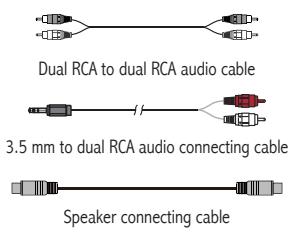
| Package contents | Speakers, RCA cables, 3.5mm/RCA cable, speaker wire, remote control, manual |
Frequently Asked Questions - HIFIR1700BT EDIFIER
User questions about HIFIR1700BT EDIFIER
0 question about this device. Answer the ones you know or ask your own.
Ask a new question about this device
Download the instructions for your Speaker in PDF format for free! Find your manual HIFIR1700BT - EDIFIER and take your electronic device back in hand. On this page are published all the documents necessary for the use of your device. HIFIR1700BT by EDIFIER.
USER MANUAL HIFIR1700BT EDIFIER
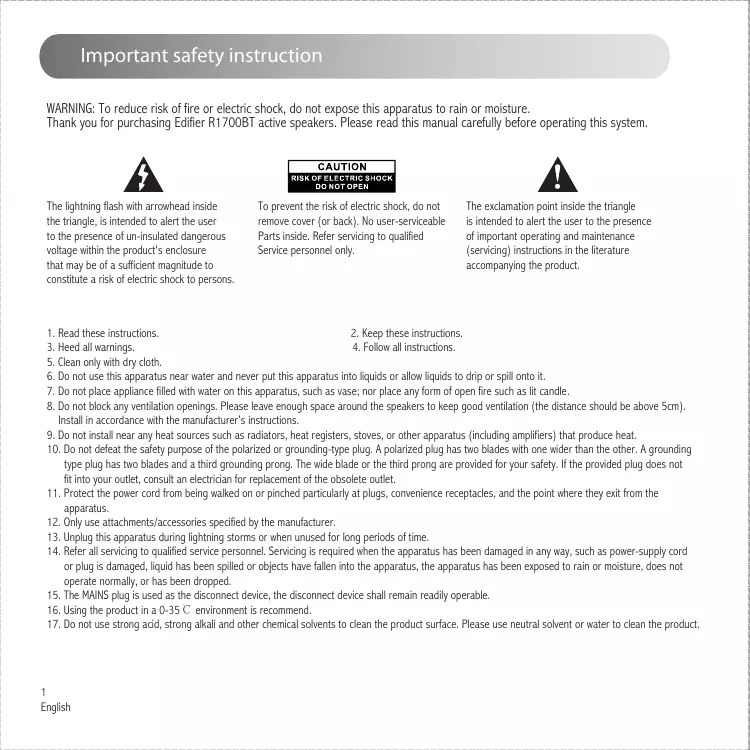
Important safety instruction
WARNING: To reduce risk of fire or electric shock, do not expose this apparatus to rain or moisture.
Thank you for purchasing Edifier R1700BT active speakers. Please read this manual carefully before operating this system.

The lightning flash with arrowhead inside the triangle, is intended to alert the user to the presence of un-insulated dangerous voltage within the product's enclosure that may be of a sufficient magnitude to constitute a risk of electric shock to persons.
CAUTION
RISK OF ELECTRIC SHOCK
DO NOT OPEN
To prevent the risk of electric shock, do not remove cover (or back). No user-serviceable Parts inside. Refer servicing to qualified Service personnel only.

The exclamation point inside the triangle is intended to alert the user to the presence of important operating and maintenance (servicing) instructions in the literature accompanying the product.
- Read these instructions.
- Heed all warnings.
- Clean only with dry cloth.
- Do not use this apparatus near water and never put this apparatus into liquids or allow liquids to drip or spill onto it.
- Do not place appliance filled with water on this apparatus, such as vase; nor place any form of open fire such as lit candle.
- Do not block any ventilation openings. Please leave enough space around the speakers to keep good ventilation (the distance should be above 5cm). Install in accordance with the manufacturer's instructions.
- Do not install near any heat sources such as radiators, heat registers, stoves, or other apparatus (including amplifiers) that produce heat.
- Do not defeat the safety purpose of the polarized or grounding-type plug. A polarized plug has two blades with one wider than the other. A grounding type plug has two blades and a third grounding prong. The wide blade or the third prong are provided for your safety. If the provided plug does not fit into your outlet, consult an electrician for replacement of the obsolete outlet.
- Protect the power cord from being walked on or pinched particularly at plugs, convenience receptacles, and the point where they exit from the apparatus.
- Only use attachments/accessories specified by the manufacturer.
- Unplug this apparatus during lightning storms or when unused for long periods of time.
- Refer all servicing to qualified service personnel. Servicing is required when the apparatus has been damaged in any way, such as power-supply cord or plug is damaged, liquid has been spilled or objects have fallen into the apparatus, the apparatus has been exposed to rain or moisture, does not operate normally, or has been dropped.
- The MAINS plug is used as the disconnect device, the disconnect device shall remain readily operable.
- Using the product in a 0-35 C environment is recommend.
- Do not use strong acid, strong alkali and other chemical solvents to clean the product surface. Please use neutral solvent or water to clean the product.
Important safety instruction

Use only with the cart, stand, tripod, bracket, or table specified by the manufacturer, or sold with the apparatus. When a cart is used, use caution when moving the cart/apparatus combination to avoid injury from tip-over.

Correct Disposal of this product. This marking indicates that this product should not be disposed with other household wastes throughout the EU. To prevent possible harm to the environment or human health from uncontrolled waste disposal, recycle it responsibly to promote the sustainable reuse of material resources. To return your used device, please use the return and collection systems or contact the retailer where the product was purchased. They can take this product for environmental safe recycling.

This equipment is a Class II or double insulated electrical appliance. It has been designed in such a way that it does not require a safety connection to electrical earth.

WARNING
DO NOT INGEST BATTERY, CHEMICAL BURN HAZARD
This product contains a coin/button cell battery. If the coin/button cell battery is swallowed, it can cause severe internal burns in just 2 hours and can lead to death.
Keep new and used batteries away from children, if the battery compartment does not close securely, stop using the product and keep it away from children.
If you think batteries might have been swallowed or placed inside any part of body, seek immediate medical attention.
The battery (in remote control) shall not be exposed to excessive heat such as sunshine, fire or the like.
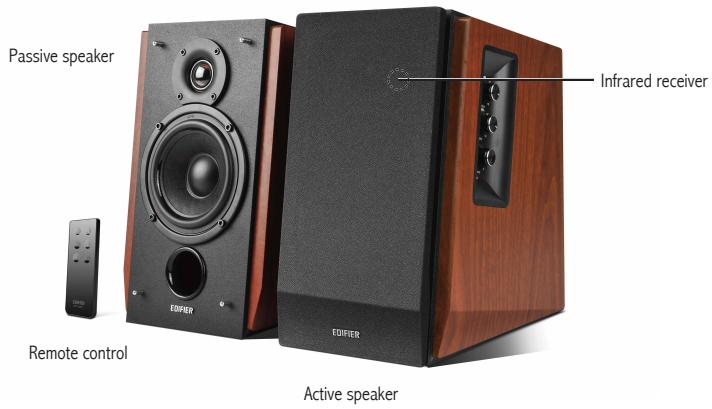
Box contents:
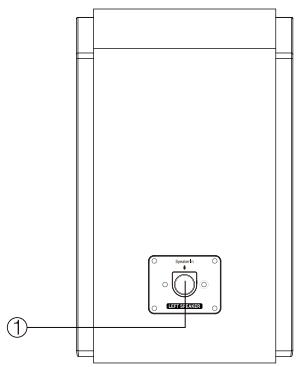
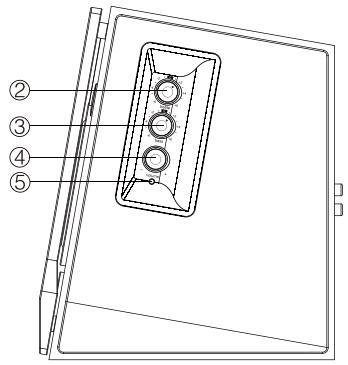
① Connect to active speaker
② Treble dial
③ Bass dial
④ Master volume dial
To disconnect Bluetooth:Press & hold
⑤ Power indicator
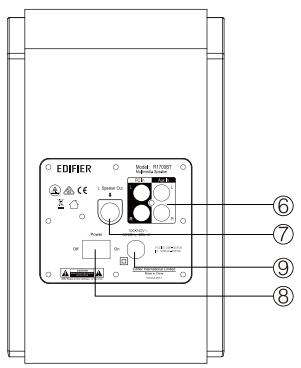
⑥ Audio input connector port
⑦ Speaker output
⑧ Power switch
⑨ Power cord
Remote control
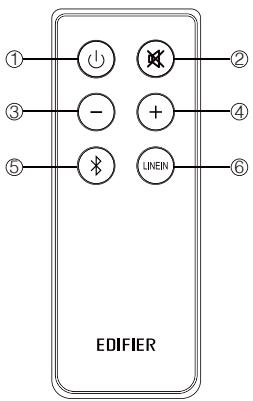
① ON/OFF
② Mute key
③ Volume decrease
④ Volume increase
⑤ Bluetooth
⑥ PC/AUX
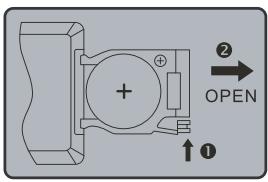
Battery loading:
Please refer to the illustration to open the battery compartment, insert the CR 2025 battery and close the compartment.
Note:
- Do not place the remote control in places that are hot and humid.
- Do not charge the batteries.
- Remove the batteries when unused for long period of time.
- The battery should not be exposed to excessive heat such as direct sun, fire or similar.
- Danger of explosion if battery is incorrectly replaced. Replace only with the same or equivalent type.
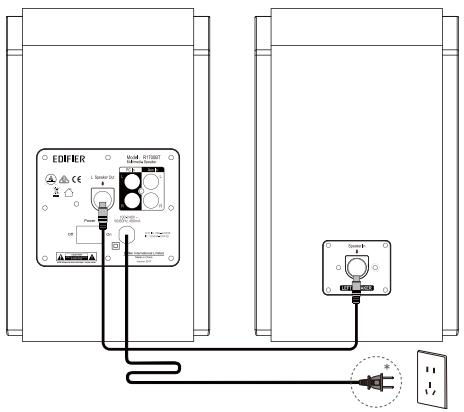
* This plug type is meant for illustration purpose only.
Connecting the speakers
Connect the active speaker and passive speaker with the included connecting cable.
Connect to A.C. Power Outlet
Please connect the A.C. power plug to the correct A.C. voltage outlet.
AUX Input
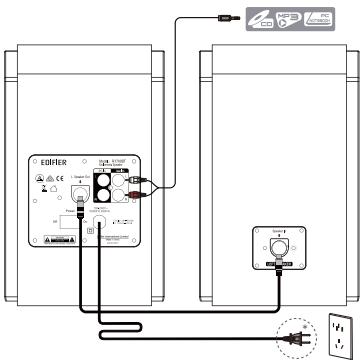
* This plug type is meant for illustration purpose only.
Adjustment
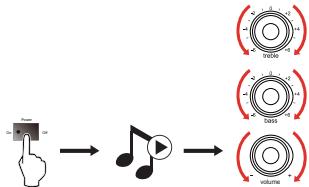
→ Play the audio on your connected device and adjust master volume/bass/treble to a desired level.
Note: If two audio sources are connected simultaneously, both signals will play. To dedicate audio output from one source, decrease the volume or power off the unselected device.

Bluetooth
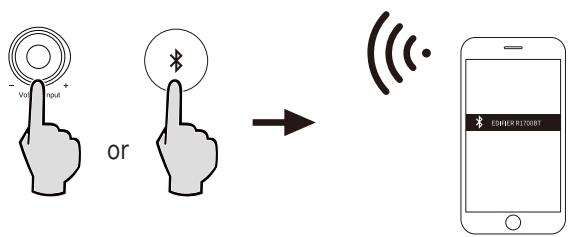
① Press the volume knob on this product or the Bluetooth button on the remote control to switch this product to Bluetooth mode.
The LED indicator flashes in blue.
② On your device (mobile phone, tablet device, MP3/MP4 player etc.), search for Bluetooth devices and select "EDIFIER R1700BT" to start pairing.
The LED indicator lights blue after they are connected.
③ Play audio on your device and adjust the volume to a desired level.
To disconnect this product from your device, press and hold the volume knob on this product or the Bluetooth button on the remote control for about 2 seconds.
Note:
- Bluetooth connectivity and compatibility may be different between different source devices, depending on the software versions of source devices.
- To enjoy the full Bluetooth functions of this product, please ensure your mobile device has A2DP profile.
- PIN code for connection is "0000" if needed.
Specifications
Total power output: R/L: 15W + 15W (treble)
R/L: 18W + 18W (bass)
Noise level: ≤slant 25dB(A)
Frequency response: 60Hz-20KHz
Input sensitivity: PC: 700mV± 50mV
AUX: 500mV± 50mV
Bluetooth: 400mFFS ± 50mFFS
Input type: PC/AUX/Bluetooth
Treibledriver: 19mm silk dome tweeter
Bass driver: 4 inch (116mm)
| Problem | Solution |
| No sound | ·Check if the power indicator light is ON |
| ·Try to turn up the volume using either the master volume control or remote control. | |
| ·Ensure the audio cables are firmly connected and the input is set correctly on the speakers. | |
| ·Check if there is a signal output from the audio source. | |
| Cannot connect via Bluetooth | ·Make sure the speaker is switched to Bluetooth input. If it is in other audio input modes, Bluetooth will not connect. Disconnect from any Bluetooth device by pressing and holding the volume dial in Bluetooth mode, then try again. |
| ·Effective Bluetooth transmission range is 10 meters; please ensure that operation is within the range. | |
| ·Try another Bluetooth device for connection. | |
| The R1700BT does not turn on | ·Check if main power is connected, or if the wall outlet is switched on. |
To learn more about EDIFIER, please visit www.edifier.com
For Edifier warranty queries, please visit the relevant country page on www.edifier.com and review the section titled Warranty Terms.
USA and Canada: service@edifier.ca
South America: Please visit www.edifier.com (English) or www.ediferla.com (Spanish/Portuguese) for local contact information.
R/L: 18W + 18W (Bass)
Gerauschpegel ≤slant 25dB(A)
Bluetooth: 400mFFS ± 50mFFS
Bluetooth: 400mFFS ± 50mFFS
Suit 2207, 22nd floor.
Tower II, Lippo centre,
89 Queensway
Hong Kong
Tel: +852 2522 6989
Fax: +852 2522 1989
www.edifier.com
© 2017 Edifier International Limited. All rights reserved.
Printed in China
NOTICE:
For the need of technical improvement and system upgrade, information contained herein may be subject to change from time to time without prior notice.
Products of EDIFIER will be customized for different applications. Pictures and illustrations shown on this manual may be slightly different from actual product. If any difference is found, the actual product prevails.