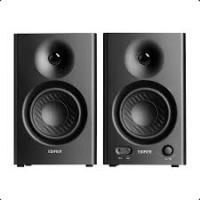
BREATHE IF600 - Speaker EDIFIER - Free user manual and instructions
Find the device manual for free BREATHE IF600 EDIFIER in PDF.


User questions about BREATHE IF600 EDIFIER
0 question about this device. Answer the ones you know or ask your own.
Ask a new question about this device
Download the instructions for your Speaker in PDF format for free! Find your manual BREATHE IF600 - EDIFIER and take your electronic device back in hand. On this page are published all the documents necessary for the use of your device. BREATHE IF600 by EDIFIER.
USER MANUAL BREATHE IF600 EDIFIER
iF600BT Multimedia Speaker
User Manual
Please carefully read this manual before operating the system
Page 1 Important safety instructions
WARNING: To reduce the risk of fire or electric shock, do not expose this apparatus to rain or moisture.
Thank you for purchasing this Edifier product. For generations, Edifier tries to provide powered speaker products to satisfy the need of our end customers, even the most demanding ones. This product can add to your home entertainment, personal computer, and mini home theater great sound performance. Please read this manual carefully to obtain the best of this system.

The lightning flash with arrowhead inside the triangle, is intended to alert the user to the presence of un-insulated dangerous voltage within the product's enclosure that may be of a sufficient magnitude to constitute a risk of electric shock to persons.
To prevent the risk of electric shock, do not remove cover (or back). No user-serviceable Parts inside. Refer servicing to qualified Service personnel only.

The exclamation point inside the triangle is intended to alert the user to the presence of important operating and maintenance (servicing) instructions in the literature accompanying the product.
-
Read these instructions.
-
Heed all warnings.
-
Do not use this apparatus near water.
-
Keep these instructions.
-
Follow all instructions.
-
Clean only with dry cloth.
-
Do not block any ventilation openings. Install in accordance with the manufacturer's instructions.
- Do not install near any heat sources such as radiators, heat registers, stoves, or other apparatus (including amplifiers) that produce heat.
- Do not defeat the safety purpose of the polarized or grounding-type plug. A polarized plug has two blades with one wider than the other. A grounding type plug has two blades and a third grounding prong. The wide blade or the third prong are provided for your safety. If the provided plug does not fit into your outlet, consult an electrician for replacement of the obsolete outlet.
- Protect the power cord from being walked on or pinched particularly at plugs, convenience receptacles, and the point where they exit from the apparatus.
- Only use attachments/accessories specified by the manufacturer.
- Unplug this apparatus during lightning storms or when unused for long periods of time.
- Refer all servicing to qualified service personnel. Servicing is required when the apparatus has been damaged in any way, such as power-supply cord or plug is damaged, liquid has been spilled or objects have fallen into the apparatus, the apparatus has been exposed to rain or moisture, does not operate normally, or has been dropped.
- The MAINS plug or an appliance coupler is used as the disconnect device, the disconnect device shall remain readily operable.
Note: The marking is located on the bottom enclosure of the speaker. There is a rechargeable Li-ion battery in the remote control.
The battery shall not be exposed to excessive heat such as sunshine, fire or the like. Danger of explosion if the battery is incorrectly replaced.
Replace only with the same or equivalent type.
The MAINS plug or an appliance coupler is used as the disconnect device, the disconnect device shall remain readily operable.
FCC Caution:
"Changes or modifications not expressly approved by the part responsible for compliance could void the user's authority to operate the equipment."
FCC statement:
"This device complies with Part 15 of the FCC Rules. Operation is subject to the following two conditions:
(1) this device may not cause harmful interference, and
(2) this device must accept any interference received, including interference that may cause undesired operation."
"This equipment has been tested and found to comply with the limits for a Class B digital device, pursuant to part 15 of the FCC Rules.
These limits are designed to provide reasonable protection against harmful interference in a residential installation. This equipment generates, uses and can radiate radio frequency energy and, if not installed and used in accordance with the instructions, may cause harmful interference to radio communications. However, there is no guarantee that interference will not occur in a particular installation.
If this equipment does cause harmful interference to radio or television reception, which can be determined by turning the equipment off and on, the user is encouraged to try to correct the interference by one or more of the following measures:
—Reorient or relocate the receiving antenna.
—Increase the separation between the equipment and receiver.
Connect the equipment into an outlet on a circuit different from that to which the receiver is connected.
—Consult the dealer or an experienced radio/TV technician for help."
IC statement:
This device complies with Industry Canada license-exempt RSS standard(s). Operation is subject to the following two conditions:
(1) this device may not cause interference, and
(2) this device must accept any interference, including interference that may cause undesired operation of the device. This Class【B】digital apparatus complies with Canadian ICES-003.
Use only with the cart, stand, tripod, bracket, or table specified by the manufacturer, or sold with the
apparatus. When a cart is used, use caution when moving the cart/apparatus combination to avoid injury from tip-over.
Correct Disposal of this product. This marking indicates that this product should not be disposed with other household wastes throughout the EU. To prevent possible harm to the environment or human health from uncontrolled waste disposal, recycle it responsibly to promote the sustainable reuse of material resources. To return your used device, please use the return and collection systems or contact the retailer where the product was purchased. They can take this product for environmental safe recycling.

This equipment is a Class II or double insulated electrical appliance. It has been designed in such a way that
it does not require a safety connection to electrical earth.
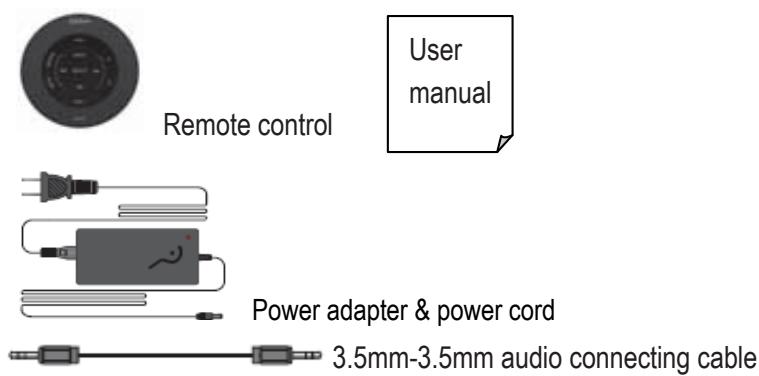
Page 2 Unpack the box Box contents
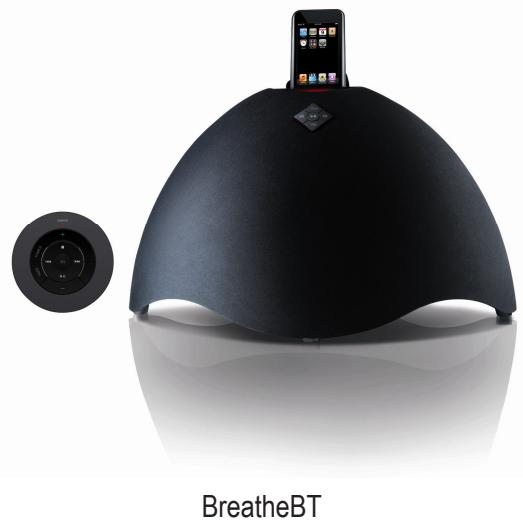
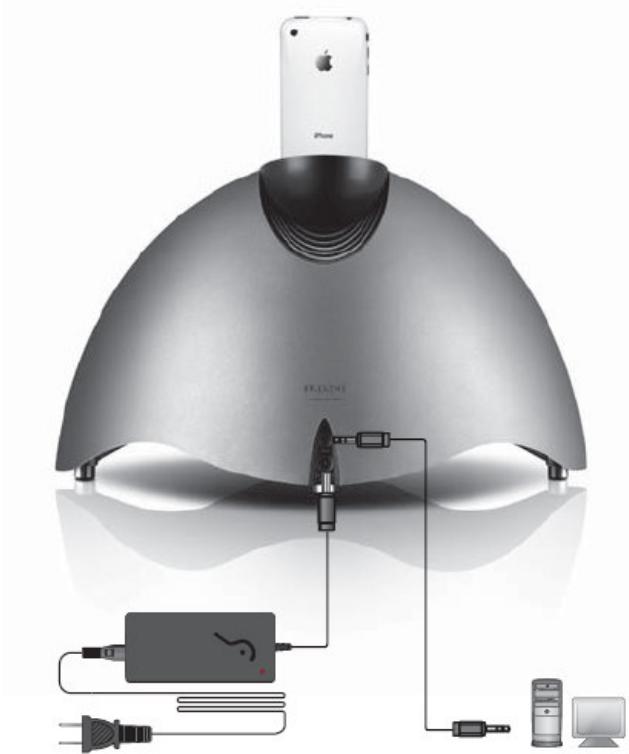
Page 3 Connectivity & How to replace the battery
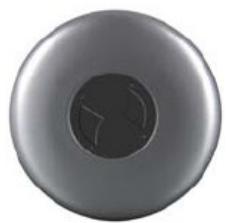
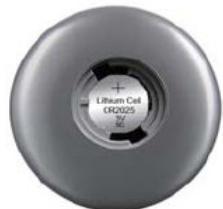
Fig.1: Firmly hold the remote whilst pushing down the black cover underneath the remote and twist cover to the left.
Fig.2: Battery must be inserted at a slight downward angle towards metal retaining clip. Battery must sit flush in the housing. The positive symbol (+) must be facing up as in the photo.
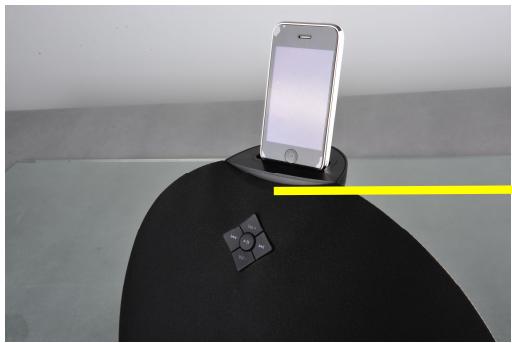
Page 4 Illustrations and Operating Functions
Input indicator
| LED | Input |
| Blue | Bluetooth |
| Green | AUX |
| Red | iPod / iPhone |
Note:
- Default input is Bluetooth.
- When system is MUTE, the LED blinks.
- When system is in standby mode, the LED fades in and fades out.
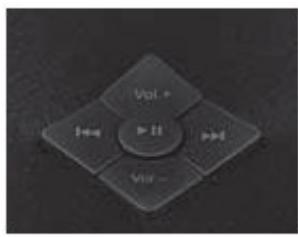
Buttons on front grille of speaker
| Buttons | Input | Press or hold |
| Vol. + / Vol. - | Bluetooth/iPod/AUX | Volume up/down |
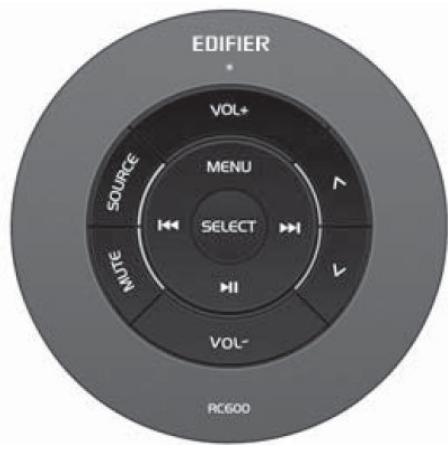
Page 5 Remote control illustration
| Buttons | Input | Press | Press & hold |
| SOURCE | Bluetooth/iPod/AUX | Select audio source | N/A |
| MUTE | Bluetooth/iPod/AUX | Mute | |
| VOL+ / VOL- | Bluetooth/iPod/AUX | Volume up/down | |
| Λ / V | iPod | Previous/next items; | |
| MENU | iPod | Open the menu of iPod/ iPhone | |
| ←/→ | Bluetooth / iPod | Previous/next track | Fast rewind / forward in current track for iPod mode only |
| →II | Bluetooth / iPod | Play/Pause | Standby |
| AUX | N/A | Standby | |
| SEL | iPod | Select and play | N/A |
Note: 串串串 are not available in AUX input.
Page 6 Operational guidance
Bluetooth
Bluetooth input
Press SOURCE to select Bluetooth input, the LED under the iPod/iPhone dock is blue.
2. Set you device (mobile phone, tablet device, MP3 player etc.) to search and select "EDIFIER Breathe".
3. Play your audio device.
Note: are available only for the source devices support AVRCA (Audio/Video Remote Control Profile).
- When connecting to a Bluetooth Source device (e.g. mobile phone), make sure the source device supports A2DP (Advanced Audio Distribution Profile)
PIN code for connection is "0000" if needed.
For specific details about Bluetooth setup and connectivity, please refer to the user manual for your computer.
Connect iPod /iPhone (MP3 or WMA audio format) into the dock.
Press SOURCE to select iPod input, the LED under the iPod/iPhone dock is red.
3. Play your audio device.
4. Press & hold to set system to standby mode.
5. Press & hold again to wake up system, press to play music.
AUX input
Press SOURCE to select AUX input, the LED under the iPod/iPhone dock is green.
2. Play your audio device.
Adjust the volume to a comfortable level.
4. Press & hold to set system to standby mode.
5. Press & hold again to wake up system
Page 7 Specifications
Power output: RMS 7.5W × 2 (treble) + 7.5W × 2 (mid-range) + 30W (bass) (THD+N=10%, f0=1KHz)
Signal to Noise ratio: ≥85 dB A
Distortion: ≤0.5%
Frequency response: 3.8KHz~20KHz
Input sensitivity: AUX: 1000mV± 50mV , iPod: 850mV± 50mV
Input type: Bluetooth / iPod / AUX
Bass unit: 5% inch ( 148mm) , magnetically shielded, 6
Midrange unit: 2% inch ( 70mm) , magnetically shielded, 4
Tweeter unit: Φ19mm silk dome, magnetically shielded, 4Ω
Dimension: 420 mm x257 mm x244 mm (W×H×D)
Net weight: 4.8kg
Gross weight: 6.2kg
Page 8 Troubleshooting
- Not all speakers function:
Please first check if the speaker wires are connected securely; then check if the Line-in connectors are reversed; check also if the audio source is at fault.
-
System does not work at all
-
Please check if power is connected, and if the wall outlet is switched on.
- Please check if the system is in standby.
- Please check if the master volume is turned to minimum.
- Please check if the audio input cable is connected correctly.
-
Please check if there is signal from audio source.
-
Noise coming from speakers
Amplifier circuitry of this product generates little noise, while the background noise of some VCD/DVD player or computer sound card are too high. Please keep the system in active mode and remove the audio source, if no sound can be heard at 1 meter away from the system, then there is no problem with this product.
Magnetic interference
This system is complete magnetically shielded, and can be placed near TV or monitor. But since magnet of the subwoofer driver is large, some magnetism leakage is inevitable when the system is too close to the monitor, and it is recommended to keep a 1 meter distance between the speaker system and monitor or TV set.
If you have any further questions or concerns regarding Edifier Products
Please visit our website at: www.edifier.com, or email Edifier Support for further assistance at: main@edifier.com, If you prefer, you may contact us by phone, Toll Free: 1-877-EDIFIER (334-3437).