
RXV685 - Home cinema amp YAMAHA - Free user manual and instructions
Find the device manual for free RXV685 YAMAHA in PDF.



| Product type | Multi-channel home theater amplifier |
| Brand and model | YAMAHA RX-V685 |
| Number of channels | 7.2 (7 amplification channels + 2 subwoofer outputs) |
| Output power (per channel) | 100 W (8 ohms, 0.9% THD) |
| Audio compatibility | Dolby Atmos, DTS:X, Dolby TrueHD, DTS-HD Master Audio, LPCM, etc. |
| HDMI connectivity | 7 HDMI inputs (including 1 front), 2 HDMI outputs (including 1 with ARC) |
| Network | Wi-Fi (802.11 a/b/g/n/ac), Ethernet 100BASE-TX, Bluetooth 4.2 |
| Streaming services | MusicCast, AirPlay, Spotify Connect, Tidal, Deezer (depending on region) |
| Radio | FM/AM with RDS, Internet Radio |
| Speaker calibration | YPAO (Yamaha Parametric Room Acoustic Optimizer) with included microphone |
| Multi-zone functions | Zone 2 with amplified or line output, party mode, control via MusicCast |
| Dimensions (W x H x D) | 435 x 171 x 378 mm |
| Weight | 10.5 kg |
| Power supply | 230 V AC, 50 Hz (Europe model) |
| Power consumption | 300 W (Europe model) |
| Standby power consumption | < 0.1 W (normal mode) |
| Analog audio inputs | 5 line inputs (including 1 phono MM), 2 zone outputs, 1 preamp output |
| Digital audio inputs | 2 optical, 1 coaxial |
| Speaker outputs | Screw terminals for 7 speakers (including 2 assignable for bi-amping or zone) |
| Included accessories | Remote control, batteries, YPAO microphone, FM/AM antennas, quick start guide |
| Care and cleaning | Clean with a soft, dry cloth. Avoid chemical products. |
| Safety | Unplug before cleaning. Do not expose to moisture. Maintain adequate ventilation. |
| Repairability | Contact an authorized Yamaha service center for any repairs. Spare parts available through the after-sales network. |
| General information | User manual available for download at notice-facile.com |
Frequently Asked Questions - RXV685 YAMAHA
User questions about RXV685 YAMAHA
0 question about this device. Answer the ones you know or ask your own.
Ask a new question about this device
Download the instructions for your Home cinema amp in PDF format for free! Find your manual RXV685 - YAMAHA and take your electronic device back in hand. On this page are published all the documents necessary for the use of your device. RXV685 by YAMAHA.
USER MANUAL RXV685 YAMAHA
Ampli-tuner audio-video
RX-V685
Mode d'emploi
MusicCast
1 Prises REMOTE IN/OUT
About Audio Return Channel (ARC)
2 Prises 1-2 SUBWOOFER
compressed music ENHANCER
DTS Digital Surround
LFE (Low Frequency Effects) 0.1 channel
Signal video composant
Signal video composite
Compressed Music Enhancer
| Résolution | Sortie HDMI | ||||||
| 480i/576i | 480p/576p | 720p | 1080i | 1080p | 4K | ||
| Entrée HDMI | 480i/576i | → | → | → | → | → | → |
| 480p/576p | → | → | → | → | → | ||
| 720p | → | → | → | → | |||
| 1080i | → | → | → | → | |||
| 1080p/50, 60 Hz | → | → | → | → | |||
| 1080p/24 Hz | → | → | |||||
| 4K | → | ||||||
| EntréeCOMPONENTVIDEO | 480i/576i | → | → | → | → | → | → |
| Entrée VIDEO | 480i/576i | → | → | → | → | → | → |
: Disponible
Audio Return Channel (ARC)

Wi-Fi PROTECTED
SETUP
Manual Development Group
© 2018 Yamaha Corporation
Published 02/2018 NV-A0
AV Receiver
Ampli-Tuner Audio-Video
AV PecuBep
RX-V685
MusicCast
EN Quick Start Guide
RU KpaTKoe pyKOBoDCTBO NO Haay pa60TbI
Precautions 2
Preparations 7
Playback 18
The precautions listed below are to prevent risk of harm to the user and others, as well as to prevent property damage, and to help the user use this unit properly and safely. Be sure to follow these instructions.
After reading this manual, be sure to keep it in a safe place where it can be referenced at any time.
- Be sure to request inspections or repairs from the dealer where you purchased the unit or from qualified Yamaha service personnel.
- Yamaha cannot be held responsible for injury to you or damage of the products caused by improper use or modifications to the unit, or data that is lost or destroyed.
- This product is for ordinary homes. Do not use for applications requiring high reliability, such as managing lives, health care or high-value assets.

WARNING
This content indicates "risk of serious injury or death."
Power supply/power cord
-
Do not do anything that could damage the power cord.
-
Do not place it near a heater.
- Do not bend it excessively or alter it.
- Do not scratch it.
- Do not place it under a heavy object.
Using the power cord/adaptor with the core of the cord exposed could cause electric shocks or a fire.
- Do not touch the power plug or cord if there is a chance of lightning. Failure to observe this may cause electric shocks.
-
Use this unit with the power supply voltage printed on it. Failure to connect to an appropriate AC outlet may cause a fire, electric shocks, or malfunctions.
-
Check the electric plug periodically and remove any dirt or dust which may have accumulated on it. Failure to observe this may cause a fire or electric shocks.
- When setting up the unit, make sure that the AC outlet you are using is easily accessible. If some trouble or malfunction occurs, immediately turn off the power switch and disconnect the plug from the AC outlet. Even when the power switch is turned off, as long as the power cord is not unplugged from the wall AC outlet, the unit will not be disconnected from the power source.
- If you hear thunder or suspect approaching lightning, quickly turn off the power switch and pull the power plug from the AC outlet. Failure to observe this may cause a fire or malfunctions.
- If not using the unit for long periods of time, be sure to pull the power plug from the AC outlet. Failure to observe this may cause a fire or malfunctions.
Do not disassemble
- Do not disassemble or modify this unit. Failure to observe this may cause a fire, electric shocks, injury, or malfunctions. If you notice any irregularities, be sure to request an inspection or repair from the dealer where you purchased the unit or from qualified Yamaha service personnel.
Water warning
- Do not expose the unit to rain, use it near water or in damp or wet conditions, or place on it any containers (such as vases, bottles or glasses) containing liquids which might spill into any openings or places where water may drop. A liquid such as water getting into the unit may cause a fire, electric shocks, or malfunctions. If any liquid such as water seeps into the device, turn off the power immediately and unplug the power cord from the AC outlet. Then, request an inspection from the dealer where you purchased the unit or from qualified Yamaha service personnel.
- Never insert or remove an electric plug with wet hands. Do not handle this unit with wet hands. Failure to observe this may cause electric shocks or malfunctions.
Fire warning
- Do not place any burning items or open flames near the unit, since they may cause a fire.
Maintenance and care
- Do not use aerosols or spray-type chemicals that contain combustible gas for cleaning or lubrication. The combustible gas will remain inside the unit, which may cause explosion or fire.
Battery use
- Do not disassemble a battery. If the contents of the battery get on your hands or in your eyes, it can cause blindness or chemical burns.
- Do not dispose of batteries in fire. Doing so may result in the battery bursting, causing a fire or injury.
-
Do not expose a battery to high temperatures, such as direct sunlight or a fire. The battery may burst, causing a fire or injury.
-
Do not attempt to recharge batteries that are not intended to be charged. Charging could cause the battery to burst or leak, which can cause blindness, chemical burns, or injury.
- If the batteries do leak, avoid contact with the leaked fluid. If the battery fluid should come in contact with your eyes, mouth, or skin, wash immediately with water and consult a doctor. Battery fluid is corrosive and may possibly cause loss of sight or chemical burns.
Wireless unit
- Do not use this unit near medical devices or inside medical facilities. Radio waves from this unit may affect electro-medical devices.
- Do not use this unit within 15cm (6 in) of persons with a heart pacemaker implant or a defibrillator implant. Radio waves from this unit may affect electro-medical devices, such as a heart pacemaker implant or defibrillator implant.
If you notice any abnormality
-
If any of the following abnormalities occur, immediately turn off the power and disconnect the power plug. If any of the following abnormalities occur, immediately turn off any amplifiers and receivers.
-
The power cord/plug is damaged.
- An unusual smell or smoke is emitted from the unit.
- Foreign material gets into the interior of the unit.
- There is a loss of sound during use.
- There is a crack or damage in the unit.
Continued use could cause electric shocks, a fire, or malfunctions. Immediately request an inspection or repair from the dealer where you purchased the unit or from qualified Yamaha service personnel.
- Be careful not to drop or apply strong impact to this unit. If you suspect the unit may have been damaged due to dropping or impact, immediately turn off the power and pull the power plug from the AC outlet. Failure to observe this may cause electric shocks, a fire, or malfunctions. Immediately request an inspection from the dealer where you purchased the unit or from qualified Yamaha service personnel.

CAUTION
This content indicates "risk of injury."
Power supply/power cord
- Do not use an AC outlet where the power plug fits loosely when inserted. Failure to observe this may cause a fire, electric shocks, or burns.
- When removing the electric plug from the unit or an AC outlet, always hold the plug itself and not the cord. Pulling by the cord can damage it and cause electric shocks or a fire.
- Insert the power plug firmly all the way into the AC outlet. Using the unit when it is not plugged in sufficiently can cause dust to accumulate on the plug, causing a fire or burns.
Installation
- Do not place the unit in an unstable position where it might accidentally drop or fall over and cause injuries.
- Do not block this unit's ventilation holes (cooling slits). This unit has ventilation holes on the top/side/bottom to prevent the internal temperature from becoming too high. Failure to observe this may trap heat inside the unit, causing a fire or malfunctions.
-
When installing this unit:
-
Do not cover it with any cloth.
- Do not install it on a carpet or rug.
- Make sure the top surface faces up; do not install on its sides or upside down.
- Do not use the device in a confined, poorly-ventilated location.
Failure to observe the above may trap heat inside the unit, causing a fire or malfunctions. Ensure that there is adequate space around the unit: at least 30 cm (11-3/4 in) on top, 20 cm (7-7/8 in) on the sides, and 20 cm (7-7/8 in) on the rear.
- Do not install the unit in places where it may come into contact with corrosive gases or salt air. Doing so may result in malfunction.
- Avoid being near the unit during a disaster, such as an earthquake. Since the unit may turn over or fall and cause injury, quickly move away from the unit and go to a safe place.
- Before moving this unit, be sure to turn off the power switch and disconnect all connection cables. Failure to observe this may damage the cables or cause you or someone else to trip and fall.
- For proper installation of the outdoor antenna, make sure to have it done by the dealer from where you purchased the unit or by qualified service personnel. Failure to observe this may cause the installation to fall and result in injury. Installation requires special skills and experience.
Hearing loss
- Do not use the unit/speakers or headphones for a long period of time at a high or uncomfortable volume level, since this can cause permanent hearing loss. If you experience any hearing loss or ringing in the ears, consult a physician.
- Before connecting the unit to other devices, turn off the power for all devices. Also, before turning the power of all devices on or off, make sure that all volume levels are set to the minimum. Failing to do so may result in hearing loss, electric shock, or device damage.
- When turning on the AC power in your audio system, always turn on the amplifier or receiver LAST, to avoid hearing loss and speaker damage. When turning the power off, the amplifier or receiver should be turned off FIRST for the same reason. Failure to observe the above may cause hearing impairment or speaker damage.
Maintenance
- Remove the power plug from the AC outlet before cleaning the unit. Failure to observe this may cause electric shocks.
Handling caution

-
Do not touch the surface having this label. Doing so may cause burns. The label on the device indicates that the surface to which the label is attached may become hot during operation.
-
Do not insert your hand or fingers into the ventilation holes of this unit. Failure to observe this may cause injury.
- Do not insert foreign materials such as metal or paper into the ventilation holes of this unit. Failure to observe this may cause a fire, electric shocks, or malfunctions. If foreign material gets into the unit, immediately shut off the power and pull the power plug from the AC outlet and request an inspection from the dealer where you purchased the unit or from qualified Yamaha service personnel.
- Do not do the following:
- put heavy items on top of the equipment.
- place the equipment in a stack.
- apply unreasonable force to buttons, switches, input/output terminals, etc.
- Avoid pulling the connected cables to prevent injuries or damage to the unit by causing it to fall.
Battery use
- Always replace all batteries at the same time. Do not use new batteries together with old ones. Using new ones with old ones could cause a fire, burns, or inflammation due to fluid leaks.
- Do not use batteries other than specified batteries. Doing so cause fire, burns, or inflammation due to leakage.
- Do not mix battery types, such as alkaline batteries with manganese batteries, or batteries from different makers, or different types of batteries from the same maker, since this can cause a fire, burns, or inflammation due to fluid leaks.
- Keep batteries away from children. A child could accidentally swallow a battery. Failure to observe this may also cause inflammation due to battery fluid leaks.
- Do not put in a pocket or bag, carry, or store batteries together with pieces of metal. The battery could short, burst, or leak, causing a fire or injury.
- Always make sure all batteries are inserted in conformity with the + / - polarity markings. Failure to do so might result in a fire, burns, or inflammation due to fluid leaks.
- When the batteries run out, or if the unit is not to be used for a long time remove the batteries from the remote control to prevent possible leakage of the battery fluid.
- When storing or discarding batteries, insulate the terminal area by applying tape, or some other protection. Mixing them with other batteries or metal objects can cause a fire, burns, or inflammation due to fluid.
Notice
Indicates points that you must observe in order to prevent product failure, damage or malfunction and data loss.
Power supply/power cord
- If not using the unit for a long period of time, be sure to pull the power plug from the outlet. Even if the (Standby/On) switch has been turned off (the screen display is off), a minute current is still flowing.
Installation
- Do not use this unit in the vicinity of other electronic equipment, such as a TV, radio, or mobile phone. Failure to observe this may cause this unit or the TV or radio to produce noise.
- Do not use this unit in a location that is exposed to direct sunlight, that becomes extremely hot, such as near a heater, or extremely cold, or that is subject to excessive dust or vibration. Failure to observe this may cause the unit's panel to become deformed, the internal components to malfunction, or for operation to become unstable.
- Install this unit as far away from other electronic equipment as possible.
Digital signals from this unit may interfere with other electronic equipment.
- If using a wireless function, avoid installing this unit near metal walls or desks, microwave ovens, or other wireless network devices.
Obstructions could shorten the transmission distance.
Connections
- If connecting external units, be sure to thoroughly read the manual for each unit and connect them in accordance with the instructions.
Failure to properly handle a unit in accordance with the instructions could cause malfunctions.
- Do not connect this unit to industrial units.
Digital audio interface standards for consumer use and industrial use are different. This unit has been designed to connect to a consumer-use digital audio interface. Connections to an industrial-use digital audio interface could not only cause this unit to malfunction, but could also damage the speakers.
Handling
- Do not place vinyl, plastic, or rubber products on this unit. Failure to observe this may cause discoloration or deformation in the panel of this unit.
- If the ambient temperature changes drastically (such as during unit transportation or under rapid heating or cooling) and there is a chance condensation may have formed in the unit, leave the unit for several hours without turning on the power until it is completely dry before use. Using the unit while there is condensation can cause malfunctions.
Maintenance
- When cleaning the unit, use a dry, soft cloth. Using chemicals such as benzine or thinner, cleaning agents, or chemical scrubbing cloths can cause discoloration or deformation.
Batteries
- Be sure to discard used batteries in accordance with local regulations.
Information
About content in this manual
- The illustrations and screens in this manual are for instructional purposes only.
- The company names and product names in this manual are the trademarks or registered trademarks of their respective companies.
- Software may be revised and updated without prior notice.
Wireless communication functions [U.K. and Europe models]
Bluetooth
Radio Frequency (Operational Frequency): 2402 MHz to 2480 MHz Maximum Output Power (EIRP): 7.27 dBm
Wi-Fi (2.4 GHz)
Radio Frequency (Operational Frequency): 2412 MHz to 2472 MHz
Maximum Output Power (EIRP): 19.98 dBm
Wi-Fi (5 GHz)
Radio Frequency (Operational Frequency), Maximum Output Power (EIRP):
5170 to 5250MHz, 22.30 dBm
5250 to 5330MHz, 22.27 dBm
5490 to 5710MHz, 24.56 dBm
5735 to 5835MHz, 13.96 dBm
- Wireless devices transmitting over a 5 GHz frequency band can only be used indoors. Use of such devices outdoors is prohibited by law.
Information for users on collection and disposal of old equipment and used batteries:

These symbols on the products, packaging, and/or accompanying documents mean that used electrical and electronic products and batteries should not be mixed with general household waste.
For proper treatment, recovery and recycling of old products and used batteries, please take them to applicable collection points, in accordance with your national legislation.

By disposing of these products and batteries correctly, you will help to save valuable resources and prevent any potential negative effects on human health and the environment which could otherwise arise from inappropriate waste handling.
For more information about collection and recycling of old products and batteries, please contact your local municipality, your waste disposal service or the point of sale where you purchased the items.

For business users in the European Union:
If you wish to discard electrical and electronic equipment, please contact your dealer or supplier for further information.
Pb
Information on Disposal in other Countries outside the European Union: These symbols are only valid in the European Union. If you wish to discard these items, please contact your local authorities or dealer and ask for the correct method of disposal.
Note for the battery symbol (bottom two symbol examples): This symbol might be used in combination with a chemical symbol. In this case it complies with the requirement set by the EU Battery Directive for the chemical involved.
(weeebattery_eu_en_02)
Introduction
- This unit is a product for enjoying music and video at home.
- This document explains basic speaker system setup and unit configuration, followed by step-by-step instructions. Basic operations, such as playing Blu-ray Discs, DVDs, and radio content, are also explained.
The unit is equipped with a number of other functions not described in this document. For more information about this product, refer to the Owner's Manual on the Yamaha website.
Follow one of the methods described below to view the latest Owner's Manual.
In HTML format
- Scan the QR code found on the front cover of this document.
- Visit the following website.
http://avpro.global.yamaha.com/manual/avr/rxv685/
In PDF format
- Visit the following website.
http://download.yamaha.com/
[For U.S. customers only]
Visit the following website for additional information, FAQ's, downloads such as "Owner's Manual" and product updates.
http://usa.yamaha.com/support/
Trademarks and trade names used in this document are those of their respective owners. See the Owner's Manual for more information.
Features
The unit is also capable of the following, which are not described in this document. See the Owner's Manual to help you get the most out of the unit.
- Playing music files stored on a media server (PC or NAS)
- Playing iTunes music or iPhone/iPad/iPod touch music over a network (AirPlay)
- Playing music in multiple rooms (Zone function)
- Configuring system settings (ADVANCED SETUP menu)
For more information, see "What you can do with the unit" in the Owner's Manual.
AV SETUP GUIDE
AV SETUP GUIDE is an app that guides you through the process of connecting a TV or playback device, such as a BD/DVD or CD player, and speakers to the AV receiver. Search "AV SETUP GUIDE" on the App Store or Google Play for details.
1
Preparation
Confirming package contents

Remote control
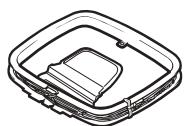
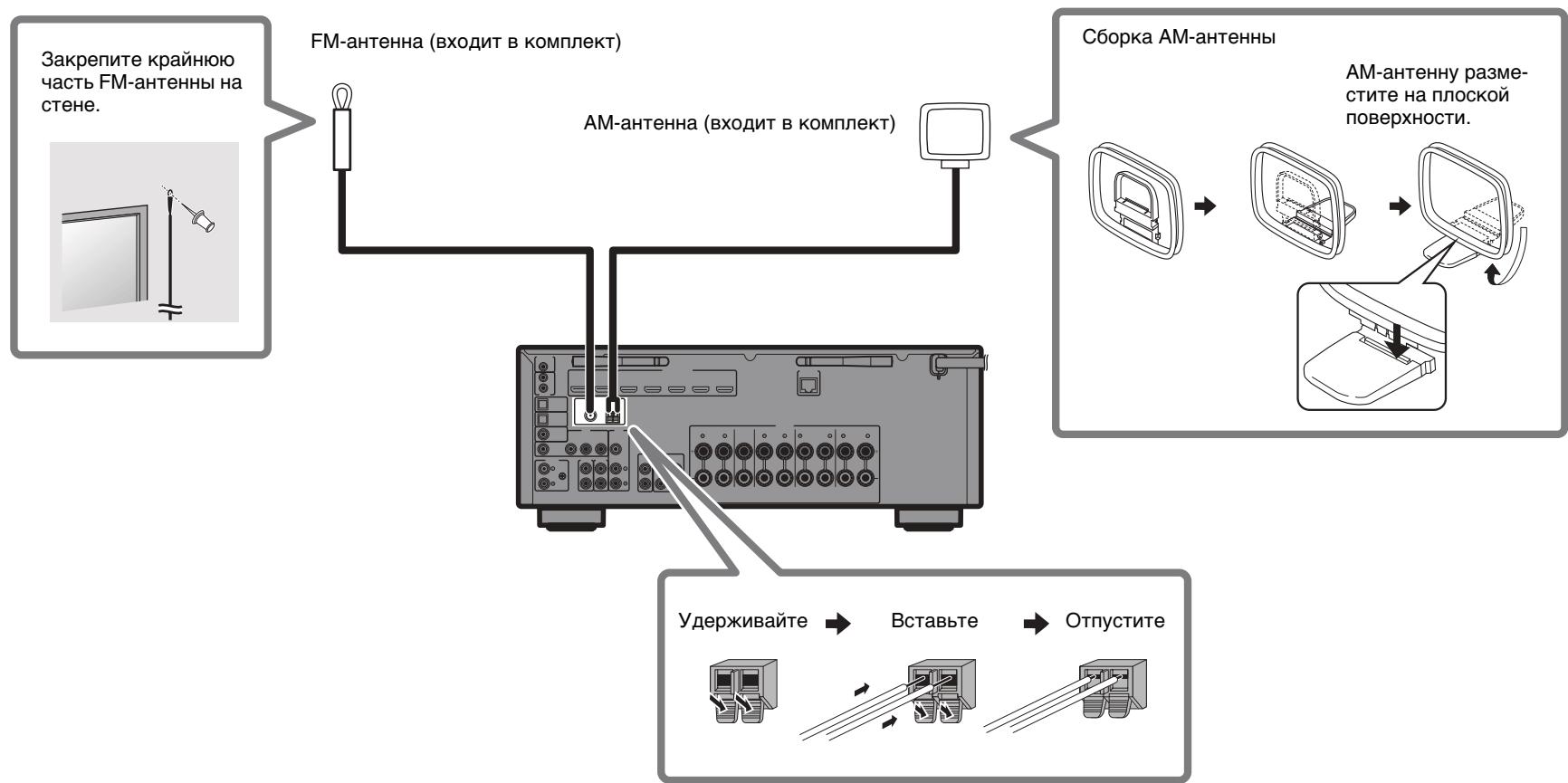
AM antenna

FM antenna

YPAO microphone
One of the above is supplied depending on the region of purchase.
Quick Start Guide (this booklet)
Preparing cables
The following cables (not supplied) are required to build the system described in this document.
- Speaker cables (depending on the number of speakers)
Audio pin cable (x1) - HDMI cables (x3)
- Network cable (x1) (when connecting to a router via a network cable)
2
Connecting speakers/subwoofer
Positioning speakers
Use the diagram as a reference for positioning speakers.

FL / FR Front speaker (L/R)
C Center speaker
SL / SR Surround speaker (L/R)
FPL / FPR Front presence speaker (L/R)
SW Subwoofer 2)
1) For 5.1.2-channel system
2) Up to two subwoofoers can be connected.
When connecting 6-ohm speakers
Set the unit's speaker impedance to "6 Ω MIN". For details, see "Setting the speaker impedance" under "Connecting speakers" in the Owner's Manual.
Precautions for connecting speaker cables
- Be sure that the unit and subwoofer are turned off.
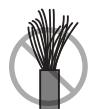
- Prepare speaker cables in a place away from the unit, to avoid accidentally dropping wire strands into the unit's interior which could result in a short circuit or malfunction of the unit.
-
Improper connection of speaker cables could cause a short circuit resulting in damage to, or malfunctioning of, the unit or speakers.
-
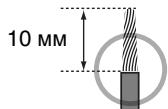
Carefully remove approximately 10 ~mm (3/8") of insulation from the speaker-connection ends of the cables, and twist the bare wires of each speaker cable together firmly.
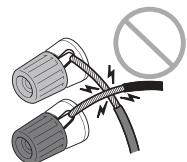
- Do not allow the bare wires of separate speaker cables to come into contact with one another.
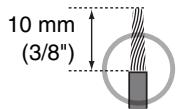
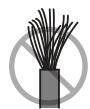
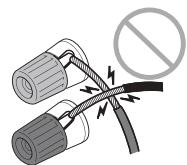
- Do not allow speaker cable bare wires to come into contact with metal parts on the unit (rear panel and screws).
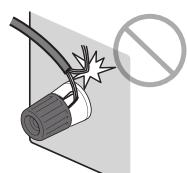
If "Check SP Wires" is shown on the front display when the unit is turned on, turn off the unit and be sure that speaker cables have not caused a short circuit.
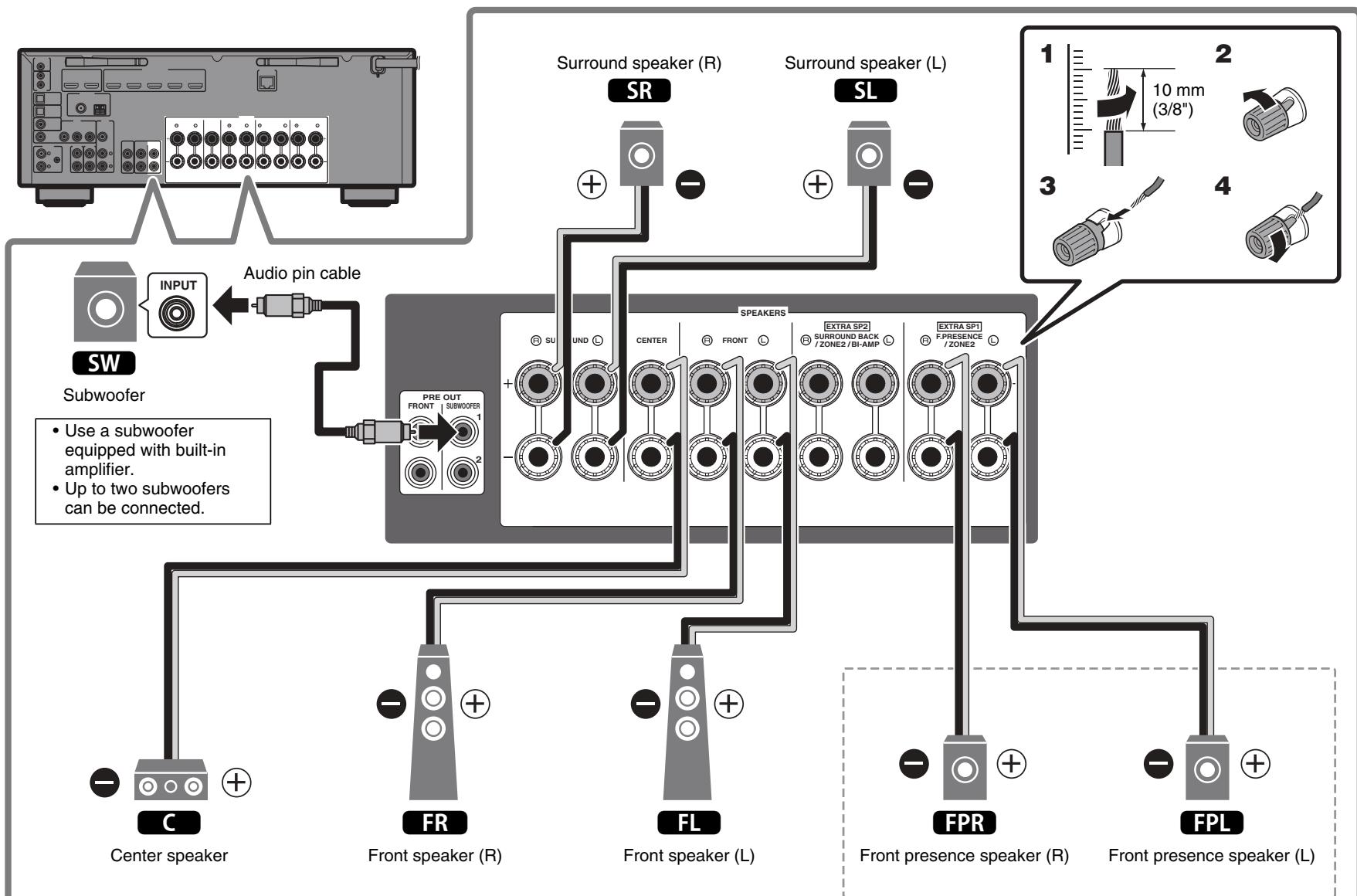
For 5.1.2-channel system
3
Connecting external devices
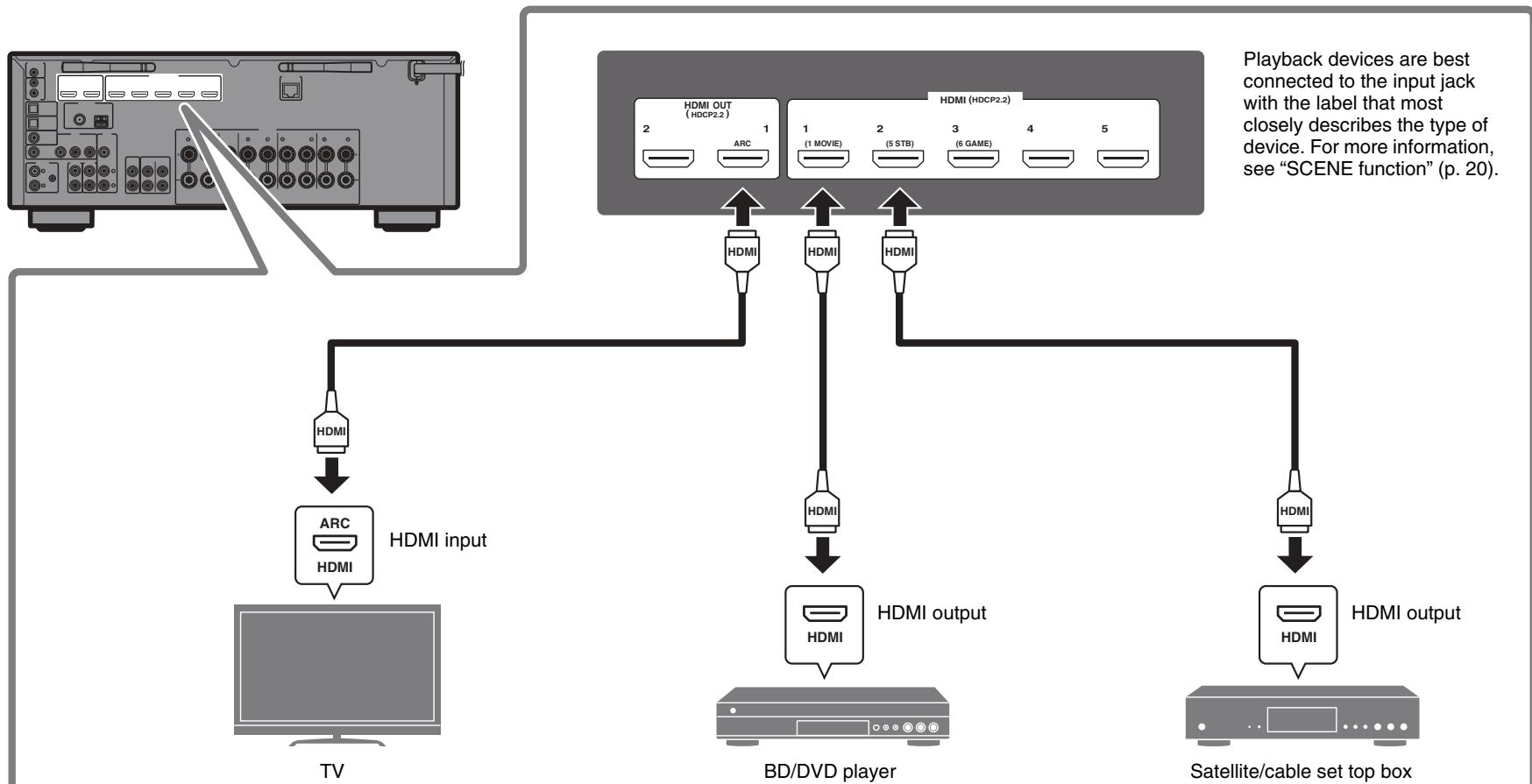

5
Preparing a network connection
Prepare a wired or wireless network connection in accordance with your network environment.
Note
The wireless antenna must be raised if the unit will be connected to a Bluetooth device.
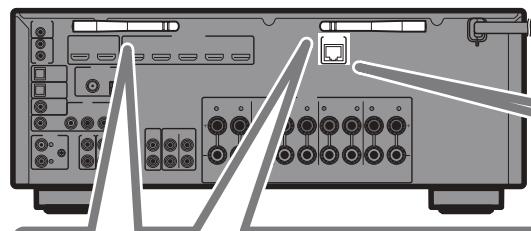
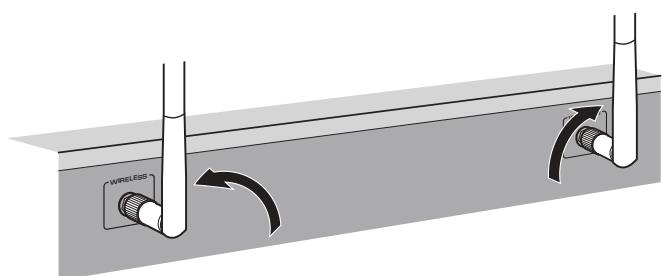
Wireless network connection
Raise the wireless antenna so that it is standing up straight.
(Procedures for connecting the unit to a wireless router are described in step 8.)
Notice
Do not apply excessive force on the antenna. Doing so may damage it.
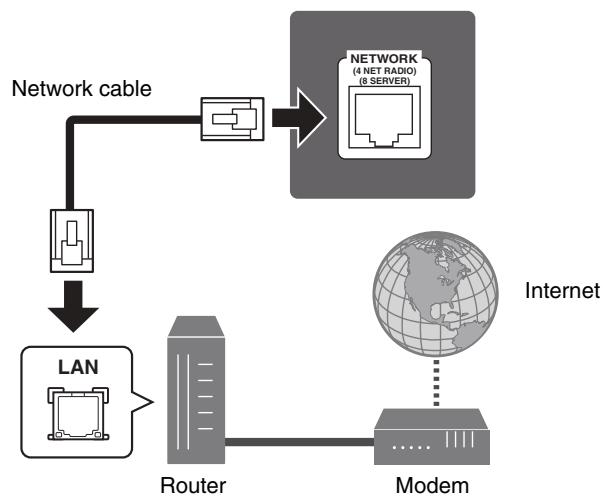
Wired network connection
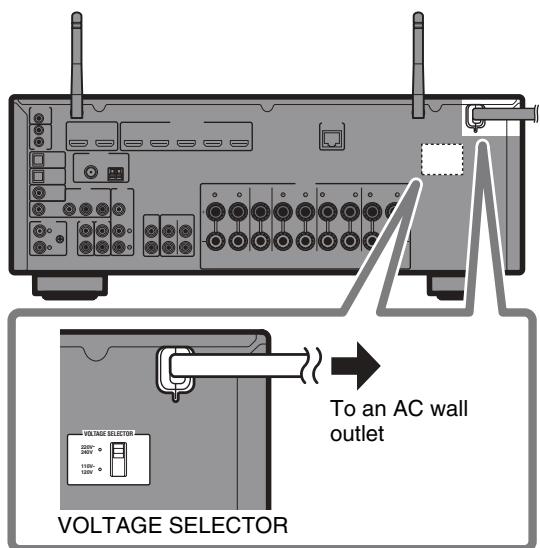
Connecting the power cable to an AC wall outlet, and turning on the unit

Warning
Before connecting the power cable (Taiwan, Brazil, and Central and South America models only)
Set the switch position of VOLTAGE SELECTOR according to your local voltage. Voltages are AC 110-120/220-240 V, 50/60 Hz.
Plug the power cable into an AC wall outlet.
2 Press (receiver power) to turn on the unit.

3 Turn on the TV and switch the TV input to display video from the unit (HDMI OUT jack).
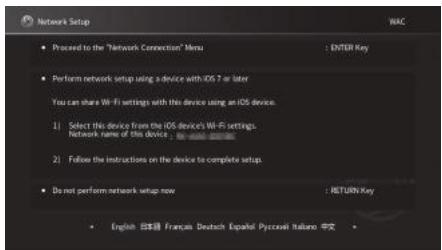
The Network Setup screen shown below will be displayed on the TV when the unit is turned on for the first time after purchase. It may take several tens of seconds for the screen to be displayed (WAC: Wireless Accessory Configuration).

See "Setting up a wireless connection using an iOS device" under "Connecting to a network wirelessly" in the Owner's Manual when using this function to connect the unit to a network. This document explains wireless connection using the Music Cast CONTROLLER app installed on your mobile device. Follow the procedure described under "8 Setting MusicCast" (p. 16).
Note
This screen will not be displayed if the unit is connected to a router via its NETWORK jack (wired connection).
7
Optimizing the speaker settings automatically
(YPAO)
The Yamaha Parametric room Acoustic Optimizer (YPAO) function detects speaker connections, measures the distances from them to your listening position(s), and then automatically optimizes the speaker settings, such as volume balance and acoustic parameters, to suit your room.
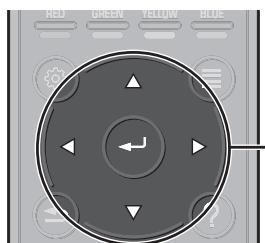
ENTER
Cursor keys
Note the following regarding YPAO measurement
- Test tones are output at high volume and may surprise or frighten small children.
- Test tone volume cannot be adjusted.
- Keep the room as quiet as possible.
- Stay in a corner of the room behind the listening position so that you do not become an obstacle between speakers and the YPAO microphone.
- Do not connect headphones.
YAMAHA
1 Turn on the subwoofer and set the volume to half.
If the crossover frequency is adjustable, set it to maximum.

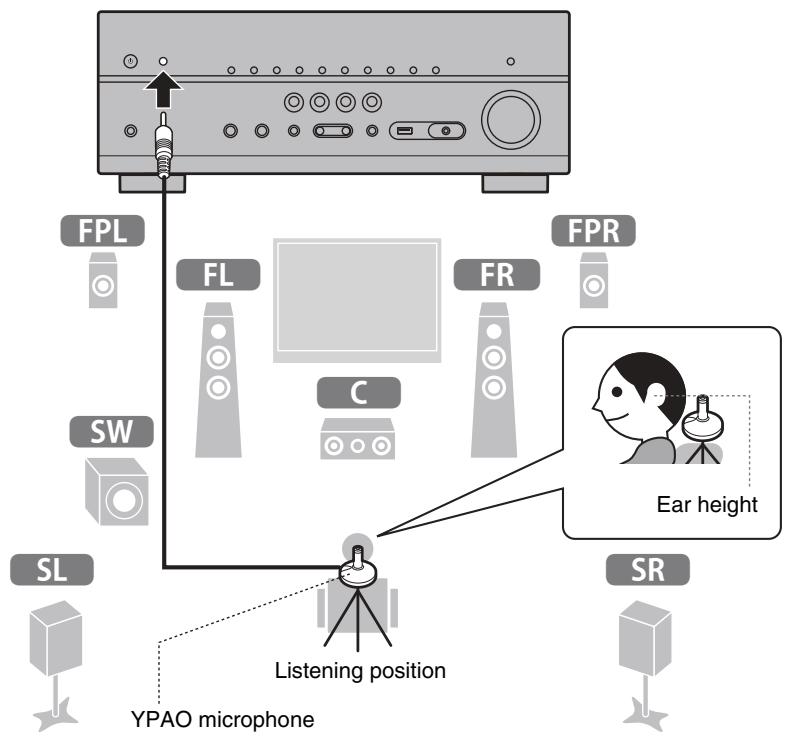
2 Place the YPAO microphone at your listening position and connect it to the YPAO MIC jack on the front panel.
The screen below appears on the TV.

Note
Place the YPAO microphone at your listening position (same height as your ears). We recommend the use of a tripod as a microphone stand. You can use the tripod screws to stabilize the microphone.
3 Use the cursor keys to select "Start" and press ENTER.
The measurement will start in 10 seconds.
It takes about 3 minutes to measure.
The screen below appears on the TV when the measurement finishes.
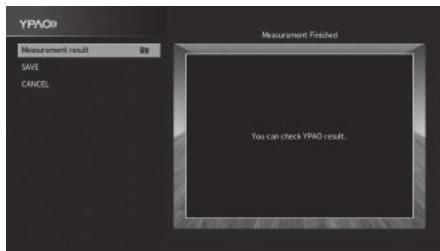
Note
If an error message (such as ERROR 1) or warning message (such as WARNING 2) appears, see "Error messages from YPAO" or "Warning messages from YPAO" under "Optimizing the speaker settings automatically (YPAO)" in the Owner's Manual.
4 Select "Measurement result" and press ENTER to display the result, if necessary.
After confirming the result, press RETURN to return to the "Measurement Finished" screen.
5 Use the cursor keys to select "SAVE" and press ENTER.
6 Disconnect the YPAO microphone from the unit.
This completes optimization of the speaker settings.
What is MusicCast
MusicCast is a brand new wireless musical solution from Yamaha, allowing you to share music among all of your rooms with a variety of devices. You can enjoy music from your smartphone, PC, NAS drive and music streaming service anywhere in your house with one easy-to-use app. For more details and a lineup of MusicCast compatible products, refer to the following site: http://www.yamaha.com/musiccast/
- Seamlessly control all MusicCast compatible devices with the dedicated app "MusicCast CONTROLLER".
- Play back music from music streaming services. (The compatible music streaming services may differ depending on your region and product.)
- Configure wireless network settings of MusicCast compatible devices.
Note
See the Owner's Manual for information on other wireless connection methods if the MusicCast CONTROLLER app will not be used.
Using MusicCast CONTROLLER
To use the network features on the MusicCast compatible device, you need the dedicated app "MusicCast CONTROLLER" for the operation. Search for the free app "MusicCast CONTROLLER" on the App Store or Google Play and install it to your device.
Adding the unit to the MusicCast network
Perform the following procedure to add the unit to the MusicCast network. You can also configure the unit's wireless network settings at once.
Note
The SSID and security key for your network will be needed.
1 Tap the "MusicCast CONTROLLER" app on your mobile device and tap "Setup".
Note
If you have already connected other MusicCast compatible devices to the network, tap "Settings" and then "Add New Device".
2 Follow the app's on-screen instructions.
3 Press and hold the CONNECT button on the front panel of the unit for 5 seconds, as instructed by the app.

4 Follow the app's on-screen instructions to configure network settings.
When a connection has been established, "Completed" will be displayed in the front display of the unit.
Network connection with the MusicCast CONTROLLER app is now complete, and the unit has been registered as a MusicCast-enabled device.
Playback
This section describes basic operations such as playing Blu-ray Discs and DVDs, and tuning into radio stations. Most operations can be performed using the remote control.
Basic playback functions
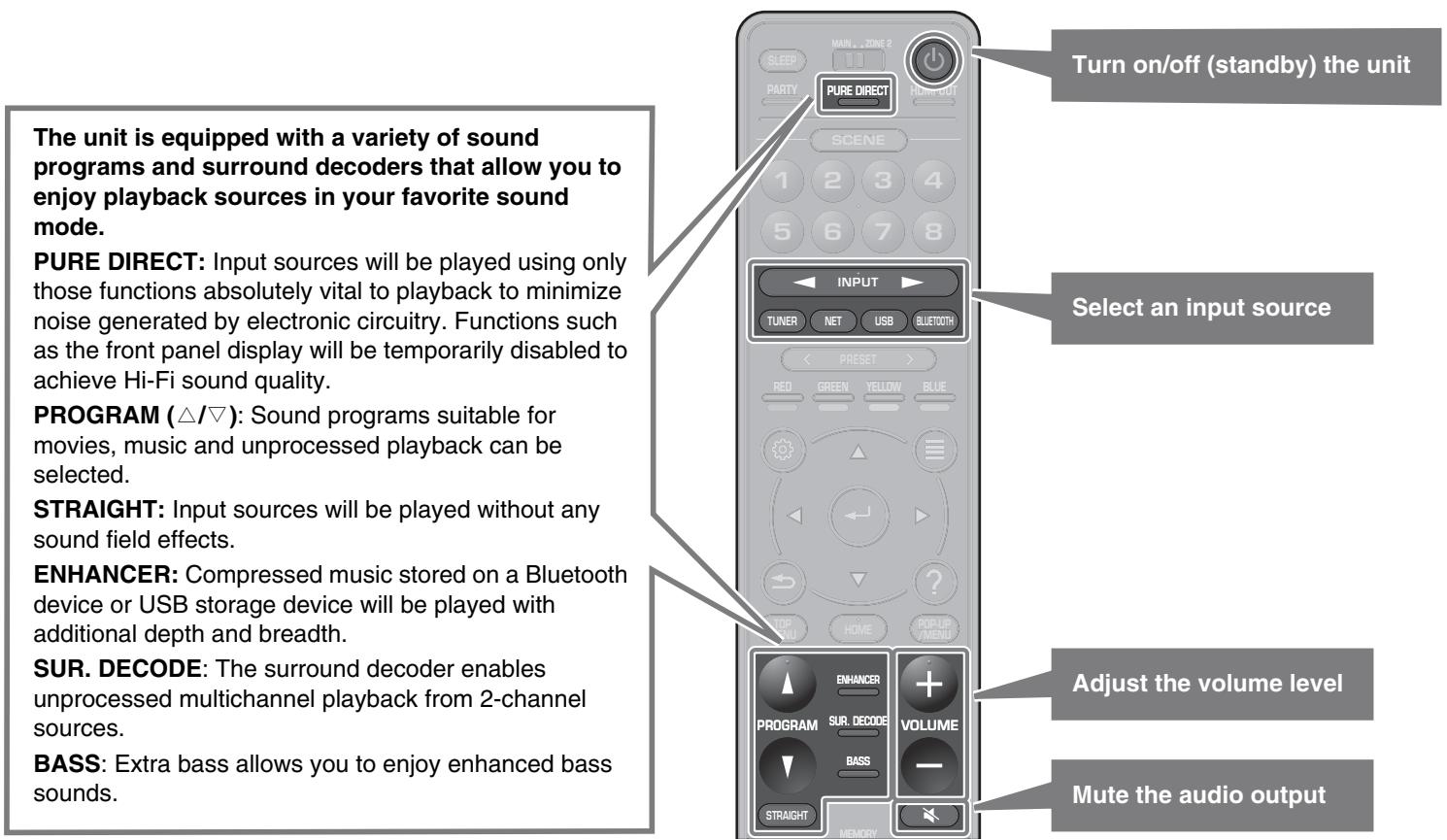
Playing a BD/DVD
We recommend playing back multichannel audio (5.1-channel or more) to feel surround sound produced by the unit.
1 Turn on the BD/DVD player.
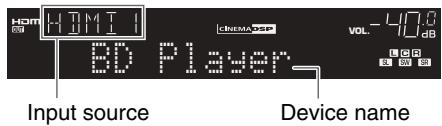
2 Press INPUT ( /) repeatedly to select "HDMI 1".
The name of the connected device such as "BD player" may be displayed.
3 Start playback on the BD/DVD player.
4 Press STRAIGHT to select "STRAIGHT".
Note
When "STRAIGHT" (straight decode) is enabled, each speaker produces each channel audio signal directly (without sound field processing).
5 Press VOLUME to adjust the volume.
Note
When sound is not heard, or no sound is output from a specific speaker, see "TROUBLESHOOTING" in the Owner's Manual.
Listening to FM/AM radio
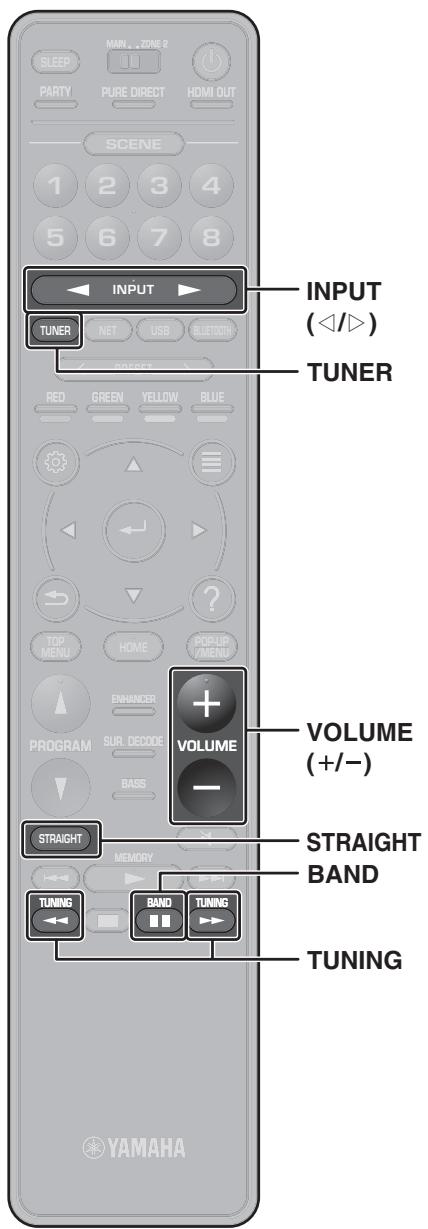
1 Press TUNER to select "TUNER" as the input source.
2 Press BAND to select FM or AM.
3 Press TUNING to set a frequency.
Hold down the key for about a second to search stations automatically.

"TUNED" lights up when the unit is receiving an FM/AM radio station signal.
"STEREO" lights up when the unit is receiving a stereo FM radio signal.
Setting the frequency steps (Asia, Taiwan, Brazil, General, and Central and South America models only)
At the factory, the frequency step setting is set to 50kHz for FM and 9kHz for AM.
Depending on your country or region, set the frequency steps to 100kHz for FM and 10kHz for AM.
1 Set the unit to standby mode.
2 Hold down STRAIGHT on the front panel and press MAIN ZONE.
3 Press PROGRAM on the front panel repeatedly to select "TU".
TU. . . . F150/AM9
4 Press STRAIGHT on the front panel to select "FM100/AM10".
5 Press MAIN ZONE to set the unit to standby mode and turn it on again.
Listening to Internet radio
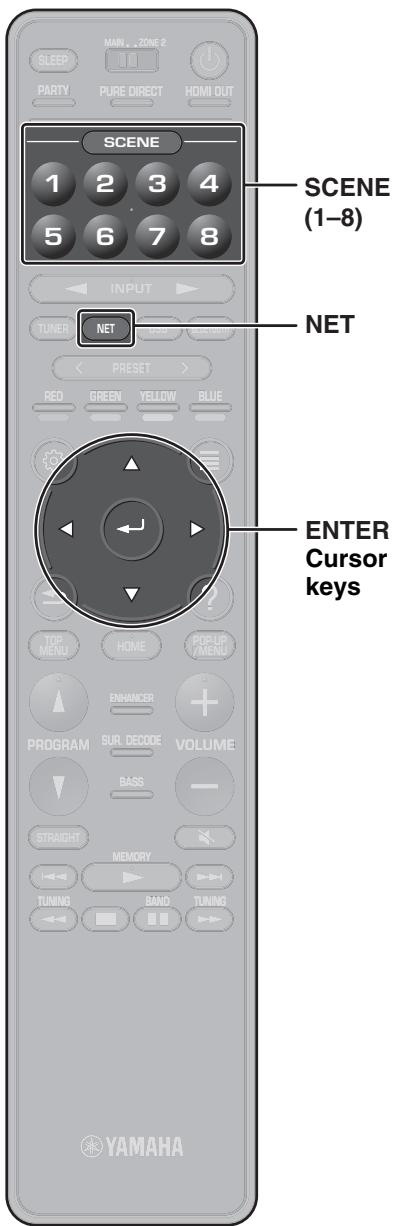
1 Press NET repeatedly to select "NET RADIO" as the input source.
The browse screen is displayed on the TV.
2 Use the cursor keys to select an item and press ENTER.
When an Internet radio station is selected, playback starts and the playback screen is displayed.
Note
Internet radio stations can also be selected using the MusicCast CONTROLLER app installed on your mobile device.
Listening to music from streaming services
The MusicCast CONTROLLER app installed on your mobile device can be used to receive streaming services.
1 Select a streaming service on the MusicCast CONTROLLER app screen.
2 Select a station.
Note
The following may be required, depending upon the streaming service used.
Install the streaming service app on your mobile device
- Register a streaming service account
Notes on streaming services
- Streaming services may be changed or discontinued without notice.
- Supported streaming services may vary by the country or region of use.
SCENE function
Unit input sources and settings that have been assigned to SCENE keys can be selected with a single touch (SCENE function). When a SCENE key is pressed, the unit turns on automatically if it is in standby mode.
By default, the following settings have been assigned to each SCENE key.
| SCENE key | SCENE name | Input | Sound program | Compressed Music Enhancer |
| 1 | Movie Viewing | HDMI 1 | Sci-Fi | Off |
| 2 | RADIO Listening | TUNER | 7ch Stereo | On |
| 3 | Music Listening | AUDIO 2 | STRAIGHT | Off |
| 4 | NET Audio Listening | NET RADIO | 7ch Stereo | On |
| 5 | STB Viewing | HDMI 2 | Drama | Off |
| 6 | Game Playing | HDMI 3 | Action Game | Off |
| 7 | TV Viewing | AUDIO 1 | Drama | On |
| 8 | Madia Server Listening | SERVER | 7ch Stereo | On |
See the Owner's Manual for settings other than those shown above.
Registering a scene
The settings assigned to each SCENE key by default can be changed to suit individual preferences.
- Play an input source.
- Apply settings for functions such as Sound programs and Compressed Music Enhancer.
- Press and hold a SCENE key until "SET Complete" appears on the front display.

Playing music stored on a Bluetooth® device
1 Press BLUETOOTH to select "Bluetooth" as the input source.
2 Select the unit (network name of the unit) from the available device list on the Bluetooth device.
If the passkey is required, enter the number "0000". When the connection is established, the indicator will glow in the front display.
3 Select a song and start playback on the Bluetooth device.
Playing music stored on a USB flash drive
1 Connect the USB flash drive to the USB jack.
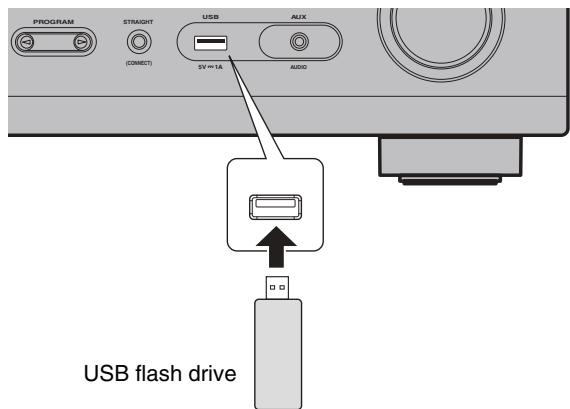
Note
Connect the USB flash drive directly to the USB jack. Do not use an extension cable.
2 Press USB to select "USB" as the input source.
The browse screen is displayed on the TV.
3 Use the cursor keys to select an item and press ENTER.
When a song is selected, playback starts and the playback screen is displayed.
Basic operation of the Option menu
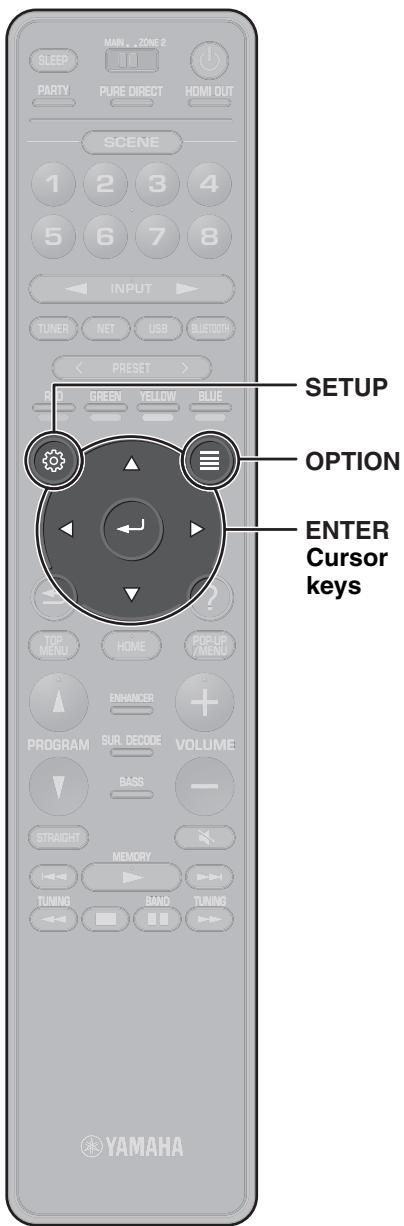
This section explains basic operation of the Option menu. The Option menu can be used to configure the unit's playback functions according to the input source.
1 Press OPTION.

The Option menu is also displayed on the TV screen.
2 Use the cursor keys to select an item and press ENTER.
3 Use the cursor keys to select a setting.
4 Press OPTION.
For more information, see "Configuring playback settings for different playback sources (Option menu)" in the Owner's Manual.
Basic operation of the Setup menu
This section explains basic operation of the Setup menu. The setup menu can be used to configure the unit's functions in detail.
1 Press SETUP.
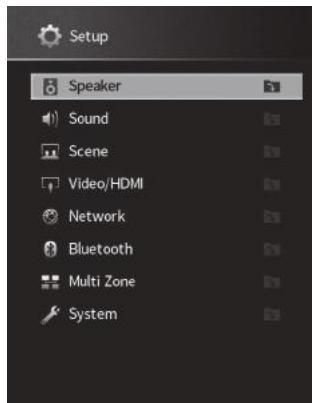
2 Use the cursor keys to select a menu and press ENTER.
3 Use the cursor keys to select an item and press ENTER.
4 Use the cursor keys to select a setting and press ENTER.
5 Press SETUP.
For more information, see "Configuring various functions (Setup menu)" in the Owner's Manual.
Troubleshooting
If trouble occurs, first check the following:
Make sure of the following when the unit does not function properly.
- The power cables of the unit, TV and playback devices (such as BD/DVD players) are connected to AC wall outlets securely.
- The unit, subwoofer, TV and playback devices (such as BD/DVD players) are turned on.
- The connectors of each cable are securely inserted in to jacks on each device.
If there is no problem with the power and cables, refer to the instructions shown in the table below.
If the problem you are experiencing is not listed or if the instructions do not help, turn off the unit, disconnect the power cable, and contact the nearest authorized Yamaha dealer or service center.
| Problem | Cause | Remedy |
| The power does not turn on. | The protection circuitry has been activated three times consecutively. When the unit is in this condition, the standby indicator on the unit's front panel blinks if you try to turn on the power. | As a safety precaution, capability to turn on the power is disabled. Contact your nearest Yamaha dealer or service center to request repair. |
| The power turns off (standby mode) immediately. | The unit was turned on while a speaker cable was shorted. | Twist the bare wires of each speaker cable firmly and reconnect to the unit and speakers (p. 8). |
| The unit is not reacting. | The internal microcomputer is frozen, due to an external electric shock (such as lightning or excessive static electricity) or to a drop in the power supply voltage. | Hold down MAIN ZONE Ⓞ on the unit's front panel for more than 10 seconds to initialize and reboot the unit. (If the problem persists, disconnect the power cable from the AC wall outlet and plug it again.) |
| No sound. | Another input source is selected. | Select an appropriate input source with the input selection keys. |
| Signals that the unit cannot reproduce are being input. | Some digital audio formats cannot be played back on the unit. To check the audio format of the input signal, use “Information” in the “Setup” menu (p. 22). For details, see “Checking the current audio signal information” in the Owner’s Manual. | |
| No sound is coming from a specific speaker. | The playback source does not contain a signal for the channel. | Use “Information” in the “Setup” menu (p. 22) to check the audio signal. For details, see “Checking the current audio signal information” in the Owner’s Manual. |
| The currently selected sound program/decoder does not use the speaker. | Use “Test Tone” in the “Setup” menu (p. 22) to check the speaker output. For details, see “Outputting test tones” in the Owner’s Manual. | |
| Audio output of the speaker is disabled. | Perform YPAO (p. 14). | |
| Use “Configuration” in the “Setup” menu to change the speaker settings. For details, see “Configuring the speaker settings” in the Owner’s Manual. | ||
| No sound is coming from the subwoofer. | The playback source does not contain LFE or low-frequency signals. | Enable the Extra Bass function using the BASS key (p. 18). |
| Subwoofer output is disabled. | Perform YPAO (p. 14). | |
| Set “Subwoofer” in the “Setup” menu to “Use” (p. 22). For details, see “Setting the use of a subwoofer” in the Owner's Manual. | ||
| No video. | Another input source is selected on the unit. | Select an appropriate input source with the input selection keys. |
| Another input source is selected on the TV. | Switch the TV input to display the video from the unit. | |
| No video from the playback device connected to the unit with HDMI. | The input video signal (resolution) is not supported by the unit. | To check the information about the current video signal (resolution), see “Checking the current video and HDMI signal information” in the Owner's Manual. For information about video signals supported by the unit, see “HDMI signal compatibility” in the Owner's Manual. |
| The TV does not support HDCP (High-bandwidth Digital Content Protection). | Refer to the instruction manuals for the TV and check the TV's specifications. If you want to play back contents that require HDCP 2.2-compatible devices, both the TV and playback device must support HDCP 2.2. | |
| Cannot make the connection settings on MusicCast CONTROLLER. | The mobile device is not connected to the wireless router at your home. | Connect the mobile device to the wireless router and use MusicCast CONTROLLER. |
| It takes time for the app to detect the unit. | Wait a moment while making sure that your mobile device will not be in the sleep mode. | |
| Access to the network is restricted by the firewall settings of the wireless router (access point). | Check the firewall setting and the MAC address filter of the wireless router (access point). |
Specifications
| Bluetooth | |
| Supported profile | A2DP, AVRCP |
| Supported codec | SBC, AAC |
| Bluetooth version | Ver. 4.2 |
| Wireless output | Bluetooth Class 2 |
| Maximum communication distance | 10 m (33 ft) without interference |
| Supported content protection method | SCMS-T |
| Network | ||
| Wi-Fi function | Radio Frequency Band | 2.4 GHz, 5 GHz band |
| Wireless LAN Standards: IEEE 802.11 a/b/g/n/ac | ||
| Security Method: WEP, WPA2-PSK (AES), Mixed Mode | ||
| Capable of WPS by PIN Method and Push-Button-Method | ||
| Capable of sharing with iOS devices by wireless connection | ||
| Tuner | ||
| Tuning Range | U.S.A. and Canada models | [FM] 87.5 MHz to 107.9 MHz [AM] 530 kHz to 1710 kHz |
| Asia, Taiwan, Brazil, General, and Central and South America models only | [FM] 87.5/87.50 MHz to 108.0/108.00 MHz [AM] 530/531 kHz to 1710/1611 kHz | |
| China, Korea, Australia, U.K., Europe, Russia, and Middle East models | [FM] 87.50 MHz to 108.00 MHz [AM] 531 kHz to 1611 kHz | |
| General | ||
| Power Supply | U.S.A. and Canada models | AC 120 V, 60 Hz |
| Taiwan, Brazil, and Central and South America models | AC110 to 120/220 to 240 V, 50/60 Hz | |
| China model | AC 220 V, 50 Hz | |
| Korea model | AC 220 V, 60 Hz | |
| Australia model | AC 240 V, 50 Hz | |
| U.K., Europe, Russia, and Middle East models | AC 230 V, 50 Hz | |
| Asia and General models | AC 220 to 240 V, 50/60 Hz | |
| General | |||
| Power Consumption | U.S.A. and Canada models | 400 W | |
| China, Korea, Australia, U.K., Europe, Russia, and Middle East models | 300 W | ||
| General, Asia, Taiwan, Central and South America, and Brazil models | 270 W | ||
| Standby Power Consumption | HDMI Control Off, Standby Through Off | 0.1 W | |
| HDMI Control On, Standby Through On (No Signals) | 0.8 W | ||
| HDMI Control ON, Standby through AUTO (HDMI no signal and no CEC for 8 hours) | 0.4 W | ||
| Network Standby On | Wired | 1.3 W | |
| Wireless (Wi-Fi) | 1.4 W | ||
| Bluetooth | 1.4 W | ||
| HDMI Control On, Standby Through On, Network Standby On | Wireless (Wi-Fi) | 2.0 W | |
| Maximum Power Consumption | Asia, Taiwan, Brazil, General, and Central and South America models only | 590 W | |
| Dimensions (W x H x D) | 435 x 171 x 378 mm (17-1/8" x 6-3/4" x 14-7/8") | ||
| Reference Dimensions (with wireless antenna upright) * Including legs and protrusions | 435 x 248 x 378 mm (17-1/8" x 9-3/4" x 14-7/8") | ||
| Weight | 10.5 kg (23.1 lbs) | ||
The contents of this manual apply to the latest specifications as of the publishing date. Refer to the Owner's Manual on the Yamaha website to confirm specifications other than described above and obtain the latest information of the unit.
PRECAUTIONS D'USAGE
LISEZ ATTENTIVEMENT AVANT DE PROCESSER À TOUTE UTILISATION. VEILLEZ À SUIVRE CES INSTRUCTIONS.
http://www.yamaha.com/musiccast/
(weeebattery_eu(es_02)
Introduccion
(WAC: Wireless Accessory Configuration).
MEPbI INPEdIOCTOPOX-HOCTN
IPEENCIOJIb3OBAHNEM BHIMATEJbHO IPOUHTAITE DAHHbie YKA3AHNA. CJEduYTE 3TNM INHCTPYKcIyM.
IpeueHcJIeHHbIe HIXe MebpI npedocTopoXHOCTn IpeJHa3HaueHbI dIJI npedOTBpaUeHn pNCKa npuHHeHn BpeJa NOJb3OBATeJIIO NdpYrIM JIOdAM, a TaKxe dJIa npedOTBpaUeHn IOBpeKdEHN MyUeCTBa N OKa3AHN NOMOUsI NOJb3OBATeJIIO NHaJIeXkaUeMy N 6e3OpacHomy NcNoJIb3OBAHIO daHHoro annapaTa. CJeDuYe 3TmM INCHTpKcIyM.
Iocne npOHTeHnXpaHInTe 3TO pyKOBOCTBO BHaJeXHOM MeCTe, YTObIK HeMy MOxHO 6bIIO o6paTntbcra B IIO6oe BpeMn.
-Длп поведеня осмOTа плп ремOTа obraTeьно образиТecь K ДИЕр,у кOTOPOrO 6bl пиОБpeTeH annapaT,ЛббВ Сервсьи цHTp Yamaha.
- Yamaha He HeceT OTBeTCTBHeHocTn 3a NOJUyeHHbIe Bamn TpaBMbl NII NOBpeKdEHNr N3deNl B pe3yNbTaTe HeHaJIeKaIeTo IcNoJIb3OBAHnI NII MoINΦNkaCm annapaTa, a TaKke 3a NotepIO NII NOBpeKdEHe N daHHbIX.
-Данhoe yctpoiCtBO npeHa3HaueHo ДЯ DOMaHero
нспьзOBaHHЯ. He nCnoJIb3yIte erO B o6JIacTJx, tpe6yUoXn
ВыICOKои HaDEJxHOCtN, HanpIMeP B cΦepe JxN3HeOBeCneYeHЯ,
ЗдраBOoxpaHEnHЯ ИПи пп paBoTe C ceHbIMn aKТиBaMn.
IcToHnK nHTaHnY n Ka6eJb nHTaHnY
- EcIn annapaT he 6yIeT nCIOJIb3OBAtBcra B TeUeHne IINITeJIbHOrO BpeMeHH,OTCOEINHnTe WTeNCEIn b OTpo3eTKn nepemehHoro ToKa.Дaxke ecIn BBKJIPOuTaTeB (OxNiDaHne/ BkJIouHHe) BbIKIQUeH (3KpaH BbIKIQUeH), He3NaHTeJIbHbI TOK 6yIeT npoDOnJXaTb npOTEkaTb.
YctaHOBka
- He IncnoIb3yIte DaHnbl annapaT prdOM C dpyrUmN 3JeKtpoHHbIM o6OpyIOBaHHeM, HapnpMep, TeBeB3OpOM, paDIO nII MOBnBbIM TelefoHom. HecOJIIODeHne 3TOrO yKa3aHnMoKeT CTaTb npuHnOH uymOB, CO3DaBaEMbIX TeBeB3OpOM nIpaDIOpNIeMHNKOM.
He nCNoIb3yIte 3OT annapaT B MeCTe, KOtOpoe NODBepKHeO BO3DeIcTBIO npRMOOr cOnHeHOro CBeta, KOTOpoe MOKeT CmUkOM CMJbHO HarpeTbC (HAnpIMep, PdOM C oBorpeBaTeMe) INn OXnAinTbcrNIOKOtOpoe NODBepKHeO CmUkOM CNJIbHOMy BO3DeIcTBIO nbIN INn BN6paun. 3TO MoKeT pINBeCTn K DeFopMaun nPaHEIN annapata, Bbl3Bab HEnCnpaBHOCTn BHYTpEHHHX KMOHENTOB INn CTaTb pInuHHO HeCTaBnBHO pa60Tbl. - YctahabnBaIte annapaT kaM MoKHO daIbwe OT dpYrOro 3IeKTPoHOrO o6OpdyoBaHn. LcIpOboBle CnHaJIb ot annapaTa MOryT Co3daBaTb NOMEXN dIpyrOro 3IeKTPoHOrO o6OpdyoBaHn.
- PnI nCNoIb3OBAHm 6ecnpoBDoHcTe nI36eAte Ye yCTaHOKn daHoro annapaTa
PraDM C mTaJIInueCKIMn CTeHAMn IIN CTOLAMn, MKNPOBOHOBbIMn neaMn IIN
dpyrIMN 6ecnpoBDhBMn cTeEBMbIMyUCTPOiCTBaMn.
PpenrTcBnMOry cOKpaTntb pacctOHaHne nepedaHn.
PoiKJIIOUOeHnA
-Пи поклioчehи BHEшнх yctpoiCTB o8a3ateJBHO BHNMaTeJbHO npoHTaIte pykoBOdCTBO ДЯ Кадоу yctpoiCTBa И поклioчITE INX B COOTBeTCTBn C nHCTpyKUIAM.
HenpaBnIbHoe noDkJIouHe nAappaTa, HapuShaIOUe INHCTpyKUn, MoXeT npVBecTN K erO HenpaBnIbHo pa6oTe.
- He noДКЛIOЧАп Te 3OT annapa T K pOmbiUHJIeHHbIM yCTpoIcTBaM.
ДяьбITOBOгиnpOMbIшнHOrO nCOnIb3OBAHnI npIMeHOTc pa3HbIe zuΦpOBBle aydINOHTEPpeHcI.3TOT annapaT npEHa3HaueH dIЯ NOdkNIOUeHnK 6bITOBomy zuΦpOBMy aydINONHTepceHcy. PoIckNIOUeHne K npOMbIshNeHOMy zuΦpOBomy aydINONHTepceHcMyoKTe ToIbKo pRnBeCTn K HeuCpABHOCTn annapaTa, Ho n IOBpeNTb DInHaAMKn.
OboaueHne c annapaTOM
- He cTaBbTe Ha 3To annapaT BnHIOBble, nlaCTMaCCOBble I ne3HOBble npEIMeTbI. 3To MoKcET cTaTb npuHOn DeOpMaun ININ BbUBeTaHn paHei annapaTa.
- Ecni npi pe3kOM 3mMeHEnn BHeUHe TEmpeaTpybl (HaNPIMep, npi TpaHCnpTPOBKe annapata INPi npi b6ICTpOM HarpeBE NIOO OxJaxDeHN) ECTb BEporTHOCb OBpa3OBAHN KOHeHCATA B annapate, npeed IcNoJIb3OBaHmE OctAAbbTe erO Ha HeCKoJIbKO YacOB, He BKJIouHAn PITAHNA, NOKA OH He BbICOXHe TOnIHOCTbIO. UcNoJIb3OBaHmE annapata npi HAIChuN B HEM KOHDeHCATA MOXET pINBecTKn ERO NOBpeKJeHIO.
Texnueckoe o6cnyxnbAHne
-ДЯчстк annapapata NOJb3yTeCb Mяrkоу cxyo TKaHbIO.ИсpoЛьзOBaHne XIMNKaTOB, TAKINK KAK bEH3nH INI pa36abNTeJIb, MOUoxc pceCTb INI INTkaHe IЯ XIMNueckO YcCTkn MoKeT npuBeCTn K DeOpmaun INI OObecuBeHbAHIO.
БатAPEйки
- IVcnoJIb3OBAHHIe 6aTapeKn CneJyET yTInIIN3HPOBaTb B COOTBETCTBUN C MeCTHBIM 3aKOHOdaTeNbCTBOM.
Hhopmaia
O coidepxaHn 3TOro pykoBocCTBa
PacnoJoxHeNKe KOJHOK
PacCTaBbTe KOJIOHKn, pyKOBOdCTByrCb npIbeJeHHo CXeMoI.

FL / FR ΦpoHTaJIbHaJ KOLOHka (IeBaJ/npaBaJ)
C LéHTpaßbHaJ KÖLOHka
SL / SR Kojonka okpykaiooero 3ByaHn (JeBaA/npaBaA)
FPL / FPR ΦpoHTaJIbHaKa KOJIoHka npICyTCTBnA (JeBaA/npaBaA) 1
SW Ca6ByΦep 2
1)ДиЯ5.1.2-КанальонСИCTeMbI
2) Moxho noqkJIOuHTb Do DByxCabByepoB.
Pn noKIOUeHm KOLOHOK c NmpeaHcom 6 O M
YcTaHOBnTe IJIr NmpeJaHca KOJIOHOK aInpapaTa 3NaueHne "6Ω MIN".ДлЯ ПОЛуЧЕнЯ ПОДрбНо INФорMaци CM. "HAcTpoIka IMpeJaHca KOJIIOHOK"В pa3dJe "ПОДКЛЮЧЕнe KOJIOHOK"В ДOKумeHTePyKOBoDCTBOПОьЗOBaTeJIЯ.
Mepbl npedoctopoxknoctn npn noKluueHnn KaabeJe KOLHOK
- Y6eIntecb TOM, yTO annapaT n ca6Bypep BbIKnIOyeHbl.
- Побговытke Ka6eJи KOLOHOK Ha ydaJIeHn OТ apapata,чTObI n36eKaTb KOPOTKOrO 3ambIkaHn IIn NOBpeKdEHN aannapaTa B pe3yIbTaTe cnyauHoro nOpaIaHn OOrJeHHbIX KOHcOB Ka6eJIe BHyTpB annapata.
-
HenpaBnIbHoe IOkNIOUeHne KaBeJeK OJHOK MOXeT Bbl3BaTb KOpOTKOE 3aMbIkaHne N NOBpeDITb aIIpapAT NII KJOONKn.
-
Octopoxho CHIMMTE np6Jn3nteJbHO
10 MM m3OJIaUN Ha KOHcax KaIeNei DnI POJKNIOUeHN KONOHOK NaJeXHO CKpyTInTe OOrJIeHHbIe YAcTn NpOBoIDOB.
-He donyckaIte cOpnKacHnI pyr c dpyrom orOJIeHHbIX KOHcOB Ka6eIe KJIoHOK.
- HedonyckaTe KOHTaKaTApoBOObKabSeIe KOLHOK C MetaJIInueCKmN YacTAmn AnnapaTa (C 3aJHe NpAHeJIbIO N BnHTAmN).
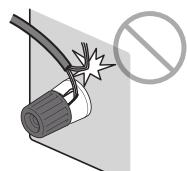
Ecn npn BkIIOUeHnn annapaTa Ha IucnIee nepeJeH nAHeJI NOBITcO coo6ueHne "Check SP Wires", BbIKIOuHTe annapat n npOBepbTe HAnuHKe KopoTkoTO 3amblKaHn B Ka6eJX KOHOHOK.

3
KToTopoYka3aHnHa6oJee
NODXOJUIN TIN
yctpoNCTBa.ДЯ NOJUyeHnA
DOnONHHTeBHO
HΦoPmaLIM CM. “ФунклИA
SCENE" (c. 116).


PnncTaBka IJI BOCIPON3BeDeHIN CNyTHNKOBORO NII KAbEnbHOr CnHaHa

TeJIeBn3Op
BD/DVD- npounpbyBaTeNb
5
http://www.yamaha.com/musiccast/
- JIerko ynpabJIaIte BcEMn MusicCast-coBMeCTnMbIMy uCtpoiCTbAMN c nOmoIbO cneuaJbHOro npJIoXeHnA "MusicCast CONTROLLER".
Bocnpo3boDnte My3bky c yCnyT nOTOKOBoN nepeayn My3bIKn. (CoBmecTmbIe ycnyr nOTOKOBoN nepeayn My3bIKN MOryT OTnHaTbcB 3abucmoctn O pernoHa n3deJnA.) - Bылолинту конфигуразию беспобдου сети MusicCast-coBmecTumbix yctpoiCTB.
PpmeuHne
Cm. Ryko0DCTBO noIb3ObaTeIg InnoIyueHn HnΦopMaun O dpyrnx cnooc6ax 6ecnpoBODHO NOKJIIOUeHn, ecnn pinnoxeHne MusicCast CONROLLER He 6ydt nncnlo3oBaTbcR.
Исpenьзоване MusicCast CONTROLLER
Для IncnoJb3OBAHnI CTeBbIx Функцн Ha MusicCast-coBmecTUMOM yctpoiCTBe Heo6xOdIMo CneuJIbHOe npInIoXeHne "MusicCast CONTROLLER" Для pa6ToI. BblOnJIHte nOcK npInIoXeHnI "MusicCast CONTROLLER" Ha App Store ИИ Google Playи уcTaHOBnTe erO ha yctpoiCTBe.
EcnBbIbpaHa nHTepHET-paDnOCTaHcNIA, NaHHeTcA ee BOCpOn3BeDeHne I NOBNTcA KpaH BOCpOn3BeDeHNA.
Примеане
IHTepHET-paIOCTaHcIMMOKHO TaKHe BbIpaTb C NOMOJIbIO pINIOJXeHIA
MusicCast CONTROLLER, yctaHOBENHOro Ha MObINbHom yCTpoIcTBe.
PpocnyuBaanye ycnyr noTOKOBn nepedaun My3bIKN





- RX-V685
- Mode d'emploi
- MusicCast
- Prises REMOTE IN/OUT
- About Audio Return Channel (ARC)
- DTS Digital Surround
- LFE (Low Frequency Effects) 0.1 channel
- Signal video composant
- Signal video composite
- Compressed Music Enhancer
- Audio Return Channel (ARC)
- AV Receiver
- Ampli-Tuner Audio-Video
- AV PecuBep
- EN Quick Start Guide
- RU KpaTKoe pyKOBoDCTBO NO Haay pa60TbI
- WARNING
- This content indicates "risk of serious injury or death."
- Power supply/power cord
- Do not disassemble
- Water warning
- Fire warning
- Maintenance and care
- Battery use
- Wireless unit
- If you notice any abnormality
- CAUTION
- This content indicates "risk of injury."
- Installation
- Hearing loss
- Maintenance
- Handling caution
- Notice
- Indicates points that you must observe in order to prevent product failure, damage or malfunction and data loss.
- Connections
- Handling
- Batteries
- Information
- About content in this manual
- Wireless communication functions [U.K. and Europe models]
- Bluetooth
- Wi-Fi (2.4 GHz)
- Wi-Fi (5 GHz)
- Information for users on collection and disposal of old equipment and used batteries:
- Pb
- Introduction
- In HTML format
- In PDF format
- [For U.S. customers only]
- Features
- AV SETUP GUIDE
- 1
- Preparation
- Confirming package contents
- Preparing cables
- 2
- Connecting speakers/subwoofer
- Positioning speakers
- When connecting 6-ohm speakers
- Precautions for connecting speaker cables
- 3
- Connecting external devices
- 5
- Preparing a network connection
- Note
- Connecting the power cable to an AC wall outlet, and turning on the unit
- Plug the power cable into an AC wall outlet.
- Press (receiver power) to turn on the unit.
- Turn on the TV and switch the TV input to display video from the unit (HDMI OUT jack).
- 7
- Optimizing the speaker settings automatically
- (YPAO)
- Note the following regarding YPAO measurement
- Turn on the subwoofer and set the volume to half.
- Place the YPAO microphone at your listening position and connect it to the YPAO MIC jack on the front panel.
- Use the cursor keys to select "Start" and press ENTER.
- Select "Measurement result" and press ENTER to display the result, if necessary.
- Use the cursor keys to select "SAVE" and press ENTER.
- Disconnect the YPAO microphone from the unit.
- What is MusicCast
- Using MusicCast CONTROLLER
- Adding the unit to the MusicCast network
- Playback
- Basic playback functions
- Playing a BD/DVD
- Listening to FM/AM radio
- . . . F150/AM9
- Listening to Internet radio
- Press NET repeatedly to select "NET RADIO" as the input source.
- Use the cursor keys to select an item and press ENTER.
- Listening to music from streaming services
- Notes on streaming services
- SCENE function
- Registering a scene
- Playing music stored on a Bluetooth® device
- Playing music stored on a USB flash drive
- Basic operation of the Option menu
- Press OPTION.
- Basic operation of the Setup menu
- Press SETUP.
- Troubleshooting
- If trouble occurs, first check the following:
- Specifications
- PRECAUTIONS D'USAGE
- LISEZ ATTENTIVEMENT AVANT DE PROCESSER À TOUTE UTILISATION. VEILLEZ À SUIVRE CES INSTRUCTIONS.
- Introduccion
- MEPbI INPEdIOCTOPOX-HOCTN
- IcToHnK nHTaHnY n Ka6eJb nHTaHnY
- YctaHOBka
- PoiKJIIOUOeHnA
- OboaueHne c annapaTOM
- Texnueckoe o6cnyxnbAHne
- БатAPEйки
- Hhopmaia
- O coidepxaHn 3TOro pykoBocCTBa
- PacnoJoxHeNKe KOJHOK
- Pn noKIOUeHm KOLOHOK c NmpeaHcom 6 O M
- Mepbl npedoctopoxknoctn npn noKluueHnn KaabeJe KOLHOK
- PpmeuHne
- Исpenьзоване MusicCast CONTROLLER
- Примеане
- PpocnyuBaanye ycnyr noTOKOBn nepedaun My3bIKN
Brand : YAMAHA
Model : RXV685
Category : Home cinema amp