
DIK6180HG - Dishwasher AEG - Free user manual and instructions
Find the device manual for free DIK6180HG AEG in PDF.
 FR
FR
 AR
AR
 BG
BG
 CS
CS
 DA
DA
 DE
DE
 EL
EL
 EN
EN
 ES
ES
 ET
ET
 FI
FI
 HU
HU
 IT
IT
 KK
KK
 LT
LT
 LV
LV
 MK
MK
 NL
NL
 NO
NO
 PL
PL
 PT
PT
 RO
RO
 RU
RU
 SK
SK
 SL
SL
 SQ
SQ
 SR
SR
 SV
SV
 TR
TR
| Product type | Extractor hood |
| Brand | AEG |
| Model | DIK6180HG |
| Number of speeds | 4 speeds (1st, 2nd, 3rd, maximum) |
| Speed Booster function | Yes, activates maximum speed for 6 minutes |
| Breeze function | Yes, refreshes the air after cooking, automatic shut-off after 60 minutes |
| Hob to Hood function | Yes, automatic connection with the hob via infrared |
| Lighting | LED, adjustable intensity |
| Control type | Touch |
| Grease filter type | Metal, washable (in dishwasher at low temperature, short cycle) |
| Grease filter cleaning frequency | At least once a month |
| Charcoal filter type | Not washable, replace every 4 months maximum |
| Filter alarm | Yes, visual reminder (solid white = clean grease filter, flashing = replace charcoal filter) |
| Alarm reset | Press the filter notification button for 3 seconds |
| Dimensions (W x D x H) | Not specified (estimate: 60 x 50 x 40 cm) |
| Weight | Not specified (estimate: 15 kg) |
| Power supply | Not specified (estimate: 220-240 V, 50 Hz) |
| Spare parts | Use only original AEG parts |
| Repairability | LED lighting replaceable only by a technician |
| Safety instructions | Read carefully the separate 'Installation Instructions' booklet |
| Environmental protection | Recycle the appliance at a recycling center, do not dispose of with household waste |
Frequently Asked Questions - DIK6180HG AEG
User questions about DIK6180HG AEG
0 question about this device. Answer the ones you know or ask your own.
Ask a new question about this device
Download the instructions for your Dishwasher in PDF format for free! Find your manual DIK6180HG - AEG and take your electronic device back in hand. On this page are published all the documents necessary for the use of your device. DIK6180HG by AEG.
USER MANUAL DIK6180HG AEG
3.2 Funksioni "Hob to Hood"
OBCJNYKBAHE HA KJINEHTN
BnHa n 3nOJI3BaIte opuHnaJIHn pe3epBn qaCTn.
Korato ce cBbP3BaTe c Hauin OToPn3IpaH OTJeN,ObcnykBaHe",Tpr6Ba da Imate np bKa cneHa tua nHOpMaun: MoJeN, PNC, cepen Homep.
HΦopMaζηraTamaOKe Da6bJe OTKpntaHa Ta6eJIkata C OCHOBn DaHHN
Iпгдунрждени /ВиMuMaHnE-ИнфopMaцяза 3a 6e3onacHOCT
① O67a nHΦopMaζηι ΚcBbEtι
IHHopMaun3aOKJHaTa cpeDa
3ana3BaMe cn npaBTo Ha nImeHeHn.
1. INHΦOPMAÇNЯ 3A BE3OПACHOCT N MOHTAX

BHIMAHNE!
BnKte OTeJHnHaTa 6poUpya
CNHCTpyKUIM3a
INHCTaJIpaHe 3a
HnΦopmaizna3a
6e30nachOCT N MOHTaK.
PpouteTe BnMaTeJIHO
Tnabte 3a 6e3oNaCHOCT
IpeDN BCaKa yNtpe6a nn
IoNDbXkaHa ypea.
2.ОПИСАНЕHAУРEDA
2.1 Перлед на Контropolnia наец!

1 BkJ./n3Kn.
2 TbpbCaKOpocHaMToopa
3 Btopa ckopoCT Ha MOTopa
4 Tpea ckopoct Ha MoTopa
5 MaKcImaJIHa cKOpocT Ha MoToPa
6 ΦyHKUЯ 3a yBéNIuYabaHe HaCKOpOCTTa
7ФyHKUЯ,Бpn3"
8 HanomHnHe 3a qnItbpa
9Функця Hob to Hood
10 Jlamna
3. BCEKNДHEBHA YNOTPEBA
3.1 Изпождван ha a6cop6aTopa
PpOBepTe npenopbUHTeHnHaTcCKOpOCT B cBoTBETCBnC TaBnucTaNo-DoNy.
3.3 AkTbBnpaHe Ha MaKcMmaHa cKOpocT Ha MOTopa
Korato HaTnchete 6byToHa,
MaKcImaJIHnTa CkOpOCT Ha MOTopa ce
BKLJUChBa 3a 6 MNHyTN. CneIe To3n
NepnoD ypeBt Ce Bpbuca KbM
PpeXoDHnTe HAcTpoKn Ha CKOpOCTTa.
i
Korato yHKnraTa e BKNHcHa, DOnbNHTeJIHOTO DOKOCBaHe Ha 6yToHa He npEiN3BkBA DeIcTBne.
3.4 AkTbBnpaHe n DeaKTbBnpaHe Ha N3BeCTneTO 3aФиNTbpa
AnapMaTaHaΦnITbpaHaHOMH3a CMHa NIN NOUcTBAHe HaΦnITbpa C AKTNBEH BvIgHe, KaKToN 3a NOuCtBaHe HaΦnITbpa 3a Ma3HNH.NHdNKaTOpBT HaΦnITbpa E BkJIouCh (6yNo) BV npOblJxKeHne Ha 30 cekyHm, B cnyuai YeΦnITbPbT 3a Ma3HNH NMa HxKDa OT NOUcTBAe. INDnKaTOpBT HaΦnITbpa npemrBa (6yNo) BVnpOblJxKeHne Ha 30 cekyHm, AkoΦnITbPT C aKtNBeB vIgHe TpRbGa da ce CMeHra NIN NOUcTBA.
i
HanpaBeTe cnpaBka OTHOCHO aJapMaTa Ha 0nITbpa B rnaBa ,PiouNCTBaHe n IprnKa"
- BkIIOHcTe KOMaHdHOTo Ta6JIo.
- YBepete ce, ye IKOHHTe ca n3KJIIOUeyHn.
- 3aДаakTNBnPaTeИПи ДeakTNBnPaTe N3BecTneTO 3a ФЛТьpa CakTNBeH BvIJIeH, ДOKOCHeTe 3a 3ceKyHdN.
i
Ako n3BecTneTo 3a qnIbpa c aKTHBEH BbIeH e aKTHBnPaHO, INKOHata Ha qnITbpa npemIrBa(6ra)O 5 nbTu.

Ako n3BecTneTo 3aФиNTbpa c aKTHBEH BbIJIeH e DeaKTbIpaHO, IKOHaTa Ha ФиNTbpa InpemIrBa (6Яно) 3пТИ.
4. Глиkin NOUÇTBAHE
4.2 CmHa Ha φnItbpa c aKTHBeH BbIeH

BHIMAHNE!
3. SVAKODNEVNA UPORABA
3.1 Uporaba nape
Provjerite preparučenu brzinu prema tablici u nastavku.
| Y1 | Prilikom zagrijavanja hrane, kuhanja sPokrivenim pos-sudama. |
| Y2 | Prilikom kuhanja sPokrivenim posudama na više zo-na kuhanja ili plamenika, lagano prženje. |
| Y3 | Prilikom ključanje i prženja velikh količina hrane bezPoklopca, kuhanja na više zona kuhanja ili plameni-ka. |
| i | Prilikom ključanje i prženja velikh količine hrane bezPoklopca, visoka VLCznost. |
| ... | Osvježava zrak u kuhinji nakon kuhanja na vrlo niskojrazini buke. Može se aktivirati i deaktivirati dodiomsimbola. Funkcija se automatski isključuje nakon 60minuta. Koristi se samo nakon kuhanja. |

Preporuca se ostaviti napu da radioko 15 minuta nakon kuhanja.

Upravljacka ploca je polje senzora. Dodirnite simbole na 1 sekundu za aktiviranje funkcije.
Za upravljanje napom:
Thank you for choosing this AEG product. We have created it to give you impeccable performance for many years, with innovative technologies that help make life simpler – features you might not find on ordinary appliances. Please spend a few minutes reading to get the very best from it.
Visit our website to:

Get usage advice, brochures, trouble shooter, service and repair information: www.aeg.com/support

Register your product for better service: www.registeraeg.com

Buy Accessories, Consumables and Original spare parts for your appliance: www.aeg.com/shop
CUSTOMER CARE AND SERVICE
Always use original spare parts.
When contacting our Authorised Service Centre, ensure that you have the following data available: Model, PNC, Serial Number.
The information can be found on the rating plate.
Warning / Caution-Safety information
(1) General information and tips
Environmental information
Subject to change without notice.
1. SAFETY INFORMATION AND INSTALLATION

WARNING!
Refer to the separate Installation Instructions booklet for Safety Information and Installation. Read carefully the Safety chapters before any use or maintenance of the appliance.
2. PRODUCT DESCRIPTION
2.1 Control panel overview

1 On/Off
2 First motor speed
3 Second motor speed
4 Third motor speed
5 Maximum motor speed
6 Speed Booster function
7 Breeze function
8 Filter reminder
9 Hob to Hood function
10 Lamp
3. DAILY USE
3.1 Using the hood
Check the recommended speed according to the table below.
| 1 | While heating up food, cooking with covered pots. |
| 2 | While cooking with covered pots on multiple cooking zones or burners, gentle frying. |
| 3 | While boiling and frying big quantities of food without a lid, cooking on multiple cooking zones or burners. |
| and | While boiling and frying big quantities of food without a lid, big humidity. |
| ↑↑ | Refreshes the air in kitchen after cooking at a very low noise level. It can be activated and de-activated by touching the symbol. The function turns off automatically after 60 minutes. Use after cooking only. |
It is recommended to leave the hood operating for approximately 15 minutes after cooking.
The control Panel is a sensor field. Touch the symbols for 1 second to activate the functions.
To operate the hood:
- Turn on the appliance by pressing the ① symbol.
You can now activate the functions.
- To activate the function touch the symbol.
- If needed, touch the light symbol to illuminate the cooking surface. To change the light intensity touch and hold the symbol again.
To turn off the appliance press the ① symbol again.
3.2 Hob to Hood function
It is an automatic function which connects the hob with a hood. Both the hob and the hood have an infrared signal communicator. Speed of the fan is defined automatically on basis of mode setting and temperature of the hottest cookware on the hob. You can also operate the fan using the hob manually. The function can be activated from panel of the hob.
For more information how to use the function refer to the hob user manual.
3.3 Activating Maximum Motor Speed
When you press the button , the Maximum Motor Speed starts to operate for 6 minutes. After that time, the appliance returns to its previous speed settings.

When the function is turned on, additional touch on the button does not have any effects.
4. CARE AND CLEANING
4.1 Cleaning the grease filter
Each filter must be cleaned at least once a month. Filters are mounted with the use of clips and pins on the opposite side.
To clean the filter:
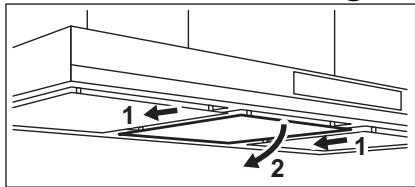
- Hold the panel on the sides and push it back.
3.4 Activating and deactivating the filter notification
Filter alarm reminds to change or clean the charcoal filter and clean the grease filter. The filter indicator is turned on (white) for 30 seconds if the grease filter must be cleaned. The filter indicator flashes (white) for 30 seconds if the charcoal filter must be replaced or cleaned.
Refer to filter alarm in care and cleaning chapter.
- Switch on the control panel.
- Make sure that the icons are turned off.
- To activate or deactivate the charcoal filter notification touch for 3 seconds.
If the charcoal filter notification is activated, the filter icon flashes (white) five times.
If the charcoal filter notification is deactivated, the filter icon flashes (white) three times.
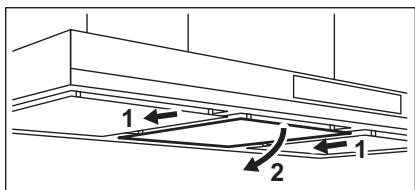
- Slightly tilt the front of the filter downwards, then pull.
i Be careful! Filter is protected by chain upon accidental collapse. Dismount the chains before cleaning the filters.
- Clean the filters using a sponge with non abrasive detergents or in a dishwasher.
The dishwasher must be set to a low temperature and a short cycle. The grease filter may discolour, it has no influence on the performance of the appliance.
- To mount the filters back follow the first two steps in reverse order. Repeat the steps for all filters if applicable.
4.2 Replacing the charcoal filter

WARNING!
The charcoal filter is non-washable!
The time of saturation of the charcoal filter varies depending on the type of cooking and the regularity of cleaning the grease filter.
To replace the filter:
- Remove the grease filters from the appliance.
Refer to "Cleaning the grease filter" in this chapter. - Pull the tabs towards the bottom part of the filter.
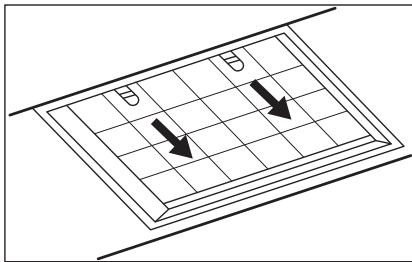
- Slightly tilt the front of the filter downwards, then pull.
- To install a new filter, perform the same steps in reverse order.
In any case, it is necessary to replace the filters at least every four months.
4.3 Filter alarm

Refer to activating and deactivating the filter alarm in daily use chapter.

Refer to cleaning the grease filter in this chapter.

Refer to cleaning the charcoal filter or replacing the charcoal filter (depends on filter type).
To reset the alarm:
Touch the for 3 seconds.
4.4 Replacing the lamp
This appliance is supplied with a LED lamp. This part can be replaced by a technician only. In case of any malfunction refer to "Service" in the "Safety Instructions" chapter.
5. ENVIRONMENTAL CONCERNS
Recycle materials with the symbol Put the packaging in relevant containers to recycle it. Help protect the environment and human health by recycling waste of electrical and electronic appliances. Do not dispose of
appliances marked with the symbol with the household waste. Return the product to your local recycling facility or contact your municipal office.
SISUKORD
- OHUTUSINFO JA PAIGALDAMINE 35
- TOOTE KIRJELDUS 36
- IGAPAEVANE KASUTAMINE 36
- PUHASTUS JA HOOLDUS 37
5.JAATMEKAITLUS. 38
PARIMATE TULEMUSTE SAAVUTAMISEKS
KataxwpioTeToTPOIOvOa,waTeVaexTeKaLATEPOePbic:
www.registeraeg.com

AyopaoTe aegouap, avawoiqa kai yviia atalakikya iT oukeunac
www.aeg.com/shop
EYINHPETHsH INEAATQN KAI ZEPBIs
Xpnoiopoioite Tavta mvo ynoid avtalaktka.
Kayinci3ikke XaHe opHaTyFa
KatbictblaknapaTka
aphanfah KITanwaadan
Kayinci3 opHaTy TpyaBlb
HYCKayNblkTbKapaHb3.
KypbIINfbIhbl naIaIaNHy
Hemece OFaH Kbl3MET
KepceTy anDbIHda
Kayinci3ik Typalbl
tapaynapdbI MkynT OKbIn
LbIFbHb3.
2.БУньIM CINATTAMACbl
2.1 Baçkapy nahanelihe sojy

1 Kocy/CenDipy
2 Ko3FaJIaTbIiTuH 6ipiHsi XblJaMdbiFbl
3 Ko3faTKnblbIekiHJXblnDAMdbIFbl
4 Ko3FaTbIbHTbIH yWIIHJI XbIJNdAmDbIbFl
5 Ko3faTKnblHTbH eH KOfapFbl XblIaMdbIfbl
6XbIyamdbIKbIKyWeeTkiuФyHKU
7XeIeTkiuФyHKUcBi
8 Cy3rHi eckepty
9Пeштэнaya tarTpksiIshФункциЯ
10 Wam
3. ΘРКУндіКОЛДАНУ
3.1 Aya TapTkblk KypaIbI naIdaIaNy
TemeHderi keCTere caiKec ycbHbIHaH KbldAmdbIKtBe TKcepiH3.

TaMaKThb XbJIbITKaHaJa, KaKnak Xa6bIJFaH bIDbICTbl KOndaHbIN nicipreHne.
| 2 | Бірнese nicipу.aiмakтарында hemece OTbikтарda Какпafы кабык bIDыICTa tamak niciprende,балpen Кувipfaнда. |
| 3 | Көн мөлшердөri тɑfamdapдь какпakcsbɪЗ Кайнатkanда көне Кувipfaнда, bірнese nicipу аимafында hemece OTbikтарда niciprende. |
| Жэн | Унken Mөлшердөri тɑfamdapдь какпakcsbɪ3 Кайнатkanда көне Кувipfaнда, bɪnfaɪdьlɪbɪk кən. |
| ... | Пісірreenнен көиin acyüderi ayanbɪ eTe Təmen shu Дeнгийнде канapтады.Оны танбаны турту арылы běncen'dipyre көне ошір're boлады. Фүнкця 60 мінуTTан көин ABI TOMaTTы Тур'de сэнedi.Tek nicipyuden көин пәдәnaHында. |
TaFamDbI nicipreHHHeN KeiH aya TaTkBbIsh KypaJIbI bI amAmEn 15 MmHyT KocBn KOIOFAKeHec6epineDi.
Backapy nahei — ceHcOpIbIK epic. PhHKuIaIapIbI 6eJIceHdIpY yuiH taHbIaIapIbI 1 cekyHd TypTIn3.
ayaTapTkbl KypanDbI naJaAnaHy ywiH:
- taH6acbIH 6acy apKblbl KypblfblHbl Kocblbl3.
Ehdi yHKuJaIapdbI 6eIceHdipe aIacbi3.
2.Функци�ньбсeндipy yuH TaH6aHbI TpyTih3. - KaKet 6oIca, nicipy 6eTin KApbIKTaHdbIpy yuIn? wam TaH6aCbH TyptiH3. KapbIK KapKbIHdbIbIbH e3repTy yuH In TaH6aHbI KaTAtyptin, yctan TypbIHbI3.
KypbIJIfBiHbI cHdipy yuH ① TaH6acbH KaTAt6acbl3.
3.2 Funcão "Hob to Hood"
C TnabAMN, OTHOCRUMMCRA
TexHnke 6e30napCHOCTN.
2.ОПИСАНUE ПРИБОРА
2.1 O6uBn BnD naHEnn ynpaBneHna

1 BkN/BbIK
2 IepBa rckOpocTb DvrgaTeJIa
3 Btopa ckopoctb DnirataTeia
4 TpeTbckopoctb Dnuratela
5 Maksimabha ckoopcb Dvrgatela
6ФунклЯ NOBbleHnCKOPOCTN
7Функця《Бри3》
8 HanomnHaHne oФиьтpe
9Функця«Hob to Hood»
10 lamna ocbeenua
3. EXEДHEBHOЕ ИСПОЛьЗOBAHNE
3.1 IcnoJb3OBaHne BbITaXKn
PekomEnIOBaHHbIe 3HaueHnA cKOpocTn npBVeHebI b Ta6JIuCe HnKe.

Pa3oRpeB npOdyKTOB B nocyDe, hakpbIToi KpbIuKa-MN.
Cm. OINcAHne npoceDpybMbITbI INI 3aMeHbI yroIbHO rNtpa (B 3aBnCIMOCTN OT BnDa FnIbTpA).
OTKJIIOUHHe NTOBUEHINIA:
KochnTecb n ydepknBaIte 3 cekyHdbI.
4.4 3aMeHa JIaMnbl
B KOMNKeT NoCTaBKn Ipi6bopa BxOuNT CBToDnOHa JAMNa. DaHna DeTaJIb MOKeT 6bITb 3aMeHeHa TOnbKO TexHueckm CneUaJIncTOM. B Cnyuae JIO6bIX HEnCnpabHocTei CM. «CepBnc» rIaBbI «Yka3aHnno Bo3oNaChOCTn»
5. OXPAHA OKPYKAOUCEI CPEblI
MaTePnAblcCmBOLOM cneIyET cdaBaTbHa nepepa6OTky. NonoKnte yNAKOVBky B COOTBeTCTByUOuNe KOHTeHepbI dJa C6opbaBTOpHOro cbIp8a. PInHIMaYuaCTHe B nepepa6OTke CTaporo 3JeKtpo6bITOBoro o6OpyDobAHn, Bbl NOMoraTe 3aunTtB OKpykaUOuOcpeDu n 3dOpOBbeYeJIOBeka.He Bbl6paCbBAiTte
BMeCTe C 6bIbOBIMN OTXoDAmN 6bITOBYIO TexHNY, NOMEueHHyO CnMBONOM . Ppi6ob CneJyET DOCTABuNTb B MeCTO pa3dJIbHOrO HAKONJIeHnI N c6opa OTxOIOB NOTpe6JIeHnI NII B NYKT c6opa IcNOJIb3OBAHHo 6bITOBOI TexHNI KIN DnIPOCJIeDyUOpE yTInlN3aUIN.
CAДРЖКAJ
- INΦOPMAUJIJE O B6E3BΕHOCTN I NHCTAJALIJIJN 115
2.ОПИС ПОИЗВODА 115
3.CBAKOJHEBHA YNOTPEBA. 115 - HEGA N U N U T H E B E 117
- EKOLUKA PINTAHB.A. 118
3A CABPUHE PE3YJTTATE
Xbana uto cte n3a6paIOn OBaj AEG npoI3BOD. CTbOpIIN CMO ra Tako da npyka n3BaHpeJHe nepOporMaHcE TOKOM MHORO rOIMHa paJa, y3 INHOBAITNBHe TexHOJIorIje Koje OJAKsAbajy KINBOT I cyHKuJe Koje HeheTe Hahn KoD obuHnxypehaja. OJBOjTe HeKONKO MNHyTa da npOHTate KaKo Da od hera do6bnjeTe MAKCMYM.
Iocetnte haw cajda:

Ipi6abnte cabete 3a kopiunhebe,6poohpe n HOpmaune 3a peuabahe npo6nema, cepBnc n nonpaBky:
www.aeg.com/support

Perictpyjte npoizbOd paDi foJe ycnye:
www.registeraeg.com

Kynite npibop, notpooshn Maepinjan n opunnahe pe3epBne deNoBe 3a cBoj ypehaj:
www.aeg.com/shop
KOPINCHNUCHA NOIDPISHA I CEPBVC
YBeK KopnCTnte opnHaJIne pe3epBHe DeIOBe.
Kaanda konthaktnape Obnaawehn cepBucn ceHTap,BoDnte pauyHa da Kaod c6eImaTe cneedehe noatake:Moden,6poj npOn3bOda,cepnjckn 6poj.
IopauMory da ce npohay Ha nlouNc caTexHnKIM KapaKTePncTnKaMa.
Uno3opehe/Oppe3- nHΦopMaunje o 6e36dnoctn
① OnuTe INHΦopMaζηje n cabetn
IHHOpMaunjeOJXNBOTHOJ cpeINH
3aDpkaHn npabo NImeHa.
1. INHΦOPMAUJIJE O BE3BEdHOCTN INHCTAJAUJN

YNO3OPEHbE!
TOrnpeJaTe 3ace6Hy
6pouypy cy ynyTCTBnma 3a
Hnctanaunjy3a
HnΦopMaunje o
6e36eDnOCTn
reparationsinformation:
www.aeg.com/support
registrar din produit for bättre service:
www.registeraeg.com


jlll jilj l jbsg baw g> j 1
i
aJl JglJl.5
jaliall aui Jbeig h3.4
j 30 aJ (aJ) 1g 30 aJ (aJ)
aai j 1jg jzj g

.1
LglaI pUuuaaAJI JJ 2
j j all ala g 1 jil a 3 3
Jas jzll jil 1s 13
gull jilagai jogj
. Joo

Jaoy poJIa Jauu JI 13
UgU, jia aagj
.

Jg 1 Jr Jr Jr Jr Jr Jr Jr Jr Jr Jr Jr Jr Jr Jr Jr Jr Jr Jr Jr Jr Jr Jr Jr Jr Jr Jr Jr Jr Jr Jr Jr Jr Jr Jr Jr Jr Jr Jr Jr Jr Jr Jr Jr Jr Jr Jr Jr Jr Jr Jr J r
J 4.2
j 1j>all jd j!

g j 1000 gai jia jia gai jia jia jia jia jia jia jia jia jia jia jia jia jia jia jia jia jia jia jia jia jia jia jia jia jia jia jia jia jia jia jia jia jia jia jia jia jia jia jia jia jia jia jia jia jia jia jia jia jia jia j
J 1 J 1 J 1 J 1 J 1 J 1 J 1 J 1 J 1 J 1 J 1 J 1 J 1 J 1 J 1 J 1 J 1 J 1 J 1 J 1 J 1 J 1 J 1 J 1 J 1 J 1 J 1 J 1 J 1 J 1 J 1 J 1 J 1 J 1 J
aallll 1g aabgl JaoLdoic i al ngS y jll Jc loyj
aIg 4
JdJI 4.1
1e Ljw oJg oJr jS aBti
C 1s w pLdawu ydlal sW pJyI
. alall agjll 1c ssu b
: jll all
L2969 g JgJl Ie 1o aGll ksw .1
Jawwll Jjwl 100000000000000000000000000000000000000000000000000000000
aulwuy aoo jilll!aui

p jjll jll jll jll jll jll
oslog aixaiol plxuowy jlll 0a bui .3
alluc g lgluc g1 abwls uacabio
.og all
aal .2
S > i > j J c 2.1

gallaojrojbaagb 7
jlll a 8
aiaaiJgall aabg 9
2luo 10
1
JgJyJxJyJxJxJxJxJxJxJxJxJxJxJxJxJxJxJxJxJxJxJxJxJxJxJxJxJxJxJxJxJxJxJxJxJxJxJxJxJx
aill jzaoallacjw 3
o 1d l d j 1i a o .AEG 1d J
-1JgWgWgWgWgWgWgWgWgWgWgWgWgWgWgWgWgWgWgWgWgWgWgWgWgWgWgWgWgWgWgWgWgWgWgWgWgWgWgWgWgWgWgWgWgWgWgWgWgWgWg
g 100
aio olaawl jg> S aclj
j>1 j0 gJyI liqg o JyI glaa
aagaaag aalwaaagaaaggag gjjll aasssglg jla jla
:2x, ylg aIaI I log12og
www.aeg.com/support
jie jiaoi aovjc Jgaoall jw
www.registeraeg.com
jglal aolll jglg bgsaIgwall gallg caxlall
www.aeg.com/shop


aIg sLaell
aI 111111111111111111111111111
Jullll PNC
a>gl 1c logleall oia j
a0dwl1og120-a/
aolo zilag og loglo ①
aLoge
jow jy aio
JgJlJnJLJLJLJLJL.1

J 1234567890123456789012345678901234567890123456789012345678901234567890123456789012345678901234567890123456789

UK CA CC
- Funksioni "Hob to Hood"
- OBCJNYKBAHE HA KJINEHTN
- INHΦOPMAÇNЯ 3A BE3OПACHOCT N MOHTAX
- BHIMAHNE!
- 2.ОПИСАНЕHAУРEDA
- Перлед на Контropolnia наец!
- BCEKNДHEBHA YNOTPEBA
- Изпождван ha a6cop6aTopa
- AkTbBnpaHe Ha MaKcMmaHa cKOpocT Ha MOTopa
- AkTbBnpaHe n DeaKTbBnpaHe Ha N3BeCTneTO 3aФиNTbpa
- Глиkin NOUÇTBAHE
- CmHa Ha φnItbpa c aKTHBeH BbIeH
- SVAKODNEVNA UPORABA
- Uporaba nape
- CUSTOMER CARE AND SERVICE
- SAFETY INFORMATION AND INSTALLATION
- WARNING!
- PRODUCT DESCRIPTION
- Control panel overview
- DAILY USE
- Using the hood
- To operate the hood:
- Hob to Hood function
- Activating Maximum Motor Speed
- CARE AND CLEANING
- Cleaning the grease filter
- To clean the filter:
- Activating and deactivating the filter notification
- Replacing the charcoal filter
- Filter alarm
- To reset the alarm:
- Replacing the lamp
- ENVIRONMENTAL CONCERNS
- SISUKORD
- PARIMATE TULEMUSTE SAAVUTAMISEKS
- EYINHPETHsH INEAATQN KAI ZEPBIs
- 2.БУньIM CINATTAMACbl
- Baçkapy nahanelihe sojy
- ΘРКУндіКОЛДАНУ
- Aya TapTkblk KypaIbI naIdaIaNy
- ayaTapTkbl KypanDbI naJaAnaHy ywiH:
- Funcão "Hob to Hood"
- 2.ОПИСАНUE ПРИБОРА
- O6uBn BnD naHEnn ynpaBneHna
- EXEДHEBHOЕ ИСПОЛьЗOBAHNE
- IcnoJb3OBaHne BbITaXKn
- OTKJIIOUHHe NTOBUEHINIA:
- 3aMeHa JIaMnbl
- OXPAHA OKPYKAOUCEI CPEblI
- CAДРЖКAJ
- 3A CABPUHE PE3YJTTATE
- KOPINCHNUCHA NOIDPISHA I CEPBVC
- INHΦOPMAUJIJE O BE3BEdHOCTN INHCTAJAUJN
- YNO3OPEHbE!
- aJl JglJl.5
- jaliall aui Jbeig h3.4
- J 4.2
- aIg 4
- JdJI 4.1
- aIg sLaell
- JgJlJnJLJLJLJLJL.1
Brand : AEG
Model : DIK6180HG
Category : Dishwasher