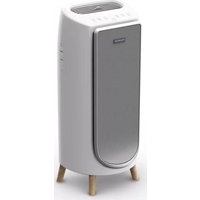
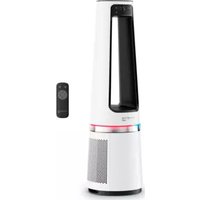
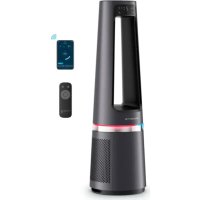
PURE AIR GENIUS PU3080 - Air purifier ROWENTA - Free user manual and instructions
Find the device manual for free PURE AIR GENIUS PU3080 ROWENTA in PDF.



| Product type | Air purifier |
| Brand | Rowenta |
| Model | PURE AIR GENIUS PU3080 |
| Filtration levels | 4: Pre-filter, Activated carbon and Allergie+ 2-in-1 filter, NanoCaptur+ filter |
| Operating modes | Auto day, Auto night, Silent, Turbo |
| Air quality indicator | LED: Blue (excellent), Green (light pollution), Yellow (moderate), Orange (heavy), Red (extreme) |
| Connectivity | Wi-Fi 2.4 GHz, Pure Air by Rowenta app |
| Radio frequency power | 20 dBm (band 2400-2483.50 MHz) |
| Electrical class | Class II (double insulation) |
| Child safety | Child lock (press button for 3 seconds) |
| Pre-filter maintenance | Clean every 2 months (vacuum or rinse with water) |
| Replace carbon/Allergie+ filter | Every 12 months (code XD6231) |
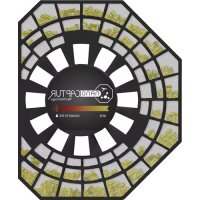
| Replace NanoCaptur+ filter | According to color change or every 12 months (code XD6082) |
| Clean particle sensor | Every 2 months with a cotton swab |
| Operating conditions | Temperature < 35°C, humidity < 70% RH |
| Minimum distance around | 50 cm on each side |
| Warranty | Rowenta international warranty |
| Use | Household use only |
Frequently Asked Questions - PURE AIR GENIUS PU3080 ROWENTA
User questions about PURE AIR GENIUS PU3080 ROWENTA
0 question about this device. Answer the ones you know or ask your own.
Ask a new question about this device
Download the instructions for your Air purifier in PDF format for free! Find your manual PURE AIR GENIUS PU3080 - ROWENTA and take your electronic device back in hand. On this page are published all the documents necessary for the use of your device. PURE AIR GENIUS PU3080 by ROWENTA.
USER MANUAL PURE AIR GENIUS PU3080 ROWENTA
PURE AIR GENIUS PU3080
SUMMARY
PRODUCT OVERVIEW 3
SAFETY TIPS 3
VERY IMPORTANT 4
INSTRUCTIONS 4
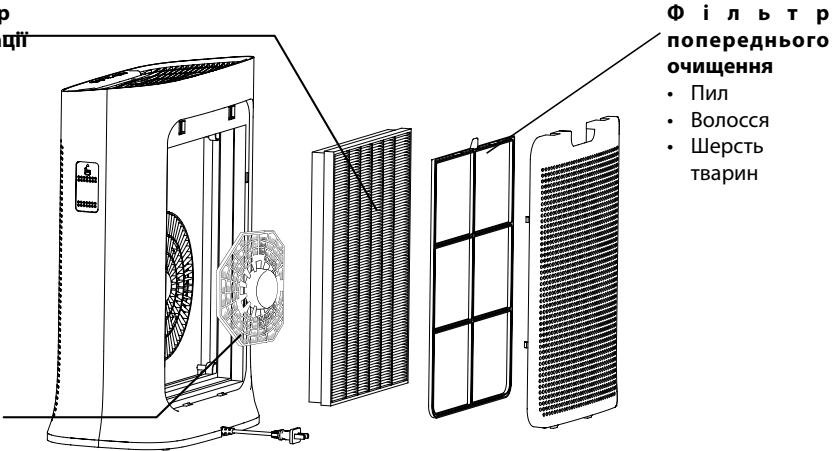
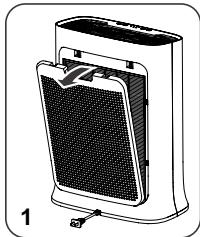
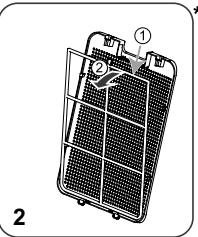
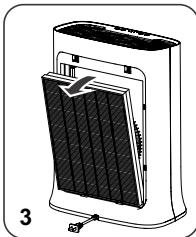
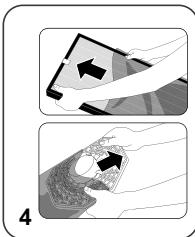
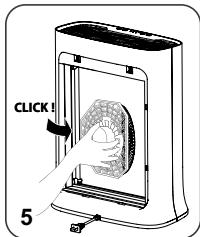
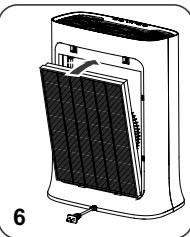
DISASSEMBLING/REASSEMBLINGFILTERS 5
WHERE TO INSTALL THE APPLIANCE 6
BEFORE FIRST USE 6
OPERATION 6
HOW TO CONNECT YOUR PURIFIER TO INTERNET 7
8
STORAGE 9
IN THE EVENT OF A PROBLEM 9
WARRANTY 10
HELP PROTECT THE ENVIRONMENT! 10
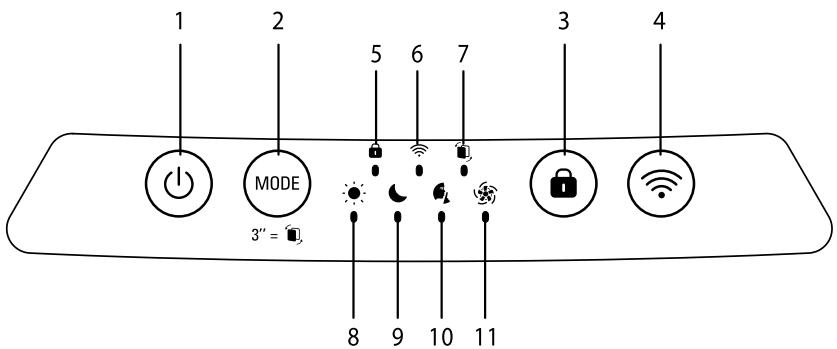
PRODUCT OVERVIEW
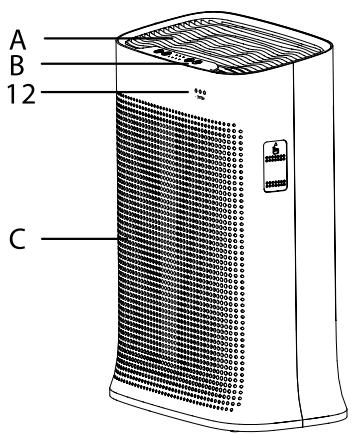
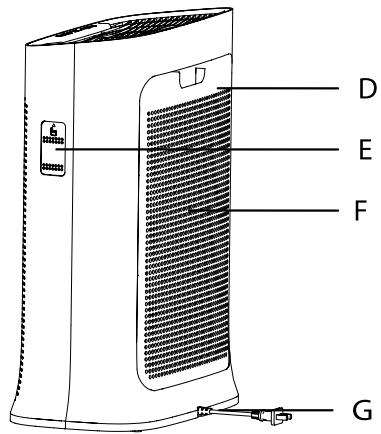
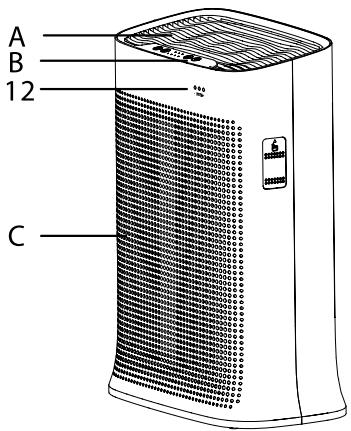
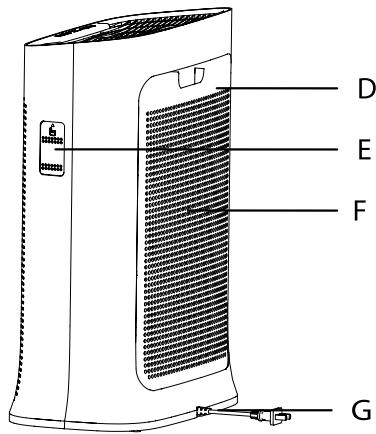
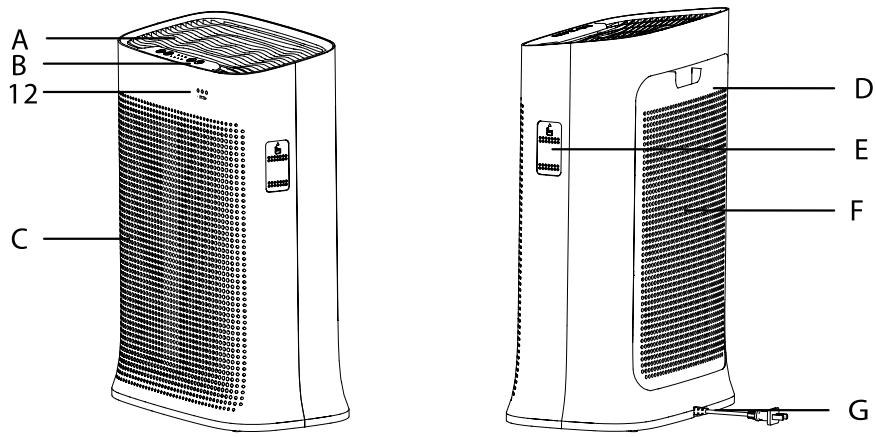
Main Unit
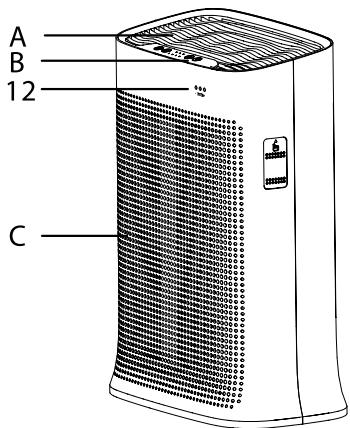
A Air outlet
B Control panel
C Front panel
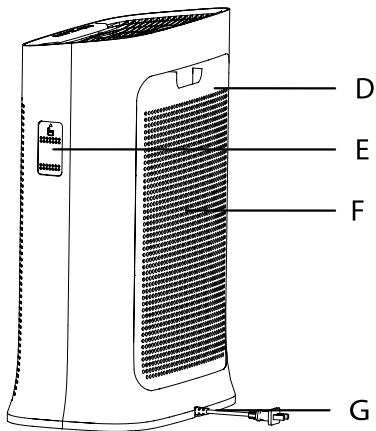
D Rear panel
E Sensor cover
F Air inlet
G Mains cable
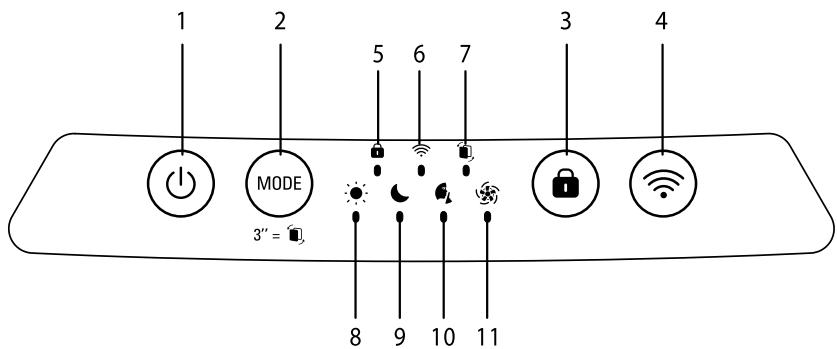
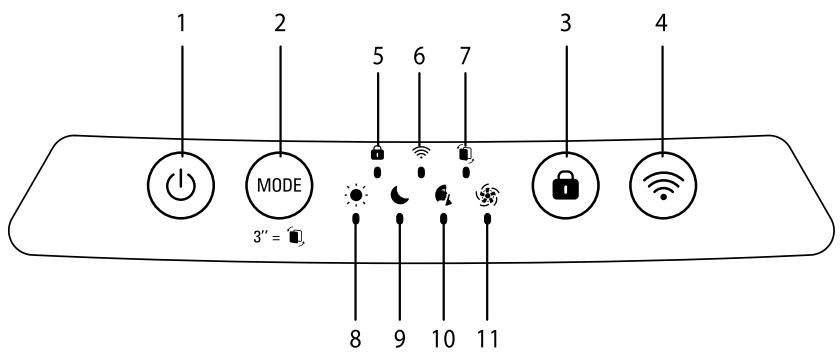
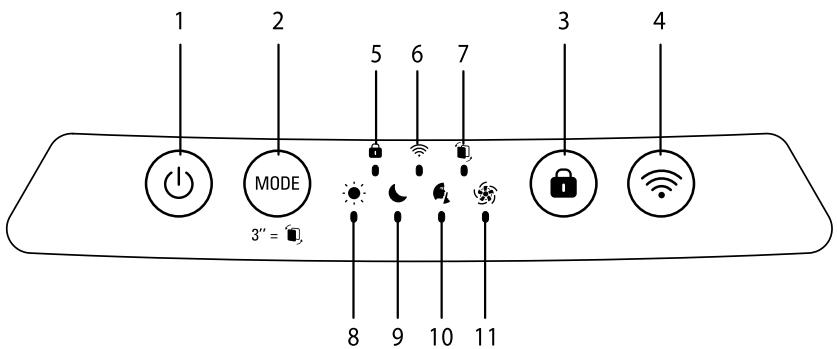
Control buttons
1 On/off button
2 Mode/Reset filter button
3 Child lock
4 Wi-Fi button
Indicators
5 Child lock indicator
6 Wi-fi connection indicator
7 Replace filter indicator
8 Day time Auto mode indicator
9 Night time Auto mode indicator
10 Quiet mode indicator
11 Turbo mode indicator
12 Air quality indicator
SAFETY TIPS
It is essential that you read these instructions carefully and observe the following recommendations:
- For your safety, this appliance complies with the applicable standards and regulations (low voltage, electromagnetic compatibility, environmental directives, etc.).
- This appliance should not be used by persons (including children) with reduced physical, sensory or mental capacities or lack of experience and knowledge, unless they are supervised or have been given instructions beforehand concerning use of the appliance by a person responsible for their safety.
- Children should be supervised to ensure they do not play with the appliance.
- The appliance can be used by children aged 8 and over and persons with a lack of experience or knowledge or reduced physical, sensory or mental capacities, provided they are supervised, have been trained on the safe use of the appliance and are aware of the risks involved. Children must not play with the appliance.
- If the power cord is damaged, it must be replaced by the manufacturer, by its after-sales service or a similarly qualified person so as to avoid any danger.
- Children should not clean or perform maintenance on the appliance without being supervised.
- For maintenance operations, please refer to the "Maintenance" section.
- Keep the appliance and its power cord out of the reach of children aged under 8.
-
This appliance is designed for domestic use only. It should not be used for industrial purposes.
-
The warranty will be voided if damage occurs due to incorrect use.
- Do not operate this appliance in a very dusty and/or humid place or in a location with fire hazards.
- Before use, always make sure that the appliance, plug and power cord are in good condition.
- Never insert objects into the appliance (e.g. needles, etc.).
- Do not pull on the power cord or the appliance, even to unplug it from the wall power outlet.
- Unroll the full length of the cord before use.
VERY IMPORTANT
- Do not cover the air inlets or the outlet grid.
- Do not touch the appliance with wet hands.
- Never allow any liquid to enter the appliance.
- Never use the appliance in a humid place.
- Never use the appliance close to a heat source.
- Do not use the appliance close to flammable objects or products (curtains, aerosols, solvents, etc.).
-
Never use the appliance in an inclined or horizontal position. Place the appliance on a flat, stable surface.
-
In the case of prolonged absence: switch the appliance off using the on/off button (1) and unplug it.
- Switch off and unplug your appliance before moving it.
- Unplug the air purifier during assembly and cleaning.
INSTRUCTIONS
Rowenta Pure Air Genius enables you to breathe pure air in your home and protects your health with up to 4 filtration levels as described below. Each level is essential and traps specific pollutants :
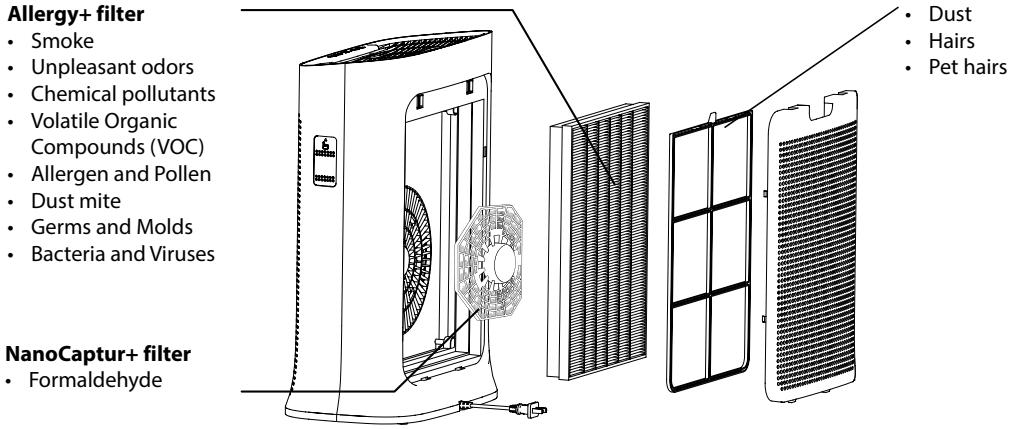
2in1 Active Carbon &

«HOW TO ACHIEVE CLEANER INDOOR AIR»
In addition to using your Pure Air Genius, here are some tips on how to improve the quality of your indoor air:
- Ventilate the rooms for at least 10 min. every day, in summer and winter.
- Maintain your ventilation system.
- Limit the use of household products.
- Do not smoke indoors.
- Avoid home fragrances, incense sticks, scented candles, etc.
- Ventilate whenever any work is being conducted in your home and for several weeks afterwards.
- Avoid green plants that are allergenic or need frequent watering.
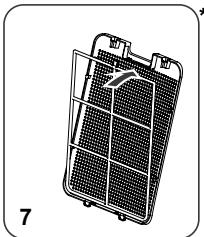
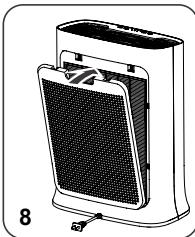
DISASSEMBLING / REASSEMBLING FILTERS
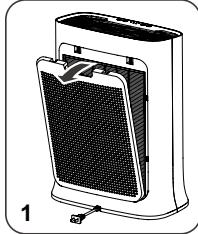
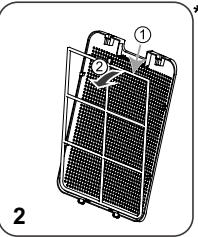
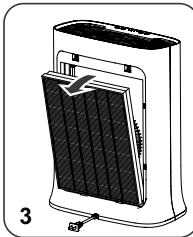
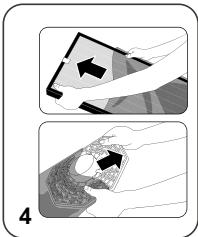
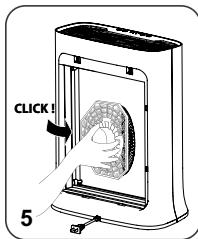
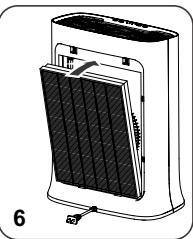
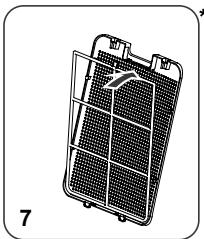
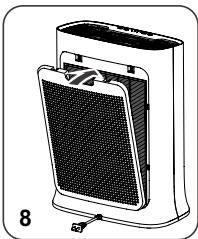

- Avoid handling used filters if you suffer from allergies or asthma.
- Wear gloves when changing the filters, or wash your hands well afterwards.
- Put used filters directly into a closed, air-tight bag before throwing them away to avoid spreading pollutants.
WHERE TO INSTALL THE APPLIANCE
Place the purifier on a flat, stable surface in the room requiring treatment.
To allow the air to circulate freely, avoid placing the appliance behind curtains, below a window, item, furniture, or shelf unit, or close to any other obstacle, and leave at least 50~cm of free space on each side of the appliance. Recommended to be used in ambient conditions lower than 35^ 70% RH (95^)
BEFORE USING THE APPLIANCE FOR THE FIRST TIME
Make sure that the plastic packaging protecting the filters has been removed before using the appliance.
Before the first use, ensure the voltage, frequency and power of your appliance suit your electric supply. Your appliance can operate using an unearthed plug. It is a class II (double electrical insulation). Before switching on your appliance, ensure that:
- the appliance is completely assembled as described in the safety instructions,
- the appliance is placed on a stable, horizontal surface,
- the appliance is positioned in accordance with the instructions given in this manual,
- the air inlets and the outlet grid are completely unobstructed,
- the filters and panel have been correctly installed (See section "Disassembling / Reassembling filters")
IMPORTANT: You are advised to switch off and unplug the appliance when not in use.
OPERATION
Power button (1)
- Press this button to turn the air purifier on/off.
Mode button (2) MODE
- AUTODAY and AUTONIGHT mode: if the air quality level is excellent then the device does not run.
-
Press this button to select one of the four modes. The corresponding indicator will turn on to indicate the selected mode.
-
Daytime auto mode: the fan speed is set to 1,2,3 or 4.
- Nighttime auto mode: The fan speed is set to 1 or 2.
- Quiet mode: The fan speed is set to minimum. Use this mode in quiet environments.
- Turbo mode: The fan speed is set to maximum. Use this mode when air quality is poor.
Child lock (3)
- The lock system prevents the purifier from being accidentally mis-set during operation.
- To activate it, press the button (3) for 3 sec until the locked control panel indicator turns on. To exit this mode, press the button (3) again for 3 seconds, until the indicator turns off. When selected, the other buttons are locked.
Wi-Fi button (4)
Frequency band operated : 2400-2483,50 MHz
Maximum radio-frequency power : 20 dbm
- To turn on or off the Wi-Fi function on your purifier, hold simultaneously the Wi-Fi button and the child lock button during 3 seconds.
- When the Wi-Fi connection indicator flashes it means that the purifier lost its connection.
HOW TO CONNECT YOUR PURIFIER TO INTERNET
HOW TO CONNECT YOUR PURIFIER TO INTERNET ?
Download the app "Pure Air by Rowenta" & follow the instructions on your smartphone :
-
Sign in to create your Rowenta account if you are new. Or log in the app if you already have an account.
-
Make sure to stand close to the purifier during the pairing (2 meters maximum) and make sure the purifier is located near a strong Wi-Fi signal.
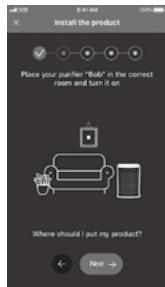
- Make sure your phone is connected to your local Wi-Fi network (you'll hear a "ding" sound and the Wi-Fi indicator will flash to indicate that your mobile device is successfully connected to Wi-Fi.)
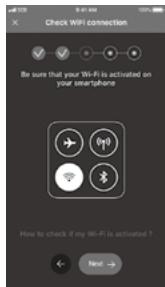
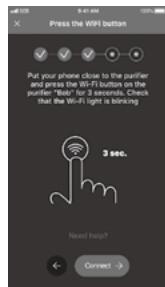
- Turn your purifier on & hold the Wi-Fi button for 3 seconds (you'll hear a "ding" sound and the Wi-Fi indicator will flash to indicate that your purifier is successfully connected to Wi-Fi.)
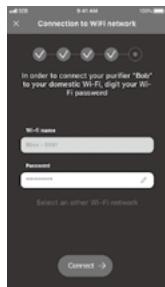
- Choose your Wi-Fi network and enter the network password to connect to your local Wi-Fi network.
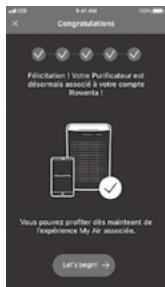
- And you're done! The Wi-Fi indicator lights to indicate that your purifier is successfully connected to Internet.
What to do if you have trouble with the installation of the application:
Check compatibility on the website https://www compatibility.groupesb.com/CompatibilityList-Pureair-Rowenta.pdf
Can multiple users pair to one device?
Of course! New users just need to download the App « Pure Air by Rowenta », create an account and do the pairing.
If the Wi-Fi in my home shuts off for a brief period will I lose control of my purifier via the app?
If the product lost its connection, the product will stop automatically after 24h.
- Indication of air quality
Air quality indicator (12) is located at the front panel (C) of the appliance. The 3 LED will indicate the air quality level:
| Air Quality | Air quality indicator color |
| Excellent | Blue |
| Slight pollution | Green |
| Moderate pollution | Yellow |
| High pollution | Orange |
| Extreme pollution | Red |
CARE AND MAINTENANCE
Before performing any maintenance work, switch off the air purifier using the on/off button (1).
Use a damp cloth to clean the surface of the product.
Important: Do not use any abrasive materials, as these may damage the surface of the product.
Frequency of cleaning/replacing the filters :
| Filter | Clean/replace | Frequency | Filter codes |
| Pre filter | Clean | Every 2 months | |
| 2in1 Active Carbon & Allergy+ filter | Replace | Every 12 months | XD6231 |
| NanoCaptur+ filter | Replace | Color changing (see color chart on filter) or every 12 months in case of no saturation. | XD6082 |
These figures are based on tests in which the air purifier is used for 8 hours per day in quiet mode.
You may need to replace the filters more often depending on the air quality and how often the air purifier is used. The filter replacement indicator (7) will turn on when the filters need to be replaced and you will receive a notification on your mobile application. To replace the filters, please refer to the section "Disassembling / Reassembling filters".
Important! When the filter replacement indicator (7) turns on, please check on the mobile application in order to know which filter has to be replaced. If two filters must be changed, please change them one by one. Change the second filter only after changing the first one and after resetting the first filter.
- The pre-filter can be cleaned with a vacuum cleaner or rinsed in water.
Important: Resetting the filter
After replacing the filter, press the mode button (2) for 3 seconds to reset the filter settings.
Performing a force reset:
If you replace a filter before the end of its lifespan, press the mode button (2) MODE for 3 seconds to reset the filter settings.
Caution :
If the granules become "white opaque", filter needs to be removed from the purifier until the granules become transparent again.
If the opaque aspect persists, filter need to be changed.
If the granule become "crumbly", filter need to be changed.
The appliance efficiency can be reduced if the pre-filter is not cleaned regularly.
Never use a pre-filter that is still damp.
The pre-filter is the only filter which can be re-used and washed with water. The 2in1 Active Carbon & Allergy+ filter cannot be cleaned and re-used. Never wash with water. The 2in1 Active Carbon & Allergy+ filter must be replaced after the end of its lifespan. For optimum performance of the appliance, only use filters provided by Rowenta. If the Nanocaptur+ filter granules become opaque white or/and crumbly, the filter needs to be changed.
Please note: certain filters may emit a temporary slight odour, due to the transport and storage conditions. This odour will vanish and is not dangerous for people.
Pollution sensors
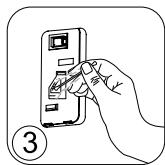
The particle sensor need to be cleaned regularly (every 2 months) and appropriately.
Make sure you turn off and unplug the appliance before cleaning the pollution sensors and follow the recommendations below:
- Clean the air inlet and outlet using a soft brush or cloth.
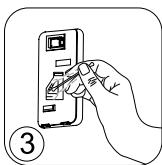
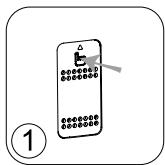
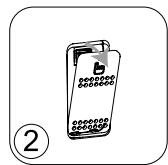
- Open the sensor cover located on the left hand side of the appliance.
- Lightly wet a cotton swab and remove any dust from the lens and the inlet/outlet. Wipe using a dry cotton swab.
- Clean the sensor using a soft brush or vacuum cleaner.
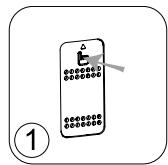
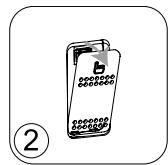
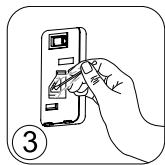
IMPORTANT:
Never use a detergent or metal object to clean the sensors.
The efficiency of the sensors may be reduced if not cleaned regularly.
Cleaning frequency varies depending on the operating environment of the appliance. If it is used in a dusty environment, clean the sensors more frequently.
STORAGE
When you are not using the appliance, store it in a cool, dry place with ambient conditions no higher than 35^ C (95°F) 70 % RH.
IN THE EVENT OF A PROBLEM
- Do not disassemble the appliance yourself. A poorly repaired appliance may be dangerous for the user.
- Check the troubleshooting table below before contacting an Approved Service Center:
| Problem | Check | Solution |
| The appliance does not switch on. | Is the power cord connected? | Connect the power cord to a plug with the correct voltage. |
| Are all the display elements off? | Press the on/off button and select the required function. | |
| Is there a power outage? | You can use your purifier once the power turns on again. | |
| The air flow does not change automatically. | Is the appliance in manual mode? | Select the correct operating mode. |
| The flow is a lot weaker than before. | Does the filter need to be cleaned or replaced? | Check the filter cleaning and replacement frequencies and clean/ replace the filter(s) if necessary. |
| There is an unpleasant smell coming from the air outlet. | Does the light still indicate poor air quality? | Check the filter cleaning and replacement frequencies and clean/ replace the filter(s) if necessary. |
| The air quality indicator does not change color. | Is the sensor lens covered with dust? | Clean the sensor lens. |
| The purifier doesn't connect | Is your phone connected to your personal Wi-Fi network at the beginning of the process? | Verify that you are conneted to your personal Wi-Fi network. |
| The purifier doesn't seem to connect? | Check that your purifier is plugged in and turned on. | |
| The Wi-Fi led of your purifier is not flashing? | Hold the Wi-Fi button for 3 seconds. | |
| The first pairing didn't work? | Restart the product to retry. | |
| My phone is connected to the Wi-Fi but not the purifier? | Make sure the two devices are in close enough proximity to one another and close to the WIFI router. | |
| My phone isn't connecting to the Wi-Fi? | Check that your Wi-Fi router is connected to the Internet Check that the Wi-Fi password didn't change | |
| Why did the pairing not work? | Check the compatibility | Supported encryption type: WPA_1/WPA_2, TIPK; PSK, AES Supported networks: 2,4 GHz (not 5Ghz) |
WARRANTY
Do not use the appliance and contact an Approved Service Centre if:
- your appliance has been dropped;
- your appliance or its power cord are damaged;
- your appliance no longer functions properly.
You can find a list of Approved Service Centres on the Rowenta international warranty card.
HELP PROTECT THE ENVIRONMENT!


our appliance contains many materials which can be recovered or recycled.
leave it at a local waste collection point or take to an approved service center so that it can be processed.
These instructions can also be found on our internet site, at www.rowenta.com.
SOMMAIRE
DESCRIPTION DU PRODUIT 12
CONSEILS DE SECURITE 12
TRES IMPORTANT 13
PRINCIPLE DE FONCTIONNEMENT 13
DÉMONTER / CHANGER LES FILTRES 14
OU INSTALLER L'APPAREIL 14
AVANT LA PREMIÈRE UTILISATION DE L'APPAREIL 15
UTILISATION 15
COMMENT CONNECTER VOTRE PURIFICATEUR À INTERNET ? 16
ENTRETIEN ET NETTOYAGE 17
RANGEMENT 18
EN CAS DE PROBLEMES 18
GARANTIE 19
AIDEZ A PROTEGER L'ENVIRONNEMENT! 19
DESCRIPTION DU PRODUIT
Unité principale
BEI EINEM PROBLEM 27
GARANTIE 28
WAAR HET APPARAAT INSTALLEREN 50
VOORDAT U HET APPARAAT VOOR DE EERSTE KEER GEBRUIKT 51
BEDIENING 51
HOE UW LUCHTREINIGER MET HET INTERNET VERBINDEN? 52
REINIGING EN ONDERHOUD 53
OPSLAG 54
ALS ER EEN PROBLEEM OPTREEDIT 54
GARANTIE 55
DRAAG BIJ AAN DE BESCHERMING VAN HET MILIEU! 55
BESCHRIJVING VAN DE ONDERDELEN
Apparaat
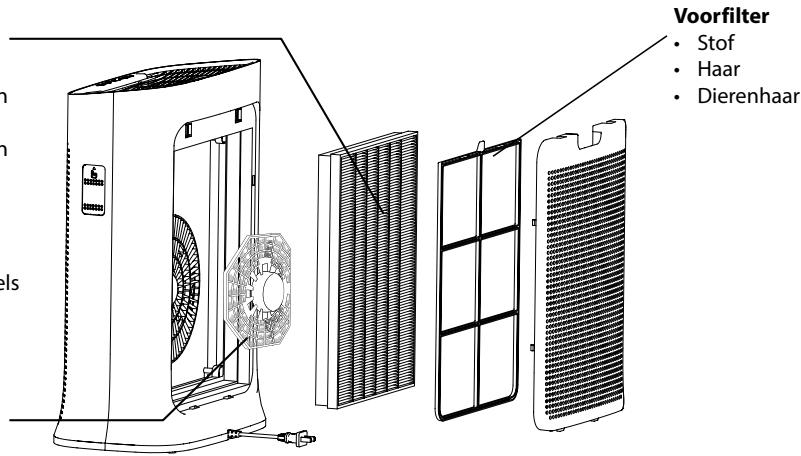
2in1 Active Carbon & Allergy+ filter
Rook
- Onaangename geuren
Chemische verontreinigende stoffen
- Vluchtige organische stoffen
- Allergenen en pollen
Stofmijt
- Microben en schimmels
- Bacteriën en virussen
NanoCaptur+ filter
Formaldehyde
"HOE SCHONERE BINNENLUCHT KRIJGEN"
WAAR HET APPARAAT INSTALLEREN
ALSEREENPROBLEEMOPTREEDT
OCHOBHN CBEDEHNA 3A IPIOyKTA
Главно устpoистvo
BytoHn 3a ynpabIeHne
UHdkaTopu
A Bb3duyxOoTBoD
1 BytoN 3a BkN./n3Kn.
5 INdikaTop 3a 3akIIOVAHeTo 3a npedna3BaHe Ha deca
B Kontrponen nahen
2 HacptpoKaHapezxm/HynipaHeHa 1nTbpa
6 INHdkaTop HaWi-fi Bpb3KaTa
C Ppeen nanei
3 3aKJIIOUBaHe 3a npEpa3BaHe Ha deua
7 INdikatop 3a cMaHa Ha fHJTbpa
D 3aedeH nahan
4 Wi-Fi 6ytoh
E KaNAK Ha ceH3Opa
F BxoJ3aBb3dyx
G Ka6eJ3a3axpaHbHeTo OTMpexKaTa
8 INdkaTop 3a aBTOMaTnueH dHeBHepeKM
9 INdikKaTOp 3a aBtOMaTnueH HOUeH peKIM
10 INdukatop 3a Tnx pexim
11 INdikaTop 3a pekIM Typ6o
12 INHnKaTOp 3a KaueCTBOTo Ha Bb3Dyxa
CbBETN 3A BE30IACHOCT
Ot oco6eHa BaXhoCT e da npoyetete HactoIHTe IHcTpyKuIN BHMaTeHNO n da cna3BaTe CneDnTe npenopbkn:
3a Basha 6e3oNaChocT, To3n ypeD OTROBapr Ha npNIOxIMnte cTaHdapTu n peIaMeHTn (DInpeKTHBNTe 3a HnCKO HnpeXeHne, eJeKTPOMarHHTHa CbBMeCTMmOcT, OKoJHa CpeDa n Dp.).
To3n ypei cIeIbA da He ce n3noJI3Ba OT Xopa (BkIIOuHTeJIHO deca) C HamaJIeHn 0n3nueCKn, CeTINBHN IIn yMCTBeHn CnOCo6HOCTn IIn C IInIcA Ha ONIT N 3HaHnA, OCBeH aKO He 6bDaT NaD3npaBAHn IIn INHCTpyKTIpaHn OTHOCHO yIpOTpe6aTa Ha ypeHa OT IInZe, OTROBOPHO 3a TExHaTa 6e3OJaNACHOCT.
- DeçaTa TpЯБа Да ce HaбЛюДаВaT, 3a Да He CSИграЯТС MaшинHaTa.
- UpeiBTo MoKe Da Ce I3NoJ3Ba OT Dea Ha Bb3pAcT 8 rOdHn N IO-ROJIeMn, KOnTO HAMt ONIT INIIN 3HaHIn YIN TaKINBa C HAmJIeHN ΦI3NueCKn, CetINBHN INIIN yMCTBeHn CnOCo6HOCTN, PnI yCNOBne, Ye IM e IOKa3aHo KaK Da I3NoJ3BaT UpeDa 6e3OpaCHO n Ca HApCHO C npncbIte pIcKOBe. DeaTa He Tpr6Ba Da cn IrpaarT cypeDa.
- Ako 3axpaHbauT Ka6eI e NOBpeH, 3a Da N36eHHe T BcKaKbU pNCKOBe, Toi Tp8Ba Da 6bJe CMeHEn OT npOn3BOdntEJI, OT cepBn3a 3a rapaHcuHNOHO o6cnykBaHe Ha npOn3BOdntEJI nII ON JInCe CbC CXoDHa KBaINΦnKaζIa.
- Побдрьжкataи поочтвано на урEDA-he 6иВа да се ИЗВьршВат ot Deца 6e3 Надзор.
3a noDbpxaun DeHocTn, MoJ, pa3rpeaTe pa3dJI "POndpbXka".
- Дръжte урEDA и HerOBnia 3axpaHbAùk Ka6eJ n3BbH O6cera Na Deça noD 8-rocnHa Bb3pact.
To3n ypeE npedna3haueH 3a ynoTpe6a camo B domaunu ycnoBna. He 6n trpa6bano da ce n3non3Ba 3a npofoecnoHaJIHn ceni.
- TapaanuTa cneBda da ce aHynipa, aKO ce noBn nobpeDa nopadn HnnpaBnHa ynoTpe6a.
- He n3no13BaIte To3n ypeB npeKomepHOn ppaHNo I/IIIN BnaXHO MRCTO IIN Ha MRCTo, KbJeTO mAm OnaCHOCT OT IOJkap.
- Ппеси улnotрба винаги се уberяbaite, че щенит на урда и неюраз захсанькабел са визправно сьстаянie.
- Hinkora He BkapBaIte npedmetu B ypea (HaPnMpEurn n np.).
- He nbpnaite 3axpaHbaua nka6e nn ypea, dopn n 3a da ro n3KIOUHTe OT KOHTaKaTa.
- Празу уnotpe6а разитte сени ka6e.
BAJKHANHΦOPMAZIHA
He nokpnbaiTe BXoJa nnn 3XoHaTa peweTka Ha Bb3dyxa.
He ninnai Te ypea c Mokpn pbue.
- HnKora He no3BovlaBte B ypea da HabIeze TeuHocT.
- HnKora He n3non3BaIte ypeDa Ha BlaJxHo MЯCTO.
- HnKora He n3non3BaIte ypeDa 6n3o Do n3TOUHk Ha TOPiHa.
- He n3non3BaIte ypeDa B 6n3OcT do 3anAaMM npedMeTu nn npoDyKTu (3abecu, aepo30nn, pa3TbOpHTeu n dp.).
- HnKora He n3nO3BaIte ypeDa B hakIoHeNo nIu XOpU3oHTaIIHO nOIOXeHne. NocTaBeTe ypeDa Bbpxy paBHa, cta6UnHa nobbpxHoct.
B cnuyaHa npodbIKNITHe OTCbCTBue: n3KnIOUeTe ypeDa, KaTo n3non3BaTe 6yToHa 3a BkN./n3Kn. (1) n n3BaTe uencela My OT KOHTaKTA.
- Ппедида мостите урEDA, Тразба ду ro ИЗКЛЮЧITE ot 6уToHA n OT KOТAKTA.
- ПО ВЕME на моHTиран e И почИствае ИЗКлIOуTeпpeuNTBaTeЯ 3a ВьзДух OT KOHTaKТa.
ПИИЦИН HA PABOTA
Rowenta Pure Air Genius Bn daBa Bb3MoXHocT da dmWate YcCT Bb3DyX B CBOY dom n da npedna3BaTe 3dpaBeTo cn c nomouTa ha do 4 HnBa Ha φnItpaun, kaKTO e OINCAHO no-dony. BcAko HnBO e BaxHo ynaBkOHTn 3Ambpciteni:
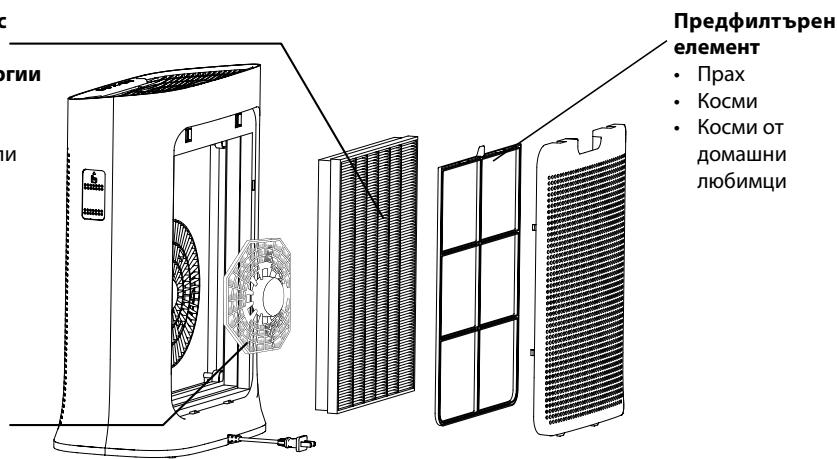
KOM6HnHpaHΦNtBp c aKTMBEH BbIeH I
Φnntbp + npotnb aneprn
- 1M
- HenpnyTHMmPn3MN
XIMNUHn 3aMbpCnTeJI - JeTINIBN opraHnUHn cmeCn (VOC)
Aleprenu nolehen - Akapu
- BaKTepn n PnIeCeHn
- BaKTepuN IN BUPcN
ΦπTbp NanoCaptur+
ΦOpMaJIeXnI
"KAK DA NOCTI RHEM IO- YNCT Bb3dYX HA 3AKPNTO"
BdonbInHeHneKbMa6oTaHaBaunIpeuNCTBaTeJ Pure Air,etOnnKoCbBeta3aTOBa, KaKa nOdo6pnte KaueCTBOTO Ha B3dyXa BvB Baunia Dom:
-Пюветраваяte сапente 3а поны 10 минуten BCEки Deн, пез Лято И пез ЗИмата.
-ПодьржайтEBHTиlaционнотасистema.
- OtrpauHueyIyOTpe6aTaHa IOMaKInHcN KIpOdyKTn.
- HenyuweTe BbTpe.
-Избягваite apomatn3aTOPN 3a Вьздух, apomatни Клески, apomatn3upaHи CBeши и Др.
-Пюоветраваite BINAн, KORAto n3BbPbBaTe dAdeHa peMOHTHa pa6Ota y Doma, KaKTo nВ npoDbJIxHHe Na HЯКОЛКо ceMnUc cIeT TOBa.
- 1364BaTte 3eIeHOLINCTHn pactehn, KOITo ca aIepreHn IJIu TAKIBa, KOITo ce HxJdaT OT YcETO NOINBAHe.
I3TerIe npinloxKeHneTo "Pure Air by Rowenta" n cIeBaiTe INcHTpyKunTe Ha CBOAcmptfOH:
| 1.Влесные в"Сьздайто свая Rowenta akaynt",ако сту Нови.Или Влесные приложения,ако Вechу имате akaynt. | 2.Уberете сe,чe стte 6blnzo do урада за пчес'tвае по врeme на свьрзва themselves в дvoюка (нa 2 метра максиму)и чe стte постав然是 урада за пчес'tвае 6blnzo do Wi-Fi. | 3.Уberете сe,чe тeteфоньт Ви e сььрзан кьm Вашatura домаша Wi-Fi мржka (ичete „Звн"и инданкогьт на Wi-Fi сe мига,зa da уразал, чe Wi-Fi e усpenho вьлочен.) |
IImam npo6JIemc c HnHCTaIIpaHeTo Ha IIpNIJoxKeHNeTo:
Поберете съвмecимоста на щeбайтаб https://www compatibilitiy.groupesb.com/CompatibilityList-Pureair-Rowenta.pdf
I3BbPwBaHe Ha npHydntelHo HynipaHe:
Ako smenite fumtp npede nkpaa ha ekcnnoataunohnna My jxbot, hatachete 6ytoha 3a pexma (2) MODE 3a 3 cekyndn, 3a da hynpate hactpojnte na fumtpba.
BHMaHne:
Ako rpaynite ctahat nIbTHo 6eH, fIITbPbT Tp86Ba da ce I3BaHn ot npueHCTBaTeJ,doKaTo rpaynite OTHOBO cTaHAT npO3paHn.
Ako Te He cTaHAT npo3paHn, fHNTbpbT Tp86Ba da ce CMeHN.
Ako rpaynata cTaHe, TpOswnBa", 0nTbPbT Tp6Ba da ce cmEn.
EeKTHBHOCTT ha ypea MoKeJa Haamalee, ako npedHnIbphnIeMeHr He ce nouchBa peoBHO.
HnKora He n3noJ3BaIte npedunTbpeH enemeHT, aKO e Bce Oue BlaJKeH.
To3n npedhntbpehen eeneMe t e eunHCTBeHHa, KOto MoKe da ce n3no3Ba MHorokpaTHo n da ce npommbc Boda. Kom6HnpaHHT h p cakTNbeB bIgHe u HnTbp + npotNB aaneprn He moKe da ce nouchTaBn 3nON3Ba NOBtOPOH.NoKora He MnTe C BODa. Kom6HnpaHHT h p cakTNbeB bIgHe u HnTbp + npotNB aaneprn Tp86Ba Da ce cmeHa cIe KpaHa ekcnloatauOnHHMa My JxNBoT. 3a onTmAlHa pa6ota Ha ypeDa n3no3BaIte camo hnnTp, npon3BeDeHn ot Rowenta. Ako ZetBT Ha rpaHynite 3a HnTbPa Nanocaptur+ cTaeMbTHo 6an/In/ Te cTahat PohnBn, HnTbPbT Tp86Ba Da ce cmEHn.
Mon, o6bphete BnmaHne: hKoN fItpn MoKeJa OTeJIaBpeMeH JeK Mnpnc npaui yCNOBA, pni KOnTO ca 6nn TpaHcnpTnpaHn n CbXpaHbAHn. Ta3n Mnpu3Ma ue n3ye3He n He e onacha 3a Xopata.
Cen3opn 3a 3ambpcBaHe
Cen3Opnte 3a fnnu qactnui Tpr6Ba da ce nouchTba peoBHO n npabunlo (Ha BCEkn 2 Meceua).
Ipeu da nouchte 3aMbpceHte ceH3Opn ce yBepTe, ye cTe n3KIOUHNypeDa ot 6yToHa n OT KOHTaTaN CneBaIte npenopbKnte no-dony:
1.Почире Te OTBOPHTe 3a BXODиИЗXODHa Bb3dUshHaTcTpy, KaTOи3NoJ3BaTe MeKa YeTkai NkBpna.
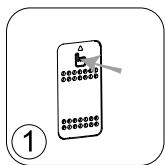
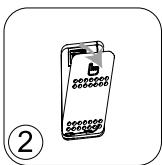
2. ÖtbopeTe KaNaKa Ha ceH3opa, KOITo ce HAMipa OT JIbBaTa CTpaHa Ha ypeJa.
3. JIeKo HABJXHeTn NaMyHa KbpNa I npEmaxHeTe npaxa OT Jeuata N OT OTBopa 3a BXoN/INxOJa Ha Bb3NyHHaTa CTpy. IV36bPwTe CbC cyxa naMyHa Kbpna.
4.Почирсте сензога с мека четка плп ралхocmykaчka.
BAKHO:
Hnkora He n3noJI3BaIte noOuNCTBaU ppenapaT mII MeTaIIH npEdmTe 3a NOUcTBAHe Ha cEH3OpIte.
EeKTHBHOCTTa Ha ceH3OpUte MOKe Da haMaJee, aKO He ce NOuNCTBaT peoBHO.
YeCTOTATA Ha NOUcTBAHe 3aBmCn OT pa6oTHata cpeHa ypeHa. Ako ce n3non3Ba B npauHa cpeHa, NOuCTBAHte CEH3OpHTe No-yeCTO.
CbXPAHEHNE
Korato He n3nol3BaTe ypeda, cxbxaHraBaiTe ro Ha cyxo I npoxlaHIO macto npu ycIOBna Ha OKoIHaTa CpeDa C noHNsCKn CToiHOCTn OT 35 ^ C n OTHOCIneJIHa BLnaxHoCT 70%.
B CJUyA H A IPOBJIEM
- He pa3rno6raBte ypea cam. EHN Heo6pe pemontpan h ype moke da 6bde onaceh 3a notpe6nteHte.
- Hapabete cnpabka c Ta6nlaata no-dony 3a OTcpaHbAhe Ha Heu3npaBHOCTN, npedn da ce Cbpxe otopun3pauh cepBn3eH ueTbp:
| Пироблим | Пирobерka | Решения |
| Уреьт не се вbkлоча. | Свързан ли e зхранвашия кабел? | Вкlioочete zaxphaнвашия кабел в Контakt с правлино напreamожения. |
| Изкоочени ли са BCNUCKи щlementné по диспег? | Нат生态系统у 3a Вкlioочан/Изкоочан и зберетe HeобхODIMATA Фунckция. | |
| Има ли спране в[elektrozoхранвашие? | Можete на Излолзовate Вашяпreamост班车, сом зхранвашие 6ьдe Вьзстановeto. | |
| Вьздунnotok не се смена AVТOMATЧИNO. | Уреьт в ръчен ржим ли e? | Изберетe похдашия ржим на равота. |
| ПOTOKьт e много по-слб отпеди. | Фильърьт лим лим hyжda ot поочевache лим поdmяна? | Пирobерete чесота за поочевache и Смаян ha Фильърьи поочctete/Смehete Фильър(a Фильтугte), ак e HeобхODIMо. |
| Има Нелрийта МИрИЗma, ИДвашиа OTВьзduxooTBoDA. | Светлинnotу Иndикатор ооч лим по��зда LA loшо качебто на Вьзduуха? | Пирobерete чесота за поочевache и Смаян ha Фильърьи поочctete/Смehete Фильър(a Фильтугte), ак e HeобхODIMо. |
| Сvetлинnotи Иndикатор 3a Качесъю на Вьзduуха не поменьяцьета си. | Има лим прах по leецда на сенztор? | Почистете лима на сенztор. |
| Уреьт за пreamост班车 не се CBьрзBA | Правлино лим e сььрзан Вашяп Телфоон кьм Вашада DOMAша на Wi-Fi Мрека в НачалOTO на поцеса? | Уberete се, че се Сььрзан Кьм DOMAшнatable Wi-Fi мрека. |
| Уреьт за пreamост班车 не ИЗглжда лим сььрзан? | Пирobерete дали Вашяп уreed за пreamost班车е e сьваран сиерcentи в Вьлочen. | |
| Свetedиodьт за WI-Fi на Вашя уreed за пreamost班车е на мига лим? | Задъжты на trushat Wi-Fi 6уToha в пroduльgeshenе на 3 секунди. | |
| ПьравоTOCBьрзBaNEв ДвОйка не равOTи лим? | Ростаима对接путale рожкta, за дддита TeOTOBO. | |
| Могот telефон e сььрзан Кьм Wi-Fi, HO на Кьм ураза за пreamost班车e? | Уberete се, че д Bretve усточьca sa дoctатучно бизю до дую и 6blizdo do WiFi руера. | |
| Могот telефон не сььрзан Кьм Wi-Fi? | Пирobерete дали Вашяп у汞ер e Сььрзан с Иnternet. Пирobерete дали папола за Wi-Fi не e пromemehа. | |
| Заш сььрзВанeto в дvoьka не pa6otи? | ПPORobерete сььмec'tIMOCCTTA. | Пордьржан тил крпtnрале: WPA_1/WPA_2, TIPK; PSK, AES Пордьржан мреки: 2,4 GHz (he 5 GHz) |
TAPAHLCNIA
He n3non3BaIte ypea n ce CbpxeTe c OTOpn3napc cepBn3en ueHtbp, ako:
- ypeBt Bn e 6nI n3nycHa t Ha 3emrTa;
- ypeBbT Bn nIIm 3axpaHbAunrMy Ka6eI ca nobpeJeH;
- ypeBt Bn Beue He pa60Tu npabuJIHo.
Mожete Да Намерпге списьк С OTOPИЗИРАПИТЕ СЕВИЗни ZeHTPoBE B М exДунapОДHaТа rapaHцIOHHa KapTa Ha Rowenta.
IOMORHETE 3A ONA3BAHETO HA OKOJIHATA CPEIa!

BauyIypeIcBbpxa MHOrO MaTePnAIn, KOnTO MoRat Da ce N3BNeKaT INIpeuKlnpaT.
OCTaBete ypeBa B MeCTHnI pyHKT 3a Cb6uPaHe IINI rO 3aHecTe B OTOpU3uPAH cepBn3eH ueHTbp, 3a da MoJcE da 6bJe o6pa6oTeH.
HactoIte HNCTpykunMOKeTe da HamepTe n B HauaJe6 caT ha aDpec www.rowenta.bg.
https://www compatibility.groupseb.com/CompatibilityList-Pureair-Tefal.pdf
JIKIJKJIIOUHTN OUYBAYO INTEPHETY 107
IOITJIIOBCLIYTOBYAHN 108
36EPIIAGHH 109
YPA3IBHNIKHEHHIPO6JIEM 109
「APAHTI 111
ДОПOMOЖITb 3БЕРТИ ДOBКЛЯ! 111
OΓλДПΟΥΚΤ
OCHOBHa yactHb
A OTbip noaui nobitpr 1 KhoNka BBimKHeHH / BmMKHeHH
B PanaHb KepyBaHHa 2 KhonKa Bn6Opye
C NpeednnaHEnb CKnDaHHN WtYBaHb
D 3 KhoNka 6KoKyBaHHa DocTyny ditei
E KpnuKa daTnuKa 4 Knonka niiKluueHn do Wi-Fi
F Bxipn OToBip Dnna noBipra
G Ka6eJIb XJUINBHeHHa
INDKaTOPN
5 Pexim6kOyBaHnIdoctnyditei
6 PiiknloeHHa Do Wi-Fi
7 IHHaKATOp Heo6xIDHocTi 3amHn fInbtpa
8 DeHHn aBTOMaTHHn peXNM
9 HiuHn aBToMaTnuHn peKmM
10 Tuxin pexim
11 Ppncckopen pexnM
12 Jkictb nobitpr
IOPADNI ⅢOIO BE3NEUHO BIKOPNCTAHNA
PekomeHdyemoybaxno npouHTaTnIO IHctpykuio Ta doTpmyBaTnca TAKnx peKomeHdaui:
-ДяВашоi 6e3nekn ue npnilad BiIDnoBidae 3aTbePdJxehnM cTaHdapTam i npabNlam (DnpeKtNbA npo Hn3bKOBoIbTHe O6laHaHHn, eJeKtpomarHITHy cymichictb, HabKoIIshnE cepeOBOuSe TOno).
- Zei npnilad He npn3naueHn dIy BnKOpNCTaHnO oc6amn (3okpeMa, DITbMn) 3 06mexKeHnMn i3N HnMn, CEHCOPHnMn YI POzymOBnMn MOxJIuBOcTAmn a6o oc6amn, IIO MaIOTb HeIOCTaTHbo DOCBiDy a6o 3HaHb, OKPIM BnPaAdKiB, KOJI N BOH N BnKOpNCTOBYt npnilad NiI HaIJaOM a6o 6yIi npoiHCTpykTobAhI CTOCOBHO IORO BnKOpNCaHnO oc6oIO, BiIDNoBidaJbHOIO 3a iXHIO 6e3neky.
- CTeXte 3a TmM, Μιός Αγίτη Θεραλίσης 3 πρυλάΟ.
-ДiTиВiKOM BiД 8 pOKiB i OCO6n 3 O6mExeHIMn φi3nUHIMn, ceHCOPHIMn
-н рОЗуМOBИМ NMOJINBOCTЯ MTo T a OCO6n, ξO MaIOTb HeIOCTaTHbO
-ДOCBiIy a6O 3HaHb, MOxYtB KOpNCTyBaTnCЯ ПпЛадOM nId HargIaDM,
-б6о якso BOHn 6yIи npoiHcTpykTOBaHi CTOCOBNo Ioro 6e3neuHOro
-ВИКОрИСТаHHЯ T a 3pO3ymiN NOB'ЯЗaHI рИЗИК. ДiTи He NOВИНHi
-гразИСЯ 3 ппладOM.
3 MeTOU yHnKHeHH He6e3neKn NOsKOJxHn SHypr XnBJeHH nOBuHEn 3aMInHOBaTnCBApo6HnKOM, IOrO cIyX6oIO nICJIpaDaxHoRO 06cIyroBvBaHH a6O Oco6aMn 3 noDi6Hm pIBhem KbajiΦikaui.
- He do3B0JIe Te iITaM uNCTuTn npilaad a6o BnKohyBaTu iHsi pOceDpyr3 Ioro 6ocnyroBvBaHHa 6e3 Baosoro Hargy.
- ДokладиWI BiIDOMOCTI npo 6cnyroByBaHnЯ npuJaD y dNb. y po3diJI «06cnyroByBaHnЯ».
- TpimaiTe npnilad i Noro shnyp xNVBJIeHnB B Micci, HeoctynHOMy dIaTeMolOdwe 8 pOKiB.
- Léi npinad npin3haeHn tiNbKn dIy no6yTOBOro BnKOpNCaHHa. Ioro He moXHa BnKOpNCTOBByBaTn dIpy npomncIOBnx nOTpe6.
- RaKIo npnIaD 6yde noWkoJxHenn ype3 Ioro HnnpaBnIbHe BnKOpncTaHHraPaHTIO 6yde cKaCoBaHO.
- He BvKOpncTObuYte cei npnilad y dUyke 3aunneHnx i / a6o BOIornX npMiuIeHHx uY y BoRHeHe6e3NeHHx MICzJx.
- Npeep BnKopncTaHHa3aBxDn nepeBipraTe npnilad, BuNky uHyp KINBneHna Ha naBHicTb noWKoDKeHb.
3a6oPoHeNo BCTaBlaTn 6yIb-kaI cTOpOHn IpeMTeN (HaPnKnaI, roKn) ycepeHny npnaIay. - He Tārhiṭb shHypr kɪnBleHŋa əb o npɪlaɪd, Ḥaɪbīt bʌkɪz o Bɑm nɒtpi6h O BɪntaɪrHuTn Bɪnʌk y 3 pɔsTeKn.
- Параев Викоростангам розмогайшур кИВленина на BCIO DOBJKINHy.
ДУЖЕВAJКЛИВО!
- He hakpmbai Te Bxidi Hi OTBOp nIe Nobitpy Ta pewiKy Ha OTbopi noaui NobiTpa.
He TopkaTecn npuJaDy MokpMn pykAmn. - YHnKaIte noTpanJaHHa piDInu BCEpeDHy npJlaNy.
- Hikonl He BnKopncToBy Te npuiJa y BOJorInx npumiueHnX.
HikonHe BnKOpncToBvIe npuaopraizdxpepaTm Tepla. - He BvNKOpNCToBMyTe npuIaN nopIaI 3IerKo3aMnCTUMN npEIMeTAMN a60 peOBUHAmN (3aHaBICKaMn, aepo3oJMaMn, po3uHHNkAmN ToIO).
Hikon He BUKOPINCTOBYte npnla y haxnlneHomy a6o rupn3OHTaIbHomy noloxeHHi. NocTaBTe npnlaHa cTiky pIacky nobepxHIO. - Jękzo Bn 6ynde BicCyTHI npotrArom TpBaNOrO Yacy, BIMKHiTb npUnaJ 3a DOnOMoroIO KHONK BBIMKHeHH / BIMKHeHH (1) i BntarHtB BuNky 3 po3eTK.
- Iepu hix nepenocntn npuna, BUMKHitb Noro Ta BUTARHITb BNUKy 3 p03eKtN.
- Перш 키х 36ирази a60 чстити прлад, втуг HilвИку 3 розетки.
IHCTPYKUJA
3aBdAnOnncaHm Hxue 4 pIBHm fIbIbTaIiTefal Pure Air Genius ouHy e nobITra B oceI Ta 3axuae MeokaHizB BID BnBy wkiDnBnx peoBnH. KoxHn pBeHb np3HaueHn dJe OunSeHHN nobITpR Bid neBHorO BVnu 3a6pyndHIOUxpeoBnH:
AntnaIepriHm fIbtp
i3TexHonorieoΦinbtpaft
2B13akTNUBOAHM
Byrinnam
-ДИМ
- HenpneMhi 3aapanx
Ximiuhi 3a6pudnHIOUpeoBHH
- Lettuoi oprahiuHi peuobunn (JLOP)
- Alepren ta nnilok
-Пилови кліцi
Mikpo6n ta ubinb
- BaKTepi Ta Bipycn
Φinbtp NanoCaptur +
ΦopMaIbIerIa

«ДОДATKOBI 3AXODI 3 OUYISEHHЯ NOBITPBA IIPIMIJIeHHI»
Okpim BKNOPiCTaHnra Pure Air Genius, e KIbka doaTkoBux cnocobIB nokpaueHHra kocti nobitprB npiMiueHHi.
-ⅢoJHn, yIitKy Ta B3mKy, npObitpOte npmiueHH npOtaRGM npHaumHi 10 xBnInH.
-Пювовtieо6слу罗вьаннcaNTeMBeHTnlaцii.
-06mexTe BUKOPINCTaHHN NO6yTOBUX npOdykTtB.
-He naitb y npmiueHHI.
-He BnKOpNCToBnyTe OcBiXyBaHi NobITpy, apOMaTnHi NaMUnKn Ta CBiKu ToIoo
-Пися заBERSEENH 6yDb-Янх pemOHnX po6iY BaSiO oceni cnig perynapno npoBtpiBaTn
примиEHN pOTaRGM KINbKox HAcTyNHx TnKHHIB.
- He trpmaite B npimiuiehhi poclinn, kki notpe6yioTb yactoro noiBaHna, aO MOxuyt b cnprunHrtn aleprichni peakii.
ДЕMOHTAZ / YCTAHOBKA ΦΙΙbTPIB

YAKNX MICUAX CJIID YCTAHOBJIOBATN IPNJIAI
Помістіпь оочиувач на CTіні КИ ППACК YОВ NOBEXHNO B npriMiiцeHHI i3 3a6pydneHIM NOBITpM. Дя 6e3pepeшkoДою сиркуляцii NOBITРЗ KOKHORO 6OKY npinadу MaE 6yTN He MeHNe 50 CM BilbHOro npocstopу. He BCTAHOBIIIOte npinad 3a3ahabickamu,piD BiKHom,Me6lmaN a60 noJIuZMaN, a taKox NopRd 3 iHUnmnpedMeTAMn,aki MoKyTB nepeShKOJdKaTn pyxH nobITPra. BInkOpICTOByTe npinad y npimiuHHNx i3 TempepaTyPOI NOBITPR He BnSe 35°C (95°F) i BIDHOCHIO BOIoricHe BnSe 70%.
IIO NOTPIIBHO 3P0BHTI PEPED IEPSHIM BVKOPNCTAHHЯM PIPNJADY
IpepeBnKOpncTaanHm npuJaMy 3Hmitb 3axnChy nnaCTNKOBy ynaKOBky 3 fJbTpib.
Ipeep nepuim BnKOpncTaHnHm nepekoHaTecra, 0o dKepeNo eNeKtpnUHOro XnBHeHHaE Happy3i, cactotni NotyXhOcTI npnaJy.
Ipiuad MOxHa NiKIOUoyaTn Do po3eTKn 6e3 3a3eMneHn. BiD HaneKntb Do KnaCy II (pnuad i3 noDbIiHO eNEKTpuHIO iOJraio
IpepeyBimKHeHHaMepekoHaTeCe,io:
- npnlaonOBHicTIO 3i6paHnI, kA3a3HaueHO B iNCTpyKcii 3 6e3neKn;
- npnilad yctaHOBJIeHn Ha cTIiKl rOpI3OHTaJbHi NObepxHi;
- npnlaud yctahOBleny npabunbHomy noLoJKeHHI, k3a3HaueHo B IHCTpyKuII cBOrO noci6Hnka;
- BxidHn OTBip Ia nOBiTp Ta pewiTka Ha OTbopi nOaui NobiTp He 3aropodxeHi;
- iInbTptn Ta naneB yctaHOBneHO npabNBJHO (iINB. po3dI IN «DemOHtax / yCTaHOBnHnHnEiNbTpB»).
BAJKIIBO!KoII npuaH He BnKOpncTOByeTbcra,pekOMHeNyEbCBA BMNKaTN
MORO Ta BnIMaTN BnIKy 3 p03eTKN.
ФУнкцПРИЛАДУ
-
KhoNka XmBJIeHHa (1)
-
HaTnchItb 90 KhoNkKy, 906 yBIMKHyTu / BIMKHyTu OuyuBaay nobitpy.
-
Khonka Bn6opy pexumy (2) (MODE)
-
DeHn i HnHn aBtOMaTnUHn pexIMn: kIoo JaKicTB nobITpr cTa€ 6e3dOraHHo, npuJaD nepeXoHTb y peXIM OUYBaHHa.
-
HatncHtB zu KhoNkny, 06 Bn6paTn oINH i3 OHTnpbOx peKmIB. 3aOpntbca iHdkaTOp Bn6paHOro peKmMy.
-
DeHHn aBTOMaTHHn pexm: BeHTNJATOp npaioe Ha 1, 2, 3 a6o 4 pIBhi WbNdkocti.
-
Hiunn abTomatnunn npexm: BeHTnIaTOp npaioe Ha 1 a6o 2 pBHi wBndkocti.
Tnxn pexim: BeHTnlaTOp npaioe Ha miHimaBni WBnKoCTi. BnKOpuctobyTe ue pexim, KOnn noTpi6Ho 36epiratTu Tnuy.
-ПиСКОЕн рекIM:ВЕТИЛТOP працюЕ на мakсимальнишвдкостт.ВИКОПСТОВУITE сей рекIM,Якso NOВITРДужelveзбрун He. -
Pexim 6lokybaHHaDctyn dTei (3
Cnctema 6IokyBaHHa 3axuaaOuyBaB bI d 3iHcHHeHb BnnaKOBHX HaJauTByBaHb ni d acp o60tn.
- yIyIyIyIyIyIyIyIyIyIyIyIyIyIyIyIyIyIyIyIyIyIyIyIyIyIyIyIyIyIyIyIyIyIyIyIyIyIyIyIyIyIyIyIyIyIyIyIyIyIyIY I yIpMcyHnyTcpe pexm,HaTncHtB KONky (3) i yTpmyte ii npToTrom 3 cekynD,doKna naHeJI KepyuBaHHn He 3aOpntbCn IHnKaTOp 6JokvBaHH. 106 BnTu n3 zuBo r pe xmy,ue pa3 HaTncHtB KOnky (3) i yTpmyte ii npToTrom 3 cekynD,doKn IHnKaTOp He BumkHeTcB. Picra Bn6Opy zuBo r pe xmy iHsi KOnkN 6ye 3a6JokOBaHO.
https://www compatibility.groupseb.com/CompatibilityList-Pureair-Tefal.pdf
Yn moKytb DeekIbKa KopncTyBauchiNikKluOHTnca Do OndHoro npunctpo?
3BvauHoi! Hobi KopncTyBaCi MaIoTb 3aBaHTaKNTn nporgamy Pure Air by Tefal, cTbOpntu o6NIkOBni 3anic i BVKoHaTu NiDKnIHyeHHN.
Якто з'эндань за мерекею Wi-Fi nepeрвалоча на.Deякий час,чMuKHa npodobkHTN KepyBaTN OunuByBaYem Chepe3 nporpamy?
Jkso 3'eHaHHa 3 Mepexeo nepepbetbca, npOdyKT BmKHeTbca ABTomauHc 3a 24 rOuHn.
- lndkaizj kocti nobitpr
Ihdkatop kocti nobitpr (12) po3taosoban H napeedni nanei (C) npnilady. CbitnoBn iHdkatop 3 noka3ye pibehkocti nobitpr:
JrKo rpaHyn He cTaOb npO3OpMn, fInbTp notpe6y€ 3amHn.
Akuo rpaHyn ctaH KpuxKmH, fInbTp notpe6y 3amHn.
Heperynpe ouuieHHa iIbtpa nonepeHbOro ouuieHHa MOKe npu3BecTu DO 3HxueHH a eKtNBHOCTi po60tu npuiaNy.
Ipeed BnKOpNCTaHnFm fInbTpa nonepdNbOro OunuEHHnepeKoHaTeCra, 0o Bin NobHicTo BnCOx.
ΦiNbTp nonepednbo Oounuenn H- ce eunnnn fipbtp, knn MOxHa BnKOpNCTOByBatn NOBtOPO Ta Mmtn y Boi. AHTnaneprinHn fipbtp i3 texhonorieo fipbtpaui 2 B 1 3 AKTNBOAHM ByrillnMa He MoxHa YcHTnTa BnKOpNCTOBYBatn NOBtOHO. Y JoHOMy pa3i He moitb uei fipbtp. Iicna 3akiuueHHa TepmiHy ekcnnyataui aHTnaneprinHoro fipbtpa 3 texhonorieo fipbtpaui 2 B 1 3 AKTNBOAHM ByrillnMa Noro cnid ZaminiH.ДЯ onTmmanlhoi po6Ot npuaDy BnKOpNCTOBuyTe Nnne fipbtp, kni BuROTOBIAOTBCa KOMnaiHoe Tefal. JIIO rpaHynfipbtpa Nanocaptur + ha6ynn Henpozoporo 6inoro KOJbopy Ta / a60 cTann Kpuxkmm, fipbtp notpe6ye zamHn.
Ybara: deiki fiibtpn MOxyb Tmucabo BndaBatn Ierkn 3anax, o6ymoBlenny mOBamn TpaHcnpotybaHHra Ta 36epiraHH. Lcien 3anax, knn i3 yacom BnuBtPioetbcra, e nobhictu 6e3neuHm dIy 3dopob'JIoudnn.
DatuKn3a6pydHeHHa
DaTnK yactOK Heo6xIDHO peYyIaRPHo Ta HaneXHM YHOM YNCTITN (KOxHi 2 MicaJI).
Ipeed ouHneHHaDatUHKIB 3a6pydHeHHB BUMKHiTb npuHa, BNTaRHiTb BUNy 3 pO3eTKn Ta doTpmyTeCb HaBeDeHNx HNXue peKomeHdaui.
- OuICTbTe OTBOpn BXOy / noaui nobITpr3a donomoroIO M'raKOi a6o cepBeTkn.
- BvdKnHte KpnsKy DaTnuKa, Ka po3TaWobHa 3 IIBoro 60ky npnilaNy.
- 3nerka haMoOHTb BAtHy pAnuKy Ta BnDaJIitb BeCb Nn 3i cKnla Ta OTBOpIB BxOy / noaui nobitpy. Ipoptipb cyXoIO BaTHOIO pAnuKoIO.
- Ouuchtbe TaTUnK 3a DOnOMoRIO M'JAKOI uTKn a6o Nnloocca.
BAJKINBO!
Hikon He BnKOpNCTOByIe MmOci peYOBHNu MeTaeBi npedMeTn dJa OunueHHaTUnkIB.
HeperyIaRpe ouHueHH daTunKIB MOKe 3HN3NTn eEeKTHBHiCTb po6OTn.
Yactota ouhiennha 3anexitb BiD 30Bhihix yMOB, y knx BnKOpncTOBYeTbCn npuna.
Akuo BIn BnKOpncTOBByEbCBAzHnneHomy cepeOBnui, uNCTbTe DaTuNKuactiwe.