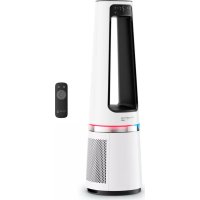
Eclipse QU506 - Air purifier ROWENTA - Free user manual and instructions
Find the device manual for free Eclipse QU506 ROWENTA in PDF.



| Product type | Air purifier |
| Brand | Rowenta |
| Model | Eclipse QU506 |
| Dimensions (approx.) | 60 x 30 x 30 cm |
| Weight (approx.) | 5 kg |
| Power supply | Mains, 220-240 V |
| Power consumption (approx.) | 50 W |
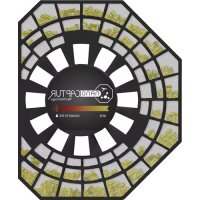
| Main filter type | Particle filter XD6520F0 (2 units included) |
| Pre-filter | Washable, clean every 2 weeks |
| Speeds | 12 manual speeds + automatic mode |
| Modes | Normal, Night, Auto |
| Oscillation | Multi-angle: 30°, 60°, 120° and 0° |
| Timer / Delayed start | 1 to 12 hours |
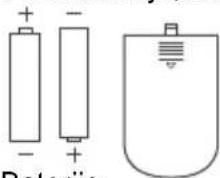
| Remote control | Yes (AAA 1.5 V batteries included) |
| Decorative light | Yes (activation via LIGHT button) |
| Filter replacement indicator | Yes, lights up when filter needs replacement |
| Automatic shutdown | After 12 h without operation (AUTO OFF mode) |
| Cleaning | Surface: damp cloth, no abrasive products |
| Particle filter: replacement | Every 6 months (average), part number XD6520F0 |
| Filter reset | Press FILTER button for 3 seconds |
| Storage | Cool and dry place, temperature ≤ 35 °C |
Frequently Asked Questions - Eclipse QU506 ROWENTA
User questions about Eclipse QU506 ROWENTA
0 question about this device. Answer the ones you know or ask your own.
Ask a new question about this device
Download the instructions for your Air purifier in PDF format for free! Find your manual Eclipse QU506 - ROWENTA and take your electronic device back in hand. On this page are published all the documents necessary for the use of your device. Eclipse QU506 by ROWENTA.
USER MANUAL Eclipse QU506 ROWENTA
natural_image
Line drawing of a vertical cylindrical device with a U-shaped top and cable at the bottom (no text or symbols)QU/QF503x
FR Veuillez lire attentivement le livret « Consignes de sécurité et d'utilisation » avant la première utilisation / EN Please read carefully the “Safety and use instructions” booklet before first use / DE Bitte lesen Sie vor der ersten Verwendung die „Sicherheits- und Gebrauchsanweisungen“ sorgfältig durch / NL Neem vóór het eerste gebruik aandachtig het boekje met de veiligheids- en gebruiksvoorschriften door / IT Leggere con attenzione il libretto «Norme di sicurezza e d’uso» al primo utilizzo / ES Lee atentamente el folleto «Instrucciones de seguridad y de uso» antes de utilizar el aparato por primera vez / PT Leia atentamente o folheto «Instruções de segurança e utilização» antes da primeira utilização / RO Citi i cu aten ie bro ura „Instruc iuni de siguran – i utilizare” înainte de prima utilizare / BG Моля, прочетете внимателно книжката „Инструкции за безопасност и употреба“ преди първа употреба / SL Pred prvo uporabo natan no preberite knjižico «Varnostna navodila in navodila za uporabo» / HR Prije prve uporabe pažljivo pro itajte knjižicu „Sigurnosne upute i upute za uporabu” / SR Pažljivo pro itajte brošuru „Uputstva za bezbednost i koriš enje“ pre prve upotrebe / BS Prije prve upotrebe pažljivo pro itajte knjižicu „Upute o sigurnosti i korištenju“ / CS Před prvním použitím si pečlivě přečtěte příručku „Bezpečnostní pokyny a návod k použití“ / SK Pred prvým použitím si pozorne pre ítajte brožúru „Bezpe nostné pokyny a pokyny na použitie“ / HU Az els használat el tt figyelmesen olvassa el a „Biztonsági és használati utasítások“ cím kézikönyvet / PL Przed pierwszym u yciem nale y dokładnie zapozna si z broszur „Instrukcje dotycz ce безpiecze stwa i u ytkowania“. / RU Перед первым использованием внимательно ознакомьтесь с брошюрой «Инструкции по технике безопасности и эксплуатации» / UK Уважно прочитайте брошуру «Інструкції з техніки безпеки й використання» перед першим використанням виробу / EL Прів апо́ тні прώтн хрήση, диабáστε проσεκτικά то фуллáδιο «Обднгієс για την ασφάλεια και τη χρήση»
FR Pour plus d'informations / EN For more information / DE Weitere Informationen / NL Voor meer informatie / IT Per ulteriori informazioni / ES Para más información / PT Para obter mais informações / RO Pentru mai multe informa ii / BG За повече информация / SL Za ve informacij / HR Za više informacija / SR Za više informacija / BS Dodatne informacije / CS Pro více informací / SK Pre viac informácií / HU További információk / PL Wi cej informacji mo na znale na stronie / RU Для получения дополнительной информации / UK Докладніша інформація / EL Гіа періосо́терес плпрофорієс.
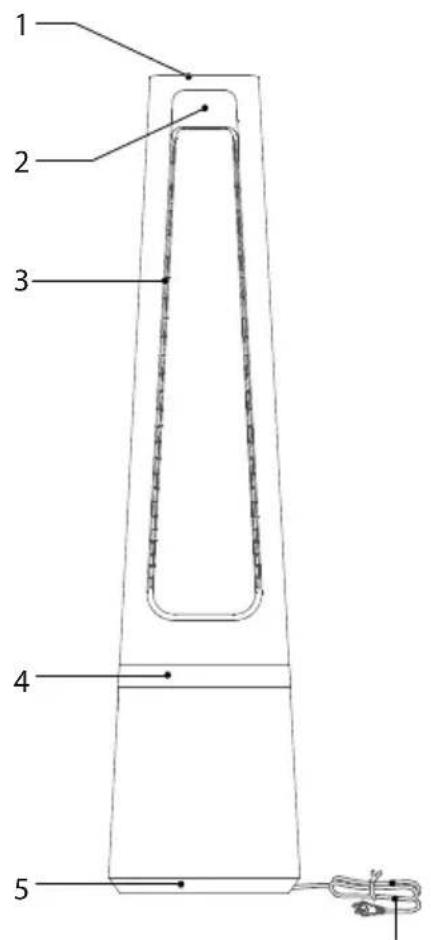
DESCRIPTION
6

natural_image
Simple 3D diagram of a rectangular object with a black arrow pointing to its top surface (no text or symbols)natural_image
Line drawing of a hand opening a door with a patterned lid (no text or symbols)natural_image
Line drawing of hands installing or removing a mechanical component with a textured interior (no text or symbols)natural_image
Line drawing of a hand holding a tool interacting with a container filled with checkered pattern (no text or symbols)natural_image
Simple icon of a document with a grid and refresh arrow inside, enclosed in a dashed circular border (no text or symbols)natural_image
Cross-sectional diagram of a mechanical or architectural component with no visible text or symbols
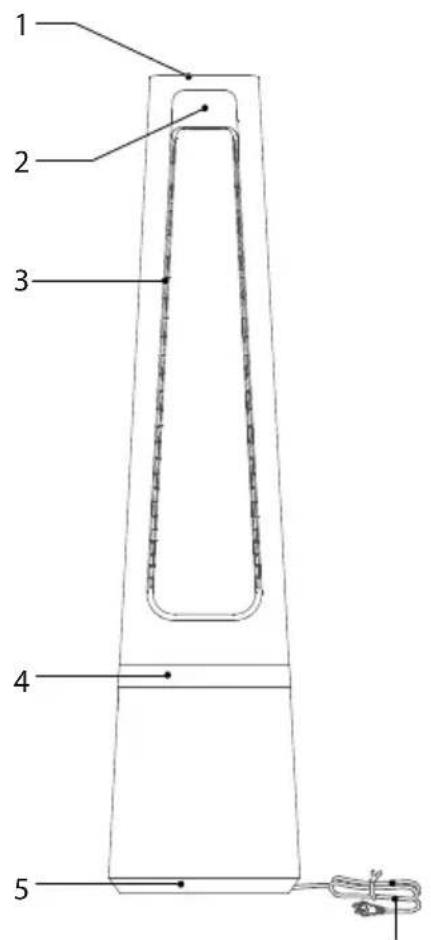
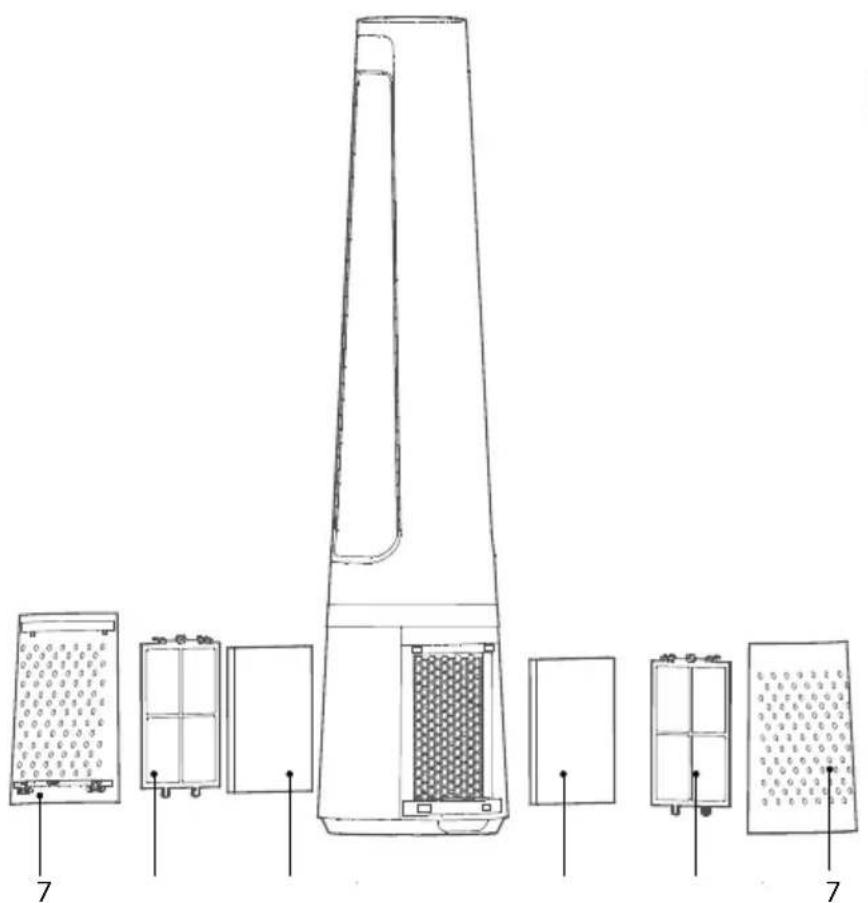
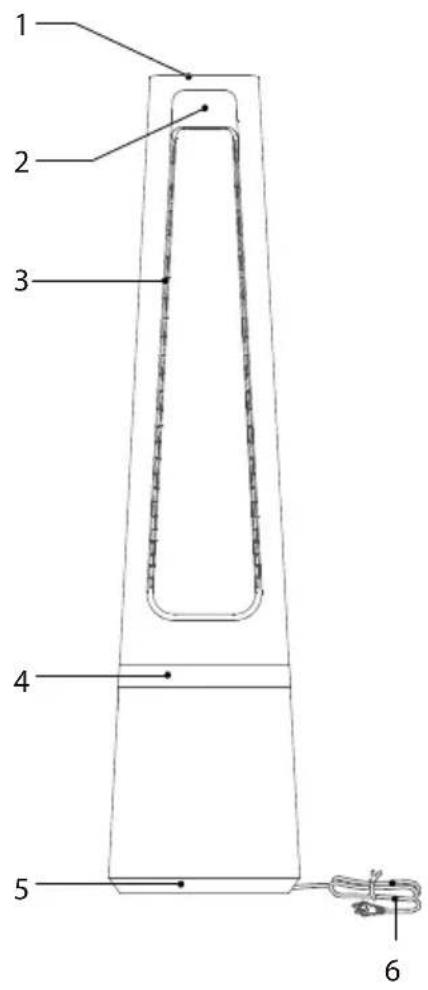
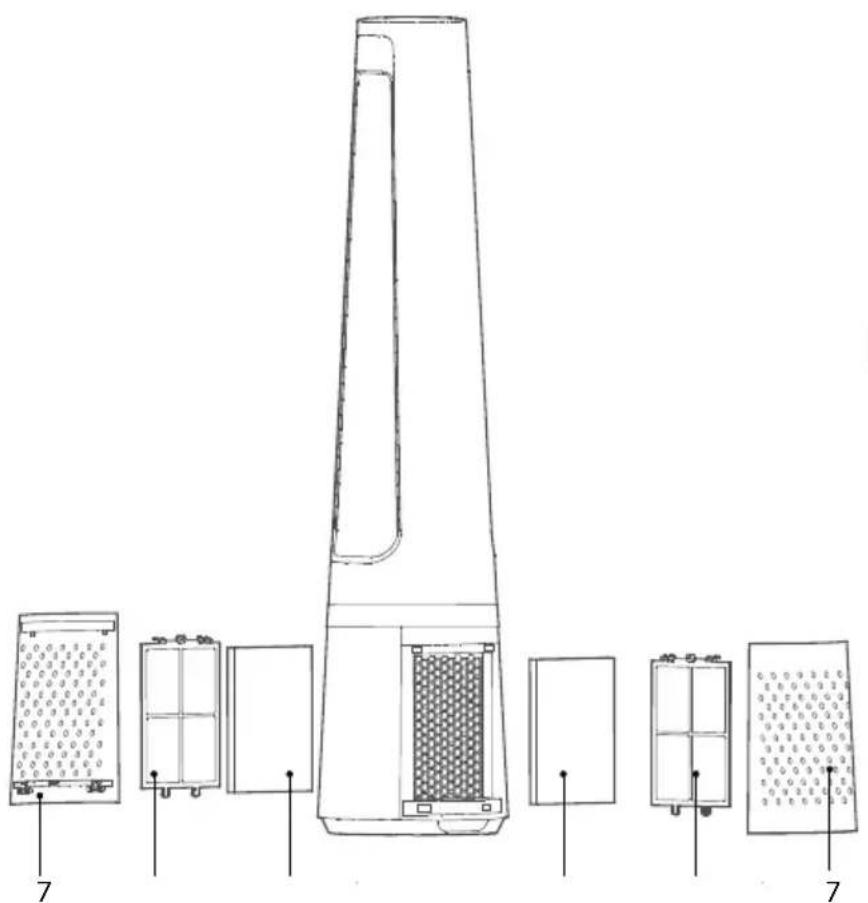
1 Control panel 6 Power cord
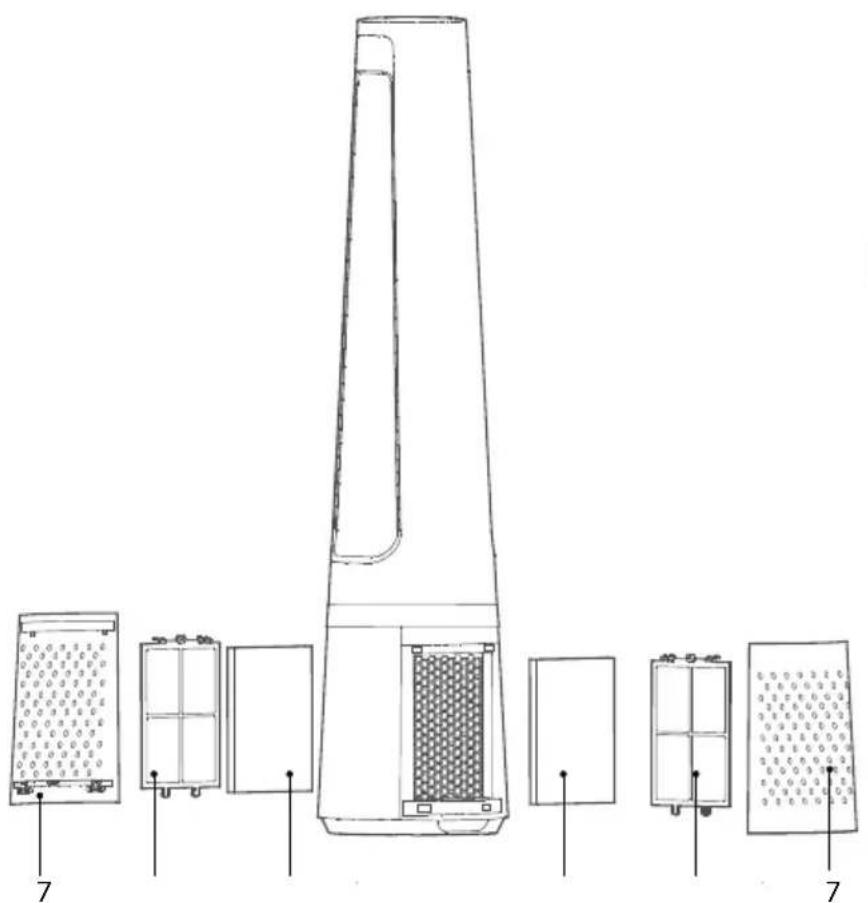
2 Screen 7 Air inlet grid
3 Air outlet 8 Pre-filter
4 Decoration light 9 Particle filter XD6520F0
5 Base
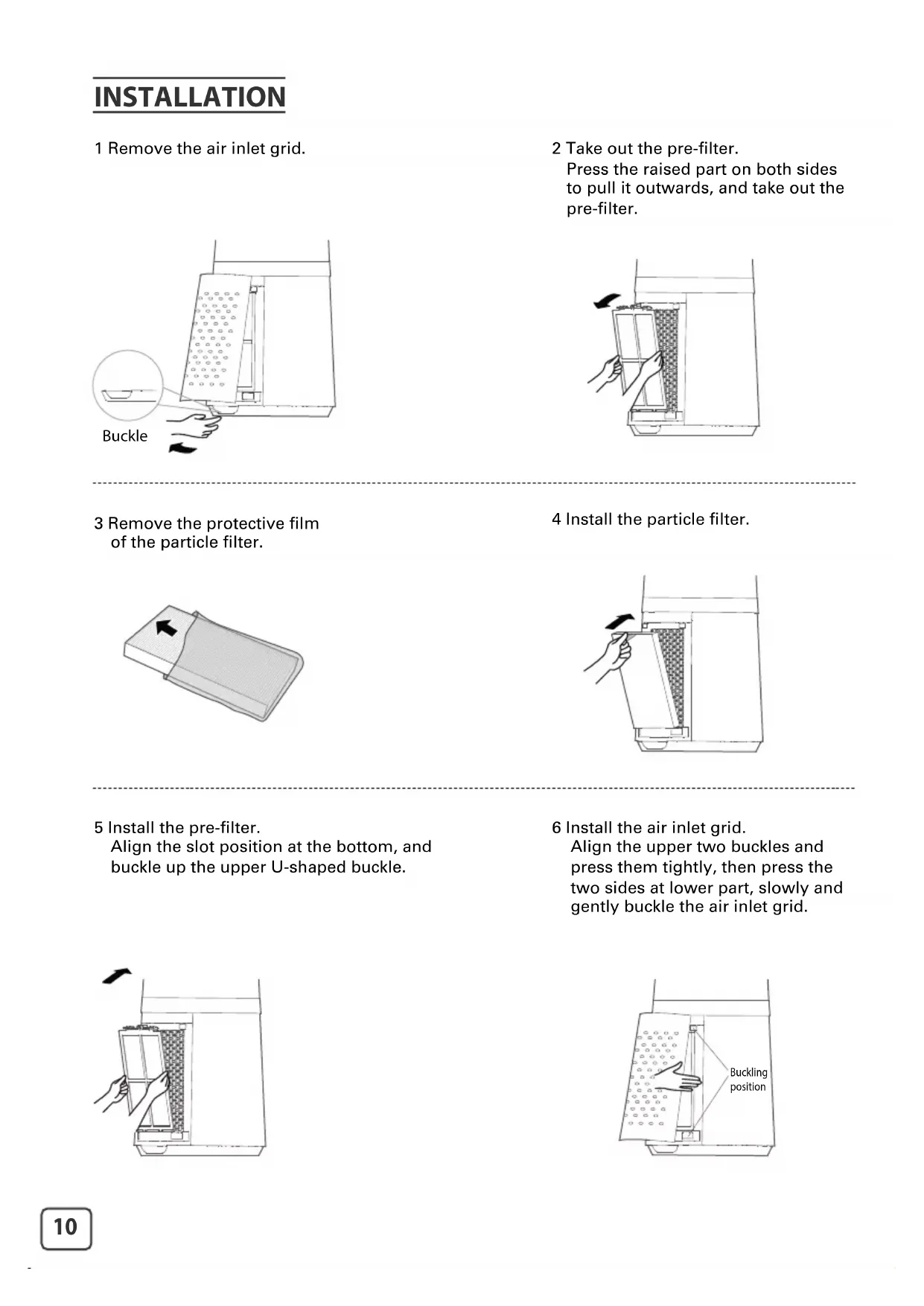
INSTALLATION
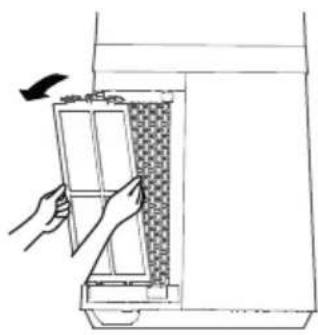
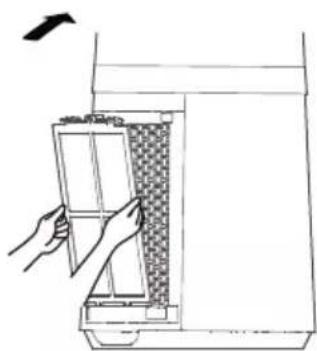
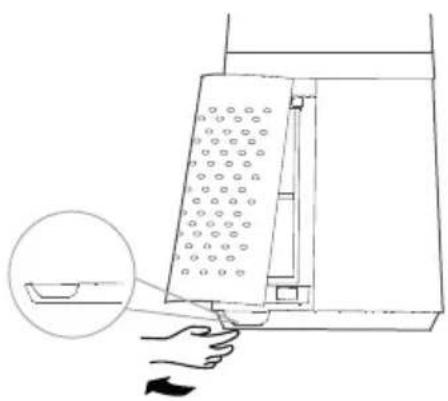
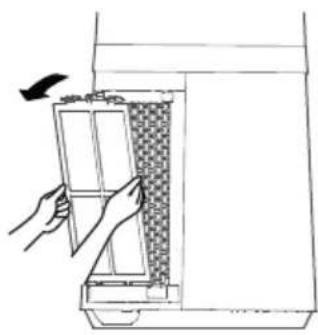
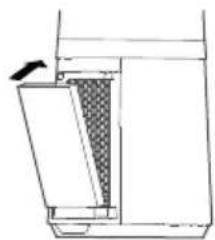
1 Remove the air inlet grid.
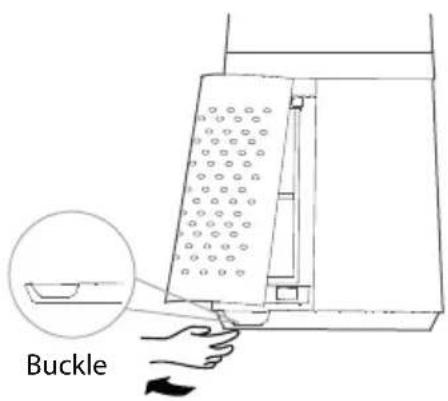
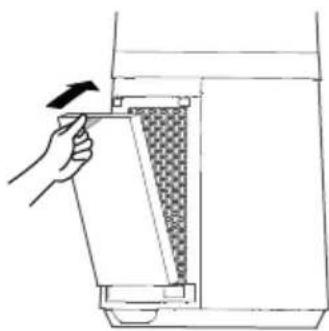
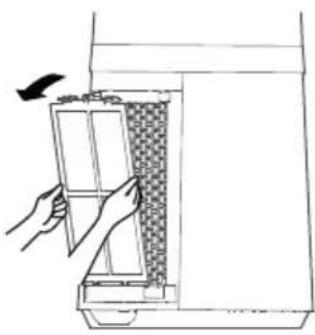
2 Take out the pre-filter. Press the raised part on both sides to pull it outwards, and take out the pre-filter.
natural_image
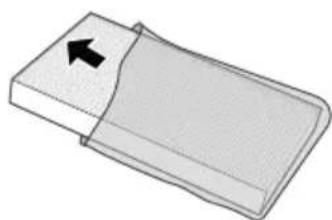
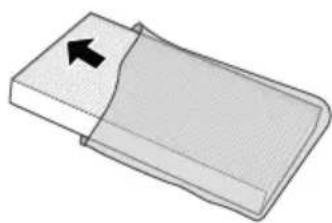
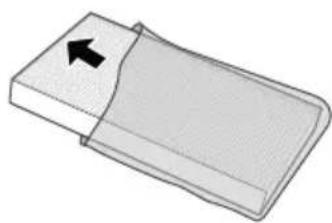
Line drawing of a hand opening a door with a grid-patterned interior (no text or symbols)3 Remove the protective film of the particle filter.
natural_image
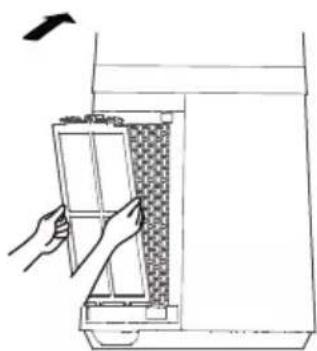
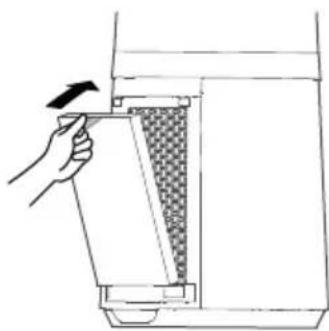
Simple 3D diagram of a rectangular object with an arrow pointing to its side (no text or symbols)4 Install the particle filter.
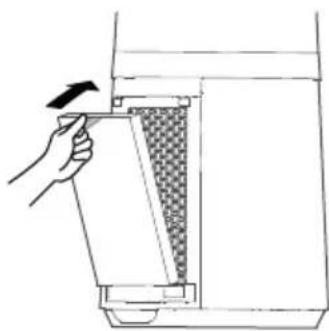
natural_image
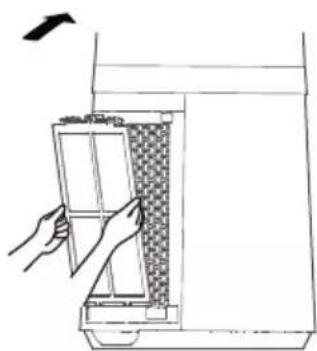
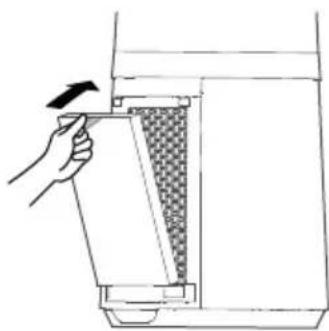
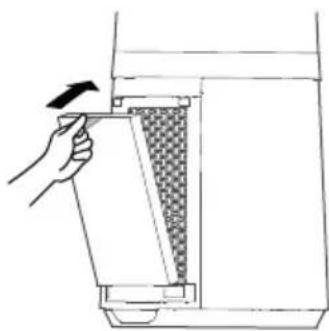
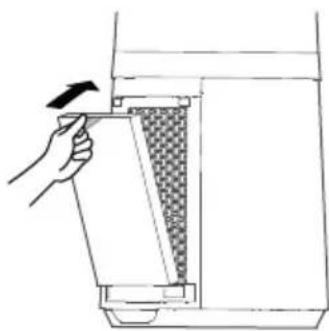
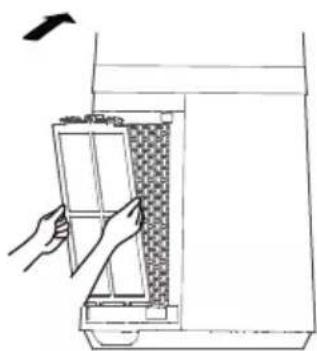
Line drawing of a hand holding a tool interacting with a device (no text or symbols present)5 Install the pre-filter. Align the slot position at the bottom, and buckle up the upper U-shaped buckle.
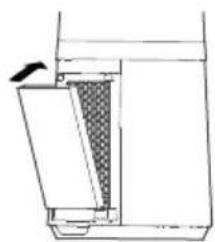
6 Install the air inlet grid. Align the upper two buckles and press them tightly, then press the two sides at lower part, slowly and gently buckle the air inlet grid.
natural_image
Line drawing of a hand opening a door with a patterned panel inside, no text or symbols present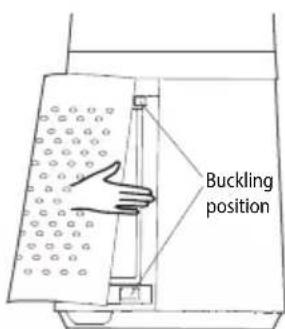
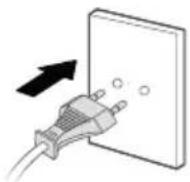
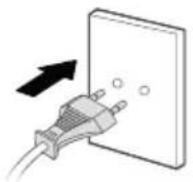
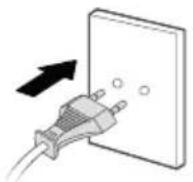
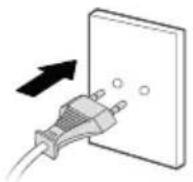
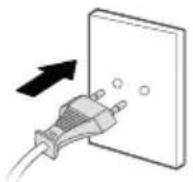
7 Plug power supply.
INSTRUCTIONS

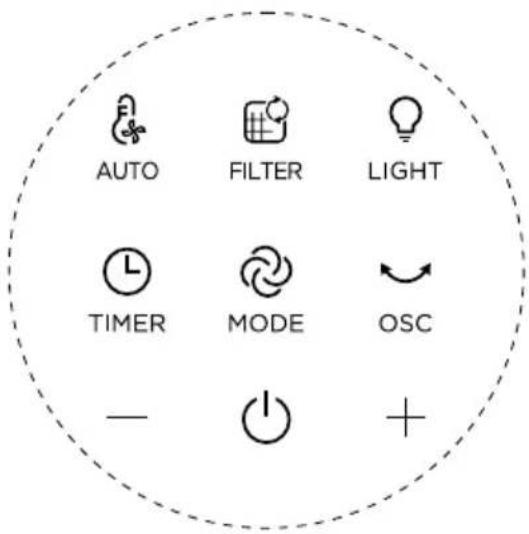
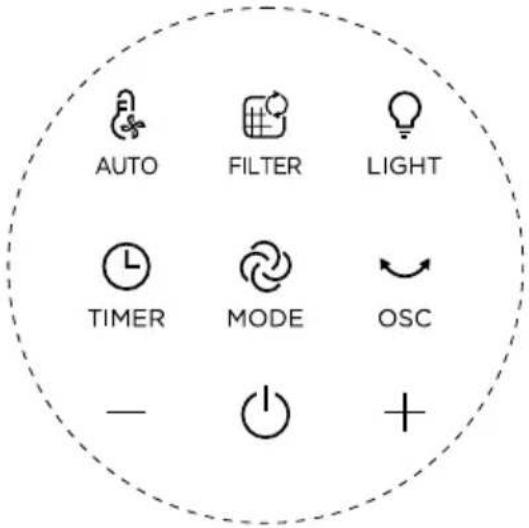
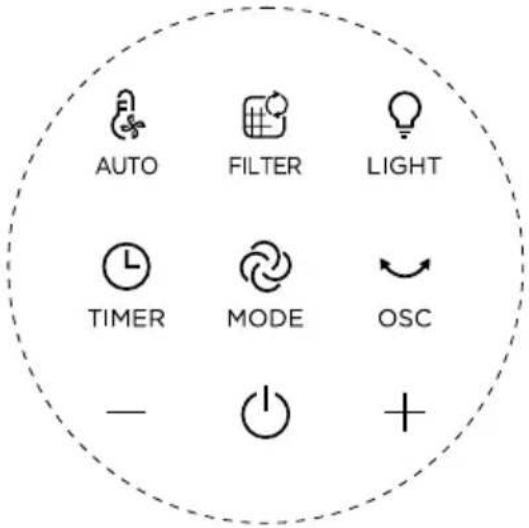
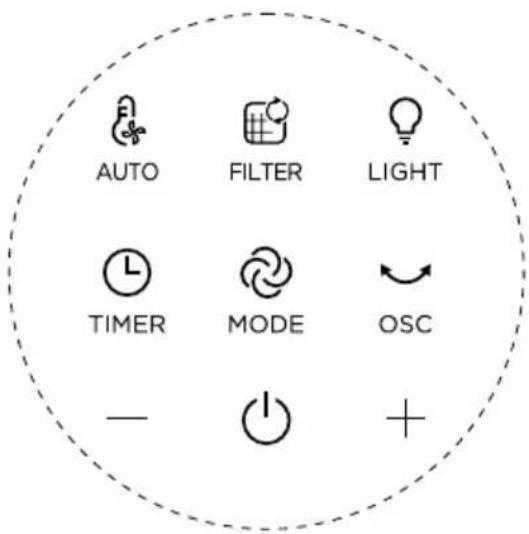
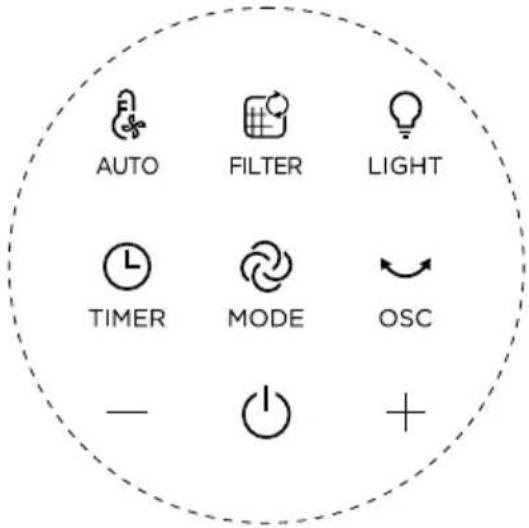
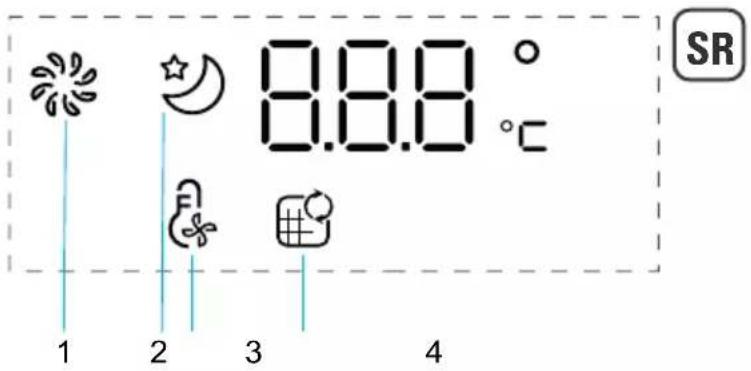
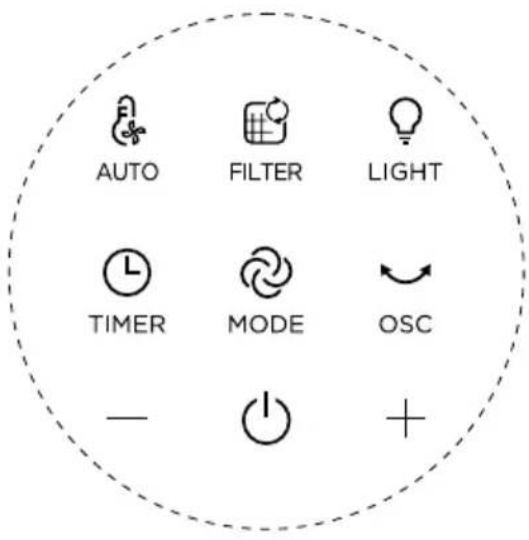
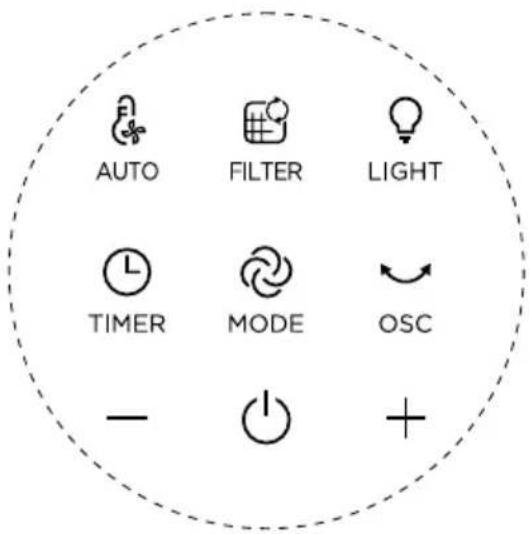
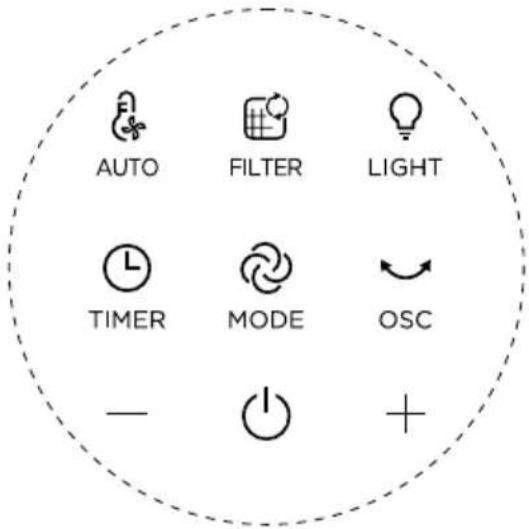
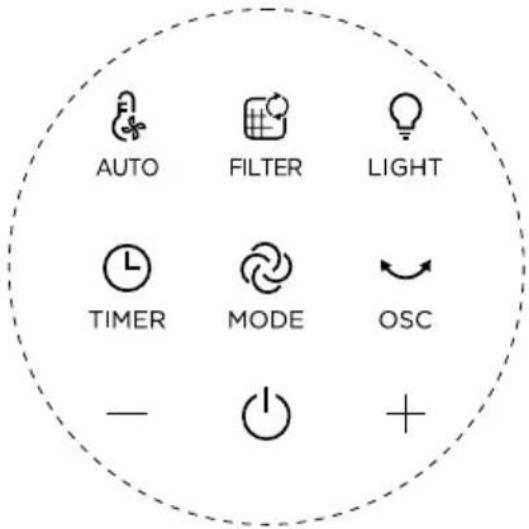
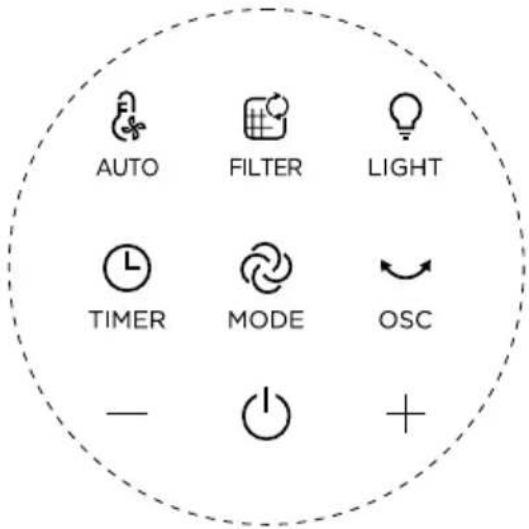
Control panel
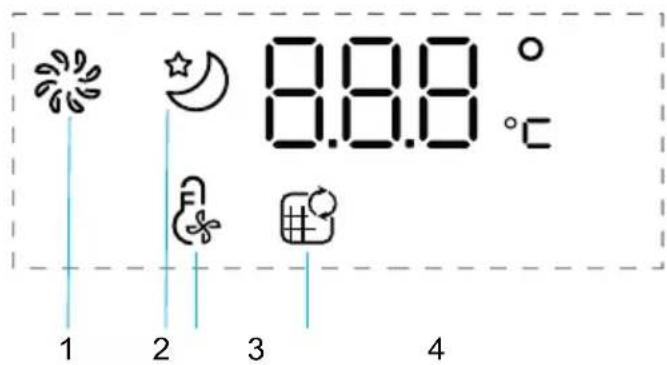
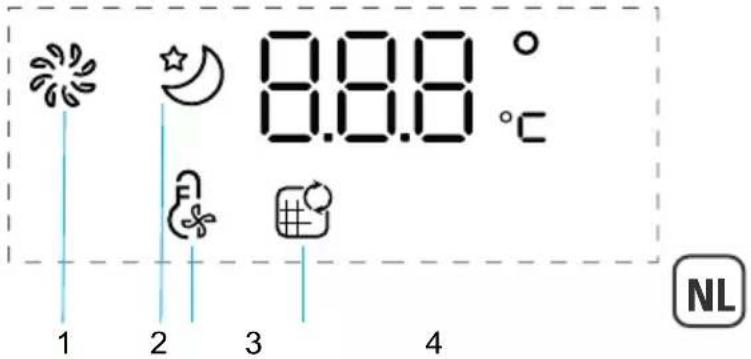
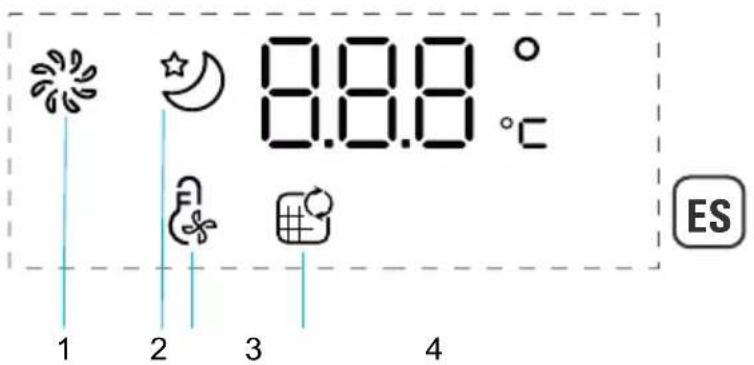
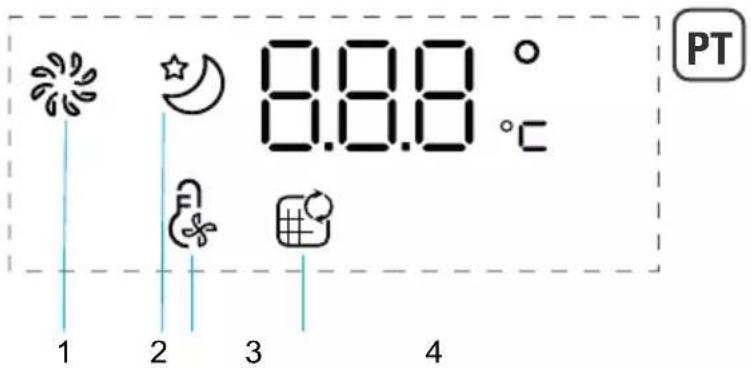
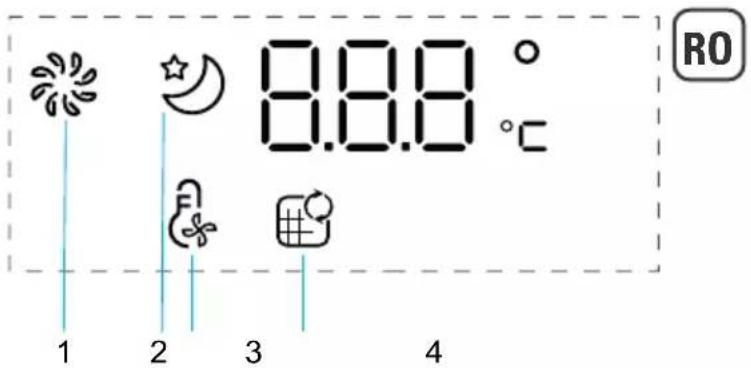
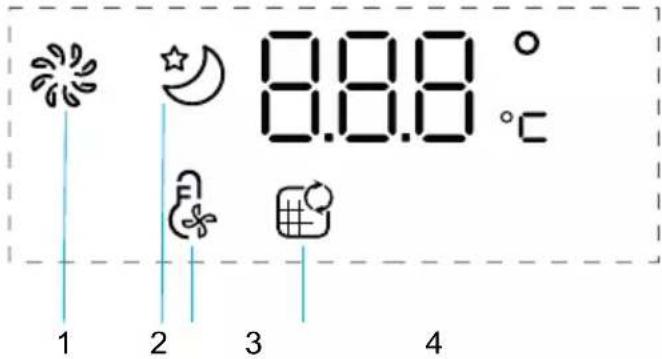
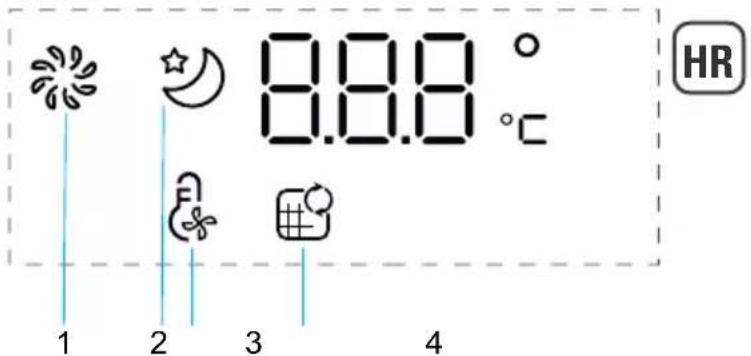
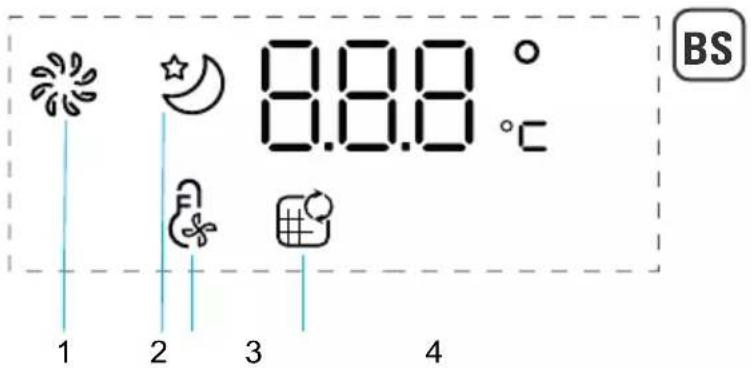
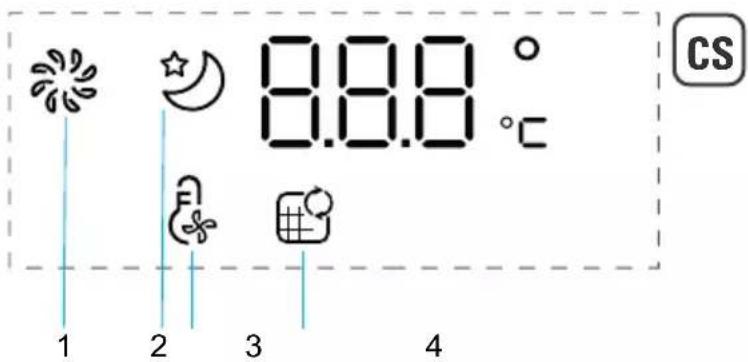
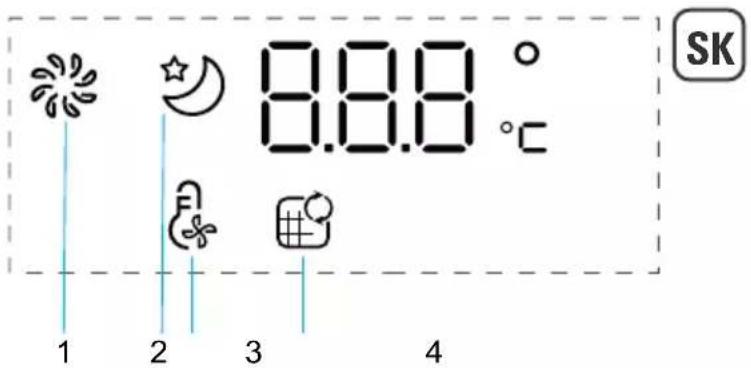
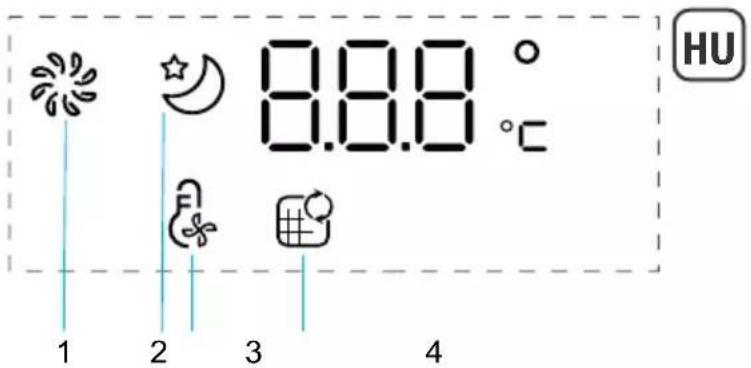
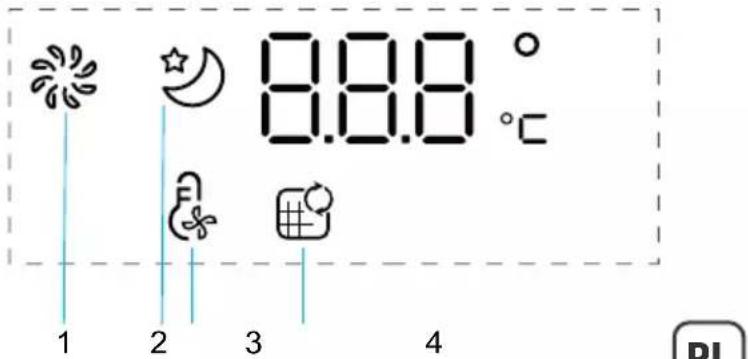
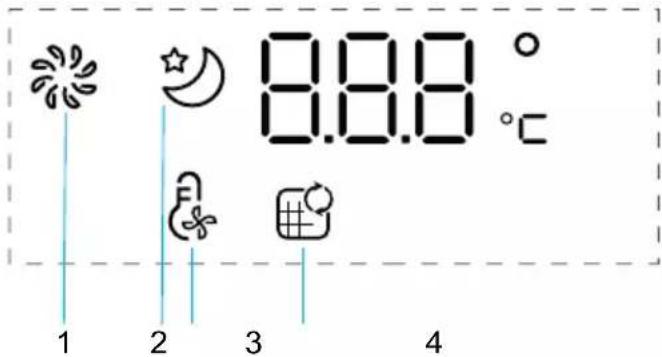
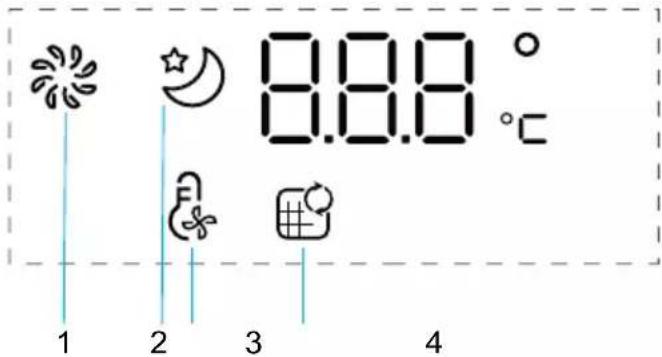
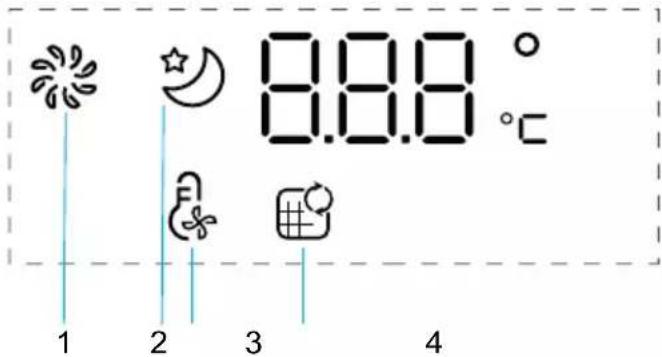
Screen
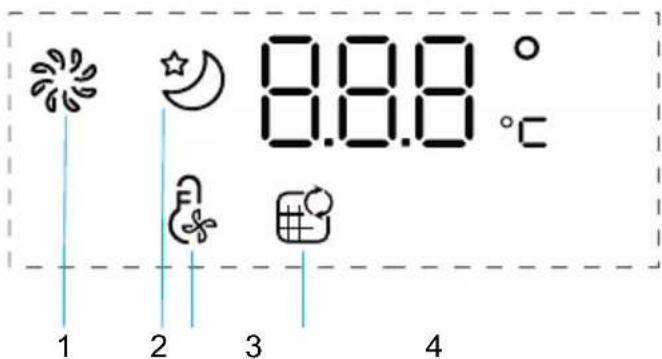
- Normal Mode
- Night Mode
- Auto Mode
- Filter replacement indicator
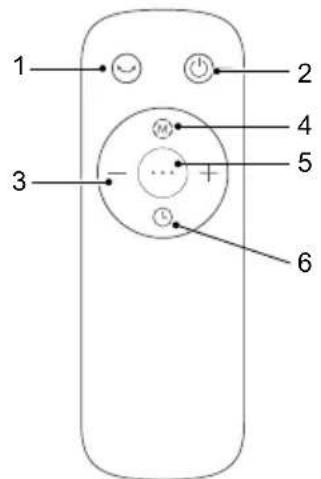
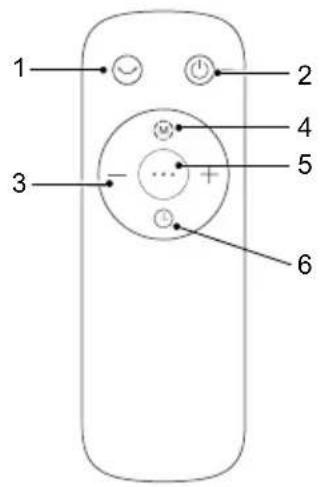
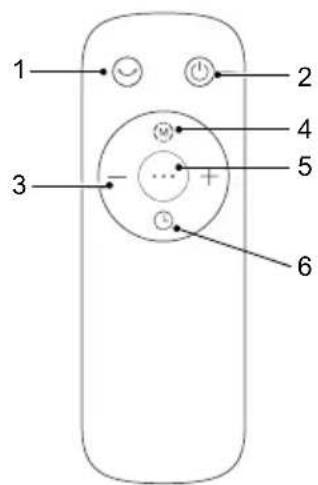
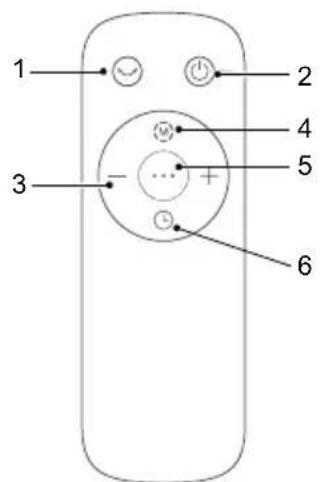
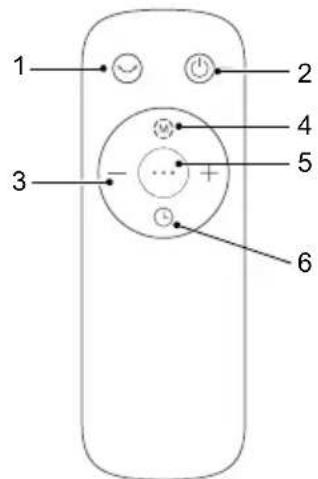
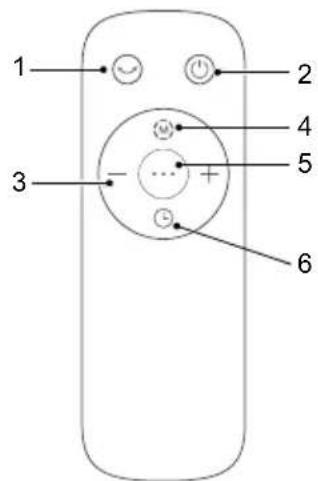
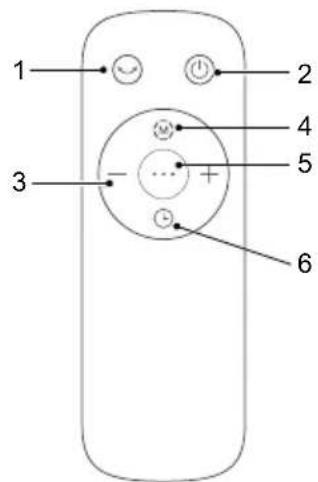
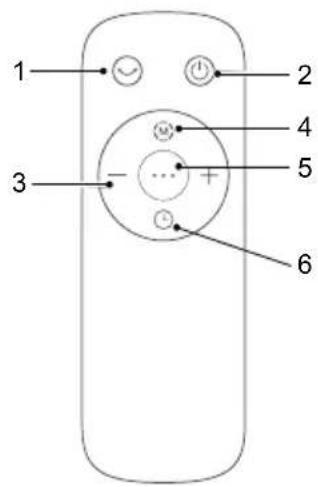
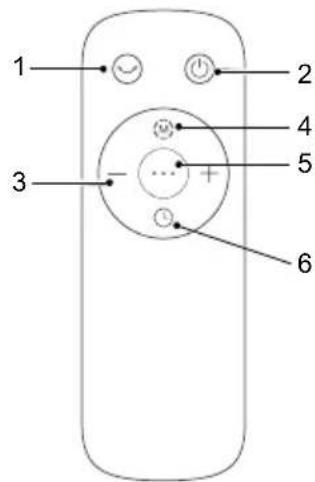
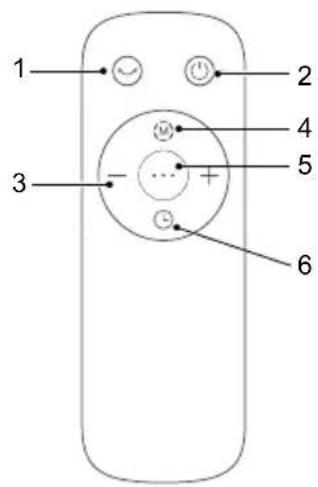
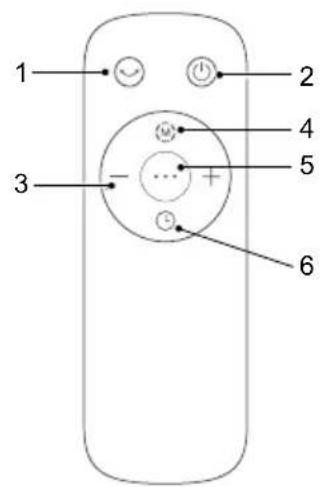
Remote control
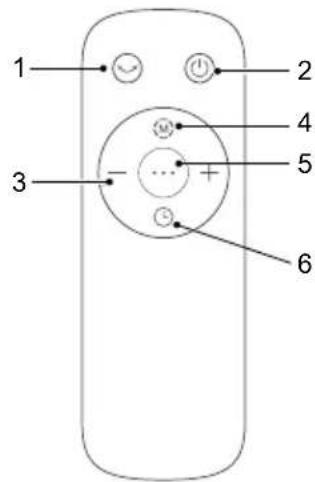
- Oscillation
- ON/OFF
- Wind speeds/Timing
- Normal mode/Night mode
- Auto mode
- Timer/Delayed Start
natural_image
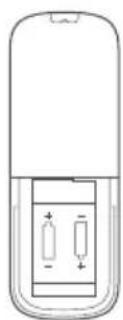
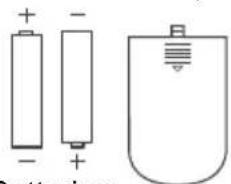
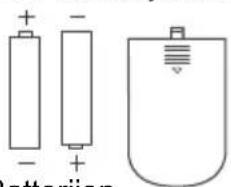
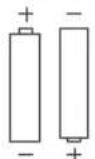
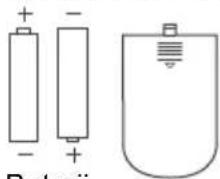
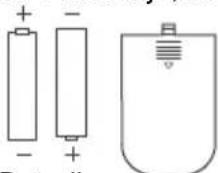
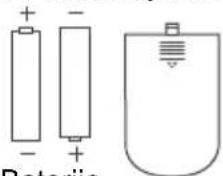
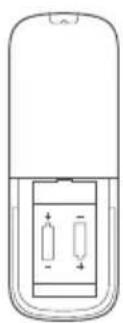
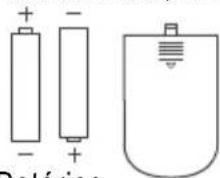
Diagram of a mobile phone rear panel showing two internal components with polarity indicators (no text or symbols)AAA Battery, 1.5 V
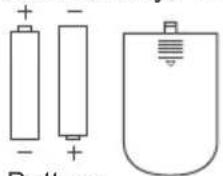
natural_image
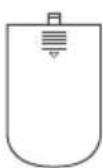
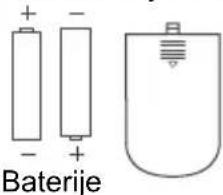
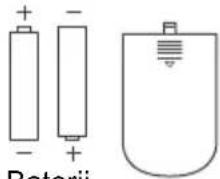
Simple line drawings of two batteries and a computer mouse (no text or symbols)Battery
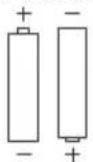
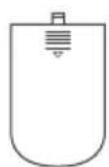
Use alkaline batteries of type «AAA».
2 batteries are included with the appliance.
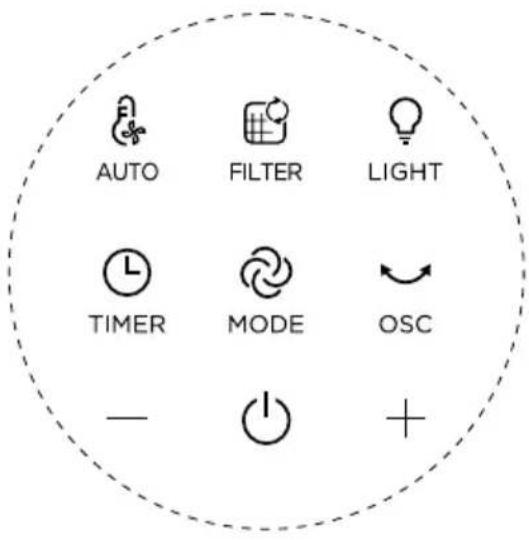
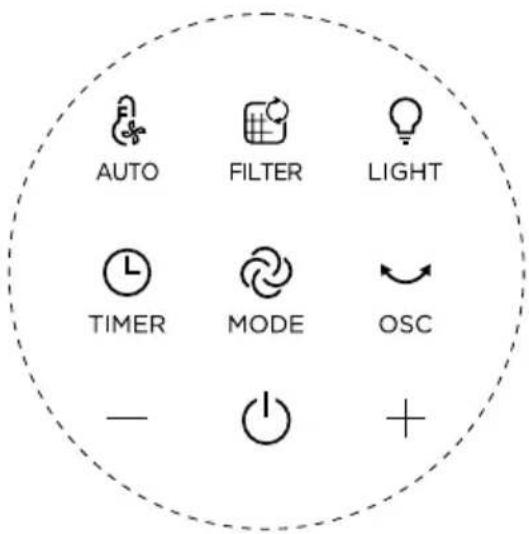
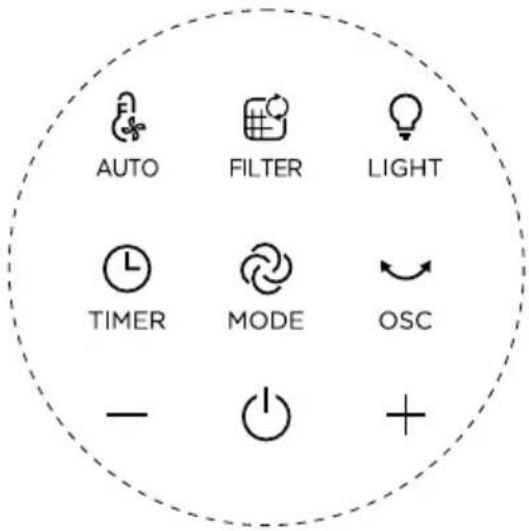
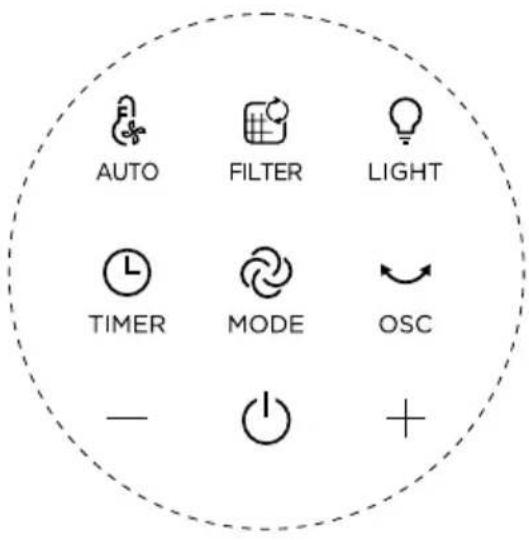
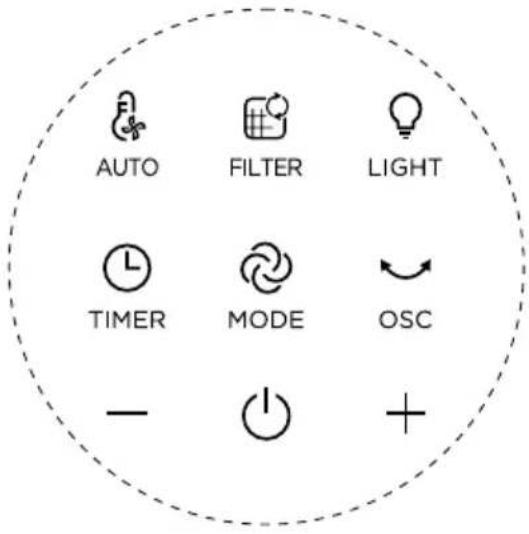
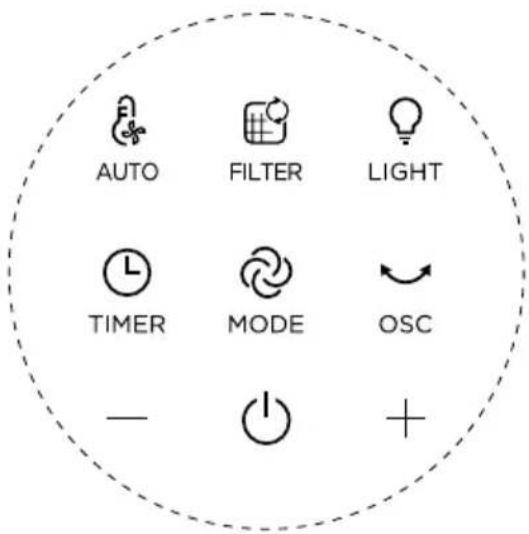
| Button Function Description | |
 | ON/OFFAuto OFF:The appliance will shutdown automatically after 12h without manipulation. |
| “-、+” | Set wind speed/timing. |
 OSC OSC | Multi-angle oscillating switch of 30°,60°, 120° and 0°. |
 MODE MODE | Press once to activate Normal mode (access to speeds 1 to 12).Press again to activate Night mode (speed decrescendo from speed 4 to 1):Speed 4 for 30min -> speed 3 for 30min -> speed 1.When combined with Auto mode:Speed 4 for 30min -> speed 3 for 30min -> speed 1 if temperature is <25°C or speed 2 if ≥25°C. |
 TIMER TIMER | Timer: Press once to activate the Timer. Then press + or - to program the automatic shutdown from 1h to 12h.Delayed start: When the appliance is OFF, press the button to program the delayed start, then, press + or - to turn on the appliance from 1h to 12h later. |
| [2TO6]AUTO | Press once to activate Auto mode. It adjusts the fan speed according to the ambient temperature of the room. Can be combined with Night mode. |
 FILTER FILTER | Long press for 3 seconds to reset the filter. |
| [7XXY]LIGHT | Press once to activate the decoration light. |
MAINTENANCE & CLEANING
Always switch the appliance off and unplug it before conducting any maintenance or cleaning operation.
Use a damp cloth to clean the surface of the product.
Important: Do not use any abrasive materials, as these may damage the surface of the product.
Filter replacement
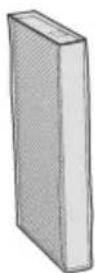
1 Filter model: XD6520F0 (including 2 sets)
2 The indicator is lighted when the particle filter needs to be replaced.

natural_image
Simple line icon of a document with a refresh arrow, enclosed in a dashed circular border (no text or symbols)3 Replace a new filter
4 Long press the filter button for 3 seconds to turn off the indicator light for filter replacement.
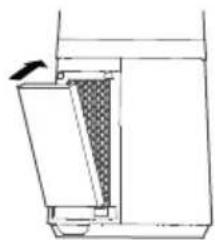
natural_image
Simple line drawing of a mechanical component or device with a handle and internal structure (no text or symbols)
Forced reset:
If you have replaced a filter before its end of life, force the reset of the filter replacement cycle: Hold the reset button for 3 seconds. 📋 (beep sound).
| Filters Action Cycles | ||
| Pre-filter Clean with vaccum cleaner | Every 2 weeks | |
| Particle filter (ref: XD6520F0) Replace when is lighted | Every 6 months (on average, according to the use environment). | |

- Avoid handling used filters if you suffer from allergies or asthma.
- Wear gloves when changing the filters, or wash your hands well afterwards.
- Put used filters directly into a closed, air-tight bag before throwing them away to avoid spreading pollutants.

« HOW TO ACHIEVE CLEANER INDOOR AIR »
In addition to using your appliance, here are some tips on how to improve the quality of your indoor air:
- Ventilate the rooms for at least 10 min. every day, in summer and winter.
- Maintain your ventilation system.
- Limit the use of household products.
- Do not smoke indoors.
- Avoid home fragrances, incense sticks, scented candles, etc.
- Ventilate whenever any work is being conducted in your home and for several weeks afterwards.
- Avoid green plants that are allergenic or need frequent watering.
STORAGE
When you are not using the appliance, store it in a cool, dry place with ambient conditions no higher than 35^ C.
BESCHREIBUNG

natural_image
Line drawing of a hand pressing down on a device with a magnified inset showing the handle (no text or symbols)natural_image
Line drawing of a hand opening a door with a patterned interior (no text or symbols)natural_image
Simple 3D diagram of a rectangular object with a black arrow pointing to its side (no text or symbols)natural_image
Line drawing of a hand holding a tool interacting with a device, showing a checkered pattern inside (no text or symbols)natural_image
Line drawing of a hand opening a door with a patterned interior (no text or symbols)natural_image
Line drawing of a hand pressing down on a door panel with circular patterns (no text or symbols)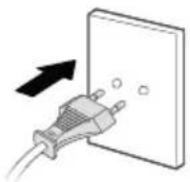
ANWEISUNGEN
Bedienfeld
Anzeige

natural_image
Simple line drawing of a mobile phone casing with two internal components (no text or symbols)AAA Batterien, 1.5 V
natural_image
Simple line drawings of batteries and a U-shaped battery with a screw (no text or symbols)Batterien
natural_image
Simple line icon of a grid with a circular arrow, enclosed in a dashed circular border (no text or symbols)natural_image
Technical line drawing of a mechanical component with a textured section and directional arrow (no text or symbols)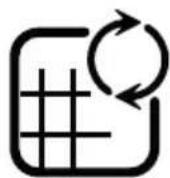
natural_image
Line drawing of a hand pressing down on a device with a magnified inset showing the handle (no text or symbols)natural_image
Line drawing of a hand opening a container with granular material inside, no text or symbols presentnatural_image
Simple 3D diagram of a rectangular object with a black arrow pointing to its top surface (no text or symbols)natural_image
Line drawing of a hand holding a container with a checkered pattern inside, next to a cylindrical container (no text or symbols)natural_image
Line drawing of a hand opening a door with a patterned panel inside, no text or symbols presentnatural_image
Line drawing of a hand pressing down on a textured panel or device (no text or symbols visible)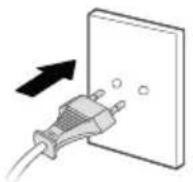
INSTRUCTIES
Bedieningspaneel
Scherm
Afstandsbediening
natural_image
Diagram of a mobile phone casing with two internal battery cells and an open rear panel (no text or symbols)AAA batterijen, 1.5 V
Batterijen
natural_image
Simple icon of a document with a grid and circular arrow, enclosed in a dashed circle (no text or symbols)natural_image
Pure technical line drawing of a mechanical component without any text, numbers, or symbols
Geforceerde reset:
natural_image
Line drawing of a hand pressing down on a device with a magnified inset showing the handle (no text or symbols)natural_image
Line drawing of a hand opening a door with a grid-patterned interior (no text or symbols)natural_image
Simple 3D diagram of a rectangular object with a black arrow pointing to its side (no text or symbols)natural_image
Line drawing of a hand holding a tool interacting with a container filled with checkered pattern (no text or symbols)natural_image
Line drawing of a hand opening a door with a patterned panel inside (no text or symbols)natural_image
Line drawing of a hand pressing down on a door panel with circular patterns (no text or symbols)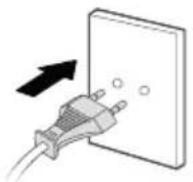
ISTRUZIONI
natural_image
Simple line drawings of batteries and a computer mouse (no text or symbols)Batterie
Utilizzare batterie alcaline di tipo «AAA».
natural_image
Simple icon of a grid with a circular arrow, enclosed in a dashed circle (no text or symbols)
natural_image
Pure technical line drawing of a mechanical component without any text, numbers, or symbolsnatural_image
Line drawing of a hand pressing down on a device with a magnified inset showing the handle (no text or symbols)natural_image
Line drawing of hands installing or removing a textured panel inside a container (no text or symbols)natural_image
Simple 3D diagram of a rectangular object with a black arrow pointing to its top surface (no text or symbols)natural_image
Line drawing of a hand holding a tool interacting with a container filled with checkered pattern (no text or symbols)natural_image
Line drawing of a hand opening a door with a patterned lid (no text or symbols)natural_image
Line drawing of a hand pressing down on a textured panel or panel (no text or symbols)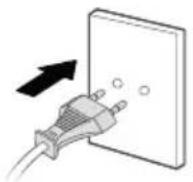
INSTRUCCIONES
Panel de control
Pantalla
Mando a distancia
natural_image
Diagram of a mobile phone casing with internal components and directional arrows (no text or symbols)Pilas AAA, 1.5 V
Pilas
natural_image
Simple icon of a document with a refresh arrow, enclosed in a dashed circular border (no text or symbols)
natural_image
Pure technical diagram of a mechanical component without any text, numbers, or symbols
natural_image
Line drawing of a hand pressing down on a device with a magnified inset showing the handle (no text or symbols)natural_image
Simple 3D diagram of a rectangular object with a black arrow pointing to its top surface (no text or symbols)natural_image
Line drawing of a hand opening a door with a patterned panel inside, no text or symbols presentnatural_image
Line drawing of a hand inserting a filter into a device (no text or symbols)natural_image
Line drawing of a hand holding a tool interacting with a container filled with checkered pattern (no text or symbols)natural_image
Line drawing of a hand pressing down on a door panel with circular patterns (no text or symbols)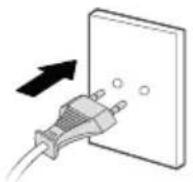
INSTRUÇÕES
Painel de controlo
Ecrã
Comando
natural_image
Diagram of a mobile phone casing showing internal battery and two connected components (no text or symbols)Pilhas AAA,1.5 V
Pilhas
Utilize pilhas alcalinas do tipo «AAA».
natural_image
Simple icon of a document with a grid and refresh arrow, enclosed in a dashed circular border (no text or symbols)
natural_image
Pure technical diagram of a mechanical or architectural component with no visible text, numbers, or symbols.
Reposição forçada:
natural_image
Line drawing of a hand pressing down on a device with a magnified inset showing the handle (no text or symbols)2 Scoate i pre-filtrul.
natural_image
Line drawing of a hand opening a container with granular material inside, no text or symbols presentnatural_image
Simple 3D diagram of a rectangular object with a black arrow pointing to its side (no text or symbols)4 Instala i filtrul de particule.
natural_image
Line drawing of a hand holding a container with a checkered pattern inside, next to a cylindrical container (no text or symbols)5 Instala i pre-filtrul.
natural_image
Line drawing of a hand opening a door with a patterned panel inside, no text or symbols present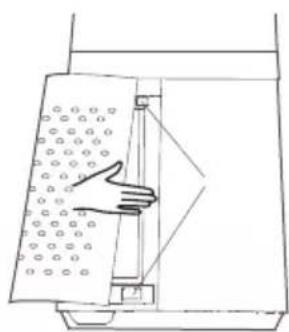
natural_image
Line drawing of a hand pressing down on a perforated panel with circular holes (no text or symbols)7 Alimentare electric la priz.
INSTRUCTIUNI
Panou de comand
Ecran
Telecomand
natural_image
Diagram of a mobile phone casing with two internal compartments and directional arrows indicating movement (no text or symbols)AAA baterii, 1.5 V
natural_image
Simple line drawings of two batteries and a U-shaped battery with a screw (no text or symbols)Utiliza i baterii alcaline tip „AAA”.
natural_image
Simple icon of a document with a refresh arrow, enclosed in a dashed circular border (no text or symbols)
natural_image
Cross-sectional diagram of a mechanical or architectural component with a shaded internal section and an arrow indicating direction (no text or symbols)
Resetare for at:
BG
natural_image
Line drawing of a hand pressing down on a device with a magnified inset showing the handle (no text or symbols)natural_image
Line drawing of a hand opening a container with granular material inside, no text or symbols presentnatural_image
Simple 3D diagram of a rectangular object with a black arrow pointing to its side (no text or symbols)natural_image
Line drawing of a hand holding a container with a checkered pattern inside, next to a cylindrical container (no text or symbols)natural_image
Line drawing of a hand opening a door with a patterned panel inside (no text or symbols)natural_image
Line drawing of a hand pressing down on a textured panel with circular patterns (no text or symbols)natural_image
Diagram of a battery pack showing internal components and charge distribution (no text or labels)natural_image
Simple icon of a document with a grid and circular arrow, no text or symbols present
natural_image
Pure technical line drawing of a mechanical component without any text, numbers, or symbols
natural_image
Line drawing of a hand pressing down on a device with a magnified inset showing the handle (no text or symbols)2 Odstranite predfilter.
Pritisnite dvignjeni del na obeh straneh in ga povlecite navzven ter odstranite predfilter.
natural_image
Line drawing of a hand opening a container with granular material inside, no text or symbols presentnatural_image
Simple 3D diagram of a rectangular object with a black arrow pointing to its side (no text or symbols)4 Namestite filter delcev.
natural_image
Line drawing of a hand holding a tool interacting with a device (no text or symbols present)5 Namestite predfilter.
natural_image
Line drawing of a hand opening a door with a patterned panel inside, no text or symbols present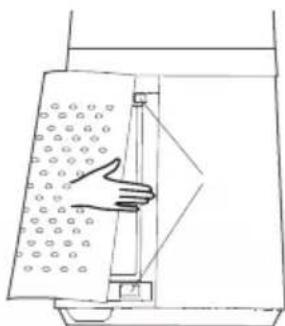
natural_image
Line drawing of a hand pressing down on a door panel with circular patterns (no text or symbols)7 Napravo priklju ite v elektri no napajanje.
NAVODILA

Nadzorna plošča
Zaslon
Daljinski upravljalnik
natural_image
Diagram of a mobile phone casing with two internal battery cells (no text or symbols)AAA baterije, 1.5 V
Baterije
natural_image
Simple line icon of a document with a grid and circular arrow, enclosed in a dashed circle (no text or symbols)3 Namestite nov filter.
natural_image
Diagram of a mechanical device with a shaded internal section and an arrow indicating direction (no text or symbols)
natural_image
Line drawing of a hand pressing down on a device with a magnified inset showing the handle (no text or symbols)2 Izvadite predfilter.
natural_image
Line drawing of a hand inserting a filter into a device (no text or symbols)3 Skinite zaštitni film s filtera za estice.
natural_image
Simple 3D diagram of a rectangular object with a black arrow pointing to its side (no text or symbols)4 Postavite filter za estice.
natural_image
Line drawing of a hand holding a tool interacting with a container filled with checkered pattern (no text or symbols)5 Postavite predfilter.
Poravnajte položaj utora na dnu i zatvorite gornju kop u u obliku slova U.
natural_image
Line drawing of a hand opening a door with a patterned panel inside, no text or symbols present6 Postavite rešetku otvora za ulaz zraka.
natural_image
Line drawing of a hand pressing down on a door panel with circular patterns (no text or symbols)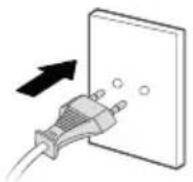
UPUTE
Upravlja ka plo a
Zaslon
Daljinski upravljač
natural_image
Diagram of a mobile phone casing with two internal components and polarity indicators (no text or symbols)AAA baterije, 1.5 V
Baterije
Rabite AAA alkalne baterije.
natural_image
Simple icon of a document with a grid and refresh arrow inside, enclosed in a dashed circular border (no text or symbols)
3 Postavite novi filter
natural_image
Cross-sectional diagram of a mechanical or architectural component with layered structure and directional arrow (no text or symbols)
Prisilno ponovno postavljanje:
Ako ste zamijenili filter prije nego što mu je istekao vijek trajanja, obavite prisilno ponovno postavljanje ciklusa za zamjenu filtera:
Pritisnite tipku za ponovno postavljanje i držite je 3 sekunde 📋.
Filteri Radnja Ciklusi
SR
1 Kontrolna tabla 6 Kabl za napajanje
2 Ekran 7 Rešetka ulaza za vazduh
3 Izlaz za vazduh 8 Predfilter
4 Dekorativno svetlo 9
5 Baza
Filter za čestice XD6520F0
INSTALACIJA
1 Uklonite rešetku ulaza za vazduh.
natural_image
Line drawing of a hand pressing down on a device with a magnified inset showing the handle (no text or symbols)2 Izvadite predfilter. Pritisnite podignuti deo sa obe strane da biste ga izvukli napolje, pa izvadite predfilter.
natural_image
Line drawing of a hand opening a door with a patterned interior (no text or symbols)natural_image
Simple 3D diagram of a rectangular object with a black arrow pointing to its top surface (no text or symbols)4 Instalirajte filter za čestice.
natural_image
Line drawing of a hand holding a tool interacting with a container filled with checkered pattern (no text or symbols)5 Instalirajte predfilter. Poravnajte položaj proreza na dnu i zaključajte gornju kopču u obliku slova „U“.
natural_image
Line drawing of a hand opening a door with a patterned panel inside, no text or symbols presentnatural_image
Line drawing of a hand pressing down on a textured panel or panel (no text or symbols)7 Priključite napajanje.
UPUTSTVA
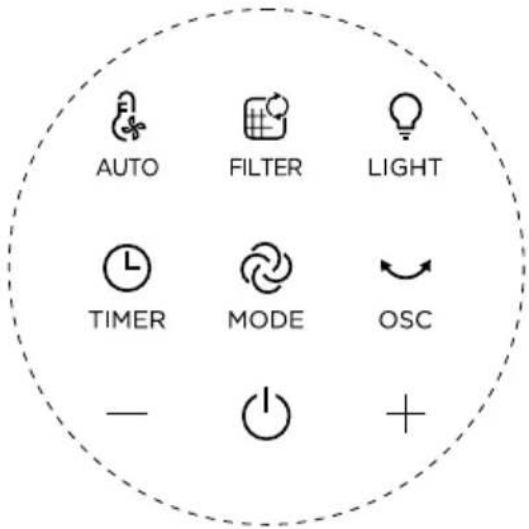
Kontrolna tabla
«Ekran
Daljinski upravljač
- Normalni režim
- Noćni režim
- Automatski režim
-
Indikator zamene filtera
-
Oscilovanje
- UKLJUČIVANJE/ISKLJUČIVANJE
- Brzina duvanja/Tempiranje
- Normalni režim/Noćni režim
- Automatski režim
- Tajmer/Odloženi početak
natural_image
Diagram of a mobile phone casing showing internal battery structure with two polarity indicators (no text or symbols)AAA baterije, 1.5 V
Koristite alkalne baterije tipa AAA.
| Dugmadi Opis funkcija | |
 | UKLJUČIVANJE/ISKLJUČIVANJEAutomatsko ISKLJUČIVANJE: Aparat će se automatski isključiti nakon 12 sati ako se njime ne rukuje. |
| “-、+” | Podesite brzinu duvanja / tempiranje. |
 OSC OSC | Višeugaono prebacivanje oscilovanja od 30°,60°, 120° i 0°. |
 MODE MODE | Pritisnite jednom da biste aktivirali normalni režim (uz pristup brzinama od 1 do 12).Ponovo pritisnite da biste aktivirali noćni režim (opadanje brzine sa 4 na 1): Brzina 4 na 30 minuta -> brzina 3 na 30 minuta -> brzina 1.U kombinaciji sa automatskim režimom:Brzina 4 na 30 minuta -> brzina 3 na 30 minuta -> brzina 1 ako je temperatura < 25°C, odnosno brzina 2 ako je temperatura ≥ 25°C. |
 TIMER TIMER | Tajmer: Pritisnite jednom da biste aktivirali tajmer. Zatim pritisnite + ili - da biste programirali automatsko isključivanje u opsegu od 1 sata do 12 sati.Odloženi početak: Kada je aparat ISKLJUČEN, pritisnite dugme da biste programirali odloženi početak, pa pritisnite + ili - da biste odredili vreme (između 1 sata i 12 sati) kada će se aparat uključiti. |
 AUTO AUTO | Pritisnite jednom da biste aktivirali automatski režim. On podešava brzinu ventilatora u skladu sa sobnom temperaturom. Može se kombinovati sa noćnim režimom. |
 FILTER FILTER | Pritisnite na 3 sekunde da biste resetovali filter. |
 LIGHT LIGHT | Pritisnite jednom da biste aktivirali dekorativno svetlo. |
ODRŽAVANJE I ČIŠĆENJE
natural_image
Simple line icon of a document with a grid and refresh arrow, enclosed in a dashed circular border (no text or symbols)
3 Stavite novi filter
4 Pritisnite dugme filtera na 3 sekunde da biste isključili svetlo indikatora zamene filtera.
natural_image
Technical line drawing of a mechanical component with a shaded section and directional arrow (no text or symbols)
Nametnuto resetovanje:
Ako ste zamenili filter pre nego što mu je istekao vek trajanja, nametnite resetovanje ciklusa zamene filtera:
BS
natural_image
Line drawing of a hand pressing down on a device with a magnified inset showing the handle (no text or symbols)2 Izvadite predfilter.
natural_image
Line drawing of a hand inserting a grid into a device (no text or symbols)3 Skinite zaštitni film s filtera za čestice.
natural_image
Simple 3D diagram of a rectangular object with a black arrow pointing to its side (no text or symbols)4 Postavite filter za čestice.
natural_image
Line drawing of a hand holding a tool interacting with a container filled with checkered pattern (no text or symbols)5 Postavite predfilter.
Poravnajte položaj utora na dnu i zatvorite gornju kopču u obliku slova U.
natural_image
Line drawing of a hand opening a door with a patterned panel inside, no text or symbols present6 Postavite rešetku otvora za ulaz zraka.
natural_image
Line drawing of a hand pressing down on a door panel with circular patterns (no text or symbols)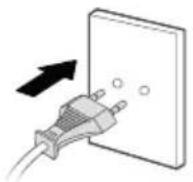
UPUTE
Upravlja ka plo a
Ekran
Daljinski upravljač
natural_image
Diagram of a mobile phone casing showing internal battery and two ports (no text or symbols)AAA baterije, 1.5 V
Baterije
Koristite alkalne baterije tipa «AAA».
| Tipka Opis funkcije | |
| UKLJUČIVANJE/ISKLJUČIVANJEAutomatsko ISKLJUČIVANJE: Uređaj će se automatski isključiti u slučaju da se na njemu ne izvršavaju nikakve komande 12 h. |
| “-、+” | Postavljanje brzine strujanja zraka/vremena. |
| OSC | Prekidač za osciliranje pod više uglova od 30°,60°, 120° i 0°. |
 MODE MODE | Pritisnite jednom da aktivirate Normalni način rada (pristup brzinama od 1 do 12).Ponovo pritisnite da aktivirate Noćni način rada (smanjivanje brzine s vrijednosti 4 na 1):Brzina 4 tokom 30 min. -> brzina 3 tokom 30 min. -> brzina 1.Kad se kombinira s Automatskim načinom rada:Brzina 4 tokom 30 min. -> brzina 3 tokom 30 min. -> brzina 1 ako je temperatura <25 °C ili brzina 2 ako je temperatura ≥25 °C. |
 TIMER TIMER | Brojač vremena: Pritisnite jednom da aktivirate Brojač vremena. Zatim pritisnite + ili - da programirate automatsko isključivanje u intervalu od 1 h do 12 h.Odgođeno pokretanje: Kad je uređaj ISKLJUČEN, pritisnite tipku da programirate odgođeno pokretanje, a zatim pritisnite + ili - da uključite uređaj u intervalu od 1 h do 12 h kasnije. |
| [SYWC]AUTO | Pritisnite jednom da aktivirate Automatski način rada. On prilagođava brzinu ventilatora u skladu s temperaturom okruženja u prostoriji. Može se kombinirati s Noćnim načinom rada. |
 FILTER FILTER | Pritisnite i držite 3 sekunde da biste ponovo postavili filter. |
| [2X34]LIGHT | Pritisnite jednom da aktivirate ukrasno svjetlo. |
ODRŽAVANJE I ČIŠĆENJE
natural_image
Simple icon of a document with a refresh arrow, enclosed in a dashed circular border (no text or symbols)
3 Postavite novi filter
natural_image
Pure technical diagram of a mechanical component with no visible text, numbers, or symbols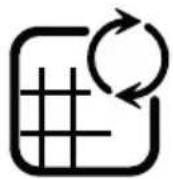
Prisilno resetiranje:
Ako ste zamijenili filter prije nego što mu je istekao životni vijek, izvršite prisilno resetiranje ciklusa za zamjenu filtera:
Pritisnite i držite tipku za resetiranje 3 sekunde.
| Filteri Radnja Ciklusi | ||
| Predfilter Očistite usisivačem Svake | 2 sedmice | |
| Filter za čestice (ref: XD6520F0) | Zamijenite 📋 kad zasvijetli | Every 6 months (on average, according to the use environment). |

«SAVJETI ZA ZAMJENU FILTERA »
- Izbjegavajte rukovanje iskorištenim filterima ako bolujete od alergije ili astme.
- Nosite rukavice tokom zamjene filtera ili nakon zamjene dobro operite ruke.
- Iskorištene filtere stavite direktno u zatvorenu, hermetički nepropusnu vrećicu prije nego što ih bacite kako biste izbjegli širenje onečišćivača.

« KAKO POSTIĆI ČIŠĆI ZRAK U ZATVORENOM PROSTORU »
Pored upotrebe uređaja dajemo vam i nekoliko savjeta za poboljšavanje kvaliteta zraka u zatvorenom prostoru:
- Prozračite sobe najmanje 10 minuta svakog dana ljeti i zimi.
- Održavajte sistem za ventilaciju.
- Ograničite upotrebu sredstava za održavanje doma.
- Ne pušite u zatvorenom prostoru.
- Izbjegavajte korištenje mirisa za prostor, mirisnih štapića, mirisnih svijeća itd.
- Prozračujte kad god se nešto radi u domu i nekoliko sedmica nakon toga.
SKLADIŠTENJE
natural_image
Line drawing of a hand pressing down on a device with a magnified inset showing the handle (no text or symbols)natural_image
Line drawing of a hand opening a door with a grid-patterned interior (no text or symbols)natural_image
Simple 3D diagram of a rectangular object with a black arrow pointing to its top surface (no text or symbols)natural_image
Line drawing of a hand holding a tool interacting with a container filled with checkered pattern (no text or symbols)natural_image
Line drawing of a hand opening a door with a patterned panel inside, no text or symbols present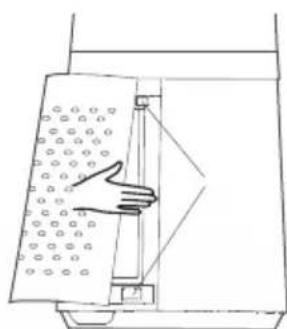
natural_image
Line drawing of a hand pressing down on a door panel with circular patterns (no text or symbols)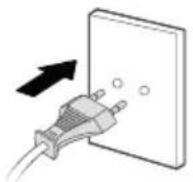
POKYNY
Ovládací panel
Obrazovka
Dálkové ovládání
natural_image
Simple line drawings of two batteries and a U-shaped battery with a circuit symbol (no text or labels)Baterie
natural_image
Simple icon of a document with a grid and refresh arrow inside, enclosed in a dashed circular border (no text or symbols)
natural_image
Diagram of a mechanical device with a textured internal component and an arrow indicating direction (no text or symbols)
Vynucený reset:
When you are not using the appliance, store it in a cool, dry place with ambient conditions no higher than 35^ C.
POPIS
6
SK
natural_image
Line drawing of a hand pressing down on a device with a magnified inset showing the handle (no text or symbols)2 Vyberte predfilter.
natural_image
Line drawing of a hand opening a container with granular material inside, no text or symbols presentnatural_image
Simple 3D diagram of a rectangular object with a black arrow pointing to its top surface (no text or symbols)natural_image
Line drawing of a hand holding a container with a checkered pattern inside, next to a cylindrical container (no text or symbols)natural_image
Line drawing of a hand opening a door with a patterned lid (no text or symbols)natural_image
Line drawing of a hand pressing down on a door panel with circular patterns (no text or symbols)7 Zapnite napájanie.
NÁVOD
Ovládací panel
Obrazovka
Dialkový ovládač
natural_image
Diagram of a mobile phone casing showing internal battery structure with two ports (no text or symbols)AAA batérie,1.5 V
Batéries
natural_image
Simple icon of a document with a grid and refresh arrow, enclosed in a dashed circular border (no text or symbols)
natural_image
Pure technical diagram of a mechanical component with no visible text, numbers, or symbols
Nútený reset:
natural_image
Line drawing of a hand pressing down on a device with a magnified inset showing the handle (no text or symbols)natural_image
Line drawing of a hand opening a door with a grid-patterned interior (no text or symbols)natural_image
Simple 3D diagram of a rectangular object with a black arrow pointing to its side (no text or symbols)natural_image
Line drawing of a hand holding a tool interacting with a container filled with checkered pattern (no text or symbols)natural_image
Line drawing of a hand opening a door with a patterned panel inside (no text or symbols)natural_image
Line drawing of a hand pressing down on a door panel with circular patterns (no text or symbols)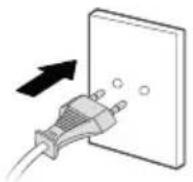
UTASÍTÁSOK
Vezérl panel
- Képernyő
Távvezérl
natural_image
Diagram of a cylindrical battery with internal components and two external batteries, shown in line drawings without any text or symbols.natural_image
Simple icon of a document with a grid and refresh arrow, enclosed in a dashed circular border (no text or symbols)
natural_image
Cross-sectional diagram of a mechanical device with internal components (no text or symbols)
natural_image
Line drawing of a hand pressing down on a device with a magnified inset showing the handle (no text or symbols)natural_image
Line drawing of a hand opening a container with granular material inside, no text or symbols presentnatural_image
Simple 3D diagram of a rectangular object with a black arrow pointing to its side (no text or symbols)natural_image
Line drawing of a hand holding a container with a checkered pattern, next to a cylindrical container (no text or symbols)natural_image
Line drawing of a hand opening a door with a patterned panel inside, no text or symbols presentnatural_image
Line drawing of a hand pressing down on a textured panel with circular patterns (no text or symbols)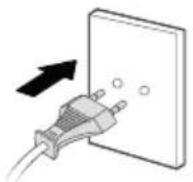
INSTRUKCJE
Panel sterowania
Wyświetlacz
PL
natural_image
Diagram of a mobile phone casing showing battery and two internal components (no text or symbols)AAA baterii,1.5 V
natural_image
Simple icon of a document with a grid and refresh arrow, enclosed in a dashed circular border (no text or symbols)natural_image
Pure technical diagram of a mechanical component with no visible text, numbers, or symbols
PL
Reset wymuszony:
natural_image
Line drawing of a hand pressing down on a device with a magnified inset showing the handle (no text or symbols)natural_image
Line drawing of a hand opening a door with a patterned lid, showing mechanical components (no text or symbols)natural_image
Simple 3D diagram of a rectangular object with a black arrow pointing to its side (no text or symbols)natural_image
Line drawing of a hand holding a tool interacting with a device (no text or symbols present)natural_image
Line drawing of a hand opening a door with a patterned panel inside, no text or symbols presentnatural_image
Line drawing of a hand pressing down on a textured panel with circular patterns (no text or symbols)7 Plug power supply.
ИНСТРУКЦИИ
Панель управления
Экран
natural_image
Diagram of a battery pack showing internal components and charge distribution (no text or labels)natural_image
Simple icon of a document with a grid and refresh arrow, enclosed in a dashed circular border (no text or symbols)natural_image
Pure technical line drawing of a mechanical component without any text, numbers, or symbolsnatural_image
Line drawing of a hand inserting a component into a device, with an inset magnified view showing the component (no text or symbols)natural_image
Line drawing of a hand opening a door with a grid-patterned interior (no text or symbols)natural_image
Simple 3D diagram of a rectangular object with a black arrow pointing to its side (no text or symbols)natural_image
Line drawing of a hand holding a tool interacting with a container filled with checkered pattern (no text or symbols)natural_image
Line drawing of a hand opening a door with a patterned panel inside, no text or symbols presentnatural_image
Line drawing of a hand pressing down on a textured panel with circular patterns (no text or symbols)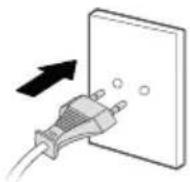
ІНСТРУКЦІЇ
Панель керування
Екран
natural_image
Diagram of four different types of batteries and a terminal block, showing internal components and polarity indicators (no text or labels)natural_image
Cross-sectional diagram of a mechanical device with a highlighted section and directional arrow (no text or symbols)natural_image
Simple icon of a document with a grid and refresh arrow, enclosed in a dashed circular border (no text or symbols)natural_image
Line drawing of a hand pressing down on a device with a magnified inset showing the handle (no text or symbols)natural_image
Line drawing of a hand inserting a filter into a device (no text or symbols)natural_image
Simple 3D diagram of a rectangular object with an arrow pointing to its top surface (no text or symbols)natural_image
Line drawing of a hand holding a container with a checkered pattern inside, next to a cylindrical container (no text or symbols)natural_image
Line drawing of a hand opening a door with a patterned panel inside, no text or symbols presentnatural_image
Line drawing of a hand pressing down on a textured panel with circular patterns (no text or symbols)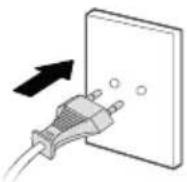
ΟΔΗΓΙΕΣ
Πίνακας ελέγχου
Οθόνη
natural_image
Diagram of a battery pack showing internal components and charge distribution (no text or labels)natural_image
Simple icon of a document with a grid and refresh arrow, enclosed in a dashed circular border (no text or symbols)natural_image
Cross-sectional diagram of a mechanical or architectural component with a shaded internal section (no text or symbols)
EL
- DESCRIPTION
- INSTALLATION
- INSTRUCTIONS
- MAINTENANCE & CLEANING
- Filter replacement
- Forced reset:
- « HOW TO ACHIEVE CLEANER INDOOR AIR »
- STORAGE
- BESCHREIBUNG
- ANWEISUNGEN
- INSTRUCTIES
- Geforceerde reset:
- ISTRUZIONI
- INSTRUCCIONES
- INSTRUÇÕES
- Reposição forçada:
- INSTRUCTIUNI
- Resetare for at:
- NAVODILA
- UPUTE
- INSTALACIJA
- UPUTSTVA
- ODRŽAVANJE I ČIŠĆENJE
- Nametnuto resetovanje:
- Prisilno resetiranje:
- «SAVJETI ZA ZAMJENU FILTERA »
- « KAKO POSTIĆI ČIŠĆI ZRAK U ZATVORENOM PROSTORU »
- SKLADIŠTENJE
- POKYNY
- Vynucený reset:
- POPIS
- NÁVOD
- Nútený reset:
- UTASÍTÁSOK
- INSTRUKCJE
- Reset wymuszony:
- ИНСТРУКЦИИ
- ІНСТРУКЦІЇ
- ΟΔΗΓΙΕΣ
Brand : ROWENTA
Model : Eclipse QU506
Category : Air purifier