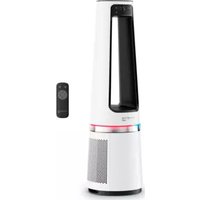
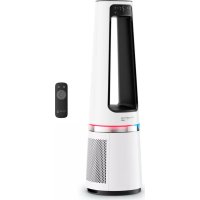
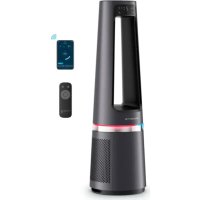
USER MANUAL Eclipse QU5060 ROWENTA
QU506x
FR Veuillez lire attentivement le livret « Consignes de sécurité et d'utilisation » avant la première utilisation / EN Please read carefully the "Safety and use instructions" booklet before first use / DE Bitte lesen Sie vor der ersten Verwendung die „Sicherheits- und Gebrauchsanweisungen“ sorgfältig durch / NL Neem vóór het eerste gebruik aandachtig het boekje met de veiligheids- en gebruiksvoorschriften door / IT Leggere con attenzione il libretto «Norme di sicurezza e d'uso» al primo utilizzo / ES Lee atentamente el folleto «Instrucciones de seguridad y de uso» antes de utilizar el aparato por primera vez / PT Leia atentamente o folheto «Instruções de segurança e utilização» antes da primeira utilização / RO Citiți cu atenție brosura „Instrucțiuni de siguranță și utilizare” înainte de prima utilizare / BG Molia, прочете внимателно книжката „Инструкции за безопасност и употреба“ преди търва употреба / SL Pred prvo uporabo natančno preberite knjižico «Varnostna navodila in navodila za uporabo» / HR Prije prve uporabe pažljivo pročitajte knjižicu „Sigurnosne upute i upute za uporabu” / SR Pažljivo pročitajte brošuru „Uputstva za bezbednost i korišćenje“ pre prve upotrebe / BS Prije prve upotrebe pažljivo pročitajte knjižicu „Upute o sigurnosti i korištenju“ / CS Před prvním použítím si pečlivě přečtěte přirucku „Bezpečnostní pokyny a návod k použítí“ / SK Pred prvým použítím si pozorne prečitajte brožuru „Bezpečnostné pokyny a pokyny na použitie“ / HU Az első használat elött figyelmesen olvassa el a „Biztonsági és használati utasítások” cimů kézikönyvet / UK Уважно прочитайте брошuru «инструкції з техніки безпеки й використання» перед першим використанням виробу / EL Прив апó ттн прώтн хрjhση, бівбасте проєктікά то філлабію «Обнүйес για ттн асфальса кай тн хрjhση»
FR Pour plus d'informations / EN For more information / DE Weitere Informationen / NL Voor meer informatie / IT Per ulteriori informazioni / ES Para más información / PT Para obter mais informações / RO Pentru mai multe informații / BG 3a novече informação / SL Za već informacij / HR Za više informacija / SR Za više informacija / BS Dodatne informacije / CS Pro vice informaci / SK Pre viac informaci / HU További informaciók / UK Dokładniша Informații / EL Για περισότερες πληροφορες.
DESCRIPTION
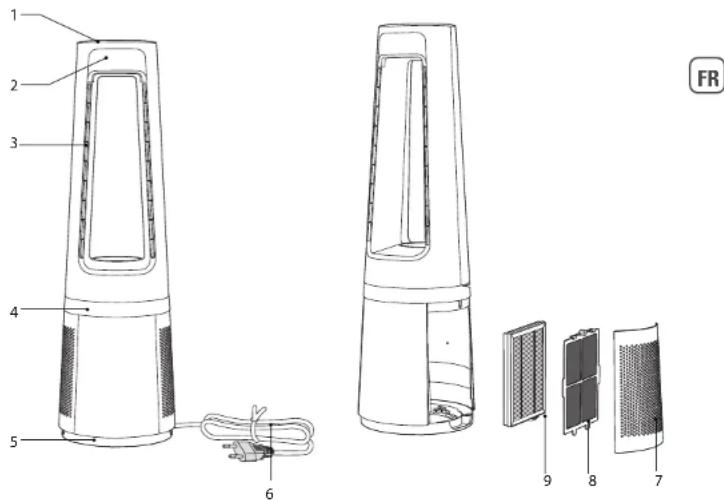
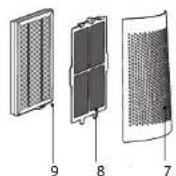
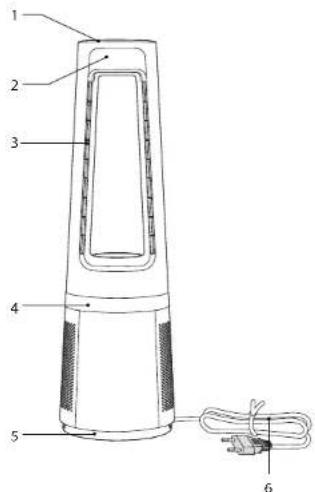
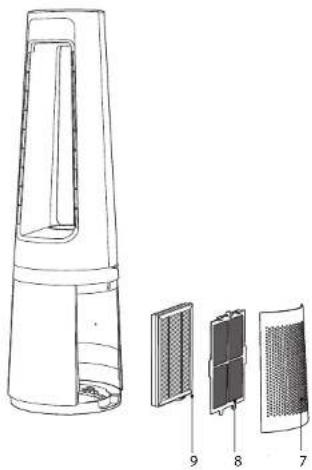
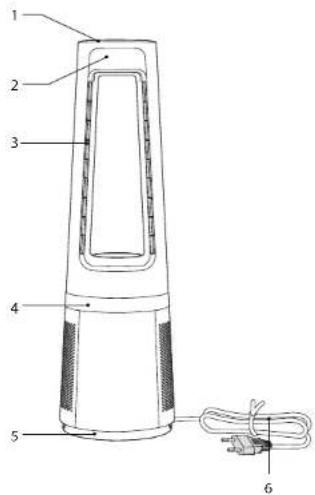
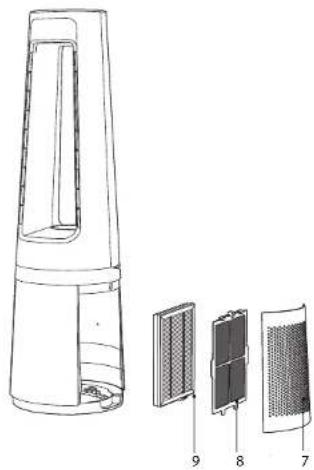
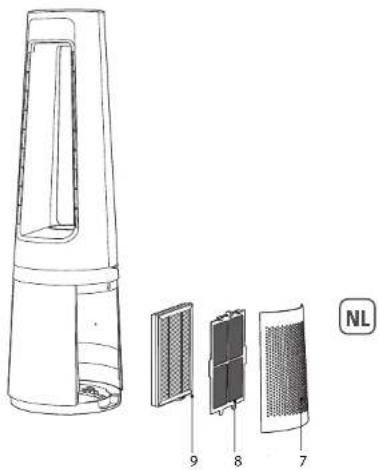
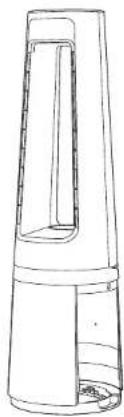
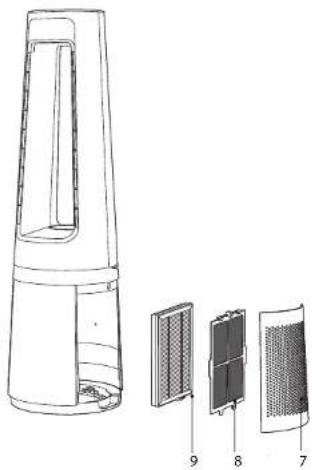
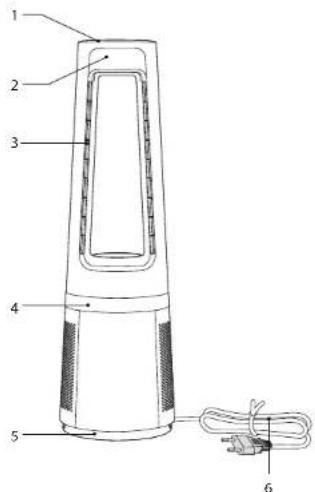
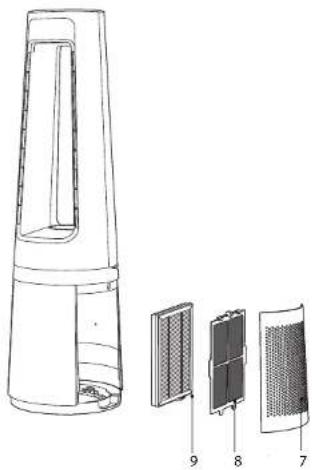
1 Control panel 6 Power cord
2 Screen 7 Air inlet grid
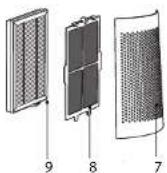
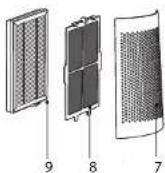
3 Air outlet 8 Pre-filter
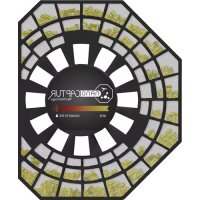
4 Decoration light 9 Particle filter XD6520F0
5 Base
INSTALLATION
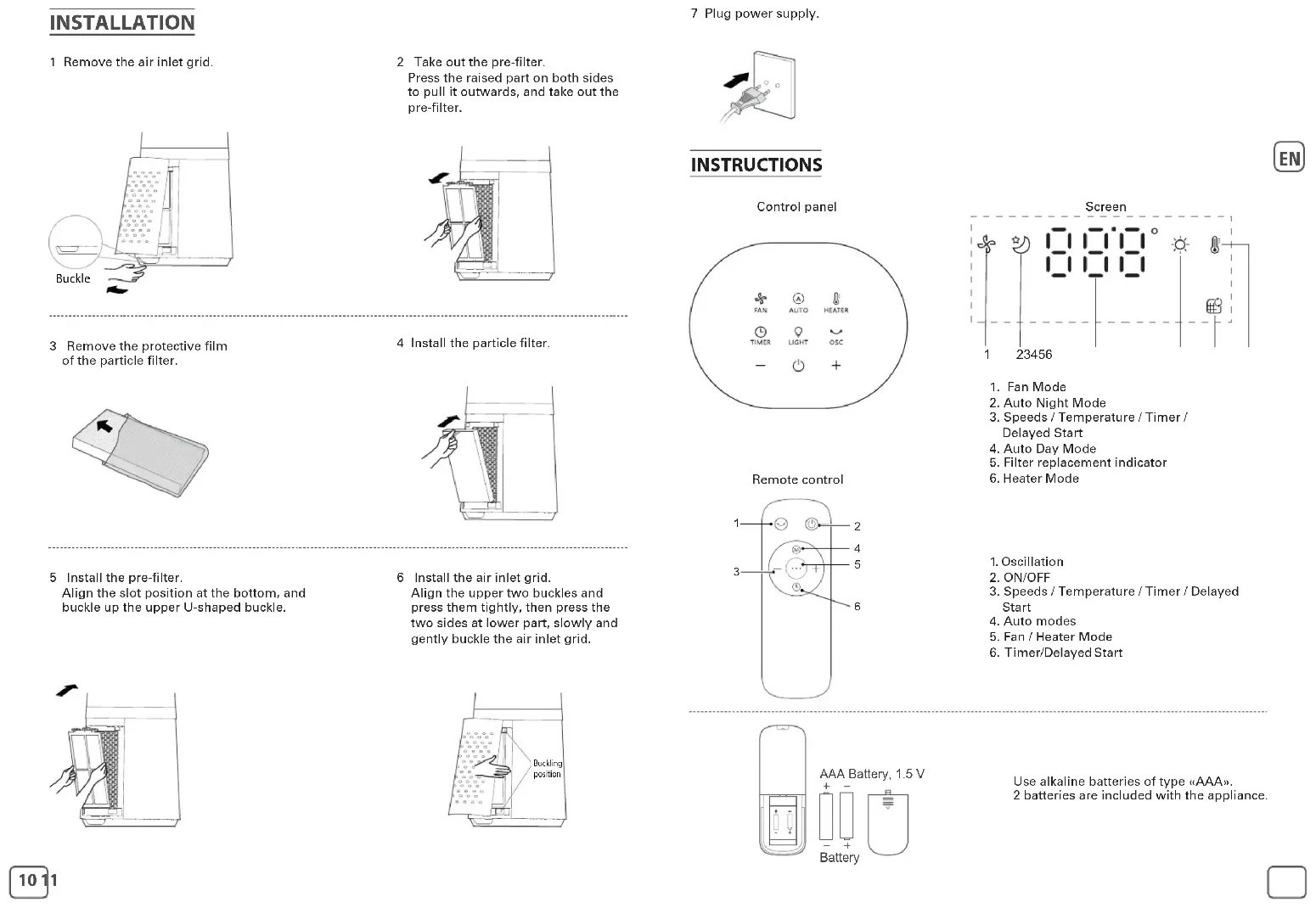
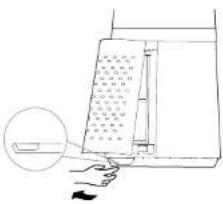
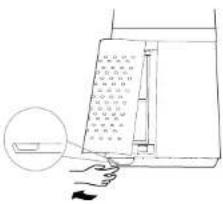
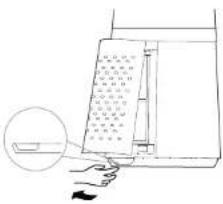
1 Remove the air inlet grid.
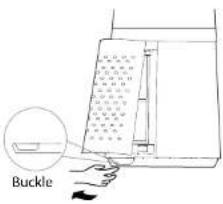
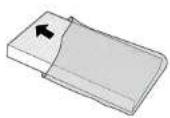
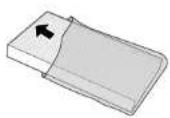
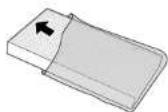
3 Remove the protective film of the particle filter.
5 Install the pre-filter.
Align the slot position at the bottom, and buckle up the upper U-shaped buckle.
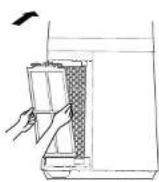
2 Take out the pre-filter.
Press the raised part on both sides to pull it outwards, and take out the pre-filter.
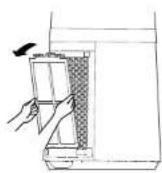
4 Install the particle filter.
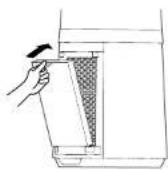
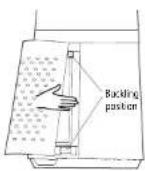
6 Install the air inlet grid. Align the upper two buckles and press them tightly, then press the two sides at lower part, slowly and gently buckle the air inlet grid.
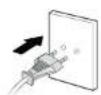
7 Plug power supply.
INSTRUCTIONS
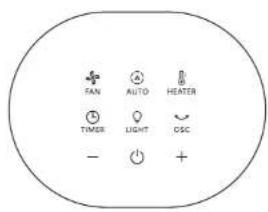
Control panel
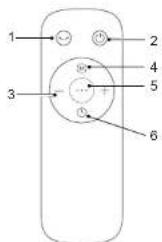
Remote control
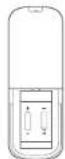
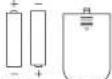
AAA Battery, 1.5 V
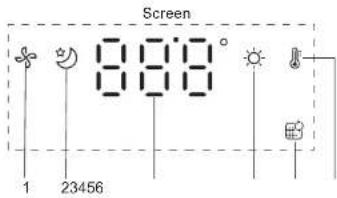
- Fan Mode
- Auto Night Mode
- Speeds / Temperature / Timer /
Delayed Start
- Auto Day Mode
- Filter replacement indicator
-
Heater Mode
-
Oscillation
- ON/OFF
- Speeds / Temperature / Timer / Delayed
Start
- Auto modes
- Fan / Heater Mode
- Timer/Delayed Start
Use alkaline batteries of type «AAA».
2 batteries are included with the appliance.
| Button Function Description |
 | ON/OFFAuto OFF: The appliance will shutdown automatically after 12h without manipulation. |
-  | Manually set fan speed, heater target temperature, timer and delayed start. |
 | Multi-angle oscillating switch of 30 ° ,60 ° , 90 ° and 0 ° . |
 | Press to activate the fan function. By default the product will be in Auto mode.Press + or – to switch to manual mode. |
 | Press to activate the heater function. By default the product will be in Auto mode.Press + or – to switch to manual mode. The maximum operating temperature is 35 ° C . |
 | Press once to activate the Auto day mode :When in fan function,the fan speed will adjust according to the ambient temperature of the room thanks to the integrated thermostat (speeds 1 to 12).When in heater function,the target temperature is 21 ° C . The product is in standby when the temperature is reached.Press twice to activate the Auto night mode :When in fan function,the fan speed is adjusted decrescendo (speeds 3 to 1) and the light is off.When in heater function,the target temperature is 19 ° C and the light is off. The product is in standby when the temperature is reached. |
 | Timer: Press once to activate the timer.Then press + or - to program the automatic shutdown from 1h to 12h.Delayed start: When the appliance is OFF,press the button to program the delayed start,then,press + or - to turn on the appliance from 1h to 12h later.Filter reset : Long press 3s to reset the filter. The bip sound indicates that the reset has been completed. |
| The decoration light is blue in fan mode,and red in heater mode. Press once to turn it on,press twice to turn it off. |
NB : on the first use, the product default setting is fan function in auto mode.
When plugged, the product will save its last mode after each use.
WARNING
- Never cover the appliance, it may cause overheating in both heater and fan modes.
- In case of overheating, switch off and unplug the appliance to let it cool down.
- Once the appliance cooled down, you can re-plug it and use it again.
MAINTENANCE & CLEANING
Always switch the appliance off and unplug it before conducting any maintenance or cleaning operation.
Use a damp cloth to clean the surface of the product.
Important: Do not use any abrasive materials, as these may damage the surface of the product.
Filter replacement
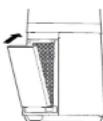
1 Filter model: XD6520F0 (including 2 sets)
2 The indicator is lighted when the particle filter needs to be replaced.
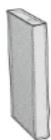
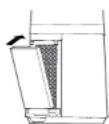
3 Replace a new filter

4 Long press the timer button for 3 seconds to turn off the indicator light for filter replacement.

Forced reset:
If you have replaced a filter before its end of life, force the reset of the filter replacement cycle:
Hold the timer button for 3 seconds. Ⓧ (beep sound).
IMPORTANT: it is recommended to change the filters as soon as the replace filter alert indicator is triggered to avoid a product malfunction.
| Filters Action Cycles |
| Pre-filter Clean with vacuum cleaner | Every 2 weeks | |
| Particle filter (ref: XD6520F0) Replace when is ligated | Every 6 months (on average, according to the use environment). |

- Avoid handling used filters if you suffer from allergies or asthma.
- Wear gloves when changing the filters, or wash your hands well afterwards.
- Put used filters directly into a closed, air-tight bag before throwing them away to avoid spreading pollutants.

« HOW TO ACHIEVE CLEANER INDOOR AIR »
In addition to using your appliance, here are some tips on how to improve the quality of your indoor air:
- Ventilate the rooms for at least 10 min. every day, in summer and winter.
- Maintain your ventilation system
- Limit the use of household products.
• Do not smoke indoors.
- Avoid home fragrances, incense sticks, scented candles, etc.
- Ventilate whenever any work is being conducted in your home and for several
weeks afterwards.
- Avoid green plants that are allergenic or need frequent watering.
STORAGE
When you are not using the appliance, store it in a cool, dry place with ambient conditions no higher than 35°C.
BESCHREIBUNG
3 Scoateți película protectoare a filtrului de particule.
Sinstalatipre-filtrul.
6 Kabel za napajanje
Filter za čestice XD6520F0
INSTALACIJA
1 Skinite rešetku otvora za ulaz zraka.
3 Skinite zaštitni film s filtera za čestice.
5Postavitepredfilter.
Poravnajte položaj utora na dnu i zatvorite gornju kopču u obliku slova U.
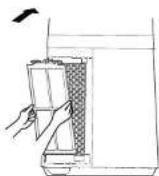
2Izvaditepredfilter.
Pritisnite izdignuti dio na obje strane kako biste ga izvukli van i izvadite predfilter.
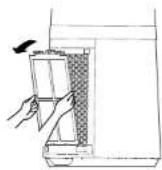
4 Postavite filter za čestice.
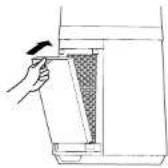
3 Postavite novi filter
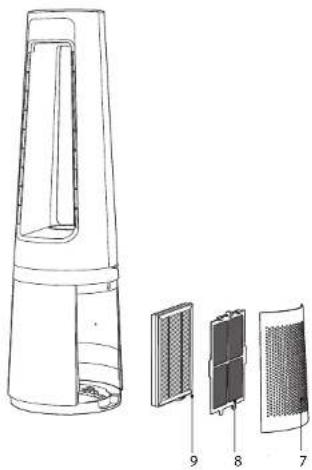
1 Kontrolna tabla 6 Kabl za napajanje
2 Ekran 7 Rešetka ulaza za vazduh
3 Izlaz za vazduh 8 Predfilter
4 Dekorativno svetlo 9
5 Baza
Filter za čestice XD6520F0
INSTALACIJA
1 Uklonite rešetku ulaza za vazduh.
3 Stavite novi filter
4 Dugo pritisnite dugme tajmera 3 sekunde da biste isključili indikatorsku lampicu za zamenu filtera

Nametnuto resetovanje:
Ako ste zamenili filter pre nego što mu je istekao vek trajanja, nametnite resetovanje ciklusa zamene filtera:
Držite taster za resetovanje 3 sekunde.
VAŽNO: Preporučljivo je da promenite filtere čim se aktivira indikator upozorenja za zamenu filtera kako biste izbegli kvar proizvoda.
| Filteri Postupak Ciklusi |
| Predfilter Čistiti usisivačem Jednom | u 2 nedelje | |
| Filter za čestice (ref.: XD6520F0) | Zameniti kada svetli | Jednom u 6 meseci (u proseku, u zavisnosti od okruženja u kome se koristi). |

- Izbegavajte da rukujete filterima ako bolujete od alergija ili astme.
- Nosite rukavice prilikom zamene filtera ili temeljno operite ruke nakon zamene.
- Ubacite iskorišćene filtere direktno u hermetički zatvorenu kesu pre nego što ih bacite da biste sprečili širenje zagadivača.

« KAKO POSTIĆI ČISTIJI UNUTRAŠNJI VAZDUH »
Pored uputstava za korišćenje aparata, evo i nekoliko saveta kako da poboljšate kvalitet vazduha u unutrašnjim prostorijama:
- Svakodnevno provetravajte prostorije najmanje 10 minuta i leti i zimi.
- Održavajte svoj ventilacioni sistem.
- Ograničite upotrebu proizvoda za domaćinstvo.
• Nemojte pušiti u zatvorenom prostoru.
- Izbegavajte mirise za osvežavanje doma, mirišljave štapiće, mirisne sveće itd
- Provetravajte kad god se obavlja bilo kakav posao u vašem domu i nekoliko sedmica nakon toga.
SKLADIŠTENJE
Kada ne koristite aparat, čuvajte ga na hladnom i suvom mestu na kojem temperatura ne prelazi 35°C.
OPIS
1 Upravljačka ploča
2 Ekran 7 Rešetka otvora za ulaz zraka
3 Izlaz zraka 8 Predfilter
4 Ukrasna lampica 9
5 Postolje
6 Kabal za napajanje
Filter za čestice XD6520F0
INSTALIRANJE
1 Skinite rešetku otvora za ulaz zraka.
3 Skinite zaštitni film s filtera za čestice.
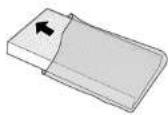
3 Postavite novi filter
When you are not using the appliance, store it in a cool, dry place with ambient conditions no higher than 35°C.
POPIS