USER MANUAL INTUITION PREFERENCE + YY4491FD KRUPS
FR. P. 11-23 EN. P. 24-36 DE. P. 37-49 NL. P. 50-63 DA. P. 64-76 NO. P. 77-89 SV. P. 90-102 FI. P. 103-115 ES. P. 116-128 IT. P. 129-141 PT. 142-154 EL. P. 155-168 CS. P. 169-181 SK. P. 182-194 HU .P. 195-207 PL. P. 208-220 RU .P.221-234 UK. P. 235-248 RO. P. 249-261 BG. P. 262-275 HR .P. 276-288
8020005357
KRUPS EA875 INTUITION PREFERENCE+
KRUPS
EA875 INTUITION PREFERENCE+
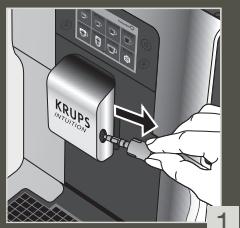
1 1st USE

FR - 1ÈRE UTILISATION
NL - 1STE GEBRUIK
NO - FØRSTE GANGS BRUK
FI - ENSIMMÄINEN KÄYTTÖKERTA
IT - PRIMO UTILIZZO
EL - INPQTH XPH2H
SK - PRVÉPOUZITIE
PL - PIERWSZE UZYCIE
UK- INPELIJE BHKOPMCTAHHRA
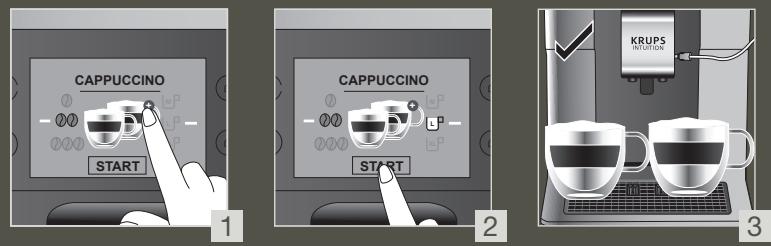
To make 2 cups of a milk recipe at once

FR - Pour 2 tasses instantanées d'une recette avec du lait
NL - Maak onmiddellijk 2 kopjes van een melkrecept
NO - Lag 2 kopper med en melkeoppskrift på en gang
FI - Tee 2 kupillista maitokahvia kerralla
IT - Preparazione di 2 bevande a base di latte contemporaneamente
EL - Ετοιμάστε 2 φλιτζάνια μιας συνταγής με γάλα στη στιγμή
SK - Pripravte naraz 2 šálky mliečneho receptu
PL - Przygotowanie 2 filiżanek napoju z mlekiem na raz
UK - Приготуйте 2 чашки напою з молоком за один раз
BG - Изпълнение на рецептата с мляко за 2 чаши наведнъж
DE - 2 Tassen eines Milchrezeptes auf einmal zubereiten
DA - Opskrift til at lave 2 kopper mælk på samme tid
SV - Tillaga 2 koppar av ett mjölkrecept i taget
ES - Haga 2 tazas de una bebida con leche a la vez
PT - Prepare 2 chavenas de uma receita de leite num instante
CS - Najednou 2 šálky mléčné receptury
HU - Egyszerre 2 csésze tejital készítsen
RU - Приготовьте 2 чашки молочного напитка одновременно
RO - Prepararea simultană a 2 cești de băutură cu lapte
HR - Napravite 2 šalice napitka s mlijekom odjednom
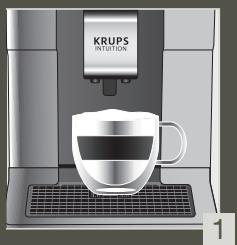
4 Quick milk rinsing after a cappuccino
FR - Rinçage rapide du lait après un cappuccino
NL - Snelle melkspoeling na een cappuccino
NO - Hurtig melkeskylling etter en cappuccino
FI - Nopea maidon huuhtelu cappuccinon jälkeen
IT - Risciacquo rapido del circuito del latte dopo un cappuccino
EL - Γρήγορη έκπλυση γάλακτος μετά από καπουτσίνο
SK - Rýchle oplachovanie mlieka po cappuccine
PL - Szybkie płukanie systemu mleka po cappuccino
UK - Швидке змивання молока після приготування капучино
BG - Бързо изплакване на млякото след капучино
DE - Schnelle Milchspülung nach einem Cappuccino
DA - Hurtig mælkeskylning efter en cappuccino
SV - Snabb mjölksöljning efter en cappuccino
ES - Enjuague rápido de la leche después de hacer un cappuccino
PT - Lavagem rápida do leite após preparação de um cappuccino
CS - Rychlé oplachování mléka po cappuccinu
HU - A tej gyors kimosása cappuccino készítése után
RU - Быстрая промывка молочной системы после приготовления капучино
RO - Clătirea rapidă a laptelui după un cappuccino
HR - Brzo ispiranje mlijeka nakon cappuccina
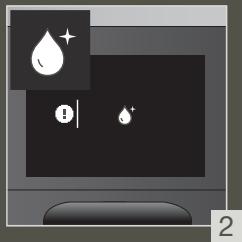
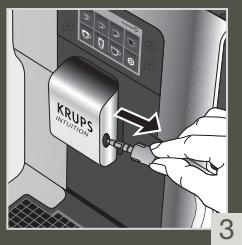
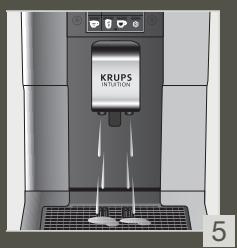
5 Manual deep cleaning of milk system - 5 min
FR - Nettoyage manuel approfondi du lait - 5 min
NL - Handmatige diepe reiniging van het melksysteem - 5 min
NO - Manuell ordentlig rengjøring av melkesystemet - 5 min
FI - Manuaalinen maitojärjestelmän syväpuhdistus - 5 min
IT - Pulizia profonda manuale del circuito del latte - 5 min
EL - Χειροκίνητος βαθύς καθαρισμός του συστήματος γάλακτος - 5 λεπτά
SK - Manuálne hlbkové čistenie mliečneho systému - 5 min
PL - Ręczne szczegółowe czyszczenie systemu mleka - 5 min
UK - Ручне глибоке очищення системи молока - 5 хв
BG - Ръчно дълбоко почистване на системата за мляко - 5 мин
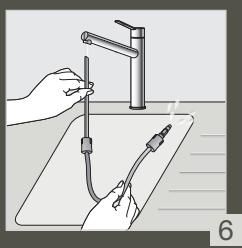
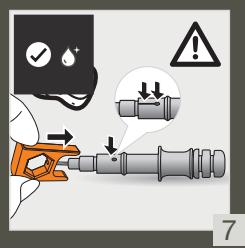
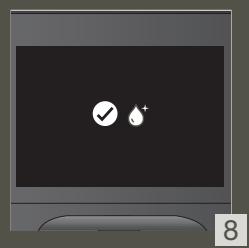
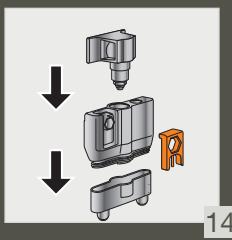
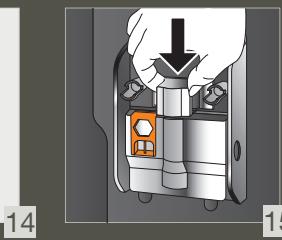
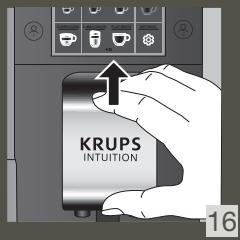
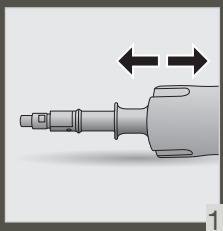
DE - MANUAL DEEP CLEANING OF THE MILK SYSTEM - 5 MIN. DA - MANUAL DEEP CLEANING OF THE MILK SYSTEM - 5 MIN. SV - MANUAL DEEP CLEANING OF THE MILK SYSTEM - 5 MINUTES ES - MANUAL DEEP CLEANING OF THE MILK SYSTEM - 5 MINUTES PT - MANUAL DEEP CLEANING OF THE MILK SYSTEM - 5 MIN CS - MANUAL DEEP CLEANING OF THE MILK SYSTEM - 5 MIN HU - MANUAL DEEP CLEANING OF THE MILK SYSTEM - 5 MIN RU - MANUAL DEEP CLEANING OF THE MILK SYSTEM - 5 MIN. RO - MANUAL DEEP CLEANING OF THE MILK SYSTEM - 5 MIN HR - MANUAL DEEP CLEANING OF THE MILK SYSTEM - 5 MIN.
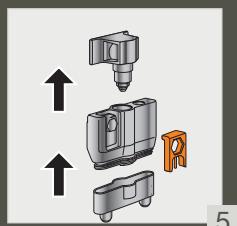
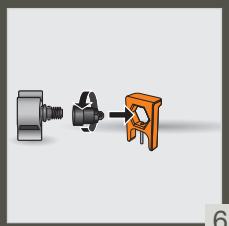
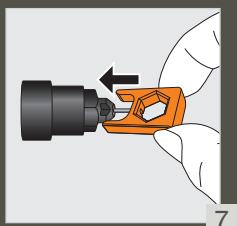
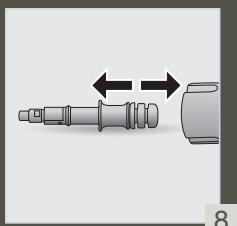


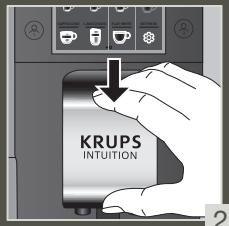

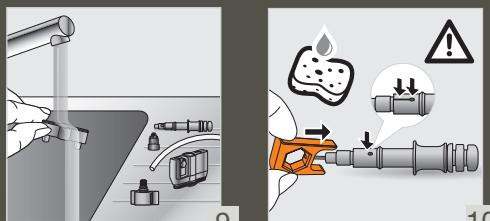
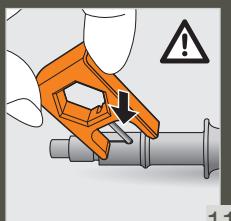


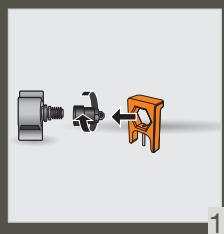

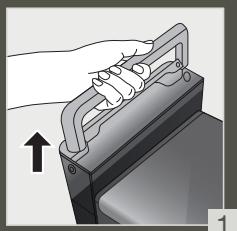
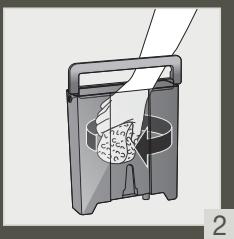
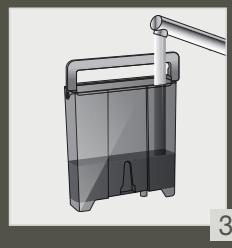
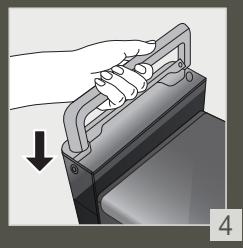
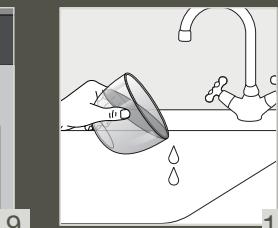
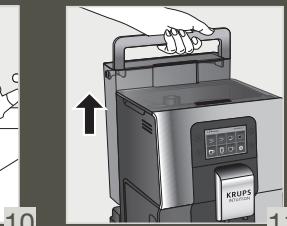
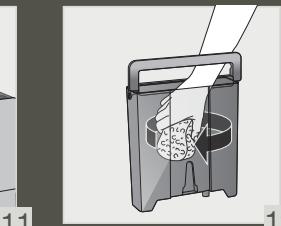
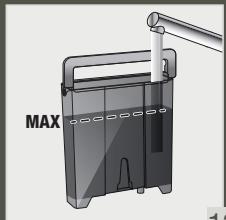
8 CLEAN THE WATER TANK REGULARLY

FR - CLEAN THE WATER TANK REGULARLY NL - CLEAN THE WATER TANK REGULARLY NO - CLEAN THE WATER TANK REGULARLY FI - CLEAN THE WATER TANK REGULARLY IT - CLEAN THE WATER TANK REGULARLY EL - CLEAN THE WATER TANK REGULARLY SK - CLEAN THE WATER TANK REGULARLY PL - CLEAN THE WATER TANK REGULARLY UK - CLEAN THE WATER TANK REGULARLY BG - CLEAN THE WATER TANK REGULARLY
DE - CLEAN THE WATER TANK REGULARLY DA - CLEAN THE WATER TANK REGULARLY SV - CLEAN THE WATER TANK REGULARLY ES - CLEAN THE WATER TANK REGULARLY PT - CLEAN THE WATER TANK REGULARLY CS - CLEAN THE WATER TANK REGULARLY HU - CLEAN THE WATER TANK REGULARLY RU - CLEAN THE WATER TANK REGULARLY RO - CLEAN THE WATER TANK REGULARLY HR - CLEAN THE WATER TANK REGULARLY
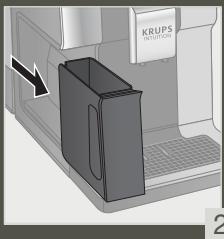
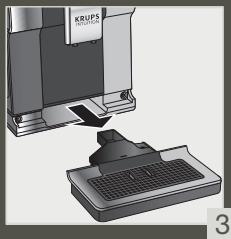
FR - FULL AUTOMATIC CLEANING OF THE MACHINE 3 x / YEAR - 13 MIN NL - FULL AUTOMATIC CLEANING OF THE MACHINE 3 x / YEAR - 13 MIN NO - FULL AUTOMATIC CLEANING OF THE MACHINE 3 x / YEAR - 13 MIN FI - FULL AUTOMATIC CLEANING OF THE MACHINE 3 x / YEAR - 13 MIN IT - FULL AUTOMATIC CLEANING OF THE MACHINE 3 x / YEAR - 13 MIN EL - FULL AUTOMATIC CLEANING OF THE MACHINE 3 x / YEAR - 13 MIN SK - FULL AUTOMATIC CLEANING OF THE MACHINE 3 x / YEAR - 13 MIN PL - FULL AUTOMATIC CLEANING OF THE MACHINE 3 x / YEAR - 13 MIN UK - FULL AUTOMATIC CLEANING OF THE MACHINE 3 x / YEAR - 13 MIN BG - FULL AUTOMATIC CLEANING OF THE MACHINE 3 x / YEAR - 13 MIN
DE - FULL AUTOMATIC CLEANING OF THE MACHINE 3 x / YEAR - 13 MIN DA - FULL AUTOMATIC CLEANING OF THE MACHINE 3 x / YEAR - 13 MIN SV - FULL AUTOMATIC CLEANING OF THE MACHINE 3 x / YEAR - 13 MIN ES - FULL AUTOMATIC CLEANING OF THE MACHINE 3 x / YEAR - 13 MIN PT - FULL AUTOMATIC CLEANING OF THE MACHINE 3 x / YEAR - 13 MIN CS - FULL AUTOMATIC CLEANING OF THE MACHINE 3 x / YEAR - 13 MIN HU - FULL AUTOMATIC CLEANING OF THE MACHINE 3 x / YEAR - 13 MIN RU - FULL AUTOMATIC CLEANING OF THE MACHINE 3 x / YEAR - 13 MIN RO - FULL AUTOMATIC CLEANING OF THE MACHINE 3 x / YEAR - 13 MIN HR - FULL AUTOMATIC CLEANING OF THE MACHINE 3 x / YEAR - 13 MIN

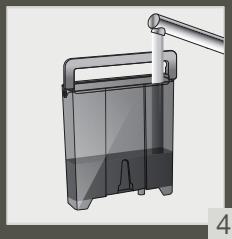
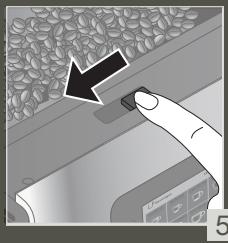
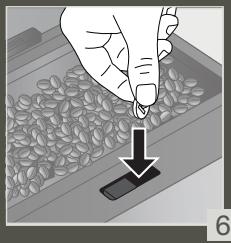
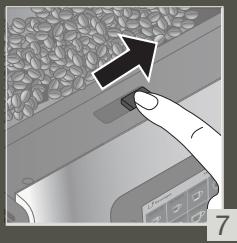
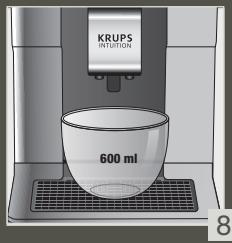
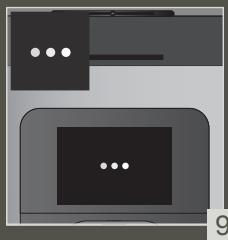
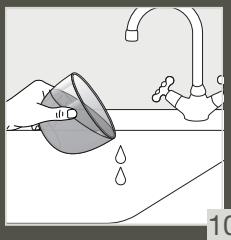
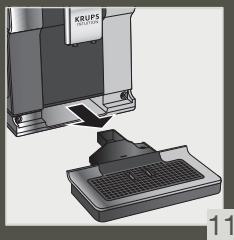
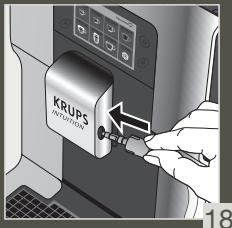
10 DESCALING PROGRAM - 20 MIN
FR - DESCALING PROGRAM - 20 MIN NL - DESCALING PROGRAM - 20 MIN NO - DESCALING PROGRAM - 20 MIN FI - DESCALING PROGRAM - 20 MIN IT - DESCALING PROGRAM - 20 MIN EL - DESCALING PROGRAM - 20 MIN SK - DESCALING PROGRAM - 20 MIN PL - DESCALING PROGRAM - 20 MIN UK - DESCALING PROGRAM - 20 MIN BG - DESCALING PROGRAM - 20 MIN
DE - DESCALING PROGRAM - 20 MIN DA - DESCALING PROGRAM - 20 MIN SV - AUTOMATIC DESCALING PROGRAM - 20 MIN ES - DESCALING PROGRAM - 20 MIN PT - DESCALING PROGRAM - 20 MIN CS - DESCALING PROGRAM - 20 MIN HU - DESCALING PROGRAM - 20 MIN RU - DESCALING PROGRAM - 20 MIN RO - DESCALING PROGRAM - 20 MIN HR - DESCALING PROGRAM - 20 MIN
1
2
3
4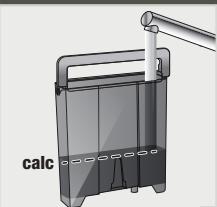
5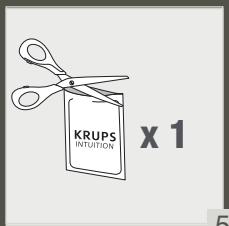
6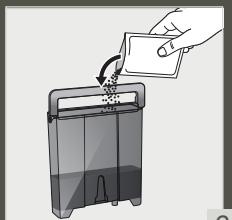
7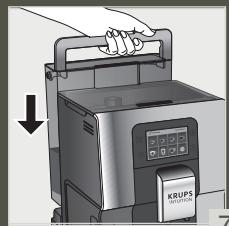
8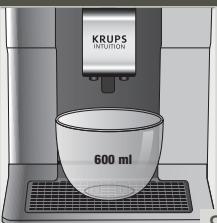
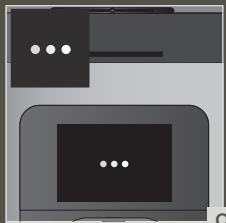
15
16
Dear customer,
ACCESSORIES SUPPLIED WITH YOUR MACHINE
POWERING ON THE MACHINE

Thank you for purchasing a KRUPS Espresso machine with bean grinder.
KRUPS designs, develops and manufactures its Espresso machines in France, ensuring you the highest standards of origin and manufacturing quality.
Designed for ease of use, your machine is the effortless way to create café-quality drinks at home. With just one touch, you can enjoy coffees such as Espresso, Ristretto and Lungo, as well as Cappuccino, Latte Macchiato, Caffe Latte and other milky drinks!
To help you get the most out of your machine every day, KRUPS has developed an Intuitive Light Indicator. It will guide you in the use of your machine and brighten up your coffee breaks.
Your KRUPS Espresso machine also has a large, intuitive touchscreen, like a smartphone UX interface for an intuitive experience. In addition, your machine's advanced technology helps you get the best possible results, revealing maximum aroma and full-bodied flavour from the freshly ground coffee beans.
We hope you have a great coffee experience and that you are completely satisfied with your KRUPS machine.
The KRUPS team

NEED HELP GETTING STARTED WITH YOUR MACHINE?



HELP AND TUTORIALS
Find a list of tutorials saved in your machine to guide you in using it.
They will walk you through preparing a drink, managing your favourites and the maintenance of your machine.
List of available tutorials:
- How do I make my drinks?
- How do I manage a profile?
- How to maintain your machine?
a. Starting a coffee drink
d. Creating and setting up your profile
h. Performing a rinsing
b. Starting a milky drink
e. Adding a drink to your profile (after making it)
i. Performing a cleaning
c. Starting two drinks simultaneously
f. Adding a drink to your profile (from the profile page)
j. Performing descaling
g. Removing a drink from your profile

Read the instruction manual carefully before using your appliance for the first time and keep it for future reference. Improper use will release KRUPS from any liability. It is important to follow the safety information.
GUIDE TO THE SYMBOLS USED IN THE INSTRUCTIONS

Danger: Warning about the risk of serious bodily injury or death.
The lightning symbol alerts you to electricity-related dangers.

Caution: Warning against any possible malfunction, damage or destruction of the appliance.

Important: General or important comment for operating the appliance.

PRODUCTS SUPPLIED WITH YOUR MACHINE
Check the products supplied with your machine. If one of the parts is missing, contact your KRUPS Consumer Service immediately.
| Products supplied |
| 1. | 2 cleaning tablets | x2 |
| 2. | 1 descaling sachet | x1 |
| 3. | Milk tube for the "One Touch Cappuccino" block | |
| 4. | Additional Milk tube for the "One Touch Cappuccino" block | ? |
| 5. | Cleaning needle of the steam circuit | |
| 6. | 1 Claris - Aqua Filter System cartridge with tightening accessory | |
| 7. | 1 water-hardness testing stick | |
| 8. | Instructions - Safety precautions
List of approved Krups service centres
International guarantee | |
| 9. | Pipe cleaner | |
| According to model |
| 10. | Milk pot:
You can put the milk pot in the dishwasher | |
TECHNICAL DATA
| Appliance | Automatic Espresso EA87 |
| Power supply | 220-240V~ / 50 Hz |
| Pump pressure | 15 bar |
| Coffee bean container | 250 g |
| Energy consumption | When operating: 1450 W |
| Water container | 3 L |
| Getting started and storage | Inside, in a dry place (away from ice) |
| Dimensions (mm) H x I x P | 365 x 240 x 400 |
| Weight EA87 (kg) | 8.2 |
Subject to technical modifications. Place the appliance on a horizontal, stable, heat-resistant, clean and dry work surface.

APPLIANCE DESCRIPTION
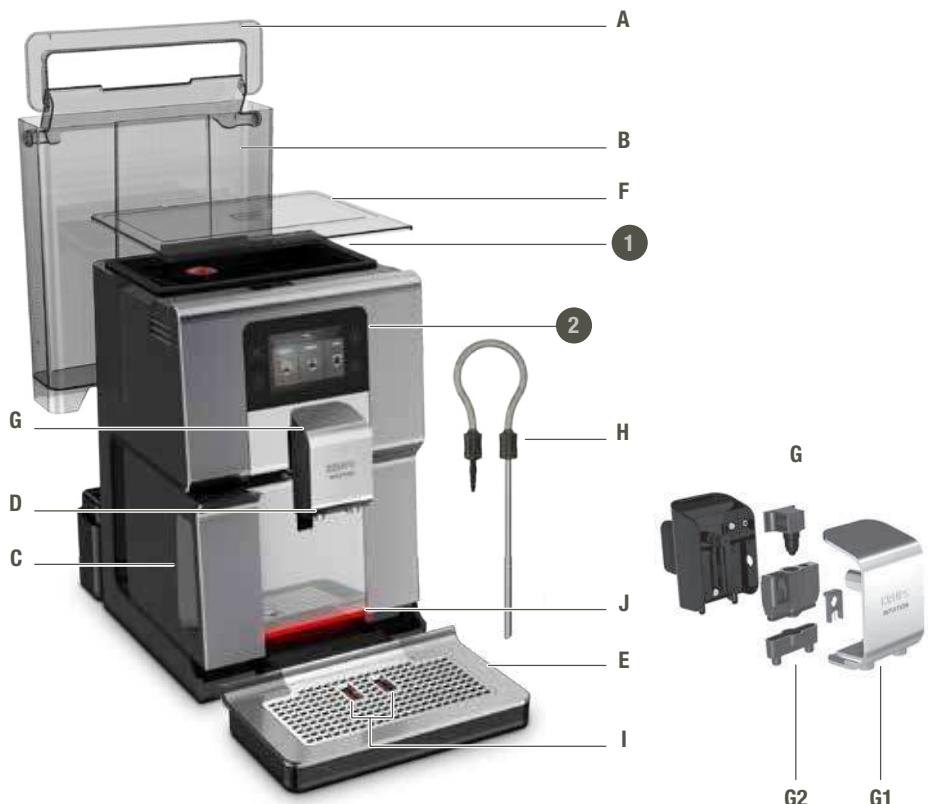
A. Handle for water container cover B. Water container C. Coffee grounds collector D. Height-adjustable coffee nozzles E. Grid and removable drip tray F. Coffee bean container lid G. "One Touch Cappuccino" block
G1. Accessory for cleaning the milk system, 2 in 1: disassembly tool + cleaning needle
G2. Removable one touch cappuccino block
H. Milk tube and connector
I. Water-level floats J. Intuitive Light Indicator
- Coffee bean container
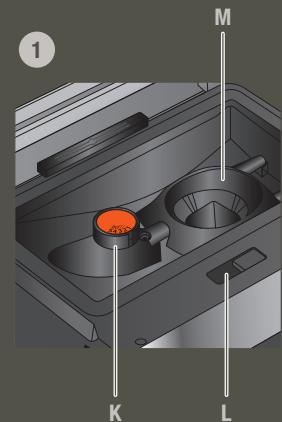
K. Grinding fineness adjustment button L. Cleaning tablet funnel M. Metal conical grinding mill
- Display panel
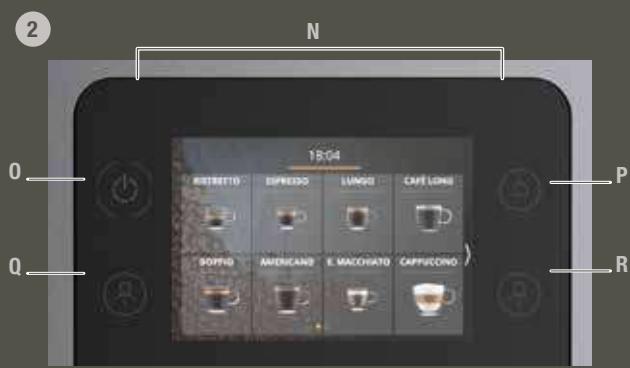
N. Navigation touchscreen O. ON/OFF P. Home screen shortcut Q. Profile 1 R. Profile 2
S. Milk Pot

GETTING STARTED & APPLIANCE SETUP
TURNING THE MACHINE ON

Danger: Connect the appliance to a grounded 230V socket. Not following this instruction puts you at risk of fatal injuries due to the presence of electricity!
Respect the safety information in the "Safety precautions" booklet.
GETTING STARTED (SEE 1.1ST USE)
When using the machine for the first time, you will be asked to select various settings.
Follow the directions that appear on the screen.
Priming the machine allows the water circuits to be filled, so that the machine can operate. Preheating and automatic rinsing will take place.
PUTTING THE MACHINE ON STANDBY
Depending on the preparation, the machine performs automatic rinsing while on standby. The cycle only lasts a few seconds and stops automatically.

TIPS AND TRICKS
Water quality has a strong influence on the quality of the aromas. Limescale and chlorine can alter the taste of coffee. To preserve the aromas of your coffee, we recommend you to use the Claris - Aqua Filter System cartridge, or bottled water with dry residues below 800 mg/L (look on the bottle's label). See the "FILTER AND WATER HARDNESS" section.
When preparing drinks, we recommend using preheated cups (by running them under hot water) of an appropriate size for your desired quantity.
The roasted coffee beans can lose their aroma if they are not protected. We advise that you use an amount of beans equivalent to your consumption over the next 2-3 days and that you choose 250 g bags.
The quality of the coffee beans is variable and tastes are subjective. Arabica will give you fine, floral aromas, while Robusta, which has a higher caffeine content, is more bitter and full-bodied. It is common to mix the two types of coffee to get a more balanced coffee. Contact your roaster for further advice.
We do not recommend using oily and caramelised beans as these can damage the machine.
The fineness of the ground beans influences the strength of the aromas and the quality of the crema. The more finely ground the beans, the smoother the crema. Grinding can also be adapted for the desired drink.

INTUITIVE LIGHT INDICATOR
WHAT DOES THE INTUITIVE LIGHT INDICATOR DO?
Your Intuition machine features smart, bright technology to make your day easier: Intuitive Light Indicator (J). This technology has a dual functionality:
- The machine automatically detects and controls the levels of coffee beans, water and coffee grounds. When you need to fill or empty your containers, or when maintenance is required, the red light alert comes on, signalling you to follow the information on the screen.
- You can also customise your experience using the Intuitive Light Indicator. You can choose a colour for each profile. When a profile has been selected, the Intuitive Light Indicator will change to the colour belonging to that profile, making everything simple to understand and ensuring super-fast and intuitive navigation. See the chapter entitled "MY PROFILE".
LET YOURSELF BE GUIDED.
| Colour | Status | Explanation |
| Red | Fixed | Alert |
| Other colours and white | Breathing | In progress |
| Fixed | Recipe complete |
FILTER AND WATER HARDNESS
WHAT IS THE PURPOSE OF THE WATER HARDNESS SETTING?
In order to avoid scale build-up in your machine and to optimise the quality of your coffee, we advise you to adjust the water hardness setting on your machine.
HOW TO SET THE WATER HARDNESS ON YOUR MACHINE?



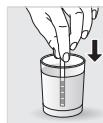
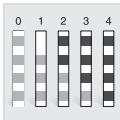
Fill a glass of water.
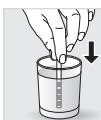
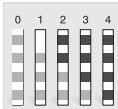
Dip the water-hardness testing stick (8) supplied with the machine in your glass of water. Wait for 1 minute. The squares on the stick will change colour. Count the number of coloured squares. This indicates the hardness of the water, from 0 to 4. In the "Water Hardness" menu, press the corresponding number between 0 and 4. Press OK.
IF YOU RUN OUT OF WATER-HARDNESS TESTING STICKS
If you need to repeat this operation, remember to adjust the water hardness setting according to the location of use or information provided by your local water company, using the table below:
| Degree of hardness | Classe 0
Very soft | Classe 1
Soft | Classe 2
Average hardness | Classe 3
Hard | Classe 4
Very hard |
| ° dH | < 3° | > 4° | > 7° | > 14° | > 21° |
| ° e | < 3.75° | > 5° | > 8.75° | > 17.5° | > 26.25° |
| ° f | < 5.4° | > 7.2° | > 12.6° | > 25.2° | > 37.8° |
| Appliance setting | 0 | 1 | 2 | 3 | 4 |
WHY INSTALL A FILTER CARTRIDGE?
The Claris Aqua Filter System cartridge optimises the taste of coffee, and reduces scaling and maintenance.
WHEN SHOULD I CHANGE THE CLARIS AQUA FILTER SYSTEM CARTRIDGE?
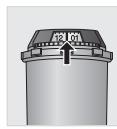
- Two months after set-up or when your machine notifies you.
- When changing the cartridge, we recommend that you turn the grey ring on the top of the filter cartridge to indicate the date + two months.
HOW DO I INSTALL THE CLARIS AQUA FILTER SYSTEM CARTRIDGE?




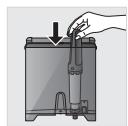
Place the cartridge in the water container. Position the cartridge, numbered ring facing up. Use the black tightening accessory, supplied with the cartridge, to position and screw the cartridge in place.
GRINDER: ADJUSTING THE FINENESS OF THE GROUND COFFEE
WHY SHOULD I ADJUST THE FINENESS OF THE GROUND COFFEE?
You can choose the strength of your coffee by adjusting how finely the coffee beans are ground.
Varying the fineness of the grinding enables you to adapt to the different types of bean:
Darkly roasted and oily beans require coarse grinding, while a more lightly roasted bean will be drier and will require finer grinding.
Note: the more finely the beans are ground, the more powerful the aroma.
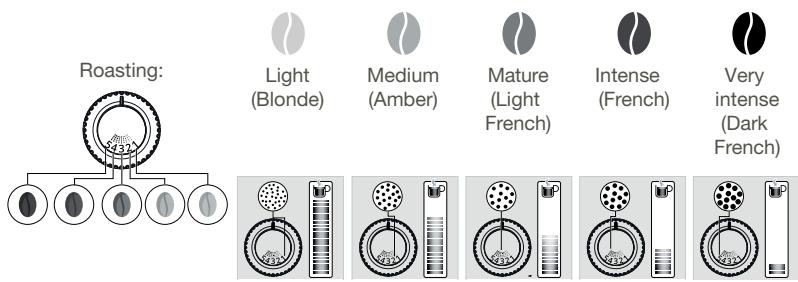
HOW DO I ADJUST THE FINENESS OF THE GROUND COFFEE?
Turn the grinding fineness adjustment button (K) located in the bean container, depending on the type of bean and the desired strength of aroma. This adjustment must be performed when the mill is in operation, notch by notch. After three preparations, you will notice a distinct difference in taste.
HOW DO I KNOW WHEN THERE ARE NO MORE BEANS IN THE CONTAINER?
Your Intuition machine has a sensor to warn you when the level of coffee beans in the container is running low. A message will appear on the screen and the Intuitive Light Indicator (J) will display red light.
WHAT IF THE ALERT APPEARS WHILE I'M MAKING A DRINK?
Fill the coffee bean container, press OK and the recipe will resume. So no coffee is wasted!
WHAT DO I DO IF I WANT TO CHANGE MY COFFEE OR IF I HAVE RUN OUT OF COFFEE?
If you press OK without adding coffee beans, the machine will try to restart and alert you again. If you press OK again, the machine will make the recipe using all of the remaining coffee. The grinder will then be empty.

Caution: We do not recommend using oily and caramelised beans that are difficult for the grinder to process.
These can damage the machine and prevent the intuitive system from functioning correctly.
If an alert message appears on your screen and the red light comes on when there are enough beans:
Press the OK button to continue the recipe. Or, turn off the "no bean" alert to prevent detection while there is still coffee in the coffee bean container.




PREPARING OTHER DRINKS
DRINKS THAT CAN BE PREPARED WITH THIS MACHINE:
| Drinks | Approximate size | Possible volumes | Coffee strength | X2 |
| Ristretto
Short Espresso with body | 25 ml | 20 - 40 ml | ✓ | ✓ |
| Espresso
The full-bodied Espresso with pronounced aromas is covered with a slightly bitter caramel coloured crema | 40 ml | 40 - 70 ml | ✓ | ✓ |
| Lungo
Long Espresso with caramel crema | 70 ml | 70 - 100 ml | ✓ | ✓ |
| Doppio
Double Espresso with amber crema | 100 ml | 40 - 140 ml | ✓ | |
| Long Coffee
Higher in caffeine but lighter on the palate.
Very popular in the morning | 120 ml | 80 - 180 ml | ✓ | ✓ |
| Americano
Double long Espresso combined with hot water | 120 ml | 90 - 150 ml | ✓ | |
| Espresso Macchiato
Espresso with a thin layer of frothed milk | M = 60 ml
L = 80 ml
XL = 100 ml | 60 - 100 ml | ✓ | ✓ |
| Cappuccino
A balance between milk, foam and coffee | M = 120 ml
L = 180 ml
XL = 240 ml | 120 - 240 ml | ✓ | ✓ |
| Frothed Milk
A large dose of milk with its milk froth | M = 120 ml
L = 160 ml
XL = 200 ml | 120 - 200 ml | | ✓ |
| Flat White
Coffee made with steamed milk and foam | M = 160 ml
L = 200 ml
XL = 240 ml | 160 - 240 ml | ✓ | |
| Caffe Latte
Foam with a subtle coffee flavour | M = 200 ml
L = 280 ml
XL = 350 ml | 200 - 350 ml | ✓ | ✓ |
| Latte Macchiato
A gourmet Espresso with milk foam | M = 190 ml
L = 250 ml
XL = 340 ml | 190 - 240 ml | ✓ | ✓ |
| Infusion
Water heated to the perfect temperature for an infusion | 200ml | 20 - 300 ml | | |
| Black Tea
Water heated to the perfect temperature for black tea | 200ml | 20 - 300 ml | | |
| Green Tea
Water heated to the perfect temperature for green tea | 200ml | 20 - 300 ml | | |
FOR YOUR INFORMATION, TO PREPARE YOUR DRINK, YOUR MACHINE AUTOMATICALLY PERFORMS THE FOLLOWING STEPS:
| For coffee recipes | For milky recipes other than Caffe Latte, Flat White and Espresso Macchiato | For the Caffe Latte, Flat White and Espresso Macchiato recipes |
| 1. Grinding coffee beans2. Tamping the ground coffee3. Pre-infusion (a few drops may fall into your cup at this point)4. Percolation | 1. Pre-heating phase2. Frothing milk3. Grinding coffee beans4. Tamping the ground coffee5. Pre-infusion (a few drops may fall into your cup at this point)6. Percolation | 1. Grinding coffee beans2. Tamping the ground coffee3. Pre-infusion (a few drops may fall into your cup at this point)4. Percolation5. Pre-heating phase6. Frothing milk |
HOW DO I ADJUST THE HEIGHT OF THE COFFEE NOZZLES?
For all drinks, you can adjust the coffee nozzles according to the size of your cup(s).
HOW DO I PREPARE MY DRINK?
Refer to the "How to make drinks?" tutorial saved in your machine.



HELP AND TUTORIALS
DIFFERENT SETTINGS ARE AVAILABLE, DEPENDING ON THE DRINK:
One or two cups: to start the double recipe, select the drink and press . Coffee strength: to increase or decrease the strength of the coffee by changing the amount of ground coffee, select your drink and choose between 1 and 3 beans, with 1 being the softest and 3 being the most full-bodied. Cup volume: to increase or decrease the cup volume, scroll up or down the list of volumes and select the one you want.
For more information, see the drinks table in the instructions.

To select the coffee strength and cup volume, you can navigate up/down or press directly on your choice.
HOW DO I STOP A DRINK MID-PREPARATION?
Warning: You can stop the preparation of a drink at any time by pressing the button. When a cycle is interrupted, it does not stop immediately. The machine will be unavailable for a time, as indicated by a message on the screen.
MILK-BASED DRINKS

TIPS
For frothed milk, use pasteurised UHT milk straight from the fridge (3 - 5°C). It is possible to use special milks (micro filtered, raw, fermented, enriched) or plant-based milks (rice, oat or almond milk), but this can give less satisfactory results in terms of quality and quantity of the froth.
HOW DO I START THE PREPARATION OF A MILK-BASED DRINK?
Refer to "2 PREPARING A MILK-BASED RECIPE" earlier in the instructions, or see the "Starting a milky drink" tutorial stored in your machine.



HELP AND TUTORIALS
TEAS AND INFUSIONS
For your teas and infusions, there are three selection buttons so that you can choose the temperature best suited to each type of tea. The temperature used for green tea will be lower than that used for black tea or infusions.
HOW DO I SET THE WATER TEMPERATURE?




Go to Settings > Water temperature. You can choose between T1, T2 and T3, where T1 is the coolest and T3 is the hottest.
When you decrease/increase the temperature, this will decrease/increase the temperature for each type of tea but the temperature used for green tea will always be lower than that used for black tea or infusions.
MY PROFILE
WHAT DO I USE THE PROFILE FUNCTION FOR?
The Profile function grants you access to a customised space where you can store and save your favourite drinks. You can easily access it by pressing a button on the machine's control panel.
Faster and perfect for everyday use, the drinks you have saved in your profile will start to pour with just one touch; no adjustments necessary. You can save as many as seven recipes for each profile.
The profile function also allows for a much more personalised interface and settings:
| First name | You can add your first name for greater personalisation. |
| Colour | You can choose a colour for the Intuitive Light Indicator, to help your profile stand out. |
| Display | Here, you can set how your drinks are displayed on the Profile screen.
They can be displayed in either “slider” or “tile” mode. |
| Programming | With the “Profile” function, you can also set a time of day for each drink. This will make it even easier to find your drink at any given moment. |
| Brightness | This allows you to enable or disable the Intuitive Light Indicator. |
HOW DO I CREATE A PROFILE?

Press the Profile 1 or Profile 2 icon and follow the on-screen instructions or watch the tutorials saved in your profile.



HOW DO I MANAGE THE FAVOURITE DRINKS SAVED TO MY PROFILE?
There are two ways to add a drink to a profile:

will appear on screen.
- After you make a drink, a button
- Directly in the profile.
If I stop my favorite drink in progress, this length will be saved.
HOW DO I ORGANISE/ORDER/REMOVE MY FAVOURITE DRINKS?
Press and hold a drink icon for a few seconds. A cross will appear in the top right-hand corner of each drink icon. Press and drag to rearrange drinks, press the cross to remove a drink.

GENERAL MAINTENANCE
Carrying out proper maintenance will optimise the life of your machine and preserve the authentic taste of your coffee.
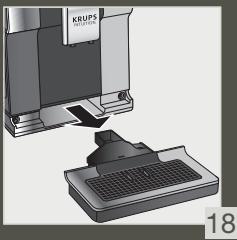
The drip tray collects the used water and the coffee grounds collector collects the used ground coffee.
Important: For hygienic reasons, as this container is in contact with milk and coffee, we recommend that you fully dismantle and clean daily each element under hot water. It is recommended that you let it air dry before you put it back in the appliance. It is important to always leave it in place and to empty it regularly. You can put the drip tray in the dishwasher. You can put the drip tray in the dishwasher but without its cover.
WHEN SHOULD I EMPTY THE DRIP TRAY?
When the floats are in the raised position, indicating that it is too full.
When the machine notifies you or more regularly but when the machine is turned on so that it can register that the bin has been emptied.

Important: Not emptying the coffee grounds collector and drip tray regularly as shown above may damage your machine. Do not put it in the dishwasher. For hygienic reasons, we recommend that you clean the coffee ground container daily under hot water with soap and sponge. It is recommended that you let it air dry before you put it back in the appliance.
MAINTENANCE OF WATER TANK AND COFFEE BEAN CONTAINER
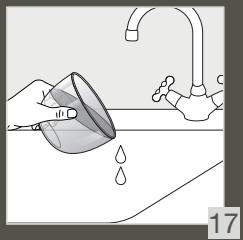
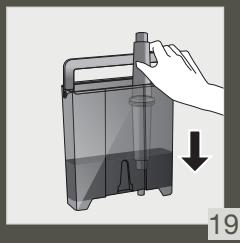
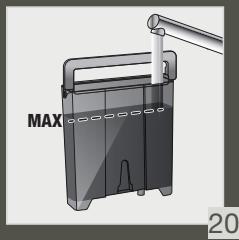
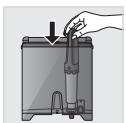
For the preservation of best coffee flavor impacted by the quality of the water and hygienic reasons, we advise you to use only fresh water and to daily clean the water tank with hot water and a bottle brush.
Coffee beans can leave greasy residue on the tank that can affect the quality of the coffee. For the preservation of best coffee flavor and hygienic reasons we recommend you to wipe it with a dry, soft cloth each time it needs to be refilled.

Important: Do not clean with water, the presence of water in the bean hopper could damage the machine

It is recommended that you let it air dry before you put it back in the appliance
WHY AND HOW DO I MAINTAIN THE MILK SYSTEM AFTER MAKING MILKY DRINKS?

Important: In order to obtain a consistent foam quality, we recommend that you:



HELP AND TUTORIALS
| Maintenance | When? | Explanation | Accessories required |
| Milk rinsing 30 s / 20 ml | After each milky drink, when the machine notifies you | Allows you to rinse the machine's milk system. You can start a milk system rinsing at any time. | |
| Milk tube, nozzle rinsing and milk pot cleaning | After each milky drink | We recommend you to clean with hot water and soap the milk pot after each use. we recommend you to replace the milk tube approximately every three months. You will find these accessories available on the KRUPS.com website. | Hot water + soap + pipe cleaner |
| Milk accessory cleaning 5 min | When the machine notifies you or at any time | This involves removing and cleaning the removable "One Touch Cappuccino" block. For optimum milk frothing, clean this regularly. See above in the instructions: 5. MÄNUAL DEEP CLEANING OF THE MILK DISTRIBUTION SYSTEM - 5 MIN. | Cleaning needle (n°5) |
OTHER MAINTENANCE
| Maintenance | When? | Explanation | Accessories required |
| Coffee rinsing 45 s / 30 ml | At any time | For hygienic reasons, it is recommended to rinse the coffee system daily or when not used for a longer period (more than 2 days). | |
| Tea rinsing 30 s - 20 ml | Before the drink starts flowing | Allows you to rinse with hot water to ensure an authentic taste of your tea or infusion. | |
| Coffee system cleaning 13 min / 600 ml | When the machine notifies you or at any time | For the preservation of best coffee flavor and hygienic reasons we recommend you to clean the coffee system 3 times a year. | 1 KRUPS cleaning tablet (n°1) |
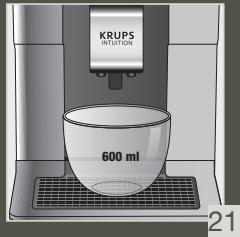
| Descaling 20 min / 600 ml | When the machine notifies you or at any time | The appliance notifies you when it is necessary to run a descaling program. This step is very important to ensure the proper functioning and longevity of your appliance. | 1 sachet of KRUPS descaler (n°2) |

Important: You do not have to run the cleaning program as soon as the appliance notifies you, but you should do it reasonably soon after. If the cleaning is postponed, the alert message will remain displayed until the operation has been performed.

Important: If you unplug your machine during cleaning or in the event of electrical failure, the cleaning program will restart. It is not possible to postpone this operation: it is mandatory in order to rinse the water system. In this case, a new cleaning tablet may be necessary.
For further explanations, please see the tutorials available in your machine's settings.



LP AND Tutorials

Want to know when you should perform the maintenance operations above?
An alert message will appear on the screen as soon as there is an action you need to take.

OTHER FUNCTIONS
Your KRUPS Intuition machine has a range of settings - check them out! They let you create a more personalised experience.
HOW DO I ACCESS MY MACHINE'S SETTINGS?



SETTINGS
LIST OF SETTINGS:
| Language | Select from 21 languages. |
| Date and time | You must set the date, particularly if using an anti-limescale cartridge. Time setting and 12 or 24 hour clock display. |
| Screen brightness | Adjusts the screen backlight. |
| Light | Turns the Intuitive Light Indicator on and off. |
| Display | Choose whether drink options are displayed as slides or tiles. |
| Auto-stop | Sets the period of time after which your appliance will stop automatically. This function lets you reduce your energy consumption. |
| Auto-start | Turns on the machine and automatically starts preheating the appliance at a chosen time. Do you have your coffee at the same time every day? This function is for you! By setting the auto-start, you can save time and no longer have to manually start your drink. |
| Volume unit | Selects the unit of measurement: ml or oz. |
| Auto-rinsing | You can choose whether or not to activate automatic rinsing of the coffee nozzle when starting the machine. |
| Water hardness | Set the hardness of the water between 0 and 4. For more information, see the “Water hardness measurement” chapter. |
| Coffee temperature | Is your coffee too hot? You can use this function to reduce the temperature. The machine has three temperature settings for your coffee drinks. |
| Tea temperature | Is your tea too hot? With this function, you can choose a lower temperature. This machine has three temperature adjustment levels for your tea drinks. |
| Type of coffee | Turns off the ‘No beans’ function. This function indicates a lack of coffee beans in the container and resumes a recipe which is in progress. See the GRINDER paragraph. |
| Factory reset | Resetting clears your preferences and settings and restores the default settings. Your favourites will also be deleted. |

TROUBLESHOOTING
OPERATION
- The machine has a fault, the software is frozen OR the machine has a malfunction. Turn off and unplug the machine, remove the filter cartridge, wait one minute and then restart the machine. Press and hold the ON/OFF button for at least three seconds to start the machine.
- The appliance does not turn on after pressing the ON/OFF button (for at least three seconds). Check the fuses and the electrical power socket. Check that the plug is correctly inserted into the socket.
- A power failure has occurred during a cycle. The device will reset automatically when it turns back on.
- The grinder is running empty. This is normal if it is occasional and there are no or few coffee beans left. It can run empty for up to ten seconds to determine its consumption and ensure that it is working properly. There are still coffee beans in the container:
The coffee may be too oily and is not drawn into the machine properly. You can try encouraging the beans to fall and see if it works again. However, we recommend changing the coffee (see the bean type function).
It is my usual coffee that has worked well up until now: please contact your contact KRUPS Consumer Service.
USE
- The grinder makes an abnormal noise.
There are most probably foreign bodies in the grinder. Try to clear it with a vacuum cleaner, otherwise contact your KRUPS Consumer Service.
- There is water under the appliance.
Before removing the drip tray, wait for 15 seconds after the coffee has flowed so that the machine finishes its cycle correctly. Check that the drip tray is positioned properly on the machine. It must always be in place even when the machine is not in use. Check that the drip tray is not full.
- The adjustment button for the grinding fineness is difficult to turn.
Only turn the grinding fineness adjustment button when the grinder is running.
- The appliance has not produced any coffee.
An incident has been detected during preparation.
The appliance resets automatically and is ready for a new cycle.
- You have used ground coffee instead of coffee beans.
Use your vacuum cleaner to clear the ground coffee from the bean container. 6. Water flows from the coffee nozzles when the machine is stopped. This is normal. This is an automatic rinse to clean the coffee nozzles and prevent them from getting clogged.
STEAM AND MILK
- The milk flow from your machine appears to be partially or completely blocked.
An alert message will appear on the screen if the nozzle is blocked. Clean the «One Touch Cappuccino» block. Refer to point 5 earlier in the instructions. MANUAL DEEP CLEANING OF THE MILK DISTRIBUTION SYSTEM - 5 MIN, or see the tutorial stored in your machine “Cleaning the milk nozzle”.
- No steam comes out.
a. During the first use of a steam cycle, if no steam comes out correctly: Check that the hole in the tip is not clogged. See section above: "The steam nozzle of your machine appears to be partially or completely clogged". Carry out the following protocol once and only once:
Empty the water tank and temporarily remove the Claris Aqua Filter System cartridge. Fill the tank with mineral water high in calcium ( >100 mg/L ) and make successive steam cycles (5 to 10 cycles) in a container until a continuous jet of steam is obtained. Put the cartridge back in the tank.
b. The steam nozzle had already worked: Check that the hole in the tip is not clogged. See section above: "The steam nozzle of your machine appears to be partially or completely clogged".
If after performing the above steps, the steam nozzle still doesn't work, please contact KRUPS Consumer Service.
- Steam escapes from the grid of the drip tray. Depending on the type of preparation, steam may escape from the grid of the drip tray.
- Steam appears under the bean container lid. Check that the cleaning tablet funnel under the cover (L) is closed.
MAINTENANCE
- The machine does not request descaling.
The descaling cycle is requested following preparation of a large number of milky or hot water-based drinks. If you only make coffee, descaling will not be required frequently.
- Some grounds are in the drip tray. A small amount of ground coffee can get into the drip tray. The machine is designed to clear any excess ground coffee so that the percolation area remains clean.
- The Intuitive Light Indicator remains lit after you have emptied the coffee grounds collector.
Refitting the coffee grounds collector.
- After filling the water container, the Intuitive Light Indicator stays on. Check the container is positioned correctly in the appliance.
The floats at the bottom of the tank must move freely. Check and dislodge the floats if necessary.
DRINKS
- The coffee flows too slowly.
Turn the grinding fineness button to the right for a coarser grind (depending on the type of coffee used). Perform one or several rinse cycles. Change the Claris Aqua Filter System cartridge.
- The coffee is too light or not full-bodied enough.
Check that the bean container contains coffee and that it is moving down correctly. Avoid using oily, caramelised or flavoured coffees that may not be drawn into the machine correctly. Decrease the preparation volume and increase the strength using the coffee strength function. Turn the grinding fineness button to the left for a finer grind. Make your drink in two cycles using the two-cup function.
- The Espresso or coffee is not hot enough.
Increase the coffee temperature in the machine settings. Heat the cup by rinsing it in hot water before preparing the drink. Perform a coffee system rinse before starting your coffee. A coffee rinse on start function can be activated in settings/auto-rinse.
- Clean water flows through the coffee nozzles before each coffee. At the start of the recipe, there is a pre-infusion of coffee which can cause a small amount of water to flow from the coffee nozzles.
If one of the problems outlined in the table persists, contact KRUPS Consumer Service.

Important: Manufacturer:
SAS GSM
DESCRIPTION OF THE APPLIANCE
HOW DO I PREPARE MY DRINK?
GETTING STARTED AND SETTING UP THE APPLIANCE
HOW TO TURN ON THE MACHINE

WHEN SHOULD THE DRIP TRAY BE EMPTIED?
GENERAL MAINTENANCE
If you perform proper maintenance, the machine will have an optimal lifespan and preserve the authentic coffee taste.
MAINTENANCE OF THE COFFEE GROUNDS CONTAINER AND THE DRIP TRAY
MAINTENANCE OF THE MILK SYSTEM
WHY AND HOW DO I MAINTAIN THE MILK SYSTEM AFTER MAKING MILK-BASED DRINKS?

MAINTENANCE
MAINTENANCE OF THE WATER TANK AND THE COFFEE BEAN CONTAINER
HOW DO I KNOW WHEN THE CONTAINER IS EMPTY OF BEANS?

OTHER MAINTENANCE OPERATIONS
1. How to prepare the drink?
a. Preparation of a coffee drink b. Preparation of a milk-based drink c. Simultaneous preparation of two drinks
2. How to control the process?
TECHNICAL SPECIFICATIONS
START OF WORK AND DEVICE SETTINGS
TURNING ON THE DEVICE

Caution! Connect the device to a grounded 230 V outlet. Failure to comply with this requirement may result in electric shock!
Familiarize yourself with the information provided in the 'Safety Rules' booklet.
START OF WORK (see section 1.1-e for use)
On first use of the device, you will be prompted to select various settings.
Follow the instructions on the screen.
To operate the machine correctly, it is necessary to fill all the water circuits. The automatic heating of the machine will start.
SUPPRIMER
Depending on the time since the last rinse, the machine performs an automatic rinse in the heating mode. The cycle lasts a few seconds and stops automatically.
Water quality has a strong influence on the aroma of the coffee. Scale and chlorine can change the taste of the coffee. To preserve the aroma, it is recommended to use Claris - cartridge filtration systems - or bottled water with a dry residue of less than 800 mg/l (see the label on the bottle). See the section «Water filter and water hardness».
To prepare the coffee, it is recommended to use preheated (under hot water) cups of a suitable size.
If roasted coffee beans are not ground, they can lose their aroma. We recommend using the amount of coffee beans equal to the amount you can consume within the next 2-3 days, and choosing a 250 g package.
The quality of coffee beans can vary, and the taste can be individual. Arabica gives delicate light aromas, while Robusta with a higher caffeine content has a more bitter and intense taste. To obtain a balanced coffee, these two types are usually mixed. For more information, please contact your dealer.
It is not recommended to use beans that contain a lot of oil or are caramelized, as they can damage the coffee machine.
The degree of grinding of the beans affects the strength of the aroma and the quality of the coffee. The finer the grind, the more intense the coffee will be. The grind can also be adjusted according to the drink.

INTELLIGENT LIGHT INDICATOR
WHAT IS THE INTELLIGENT LIGHT INDICATOR FOR?
The Intuition coffee machine is equipped with innovative technology that simplifies operation: the Intelligent Light Indicator (J). This technology has two functions:
- The coffee machine automatically detects and regulates the level of coffee beans, water, and coffee grounds. If it is necessary to fill or empty the container, as well as if technical maintenance is required, the red indicator lights up, signaling the need to follow the instructions on the screen.
- You can also select personal settings with the help of the Intelligent Light Indicator. You can choose the light for each profile. After selecting a profile, the Intelligent Light Indicator changes to the color corresponding to that profile. This way you can quickly and conveniently prepare your favorite drink. See the chapter «My profiles».
CLEDEYTE YKA3AHNIM HDNKATOPA.
To avoid slipping in the coffee machine and improve the quality of the coffee, it is recommended to adjust the water hardness level.
HOW TO SET WATER HARDNESS IN THE COFFEE MACHINE?



SETTINGS
FILL THE TANK WITH WATER.
Dip the test strip for water hardness (8) into the water. Wait 1 minute. The squares on the strip change color. Count the number of colored squares. It indicates the water hardness in the range from 0 to 4. In the "Water hardness" menu, press the corresponding number from 0 to 4 and press OK.
IF YOU HAVE RUN OUT OF WATER HARDNESS TEST STRIPS
If you need to repeat this operation, adjust the water hardness setting according to the operating instructions or in accordance with the information provided by the local water company, using the table below:
The drip tray collects used water, and the container for coffee grounds collects used grounds.
Important! For hygiene reasons, since the container comes into contact with milk and coffee, it is recommended to disassemble and rinse each element under running water. It is recommended to let it dry and air out before reinstalling the brew unit. It is important to always leave the machine in the preheating position. The drip tray can be washed in the dishwasher. The drip tray can be washed in the dishwasher, but not the lid.
WHEN SHOULD THE DRIP TRAY BE EMPTIED?
If the float is in the raised position, this means that the tray is full.
WHEN SHOULD THE CONTAINER FOR COFFEE GROUNDS BE EMPTIED?
When the indicator lights up or even earlier, but it is important that the coffee machine is able to detect the full container.

Important! Incorrect handling of the container for coffee grounds or the drip tray, as indicated above, can cause damage to the coffee machine. Do not wash them in the dishwasher. For hygiene reasons, it is recommended to wash the container for coffee grounds every day with hot water and a mild detergent. It is recommended to let it dry in the air before reinstalling it.
MAINTENANCE FOR COFFEE WATER CONTAINER
To preserve the full flavor of coffee, which depends on the quality of water and the machine, it is recommended to use only fresh water and to regularly empty the water reservoir for hot drinks.
Coffee beans can leave oily residues in the reservoir that reduce the quality of the coffee. To preserve the full flavor and aroma of coffee and for hygienic reasons, it is recommended to wipe the container with a dry, soft cloth before each refill.

Important! Do not use water for cleaning, as water remaining in the container for coffee beans can cause damage to the coffee machine.

It is recommended to let it air dry before reinstalling.
MAINTENANCE OF THE MILK SYSTEM
WHY AND HOW TO CLEAN THE MILK SYSTEM AFTER PREPARING MILK-BASED DRINKS?

Important! For proper operation, it is recommended:


USER MANUAL
REFERENCE AND USER MANUAL

Want to know when to perform the maintenance operations described above?
If necessary, a warning message will appear on the screen.

OTHER FUNCTIONS
The KRUPS Intuition coffee machine contains many settings - get to know them! They allow you to make working with the device more enjoyable.
HOW TO ACCESS THE DEVICE SETTINGS?



LIST OF MALFUNCTIONS:
4. The appliance is not ready for use.
A problem was detected during preparation.
The appliance automatically restarts and is ready for a new cycle.
- Instead of coffee beans, ground coffee was used. The container for ground coffee is clogged with ground coffee.
- When the appliance stops, water comes out of the nozzle. This is normal. This is an automatic rinsing cycle to clean the nozzle and prevent blockages.
MILK FROTH
- The nozzle for milk frothing is partially or completely blocked.
If the nozzle is clogged, a warning message appears on the display. Clean the "One Touch Cappuccino" block. See point 5 in the instructions. "MANUAL CLEANING OF THE MILK SYSTEM - 5 MINUTES" see manual, saved in the appliance memory, "Cleaning the milk frothing nozzle".
- No steam comes out.
a. If during first use of the steam function, steam does not come out properly: Make sure that the hole in the nozzle is not clogged. See section above: "Nozzle for steam on the device partially or completely clogged". Perform the following procedure:
Remove water from the reservoir and temporarily remove the Claris water filter cartridge. Fill the reservoir with mineral water with high calcium content (> 100 mg/l) and perform several cycles of steam delivery (from 5 to 10 cycles) in a container until a continuous steam flow is produced. Reinstall the cartridge in the reservoir.
- The steam nozzle has been used before: Make sure that the hole in the nozzle is not clogged. See section above: "Nozzle for steam partially or completely clogged".
If after performing the above actions the steam nozzle still does not work, contact KRUPS customer service.
3. Steam may escape from the filter holder depending on the type of preparation. 4. Steam may appear from under the container lid after grinding coffee beans. Make sure the opening of the cleaning tablet for the lid (L) is closed.
MAINTENANCE
- The coffee machine does not clean limescale. If limescale builds up, it is due to preparing large quantities of drinks with milk or hard water. If you only make coffee, descaling is rarely needed.
- A small amount of ground coffee remains in the filter holder. A small amount of ground coffee may get into the filter holder. The design of the coffee machine allows you to remove excess ground coffee so that the filtration area remains clean.
- The smart indicator light continues to burn after cleaning the coffee grounds container. Install the coffee grounds container.
- After filling the water reservoir, the smart indicator light continues to burn. Make sure the reservoir is correctly installed in the appliance.
- Coffee flows too slowly.
Turn the grinder adjustment dial to the right to select a coarser grind (depending on the type of coffee used). Perform one or more rinsing cycles. Replace the water filter cartridge.
- Coffee is too weak or not strong enough.
Make sure the coffee bean container contains coffee and is correctly installed. Do not use oily, caramelized, or flavored coffee beans, which pass poorly through the coffee machine. Increase the strength using the coffee strength function. Turn the grinder adjustment dial to the right for a coarser grind. Prepare the drink using the two-cup function.
- Espresso is not strong enough.
Increase the coffee temperature in the coffee machine settings. Before preparing the drink, heat the cup by rinsing it with hot water. Before starting to prepare coffee, rinse the coffee machine. The rinsing function of the coffee machine can be activated in the menu 'Settings/Automatic rinse'.
- Before each coffee preparation, clean water flows through the spout. At the beginning of preparation, a pre-extraction is performed, during which a small amount of water may start to flow from the spout.
If any of the problems described in the table is not resolved, contact the KRUPS customer service center.

Important! Manufacturer: SAS GSM - Rue Saint-Léonard F-53104 Mayenne - France
Dear customer!
1. Accessories and additional equipment
2.1: Instruction for use and care
2.2. Block with display
H. Tube for milk and suction nozzle I. Water level control J. Indicator light
- Container for coffee beans
K. Button for adjusting the grinder L. Hopper for tablets for cleaning M. Metal funnel for coffee grinder
2. Dispenser
N. Display with sensor screen O. On/Off button P. Handle for turning the display Q. Profile R. Profile
S. Milk jug

We do not recommend using oily and caramelized beans, as they can damage the machine.
When to replace the water filter system CLARIS?
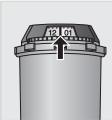
- After two months of use or after the machine displays a message. 2. When replacing the cartridge, we recommend lifting the cartridge from above, selecting the date after two months from the last date.
How to install the water filter system CLARIS?



Maintenance
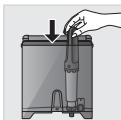
Install the coffee grinder burrs for brewing. Turn the burrs numbered with the arrow. Use the accessory for filling, if it is included with the grinder, to install and tighten the burrs securely.
GRIND SETTINGS: ADJUSTING THE GRIND FINENESS
WHY ADJUST THE GRIND FINENESS?
You can determine how fine the coffee is ground by adjusting the grind fineness of the coffee beans.
By adjusting the grind fineness, you can achieve optimal results for different types of beans:
Oily beans and dark roast beans require a coarser grind.
Light roast beans with dry processing require a finer grind.
The finer the grind of the coffee beans, the more intense the coffee aroma.
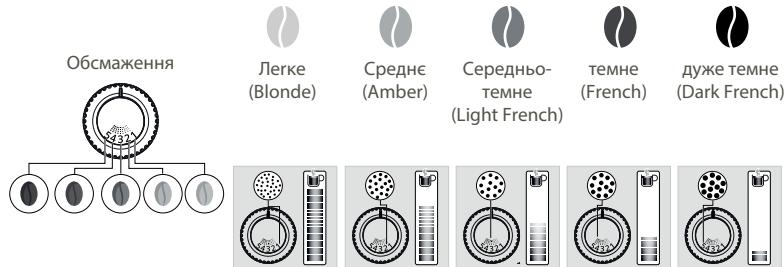
HOW TO ADJUST THE GRIND FINENESS?
Turn the grind fineness adjustment knob (K) on the coffee bean container according to the type of beans and the desired aroma intensity. This adjustment can be made while the coffee grinder is running, gradually changing the grind. After three preparations of coffee, you will notice the change in flavor.
HOW TO KNOW IF THERE ARE ENOUGH BEANS IN THE CONTAINER?
The Intuition series machine is equipped with a special sensor that detects when the level of coffee beans in the container becomes low.
A corresponding message will appear on the screen, and the intuitive light indicator (J) will start blinking with a red light.
WHAT IF THE MESSAGE APPEARS DURING OPERATION?
Fill the coffee bean container, press "OK", and the preparation will continue according to the recipe. You will not lose a single gram of coffee!
IIO POBNTU, RIKIOTPEBA 3MIHUTN KABY ABO KABA 3AKIHUNJAC?
If you press «OK» without adding coffee beans to the container, the machine will attempt a restart and then turn off again. If you press «OK» again, the machine will use the ground coffee for the entire lock. After that, the coffee maker will beep.

Warning! We do not recommend using oily and caramelized beans, which the coffee maker has difficulty grinding. Such beans can damage the machine and interfere with the proper functioning of the intuitive control system.
When the warning appears on the screen, the indicator will light up first, when the number of beans in the machine is sufficient:
Press the OK button to continue preparing the drink. Or turn off the warning about the absence of beans to disable the control for a while, while there are no beans in the container.



ADJUSTMENT
PREPARING OTHER DRINKS
DRINKS THAT CAN BE PREPARED WITH THIS MACHINE:
HOW TO ADJUST THE HEIGHT OF THE COFFEE SPOUT?
You can adjust the coffee spout height according to the size of the cup for any drink.
HOW TO PREPARE A DRINK?
Refer to the user manual «How to Prepare a Drink?», stored in the device.



HELP USER MANUAL
DEPENDING ON THE DRINK, DIFFERENT ADJUSTMENTS ARE AVAILABLE:
It has two functions: for preparing two drinks at once, press the button and hold it.

Milk strength: increase or decrease the amount of milk. To change the amount of milk, select the desired amount and choose from 1 to 3 grains, where 1 grain corresponds to the lowest milk strength, and 3 grains to the highest milk strength. Water volume: increase or decrease the water volume by scrolling up or down the list of available volumes and select the desired one.
The recommended dosage can be found in the table in the instructions.

ADVICE
HOW TO KEEP THE MILK FROTH IN YOUR PROFILE?
There are two ways to add milk to the profile:

On the screen, a button will appear.
WHEN SHOULD THE MILK SYSTEM BE CLEANED?
When the appliance prompts you, or, even more regularly, when the appliance is turned on, you can determine when the container for milk must be emptied.

Important! If you do not regularly clean the milk system and the water tank as described above, this can lead to damage to the machine. Using the machine for cleaning and descaling is prohibited. We recommend cleaning the milk system under running water and with detergent. We also recommend checking the water filter before installing it and its replacement.
RESPONSIBILITY FOR DAMAGE CAUSED BY FOREIGN OBJECTS
TROUBLESHOOTING
OPERATION
The brewing unit has detected a problem.
The appliance will automatically restart and will be ready for a new cycle.
- You have used ground coffee instead of coffee beans.
The milk supply system is blocked.
6. When the machine is switched on, water enters the milk supply system.
This is normal. An automatic rinse is performed to clean the milk supply system and prevent it from clogging.
STEAM
1. Milk supply is completely blocked.
If the milk is clogged, the corresponding message appears on the display. Press the milk button once. Follow the instructions given in section 5 of the manual for the milk supply system - 5 minutes or keep the machine in the milk supply system cleaning mode.
2. Steam supply is not working.
a. Steam supply is not working properly for the first time after using the machine. Check that the nozzle opening is not clogged. See the section "Steam nozzle of the machine is completely clogged" above.
Perform the described procedure (at least once).
Empty the water tank and temporarily remove the water filter cartridge. Fill the tank with water with a high calcium content (more than 100 mg/l) and perform a series (from 5 to 10) of successive cycles and wait in the tank until you get a continuous steam jet. Install the cartridge back into the tank.
b. The steam nozzle is already in use:
If after performing the above steps the steam nozzle still does not work, contact the customer service of the KRUPS company.
If after performing the above steps the steam nozzle still does not work, contact the customer service of the KRUPS company.
- Steam comes out of the nozzle in drops.
When preparing certain types of drinks, steam may come out of the nozzle in drops. 4. Steam appears together with the container lid of the milk jug. Check that the lid (L) is closed properly.
- The machine does not require special maintenance.
If you use a large amount of milk or coffee-based drinks, you need to perform the descaling procedure more often. If you prepare only coffee, the machine will not require descaling as frequently.
- The flow of coffee through the spout may be slow. The flow may be reduced by a large amount of ground coffee. The machine's design ensures the flow of ground coffee for proper extraction.
- The intuitive light indicator does not go out after the descaling procedure. Make sure you have set the descaling level correctly.
- The intuitive light indicator does not go out after filling the water reservoir. Make sure you have installed the reservoir correctly.
The float in the reservoir should move freely. Check the float and adjust its position if necessary.
- Coffee bean container
K. Grind adjustment knob L. Cleaning tablet compartment M. Conical metal burr grinder
- Display panel
HOW DO I KNOW WHEN THERE ARE NO MORE BEANS IN THE CONTAINER?
HOW DO I PREPARE THE DRINK?
Follow the instructions on how to prepare drinks? Replaced in your machine.



HELP INSTRUCTIONS
Depending on the drink, there are different settings:
One or two cups: to prepare a double drink, select the drink and press the button twice. To increase or decrease the strength of the coffee, change the amount of ground coffee. Select the drink and press, with 1 being the weakest and 3 being the strongest. Cup volume: to increase or decrease the cup volume, press up or down on the volume list and select the one you want. For more information, see the drink table in the instructions.

LIGHT
To select the coffee strength and cup volume, you can press up/down or press the selection button directly.
HOW TO STOP DRINK PREPARATION?


Warning: You can stop drink preparation at any time by pressing the button when the dispenser is running. It will not stop immediately. The machine will be unavailable for a certain time, indicated by a message on the screen.
DRINK WITH MILK

LIGHTS
For frothy milk, use pasteurized milk first from the refrigerator (3 - 5°C). It is possible to use special milk (microfiltered, raw, fermented, enriched) or plant-based milk (rice, oat, or almond milk), but this may give less satisfactory results in terms of quality and quantity of the drink.
HOW TO START PREPARING A DRINK WITH MILK?
Follow the "Preparation of a recipe with milk" in the previous instructions or see the instructions "Preparation of a drink with milk" included in your machine.



HELP INSTRUCTIONS
TROUBLESHOOTING
You can set the water temperature for each tea type so that you can select the temperature that is most suitable for every type of tea. The temperature used for green tea will be lower than that used for black tea or herbal tea.
HOW DO I SET THE WATER TEMPERATURE?



SETTINGS
Go to Settings > Water temperature. You can choose between T1, T2, and T3, where T1 is the coolest and T3 is the hottest.
When you decrease/increase the temperature, it will decrease/increase the temperature for every tea type, but the temperature used for green tea will always be lower than that used for black tea or herbal tea.
PROFILES
WHAT IS THE PROFILE FUNCTION FOR?
The Profile function gives you access to a personalized space where you can store and recall your favorite drinks. You can easily access it by pressing the button on the control panel of the machine.
It is ideal for everyday use: store your drinks in your profile, and they will be prepared with just one touch; no corrections are needed. You can store up to seven drinks for each profile.
The profile function also allows for a more personalized experience and assets.
| Собстену лиме | Можete наdoesabinte cboeto собстену лиме за по-толамо персонлимараиме. |
| цоват | Можete наизберeteцета заинтугиньни CBetлимен Инданкатор, за наразганчпente piroфILA си. |
| Ди检пени | Ту к можete на заадаенте свotingе наиткда се за взевждат на ekран на пroфILA.Те могат набъдат по��азашиEdа сед друга сед приплбваце ил edуга на edин и сьш ecрал. |
| Пportрамиране | С поюда на Функцята „Profile" (Пюфол), Вие можete на заадаенте чac за BCяka нанданка.Toba ще уlexсан оsite novechу нандане на Baшatura нанданка вьв Сбеки edinн мочем. |
| Ярков | Тoba Ви поозвая за akтугинаре ялл дezатугиньни CBetлимен Инданкатор. |
HOW DO I SET UP A PROFILE?

Press the button for Profile 1 or Profile 2 and follow the on-screen instructions to set up your profile.



HELP
HOW DO I MANAGE MY DRINKS STORED IN MY PROFILE?
There are two ways to add a drink to a profile:

This is a test button.
2. Directives for use.
If the drink is left to stand, this liquid will be stored.
HOW TO ORGANIZE/PREPARE/DISPENSE YOUR DRINKS?
Press and hold the drink button for a few seconds. In the upper part of each drink button there is a cross. Press and hold for dispensing drinks, press the cross to dispense the drink.

MAINTENANCE
Regular maintenance will optimize the life of your machine and preserve the authenticity of your coffee.
CLEANING THE DRIP TRAY AND THE DRIP TRAY GRID
The drip tray grid collects the used water, and the drip tray collects the used ground coffee.
Important: For hygiene reasons, as this is in contact with milk and coffee, we recommend that you rinse daily and place all elements under running water. We recommend that you let it dry in the air before putting it back in the machine. It is important to leave it in place and rinse it regularly. You can put the drip tray grid in the dishwasher, but without the cap.
WHEN SHOULD THE DRIP TRAY GRID BE CLEANED?
When the float is in the upper position, which indicates that it is full.
WHEN SHOULD THE DRIP TRAY BE CLEANED?
When the machine is off, regularly, but when the machine is on, to be able to register that the container is empty.

Important: If you do not clean the drip tray and the drip tray grid regularly, as shown above, you may damage the machine. Do not put it in the dishwasher. For hygiene reasons, we recommend that you place the container for ground coffee daily under running water and rinse. We recommend that you let it dry in the air before putting it back in the machine.
MAINTENANCE OF THE WATER RESERVOIR AND THE COFFEE CONTAINER
To preserve the good taste of the coffee and for hygiene reasons, we recommend using only fresh water and regularly cleaning the water reservoir with fresh water and a bottle brush.
The coffee grounds can leave residues in the container, which can affect the quality of the coffee. To preserve the best taste of the coffee and for hygiene reasons, we recommend emptying it with a dry cloth every time it needs to be refilled.

Important: Do not clean with water; the water inlet in the coffee container may damage the machine.

We recommend letting it dry in the air before putting it back in place.
MAINTENANCE OF THE MILK SYSTEMS
WHY AND HOW TO MAINTAIN THE MILK SYSTEMS AFTER PREPARING MILK DRINKS?

Important: To ensure consistent quality of the milk, we recommend:



HELP INSTRUCTIONS
TROUBLESHOOTING
OPERATION
- The machine is damaged, check the plug or the machine has a malfunction.
Disconnect the machine and remove the plug from the socket, remove the drip tray, wait a minute and restart the machine. Press and hold the button for at least three seconds to start the machine.
- The machine does not turn on after pressing the button (for at least three seconds).
Check the power cord and the plug. Make sure the plug is correctly inserted into the socket.
- Electrical malfunction over time.
The device will be switched off automatically when it is turned on.
- The coffee maker is working.
This is normal if it is occasional and if the coffee maker has little coffee left. It may work normally for a few seconds, to determine the consumption and to guarantee that it works correctly.
All the coffee beans in the container:
The coffee may be too hard and may not be ground properly in the machine. You can try to help the beans to fall and to work again. We recommend that you change the coffee (see the function for coffee selection).
This is a common occurrence that has been happening so far: call the KRUPS customer service center.
USE
- The coffee maker requires maintenance.
Most likely there are foreign objects in the coffee maker. Try to clean it with a vacuum cleaner, otherwise contact the KRUPS customer service center.
2. Water tank.
The descaling cycle lasts 15 seconds, after the coffee stops flowing, so that the machine completes its cycle as it should. Check that the descaling cycle is set correctly on the machine. It should be in the correct position when the machine is not in use. Check that the descaling cycle has not been activated.
- The buttons for adjusting the grinding level turn with difficulty.
Turn the grinding level adjustment buttons while the coffee maker is working.
- The coffee is not correct.
It will be adjusted automatically and is ready for use.
5. USE GROUND COFFEE, NOT BEANS.
Use ground coffee to avoid too much coffee in the container. 6. When the machine is off, water may drip from the coffee spout. This is normal. This is an automatic rinse to clean the spout and prevent it from clogging.
MILK FROTH
- The milk flow from the machine looks watery or foamy.
If the milk froth is clogged, the machine will first show a warning. Clean the milk spout (see "Cleaning"). Follow the troubleshooting steps in the previous instructions. This is a basic function of the milk system. See the instructions for cleaning the milk frother in the machine.
- It does not work.
a. On first use of the coffee, if the coffee does not come out correctly: Check that the spout is not clogged. See the section above: "The coffee from the machine looks watery or foamy." Run a few cycles with just water:
Empty the water reservoir and temporarily remove the filter for the Claris Aqua system. Fill the reservoir with mineral water with high calcium content (>100 mg/L) and run 5 to 10 cycles with coffee, until you get a constant stream of coffee. Put the filter back in the reservoir.
b. If the coffee has already been used: Check that the spout is not clogged. See the section above: "The coffee from the machine looks watery or foamy." If after cleaning the spout the coffee still does not work, contact the Krups customer service center.
3. Coffee comes out of the drip tray grid. Depending on the type of preparation, the drip tray may overflow. 4. Check the coffee container for beans. Check that the lid for the cleaning tablets (L) is closed.
TROUBLESHOOTING
- The machine does not accept beans. The bean hopper lid is blocked after adding a certain number of beans at the base of the milk during hot water. If you make only coffee, the bean hopper lid does not need to be cleaned.
- There is little coffee in the drip tray. A small amount of coffee may appear in the drip tray. The machine is designed to release all the coffee so that the filter area stays clean.
- The indicator light for the water tank is on. Check the water tank cap. Replace the water tank cap.
- When the water container is inserted, the indicator light stays on. Check that the container is placed correctly in the device. The floats at the bottom of the reservoir must move freely. Check and release the floats if necessary.
DRINKS
- The coffee is too weak.
Turn the knob for adjusting the strength of the coffee to the stronger setting (depending on the type of coffee used). Pull out and insert the brewing unit. Clean the milk container of the Claris Aqua system.
- The coffee is too light and not strong enough.
Check if the coffee bean container is empty. Avoid using oily, caramelized, or aromatized coffee beans, which may not grind properly in the machine. Reduce the amount of coffee to be prepared and increase the strength of the coffee function. Turn the knob for adjusting the strength of the coffee to the stronger setting. Prepare the drink in two cups, using the function for two cups.
- The espresso or coffee is not hot enough.
Increase the temperature of the coffee on the machine's settings. Rinse the appliance with hot water before preparing the drink. Check and clean the coffee brewing system. The coffee brewing system function is activated automatically during rinsing.
4. Before each coffee, run water through the coffee spout. At the beginning of the brewing process, the heating element may cause a small amount of water to be released before the coffee.
If any of the problems persist, describe them in the table, contact the customer service department of KRUPS.

Important: Manufacturer: SAS GSM - Rue Saint-Lionard F-53104 Mayenne - France
Dear user,