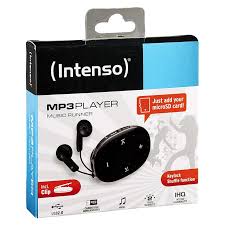
MUSIC RUNNER - Portable audio player INTENSO - Free user manual and instructions
Find the device manual for free MUSIC RUNNER INTENSO in PDF.



| Product type | Portable audio player |
| Brand | INTENSO |
| Model | MUSIC RUNNER |
| Display | LCD 96 x 32 pixels |
| Power supply | 1 AAA battery (included) |
| Supported audio formats | MP3, WMA, ASF |
| Bit rate | MP3/WMA: 8 kbps ~ 320 kbps |
| Recording format | ACT |
| Maximum recording time | Approximately 280 hours (with 1 GB free space) |
| Connectivity | USB 2.0 (compatible with Windows 98/SE/2000/XP/ME/Vista) |
| Main functions | MP3/WMA/ASF playback, voice recording, folder navigation, equalizer (Flat, Rock, Pop, Classic, Soft, Jazz, DBB, SRS WOW), repeat modes, shuffle playback, intro, key lock |
| Maintenance and cleaning | Clean with a dry cloth. Do not use chemical solutions. |
| Safety | Avoid shocks, extreme temperatures, humidity, magnetic fields. Do not disassemble the device. Use headphones at moderate volume to preserve hearing. |
| Spare parts and repairability | AAA battery user-replaceable. For any repairs, contact customer service. Do not attempt to repair yourself. |
| Package contents | MP3 player, stereo headphones, AAA battery, user manual, warranty card |
Frequently Asked Questions - MUSIC RUNNER INTENSO
User questions about MUSIC RUNNER INTENSO
0 question about this device. Answer the ones you know or ask your own.
Ask a new question about this device
Download the instructions for your Portable audio player in PDF format for free! Find your manual MUSIC RUNNER - INTENSO and take your electronic device back in hand. On this page are published all the documents necessary for the use of your device. MUSIC RUNNER by INTENSO.
USER MANUAL MUSIC RUNNER INTENSO
USB 2.0 (High Speed)
(INTENSO)
49377 Vechta
Germany
www.intenso.de



1. Contents
- Contents. 1
- Notes 2
- Functions 2
- Contents of this pack 2
- Prior to use 3
- Operation 4
- Main menu 5
- Music 5
- Speech recording 7
- Playback speech recordings 7
- System settings 8
- Troubleshooting 9
- Technical data 10
2. Notes
- Prevent the device from dropping.
- Do not use the device in extremely cold, hot, humid or dusty areas. Do not expose it to direct sunlight.
- Back up your device regularly to avoid possible data loss.
- Avoid using your player in strongly magnetic fields.
- Protect the device from moisture. Should moisture seep into the device, please switch it off immediately and clean and dry the device afterwards.
- Do not use any chemical solutions to clean the device. Use a dry cloth only.
- We are not liable for damages or data loss caused by malfunctions, incorrect operation, repairs done by you or changing of the battery.
- Please do not disassemble the device into components and do not try to repair it yourself as the warranty expires in this case.
- The use of earphones or headphones at high volume can cause permanent damage to your sense of hearing.
3. Functions
- Playback of MP3, WMA and ASF files
- Folder navigation
Speech recording
SRS WOW Sound Effect
4. Contents of this pack
- Intenso MP3-Player
- Stereo headphones
AAA -size alkaline battery - User manual
Warranty card
5. Prior to use
Connect to the PC
Please install a driver for OS Windows 98/SE prior to connecting the player with the PC. (download from www.intenso.de). No driver installation is required for OS WIN 2000/XP/ME.
Please proceed as follows:
(1) Connect the player with the USB-port of the PC
(2) The window "Intenso" opens. Now you can store the data from your hard disk on the player.
Safe removal from PC
For Windows 2000/XP/ME/Vista:
Click with the right mouse button bottom right in the task bar onto the symbol "safe removal of hardware". Select "remove USB flash drive" with the left mouse button from the appearing context menu. Please ensure that the data transfer has been finished completely.
Now you can remove the device.
For Windows 98/SE:
Select the device in the "device manager" using the left mouse button. Now click on the menu item "remove". Please also ensure here that the data transfer has been finished completely. The device can now be disconnected from the PC.
Installing Battery
(1) Press and push the battery cover to open it.
(2) Remove the cover and insert one AAA-size battery into the battery compartment.
(3) Close the cover.
Controls
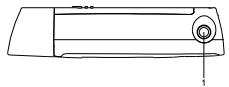
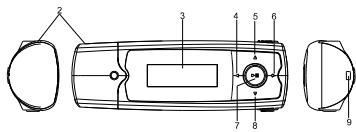
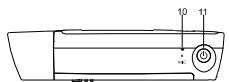
(1) Earphone port
(2) USB
(3) LCD Display
(4) Track back / rewind
(5) VOL+ button
(6) Track forward / fast forward
(7) Play/Pause button
(8) VOL - button
(9) Support for a neck strap
(10) Microphone
(11) On/Off
6. Operation
On/Off
Push and hold the key [] to show the logo by Intenso on the display. With this key you can select the respective submenus in every menu. To switch off, push and hold the key [] until the logo of Intenso is shown on the display.
Play / Pause
Press the [▶] button for playback or stopping of a track.
Adjust volume
Press the [] or [] button in order to increase or lower the volume.
Forward/Back
Press the [] / [] button to go to the previous or to the next track.
Fast forward
Press and hold down the [ ] button to fast forward within the track.
Rewind
Press and hold down the [<] button to rewind within the track.
Key lock
In order to prevent the buttons from being pressed by mistake you can set an automatic key lock in the setup menu.
7. Main menu
After switching on the MP3 player the main menu appears. Here you can choose between the functions music, recording, playback and setup.
Press the [] / [] buttons for selection and confirm your selection with the button.
8. Music
Select Music from the main menu.
- Call folder navigation
(1) If required, press the [▶II] button to stop the current playback.
(2) Press the button to call the "setup" menu.
(3) Select "folder" and confirm your selection by pressing the [▶] button
(4) Select pressing the [4] / [▶] buttons the required folder and confirm your selection by pressing the [▶II] button.
(5) Confirm your selection with the [▶II] button in order to start playback mode or press the button to close the selected folder afterwards and to exit the folder navigation.
- Delete track
To delete a single track do the following:
(1) If required, press the [▶II] button to stop the current playback.
(2) Press the [O] button to call the "setup" menu.
(3) Select "delete file" and confirm with the [▶II] button.
(4) Press the [<] / [>] buttons to select Yes or No. Confirm your selection with the [▶] button or press the [U] button to return to the sub-menu.
- Delete all tracks
To delete all stored tracks do the following:
(1) If required, press the [▶II] button to stop the current playback.
(2) Press the [O] buttons to call the "setup" menu.
(3) Select "delete all" and confirm with the [▶ll] button.
(4) Press the [] / [] buttons to select Yes or No. Confirm your selection with the [ ] button or press the [] button to return to the sub-menu.
- playback modes:
Normal - Plays all tracks once and stops the playback afterwards
Repeat track - repeats the current track
Repeat all - Plays all tracks and starts again from the beginning
Random - plays all tracks in random sequence
Intro - plays the first 10 sec. of each track
To select a playback mode do the following:
(1) During playback of a track press the [O] button to go to the "play setup" menu.
(2) Press the [] / [] buttons to select "repeat" and confirm your selection with the [▶II] button.
(3) Press the [▶] / [▶] buttons to select the desired playback mode. Confirm your selection with the [▶ll] button or press the [U] button to return to the sub-menu.
Equalizer
You can choose from the following sound effects for playback: flat, rock, pop, classic, soft, jazz, DBB and SRS WOW.
To select an equalizer setting do the following:
(1) During playback of a track press the [O] button to go to the "play setup" menu.
(2) Press the [] / [] buttons to select "equalizer" and confirm your selection with the button.
(3) Press the [] / [] buttons to select the desired equalizer setting. Confirm your selection with the button or press the () button to return to the sub-menu.
Note: WOW, SRS and the () symbol are trademarks of SRS Labs, Inc. The WOW technology is licensed by SRS Labs, Inc.
- Exit music mode
Hold the key [▶II] until the principal menu is displayed again.
9. Speech recording
In the main menu select the function record.
You can record speech via the built-in microphone.
record
(1) Press the [▶II] button to start recording.
(2) During recording you can stop and/or resume the recording by pressing the button.
(3) Press and keep [▶] button to stop and save the recording.
Attention: Do not switch off the device during recording. The recording will not be saved and is lost.
- Exit the function record
Hold the key [▶II] until the principal menu is displayed again.
10. **Playback speech recordings**
In the main menu select the function playback.
You can playback previously recorded speech.
- playback
(1) Select the desired file using the [] / [] buttons and start playback with the [▶] button.
- Exit playback function
Hold the key [▶II] until the principal menu is displayed again.
11. System settings
To set your MP3 player individually do the following:
(1) In the main menu select the function setup.
(2) Press the [▲] / [▶] buttons to select the desired setting (see table). Confirm your selection with the [▶] button or press the [◎] button to return to the main menu.
| Setting | Description: |
| Backlight | After the set time has elapsed, the display will be switched to dark in order to save energy. |
| Language | Select the desired language. |
| Power Off | Off time – The player switches itself off automatically after the preset time provided that the player is not in use. Sleep-Timer – After the set time has elapsed the player will be switched off. |
| Key lock | Select the desired time lapse after which the key lock will be activated. When choosing 0 seconds the key lock will be deactivated. |
| Firmware version | Shows the software version. |
| Default Setting | loads factory settings |
12. Troubleshooting
The LCD displays nothing when the device is started.
(1) Battery is too low.
Replace the battery.
(2) The keys are locked.
Press and hold the button down to unlock the keys.
No sound when playing music file.
(1) The volume is too low.
Adjust the volume.
(2) There are problems with the audio file.
Delete the file or play other files.
The player cannot be connected to the PC.
(1) The driver is not installed or destroyed.
Install or reinstall the driver shipped with the player.
(2) The USB port is not supported by PC's motherboard.
Update or replace the PC's motherboard.
The displayed time is changing constantly.
(1) The bit rate of the MP3 file is changing during playback.
Try to use fixed bit rate to compress the MP3 file.
The PC has an error when you plug-in and unplug the player.
(1) The player is disconnected from the PC abruptly while transferring files.
Do not disconnect the player from the PC when transferring files.
- Total memory displayed on the player is not in accordance with the marked amount.
(1) Part of memory is used to store programs and display characters.
Some of MP3 files cannot be played properly.
(1) The MP3 file is compressed by a standard, such as MPEG I Layer 1 or Layer 2 that the player does not support. Delete the unsupported MP3 files.
13. Technical data
Item
LCD Display
Battery type
Record format
Record duration (max.)
Supported music formats
Bit Rate
Output frequency
SNR
Channel separation
Frequency response
Output line headphones
USB port
Parameter
96 x 32 pixel
AAA -size alkaline battery
ACT
approx. 280 hours having 1GB free memory
MP3, WMA, ASF
MP3/WMA: 8kbps ~ 320 kbps
ASF: 8 kbps ~ 448 kbps
20Hz ~ 20kHz
> = 85 dB
> = 40 dB
<=3dB (20Hz ~ 20kHz)
L 5mW, R 5mW
USB 2.0 (High Speed)
(INTENSO)
49377 Vechta
Germany
www.intenso.de



1. Indices
USB 2.0 (High Speed)
(INTENSO)
49377 Vechta
Germany
www.intenso.de



USB 2.0 (High Speed)
1. Contenido
USB 2.0 (High Speed)
(INTENSO)
49377 Vechta
Germany
www.intenso.de



1. Conteudo
USB 2.0 (High Speed)
(INTENSO)
49377 Vechta
Germany
www.intenso.de



1. Zawartosć
USB 2.0 (High Speed)
(INTENSO)
49377 Vechta
Germany
www.intenso.de


1. 0630p codepaHna
- 0630p coepxahan 1
- 3ameyanra: 2
- ΦyHKUH 2
- Copejxahanie naketa 2
- Ipeed nCnoIb3OBAHnem 3
- 06cIyXnBaHne 4
- TnabHoe MeHIO 5
- My3bika 5
- 3Byko3aIncb 7
- Bocnpo3BeDHe 3Byko3aIncn 7
- HactpoKa CnCTeMbI 8
- YcTpaHHe HEnoJaIOK 9
- TexHHueckne daHHbIe 10
2. 3ameuahnna:
- ɪnʒərərɪe Cɪŋbɪhɒx yʌdɒpər nɪpɪbɒpa.
He nCnObn3yIte npB6Op B 3KCTPmAbNHO XOIOJNbHbX, rOpYHcX, BnAChbIX INIy PbNbHbX obnaTae. He noDabai Te np6Op TAKKe npRMOy BO3dEiCtBNo COINHeuHbIX nyueH. - PpOBoODItepeyIpyHyIO 3aINcB daHHbIX, yTObIuN36ExKaTb NOTePn DaHHbIX.
- N36eraaTe IcNoJIb3OBAHnB B CINbHbIX MaHHTbIX NOJAX.
3aunuatae npn6op ot BnaXhoCTN. EcnB npi6op npOnHKnet BnaXhoCTb, OTKJIOHTe erO HeMeIeHHo, NOcE 3TOr oNCHTEu BByUHTe npn6op. - He nCnoIb3yIe TnI qHCTKn pIbn6paXmMueckne paCTBOpbl. IJra 3Toro nCnoIb3yETcT OToJIbKO cyXaA TpIYka.
Mbl He OTEBueaem 3a noBpeKdEHNH IINI notepeO daHbIX, BO3NHkuYO npi HnCnpabNtOCTx, HnepaBInbHOM o6cIyKbBaHIM, Co6cbTBeHHOpuyHOro pEmOHTa IINI 3aMeHe 6batape.
Hepacklaibbaitepnio6pHaOTdIbHbIeYactnHneBtaiTecepbemHTnpoBaT bero cobctBeHHOpuyHo,TakKaK B3OM CnYae TepaTe rapaHTn.
Icnpb30BaHHe NayUHHIOB CO CnUHKO M BbICKIM 3ByKOM MoKET npVBecTH K DOnTROBpeMHHO NOBpXdEHNO CNYxa.
3. yHKm
- IponrpmbaHne fopmaTob MP3, WMA n ASF
Habiracnno nankam
3Byko3aHnCb
3BykoBoJ 3ΦΦeKTSRSWOW
4. CodepkaHne naketa
- ΠneaueMP3 Ιntehco
Ctepeo-HayuHnK - ΜειηουήσαθατεργινηλΑΑ
HCTpykCnO6cnyKbAHN - TapaHTnHaJa KaPaTa
5.пегдногьбовимe
PoiocoeHHnTe np60K
Ecn y Bac pa6o7a cnTeMa Windows 98/SE, yCTaHOBnTE dpaBep, npexJe cem coeHNt b pIeep c PIK. (Ero Bc CMOXeTe cKaaTb co CTpaHmUb www.intenso.de). DnA cnCTeM WIN 2000/XP/ME ycTaHOBka dpaBep He Tpe6yeTcra.
CdaaiTe cneDyUoJe warr:
(1)ПодсоeДинITEпnevр КгнeЗДУ USB на ПК.
(2) OTKpoeTcO kHO "VIHTeHCo". Tepeb MOxHo 3aIncat b daHHbIe n3 JkctKOrO DbcKa ha nepeHocHoi HocHTeNb daHHbIX.
HaedxHoe OTOeDHHne ot PK
Yka3aHue: WOW, SRS u cumoon (●) -эmo mopoebile mapku SRS Labs, Inc. WOW Technology 3auuueha nuuehneu SRS Labs, Inc.
BbIXoD n3 fynKcnn My3bIKN
ДержКITE KHONKY [ ]наркToI, noka onrTb He NOBITcR rnaBHOe MeHIO.
9. 3Byko3aIncb
BbIbePHTe B rIaBHOM MeHNo fYHKUIO 3aINCb.
Yepe3 BCTPOEHnbl MMKpOoH MOxHO pIOBOOHTb 3aINCb peuH.
3aHc6
(1) HaxMMTe KhoNky [▶], YTO6bI HaayTb 3aINCb.
(2) Bo Bpemr 3aIncn HaxaTneM Ha KhoNkU [▶II] MoKHO 3aIepKzAtb IJIN npOIOJXntb 3aIINCb.
(3) Haxkmtte n depKntte KhONky [■], YTO6bI 3aOKOHHTb N OTIOKNb 3aINCb BnAMTn.
BHMaHHe: He BbKIIouaTe pIb6p BO BpeM aIncN. Pn3 3TO 3aIMCb He 6yJeT OCTaJIeHa B nAMrTN I TepaETCJ.
BbIXoI3yHKcUN3aINCN
ДерхитЕ Кноку [II] HaxkaToI, noka onrTa He NOraBtca rJIaBHOe MeHIO.
10. Bocnpon3BeJeHne 3Byko3aIncn
Bb6epnte B rnaBHOM MeHIO yHKUHO Bocpon3BeHeNe.
Bb moxte Bocnpoun3BeCTn 3aHncaHHy paHbIe peyb.
Bocnpon3BeDHe
(1) Bbl6epuTe KhoNkamn [<] /[>] JeNaTeIbHbI ΦaII n HaHnTe BocpOn3BeDeHne KhoNkoI [>II].
BbIXoN3fynKcNNBOcnpOn3BeDeHn
ДерхитЕ Кноку [▶II] HaxkaToI, noka onЯТь He NOЯВИСТС RAJIaBHOE MeHIO.
11. HactpoJa cNCTeMbI
ДяиндИвдуально Habтpoй npeepa MP3 сdenaite cneyuше wan:
(1) BbIbeIpTeBrraBOMMeHIOyHKUHOHaCToPoiKa.
(2) Haxmnte KhoNkn [A] /[B], YTObIy BbIpaTb JxelATEIbHyO HAcTpOky (cm. TaBJIuCy). IIOITBePdnte Baaw BbIbOp KhoNko [BII] nIIN HaxmTe KhoNky [O], YTObIy BePHytbCRA TnabHomy MeHIO.