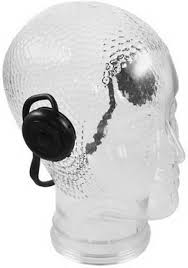
CALYPSO - Headphones B-SPEECH - Free user manual and instructions
Find the device manual for free CALYPSO B-SPEECH in PDF.



| Product Type | Bluetooth Headset |
| Brand | B-SPEECH |
| Model | CALYPSO |
| Weight | 80 g |
| Bluetooth Version | V2.1 + EDR |
| Bluetooth Range | Up to 10 meters (open space) |
| Frequency | 2.402 ~ 2.480 GHz |
| Battery Type | Rechargeable Lithium Polymer |
| Battery Capacity | 3.7 V / 400 mAh |
| Talk/Playback Time | Up to 18 hours |
| Power Supply | 5V 500mA via mains adapter or USB port |
| Charging | Via USB cable or travel charger (optional) |
| Microphone | Built-in Microphone |
| Main Functions | Answer/reject calls, voice dialing, automatic redial, music playback, volume control, track change |
| Buttons | On/Off/Pairing, Volume +/-, Next/Previous Track |
| LED Indicators | Pairing indicator (blue), power indicator (red/amber) |
| Operating Temperature | 0°C to 50°C |
| Operating Humidity | 0% to 95% (non-condensing) |
| Care and Cleaning | Disconnect before cleaning. Use a soft, dry cloth. |
| Safety | Only use the supplied charger. Do not expose to water. Observe USB polarity. |
| Package Contents | Headset, USB cable, Quick Start Guide |
Frequently Asked Questions - CALYPSO B-SPEECH
User questions about CALYPSO B-SPEECH
0 question about this device. Answer the ones you know or ask your own.
Ask a new question about this device
Download the instructions for your Headphones in PDF format for free! Find your manual CALYPSO - B-SPEECH and take your electronic device back in hand. On this page are published all the documents necessary for the use of your device. CALYPSO by B-SPEECH.
USER MANUAL CALYPSO B-SPEECH
This device complies with Part 15 of the FCC rules.
Operation is subject to the following two conditions: (1) this device may not cause harmful interference, and (2) this device must accept any interference received; including interference that may cause undesired operation.
Federal Communications Commission (FCC) Statement
This Equipment has been tested and found to comply with the limits for a Class B digital device, pursuant to Part 15 of the FCC rules. These limits are designed to provide reasonable protection against harmful interference in a residential installation. This equipment generates, uses and can radiate radio frequency energy and, if not installed and used in accordance with the instructions, may cause harmful interference to radio communications. However, there is no guarantee that interference will not occur in a particular installation. If this equipment does cause harmful interference to radio or television reception, which can be determined by turning the equipment off and on, the user is encouraged
to try to correct the interference by one or more of the following measures:
- Reorient or relocate the receiving antenna.
- Increase the separation between the equipment and receiver.
- Connect the equipment into an outlet on a circuit different from that to which the receiver is connected.
- Consult the dealer or an experienced radio/TV technician for help.
Warning:
Changes or modifications to this unit not expressly approved by the party responsible for compliance could void the user authority to operate the equipment.
Tested to comply with FCC standard. FOR HOME OR OFFICE USE.
Warning:
This equipment complies with FCC RF radiation exposure limits set forth for an uncontrolled environment. & This device and its antenna(s) must not be co-located or conjunction with any other antenna or transmitter.
The information in this document is subject to change without notice. The manufacturer makes no representations or warranties with respect to the contents thereof and specifically disclaims any implied warranties of merchantability or fitness for any particular purpose. The manufacturer reserves the right to revise this publication and to make changes from time to time in the content thereof without obligation of the manufacturer to notify any person of such revision or changes.
Trademark Recognition
Bluetooth is a trademark of the Bluetooth SIG, Inc. (Special Interest Group). The Bluetooth trademark is owned by Bluetooth SIG, Inc. USA.
Motorola is a trademark or registered trademark of Motorola, Inc.
RealPlayer is a trademark or registered trademark of RealNetworks, Inc.
Samsung is a trademark or registered trademark of Samsung, Inc.
Other product names used in this manual are the properties of their respective owners and are acknowledged.
FCC Information
This device complies with Part 15 of the FCC rules.
Operation is subject to the following two conditions: (1) this device may not cause harmful interference, and (2) this device must accept any interference received; including interference that may cause undesired operation.
Federal Communications Commission (FCC) Statement
This Equipment has been tested and found to comply with the limits for a Class B digital device, pursuant to Part 15 of the FCC rules. These limits are designed to provide reasonable protection against harmful interference in a residential installation. This equipment generates, uses and can radiate radio frequency energy and, if not installed and used in accordance with the instructions, may cause harmful interference to radio communications. However, there is no guarantee that interference will not occur in a particular installation. If this equipment does cause harmful interference to radio or
television reception, which can be determined by turning the equipment off and on, the user is encouraged to try to correct the interference by one or more of the following measures:
- Reorient or relocate the receiving antenna.
- Increase the separation between the equipment and receiver.
- Connect the equipment into an outlet on a circuit different from that to which the receiver is connected.
- Consult the dealer or an experienced radio/TV technician for help.
Warning:
Changes or modifications to this unit not expressly approved by the party responsible for compliance could void the user authority to operate the equipment.
Tested to comply with FCC standard. FOR HOME OR OFFICE USE.
Warning:
This equipment complies with FCC RF radiation exposure limits set forth for an uncontrolled environment. & This device and its antenna(s) must not be co-located or conjunction with any other antenna or transmitter.
Europe-EU Declaration of Conformity
This device complies with the specifications EN 300 328, EN 301-489 and EN 60950-1 following the provisions of the R&TTE Directive.
Table of Contents
Getting Started with the Headset 19
Unpacking and Checking the Contents 19
Identifying Components 20
Headset Parts 20
Headset Status LEDs Main Functions 20
Charging the Headset Batteries 21
Charging with the USB Cable 21
Charging with the Travel Adapter 21
Folding and Unfolding the Headset 22
Operation 23
Pairing with a Bluetooth Enabled Phone 23
Answering Calls 23
Rejecting Calls 23
Voice dial 24
Ending a Call in Progress 24
Re-dialling 24
Listening to MP3s on your Phone 24
Adjusting the Volume 24
Skipping Tracks 25
Appendix 25
Troubleshooting 25
Button Function Table 25-26
Specifications 27
About This Manual
This manual provides information for setting up and configuring the Headset.
This manual is intended for home users.
Safety Information
- Only use the supplied travel charger.
- Do not place anything on the power cord. Place the power cord where it will not be in the way of foot traffic.
- Before cleaning the Headset, disconnect the travel charger.
Getting Started with the Headset
Congratulations on your purchase!
This section covers unpacking the Headset and identifying components.
Unpacking and Checking the Contents
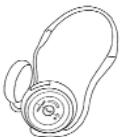
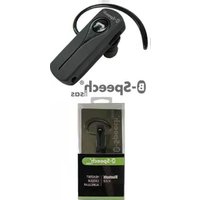
Headset
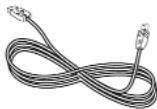
USB Cable
Quick Guide
If any item is missing or damaged, repack the Headset and return it to your reseller.
Identifying Components
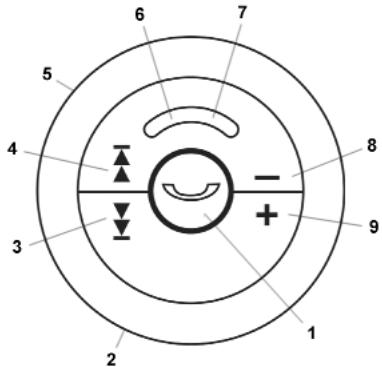
The following illustration shows the Headset parts.
Headset Parts
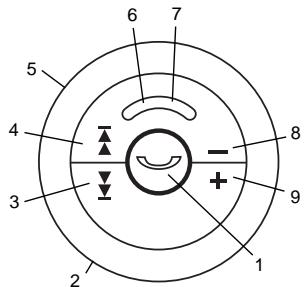
1 - Press to turn on/off
- Press to pairing with an Bluetooth device
- Press to answer incoming call
- Press to finish a call
2 - Microphone
3 - Next
4 - Previous
5 - USB port / Reset Button
6 - Status LED
7 - Link LED
8 - Volume down
9 - Volume up
Headset Status LEDs Main Functions
Link-Color
LED
Blue flashing slowly
Blue/Red flashing slowly
Function
Power on
Connected to device
Status
LED
Color
Red
Red off
Function
Charging
Charging complete
Charging the Headset Batteries
The Headset has a built-in rechargeable battery. Batteries can be charged through the USB cable or the travel charger.
Charging with the USB Cable
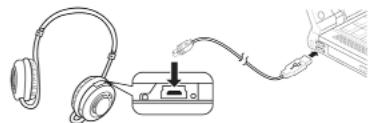
Refer to the following to charge the Headset with the USB cable.
- Connect the small connector on the USB cable to the Headset.
- Connect the other end of the cable to a USB connector on your computer. The Power LED lights amber to indicate charging.
- Unplug the USB cable when the Power LED is off.
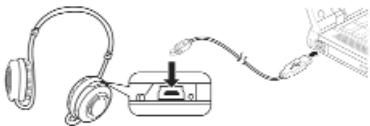
NOTE: Most notebook computer USB connectors are horizontal. The USB cable should be connected with the USB icon facing up. If the USB connector on your computer is vertical, connect the cable carefully to avoid damaging the connectors.
Charging with the Travel Adapter (optionally)
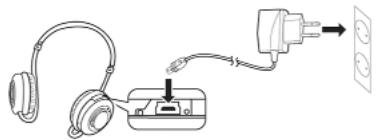
Refer to the following to charge the Headset with the travel adapter.
- Connect the small connector on the USB cable to the Headset.
- Connect the adapter to an electrical outlet. The Power LED lights red to indicate charging.
- Unplug the USB cable when the Power LED is off.
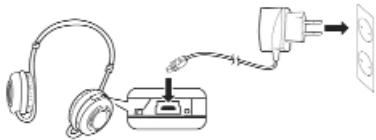
NOTE: The travel adapter can be used with 110V and 220V (auto switching). If you need to use a socket adapter, be sure the adapter is correctly grounded for your location.
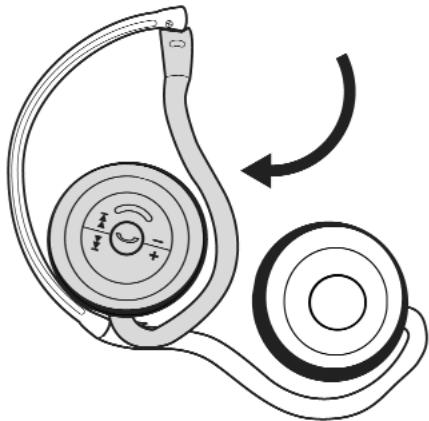
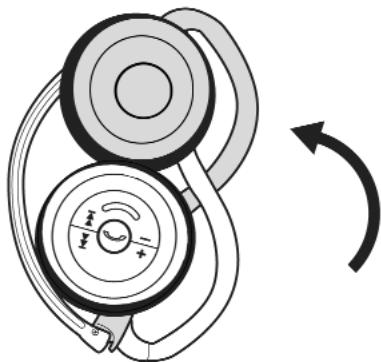
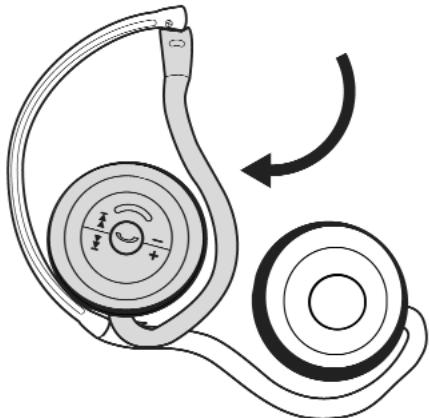
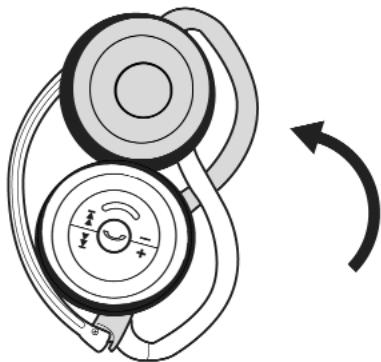
Folding and Unfolding the Headset
You can fold the Headset for easier storage. Refer to the following illustration to fold or unfold the Headset.
Operation
This section covers pairing the Headset with your mobile phone to answer calls or to listen to MP3 audio files.
Pairing with a Bluetooth Enabled Phone
Refer to the following steps to pair the Headset with a Bluetooth® enabled phone.
Important: Bluetooth® must be enabled on your mobile phone to use this function. Refer to your phone's user manual for instructions on enabling Bluetooth.
- Press and hold „Pair“ on the Headset for seven seconds. The link and status LED flashes alternately.
- Scroll to Bluetooth in the menu of your phone and look for a setting such as active device.
- Select „Calypso" when it appears in the phone menu.
- When prompted, type in the default password [0000]. The link LED lights blue when you are connected.
Answering Calls
Refer to the following to answer a call.
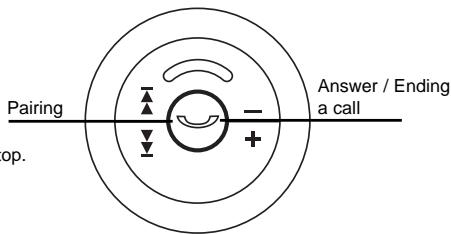
- When your phone rings, press "answer" on the Headset.
- Adjust the volume as you want.
- Press "answer" to end your call.
Rejecting Calls
When your phone rings, press Pair/answer button until ringing stop.
Voice dial (dial by calling a name)
- turn on headset and pair it with your telephone (if not done already).
- Press answering key twice in short sequence, until you can hear a "du-du" tone.
- Now clearly say the name of the person you want to call.
- Your phone dials the requested number.
Note: The voice deal function can only be used, if your mobile telephone supports voice deal. The according voice pattern has to be stored
Re-dialling
By pressing the answering key for one second the re-dialling function is activated. After hearing the "Duuuuu" tone, your telephone dials the last dialed number.
Ending a Call in Progress
While a call is in progress, press "answer" on the Headset to end the call.
Listening to Music on your Phone
Many phones allow you to store and play Music on your phone. You can pair the Headset with your phone and listen to music through the Headset. Refer to the user manual with your phone for details.
Adjusting the Volume
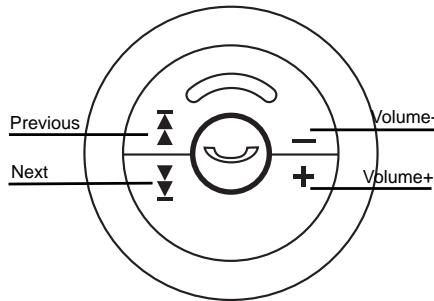
Push the volume up and down buttons on the Headset to adjust the volume while you are listening to music.
- Press the left side of the volume button to decrease the volume.
- Press the right side of the volume button to increase the volume.
Skipping Tracks
While listening to music on your phone, use the SKIP button on the Headset to skip forward or backward to find the track you want to listen to.
- Press the left side of the SKIP button to go to the previous track.
- Press the right side of the SKIP button to go to the next track.
Appendix
Troubleshooting
Try the following if the Headset does not work:
- Ensure connecting devices are charged.
- Turn off all devices and then turn them on again in the order shown in this guide.
- Ensure devices are within the 10-meter (33 feet) range.
- Ensure no obstructions such as concrete walls are between connecting devices.
If the Headset is still not working after trying the above, pack the Headset in the original package and return the package to your reseller.
Button Function Table
| Function | Device Status | Operation |
| Power On the device | Power On the device | Long press for 5 sec |
| Power Off the device | Standby | Long press and hold for more than 4 sec. |
| Pairing the device | Off | Long press and hold for more than 7-8 sec |
| Answer Call | Ringing | Press Ⓞ less than 1 sec. |
| End Call | Talking | Press Ⓞ less than 1 sec. |
| Reject Call | Ringing | Press Ⓞ for 2 sec. |
| **Voice Dialing | Standby or Disconnection | Double click Ⓞ within 0.5 sec |
| **Last Number Redialing | Standby or Disconnection | Press Ⓞ for 2 sec. |
| Volume Up | Talking or Play Music | Press + less than 1 sec. |
| Volume Down | Talking or Play Music | Press - less than 1 sec. |
| Music Playing | Stop or Pause | Press Ⓞ less than 1 sec. |
| Pause Music Playing | Playing Music | Press Ⓞ less than 1 sec. |
| Forward Playing | Playing Music | Press ↑ less than 1 sec. |
| Backward Playing | Playing Music | Press ← less than 1 sec. |
Note: The *** The function works only when the mobile phone supports Handsfree Profile.
Specifications
| General Radio | BT V. 2.1 + EDR, Class 2, up to 5~10 meters (open space) |
| Operating range | Depends on paired phone model, battery power, and environmental factors. |
| Carrier Frequency | 2,402~2,480 GHZ |
| Data Rate | 1 Mbit/s |
| Spread-Spectrum | FHSS (Frequency Hopping Spread Spectrum) |
| Auto-switching | While listening to music, you can receive or make a phone call with a paired mobile phone. |
| S/N Ratio | >88 dB |
| Input Power | 5V 500mA, AC adapter |
| Listening/talking Time | Up to 18 hours (factors such as distance between devices, and type of mobile phone used increase power consumption). |
| Weight | 80 grams |
| I/O port | Mini USB jack power adapter |
| Microphone | Built-in microphone for mobile phone use |
| Built-in Battery | 3.7V / 400mAh / Li-Polymer rechargeable |
| Battery Life | Up to 18 hours |
| Dynamic Power Management | Automatically power control for power consumption |
| Operating Temperature | 0 bis 50°C |
| Operating Humidity | 0 to 95% (non-condensing) |
This device complies with Part 15 of the FCC rules.
Operation is subject to the following two conditions: (1) this device may not cause harmful interference, and (2) this device must accept any interference received; including interference that may cause undesired operation.
Federal Communications Commission (FCC) Statement
This Equipment has been tested and found to comply with the limits for a Class B digital device, pursuant to Part 15 of the FCC rules. These limits are designed to provide reasonable protection against harmful interference in a residential installation. This equipment generates, uses and can radiate radio frequency energy and, if not installed and used in accordance with the instructions, may cause harmful interference to radio communications. However, there is no guarantee that interference will not occur in a particular installation. If this equipment does cause harmful interference to radio or television reception, which can be determined by turning the equipment off and on, the user is encouraged to try to
correct the interference by one or more of the following measures:
- Reorient or relocate the receiving antenna.
- Increase the separation between the equipment and receiver.
- Connect the equipment into an outlet on a circuit different from that to which the receiver is connected.
- Consult the dealer or an experienced radio/TV technician for help.
Warning:
Changes or modifications to this unit not expressly approved by the party responsible for compliance could void the user authority to operate the equipment.
Tested to comply with FCC standard. FOR HOME OR OFFICE USE.
Warning:
This equipment complies with FCC RF radiation exposure limits set forth for an uncontrolled environment. & This device and its antenna(s) must not be co-located or conjunction with any other antenna or transmitter.
Button Function Table 37-38
39
Button Function Table
This device complies with Part 15 of the FCC rules.
Operation is subject to the following two conditions: (1) this device may not cause harmful interference, and (2) this device must accept any interference received; including interference that may cause undesired operation.
Federal Communications Commission (FCC) Statement
This Equipment has been tested and found to comply with the limits for a Class B digital device, pursuant to Part 15 of the FCC rules. These limits are designed to provide reasonable protection against harmful interference in a residential installation. This equipment generates, uses and can radiate radio frequency energy and, if not installed and used in accordance with the instructions, may cause harmful interference to radio communications. However, there is no guaran-
tee that interference will not occur in a particular installation. If this equipment does cause harmful interference to radio or television reception, which can be determined by turning the equipment off and on, the user is encouraged to try to correct the interference by one or more of the following measures:
- Reorient or relocate the receiving antenna.
- Increase the separation between the equipment and receiver.
- Connect the equipment into an outlet on a circuit different from that to which the receiver is connected.
- Consult the dealer or an experienced radio/TV technician for help.
Warning:
Changes or modifications to this unit not expressly approved by the party responsible for compliance could void the user authority to operate the equipment.
Tested to comply with FCC standard. FOR HOME OR OFFICE USE.
Warning:
This equipment complies with FCC RF radiation exposure limits set forth for an uncontrolled environment. & This device and its antenna(s) must not be co-located or conjunction with any other antenna or transmitter.
This device complies with Part 15 of the FCC rules.
Operation is subject to the following two conditions: (1) this device may not cause harmful interference, and (2) this device must accept any interference received; including interference that may cause undesired operation.
Federal Communications Commission (FCC) Statement
This Equipment has been tested and found to comply with the limits for a Class B digital device, pursuant to Part 15 of the FCC rules. These limits are designed to provide reasonable protection against harmful interference in a residential installation. This equipment generates, uses and can radiate radio frequency energy and, if not installed and used in accordance with the instructions, may cause harmful interference to radio communications. However, there is no guarantee that interference will not occur in a particular installation. If this equipment does cause harmful interference to radio or television reception, which can be determined by turning the equipment off and on, the user is encouraged to try to correct the interference by one or more of the following measures:
- Reorient or relocate the receiving antenna.
-
Increase the separation between the equipment and receiver.
-
Connect the equipment into an outlet on a circuit different from that to which the receiver is connected.
- Consult the dealer or an experienced radio/TV technician for help.
Warning:
Changes or modifications to this unit not expressly approved by the party responsible for compliance could void the user authority to operate the equipment.
Tested to comply with FCC standard. FOR HOME OR OFFICE USE.
Warning:
This equipment complies with FCC RF radiation exposure limits set forth for an uncontrolled environment. & This device and its antenna(s) must not be co-located or conjunction with any other antenna or transmitter.
Whenever you are in the office, you should be able to use the telephone to contact us.
Marcacao por Voz
This device complies with Part 15 of the FCC rules.
Operation is subject to the following two conditions: (1) this device may not cause harmful interference, and (2) this device must accept any interference received; including interference that may cause undesired operation.
Federal Communications Commission (FCC) Statement
This Equipment has been tested and found to comply with the limits for a Class B digital device, pursuant to Part 15 of the FCC rules. These limits are designed to provide reasonable protection against harmful interference in a residential installation. This equipment generates, uses and can radiate radio frequency energy and, if not installed and used in accordance with the instructions, may cause harmful interference to radio communications. However, there is no guarantee that interference will not occur in a particular installation. If this equipment does cause harmful interference to radio or television reception, which can be determined by turning the equipment off and on, the user is encouraged to try to correct the interference by one or more of the following measures:
- Reorient or relocate the receiving antenna.
- Increase the separation between the equipment and receiver.
- Connect the equipment into an outlet on a circuit different from that to which the receiver is connected.
- Consult the dealer or an experienced radio/TV technician for help.
Warning:
Changes or modifications to this unit not expressly approved by the party responsible for compliance could void the user authority to operate the equipment.
Tested to comply with FCC standard. FOR HOME OR OFFICE USE.
Warning:
This equipment complies with FCC RF radiation exposure limits set forth for an uncontrolled environment. & This device and its antenna(s) must not be co-located or conjunction with any other antenna or transmitter.
Europe-EU Declaration of Conformity
This device complies with the specifications EN 300 328, EN 301-489 and EN 60950-1 following the provisions of the R&TTE Directive.
The information in this document is subject to change without notice. The manufacturer makes no representations or warranties with respect to the contents thereof and specifically disclaims any implied warranties of merchantability or fitness for any particular purpose. The manufacturer reserves the right to revise this publication and to make changes from time to time in the content thereof without obligation of the manufacturer to notify any person of such revision or changes.
Trademark Recognition
Bluetooth is a trademark of the Bluetooth SIG, Inc. (Special Interest Group). The Bluetooth trademark is owned by Bluetooth SIG, Inc. USA.
Motorola is a trademark or registered trademark of Motorola, Inc.
RealPlayer is a trademark or registered trademark of RealNetworks, Inc.
Samsung is a trademark or registered trademark of Samsung, Inc.
Other product names used in this manual are the properties of their respective owners and are acknowledged.
FCC Information
This device complies with Part 15 of the FCC rules.
Operation is subject to the following two conditions: (1) this device may not cause harmful interference, and (2) this device must accept any interference received; including interference that may cause undesired operation.
Federal Communications Commission (FCC) Statement
This Equipment has been tested and found to comply with the limits for a Class B digital device, pursuant to Part 15 of the FCC rules. These limits are designed to provide reasonable protection against harmful interference in a residential installation. This equipment generates, uses and can radiate radio frequency energy and, if not installed and used in accordance with the instructions, may cause harmful interference to radio communications. However, there is no guarantee that interference will not occur in a particular installation. If this equipment does cause harmful interference to radio or
television reception, which can be determined by turning the equipment off and on, the user is encouraged to try to correct the interference by one or more of the following measures:
- Reorient or relocate the receiving antenna.
- Increase the separation between the equipment and receiver.
- Connect the equipment into an outlet on a circuit different from that to which the receiver is connected.
- Consult the dealer or an experienced radio/TV technician for help.
Warning:
Changes or modifications to this unit not expressly approved by the party responsible for compliance could void the user authority to operate the equipment.
Tested to comply with FCC standard. FOR HOME OR OFFICE USE.
Warning:
This equipment complies with FCC RF radiation exposure limits set forth for an uncontrolled environment. & This device and its antenna(s) must not be co-located or conjunction with any other antenna or transmitter.
Europe-EU Declaration of Conformity
This device complies with the specifications EN 300 328, EN 301-489 and EN 60950-1 following the provisions of the R&TTE Directive.
O daHHo HnCTpyKuH
B INCHtpKm Bb HaidTe HnFopMaIIO KOHCTpyKm I nONb3OBAHm KOMnEKA HayuHKnOB B-Speech Calypso. IHCTpyKm npedHa3NaHeHa 4n86bTOBO rncNtob3oBaHnA.
HΦopmauσo 6e30anachoctn
- INONb3OBaTb 3apAHOe yCTPOINbKO BxOJaueB E KOMnneKT
HmHeo He KNAIte Ha Ka6eB 3apAHorO yCTpoiCTBa. HomeCTte 3apAHyb Ka6eB TaKIM CNOC6OB. Tc6BoE He 3aTeB erO HorAM
-пеническон hayшников OTKПОЧITE 3apядhoe ycTpoICTBO
OchOBHnHΦopMaŋ
Pn3dpabIeM Bac c nokynkoH hayuHnKOB B-Speech Calypso! B 3toi qactn HnctpykUm Bbl no3hakOMTecb CcOepKaHHeM BCero KOMIIeKTA.
Copepkahne ynaKOBKn:
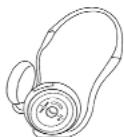
HayushuKIM
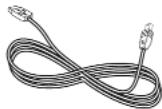
ka6eBb USB
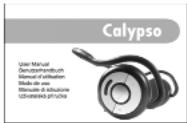
HnCTpyKUIN NO O6CnyMBAHNIO
B cIyae HeIOCTaH OJHO I3 pEIMTOB, IIOBO OINH I3 pEIMTOB NOBpeXJeH, IpocIM BepHyTB TOBAP IO MEcy NOKTIKN.
OnncHne cTpoEHn HayuHKnOB
Ha cxeme, pacnoioxehno Hnke Bbl handeTe onncane HeeCTBn BCex nepeKnouateNei.
OncaHne rnaBbix yHKn noka3aHn LED
DnOLED
Link
Lbet
MeDneHNO mepuaOuun ronyboi
MeDneHNO MePauOuynrOnyoBOnnnKpaChbN
ΦyHKUH
BKJIOUeHO
IopdknIOueHo
K yCTpOncBy Bluetooth
1.-HaxaTb,HTO6bI BKJIOHTb/BBKINOHHTb[ON/OFF]
- Haxatb N pIeDexkata, YTObI bNo kIIOHcHTbCBA cypToTbOM Bluetooth [Pairing]
-нжаты,чтобbl OTBETnTb Ha BXODIuIN 3BOHOK [Answer Call]
- HaxaTb, yTo6bI 3aKOHHTb pa3roBOp [End Call]
2.MKpOoh
3.CneyuOuee npOn3BedeHnE [>>]
4.ПпдыдушеepnриЗбeнhoe[<<]
5. nopT USB/kHonka Reset
6.Диod Status LED
7.Дио LinkLED
8. rpoMHe [+]
9. TIIe[-]
DnOLED
Status
LBet
KpachbH
Функции
3apraKa
KpachbI dnoI noraen
3apnka 3aKoHcHa
3apnka aKKMyTTOPOB B HayHnKax
HayuHnKIM HeoBCTpoEHbIe AKKymyTOpbl. AKKymyTOpbl MoryT 3apKaTbcrype3nop USB n60 3apJHoe yctpoCTBO, BXOJaee B KOMNKeT
3apka uepe3 nopT USB
Ia3apAknakymyraTOPOB BbINONHHTcNeDyUOue WAr:
- NoidknouHTb MaIbI KOHTaKT Ka6eJIa USB K HayuHKam.
- BtOPOI KOHeI KabeJI NOdKnIOuHTb K nopTy USB KOMMbTepe. IIOID Status doJXKeH nOKa3aTb npOeCC 3apRkN.
- Nocne toro, kak dnoD Status norachet OTKHouHTb Ka6eJIb USB
Baxho! O6patntte BHIMAHNE Ha nnonoxhene npota USB, qto6bI He nOBpeDnTb KOHTAKTOB BO Bpemr noDKHIOHEHN.
NcnoJb3OBaHne 3apAHO yCTPOIcTBA
YTo6bI 3aPnTb AkyMyJrTOpbI, BbINONHITe CneDyIOUne WaR:
- PodkIIOHTb MaIbIKoHTaKT KaIeJIa3apIHO yCTpoIcTba K nopTy USB hayuHKnOB.
2.3apnHoe yctpoNCTBO noKKnOHTb K 3neKtpnuecko po3eTke. DnoD Status donKeH nok3aTb npoucc 3apAkn. - Nocne toro, kak dno Status norachet OTKIOHTb Ka6eNB USB
Baxho! 3apraHoe yctpoCTBO MOKET 5bItb NcNoJIb3oBAHO B cTeT C HnPRAKeHNEM 110V n 220V (nepeKnIOaETcra ATOMATuCeckn).Ecn 3apraHoe yctpoCTBO NOkIKNOaTEcTAYePe3 dpyrO aAnTep, cNeyEt npOBepNTb, YTO6bl OH IMeI npabNbHoe 3a3emJeHne.
CknaDbIbAHne npackknaDbIbAHne HayuHnKOB
TtO6bI hayuHnKn 3aHmMaII MeHbIe MeCTa, IN MOxHO CTOXKNb. CTOXKNb/pa3IOXKnTB HayuHnKn MOxHO B COOTBcTcBN co CXeMOi, paCNOIOKeHHo HNKe.
Пользоване
B daHOM pa3dene haoDnTc0 nOncAHne noKnIOeHnry HauHHNKOB K cOTOBMy TeneoHcy C nHTepfeyCOM bluetooth dI pynemA 3BOHKB IN pOcnyuBaHnry paINOB MP3.
IopKnHueHne K Tepeohy C nHTeppeombluetooth
Ttobnokknohtb HaywnnnK Telephocmblteoth, bInonHnTe cneyoune warn.
Baxho:Функи bluetho dOJnKha 6bIb B BaWem cToBOM TepeHoe AKTNBa. YTo6bl AKTNBImPOBaT daHHyO fHyHKUHO, BbINOHNTE HcTpKUIM NO oCbnyKmbAHIO TepeHoa.
Haxmte npdepxnte knabuuy,Pairing"Ha haywnkax B teeyne 7 ckynd. Nodbl Status ni Link hanyr Mrtatb.
1.BKIOUHTe yHKcHIO noncKa ycTPOIcTB bluetooth B TeJepeOHe
2. BbBepTe yCtpoIcBO c Ha3BaHHeM „Calypso", KOrda OHO NORBITcB CnNcKe HauDeHHbIX yCTpoIcTB
3. Korda noBHTcN none npaonb, BnHnWite npaONb [0000]. Korda Bo3NHKeT coeINHeHne, mOd Link oJokhen ropetb roY6bIM zETOM.
PnEm 3BOHKO8
YTo6bI npHrTb BXOJxuN 3BOHOK, BbINONHN CJeDyUOpne WArn:
- Pocne coo6ueHnra TelefoHa O BXOaIeM 3BOHke, HaxmTe KhoNky Answer Call
- OTPerynnpyTe ypoBEn rpoMkoCTn no BbIbOpny
- YTo6b3aKoHHTb pa3ROBOp, HaxMnTe KhONky "End Call"
OTka3 OT pa3ROBOPOB
YTo6bIOTKIOHHTB XODAUIM 3BOHOK, HAKMITE IN pnpdePKeTKEHONKY "End call" NOKA 3BOHOK HE npEkpATNTCA.
TOnocobHabOp Homepa
1.BknoHbHayuHnKnNoKnHouTbKeTeepohny npn nomou bluetho (ecnn 3toro He 6bIIO cdeJano 3apaHee)
2.Дba pa3a 6bICTpo hXaKaTb KhONky „Answer call", noka He pa3daactcra 3Byk „dY-dy"
3. Bbpa3nteBHO npoun3HecuTE NMR nJn Ha3BaHne, npunncahHOE K HOMepy B TeJeOHHo KNKKe TeneOHa
4. Nocne pacno3HaHn TaTepeOH HauHET ABToMaTueckn Ha6npaTb Homep
Baxho: FyHKnra rnoocoboro Habopa homepa moKet 6bIb NCNoIb3oBaHa TOnbKO B Tepeohax, IMeIoXx TaKyO fHyHKIO. IpnONHeCenHoe Ha3BaHne DoJIKHO COOTBeCTBOBaTb TeKcTy, 3aNCAHHOMY B TepeOHe.
NobtopbHn HabOp Homepa
HaxKaTb KhonKy,Answer call"Ha 1 cek, YTO6bI AKTNBn3PObaTb FyHKnIO Redial. KOrDa B HayuHnKax 6yDet CblIeH 3ByK «Dyyyyyyyyyyyyy”, BaW TepeOH N03BOHnT Ha NoCneHn H6paHHb HOpEep.
OKOHyahne pa3roBopa
Bo Bpempa3roBopapaxmKhoNky,End call,TO6b3aOKHHTb pa3roBOp.
PpocnyuBAAHm My3bIKc BaWero TeNefoHa
MHOrneMoIeN TeLEFOHOH IMeOT FyHKUIO pOnIrpBbAHn My3bIaNbIbX PAnOB. HayUHNKc Calpyso MOxHO HcN0B3ObaT dI npoIprBaHnAMy3bIK C NOkIOHcHoro cOTOBORo TeneOHa. DJIr 3TOr HO BnCTpyKuIN K TepeOHy HauTI INHOFPMAIO O BKNIOHcENyHKUIO pONIRpBaHnMy3bIK.
PerynpobKa rpoMkoCTn
BoBpMa npocnyBaHnMy3bIKn Haxmnte JbeHyO cactb KOnKnVolume"TTObI yMeHbMHTb CIny 3Byka, IIOo npabYIO cactb KOnKn,Volume"TTObI yBeMNHTb CIny 3Byka.
PepexoM Mekdy npOn3BedeHnMa
HaxmteJeByuacbKhoNKn „Skip",yTo6blnepeTn KnpdeBdyuemy npOn3BeDeHHIO
- Haxkmnte npabyu qactb Khonkn „Skip", yto6bl nepeynK cneyuouemy npoun3beDeHHO
PpnoJoxeHne
PeseHne npo6nem
Ecn yctpOCTBO He DeNCTByET, npOBepbTe HnKecneDyUouee
- yDIOCTOBepbTecb, YTO HAYUHNI KI TeNcFOH 3apJKeHbI
BbIKIOHTe BCE yCTPOINCTBA IN DAnee BKIOHTe B COOTBETCTBIM C NOPAOKOM, ONINCAHHBIM B HAcTOrIeMHCTpyKLIIN
-yoCTOBepbTecb,TO yCtpoIcTbHaxOaTcHpaacctOHHHe 60JIbWeHem 10M
-yoCTOBepbTcB,TO MEKdy yCTPOCTBaMn Het npperpaTtna 6eToHHO CTHebl
Ecn yctpoiCTBO n daIbwe He deIeCTByeT, o6paNTecb K texHnuecko NMOOu FNpMb «Media-Tech», NIO BOINTe Ha cTpaHcy www.media-tech.eu, UTO6bl NOcMOTpeB 6ba3e FAQ-a.
Ta5nuaФyHKUHOHaBbIXKHOHOK:
GB/ Note on environmental protection:

After the implementation of the European Directive 2002/96/EU in the national legal system, the following applies:
Electrical and electronic devices may not be disposed of with domestic waste. Consumers are obliged by law to return electrical and electronic devices at the end of their service lives to the public collecting points set up for this purpose or point of sale. Details to this are defined by the national law of the respective country. This symbol on the product, the
instruction manual or the package indicates that a product is subject to these regulations. By recycling, reusing the materials or other forms of utilising old devices, you are making an important contribution to protecting our environment.
GB B-Speech® declares herewith that this device carries the CE mark in accordance with the regulations and standards of the guideline R&TTE (1999/5/EG). It conforms with the fundamental requirements, the appropriate regulations and rules of the guideline 1999/5/EG. You can find the complete declaration of conformity under www.b-speech.de.
- Federal Communications Commission (FCC) Statement
- Warning:
- Trademark Recognition
- FCC Information
- Europe-EU Declaration of Conformity
- Table of Contents
- Getting Started with the Headset 19
- Operation 23
- Appendix 25
- About This Manual
- Safety Information
- Getting Started with the Headset
- Unpacking and Checking the Contents
- Identifying Components
- Headset Parts
- Headset Status LEDs Main Functions
- Charging the Headset Batteries
- Charging with the USB Cable
- Charging with the Travel Adapter (optionally)
- Folding and Unfolding the Headset
- Operation
- Pairing with a Bluetooth Enabled Phone
- Answering Calls
- Rejecting Calls
- Re-dialling
- Ending a Call in Progress
- Listening to Music on your Phone
- Adjusting the Volume
- Skipping Tracks
- Appendix
- Troubleshooting
- Specifications
- Marcacao por Voz
- O daHHo HnCTpyKuH
- HΦopmauσo 6e30anachoctn
- OchOBHnHΦopMaŋ
- Copepkahne ynaKOBKn:
- OnncHne cTpoEHn HayuHKnOB
- OncaHne rnaBbix yHKn noka3aHn LED
- DnOLED
- Lbet
- ΦyHKUH
- Функции
- 3apnka aKKMyTTOPOB B HayHnKax
- 3apka uepe3 nopT USB
- NcnoJb3OBaHne 3apAHO yCTPOIcTBA
- CknaDbIbAHne npackknaDbIbAHne HayuHnKOB
- Пользоване
- IopKnHueHne K Tepeohy C nHTeppeombluetooth
- PnEm 3BOHKO8
- OTka3 OT pa3ROBOPOB
- TOnocobHabOp Homepa
- NobtopbHn HabOp Homepa
- OKOHyahne pa3roBopa
- PpocnyuBAAHm My3bIKc BaWero TeNefoHa
- PerynpobKa rpoMkoCTn
- PepexoM Mekdy npOn3BedeHnMa
- PpnoJoxeHne
- PeseHne npo6nem
- GB/ Note on environmental protection:
Brand : B-SPEECH
Model : CALYPSO
Category : Headphones