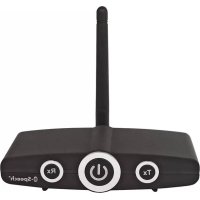
RTX1 - Wireless transceiver B-SPEECH - Free user manual and instructions
Find the device manual for free RTX1 B-SPEECH in PDF.



| Product Type | Bluetooth stereo wireless transceiver |
| Brand | B-Speech |
| Model | RTX1 |
| Bluetooth Version | 2.1+EDR (Class 2 in reception, Class 1 in transmission) |
| Supported Bluetooth Profiles | A2DP, AVRCP |
| Wireless Range | Up to 30 meters in transmission mode, up to 10 meters in reception mode |
| Audio Connectors | Stereo RCA input/output, 3.5 mm jack input/output |
| Power Supply | USB 5V power adapter (mini USB) |
| Operating Temperature | -10°C to +40°C |
| Storage Temperature | -20°C to +60°C |
| Main Functions | Wireless stereo audio transmission and reception, automatic pairing, playback control (pause/play) via multifunction button |
| Maintenance and Cleaning | Clean with a soft, dry cloth. Do not use abrasive products or solvents. Avoid any liquid ingress. |
| Safety | Do not open the device. Do not expose to water. Disconnect if not used for extended periods. Use only the supplied adapter. |
| Warranty | 2 years |
| Box Contents | RTX1, power adapter, antenna, RCA to 3.5 mm jack cable, dual 3.5 mm jack cable, user manual |
Frequently Asked Questions - RTX1 B-SPEECH
User questions about RTX1 B-SPEECH
0 question about this device. Answer the ones you know or ask your own.
Ask a new question about this device
Download the instructions for your Wireless transceiver in PDF format for free! Find your manual RTX1 - B-SPEECH and take your electronic device back in hand. On this page are published all the documents necessary for the use of your device. RTX1 by B-SPEECH.
USER MANUAL RTX1 B-SPEECH
natural_image
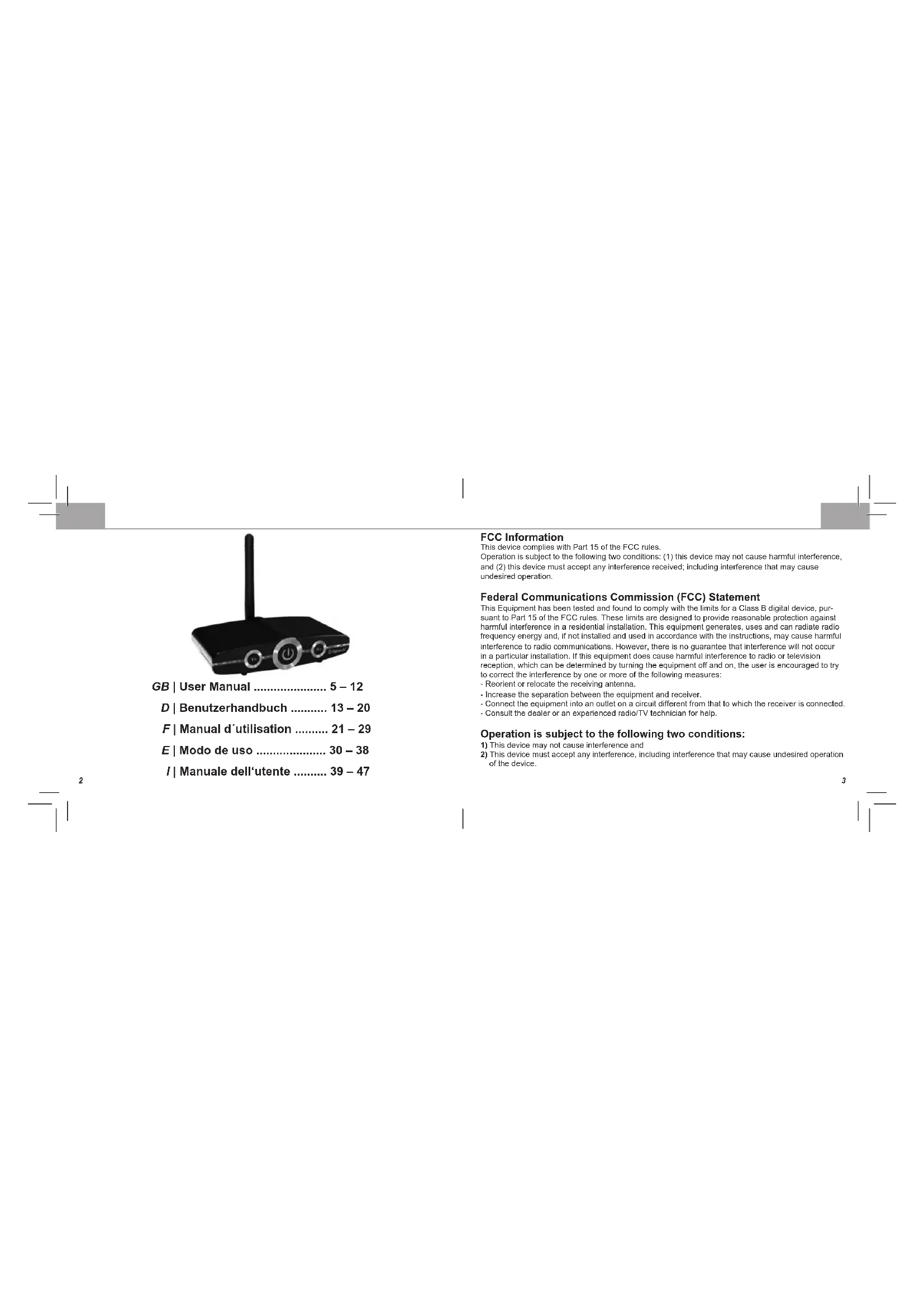
Black wireless router with two ports and a central antenna (no visible text or symbols)GB | User Manual 5 – 12
This device complies with Part 15 of the FCC rules.
Operation is subject to the following two conditions: (1) this device may not cause harmful interference, and (2) this device must accept any interference received; including interference that may cause undesired operation.
Federal Communications Commission (FCC) Statement
This Equipment has been tested and found to comply with the limits for a Class B digital device, pursuant to Part 15 of the FCC rules. These limits are designed to provide reasonable protection against harmful interference in a residential installation. This equipment generates, uses and can radiate radio frequency energy and, if not installed and used in accordance with the instructions, may cause harmful interference to radio communications. However, there is no guarantee that interference will not occur in a particular installation. If this equipment does cause harmful interference to radio or television reception, which can be determined by turning the equipment off and on, the user is encouraged to try to correct the interference by one or more of the following measures:
- Reorient or relocate the receiving antenna.
- Increase the separation between the equipment and receiver.
- Connect the equipment into an outlet on a circuit different from that to which the receiver is connected.
- Consult the dealer or an experienced radio/TV technician for help.
Operation is subject to the following two conditions:
1) This device may not cause interference and
2) This device must accept any interference, including interference that may cause undesired operation of the device.
FCC RF Radiation Exposure Statement
This equipment complies with FCC radiation exposure limits set forth for an uncontrolled environment. End users must follow the specific operating instructions for satisfying RF exposure compliance. This transmitter must not be co-located or operating in conjunction with any other antenna or transmitter.
Warning:
Changes or modifications to this unit not expressly approved by the party responsible for compliance could void the user authority to operate the equipment.
Tested to comply with FCC standard. FOR HOME OR OFFICE USE.
Warning:
This equipment complies with FCC RF radiation exposure limits set forth for an uncontrolled environment. This device and its antenna(s) must not be co-located or conjunction with any other antenna or transmitter.
Disclaimer
The information in this document is subject to change without notice. The manufacturer makes no representations or warranties with respect to the contents hereof and specifically disclaim any implied warranties of merchantability or fitness for any particular purpose. The manufacturer reserves the right to revise this publication and to make changes from time to time in the content hereof without obligation of the manufacturer to notify any person of such revision or changes.
Trademark Recognition
Bluetooth is a trademark of the Bluetooth SIG, Inc. (Special Interest Group). The Bluetooth trademark is owned by Bluetooth SIG, Inc. USA.
Other product names used in this manual are the properties of their respective owners and are acknowledged.
This device bears the CE symbol as specified by the provisions of Directive R & TTE (99/5/EC). B-Speech hereby declares that this device is in compliance with the basic requirements and other relevant guidelines and regulations of the 1999/5/EC guideline. You will find the declaration of conformity on the Internet at http://www.b-speech.com.
Congratulations
Congratulations to your purchase of the B-Speech® RTX1 professional transmitter and receiver. The B-Speech® RTX1 offers the possibility to transmit stereo audio signals via Bluetooth® from devices such as hi-fi systems, TV, MP3, mobile phones or other output equipment to Bluetooth® receivers within 30 metres (transmitter mode). Moreover, it is also able to play data received via Bluetooth® in complete stereo quality using your customary devices such as speakers, hi-fi systems, or wired
GB GB
headsets (receiver mode). The B-Speech® RTX1 has RCA plugs and offers numerous application possibilities.
Package contents
• B-Speech® RTX1
- AC adapter
- Antenna terminal
• RCA to 3.5mm cable
• 3.5mm to 3.5mm cable
- Manual
Function overview

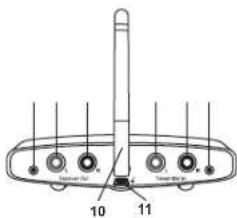
- Tx button
- Multifunction button
- Rx button
4.3.5 mm output - RCA output left
- RCA output right
- RCA input left
- RCA input right
9.3.5 mm input - Antenna
- Mini-USB power input
LED Functions
LED
Pairing Red and blue blinks alternately
Rx Mode Connecting Blue blinking
Rx Mode Connected Blue is permanently on
Tx Mode Connecting Red blinking
Tx Mode Connected Red is permanently on
Not Connected Red or blue blinks every 2 sec.
Searching Red or blue blinks every 0.5 sec.
Get started
Attach the antenna
Screw the package included antenna on to the rear of the RTX1 antenna terminal by firmly turning it to the right. Set up the antenna and set it to the desired position.

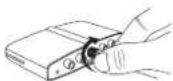

Note: Different antenna positions can affect wireless working range. Check which position gives you the best result.
GB GB
Connect the AC adapter
Plug the AC adapter into the wall socket. Connect the other end of the USB cable to the rear side of the RTX1.
Connect audio cables
When using the RTX1 as a receiver for audio, plug the RCA or 3.5mm jack cables into the ports labelled "Receiver Out".
When using the RTX1 as a transmitter for audio, plus the RCA or 3.5mm jack cables into the ports labelled "Transmitter In"
Power On/Off
To power on RTX1 press and hold the multifunction button for at least 3 seconds. The LED will turn on. To power off RTX1 press and hold the multifunction button for at least 4 seconds. The LED will turn off.
Pairing
Your RTX1 needs to be paired to a Bluetooth® device before it can be used. This is a two part process; one part is carried out on the RTX1 and the other is carried out by the Bluetooth® device you want to connect to.
Note: Various Bluetooth® devices use different methods of pairing.
With your RTX1 turned on, press the Rx or Tx Button to enter pairing mode. The LEDs will alternate rapidly between blue and red which indicates that the RTX1 is in pairing mode.
Receiver mode (Rx)
The RTX1 can be used to receive audio data from A2DP capable Bluetooth® devices in transmitter mode and outputs them through the RCA or 3.5mm jack connectors.
| Application examples: Mobile phone > RTX1 > Hi-Fi System | ||||
| Computer | > RTX1 | > Speakers | ||
| BT | Transmitter | > RTX1 | > Wired Headphones | |
-
Connect the required cables into the rear sided RCA or 3.5mm jacks of RTX1 marked with "Rx Output".
-
Switch on RTX1 and select the receiver mode by pressing the Rx button. Your RTX1 is in pairing mode and will search for other Bluetooth® transmitters which are in pairing mode.
-
Use your mobile phone, Computer or other Bluetooth® transmitter to search for Bluetooth® audio devices. The Bluetooth® should indicate that it has found "RTX-1". Confirm that you want to pair it with RTX1 together. If you are unsure how to go through the pairing process, please refer to the user manual of your Bluetooth® device or the installed Bluetooth® software stack of your Computer. When asked for a pin key, enter "0000" and confirm to connect it to your RTX1.
When using a Bluetooth® transmitter without display, simply turn on pairing or connect mode on your Bluetooth® transmitter and wait a few seconds until it established the connection with RTX1.
- You can now enjoy your favourite music wirelessly. To control music playback you can use the multifunction button on the RTX1 to play/pause music streaming.
Note: If you lost the connection or temporarily disconnected your mobile phone/Computer, shortly press the multifunction button on the RTX1 to re-establish the connection.
To use the play/pause feature your Computer/mobile phone must support the AVRCP profile.
GB GB
Transmitter mode (Tx)
The RTX1 can be used to transmit audio signals from devices connected to the RCA or 3.5mm jack connectors to A2DP capable Bluetooth® devices in receiver mode.
| Application examples: | Television | > RTX1 | > BT Receiver | |
| Game | Console | > RTX1 | > BT Headset | |
| Computer | > RTX1 | > BT Speaker |
-
Connect the required cables into the RTX1s rear sided RCA or 3.5mm jacks marked with "Tx Input".
-
Switch on RTX1 and select the transmitter mode by pressing the Tx button. Your RTX1 is in pairing mode and will search for other Bluetooth® receivers which are in pairing mode.
-
Use your Bluetooth® receiver and search for the "RTX-1". Confirm to pair it with RTX1. If you are unsure how to go through the pairing process, please refer to the user manual of your Bluetooth® receiver. When asked for a pin key, enter "0000" and confirm to connect it to your RTX1. When using a Bluetooth® receiver without display, simply turn on pairing or connect mode on your Bluetooth® receiver and wait a few seconds until it established the connection with RTX1.
-
You can now enjoy your favourite music wirelessly over your Bluetooth® device.
Note: If you lost the connection or temporarily disconnected your Bluetooth® device, shortly press the multifunction button on the RTX1 to re-establish the connection. When changing from Rx to Tx mode or vice versa pairing and connecting the RTX1 must be reapplied
Troubleshooting
Problem Solution RTX1 cannot be switched on Check the power connection and make sure you pressed the multifunction button for at least 3 seconds.
10 11
Wireless working range to low Make sure you attached the antenna correctly and are
within 10 metres range for Rx and 30 metres for Tx mode.
No audio output Check the cable connections and correct configuration.
Can't connect to RTX1 Make sure the Bluetooth® device support A2DP and pin code 0000, 1234 and 8888.
When changing from Rx to Tx mode or vice versa pairing and
connecting the RTX1 must be reapplied.
Technical Specifications
• Model number: RTX-1 Trademark: B-Speech
• BT version 2.1+EDR / Class 2(Rx) / Class 1(Tx)
• Supports A2DP, AVRCP profile
- Operating Temperature: -10 to +40°C
• Storage Temperature: -20 to +60°
Safety advice
• Do not open the device
- Do not hold the device under water
- Disconnect electronic devices from the power when not using them for longer time.
- Do not use the device when it has visible defects.
No commitment for any damage at misuse.
Warranty
B-Speech products are subject to a strict quality control.
• A copy of your receipt or other proof of purchase is required.
- The warranty is void if the serial number, date code label or product label is removed, or if the product
has been subject to physical abuse, installation, modification or repair by unauthorized third parties.
• The responsibility for our products is limited to the repair or replacement of the product at our discretion.
- All warranty on our products is limited to two years from the date of purchase
- Specifically exempt from any warranty are limited-life consumable components subject to normal wear
and tear, such as microphone, decorative finishes, batteries and other accessories.
• We are not liable for any incidental or consequential damages arising from the use or misuse of any
our products.
• This warranty gives you specific rights but you may have other rights depending on your location.
- Unless otherwise instructed in the user guide, the user may not, under any circumstances, attempt to perform service, adjustments or repairs on this unit, whether in or out of warranty. It must be returned to the sales outlet, factory or authorized service agency for all such work.
• We do not assume any responsibility for any loss or damage incurred during shipping. Any repair work on our products by unauthorized third parties nullifies any warranty.
In case you need technical support, please contact our support-team by e-mail under service@b-speech.com.
Haftungsausschluss
Note on environmental protection:
After the implementation of the European Directive 2002/96/EU in the national legal system, the following applies: Electrical and electronic devices may not be disposed of with domestic waste. Consumers are obliged by law to return electrical and electronic devices at the end of their service lives to the public collecting points set up for this purpose or point of sale. Details to this are defined by the national law of the respective country. This symbol on the product, the instruction manual or the package indicates that a product is subject to these regulations. By recycling, reusing the materials or other forms of utilising old devices, you are making an important contribution to protecting our environment.
natural_image
Pure black rectangle with thin lines at corners and edges, no text or symbols present
- Federal Communications Commission (FCC) Statement
- Operation is subject to the following two conditions:
- FCC RF Radiation Exposure Statement
- Warning:
- Disclaimer
- Trademark Recognition
- Congratulations
- GB GB
- Package contents
- LED Functions
- LED
- Get started
- Attach the antenna
- Connect the AC adapter
- Connect audio cables
- Power On/Off
- Pairing
- Receiver mode (Rx)
- Transmitter mode (Tx)
- Troubleshooting
- Technical Specifications
- Safety advice
- Warranty
- Haftungsausschluss
- Note on environmental protection:
Brand : B-SPEECH
Model : RTX1
Category : Wireless transceiver