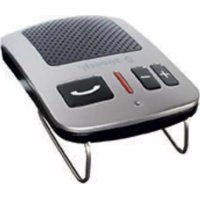
Pago - Built-in kit B-SPEECH - Free user manual and instructions
Find the device manual for free Pago B-SPEECH in PDF.

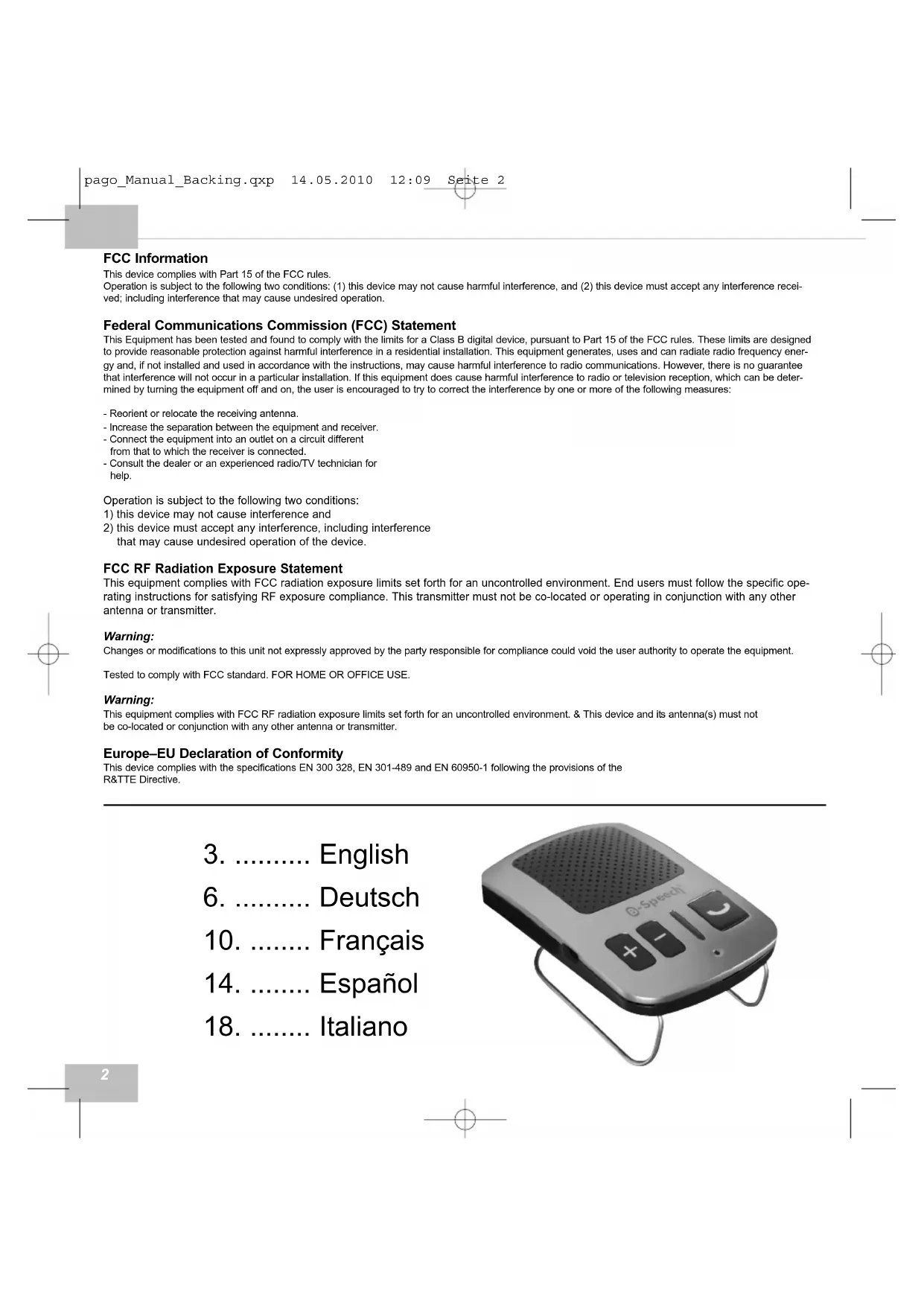


| Product Type | Bluetooth hands-free kit for vehicle (sun visor mount) |
| Brand | B-Speech |
| Model | Pago |
| Bluetooth Version | 2.0 (Class II, range 10 m) |
| Supported Profiles | Headset (HSP) and Hands-Free (HFP) |
| Power Supply | Built-in Lithium-Polymer battery, rechargeable via USB (5V) |
| Talk Time | 7 hours |
| Standby Time | 240 hours (10 days) |
| Multilingual (TTS) | French, English, German, Italian, Spanish |
| Phonebook | Up to 300 contacts, automatic or manual transfer |
| Multi-connection | Up to 2 phones simultaneously |
| Noise Reduction | DSP (digital signal processor) for echo and noise |
| Voice Commands | Voice dialing and caller name announcement |
| Phone Functions | Last number redial, call reject, call transfer, mute |
| Firmware Update | Via USB and PC (Windows 32-bit only) |
| Dimensions (approx.) | 10 x 5 x 2 cm |
| Weight (approx.) | 80 g |
| Package Contents | Pago kit, sun visor clip, USB cable, car charger, manual |
| Care | Clean with a soft, dry cloth. Do not use abrasive products. |
| Safety | Hands-free use recommended while driving. Do not use the phone while driving. |
| Repairability | Repair by authorized center only. Firmware update possible by user. |
| Warranty | 2 years, limited to original purchaser, upon proof of purchase. |
| Certifications | CE, R&TTE directive 1999/5/EC |
| Recycling | Compliant with WEEE directive 2002/96/EC. Do not dispose of with household waste. |
Frequently Asked Questions - Pago B-SPEECH
User questions about Pago B-SPEECH
0 question about this device. Answer the ones you know or ask your own.
Ask a new question about this device
Download the instructions for your Built-in kit in PDF format for free! Find your manual Pago - B-SPEECH and take your electronic device back in hand. On this page are published all the documents necessary for the use of your device. Pago by B-SPEECH.
USER MANUAL Pago B-SPEECH
This device complies with Part 15 of the FCC rules.
Operation is subject to the following two conditions: (1) this device may not cause harmful interference, and (2) this device must accept any interference received, including interference that may cause undesired operation.
Federal Communications Commission (FCC) Statement
This Equipment has been tested and found to comply with the limits for a Class B digital device, pursuant to Part 15 of the FCC rules. These limits are designed to provide reasonable protection against harmful interference in a residential installation. This equipment generates, uses and can radiate radio frequency energy and, if not installed and used in accordance with the instructions, may cause harmful interference to radio communications. However, there is no guarantee that interference will not occur in a particular installation. If this equipment does cause harmful interference to radio or television reception, which can be determined by turning the equipment off and on, the user is encouraged to try to correct the interference by one or more of the following measures:
- Reorient or relocate the receiving antenna.
- Increase the separation between the equipment and receiver.
- Connect the equipment into an outlet on a circuit different from that to which the receiver is connected.
- Consult the dealer or an experienced radio/TV technician for help.
Operation is subject to the following two conditions:
1) this device may not cause interference and
2) this device must accept any interference, including interference that may cause undesired operation of the device.
FCC RF Radiation Exposure Statement
This equipment complies with FCC radiation exposure limits set forth for an uncontrolled environment. End users must follow the specific operating instructions for satisfying RF exposure compliance. This transmitter must not be co-located or operating in conjunction with any other antenna or transmitter.
Warning:
Changes or modifications to this unit not expressly approved by the party responsible for compliance could void the user authority to operate the equipment.
Tested to comply with FCC standard. FOR HOME OR OFFICE USE.
Warning:
This equipment complies with FCC RF radiation exposure limits set forth for an uncontrolled environment. & This device and its antenna(s) must not be co-located or conjunction with any other antenna or transmitter.
Europe-EU Declaration of Conformity
This device complies with the specifications EN 300 328, EN 301-489 and EN 60950-1 following the provisions of the R&TTE Directive.
- English
- ...... Deutsch
- ......... Francais
- ......... Espanol
- ....Italiano
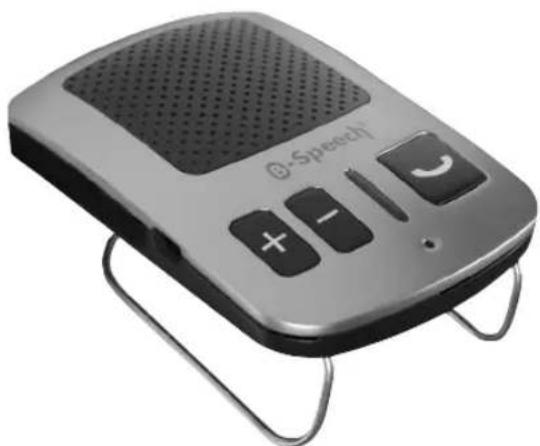
User manual for B-Speech Pago
TTS Bluetooth-Hands free with Phonebook
Index
- Package Content 3
- Features 3
- Overview 3
3.1. LED-Functions 3
- Installation 3
- Getting started 4
5.1. Charge the battery 4
5.2.Power On/Off 4
5.3. Language Selection 4
5.4. Pairing 4
5.5. Multi-connecting 4
5.5.1. Setting-up Multi-connection 4
5.6. Volume control 4
5.7 Disable/Enable TTS 4
- Menu 4
6.1 Phone book transfer 4
6.2 Phone book download 4-5
6.3 Delete Phone book
5
- Call options
- Software Update
- Warranty and parts replacement
5
Short introduction in the wireless technology Bluetooth
Bluetooth is a wireless communication technology with short range. It enables a wireless communication between devices with Bluetooth interfaces, such as mobile phones, Personal Digital Assistants (PDA), Desktops and Notebooks, input / output devices (mouse, keyboard, printer) and domestic appliances. Bluetooth complies with the world wide standards for radio operating in the ISM-Band (industrial, scientific and medical frequency band). Within the ISM-Band (2,4 GHz to 2.48 GHz) Bluetooth can jump 1,600 time per second between 79 different frequencies with a range up to 10 meters (Class II).
B-Speech Pago
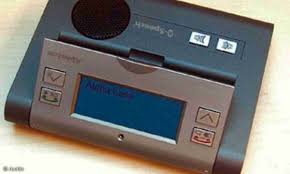
B-Speech Pago is a wireless Multilink Handsfree-Bluetooth system, which is equipped with Bluetooth technology Version 2.0 and the latest TTS (Text To Speech) Technology which announces instructions for the users in multiple languages. It also announces the status of the Bluetooth device as well as the name (or phone number, if the contact has not yet been downloaded) of the incoming caller.
1. Package Content
B-Speech Pago
Sun visor clip
USB Charger Cable
Car-Charger
This Manual
2. Features
- Text-to-Speech controlled user Menu & Caller announcement
- Multi-connecting function for 2 Mobiles at the same time. And memory for 8 paired devices
Automatic and manual phone book download
Supports Headset/Handsfree profile
- Multilingual Speech (English, German, Italian, French, Spanish)
Supports voice dialling
- Re-dial of the last dialled phone number
- Microphone Mute
- Call transfer from and to Mobile
DSP (Digital Signal Processor) to decrease noise and echo
Full Duplex
- Compatible with all Bluetooth Devices
- Firmware-Upgrading Interface
7 Hours Talk time
240 Hours Days Stand-by
- Stylish German Design
Built-in Lithium-Polymer Battery
- Bluetooth Version 2.0 (Class II)
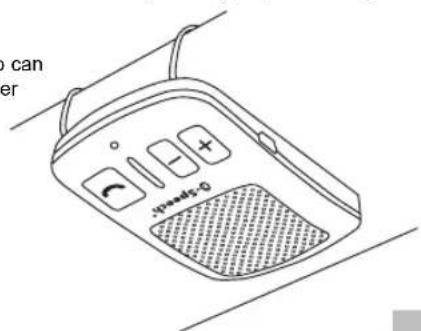
3. Overview
1. Speaker
2. USB charging/data port
3. increase volume, radial, confirm action
4.decrease volume, voice dial, end action
5.StatusLED
6. Microphone
- Multifunction button
(take call, end call, pairing, enable multi-connecting, reject call)
8.Mode
(browse menu: Automatic phone book tranfer - Send contacts manually - delete phone book / language selection)
3.1. LED-Functions
- Powering on: 1 second, blue and red LED
- Powering off: red flashes 3 times.
- Connected to device: Blue LED one time each 15 Seconds
- Not connected: blue flashes once per second
- Pairing: blue and red flashes alternately
- Manual phone book downloading: blue lights permanently
GB
5. Getting started
5.1. Charge the battery
The B-Speech Pago is equipped with a internal rechargeable Lithium-Polymer battery.
Plug in the charger into the USB port of the B-Speech Pago.
When the B-Speech Pago is charging, the red LED will light until it is fully charged. After the charging process is completed, please disconnect the charger.
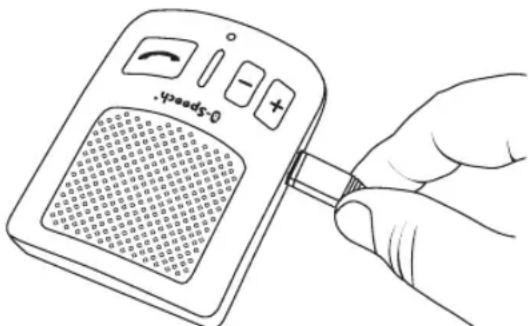
If the capacity of the batteries is low, you will hear "Battery Low", please charge" and the red LED will start to blink.
Note: Please charge the battery for a minimum of 3-4 Hours before using for the first time.
During operation of Pago, connecting the Charger or USB Cable will cause system reset and switch off the Handsfree, to continue the operation, switch on the Pago, to transfer the speech from Mobile to Pago, press the "Mode button" for 1 second.
5.2. Power On/Off
To turn off your B-Speech Pago, press and hold the Multifunction button for at least 2 seconds until you hear "Power Off".
To turn on your B-Speech Pago, press and hold the Multifunction button for minimum 2 seconds until you hear "Power On".
5.3. Language Selection
After starting the B-Speech Pago, you can select your language. Select your language (English, German, French, Spanish, Italian) by pressing the Mode one time per Second. The language will be saved automatically.
5.4. Pairing
The B-Speech Pago and your mobile phone must be paired before being used together. Turn on the B-Speech Pago and hold down the Multifunction button for 6 more seconds, you will hear "Please pair Bluetooth phone.
The blue and red LED will blink alternately, the B-Speech Pago is now in pairing mode and can be found by your mobile phone.
Activate the Bluetooth function of your mobile phone and follow the pairing procedure according to your handsets manual. The B-Speech Pago will be found by your mobile phone. Choose "Pago" from the list displayed on your mobile phone. If you are asked for a pairing code, please enter 1234 . After successful pairing, you will hear "Pairing complete". If the pairing process fails, repeat the process. Once the pairing process is completed, the B-Speech Pago is ready to use. The B-Speech Pago will automatically try to connect to the mobile
phone. Once the connection is established you will hear "Connected to" followed by your mobile phones pairing name.
Note: Some Handsets needs to be connected after pairing and require authorisation. Please follow your handsets manual for these additional steps.
If the B-Speech Pago looses it's connection to the mobile phone, press the "Multi function button" to reestablish the connection.
5.5. Multi-connecting
The B-Speech Pago can be used by two mobile phones at the same time by using the new multi-connecting technology. This is ideal for users with more than one mobile phone.
5.5.1. Setting-up Multi-connection
To use the second phone, it is necessary to pair the second phone and connect it with the B-Speech Pago. To pair the second phone, please follow these steps:
Turn the B-Speech Pago off and on, hold down the multifunction button for 6 more seconds, Double click the multifunction button, the LED will rapidly change between red and blue.
Pair the second mobile phone with Pago as described in Chapter 5.4. To connect the Pago to both mobiles phones, please turn off and turn on followed by a double click of "Multi function button".
- During the first phone talking, once the second Mobile phone call coming, press VOL+ and hold 2 seconds, to accept incoming call & hold the first call active.
- During the first phone talking, once the second Mobile phone call coming, press "VOL-" and hold 2 seconds to Accept incoming call & end the first phone call.
- During multi talking, you can single clk MFB, to end the talking call.
5.6. Volume control
To adjust the volume of the TTS voice output or active calls, use the + or - buttons.
Shortly press + to increase the Volume ( a "Beep" signal will indicate the Volume).
Shortly press - to decrease the Volume ( a "Beep" signal will indicate the Volume).
5.7 Disable/Enable TTS
To turn off the Text announcement ( TTS ) Press and hold + and - at the same time. You will hear two beeps and one final beep for confirmation. The Text announcement is switched off.
To turn on the Text announcement ( TTS ) Press and hold + and - at the same time. You will hear two beeps and one final confirmation beep. The Text announcement is switched on.
6. Menu
In order to enter to the next menu level please double click the "Mode button".
Phone book transfer
This function is not supported with all mobile phones, once the Contact name can not be stored, you will hear the Caller's Number. The phone book of the B-Speech Pago, stores up to 300 numbers.
6.1 Automatic phone book transfer
To download phone contacts to the B-Speech Pago, shortly press Mode for two times until you hear "automatic phone book transfer" and confirm your selection with ^+ . The B-Speech Pago will now automatically download the contacts stored in your phone. Do not press any key on your phone and the B-Speech Pago during the transfer. After the transfer is completed, you'll hear "Phone book loading completed". Pago will return to the Stand-by menu. If your mobile phone does not support the automatic download of contacts, you need to do this manually.
6.2 Send contacts manually
Shortly press Mode for two times and repeat this until you hear "send contacts manually" and confirm your selection with +.
During the manual phone book transfer, the B-Speech Pago will close the current connection to your mobile phone to avoid any interference. On most phones you have to enter the contacts menu, select the contacts you wish to transfer and send them by Bluetooth to your B-
Speech Pago. Otherwise please refer to your mobile phone's instruction manual. After the transfer is completed, press - to end the process. Pago will automatically reconnects to your mobile phone.
6.3 Delete Phone book
To delete the phone book of your B-Speech Pago, shortly press Mode for two times until you hear "delete phone book" and confirm your selection with ^+ . Please note that this function will delete the entire phone book. After the process you will hear "Phone book empty".
7. Call options
The B-Speech Pago supports all basic phone functions like redialling the last used number, voice dial, microphone mute and transfer the call to the handset.
- To redial the last called number, press + for two times in a second. In multilink mode press and hold the Volume + button for one second to redial the last number.
- To start voice dial, press - for two times in a second. In multilink mode press and hold the Volume - button for one second to start voice dial.
- To reject an incoming call press the multi-function button for two times in a second.
- During an active call double click the "Mode button" to mute the microphone, to deactivate microphone mute double click the Menu button
- To transfer a running call to the handset, press the "Mode button" for three seconds. Use your mobile phone to send it back to the B-Speech Pago.
8. Software Update
To ensure the compatibility with new mobile phones and features, it is useful to upgrade the B-Speech Pago to the newest software version. Please follow the instructions as follows.
Download the newest software under www.b-speech.de/en/downloads. Connect the included USB-cable to the B-Speech Pago and your PC. Press and hold mode and the multi function button. Release mode and keep holding the multi function button for the entire updating process. Your PC will detect a new device plugged into your PC.
Cancel the Wizard for the new hardware and open the file "Driver Setup.exe" you find in the archive.
Please follow the instructions of the Device Driver Installation Wizard and close the wizard after successful installation
Open the file "Setup.exe" to install the Firmware updater for your B-Speech Pago and follow the installation instructions. After the installation is finished, you have the choice to start the Software update immediately to upgrade your B-Speech Pago or do this later. You can always use the link on your desktop and/or Startmenu to start the updating program.
Note: If you already installed the driver and Software you can skip these steps.
Make sure your Pago is connected and set to upgrade mode as described above before starting the firmware updater.
If everything is correctly installed, the update will run automatically. The updating process will take about three to five minutes. Do not shut down your PC, the B-Speech Pago, release the multi function button or interrupt the connection while the update is in progress. This can cause serious damage to the device.
Note: The update will only work on Microsoft® Windows® based based Operating Systems and will not work on a 64-Bit architecture.
Please note:
You are as driver responsible for having your vehicle under control at all time. You should while driving, never converse through your mobile phone, write or read SMS or look at MMS. Surveys have revealed that drivers are a higher security risk when telephoning while driving.
We advise you strongly, as a driver, to use a handsfree device while driving and to stop your vehicle before having important conversations on your mobile phone.
Warranty and parts replacement
Dear customer,
Our products are subject to a strict quality control. However, should you have problems, please contact your seller. You will then get help rapidly.
Please, note :
- The warranty is limited to the original purchaser.
- A copy of your receipt or other proof of purchase is required. Without proof of purchase, your warranty is defined as beginning on the date of manufacture as labeled on the products.
- The warranty is void if the serial number, date code label or product label is removed, or if the product has been subject to physical abuse, improper installation, modification, or repair by unauthorized third parties.
- The responsibility for our products is limited to the repair or replacement of the product at our discretion.
- All warranty on our products is limited to two years from the date of purchase.
- Specifically exempt from any warranty are limited-life consumable components subject to normal wear and tear, such as microphone, decorative finishes, batteries, and other accessories.
- We are not liable for any incidental or consequential damages arising from the use or misuse of any our products.
- This warranty gives you specific rights but you may have other rights depending on your location.
- Unless otherwise instructed in the user guide, the user may not, under any circumstances, attempt to perform service, adjustments or repairs on this unit, whether in or out of warranty. It must be returned to the sales outlet, factory or authorized service agency for all such work.
- We do not assume any responsibility for any loss or damage incurred during shipping. Any repair work on our products by unauthorized third parties nullifies any warranty.
Conformity Declaration
GB: B-Speech® declares herewith that this device carries the CE mark in accordance with the regulations and standards of the guideline R&TTE (1999/5/EG). It conforms with the fundamental requirements, the appropriate regulations and rules of the guideline 1999/5/EG. You can find the complete declaration of conformity under www.b-speech.com.
GB Note on environmental protection:

After the implementation of the European Directive 2002/96/EU in the national legal system, the following applies: Electrical and electronic devices may not be disposed of with domestic waste. Consumers are obliged by law to return electrical and electronic devices at the end of their service lives to the public collecting
points set up for this purpose or point of sale. Details to this are defined by the national law of the respective country. This symbol on the product, the instruction manual or the package indicates that a product is subject to these regulations. By recycling, reusing the materials or other forms of utilising old devices, you are making an important contribution to protecting our environment.
- Federal Communications Commission (FCC) Statement
- FCC RF Radiation Exposure Statement
- Warning:
- Europe-EU Declaration of Conformity
- User manual for B-Speech Pago
- Index
- Short introduction in the wireless technology Bluetooth
- B-Speech Pago
- Package Content
- Features
- Overview
- Speaker
- USB charging/data port
- increase volume, radial, confirm action
- 4.decrease volume, voice dial, end action
- 5.StatusLED
- Microphone
- LED-Functions
- GB
- Getting started
- Charge the battery
- Power On/Off
- Language Selection
- Pairing
- Multi-connecting
- Setting-up Multi-connection
- Volume control
- Disable/Enable TTS
- Menu
- Phone book transfer
- Automatic phone book transfer
- Send contacts manually
- Delete Phone book
- Call options
- Software Update
- Please note:
- Warranty and parts replacement
- Dear customer,
- Please, note :
- Conformity Declaration
- GB Note on environmental protection:
Brand : B-SPEECH
Model : Pago
Category : Built-in kit