RCD300U - Radio THOMSON - Free user manual and instructions
Find the device manual for free RCD300U THOMSON in PDF.



| Brand | THOMSON |
| Model | RCD300U |
| Product type | CD/MP3/USB radio with FM tuner |
| Power supply | AC 230 V ~ 50 Hz |
| Power consumption | 13 W |
| Radio frequency range | FM 87.5 – 108 MHz |
| Main functions | CD/MP3/USB player, FM radio, Aux-in input, Bass Boost, automatic scan, 20 station memory, track programming, repeat, clock, auto standby |
| Supported USB formats | FAT32, capacity less than 32 GB |
| Included accessories | 3.5 mm audio cable |
| Antenna | Wired antenna |
| Maintenance and cleaning | Unplug before cleaning; use a soft dry cloth; avoid solvents |
| Safety | Use only with specified power supply; do not expose to moisture; do not open the casing |
| Spare parts and repairability | Contact customer service during business hours (9am-7pm) or support@thomsonaudiovideo.eu |
| General information | Imported by BIGBEN INTERACTIVE SA, 396 rue de la Voyette, CRT2-FRETIN, CS 90414, 59814 LESQUIN Cedex, France. |
Frequently Asked Questions - RCD300U THOMSON
User questions about RCD300U THOMSON
0 question about this device. Answer the ones you know or ask your own.
Ask a new question about this device
Download the instructions for your Radio in PDF format for free! Find your manual RCD300U - THOMSON and take your electronic device back in hand. On this page are published all the documents necessary for the use of your device. RCD300U by THOMSON.
USER MANUAL RCD300U THOMSON
LECTEUR STÉRÉO/CD/MP3/USB AVEC RADIO FM
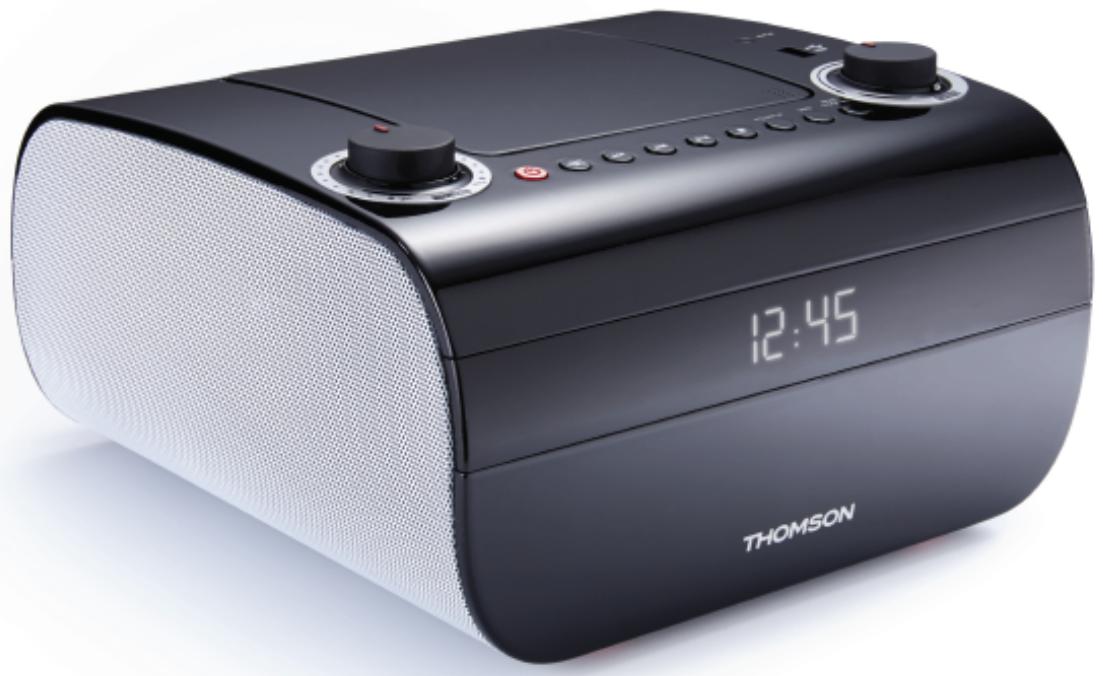
- MANUEL D'UTILISATION
-
MODELE
RCD300U
MANUEL D'UTILISATION
VEUILLEZ LIRE ATTENTIVEMENT CE MANUEL D'UTILISATION
AVANT D'UTILISER L'APPAREIL, ET LE CONSERVER POUR VOUS Y RÉFÉRER ULTÉRIÉUREMENT.
Rev 0
COMPOSANTS / BOUTONS

customerservice@bigben-interactive.be
ESPANA, sat@bigbeninteractive.es
ITALIA, support@bigbeninteractive.it
www/bigben.eu
Fabrique en Chine


BEFORE USE AND KEEP FOR FUTURE REFERENCE.
Rev 0
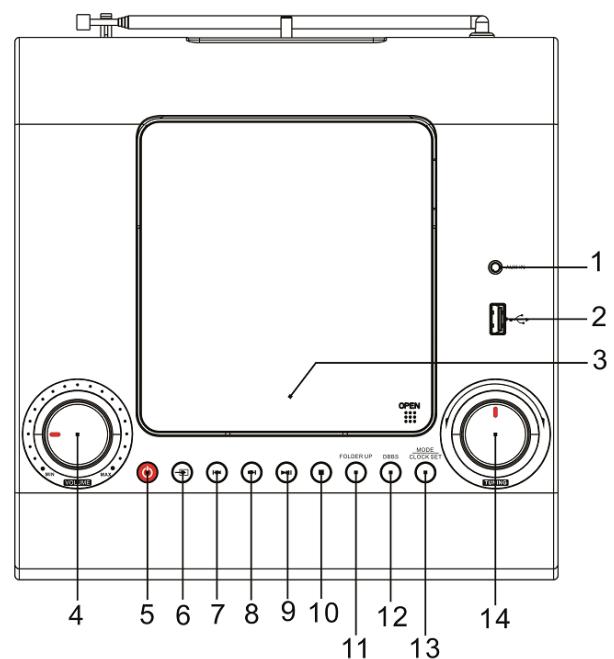
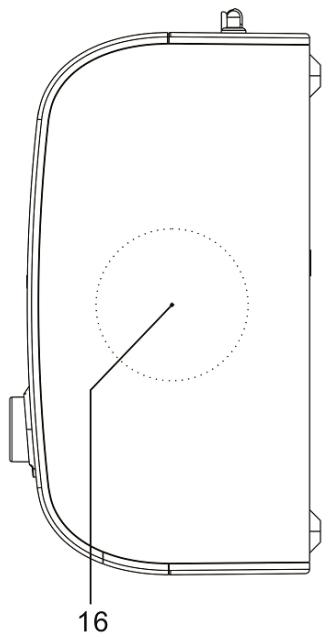
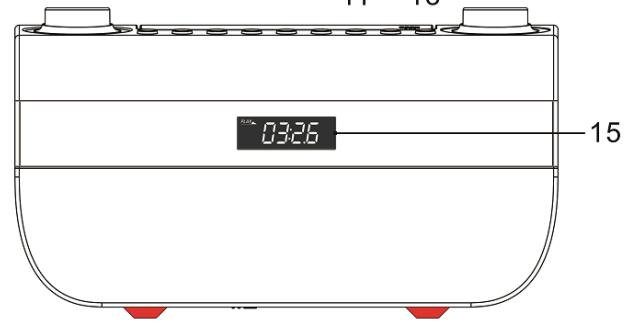
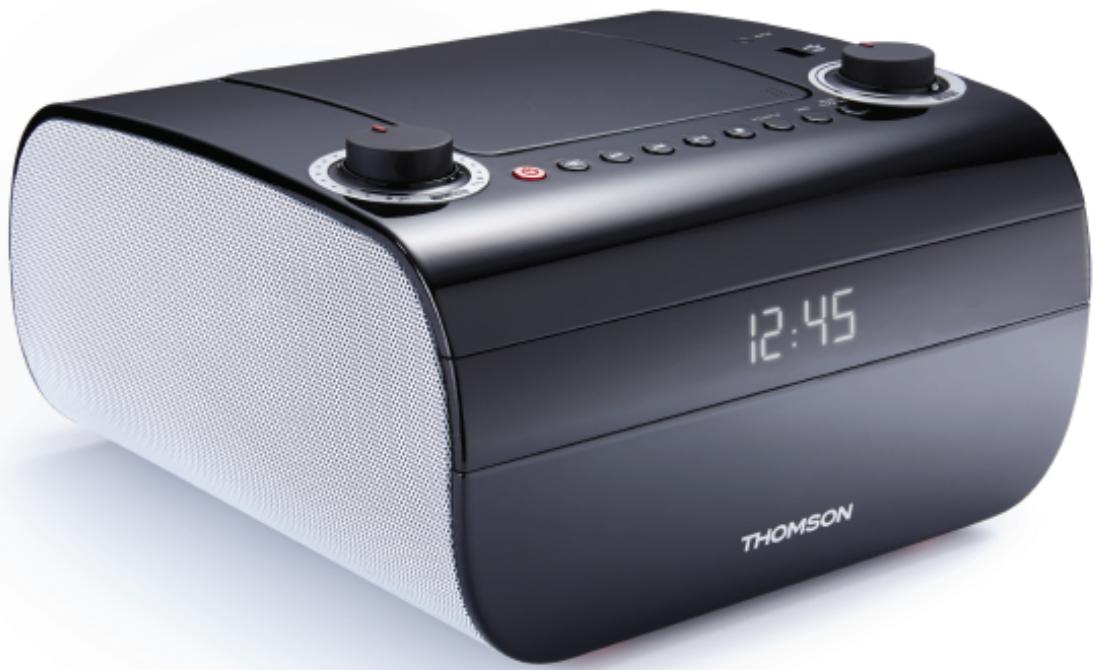
PARTS / BUTTONS
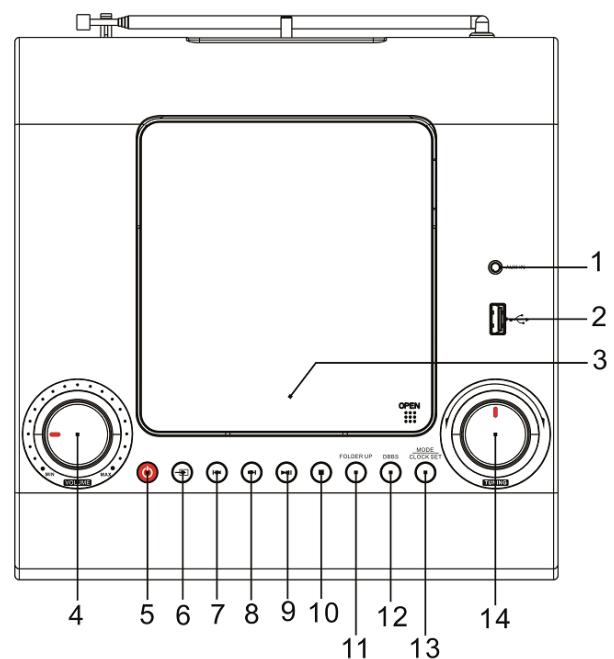
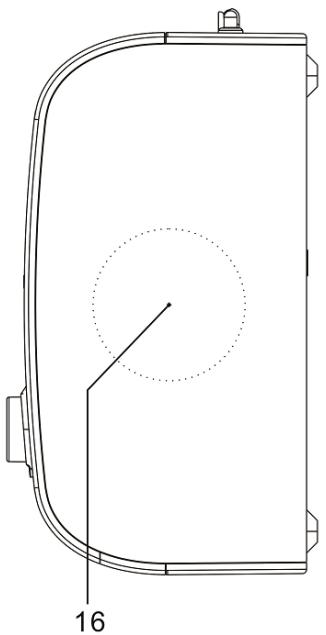
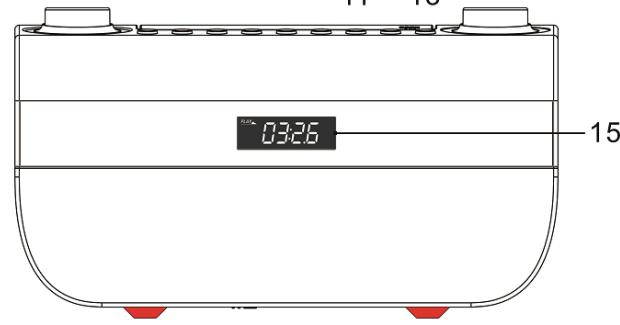
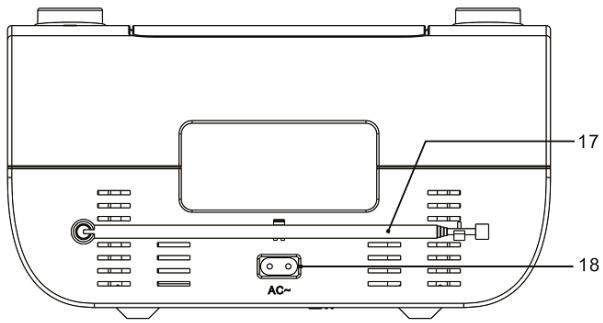
- Aux-in jack
- USB port
- CD door
- VOLUME control
- Power ON/OFF button
- AUX/ CD/ USB/TUNER Function button
- SKIPDOWN/BACKbutton(CD/USB)
- SKIP UP/NEXT button (CD/USB)
9.▶IIPLAY/PAUSE button/ FM scan
-
STOP button
-
FOLDER UP button
- Bass Boost button
- MODE/CLOCK SET button
- Tuning control knob
- Display
- Speaker
- Antenna
- AC socket
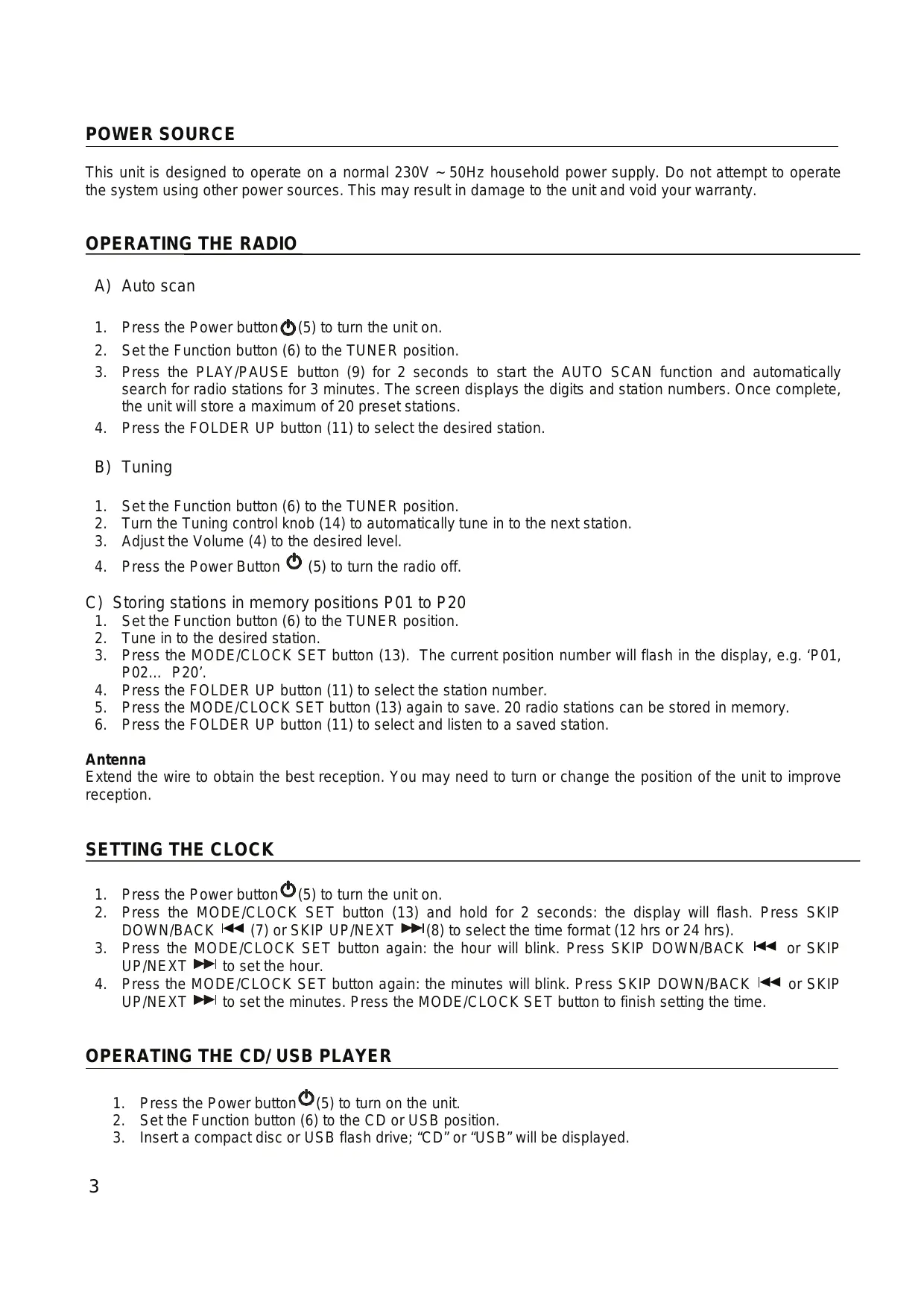
This unit is designed to operate on a normal 230V 50Hz household power supply. Do not attempt to operate the system using other power sources. This may result in damage to the unit and void your warranty.
OPERATING THE RADIO
A) Auto scan
- Press the Power button (5) to turn the unit on.
- Set the Function button (6) to the TUNER position.
- Press the PLAY/PAUSE button (9) for 2 seconds to start the AUTO SCAN function and automatically search for radio stations for 3 minutes. The screen displays the digits and station numbers. Once complete, the unit will store a maximum of 20 preset stations.
- Press the FOLDER UP button (11) to select the desired station.
B) Tuning
- Set the Function button (6) to the TUNER position.
- Turn the Tuning control knob (14) to automatically tune in to the next station.
- Adjust the Volume (4) to the desired level.
- Press the Power Button (5) to turn the radio off.
C) Storing stations in memory positions P01 to P20
- Set the Function button (6) to the TUNER position.
- Tune in to the desired station.
- Press the MODE/CLOCK SET button (13). The current position number will flash in the display, e.g. 'P01, P02... P20'.
- Press the FOLDER UP button (11) to select the station number.
- Press the MODE/CLOCK SET button (13) again to save. 20 radio stations can be stored in memory.
- Press the FOLDER UP button (11) to select and listen to a saved station.
Antenna
Extend the wire to obtain the best reception. You may need to turn or change the position of the unit to improve reception.
SETTING THE CLOCK
- Press the Power button (5) to turn the unit on.
- Press the MODE/CLOCK SET button (13) and hold for 2 seconds: the display will flash. Press SKIP DOWN/BACK (7) or SKIP UP/NEXT (8) to select the time format (12 hrs or 24 hrs).
- Press the MODE/CLOCK SET button again: the hour will blink. Press SKIP DOWN/BACK or SKIP UP/NEXT to set the hour.
- Press the MODE/CLOCK SET button again: the minutes will blink. Press SKIP DOWN/BACK or SKIP UP/NEXT to set the minutes. Press the MODE/CLOCK SET button to finish setting the time.
- Press the Power button (5) to turn on the unit.
- Set the Function button (6) to the CD or USB position.
- Insert a compact disc or USB flash drive; "CD" or "USB" will be displayed.
▶PLAY/PAUSE button (9)
- When music is stopped, press the button to play the music.
- When music is playing, press the button to pause.
- When music is paused, press the button to resume play.
STOP button (10)
- When music is playing or paused, press the button to stop.
- When in programming tracks, press the button to exit the mode.
SKIP UP/NEXT button (8)
- When music is stopped, press the button to select the track you want to play (and go to the first track if currently on the last track).
- When music is playing, press the button to skip to the next track (and go to the first track if currently playing the last track).
- Press the button and hold for 2 seconds to fast-forward.
- When playing programmed tracks, press the button to skip to the next programmed track (and go to the first track if currently playing the last track).
SKIPDOWN/BACKbutton(7)
- When music is stopped, press the button to select the track you want to play (and go to the last track if currently on the first track).
- When music is playing, press the button to skip to the previous track (and go to the last track if currently playing the first track).
- Press the button and hold for 2 seconds to rewind.
- When playing programmed tracks, press the button to skip to the previous programmed track (and go to the last track if currently playing the first track).
CD PLAYREPEAT
- You can choose between two modes: Repeat 1 and Repeat All.
During Repeat 1 mode, the player repeats the current CD track. - During Repeat All mode, the player repeats all tracks on the CD; when it reaches end of the last track, it will return to the first track.
PROGRAMMING CD & USB PLAY
You can only enter programs in STOP mode. Press the STOP button (10) and then follow the instructions below.
- Press the MODE/CLOCK SET button (13); "Memory" is displayed and the track number flashes.
- Press the SKIP DOWN/BACK /SKIP UP/NEXT buttons (7, 8) to choose the track number you wish to program.
- Press the MODE/CLOCK SET button again to confirm. The unit saves the track number and goes to the next track you wish to program.
- The unit can store 20 CD programs and 99 USB programs. After it has stored the maximum number of programs, no further entry is possible.
- If you press the STOP button (10) while programming the unit, the unit clears the programmed content and returns to STOP mode.
- If you press the▶PLAY/PAUSE button (9) when the unit has been programmed, "Memory" is displayed and the unit starts playing the programmed tracks.
- If you press the SKIP DOWN/BACK / SKIP UP/NEXT buttons when playing programmed tracks, the unit skips to the previous or next programmed track.
- If you press the STOP button when playing programmed tracks, the unit stops playing but programmed track selection is kept. Press the STOP button again to clear the programmed content and return to STOP mode.
AUX-IN
Plug one end of the 3.5mm audio cable (included) into the Aux-in jack (1) on the top of the unit and the other end into the line-out jack or headphone jack of an external audio source to be able to listen through that system's speakers.
While using the Aux-in function, the CD player will not work.
BASS BOOST
Press the Bass Boost button (12) once to set in to the ON position (DBBS will be displayed) to enjoy a sound with more powerful bass.
Note: When there is no sound output for about 30 minutes in CD, USB or AUX mode, the unit will automatically switch to standby mode to save energy. It can be turned on again by using the AUX/ CD/ USB/TUNER Function button.
SPECIFICATIONS
Power supply: AC 230V ~ 50Hz
Power consumption: 13W
Radio frequency coverage: FM 87.5 - 108 MHz
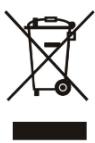
Don't discard electrical and electronic appliances with regular waste.
Take them to an official collection point.
- Some components may be hazardous to health and the environment.
Imported by BIGBEN INTERACTIVE SA
396, Rue de la Voyette
CRT2-FRETIN
CS 90414
59814 LESQUIN Cedex - France
www/bigben.eu
big
customerservice@bigben-interactive.be
ESPANA, sat@bigbeninteractive.es
ITALIA, support@bigbeninteractive.it
www/bigben.eu
Made in China


THOMSON is a trademark of TECHNICOLOR SA or its affiliates and is used under license by Bigben Interactive.
REPRODUCTOR ESTÉREO/CD/MP3/USB CON RADIO FM
customerservice@bigben-interactive.be
ESPANA, sat@bigbeninteractive.es
ITALIA, support@bigbeninteractive.it
www/bigben.eu
Hecho en China



customerservice@bigben-interactive.be
ESPANA, sat@bigbeninteractive.es
ITALIA, support@bigbeninteractive.it
www/bigben.eu
Fabbricato in Cina




customerservice@bigben-interactive.be
ESPANA, sat@bigbeninteractive.es
ITALIA, support@bigbeninteractive.it
www/bigben.eu
Fabricado na China


customerservice@bigben-interactive.be
ESPANA, sat@bigbeninteractive.es
ITALIA, support@bigbeninteractive.it
www/bigben.eu
customerservice@bigben-interactive.be
ESPANA, sat@bigbeninteractive.es
ITALIA, support@bigbeninteractive.it
www/bigben.eu
Gemaakt in China



customerservice@bigben-interactive.be
ESPANA, sat@bigbeninteractive.es
ITALIA, support@bigbeninteractive.it
www/bigben.eu
Tillverkad i Kina