
RT280 - Radio THOMSON - Free user manual and instructions
Find the device manual for free RT280 THOMSON in PDF.


| Product type | Solar dynamo radio with flashlight and reading lamp |
| Brand | Thomson |
| Model | RT280 |
| Dimensions (L x W x H) | 166.5 x 57 x 87 mm |
| Weight | 506 g |
| Power supply | Li-ion battery 4000 mAh 3.7 V; crank; solar panel; USB Type-C input 5 V |
| Battery life (flashlight mode) | 12 hours |
| Battery life (reading lamp mode) | 7 hours |
| Battery life (radio at max volume) | 6 hours |
| Battery life (SOS alarm) | 5 hours |
| Battery life (all functions) | Approximately 3 hours |
| Main functions | FM/AM/NOAA weather radio, flashlight (3 modes), 180° adjustable reading lamp, SOS alarm, USB output 5V 1A, solar panel, crank |
| Frequency bands | FM: 88-108 MHz; AM: 530-1600 kHz; Weather: 162.400-162.550 MHz |
| Connectivity | DC 5 V input/output (micro USB); audio port; USB output 5V 1A |
| Care and cleaning | Soft cloth; do not use abrasive products or harsh cleaners |
| Safety | Do not open the case; follow safety instructions; use indoors only |
| Warranty | 2 years (by Bigben Interactive) |
| General information | Made in China; distributed by Bigben Interactive |
Frequently Asked Questions - RT280 THOMSON
User questions about RT280 THOMSON
0 question about this device. Answer the ones you know or ask your own.
Ask a new question about this device
Download the instructions for your Radio in PDF format for free! Find your manual RT280 - THOMSON and take your electronic device back in hand. On this page are published all the documents necessary for the use of your device. RT280 by THOMSON.
USER MANUAL RT280 THOMSON
INSTRUCTIONS FOR USE
BEFORE USING THIS DEVICE, PLEASE READ THIS MANUAL CAREFULLY AND KEEP IT FOR FUTURE REFERENCE.
BELGIUM, customerservice@bigben-interactive.be
NETHERLANDS, customerservice@bigben-interactive.nl
SPAIN / PORTUGAL, soporte@metronic.com
Tel.: +34 93 713 26 25
ITALY, tecnico@metronic.com - Tel.: 02 94 94 36 91
OTHERS, from Monday to Friday - 9.00 am - 6.00 pm
www.bigben.fr/support (Chatbot) & support@bigben.fr
www.bigben.eu
RT280
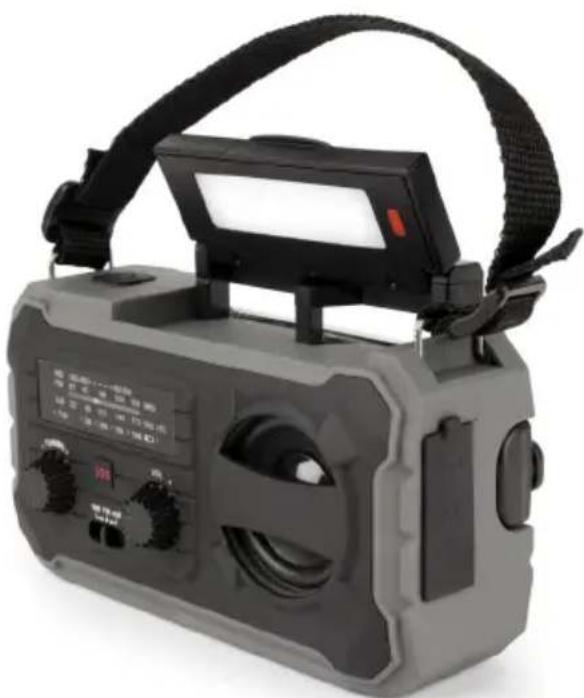
Solar-powered dynamo radio with torch and reading light
USER GUIDE
BEFORE USING THIS DEVICE, PLEASE CAREFULLY READ THIS USER GUIDE AND KEEP IT FOR FUTURE REFERENCE.
| Getting started 9 | Power supply | 12 | |
| Warnings and safety instructions 9 | Specific characteristics | 12 | |
| Contents of the box 11 | Environmental protection | 13 | |
| Function | 11 | Additional information | 13 |
| Radio operation 12 | Declaration of conformity | 13 | |
| Using the torch | 12 | Warranty | 13 |
| Using the reading lamp | 12 |
Getting started
Take the device out of the box. Remove all the packaging from the product. Place the packaging inside the box or dispose of it safely in compliance with the waste sorting instructions shown on the outside.
Warnings and safety instructions
You must read and understand all the instructions before using this device. The warranty will not apply if damage is caused by failure to follow the instructions.

- Never remove the device casing.
- Never place this device on top of other electrical equipment.
- Protect the power cable from being stepped on or pinched, particularly at the plugs, sockets and point where it exits the device. Make sure that the power rating corresponds to the voltage shown on the rating plate at the rear of the device. Always pull the plug from the socket when disconnecting from the mains. Never pull on the cable. Ensure you have completed all the other connections before connecting the mains plug.
- Only use attachments/accessories that are recommended by the manufacturer.
- Entrust all device repairs to qualified repairers. Repair is needed when the device has been damaged in any fashion, and in particular:
- If the power cable is damaged;
- In the event of a liquid spill or objects being inserted into the device;
- If the device is exposed to rain or humidity;
- If the device is not working normally;
- Or if the device has been dropped or impacted.
- The series panel is located on the bottom of the device.
- Never block the air vents.
- Make sure you have enough space for ventilation. Place the product on a stable surface.
- This device must be used in a moderate climate, away from direct sunlight, naked flames or sources of heat, heaters, cookers or any other devices (including amplifiers) that generate heat. Do not install near a heat source.
- The batteries (battery pack or inserted batteries) must not be exposed to excessive heat, such as sunshine, fire, etc.
- Always unplug the appliance before cleaning it. Never lubricate any part of this device. Clean it using a soft cloth. Do not use abrasive products or harsh cleaners.
- Ensure that you always have easy access to the power cable, plug or adapter to disconnect this device from the mains if necessary.
- Do not use this device near water. It must not be dripped on or splashed. Do not use this device in a damp or wet environment.
- Disconnect this device in the event of a storm, or if you intend not to use it for a long period of time.
- This device can be used by children aged 8 and over, and by persons with a physical or sensory disability, learning difficulties or a lack of experience and knowledge, provided they are supervised or have received instructions on the safe use of the device, and understand the risks involved. Children must not play with the device or power cable (risk of strangulation). Children must not clean or maintain the device without supervision.
- This device must only be supplied with very low safety voltage corresponding to the marking on the device.
- The battery should be removed from the device before disposal. The device must be disconnected from the power supply when removing the battery.
- The appliance must be placed at least 20 cm from the human body when in use.

The lightning bolt symbol within an equilateral triangle alerts users to the presence of dangerous uninsulated voltages inside the device that may present a risk of electric shock.
The exclamation mark inside a triangle indicates the presence of important operating and maintenance (repair) instructions in the literature accompanying the device.
| Class II material | |
| Direct current | |
| Alternating current | |
| For indoor use only |
Contents of the box
- Emergency radio
- USB charging cable
- Instruction booklet
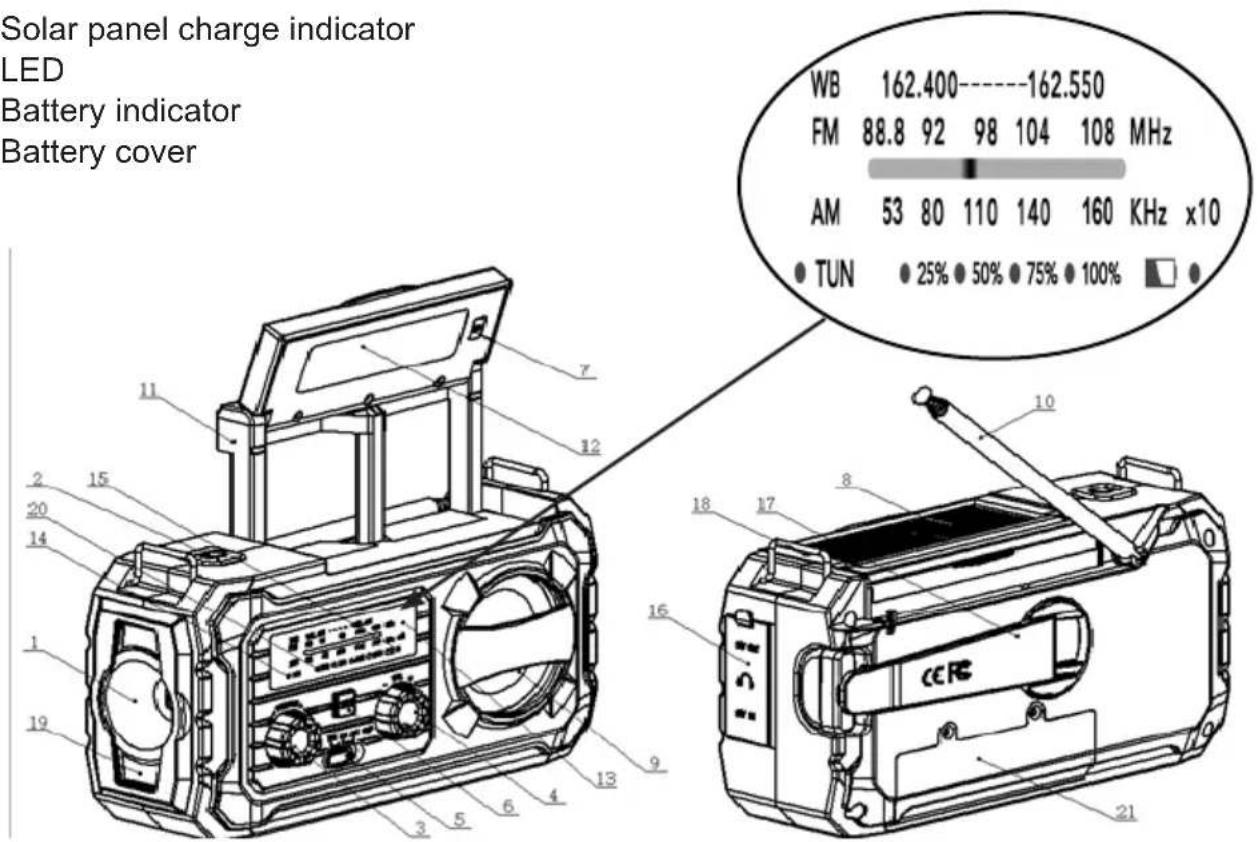
Function
- Torch
- Torch switch
- Tuner
- Volume
- FM / AM / Emergency weather radio (NOAA)
- SOS button
- Reading lamp switch
- Solar panel
- Speaker
- Antenna
- Reading lamp rotation axis
- Reading lamp
- Frequency indicator
- Setting indicator
- Charging indicator
- DC 5V input/output / Audio port
- Crank handle
- Solar panel charge indicator
- LED
- Battery indicator
- Battery cover
Radio operation
- Turn the volume knob clockwise to switch the radio on and adjust the audio volume.
- Use the radio control knob to select FM / AM / Emergency radio mode. Extend the antenna for better reception.
- Turn the Tuner knob to select the radio station. A green LED lights up when the station is being received correctly.
Using the torch
- Press the torch switch to activate or deactivate it.
- Press once to switch on the torch.
- Press a second time to light up the top and bottom LEDs.
- Press a third time to switch on the torch and the top and bottom LEDs simultaneously.
- Press a fourth time to switch off all lighting.
Using the reading lamp
- Raise the solar panel and press the lamp switch to activate or deactivate it.
- You can tilt the lamp up to 180 degrees and keep it in the position that suits you best.
- You can also adjust the height of the lamp.
Power supply
A. Crank
- Turn the crank continuously clockwise or anti-clockwise at a speed of 130 to 140 revolutions per minute to power the appliance.
B. Solar energy
- The solar panel must be exposed to direct sunlight.
- It can power the entire device, including the radio, torch and SOS signal.
- It is mainly used to maintain the battery and extend its life.
C. USB charging port
- Recharge using a USB cable.
- Connect the USB power supply (e.g. AC/DC adapter or computer USB power port) and the micro USB C port on the radio using the USB charging cable supplied.
- Recharge any device using the 5V1A USB output as a backup battery.
Specific characteristics
• 4.000 mAH 3.7 V Li-ion. - USB DC 5 V output - USB Type-C DC 5 V input. - When the battery is empty, turn the crank for two minutes (130 to 140 revolutions per minute). The torch or reading lamp can then produce light for 15 to 20 minutes and the radio can transmit independently for 15 to 20 minutes. • Weight of appliance: 506 grams. • Appliance dimensions: 166.5 x 57 x 87 mm. - Flash light mode 12 hours - Reading light mode 7 hours • Radio (in Max volume) 6 Hours • SOS Alarm: 5 hours • All function ON: around 3 hours

Your product has been designed and manufactured using high-quality materials and components that can be recycled and reused.
Attention should be drawn to the environmental aspects of battery disposal.

When the crossed-out wheelie bin symbol appears on a product, it means that the product is covered by European Directive 2002/96/EC. Please find out about the local sorting and collection system for electrical and electronic products. Please act according to local rules and do not dispose of your old products in your household waste. By ensuring this product is disposed of correctly, you are helping to prevent potentially negative consequences for the environment and human health.
Additional information
- THOMSON is a trademark of Talisman Brands, Inc. used under licence by Bigben Interactive.
- This product is manufactured and sold under the responsibility of Bigben Interactive.
- THOMSON and the THOMSON logo are trademarks operated under licence by Bigben Interactive – for further information, please visit: www.thomson-brand.com.
- All other products, services, corporate names, trademarks, trade names, product names and logos referenced herein are the property of their respective owners.
Declaration of conformity
- Bigben Interactive hereby declares that the RT280 type radio equipment complies with Directive 2014/53/EU. The full text of the EU declaration of conformity is available at the following web address: www.bigben.fr/support
Warranty
This product is guaranteed by Bigben for a period of 2 years from the date of purchase, except in countries of the European Economic Area, which offer a longer warranty period. We recommend that you keep your receipt for any claims. The warranty covers breakdowns due to defective material, a missing element or manufacturing defect. In this case, contact our technical support. For any problem with a defective product, contact your point of purchase with your receipt. The warranty does not cover problems of improper use.
SUPPORT
For any technical problem, please contact support@bigben.fr.
Our Support Team is also available by chat via www.bigben-interactive.co.uk/support/from Monday to Friday 9.00am till 6.00pm (GMT+1).
![graph LR A["EN"] --> B["This product can be recycled"] B --> C["TO DROP OFF IN STORE"] C --> D["or"] D --> E["TO DROP OFF IN A RECYCLING CENTER"]](/content/2026/04/743687/images/c3a8ee30073688ea392f677ea085513f65d8caf732793140241d5eacdb9ee76b.jpg)




Manufacturer: Bigben Interactive FRANCE
396-466, rue de la Voyette - CRT2
59273 Fretin, France
BELGIUM, customerservice@bigben-interactive.be
NETHERLANDS, customerservice@bigben-interactive.nl
OTHERS, from Monday to Friday - 9.00 am - 6.00 pm
www.bigben.fr/support (Chatbot) & support@bigben.fr
www.bigben.eu
RT280
BELGIUM, customerservice@bigben-interactive.be
NETHERLANDS, customerservice@bigben-interactive.nl
OTHERS, from Monday to Friday - 9.00 am - 6.00 pm
INSTRUCTIONS FOR USE
BEFORE USING THE DEVICE, READ THIS INSTRUCTION MANUAL CAREFULLY AND KEEP IT FOR FUTURE REFERENCE.
BELGIUM, customerservice@bigben-interactive.be
NETHERLANDS, customerservice@bigben-interactive.nl
OTHERS, from Monday to Friday - 9.00 am - 6.00 pm
INSTRUCTION MANUAL
BEFORE USING THIS DEVICE, READ THIS INSTRUCTION MANUAL CAREFULLY AND KEEP IT FOR FUTURE REFERENCE.
BELGIUM, customerservice@bigben-interactive.be
NETHERLANDS, customerservice@bigben-interactive.nl
OTHERS, from Monday to Friday - 9.00 am - 6.00 pm
INSTRUCTION MANUAL
BELGIUM, customerservice@bigben-interactive.be
NETHERLANDS, customerservice@bigben-interactive.nl
SPAIN / PORTUGAL, soporte@metronic.com
Tel.: +34 93 713 26 25
ITALY, tecnico@metronic.com - Tel.: 02 94 94 36 91
OTHERS, from Monday to Friday - 9.00 am - 6.00 pm
USER MANUAL
READ THESE INSTRUCTIONS CAREFULLY BEFORE USING THIS DEVICE AND KEEP THEM FOR FUTURE REFERENCE.
BELGIUM, customerservice@bigben-interactive.be
NETHERLANDS, customerservice@bigben-interactive.nl
OTHERS, from Monday to Friday - 9.00 am - 6.00 pm
www.bigben.fr/support (Chatbot) & support@bigben.fr
www.bigben.eu



- INSTRUCTIONS FOR USE
- SOLAR-POWERED DYNAMO RADIO WITH TORCH AND READING LIGHT
- USER GUIDE
- GETTING STARTED
- WARNINGS AND SAFETY INSTRUCTIONS
- CONTENTS OF THE BOX
- FUNCTION
- RADIO OPERATION
- USING THE TORCH
- USING THE READING LAMP
- POWER SUPPLY
- CRANK
- SOLAR ENERGY
- USB CHARGING PORT
- SPECIFIC CHARACTERISTICS
- ADDITIONAL INFORMATION
- DECLARATION OF CONFORMITY
- WARRANTY
- SUPPORT
- INSTRUCTION MANUAL
- USER MANUAL
Brand : THOMSON
Model : RT280
Category : Radio