
FLEXSCAN M1700 - Monitor EIZO - Free user manual and instructions
Find the device manual for free FLEXSCAN M1700 EIZO in PDF.


| Product type | LCD monitor |
| Brand | EIZO |
| Model | FLEXSCAN M1700 |
| Screen size | 17 inches (diagonal) |
| Native resolution | 1280 x 1024 (SXGA) |
| Connectivity | DVI-D, D-Sub 15-pin, audio input (mini-jack), headphone output (mini-jack) |
| Power consumption | Approx. 30 W (max 45 W) |
| Weight (with stand) | Approx. 5.5 kg |
| Dimensions (with stand) | 370 x 410 x 200 mm (W x H x D) |
| Power supply | 100-240 V AC, 50/60 Hz (built-in AC adapter) |
| Main features | Auto adjustment (analog), FineContrast (Custom/sRGB/Text/Picture/Movie modes), brightness and volume adjustment, screen rotation (pivot), VESA mount (100x100 mm) |
| Maintenance and cleaning | Unplug the device before cleaning. Use a soft, dry cloth. Do not use solvents or liquids. |
| Safety | Do not obstruct ventilation slots, do not expose to moisture, use a grounded outlet, keep liquids and small objects away. |
| Spare parts and repairability | Contact your EIZO dealer for spare parts. Stand replacement is possible (compatible with VESA arm). |
| General information | Installation manual included, user manual on CD-ROM. Warranty according to local legislation. |
Frequently Asked Questions - FLEXSCAN M1700 EIZO
User questions about FLEXSCAN M1700 EIZO
0 question about this device. Answer the ones you know or ask your own.
Ask a new question about this device
Download the instructions for your Monitor in PDF format for free! Find your manual FLEXSCAN M1700 - EIZO and take your electronic device back in hand. On this page are published all the documents necessary for the use of your device. FLEXSCAN M1700 by EIZO.
USER MANUAL FLEXSCAN M1700 EIZO
Important: Please read this Setup Manual and the User's Manual stored on the CD-ROM carefully to familiarize yourself with safe and effective usage. Please retain this manual for future reference.
Installationshandbuch
The monitor supports the following resolutions.
This manual uses the safety symbols below. They denote critical information. Please read them carefully.
| WARNING Failure to abide by the information in a WARNING may result in serious injury and can be life threatening. | CAUTION Failure to abide by the information in a CAUTION may result in moderate injury and/or property or product damage. | |
| Indicates a prohibited action. | ||
| Indicates to ground for safety. | ||
PRECAUTIONS

WARNING

If the unit begins to emit smoke, smells like something is burning, or makes strange noises, disconnect all power connections immediately and contact your dealer for advice.
Attempting to use a malfunctioning unit may result in fire, electric shock, or equipment damage.

Keep small objects or liquids away from the unit.
Small objects accidentally falling through the ventilation slots into the cabinet or spillage into the cabinet may result in fire, electric shock, or equipment damage. If an object or liquid falls/spills into the cabinet, unplug the unit immediately. Have the unit checked by a qualified service engineer before using it again.

Use the enclosed power cord and connect to the standard power outlet of your country.
Be sure to remain within the rated voltage of the power cord. Not doing so may result in fire or electric shock.

Set the unit in an appropriate location.
Not doing so may result in fire, electric shock, or equipment damage.
- Do not place outdoors.
- Do not place in the transportation system (ship, aircraft, trains, automobiles, etc.).
- Do not place in a dusty or humid environment.
- Do not place in a location where the steam comes directly on the screen.
- Do not place near heat generating devices or a humidifier.

The equipment must be connected to a grounded main outlet.
Not doing so may result in fire or electric shock.

CAUTION

Do not block the ventilation slots on the cabinet.
- Do not place any objects on the ventilation slots.
- Do not install the unit in a closed space.
- Do not use the unit laid down or upside down. Blocking the ventilation slots prevents proper airflow and may result in fire, electric shock, or equipment damage.

Use an easily accessible power outlet.
This will ensure that you can disconnect the power quickly in case of a problem.
About Setup Manual and User's Manual
| Setup Manual (this manual) | Describes basic information ranging from connection of the monitor to a PC to using the monitor. |
| User's Manual (•PDF file on the CD-ROM*) | Describes application information such as screen adjustments, settings, and specifications. |
- Installation of Adobe Reader is required.
Package Contents
Check that all the following items are included in the packaging box. If any items are missing or damaged, contact your local dealer.
NOTE
- Please keep the packaging box and materials for future movement or transport of the monitor.
Monitor
Power cord
Digital signal cable (FD-C39)

Analog signal cable (MD-C87)

- Stereo Mini-jack cable

EIZO LCD Utility Disk (CD-ROM)
- User's Manual
Setup Manual (this manual)
□ Limited warranty
Fixing screws: M4 x 12 mm 4PCS
Controls and Functions
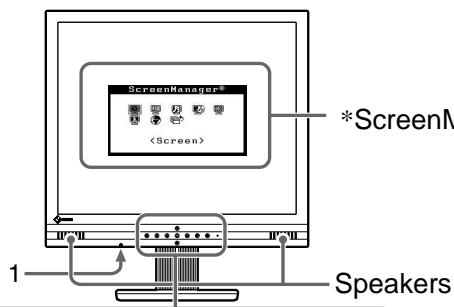
*ScreenManager®
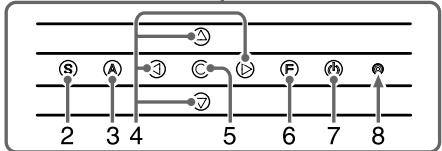
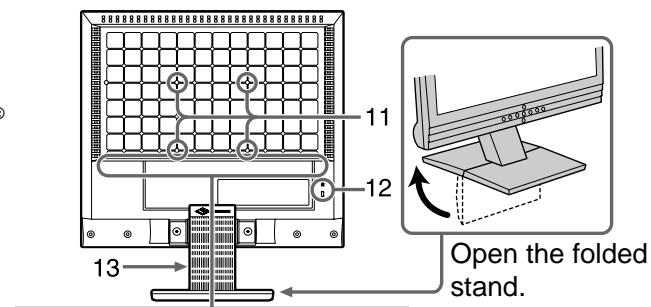
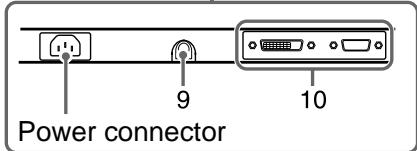
| 1 | Headphone (Stereo Mini-jack) | Connects the headphone. |
| 2 | Input Signal Selection button | Switches input signals for display when two PCs are connected to the monitor. |
| 3 | Auto Adjustment button | Performs the function to adjust the screen automatically. (analog input only) |
| 4 | Control buttons (Left, Down, Up, Right) | • ④ or ⑥ button: Displays the Volume adjustment window (page 5). • ⑧ or ⑦ button: Displays the brightness adjustment window (page 5). • Chooses an adjustment item or increases/decreases adjusted values for advanced adjustments using the Adjustment menu (page 5). |
| 5 | Enter button | Displays the Adjustment menu, determines an item on the menu screen, and saves values adjusted. |
| 6 | FineContrast button | Switches the display mode of the FineContrast mode in the FineContrast menu (page 7). |
| 7 | Power button | Turns the power on or off. |
| 8 | Power indicator | Indicates monitor's operation status. Blue : Operating Off : Power off Yellow : Power saving |
| 9 | External line in (Stereo Mini-jack) | Connects the Stereo Mini-jack cable. |
| 10 | Input signal connectors | Left: DVI-D connector/Right: D-sub mini 15-pin connector. |
| 11 | 4 holes for mounting an arm/stand | The stand can be replaced with an arm or another stand. For how to replace, refer to the User's Manual on the CD-ROM. |
| 12 | Security lock slot | Complies with Kensington's MicroSaver security system. |
| 13 | Height adjustable stand | Adjusts the height and angle of the monitor screen. |
- ScreenManager® is an EIZO's nickname of the Adjustment menu. (For how to use ScreenManager, refer to the User's Manual on the CD-ROM.)
Connecting Cables
Attention
- When replacing the current monitor with an M1700/M1900 monitor, be sure to change the PC settings for resolution and vertical frequency to those which are available for the M1700/M1900 monitor referring to the resolution table (back of cover page) before connecting the PC.
NOTE
- To use speaker, connect a stereo mini-jack cable to the Audio output terminal on a PC or CD player.
- When connecting two PCs to the monitor, refer to the User's Manual on the CD-ROM.
1 Check that the monitor and the PC are powered off.
2 Connect the monitor to the PC with a signal cable that matches the connectors.
After connecting the cable connectors, tighten the screws of the connectors to secure the coupling.
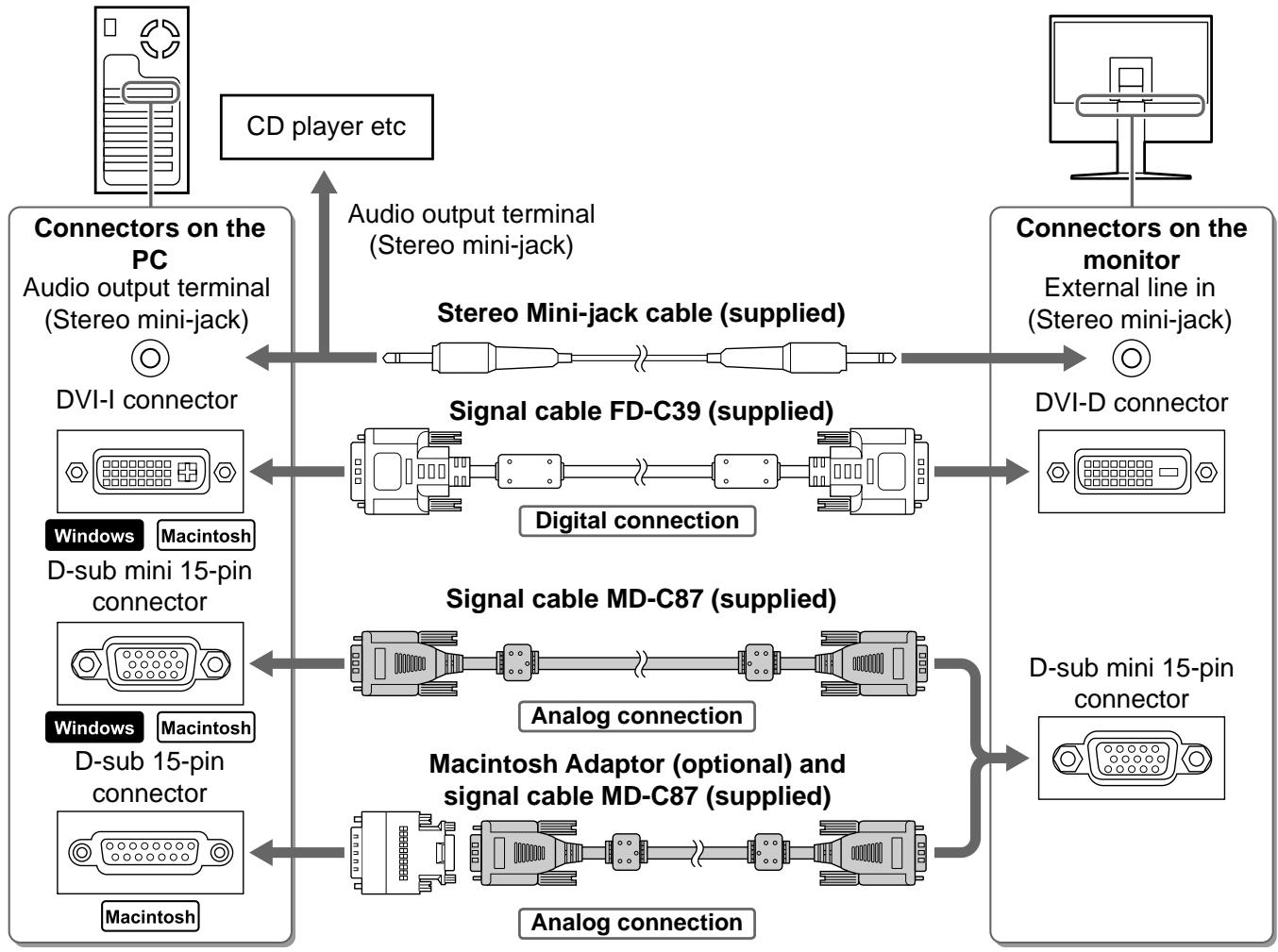
3 Plug the power cord into a power outlet and the Power connector on the monitor.
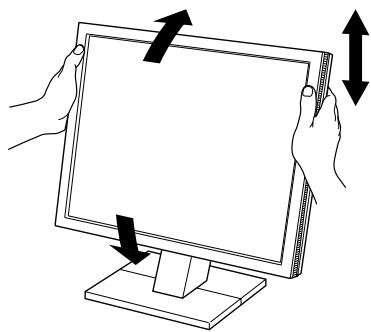
Adjusting Screen Height and Angle
Adjust the screen height, tilt and swivel the screen to the best condition for working.
Displaying Screen
1 Press to turn on the monitor.
2 Turn on the PC.
The monitor's Power indicator lights up blue and the screen image appears.
3 When using analog input signals, perform the Auto Adjustment function. (Refer to "Performing Auto Adjustment function" below.)
The Auto Adjustment function is not necessary when digital signals are input because images are displayed correctly based on the preset data of the monitor.
Attention
- Turn off the monitor and PC after using them.
- For the maximum power saving, it is recommended that the Power button be turned off. Unplugging the power cord completely shuts off power supply to the monitor.
Performing Auto Adjustment Function (Analog input only)
When analog signals are input, the Auto Adjustment function enables the automatic adjustment of clock, phase, screen position, and resolution.
For details of the Auto Adjustment function, refer to the User's Manual on the CD-ROM.
1 Press A.
A message window appears.
2 Press A again while the message is displayed.
The Auto Adjustment function is activated and clock, phase, screen position, and resolution are adjusted automatically.
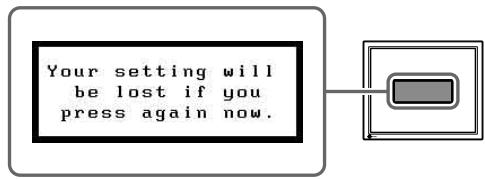
Message window
Attention
- The Auto Adjustment function works correctly when an image is fully displayed over the display area of a Macintosh or Windows PC screen.
It does not work properly when an image is displayed only on a part of the screen (DOS prompt window, for example) or when a black background (wallpaper, etc.) is in use. - The Auto Adjustment function may not work properly with some graphics boards.
Adjusting Speaker Volume
1 Press the or button.
The volume adjustment window appears.
2 Change the speaker volume with the to decrease or the to increase.
3 Press at the desired volume.
To mute the sound, press the () or () while the volume adjustment menu is displayed.
To cancel muting, press the 4 or button.
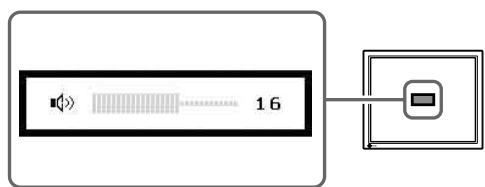
Volume adjustment window
Selecting Display Mode
FineContrast allows you to select the best display mode easily according to monitor's application. For details of FineContrast, refer to the User's Manual on the CD-ROM.
FineContrast Mode
| Custom | Available for making desired setting. |
| sRGB | Suitable for color matching with sRGB compatible peripherals. |
| Text | Suitable for displaying texts for word processing or spreadsheets. |
| Picture | Suitable for displaying images such as photos or picture images. |
| Movie | Suitable for playing back animated images. |
1 Press F.
The FineContrast window appears.
2 Press again while the FineContrast menu is displayed.
Each time the button is pressed, the mode on the screen switches. (Refer to the FineContrast Mode table.)
3 Press at the desired mode.
The selected mode is set.
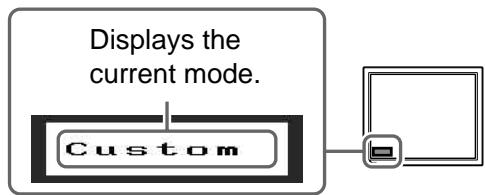
FineContrast window
Adjusting Brightness
1 Press or .
The brightness adjustment window appears.
2 Adjust the brightness with or .
Press to increase screen brightness or press to decrease.
3 Press at the desired brightness.
The specified brightness is saved.
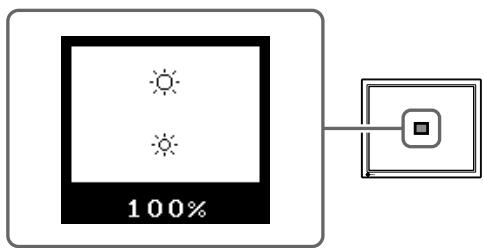
Brightness adjustment window
Performing Advanced Settings/Adjustments
Advanced adjustments for the screen or color and various settings are available using the Adjustment menu.
For details of each adjustment function, refer to the User's Manual on the CD-ROM.
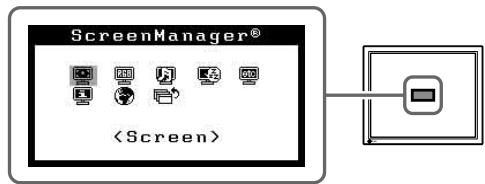
Adjustment menu
The basic settings and adjustments are completed. For advanced settings/adjustments, refer to the User's Manual on the CD-ROM.
If no picture is displayed on the monitor even after the following remedial action is taken, contact your local dealer.
1. Check the Power indicator.
| Symptom | Status | Possible cause and remedy |
| No picture | Power indicator does not light up. | Check whether the power cord is correctly connected. If the problem persists, turn off the monitor for a few minutes, and then turn it on again. |
| Power indicator lights blue. | Check the brightness setting. | |
| Power indicator lights yellow. | Switch the input signal with Ⓢ . | |
| Press a key on the keyboard or click the mouse. | ||
| Turn on the PC. |
2. Check the error message that remains on the screen for 40 seconds.
These messages appear when the input signal is incorrect even if the monitor is functioning.
| Symptom | Status | Possible cause and remedy |
| Signal Check Analog No Signal | The input signal is not received correctly. | Check whether the PC is turned on. |
| Check whether the signal cable is properly connected to the PC. | ||
| Switch the input signal with ⑤ . | ||
| Signal Error Digital fD:135.0MHz fH:80.0kHz fU:75.0Hz | The signal frequency is outside the specification. Incorrect signal frequency is shown in red. | Change the mode to an appropriate mode using the graphics board's utility software. Refer to the manual of the graphics board for details. |
FlexScan® M1700/M1900
LCD-Farbmonitor
SICHERHEITSSYMBOLE
Cable de signal analogue (MD-C87)

Cablea mini-prises stereo

EIZOLCD Utility Disk (CD-ROM)
- Manuel d'utilisation
- Manuel d'installation (ce manuel)
Garantie limitee
Vis de montage: M4 × 12 (mm) × 4 pieces
Kaalwoavaoyikouo nmuatoC (MD-C87)

Kαλωδιo stereo Mini-jack

EIZO LCD Utility Disk (CD-ROM)
- Eγχειρίοχρηστη
EyxEpiio EYkataoTaonC (To TApov EvxEpiio)
Iepiopioevn yyyunon
BifdaTPOOAPrTOJNS: M4 x 12 mm 4 PCS
MEPbI IPREIOCTOPOXHOCTN

PPEyPPEKDEHNE

Pn NOBHeHn DbIma, NcXoJaIero n3 yCTpoiCTBa, 3anaxa rapn nn Heo6bIHybIX 3ByKOB HemeJeHHO oBeTochte YcTPOiCTBO n 06paTnteCb K npodabuy 3a NOMoucbIO.
Пиьтka 3кслуataин HeHcIpaBHorO yctpoICTBa MOKTe IIpNBecTn K IIOkapy, IIopaKeHHIO 3JIeKtpNueckHM TOKOM HIN IOBpeJdeHHIO O6OpyIDOBaHH.

IcnoJIb3yIte BXOJaIeB KOMJIpeK T Hyp NITaHn, IoKJIIOHaemBk CTaHApTHoN DJIBaWe CTPaHbI WTeNCJIbHO p03eTke.
Y6eIHTecb C06JIIODeHNN IpeJeIOB HOMHaJIbHOHO HAIIpyKeHHa KOTOpoe paCCHTaH IIHYP IIITaHHa. HeBbIIOJIHeHHe 3TOrTO Tpe6OBaHHa MOKeT IIpNBecTH K IIOKapy HIN IIOpaJKeHHIO JIEKTPHuYeCKHM TOKOM.

XpaHnTe MeJkne npeMeTbI JxNdkOcTN BdaJI NOT yCtpoiCTBa.
ClyuhaHoe IOnaJaHHe MeJIKx IIpeIMeTOB HJIN
IpoJIInTOJ KHNKoCTN BHyTb KOpIIyCa Hepe3
BEHTNJIAIOOHHBe OTBepCTH MoKeT PnHBecTH K IIOkApY,
IopajKeHHIO 3JIeKtpUneCKHM TOKOM HJIN IOBpeJDeHHIO
O6bpyIOBaHH. B Clyuae IOnaJaHHa KaKOrO-JIb60
IpeIMeta HJIN JKNKoCTN BHyTb KOpIIyCa HeMeJlEHHO
O6cToCbTe yctPoIHCTBO. IpePe IocJIeYIOUIe
3KcIIyatauHei O6paTHtecb K KBaJIHfHUnpOBaHHOMY
CIIeHuaJIHCTy IIO peMOHTy I TeXHHueCKOMY
O6cLyJKBaHHIO IJI BblIOJIHeHHI IpOBepKn.

YctaHOBnTe yCTPOINCTBO B NOxOJaEM MeCTe. HeBbIIOJIHeHne 3TOTO Tpe6OBaHHa MoKET IIpNBecTH K IIOKApy, IopAkeHHIO 3JIeKtPrHcckHM TOKOM HJIN IOBpeKdEHHIO O6OpyIDoBaHHa.
- He yctaHaBJIiBaIte Ha OTKpbITOM BO3JyXe.
- He yctaHaBJIbAaIeT B TpaHcIIOpTHbIX cpeIcTBax (Ha Kopa6JIaX, B CaMOJIeTAX, IIOE3dAX, aBTOMO6NJIaX H.T.I.).
- He yctaHaBJIHbAitE B IIbIbHbIX H BJIaXHbIX MeCTax.
- He yctaHaBJIHbAaTe B MeCeT, rIe 9KpaH IIOBepKeH IIpRMOy DeiCTBnIO Iapa.
- He yctaHaBJIHbAaTe B6JIH3n ycTpoIcTB, BblJeJIHOIIHX TeJIIO, HJIIN yBJIAJXHITeJI.

O6opydoBaHne doJxHo 6bIb noKlIoUeHO K 3a3emLeHHo WTeNceJIbHO p03eTke nHTaHOe ceTI.
HeBbIIOJIHeHne 3TOrO Tpe6OBaHHa MoKeT IIpNBecTH K IIOKApy IIN IopAkaJeHHo 3JIeKtpuYeCKHM TOkOM.

BHHMAHNE

He 3aKpbIbaiTe BeHTnJIauHNoHHbIe OTBepCTnB KOpnyce.
- Installationshandbuch
- PRECAUTIONS
- WARNING
- CAUTION
- About Setup Manual and User's Manual
- Package Contents
- NOTE
- Controls and Functions
- Connecting Cables
- Attention
- Adjusting Screen Height and Angle
- Displaying Screen
- Performing Auto Adjustment Function (Analog input only)
- Adjusting Speaker Volume
- Selecting Display Mode
- Adjusting Brightness
- Performing Advanced Settings/Adjustments
- Check the Power indicator.
- Check the error message that remains on the screen for 40 seconds.
- FlexScan® M1700/M1900
- LCD-Farbmonitor
- SICHERHEITSSYMBOLE
- MEPbI IPREIOCTOPOXHOCTN
- PPEyPPEKDEHNE
- BHHMAHNE
Brand : EIZO
Model : FLEXSCAN M1700
Category : Monitor