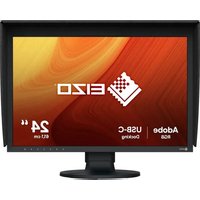
ColorEdge CG2400S - Monitor EIZO - Free user manual and instructions
Find the device manual for free ColorEdge CG2400S EIZO in PDF.


Pick your language and provide your email: we'll send you a specifically translated version.
| Product Type | 24.1-inch LCD Monitor |
| Brand | Eizo |
| Model | ColorEdge CG2400S |
| Screen Size | 24.1 inches (61 cm) diagonal |
| Resolution | 1920 x 1200 (WUXGA) |
| Panel Type | IPS (In-Plane Switching) |
| Brightness | 350 cd/m² (typical) |
| Contrast Ratio | 1000:1 (typical) |
| Color Gamut | 99% Adobe RGB, 100% sRGB |
| Input Connectors | DisplayPort, HDMI, USB-C, DVI-D |
| Power Consumption | 60 W (typical), 0.5 W (standby) |
| Weight (with stand) | Approx. 8.7 kg |
| Dimensions (W x H x D with stand) | 556 x 395 x 235 mm |
| Stand Adjustments | Height, tilt, swivel, pivot |
| Power Supply | AC 100-240 V, 50/60 Hz |
| Main Features | Hardware calibration, built-in calibration sensor, color uniformity |
| Maintenance & Cleaning | Clean with soft dry cloth; avoid solvents; use screen cleaner |
| Safety | VESA mount compatible, anti-theft lock slot |
| Spare Parts & Reparability | Replaceable stand, power supply, and circuit boards |
| General Information | Professional color-critical monitor for photography, design, and video |
Frequently Asked Questions - ColorEdge CG2400S EIZO
How do I calibrate the ColorEdge CG2400S monitor?
The monitor has a built-in calibration sensor. Use the ColorNavigator software to schedule automatic recalibration. Connect via USB and follow on-screen instructions.
What is the maximum resolution supported?
The native resolution is 1920 x 1200 (WUXGA) at 60 Hz. It also supports lower resolutions.
Does the monitor support USB-C connectivity?
Yes, the CG2400S features a USB-C input that supports video, data, and power delivery (60W).
How do I clean the screen safely?
Turn off the monitor and unplug. Use a soft, lint-free cloth slightly dampened with water or a dedicated screen cleaner. Do not spray directly onto the screen.
Can I mount this monitor on an arm?
Yes, it has a VESA mount pattern (100 x 100 mm). Use a compatible arm or stand.
What color spaces does the monitor cover?
It covers 99% Adobe RGB, 100% sRGB, and 98% DCI-P3, making it suitable for professional color work.
How do I adjust the OSD settings?
Press the menu button on the bottom bezel. Use the joystick to navigate and adjust brightness, contrast, color, etc.
What is the power consumption in standby?
In standby mode, it consumes less than 0.5 W.
Does the monitor have built-in speakers?
No, the ColorEdge CG2400S does not include internal speakers. Use external speakers via audio output or HDMI audio.
How do I update the monitor firmware?
Download the latest firmware from Eizo's website and use the ColorNavigator or USB update tool. Connect the monitor via USB and follow instructions.
User questions about ColorEdge CG2400S EIZO
0 question about this device. Answer the ones you know or ask your own.
Ask a new question about this device
No questions yet. Be the first to ask one.
Download the instructions for your Monitor in PDF format for free! Find your manual ColorEdge CG2400S - EIZO and take your electronic device back in hand. On this page are published all the documents necessary for the use of your device. ColorEdge CG2400S by EIZO.
USER MANUAL ColorEdge CG2400S EIZO

Manual assistant
Powered by Anthropic
Waiting for your message
Product information
Brand : EIZO
Model : ColorEdge CG2400S
Category : Monitor