
JFK - Radio transceiver PRESIDENT - Free user manual and instructions
Find the device manual for free JFK PRESIDENT in PDF.


User questions about JFK PRESIDENT
0 question about this device. Answer the ones you know or ask your own.
Ask a new question about this device
Download the instructions for your Radio transceiver in PDF format for free! Find your manual JFK - PRESIDENT and take your electronic device back in hand. On this page are published all the documents necessary for the use of your device. JFK by PRESIDENT.
USER MANUAL JFK PRESIDENT
Owner's manual / Handbuch
PRE5★E1C
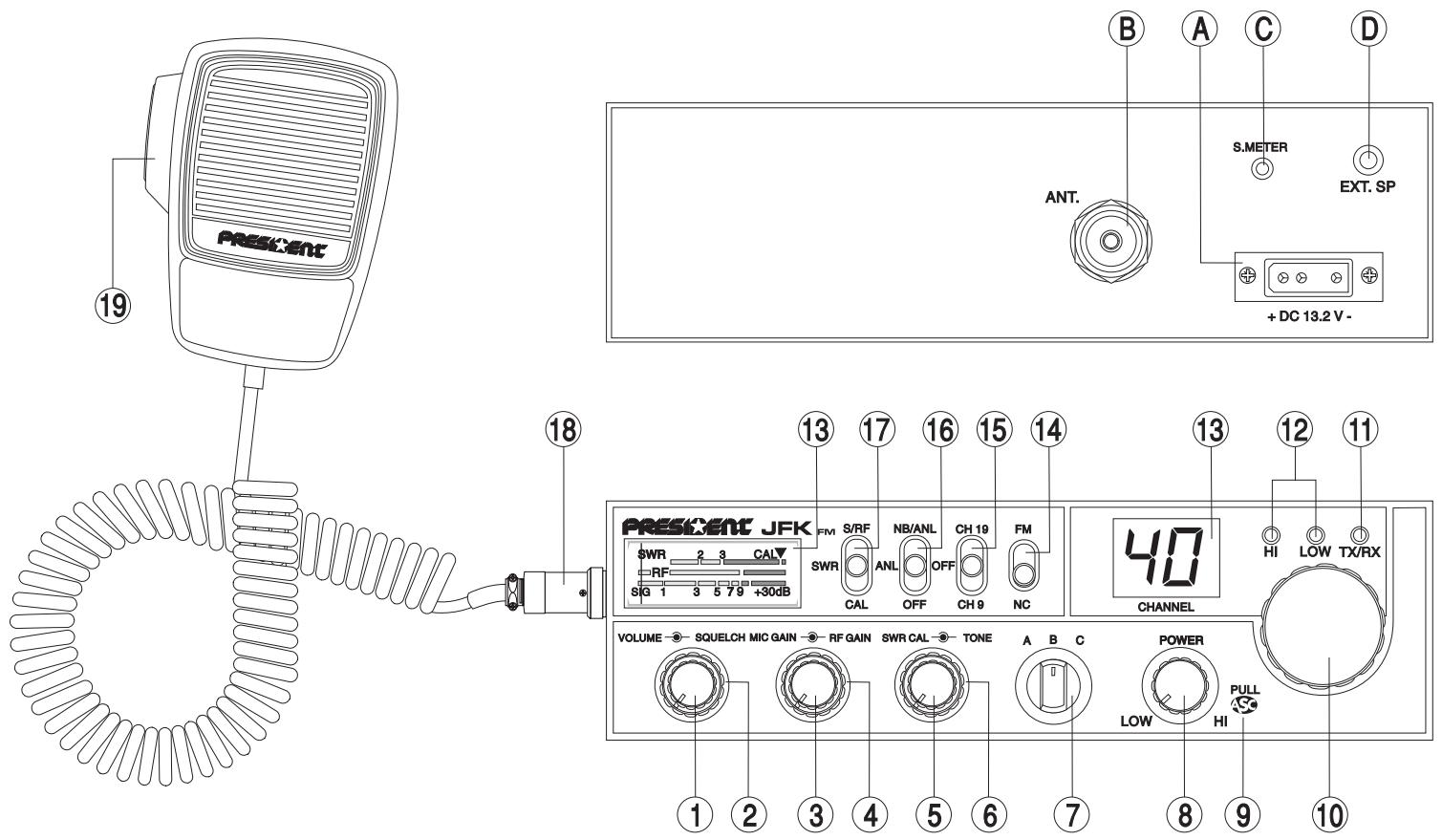
Votre PRESIDENT J.F.K. ASC en un coup d'oeil
Your PRESIDENT J.F.K. ASC at a glance
| A | Alpha | H | Hotel | P | Papa | W | Whiskey |
| B | Bravo | I | India | Q | Quebec | Y | Yankee |
| C | Charlie | J | Juliett | R | Romeo | Z | Zulu |
| D | Delta | L | Lima | S | Sierra | ||
| E | Echo | M | Mike | T | Tango | ||
| F | Foxtrott | N | November | U | Uniform | ||
| G | Golf | O | Oscar | V | Victor |
LANGUAGE TECHNIQUE :
Standing Waves Ratio
Short waves listening
Short waves (ondes courtes)
Fine business (bon, excellent)
Type: radio CB J.F.K. ASC.
N° de série :

SANS LE CACHET DU DISTRIBUTEUR LA GARANTIE SERA NULLE
VOLET A RENVOYER SOUS ENVELOPPE
QUESTIONNAIRE CB CONFIDENTIEL
Groupe

ELECTRONICS
SERVICE DES GARANTIES
Route de SETE - BP 100
34540 BALARUC - FRANCE
Info route
Convivalite
□ Assistance-radio
H Hotel
I India
J Juliet
L Lima
M Mike
N November
Oscar
P Papa
Q Quebec
R Rome
Sierra
T Tango
U Uniform
V Victor
W Whiskey
Y Yankee
Z Zulu
TERMINOS DEL ARGOT CEBEISTA:
A.L.
ARMONICOS
AVE MARIA
BARBAS
BARRA MOVIL
BASE
BIGOTADA
BREAK
BREAKER
CAJATONTA
CHICHARRA
Tip: radio CB J.F.K. ASC
N° de Serie:

SIN SELLO DEL DISTRIBUTOR LA GARANTÍA NO SERÁ VALIDA.
A REMITIR RESPUESTA VIA CORREO
QUESTIONARIO CB CONFIDENCIAL
PRESIDENT
ANTENAS IBERICA
Botanica, 107-109, Pol. Ind. Gran Via Sud 08908 L'HOSPITALET DE LLOBREGAT BARCELONA
Fecha de compra:
Tip: radio CB J.F.K. ASC.
N^ de Serie:

SIN SELLO DEL DISTRIBUTOR LA GARANTÍA NO SERÁ VALIDA.
Nombre Apellido
Dicho.
Ciudad.......Codigo postal....Tel.
Before using, be careful never to transmit without first having connected the antenna (connection "B" situated on the back panel of the equipment) or without having set the SWR (Standing Wave Ratio)! Failure to do so may result in destruction of the power amplifier, which is not covered by the guarantee.
The guarantee of this transceiver is valid only in the country of purchase.
Welcome to the world of the new generation of CB radios. The new PRESIDENT range gives you access to top performance CB equipment. With the use of up-to-date technology, which guarantees unprecedented quality, your PRESIDENT J.F.K. ASC is a new step in personal communication and is the surest choice for the most demanding of professional CB radio users. To ensure that you make the most of all its capacities, we advise you to read carefully this manual before installing and using your PRESIDENT J.F.K. ASC.
A) INSTALLATION:
1) WHERE AND HOW TO MOUNT YOUR MOBILE CB RADIO:
a) You should choose the most appropriate setting from a simple and practical point of view.
b) Your CB radio should not interfere with the driver or the passengers.
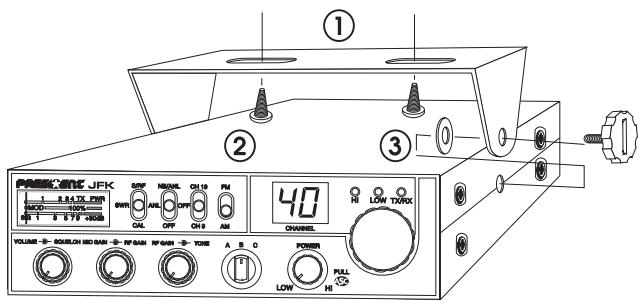
MOUNTING DIAGRAM
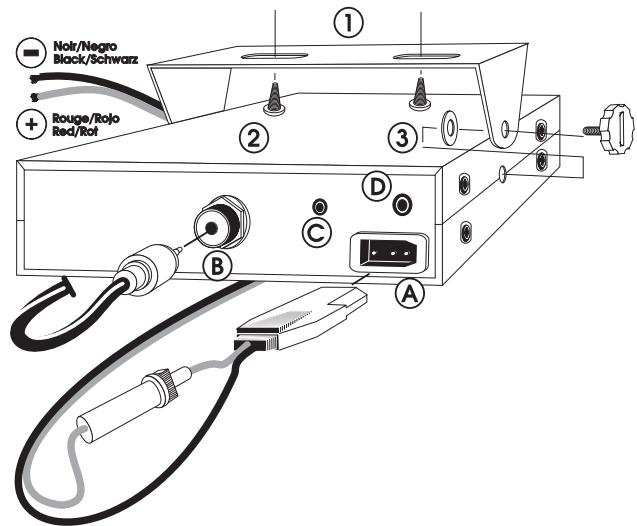
c) Remember to provide for the passing and protection of different wires (e.g. power, antenna, accessory cabling) so that they do not in any way interfere with the driving of the vehicle.
d) To install your equipment, use the cradle (1) and the self-tapping screws (2) provided (drilling diameter 3.2mm ). Take care not to damage the vehicle's electrical system while drilling the dash board.
e) Do not forget to insert the rubber joints (3) between the CB and its support as these have a shock-absorbing effect which permits gentle orientation and tightening of the set.
f) Choose where to place the microphone support and remember that the microphone cord must stretch to the driver without interfering with the controls of the vehicle.
- N.B.: As the transceiver has a frontal microphone socket, it can be set into the dash board. In this case, you will need to add an external loud speaker to improve the sound quality of communications (connector EXT.SP situated on the back panel: D). Ask your dealer for advice on mounting your CB radio.
2) ANTENNA INSTALLATION:
a) Choosing your antenna:
- For CB radios, the longer the antenna, the better its results. Your dealer will be able to help you with your choice of antenna.
b) Mobile antenna:
- Must be fixed to the vehicle where there is a maximum of metallic surface (ground plane), away from windscreen mountings.
- If you already have a radio-telephone antenna installed, the CB antenna should be higher than this.
- There are two types of antenna: pre-regulated which should be used on a good ground plane (e.g. car roof or lid of the boot), and
adjustable which offer a much larger range and can be used on a smaller ground plane (see p 27 § 5, Adjustment of SWR). - For an antenna which must be fixed by drilling, you will need a good contact between the antenna and the ground plane. To obtain this, you should lightly scratch the surface where the screw and tightening star are to be placed.
- Be careful not to pinch or flatten the coaxial cable (as this runs the risk of breakdown and/or short circuiting).
- Connect the antenna (B)
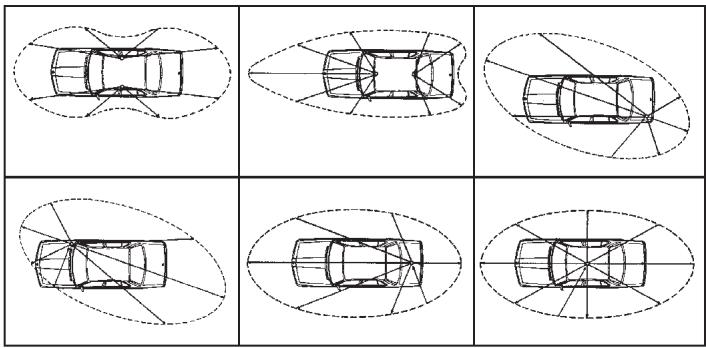
OUTPUT RADIUS PATTERNS
c) Fixed antenna:
- A fixed antenna should be installed in a clear space as possible. If it is fixed to a mast, it will perhaps be necessary to stay it, according to the laws in force (you should seek professional advice). All PRESIDENT antennas and accessories are designed to give maximum efficiency to each CB radio within the range.
3) POWER CONNECTION:
Your PRESIDENT J.F.K. ASC is protected against an inversion of polarities. However, before switching it on, you are advised to check all the connections. Your equipment must be supplied with a continued current of 12 volts (A). Today, most cars and lorries are negative earth. You can check this by making sure that the negative terminal of the battery is connected either to the engine block or to the chassis. If this is not the case, you should consult your dealer.
WARNING: Lorries generally have two batteries and an electrical installation of 24 volts, in which case it will be necessary to insert a 24/12 volt converter (type CV 24/12 PRESIDENT) into the electrical circuit. The following connection steps should be carried out with the power cable disconnected from the set.
a) Check that the battery is of 12 volts.
b) Locate the positive and negative terminals of the battery (+ is red and - is black). Should it be necessary to lengthen the power cable, you should use the same or a superior type of cable.
c) It is necessary to connect your CB to a permanent (+) and (-). We advise you to connect the power cable directly to the battery (as the connection of the
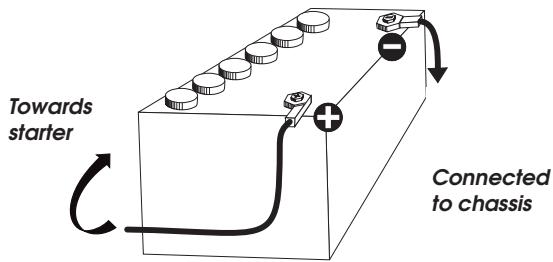
CB cable to the wiring of the car-radio or other parts of the electrical circuit may, in some cases, increase the likelihood of interference).
d) Connect the red wire (+) to the positive terminal of the battery and the black (-) wire to the negative terminal of the battery.
e) Connect the power cable to your CB radio.
WARNING: Never replace the original fuse (4 A) by one of a different value.
4) BASIC OPERATIONS TO BE CARRIED OUT BEFORE USING YOUR SET FOR THE FIRST TIME (without transmitting and without using the “push-to-talk” switch on the microphone):
a) Connect the microphone
b) Check the antenna connections
c) Turn the set on by turning the knob VOLUME clockwise.
d) Turn the SQUELCH knob to minimum (anti-clockwise). Adjust the volume to a comfortable level.
e) Go to Channel 20 using the rotary knob on the front panel.
5) ADJUSTMENT OF SWR (Standing wave ratio):
WARNING: This must be carried out when you use your CB radio for the first time (and whenever you re-position your antenna). The adjustment must be carried out in an obstacle-free area.
- Using an external SWR meter (e.g. SWR 1 or SWR 2) or the integrated SWR meter:
a) To connect the SWR meter :
- Connect the SWR meter between the CB radio and the antenna as close as possible to the CB (use a maximum of 40~cm cable, type President CA 2C).
b) To adjust the SWR meter: - Set the CB to channel 20.
Put the switch (17) on the SWR meter to position CAL ou FWD. - Press the «push-to-talk» switch on the microphone to transmit.
- Bring the index needle to by using the calibration key (5).
- Change the switch (17) to position SWR (reading of the SWR level). The reading on the V.U. meter should be as near as possible to 1. If this is not the case, re-adjust your antenna to obtain a reading as close as possible to 1. (An SWR reading between 1 and 1.8 is acceptable).
- It will be necessary to re-calibrate the SWR meter after each adjustment of the antenna.
Your CB is now ready for use.
a) To turn the set on, turn the knob (1) clockwise
b) To increase the sound level, turn the same knob further clockwise.
2) ASC (Automatic Squelch Control)/SQUELCH:
Suppresses undesirable background noises when there are no communication. Squelich does not effect neither sound nor transmission power, but allows a considerable improvement in listening comfort.
a)MANUAL SQUELCH
Turn the squelch knob clockwise to the exact point where all back-ground noise disappears. This adjustment should be done with precision as, if set to maximum, (i.e. fully clockwise) only the strongest signals will be received. The adjustment of this function is done automatically when the key (9, ASC) is activated.
b)ASC: Automatic Squelch Cor
Worldwide patent, a PRESIDENT exclusivity
No repetitive manual adjustment and a permanent improvement in listening comfort when this function is active. It can be disconnected by using the switch (9), in this case the manual squelch control becomes active again.
3) MIC GAIN:
Is for regulating microphone sensitivity, when using a microphone other than the one supplied with your PRESIDENT J.F.K. ASC. (pre-amplified).
The normal setting of this knob is fully clockwise.
4) RF GAIN:
This knob is for adjusting sensitivity during reception. For long distance communications RF GAIN should be set to maximum. RF GAIN can be reduced to avoid distortion, when your correspondent is close by and when he does not have RF POWER.
The normal setting of this knob is on maximum (fully clockwise).
5) SWR/CAL:
Used for the calibration of the SWR meter (see «Adjustment of SWR» page 27, § 5).
6) TONE:
This function is used to adjust the tone during reception. Turn on to activate the function.
7) BAND SELECTOR:
Unused key on this version.
8) RF POWER:
When you turn this knob fully clockwise the RF power (norm peak 4 watts) is at maximum. You should reduce transmission power when the communication is close to someone who does not have RF GAIN.
The normal setting of this knob is on maximum (fully clockwise).
9) ASC (Automatic Squelch Control) and ROGER BEEP:
a) ASC (Automatic Squelch Control)
Both functions ASC and ROGER BEEP will be activated pulling (9) switch see page 27, point 2).
b) ROGER BEEP
When you finish speaking and you release the «push-to-talk» switch to allow your correspondent to speak, a «beep» sounds. Radio CB is what is known as a «simplex» method of communication, that is to say, that you cannot listen and speak at the same time (as you can, for example, with the telephone). It was custom to say «roger» to indicate to your correspondent that you'd finished speaking and that it was his turn to talk. The word «roger» has now been replaced with a beep, hence its name, «Roger Beep».
10) CHANNEL SELECTOR ROTARY KNOB:
Turning this knob allows you to choose a channel (1-40) for transmitting and receiving.
11) RX/TX:
RX indicator (green) lights when the receiver is in operation and TX indicator (red) lights when the transmitter is in operation.
12) HI/LOW:
Unused key on this version.
13) DISPLAY:
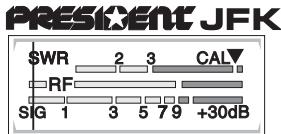
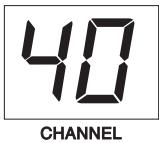
The display shows the current channel. The bargraph shows the level of reception, the emitted level of power and the measured standing wave ratio.
14) MODE:
Use this key to select AM or FM. The modulation mode must correspond with that of the person with whom you communicate.
A/ Amplitude Modulation (AM) is for communications in areas where there are obstacles and over medium distances.
B/ Frequency Modulation (FM) is for nearby communications in flat, open areas. It gives better quality of communication (squelch adjustment needs more finesse).
15) CH 9/19:
Channel 9/19 is automatically selected.
16)ANL/NB:
Noise Blanker/ Automatic Noise Limiter. These filters allow the reduction of back ground noise, and some reception interferences.
In the S/RF position, the meter swings proportionally to the strength of the received signal. When transmitting, the meter indicates relative RF output power. In the "CAL" position, the SWR meter can be calibrated by adjusting the "SWR CAL" control. When in the SWR position, the standing wave ratio is measured.
18) 6-PIN MICROPHONE PLUG:
This plug is situated on the front panel, thereby making it easier to set the equipment into the dashboard. See the cabling diagram on page 46.
19) PTT (push to talk):
Depress this knob to transmit a message and release to listen to an incoming communication.
A) DC-POWER TERMINAL (13,2 V)
B) ANTENNA CONNECTOR (SO-239)
C) EXTERNAL S-METER JACK (Ø 2,5 mm)
D) EXTERNAL SPEAKER JACK (8 Ω, 0 3,5 mm)
C) TECHNICAL CHARACTERISTICS:
1) GENERAL:
- Channels
- Modulation modes
Frequency ranges - Antenna impedance
- Power supply
- Dimensions (in mm)
Weight - Accessories supplied
2) TRANSMISSION:
- Frequency allowance
- Carrier power
Transmission interference
- Audio response
- Emitted power in the adj. channel
- Microphone sensitivity
-Drain
- Modulated signal distortion
3) RECEPTION:
Maxi. sensitivity at 20 dB sinad
- Frequency response
- Adjacent channel selectivity
Maximum audio power
Squelch sensitivity
- Frequency image rejection rate
- Intermediate frequency rej. rate
-Drain
40
AM/FM
from 26.965 MHz to 27.405 MHz
50 ohms
13.2V
174 (L) x 211 (H) x 52 (D)
1.4kg
: Microphone with support, mounting cradle, screws.
+ / - 300Hz
4 watts FM CW
4 watts AM PEP
: inferior to 4 nW (- 54 dBm)
300 Hz à 3 KHz in AM/FM
: inferior to 20~ W
1.0mV
1,7 A (with modulation)
1.8%
0.5 V - 113 dBm (AM/FM)
300 Hz à 3 kHz in AM/FM
60dB
5W
: minimum 0.2 V - 120 dBm maximum 1 mV - 47 dBm
60 dB
70dB
500 mA nominal
800mA maximum
D) TROUBLE SHOOTING
1) YOUR CB RADIO WILL NOT TRANSMIT OR YOUR TRANSMISSION IS OF POOR QUALITY:
- Check that the antenna is correctly connected and that the SWR is properly adjusted.
- Check that the microphone is properly plugged in.
2) YOUR CB RADIO WILL NOT RECEIVE OR RECEPTION IS POOR:
- Check that the squelch level is properly adjusted.
- Check that the volume is set to a comfortable listening level.
- Check that the microphone is properly plugged in.
- Check that the antenna is correctly connected and that the SWR is properly adjusted.
- Check that you are using the same modulation mode as your correspondent.
3) YOUR CB WILL NOT LIGHT UP:
- Check the power supply.
- Check the connection wiring.
- Check the fuse.
E) HOW TO TRANSMIT OR RECEIVE AMESSAGE:
Now that you have read the manual, make sure that your CB Radio is ready for use (i.e. check that your antenna is connected).
Choose your channel (19, 27).
Choose your mode (AM/FM) which must be the same as that of your correspondent.
Press the «push-to-talk» switch and announce your message «Attention stations, transmission testing» which will allow you to check the clearness and the power of your signal. Release the switch and wait for a reply. You should receive a reply like. «Strong and clear».
If you use a calling channel (19, 27) and you have established communication with someone, it is common practice to choose another available channel so as not to block the calling channel.
F) GLOSSARY:
Below you will find some of the most frequently used CB radio expressions. Remember this is meant for fun and that you are by no means obliged to use them. In an emergency, you should be as clear as possible.
INTERNATIONAL PHONETIC ALPHABET:
A Alpha H Hotel P Papa W Whiskey
B Bravo India Q Quebec YYankee
C Charlie J Juliet R Romeo Z Zulu
D Delta L Lima S Sierra
E Echo M Mike T Tango
F Foxtrott N November U Uniform
G Golf Oscar V Victor
TECHNICAL VOCABULARY:
AM Amplitude Modulation
CB Citizen's Band
CH Channel
CW : Continuous Wave
DX : Long Distance Liaison
DW : Dual Watch
FM : Frequency Modulation
GMT : Greenwich Meantime
HF : High Frequency
LF Low Frequency
LSB : Lower Side Band
RX Receiver
SSB : Single Side Band
SWR Standing Wave Ratio
SWL : Short Wave Listening
SW : Short Wave
TX : CB Transceiver
UHF Ultra High Frequency
USB Upper Side Band
VHF Very High Frequency
CB LANGUAGE:
| Advertising | : | Flashing lights of police car |
| Back off | : | Slow down |
| Basement | : | Channel 1 |
| Base station | : | A CB set in fixed location |
| Bear | : | Policeman |
| Bear bite | : | Speeding fine |
| Bear cage | : | Police station |
| Big slab | : | Motorway |
| Big 10-4 | : | Absolutely |
| Bleeding | : | Signal from an adjacent channel interfering with the transmission |
| Blocking the channel | : | Pressing the PTT switch without talking |
| Blue boys | : | Police |
| Break | : | Used to ask permission to join a conversation |
| Breaker | : | A CBer wishing to join a channel |
| Clean and green | : | Clear of police |
| Cleaner channel | : | Channel with less interference |
| Coming in loud and proud | : | Good reception |
| Doughnut | : | Tyre |
| Down and gone | : | Turning CB off |
| Down one | : | Go to a lower channel |
| Do you copy? | : | Understand? |
| DX | : | Long distance |
| Eighty eights | : | Love and kisses |
| Eye ball | : | CBers meeting together |
| Good buddy | : | Fellow CBer |
| Hammer | : | Accelerator |
| Handle | : | CBer's nickname |
| Harvey wall banger | : | Dangerous driver |
| How am I hitting you? | : | How are you receiving me? |
| Keying the mike | : | Pressing the PTT switch without talking |
| Kojac with a kodak | : | Police radar |
| Land line | : | Telephone |
| Lunch box | : | CB set |
| Man with a gun | : | Police radar |
| Mayday | : | SOS |
| Meat wagon | : | Ambulance |
| Midnight shopper | : | Thief |
| Modulation | : | Conversation |
| Negative copy | : | No reply |
| Over your shoulder | : | Right behind you |
| Part your hair | : | Behave yourself - police ahead |
| Pull your hammer back | : | Slow down |
| Rat race | : | Congested traffic |
| Rubberbander | : | New CBer |
| Sail boat fuel | : | Wind |
| Smokey dozing | : | Parked police car |
| Smokey with a camera | : | Police radar |
| Spaghetti bowl | : | Interchange |
| Stinger | : | Antenna |
| Turkey | : | Dumb CBer |
| Up one | : | Go up one channel |
| Wall to wall | : | All over/everywhere |
| What am I putting to you? | : | Please give me an S-meter reading. |
ACHTUNG!
H Hotel
1 India
J Juliet
L Lima
M Mike
N November
Oscar
P Papa
Q Quebec
R Romeo
S Sierra
T Tango
U Uniform
V Victor
W Whiskey
YYankee
Z Zulu
R/S-Code:
R = Lesbarkeit
Addition to the service manual supplied
PAGE 28:
14) The function key MODE (14) doesn't function. Your transceiver is only functioning in FM mode.
PAGE 29:
16) The function key NB/ANL (16) activates only the NB filter.
PAGE 29:
D) TECHNICAL SPECIFICATIONS :
1) GENERAL:
- Approval DGPT N° : 970303 CB0
- Channels 40
- Modulation modes : FM