
SE 80 - Sleep sensor BEURER - Free user manual and instructions
Find the device manual for free SE 80 BEURER in PDF.



| Product type | Contactless sleep sensor |
| Brand | BEURER |
| Model | SE 80 |
| Dimensions | Ø 170 x 10 mm |
| Weight (with power adapter) | 234 g |
| Material | Polycarbonate |
| Power supply | Power adapter 100-240 V~, 50-60 Hz, 0.3 A ; output 5 V⎓, 1 A |
| Connection | Micro USB |
| Data transfer | Bluetooth Smart (low energy) |
| Main functions | Recording of heart rate, respiratory rate, movements; detection of sleep phases (light, deep, REM); Sleep Score (0-100); Fresh Wake (gentle wake-up); sleep apnea detection; diary (alcohol, caffeine, activity) |
| App | beurer SleepExpert (iOS 8.0+, Android 4.3+) |
| Maximum user weight | 300 kg |
| Operating conditions | +5 °C to +40 °C, 15-85% RH (non-condensing), 700-1060 hPa |
| Storage conditions | +5 °C to +40 °C, 15-85% RH (non-condensing), 700-1060 hPa |
| Transport conditions | -40 °C to +70 °C, 15-85% RH (non-condensing), 700-1060 hPa |
| Safety | Non-medical device; use by children from 8 years under supervision; do not use on water bed; unplug before cleaning; damaged cable → disposal |
| Maintenance | Cleaning with soft dry cloth; avoid abrasive/solvent products |
| Spare parts and repairability | No user-serviceable parts; power adapter included; for repair, contact customer service |
| Package contents | 1 sleep sensor, 1 power adapter, 1 quick guide, 1 instruction manual |
| Disposal | Do not dispose of with household waste; comply with WEEE directive |
Frequently Asked Questions - SE 80 BEURER
User questions about SE 80 BEURER
0 question about this device. Answer the ones you know or ask your own.
Ask a new question about this device
Download the instructions for your Sleep sensor in PDF format for free! Find your manual SE 80 - BEURER and take your electronic device back in hand. On this page are published all the documents necessary for the use of your device. SE 80 by BEURER.
USER MANUAL SE 80 BEURER
Instructions for use. 9
Capeur de sommeil
Mode d'emploi 16
E Sensor de sueño
Read these instructions for use carefully and keep them for later use, be sure to make them accessible to other users and observe the information they contain.
Table of contents
- Getting to know your device 10
- Signs and symbols 10
- Intended use 11
- Notes 11
- Useful information about sleep.....11
- Device description.. 12
- First steps. 13
8.App features. 14
8.1 Sleep statistics 14
8.2 Diary 14
8.3 Fresh Wake 14
- Cleaning and storage 14
- Disposal 14
- Technical data.. 15
Included in delivery
- 1x sleep sensor
- 1x mains part plug
- 1x brief instructions
- 1x these instructions for use

WARNING
- This device may be used by children over the age of eight and by people with reduced physical, sensory or mental skills or a lack of experience or knowledge, provided that they are supervised or have been instructed on how to use the device safely, and are fully aware of the consequent risks of use.
Children must not play with the device. - Check that the device and the mains cable are in perfect working order before each usage. In the event of damage, the device must not be used.
- Cleaning and user maintenance must not be performed by children unless supervised.
- Disconnect the device from the mains supply during cleaning.
- Clean the device using only the methods specified.
- Do not use any solvent-based cleaning products.
- If the mains connection cable of this device is damaged, it must be disposed of. If it cannot be removed, the device must be disposed of.
Dear customer,
Thank you for choosing one of our products. Our name stands for high-quality, thoroughly tested products for applications in the areas of heat, gentle therapy, blood pressure/diagnosis, weight, massage, beauty, air and daycare. Read these instructions for use carefully and keep them for later use, be sure to make them accessible to other users and observe the information they contain.
With kind regards,
Your Beurer team
1. Getting to know your device
When developing the Beurer SE 80 SleepExpert sleep sensor, we drew heavily on experience gained from the professional use of devices for measuring vital signs in hospitals and on many years of research.
This innovative, non-contact sleep sensor accurately and reliably records your sleep. This provides you with a deeper understanding of your sleeping behaviour, which will ultimately improve the quality of your sleep and life as a whole.
The SE 80 is placed under the mattress and records your heart rate, breathing rate and movements whilst you are sleeping. The device can then use these values to identify the various sleep phases that occurred at different times. It also creates a daily Sleep Score. To do so, an app uses the recorded values to calculate an index, which clearly indicates the quality of your sleep each night. With the free beurer SleepExpert app, you can view graphic displays of all the recorded values and compare these with one another. The diary function enables influencing factors such as sport or alcohol consumption to be taken into account.
Using the app provides you with the following functions:
- Calculation of sleep quality and clear display of information with the Sleep Score
- Detection of the fall-asleep phase, wake-up frequency and sleep duration
- Clear overview of the individual sleep phases
- Fresh Wake function (gentle alarm function through detection of sleep phase)
- Personalised sleep tips adapted to your sleeping behaviour
- Sleep view/analysis view (daily/weekly/monthly view)
- Diary function
- Phases of the moon
- Link between your heart rate/breathing rate/movements
- Function to detect interruptions in your breathing
System requirements
- Bluetooth® 4.0, iOS from version 8.0, Android™ devices from version 4.3 with Bluetooth® Smart Ready
2. Signs and symbols
The following symbols appear in these instructions for use:
| ▲ | WARNING Warning instruction indicating a risk of injury or damage to health |
| ▲ | IMPORTANT Safety note indicating possible damage to the device/accessory |
| i | Note Note on important information |
3. Intended use
Only use the sleep sensor to record sleeping behaviour. The sleep sensor is intended for private, indoor use only.
WARNING
This device must only be used for the purpose for which it was designed and in the manner specified in the instructions for use. Improper use can be dangerous. The manufacturer is not liable for damage resulting from improper or careless use.
4. Notes
Read the notes carefully! Non-observance of the following information may result in personal injury or material damage.
WARNING
General safety notes
- Keep packaging material away from children. Choking hazard!
- This device is not a medical product and is not suitable for diagnosing, treating, curing or preventing illnesses.
- Never operate the device if it is visibly damaged. A damaged device may lead to inaccurate measurement results.
- Only operate the device using the mains part plug included in delivery.
- Do not use the device together with a water bed.
- Keep the device away from nearby sources of vibration as these could lead to incorrect or inaccurate measurements.
- Ensure that the socket to which the device is connected is in close proximity to the bed.
IMPORTANT
- Protect the device against sunlight and impacts and do not drop it.
- Never shake the device.
5. Useful information about sleep
A restorative night's sleep is of huge importance for our physical and psychological well-being; after all, it is during sleep that we process things such as new experiences and improve our mental and physical fitness. Sleep researchers have even discovered that a person's life expectancy increases by around 5 years if you regularly sleep for around 7.5 hours at night.
Healthy, restorative sleep is thus particularly important when you consider that we spend on average a third of our lives sleeping.
Most of us do not give a great deal of thought to the sleeping process, even if we sometimes experience problems with sleep. Only 55% of the total global population enjoys deep, restorative sleep.
Typical sleeping behaviour
It is very difficult to normalise sleeping requirements, since everyone has different requirements. Therefore, the most important thing is that we consider our sleep to be relaxing and restorative.
Naturally, this depends on whether you tend to sleep for long or short periods and rise early or stay up late. Your nature, age and habits also play a key role.
On average, most young adults and adults sleep for between seven and nine hours a night, however this can vary.
Even if you only sleep for 6 hours a night, it is important that you go to bed and get up at fixed times.
As a rule, your sleep during the night is divided into the following recurring phases:
| Phase | Description |
| Light sleep | Light sleep is divided into two phases. The first phase is very short and only lasts just under 10 minutes. During this time the tension in your muscles reduces and they begin to twitch. In the second phase the muscles are relaxed. Light sleep accounts for around 50% of the healthy sleeping time. The main difference between light sleep and deep sleep is the number of stimuli required to wake the sleeping person. It is significantly easier to wake a person from light sleep than from deep sleep. |
| Deep sleep | Breathing is now very even and the heart rate slows down. The muscles are now fully relaxed. It is difficult to wake up the sleeper; they are recovering from physical activity. |
| REM sleep | REM (“Rapid Eye Movement”) sleep kicks in every 60–90 minutes: Your eyes move rapidly, your brain is very active (you have many dreams), your breathing becomes irregular and your muscles are paralysed. |
Impacts of lack of sleep
A lack of sleep can have a variety of physical and mental consequences. The impacts range from a lack of concentration, reduced mental capability and irritability to personality disorders. If your natural sleep rhythm is unsettled, human body functions such as breathing, blood pressure and metabolism can also be disrupted, weakening the immune system and accelerating the ageing process. Long-term studies have shown that there is a link between cardiovascular disease and a sustained lack of sleep (regularly having less than 6 hours of sleep) or breathing disorders during sleep.
6. Device description
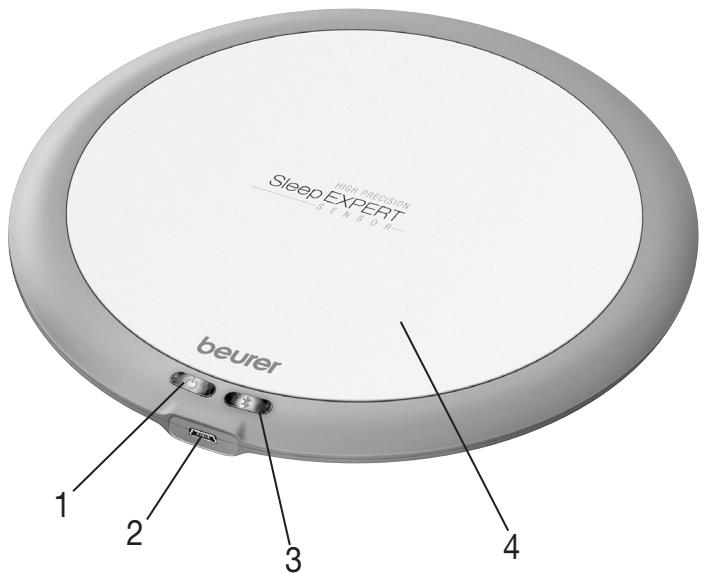
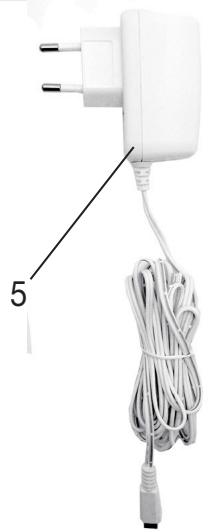
| 1 Function light (green) | 4 Sensor plate |
| 2 Connection for mains part plug | 5 Mains part plug |
| 3 Bluetooth function light (blue) |
7. First steps
To set up the sleep sensor, proceed as follows:
- Ensure that your smartphone is connected to the Internet.
- Download the beurer SleepExpert app in the Apple App Store (iOS) or Google Play Store (Android). The sleep sensor can only be operated in conjunction with the beurer SleepExpert app.
Note
Depending on the settings for your smartphone, additional charges may be incurred for connecting to the Internet or transferring data.
3 Activate Bluetooth® on your smartphone.
4. Open the beurer SleepExpert app and register yourself (you only need to do this once).
5.Once registration is complete, the guide for setting up the SE 80 is launched in the app. After this the tutorial starts, which explains the displays and functions in the app and how to start recording your sleep. Follow the step-by-step instructions in the app:
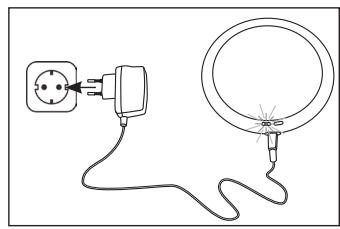
6. Connect the mains part plug to the sleep sensor.
7.Insert the other end of the mains part plug into a suitable socket. A green function light on the sleep sensor begins to light up.
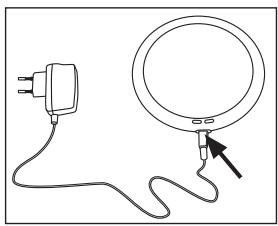
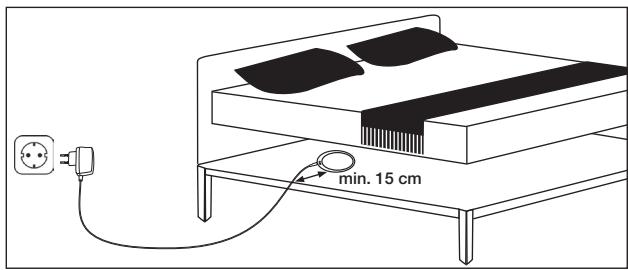
- Position the sleep sensor beneath your mattress at the shoulder position. There should be a gap of at least 15cm between the sleep sensor and the edge of the bed. Ensure that the "beurer" logo on the sleep sensor is facing upwards. Arrange the cable of the mains part plug so that no-one will trip over it. Position the sleep sensor such that the connection for the mains part plug is facing the socket.
Note
If two people are sleeping in the bed, separate sleep recordings can be generated using two SE 80 devices. However, each SE 80 must be connected to a separate smartphone. It is not possible to connect two SE 80 devices to one smartphone.
It is also possible to use the SE 80 with an electric underblanket. However, the SE 80 and the electric underblanket should not be in direct contact with one another. You should position the SE 80 underneath the mattress (as described above) and the electric underblanket on top of the mattress.
8. App features
8.1 Sleep statistics
Various sleep statistics are logged for every sleep recording.
The app shows:
the actual duration of your sleep,
- how long you were in each sleep phase (light sleep, deep sleep, REM sleep, awake),
- your breathing rate/heart rate,
- the length of time it took you to fall asleep, how many times you woke up and for how long, and the total time spent in bed,
- personalised sleeping tips tailored to your sleep,
- the Sleep Score. To generate this, the app uses the recorded values to calculate an index (0 to 100), which informs you of the quality of your sleep each night. The higher the Sleep Score, the better you have slept.
8.2 Diary
Before recording your sleep, you can enter in the diary whether you drunk alcoholic or caffeinated drinks or exercised before going to bed.
Later on, this allows you to determine the effect of these actions on your sleep.
8.3 Fresh Wake
The settings of the beurer SleepExpert app allow you to configure a Fresh Wake. The Fresh Wake is a wake-up function with sleep phase recognition. As a result, during the configured wake-up period the sleep sensor ensures that you are not woken up if you are in the deep sleep phase. This ensures that you are woken up gently and make a bright start to the day.
Note
If you are not in the light sleep phase during the configured wake-up period, the alarm will sound at the last possible moment. In order to use the Fresh Wake function, an active internet connection is required.
Note for users of Apple devices: In order to use the Fresh Wake function, please enable the notifications for the beurer SleepExpert in the device settings.
9. Cleaning and storage
- Protect the device from knocks, damp, dust, chemicals, drastic changes in temperature, electromagnetic fields and nearby sources of heat (ovens, heaters).
- Clean the device with a soft, dry cloth. Do not use any abrasive cleaning products.
- Store the device in a dry, clean place, protected against dust and at a temperature of 5 - 40^
10. Disposal
For environmental reasons, do not dispose of the device in the household waste at the end of its useful life.
Dispos of the unit at a suitable local collection or recycling point. Dispos of the device in accordance with EC Directive - WEEE (Waste Electrical and Electronic Equipment).
If you have any questions, please contact the local authorities responsible for waste disposal.
11. Technical data
| Dimensions | Ø 170x10 mm |
| Weight (sensor with mains part plug) | 234 g |
| Connection | Micro USB connection |
| Mains part plug voltage supply | Input: 100-240 V~, 50-60 Hz, 0.3 A Output: 5 V ---, 1 A |
| Mains part plug protection class | □ double-protected |
| Material | Polycarbonate |
| Permitted user weight | 300 kg |
| Data transfer | Bluetooth® Smart (low energy) |
| Permissible operating conditions/storage conditions | +5°C to +40°C, 15-85% relative humidity (non-condensing), 700-1060 hPa ambient pressure |
| Permissible transport conditions | -40°C to +70°C, 15-85% relative humidity (non-condensing), 700-1060 hPa ambient pressure |
We hereby guarantee that this product complies with the European R&TTE Directive 1999/5/EC. Please contact the specified service address to obtain further information, such as the CE Declaration of Conformity.
FRANÇAIS

Chere clientele, cher client,
TapaHTnHa He paCnPoCTpaHЯETcA:
-
Ha cnyuanyuep6a, BbI3BaHHOHe He npabJbHbIM NcNoJb3OBaHnEM
-
Ha 6bIcTpOn3HaUINBaIOUJIeSCaTn (ceTeBOJ aIaNTPeP)
-
Ha DepekeTbI, O KOtOpbIX NOKyPnATEJIb 3HaJI B MOMENT NOKyPIKIN
-
Na cnlyu an co6CTbeHHo BnHbI nOKyNaTeJIa.
ToBAP noJIeKHT deKlaproBaHIO: daTnIK cHa, TC No RU DI- DE. AY 37.B.17074., cPOK DeIcTBnI C 19.10.2015 no 18.10.2018 rr.
Cpok 3KcIpyataunn 13JeJna: Mm5 Jiet
HnPma-n3rTOBtIeB:BoIpepΓm6x,CoΦJIINHrepUtpacce 218
89077-улм, Германя