
WL 70 - Light alarm clock BEURER - Free user manual and instructions
Find the device manual for free WL 70 BEURER in PDF.

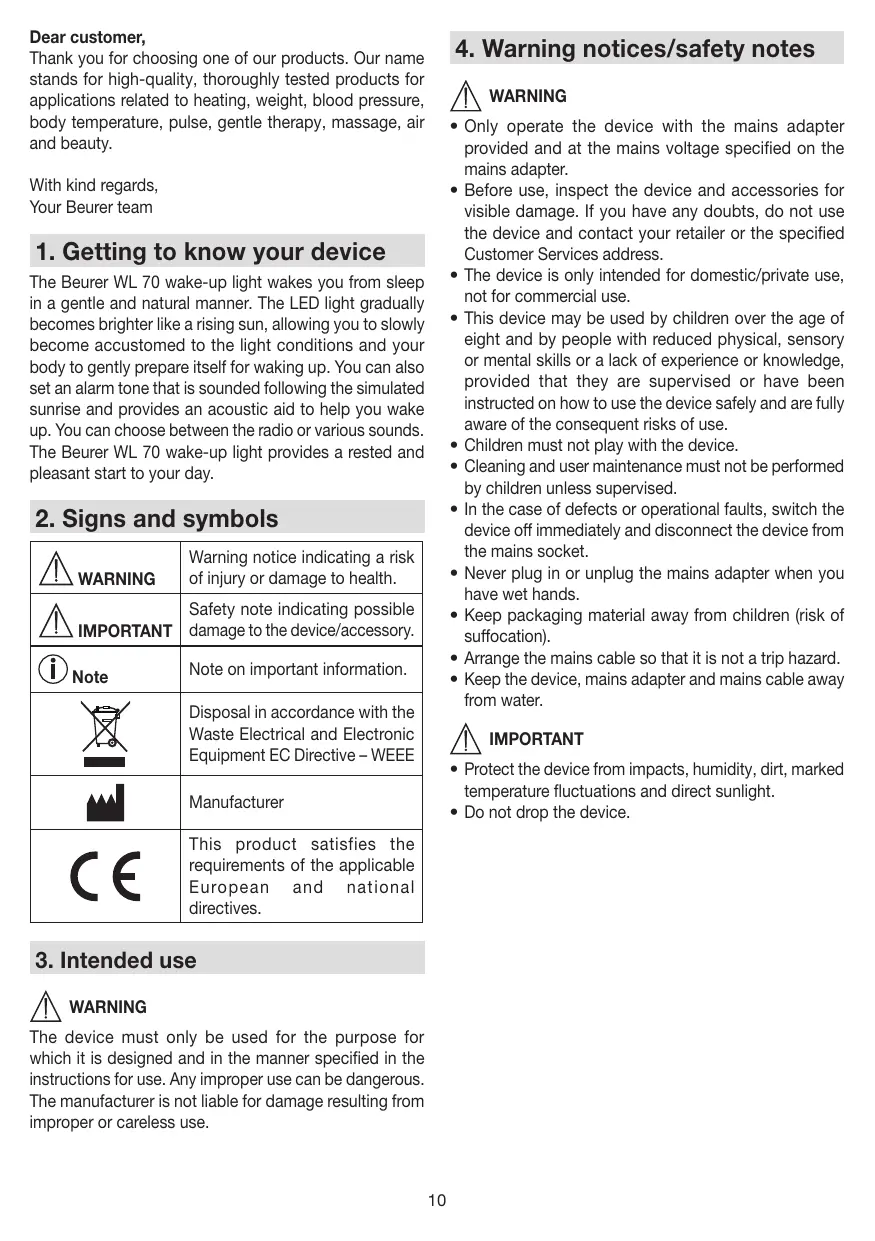


| Product type | Light alarm clock |
| Brand | BEURER |
| Model | WL 70 |
| Power supply | AC mains adapter 110-240 V, 50/60 Hz, output 9 V DC / 1.5 A |
| Light technology | LED (white >50,000 h, colored >20,000 h) |
| Max light intensity | Approx 2,500 lux (at 15 cm) |
| Intensity levels | 20 levels |
| Sunrise function | Yes, adjustable duration (2, 5, 10, 15, 20, 30, 45, 60 min) |
| Sunset function | Yes, adjustable duration (2, 5, 10, 15, 20, 30, 45, 60 min) |
| Alarm | 3 independent alarms, beep, 4 melodies, radio |
| Snooze | Yes, adjustable duration (1, 2, 5, 10, 20, 30 min) |
| Radio | FM 87.5-108 MHz, 10 presets |
| AUX input | 3.5 mm jack socket |
| Speaker | 2 watts |
| Display | Backlit LCD, adjustable brightness (OFF, 1, 2, 3) |
| Night light function | Yes, reading lamp |
| Night function (Sleep Timer) | Yes, automatic radio shut-off (2-60 min) |
| Key beep | On/Off |
| Time format | 12h/24h |
| Backup battery | 15 minutes in case of power failure |
| Cleaning | Dry cloth, do not use abrasive cleaners, do not immerse |
| Safety | Use only with supplied adapter, do not expose to water, keep out of reach of children (packaging) |
| General information | Manufactured by Beurer, Germany. Subject to changes. |
Frequently Asked Questions - WL 70 BEURER
User questions about WL 70 BEURER
0 question about this device. Answer the ones you know or ask your own.
Ask a new question about this device
Download the instructions for your Light alarm clock in PDF format for free! Find your manual WL 70 - BEURER and take your electronic device back in hand. On this page are published all the documents necessary for the use of your device. WL 70 by BEURER.
USER MANUAL WL 70 BEURER
Instructions for use. 9
F Lumière de réveil
Mode d'emploi 15
Luz para despertar
Read these instructions for use carefully and keep them for later use, be sure to make them accessible to other users and observe the information they contain.
Table of contents
- Getting to know your device 10
- Signs and symbols 10
- Intended use 10
- Warning notices/safety notes 10
- Device description 11
- Initial use 11
- Basic settings 11
7.1 Setting the time 11
7.2 Setting the alarm properties 11
7.3 Setting the display brightness 12
7.4 Setting the snooze duration 12
7.5 Switching the button tone on/off 12
- Device functions 12
8.1 Setting the alarm 12
8.1.1 Switching the alarm on (ON) 12
8.1.2 Setting an alarm for each day (DAY) 12
8.1.3 Permanently deactivating the alarm (OFF) 13
8.2 Switching off the alarm 13
8.2.1 During sunrise 13
8.2.2 Snooze mode (Snoopze) for the alarm 13
8.2.3 Switching off the alarm when the alarm tone sounds 13
8.3 AUX mode 13
8.4 Radio mode 13
8.5 Good night function (radio sleep timer) 13
8.6 Light functions 13
8.6.1 Reading lamp 13
8.6.2 Sunset function 13
8.7 Resetting the device to factory settings 14
- Cleaning and storage 14
- Disposal 14
- Technical data 14
Included in delivery
- Wake-up light with cable antenna
- Mains adapter
AUX cable - Instructions for use
Dear customer,
Thank you for choosing one of our products. Our name stands for high-quality, thoroughly tested products for applications related to heating, weight, blood pressure, body temperature, pulse, gentle therapy, massage, air and beauty.
With kind regards,
Your Beurer team
1. Getting to know your device
The Beurer WL 70 wake-up light wakes you from sleep in a gentle and natural manner. The LED light gradually becomes brighter like a rising sun, allowing you to slowly become accustomed to the light conditions and your body to gently prepare itself for waking up. You can also set an alarm tone that is sounded following the simulated sunrise and provides an acoustic aid to help you wake up. You can choose between the radio or various sounds. The Beurer WL 70 wake-up light provides a rested and pleasant start to your day.
2. Signs and symbols
| WARNING | Warning notice indicating a risk of injury or damage to health. |
| IMPORTANT | Safety note indicating possible damage to the device/accessory. |
| Note | Note on important information. |
| Disposal in accordance with the Waste Electrical and Electronic Equipment EC Directive – WEEE | |
| Manufacturer | |
| CE | This product satisfies the requirements of the applicable European and national directives. |
3. Intended use

WARNING
The device must only be used for the purpose for which it is designed and in the manner specified in the instructions for use. Any improper use can be dangerous. The manufacturer is not liable for damage resulting from improper or careless use.
4. Warning notices/safety notes

WARNING
- Only operate the device with the mains adapter provided and at the mains voltage specified on the mains adapter.
- Before use, inspect the device and accessories for visible damage. If you have any doubts, do not use the device and contact your retailer or the specified Customer Services address.
- The device is only intended for domestic/private use, not for commercial use.
- This device may be used by children over the age of eight and by people with reduced physical, sensory or mental skills or a lack of experience or knowledge, provided that they are supervised or have been instructed on how to use the device safely and are fully aware of the consequent risks of use.
Children must not play with the device. - Cleaning and user maintenance must not be performed by children unless supervised.
- In the case of defects or operational faults, switch the device off immediately and disconnect the device from the mains socket.
- Never plug in or unplug the mains adapter when you have wet hands.
- Keep packaging material away from children (risk of suffocation).
- Arrange the mains cable so that it is not a trip hazard.
- Keep the device, mains adapter and mains cable away from water.

IMPORTANT
- Protect the device from impacts, humidity, dirt, marked temperature fluctuations and direct sunlight.
- Do not drop the device.
5. Device description
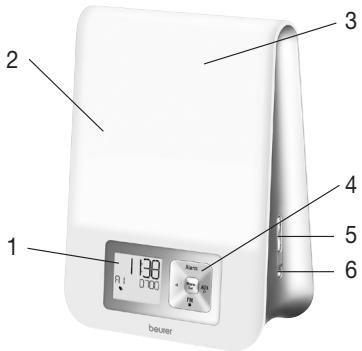
| 1 Display | 5 +/- buttons |
| 2 Light area | 6 Light button |
| 3 Snooze function (vibration of the device) | |
| 4 Keypad |
6. Initial use
- Remove the packaging material.
- Check that all parts listed are present.
- Check the device, mains adapter and AUX cable for damage.
- Place the device on a firm, even surface.
- Insert the mains adapter connector into the mains adapter socket on the rear of the device.
- Insert the mains adapter into a suitable socket.
- The time is shown on the device display.
- Route the cable antenna of the device to the rear.
7. Basic settings
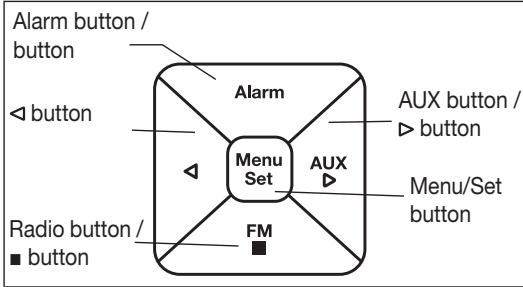
In the basic settings, you can set the time (TIME), the alarm properties for the set alarm times (RLRR1, RLRR2, RLRR3), the display brightness (DISPLAY), the snooze duration (SNOGZE) and the button tone (BEEP) in the order stated here.
7.1 Setting the time
- When the device is switched on, press the Menu/Set button. "TIFIE" flashes in the display. Press the Menu/Set button again.
- The hour mode "24 H" flashes in the display. Set hour mode using the / buttons (24-hour mode or 12-hour mode). Confirm using the Menu/Set button.
- The hour display flashes in the display. Set the hours using the / buttons. Confirm using the Menu/Set button.
- The minute display flashes in the display. Set the minutes using the / buttons. Confirm using the Menu/Set button.
- The weekday display flashes in the display. Set the day of the week using the / buttons. Confirm using the Menu/Set button.
Note
MON = Monday, TUE = Tuesday, WED = Wednesday, THU = Thursday, FRI = Friday, SAT = Saturday, SUN = Sunday.
7.2 Setting the alarm properties
You can choose to wake up with one of the 4 wake-up melodies, an alarm tone or the radio.
For the alarm times that have been set (see section 8.1), you can configure the following alarm properties: alarm tone, volume, sunrise, duration of sunrise, brightness of sunrise.
To configure the alarm properties, proceed as follows:
- When the device is switched on, press the Menu/Set button. "TIFIE" flashes in the display.
- Use the / buttons to select the desired alarm storage location (RLAR1, RLAR2 or RLAR3) for which you wish to configure the functions. Confirm using the Menu/Set button.
-
The currently set alarm tone (e.g. BUZZ) flashes. Use the / buttons to select the desired alarm tone. Confirm using the Menu/Set button.
-
The alarm volume (1/0) flashes. Use the / buttons to set the desired volume (1 to 1). Confirm using the Menu/Set button.
- The sunrise function flashes (SUNRISE). Use the / buttons to switch the sunrise function on (ON) or off (OFF). Confirm using the Menu/Set button.

Note
You can also choose to be woken up by a sunrise function in addition to the alarm tone. The sunrise function is a simulated sunrise. In the process, the LED light slowly turns brighter prior to the actual alarm time that is set.
- If the sunrise function is switched on, the duration of the sunrise flashes (10 min). Use the / buttons to select the duration of the sunrise prior to the alarm time (1, 2, 5, 10, 20 or 30 minutes). Confirm using the Menu/Set button.
- The brightness of the sunrise flashes (20 L) in the display. Use the / buttons to select the desired brightness of the sunrise at the alarm time (5, 10, 15 or 20). Confirm using the Menu/Set button. If you are woken up by light relatively quickly, then we recommend reducing the brightness.
7.3 Setting the display brightness
- When the device is switched on, press the Menu/Set button. "TIFIE" flashes in the display.
- Use the / buttons to select DISPLR5. Confirm using the Menu/Set button.
- The current display brightness flashes (3 DISPLAY). Use the / buttons to select the desired brightness (OFF, 1, 2, or 3). Confirm using the Menu/Set button.

Note
Once the setting is made, it takes approx. 10 seconds for the currently configured display brightness to appear. This is because the display is automatically illuminated at the highest setting for 10 seconds each time a button is pressed (including the snooze function).
7.4 Setting the snooze duration
-
When the device is switched on, press the Menu/Set button. "TIFIE" flashes in the display.
-
Use the / buttons to select SNOOZE. Confirm using the Menu/Set button.
- The snooze duration flashes (5 MIN SNOOZE). Use the / buttons to select the desired snooze duration (1, 2, 5, 10, 20 or 30 minutes). Confirm using the Menu/Set button.
7.5 Switching the button tone on/off
- When the device is switched on, press the Menu/Set button. "TIFIE" flashes in the display.
- Use the / buttons to select FEEDBRICK. Confirm using the Menu/Set button.
- Use the / buttons to switch the button tone on (ON) or off (OFF). Confirm using the Menu/Set button.
8. Device functions
8.1 Setting the alarm
The device features three alarm memory spaces that can be configured individually.
8.1.1 Switching the alarm on (ON)
- When the device is switched on, keep pressing the ALARM button until the desired alarm memory space appears in the display (R1, R2 or R3).
- Press the buttons until ON appears in the display.
- Press the Menu/Set button. The hour display of the alarm flashes in the display. Use the / buttons to set the hour and confirm using the Menu/Set button.
- The minute display of the alarm flashes in the display. Use the / buttons to set the minute and confirm using the Menu/Set button.
5.END is briefly shown in the display. The set alarm is now activated and appears in the display.
8.1.2 Setting an alarm for each day (BAY)
For each alarm that has been set, you can use the DRRY function to specify the days of the week on which the alarm should sound.
- When the device is switched on, keep pressing the ALARM button until the desired alarm memory space appears in the display (R1, R2 or R3).
- Press the buttons until is shown in the display.
- Press the Menu/Set button. ON (Monday) and OFF appear in the display.
4.Use the / buttons to activate (GN) or deactivate (OFF) the alarm for Monday. Confirm using the Menu/Set button. - TRUE (Tuesday) appears in the display. Make the settings for the other days of the week in the same way as for
Monday, as described in the previous point. Then set the alarm time as described in section 8.1.1.
8.1.3 Permanently deactivating the alarm (OFF)
To permanently deactivate a set alarm, proceed as follows:
- When the device is switched on, keep pressing the ALARM button until the desired alarm memory space appears in the display (R1, R2 or R3).
- Press the / buttons until OFF appears in the display.
- Confirm using the Menu/Set button.
4.END appears in the display. The alarm is now permanently deactivated.
8.2 Switching off the alarm
8.2.1 During sunrise
When the sunrise function is switched on, the device slowly begins to light up prior to the set alarm time and "SUNRISE" is shown in the display. You can switch off this sunrise by activating the snooze function. However, the alarm tone will still sound at the set alarm time.
You can switch off the sunrise and alarm by pressing any button.
8.2.2 Snooze mode (Snoopze) for the alarm
The device features a snooze mode (Snoopze).
If the alarm sounds and you press the Snooze function (by tapping the light area), the alarm will sound again once the set snooze duration has elapsed (see section 7.4).
8.2.3 Switching off the alarm when the alarm tone sounds
When the alarm sounds, press any button apart from Snooze. The alarm is now switched off and will only sound again at the set alarm time.
8.3 AUX mode
You can connect an external audio source (e.g. MP3 player, smartphone or CD player) to the wake-up light via the AUX input.
- Connect the supplied AUX cable to an audio source.
- Insert the other end of the AUX cable into the AUX input on the rear of the device.
- Press the AUX button on the device. The external audio source is now connected to the wake-up light.
- Use the + / - buttons on the side to adjust the volume.
- Press the button to exit AUX mode again.
- Disconnect the AUX cable after use.
8.4 Radio mode
You can also use the device to listen to the radio. If you wish to use radio mode, proceed as follows:
- When the device is switched on, press the FM button. The current station frequency and programme number (e.g. P1) appear in the display.
- Use the / buttons to select the desired programme number (e.g. P1 or P2) under which a station is to be saved.
- Press and hold the button to start the automatic station search. To save a station under the selected programme number (e.g. P1), PRESS THE Menu/Set button.
- To switch between the saved stations, press the / buttons.
8.5 Good night function (radio sleep timer)
If radio mode is switched on, you can also enable a good night function.
You can use the good night function to set the number of minutes after which the radio should automatically switch off.
If you wish to use the good night function, proceed as follows:
- When the device is switched on, press the FM button to access radio mode.
- Press the Menu/Set button; 2 FIN SLEEP appears in the display.
3.Use the Menu/Set button to set the desired time after which the radio should automatically switch off (2, 5, 10, 15, 20, 30, 45 or 60 minutes).Wait 5 seconds to confirm the selection. A small icon will subsequently appear in the display.
8.6 Light functions
8.6.1 Reading lamp
- When the device is switched on, press the Light button.
- The light turns on and 20 Light appears in the display. Use the +/- buttons to set the desired brightness for the light (can be selected between 1-20).
- To switch the light off again, keep pressing the Light button until "LIGHT OFF" appears in the display.
8.6.2 Sunset function
The device can also be used to simulate a sunset. In the process, the light slowly turns darker after a set duration.
To simulate a sunset with the device, proceed as follows:
-
When the device is switched on, press the Light button on the side.
-
The light turns on and 20 Light appears in the display; immediately afterwards, use the +/- buttons on the side to set the desired brightness of the light (can be selected between 1-20). Use the Light button to confirm. 10 sunset appears in the display.
3.Use the + / - buttons on the side to select the desired duration of the sunset (2, 5, 10, 15, 20, 30, 45 or 60 minutes), then wait for 5 seconds. The sunset function is then activated automatically and a small icon appears in the display. The light will now go out automatically once the configured duration of the sunset has elapsed.

Note
Sunset with music
The device can also be used to simulate a sunset while you listen to music. In the process, the light slowly turns darker after a set duration. The music is switched off automatically after the set duration has elapsed.
To start a sunset with music on the device, proceed as follows:
- When the device is switched on, select the desired music source (radio (FM) or AUX).
2.Perform the subsequent steps as in "8.7.2 Sunset function".
8.7 Resetting the device to factory settings
If you wish to reset all settings on the wake-up light to the factory settings, proceed as follows:
- Remove the mains adapter of the wake-up light from the socket.
- Press and hold both the Menu/Set button and the Light button on the device, which is now switched off, and reinsert the mains adapter of the wake-up light into the socket. Keep pressing the buttons about 10 sec..
- The device has now been reset to the factory settings.
9. Cleaning and storage
- Clean the device with a dry cloth.
- Do not use any abrasive cleaning products.
- Ensure that no water enters the device. If this should happen, reuse the device only when it has fully dried out.
- Never immerse the device or mains part plug in water or other liquids.
- Protect the device from impacts, humidity, dust, chemicals, marked temperature fluctuations and nearby sources of heat (ovens, heaters).
10. Disposal
For environmental reasons, do not dispose of the device in the household waste at the end of its useful life.
Dispose of the device at a suitable local collection or recycling point. Observe the local regulations for material disposal. Dispose of the device in accordance with EC Directive - WEEE (Waste

Electrical and Electronic Equipment). If you have any questions, please contact the local authorities responsible for waste disposal.
11. Technical data
| Illuminance | Max. approx. 2500 lux (at distance of 15 cm) |
| Light | LED technology (white LED service life: >50,000 hours; coloured LED: >20,000 hours) |
| Light levels | 20 light levels with simulation of dawn |
| Wake-up light function | Off, 2, 5, 10, 15, 20, 30, 45, 60 minutes prior to alarm |
| Sunrise function | Maximum light intensity up to alarm: Light level 5, 10, 15, 20 |
| Snooze duration | 1, 2, 5, 10, 20, 30 minutes |
| Sunset function | 2, 5, 10, 15, 20, 30, 45, 60 minutes |
| Good night function (sleep radio) | 2, 5, 10, 15, 20, 30, 45, 60 minutes |
| LCD backlighting | Off, 1, 2, 3 |
| Time | Toggle 12h/24h mode, 15 minute buffer in event of power failure |
| Alarm | 3 alarm times (Off, On, Day) Alarm tone, 4 sounds, radio |
| Button tone | Off, On |
| AUX | Line-in, 3.5 mm jack plug |
| Radio | Frequency range VHF 87.5-108 MHz, 10 memory spaces |
| Speaker | 2 Watt |
| Mains part voltage supply | Input: 110-240 V, AC, 50/60 Hz, 0.5 A Output: 9 V, DC, 1500 mA |
| Mains part protection class | Protection class II |
Subject to technical changes.

Chere clientele, cher client,
9.Nettoyage/stockage
Hnka, rPOMKOCTb, BOCXoD COJHua, IINTeJIbHOCTb BOCXOda COJHua, JRPKoCTb BOCXoDa COJHua.
C nOMOuIyHKnIN BRY JnKakdoRHO HacTPOEHNO CnHnla 6yDnIbNkA MoXHO yCTaHOBnTB DnH HeJeN, NO KOTOpBm OH dONKeH 3ByaTb.
1.HaKImaTe KHOIpKy ALARM Ha BkJIOueHHOM npIbOpE do Tex nop, noka Ha dinCnIee He OTo6pa3ntc HUxHna Jyehka naMaTn 6yDnJIbHnKa (R1, R2 nn R3).
2.HaKIMaIe KhoIpnK 1/1o TeX np, noka Ha dncnlee He noBntc DRY.
3.HaKmTe KhoNky Menu/Set. Ha DnCJIe noRbITcR HON (noHeJeBnK) n OFF.
4.C NOMOUbHO KHONOK /BbI MOXeTe BKJIIOuHTb (G) INJN OTKJIIOuHTb (GFF) CnIHAN 6yDINbHNK Ha NOHeJElbHNK. IoITBePdInTe BbIOp HxKaTneM KHONIK Menu/Set.
5.Ha niscnlee noarntcnaikatop TUE (BtopnHK). Hactpoite octalnbte dHn HeJeIe TaK, KaK onncaho B npdebluyem nyHkTe. Iocne 3TOrO hactpoite Bpema CpaabaBbAHna 6yDnJIbNka, KaK onncaHO B rnaBe 8.1.1.
8.1.3 POnHoe OTKIIOHeHne FyHKU6bYdNJIbHNka (FF) YTO6bl NOINHOCTbO IO TCKIIOHTb FyHKUIO 6bYdNJbHNka, BbINOHNHT CNeDyUOUE DeIcTBNA.
1.HaKImaTe KhoIpy ALARM Ha BkJIOueHHOM npi6ope do Tex nop, noka Ha dinCnIee He OTo6pa3ntc HUxHna JyEeKa naMaTn 6yDnJIbHnKa (R1, R2 nn R3).
2. HaximaiTe KhoIKN 1/1o Tex nop, noka Ha dinCJIe He noBntcFF.
3.ПоТВерДиTe Bыбор НжаТиЕМ KНОПКI Menu/Set.
4.Ha niscnnee noBntcE EN.Функця 6ydnbHnka noJIHOCTbIO OTKHNoyeHa.
8.2 BbIKJIouHeHne 6yDnJIbHnKa
8.2.1 Bo Bpemra Bocxoanda coJIHua
ПривКлючений Функци "BOCXOD coNHa"do yctahOBJIeHOro BpeMeHn cpa6aTbIbAHn 6ydnlbHnka rapKoCTb CBeueHnHaHuHaet nOcTeNeHNO yBEnuHbATbcra H Na DmCJIee noRbIeTcN HdNkAtop «SUNRISE».Вbl MoKeTe OTKJIOUHTb 3OT «BOxCOD coNHa"akTNBaUneiФyHKUIN KOPOTKOrO cHa Snooze.PriN 3tOM 3BykoBoi CnHrAn 6ydnlbHnKa BCE paBHO pa3dactcB hA3ha-eyHHoe Bpem.
BocxOJ COINua" N 3ByKOBOI CnHnAL MOXHO BbIKIOHTb HaxaTne IIO6o KNOpKn.
8.2.3 BbIKJIoueHHe 6yDnIbHnKa npn cpa6aTbIBaHHN 3ByKOBORO CIRHaHa
Ppi cpa6aTbIBAHIN 6yDnJIbHnIka HaxMnte IIObyIO KHOKNy, KpOme Snooze. ByDnJIbHnIK BbIKJIOHTcN IN cpa6Otae BHOBb TOJbKO B3aDaHHe BpeM.
8.3 Pekim AUX
BbMOxKeTe NIOcOeINHHT BHEUHN IcTOHk 3ByKa (HaNPIMep MP3-PIeep, cMaprTFOH nIi CD-PIeep) K CBeTOBOMy 6yDnJIbNHy Uepe3 BXoAUX.
1.Подключite ka6eь AUX, BXOДЯши B KOMПЛeКТ NOCTaBKN.
2.Дуroy koheц ka蜂蜜 AUX nodklouhTe K BXody AUX, paacnoolxehHomy Ha 3aDnei cTeHKe npu6opa.
3.HaXMMTe KhONKy AUX Ha npi6ope. Tepeb BHeUHIn NCTOuHnK 3Byka nOpcoeINHeN K CBETOBOMy BydunblHnky.
4. OTPeryIpyuTe rPOMKocTb C NOMOu6oKOBbIX KHOIOK +/-
5.YtobblbIITn3peKImAUX,HaKMnTe KhoNky.
6.OTcoeINHtE Ka6eJIb AUX nocIe mCnoJIb3OBAHnIa.
8.4 Pekim paio
C nomoubI npmbopa Bbl taKke moKte cnyuataPpaIO.
Tnncnolb3OBAHnpeKIma paNIO BblONHITe CneDyUoLue DeiCTBnI.
1.HaXmnte KhoNky FM Ha BkIIOHcHOM npn6ope. Ha nCpnee oTo6pa3ntcTc KeYuaar paAnOuactota HnHomep npOrpaMMbl (HanpImep P1).
2.C NOMOuBHO KHOJOK / BbIbepnTe HOMeH Heo6xoDmO npOrpAmMbI (HaNPmEp, P1 uIN P2), KOtOpoi 6yET pNcBOHeONpeJeHnHa paNocTaHnIa.
3.YtobHaayabATbABTOMaUeCKnNONCKpaIIOCTAHcN,HakMITEuYepKINBaIteHakAToiKHONKYD.YtobCoXpaHITb paIIOCTaHcNIOIoNDonpeJeHHeHIOIporpAMMO(HaPIMeP,P1),HakMITEKHOIKyMenu/Set.
4.Тоблпегкючысмжду coхраенhhblm радистаньим,надимаite KhoIGNky / 1
CoΦnIHrep ηTpaccce 218,
89077-улм, Германя
ΦιρMa-ιΜηρΟντερ:
OOBoupep,
109451 r. MockBa, yn.
IpeepBa 62, Kopn. 2, oΦnc 3
CepBnchbIy ceHTp:
109451 r. MockBa, yn.,
IpepeBa 62, kopn. 2
TeI(ΦaKc) 495-658 54 90,
bts-service@ctdz.ru
Data npodaxn
Ponncb npoabua
Ltammara3nHa
Poiinbcnokynataela
