
MOBY 100 - Air-conditioner PUR LINE - Free user manual and instructions
Find the device manual for free MOBY 100 PUR LINE in PDF.


User questions about MOBY 100 PUR LINE
0 question about this device. Answer the ones you know or ask your own.
Ask a new question about this device
Download the instructions for your Air-conditioner in PDF format for free! Find your manual MOBY 100 - PUR LINE and take your electronic device back in hand. On this page are published all the documents necessary for the use of your device. MOBY 100 by PUR LINE.
USER MANUAL MOBY 100 PUR LINE
Read and retain these instructions for future reference
SPECIFICATION
| Model no. | TC-1039R | TC-1239R |
| Cooling capacity | 10000 BTU/hr 2930 watts | 11500 BTU/hr 3370 watts |
| Power/Ampere consumption for cooling | 1050W/4.7A 2 | 1250W/5.6A |
| Air volume (max. speed) | 420m³/h | 480m³/h |
| Humidity removal capacity | 1.2 L/hr | 1.4 L/hr |
| Power supply | 220-240V~, 50Hz | |
| Compressor | rotary | |
| Refrigerant | R410A (Please refer to the rating label.) | |
| Fan speed | 3 | |
| Timer | 1 24 hours | |
| Working temperature | Cooling: 18 ~ 32°C Heating: 7 ~ 27°C | |
| Exhaust pipe | Ø 142 x 1500mm | |
| Net Weight | 33 kgs | 33.5 kgs |
| Dimension | 450 x 365 x 825 mm (WxDxH) | |
REMARK:
- Measuring condition for above is as per EN 14511: DB=27°C, WB=19°C *DB = temperature of dry bulb = room temperature, WB = temperature of wet bulb = relative humidity.
- Test condition for data in our rating label is as per safety regulation: EN 60335-2-40
- Current & Fuse : F2L250V or T2L250V
BEFORE USE
GENERAL SAFETY
- Do not exceed the recommended room size 50m^3 (typically 20m^2 floor area)
- Close doors and windows
- Keep curtains of blinds closed during the sunniest part of the day
- Keep filters clean
- Once room has reached the desired conditions, reduce temperature and ventilation settings
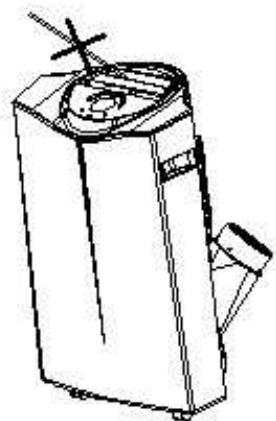
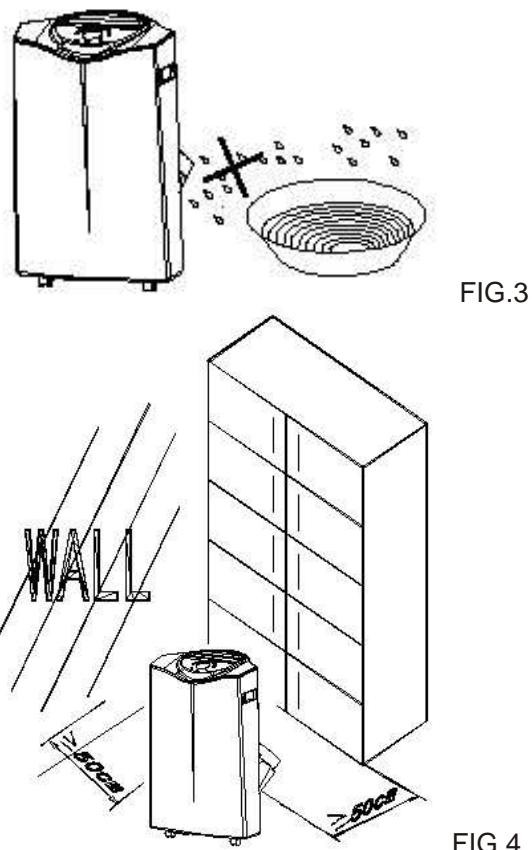
FIG. 2
FIG.3
PARTS
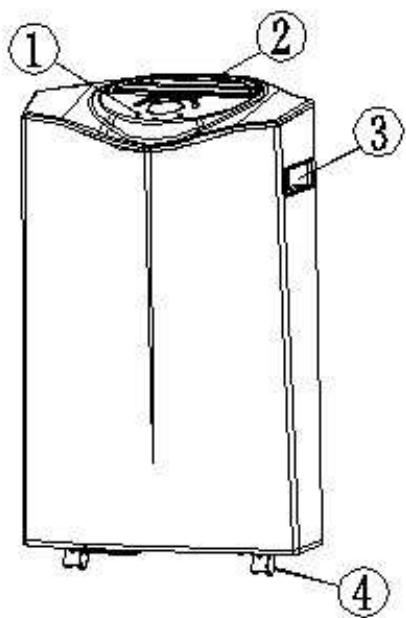
Front
- Control Panel
- Air outlet
- Carrying handle
- Caster
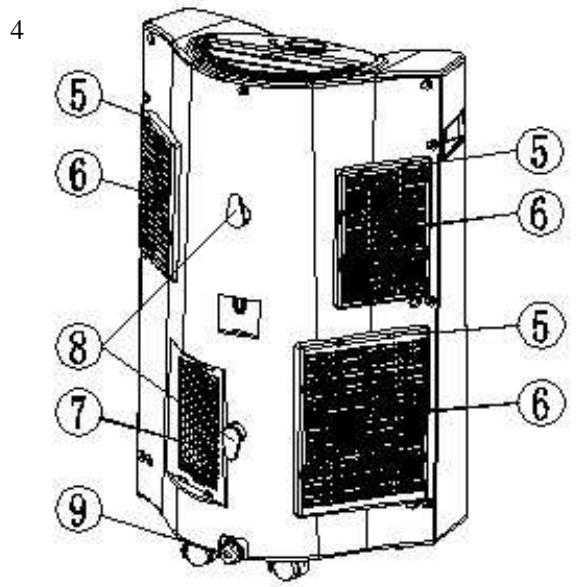
Back
- Air filter
- Air inlet
- Exhaust air outlet
- Cord storage
- Water stopper / drainage point
Accessories
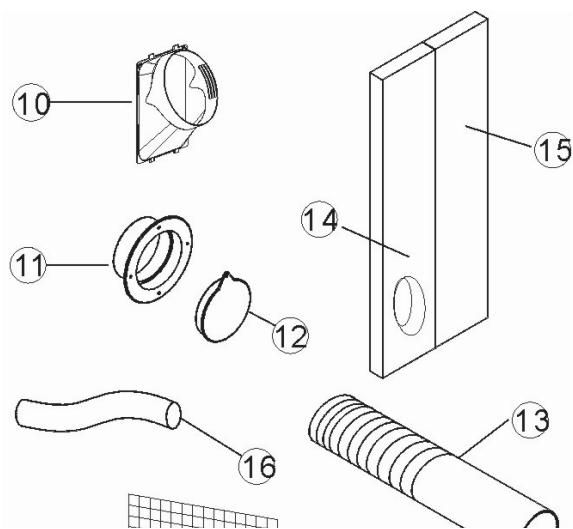
- Inward adaptor - for insertion over hose and connection with piece 1.
- Outward adaptor - for insertion over hose and into foam strip (or into hole in the wall/window).
- Round cap for filling the hole in wall/window.
- Exhaust hose.
- Foam strip - for filling the open window space and with hole for connection to exhaust hose.
- Foam strip - for filling the open window space
- Drain tube for continuous drainage
Installation of the exhaust pipe
The unit is a portable air conditioner that may be moved from room to room.
2. Using the foam strips
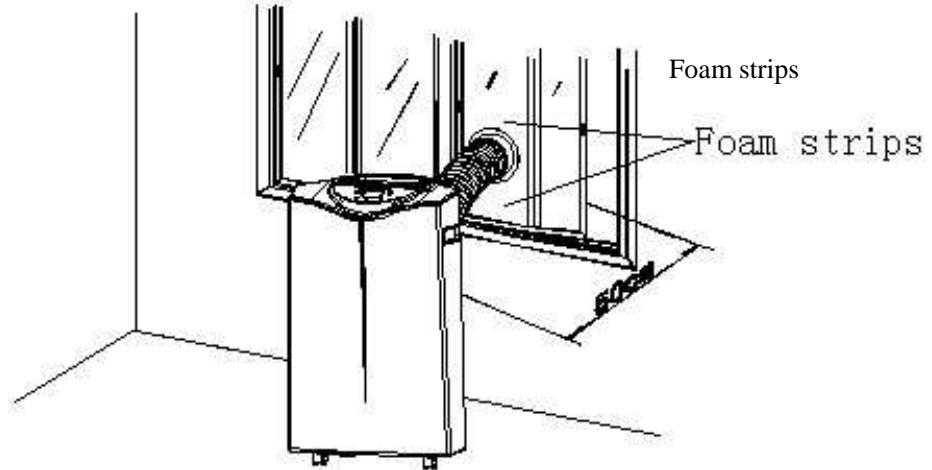
FIG.5
- Offer foam strips to the window gap and cut to size if necessary.
- Feed exhaust hose through the foam strip and insert strip into window gaps as shown and slide window across so that foam is held securely. This technique may also be used for sash windows. Note: Take care to maintain protection against intruders
3. Using the adaptor
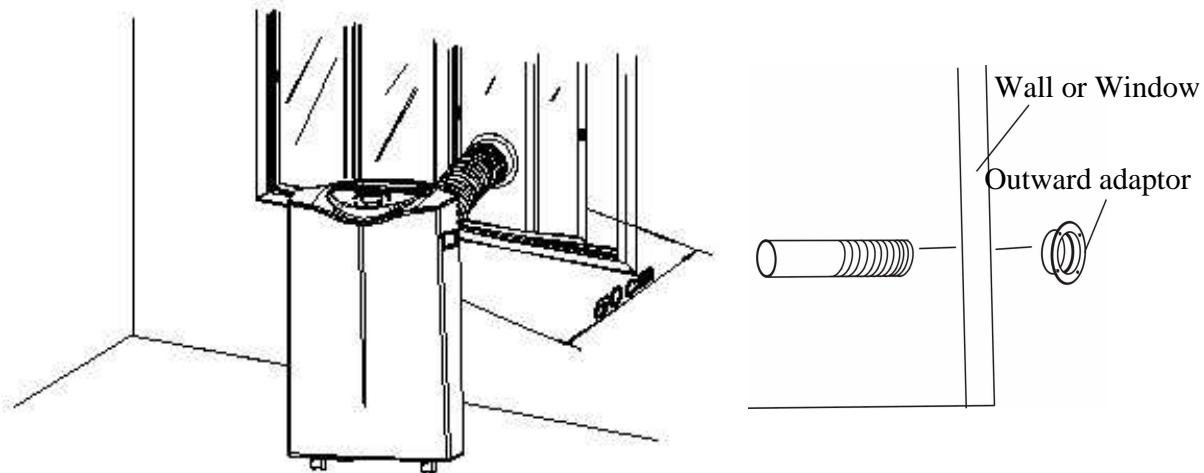
FIG.6
FIG.7
- Cut a 151mm diameter hole in the wall or window.
- Feed exhaust hose through the window or wall and attach the threaded adaptor from the outside as shown.
Mounting of the exhaust pipe when not in use, pin the hole with the cover provided
- Use only the hose provided and clip exhaust hose and unit adaptor to the back of the air conditioner
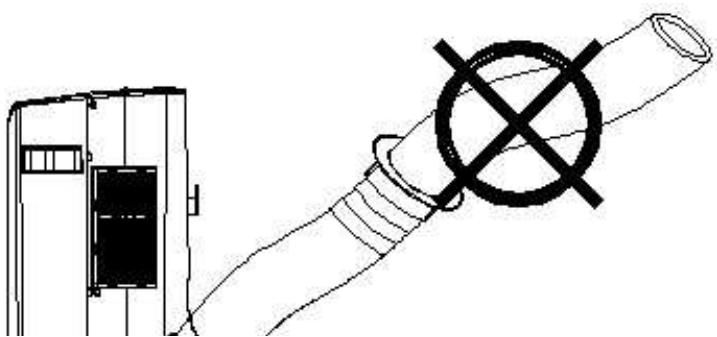
- Avoid kinks and bends in the exhaust hose as this will cause expelled moist air to build up causing the unit to overheat and shut down. Fig 8 & 9 show correct position
- The hose may be extended from 300mm to 1500mm but for maximum efficiency use the shortest length possible.
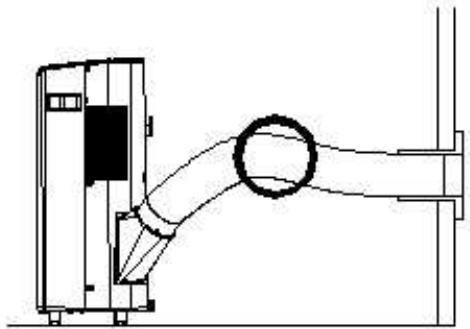
FIG.8
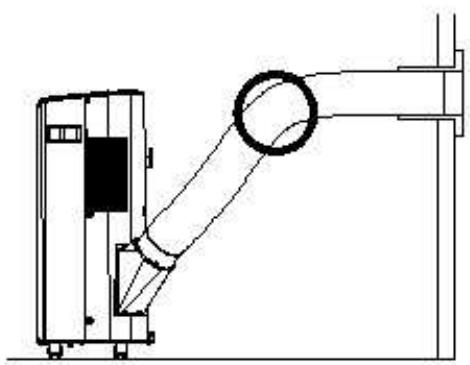
FIG.9
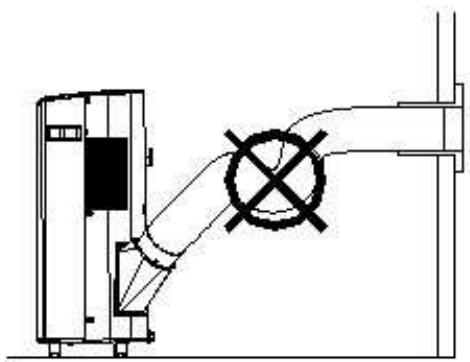
FIG.10
WARNING!
The length of the exhaust pipe is specially designed according to the specification of this product. Do not replace or prolong it with your own private hose as this could cause the unit to mal-function.
Installation of the carbon filter
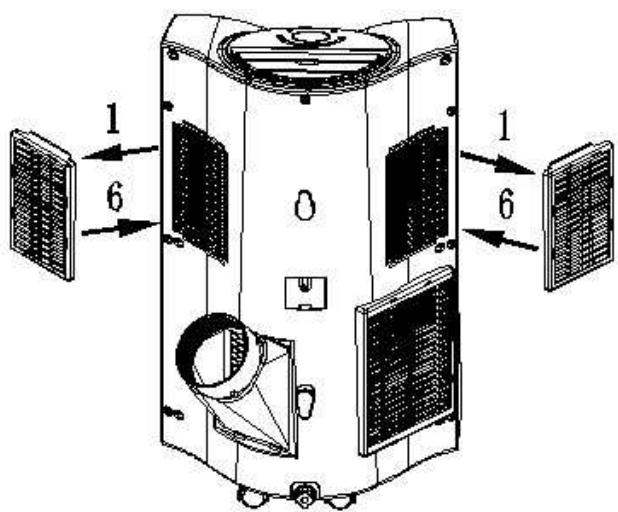
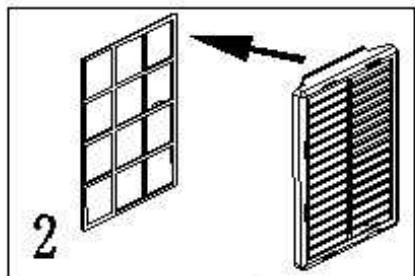
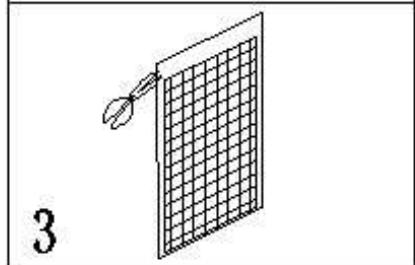
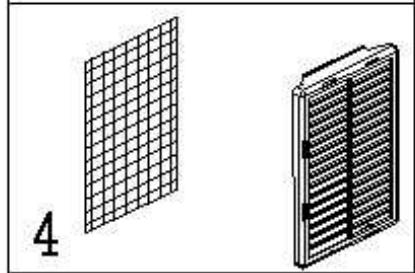
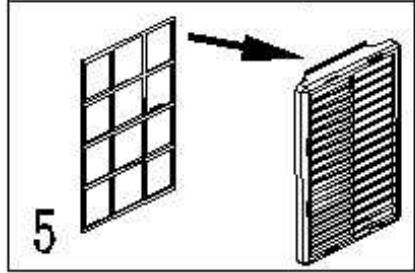
- Remove the filter frame from the unit.
- Separate the filter fixer from the filter frame.
- Remove the active carbon filter from its plastic bag.
- Insert the active carbon filter into the filter frame.
- Fix the filter by reassembling the fixer onto the filter frame.
- Re-fit the filter frame inside the unit.
Control panel
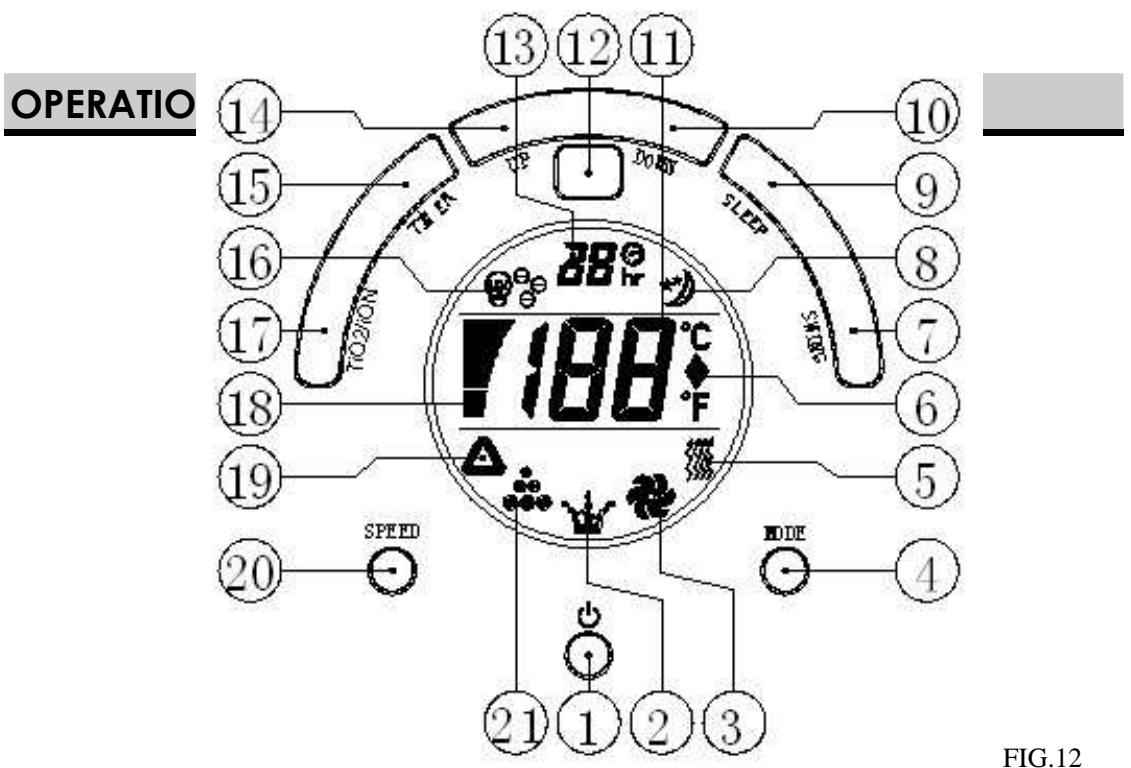
FIG.12
- ON/OFF (power) button
- Sign for dehumidification/water full
- Sign for fan (ventilation)
- Mode button
- Sign for heat function
- Sign for Centigrade or Fahrenheit (please refer to the real unit you purchased)
- Swing button
- Sign for sleep function
- Sleep function button
- "Temperature down" button
-
Room temperature display
-
Receiver for remote control
- Timer display
- "Temperature up" button
- Timer button
- Sign for TiO2/ionizer (only for the unit with TiO2/ionizer)
- TiO2/ionizer button (only for the unit with TiO2/ionizer function)
- Fan speed display
- Sign for automatic function
- Fan speed button
- Sign for cooling function
Turning ON/OFF
-
Press ON/OFF button, the unit will start automatically. If the ambient temperature is
-
higher than 23^ C , the unit will work in cooling model.
-
higher than 20^ C but below or equal to 23^ C , the unit will work in ventilation
-
Indicators of the functions in progress come on at the same time. *NOTE! The display window shows the ambient room temperature from 0^ to 50^
- To turn the unit off, press ON/OFF button again.
Setting mode/function
Press MODE button to select required working mode: automatic, cooling, fan, dehumidification or heating, (Heating is only available for heating & cooling models.) Sign of your selected mode comes on.
Setting temperature
- Press 'Temperature up' or 'Temperature down' button to regulate the temperature you desired.
- The display window will show the temperature you set as you press 'Temperature up' or 'Temperature down' button. Otherwise, it will always show the ambient temperature.
- The pre-setting temperature of this machine is: 24^ for cooling, 20^ for heating.
Setting ventilation speed
- Press SPEED button to choose the ventilation speed you need, high, medium or low. The sign of high, low or medium ventilation will light on at the same time.
- If the unit is in AUTO mode, it will choose the ventilation speed automatically according to the ambient temperature.
Setting timer
- Press TIMER button to set the operating hours you desired (1 to 24 hours, the sign of timer will light on). When the set time has been reached, the machine will turn off automatically. The LCD will show the hour(s) you set as you press TIMER button. If the timer button is not pressed, the unit will work continuously.
- By pressing the timer but without turning on the other functions, you can PRE-SET the time for the machine to work. For example, if you press the timer to '2', the unit will work automatically after 2 hours.
Sleep function
- In cooling mode, by pressing the SLEEP button, the set temperature will increase 1^ at the 1st hour, another 1^ at the second hour, then keeps at that temperature.
- In heat mode, by pressing the SLEEP button, the set temperature will descend 1^ at the 1st hour, another 1^ at the second hour, then keeps at that temperature.
- In sleep mode, the ventilation will keep at low speed. Re-press the SLEEP button, the setting temperature and ventilation speed will return to the pre-selected one.
- The unit will shut down automatically after the SLEEP function running for 12 hours.
- Please note, the sleep function is not available while the machine is working in ventilation, dehumidification or auto mode. Only available in Cooling or Heating mode.
6. When the machine is in Sleep function, the Fan Speed would turn to be LOW speed.
Swing function
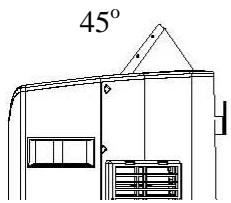
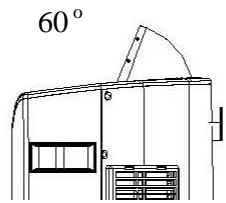
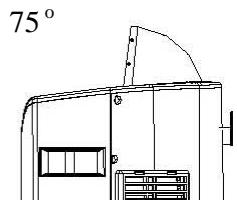
By pressing SWING button, the air vent will rise in 3 different angles: 45^ 60^ 75^
Every time when you turn on the machine, the air vent will rise to position 75^ first, then return to position 45^ automatically. For resetting the angle, the air vent will rise to 75^ first, too. The interval of each move is 4 sec.. As you turn off the air vent, the air vent will close.
Dehumidification function
In dehumidification mode, the temperature cannot be adjusted, the ventilation will fix at low speed.
TiO2 / Ionizer function
- This is only for the model with TiO2 or lonizer function, i.e. model no. with T or I. T stands for TiO2, I stands for lonizer. * TiO2 is a kind of photochemical catalysis.
- To start the TiO2 or lonizer button, please press TiO2/lonizer button. These 2 functions can clean the air, improve the air quality.
Self-diagnosis
This machine is equipped with self-diagnosis function. If something is wrong in the machine, the LCD will show the word “E1” or “E2”. As this time, please call your service centre.
All the above functions can also be performed with the supplied remote control.
This remote control requires 2 pcs AAA batteries to operate
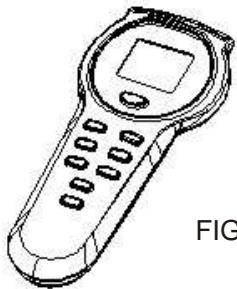
FIG.13
NOTICE!
- To prolong the compressor's life, after switch-off of the unit, please wait for 3 minutes (at least) before re-switch.
- The cooling system will switch off if the ambient temperature is lower than the set one. The ventilation, however, keeps working on the set level. If the ambient temperature rises above the selected level, the cooling will return to work.
DRAINAGE
During the process of cooling, some water will be extracted from the air into the unit. If the reservoir is full, both of the compressor and motor will stop. The "water full" sign will light on, also the machine will beep as reminder.
To make the cooling work again, please empty the water by one of the following ways:
Turn off the air conditioner and avoid moving it when full.
Position a container (a water tray for example) underneath the drain hole.
Remove the drain knob & rubber plug from the drain hole and allow the water to drain out.
When the container is almost full, replace the rubber plug in the drain hole and empty the water tray.
Repeat until the unit is emptied.
Replace the rubber plug and tighten the drain knob firmly.
Switch on the unit - the full water or compressor operating indicator should not be flashing.
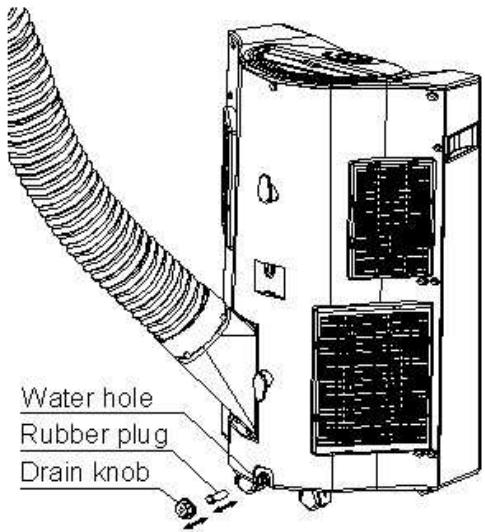
FIG.14
If you wish to operate the unit without the need to empty the water tank, please:
Remove the drain knob and rubber plug and retain for future use.
Connect the drain tube supplied to the water outlet as shown and locate the other end into a drain.
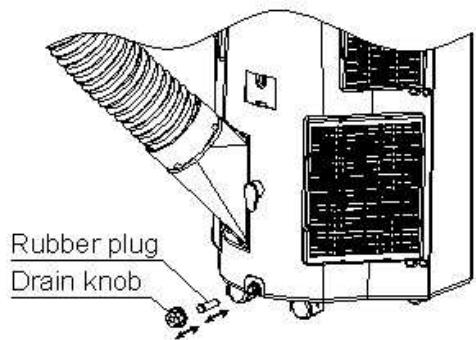
FIG.15
- The drain tube may be extended by adding an extension tube and using a suitable connector.
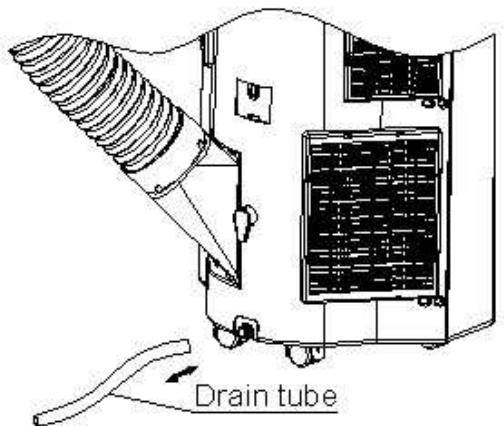
FIG.16
Please note
- The drain must be at or below the outlet level.
- Flashing comp / 'full water' indicator will not function in this mode of drainage.
- If you want to extend the water tube, you can connect it with another tube (OD: 18mm)
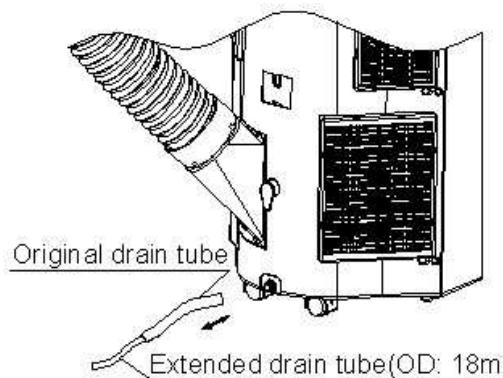
FIG.17
MAINTENANCE
Always unplug the air conditioner from the mains before cleaning.
To maximize the efficiency of the air conditioner clean regularly.
Cleaning the housing
Use a soft, damp cloth to wipe the body clean.
Never use aggressive chemicals, gasoline, detergents, chemically treated cloths, or other cleansing solutions. These all could possibly hurt the cabinet.
Cleaning the filter
Use a vacuum cleaner or tap the filter lightly to remove loose dust and dirt from the filters and then rinse thoroughly under running water (no hotter than 40^ ).
Dry thoroughly before replacing.
Notice! Never operate the unit without the filters.
End of season storage
-
Drain any water in the unit before completely operating the unit on ventilation only mode for a few hours, to thoroughly dry the inside.
-
Clean or change the filter
- Unplug and store the power cord as shown
- Replace in the original carton or cover for storage.
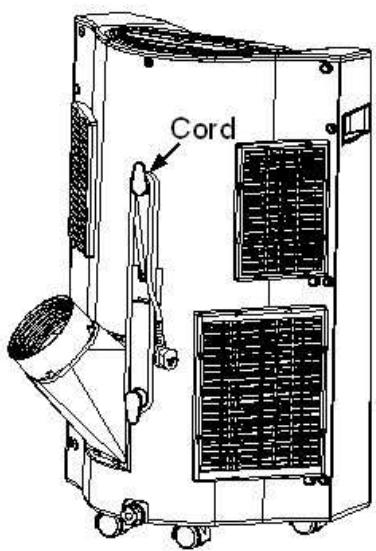
FIG.19
. FAULT CHECK LIST
The air conditioner does • Is the air conditioner plugged in?
Is there a power failure?
Is the comp / 'full water' indicator flashing?
Is the room temperature below the set temperature?
The machine seems to • Is there direct sunshine? do little (Please put down the curtain.)
- Are too many windows or doors open?
- Are there too many people in the room?
Is there something in the room producing lots of heat?
The machine seems to do nothing.
Is the air intake or output blocked up?
Is the room temperature below your selected temperature?
Too noisy Is the machine positioned unevenly so as to create vibration?
Is the floor underneath the machine uneven?
The compressor doesn't • Is so, it is possible the overheat protection of the compressor is on. Just wait for the temperature to drop.
Never try to repair or dismantle the unit yourself
PROBEER HET APPARAAT NOOIT ZELF TE REPAREREN OF TE DEMONTEREN.