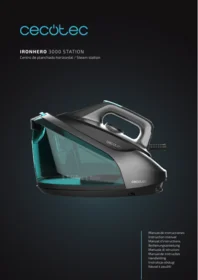
Ironhero 3000 Station - Iron CECOTEC - Free user manual and instructions
Find the device manual for free Ironhero 3000 Station CECOTEC in PDF.


User questions about Ironhero 3000 Station CECOTEC
0 question about this device. Answer the ones you know or ask your own.
Ask a new question about this device
Download the instructions for your Iron in PDF format for free! Find your manual Ironhero 3000 Station - CECOTEC and take your electronic device back in hand. On this page are published all the documents necessary for the use of your device. Ironhero 3000 Station by CECOTEC.
USER MANUAL Ironhero 3000 Station CECOTEC
Safety instructions 6
-
Parts and components 30
-
Before use 30
-
Operation 30
-
Cleaning and maintenance 32
-
Troubleshooting 33
-
Technical specifications 35
-
Disposal of old electrical and electronic appliances 35
-
Technical support and warranty 36
-
Copyright 36
SOMMAIRE
Read these instructions thoroughly before using the appliance. Keep this instruction manual for future reference or new users.
- Ensure that the mains voltage matches the voltage specified on the device rating label and that the plug is earthed.
- This device is designed for domestic use only and is not intended for bars, restaurants, farmhouses, hotels, motels, and offices. Do not use the appliance for industrial or commercial purposes.
- Do not use the iron if it has been dropped, shows visible damage, or is leaking.
- Do not immerse the cable, plug, or any other non-removable part of the device in water or any other liquid or expose electrical connections to water. Make sure your hands are dry before handling the plug or switching on the device.
- Check the power cable regularly for visible damage. If the power cable is damaged, it must be replaced by the official Cecotec Technical Support Service or similar qualified personnel to avoid risks.
- Do not leave the iron unattended while connected to the power supply.
- Keep the power cable away from the hot soleplate of the iron.
-
The appliance will reach very high temperatures during and after use, especially the soleplate. Do not touch the soleplate to avoid burns.
-
Unplug the appliance from the power supply as soon as you have finished using it, before cleaning it, or before leaving it unattended.
- Unplug the appliance before filling up the water tank.
- Keep all filling openings closed during use.
- Do not move the appliance during use.
- Do not use the appliance to iron wet fabrics.
- The iron must be used and placed on a stable, flat surface.
- When placing the iron on its base, make sure that the surface on which the base is placed is stable.
- Do not cover the appliance with any cloth or plastic immediately after use.
- Do not pull on the power cable to disconnect the appliance from the socket. Pull on the plug instead.
This symbol means: CAUTION: hot surface. The temperature of accessible surfaces may be high while the appliance is in use and could cause burns.
Do not touch hot surfaces during operation or immediately after. - This appliance can be used by children aged 8 years and above and people with reduced physical, sensory, or mental capabilities or lack of experience and knowledge if they have been given supervision or instruction concerning use of the appliance in a safe way and understand the hazards involved. Children must not play with the appliance. Cleaning and user maintenance should not be carried out by unsupervised children.
- Supervise children to prevent them from playing with the appliance. Close supervision is necessary when the appliance is being used by or near children.
- Keep the iron and its power cable out of reach of children under 8 years old when plugged in or cooling down.

INSTRUCTIONS DE SÉCURITÉ
- Steam hose
- Steam hose storage compartment
- Power icon
- Modes icon (ECO STEAM MODE/CONTINUOUS STEAM)
- Cleaning icon
- Power cable
- Heat-insulated bracket
- Base
- Soleplate
- Lock button
- Water tank handle
- Water tank
- Power indicator light
- Steam button
- Temperature knob
2. BEFORE USE
- This appliance is packaged in a way as to protect it during transport. Take the appliance out of its box and remove all packaging materials. You can keep the original box and other packaging elements in a safe place. This will help you prevent damage to the appliance when transporting it in the future. In case the original packaging is disposed of, make sure all packaging materials are recycled accordingly.
- Make sure all parts and components are included and in good conditions. If there is any piece missing or in bad conditions, contact the official Cecotec Technical Support Service immediately.
3. OPERATION
Using the appliance
- Press the lock button (10) to release the iron from the base.
- Press the Power icon for one second to switch the appliance on.
- Press and hold the Power icon for two seconds to switch the appliance off.
Filling up the water tank
- Make sure the iron is unplugged from the mains.
- Remove the water tank.
- Fill the water tank up to the MAX mark and put it back.
Steam ironing
Note: when using the appliance for the first time it is normal for the steam hose to have some air in it, which will take about 30 seconds for the steam to come out. This is normal.
- Fill the water tank as described in the section 'Filling up the water tank'.
-
Plug the iron to the mains.
-
Steam ironing is only possible when heating has been completed (the indicator light will remain steady green), otherwise, water may come out of the soleplate.
- Wait until the indicator light is no longer flashing to ensure that the soleplate is hot enough.
- Press the lock button (10) to release the iron from the base.
- The steam station will switch on by default to ECO Steam mode.
- To activate continuous steam, press the Modes icon (4). You can select between Continuous steam mode and ECO Steam Mode. You can switch modes during ironing at any time by pressing the same icon. Press and hold the steam button (14) to make the iron release steam continuously. You do not need to press and hold the button (14) hard to release the steam, a light press is sufficient.
Steam shot
- If you press the steam button (14) once, the iron will not release steam. You must press it twice to activate the Steam shot function (the temperature knob must be in the "shot" position for this function to operate).
- You can use the steam iron in upright position to remove creases in hanging clothes.
- Once finished ironing, place the iron upright or on the base.
- Unplug the iron from the mains. Pour off the excess water and allow the iron to cool.
Note: the pump is activated each time you press the steam button. That is why it is normal for it to produce a slight rattling noise. When there is no water in the tank, the pump will make more noise. Fill the water tank when this happens. When you have finished using the iron, do not switch it off suddenly. Wait until the iron stops producing steam before switching it off, otherwise, the next time you switch it on, steam or water droplets are likely to come out of the soleplate.
Automatic switch-off mode
- To save energy, the appliance will automatically switch off if it is not used for 10 minutes.
The power indicator light (13) will start flashing.
- To restart the appliance, press the Power icon (3), the iron will start heating again.
- The appliance and the power indicator light (13) will automatically switch off if after 10 minutes no operation is performed. Hence, the user will have to press the Power icon to restart the appliance.
4. CLEANING AND MAINTENANCE
The appliance has an automatic function that provides reminders to ensure regular descaling. When the descaling process is required, the cleaning icon indicator light will light up and the appliance will beep.
Warnings about the descaling function: to extend the lifetime of the appliance and to ensure good steam ironing, the automatic descaling function should be used every two weeks. If the water hardness in your city is high (i.e. limescale appears on the soleplate during ironing), you should use the automatic descaling function more often.
- Prepare a container with water.
- Make sure the appliance is unplugged.
- Fill the water tank with water, up to the MAX mark. Note: do not add vinegar or other descaling agents to the water tank.
- Insert the plug of the iron into a power socket, press the power icon (3) to switch on the iron and turn the temperature knob (15) to any position.
- Hold the iron over the container and press and hold the cleaning icon (5) until the indicator light flashes and the appliance beeps briefly.
- During the descaling process, you will hear short beeps and a pumping sound.
- Wait about 2 minutes until the appliance completes the descaling process. Once the descaling process is completed, the iron will stop beeping and the cleaning icon indicator light will stop flashing.
- Unplug the iron, wipe the soleplate with a cloth and put it back on the base.
- The tank heats up during the descaling process, so you should wait approximately 5 minutes before touching it. Allow the appliance to cool down before storing it.
If necessary, you can repeat steps 1 to 9. Be sure to empty the tank before starting the descaling process.
Note: during the descaling process, clean water may flow out of the soleplate if no limescale has built up inside the iron. This is normal.
5. TROUBLESHOOTING
This section summarises some of the most common problems you may encounter.
If this does not solve the problem, contact the official Cecotec Technical Support Service.
Do not attempt to replace a defective power cable. Contact the official Cecotec Technical Support Service.
| Problem | Possible cause | Solutions |
| The iron does not produce steam | There is not enough water in the tank. | Fill the water tank with water, up to the MAX mark. Press and hold the steam button until steam comes out. It can take up to 30 seconds for the steam to come out. |
| You are not pressing the steam button. | Press and hold the steam button until steam comes out. | |
| The appliance emits a loud pumping sound | Water tank is out of water. | Fill the tank with water and press the steam button until the water pumping sound is attenuated, and steam comes out of the soleplate. |
| Water drops come out of the soleplate | After the descaling process, the remaining water may drip out of the soleplate. | Dry the soleplate thoroughly with a dry cloth. If the cleaning icon indicator light continues to flash and the appliance beeps, perform the descaling process.See section on “Cleaning and maintenance”. |
| The descaling process has not been completed. | The descaling process must be carried out again (see section on “Cleaning and maintenance”). | |
| Dirty water and impurities come out of the soleplate | Impurities or chemical components in the water have been deposited in the steam outlet or on the soleplate. | Perform the descaling process regularly. |
| The iron leaves a shine or marks on the clothes | The surface to be ironed is uneven, e.g. you were ironing on a seam or a fold of the garment. | Shine or marks are not permanent and will disappear when the garment is washed. Avoid ironing over seams or folds or place a cotton cloth over the area to be ironed to avoid marks. |
| The ironing board cover does not have enough felt. | Place an additional felt pad under the ironing board cover. |
| The ironing board cover gets wet or there are drops of water on the floor or garment | Steam has condensed on the ironing board cover after a long ironing session. | Replace the ironing board cover if the felt pad is damaged or worn. You can also place an additional felt pad under the ironing board cover to prevent condensation on the ironing board. |
| The ironing board may not be designed to withstand the steam shot function of the appliance. | Place an additional felt pad under the ironing board cover to prevent condensation on the ironing board. |
6. TECHNICAL SPECIFICATIONS
Product reference: 08365
Product: IronHero 3000 Station
Power: 3000 W
Voltage and frequency: 220-240 V, 50/60 Hz
Technical specifications may change without prior notification to improve product quality.
Made in China | Designed in Spain
7. DISPOSAL OF OLD ELECTRICAL AND ELECTRONIC APPLIANCES
This symbol indicates that, according to the applicable regulations, the product and/or batteries must be disposed of separately from household waste. When this product reaches the end of its shelf life, you should dispose of the cells/batteries/accumulators and take them to a collection point designated by the local authorities.
Consumers must contact their local authorities or retailer for information concerning the correct disposal of old appliances and/or their batteries.
Compliance with the above guidelines will help protecting the environment.
8. TECHNICAL SUPPORT AND WARRANTY
Cecotec shall be liable to the end user or consumer for any lack of conformity that exists at the time of delivery of the product under the terms, conditions, and deadlines established by the applicable regulations.
It is recommended that repairs be carried out by qualified personnel.
If at any moment you detect any problem with your product or have any doubt, do not hesitate to contact the official Cecotec Technical Support Service at +34 963 210 728.
9. COPYRIGHT
The intellectual property rights over the texts in this manual belong to CECOTEC INNOVACIONES, S.L. All rights reserved. The contents of this publication may not, in whole or in part, be reproduced, stored in a retrieval system, transmitted, or distributed by any means (electronic, mechanical, photocopying, recording or similar) without the prior authorization of CECOTEC INNOVACIONES, S.L.
1. PIÈCES ET COMPOSANTS
Img. 1
5. PROBLEEMOPLOSSING
Product: IronHero 3000 Station
Vermogen: 3000 W
Voltage en frequentie: 220-240 V, 50/60 Hz
Fig. / Img. / Rys. / Obr. 1
www.cecotec.es
- SOMMAIRE
- INSTRUCTIONS DE SÉCURITÉ
- BEFORE USE
- OPERATION
- USING THE APPLIANCE
- FILLING UP THE WATER TANK
- STEAM IRONING
- STEAM SHOT
- AUTOMATIC SWITCH-OFF MODE
- CLEANING AND MAINTENANCE
- TROUBLESHOOTING
- TECHNICAL SPECIFICATIONS
- DISPOSAL OF OLD ELECTRICAL AND ELECTRONIC APPLIANCES
- TECHNICAL SUPPORT AND WARRANTY
- COPYRIGHT
- PIÈCES ET COMPOSANTS
- IMG. 1
- PROBLEEMOPLOSSING
Brand : CECOTEC
Model : Ironhero 3000 Station
Category : Iron