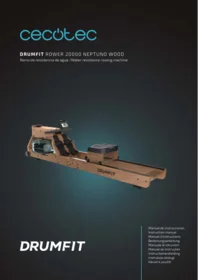
Drumfit Rower 20000 Neptuno Wood - Fitness Equipment CECOTEC - Free user manual and instructions
Find the device manual for free Drumfit Rower 20000 Neptuno Wood CECOTEC in PDF.


| Brand | Cecotec |
| Model | Drumfit Rower 20000 Neptuno Wood |
| Product type | Magnetic resistance rower |
| Usage | Home use only |
| Resistance system | Adjustable magnetic resistance |
| Monitor | LCD display of time, distance, calories, and strokes per minute |
| Maximum user weight | 120 kg |
| Dimensions (approximate) | ≈ 200 × 55 × 90 cm |
| Device weight | ≈ 35 kg |
| Power supply | 2 AAA batteries (not included) |
| Structure | Wood and steel frame |
| Comfort | Sliding ergonomic seat |
| Pedals | Anti-slip pedals with adjustable straps |
| Mobility | Transport wheels |
| Safety | Requires a flat, stable surface; free space of 0.6 m around the workout area |
| Maintenance and cleaning | Damp cloth, avoid abrasive products |
| Audience | From 14 years old |
| Environment | Recycling compliant with WEEE directive |
| Warranty and after-sales service | Legal warranty of conformity and Cecotec technical support |
| Main functions | Cardiovascular training and muscle strengthening with performance monitoring |
Frequently Asked Questions - Drumfit Rower 20000 Neptuno Wood CECOTEC
User questions about Drumfit Rower 20000 Neptuno Wood CECOTEC
0 question about this device. Answer the ones you know or ask your own.
Ask a new question about this device
Download the instructions for your Fitness Equipment in PDF format for free! Find your manual Drumfit Rower 20000 Neptuno Wood - CECOTEC and take your electronic device back in hand. On this page are published all the documents necessary for the use of your device. Drumfit Rower 20000 Neptuno Wood by CECOTEC.
USER MANUAL Drumfit Rower 20000 Neptuno Wood CECOTEC
DRUMFIT
Safety instructions 8
-
Parts and components 49
-
Before use 50
-
Product assembly 51
-
Display operation 52
-
Cleaning and maintenance 54
-
Information on exercising 54
-
Troubleshooting 55
-
Technical specifications 55
-
Disposal of old electrical and electronic appliances 55
-
Technical support and warranty 56
-
Copyright 56
-
Simplified Declaration of Conformity 56
SOMMAIRE
Please, keep this instruction manual in a safe place for future reference or new users.
- Read these instructions carefully before assembling or using your rowing machine. These instructions contain important information that will help you get the best out of your equipment.
- The free space shall not be less than 0,6 m larger than the training area in the directions from which the equipment is accessed. The free space shall also include the area for emergency dismounting. For equipment located next to each other, the value of the free space may be shared.
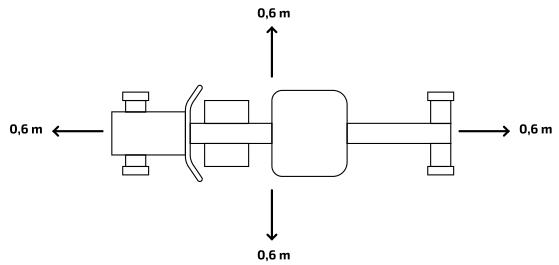
- This machine can be used by children aged 14 years and above and persons with reduced physical, sensory, or mental capabilities or lack of experience and knowledge if they have been given supervision or instruction concerning the use of the machine in a safe way and understand the hazards involved. Children must not play with the machine. Cleaning and user maintenance should not be carried out by unsupervised children.
- Warning: incorrect or excessive training can lead to health injuries.
-
Warning: if any of the adjustment devices are protruding, they may interfere with the user's movement.
-
Warning: the equipment must be installed on a stable and level surface.
- This device is designed for domestic use only and is not intended for bars, restaurants, farmhouses, hotels, motels, and offices.
- Safe and efficient use can be only achieved if the machine is properly assembled, maintained, and used.
- It is your responsibility to make sure every user is informed about the warnings and precautions stated in this instruction manual.
- Before starting a training session, it is recommended that you consult your doctor if you have any adverse health or physical condition that may pose a risk to your safety or make it difficult to use the machine properly. Your doctor's advice is essential if you are taking medication that affects your heart rate, blood pressure, or cholesterol level.
- Be aware of your body signals. Incorrect or excessive exercise can deteriorate your health. Stop exercising if you experience any of the following symptoms: pain, tightness in your chest, irregular heartbeat, extreme shortness of breath, dizziness, or nausea. If you experience any of these conditions, you should consult your doctor before continuing with your training.
- Warning: the safety level of the equipment can only be maintained if it is regularly checked for damage and wear.
- Warning: replace faulty components immediately and/or keep the equipment out of use until repaired.
- Pay special attention to the components that are most susceptible to mechanical wear.
- Keep children and animals away from the assembling area, as small parts could cause risk of suffocation if swallowed.
- Keep children and pets away from the machine. Do not allow
children to use and/or play with the machine. It is designed for adults only.
- Use the machine on a solid, flat, stable surface with a protective floor covering or carpet.
- Make sure the screws and nuts are securely tightened before using the machine.
- Use the machine as indicated in this instruction manual. If you find any defective parts when assembling or testing the machine, or if it emits an unusual noise during use, stop using it. Do not use the machine until the problem has been solved.
- Wear suitable clothing when using the machibe. Avoid wearing baggy clothing, as it may get caught in the equipment or hinder movement.
- If repairs are required, please consult your supplier for further information or contact Cecotec Customer Service.
- The air bike is not suitable for therapeutic use.
- Be careful when moving or lifting the machine to avoid injuring your back.
- Maximum user weight: 130 kg.
- Keep the equipment in a cool, dry place. Do not store in extremely cold, hot, or humid areas, as this may cause corrosion or other similar problems.
Instructions on batteries
- Do not burn or expose the batteries to high temperatures, as they may explode.
- Leaks from the batteries can occur under extreme conditions. Do not touch any liquid that leaks from the batteries. If the liquid gets into contact with skin, wash immediately with soap and water. If the liquid gets into the eyes, wash them immediately with clean water for a minimum of 10 minutes and seek medical attention. Wear gloves to handle the
battery and dispose of it immediately in accordance with local regulations.
- Avoid contact between the batteries and small metal objects such as paper clips, coins, keys, nails, or screws.
- Do not tamper with the batteries in any way.
- The batteries must be removed for safe disposal of the machine.
- Keep the batteries out of the reach of children when there is a risk of ingestion.
- Battery ingestion can cause burns, soft-tissue perforation, and death.
- It can cause severe burns within two hours of the ingestion.
- In case of battery ingestion, please seek medical help immediately.
- The batteries' power supply terminals must not be short-circuited.
- If the machine is to be stored for a long period of time, it is advisable to remove the batteries.
- The batteries must be inserted in the correct position. When replacing batteries, check the polarity.
INSTRUCTIONS DE SÉCURITÉ
| Part | Description | Quantity |
| A L/R | Rear main frame sheets | 2 |
| B L/R | Main frame sheets | 2 |
| C | Console | 1 |
| D | Footrest | 2 |
| E | Wheels | 2 |
| F | Console bracket | 1 |
| G | Data cable | 1 |
| H | Saddle | 1 |
| I | Sliding guide (assembled) | 2 |
| J | Rear stop | 2 |
| K | Screw M8x40 | 6 |
| L | Nylon nut M8 | 6 |
| M | Screw M5x12 | 4 |
| N | Bolt M6x75 | 1 |
| O | Screw ST4x25 | 2 |
| P | Washer OD10*ID6*1.5 | 1 |
| Q | Washer D6 | 1 |
| R | Washer OD16*ID8*1.5 | 12 |
| S | Allen key S5 | 1 |
| T | Spanner 13-15 | 1 |
| U | Allen key S6 | 1 |
| V | Connecting sheet | 2 |
NOTE:
the graphics in this manual are schematic representations and may not exactly match the device.
2. BEFORE USE
- This appliance is packaged in a way as to protect it during transport. Take the device out of its box and remove all packaging materials. You can keep the original box and other packaging elements in a safe place. This will help you prevent damage to the device when transporting it in the future. In case the original packaging is disposed of, make sure all packaging materials are recycled accordingly.
- Make sure all parts and components are included and in good conditions. If there is any piece missing or in bad conditions, contact the official Cecotec Technical Support Service immediately.
Box content
- DrumFit Rower 20000 Neptuno Wood water rowing machine
- Assembly kit
- 2 AA console batteries
Instruction manual
3. PRODUCT ASSEMBLY
Step 1: assembling the main frame. Fig. 3
Install the rear main frame sheets (A L/R) on the main frame sheets (B L/R), using the connecting sheet (V), screws (K) and nylon nuts (L) to secure them. Do this with the help of the spanner (T) and the Allen key.
STEP 2: assembling the display. Fig. 4
- Remove the four pre-mounted screws (M) from the console (C). Then, fix the console (C) on the bracket (F) using the four screws (M). Tighten them.
- Connect the two console cables (G) with the console (C).
- Make sure that you can adjust the angle of the console (C).
- Then, tighten the console with the bolt (N), the washer (P) and the other washer (Q) on the main frame. Tighten it securely with the Allen key.
STEP 3: assembling the saddle. Fig. 5
Slide the saddle (H) over the back of the sliding guide (I). Next, fix the stops (J) to the rear main frame sheets (A L/R) using two screws (O), and tighten them.
Adjusting the footrest
The footrest strap is adjustable and can be adapted to the size of the user's foot.
Filling and emptying the tank
- Remove the tank cap from the top of the water tank.
- To fill the tank with water, insert the funnel into the tank, then use a beaker or the pump siphon and a bucket to fill the tank. Use the water level indicator on the side of the tank to measure the desired water level. Do not exceed the maximum level.
- To empty the tank, place a bucket next to the rowing machine and use the pump siphon to pump the water from the tank into the bucket.
- Replace the filler cap on the top of the tank and wipe up any spilled water.
ATTENTION:
- Fill the water tank with clean water. Add water purifying liquid (1 container included). Never use chlorine or bleach. This will damage the tank and void the warranty.
- Add water purifying liquid every 6 months or as needed. If the water is still murky, replace the water in the tank.
- Do not drink the water from the tank. Discard the water after pumping it out of the tank.
Water level
- The water level indicators are located on the side of the tank. The maximum filling level is 6. Do not exceed this limit. Filling the tank above this limit will void the warranty.
- The resistance of the machine depends on the water level in the tank. Level 1 is the lowest resistance. Level 6 is the highest resistance.
▲/▼ (UP/DOWN): press these buttons to move through the available selection or to adjust the value of the selected function up or down.
ENTER: press this button to confirm your selection. During training, press this button to explore each function on the display.
START/STOP: press to start or stop the selected training programme.
RESET: press to return to the main menu.
Functions
TIME: preset the target time by pressing the UP or DOWN buttons (1min \~ 99 min). The increase/decrease setting is 1 minute.
TIME/500 M: the average time taken to cover 500 metres will be automatically displayed and continuously updated.
SPM: number of rowing strokes per minute.
DISTANCE: preset the target distance by pressing the UP or DOWN buttons (0 \~ 99900 metres). One press adds or subtracts 100 m.
STROKES: preset the target number of rowing strokes by pressing the UP or DOWN buttons (0-9990). One press adds or subtracts 10 strokes.
TOTAL STROKES: displays the cumulative calculation of total rowing strokes, from 0 to 9999.
CALORIES: preset the target calories burned by pressing the UP or DOWN buttons (5 Cal \~ 9990 Cal). One press adds or subtracts 5 cal.
Display operation
- Insert two AA batteries. You will hear a long beep for two seconds. During this period of time, the display will be shown as in Fig. 6. After that, the console will start running.
- Upon entering the row icon, the MANUAL and RACE icons will flash.
- Press the UP or DOWN buttons to select them. Then, press ENTER to confirm your selection. Fig. 7.
Manual Mode. Fig. 8
- Enter Manual mode, press UP to adjust the flashing figure in the TIME section. Press ENTER to confirm. Next, press the UP button to adjust the functions: DISTANCE→STROKES→CALORIES→PULSE→TIME. If you have set the target duration value, you will not be able to set the distance, and vice versa.
- Press the START button to start. The STOP icon will disappear. Press the UP and DOWN buttons to select functions.
- When the countdown of the function you have selected ends, or when you press the STOP button, the console will stop and display the average value.
Race mode. Fig. 9
- Enter RACE mode, L1 will appear on the display. The TIME/500 M function will display 8:00. You can press the UP or DOWN button to choose any option between L1 and L15. Press ENTER to confirm. You can then set the distance of the RIDE (500 M \~ 10000 M) while the DISTANCE icon is flashing.
- Press ENTER and the race picture will appear on the display.
- The symbols of the TIME/500 M function are as follows☐
| L1 | L2 | L3 | L4 | L5 | L6 | L7 | L8 | L9 | L10 | L11 | L12 | L13 | L14 | L15 |
| 8:00 | 7:30 | 7:00 | 6:30 | 6:00 | 5:30 | 5:00 | 4:30 | 4:00 | 3:30 | 3:00 | 2:30 | 2:00 | 1:30 | 1:00 |
- Press the START button to start. The STOP icon will disappear. The USER and PC will be displayed on the display (Fig. 10). The console will stop when the set race distance has been reached. The display will then show "PC WIN" or "USER WIN" (Fig. 11).
- When the race is over, you can press START to start racing again. Press RESET to exit the race.
Bluetooth connection
By scanning the QR code below you can access a manual explaining how to pair the DrumFit Rower 20000 Neptune Wood with the Kinomap app:

5. CLEANING AND MAINTENANCE
- To clean the rowing machine, use a soft, clean, damp cloth.
- Do not use abrasive cleaning agents or solvents to clean plastic parts.
- Wipe off any accumulated perspiration from the machine after each use.
- Be careful not to allow too much moisture to enter the monitor, as this may cause the electronic components to fail.
- Keep the rowing machine out of direct sunlight to prevent damage or deterioration.
- Make sure to tighten the screws, nuts, and pedals of the rowing machine on a weekly basis.
- Regularly lubricate the moving parts of the machine.
Transporting
- Hold the rear with both hands until the front wheels make contact with the ground.
- Pull or push the rowing machine to the place where you want to store it before standing it up. Do not let go of the rowing machine during transportation.
Storage
Store the rowing machine in a clean and dry place, out of the reach of children and pets.
6. INFORMATION ON EXERCISING
A proper workout should consist of the following phases:
Warm-up: consists of a session of stretching and low-intensity exercise lasting 5 to 10 minutes. A proper warm-up increases your body temperature, heart rate, and circulation in preparation for exercise. Fig. 12
Training: consists of 20 to 30 minutes of exercise.
(Note: during the first few weeks of exercise do not keep your heart rate high for more than 20 minutes).
Fig. 13
Cool-down: consists of 5 to 10 minutes of stretching exercises. This will increase your flexibility and help you to prevent injury after exercise. Fig. 13
7. TROUBLESHOOTING
| PROBLEM | CAUSE | SOLUTION |
| The base is unstable | 1. The floor is not flat or there is an object under the stabiliser. | 1. Remove the object. |
| Excessive noise from moving parts | Parts are not tightened correctly. | Tighten them. |
| The display is not working properly | 1.Batteries are worn out.2.Cables are not correctly connected. | 1. Replace batteries.2. Connect the cables correctly. |
8. TECHNICAL SPECIFICATIONS
Product reference: 07226
Product: DrumFit Rower 20000 Neptuno Wood water rowing machine
Maximum user weight: 130 kg
HB Class
Technical specifications may change without prior notification to improve product quality. Made in China | Designed in Spain
9. DISPOSAL OF OLD ELECTRICAL AND ELECTRONIC APPLIANCES

This symbol indicates that, according to the applicable regulations, the product and/or batteries must be disposed of separately from household waste. When this product reaches the end of its shelf life, you should dispose of the cells/batteries/accumulators and take them to a collection point designated by the local authorities.
Consumers must contact their local authorities or retailer for information concerning the correct disposal of old appliances and/or their batteries.
Compliance with the above guidelines will help protecting the environment.
10. TECHNICAL SUPPORT AND WARRANTY
Cecotec shall be liable to the end user or consumer for any lack of conformity that exists at the time of delivery of the product under the terms, conditions, and deadlines established by the applicable regulations.
It is recommended that repairs be carried out by qualified personnel.
If at any moment you detect any problem with your product or have any doubt, do not hesitate to contact the official Cecotec Technical Support Service at +34 963 210 728.
11. COPYRIGHT
The intellectual property rights over the texts in this manual belong to CECOTEC INNOVACIONES, S.L. All rights reserved. The contents of this publication may not, in whole or in part, be reproduced, stored in a retrieval system, transmitted, or distributed by any means (electronic, mechanical, photocopying, recording or similar) without the prior authorization of CECOTEC INNOVACIONES, S.L.
12. SIMPLIFIED DECLARATION OF CONFORMITY

Cecotec Innovaciones hereby declares that this treadmill, model 07226 DrumFit Rower 20000 Neptuno Wood is in conformity with the Radio Equipment Directive 2014/53/EU.
The full text of the EU Declaration of Conformity can be found on the following website:
www.cecotec.es
1. PIÈCES ET COMPOSANTS
Img. 1 et Img. 2
7. PROBLEEMOPLOSSING
Fig./Img./Abb./Afb./Rys./Obr.1

Fig./Img./Abb./Afb./Rys./Obr. 2

Fig./Img./Abb./Afb./ Rys./Obr.3
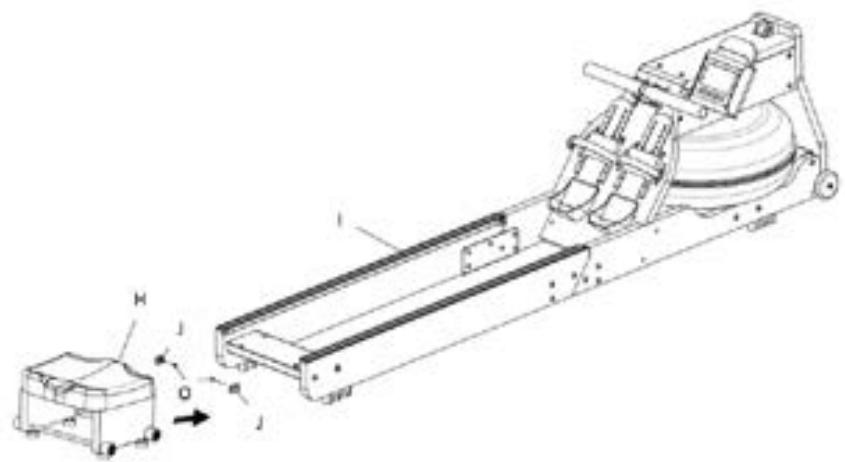
Fig./Img./Abb./Afb./ Rys./Obr. 5
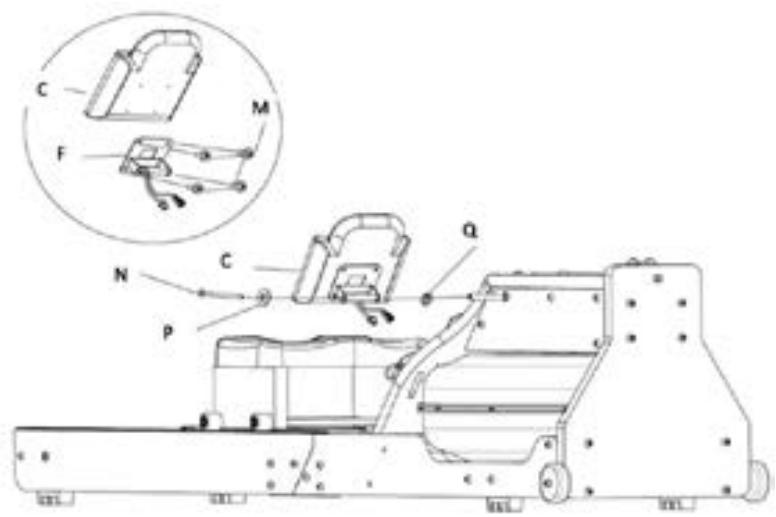
Fig./Img./Abb./Afb./Rys./Obr. 4

Fig./Img./Abb./Afb./Rys./Obr. 6

Fig./Img./Abb./Afb./Rys./Obr. 6

Fig./Img./Abb./Afb./Rys./Obr. 11
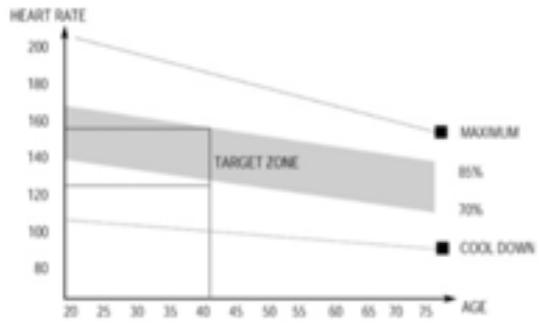
Fig./Img./Abb./Afb./ Rys./Obr. 12
www.cecotec.es

- SOMMAIRE
- INSTRUCTIONS ON BATTERIES
- INSTRUCTIONS DE SÉCURITÉ
- BEFORE USE
- BOX CONTENT
- PRODUCT ASSEMBLY
- ADJUSTING THE FOOTREST
- FILLING AND EMPTYING THE TANK
- ATTENTION
- WATER LEVEL
- FUNCTIONS
- DISPLAY OPERATION
- MANUAL MODE. FIG. 8
- RACE MODE. FIG. 9
- BLUETOOTH CONNECTION
- CLEANING AND MAINTENANCE
- TRANSPORTING
- STORAGE
- INFORMATION ON EXERCISING
- TROUBLESHOOTING
- TECHNICAL SPECIFICATIONS
- DISPOSAL OF OLD ELECTRICAL AND ELECTRONIC APPLIANCES
- TECHNICAL SUPPORT AND WARRANTY
- COPYRIGHT
- SIMPLIFIED DECLARATION OF CONFORMITY
- PIÈCES ET COMPOSANTS
- PROBLEEMOPLOSSING
Brand : CECOTEC
Model : Drumfit Rower 20000 Neptuno Wood
Category : Fitness Equipment