HEADSET HS-1200 - Headphones CREATIVE - Free user manual and instructions
Find the device manual for free HEADSET HS-1200 CREATIVE in PDF.


User questions about HEADSET HS-1200 CREATIVE
0 question about this device. Answer the ones you know or ask your own.
Ask a new question about this device
Download the instructions for your Headphones in PDF format for free! Find your manual HEADSET HS-1200 - CREATIVE and take your electronic device back in hand. On this page are published all the documents necessary for the use of your device. HEADSET HS-1200 by CREATIVE.
USER MANUAL HEADSET HS-1200 CREATIVE
Digital Wireless Gaming Headset HS-1200

ENGLISH
EU Compliance 5
License and Copyright 5
Illustrated Guide 6
User Instruction 8
8
Modifying / Uninstalling Drivers and Applications 8
Troubleshooting Guide 9
Precaution 10
Technical Specifications 10

FRANÇAIS
This product conforms to the following:
EMC Directive 2004/108/EC
Mains operated product for the European market comply with Low Voltage Directive 2006/95/EC. Communication / RF wireless products for the European market comply with R&TTE Directive 1999/5/EC.
CAUTION: To comply with the Europe CE requirement, this device must be installed with CE certified computer equipment which meet with Class B limits.
All cables used to connect this device must be shielded, grounded and no longer than 3m in length. Operation with non-certified computers or incorrect cables may result in interference to other devices or undesired effects to the product.
MODIFICATION: Any changes or modifications not expressly approved by Creative Technology Limited or one of its affiliated companies could void the user's warranty and guarantee rights.
License and Copyright
Information in this document is subject to change without notice and does not represent on the part of Creative Technology. No part of this manual may be reproduced or transmitted in any form or by any means, electronic or mechanical, including photocopying and recording, for any purpose without the written permission of Creative Technology Ltd.
The Software License Agreement is found in a separate folder on the Installation CD.
Copyright © 2008 by Creative Technology. All rights reserved. Creative, the Creative logo, X-Fi, Xtreme Fidelity, Sound Blaster, the Sound Blaster X-Fi logo, EAX and CMSS are registered trademarks or trademarks of Creative Technology Ltd. In the United States and/or other countries. All other products are trademarks or registered trademarks of their respective owners.
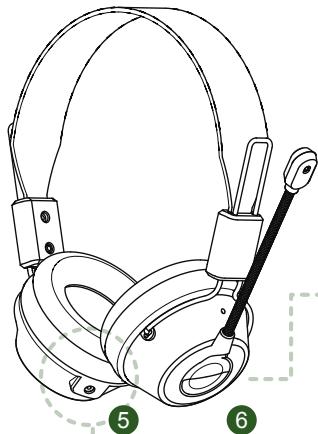
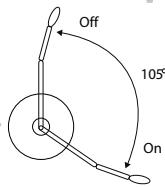
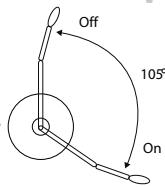
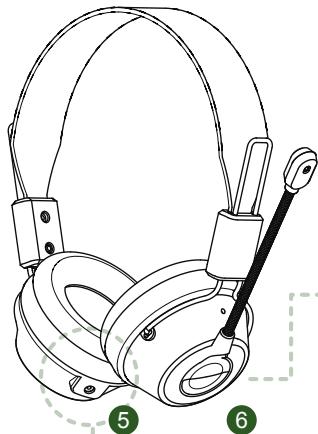
Swivel microphone boom upwards to turn off the microphone.
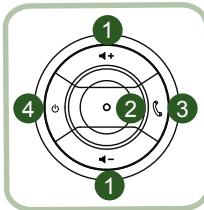
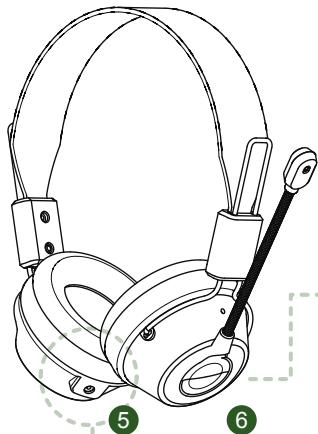
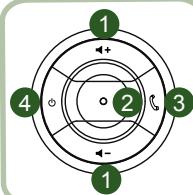
1 VOL +/VOL -
LED Indicator
Pick Up/End Call
4 Power On/Off
5 DC-IN port
6 Microphone


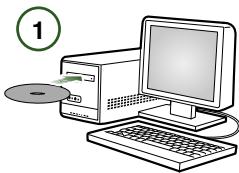
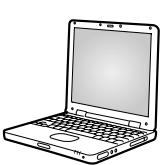
Step ①: Install X-Fi Software on your PC
Step ② : Plug in USB Transceiver on any powered USB Port
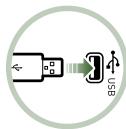
Connect the USB Transceiver to your PC. The USB Transceiver is the 2.4GHz RF Base Station and also charges your headset when low in power.
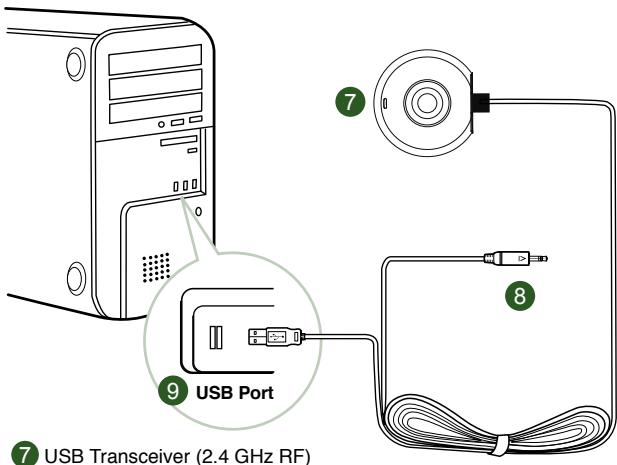
7 USB Transceiver (2.4 GHz RF)
USB DC-Charging Pin
9 USB Connector
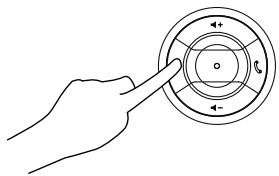
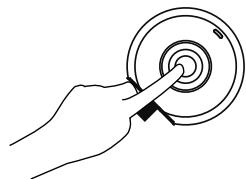
To PAIR, power off headset.
Press and hold simultaneously for 5 seconds.
User Instruction
Congratulations on selecting Creative HS-1200 Digital Wireless Gaming Headset from Creative Labs. Creative HS-1200 Digital Wireless is the first fully bi-directional 2.4GHz USB Gaming Headset with Sound Blaster® X-Fi for full-out gaming. Delivering high-fidelity uncompressed stereo audio with powerful 40mm Neodymium drivers and clear voice communication with easy-access control buttons on the earcup, the HS-1200 Digital Wireless Gaming Headset with X-Fi Technology creates immersive 3D surround sound effect that makes you feel like you are actually in the game. Sound Blaster® X-Fi Software makes your games sound way better and gives you the competitive edge over conventional headsets.
Package Contents
Creative HS-1200 Digital Wireless Gaming Headset
USB Transceiver
- User Guide
Installation CD
X-Fi Crystalizer
Enhances musical dynamics by emphasizing sharp percussive sounds and transients
X-Fi CMSS-3D
X-Fi CMSS-3D Headphone: Provides a multichannel playback experience over headphones for all types of content.
Installing Drivers and Applications
Insert the Sound Blaster® X-Fi installation CD into your CD/DVD-ROM drive.
Right-click the CD-ROM/DVD-ROM drive icon, and then click Open AutoPlay or AutoPlay
Follow the instruction on the screen to complete the installation > restart your computer.
Modifying / Uninstalling Drivers and Applications
Insert the Sound Blaster® X-Fi installation CD into your CD/DVD-ROM drive.
Right-click the CD-ROM/DVD-ROM drive icon, and then click Open AutoPlay or AutoPlay.
Follow the instructions on-screen. At the Program Maintenance page, select Add or Remove to modify, Repair to reinstall or Remove All to uninstall the software suite.
- Volume +/-
Press "+" to increase or "- to decrease headset volume.
- LED Indicator
Red indicates your headset is charging.
Blue indicates the headset is powered on and paired with USB Transceiver.
- Answer / End Call
Press once to receive an incoming call with Windows Live™ Messenger or MSN® Messenger.
Press again to end call.
Pause Music Playback
Pauses audio in Windows Media Player.
Other applications' behavior may vary.
- Power On / Off
To turn your headset on or off headset, press and hold for 1-3 seconds.
Pairing Mode
To activate pairing mode, turn off your headset. Simultaneously press and hold the 'power-on' button for more than 5 seconds on your headset and USB Transceiver.
When LED shows steady blue, your headset is now paired with the USB Transceiver.
- DC-IN Port
To charge your headset, connect the DC charging pin to your headset.
It takes approximately 2.5 hours to fully charge your headset. Please charge your headset for minimum 6 hours if using it for the first time.
Note: Your HS-1200 headset is rechargeable even while in use.
- Microphone
To activate the microphone, swivel the microphone boom down and adjust mouthpiece accordingly.
To de-activate microphone, swivel the microphone boom up.
7. USB Transceiver
The USB transceiver serves as a base-station and operates on the 2.4GHz radio frequency to transmit and receive digital signals from your headset.
8. USB-DC Charging Pin
Connect the USB-DC Charging pin to the DC-IN Port located on your headset to charge.
9. USB Connector
Connect the USB Connector to any available USB Ports on your PC.
Manual Configuration for Skype™
From your Skype™ menu, select Tools/Options. Proceed to the Hotkeys section and modify these:
- Change 'Answer call' Hotkey to 'Ctrl-C'
- Change 'Reject/hang up call' Hotkey to 'Alt-Q'
Save setting. Your headset is now configured for Skype™.
Note: Not all other VoIP applications support 'Hotkeys' configuration and settings can vary.
Troubleshooting Guide
If you suspect your Creative HS-1200 Digital Wireless Gaming Headset is not working as expected, perform the following trouble-shooting steps before having your headset serviced. For more information, see the "Customer Support" page on
http://www.creative.com/support/
Headset cannot power on
- Verify that headset is charged. If this is the first time you are using this headset, please charge for 2.5 hours, prior to use. Please charge your headset for minimum 6 hours if using it for the first time.
Note: Your HS-1200 headset is rechargeable even while in use.
- Press the power up/down button on the earcup control to activate your headset.
Headset is powered on, but no audio
- Check if the LED indicator shows steady blue. If the indicator is blinking, it means this headset needs to be paired with the USB Transceiver. To pair your headset, power off first. Then press and hold power up/down button for >5 seconds. Simultaneously, press the pairing button on the USB transceiver. When the LED indicator shows steady blue, your headset is paired.
- Check if the USB transceiver is plugged directly into any available USB port. Some BUS-Powered USB Hubs may not have enough power to support this device. Disconnect your USB Hub and plug the USB transceiver directly into the PC. Alternatively, you may use a USB Hub with external power source.
- Use another USB port on your PC*.
- Under control panel (PC*), ensure the correct audio device is selected. Choose (Settings > Control Panel > Sound and Audio Devices) and Sound playback, select Creative HS-1200 Headset Sound recording, select Creative HS-1200 Headset Restart the PC Application.
- Supports Windows XP® SP2, Vista™ and above only. Other operating systems do not support this device.
- Verify that your Volume and Playback settings are not muted, and that the volume for these devices are at least halfway up.
- Try unplugging and re-plugging the USB transceiver to the PC* and restart your application. Repeat the process above.
- On a computer system that does not follow proper USB convention, there is a chance that the system may lock up when you plug in the device. If this occurs on your system, contact your computer's manufacturer.
- Check if the Headphones option is selected in the speakers and headphone selection of Entertainment Mode.
- Adjust the volume mixer settings in Entertainment Mode to set at mid-range
Cannot pair to USB transceiver
-
Make sure the headset is charged and powered off when you try to pair.
-
Make sure you have press the pairing button on the USB transceiver.
- Check to see if USB port is working.
When you plug in the USB transceiver, the LED indicator will light up.
Status light
Steady Blue
Flashing Blue
Steady Red/Blue
Message
Paired
Ready for pairing
Charging
Intermittent Headset to USB transceiver connectivity
Every electronic device is subject to radio frequency (RF) interference from external sources.
To reduce interference, follow these instructions.
- Check for possible sources of radio frequency (RF) interference and reposition these devices.
- Reposition your USB transceiver. Range of device is optimized when it is not obstructed by obstacles, i.e. walls, metal objects, electronic devices, speakers, etc.
-
Reduce the distance between headset and USB transceiver. Maximum operating distance of Creative HS-1200 Digital Wireless is 22 meters (72 feet)*.
-
Measured in open space. Walls and structures may affect range of device.
Headset button not functioning properly
- Power on headset. If there is no response from LED indicator, try recharging the headset through the supplied DC-in power adaptor. Do not switch off your computer when headset is charging.
- Press the button again. The LED should be blue, after you have power-up the headset.
- If still no response, use a small pin and press the 'reset' button located on the right earcup. This will reset the unit and return to factory default.
Headset is not charging
Connect headset to the DC-in charging pin, and insert the USB transceiver to a high-power USB port on a computer that is not in Sleep/Hibernate mode. The LED indicator should show Blue/Red when charging, and blue when charging is complete.
Do not use non-approved chargers to charge your headset.
Microphone is not working
Under control panel (PC*), ensure the correct audio device is selected.
Choose (Settings > Control Panel > Sound and Audio Devices) under Sound recording, select Creative HS-1200 Headset.
Restart the PC Application.
- Supports Windows® XP SP2, Vista™ and above only. Other operating systems do not support this device.
Check the following
The Mic Mute is turned off.
- In the Mixer selection of Entertainment Mode, select the Monitor checkbox in the Mic In section.
- Check your microphone boom to ensure it is swivel down.
- Adjust microphone mouth-piece to be positioned closer to your mouth.
Pre-caution
- Extended exposure to high volumes when using a headset may result in temporary or permanent hearing loss.
- Turn off Digital Wireless Gaming Headset while on-board any aircraft.
- Do not bend, drop, crush, puncture, incinerate, or open the headset.
- This Digital Wireless headset system is specifically designed for the operation within the electrical range(s) with the provided USB power adaptor and use outside of this range shall be at your own risk.
- Do NOT operate the Digital Wireless headset system with other power adaptors.
Contact Creative Customer Support should you need a replacement power adaptor.
- Do not attempt to service any part of the digital wireless headset / USB transceiver yourself as opening or removing covers may exposed you to dangerous voltage or other hazards.
Refer all servicing to qualified service personnel.
Technical Specifications
Technical Specifications
Digital Wireless Technology: Proprietary 2.4 GHz Radio Frequency for advanced 2-way
transmission.
- Range: Up to 22 meters (72 feet) in a typical environment.
- Listen Time (per charge): Approximately 8 hours.
- Standby time: Up to 3 months.
- Charging time: 2.5 hours.
- Charging Method: Through USB powered Transceiver DC out.
- Battery type: Lithium polymer.
- Low battery indication: 3 beeps repeated every 5 seconds.
Connectivity: USB 1.1
USB Cable length: 80 cm/2.6 feet. - Net Weight (without packaging):
USB Transceiver - 60 g Digital Wireless Headset - 155 g
Headphone
- Driver: 40mm Neodymium magnet.
Frequency Response: 20Hz 20kHz
Impedance: 32 ohm.
Microphone
Type: Noise cancelling condenser.
Frequency Response: 100 Hz-16 kHz.
Impedance: < 10 kohm.
System Requirement
Intel Pentium 4.1 6 GHz, AMD Athlon XP 2000+ processor or faster. (Pentium 4.2GHz AMD Athlon XP 2400+ processor or faster recommended)
Intel, AMD or 100% compatible motherboard chipset.
- Microsoft® Windows Vista™ 32-bit or 64-bit, Windows® XP Professional x64 Edition, Windows® XP Service Pack 2 (SP2).
- 512 MB RAM.
- 600 MB of free hard disk space.
CD/DVD-ROM drive.
One available USB port (for the USB transceiver).
- Installed and launched Windows Live™ Messenger or MSN® Messenger to answer / end calls. Skype™ requires manual configuration.
- Measured in open space. Walls and structures may affect range of device.
Conformité UE
Directive CEM 2004/108/EC
http://www.creative.com/support/
When you plug in the USB transceiver, the LED indicator will light up.
http://www.creative.com/support/
http://www.creative.com/support/
http://www.creative.com/support/
http://www.creative.com/support/
http://www.creative.com/support/
Hodesettet kan/DDs pa
Digital Wireless-headset - 155 g
Hovedtelefon
- Driver: 40 mm neodymmagnet.
Frekvensgang: 20Hz 20kHz
Impedans: 32 ohm.
Mikrofon
- Type: Stojreducerende kondensator.
Frekvensgang: 100 Hz-16 kHz.
Impedans: < 10 kohm.
Systemkrav
- Intel® Pentium® 4 1,6 GHz, AMD® Athlon XP 2000+ prosessor erler raskere.
(Pentium® 4 2,2 GHz, AMD® Athlon XP 2400+ prosessor eller raskere anbefales)
Intel, AMD' eller 100% incompatible databrikker for hovedkort. - Microsoft® Windows Vista™ 32-biters aller 64-biters, Windows® XP Professional x64 Edition, Windows® XP Service Pack 2 (SP2).
- 512 MB RAM.
- 600 MB ledig plass på hardisken.
CD/DVD-ROM-stasjon. - En tilgengelig USB-port (for USB-senderen/mottakeren).
-
Installerg og startet Windows Live™ Messenger erer MSN® Messenger for à ta imot / avslutte smelter. Skype™ krever manuell konfigurering.
-
Målt i abne omgivelser. Væggge og genstande kan pávirke enhedens rækkevidde.
Shoda s prdpisy EU
http://www.creative.com/support/
http://www.creative.com/support/
Copyright © 2008 by Creative Technology. Bce npaba aazmuhenb. Cfree, lorotn Creative, X-Fi, Xtreme Fidelity, Sound Blaster, lorotn Sound Blaster X-Fi, EAX n CMSS ybnhotc ToBapbIMn 3hakamn mnn 3apeiCtprpoBaHbIMn ToBapbIMn 3hakamn Kompanhncr Creative Technology Ltd b CUSA w/nn dpyrnx cTpaHax. Bce dpyrme npodkbly jBnhotc ToproBbIMn MapkAMn mnn 3apeiCtprpoBaHbIMn ToproBbIMn MapkAMn BOxN COOTBETCTBvOuNX Bnaedelbuee.
IOnHnMNTe MnkpooHnhB IuTaTMB, YTO6bI OTKJIOUHTb Mnkpooh.
1 TpOMKoCTb+/-
CBeToDIOHbI INHdIKaTOP
3 OTBetNTb / 3aBePImTb Bbl3OB
Bkn./BbIKn.niTaHnHa
6 Minkpofoh
5 Pa3bem dπa 3apdkn
Uar ① :YctaHOBInTe npOrpAMMHOe o6ceueHHe X-Fi Ha CBOI KOMTbIOTep.
Uar ② :PoioknIOuHTe USB-tpaHcNbepB USB-nopt c nitaHnem.
NCHIy kya3bAaH Na To, 0TO IITaHHe rapHnITpyb BkIOUeHO N CoEDINHENE C USBTAPHCHEBOPYCTAHOBNEHO.
3. OTBeNTb/3aBepwnTb Bbl3OB
Haxmnte oDIN pa3 nIy npnema BxOrae OByIOBc nOmoaio Windows LiveTM
Messenger Или MSN® Messenger. Habtmite[e] pa3 Дял заBERSEнь Вьзова.
PnOCTaHOBt BOCpON3BeJeHne My3bIKN.
PnnoctaHOBka BocnpoN3BedeHnB npOnrpbBaTeNe Windows Media
DnCTBnE B DpynX npINoXeHnX MOKeT OTNnUaTbCra.
4.Bk./BbIKn.nTaHna
IbnKIOHHeN NmIKIOHeHnRAPHTyBn HAKMITE nYdePJKBAITE KONIKY HAKATOB NTeHHeN1-3cKeyND.
PexIM coeHHeHnA
Дяв КИLOVENHЯ рекIMа COeINHINHA BbKIOHHTe raphNtpy.ОнЮВрЕМно HabKMITEи ydeprKbIaBte 6OJIe 5 cekyHd KHOINK BKNIOHENI nTahnHa raphNtpe N USB-тaramсibepe.
Kak TofIbKO INHdIKaTOp 3aoropITcA HnpepbIBhIM CnHM CBETOM, CoeINHeHne Mekdy raphHTypoN I USB-tpaHcNBepom yctahOBNeHO.
5. Flopt DC-IN
TcBbI 3apnHtbpaHNTyp, bCTABSe ITEKep 3apKnO NTocHOHHoNTOK B aRbHTpy. PONHAR 3apKnDpaHNTpy bAHMaETpNPI6IN3MtenBho 2,5aca.
Pn npBOM nCnoIb3ObaHH raphNtpybI ee cneJyET 3apXaTb KAK MNHmym6 yacOB.
PpmeHne. HAPHTy HS-1200 moXHO pO3apKaTb dAke BO BpeM yCnOJb3ObaHna.
6. Minkpofoh
TcBbI BKIOHTb MIKPOCHO, ONCTNE IITATIN MIKPOOHa BHN3 N OTPERYNPnyTe NOJOKHENO NOBOK.
IЯOTKJIIOUeHnMnKPOOHO NAIDHMNTE WTAINB MKNPOOHO BBePx.
7. USB-TpaHcNbep
USB-tpaHCBepcnCnystB60BbCTANuHneI npedeAeN nOyuaet uΦpOBo CnHAnOT raphInptbny a naDooactote 2,4TgU.
HaxmTe KhoNky nTaHnHa HayuHnKe, TTo6bI BkInouHTb rapHtpy.
TapHnTypa BKnIoueHa, Ho HeT 3Byka
IpOBePbTe,TO IHdKATOp rOpHT HEnpePBbHM CINHM CEBOM. EcNI INDkaTOp MmHaet, 30a O3NaHaeT, TO cIeSyET yCTaHObNTB coeINHeMNE MExy dApHTnTyPOI u USB-tpaCINBePOM. TOp6bI yCTaHObNTB coeINHeMNE, OTKnOHUte rAPHTNy. 3aTEM HaxMITE u YdepXJBaITe KHOKNY PINTAHNIA B TceHene 5 cekyHd. OJHOBPemHo C 3TNIM HAXMITE KNOKY coeINHeMNA h USB-tpaCINBePe. KaK ToJIbKO INDkaTOp 3aORPTC HEnpePBbHM CINHM, CoeINHeMNE yCTaHOBNeHO.
Y6eDHTc, YTO-USB-TPAHCBnEBpHARMyIO NOKIIHOENB CBO6OBDHn NOP NTB. HekOTOpBE YTO-KOHENTPaTbPOr CnTHAHENOT OTHINbMOYr BbDAbaTB HeIOCTaTOOHoe HANPRAJEHNE DnA NITAHN DAHHORQyCTPOIECTBA. OTKIOHOITE USB-KOHENTPaTbOP IN NOKIOHcUVE US TpAHCBnEBpHARMyIO K COMBIbOTepk. KaBpaHANT, MOXHO IcNOIb3OBATb USB-KOHENTPaTc B HEUHMN ICTOHNKOM IITAHNI.
BocnoIb3yItecb dpyrIM USB-nopTom*.
- Y6eIeTcB,чToВПанeнуnpaВeNnH(PC*)БИбраHo npaВиьhoe aHydOyctpoiCTBO. BbIeBpeH HAcToKa> Панeну npaВeNnH> 3ByKn u aHydOyctpoiCTBa, yctaHOblte B cInckax BocpOmBzEbeHne 3Byk-3aHuEne Creative HS-1200 Headset, 3aIncb 3Byka-3aHuEne Creative HS-1200 Headset
He ydaetc yctaHOBntb coeHHeHne c USB-tpaHCBepom
- Y6eIntTeB, YTO rapHnTypa 3apaXeHa N OKTIOcHb O BpEMa NIOblTKM yCTAHOBITb coeIMHeHne.
He 3a6yDbte Haxatb KhONky coeINHeHnHa USB-tpaHcNBepe.
Повета,разботам пИ USB-nopt. Пи радкючени USB-tpaHcmbe рджен 3логорь снндakotр.
HdkaTop coctoHHN
Topnt CnHIM
MURAET CINHM CBETOM
Topnt KpaChbIM/CINHM
Co06eHne
CoeHHeHne yCTaHOBnEHO
TOTOB K yCTaHOBHeHIO COeHNHeHNA
3apnka
IpepbBnCTa CB3b MExdy raphHtypo n USB-tpaHcBepom
Bce 3nKtropn6bOpb noDBeaerOCTa RAnoHcTObHM NmEXAMOT BHeUHIXNCTOHNIOB. Tc0b6I cHn3bT ypoBHeBnOMex, BbInONHtme CneJyUooee.
Поверьте, Нет ЛИ Вблими ИСТОЧИКВО радионаCTOTьХ NOMEX, ecлд за, OTOДВиьтЕ IX NOДАльш.
Пелемспгу USB-Траимсбр.30нддьгУСТРОДТВАБЗРASTET PRN OTCYCTBIMnPperpaT,ТaknxКakCTeHbI,MetaJIINUeCKNe ПпeмTebl,3NeKTPoPn6Opbl,rgmOKOROBOPITENIиT.D.
YMeHbSHTNE paccSTONHE MeKdy APnHrTpyo IN USB-TPaCHeBPOm. MakcHmAbhnae PaochaydmtAnzhuapnHrHpytby Creative HS-1200 coctBanier 22 metpa"
*EchTbENTbHO nIra OTKpbTOrO nPOCTaHcTB. CTeHb I aDpyrte ObBeKtBu MoryT HEaTHBn Bnrrb Ha 3OHy EchTbHN YcTOpCTBa.
KhONka rapHnTypbI He pa6oTaET
BkIIOHHTe rAPnHTpy. Ecni HnDnKATOp He 3aOraTcN, nonpO6yIte 3aprAHTb rAPnHTpy Pn nOmoi npnnaeMoRo aadAnTepa DC-in. He BkyKnUayIte KOMNbHTep, noka rapnHTpy He zaprAITcN.
Hakmnte KhoNky ChOBA. Nocle BkIIOEHHa rapHITpyb HINDKaTOp DOnKHeR opetb CHHM CBETOM.
- Ecn peakunn BCE paBHOH, TOHKO 6ynabKo HAXMITE KONKY reset', pacNOXeHHyO Ha npaBOM hauHNke. 3To bI3OBET c6poc napametpoy yctpoiCTBa K 3ABODCKIMYc7aHOBKM.
TapHntypa He 3apaXkaetc
PQkIIOHHTe rapnHTpy K 13bIbky zarapdHoro yctpoCTBa, nocne Yero BCTabte USB-tpaHcBep B USB-nopt KOMlbTepepa (KOMlbTepe He DoJIen HaxoDITbcB C bIeIeM mNJ XJUeIMepeKIXmE). Bo Bpemr ZAPdIKn IHINkATop DOJIENK MnrHMMKpAchblMCBETO.
Ecnn HndkaTOp He Mnaet ropnt CnHm CBetom, 3apKa 3aBepweHa.
IcnoB3yTe TObko qnpMeHHbIe 3apAHyIe yCTpOInCTBa.
He pa6oTaet MmKpOΦoH.
Y6bndteC, YTO B a NaenH ynpaBnH (PC*) bIb6pH o npaBnHoe aydnoctpoiCTBO. B pa3dene 3aAinbc 3byka (Hactpoika > Naenb ynpaBnHn > 3Bykn u aydnoctpoiCTBa) bIb6peite Creative HS-1200 Headset.
Ipe3aynctte npuioxkeHne.
*PoiepxnaeTToBkoWindowsXPSP2,VistaTMnBbIe.
OctaHbIe onepauOnHHbcnCTembl He noDpeKBAOTcra.
PpOBepeCneIyUoIeE
- Y6eIntecb, yTo cyHKzma Mic Mute (OTKn.MKpOfoH) He BkIIOueHa.
B CnKepe MmKep (pezim «PazbneHn») yctaHOBite pfakok MoHITop B pa3dene BxoJ MmKpOBoHa. - Y6eIntecb, yTo IaTnB MmKpOfoHa onyueH Bn3.
- OTPerynpyTe HAKOHeuHm MUKPOoHa, YTO6bI paCNoJoxNtB er0 6mKe Ko pTy.
Mepblippeoctopoxknoctn
PpOJIOKHTENBHO Bo3EeTBReI pROMOKO 803yKn PnI MNCN5OBOAHN HAYUHMKOB MOKET pINBECTK N BPEMHNH N I NTOSOHN HOTEpe CNYX.
- OTKJIUOaIe TcIΦpOByIO 6ecnpoBODHyIO rapHITpy npn HaxOJDeHN Ha 6OpTy cAmOJeTa.
He cneyet cr6aTB, noxiratb, cabnBaTb, npokalbaTaHnn OTkpBaTb rapHtpy.
Данаярнитураразботаюдя работы толъкв вданаоно лэпектуесхИХ
Велими ргимагаемOTO USВ-адпета。
HEIcnoIbayte raphHTyCy dCyrnnMa IaIepTePam nITaanH.PriJ He6xOdMOnCTn 3aMeHbI aIaIepTe PnITaanObpAteTneB CByckyI O npDeppKn Creative.
He IytaiTebcamocToTebHo pemOHtnpOabTb HIObIe Yactn UcnpoBoB 6ecnpoBdoHoi HnHTpyb/USB-tpaCHeBa, TAK KAC OTKbIteN INH CHTne KOPNYCA MOKeT PnBeCTN K npaxaeHHNeAeKTPaeeCKHM TOKOM IND pYGM HeCACTHm CNYaAR. TexNHuecko OcbnyKaBAHMe DoJXHO BblNOHrTaCB TaBO KBaINΦmUPOBaBHm EpeCOHAM.
TexHueckne xapaKTepeNCTNK
TexHueckne xapaKTePncTnKn
LdpoBaa 6ecpOBOaTHaTgEXHONrA:3anateHTOBaHnBaTHexONrA paCunpeHHoDyctorponeH npedaeuHa raPdoaCTOte 2,4Γμ.
30Ha DeiCTBnA: Do 22 M* B obbIhBx ycIOBnAx.
Bpem npocnyuBaHn (OT OndH 3apAKn): np6bnnteIbHo 8 u.
BpempaobtBpexmeoxndaHn:do3MecaeB.
Bpem3apdKn:2,5aca.
Cnocob 3apdKn:Yepe3 BbIXoN IOCTOHHOrTo Ka USB-TpaHcNBepa.
TnAkkymyIaTopa:JIITHeBbIC NONIMepHbIM 3JEKTPoJNTOM.
- Инданаундагаи зларда akkymyniptopora: 3 abykoBVbIX cHnHana, noBTOpOuIneceKAKKdIbe 5 ceKHyJ.
- PoiKJIoueHne: USB 1.1.
-ДиHAUSB-ka6eЯ:80cm.
Bec HeTTO (6e3 ynaKOBKn):
USB-TPA3nBEB -60 r.
LHfPbOAB 6ecpnoBDAHra pAHNtpya -155 r.
Hayushnkn
- Mem6paHa: 40-MM C HeOДIMOBbIM MaHHTOM.
-Дианазон BOCPON3BODIMbIXЧаТOT:OT 20ФUdo 20KФU. - AkyctUnyeckoe conpoTnBJIeHne: 32 OM.
Minkpofoh
TIN: KOHDeHCATOp WymOnoDaBJeHnI.
- Dnana3OH BOCPON3BOOMbIX qactOT: ot 100 F do 16 KfU.
- AkyctUnyeckoe conpoTnBHeHne: < 10 kOM.
CnCTeMHbIe Tpe6oBaHn
- Ptoequecop Intel® Pentium® 4.6 17 GHz, AMD® Athlon XP 2000+ | mono 60bee 6bctprb. (Pekomehuyetca Intel® Pentium® 4.2 2.2 GHz, AMD® Athlon XP 2400+ | mono 60bee 6bctprb)
- Matepнckay пас счincetom Intel®, AMD® уи 100% COBmecTmblM.
- Microsoft® Windows Vista™ 32-bit «ин» 64-bit, Windows® XP Professional x64 Edition, Windows® XP Service Pack 2 (SP2).
512M6onepatNBHOI naTn.
600M6cbo6oHOrOMeCTaHaJKeCTKOMDnCKe.
-ДИСКOBОД CD/DVD. - OdnCbo6oHbI npT USB (nra USB-TpaHcNBepa).
- Yctahoblenhoea ananyenchoe npinoxoehe Wnodes LiveTM Messenger ini MSN Messenger para nPema/abepwena Bb3o0B. Jna SkyMaTpebyc tycha nactpoika.
*EchTbIeHTbHO nOra OTKbIrTO pNOCTpAHCTBa. CTeHb I aDpyIme 06BeKtBt MyrERaTHBn BnITbHa 3OHy EchTbIaYUCPTbA.
EU megfeleloség
Europai megfeleloseg
EMC Directive 2004/108/EC
I\n\nI\n\nI\n\nI\n\nI\n\nI\n\nI\n\nI\n\nI\n\nI\n\nI\n\nI\n\nI\n\nI\n\nI\n\nI\n\nI\n\nI\n\nI\n\nI\n\nI\n\nI\n\nI\n\nI\n\nI\n\nI\n\nI\n\nI\n\nI\n\nI\n\nI\n\nI\n\nI\n\nI\n\n
http://www.creative.com/support/
Náhlavná suprava sa nezapína
- Presvedcêste sa, āj é nahlavna suprava nabita. Pred pry'm pouzitim nechajte nahlavnú supravu nabita'po dobu 2,5 hod.
Pred prvym pouzitim je potrebne nabija' nahlavnu supravu minimalne 6 hodin.
Poznamka: Nahlavnú supravu HS-1200 je mozné dobíjáť aj počas používania. - Stlacte tlacidlo zapn't/vypn't na sluchadle na activaciu nahlavnje supravy.
Náhlavná suprava je zapnutá, zvuk nefunguje
Presvedctae, ci indicator LED svieti neprusovanym modrny smvton. Ak indicator blika, znamena to, ze je potrebné sparova'tnahlnu supravu s USB prijima.com. Nahlnu supravu pred sparoanim vypnite. Pootom stlache a podrzte tlacidlo zapn/Vypnuf do bud aspon 5 sekund. Sucasne stlache tlacidlo pre sparovanie na USB prijima. Ak zacné indicator LED svieti neprusovanym modrmy smvton, nahlnu suprava je sparoanova s prijima.com USB.
- Skontrolujte,çi je USB prijimač priamo zapojený do lubovolného vofného USB portu. Niekotre USB huby priamo napajané z konektrora nedisponuju dostatočnou el. energiou pre napajanie tohto zariaidenia. USB hub odpoje a USB prijimač zapojte priamo do počitača. V inom pripadeMZe tete použí USB hub s externym zdrojom energia.
- Použite iny USB port na Vašom počitači*.
V ovladacom paneli (PC *) sa presvedcte, ci je zvolene spravne audio zariadenie. ZvloTE (Settings (Nastavenia)>Control Panel (Ovladaci panel)>Sound and Audio Devices (Audio zariadenia)).
v menu Sound playback (Prehravanie zvuku), zvoite Creative HS-1200 Headset.
v menu Sound recording (Nahrvanie zvuku), zvoite Creative HS-1200 Headset.
Restartujte PC applkaciu.
-
Podporodanie len operacñymi systemami Windows XP SP2, Vista™ a novími. Iné operacñé系統 toto zariadni nepodoporúj.
-
Skontrolujte, ci ne je tišnéva istalo alebo vypnute stavazenia prehravania. Hlasitost pre tiello zariaidenia by mala byt' stavazená aspon na polovičné urověn.
- Pokuste sa odojit' a opatovne prioji't USB prijimač k PC * a restarovat' aplikáciu. Zopakujte uvedeny postup.
V pociitaovom systeme, kto nema standizovane USB Rozhania, sa systeme po pripojeni zariaidenia zablokovat'. V tomto priapde kontakujte vrobyco pociitaça. - Skontroljute, Č je zvolená moznost Headphones (Sluchadla) pri položke reproductory a sluchadla v rezime Entertainment (Zabava).
- Nastavenia ovladania hlasitosti v režime Entertainment (Zábava) nastavo do strendného roszahu.