
DR 2890 - Kitchen appliance CLATRONIC - Free user manual and instructions
Find the device manual for free DR 2890 CLATRONIC in PDF.


| Product type | Steam cleaner |
| Brand | CLATRONIC |
| Model | DR 2890 |
| Power supply | 230 V / 50 Hz |
| Water tank capacity | 1.2 L |
| Heating time | Approximately 4 to 5 minutes |
| Steam pressure | Adjustable via steam regulator |
| Safety system | Safety cap with automatic release, thermostat, fuse |
| Included accessories | 2 extension tubes, spray nozzle, floor brush, window squeegee, fabric cover, round brush, steam gun |
| Use | Steam cleaning for hard surfaces, windows, floors, joints |
| Maintenance | Clean with a damp cloth after complete cooling. Do not use vinegar or descaler |
| Warranty | 24 months (according to conditions) |
Frequently Asked Questions - DR 2890 CLATRONIC
User questions about DR 2890 CLATRONIC
0 question about this device. Answer the ones you know or ask your own.
Ask a new question about this device
Download the instructions for your Kitchen appliance in PDF format for free! Find your manual DR 2890 - CLATRONIC and take your electronic device back in hand. On this page are published all the documents necessary for the use of your device. DR 2890 by CLATRONIC.
USER MANUAL DR 2890 CLATRONIC
OBS! Varm flate! Fare for forbrenning!
Spesielle sikkerhetsanvisninger

General Safety Instructions
- Read the operating instructions carefully before putting the appliance into operation and keep the instructions including the warranty, the receipt and, if possible, the box with the internal packing.
- The appliance is designed exclusively for private use and for the envisaged purpose. This appliance is not fit for commercial use. Do not use it outdoors (except if it is designed to be used outdoors). Keep it away from sources of heat, direct sunlight, humidity (never dip it into any liquid) and sharp edges. Do not use the appliance with wet hands. If the appliance is humid or wet, unplug it immediately. Do not put it in water.
- When cleaning or putting it away, switch off the appliance and always pull out the plug from the socket (pull on the plug, not the cable) if the appliance is not being used and remove the attached accessories.
- Do not operate the machine without supervision. If you should leave the workplace, always switch the machine off or remove the plug from the socket (pull the plug itself, not the lead).
- To protect children from the dangers posed by electrical appliances, make sure that the cable is hanging low and that children do not have access to the appliance.
- Check the appliance and the cable for damage on a regular basis. Do not use the appliance if it is damaged.
- Do not try to repair the appliance on your own. Always contact an authorized technician. To avoid the exposure to danger, always have a faulty cable be replaced only by the manufacturer, by our customer service or by a qualified person and with a cable of the same type.
Use only original spare parts. - Pay careful attention to the following "Special Safety Instructions".
Safety Symbols on the Device and in the Instructions

Caution! Please read the accompanying documents!
The symbol Caution! indicates a source of danger. It draws your attention to a working routine, a method of working, a condition or other situation which may lead to physical injury if performed incorrectly or with insufficient care.

Caution! Hot surface! Danger of scalding!
Special Safety Advice
GB
- The device is equipped with a thermostat for temperature restriction, a safety fuse and a safety lock.
The device must not be opened during use. - During use the device must not be tilted by more than 45^ as boiling water could be spilled together with the steam.
- Never direct the steam jet towards people, animals or electric devices (e.g. into the oven).
- Please do not immerse the device in water or other liquids.
- When refilling, always pull the power plug from the socket.
- Do not overfill! Please do not exceed the amount of water indicated on the measuring beaker.
- Store the device out of the reach of children.
- Do not touch the hot surfaces. If you would like to change the accessories, please wait until the device has cooled down.
- The device must not be used to clean electrical equipment or installations.
- Please do not add anti-liming agents, solvents, alcohol or cleaning agents as these may damage the device or have a dangerous effect.
- Do not use the device if it is damaged.
Caution! Before you begin cleaning you should test the materials to be cleaned as to their suitability for cleaning with steam. Do not hold the steam nozzle for too long and too close in one position.
Overview of the Controls
1 On/off switch
2 Kettle/water tank
3 Hose
4 Safety lock/Filling aperture
5 Steam switch on the connecting head
6 Carrying handle
7 Connection cable
8 Lock
9 Measuring beaker
10 2 extension tubes
11 Jet nozzle
12 Floor brush nozzle
13 Window wiper
14 Non-woven cover
15 Round brush attachment
16 Steam pistol
17 Connecting head
18 Temperature control lamp
19 Steam control button
GB
Initial Operation
Remove the main device and accessories from the box. Also remove any packaging materials that may be present.
Filling up the Heating Boiler before Use!
Before the tank cap is opened it must be ensured that the device is not under any pressure. Please proceed as follows:
- Open the cover on the main device and attach the connection head (17).
- Connect the device to a correctly installed 230 V/50 Hz power socket.
- Switch on the steam control button (19). The green control lamp lights up.
- Release the pressure by using the steam switch (5).
- Remove the plug from the socket.
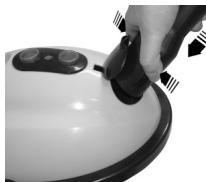
- Caution! Danger of Injury! Please open the safety lock (4) only when no more steam comes out of the nozzle.
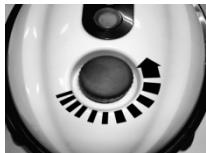
Turn the lock in an anticlockwise direction.
If the device is still warm, please wait 5 minutes before removing the seal completely. Press the seal downwards and turn.
Note: For your protection the safety lock has a release device. If the pressure in the kettle is still too high, this release device prevents it from being opened.
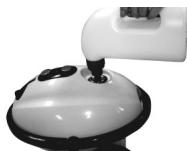
- Shake any residual water out of the kettle (2). Fill freshwater from the measuring beaker (9) into the kettle. Do not overfill! Do not exceed the quantity of water stated on the measuring beaker, i.e. 1.2 litres!
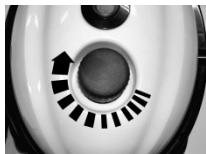
- Re-fasten the safety lock (4).
Attachment of the Individual Accessories
GB
It is possible to attach the individual nozzles directly to the steam pistol of the hose (3):
- Attach one of the nozzles to the steam pistol until it locks in place.
- In order to release the nozzle again, please press the button on the steam pistol.
- Keep the button pressed down and then pull the nozzle off
or extend the nozzle attachments with one or two extension tubes (10).
- Please insert the two-parts of the extension tube into one another until they lock into place and then attach them to the steam pistol (3).
- Then attach the floor brush nozzle (12) or the accessories.
- In order to release the extension tube, please press the button on the steam pistol.
Note: The round brush attachment can only be used in conjunction with the jet nozzle.
Jet nozzle with round brush attachment (11):
Floor brush nozzle (12): Window wiper (13): Non-woven cover (14):
For cleaning joints, the edges of bath tubs or areas which are difficult to access etc.
For large surfaces, such as laminate or tiles etc. For window cleaning, shower partitions etc. Non-woven cover for sensitive surfaces. Use the cover in conjunction with the floor brush le.
Switching on the Device
Before inserting the mains lead into the socket, check whether the voltage you intend to use complies with that of the machine. For details see the machine label.
After you have filled the kettle with water and selected a cleaning attachment, please proceed as follows:
- Only connect the machine to a properly installed safety socket, 230V / 50Hz
- If you have not done so already, open the cover on the main device and attach the connection head (17).
- Press the on/off switch (1). The red control lamp lights up. The temperature control lamp (18) shows that the device is heating up.
- After approx. 4-5 min the steam temperature has been reached and the temperature control lamp (18) goes off.
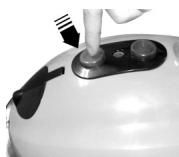
- Press the steam control button (19). The green control lamp lights up.
GB
- Point the steam nozzle at the surface to be cleaned and press the steam switch (5).
- Use the lock (8) to turn the steam pistol to permanent steam.
Filling up the Water Boiler when using the Device
If there is no more water in the vessel no steam is emitted when the steam switch (5) is pressed. The water has to be filled up as follows:

- Press the on/off switch (1). The red control lamp goes off.
- Wait for approximately 5 minutes and release the residual pressure with the steam switch!
3 Pull the power plug out of the socket! - Slowly open the safety lock (4) and wait a few seconds before opening it completely until the overpressure has been released. Note: For your protection the safety lock has a release device. If the pressure in the kettle is still too high, this release device prevents it from being opened.
- Fill freshwater from the measuring beaker (9) into the kettle. Do not overfill! Do not exceed the quantity of water stated on the measuring beaker, i.e. 1.2 litres! Take care of water splashes that might come out of the boiler. In order to prevent water from splashing, the water should be filled in slowly after the safety lock has been opened.
- Fasten the safety lock again.
- Reinsert the plug into the socket and switch on the device using the on/off switch.
When you have finished using the device
- Switch the device off using the on/off switch (1).
- Allow the pressure that is still present to escape by operating the lever on the steam pistol (16).
- Switch off the steam control button (19). The green control lamp goes off.
- Remove the mains plug from the socket.
- Allow the device to cool down for approximately one hour and then shake out any residual water that may be present in the kettle (2).
Cleaning and Maintenance
- Cleaning and maintenance must only be carried out when the power plug is removed from the socket.
- Before putting the device away or cleaning it, it has to be allowed to cool down completely.
- Please clean the device and the accessories only with a slightly moist cloth.
- Do not use strong cleaning agents of solvents for cleaning.
- In order to guarantee a long and trouble-free working life, lime residues have to
be rinsed out of the boiler once a month. Please do not use vinegar or other anti-liming agents
GB
This device has been tested according to all relevant current CE guidelines, such as electromagnetic compatibility and low voltage directives, and has been constructed in accordance with the latest safety regulations.
Subject to technical changes without prior notice!
Guarantee
The device supplied by our Company is covered by a 24 month guarantee starting on the date of purchase (receipt).
During the life of the guarantee any fault of the device or its accessories *) ascribable to material or manufacturing defects will be eliminated free of charge by repairing or, at our discretion, by replacing it. The guarantee services do not entail an extension of the life of the guarantee nor do they give rise to any right to a new guarantee!
Proof of the guarantee is provided by the proof of purchase. Without proof of purchase no free replacement or repair will be carried out.
If you wish to make a claim under the guarantee please return the entire machine in the original packaging to your dealer together with the receipt.
*) Damage to accessories does not mean automatic free replacement of the whole machine. In such cases please contact our hotline. Broken glass or breakage of plastic parts are always subject to a charge.
Defects to consumables or parts subject to wearing (e.g. motor pistons, kneading blades, drive shafts, spare remote control, spare toothbrushes, saw blades, etc.) as well as cleaning, maintenance or the replacement of said parts are not covered by the guarantee and hence are to be paid!
The guarantee lapses in case of unauthorized tampering.
After the expiry of the guarantee
After the expiry of the guarantee repairs can be carried by the competent dealer or repair service against the payment of the ensuing costs.
PL
- Spesielle sikkerhetsanvisninger
- General Safety Instructions
- Safety Symbols on the Device and in the Instructions
- Special Safety Advice
- GB
- Overview of the Controls
- Initial Operation
- Filling up the Heating Boiler before Use!
- Attachment of the Individual Accessories
- Switching on the Device
- Filling up the Water Boiler when using the Device
- When you have finished using the device
- Cleaning and Maintenance
- Guarantee
- After the expiry of the guarantee
- PL
Brand : CLATRONIC
Model : DR 2890
Category : Kitchen appliance