
REFERENCE 610 - Pregnant JBL - Free user manual and instructions
Find the device manual for free REFERENCE 610 JBL in PDF.


| Product Type | Bluetooth Wireless Headphones |
| Brand | JBL |
| Model | Reference Series 610 |
| Available Colors | White/Black with Chrome |
| Speakers | Two 40mm neodymium speakers |
| Sensitivity | 96 dB SPL/mW @ 1 kHz |
| Frequency Response | 20 Hz - 20 kHz (-10 dB) |
| Impedance | 32 ohms |
| Maximum Input Power | 2 x 50 mW |
| Weight | 212 g (without cord) |
| Dimensions | 102 mm diameter (earcups), 1.75 m audio cable |
| Power Supply | Integrated rechargeable battery, USB charging |
| Charging Time | Approximately 3 hours |
| Battery Life | 8 to 10 hours of continuous use |
| Wireless Technology | Bluetooth with A2DP and AVRCP profiles |
| Range | Up to 10 meters |
| Wired Compatibility | Devices with 3.5 mm stereo mini-jack |
| Included Accessories | Carrying case, Bluetooth transmitter, stereo phono adapter, dual airplane adapter, battery charger, optional audio cable |
| Care and Cleaning | Clean with a dry cloth only |
| Safety Instructions | Do not expose to water, do not block ventilation, unplug during thunderstorms, repair by qualified technician |
| Manufacturer | Harman Consumer Group, Inc. |
Frequently Asked Questions - REFERENCE 610 JBL
User questions about REFERENCE 610 JBL
0 question about this device. Answer the ones you know or ask your own.
Ask a new question about this device
Download the instructions for your Pregnant in PDF format for free! Find your manual REFERENCE 610 - JBL and take your electronic device back in hand. On this page are published all the documents necessary for the use of your device. REFERENCE 610 by JBL.
USER MANUAL REFERENCE 610 JBL
jbl reference series OIO
Bluetooth® wireless headphones for iPod
Important Safety Instructions
Please read the following precautions before use:
- Read these instructions, heed all warnings, and keep for future reference.
- Do not use this apparatus near water.
Clean only with dry cloth. - Do not block any ventilation openings; a minimum distance of 10mm around the entire apparatus is required for sufficient ventilation.
- No naked flame sources such as lighted candles should be placed on or near apparatus.
- Attention should be drawn to the environmental aspects of battery disposal.
- Apparatus is to be used in moderate climates only.
- Do not install near any heat sources such as radiators, heat registers, stoves or other apparatuses (including amplifiers) that produce heat.
- Do not defeat the safety purpose of the polarized or grounding-type plug. A polarizing plug has two blades with one wider than the other. A grounding-type plug has two blades and a third grounding prong. The wide blade or third prong is provided for safety. If the provided plug does not fit into your outlet, consult an electrician for replacement of the obsolete outlet.
- Protect the power cord from being walked on or pinched, particularly at the plugs and convenience receptacles, and at the point where they exit from the apparatus.
Only use attachments/accessories specified by the manufacturer. - Unplug this apparatus during lightning storms or when unused for long periods of time.
- Refer all servicing to qualified service personnel. Servicing is required when the apparatus has been damaged in any way, such as power-supply cord or plug is damaged, liquid has been spilled or objects have fallen into the apparatus, or the apparatus has been exposed to rain or moisture, does not operate normally, or has been dropped.
- TO PREVENT THE RISK OF ELECTRIC SHOCK, DO NOT REMOVE THE COVER (OR BACK). THERE ARE NO USER-SERVICEABLE PARTS INSIDE THIS UNIT. PLEASE REFER SERVICING TO QUALIFIED HARMAN CONSUMER GROUP, INC.SERVICE PERSONNEL
- Never remove grille covers in order to service the speaker system. The speaker system does not contain any user-serviceable parts.

THE LIGHTNING
FLASH AND
ARROWHEAD
WITHIN THE
TRIANGLE IS A
WARNING SIGN
ALERTING YOU
TO DANGEROUS
VOLTAGE INSIDE
THE PRODUCT.
CAUTION
RISK OF ELECTRIC SHOCK DO
NOT OPEN
CAUTION: TO REDUCE
THE RISK OF SHOCK, DO
NOT REMOVE COVER.NO
USER-SERVICEABLE PARTS
INSIDE.REFER SERVICING
TO QUALIFIED SERVICE
PERSONNEL

THE EXCLAMA
TION POINT
WITHIN THE
TRIANGLE IS A
WARNING SIGN
ALERTING YOU
TO IMPORTAN
INSTRUCTIONS
ACCOMPANYIN
THE PRODUCT.
IATTENTION!
It is considered good practice to connect the AC charger cable to your headphone prior to plugging charging device into power source.
WARNING: TO PREVENT FIRE OR ELECTRICAL SHOCK
HAZARD,DO NOT EXPOSE THIS PRODUCT TO RAIN
OR MOISTURE
WARNING: THE APPARATUS SHOULD NOT BE
EXPOSED TO DRIPPING OR SPLASHING AND NO
OBJECTS FILLED WITH LIQUID, SUCH AS VASES, SHOULD
BE PLACED ON THE APPARATUS.
jbl reference series 610
Safety Instructions
Headphone/earphone listening at high volume levels may cause permanent damage to your hearing. Always set the volume control to the lowest level before switching to different sources (tuner, CD player, MP3 player, etc.) or before plugging in the headphones/earphones. For your safety, do not use headphones/earphones while driving or cycling.
Welcome
Thank you for purchasing the JBL Reference Series 610 wireless headphone system. These headphones incorporate 60 years of JBL's professional audio experience and technology, setting a new standard for Bluetooth® wireless headphone systems.
Introduction
JBL is proud to bring you the JBL Reference Series 610 wireless headphone system. This wireless headphone system streams high-fidelity digital sound from your audio device to your headphones. With the included Bluetooth® transmitter attached to your iPod, you can stream music to your JBL 610 wireless headphones as far as 10 meters away from the music source. With no wires to tangle or restrict your movement, and the volume and track controls conveniently located on the headphones, the JBL Reference Series 610 is both the ultimate in portable audio convenience and the pinnacle of audio quality.
The JBL Reference 61o is compatible with most Bluetooth®enlnd devices, music players, cell phones and laptops. Enled with Bluetooth®A2DP (Advanced Audio Delivery Protocol) and AVRCP (Audio/Video Remote Control Protocol), the JBL 61o can stream high-quality sound. The JBL Reference Series 61o has raised the bar for high-performance, wireless, portable headphone systems and has earned the right to be a part of the JBL Reference Series family.
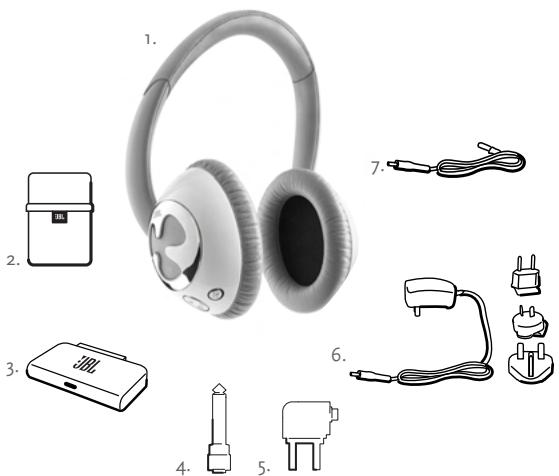
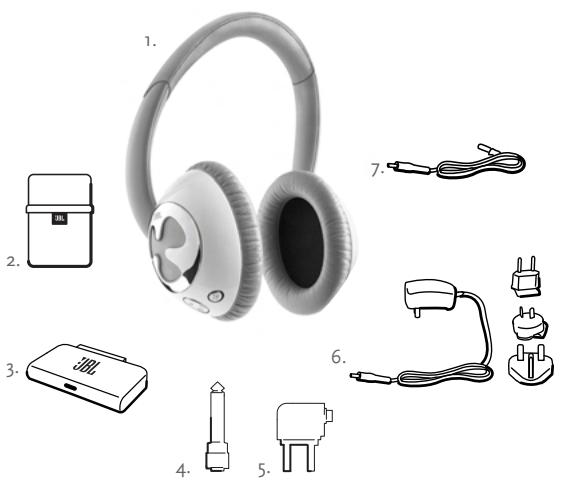
Package Contents
- JBL Reference Series 610 Headphones
- Carrying Case
- Bluetooth Transceiver
- Stereo Phono Adapter
- Dual Airline Adapter
- Battery Charger
7.1.75-Meter Optional Audio Cable
using your jbl reference series 610 wireless headphones
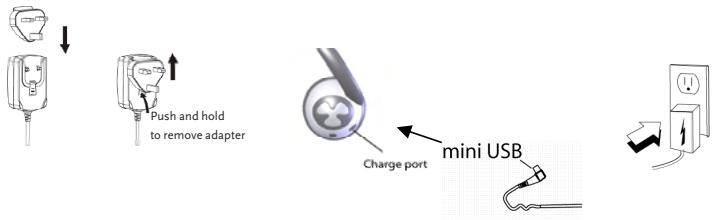
Charging Your Headphones
To optimize your JBL 610 headache system's performance, the unit must be fully charged prior to operation.
- Select the proper regional AC adapter plug and assemble onto your battery charger by sliding the plug into the receptacle cavity. (To remove the adapter plug, press the release lever on the charger housing and slide plug in the direction shown.)
- Connect the mini USB plug on your battery charger to the charge port located on the left ear cup of your headphones.
- Connect to power outlet and begin charging. Your headphones should reach a complete charge in three (3) hours.
JBL Reference 610 Automatic Power Saving Mode
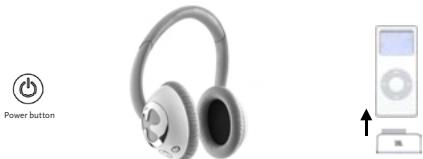
To extend the single charge battery playing time of your JBL Reference 610 Wireless Headphone, a power "OFF" feature has been built into the system. After 30 minutes of in-activity the headphone will automatically power off. The Bluetooth Transceiver will also shut down and no longer draw power from the iPod.
To re-activate your JBL Reference 610 headache proceed as follows:
- Disconnect the JBL Bluetooth Transceiver from the iPod
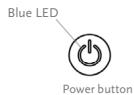
- Press Power Button located on the left ear cup (you will see the blue LED light up)
- Connect the Bluetooth Transceiver to the iPod
The headphone and Bluetooth Transceiver will now re-link with each other.
Starting Up Your Headphones and the Bluetooth Transceiver
The JBL Reference Series 610 is designed for use with iPod generations 4G and above. For your hearing safety, please adjust your iPod volume to the minimum position prior to powering up your headphones.
- Power "On" your headphones by pressing the power button located on the left ear cup. The blue LED on the headphone will light up (at first solid, followed by three consecutive, quick flashes - indicating that headphones are ready to be "discovered"). Plug in your dongle after headphone system is in discoverable mode. The LED on the mating transceiver will start to blink rapidly, indicating pairing with each other. (To power "Off" headphones, press power button.)
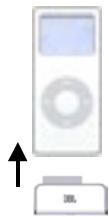
- Connect the Bluetooth transceiver to the mating Omni connector on the base of your iPod. Connecting the transceiver will automatically power up your iPod.
- Once the headphones and Bluetooth transceiver are paired and connected, the blue LED on the headphones and the transceiver's LED will blink slowly and intermittently. You are now ready to use your wireless headphones system.
(Note: Pairing of the headphones and transceiver may take up to one minute.)
- If Bluetooth connection is lost due to moving out of transmission range, move closer to the iPod and press the play/pause button ">. It will re-pair to the Bluetooth transceiver.
Navigating Your Headphone Controls
The navigation controls are all conveniently located on the right ear cup.



Volume
Music Playing Mode
- The volume "..." and "+" buttons are controlled by pressing to make your selection. Repeated pressing will reduce or increase volume, as desired. If you do not notice a change in the volume, make sure your iPod does not have a low battery.
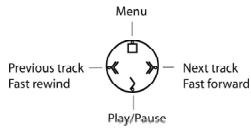
- Located on the four-position toggle switch are:
_ (a) "menu" (push once to take you to menu mode)
(< < ) "previous track" (push once), "fast rewind" (press and hold)
() "next track" (push once), "fast forward" (push and hold)
( > ) "play/pause"(press once to play,once to pause)
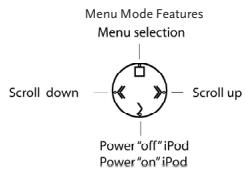
Menu Mode
Menu mode brings up a second tier of iPod navigation features, which let you roam through your iPod menus.
- Push menu button (o) once to take you to the menu mode.
- To scroll "up" (<>) or "down" (>>) the menu, hold down the proper feature button until you reach your selection.
- To make a selection from the menu list, push and hold the menu button (□).
- In the menu mode, pressing and holding play/pause " > " allows you to turn your iPod on or off remotely from your headphones.

Using Your Headphones With Other Bluetooth Devices
The JBL Reference Series 610 headphones can also be used with other Bluetooth music devices. The Bluetooth product must be enabled with the A2DP (Advanced Audio Distribution Profile). This will allow streaming of music to your headphones. A Bluetooth device with both A2DP and AVRCP (Audio/Video Remote Control Profile) will stream music and allow functionality of the "Music Playing Mode" control features.
- Make sure headache power is "Off" and transceiver is disconnected from the iPod.
- Turn headphone power back "On" and wait for solid LED, then three quick flashes - indicating that the headphone system is in "discoverable" mode.
- To pair your Bluetooth-enabled device to the headphones, please refer to your user's manual for the proper setup procedure.
- When your audio device requests a passcode to pair with the JBL Reference Series 610 headphone system, enter the numerical sequence "ooo".
Note: The headphone control features may be limited when used with devices other than your iPod, due to the varying designs and possible remote control limitations of your audio device.
Using Your Headphones in Passive Mode
For situations when you are not able to use your Bluetooth wireless mode to stream music, the JBL Reference Series 610 headphones can be connected to your audio device through the included audio cable. Make sure the volume on your audio device is turned to the minimum position, to ensure hearing safety, prior to connecting your headphones.
- Turn the power "Off" on your headphones.
- Plug the mini USB connector on your audio cable into the headphone charging port.
- Plug the 3.5mm mini stereo jack end into the audio device's mating port.
- The control features buttons will not be functional when the headphone system is used with the audio cable.

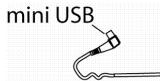
Charge port
troubleshooting your jbl reference series 610
| Symptom when used with Bluetooth transceiver | Possible Problem | Solution | Note |
| Sound Quality | |||
| No sound from headphones. | Headphone system is not powered “On”. | Press down power button. | Blue LED should go from solid to three consecutive, fast blinks, indicating that it's ready to be “discovered” by transceiver or other audio source. |
| Rechargeable headphone ba-tery is low. | Charge headphones by following the battery charging directions in this User Guide. | If blue LED on headphones continues to blink rapidly after headphone system has paired, it is indicating a low battery. A monotone will also be sounded every 5 seconds for low battery alert. | |
| Bluetooth transceiver is not receiving power. | Make sure iPod power is on and the transceiver connector is engaged correctly. | Blue LED on transceiver should start blinking. | |
| iPod battery is low. | Charge your iPod in accordance with the battery charging directions given in your iPod user's guide. | ||
| No sound from headphones. | Headphone has lost the link with the Bluetooth transceiver. | 1. Press the play/pause button and the headphone system will re-pair itself with the transceiver.2. Move back to within Blue-tooth connection range.3. Unplug your transceiver and replug it in to initiate connection. | Blue LED should start blinking rapidly (indicating pairing). You may have lost the link because you are too far from the iPod. Move closer and try again. |
| Sound comes from only one side/channel. | Bluetooth transceiver is not connected properly. | Make sure transceiver is connected properly. | |
| If using audio cable, connection at mini USB or 3.5mm audio inlet end may not be connected properly. | Make sure connectors are mat-ing correctly to your headphones and audio device. | ||
| Volume is low and will not increase when “+” feature is selected. | The iPod may have a low battery. | Charge iPod according to iPod charging instructions. | |
| Your iPod may have a maximum volume setting that is “On”. | See whether you have iPod maximum volume setting. |
| Symptom when used with Bluetooth transceiver | Possible Problem | Solution | Note |
| Headphone controls have intermittent operation. | Bluetooth transceiver is not connected properly. | Make sure transceiver is connected properly. | |
| May be moving out of Bluetooth range. | Move closer to iPod. | Bluetooth does not have good transmission through metal or water. | |
| Headphone battery is low. | Charge headphones by following the battery charging directions in this User Guide. | if blue LED on headphones continues to blink rapidly after headphone system has paired, it is indicating a low battery. A monotone will also be sounded every 5 seconds for low battery alert. | |
| The iPod may have a low battery. | Charge iPod according to iPod charging instructions. | ||
| Sound drops in and out. | Moving out of transmission range. | Move closer to the iPod or change position. | |
| Distortion (static, crackling or hissing sounds). | Noise may be caused by interference from a monitor, cell phone or other transmitting device. | Turn monitor off to see whether noise is eliminated. Use headphones further away from monitor. | |
| If using audio cable, headphone system may be overdriven by an amplified audio source. | Ensure that the JBL Reference Series 610 is connected to an appropriate source device. Make sure cables are inserted snugly into receptacles. Reduce volume on the audio source. | ||
| Pairing | |||
| Audio device does not pair with headphones. | Audio device does not support A2DP profiles. | Audio device is not compatible.Verify with manufacturer. | |
| Headphone system is not powered “On”. | Press down on power button. | Blue LED should go from solid to three consecutive, fast blinks, indicating that it's ready to be “discovered” by transceiver or other audio source. | |
| Headphone system is still paired to Bluetooth transceiver. | Disconnect transceiver from iPod and turn headphone power “Off”, then back “On”. | If LED has intermittent, slow blinks on both dongle and headphones, both devices are connected. If you wish to re-pair, please follow initial pairing instruction. | |
| iPod battery is low. | Charge headphones by following the battery charging directions in this User Guide. | If blue LED on headphones continues to blink rapidly after headphone system has paired, it is indicating a low battery. A monotone will also be sounded every 5 seconds for low battery alert. |
Technical Specifications
| Manufacturer: | Harman Consumer Group, Inc. |
| Model Name: | JBL Reference Series 610 |
| Available in: | White/Black with Chrome |
| Features Sensitivity: | 96dB SPL/mW @ 1kHz |
| Input Requirement, iPod Dongle: | iPod Dongle connected to iPod models ,4th generation and above |
| Input Requirement, iPod Dongle: | Bluetooth A2DP and AVRCP profile streaming |
| Drivers: | Two 40mm neodymium drivers |
| Input Power: | 2 x 50mW maximum power |
| Frequency Response: | 20Hz-20kHz (~10dB) |
| Dimensions: | Diameter -102mm, hardwire audio cable -1.75m |
| Weight: | 212g without cord |
| Input Impedance: | 32 ohms |
| Wireless Compatibility: | Most Bluetooth-enabled audio devices with A2DP and AVRCP profiles |
| Hardwired Compatibility: | Audio devices with 3.5mm mini audio jack connection |
| Battery Usage: | 8-10 hrs continuous play |
| Symptom when used with Bluetooth transceiver | Possible Problem | Solution | Note |
| Control Features | |||
| Headphone controls do not work with Bluetooth audio device. | Audio device is not compatible with AVRCP profile. | Audio device is not compatible. Verify with manufacturer. | |
| Headphone controls have limited operation. | Audio device does not recognize some control features. | Contact your audio device manufacturer to check limitations. | Because of the large variation in design, the control features may be limited due to restrictions on your audio device. |
| Sound Quality | |||
| No sound from headphones. | Headphone system has lost the link with the audio device. | Follow your audio device's user guide instructions to re-pair the Bluetooth connection. | |
| If using audio cable, connection at mini USB or 3.5mm audio inlet end may not be connected properly. | Make sure connectors are mating correctly to your headphone and audio device. Make sure headphone power is "Off". | ||
| Sound drops in and out. | Moving out of transmission range. | Move closer to audio device or change position. | |
| Audio device is dropping transmission. | Contact audio device manufacturer for guidance. | ||
| Headphone battery is low. | Charge headphones by following the battery charging directions in this User Guide. | If blue LED on headphones continues to blink rapidly after headphone system has paired, it is indicating a low battery. A monotone will also be sounded every 5 seconds for low battery alert. | |
| Distortion (static, crackling or hissing sounds). | Noise may be caused by interference from a monitor, cell phone or other transmitting device. | Turn monitor off to see whether noise is eliminated. Use headphones further away from monitor. | |
| If using audio cable, headphone system may be overdriven by an amplified audio source. | Ensure that the JBL Reference Series 610 is connected to an appropriate source device. Make sure cables are inserted snugly into receptacles. Reduce volume on the audio source. |
page left intentionally blank
Harman Consumer Group, Inc.
JBL Reference Series 610
jbl reference series 610
Mesures de sécurité
When your audio device requests a passcode to pair with the JBL Reference Series 610 headphone system, enter the numerical sequence "0000".
Specifications techniques
jbl reference series 610
A Anything, I am in the middle of a meeting.
Compatibility wireless
Harman Consumer Group, Inc.
JBL Reference Series 610
jbl reference series 610
Harman Consumer Group, Inc.
JBL Reference Series 610
JBL Reference 610 3.3.2.2.3.4.5.6.7.8.9.10.11.12.13.14.15.16.17.18.19.20.21.22.23.24.25.26.27.28.29.30.31.32.33.34.35.36.37.38.39.40.41.42.43.44.45.46.47.48.49.50.51.52.53.54.55.56.57.58.59.60.61.62.63.64.65.66.67.68.69.70.71.72.73.74.75.76.77.78.79.80.81.82.83.84.85.86.87.88.89.90.91.92.93.94.95.96.97.98.99.
troubleshooting your jbl reference series 610
iPodMo1e43e4e4e4e4e4e4e4e4e4e4e4e4e4e4e4e4e4e4e4e4e4e4e4e4e4e4e4e4e4e4e4e4e4e4e4e4e4e4e4e4e4e4e4e4e4e4e4e4e4e4e
龍華華A2DP及AVRCP元羅日
T444444444444444444444444444444444444444444444444444444444444444444444444444444
2x50mW 套大
20 Hz-20kHz(-10dB)
[ \text{吉} = 102\mathrm{mm}, \text{哈德里克} \text{O} \text{尼} \text{尼} \text{尼} \text{尼} - 1.75\mathrm{m} ]
司三日
32 ohms
jbl reference series 610
Sikkerhetsveiledning
Hvis du bruker hodetefon/areproppen med volumstyrken skrudh hoyt opp, kan dette skade horselen. Still alltt ldystyrken pa det laveste nivaet hvis du skal bye tille andydkieler (radio, CD-spiler, MP3-spiller, osv.), ellr for hodetefonen/arepropene tilkobles. Av sikkerhetsgrunner skal hodetefon/arepropende ici brukes mens du jkrer er sylkert.
Velkommen
Tak for at du kjapte et JBL Reference Series 6io tralstod hoteledofsystem. Disse hodetefonene bygger pa 6o ans erfaring som JBL har innen professiendy lodepvelese og technologi, og sett er ny standard for Bluetooth® traldae hoteledofsystem.
Innedning
JBL er stolt av kunne tilby JBL Reference Series 6io tradloh hodetelefonsystem. Dette tradlose hodetelesystemet overforer hi-fi digallyld fra audioapparatet ditt lil hodefteonen. Med inkludert Bluetooth sender-mottaker festi din ipod kan musik overfores til JBL 6io tradlose hodetefopena lang somt lo meter fra musikk-kilden. Uden ledninger somm起来i ellegerbrense geselfehrieten, og volum- ogsporkontroll enkelt passiert auf hodefteonen, er JBL Reference Series 6io det Beste og enklenste innere barbart tegbelesesfihgeten, smidtg som hykvaliten er suveren.
JBL Reference 610 er kompatibel med de feste Bluetooth®-aktiveptrater, musikspillere, mobitelefoner, og lapptor. Aktivert med Bluetooth®A2DP (avansert audio leveringsportokoll) og ARCP (audio/video fiernkontrol protokoll), kan jJBL 610 overfere yd av høk kvalitet. JBL Reference Series 610 har het vet standarden for hystytende, trådlase bærbare hodetelesystemis, og har fortjent en plaiss i JBL Reference Series familien.
Pakkeinnhold
- JBL Reference Series 610 hodetelefon
- Bæremappe
- Bluetooth sender-mottaker
- Stereofon adapter
- Dobbelt luftlinje adapter
- Batterilader
7.1,75 m audiokabel
Feilsøking for jbl reference series 610
| Feilsymptom ved bruk medBluetooth sender-mottaker | Mulig problem | Lösning | Merknad |
| Lydkvalitet | |||
| Hodetelefonen gir ingen lyd. | Hodetelefonen er ici på. | Trykk Av/på knappen. | Blätt LED-lys skal skiffe fra fasttil tre etterfolgende raske blink, som indikerer at den er klart til àbli "oppdaget" av sender-mot-takeren eller annen audio kilde. |
| Oppladbart hodetelefonbat-teri er lavt. | Lad opp hodetelefonen ved àfolge instrukser for batteriladingi brukerveiledningen. | Hvis det blå LED-lyset fortsetterá blinke rasket etter at hodetelesfonsystemet er paired, er dette tegn på at batteriet er lavt. Enmonoton lyd vil øgså varsole hvertfemte sekund om lavt batteri. | |
| Bluetooth sender-mottaker eruten kraft. | Se til at iPod er slätt på og atsender-mottaker-kontakteren riktig festet. | Blätt LED-lys på sender-mottakerbør begynne Å blinke. | |
| iPod batteriet er lavt. | Lad opp iPod verä folgeinstrukser for batterilading i iPodbrukerveiledningen. | ||
| Hodetelefonen gir ingen lyd. | Hodetelefonen har mistet forbindelse med Bluetooth sender-mottaker. | 1. Trykk play/pause knappen og hodetelefonsystemet vil pairing med sender-mottaker igjen.2. Gå tilbake til Bluetooth'sforbindelsområde.3. Ta utkontatken til sender-mot-taker og sett den inn igjen for áforbindelse. | Blätt LED-lys bør begynne Å blinke raskt (som indikerer pairing). Du kan ha mistet forbindelsen fordù du er for langt borte fra iPod. Flytt degnæmere og forsøk på nytt. |
| Lydkommen kun fra en side/kanal. | Bluetooth sender-mottaker er ici riktig tikkoblet. | Se til at sender-mottakeren er riktig tikkoblet. | |
| Hvis audiokabel brukes er detmulig at mini-USB ellr 3,5 mmaudio-inntak forbindelse ikke riktig tikkoblet. | Se til at kontakter er riktigpaired med hodetelefonen ogaudio-outstyret. | ||
| Lydvolumet er lavt og blir ikkehóre när "+" Funksjonenvelges. | iPod kan ha lavt batteri. | Lad opp iPod i henhold til iPodladeinstrukyer. | |
| Din iPod kan ha en maksimalvoluminnstilling som er "på". | Se om du har iPod maksimalvoluminnstilling. |
| Feilsymptom ved bruk medBluetooth sender-mottaker | Mulig problem | Lösning | Merknad |
| Hodetelefonkontroller fungererkun vekselvist. | Bluetooth sender-mottaker er likerkrittig tilkoblet. | Se til at sender-mottakeren er riktig tilkoblet. | |
| Kan vaare på vei ut av Bluetoothområde. | Flytt næmere iPod. | Bluetooth har ikke godoverfaring giennom metallvellan. | |
| Hodetelefon-batteriet er lavt. | Lad opp hodetelefonen ved äfolge instrukser i brukerveiled-ningen om batterilading. | Hvis blätt LED-lys på hodetele-fonnen fortsetter ä blinke rasketetter at hodetelefon-systemer paired, er dette tegn på at bat-teriet er lavt. En monoton lyd vilogså variske hert fekte sekundom at batteriet er lavt. | |
| iPod kan ha lavt batteri | Lad opp iPod i henhold til iPodladeinstrukser. | ||
| Lyden fallerinn og ut. | På vei ut av sendingsområdet | Flytt næmere iPod ell er skift stilling | |
| Lydforstyrlse (statisk, knek-kende eller hvesende stoy). | Støy kan forarsakes av interferensfra en monitor, mobilitefon eller annet sendende utstyr. | Sla monitoren av for á se om støyenelimineres. Bruk hodetelefonen longerbort fra monitoren. | |
| Hvis audiokabel brukes kanhodetelesystemet ∀verstigtet av en forsterketaudio kilde. | Se til at JBL Reference Series 610 erkoblet til et passende kilde apparat.Se til at kabler er*gdot festet til sender-mottaker. Sett ned volum-styrken på audio kilden. | ||
| Feilsymptom ved bruk medBluetooth sender-mottaker | Mulig problem | Læsning | Merknad |
| Pairing | |||
| Audio-utstyär ikke pairing medhodetelefonen. | Audio-utstyär stätter ikke A2DP profiler. | Audio-utstyär er/DDke kompatibelt.Rädfor med fabrikanten. | |
| Hodetelefonsystemet er/DDke på. | Trykk på av/på knappen. | Blätt LED-lys bør skifte fra fast tiltre etterfolgende raske blink, somindiker at det er klart til à bilipoppdaget"av sender-mottakereller annen audio kilde. | |
| Hodetelefonsystemet erfredeles paired med Bluetoothsender-mottaker. | Koble sender-mottaker fra iPod og slå hodetelefonen av og på. | Hvis LED-lyset blinker aktte ogperiodevist på böde hodetele-fonen og dongelen, er beggeapparater tinkoblet. For pairing papyrty skal du folge paingeveiled-ningen. | |
| iPod batteriet er lavt. | Lad opp hodetelefonen ved àfolge instrukser for batterilad-ning i brukerveiledningen. | Hvis det blA LED-lyset på hode-telefoner fortsetter à blinke rasktetter at hodetelefonsystemet erpaired, er det tegn på at batterieter lavt. En monoton lyd varsslerogså hvert femte sekund om atbatteriet er lavt. |
Harman Consumer Group, Inc.
JBL Reference Series 610
Hvitt/svart med krommetall
g6dB SPL/mW ved 1khz
iPod dongel forbundet med iPod modeller, generasjon 4 aller hoyere
Bluetooth A2DPog AVRCP profil stromning
To 40 mm neodymium drivere
2x50mw maksimal styrke
20hz-20khz(-10db)
Diameter-102mm,audiokabel-1,75m
212 guten kabel
32 ohm
De feste Bluetooth aktivierte audio apparater med A2DP og AVRCP profiler
Harman Consumer Group, Inc.
JBL フアレNs 610
白/黑とクロ一ム
1kHz 96dB SPL/mW
Harman Consumer Group, Inc.
8500 Balboa Boulevard, Northridge, CA 91329 USA
1.516.255.4525 (USA only)
www.jbl.com
Made in China.
2006 Harman International Industries, Incorporated. All rights reserved.
JBL and Harman International are trademarks of Harman International Industries, Incorporated, registered in the United States and/or other countries.
iPod is a trademark of Apple Computer, Inc., registered in the U.S. and other countries.
The Bluetooth® word mark and logos are owned by the Bluetooth SIG, Inc. and any use of such marks by JBL is under a license agreement.
Fabrique en Chine.
- Important Safety Instructions
- CAUTION
- IATTENTION!
- jbl reference series 610
- Safety Instructions
- Welcome
- Introduction
- Package Contents
- using your jbl reference series 610 wireless headphones
- Charging Your Headphones
- JBL Reference 610 Automatic Power Saving Mode
- Starting Up Your Headphones and the Bluetooth Transceiver
- Navigating Your Headphone Controls
- Music Playing Mode
- Menu Mode
- Using Your Headphones With Other Bluetooth Devices
- Using Your Headphones in Passive Mode
- troubleshooting your jbl reference series 610
- Mesures de sécurité
- Specifications techniques
- Sikkerhetsveiledning
- Velkommen
- Innedning
- Pakkeinnhold
- Feilsøking for jbl reference series 610
- www.jbl.com
Brand : JBL
Model : REFERENCE 610
Category : Pregnant