
ON CALL 5310 - Bluetooth speaker JBL - Free user manual and instructions
Find the device manual for free ON CALL 5310 JBL in PDF.



| Product type | Portable Bluetooth speaker |
| Brand | JBL |
| Model | ON CALL 5310 |
| Dimensions (W x H x D) | 115 mm x 65 mm x 175 mm |
| Weight | 0.6 kg |
| Power supply | Mains adapter or 4 LR6 batteries |
| Battery type | Alkaline or NiMH |
| Output power | 2 x 3 watts (tweeters) |
| Speakers | 2 x 25 mm Odyssey tweeters |
| Frequency response | 100 Hz - 20 kHz |
| Signal-to-noise ratio | 80 dB |
| Input impedance | 10 kΩ |
| Max power consumption | 25 W |
| Connectivity | Dock for Nokia 5310, 2.5 mm and 3.5 mm mini-jack auxiliary input |
| Functions | Volume control, green power indicator |
| Care and cleaning | Use a dry cloth; do not use liquid products |
| Safety | Do not expose to water, do not block openings, disconnect during thunderstorms |
| Spare parts and repairability | No user-serviceable parts; contact JBL customer service |
| Included accessories | Power adapter, auxiliary audio cables |
| Compatibility | Nokia 5310 XpressMusic phone, auxiliary sources with 2.5/3.5 mm audio output |
Frequently Asked Questions - ON CALL 5310 JBL
User questions about ON CALL 5310 JBL
0 question about this device. Answer the ones you know or ask your own.
Ask a new question about this device
Download the instructions for your Bluetooth speaker in PDF format for free! Find your manual ON CALL 5310 - JBL and take your electronic device back in hand. On this page are published all the documents necessary for the use of your device. ON CALL 5310 by JBL.
USER MANUAL ON CALL 5310 JBL
Simplified Chinese.....42
Russian 46
Swedish. 50
Finnish 54

jbl on call 5310
phone speaker dock for Nokia 5310 XpressMusic
Important Safety Instructions
Please read the following precautions before use:
- Read these instructions.
- Keep these instructions.
Heed all warnings. - Follow all instructions.
- Do not use this apparatus near water.
Clean only with dry cloth. - Do not block any ventilation openings. Install in accordance with the manufacturer's instructions.
- Do not install near any heat sources such as radiators, heat registers, stoves or other apparatus (including amplifiers) that produce heat.
- Do not defeat the safety purpose of the polarized or grounding-type plug. A polarizing plug has two blades with one wider than the other. A grounding-type plug has two blades and a third grounding prong. The wide blade, or third prong, is provided for safety. If the provided plug does not fit into your outlet, consult an electrician for replacement of the obsolete outlet.
- Protect the power cord from being walked on or pinched, particularly at the plugs and convenience receptacles and the point where they exit from the apparatus.
- Only use attachments/accessories specified by the manufacturer.
- Unplug this apparatus during lightning storms or when unused for long periods of time.
- Refer all servicing to qualified service personnel. Servicing is required when the apparatus has been damaged in any way, such as power-supply cord or plug is damaged, liquid has been spilled or objects have fallen into the apparatus, the apparatus has been exposed to rain or moisture, does not operate normally, or has been dropped.
TO PREVENT THE RISK OF ELECTRIC SHOCK, DO NOT REMOVE THE COVER (OR BACK). THERE ARE NO USER-SERVICEABLE PARTS INSIDE THIS UNIT. PLEASE REFER SERVICING TO QUALIFIED JBL, INCORPORATED, SERVICE PERSONNEL. - Never remove grille covers in order to service the speaker system. The speaker system does not contain any user-serviceable parts. Refer all servicing to the JBL, Incorporated, Technical Support Group.
Regulatory
FCC Statement and Warning
This device complies with part 15 of the FCC rules. Operation is subject to the following two conditions:
1) This device may not cause interference.
2) This device must accept interference, including interference that may cause undesired operation of the device.
IC Statement and Warning
Operation is subject to the following two conditions:
1) This device may not cause interference.
2) This device must accept interference, including interference that may cause undesired operation of the device.
MODIFICATIONS NOT EXPRESSLY APPROVED BY THE MANUFACTURER COULD VOID THE USER'S AUTHORITY TO OPERATE THE EQUIPMENT UNDER FCC RULES.
jbl on call TM 5310
Introduction
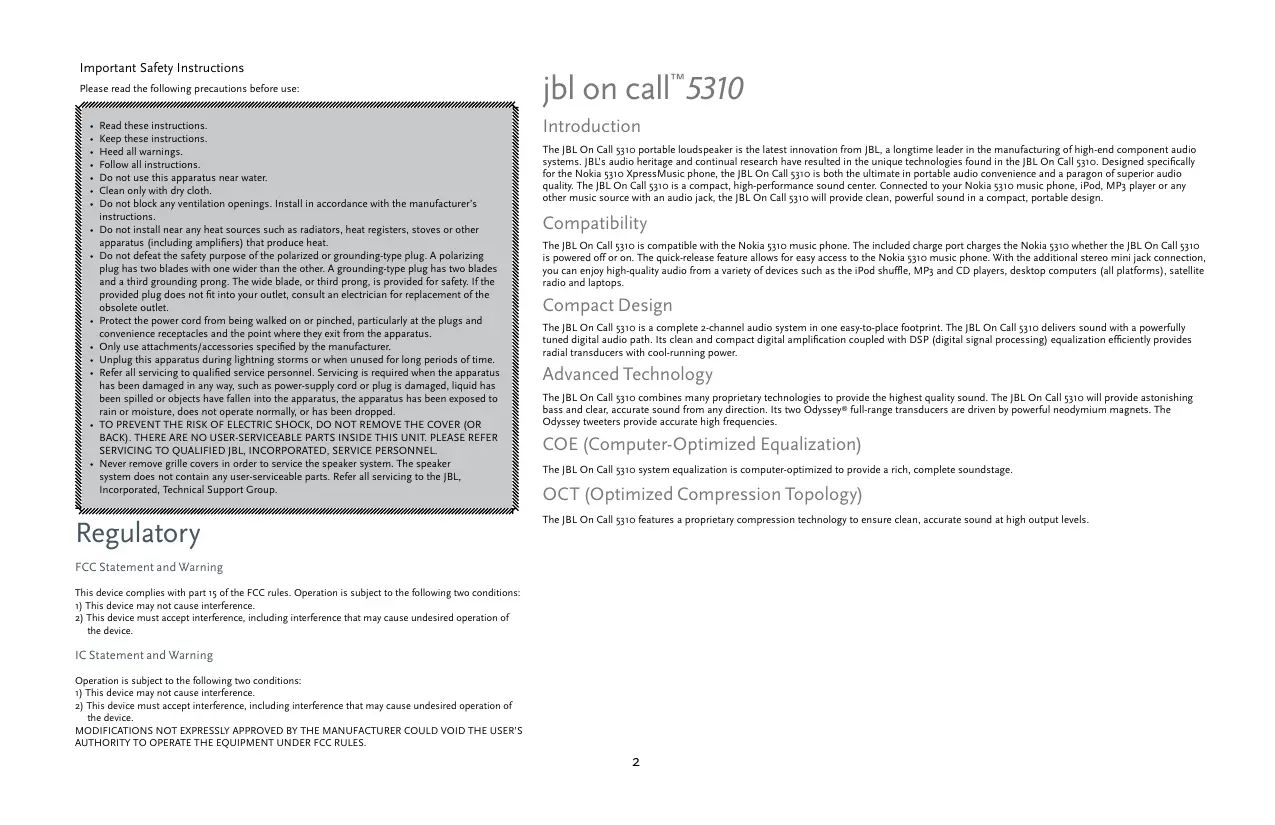
The JBL On Call 5310 portable loudspeaker is the latest innovation from JBL, a longtime leader in the manufacturing of high-end component audio systems. JBL's audio heritage and continual research have resulted in the unique technologies found in the JBL On Call 5310. Designed specifically for the Nokia 5310 XpressMusic phone, the JBL On Call 5310 is both the ultimate in portable audio convenience and a paradigm of superior audio quality. The JBL On Call 5310 is a compact, high-performance sound center. Connected to your Nokia 5310 music phone, iPod, MP3 player or any other music source with an audio jack, the JBL On Call 5310 will provide clean, powerful sound in a compact, portable design.
Compatibility
The JBL On Call 5310 is compatible with the Nokia 5310 music phone. The included charge port charges the Nokia 5310 whether the JBL On Call 5310 is powered off or on. The quick-release feature allows for easy access to the Nokia 5310 music phone. With the additional stereo mini jack connection, you can enjoy high-quality audio from a variety of devices such as the iPod shuffle, MP3 and CD players, desktop computers (all platforms), satellite radio and laptops.
Compact Design
The JBL On Call 5310 is a complete 2-channel audio system in one easy-to-place footprint. The JBL On Call 5310 delivers sound with a powerfully tuned digital audio path. Its clean and compact digital amplification coupled with DSP (digital signal processing) equalization efficiently provides radial transducers with cool-running power.
Advanced Technology
The JBL On Call 5310 combines many proprietary technologies to provide the highest quality sound. The JBL On Call 5310 will provide astonishing bass and clear, accurate sound from any direction. Its two Odyssey® full-range transducers are driven by powerful neodymium magnets. The Odyssey tweeters provide accurate high frequencies.
COE (Computer-Optimized Equalization)
The JBL On Call 5310 system equalization is computer-optimized to provide a rich, complete soundstage.
OCT (Optimized Compression Topology)
The JBL On Call 5310 features a proprietary compression technology to ensure clean, accurate sound at high output levels.
Unpacking
Carefully unpack your speaker system and identify all its components:
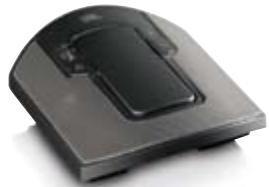
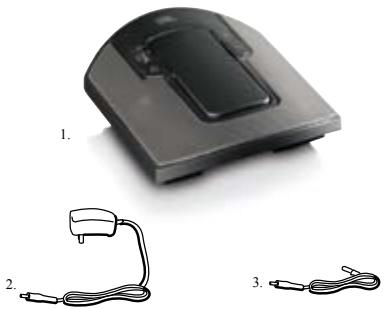
- JBL On Call 5310 unit
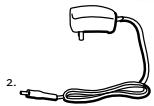
- Power supply
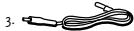
- Auxiliary audio cables
1.
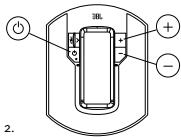
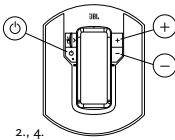
Volume Control (on Base Unit)
Volume increase ^ 十
Volume decrease "
General Setup
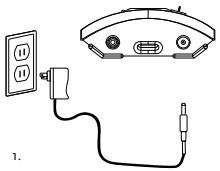
Unpack the JBL On Call 5310 and its power supply.
- Plug adapter into the "D\12v" port in back of unit and then into a wall outlet.
- Press the "Power" button on the front of the JBL On Call 5310. A green LED will indicate that the unit is on.
Battery Installation
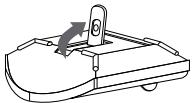
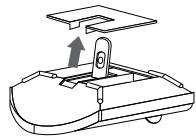
- Lift the kickstand.
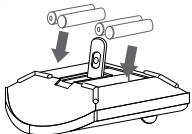
- Lift battery cover on the bottom of the jBL On Call 5310 and remove the battery cover.
- Place (4) fresh AA batteries as shown.
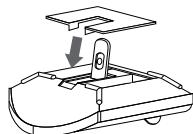
- Replace battery compartment cover.
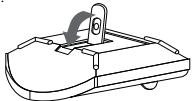
- Close the kickstand.
1.
2.
3.
4
5.
Note: System will not use battery power when using AC power.
DO NOT MIX BATTERY TYPES.
DO NOT MIX CHARGED AND PARTIALLY CHARGED BATTERIES. BATTERIES WILL NOT RECHARGE WHILE IN JBL ON ALL S310.
Battery Disposal
Alkaline batteries are considered nonhazardous and can be disposed of in your regular household trash.
Rechargeable batteries (i.e., nickel cadmium, nickel metal-hydride, lithium and lithium-ion) are considered hazardous household materials and could pose an unnecessary health and safety risk. Unwanted materials should be disposed of in an environmentally sound manner. Contact your local waste management officials for other information regarding the environmentally sound collection, recycling and disposal of used batteries.
Listening to Music From the Nokia 5310 Music Phone
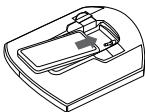
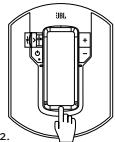
- Slide the Nokia 5310 music phone into the JBL On Call 5310 dock.
- Hold down the bottom of the Nokia 5310 music phone.
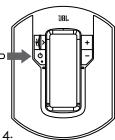
- Slide the JBL On Call 5310 charge connector into the Nokia 5310 music phone.
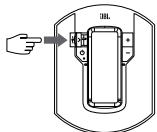
- Press the "Power" button on the front of the JBL On Call 5310. A green LED will indicate that the unit is on.
- Control music playback through the Nokia 5310 music phone.
- Adjust volume using the "+" and "-" buttons located on the front of the JBL On Call 5310.
1.
3-
rom an Auxiliary Device
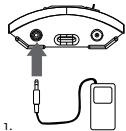
The JL On Call 5310 speaker includes a 2.5mm mini jack and 3.5mm mini jack cable for connection to any analog music player with either a 2.5mm or 3.5mm output.
- Connect the auxiliary device to the JBL On Call 5310 using the supplied audio cable.
- Press the "Power" button on the front of the JBL On Call 5310. A green LED will indicate that the unit is on.
- Control music playback through the auxiliary device.
- Adjust volume using the "+" and "-" buttons located on the front of the JBL On Call 5310.
troubleshooting your jbl on call™ 5310
| Symptom | Possible Problem | Solution | Note |
| Sound Quality | |||
| No sound from JBL On Call 5310 | No power to unit | Make sure wall power outlet or power strip has power; make sure all switches for outlet/power strip are on and that all switches for speaker system are on | |
| Incorrect source selection | Ensure that the Nokia 5310 XpressMusic phone is properly docked into the JBL On Call 5310Ensure that the auxiliary cable is properly connected to an external audio deviceTurn up the volumeCheck the system with a known good sourceConnect the Aux In cable to the headphone jack on your audio device | ||
| Sound comes from only one side/channel | Audio cable is not seated properly | Make sure the AuxIn cable is seatedall the way into the JBL On Call 5310Ensure that the Nokia 5310 XpressMusic phone is properly docked into the JBL On Call 5310 | If you are using an extension cable or a third-party cable, make sure it is a stereo male-to-male cable |
| Distortion (static, crackling or hissing sounds) | Noise may be caused by interference from a monitor, cell phone or other transmitting device | ||
| Sound Quality | |||
| Too much bass or treble | Ensure that the JBL On Call 5310 is connected to an appropriate source deviceMake sure that all signal cables are inserted snugly into receptacles | ||
| Volume level may be too high | Check volume of source deviceSome devices will distort the output signal if the volume is set to Maximum | ||
| Check the EQ setting on your source device | JBL recommends that the source device EQ be set to Flat or Off | ||
| Speaker system experiences radio frequency interference or picks up a radio station | Input cable is not plugged in properly | Check input cable connection | |
| Input cable may be picking up interference | Wrap up excess input cable in order to make it as short as possible | ||
| FM radio reception is poor | No power to unit | Make sure wall power outlet or power strip has power; make sure all switches for outlet/power strip are on and that all switches for speaker system are on. | FM radio feature will not function when JBL On Call 5310 is under battery power. |
| The JBL On Call 5310 charge connector is plugged into the Nokia 5310 XpressMusic phone | Disconnect the JBL On Call 5310 charge connector from the Nokia 5310 XpressMusic phone. | ||
| Charging | |||
| Nokia 5310 XpressMusic phone will not charge | The JBL On Call 5310 charge connector is not inserted snugly into the Nokia 5310 XpressMusic phone | Ensure that the JBL On Call 5310 charge connector is plugged in correctly | |
Technical Specifications
| Manufacturer | JBL, Incorporated |
| Model | JBL On Call™ 5310 |
| Drivers (Tweeter) | Odyssey® 25mm |
| Power | 2 x 3 Watts (tweeters) at 1% THD |
| Dimensions | Width 4-1/2" (115mm) |
| Height 2-1/2" (65mm) | |
| Length 7" (175mm) | |
| Weight | 1.3 lb (0.6kg) |
| Battery Size | AA |
| Battery Type | Alkaline, NiMh |
| Input Impedance | >10k Ohms |
| Signal-to-Noise Ratio | >80db |
| Frequency Response | 100Hz – 20kHz |
| Power (USA/Canada) | 120 Volts, 60Hz AC |
| Power (Europe/UK) | 220 – 230 Volts, 50Hz or 60Hz AC |
| Power (Japan) | 100 Volts, 50Hz or 60Hz AC |
| Power (Australia) | 240 Volts, 50Hz or 60Hz AC |
| Maximum Power Consumption | 25 Watts |
| UL/CUL/CE-Approved |
Alimentation (USA/Canada)
Alimentation (Europe/RU)
Anchura 4-1/2" (115mm)
Altura 2-1/2" (65mm)
Longitud 7" (175mm)
1,3 lb (0,6 kg)
AA
Alcalina, NiMh
1ok Ohms
8odb
100Hz-20kHz
120 Volts, 60Hz CA
220-230 Volts, 50Hz o 60Hz CA
100 Volts, 50Hz o 60Hz CA
240 Volts, 50Hz o 60Hz CA
25 Watts
COE (Computer-Optimized Equalization)
OCT (Optimized Compression Topology)
OCT (Optimized Compression Topology)
OCT (Optimized Compression Topology)
FCC (Federal Communications Commission USA) uttalse og adversel
COE (Computer-Optimized Equalization)
OCT (Optimized Compression Topology)
OCT(Optimized Compression Topology,优化压缩布局)
OITMMH3NUpOBaHHa TOnIOJOrn cKaTna OCT
AkyTnEeKcHcI chtema JBL On Call 5310 hNcHbIyET co6ctBENHyTO texHOIoTH cKaTHa, KOtpora rapaHTnpET Ychtt b ToHHm 3Byk pRn BbOkoB BbxOHOu mooHOnCT.
PacnaKOBka
- AkkyparthopacnayiknyareakcyneKCHCTMnynpOBeHrO HauJIHHe BCEX KOMIJIeKTOJIOOH:
- Cnctema JBL On Call 5310
- HCTOCHNK IITAHNA
4.BcnomoratTeIbHbIeaynoka6eJIi
YIpaBJIeHHe rPOMKocTbIO (Ha OCHOBHOM 6JIOKe)
YBéJIHueHHe rPOMKocTH “+”
UmeHbIeHHeI rPOMKoCTH “
HactpoJa cncTeMbI
PacnakyIte cHcTeMy JBL On Call 5310 He HcToUHHK nHTaHH.
CepTHΦhKaTbUL/CUL/CE
JBL, Incorporated
JBL On CallTM 5310
Odyssey® 25 MM
2x3 Bt (Bt) npu KHN 1%
IIInpuHa 4-1/2" (115mm)
Bbocra 2-1/2" (65mm)
Дино7"(175mm)
0,6K
Batapen Tnla AA
IIeouhybe iiehmetbIitnHnHHkeJI-MetAUHJTHpHdNMe (NiMH) akkMyIaHTopHerbeiiehmetb
10KOM
85π6
100Γ-20KΓ
120B,60TIIIepeMeHHORTOKA
220-230B,50HJH60TIGIIEpeMeHHOROTOKa
100B,50IIN60ΓIIIepeMeHHoroTOka
Harman Consumer Group, Inc.
8500 Balboa Boulevard, Northridge, CA 91329 USA
1.516.255.4525 (USA only)
www.jbl.com
Made in China Fabrique en China
© 2007 Harman International Industries, Incorporated. All rights reserved. Tous droits réservés.
JBL and Odyssey are trademarks of Harman International Industries, Incorporated, registered in the United States and/or other countries.
JBL On Call is a trademark of Harman International Industries, Incorporated.
Nokia and XpressMusic are trademarks or registered trademarks of Nokia Corporation.
iPod is a trademark of Apple Inc., registered in the U.S. and other countries. Shuffle is a trademark of Apple Inc.
H A Harman International Company
Document Number: 950-0188-001
- JBL ON CALL 5310
- IMPORTANT SAFETY INSTRUCTIONS
- REGULATORY
- JBL ON CALL TM 5310
- INTRODUCTION
- COMPATIBILITY
- COMPACT DESIGN
- ADVANCED TECHNOLOGY
- COE (COMPUTER-OPTIMIZED EQUALIZATION)
- OCT (OPTIMIZED COMPRESSION TOPOLOGY)
- UNPACKING
- VOLUME CONTROL (ON BASE UNIT)
- GENERAL SETUP
- BATTERY INSTALLATION
- BATTERY DISPOSAL
- LISTENING TO MUSIC FROM THE NOKIA 5310 MUSIC PHONE
- ROM AN AUXILIARY DEVICE
- TECHNICAL SPECIFICATIONS
- OCT(OPTIMIZED COMPRESSION TOPOLOGY,优化压缩布局)
- OITMMH3NUPOBAHHA TONIOJORN CKATNA OCT
- PACNAKOBKA
- HACTPOJA CNCTEMBI
Brand : JBL
Model : ON CALL 5310
Category : Bluetooth speaker