
BLACK & DECKER KW850E - Electric router BLACK & DECKER - Free user manual and instructions
Find the device manual for free BLACK & DECKER KW850E BLACK & DECKER in PDF.



| Product type | Electric router |
| Brand | Black & Decker |
| Model | KW850E |
| Supply voltage | 230 V AC |
| Power consumption | 1100 W |
| No-load speed | 8,000 - 28,000 min⁻¹ (adjustable) |
| Cutter shank diameter | 6 mm, 1/4", 8 mm |
| Max. cutter diameter | 33 mm |
| Max. cutting depth | 55 mm |
| Weight | 3.3 kg |
| Double insulation | Yes (compliant with EN 50144) |
| Sound pressure level (LpA) | 85.5 dB(A) |
| Sound power level (LWA) | 98.5 dB(A) |
| Hand/arm vibration | < 2.5 m/s² |
| Depth stop | Adjustable (3-position turret) |
| Variable speed | Yes |
| Spindle lock | Yes (for cutter change) |
| Dust extraction adapter | Included |
| Guide fence | Included |
| Template guide | Included |
| Copy follower | Included |
| Centering pin | Included |
| Warranty | 2 years (domestic use) |
| Intended use | Woodworking and derived products (domestic) |
Frequently Asked Questions - BLACK & DECKER KW850E BLACK & DECKER
User questions about BLACK & DECKER KW850E BLACK & DECKER
0 question about this device. Answer the ones you know or ask your own.
Ask a new question about this device
Download the instructions for your Electric router in PDF format for free! Find your manual BLACK & DECKER KW850E - BLACK & DECKER and take your electronic device back in hand. On this page are published all the documents necessary for the use of your device. BLACK & DECKER KW850E by BLACK & DECKER.
USER MANUAL BLACK & DECKER KW850E BLACK & DECKER
You have chosen a Black & Decker tool. Our aim is to provide quality tools at an affordable price. We hope that you will enjoy using this tool for many years.
EC DECLARATION OF CONFORMITY

KW850E
Black & Decker declares that these products conform to: 98/37/EC, 89/336/EEC, 73/23/EEC, EN 50144, EN 55014, EN 61000
Level of sound pressure, measured according to EN 50144:
| KW850E | |||
| LpA | (sound pressure) | dB(A) | 85.5 |
| LwA | (acoustic power) | dB(A) | 98.5 |

Always wear ear protection if the sound pressure exceeds 85 dB(A).
Hand/arm weighted vibration value according to EN 50144:
KW850E
< 2.5 m/s²

Kevin Hewitt
Director of Consumer Engineering
Spennymoor, County Durham DL16 6JG, United Kingdom
INTENDED USE
Your Black & Decker router KW850E has been designed for routing wood and wood products. This tool is intended for consumer use only.
SAFETY INSTRUCTIONS
Warning symbols
The following symbols are used in this manual:

Denotes risk of personal injury, loss of life or damage to the tool in case of non-observation of the instructions in this manual.

Denotes risk of electric shock.

Read the manual prior to operation.
Know your tool

Warning! When using mains-powered tools, basic safety precautions, including the following, should always be followed to reduce the risk of fire, electric shock, personal injury and material damage.
Read all of this manual carefully before operating the tool.
- Before operating the tool, make sure that you know how to switch the tool off in an emergency.
- Retain this manual for future reference.
General
- Keep work area clean
Cluttered areas and benches can cause accidents.
- Consider work area environment
Do not expose the tool to rain. Do not use the tool in damp or wet conditions. Keep the work area well lit. Do not use the tool where there is a risk of causing fire or explosion, e.g. in the presence of flammable liquids and gases.
- Keep children away
Do not allow children, visitors or animals to come near the work area or to touch the tool or mains cable.
- Dress properly
Do not wear loose clothing or jewellery, as these can be caught in moving parts. Preferably wear rubber gloves and non-slip footwear when working outdoors. Wear protective hair covering to keep long hair out of the way.
- Personal protection
Always use safety glasses. Use a face or dust mask whenever the operations may produce dust or flying particles. Wear ear protection whenever the sound level seems uncomfortable.
- Guard against electric shock
Prevent body contact with earthed or grounded surfaces (e.g. pipes, radiators, cookers and refrigerators). Electric safety can be further improved by using a high-sensitivity (30mA / 30mS) residual current device (RCD).
- Do not overreach
Keep proper footing and balance at all times.
- Stay alert
Watch what you are doing. Use common sense. Do not operate the tool when you are tired.
- Secure workpiece
Use clamps or a vice to hold the workpiece. It is safer and it frees both hands to operate the tool.
- Connect dust extraction equipment
If devices are provided for the connection of dust extraction and collection facilities, ensure that these are connected and properly used.
- Remove adjusting keys and wrenches
Always check that adjusting keys and wrenches are removed from the tool before operating the tool.
- Extension cables
Before use, inspect the extension cable and replace if damaged. When using the tool outdoors, only use extension cables intended for outdoor use.
13.Use appropriate tool
The intended use is described in this instruction manual. Do not force small tools or attachments to do the job of a heavy-duty tool. The tool will do the job better and safer at the rate for which it was intended. Do not force the tool.
Warning! The use of any accessory or attachment or performance of any operation with this tool other than those recommended in this instruction manual may present a risk of personal injury.
- Check for damaged parts
Before use, carefully check the tool and mains cable for damage. Check for misalignment and seizure of moving parts, breakage of parts, damage to guards and switches and any other conditions that may affect its operation.
Ensure that the tool will operate properly and perform its intended function. Do not use the tool if any part is damaged or defective.
Do not use the tool if the switch does not turn it on and off. Have any damaged or defective parts repaired or replaced by an authorised repair agent. Never attempt any repairs yourself.
- Unplug the tool
Unplug the tool when it is not in use, before changing any parts of the tool, accessories or attachments and before servicing.
- Avoid unintentional starting
Do not carry the tool with a finger on the on/off switch. Be sure that the tool is switched off when plugging in.
- Do not abuse cord
Never carry the tool by its cord or pull it to disconnect from the socket. Keep the cord away from heat, oil and sharp edges.
- Store idle tools
When not in use, tools should be stored in a dry, locked up or high place, out of reach of children.
- Maintain tools with care
Keep cutting tools sharp and clean for better and safer performance. Follow the instructions for maintenance and changing accessories.
Keep handles and switches dry, clean and free from oil and grease.
20. Repairs
This tool complies with relevant safety requirements. Repairs should only be carried out by qualified persons using original spare parts; otherwise this may result in considerable danger to the user.
Additional safety instructions for routers

Wear safety glasses or goggles when operating this tool.
- Only use router bits with a shank diameter equal to the size of the collet installed in the tool.
- Only use router bits suitable for the no-load speed of the tool.
- Never use router bits with a diameter exceeding the maximum diameter specified in the technical data section.
Do not use the tool in an inverted position. -
Do not attempt to use the tool in a stationary mode.
Take special care when routing MDF on surfaces coated with lead-based paint: -
Wear a dust mask specifically designed for protection against lead paint dust and fumes and ensure that persons within or entering the work area are also protected.
- Do not let children or pregnant women enter the work area.
- Do not eat, drink or smoke in the work area.
- Dispose of dust particles and any other debris safely.
Additional safety instructions for Australia and New Zealand
This appliance is not intended for use by young or infirm persons without supervision. Children must be supervised to ensure they do not play with the appliance.
- If the supply cord is damaged, it must be replaced by the manufacturer or an authorised Black & Decker Service Centre in order to avoid a hazard.
ELECTRICAL SAFETY
The electric motor has been designed for one voltage only. Always check that the power supply corresponds to the voltage on the rating plate.

This tool is double insulated in accordance with EN 50144; therefore no earth wire is required.
Mains plug replacement (U.K. & Ireland only)
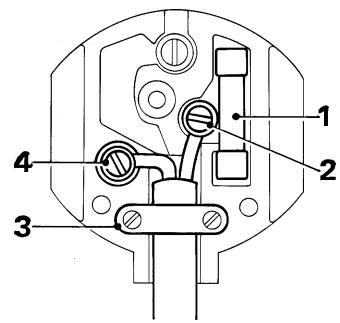
Should your mains plug need replacing and you are competent to do this, proceed as instructed below. If you are in doubt, contact an authorised repair agent or a qualified electrician.
Disconnect the plug from the supply and remove the fuse from the plug.
- Cut off the plug and dispose of it safely; a plug with bared copper conductors is dangerous if engaged in a live socket outlet.
- Only fit 13 Amperes BS1363A approved plugs fitted with the correctly rated fuse (1).
- The cable wire colours, or a letter, will be marked at the connection points of most good quality plugs. Attach the wires to their respective points in the plug (see above). Brown is for Live (L) (2), blue is for Neutral (N) (4).
- Before replacing the top cover of the mains plug ensure that the cable restraint (3) is holding the outer sheath of the cable firmly and that the leads are correctly fixed at the terminal screws.
- If the plug has a fuse cover, make sure that the fuse cover is fitted. Do not use the plug if the fuse cover is missing or damaged.

Never use a light socket.
Using an extension cable
Always use an approved extension cable suitable for the power input of this tool (see technical data). Before use, inspect the extension cable for signs of damage, wear and ageing. Replace the extension cable if damaged or defective.
When using a cable reel, always unwind the cable completely. Use of an extension cable not suitable for the power input of the tool or which is damaged or defective may result in a risk of fire and electric shock.
PACKAGE CONTENTS
The package contains:
1 Router
3 Collets
1 Spanner
1 Edge guide
1 Dust extraction adaptor
1 Centring pin
1 Copy follower
1 Distance plate
1 Template guide
1 Instruction manual
Carefully unpack all parts.
OVERVIEW (fig. A)
- On/off switch
- Lock-off button
- Variable speed control knob
- Plunge lock lever
- Fixing screws for edge guide
- Collet
- Spindle lock button
- Revolver depth stop
- Depth stop bar
- Locking screw
- Depth of cut scale
- Dust extraction adaptor
ASSEMBLY

Before attempting any of the following operations, make sure that the tool is switched off and unplugged and that the spindle has stopped.
Fitting a router bit (fig. B)
- Keep the spindle lock (7) depressed and rotate the spindle until the spindle lock fully engages.
Loosen the collet nut (13) using the spanner provided.
Insert the shank of the router bit (14) into the collet (6). Make sure that the shank protrudes at least 3mm from the collet as shown. - Keep the spindle lock (7) depressed and tighten the collet nut (13) using the spanner provided.
Fitting the edge guide (fig. C)
The edge guide helps to guide the tool parallel to an edge.
Insert the bars (15) into the router base as shown.
- Set the edge guide to the required distance.
Tighten the fixing screws (5).
Fitting the dust extraction adaptor (fig. D)
The dust extraction adaptor allows you to connect a vacuum cleaner to the tool.
Place the dust extraction adaptor (12) onto the base of the tool as shown.
Insert the two screws (16) from the bottom through the holes in the base and in the dust extraction adaptor.
Place a nut (17) onto each of the screws and securely tighten the nuts.
Fitting the template guide (fig. M & D)
Fit the template guide (20) to the base of the router, with the flange to the bottom (= workpiece) side.
Insert the two long screws (16) from the bottom side through the template guide and the holes in the base.
Place the dust extraction adaptor on top of the base as shown in fig. D.
Place a nut (17) onto each of the screws and securely tighten the nuts.
Fitting the distance piece (fig. N)
Fit the distance piece (21) to the base of the router using the screws provided.
Fitting the centring pin (fig. O)
Fit the edge guide to the router as shown in fig. C, but upside down.
Fit the centring pin (22) to the workpiece side of the edge guide with the screw (23) provided.
Fitting the copy follower (fig. P)
Fit the edge guide to the router as shown in fig. C.
Fit the 'L' bar (24) to the upper side of the edge guide using the two screws and nuts provided.
Fit the rotating attachment (25) to the 'L' bar with the wing screw provided.
#
USE

Let the tool work at its own pace.
Do not overload.
- Carefully guide the cable in order to avoid accidentally cutting it.
Adjusting the depth of cut (fig. E)
The depth of cut is the distance X between the depth stop bar (9) and the depth stop (18). The depth of cut can be set in two different ways as described below.
Adjusting the depth of cut using a piece of wood (fig. A & F)
Fit the router bit as described above.
Loosen the locking screw (10).
Pull the plunge lock lever (4) up.
Plunge the router down until the router bit touches the workpiece.
Push the plunge lock lever (4) down.
Pull the depth stop bar (9) up.
- Place a piece of wood with a thickness equal to the desired depth of cut between the depth stop (18) and the depth stop bar (9).
Tighten the locking screw (10).
Remove the piece of wood.
Pull the plunge lock lever (4) up and let the router return to its original position.
After switching the router on, plunge it down and make the desired cut.
Adjusting the depth of cut using the scale (fig. A & G)
Fit the router bit as described above.
Loosen the locking screw (10).
Pull the plunge lock lever (4) up.
Plunge the router down until the router bit touches the workpiece.
Push the plunge lock lever (4) down.
Read the starting position from the scale (11).
Add the desired depth of cut to the starting position.
Move the depth stop bar (9) to the calculated position on the scale.
Tighten the locking screw (10).
Pull the plunge lock lever (4) up and let the router return to its original position.
After switching the router on, plunge it down and make the desired cut.
Adjusting the revolver depth stop (fig. H)
After turning the revolver depth stop to the desired setting, you can fine-adjust the depth stop to be used. If you want to make several cuts with a different depth of cut, adjust each of the depth stops.
Turn the depth stop screw (19) up or down as required using a screwdriver.
Setting the speed (fig. A)
- Set the speed control knob (3) to the required speed. Use a high speed for small diameter router bits. Use a low speed for large diameter router bits.
Using a batten as a guide (fig. 1)
When it is not possible to use the edge guide, for example when routing grooves in the back panel of a bookcase to support shelves, proceed as follows:
Place a batten onto the workpiece.
Move the batten until it is in the correct position to guide the tool.
- Securely clamp the batten to the workpiece.
Using the template guide (fig. M)
The template guide can be used to make a cutout shape from a template, for instance a letter.
Secure the template over the workpiece with double-sided tape or 'G' clamps.
- The router bit must extend below the flange of the template guide, to cut the workpiece in the shape of the template.
Using the distance piece (fig. N)
The distance piece can be used for trimming wooden or laminate vertical projections.
Using the centring pin (fig. O)
The centring pin can be used to cut out circular patterns.
Drill a hole for the point of the centring pin in the centre of the circle to be cut.
Place the router on the workpiece with the point of the centring pin in the drilled hole.
Adjust the radius of the circle with the bars of the edge guide.
The router can now be moved over the workpiece to cut out the circle.
Using the copy follower (fig. P)
The copy follower helps to maintain an equal cutting distance along the edge of irregularly shaped workpieces.
Place the router on the workpiece at the desired distance from the edge to be copied.
Adjust the bars of the edge guide until the wheel is in contact with the workpiece.
Switching on and off (fig. A)
Switching on
Keep the lock-off button (2) depressed and press the on/off switch (1).
Release the lock-off button.
Switching off
Release the on/off switch.
Hints for optimum use
- When working on outside edges, move the tool counterclockwise (fig. J). When working on inside edges, move the tool clockwise.
Use HSS router bits for softwood.
Use TCT router bits for hardwood. - You can use the tool without a guide (fig. K). This is useful for signwriting and creative work. Only make shallow cuts.
Refer to the table below for common types of router bits.
Router bits (fig. L)
| Description | Application | |
| Straight bit (1) | Grooves and rebates | |
| Trimming bit (2) | Trimming laminates or hardwood; accurate profiling using a template | |
| Rebating bit (3) | Rebates on straight or curved workpieces | |
| V-grooving bit (4) | Grooves, engraving and edge bevelling | |
| Core box bit (5) | Fluting, engraving and decorative edge moulding | |
| Cove bit (6) | Decorative edge moulding | |
| Ogee moulding bit (7) | Decorative edge moulding | |
| Rounding over bit (8) | Rounding over edges | |
| Dovetail bit (9) | Dovetail joints | |
| Chamfer bit (10) | Chamfer edges |
MAINTENANCE
Your Black & Decker tool has been designed to operate over a long period of time with a minimum of maintenance. Continuous satisfactory operation depends upon proper tool care and regular cleaning.

Before performing any maintenance, switch off and unplug the tool.
Regularly clean the ventilation slots in your tool using a soft brush or dry cloth.
- Regularly clean the motor housing using a damp cloth. Do not use any abrasive or solvent-based cleaner.
PROTECTING THE ENVIRONMENT

Black & Decker provides a facility for recycling Black & Decker products once they have reached the end of their working life. This service is provided free of charge. To take advantage of this service please return your product to any authorised repair agent who will collect them on our behalf.
You can check the location of your nearest authorised repair agent by contacting your local Black & Decker office at the address indicated in this manual. Alternatively, a list of authorised Black & Decker repair agents and full details of our after-sales service and contacts are available on the Internet at: www.2helpU.com.
Technical data
| KW850E | ||
| Voltage | VAC | 230 |
| (Australia & New Zealand) | VAC | 240 |
| Power input | W | 1,100 |
| No-load speed | min-1 | 8,000 - 28,000 |
| Collet size | 6 mm, 1/4", 8 mm | |
| Max. diameter of router bit | mm | 33 |
| Max. depth of cut | mm | 55 |
| Weight | kg | 3.3 |
GUARANTEE
Black & Decker is confident of the quality of its products and offers an outstanding guarantee. This guarantee statement is in addition to and in no way prejudices your statutory rights.
The guarantee is valid within the territories of the Member States of the European Union and the European Free Trade Area.
If a Black & Decker product becomes defective due to faulty materials, workmanship or lack of conformity, within 24 months from the date of purchase, Black & Decker guarantees to replace defective parts, repair products subjected to fair wear and tear or replace such products to ensure minimum inconvenience to the customer unless:
- The product has been used for trade, professional or hire purposes;
- The product has been subjected to misuse or neglect;
- The product has sustained damage through foreign objects, substances or accidents;
Repairs have been attempted by persons other than authorised repair agents or Black & Decker service staff.
To claim on the guarantee, you will need to submit proof of purchase to the seller or an authorised repair agent. You can check the location of your nearest authorised repair agent by contacting your local Black & Decker office at the address indicated in this manual. Alternatively, a list of authorised Black & Decker repair agents and full details of our after-sales service and contacts are available on the Internet at: www.2helpU.com.
OTHER DIY TOOLS
Black & Decker has a full range of tools that make DIY jobs easy. If you would like further information on the following products, please contact our Service and Information Centre (see the address page towards the end of this manual) or your local Black & Decker retailer.
Drills
Cordless screwdrivers
Cordless drills/screwdrivers
Sanders
Jigsaws
Circular saws
Mitre saws
Angle grinders
Planers
Routers
Cored and cordless multi-purpose tools
Paint strippers
Workbenches
We also have a wide range of accessories for the above tools.
Not all products are available in all countries.
HANDOBERFRÄSE KW850E
HERZLICHEN GLUCKWUNSCH!
Kevin Hewitt
Director of Consumer Engineering
Spennymoor, County Durham DL16 6JG, United Kingdom
Spennymoor, County Durham DL16 6JG, United Kingdom
USO PROGETTATO
Director of Consumer Engineering
Spennymoor, County Durham DL16 6JG, United Kingdom
GEBRUK VOLGENS BESTEMMING
No permitted that you can see the animals.
Suelte el interruptor de encendido/apagado (on/off).
Spennymoor, County Durham DL16 6JG, United Kingdom
FINALIDADE
O seu torno Black & Decker KW850E FOi projectado para tornear madeira e produits desse mesmo material.
Director of Consumer Engineering
Spennymoor, County Durham DL16 6JG, United Kingdom
ANVÄNDNINGSOMRÄDE
Director of Consumer Engineering
Spennymoor, County Durham DL16 6JG, United Kingdom
BRUKSOMRÄDER
ANDRE GJØR-DET-SELV VERKTØY
Director of Consumer Engineering Spennymoor, County Durham DL16 6JG, United Kingdom
ANVENDESESOMRADE
ANDET GØR-DET-SELV VærKTØJ
Director of Consumer Engineering
Spennymoor, County Durham DL16 6JG, United Kingdom
KÄYTTÖTARKOITUS
Spennymoor, County Durham DL16 6JG, United Kingdom
ENΔEΔEIGMENH XPH∑H
Sigma npomegakecs oynies aopaaleias yia poutp

Afnotε to δiakóπtn λειtoupyiaç on/off.
Σμβούλες γία πρόη
- EC DECLARATION OF CONFORMITY
- KW850E
- INTENDED USE
- SAFETY INSTRUCTIONS
- Warning symbols
- Know your tool
- General
- Repairs
- Additional safety instructions for routers
- Additional safety instructions for Australia and New Zealand
- ELECTRICAL SAFETY
- Mains plug replacement (U.K. & Ireland only)
- Using an extension cable
- PACKAGE CONTENTS
- OVERVIEW (fig. A)
- ASSEMBLY
- Fitting a router bit (fig. B)
- Fitting the edge guide (fig. C)
- Fitting the dust extraction adaptor (fig. D)
- Fitting the template guide (fig. M & D)
- Fitting the distance piece (fig. N)
- Fitting the centring pin (fig. O)
- Fitting the copy follower (fig. P)
- #
- USE
- Adjusting the depth of cut (fig. E)
- Adjusting the depth of cut using a piece of wood (fig. A & F)
- Adjusting the depth of cut using the scale (fig. A & G)
- Adjusting the revolver depth stop (fig. H)
- Setting the speed (fig. A)
- Using a batten as a guide (fig. 1)
- Using the template guide (fig. M)
- Using the distance piece (fig. N)
- Using the centring pin (fig. O)
- Using the copy follower (fig. P)
- Switching on and off (fig. A)
- Switching on
- Switching off
- Hints for optimum use
- MAINTENANCE
- PROTECTING THE ENVIRONMENT
- GUARANTEE
- OTHER DIY TOOLS
- Drills
- HANDOBERFRÄSE KW850E
- HERZLICHEN GLUCKWUNSCH!
- USO PROGETTATO
- GEBRUK VOLGENS BESTEMMING
- FINALIDADE
- ANVÄNDNINGSOMRÄDE
- BRUKSOMRÄDER
- ANDRE GJØR-DET-SELV VERKTØY
- ANVENDESESOMRADE
- ANDET GØR-DET-SELV VærKTØJ
- KÄYTTÖTARKOITUS
- ENΔEΔEIGMENH XPH∑H
- Sigma npomegakecs oynies aopaaleias yia poutp
- Σμβούλες γία πρόη
Brand : BLACK & DECKER
Model : BLACK & DECKER KW850E
Category : Electric router