MD 82294 - Bluetooth speaker MEDION - Free user manual and instructions
Find the device manual for free MD 82294 MEDION in PDF.



| Product type | Wireless speaker with radio transmitter |
| Brand | MEDION |
| Model | MD 82294 / E69010 |
| Transmission frequency | 863 to 865 MHz |
| Maximum range | 80 m (free field) |
| Speaker output power | 5 W |
| Waterproof rating | IPX7 (temporarily submersible up to 1 m) |
| Transmitter power supply | Mains adapter 230 V ~ 50 Hz, 45 mA / Output 6 V, 300 mA; or 4 LR6/1.5 V batteries (not included) |
| Speaker power supply | 6 LR6/1.5 V batteries (included) |
| Transmitter connectivity | 2 x RCA (audio input), 3.5 mm jack (audio input), mains adapter socket |
| Functions | Wireless transmission, volume control, channel selection (3 channels), effect light, SCAN function |
| Included accessories | Transmitter, speaker, 2 x RCA to 3.5 mm cable, mains adapter, 6 AA batteries, instruction manual, warranty card |
| Cleaning | Soft, dry cloth; do not use solvents or corrosive products |
| Safety | Do not open the housing; do not immerse the transmitter; use only the supplied adapter; keep batteries out of reach of children |
| Recommended ambient temperature | Normal ambient temperature (not precisely specified) |
Frequently Asked Questions - MD 82294 MEDION
User questions about MD 82294 MEDION
0 question about this device. Answer the ones you know or ask your own.
Ask a new question about this device
Download the instructions for your Bluetooth speaker in PDF format for free! Find your manual MD 82294 - MEDION and take your electronic device back in hand. On this page are published all the documents necessary for the use of your device. MD 82294 by MEDION.
USER MANUAL MD 82294 MEDION
Safety and maintenance 3
About these instructions 3
Proper use 3
Operating safety 3
Power supply 4
Installation location 4
Electromagnetic compatibility 5
CE Declaration of Conformity 5
Notes on handling batteries. 5
Maintenance. 6
Cleaning. 6
Disposal. 6
Packaging. 6
Appliance 6
Batteries 6
Package contents 7
Technical specifications 7
Model MD 82294 / E69010 7
Transmitter. 7
Loudspeaker. 7
Mains adapter 7
Description 8
Loudspeaker front 8
Loudspeaker rear 8
Transmitter front 9
Transmitter rear 9
Start of operation 10
Putting the loudspeakers into operation 10
Putting the transmitter into operation 10
Connecting the mains adapter 10
Inserting batteries. 10
Operation 11
Connecting an audio device 11
Connecting devices by cinch cable 11
Connecting devices by headphone connection socket 12
Switching on the loudspeaker and transmitter. 13
Status of the power light 13
Selecting the radio frequency 14
Setting volume 14
Switching on the effect lighting. 15
Using the loudspeaker in water 15
Switching off 15
Customer service 16
What to do in case of malfunctions 16
No sound/distorted sound 16
Distorted sound 16
Restricted Warranty 17
Copyright © 2009, Version 2.0
All rights reserved. This manual is protected by copyright. The company Medion® owns the copyright.
Trademarks:
Applied trademarks are the property of their respective owners.
Subject to technical and optical changes as well as printing errors.
Safety and maintenance
About these instructions
Please read this section carefully and follow all instructions given. This guarantees reliable operation and a longer life expectancy for your loudspeaker. Always store these instructions near the loudspeakers. Keep the operating instructions so that you can pass them on with the loudspeaker if you sell it.
Proper use
- The loudspeakers and the transmitter are designed to be connected to devices such as portable CD or MP3 players, computers/notebooks, stereo systems or televisions.
- The loudspeaker is watertight if submerged temporarily in depths up to 1 meter. The mains adapter of the transmitter is not suitable for outdoor use. Use only in dry interior spaces.
- The loudspeakers and the transmitter are intended for private use only and are not designed to be used in a heavy industrial business or for commercial purposes.
Operating safety
- Do not let children play with electrical appliances without supervision. Children cannot always recognise potential hazards correctly.
- Batteries may endanger life if swallowed. For this reason, keep the device and the batteries out of reach of children. Obtain immediate medical assistance in case a battery is swallowed.
- Keep plastic packaging out of reach of children. It may cause suffocation.
- This unit is not intended for use by people (including children) with reduced physical, sensory or mental abilities or for those without experience and/or knowledge, unless they are supervised by a person responsible for their safety or they have been instructed on its use. Children should be supervised to ensure they do not play with this unit
- To prevent risks, never open the housing of the loudspeaker, the transmitter or the mains adapter! The opened mains adapter housing presents a danger to life due to electric shock. Parts requiring maintenance are not included.
Power supply
- The socket outlet must be close to the device and easily accessible. Position the cable so that it cannot be stepped on or tripped over.
- To disconnect the power supply from your device, pull the mains adapter from the socket outlet. Always pull on the mains adapter itself when removing from the socket outlet. To prevent damage, never pull on the cable.
- When not in use, pull the mains adapter from the socket outlet, or use a master-slave power strip to prevent power consumption when switched off.
- Only operate the mains adapter on earthed socket outlets with 230V 50Hz . If you are not sure about the power supply at the set-up location, please ask your power supplier.
- To prevent non-permissible heating up, do not cover the mains adapter.
- Do not continue to use the mains adapter if the housing or the supply lead to the device is damaged. Replace it with the same type of mains adapter.
- Use only the included mains adapter, or one that corresponds to the technical values (see page 7), otherwise damage might occur.
Installation location
- In the first few hours of use new appliances can release a typical, unavoidable but totally safe smell, which reduces with time. To help reduce the amount of odour build-up, we recommend that you ventilate the room at regular intervals. We have taken appropriate measures during the development of this product so that levels are explicitly below legislative limits.
- Never submerge the transmitter, connection cable or mains adapter in water, as this poses a risk of electric shock.
- Never touch the transmitter with wet hands. Operate the transmitter only with batteries when out of doors. If the mains adapter of the device is connected to the mains, the device may only be used in dry interior spaces.
- Do not place vessels filled with liquid, such as vases, on or in the vicinity of the transmitter and/or mains adapter. The vessel may tip over and the liquid will impair electrical safety.
- Protect the transmitter, mains adapter and all connected devices from moisture, water drops and splashed water.
- Do not place naked flames, such as lit candles, on or near the device.
- Do not place any objects on the cable to avoid damaging it.
- Keep the transmitter and all connected devices away from moisture. Avoid dust, heat and direct sunshine to prevent breakdowns.
- Place and operate all components on a stable, level and vibration-free surface to prevent the loudspeaker from falling down.
- Ensure an adequate ambient temperature.
Electromagnetic compatibility
- You must comply with the European directives on electromagnetic compatibility (EMC) when you connect the transmitter.
- Keep a distance of at least one metre from high frequencies and magnetic sources of interference (television, other loudspeaker boxes, mobile telephones etc.) to avoid malfunctions.
CE Declaration of Conformity
Medion AG hereby declares that these devices conform to the fundamental requirements and the remaining relevant regulations of the 1999/5/EC Directive. Full declarations of conformity are available at www.medion.com/conformity.
CE
Notes on handling batteries
The appliance is battery-operated. Please note the following on handling batteries:
- Never recharge batteries! Risk of explosion!
- Keep batteries away from children; do not throw them into a fire, short circuit or dismantle them.
- When inserting batteries ensure that the polarity is correct.
Always replace all batteries at the same time. - Always use replacement batteries of the same type; do not mix different types of batteries or old and new batteries.
- Clean the contacts on the battery and appliance before inserting.
- Remove depleted batteries immediately! Increased risk of leakage!
- Never expose the batteries to excessive heat such as sunshine, fire or similar.
- If disregarded, the batteries may be discharged beyond their final voltage and could leak! Remove batteries immediately to avoid any possible damage.
- Avoid contact with skin, eyes and mucous membranes. If these areas come into contact with battery acid, rinse them immediately with plenty of clean water and contact a doctor immediately.
- Remove the battery if the device will not be in use for an extended period.
Maintenance
Please contact our service centre if you have technical problems with your device. Repairs should only be performed by our authorised service partners.
Contact customer services if:
- Fluid has seeped inside the transmitter.
- The transmitter or loudspeaker does not work properly.
- The appliance has been dropped or the housing is damaged.
Cleaning
- To clean, do not use solvents, corrosive or aerosol detergents.
- Furniture is often coated with diverse varnishes or plastics and treated with very different care products. Some of these substances contain components that could corrode and soften the material of the transmitter's base. Therefore, place a non-skid mat underneath the device as necessary.
Disposal
Packaging

All packaging and packaging materials that are no longer required can and should be recycled.
Appliance

At the end of its life, the appliance should not be disposed of in household rubbish. Seek the advice of your local authority on environmentally friendly disposal facilities.
Batteries

Do not dispose of used and defective batteries in the household rubbish. Batteries should be taken to a collection point for used batteries.
Package contents
Please check your purchase to ensure all items are included and contact us within 14 days of purchase if any components are missing. You have received:
1 transmitter
1 loudspeaker
1 connection cable (2 x cinch -> 3.5 mm jack)
- Mains adapter
- Batteries (6 x AA batteries for loudspeaker)
- Operating instructions
Warranty card
Technical specifications
Model MD 82294 / E69010
Frequency range: 863 - 865 MHz
Range: max. 80m freefield
- Power light: Light-emitting diode (LED)
Transmitter
- Power supply: via mains adapter via batteries: 4 × AA type LR6/1.5V (not included)
- Connections: Audio input (2 x cinch) Audio input (3.5 mm jack) Mains adapter connection
Loudspeaker
- Batteries: 6 x type AA LR6/1,5V
Power output: 5 W - Watertight as per IP X7 standard
Mains adapter
Model AK00G-0600030BW
- Input 100-240 V ~ 50/60 Hz, 0.2 A
Output DC 6V, 300 mA
Description
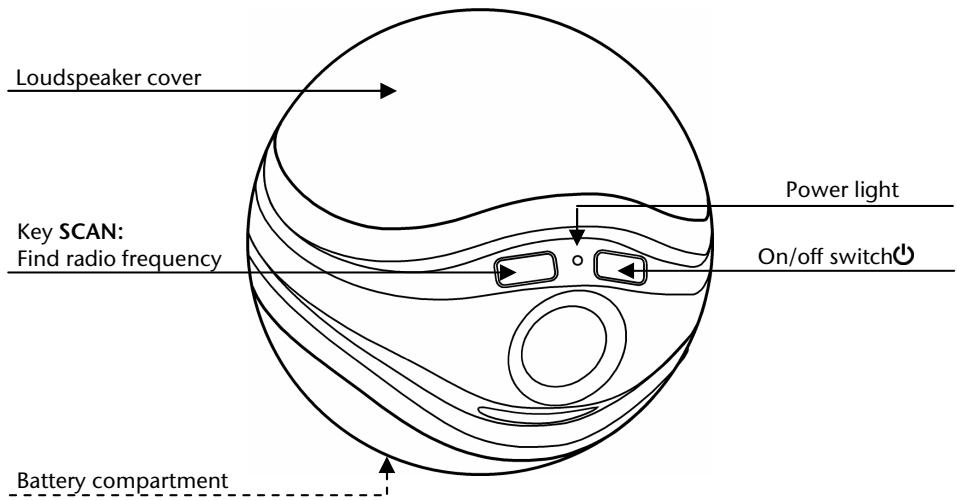
Loudspeaker front
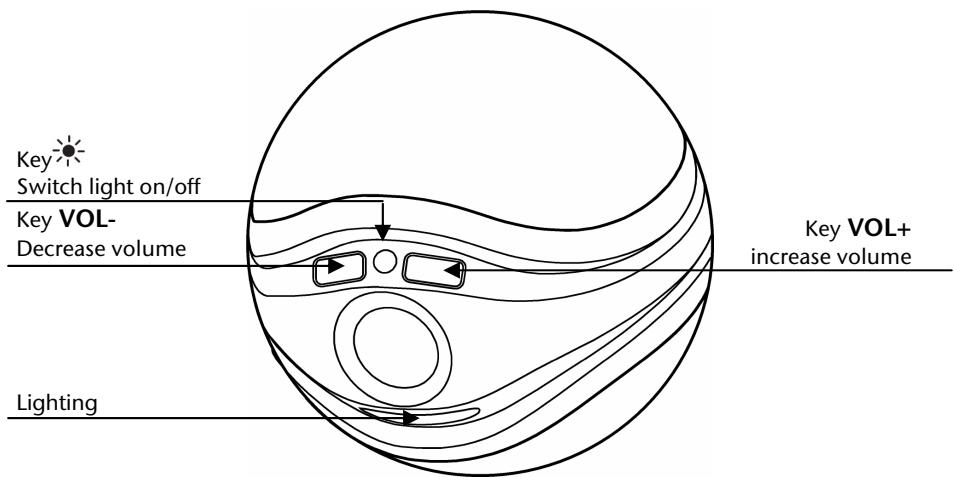
Loudspeaker rear
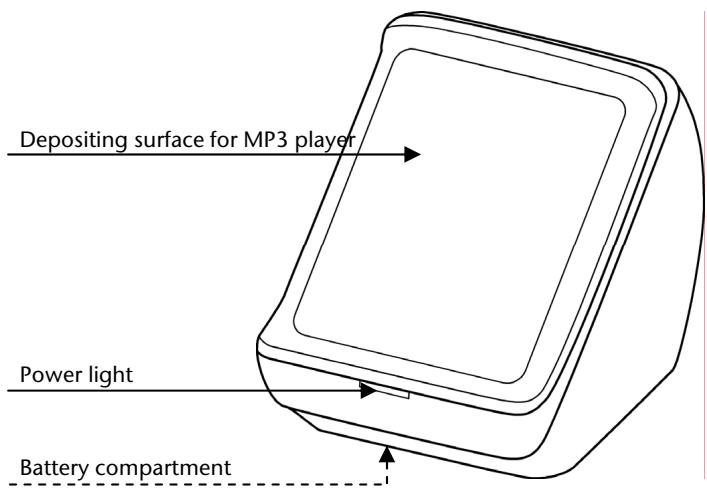
Transmitter front
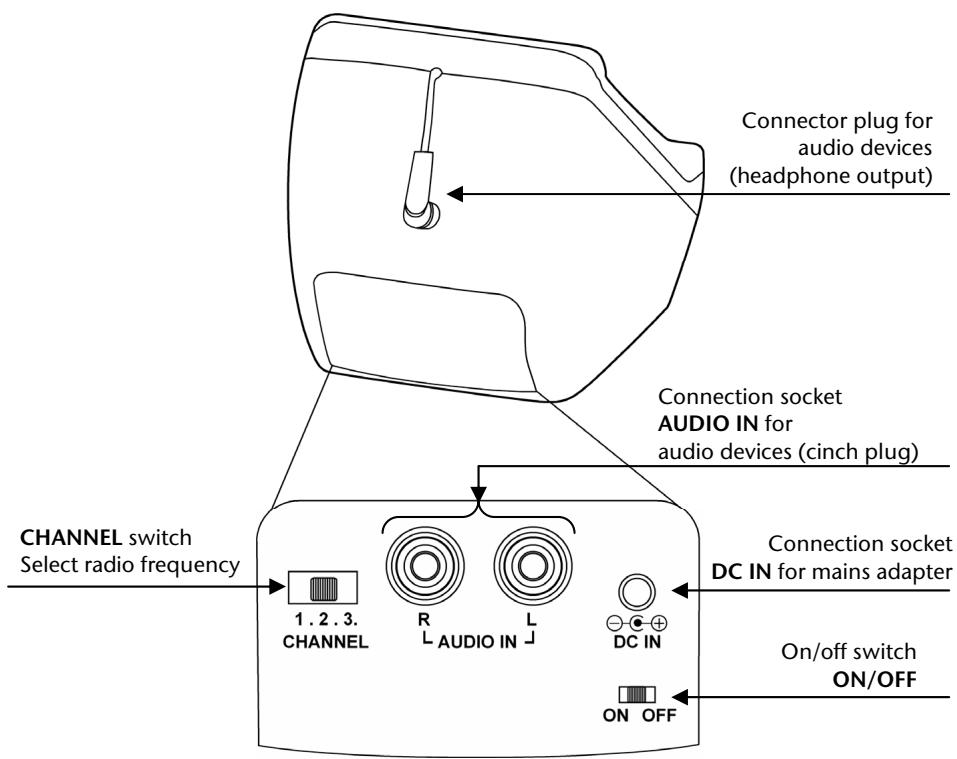
Transmitter rear
Start of operation
Putting the loudspeakers into operation
You will need 6 LR6/1.5 V batteries for the loudspeaker.
Note
The sealing ring must be inserted correctly at all times. Otherwise the loudspeaker is not watertight.
- Turn the battery compartment lid on the bottom of the loudspeaker anticlockwise.
- Place the batteries over the ribbon. Observe polarity (+ / - )
- Check that the sealing ring is seated on the edge of the battery compartment and is free from contamination.
Note
When replacing the batteries, the ribbon makes it easier for you to remove the spent batteries.
- Replace the battery compartment lid and turn it clockwise until hand-tight. The ribbon must not be caught in the lid!
Putting the transmitter into operation
You can operate the transmitter with the mains adapter or with the batteries. If you will be using the transmitter outdoors, then use only the batteries.
Connecting the mains adapter
- Plug the connector plug of the mains adapter into the DC IN connection socket.
- Plug the mains adapter into a wall socket.
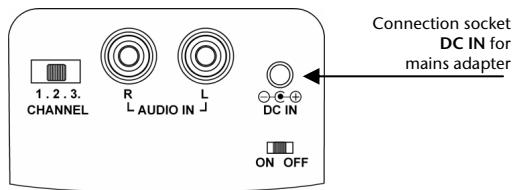
Inserting batteries
You will need 4 LR6/1.5 V batteries (not included).
- Press against both tabs of the battery compartment lid and remove the lid.
- Insert the batteries. Observe polarity (+ / -) . 3. Close the battery panel cover.
Operation
Connecting an audio device
- Please observe the notes in the section "Safety and maintenance" (pages 3).
- Also comply with the operating instructions of the device to which you will connect the transmitter.
- Switch off all devices before connecting them.
You can connect a multitude of different audio devices to the transmitter, e.g. an MP3 and CD player, the receiver from your stereo system, a computer or even your television.
Connecting devices by cinch cable
You will need an audio cable with cinch plugs. A 2 x cinch -> 3.5 mm jack connection cable is included with your device.
- Set the audio device to a medium loud volume. Then switch the device off.
- Insert the 3.5mm jack plug into the audio output socket of the audio device.
- Insert the red and the white cinch plug into the relevant coloured AUDIO IN R and L sockets of the transmitter.
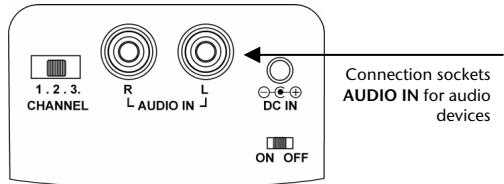
Note
Devices such as a stereo receiver or a television usually have one red and one white audio output socket. These are usually identified with OUT, AUDIO OUT, LINE OUT or similar.
To use these output sockets, you will need a 2 × cinch -> 2 × cinch connection cable (not included; available from specialised trade).
Connecting devices by headphone connection socket
You can connect portable devices, e.g. CD or MP3 player, via the headphone output socket (jack = 3.5mm
- Set the audio device to a medium loud volume. Then switch the device off.
Note
If the volume decreases after switching off the audio device, set the volume back to a medium volume after connecting the audio device. If the volume at the audio device is too low, there may be disruptions in the transmission between the transmitter and the loudspeaker.
- Partially pull the connector plug out of the transmitter and then plug it into the headphone output socket of the audio device.
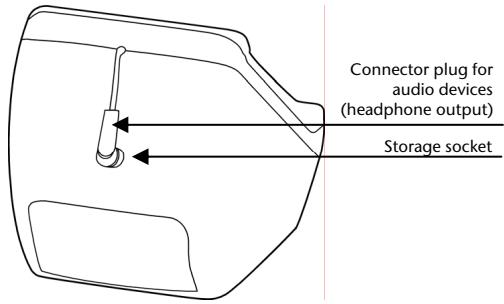
Note
If you want to attach the connector plug back to the transmitter, then pull it out just a tiny bit so that it is retracted automatically. Then insert it into the storage socket.
Switching on the loudspeaker and transmitter
- Switch on the transmitter by sliding the On/Off switch to ON. The power light on the front will light up green. The device is now ready for operation..
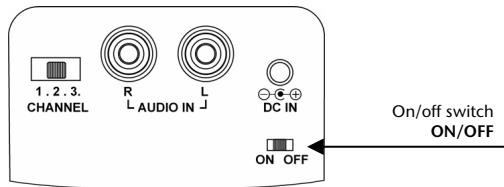
-
Switch on your audio device, select a medium loud volume and start the playback. The power light of the transmitter will change to blue. The transmitter is switched on.
-
Switch on the loudspeaker with the On/Off switch . The power light of the loudspeaker will light up green.
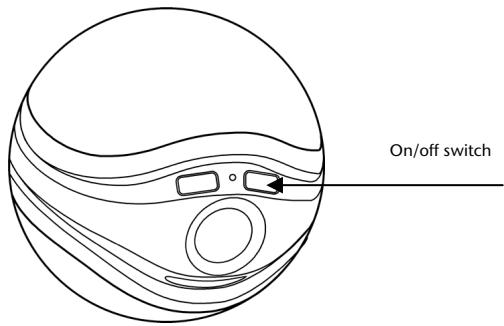
Status of the power light
If the power lights light up green, the devices are ready for operation.
If the power lights light up blue, the devices are switched on and active.
| Ready to operate (green power light) | Active (blue power light) | |
| Transmitter | The audio device was switched off No audio signal for more than 4 minutes because playback is not switched on Loudspeaker does not receive a signal for more than 4 minutes because it is not switched on or there is no radio contact | Playback was started |
| Loudspeaker | The radio contact to the transmitter was interrupted | The radio contact to the transmitter was re-established |
Note
If radio contact is not established within 5 minutes, the loudspeaker switches off completely.
Selecting the radio frequency
- Set the CHANNEL switch of the transmitter to any channel number (1, 2 or 3).
- Press the SCAN button on the loudspeaker. It automatically finds the radio frequency of the transmitter. The power light changes from green to blue.
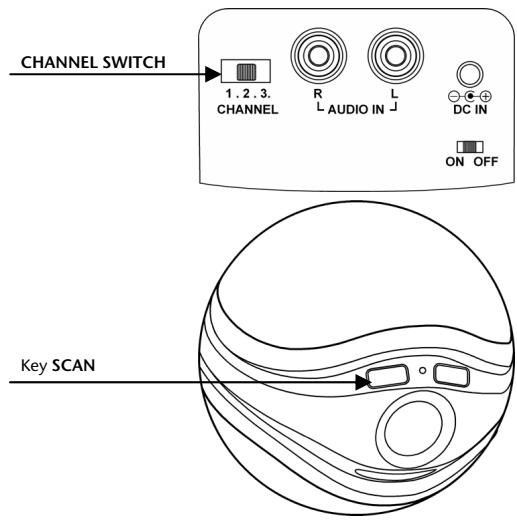
Note
If the reception is disrupted, try another radio channel.
Set up the loudspeaker and the transmitter no further apart than 80m free field. Walls or other obstacles can decrease the range.
Setting volume
Use the VOL+ / - buttons on the loudspeaker to adjust the volume.
ein:
VOL+ increase volume
VOL-decrease volume
Switching on the effect lighting
Press the button to switch the effect lighting at the loudspeaker on or off.
Note
The light can only be switched on if the loudspeaker is switched on.
Excessive use of the light has a negative effect on the battery lifetime.
Using the loudspeaker in water
Caution
Even when operated with batteries, the transmitter must not be submerged in water.
The electronic parts of the loudspeaker are protected against water. However, water can collect beneath the loudspeaker cover and affect the sound.
Take the loudspeaker out of the water, turn it around and shake lightly to pour off the water.
To thoroughly remove the water:
- Press the cover with your thumbs at the indicated point.
- Remove the cover and pour out the water.
- Replace the cover firmly on the loudspeaker. Engagement must be audible and perceptible.
Switching off
- Press the On/Off switch to switch off the loudspeaker.
- Switch off the audio device.
- Switch off the transmitter by sliding the On/Off switch to OFF.
- Disconnect the cable connection between the transmitter and the audio device.
- Unplug the mains adapter of the transmitter.
Note
If the loudspeaker does not have radio contact to the transmitter for more than 5 minutes, it will completely switch off automatically.
Customer service
What to do in case of malfunctions
Faults often occur for the simplest of reasons, but some can also be complex and require a lot of analysis. We would like to give you a few pointers on how to solve the problem.
If these tips don't do the trick, then we'll be more than pleased to help you out. Just give us a call!
No sound/distorted sound
Is the audio device switched on, playback started, and have you set a medium loud volume?
- Increase the volume as necessary.
Is the loudspeaker volume set high enough?
- Increase the volume as necessary.
Are the batteries in loudspeaker (or transmitter) spent?
- Insert new batteries.
Water underneath the loudspeaker cover?
- Pour off the water.
Distorted sound
Is there radio frequency interference?
- Press SCAN to adjust the radio frequency.
- If necessary, choose another radio channel and then press SCAN.
- Change the position of the transmitter and/or loudspeaker to avoid disruptive external influences.
- Remove disruptive objects (mobile phone, or similar) from the environment of the devices.
Distance too great?
- Set the transmitter and loudspeaker closer together.
Are the batteries in loudspeaker (or transmitter) spent?
- Insert new batteries.
Water underneath the loudspeaker cover?
- Pour off the water.
Restricted Warranty
I. General Conditions of Warranty
1. General
This warranty covers defects relating to workmanship and manufacture in MEDION products. The period during which this warranty is valid and during which claims against the warranty can be made to MEDION must be in accordance with the following terms in order to be considered eligible:
- Is effective from the date of purchase or receipt of the MEDION product from an authorised seller of MEDION products; and
- expires at the end of the warranty period specified on the warranty card provided with the product.
For the warranty to be valid, you must:
- provide suitable evidence of purchase, a copy of the original purchase receipt from an authorised seller of MEDION products is preferred; or
- register your product within 28 days of purchase either online at www.MEDION.co.uk or by completing and returning the pre-paid registration card included with the product.
Please keep the original purchase receipt and the warranty card in a safe place. MEDION and its authorised sellers reserve the right to refuse a repair under warranty or a warranty confirmation if a proof of purchase [or registration of purchase] cannot be established, or has not been, submitted.
When it is necessary to return your product for repair please ensure that your product is suitably packed for transportation.
Provided that your product is still within warranty (please check the duration of the warranty period as described above) and is eligible for repair or replacement under the terms of the warranty, to return your product, please telephone MEDION on the service hotline number. You will be sent a pre-paid transportation box suitable for returning your product to MEDION. PLEASE MAKE SURE THAT YOU HAVE A BACKUP COPY OF ALL DATA ON THE PRODUCT BEFORE RETURNING THE PRODUCT TO MEDION. MEDION shall bear the costs of postage and packaging for returning the product and the transportation risk. However, if following examination of the defective product in question, MEDION, in its reasonable opinion, considers that the defect has been caused by:
- your operating and/or using the product other than as instructed in the accompanying documentation;
- damage caused in transit as a result of your negligence in packaging of the product; and/or
- otherwise than in accordance with the terms of this warranty;
This warranty shall be void and you may be required by MEDION to reimburse MEDION for the reasonable costs of postage and packaging before MEDION will return the product to you. If so and you would still like MEDION to repair or replace the product, MEDION may do so but you will be charged MEDION's standard rates for repair and replacement for this service.
Before returning the product, please contact MEDION via the service hotline or via the internet (www.MEDION.co.uk). You will receive a reference number (RMA No.) on the warranty card. Please mark the outside of your package to ensure that this reference number is clearly visible. Please submit a letter containing as much detailed information as possible and, a full description of the defect or fault.
This should include:
a description of the fault;
- when it occurred, how long it has been evident and how frequently it occurs;
- any errors message(s) displayed when using the product;
- a description of the circumstance(s) and conditions in which the fault occurs; and
whether it is an intermittent or persistent fault;
This will greatly assist MEDION in identifying the defect, when submitted together with the defective product.
Unless otherwise instructed by a MEDION representative in all cases, the product must be returned complete with all parts which were included with the original product. Incomplete contents of the returned package may lead to a delay in the repair or replacement. MEDION does not accept any liability for any additionally submitted material(s) which were not supplied with the original MEDION product.
This warranty does not affect your statutory rights in any way and is subject to the applicable legal statutes of the country where the product was sold to you by an authorised MEDION seller.
2. Scope
Subject to any exclusions set out within this warranty, where there is a defect in your MEDION product covered by this warranty, MEDION will repair or replace the MEDION product. The decision whether to repair or replace the product will be made solely at the discretion of MEDION. MEDION may, in its own discretion, replace the product returned for repair under warranty with a replacement product that is either identical or, in the event that such product(s) are no longer available, a product of equal or superior specification and quality.
No warranty is given for batteries or rechargeable batteries or for consumable materials subject to wear and tear, i.e. for parts which have to be replaced periodically during the normal use of the product, such as video-projector lamp.
Non critical failures that fall within industry specified tolerances e.g. noise, LCD pixels are not covered by this warranty. Please consult the appropriate section in your user or instruction manual for this product for exact specifications and tolerances.
To the extent which is permitted under law, MEDION will accept no liability for burnt-in images on plasma or LCD products as a result of normal wear and tear during the operation of the product. Please refer to your user or instruction manual for this product for detailed operating instructions for your plasma or LCD product.
The warranty does not cover errors relating to the playback of data media in an incompatible format or created with unsuitable software.
If it is found during repair or assessment that the defect concerned is not covered under warranty, MEDION reserves the right to invoice you for all reasonable costs incurred by MEDION. These costs will be in relation to the return of the product, including reasonable administration costs, plus reasonable costs for materials used and labour provided when repairing or replacing the product. This is subject to MEDION providing you with an estimate for carrying out such work prior to costs being incurred and that you have accepted the estimate.
You are entitled to seek independent advice or consultation relating to your product or any of MEDION's findings. MEDION will not be liable for any costs incurred to you when doing so.
3. Exclusion from warranty
To the extent permitted by law, this warranty shall be void in the event that defects or loss caused by:
a. failure and damage resulting from the operation of the product in an environment other than that recommended in the accompanying user or instruction manual (e.g. in direct sunlight or in a damp room);
b. accidental damage;
c. use other than in accordance with the accompanying user or instruction manual;
d. modifications, conversions, expansions, maintenance and/or repairs made to the MEDION product by unauthorised repairers or use of unauthorised third party parts;
e. negligence;
f. virus attack or software errors; or
g. improper transportation or packaging during return of the product.
This warranty will also be considered void if labels or serial numbers of the product or of a component of the product are modified or made illegible.
To the extent permitted by law, MEDION shall; only be responsible for losses which are a reasonably foreseeable consequence of the relevant defect in the product; MEDION will not be responsible for any costs incurred in relation to software configuration; economic loss; loss of opportunity; loss of income; or loss of data or software arising out of its repair or replacement of a MEDION product under this warranty
4. Service Hotline
Before returning the product to MEDION you must contact us using the service hotline or via the internet (www.MEDION.co.uk). You will receive further instructions for making your claim under warranty when you call.
The service hotline is available on 362 days in the year, including Sundays and bank holidays but excluding Christmas day, New Years Day and Easter day. The service hotline is subject to [national rate] telephone call charges. These charges are subject to change. The price of your call will be stated at the beginning of the call.
II. Special warranty conditions for MEDION PC, notebook, pocket PC (PDA) and navigation devices (PNA)
The following terms apply to MEDION PC, notebook, desktop, pocket PC and laptop products and optional items included with such products. If one of these items has a fault, you also have a warranty claim for its repair or replacement, from MEDION. The warranty covers the costs of materials and labour for repairing or replacing the defective MEDION product or the optional item in question.
Hardware connected to your product that was not produced or marketed by MEDION can invalidate the warranty if MEDION can reasonably demonstrate that damage to the MEDION product or of the optional item included with the delivery was caused by such hardware. You are entitled to seek independent advice or consultation relating to your product or any of MEDION's findings. MEDION will not be liable for any costs incurred to you when doing so.
This warranty is restricted in relation to any pre-installed operating system as well as to application programme software that is included with the MEDION product in question. This warranty is restricted as follows:
For pre-installed operating system as well as to application programme software included in the MEDION product, MEDION only guarantees the data media (e.g. the diskettes and CD-ROMs) upon which this software is delivered and warrants that such data media shall be free from material and processing defects for a period of 90 days from the date of purchase of the MEDION product from an authorised seller of MEDION. MEDION will replace defective data media free of charge.
Any claims in respect of defective pre-installed operating system as well as to application programme software are hereby expressly excluded and you should contact the relevant licensor or copyright owner of the defective software in question. MEDION does not guarantee that any software supplied with MEDION products will function without interruption, will be free from errors or that it will fulfil your requirements. MEDION does not guarantee the 100% accuracy of the maps provided with the Navigation device.
It may be necessary to delete all data in the product in order to repair the MEDION product. PLEASE MAKE SURE THAT YOU HAVE A BACKUP COPY OF ALL DATA ON THE PRODUCT BEFORE RETURNING THE PRODUCT TO MEDION. To the extent permitted by law, MEDION excludes all liability for loss of data and MEDION
recommend in all cases that you back up all data on your MEDION product before returning the product to MEDION.
III. Special warranty conditions for repair on site or replacement on site
If a claim for repair or replacement on site is included within the terms of the warranty card provided with the product, the special warranty conditions for repair or replacement of your MEDION product on site apply.
The following provisions must be made by you for carrying out repairs or replacements on site:
- MEDION or its authorised personnel must have unrestricted, safe and immediate access to the products.
- Telecommunication facilities required by MEDION or its authorised personnel for proper execution of your order, for testing and diagnostic purposes and for remedying faults are provided by you at your own expense.
- You are responsible yourself for restoring the application software after the repair services have been carried out by MEDION or its authorised personnel.
- You must take all other necessary steps to enable MEDION or its authorised personnel to carry out your order properly.
- You are responsible yourself for connecting and configuring any existing external peripheral products after MEDION or its authorised personnel have carried out their repairs.
- The free cancellation period for repairs or replacements on site is 24 hours, thereafter our reasonable costs resulting from late or missing cancellation shall be invoiced at your expense.
Inhalt
Inhalt 1
Copyright © 2009, Version 2.0
Lieud'st installation 4
Compatibility electromagnetique 5
Copyright © 2009, Version 2.0
You've asked because you have to wait for the next two days.
Remarque
Copyright © 2009, Version 2.0
- Voeding: via netadapter
via batterijen: 4 × AA type LR6/1,5V (niet meegeleverd)
Copyright © 2009, Version 2.0