LIFE P64633 (MD 84467) - Bluetooth speaker MEDION - Free user manual and instructions
Find the device manual for free LIFE P64633 (MD 84467) MEDION in PDF.



User questions about LIFE P64633 (MD 84467) MEDION
0 question about this device. Answer the ones you know or ask your own.
Ask a new question about this device
Download the instructions for your Bluetooth speaker in PDF format for free! Find your manual LIFE P64633 (MD 84467) - MEDION and take your electronic device back in hand. On this page are published all the documents necessary for the use of your device. LIFE P64633 (MD 84467) by MEDION.
USER MANUAL LIFE P64633 (MD 84467) MEDION
natural_image
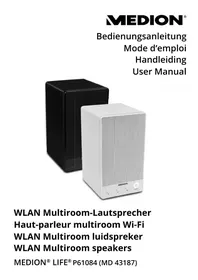
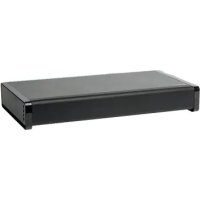
Black rectangular electronic device with mesh grille and front panel (no visible text or symbols)TV-Soundbase mit Bluetooth-Funktion Base enceinte TV avec fonction Bluetooth TV-soundbase met Bluetooth-functie Tv-soundbase med Bluetooth-funktion TV Soundbase with Bluetooth Function
MEDION® LIFE® P64633 (MD 84467)
Inhaltsverzeichnis
DE
natural_image
Line drawing of a monitor mounted on a base with an upward arrow indicating motion (no text or symbols)Bluetooth Profile: A2DP V1.2, AVRCP V1.4.
Reichweite:
max.
natural_image
Line drawing of a computer monitor with an open rear panel and directional arrows indicating orientation (no text or symbols)natural_image
Symbol of a trash bin crossed with no text or labels, accompanied by a black rectangular block below (no readable text or symbols)• Directive CEM 2004/108/CE
natural_image
Line drawing of a computer monitor with an open rear panel and directional arrows indicating orientation (no text or symbols)natural_image
Line drawing of a computer monitor with an upward arrow on the base (no text or symbols)Brugsanvisningen kan efterbestilles via vores service-hotline og er til rådighed til download via serviceportalen www.medion.com/dk/service/start/.
1. About these instructions....84
1.1. Symbols and key words used in these instructions ....84
FR
2. Proper use
3. Safety information
DK
EN
3.1. Operating safety....85
3.2. Power supply 86
3.3. Installation location 86
3.4. Information on handling batteries ....87
3.5. Never carry out repairs yourself 88
3.6. Thunderstorms / non-use 88
4. Package contents
5. Description
5.1. Front 90
5.2. Side view....90
5.3. Rear....91
5.4. Remote control....92
6. Start-up.... 93
6.1. Inserting the batteries in the remote control ....93
6.2. Placing a television or monitor onto the soundbase....93
6.3. Connecting audio equipment....93
7. Operation 9
7.1. Switching on the soundbase 97
7.2. Selecting audio source 98
7.3. Setting the volume....98
7.4. Setting the sound effect 98
7.5. Switching off the soundbase 98
8. Maintenance.... 99
9. Cleaning
10. Troubleshooting 99
- Disposal 100
- Technical data 101
- Declaration of conformity.... 101
- Legal notice 102
1. About these instructions

Please read these operating instructions carefully and follow all instructions given. This will guarantee reliable operation and a longer life expectancy for your loudspeakers. Always store these instructions near the loudspeakers. Keep the operating instructions so that you can pass them on with the loudspeakers if you sell them.
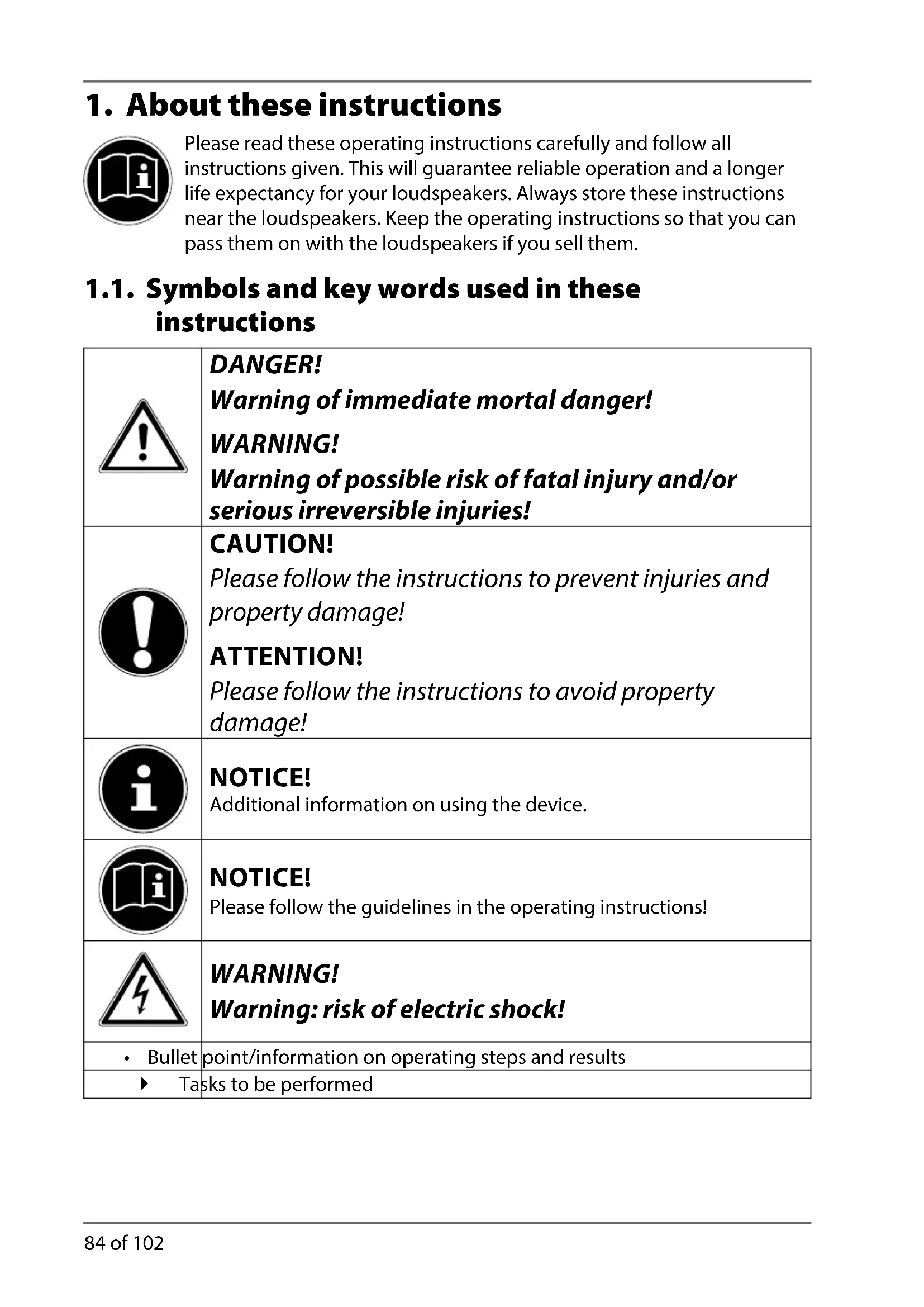
1.1. Symbols and key words used in these instructions
 | DANGER!Warning of immediate mortal danger!WARNING!Warning of possible risk of fatal injury and/or serious irreversible injuries! |
 | CAUTION!Please follow the instructions to prevent injuries and property damage!ATTENTION!Please follow the instructions to avoid property damage! |
 | NOTICE!Additional information on using the device. |
 | NOTICE!Please follow the guidelines in the operating instructions! |
 | WARNING!Warning: risk of electric shock! |
| • Bullet | point/information on operating steps and results |
| ► Tasks to be performed | |
2. Proper use
The TV soundbase is designed to be connected to televisions. It is also possible to connect other units, such as portable CD players, MP3 players, computers, notebooks and stereo systems.
The device is intended for private use only and not for industrial/commercial use.
Please note that we shall not be liable in cases of improper use:
- Do not modify the device without our consent and do not use any auxiliary equipment that we have not approved or supplied.
-Use only spare parts and accessories that we have supplied or approved.
-Heed all the information in these operating instructions, especially the safety information. Any other use is deemed improper and can cause personal injury or property damage. - Do not use the device in extreme environmental conditions.
3. Safety information
3.1. Operating safety
- Do not let children play with electrical devices without supervision. Children are not always aware of potential hazards.
- Batteries can be fatal if swallowed. Therefore keep the product, the remote control and the batteries out of reach of babies and small children. If a battery is swallowed, please obtain immediate medical assistance.
- DANGER! Keep plastic packaging out of the reach of children. There is a risk of suffocation.
- This product is not intended for use by people (including children) with reduced physical, sensory or mental abilities or by people who lack the experience or knowledge to use it,
unless they are supervised by a person responsible for their safety or have been instructed on its use. Children should be supervised to ensure that they do not play with the product.
- WARNING! To prevent risks, never open the housing of the device or mains plug! There are no parts requiring maintenance.
3.2. Power supply
- The sockets must be close to the product and easily accessible. Position the cables so that they cannot be stepped on or tripped over.
- To disconnect the power supply from your device, pull the mains plug from the socket outlet. Always grab the plug firmly when unplugging it from the socket. To prevent damage, never pull on the cable.
- When not in use, pull the mains plug from the socket outlet, or use a master-slave power strip to prevent power consumption when switched off.
- Only operate the device on earthed socket outlets with 100–240 V \~ 50/60 Hz. If you are not sure about the power supply at the set-up location, please ask your power supplier.
- Do not continue to use the mains plug of the device if the housing or the supply lead to the device is damaged.
3.3. Installation location
- In the first few hours of use, new devices can give off a typical, unavoidable but totally harmless smell, which wears off with time.
To help reduce the amount of odour build-up, we recommend that you ventilate the room at regular intervals. We have taken appropriate measures during the development of this product to ensure that levels are well below legal limits. - Do not place vessels filled with liquid, such as vases, on or in the vicinity of the device and mains adapter. Such containers could tip over, and the liquid could impair the electrical safety
of the product.
- Protect the device and all connected devices from moisture, water drops and splashes. To prevent malfunctions, avoid dust, heat and direct sunlight.
- Do not place naked flames, such as lit candles, on or near the product.
- Do not place objects (for example, newspapers, blankets, etc.) over the mains plug of the device in order to avoid overheating.
- To avoid damaging the cables, do not place any objects on them.
- Set up and operate all components on a stable, level and vibration-free surface to prevent the device from falling down.
- Keep the product at a distance of at least one metre from high-frequency and magnetic sources of interference (televisions, other loudspeakers, mobile phones, etc.) in order to prevent malfunctions.
3.4. Information on handling batteries
The remote control of the device is operated with two batteries.
Please note the following instructions on handling batteries:
- Never recharge batteries! Risk of explosion!
- Keep batteries away from children; do not throw them into a fire, short-circuit or dismantle them.
- When inserting batteries ensure that the polarity is correct.
- Use only batteries of the same type.
- Clean the contacts on the batteries and on the product before inserting the batteries.
- Remove depleted batteries immediately! There is an increased risk of leakage!
- WARNING! Never expose the batteries to excessive heat, such as sunshine, fire or similar sources!
- If this instruction is not heeded, the batteries may discharge
beyond their end-point voltage and could leak! Remove batteries immediately to avoid damage.
- Avoid contact with skin, eyes and mucous membranes. If any of these areas come into contact with battery acid, rinse them immediately with plenty of clean water and consult a doctor as soon as possible.
- Remove the battery if the product will be out of use for an extended period.
3.5. Never carry out repairs yourself
- WARNING! Never put yourself at risk by opening the device housing! There is a risk of electric shock. There are no parts requiring maintenance.
- In the event of a fault, please contact the Medion Service Centre or an approved repair specialist.
3.6. Thunderstorms / non-use
- Pull the plug out of the mains socket if you are going to be away for a long period or if there is a thunderstorm.
4. Package contents
Please check your purchase to ensure that all items are included. If anything is missing, please contact us within 14 days of purchase. Included in the package:
-TV soundbase
-Remote control including batteries (2 x 1.5 V, type AAA)
-Audio cable (2 x cinch -> 2 x cinch)
-Optical cable (approx. 95 cm long)
-Mains cable
-Operating instructions incl. warranty documents
5. Description
5.1. Front
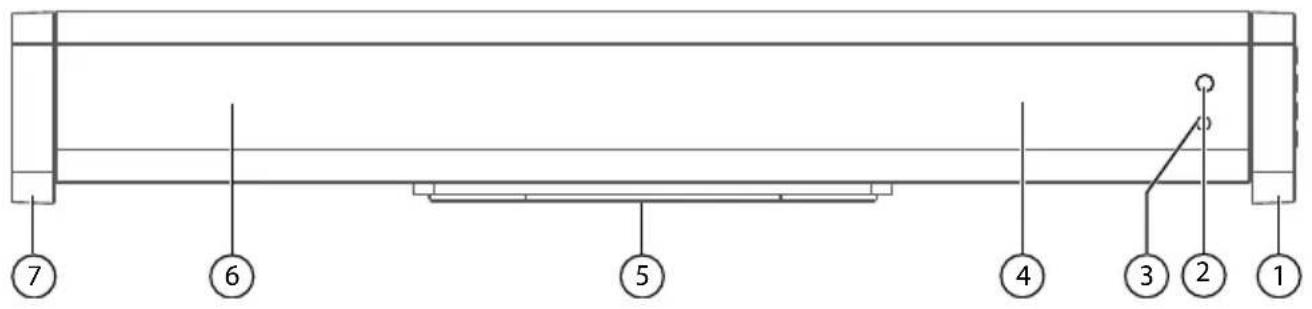
1) Stand
2) Remote control sensor
3) Operating LED
4) Speaker
5) Subwoofer (on the bottom, not shown)
6) Speaker
7) Stand
5.2. Side view
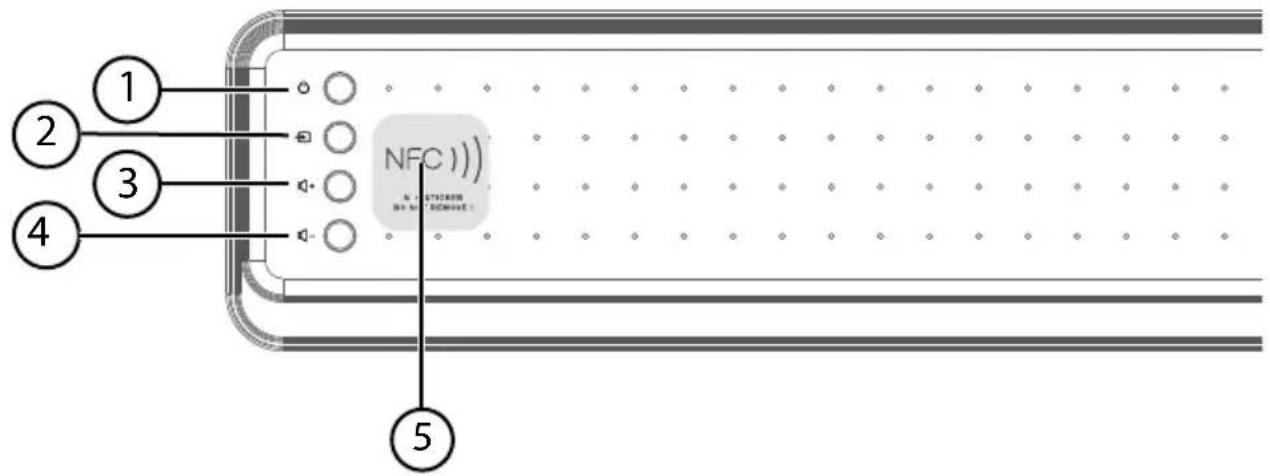
1) (Standby): On and off switch
2) (Source): Audio source selection
3) : Increase volume
4) : Reduce volume
5) NFC (Near Field Communication) zone
5.3. Rear
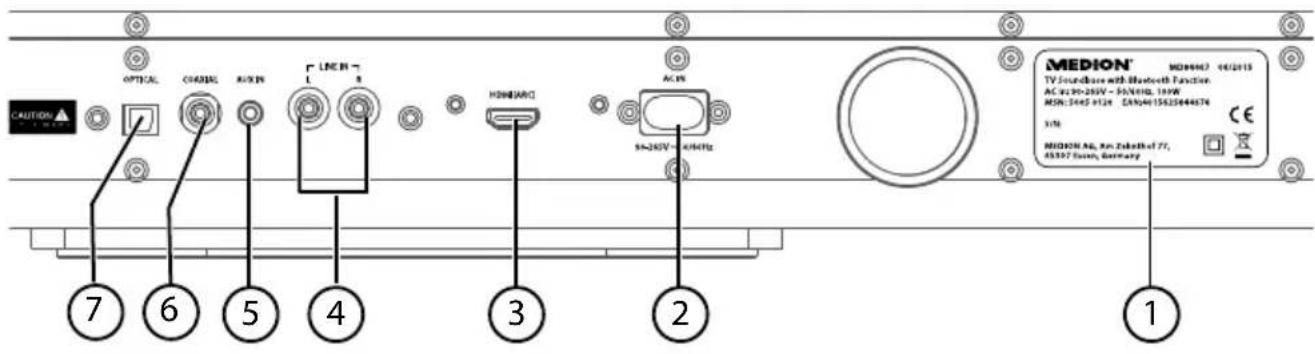
1) Type plate
2) AC IN: Connection socket for mains cable
3) HDMI (ARC): Digital input for TV, computer and other audio devices connected via HDMI cable; also for HDMI ARC-enabled devices (ARC enables audio signals to be received via HDMI and to be returned via the same cable).
4) LINE IN L/R: Stereo cinch sockets – analogue input for TV and other audio devices
5) AUX IN: Connection socket for TV and other audio devices
6) COAXIAL: Digital input for TV and other audio devices connected via coaxial cable
7) OPTICAL: Digital input for TV and other audio devices connected via fibre-optic cable
5.4. Remote control
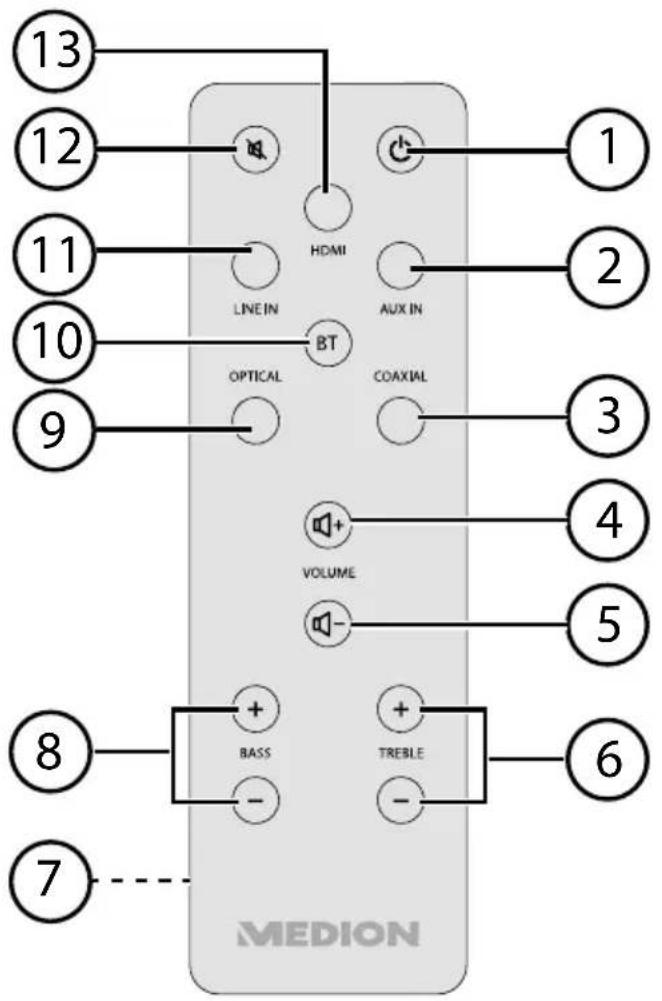
1) (Standby): Switch device on or off
2) AUX IN: Select audio source via AUX IN
3) COAXIAL: Select audio source via COAXIAL
4): Increase volume
5) Reduce volume
6) TREBLE +/-: Set the treble
7) Battery compartment (on the back of the remote control, not shown)
8) BASS +/-: Set the bass
9) OPTICAL: Select audio source via fibre-optic cable
10) Select audio source via BLUETOOTH, establish Bluetooth connection
11) LINE IN: Select audio source via cinch cable
12) MUTE: Switch off sound
13) HDMI: Select audio source via HDMI cable
6. Start-up
6.1. Inserting the batteries in the remote control
The remote control is operated with two 1.5-V AAA batteries.
If the product fails to respond or is slow to respond to the remote control, you will need to change the batteries. Proceed as follows:
▶ Pull the opening tab on the battery compartment upwards and remove the battery compartment cover.
Insert 2 x 1.5-V AAA batteries so that the negative end is placed next to the springs. Refer to the diagram in the battery compartment.
Place the battery compartment cover with the locking tab onto the opening in the battery compartment, and press the cover downwards until it audibly clicks into place.
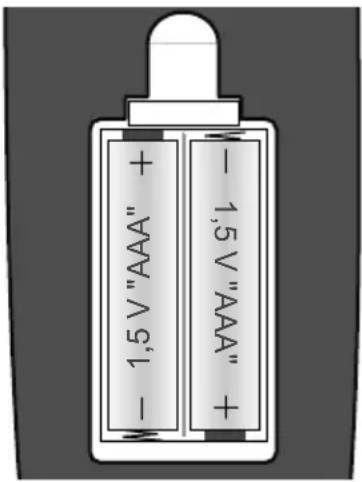

ATTENTION
Risk of explosion if batteries are replaced incorrectly.
Replace batteries only with the same or equivalent type.
6.2. Placing a television or monitor onto the soundbase
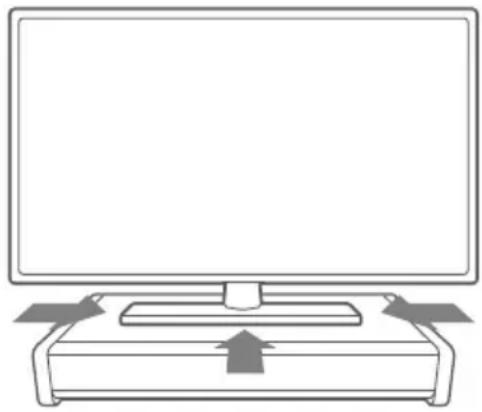
Televisions or monitors that weigh up to 45 kg and have a fixed base can be placed on top of the soundbase. Devices with narrow feet are not suitable, as the weight of the device is not evenly distributed and this can cause damage to the soundbase.
▶ Place the television or monitor with the base in the middle of the soundbase.
natural_image
Line drawing of a computer monitor with an open rear panel and upward arrow indicator (no text or symbols)6.3. Connecting audio equipment
- Observe the instructions in section "3. Safety information" on page 85 ff.
- Also comply with the operating instructions of the device to which you want to connect the soundbase.
- Switch off all devices before connecting them to each other.
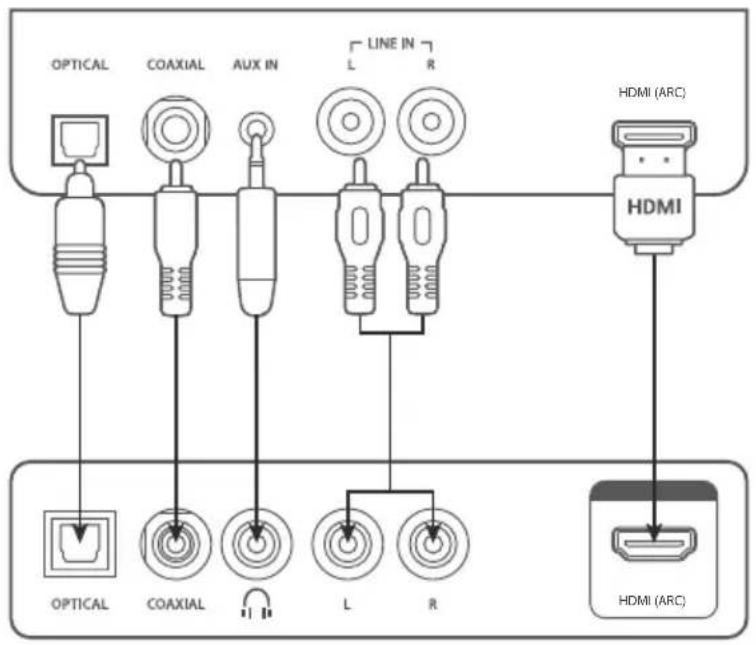
You can connect a number of different audio devices to this product, e.g. an MP3 player, a CD player, the receiver of your stereo system, a computer or even your television.
flowchart
graph TD
    A["OPTICAL"] --> B["COAXIAL"]
    B --> C["AUX IN"]
    C --> D["L"]
    D --> E["R"]
    E --> F["HDMI (ARC)"]
    G["OPTICAL"] --> H["COAXIAL"]
    H --> I["L"]
    I --> J["R"]
    J --> K["HDMI (ARC)"]
Soundbase
Audio device/TV
6.3.1. Connecting devices via HDMI

NOTICE
Also comply with the operating instructions of the device to which you want to connect the soundbase.
You will need an HDMI cable. The HDMI cable is not supplied.
To connect devices via HDMI, proceed as follows.
▶ Set the audio device to a medium volume. Then switch it off.
Connect the HDMI (ARC) port to the HDMI OUT port on your television. If your television supports HDMI ARC, you have the benefit of the Audio Return Channel function: ARC enables audio signals to be received via HDMI and to be returned via the same cable. ARC can be used to control a connected AV receiver, to which the sound system and a Blu-ray player can be connected.

NOTICE
ARC only works with HDMI ARC-enabled devices and with an HDMI 1.4 cable (or higher). The audio output on the television must be set to PCM.
▶ Enable the ARC functions and switch the sound output to PCM (Pulse Code Modulation) mode on the connected devices. Make sure you comply with the operating instructions of the connected devices.
6.3.2. Connecting devices via AUX IN and headphone connection socket on the audio device
You will need an audio cable with 3.5 mm ∅ jack > 3.5 mm ∅ jack (not supplied) to connect a headphone socket of a CD or MP3 player, for example, to the AUX IN input on the soundbase.
▶ Set the audio device to a medium volume. Then switch it off.
Plug the connector into the headphone output socket on the audio device. Then plug the connector at the other end of the cable into the AUX IN input on the soundbase.
6.3.3. Connecting devices via LINE IN
You will need an audio cable with cinch plugs. A 2 x cinch -> 2 x cinch stereo audio connection cable is included with your device.
▶ Set the audio device to a medium volume. Then switch it off.
Plug the white cinch connector into the white LINE IN socket (marked L for left) on the soundbase, and plug the red cinch connector into the red LINE IN socket (marked R for right).
Then plug the red and white cinch connectors at the other end of the cable into the correspondingly coloured audio output sockets on the output device.

NOTICE
Pieces of equipment like stereo receivers or television sets usually have one red and one white audio output socket. These are usually marked OUT, AUDIO OUT, LINE OUT or similar.
6.3.4. Optical connections
You can connect digital amplifiers, for example, via the OPTICAL port. You will need an optical digital cable (fibre-optic cable, supplied with the product).
▶ Set the audio device to a medium volume. Then switch it off.
Remove the protective cap from the OPTICAL port. Plug the connector into the OPTICAL socket on the soundbase.
- Plug the connector into the corresponding digital input socket on your digital receiver.

NOTICE
If no sound signals are output and the OPTICAL status LED flashes quickly, switch the audio output format on your output device to PCM (Pulse Code Modulation) mode.
6.3.5. Connecting devices via coaxial
You can connect your television or an audio device, for example, via the COAXIAL port. You will need a cinch cable (not supplied with the product). Connect the Coaxial Out port on your external device to the COAXIAL port on your soundbase.
If necessary, switch the sound output to PCM on the connected devices. Make sure you comply with the operating instructions of the connected devices.
6.3.6. Establishing a Bluetooth connection
Bluetooth operation enables the wireless reception of audio signals from an external Bluetooth-compatible audio output device. Ensure that the distance between the two devices is not greater than 10 metres.
To connect a Bluetooth-compatible audio output device, follow these steps:
▶ Switch on the soundbase by pressing the button on the side of the device or by pressing the button on the remote control.
Now press the button on the soundbase or the button on the remote control.
The device is in discovery mode. The LED flashes blue.
▶ Switch on the Bluetooth functionality on your audio output device and activate the discovery mode in order to pair the devices with one another.

NOTICE
If required, please refer to the corresponding operating instructions for information on the Bluetooth functionality of your audio output device.
The device name of the soundbase, MD 84467, is displayed as soon as the signal has been found.
▶ If you are asked for a password, enter 0000.
The pairing process for both devices is complete when an acoustic signal is emitted and the LED constantly glows blue.
6.3.7. NFC-enabled output device
The NFC (Near Field Communication) function enables the wireless reception of audio signals from an NFC-enabled audio output device within close proximity.
The soundbase is switched on.
▶ Switch on the NFC function and the Bluetooth function on your smart device.
The device is in discovery mode.
▶ Hold your NFC-enabled smart device near the area marked NFC on the soundbase.
▶ Confirm the query CONNECTING WITH MD 84467 on your smart device with YES. Wait 5 to 8 seconds before removing your smart device from the soundbase.
The pairing process for both devices is complete when a double acoustic signal is emitted and the operating LED constantly glows blue.
▶ Select a medium volume and start playback on your smart device.
6.3.8. Connecting the soundbase to the mains
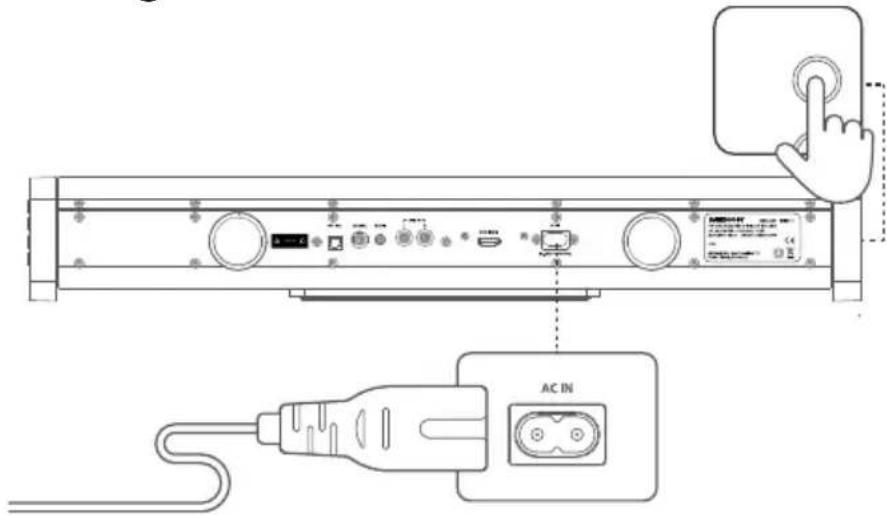
Connect the mains cable to the AC IN socket.
▶ Make sure that all your devices are connected.
Connect the mains cable to a 100–240 V \~ 50/60 Hz power outlet.
The operating LED will light up red.
7. Operation
7.1. Switching on the soundbase
Switch on the soundbase by pressing the ⏻ button on the side of the device and holding it for a few seconds, or by pressing the ⏻ button on the remote control.
The operating LED lights up; the audio source last selected is indicated by the operating LED colour.
▶ Switch on the audio device, select a medium volume and start playback.

NOTICE
The soundbase will automatically switch off after 15 minutes if there is no input signal.
7.2. Selecting audio source
You set the desired audio source using the AUX IN, HDMI, COAXIAL, LINE IN and OPTICAL buttons on the remote control or by repeatedly pressing the button on the soundbase.
The selection is indicated by the colour of the operating LED on the front of the device.
| AUX IN HDM | OAXIAL LINE IN | OPTICAL | ||
| Green Blue Light blue Yellow | w Pink White |
7.2.1. Listening to music via Bluetooth
If you have connected the soundbase to a device that supports A2DP (Advanced Audio Distribution Profile) and AVRCP (Audio Video Remote Control Profile), the soundbase is used as the output medium and the audio signals are output solely by the soundbase.

NOTICE
If you have connected the soundbase to your Bluetooth-enabled mobile phone, music playback is interrupted when there is an incoming call and is resumed only when the call has ended.
7.3. Setting the volume
Use the ⏻+/⌘- buttons on the soundbase or on the remote control to adjust the volume to the required level:
-
- Increase volume
- Reduce volume
The volume can be turned off completely by pressing the ⚠️ MUTE button on the remote control.
▶ Press the ⚫ MUTE button again to restore the audio output.
7.4. Setting the sound effect
Use the TREBLE+/- button on the remote control to adjust the treble level.
• + Increase the treble
- Reduce the treble
Use the BASS+/- button on the remote control to adjust the bass level.
-
- Increase the bass
- Reduce the bass
7.5. Switching off the soundbase
▶ Press the ⏻ button on the remote control or on the soundbase to switch the soundbase to the standby state.
With the device in the standby state, the operating LED lights up red.
The soundbase automatically switches to the standby state if it does not receive an audio signal.

NOTICE
The device uses power in the standby state. To disconnect the power supply, pull the mains plug from the socket outlet.
8. Maintenance

WARNING!
Never try to open or repair the device yourself. There is a risk of electric shock!
Please contact our Service Centre if you have any technical problems with the product. Repairs should be performed by our authorised service partners only.
Contact your customer services in the following cases:
- Fluid has seeped inside the unit.
- The device is not working properly.
- The device has fallen or the housing is damaged.
9. Cleaning
- Do not use solvents, corrosive agents or aerosol-based cleaning agents.
Pieces of furniture often have various varnish finishes or synthetic coatings and are treated with a wide range of care products. Some of these substances contain components which are capable of adverse reactions with the loudspeaker feet. Use a non-slip underlay to prevent this problem where applicable.
10. Troubleshooting
If the device malfunctions, please check first if you can eliminate the error yourself with the help of the following overview.
Never try to repair the devices yourself. Contact our Service Centre or other qualified personnel if a repair is necessary.
| Cause Troubleshooting | |
| Incorrect cables and connections | ▸ Check whether all cable connections are correct and undamaged; if applicable, check whether there is an active Bluetooth connection.▸ Ensure that all connected devices are adequately supplied with power. |
| No sound Check the volume | on the output device. Increase the volume as necessary. |
| Distorted sound | ▸ Change the position of the soundbase in order to avoid interference from external sources.▸ Clear the area around the unit of any potential sources of interference (mobile phones, etc.). |
11. Disposal

Packaging
All packaging and packaging materials that are no longer required can and should be recycled.
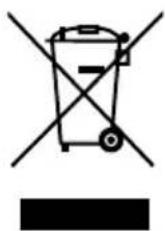
Correct disposal of this product
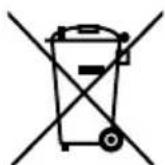
Within the EU this symbol indicates that this product may not be thrown away with the household refuse. Old devices contain valuable recyclable materials which should be disposed of through the proper channels in the interests of the environment and human health. Therefore please use the collection systems provided or send the product back to the place where you bought it so that it can be disposed of correctly and recycled as appropriate.
Batteries
Do not dispose of used and defective batteries in the household rubbish. Take the batteries to a collection point for used batteries.
12. Technical data
Mains connection 100–240 V \~ 50/60 Hz
Power output: Speakers: 2 x 20 W RMS
Subwoofer: 40 W RMS
Power input: 100 W
Connections: Cinch input
AUX input
Optical input
Coaxial input
HDMI input (ARC)
Mains cable connection
Bluetooth specification: V4.0 + EDR, Class II
Bluetooth profiles: A2DP V1.2, AVRCP V1.4.
Range: max. 10 m (depending on conditions)
Dimensions (WxHxD) approx. 60.3 x 9.2 x 32 cm
Carrying capacity max. 45 kg
Remote control: 2 x 1.5 V
--- battery, type AAA
(included with the product)
13. Declaration of conformity
CE Medion AG hereby declares that the product MD 84467 conforms to the following European requirements:
• R&TTE Directive 1999/5/EC
• EMC Directive 2004/108/EC
• Low Voltage Directive 2006/95/EC
• Ecodesign Directive 2009/125/EC
• RoHS Directive 2011/65/EU.
Full declarations of conformity are available at www.medion.com/conformity.
14. Legal notice
Copyright © 2015
All rights reserved.
This operating manual is protected by copyright.
Mechanical, electronic and any other form of reproduction is prohibited without the written permission of the manufacturer
Copyright is owned by the company:
Medion AG
Am Zehnthof 77
45307 Essen
Germany

The operating manual can be reordered via the service hotline and is available for download via the service portal at www.medion.com/gb/service/start/.
You can also scan the QR code above and download the operating manual onto your mobile device via the service portal.