
JG6000 - Game console LEXIBOOK - Free user manual and instructions
Find the device manual for free JG6000 LEXIBOOK in PDF.



| Product Type | Game console |
| Brand | LEXIBOOK |
| Model | JG6000 |
| Power supply | 8 LR6 batteries (1.5 V) or 9 V 500 mA adapter (not included) |
| Number of batteries | 4 batteries for the console, 4 batteries for the dashboard |
| Recommended battery type | LR6 alkaline |
| Compatible AC adapter | Toy transformer 9 V 500 mA, center positive (not included) |
| Built-in games | 6 games: Jet Rush, Auto X, Monster Shooting, Jet Rush 2, Jewel Fever 2, Fishing |
| Maximum operating distance | 5 meters |
| Maximum user weight | 50 kg |
| TV connection | AV cable (yellow video, red audio) |
| Control | Tiltable handlebar (left/right) + accelerator/brake handles |
| Special features | Console usable independently from the scooter; reset button; LED indicators |
| Warranty | 2 years |
| Maintenance | Clean with a slightly damp cloth; avoid detergents |
| Safety | Not suitable for children under 36 months; epilepsy risk; do not use in water |
| Included accessories | Console, sea scooter, AV cable, instruction manual, repair kit |
| Alternative power supply | 9V 500 mA adapter (not supplied) |
| Country of manufacture | China |
| Design | Europe |
| Reference | JG6000 |
Frequently Asked Questions - JG6000 LEXIBOOK
User questions about JG6000 LEXIBOOK
0 question about this device. Answer the ones you know or ask your own.
Ask a new question about this device
Download the instructions for your Game console in PDF format for free! Find your manual JG6000 - LEXIBOOK and take your electronic device back in hand. On this page are published all the documents necessary for the use of your device. JG6000 by LEXIBOOK.
USER MANUAL JG6000 LEXIBOOK
Games to learn as they grow,
Thank you for purchasing a Lexibook Junior product. Lexibook has designed, manufactured and distributed toys world wide for nearly 10 years. Our products are renowned for their educational and entertainment value, as well as for the high-quality standard in the fabrication process.
Infant and preschool toys, educational computers, interactive games that can connect to the TV, chess games, musical games... Our toys create a fun and engaging environment for children of all ages to stimulate their ability to learn fundamental skills.
Let's play!
Lexibook team
START-UP GUIDE
This section explains briefly how to play with the Super TV Air Jet. It is recommended to read the complete user guide for detailed instructions on the activities and safety warnings.
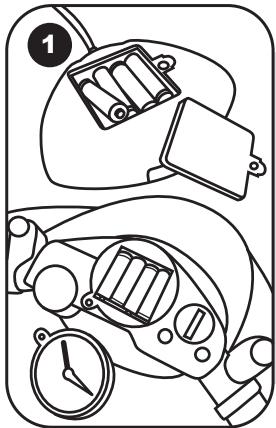
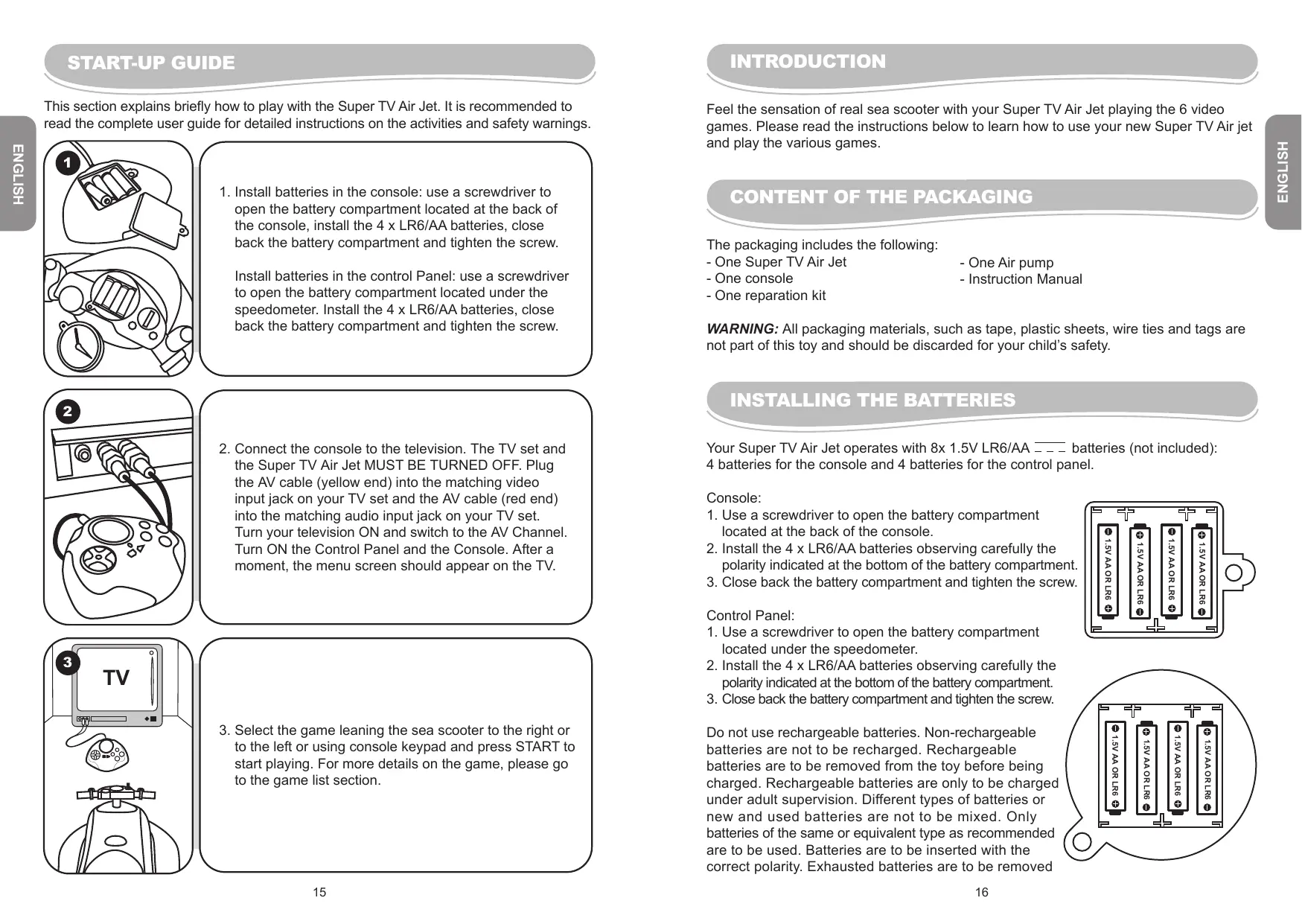
- Install batteries in the console: use a screwdriver to open the battery compartment located at the back of the console, install the 4 x LR6/AA batteries, close back the battery compartment and tighten the screw.
Install batteries in the control Panel: use a screwdriver to open the battery compartment located under the speedometer. Install the 4 x LR6/AA batteries, close back the battery compartment and tighten the screw.
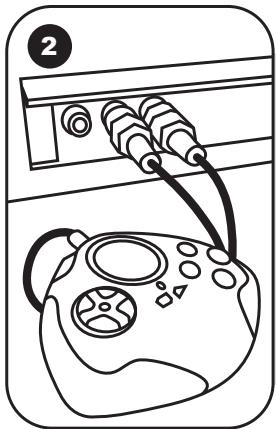
- Connect the console to the television. The TV set and the Super TV Air Jet MUST BE TURNED OFF. Plug the AV cable (yellow end) into the matching video input jack on your TV set and the AV cable (red end) into the matching audio input jack on your TV set. Turn your television ON and switch to the AV Channel. Turn ON the Control Panel and the Console. After a moment, the menu screen should appear on the TV.
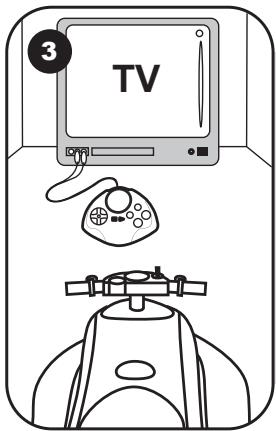
- Select the game leaning the sea scooter to the right or to the left or using console keypad and press START to start playing. For more details on the game, please go to the game list section.
INTRODUCTION
Feel the sensation of real sea scooter with your Super TV Air Jet playing the 6 video games. Please read the instructions below to learn how to use your new Super TV Air jet and play the various games.
CONTENT OF THE PACKAGING
The packaging includes the following:
-
One Super TV Air Jet
-
One Air pump
-
One console
-
Instruction Manual
-
One reparation kit
WARNING: All packaging materials, such as tape, plastic sheets, wire ties and tags are not part of this toy and should be discarded for your child's safety.
INSTALLING THE BATTERIES
Your Super TV Air Jet operates with 8x 1.5V LR6/AA -- batteries (not included):
4 batteries for the console and 4 batteries for the control panel.
Console:
- Use a screwdriver to open the battery compartment located at the back of the console.
- Install the 4 x LR6/AA batteries observing carefully the polarity indicated at the bottom of the battery compartment.
- Close back the battery compartment and tighten the screw.
Control Panel:
- Use a screwdriver to open the battery compartment located under the speedometer.
- Install the 4 x LR6/AA batteries observing carefully the polarity indicated at the bottom of the battery compartment.
- Close back the battery compartment and tighten the screw.
Do not use rechargeable batteries. Non-rechargeable batteries are not to be recharged. Rechargeable batteries are to be removed from the toy before being charged. Rechargeable batteries are only to be charged under adult supervision. Different types of batteries or new and used batteries are not to be mixed. Only batteries of the same or equivalent type as recommended are to be used. Batteries are to be inserted with the correct polarity. Exhausted batteries are to be removed
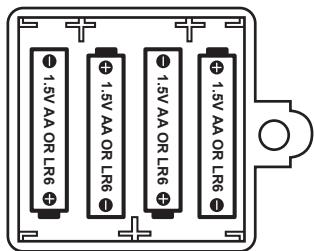
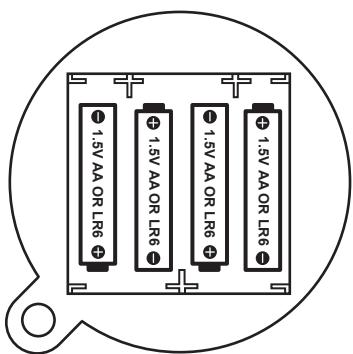
from the toy. The supply terminals are not to be short circuited. Do not throw batteries into a fire. Remove the batteries if you are not going to use the game for a long period of time.
WARNING: If the unit malfunctions or receives an electrostatic shock, press the Reset key. If this proves to be ineffective, remove the batteries and insert them again.
The game also works with a 9V (_ _ _ _ _ _ _ _ _ _ _ _ _ _ _ _ _ _ _ _ _ _ _ _ _ _ _ _ _ _ _ _ _ _ _ _ _ _ _ _ _ _ _ _ _ _ _ _ _ _ _ 500mA transformer with positive centre IN Positive / OUT Negative (not included).
To connect it, follow these instructions:
- Make sure the game is switched off.
- Connect the transformer plug to the socket of the game.
- Connect the transformer to the main outlet.
- Start the game.
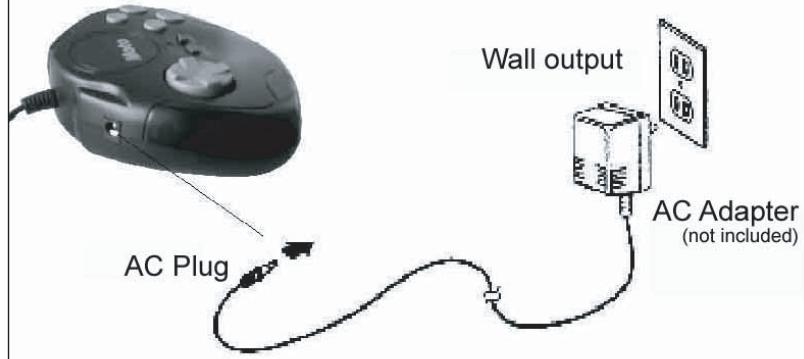
Sideview of console
Disconnect the transformer if the game is not used for a long period of time to prevent overheating. If you are using the power supply transformer, do not play outdoors. The toy must only be used with the recommended transformer; the transformer is not a toy; toys liable to be cleaned with liquid are to be disconnected from the transformer before cleaning; transformers or battery chargers used with the toy are to be regularly examined for damage to the cord, plug, enclosure and other parts. In the even of such damage, toy must not be used with the transformer or battery charger until such damage has been repaired. This game is not suitable for children under 3 years old. The game should only be used with the recommended power adaptor.
DESCRIPTION OF THE SUPER TV AIR JET
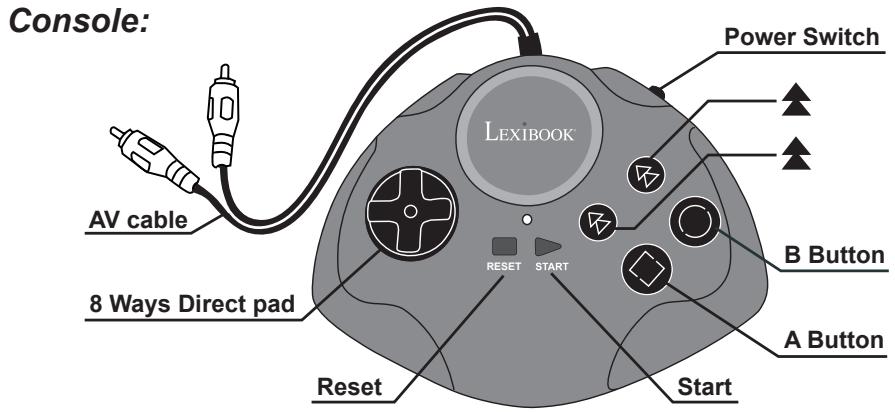
Power Switch Used to switch the Console on and off.
Start Used to start the game and to pause the game in progress
Reset Used to access the selection menu during a game
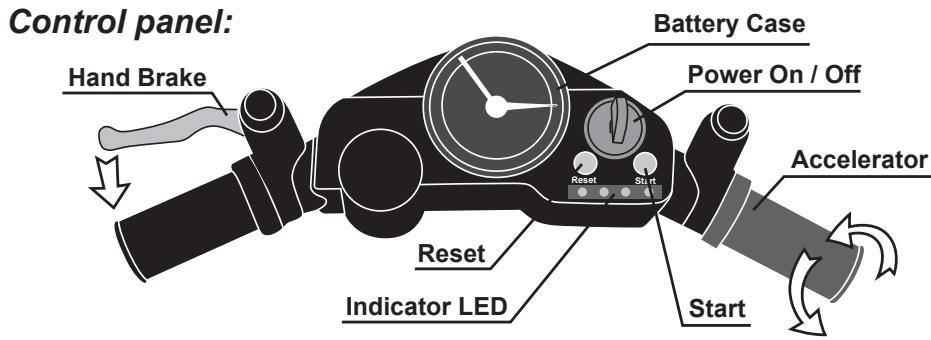
Power On / Off Used to switch the Super TV Air Jet on and off.
Reset Used to access the selection menu during a game
Start Used to start the game and to pause the game in progress
Accelerator
(Right Handgrip)
Please refer to Game list for more details.
Hand Brake
(Left Handgrip)
Please refer to Game list for more details
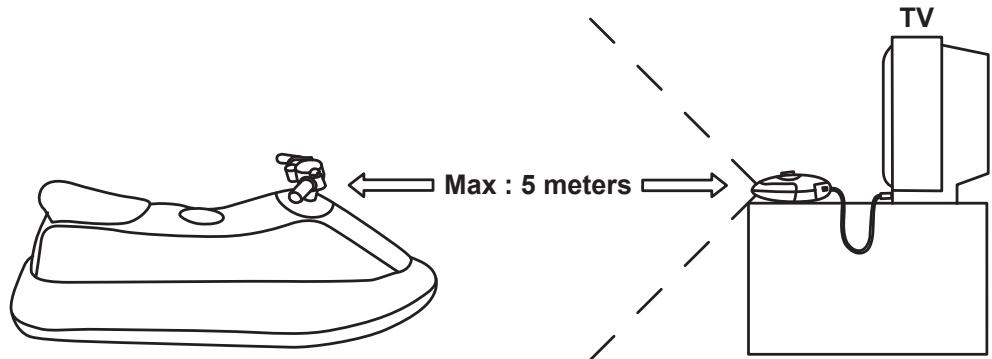
RADIO FREQUENCY WIRELESS
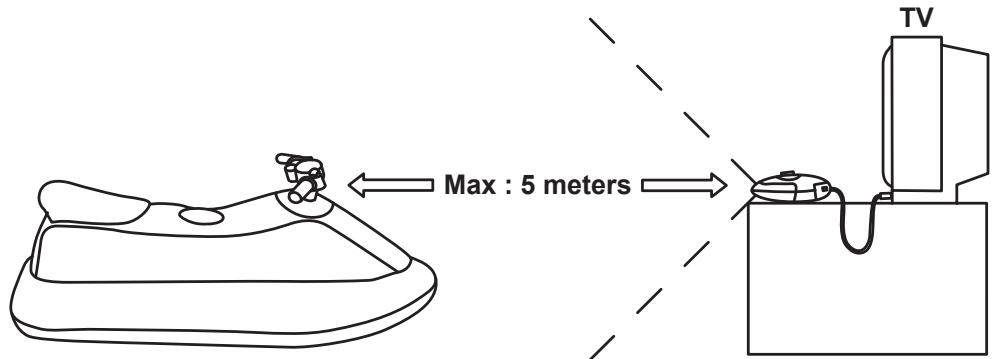
The maximum available distance is 5 meters under the normal power supply.
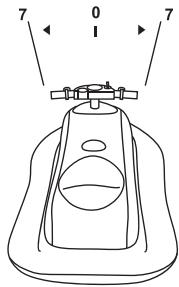
DIRECTION CONTROL DESCRIPTION
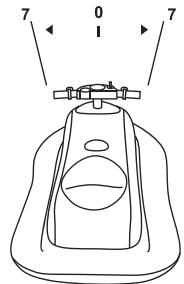
Horizontal position
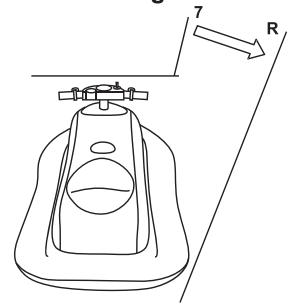
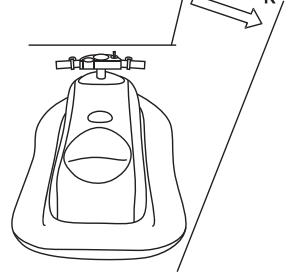
Slant to Right
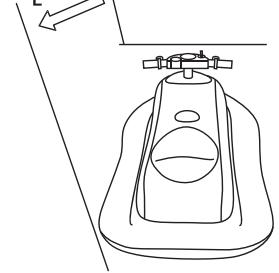
Slant to Left
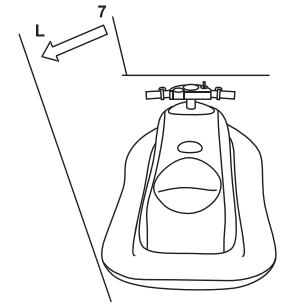
When you position the Super TV Air Jet horizontally or within 7 degrees left and right, the vehicle reflects on TV keep straight forward.
When you position the Super TV Air Jet to more than 7 degrees right, the vehicle reflect on TV moves to right.
When you position the Super TV Air Jet to more than 7 degrees left, the vehicle reflect on TV moves to left.
Maximum weight : The authorized maximum weight on the Super TV Air Jet is 110 lbs.
Warning : The Super TV Air Jet game is not intended as a floatation device or pool toy. Do not use it in or around water.
CONNECTING THE SUPER TV AIR JET TO A TV SET
-
The TV set and the Super TV Air Jet must be turned off.
-
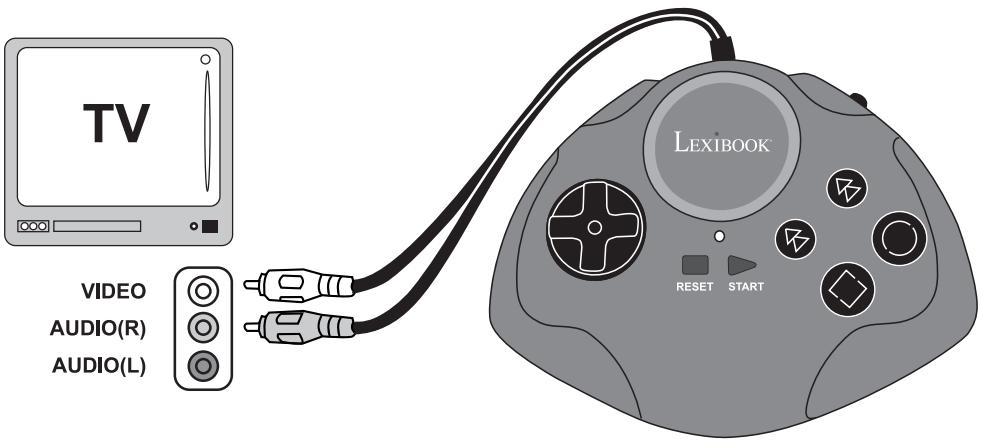
Connect the Console to the television :
-
Plug the AV cable (yellow end) into the matching video input jack on your TV set
-
Plug the AV cable (red end) into the matching audio input jack on your TV set
-
Turn your television ON and switch to the AV Channel.
- Turn ON the Control Panel and the Console. After a moment, the menu screen should appear on the TV.
- Once select the game, press START to start playing.
Remark:
The console can be used as an independent hand-held game console. Just power off the Super TV Air Jet and you can also play all the games with the console alone.
TROUBLESHOOTING (for AV input system)
| Problem | Before requesting repair, check the following items |
| No picture on the screen | ● Is the SUPER TV AIR JET & Console turned on? ● Is the TV turned on? ● Is the TV on the Input or A/V channel? ● Is the A/V cable connected properly? ● Do the batteries have enough power? ● Are batteries properly installed? |
| Screen flickers or no colour | ● Are the TV colour controls set properly? ● Are the TV channel fine adjustments set properly? ● Do the batteries have enough power? |
| No game sound | ● Is the TV volume too low or muted? ● Has the audio cable become loose or disconnected? |
| Picture on TV is unsteady | ● Adjust the vertical or horizontal hold controls on your television until the picture becomes steady. ● Do the batteries have enough power? |
| Fringes appear on TV during play | ● Is the video cable connected properly? ● Do the batteries have enough power? |
| Picture is blinking or distorted | ● Try pressing the reset button, if there is no improvement, turn power off and try again. ● Do the batteries have enough power? |
| No power | ● Are the batteries inserted properly? ● Is the power switch turned on? |
If you still have a problem, please follow the instructions given in this manual and re-connect the system step by step.
GAME LIST
Totally Jet
Race boat against time to the end point, and collect the score and fuel in the water to get your score more. But avoid the obstacles and the balls on both sides, if you touch it, you will lose the score.
Functions
Control handlebar: Left and right
Twist right handgrip: Accelerate
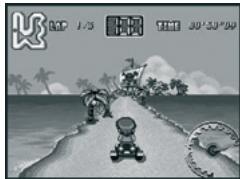
The truck is ready to start and the time limit is set according to different difficulty level, if the driver cannot finish the race within the time limit or all lives and chances used up, the track stops on the road.
Functions
Control handlebar: Left and right
Twist right handgrip: Accelerate
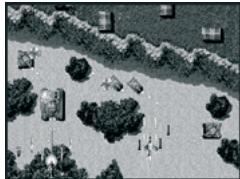
A terrible accident has created swarms of mutant monsters determined to destroy mankind! You'll have to blast them out of the skies and destroy their bases on the ground if you want to save the human race from extinction!
Functions
Control handlebar: Left and right
Twist right handgrip: Fire
Press left hand : Extermination (3 shots)
Jet Rush 2
The Ocean Scooter is racing against the computer (COM), exceed the others and avoid the obstacles to get to the end safely.
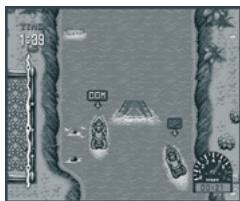
Functions
Control handlebar: Left and right
Twist right handgrip: Accelerate
To eliminate the treasures dropped from the up screen. If the treasures push down overrun the protect line, the game is over. But if we find all of the treasures, you will win it.
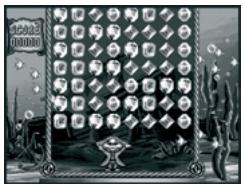
Functions
Control handlebar: Left and right
Twist right handgrip: Shooting
Press left hand: Get the treasures
Pinball Fish
Control the instrument to catch the fish, avoid the obstacles as soon as possible. Catch all the fish and protect the safety of the assistant not to drop into the deep sea.
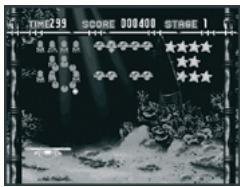
Functions
Control handlebar: Left and right
Twist right handgrip: Shooting
Illustrated below are the function descriptions and differences between the Super TV Air Jet and the console.
| Super TV Air Jet | console |
| Left handgrip: Hand brake | A button |
| Right twist grip: Accelerator/throttle | B button |
| Moving left/right: Slanting or leaning the Sea scooter left or right | 8 ways pad |
| Power => Power On/Off | Power Switch |
| Reset => Start again Start => Start / Pause game | Reset => Start again Start => Start / Pause game |
| LED Indicator => Left, Right, Power, Brake. | LED Indicator => Power. |
WARNING REGARDING EPILEPSY
To be read before attempting to use a video game, either by you or your child.
Some people are susceptible to suffer epileptic seizures or to loose consciousness when looking at certain types of flashing lights or elements commonly present in our everyday environment. These people are exposed to seizures when watching certain images on television or they play some video games. This phenomenon can become apparent even if the person has no previous medical history of such, or has never suffered an epileptic fit. If you or a member of your family has shown in the past any symptom linked to epilepsy (either a seizure or loss of consciousness) when exposed to "luminous" stimulation, please consult with your doctor prior to any attempt to use this game. We warn parents to be vigilant with their children while they play with video games. If you or your child experience any of the following symptoms: dizziness, altered vision, eye or muscle twitches, loss of awareness, disorientation or involuntary movement or convulsions, stop immediately playing the game and consult a doctor.
FOLLOW THE PRECAUTIONS BELOW WHENEVER USING YOUR SUPER TV AIR JET
When using your Super TV Air Jet do not sit or stand too close to the television screen.
Play as far back from the screen as possible.
- Do not play if you are tired or need sleep.
- Always play in a well-lit room.
- Be sure to take a 10 to 15 minutes break at least every hour while playing.
MAINTENANCE
Only use a soft, slightly damp cloth to clean the unit. Do not use detergent. Do not expose the unit to direct sunlight or any other heat source. Do not immerse the unit in water. Do not dismantle or drop the unit. Do not try to twist or bend the unit.
NOTE: please keep this instruction manual, it contains important information.
This product is covered by our 2-year warranty.
For any claim under the warranty or after sale service, please contact your distributor and present a valid proof of purchase. Our warranty covers any manufacturing material and workmanship defect, with the exception of any deterioration arising from the non-observation of the instruction manual or from any careless action implemented on this item (such as dismantling, exposition to heat and humidity, etc.). It is recommended to keep the packaging for any further reference.
In a bid to keep improving our services, we could implement modification on the colours and the details of the product shown on the packaging. Not suitable for children under 36 months old, as it contains small detachable elements which could be swallowed.
Warning: Changes of modifications to this unit not expressly approved by the party responsible for compliance could void the user authority to operate the equipment.
This product is suitable for use in all the European Union member states, except for Norway, Croatia and Romania.
Reference: JG6000
Designed and developed in Europe - Made in China
© 2006 LEXIBOOK®
C€1177!
Environmental Protection
Unwanted electrical appliances can be recycled and should not be discarded along with regular household waste! Please actively support the conservation of resources and help protect the environment by returning this appliance to a collection centre (if available).
Lexibook Junior
WAARSCHUWING VOOR EPILEPSIE
Xpnaiouoiitai yia to Eekivma kai Tny Tpoowpivn diakottn Tou TAIviOu TOU eivai oE EeIg
Xeipóφpevo (ApioTeρñ Xeipoλαβñ)
Iapakaloume 8eite Tn AioTa TnaiXviOiwv Yia TepiiooTepecs
AEITTOpeie
KαZI (△εξiαxειρολβn)
Iapakakoume 8eite Tn AioTa TnaiXviOiwv Yia TEPiOoTepeC TOpEeIc.
H aTIOaON eEyxou eivai 5 tpa e Kavovikn Tpoqodooia (eYaTeS mTatape).
NEPIIgPAH TOY EANETXOY KATEYOYNH
Opiocvtia the
Klaon npos ta i
Klaon npos ta apioTepa
OTav exTe To Super TV Air Jet opizovtia n e Kliion
ews 7 oipes apiotepa n
dei, ta oxmuata Tnou
TPObaovtai otnv oovn
tns tnAeopaonc
TPOxpouov ia Ppota.
OtauexTeTo Super TV Air Jet KIAIOn aT07oipcesEgia,ta oxmuata Tou PPOBaalovtai OTNV oOvN TNS tNLEopaanCS KIVOUVTAI TPOsTa Eeia.
OtauexTeTo Super TV Air Jet KIAIg U P aT07 0oipc apioTEpa, Ta oxnata Tou PPOaALovTai OTNV oOvN Tns TnEopaanC kivouvtai Tpoc ta apioTEpa.
DECLARATION OF CONFORMITY
We, LEXIBOOK
2, Av de Scandinavie, 91953 Courtaboeuf Cedex
declare under our sole responsibility that the product
Kind of product: Super TV Air Jet
Type number: JG6000
to which this declaration relates, is in conformity with the following standards and/or other normative documents :EN300220-1-3, EN301489-1-3, EN50088.
We hereby declare that the above named product is in conformity to all the essential requirements of Directive 1999/5/EC.
Denis Mauduit
Quality Manager
Unit 10 Petersfield Industrial Estate
Bedford Road, Petersfield
Hampshire, GU32 3QA, United Kingdom
Freephone helpline: 0808 100 3015
LEXIBOOK Ibérica S.L
LEXIBOOK Electronica Lda
Quinta dos Loios
Praceta José Domingos dos Santos, 6B-8A
2835-343 Lavradio-Barreiro Portugal

- START-UP GUIDE
- INTRODUCTION
- CONTENT OF THE PACKAGING
- INSTALLING THE BATTERIES
- DESCRIPTION OF THE SUPER TV AIR JET
- RADIO FREQUENCY WIRELESS
- DIRECTION CONTROL DESCRIPTION
- CONNECTING THE SUPER TV AIR JET TO A TV SET
- Remark:
- TROUBLESHOOTING (for AV input system)
- GAME LIST
- Totally Jet
- Functions
- Jet Rush 2
- Pinball Fish
- WARNING REGARDING EPILEPSY
- FOLLOW THE PRECAUTIONS BELOW WHENEVER USING YOUR SUPER TV AIR JET
- MAINTENANCE
- C€1177!
- Environmental Protection
- Lexibook Junior
- WAARSCHUWING VOOR EPILEPSIE
- NEPIIgPAH TOY EANETXOY KATEYOYNH
- DECLARATION OF CONFORMITY
- LEXIBOOK Ibérica S.L
- LEXIBOOK Electronica Lda
Brand : LEXIBOOK
Model : JG6000
Category : Game console