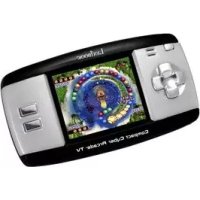
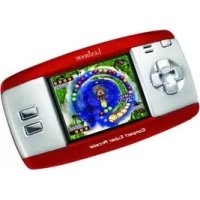
MAXI CYBER ARCADE - Game console LEXIBOOK - Free user manual and instructions
Find the device manual for free MAXI CYBER ARCADE LEXIBOOK in PDF.



User questions about MAXI CYBER ARCADE LEXIBOOK
0 question about this device. Answer the ones you know or ask your own.
Ask a new question about this device
Download the instructions for your Game console in PDF format for free! Find your manual MAXI CYBER ARCADE - LEXIBOOK and take your electronic device back in hand. On this page are published all the documents necessary for the use of your device. MAXI CYBER ARCADE by LEXIBOOK.
USER MANUAL MAXI CYBER ARCADE LEXIBOOK
- Bubble Blaster
- Squirrel Bobble
- Dream Bubble
- Tiger Rescue
- Final Round Tennis
- Busy Bong
- Fire Fighter
- Pinball Fish
- Jewel Fever 2
- Pop Ball
11.Jewel Master 2 - Super Move Quest
- Plumber
- Hanoi Tower
- Jump Frog
- Bump Bomb
-
Mr. Onion
-
Bump Jump
- On Noff
- Zippy Froger
- Hide and Seek
- Rapid Stream
- Slot Machine
- Find the Way
- Brave Kaka
- Seek the Resources
- Treasure Hunt
- Quick Move
- Get the meet
- Manic Troll
- Pool Pro
- The Lost World
- Go Kart
-
Win or Lose
-
Go Home
36.Box Puzzle - Caddie
- Go, Smile
- Hero Legend
- Go Bang
- Make Way
- Lucky Que
- Cooking Chaos
- Feed Sort
- Potion Commotion
- Lucky's Milk
- Egg Collector
- Pathfinder
- Sheep-Dog Day
- Magic Jelly
AVERTISSEMENT SUR L'EPILEPSIE
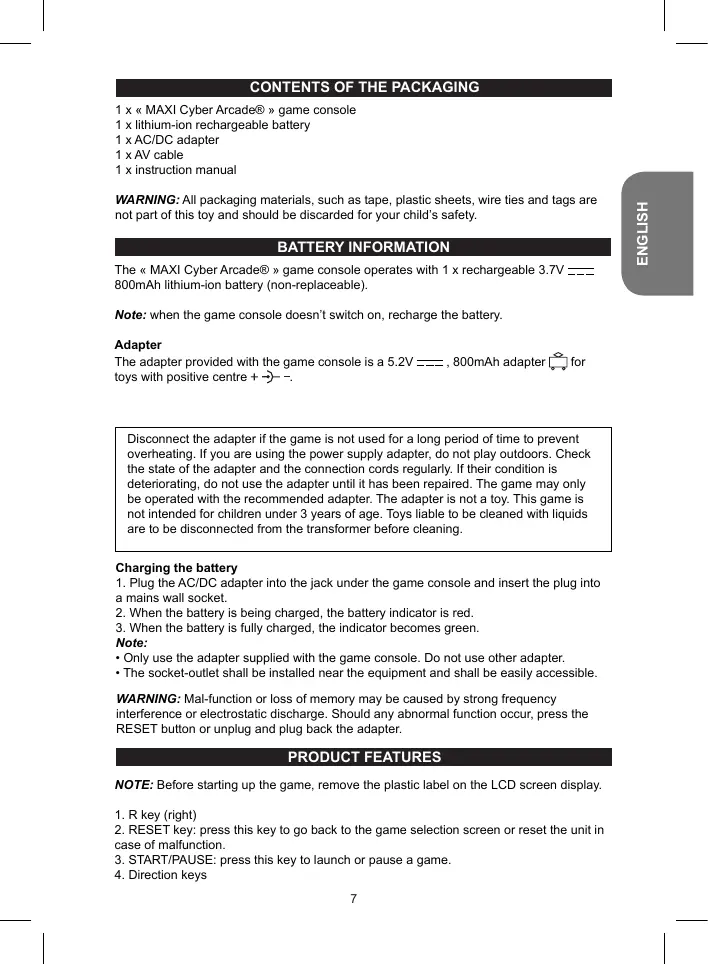
WARNING: All packaging materials, such as tape, plastic sheets, wire ties and tags are not part of this toy and should be discarded for your child's safety.
BATTERY INFORMATION
The « MAXI Cyber Arcade® » game console operates with 1 x rechargeable 3.7V——800mAh lithium-ion battery (non-replaceable).
Note: when the game console doesn't switch on, recharge the battery.
Adapter
The adapter provided with the game console is a 5.2V ---, 800mAh adapter [ ] for toys with positive centre + -> - .
Disconnect the adapter if the game is not used for a long period of time to prevent overheating. If you are using the power supply adapter, do not play outdoors. Check the state of the adapter and the connection cords regularly. If their condition is deteriorating, do not use the adapter until it has been repaired. The game may only be operated with the recommended adapter. The adapter is not a toy. This game is not intended for children under 3 years of age. Toys liable to be cleaned with liquids are to be disconnected from the transformer before cleaning.
Charging the battery
- Plug the AC/DC adapter into the jack under the game console and insert the plug into a mains wall socket.
- When the battery is being charged, the battery indicator is red.
- When the battery is fully charged, the indicator becomes green.
Note:
- Only use the adapter supplied with the game console. Do not use other adapter.
- The socket-outlet shall be installed near the equipment and shall be easily accessible.
WARNING: Mal-function or loss of memory may be caused by strong frequency interference or electrostatic discharge. Should any abnormal function occur, press the RESET button or unplug and plug back the adapter.
PRODUCT FEATURES
NOTE: Before starting up the game, remove the plastic label on the LCD screen display.
- R key (right)
- RESET key: press this key to go back to the game selection screen or reset the unit in case of malfunction.
- START/PAUSE: press this key to launch or pause a game.
-
Direction keys
-
L key (left)
- Battery indicator (red when charging, green when fully charged)
- AC/DC jack
- ON/OFF knob
- Volume knob
- A/V jack
- Earphones jack
CONNECTING THE CONSOLE TO A TV SET
The "MAXI Cyber Arcade®" game console can be plugged to a TV set to play on a wider screen.
- The TV set and the "MAXI Cyber Arcade®" MUST BE TURNED OFF.
- Plug the AV cable (black end) into the game's A/V cable jack.
- Plug the AV cable (yellow end) into the matching video input jack on the TV set.
- Plug the AV cable (white end) into the matching audio input jack on the TV set.
- Switch on the TV set and the game console.
GAME LIST
- Bubble Blaster
- Squirrel Bobble
- Dream Bubble
- Tiger Rescue
- Final Round Tennis
- Busy Bong
- Fire Fighter
- Pinball Fish
9.Jewel Fever 2 - Pop Ball
- Jewel Master 2
- Super Move Quest
- Plumber
- Hanoi Tower
15.Jump Frog - Bump Bomb
-
Mr. Onion
-
Bump Jump
- On N off
- Zippy Froger
- Hide and Seek
- Rapid Stream
23.Slot Machine - Find the Way
- Brave Kaka
- Seek the Resources
- Treasure Hunt
- Quick Move
- Get the meet
- Manic Troll
- Pool Pro
- The Lost World
- Go Kart
-
Win or Lose
-
Go Home
36.Box Puzzle - Caddie
- Go, Smile
- Hero Legend
- Go Bang
- Make Way
- Lucky Que
- Cooking Chaos
- Feed Sort
- Potion Commotion
- Lucky's Milk
- Egg Collector
- Pathfinder
- Sheep-Dog Day
- Magic Jelly
EPILEPSY WARNING
Read before you or your children use video games. Some people are prone to epileptic seizures or losses of consciousness as a result of seeing certain flickering lights or objects often present in daily life. These people are at risk from seizures when they watch certain television images or play certain video games. Such incidents can happen even if the person has no previous medical history of epilepsy. If you or a member of your family has ever displayed symptoms linked with epilepsy (seizures or loss of consciousness) while watching flickering lights or images, consult your doctor before use.
Parents are advised to supervise their children while playing video games. If you or your child shows any of the following symptoms: dizziness, vision problems, eye or muscle tenseness, loss of consciousness, involuntary movements or seizures, cease playing immediately and consult your doctor.
Precautions to take in any case while using a video game
- When you use a video game which can be connected to a TV screen, stand or sit relatively far from the TV screen and as far as the connection cable allows it.
- Use preferably video games which have a small screen. Avoid playing video games if
you are tired or lack some sleep.
- Make sure to play in room which is well lit.
- While playing video games, take 10 to 15 minute breaks every hour.
MAINTENANCE AND WARRANTY
Only use a soft, slightly damp cloth to clean the unit. Do not use detergent. Do not to expose the unit to direct sunlight or any other heat source. Do not immerse the unit in water. Do not dismantle or drop the unit. Do not try to twist or bend the unit.
NOTE: please keep this instruction manual, it contains important information.
This product is covered by our 2-year warranty. For any claim under the warranty or after sale service, please contact your distributor and present a valid proof of purchase. Our warranty covers any manufacturing material and workmanship defect, with the exception of any deterioration arising from the non-observation of the instruction manual or from any careless action implemented on this item (such as dismantling, exposition to heat and humidity, etc.). Warning! This game is not suitable for children under 36 months. Choking hazard. In a bid to keep improving our services, we could implement modification on the colours and the details of the product shown on the packaging.
Reference: JL2700
Designed and developed in Europe - Made in China
©2010 LEXIBOOK®
United Kingdom & Ireland
For any further information, please call 0808 100 3015
www.lexibook.com
CONTENIDO DEL EMBALAJE
- Bubble Blaster
- Squirrel Bobble
- Dream Bubble
- Tiger Rescue
- Final Round Tennis
- Busy Bong
- Fire Fighter
- Pinball Fish
- Jewel Fever 2
- Pop Ball
- Jewel Master 2
- Super Move Quest
- Plumber
- Hanoi Tower
- Jump Frog
- Bump Bomb
-
Mr. Onion
-
Bump Jump
- On N off
- Zippy Froger
- Hide and Seek
- Rapid Stream
23.Slot Machine - Find the Way
- Brave Kaka
- Seek the Resources
- Treasure Hunt
- Quick Move
- Get the meet
- Manic Troll
- Pool Pro
- The Lost World
- Go Kart
-
Win or Lose
-
Go Home
36.Box Puzzle - Caddie
- Go, Smile
- Hero Legend
- Go Bang
- Make Way
- Lucky Que
- Cooking Chaos
- Feed Sort
- Potion Commotion
- Lucky's Milk
- Egg Collector
- Pathfinder
- Sheep-Dog Day
- Magic Jelly
AVISO RELACIONADO CON LA EPILEPSIA
- Bubble Blaster
- Squirrel Bobble
- Dream Bubble
- Tiger Rescue
- Final Round Tennis
- Busy Bong
- Fire Fighter
- Pinball Fish
- Jewel Fever 2
- Pop Ball
- Jewel Master 2
- Super Move Quest
- Plumber
- Hanoi Tower
- Jump Frog
- Bump Bomb
-
Mr. Onion
-
Bump Jump
- On N off
20.Zippy Froger - Hide and Seek
- Rapid Stream
- Slot Machine
- Find the Way
- Brave Kaka
- Seek the Resources
- Treasure Hunt
- Quick Move
- Get the meet
- Manic Troll
- Pool Pro
- The Lost World
- Go Kart
-
Win or Lose
-
Go Home
36.Box Puzzle - Caddie
- Go, Smile
- Hero Legend
- Go Bang
- Make Way
- Lucky Que
- Cooking Chaos
- Feed Sort
- Potion Commotion
- Lucky's Milk
- Egg Collector
- Pathfinder
- Sheep-Dog Day
- Magic Jelly
ADVERTÉNCIA SOBRE A EPILEPSIA
- Bubble Blaster
- Squirrel Bobble
- Dream Bubble
- Tiger Rescue
- Final Round Tennis
- Busy Bong
- Fire Fighter
- Pinball Fish
- Jewel Fever 2
- Pop Ball
- Jewel Master 2
- Super Move Quest
- Plumber
- Hanoi Tower
- Jump Frog
- Bump Bomb
-
Mr. Onion
-
Bump Jump
- On N off
- Zippy Froger
- Hide and Seek
- Rapid Stream
- Slot Machine
- Find the Way
- Brave Kaka
- Seek the Resources
- Treasure Hunt
- Quick Move
- Get the meet
- Manic Troll
- Pool Pro
- The Lost World
- Go Kart
-
Win or Lose
-
Go Home
36.Box Puzzle - Caddie
- Go, Smile
- Hero Legend
- Go Bang
- Make Way
- Lucky Que
- Cooking Chaos
- Feed Sort
- Potion Commotion
- Lucky's Milk
- Egg Collector
- Pathfinder
- Sheep-Dog Day
- Magic Jelly
AVVERTENZE SULL'EPILESSIA
- Bubble Blaster
- Squirrel Bobble
- Dream Bubble
- Tiger Rescue
- Final Round Tennis
- Busy Bong
- Fire Fighter
- Pinball Fish
- Jewel Fever 2
- Pop Ball
- Jewel Master 2
- Super Move Quest
- Plumber
- Hanoi Tower
- Jump Frog
- Bump Bomb
-
Mr. Onion
-
Bump Jump
- On N off
- Zippy Froger
- Hide and Seek
- Rapid Stream
23.Slot Machine - Find the Way
- Brave Kaka
- Seek the Resources
- Treasure Hunt
- Quick Move
- Get the meet
- Manic Troll
- Pool Pro
- The Lost World
- Go Kart
-
Win or Lose
-
Go Home
36.Box Puzzle - Caddie
- Go, Smile
- Hero Legend
- Go Bang
- Make Way
- Lucky Que
- Cooking Chaos
- Feed Sort
- Potion Commotion
- Lucky's Milk
- Egg Collector
- Pathfinder
- Sheep-Dog Day
- Magic Jelly
EPILEPSIE-HINWEIS
- Bubble Blaster
- Squirrel Bobble
- Dream Bubble
- Tiger Rescue
- Final Round Tennis
- Busy Bong
- Fire Fighter
- Pinball Fish
- Jewel Fever 2
- Pop Ball
- Jewel Master 2
- Super Move Quest
- Plumber
- Hanoi Tower
- Jump Frog
- Bump Bomb
-
Mr. Onion
-
Bump Jump
- On N off
- Zippy Froger
- Hide and Seek
- Rapid Stream
23.Slot Machine - Find the Way
- Brave Kaka
- Seek the Resources
- Treasure Hunt
- Quick Move
- Get the meet
- Manic Troll
- Pool Pro
- The Lost World
- Go Kart
-
Win or Lose
-
Go Home
36.Box Puzzle - Caddie
- Go, Smile
- Hero Legend
- Go Bang
- Make Way
- Lucky Que
- Cooking Chaos
- Feed Sort
- Potion Commotion
- Lucky's Milk
- Egg Collector
- Pathfinder
- Sheep-Dog Day
- Magic Jelly