TV Game Console 100 games in 1 JG7415 - Game console LEXIBOOK - Free user manual and instructions
Find the device manual for free TV Game Console 100 games in 1 JG7415 LEXIBOOK in PDF.


| Product type | Interactive video game console |
| Brand | Lexibook |
| Model | JG7415 |
| Number of built-in games | 100 games (sports and action) |
| Controllers | 2 wireless controllers with vibration function |
| Console power supply | 4 AA/LR6 batteries (1.5 V) or 5V - 300 mA mains adapter (included) |
| Controller power supply | 3 AAA/LR03 batteries (1.5 V) each |
| TV connectivity | AV cable (yellow video, white audio) |
| Sensor | Infrared |
| Included accessories | 1 tennis racket, 1 baseball bat, 1 ping-pong racket |
| Package contents | Console, 2 controllers, 3 accessories, AV cable, mains adapter, instruction manual |
| Recommended playing distance | At least 1 meter from the screen |
| Vibration function | Can be activated by ON/OFF button on each controller |
| Safety | Not suitable for children under 3 years (small parts); epilepsy warning |
| Maintenance | Clean with a slightly damp cloth, no detergent; protect from moisture and heat |
| Warranty | 2 years |
| Manufacturing | Designed in Europe, made in China |
| After-sales service | 0 892 23 27 26 (€0.34/min) |
| Website | www.lexibook.com |
Frequently Asked Questions - TV Game Console 100 games in 1 JG7415 LEXIBOOK
User questions about TV Game Console 100 games in 1 JG7415 LEXIBOOK
0 question about this device. Answer the ones you know or ask your own.
Ask a new question about this device
Download the instructions for your Game console in PDF format for free! Find your manual TV Game Console 100 games in 1 JG7415 - LEXIBOOK and take your electronic device back in hand. On this page are published all the documents necessary for the use of your device. TV Game Console 100 games in 1 JG7415 by LEXIBOOK.
USER MANUAL TV Game Console 100 games in 1 JG7415 LEXIBOOK
| Dancing | Pool |
| Tennis | Fishing |
| Baseball practice | Boxing |
| Golf | Basketball |
| Ping-pong | Darts |
| Bowling |
Thank you for purchasing this Lexibook "TV Game Console".
Please read the following instructions to discover all its functions and understand the safety rules.
Contents of the packaging
When unpacking, ensure that the following elements are included:
1 x game console "TV Game Console"
2 x wireless controllers
3 x accessories to play (tennis racket, baseball bat and ping pong paddle)
1xAV cable
1 x AC/DC adapter
1 x instruction manual
WARNING: All packaging materials, such as tape, plastic sheets, wire ties and tags are not part of this toy and should be discarded for your child's safety.
Battery Information
The "TV Game Console" operates with:
- 4x1.5V AALR6 type batteries (not included)
OR
- the AC/DC adapter provided (5V -300 mA, with positive centre).

The 2 wireless controllers work with 3 × 1.5 ~V ~A ~A ~A / LR03 type batteries each (not included).
Console:
Installing the batteries:
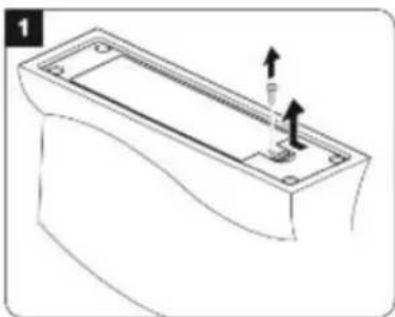
- Use a screwdriver to open the battery compartment located under the console.
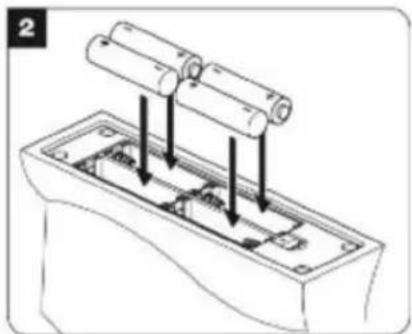
- Install the 4 x LR6/AA type batteries observing carefully the polarity indicated at the bottom of the battery compartment and as per the diagram shown below.
- Close the battery compartment and tighten the screw.
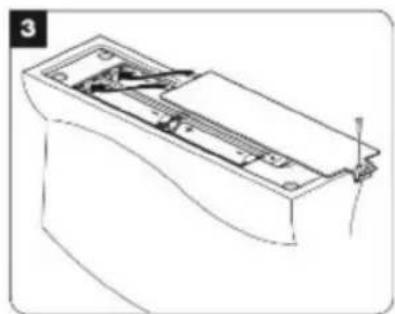
Adapter:
- Make sure the game console is switched off.
- Connect the adapter plug (supplied) to the socket located on the back side of the console.
- Connect the adapter into a main socket.
- Switch the game console on.
Warning: Disconnect the adapter if the game is not used for a long period of time to prevent overheating. When
the game is powered by an adapter, do not play outside. Check the state of the adapter and the connection cords regularly. If their condition is deteriorating, do not use the adapter until it has been repaired. The game may only be operated with the recommended adapter. The adapter is not a toy. The console should be disconnected from the power supply to be cleaned if liquids are used for cleaning.
Wireless controllers:
-
Use a screwdriver to open the battery compartment located at the back of the controller.
-
Install the 3 x LR03/AAA type batteries observing carefully the polarity indicated at the bottom of the battery compartment and as per the diagram shown below.
- Close the battery compartment and tighten the screw.
- Repeat the 3 previous steps to install the batteries of the second controller.
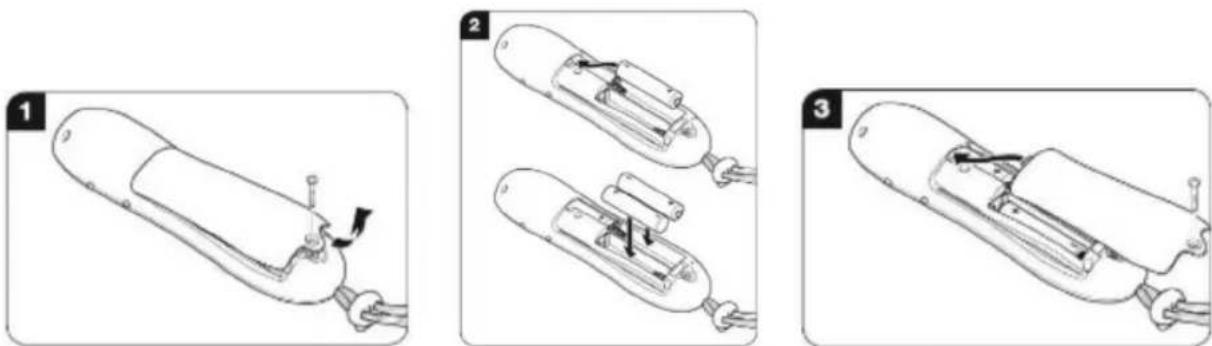
Non-rechargeable batteries are not to be recharged. Rechargeable batteries are to be removed from the toy before being charged. Rechargeable batteries are only to be charged under adult supervision. Different types of batteries or new and used batteries are not to be mixed. Only batteries of the same or equivalent type as recommended are to be used. Batteries are to be inserted with the correct polarity. Exhausted batteries are to be removed from the toy. The supply terminals are not to be short circuited. Do not throw batteries into a fire. Remove the batteries if you are not going to use the game for a long period of time.
WARNING: Mal-function or loss of memory may be caused by strong frequency interference or electrostatic discharge. Should any abnormal function occur, reset the unit or remove the batteries and insert them again, or unplug the AC/DC adapter from the mains socket and plug it back in.
Connecting the console to a TV set
The "TV Game Console" must be plugged to a TV set.
Note: The TV set and the console MUST BE TURNED OFF.
- Plug the AV cable (yellow end) into the matching video input jack on the TV set.
- Plug the AV cable (white end) into the matching audio input jack on the TV set.
- Switch on the TV set and turn on the console.
Positioning the console in the play area:
- Place the console observing carefully the diagram shown opposite.
- Ensure you have enough space and there are no obstacles in the play area (furniture, overhead light, carpet...)
- Place the console on a flat and steady table at about the same height as the television.
- Play directly in front of the television within a distance of 1 meter from the console.
Note: Do not use other controllers in the same room and during the game, it may occur abnormal function of the console.
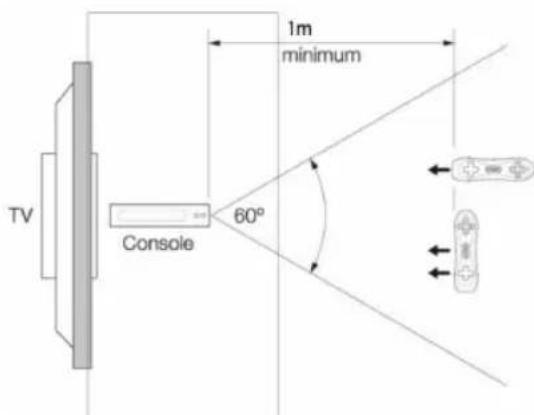
Key guide
Console
Note: Refer to diagram A.
- POWER key: to turn the game console on or off.
- Reset key: to reset the unit
- Infra-red receiver
- Charging light
- Battery compartment
- AC/DC port
- AV out
Controller
Note: Refer to diagram B.
8. Push Buttons: press these buttons to insert the game accessories into the controller (baseball bat and rackets)
9. Directional keys: to navigate within the menus and play games (Up/Down/Left/Right)
10. START key: to start playing
11. MENU key: to access the main menu or the previous screen
12. ON/OFF key: to activate/inactivate the vibration mode
13. SELECT key: to select a game or confirm a choice
14. A, B, X and Y keys: to play the games.
Note: The function of the key depends on the game.
- Wrist strap
- Battery compartment
Let's play
How to hold the controller
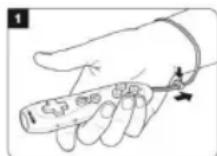
Note: Always wear the wrist strap when you play.
- Slip your hand through the wrist strap and adjust it (See diagram 1).
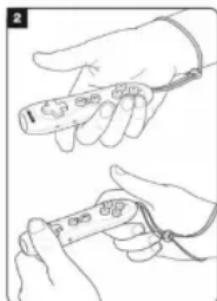
- Depending on the game, you can hold the controller in one hand (vertical position) or both hands (horizontal position) (See diagram 2).
Vibration mode:
For more realism and fun when you play the controllers feature a vibration function. To activate the vibration function, set the ON/OFF button of the controller (12) on the ON position. The controller vibrates when you move it.
To select a game
Important note: Always use the controller 1 to select a game. Hold the controller in one hand (vertical position) to navigate through the game menu and select a game.
Using the controller keys:
- Hold the controller in on hand (vertical position).
- Press the "START" key on the controller to access the game menu.
- Use the directional keys (Left/Right) to move the cursor and scroll through the different games.
- To select a game, press the "SELECT" key.
- Select the game options.
- To return to the previous screen or menu, press the "MENU" key.
- To start playing, press the "START" key.
- To pause the game, press the "MENU" key. To restart, select "Resume" using the directional keys and then press "SELECT".
Using the controller:
- Select the game using the controller 1. Move the controller right or left with a sure and fast gesture to move the cursor in the game menu.
- Shake the controller to validate a choice, select an option or start playing.
List of games
11 interactive sport games
Note: In these games there are one or two players. Hold the controller in one hand. For tennis, baseball and ping pong games, use the matching accessory.
| Dancing | Pool |
| Tennis | Fishing |
| Baseball practice | Boxing |
| Golf | Basketball |
| Ping-pong | Darts |
| Bowling |
89 mini games
Note: In these games there is one player. To play, hold the controller in both hands (horizontal position).
| Auto Racing | Lady Bugs | Toy Kingdom | Go Bang |
| Ball Battle | Lighting Plan | Treasure Hunt | Rotating Puzzle |
| Big Burger | Magic Cubes | Yummy | Tutelary |
| Brave Heart | Find pairs | Jet Rush 2 | Brain Explode |
| Ball Blaster | Mission | Busy Busy | Zippy Frog |
| Caddie | Motor Rally 2 | Campaign | Blue |
| Coin Digger | Mr. Onion | Final Escape | Crazy Addition |
| Cooking Chaos | Mystic Totem | Tennis | Defence Mission |
| Crazy Coconuts | Plumber Man | Which Way | Wobble |
| Deep Storm | Pop Ball | Find Food | Shanghai |
| Dragon | Potion Commotion | Smile | Hide and Seek |
| Egg Collector | Rapid Stream | Picture Challenge | Box Puzzle |
| Find the Way | Slot Machine | Magic Jelly | Ballroom Bonanza |
| Finger Dancing | Sudoku | Make Way | Feed Sort |
| Fire Fighter | Speed Runner | Rock Challenge | Pumpkin Surprise |
| Happy Farm | Spiral Ball | Pinball Fish | Lucky Hunt |
| Go Karts | Squirrel Bobble | Pool Pro | Dinglehoppers |
| Hay Bales | Starry Night | Seek the Resources | Fruit Fall |
| Hero Legend | Surf Adventure | Super Move Quest | Garden Weeder |
| Hot Drop | Texas Hold'em | Jump Frog | Hero |
| Ice Climber | The Lost world | Bump Jump | |
| Jewel Fever 2 | Tiger Rescue | Quick Move | |
| Jewel Master 2 | Jet Skiing | On N Off |
Epilepsy Warning
Read before you or your children use video games. Some people are prone to epileptic seizures or losses of consciousness as a result of seeing certain flickering lights or objects often present in daily life. These people are at risk from seizures when they watch certain television images or play certain video games. Such incidents can happen even if the person has no previous medical history of epilepsy. If you or a member of your family has ever displayed symptoms linked with epilepsy (seizures or loss of consciousness) while watching flickering lights or images, consult your doctor before use.
Parents are advised to supervise their children while playing video games. If you or your child shows any of the following symptoms: dizziness, vision problems, eye or muscle tenseness, loss of consciousness, involuntary movements or seizures, cease playing immediately and consult your doctor.
Precautions to take in any case while using a video game:
- When you use a video game which can be connected to a TV screen, stand or sit relatively far from the TV screen and as far as the connection cable allows it.
- Use preferably video games which have a small screen. Avoid playing video games if you are tired or lack some sleep.
- Make sure to play in room which is well lit.
- While playing video games, take 10 to 15 minute breaks every hour.
Maintenance and Warranty
Only use a soft, slightly damp cloth to clean the unit. Do not use detergent. Do not to expose the unit to direct sunlight or any other heat source. Do not immerse the unit in water. Do not dismantle or drop the unit. Do not try to twist or bend the unit.
NOTE: please keep this instruction manual, it contains important information.
This product is covered by our 2-year warranty.
For any claim under the warranty or after sale service, please contact your distributor and present a valid proof of purchase. Our warranty covers any manufacturing material and workmanship defect, with the exception of any deterioration arising from the non-observance of the instruction manual or from any careless action implemented on this item (such as dismantling, exposition to heat and humidity, etc.). It is recommended to keep the packaging for any further reference. WARNING! Not suitable for children under 3 years. Choking Hazard-Small parts. In a bid to keep improving our services, we could implement modification on the colours and the details of the product shown on the packaging.
Reference: JG7410
Designed and developed in Europe - Made in China
© 2011 LEXIBOOK®
United Kingdom & Ireland
For any further information, please call 0808 100 3015
www.lexibook.com
CE
Environmental Protection:
Unwanted electrical appliances can be recycled and should not be discarded along with regular household waste! Please actively support the conservation of resources and help protect the environment by returning this appliance to a collection centre (if available).

Introduccion
T. +(351) 220 824 521 | lexibook@ajaguiar.com
www.lexibook.com

Proteção Ambiental: