
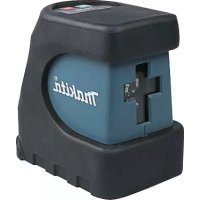
LD100P - Measuring tool MAKITA - Free user manual and instructions
Find the device manual for free LD100P MAKITA in PDF.



| Product type | Laser distance meter |
| Brand | MAKITA |
| Model | LD100P |
| Dimensions (L x W x H) | 126 x 51 x 27 mm |
| Weight (with batteries) | 125 g |
| Power supply | 2 AAA 1.5 V batteries |
| Battery life | Up to 5,000 measurements |
| Range | 0.05 m to 100 m (with target plate beyond 80 m) |
| Accuracy (up to 10 m) | ± 1.5 mm (typical, 2 σ) |
| Smallest displayed unit | 0.1 mm |
| Laser | Class II, 635 nm, < 1 mW |
| Laser point diameter (at 10/50/100 m) | 6 / 30 / 60 mm |
| Main functions | Distance measurement, area, volume, Pythagoras (2 and 3 measurements), inclination measurement (±45°), direct horizontal distance, stakeout function, timer, addition/subtraction, history memory (20 values), constant, continuous measurement min/max |
| Protection | IP54 (dust and splash water protected) |
| Operating temperature | -10°C to +50°C |
| Storage temperature | -25°C to +70°C |
| Tripod thread | Yes |
| Multifunctional end piece | Yes (foldable angle stop) |
| Display and keypad illumination | Automatic (light sensor) |
| Maintenance and cleaning | Clean with a soft, damp cloth. Do not use solvents. Do not immerse in water. |
| Repairability | Do not repair yourself. Contact the Makita dealer in case of defect. |
| Recommended accessories | Target plate (for long distances or difficult conditions) |
| General information | Complies with standards EN55022, EN61000-4, EN60950-1, directive 2004/108/EC. |
Frequently Asked Questions - LD100P MAKITA
User questions about LD100P MAKITA
0 question about this device. Answer the ones you know or ask your own.
Ask a new question about this device
Download the instructions for your Measuring tool in PDF format for free! Find your manual LD100P - MAKITA and take your electronic device back in hand. On this page are published all the documents necessary for the use of your device. LD100P by MAKITA.
USER MANUAL LD100P MAKITA
INSTRUCTION MANUAL Laser Distance Measure
LD100P
WARNING:
For your personal safety, READ and UNDERSTAND before using.
SAVE THESE INSTRUCTIONS FOR FUTURE REFERENCE.
Thakita
LD100P
Complies with 21 CFR 1040.10 and 1040.11 CFR 1040.12.
Law: Notice No. 50, dated July 26, 2001.


Power: 3V = /0.3A


PATENTS:
WO 0216964

44754 US

1
WO 9427164

18019

5617
Makita Corporation, Anjo, Aichi, Japan. Made in Austria

















Bedienungsanleitung
User Manual
Addition / Subtraction
Distanz messen.
Michigan Drive, Tongwell, Milton Keynes, Bucks MK15
8JD, ENGLAND
User Manual
English
Congratulations on the purchase of your Makita LD100P.


Carefully read the Safety Instructions and the User Manual before using this product.
The person responsible for the instrument must ensure that all users understand these directions and adhere to them.
Contents
Safety Instructions 1
Start-up. 5
Menu functions 7
Operation. 8
Measuring 9
Functions 10
Appendix 14
Safety Instructions
Symbols used
The symbols used in the Safety Instructions have the following meanings:

WARNING:
Indicates a potentially hazardous situation or an unintended use which, if not avoided, will result in death or serious injury.

CAUTION:
Indicates a potentially hazardous situation or an unintended use which, if not avoided, may result in minor injury and/or in appreciable material, financial and environmental damage.

Important paragraphs which must be adhered
to in practice as they enabled the product to be used in a technically correct and efficient manner.
Use of the instrument
Permitted use
- Measuring distances
Computing functions, e. g. areas and volumes - Measuring tilts
Prohibited use
Using the instrument without instruction
Using outside the stated limits
- Deactivation of safety systems and removal of explanatory and hazard labels
- Opening of the equipment by using tools (screw-drivers, etc.), as far as not specifically permitted for certain cases
- Carrying out modification or conversion of the product
Use after misappropriation
Use of accessories from other manufacturers without the express approval of Makita.
- Deliberate or irresponsible behaviour on scaffolding, when using ladders, when measuring near machines which are running, or near parts of machines or installations which are unprotected
Aiming directly into the sun
Deliberate dazzling of third parties; also in the dark
- Inadequate safeguards at the surveying site (e.g. when measuring on roads, construction sites, etc.)
Limits of use

See section "Technical Data".
The Makita LD100P is designed for use in areas permanently habitable by humans, do not use the product in explosion hazardous areas or in aggressive environments.
Areas of responsibility
Responsibilities of the manufacturer of the original equipment Makita Corporation Anjo, Aichi, 446-8502 Japan:
Makita is responsible for supplying the product, including the User Manual and original accessories, in a completely safe condition.
Responsibilities of the manufacturer of nonMakita accessories:
The manufacturers of non-Makita accessories for the Makita LD100P are responsible for developing, implementing and communicating safety concepts for their products. They are also responsible for the effectiveness of these safety concepts in combination with the Makita equipment.
Responsibilities of the person in charge of the instrument:

WARNING
The person responsible for the instrument must ensure that the equipment is used in accordance with the instructions. This person is also accountable for the deployment of personnel and for their training and for the safety of the equipment when in use.
The person in charge of the instrument has the following duties:
-
To understand the safety instructions on the product and the instructions in the User Manual.
-
To be familiar with local safety regulations relating to accident prevention.
- To inform Makita immediately if the equipment becomes unsafe.
Hazards in use

CAUTION:
Watch out for erroneous distance measurements if the instrument is defective or if it has been dropped or has been misused or modified.
Precautions:
Carry out periodic test measurements. Particularly after the instrument has been subject to abnormal use, and before, during and after important measurements.
Make sure the Makita LD100P optics is kept clean and that there is no mechanical damage to the bumpers.

CAUTION:
In using the instrument for distance measurements or for positioning moving objects (e.g. cranes, building equipment, platforms, etc.) unforeseen events may cause erroneous measurements.
Precautions:
Only use this product as a measuring sensor, not as a control device. Your system must be configured and operated in such a way, that in case of an erroneous measurement, malfunction of the device or power failure due to installed safety measures (e.g. safety limit switch), it is assured that no damage will occur.

WARNING:
Flat batteries must not be disposed of with household waste. Care for the environment and take them to the collection points provided in accordance with national or local regulations.

The product must not be disposed of with household waste.
Dispose of the product appropriately in accordance with the national regulations in force in your country.
Always prevent access to the product by unauthorized personnel.
Electromagnetic Compatibility (EMC)
The term "electromagnetic compatibility" is taken to mean the capability of the product to function smoothly in an environment where electromagnetic radiation and electrostatic discharges are present, and without causing electromagnetic interference to other equipment.

WARNING:
The Makita LD100P conforms to the most stringent requirements of the relevant standards and regulations. Yet, the possibility of it causing interference in other devices cannot be totally excluded.

CAUTION:
Never attempt to repair the product yourself. In case of damage, contact the local dealership.
FCC statement (applic. in U.S.)
This equipment has been tested and found to comply with the limits for a Class B digital device, pursuant to part 15 of the FCC Rules. These limits are designed to provide reasonable protection against harmful interference in a residential installation.
This equipment generates, uses and can radiate radio frequency energy and, if not installed and used in accordance with the instructions, may cause harmful interference to radio communications.
However, there is no guarantee that interference will not occur in a particular installation.
If this equipment does cause harmful interference to radio or television reception, which can be determined by turning the equipment off and on, the user is encouraged to try to correct the interference by one or more of the following measures:
Reorient or relocate the receiving antenna.
- Increase the separation between the equipment and receiver.
- Connect the equipment into an outlet on a circuit different from that to which the receiver is connected.
- Consult the dealer or an experienced radio/TV technician for help

WARNING:
Changes or modifications not expressly approved by Makita for compliance could void the user's authority to operate the equipment.
Laser classification
Integrated distancemeter
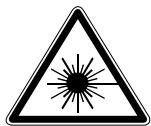
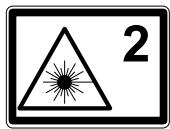
The Makita LD100P produces a visible laser beam which emerges from the front of the instrument. It is a Class 2 laser product in accordance with:
IEC60825-1:2007 "Radiation safety of laser products"
Laser Class 2 products:
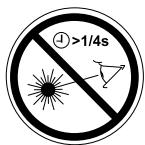
Do not stare into the laser beam or direct it towards other people unnecessarily. Eye protection is normally afforded by aversion responses including the blink reflex.

WARNING:
Looking directly into the beam with optical aids (e.g. binoculars, telescopes) can be hazardous.
Precautions:
Do not look directly into the beam with optical aids.

CAUTION:
Looking into the laser beam may be hazardous to the eyes.
Precautions:
Do not look into the laser beam. Make sure the laser is aimed above or below eye level. (particularly with fixed installations, in machines, etc.)

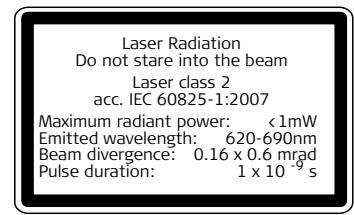
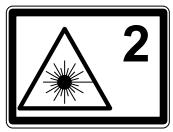

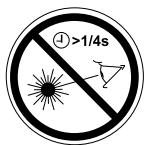
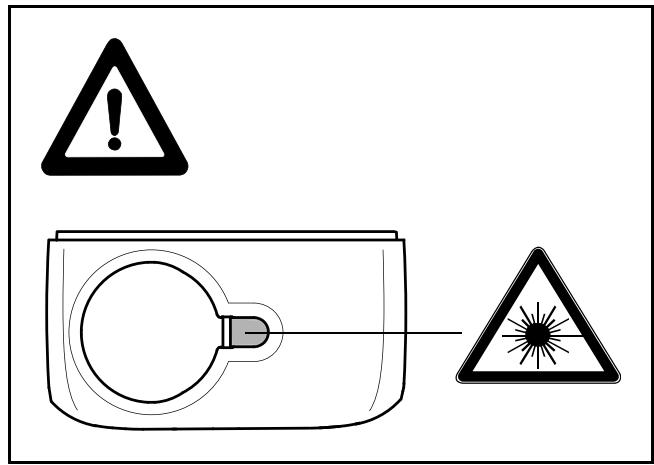
Position of the product label see last page!
Start-up
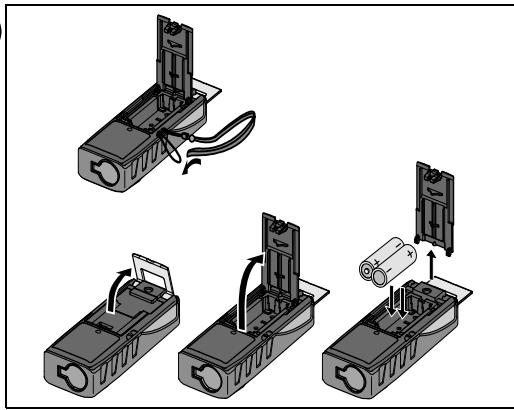
Inserting/replacing batteries
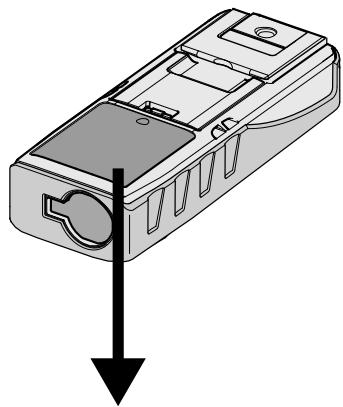
See figure A
1 Remove battery compartment lid and attach handstrap.
2 Insert batteries, observing correct polarity.
3 Close the battery compartment again. Replace the batteries when the symbol flashes permanently in the display.

Use alkaline batteries only.

Remove the batteries before any long period of non-use to avoid the danger of corrosion.
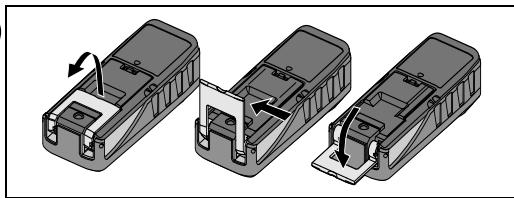
Changing the reference point (multifunctional endpiece)
See figure B
The instrument can be adapted for the following measuring situations:
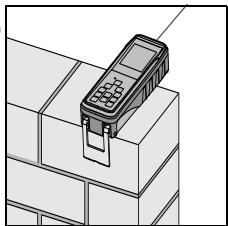
- For measurements from an edge, fold out the positioning bracket until it first locks in place. See figure .
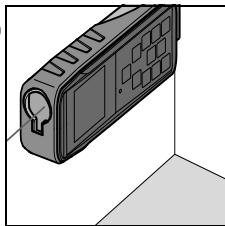
- For measurements from a corner, open the positioning bracket until it locks in place, then push the positioning bracket lightly to the right to fold it out fully. See figure D .
A built-in sensor automatically detects the orientation of the positioning bracket and adjusts the zero point of the instrument accordingly.
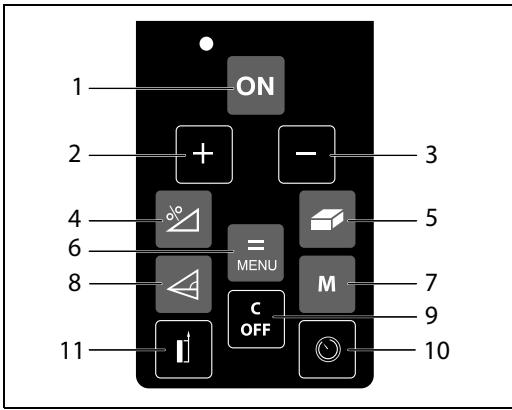
Keypad
See figure E
1 ON (On/measuring) button
2 Plus (+) button
3 Minus (-) button
4 Functions button
5 Area / volume button
6 Equal / menu button
7 Memory button
8 Indirect measurement (Pythagoras) button
9 Clear / off button
10 Timer button
11 Reference button
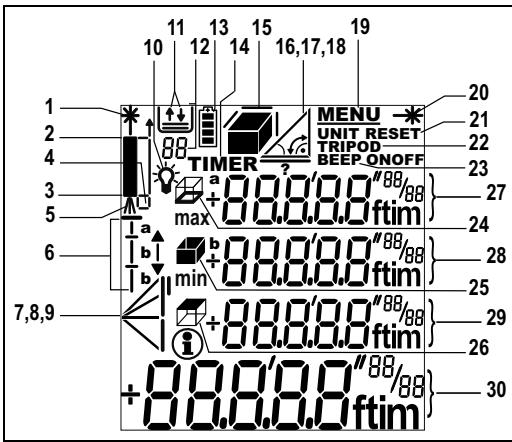
Display
See figure F
1 Laser active
2 Reference(front)
3 Reference (rear)
4 Reference (corner stop)
5 Measuring with the tripod
6 Stake out function
7 Single Pythagorean measurement
8 Double Pythagorean measurement
9 Double (partial height) measurement
10 Illumination
11 Save constant value, call up constant value
12 Historical memory, call up values
13 Battery status
14 Timer
15 Area/volume
16 Tilt
17 Horizontal distance measurement using tilt
18 Room corner angle function
19 Menu
20 Continuous laser
21 Reset
22 Reference (tripod)
23 Beep
24 Circumference
25 Wall area
26 Ceiling area
27 Intermediate line 1
28 Intermediate line 2
29 Intermediate line 3
30 Summary line
Menu functions
Settings
The menu allows settings to be altered and permanently stored. After switching off the device or replacing the batteries the settings are stored.
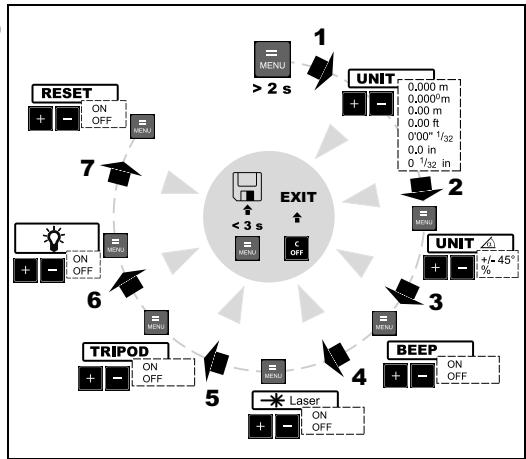
Navigation in the menu
The menu allows settings to be made at the user level. The instrument can be specifically configured to your personal requirements.
General description
= button (pressed long) brings up the MENU, the set units and the UNIT symbol are displayed.
= button (pressed short) pages through each menu item. See figure G
- or - button to make changes in menu items.
= button (pressed short) brings up the next menu item.
A long press on the button in the menu confirms the new settings made in the submenu items.
Pressing the C button for longer in the menu allows you to quit the settings function without saving.
Setting the unit for distance measurements
The following units can be set:
| Distance | Area | Volume | |
| 1. | 0.000 m | 0.000 m2 | 0.000 m3 |
| 2. | 0.0000 m | 0.000 m2 | 0.000 m3 |
| 3. | 0.00 m | 0.000 m2 | 0.000 m3 |
| 4. | 0.00 ft | 0.00 ft2 | 0.00 ft3 |
| 5. | 0'00" 1/32 | 0.00 ft2 | 0.00 ft3 |
| 6. | 0.0 in | 0.00 ft2 | 0.00 ft3 |
| 7. | 0 1/32 in | 0.00 ft2 | 0.00 ft3 |
Setting the unit for tilt measurements
The following units can be set for tilt measurements:
| Units for tilt | |
| 1. | +/- 0.0° |
| 2. | 0.00% |
Beep (BEEP)
You can switch the beep on or off.
Continuous laser (-)
You can switch the continuous laser function on or off.
With the continuous laser function set on, each press of the ON button triggers a measurement. The laser automatically switches off after 15 minutes.
Measuring with the tripod (TRIPOD)
The reference must be appropriately adjusted in order to be able to take correct measurements with a tripod. To do this select the TRIPOD symbol in this menu item. You can switch the reference on the tripod on or off. The setting can be seen on the display
Display - keypad illumination (
Automatic illumination of the display and the keypad can be switched on or off.
Reset - returning the instrument to the factory settings (RESET)
The instrument has a RESET function. When you select the menu function RESET and confirm, the instrument defaults to the factory settings.
A reset returns the following values to their factory settings:
Reference (rear)
Display illumination (ON)
- Beep (ON)
Unit (m(mm))
- Stack and memory are erased

All customised settings and stored values are also lost.
Operation
Switching on and off

Switches on the instrument and laser. The display shows the battery symbol until the next button is pressed.

Pressing this button for longer switches the instrument off.
The instrument switches off automatically after six minutes of inactivity.
CLEAR button

volume measurements, each single measurement can be deleted and remeasured in series.
Display / keypad illumination
The instrument has a sensor that automatically switches the display and keypad illumination on or off in response to lighting conditions.
Reference setting
The default reference setting is from the rear of the instrument.
Press this button to take the next measurement from the front edge. A special beep sounds whenever the reference setting is changed.
After a measurement the reference returns automatically to the default setting (rear reference). See figure H
Press this button for longer the front reference is set permanently.
Press this button, the rear reference is set again.
Measuring
Single distance measurement
ON Press to activate the laser. Press again to trigger the distance measurement.
The result is displayed immediately.
Minimum/maximum measurement
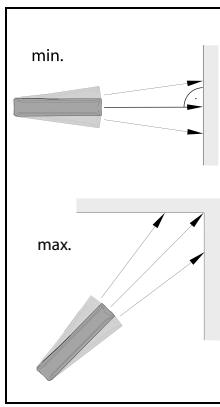
This function allows the user to measure the minimum or maximum distance from a fixed measuring point. It can also be used as to determine spacings. See figure {1}
It is commonly used to measure room diagonals (maximum values) or horizontal distances (minimum values).
ON Press and hold down this button until you hear a beep. Then slowly sweep the laser back and forth and up and down over the desired target point - (e.g. into the corner of a room).
ON Press to stop continuous measurement. The values for maximum and minimum distances are shown in the display as well as the last measured value in the summary line.
Functions
Addition / subtraction
Distance measuring.
- The next measurement is added to the previous one.
The next measurement is subtracted from the previous one.
This process can be repeated as required. The result is always shown in the summary line with the previous value in the second line.

The last step is cancelled.
Area
Press once. The symbol appears in the display.
ON Press this button to take the first length measurement (e.g. length).
ON Press it again to take the second length measurement (e.g. width).
The result is displayed in the summary line.
Press the button for longer to calculate the circumference.
Volume
Press this button twice. The symbol appears in the display.
ON Press this button to take the first length measurement (e.g. length).
ON Press this button to take the second length measurement (e.g. width).
ON Press this button to take the third length measurement (e.g. height). The value is shown in the second line. The volume then appears in the summary line.
Press the button for longer to display additional room information such as ceiling/floor area, surface area of the walls, circumference.
Tilt measurement
The inclination sensor measures tilts between ± 45^
During tilt measurement the instrument should be hold without a transverse tilt (± 10^)
Press this button once to activate the tilt sensor. The symbol appears in the display. The tilt is continuously shown as ^ or % depending on the setting.
ON Press to measure the inclination and the distance. See figure J
Direct horizontal distance

Press this button twice and the following
symbol appears in the display a.
ON Press this button to measure tilt and distance.
The summary line displays the result as the direct horizontal distance.
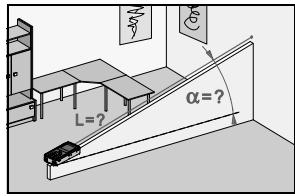
Room corner angle function
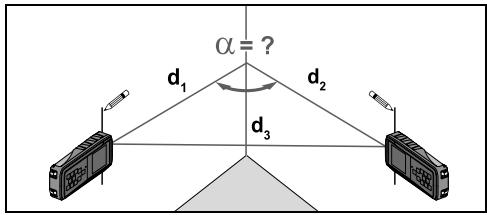
The angles in a triangle can be calculated by measuring the three sides. This function can be used e.g. to check a right-angled room corner. See figure K

Press this button three times and the room
corner symbol appears in the display
Mark the reference points to the right and left (d1/ d2) of the angle to be measured.

Press this button to measure the first (short)
side of the triangle (d1 or d2).

Press this button to measure the second (short)
side of the triangle (d1 or d2).

Press this button to measure the third (long)
side of the triangle (d3).
The result is displayed in the summary line as the room corner angle.
Stake out function
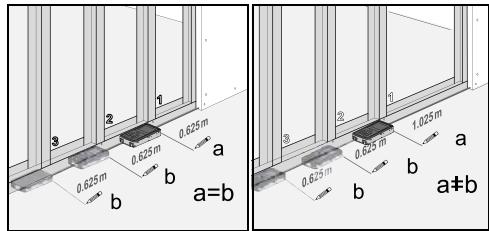
Two different distances (a and b) can be entered into the instrument and can then be used to mark off defined measured lengths, e.g. in the construction of wooden frames.
See figure L
Entering stake out distances:

Press this button four times and the stake out tion symbol appears in the display Tb.
The value (a) and the corresponding intermediate line flash.
By using + and - , you can adjust the values (first a and then b) to suit the desired stake out distances. Holding the buttons down increases the rate of change of the values.
Once the desired value (a) has been reached it can be confirmed with the button.
The value (b) and the intermediate line flashes (the defined value (a) is automatically adopted). Value (b) can be entered using + and - .
The defined value (b) is confirmed with the button.
Pressing the ON button starts the laser measurement. The display shows required stake out distance
in the summary line between the stake out point (first a and then b) and the instrument (rear reference).
If the Makita LD100P is then moved slowly along the stake out line the displayed distance decreases. The instrument starts to beep at a distance of 0.1m from the next stake out point.
The arrows in the display indicate in which direction the Makita LD100P needs to be moved in order to achieve the defined distance (either a or b). As soon as the stake out point is reached the beep changes and the intermediate line starts to flash.
The function can be stopped at any time by pressing the C button.
Indirect measurement
The instrument can calculate distances using Pythagoras' theorem.

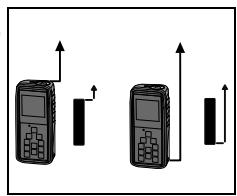
Make sure you adhere to the prescribed pace of measurement:
- All target points must be in a horizontal or vertical plane.
-
The best results are achieved when the instrument is rotated about a fixed point (e.g. with the positioning bracket fully folded out and the instrument placed on a wall).
-
The minimum/maximum function can be used - see explanation in "Measuring -> Minimum/ maximum measurement". The minimum value must be used for measurements at right angles to the target; the maximum distance for all other measurements.

Make sure that the first measurement and the distance to be measured are at right angles. Use the Minimum/maximum function, as explained in "Measuring -> Minimum/maximum measurement".
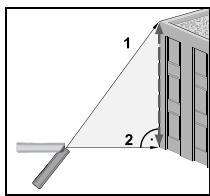
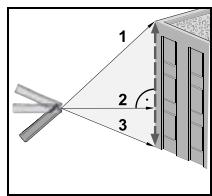
Indirect measurement - determining a distance using 2 auxiliary measurements
See figure \
e.g. for measuring building heights or widths. It is helpful to use a tripod when measuring heights that require the measurement of two or three measurements.

Press this button once, the display shows
The laser is switched on.

Aim at the upper point (1) and trigger the measurement. After the first measurement the value is stated. Keep the instrument as horizontal as possible.

Press and hold down this button to trigger pinuous measurement, sweep the laser back and up and up and down over the ideal target point.
ON Press to stop continuous measurement (2). The result is displayed in the summary line, the partial results in the secondary line.
Indirect Measurement - determining a distance using 3 measurements
See figure N
Press this button twice; the display shows the following symbol. The laser is switched on.
ON Aim at the upper point (1) and trigger the measurement. After the first measurement the value is adopted. Keep the instrument as horizontal as possible
ON Press and hold down this button to trigger continuous measurement, sweep the laser up and down over the ideal target point.
ON Press to stop continuous measurement (2). The value is adopted. Aim at the lower point and
ON press this button to trigger the measurement
(3). The result is displayed in the summary line, the partial results in the secondary lines.
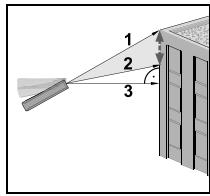
Indirect measurement - determining a chain value using 3 measurements
See figure 0
e.g. determining the height between point 1 and point 2 using three target points.
Press this button three times; the display shows the following symbol. The laser is switched on.
Aim at the upper point (1).
ON Press this button and trigger the measurement. After the first measurement the value is adopted. The display flashes (2).
ON Triggers the measurement. After the second measurement the value is adopted. The display flashes (3).
ON Press and hold down this button to trigger continuous measurement. Sweep the laser up and down over the ideal target point.
ON Press this button to end continuous measurement. The result is displayed in the summary line, the partial results in the secondary lines.
Storage of constants/historical storage
Storage of a constant
You can store and recall a frequently used value e.g. height of a room. Measure the desired distance, press and hold the M button until the device beeps to confirm storage.
Recalling the constant
M Press this button once to recall the constant and make it available for further calculations by pressing button MENU.
Historical storage
Press this button twice and the previous 20 results (measurements or calculated results) are shown in reverse order.
The + and - buttons can be used for navigation.
= Press this button to use a result from the
summary line for further calculations.
Pressing the M and c buttons at the same time erases all the values in historical storage.
Timer (self-triggering)

Press this button to set a 5-second time delay.

Press and hold down this button until the ed time delay is reached (max. 60 seconds).
Once the key is released the remaining seconds until measurement (e.g. 59, 58, 57...) are displayed in a countdown. The last 5 seconds are counted down with a beep. After the last beep the measurement is taken and the value is displayed.

The timer can be used for all measurements.
Appendix
Message codes
All message codes are displayed with either ① or "Error". The following errors can be corrected:
| 1 | Cause | Remedy |
| 156 | Transverse tilt greater than 10° | Hold the instrument without any transverse tilt |
| 160 | Main tilt direction, angle too high (>45°) | Measure angle up to max. ±45° |
| 204 | Calculation error | Repeat procedure |
| 252 | Temperature too high | Cool down instrument |
| 253 | Temperature too low | Warm up instrument |
| 255 | Receiver signal too weak, measurement time too long, distance > 100 m | Use target plate |
| 256 | Received signal too strong | Target too reflective (use target plate) |
| 257 | Wrong measurement, background brightness too high | Darken target (measure in different lighting conditions) |
| 260 | Laser beam interrupted | Repeat measurement |
| Error | Cause | Remedy |
| Error | Hardware error | Switch on/off the device several times. If the symbol still appears, then your instrument is defective. Please call your dealer for assistance. |
Technical data
| Distance measurements: Measuring accuracy up to 10 m (2 σ, standard deviation) | typically: ± 1.5 mm* |
| Power Range Technology™: Range (use target plate from about 80m) | 0.05 m to 100 m |
| Smallest unit displayed | 0.1 mm |
| Distance measurement | ✓ |
| Minimum/maximum measurement, Continuous measurement | ✓ |
| Area/volume calculation of room data | ✓ |
| Addition / subtraction | ✓ |
| Indirect measurement using Pythagoras | ✓ |
| Tilt measurements: Tilt sensor: Accuracy (2 σ, standard deviation) - to laser beam | ± 0.3° |
| - to the housing | ± 0.3° |
| Indirect measurement using tilt sensor (direct horizontal distance) | ✓ |
| Angle measurement using tilt sensor(± 45°) | ✓ |
| General: Laser class | II |
| Laser type | 635 nm, < 1 mW |
| Ø laser point (at distances) | 6 / 30 / 60 mm (10 / 50 / 100 m) |
| Autom. laser switch-off | after 3 min |
| Autom. instrument switch-off | after 6 min |
| Display illumination | ✓ |
| Keypad illumination | ✓ |
| Multifunctional endpiece | ✓ |
| Timer (self-triggering) | ✓ |
| Save constant value | ✓ |
| Historical storage (20 values) | ✓ |
| Tripod thread | ✓ |
| Battery life, Type AAA, 2 x 1.5V | up to 5 000 measurements |
| Protection against splashes and dust | IP 54, dust-proof, splash-proof |
| Dimensions | 126 x 51 x 27 mm |
| Weight (with batteries) | 125 g |
| Temperature range: Storage | -25°C up to +70°C (13°F up to +158°F) |
| Operation | -10°C up to +50°C (14°F up to +122°F) |
- maximum deviation occurs under unfavourable conditions such as bright sunlight or when measuring to poorly reflecting or very rough surfaces. Measuring accuracy between 10m and 30m may deteriorate to approx. ± 0.025mm / m , for distances above 30m to ± 0.1mm / m .
Measuring conditions
Measuring range
The range is limited to 100m
At night or dusk and if the target is in shadow the measuring range without target plate is increased. Use a target plate to increase the measurement range during daylight or if the target has poor reflection properties.
Target surfaces
Measuring errors can occur when measuring toward colourless liquids (e.g. water) or dust free glass, Styrofoam or similar semi-permeable surfaces.
Aiming at high gloss surfaces may deflect the laser beam and lead to measurement errors.
Against non-reflective and dark surfaces the measuring time may increase.
Care
Do not immerse the instrument in water. Wipe off dirt with a damp, soft cloth. Do not use aggressive cleaning agents or solutions. Handle the instrument as you would a telescope or camera.
EC-DECLARATION OF CONFORMITY
Model; LD100P
We declare under our sole responsibility that this product
is in compliance with the following standards of
standardized documents;
EN55022: 2006, EN61000-4-2: 2001
EN61000-4-3: 2006, EN61000-4-8: 2001
EN60950-1:2006
in accordance with Council Directives, 2004/108/EC.
CE 2008

Tomoyasu Kato
Director
Responsible Manufacturer:
Makita Corporation
3-11-8, Sumiyoshi-cho, Anjo, Aichi, JAPAN
Authorized Representative in Europe:
Makita International Europe Ltd.
Michigan Drive, Tongwell, Milton Keynes, Bucks MK15
8JD, ENGLAND
Classification laser
Voir figure F
Mesure Minimum/Maximum
Addition / Soustraction
Voir figure L
Voir figure M
Voir figure N
Voir figure 0
Fabricant responsible :
Makita Corporation
3-11-8, Sumiyoshi-cho, Anjo, Aichi, JAPON
Representant agreé en Europe :
Makita International Europe Ltd.
Michigan Drive, Tongwell, Milton Keynes, Bucks MK15
8JD, ANGLETERRE
Manuale d'uso
Italiano
3-11-8, Sumiyoshi-cho, Anjo, Aichi, GIAPPONE
Michigan Drive, Tongwell, Milton Keynes, Bucks MK15
8JD, INGHILTERRA
Manual de empleo
Espanol

CE 2008
Tomoyasu Kato
Director
Fabricante responsable:
Makita Corporation
3-11-8, Sumiyoshi-cho, Anjo, Aichi, JAPON
Representante autorizzato en Europa:
Makita International Europe Ltd.
Michigan Drive, Tongwell, Milton Keynes, Bucks MK15
8JD, ENGLAND
Gebruiksaanwijzing
Nederlandsls
Michigan Drive, Tongwell, Milton Keynes, Bucks MK15
8JD, ENGELAND
Manual de Operação
Português
AESS AESS AESS AESS AESS AESS AESS AESS AESS AESS AESS AESS AESS AESS AESS AESS AESS AESS AESS AESS AESS AESS AESS AESS AESS AESS AESS AESS AESS AESS AESS AESS AESS AESS AESS AESS AESS AESS AESS AESS AESS AESS AESS AESS AESS AESS AESS AESS AESS AESS AESS
IEC60825-1:2007 "Radiation safety of laser products"
Produo Laser de Classe 2:
Michigan Drive, Tongwell, Milton Keynes, Bucks MK15
8JD, INGLATERRA
Brukerhandbok
Norsk
| Enheter for helming | |
| 1. | +/- 0.0° |
| 2. | 0.00% |
Lydsignal (BEEP)
Lydsignalet kan slas av eller pa.
Michigan Drive, Tongwell, Milton Keynes, Bucks MK15
8JD, ENGLAND
Käyttoohje
Suomi
Michigan Drive, Tongwell, Milton Keynes, Bucks MK15 8JD, ENGLAND
Brugervejledning
Dansk
Integrated distancemeter
Makita LD100P freembringer en synlig laserstråle, derkommen ud af instrumentets forside.
drug for at undgå faren for korrosion.
ON Tryk for at aktivere laseren. Tryk paigen for at
startedistancemalingen.
Michigan Drive, Tongwell, Milton Keynes, Bucks MK15 8JD, ENGLAND
Bruksanvisning
Svenska
Michigan Drive, Tongwell, Milton Keynes, Bucks MK15
8JD, ENGLAND
Kullanma Kilavuzu
Türkce
Sizleri Makita LD100P urununu改制 aligiiniz icin tebrik ederiz.


Michigan Drive, Tongwell, Milton Keynes, Bucks MK15
8JD,INGILTERE
Michigan Drive, Tongwell, Milton Keynes, Bucks MK15
8JD, ANGLIE
Námod na použitie
Slovensky
Michigan Drive, Tongwell, Milton Keynes, Bucks MK15
8JD, ENGLAND
Instrukcja uzywania
jezyk polski
Nu priviti direct in raza laser
LED laser IR Clasa 2
cf. IEC 60825-1:2007
Capacitate maxima de iradiere: < 1mW
Lungime de undä emisa: 620-690nm
Divergenta razei: 0.16 × 0.6 mrad
Durata pulsului: 1 × 10^-9 ~s
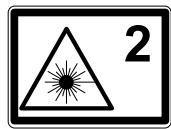

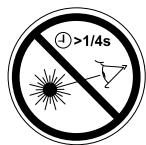
Michigan Drive, Tongwell, Milton Keynes, Bucks MK15
8JD, ANGLIA
Használati utmutató
magyar
Michigan Drive, Tongwell, Milton Keynes, Bucks MK15
8JD, ANGLIA
Oδnyíες χρήσης
EaVikα
Anawoume aonoklaotiku eUoyn ma ot to
Michigan Drive, Tongwell, Milton Keynes, Bucks MK15
8JD, AΓΓAIA
PykoBoODCTBO NOJIb3OBaTeJIa
Pycckn y3bik
IozdpaBJIaEM Bac c npno6peTeHnem Makita LD100P.


IpeepHaayalompa60tbc INHCTpyMeHTOMBHIMaTeJIbHO 13yUHTe 3TN HCHTpyKlUN.
O TBETCTBENHOI D0JXHOCHTHOE JINIO 3KcNlpyATpyUoIeI opraHn3aunI D0JXHO 6bITb yBepeHO, YTO BCE IIOJIb3OBaTeIIN IOHIMaHT 3TN INHCTpyKUnI n CJIeDyHT mM.
Copepkahanie
IhctpykunnoTexnke6e0napchoctn 1
Hauano pa6oTbI 5
Функции MeHIO 7
Pa6ota c np6opom 8
N3mepenra 9
Функци.. 10
PpuiioxHne 15
Hnctpykunno TeXnKe 6e3oNaChOCTn
IcNoJIb3YeMbIe CnMBOJbl
VcnoIb3yeMbIe CmMBOJIb VHcTpyKUIN NO 6e3oNaCHOCTN IMeIoT CneDuIOoe 3HaueHHe:

BHIMAHNE!
IopoTeHuaJIbHaJ OAnaCHocTb IIN HeNpaBnJIbHoE oBaIeHHe C mHCTpyMeHTOM, KOTOpbIE MOryT pInBeCTN K TJaKeIoi TpaBMe IIN CmepTeJIbHOMy NcXoDy.

OCTOPOXHO!
IopoTeHuaJIbHaJ OAnchocb IIN HeIpaBnJIbHoe
ObaUeHHe CInHCTpymEtOM, KOToPbIE MOrT pNBeCTN
K JIeRKM TpaBMam, HO HaHeCTN 3NaHTeJIbHbI
MaTePnaJIbHbI, fHHaHCobbI IN NkOJIOrnueckn
yUep6.

POne3Na HnΦopMaZn, KOTOPa nOMoKet
NIOb3OBaTeJIIO TexHnueeCKn KOppeKTHO N OΦΦeKTHBHO NCIOb3OBaTb IHCTpyMeHT.
Ha3naueHne nHcTpymeHTa
Pa3peuHnoe nCnoJb3ObaHne
- I3mepene paCToHn
BbIuNCnIteJIbHbIe FyHKcIIN,HaNPIMep,IIOUaIIN o6bembl
I3mepenye yrnoB hakoHa
RUS
Heonycmbie deyctbna
IcnoJIb3OBAHnepn6opa6e3nHCTpyKcnn
IcnoIb3OBAHne, BbIXoJauee 3a npedeJIpa3peSeHHbIX onepauin
BbIOJ n3 cTPO CNTcTEM 6e30nacHocTN uyaJIeHne c npIbopa npEduPepEnTeNbHbIX u yka3aTeNbHbIX naIIncseI
Pa36bOpka npu6bOpB C nCnOJIb3OBAHMe mHCTpyMeHTOB (OTBepTOK, n T.D.), ecnHa To HET cneuaJIbHOpa3peUeHnB OnpeJeIeHHbIX cnUyax
Измение конструкции пибopa ил erо модиф尼克?
IcnoJb3ObaHne ykaDHeHHoro np6oba
IcnoIb3ObaHne akceccyapOB, nOlyuehhIx OT npYrnx npOn3BODnTeNei, ecNI OHn He dOnyuSeHbIK npImeHeHIO Makita.
- Be30TBeTCTBHeHNo6bpaSeHnC pnp6Opom Ha Iecax,JIeCTHnUax,IpiN 13MepeHnx B6IIN3 npa6ToaUxM aUIn H INO TKePbITbIX YacteM aUHH n yCTaHOBOK
- Ppmaoe HabeeneHne npbopa Ha coNHce
- HamepeHHoe ocIeJIeHne TpeTbIX IINU, TaKKe B TEMHOte
Измерени В мостax NOВьшен Hon onachoctn 6e3
надлесаши Мер пе dioctopoxhoctn (Hapimep,
Измерени на doporax, CTpoiПLOUaДКaX, n T.D.)
OrpaHnueHnB HcNoJIb3OBaHn np6opa

Cm. TnaBy "Texnueckne xapaKTepcntnKn".
Makita LD100P cnpoeKtnipoBaH dIЯ nCnoJIb3OBAHnB yCIOBnIX, xapaKtePnhIx dIЯ MeCT NOCToHHoro npoxBaHnI IIOeI. He nCnoJIb3yIte 3OT npi6Op BO B3pblBOONaChbIX INI dpyrNX arpeccNBbx yCIOBnIX.
06laactn OTBetCTBeHHoCTN
OTBeTCTBeHHocTb npOn3BODnTeJ npN6opa - Makita Corporation Anjo, Aichi, 446-8502 Japan (cokpaueHno Makita):
Makita Hecet OTBETCTBEHHOCTb 3a COOTBECTBVe npibopa, BkIIOUyA PyKOBoIDCTBO NOb3OBaTeN I opunHaJIbHbIe pINHaIeXHOCHTN K HEmy, Heo6xOdMblm ycNoBnM 6eONaCHOCTN.
OTBetCTBENHOCTb npOn3BOJNTeJIa
DOnOJIHHTeJIbHbIX npHaIaIeXHoCTeI:
CTOPOHHnI pOn3BODiTne I npHaIeXHOCTeI dJaMakita LD100P HeCyT nOInHyIO OTBeTCTBeHHOCt b 3a COOTBeTCTBHe IN pOdyKuIN BCem Tpe6oBaHnAM 6e3oNaCHOCTn. OHn TaKKe HecyT nOInHyO OTBeTCTBeHHOCt b 3a 6e3oNaCHOCTb EKCnIyatauIN IN pOdyKuIN B coUeTaHnC nPoodyKuNei Makita.
063aHHOCTN JIua,OTBtCTBeHHoro 3a 3KcJIyaTaCuH npu6opa:
BHIMAHNE!
3Kcnnyatnpuoya np6op opraHn3aunna 063aHaHa3NaHTb DOJXHOCTHoe IINIO, KOTOPOE HecET OTBETCTBEHHOCTb 3a INONBJ3OBaHHe INHCTpyMeHTA B COOTBETCTBm CO BCEMN INHCTpyKUyMn, a TaKKe 3a
pa60ty cBOnx COtpyDnIKOB, INX INCTpyKTaX IN COxpaHHoCTb pInbopa B pOueCEE 3KcPnIyatauIN.
Долхноcthoe Лиц o6ra3aHo:
- RaCHO noHIMaTb Tpe6oBaHnI npEduPepdnteHbHbIX HaDnIcEi Ha npIbope, a TaKke PykoBODCTBa noJIb3OBAteJI.
3HaTb Tpe6oBaHnI INCTpykUm IO TexHnke 6e3OpaChocTn I npDeOTBpaueHIO HeCuaCThIx ClyuaeB. - HemeiHnO INΦopMnPoBaTb Makita, ecnnpnbop nepectan OTbeuatb Tpe6oBaHnAm 6e30nacchoctn.
IcToUHKn ONaCHoCTn npn 3KcPnyataaun npnbopa

OCTOPOXHO!
Ecn npnbop poHn, HnpabnlbHo
IcnoIb3OBAHn IIN MoNΦuNUPoBAn,TO npI pa6Ote c TaKIM npIb6OpOM Bbl MOKeTe nOlyuHTb HEnpaBnHbIe pe3yIbTaTb I3MepeHn.
Mepbl npedoctopoxknoctn:
IpeNoDnueckn npoBOnTe KOHTpOJIbHbIe I3MepeHnra. Oc6eHNO nocNe TOrO, KaK npu6Op noDbepranCay ue3MepHBIM MEXaHnueckm IN DpyrIM BO3JeCTBnA m a TaKKe Do N nocNe BblIOJIHeHn OTBETCTBeHHbIX I3MePntJIbHbIX pa60T.
Copeknte onTky Baawero Makita LD100P bHcTote n obeperaTe OT mexaHuecknx nobpeKdHn.

OCTOPOXHO!
PnncnoB3OBAHnn np6opa dna n3MepeHH paacToHn do noDbNkHbIX o6BeKToB uIN dna nx no3uONHOPOBAHn(HaNPmep,noDbemHbIe INCTPONTJIbHbIe MaunHbI,PiATΦOpMbI nT.D.)MOryt 6bITb NOJyHeHbI He npabINbHbIe pe3yIbTaTb I CnNy HnepeBnDEHNbIX O6CToTeJIbCTB.
Mepbl npedoctopoxknoctn:
Pn6bop npEdHa3NaueH ToIbKO dIy BbINOHNHeH N3Mepen. He nCpOJIb3yIe Tnp6Op dIy KOHTpOJa DpyHX cpeCTB N3MepENH. YcNOBmI dIy pIOBEDeH N3MepENH DOJXHbI 6blTb NOIgROTBJeHbI TaKIM O6pa3OM, YTO6bl COOTBeTcBHyOoee yCTpoiNCTBO 6e3OpanachocTN (HapnmpE, abApNIHbI py6NbHK) npedotBpArnlo uJep6, MOrUsyIbHO3NHkHytbpn HEnpABINbHOM N3MepENH, HEnOJaKaX B np6bope IIn C6oe B nOdaYe 3NeKtpOaHeprn.

BHIMAHHE!
Плоскne 6atapeин He nOДпlexat yTnIIN3aUNC 6bIITOBbIMN OTXODAMN. ПОЗбOTbTeCb 6Ob OKpykaIOUeI cpeIe, cdaIte Ix Ha c6OpHbI pyHKT,oprAHN3OBaHHbI B COOTBETCTBIM C rOcydapCTBeHHbIM NII MecTHbIMN HopMaMn.

I3JeIHe He noDnEeKIT yTnIINaCIN C 6bITOBbIMN OTXoAMN.
Yttnn3npyTe n3dJeIne HaIeKaIIM
6bpa3OM B COOTBeTCTBmC
rocydapCTBeHbIMn HopMaMn,
deIcTByUoImn B BaWe cTpaHe.
RUS
3JIeKTpomarHnTHaY COBMeCTHMOCtB (33)
TepMN "3JIeKTPOMaHHTHa COBMeCTMIOCTb" 03Naayet CnOc6HoCTb PnIbopa HOpMaJIbHO fYHKUHOHPoBaTB BUCNOBIAx BO3JeCTBnA 3JIeKTPoCTaTtuecknx N3JIeKTPOMaHTHbIX NOJIe, He OKa3bIBaPn3TOM 3JIeKTPOMaHTHTOBINHA Na dpyrne pnp6opbl nOBOpyDobAHne.

BHIMAHNE!
Makita LD100P COOTBETCTByET CAMbIM JXeCTKIM Tpe6oBaHnI M DeIcTByUOJnx CTaHdApTOB INpAbIN B 3ToI oBlaCTN. Ondako, PONHOCTbIO NCKJIOnuHTb BInHHe np6bopa Ha dpyroe obOpyDoBaHne HeJIb3a.

OCTOPOXHO!
HnB Koem Cnyuae He NbTaIeTcB peMOHTnpoBaTb np6op camocToTeNbHO. PeMOHTpyIe CBOI np60by TOnbKO B cepBnchbIX MacTepcKnx, yonHomOueHHbIX Makita.
KlaccnФикачилazepa
IHTerpnpoBaHHbI daIbHomep
Pπb6op Makita LD100P n3nyaet BvDnMbI Ja3epHbI JyU n3 cBoe nepeDHeu actn.
N3dJIe NOTHCITcKo 2-My KIaCCy Ia3epOB B COOTBETCTBIM:
IEC60825-1:2007""Be3oNaChocTbJa3epHbIXn3deJIn"
Ia3epHbIe n3dennn Knacca 2:
He cmotnTe B Ia3epHbI Lyu N He HaprabIyTe er0 6e3 HaIO6HoCTn Ha DpyrIx IIOJe. 3aUNTa rIa3 0bIyHO OcUSeCTBJIeTc IyTEM OTBeDeHnA INX B CTOpOHy IIN 3aKpbITnEM BEK.

BHIMAHHE!
IpyMoB B3rJaHa NaUy Chepe3 ONTuYeCKne yCTpoiCTBa (HAnpImepe, 6nHokIn, 3pnteJbHbIe Tpy6bl) MoKet 6blb OnaceH.
Mepbl npedoctopoxknoctn:
He cmToTe Ha lyu Ia3epa Chepe3 6nHokn n npyrne onTHeckne yctpoiCTBa.

OCTOPOXHO!
B3rIaHa Ia3epHbI Lyu MoKet 6bITb OnaChbIM Dnra rna3.
Mepbl npedoctoPOXHOCTN:
He cmotpnte ha na3epnblny. Cneinte 3a tem, yto6bl na3epnblny npoxoHn Bblwe nnn HnXe ypoBnra3 (oc06eHHO pnp CTauNoHapHO yCTaHOBKe np6opab MaunHax, o6OpyDobAHn n T.n.).
HaDnncn Ha np6ope
Ja3epHoe N3nyeHne
He haoDnte npyB rna3a
Janaep Knaacc 2
acc. IEC 60825-1:2007
MaKcImaJIbHaMaOuHOCtB
N3nyHeHn
<1mW
Динэ reHepupeMoB BOJIbI 620-690nm
DinBeprenuIyau: 0.16 x 0.6 mrad
PpOdoJxKTeJIbHOCTb
IMnYnbca:
1x10⁻⁹s

PacnoJoxKeHne HaIncseH Ha npIbope cm. HanoCneHne cTpaHnce!
Hauaio pa6oTbI
YctaHOBka/3aMeHa 3JIeMeHTOB
NITAHNA
Cm.pnc.{A}
1 ChnMInTe KpbIuKy OToCeKa dJa 6aTaape n npNKpeNInTe peMeWoK dJaФHKcaunnyuKn.
2 IomeCTIte B Hrero HOBbIe 3JIeMeHTbl NITaHnA, co6JIoDaI nonpaHocTb.
3aKpoIe 6aTapeHbI OTCek ONrTb. 3aMeHInTe 3JIeMeHTbI NITaHnI, KOrDa Ha DcCnIe NORBNTcR NOCToHHO BCbIXNBAIOU CmBOJ

IcnoJIb3yIte ToJIbKO IeIIOUHbIe 6aTapeN.

B Cb3n C onacHocTbO Koppo3nn n3BJIeKeNTe
3JIeMeHbI NITaHnI,ecIIN pRi6Op He 6yJeT
NCIOJIb3OBAtBcA DJIITeJIbHOE BpEMr.
I3MeHeHne TOUKNOTcYeTa
m3MepenH (MHOROΦyHKcNoHaNbHa n03nOnHHa cKo6a np6opa)
Cm.puc.{B}
3BykoBoON CnHnAMJ MOXeT 6bITb BKJIIOUeH ININ BbIKJIIOUeH.
HnCTpyMeHT BbIKIIOUaEaTcA bOTOMaTNUeCKn uepe3 uecTB MmHyT 6e3dIeCTBnI.
KnaBnsha CLEAR

IocJeDHee DeiCTBne OTMeHReTcB B npOceCE
n3MepeHnI pIoUaDei, oBbEmOB nDp., KaJdoe npomexkyToUHOe n3MepeHne MoKeT 6blTb NocJeIOBaTeJIbHO OTMeHENo n3MepeHO 3aHOBO.
PoncBetka nucnpe/KnaBnaTpybI
Прибор ИмeelдаТиК,КOTOPь aВТOMaTчeckn BKNHQUaET N bblKIIHQUaET NOcCBeTKyДИСПЛЯ N KJIaBnAtypbI B 3aBnCmOCTN OT yCNoBn OCBeUeHHOCTN.
YctaHOBka ToCKN OTCYeTa N3MepenH
IyoMOnJUHAnIO npIbOp pnpO3BODnT n3MepeHnO T HIXHeN IOBePxHOCTn.

PnHaKaTmHa 3Ty KnaBniUy UcTaHOBka MoXeT
6bITb n3MeHeHa TAKIM O6pa3OM, YTO CNeIyUoJee n3MepHne MOKeT 6bITb IpnI3BeDeHO OT BepXHei NOBepxHocTN pIb6opa CneIuaJIbHbN 3ByKOB0 CNrHaJI cOpBoXJaTe KaKDoe n3MeHeHne TOcKn OTCHeTa.
IocJIe I3MepEnHa ToUka OTCueTa BepHeTcA aBTOMaTnueckn K 3aBOdCKm yCTaHOBkAm nO
ymoJIyauHHIO (I3MepeHHe OT HnKHeu YacTn). Cm. pnc. {H}.

Haxmnte Ha 3Ty KnaBnUy B TeueHne 6oJee
ДЛNTeNBHorOВрЕмнДЯ NOCTOЯHHOуCTaHOBKN ɪЗМерЕнэ OТ ВсХнй NOВePxHOCHTN.

HaKMMTe Ha 3Ty KHOKNy, NxCOJHON TOUKO CHOBA
CTaHET3aDnYaCTb.
Измeperнь
OdHouHoe n3MepeHne paCCToHHN

Haxmnte, yTo6bl AKTNBnPoBaTb Ia3ep. Haxmnte
CHOBA, TTO6bI BbINONHHTb N3MepeHne pacCTOHHN.
Pe3yIbTaT OTo6paXaetcH HemeIeHNo.
I3MepeHne MHHMaJIbHbIX/
MaKcImMaJIbHbIXpacCTOHHI
3TaФункциЯ NO3BOJIeT NOJIb3OBAteJIIOИЗМерЯТь MHNIMaJIbHOe ИПМakCIMaJIbHOe paCtToHne OT ΦИКсИрOBaHHо.TOUKn.ОHa TAKKe MoKET IcNoIb3OBAtBcIЯ ONpeIeIeHnI INHTepBaJIOB paCCTOAHn. Cm. pnc.{}
Yaue Bcero 3ta fynkunia nCnoB3yeTcna
n3mepeHnnaIarOHaJe (MaKcHmAbhBHe 3NaueHne)
nIIN rOpN3oHTaJIbHbIX paCtToHn Do BepTuKaJIbHO
NoBepxHOCTn (MnHmAmlbHoE 3NaueHne).
ON Haxmnte u yedepxnbaiTe 3Ty KnaBnuy, noka He
ycbliHTE 3ByKOBo CnHaI. 3aTeM MeDHeH0
nepemaaTe Ia3epHbI LyuC COOTBEcTBeHHO BIneBO -BnpaBO NII, HapnPmEp, BBePx IN BHN3 BpaHOHe cEJI.- (HapnPmEp,ByrOJ KOMHaTbI).
ON Haxmnte IJn OTKIIOHEnpeKIMa HenpepbIBHoro
m3MepeHn. 3NaueHnMaKcImaJIbHOrO mNInMaJIbHOrO
pacctoHnOTo6paKaIOCTaHaDinCIIeHapany C
IocJIeHIM I3MepeHHbIM 3HaueHHeM B ITOROBc CTPOKe.
Функцин
CLOXeHne / BbUHTaHne
U3mpeHne pacCToHHa
- CnedyuOee n3MepEnie np6abJraTcK
npedbyuemy.
Cneyuooee n3MepenHe BbHHTaeTcra 13
npedbyuero.
3TOT npoecc MOxHO NOBTopaTb CTOnbKa pa3, cKoJIbKO 3TO Heo6xoJIMo. Pe3yIbTaT BCeRda OTo6paXaETcRa B ITOROBOI CToPKe, pRn 3ToM ppeJeSceCTByUOuN pe3yIbTaT OTo6paXaETcBA BO BToPOI CToPKe.
c Off PocneJHee DeIeCTBne OTMeHReTcR
Плоцадь

Haxmnte ODHOKpTaHo. Ha dncnnee noBnEeTc
CNMBOJ

ON Haxmnte Ha 3Ty KnaBnUy Dny I3MepeHnI nepBoi CTOpOnbl (HaNPImep, DnHbI).
ON Haxmnte Ha Hee NOBTOpHo IЯИЗМеретиЯ
BTOPOI CTOPONbl (HaNPIMep, 1nPNHbI).
Pe3yIbTaT OTo6paXaEeB HITOrOBoN CTpOKe.
HaximamaHaHeckoJIbKOceyHd

KnaBnUy, Bbl
MOXKeTe yCTaHOBNTb yHKUIO BVUINCJIeHnI nepuMeTpa.
06bem
HaxMMTe Ha 3Tu KnabNsiu Dba pa3a. Ha dinCnIee NOABJIeTcra CmBON
ON HaxMMTe Ha 3Ty KnaBnUy Dnla N3MepeHnI nepBOI CTOpOhbl (HaNPmEp, DnINHbI).
ON HaxMMTE 3Ty KnaBnUy dIpy I3MpeHnI BTOPOI CTOPOHbI (HaNPIMep, IINPIHbI).
ON Haxmnte Ha 3Tu KnaBnUy dIy I3MepEny TpeTbe CTOpOhbl (HaNPImep, BbICOTbl). 3NaueHne OTo6paKaETcB BO BTOPOCTPoke.
3NaueHne oBbema nOBnRETCB NTOROBOn CTPOKe.
Hajmnte -KnaBnUHa Ha HeckOJbKO cKeYHd,ДЯ TOrO,чTo6blПОЛуNTь ДОпОЛнТeЛьНУИ NнФорMaцио 6иЗМерЯсМОпЕшEN:ПLOSHAДБ ПОla (ПOTOLka),ПLOSHAДБ ПОВЕХHOCHTI CTEN,ПЕРIMeTp.
I3mepenHe hakloHa
Датунк Нakлona HOCUSECTBЯETИЗМЕРЕНВ npedenax ± 45°.
BoBpEmn3MepeHnYrIaHaKNoHa INHCTpymEnT Heo6XoIMMo DePkaTb 6e3 nonepueHoro yKnoHa (± 10^)
Hakmnte Ha 3Tu KnaBnUy ODHOKpaTHO DnB BKIOUeHnA DaTnka HAKNoHa. Ha DncNne NoABnTeC NCMBOJ . HAKNOH OTObpaXaete NOCToAHHO B VND ^ nIIN % B 3aBNCMOCTN OT HAcTPOIKN.
ON HaxmTe IJIa N3MepeHnHa NaKIOHa n paCCToHnA.
CM.pnc.{}.
Ppmaoe paacctoHne no ropn3oHTaJIn
Haxmte Ha 3Tu KnaBnuy Dba pa3a n Ha dncnnee OTObpaNTcra CneDyUoUsn CnMBOJ
ON Haxmnte Ha 3Tu KnaBnUy dIy n3MpeHnHaKIOHa n paCCTOaHn. B nTOROBoi cTpOKe OTo6paXaetcpe3uNbTaT kak npraMoe pacCToHne no Tropu3OHTaII.
BbOd paCCToHn pa3MeTk:
HaxmTe Ha 3Tu KnaBnUy YeTbIpe pa3a n Ha IaCIIeE OTo6pa3ntc CaMBOJ FyHKuN pa3MeTkn 1 a b 3NaueHne (a) i COOTBeTCTByIOUcaI npOMexyTOUHa CTPOKA BCblxINBAIoT.
C nOMoUbIO KnaBnU + -, Bbl MoXeTe
KoppeKTnpoBaTb 3NaueHn (BNaueIe (a), (a) 3aTeM (b)), TTObI NOJyUHTb HxKhIe paCCToHn pa3MeTkn. PpN yDEpXaHn KNOpOK B HaxKaTOM NIOXKeHn NOBbIaAeTCsC KcOPOCTb N3MeHeHn 3NaueHn.
Kak Tobilko Huykhoe 3haueHne (a) DOCTnHyTo, ero
MOXHO NOdTBepdntb KnaBnwei
3NaueHne (b) nIpOMeKUToHna CToPoka BCbIxNbaHT (OnpedeJIeHHoe 3NaueHne a aBTOMaTnueckn
pnuHmaeTc).3NaueHne b MOxHO BBeCTn C NOMOuBIO
- n - . OnpeJeHoe 3NaueHne (b) NOITBepKJaETCa NOMOuKJIaBnU INEMENU
Haxatne Ha knabiny ON 3anyckaet HnpepbIBhoe n3mepene. Ha dincnilee otobpaKaetc Tpe6yemoe paCToTHe pa3MeTKN B NTOROBOI CToPOKe MeJdy TOUKO pa3MeTKN (BHaUaJIe (a), 3aTeM (b)) n npu6opom (HNKHA NOBepxHOCTb).
Ecni Makita LD100P 3aTeM MeIeHNO nepeMeuaetcBIOJIb IINn pa3MeTkn, OTo6paKaemoe pacCTOHNyeMHehbaeTc. Pnp6op NaunHaet n3daBaTb 3ByKOBoi
CnHnHa paacctoHm0.1MOTcneDyUoSeiTOuKn pa3MeTkn.
paTnHa T a Ta b yka3bIbaHOT, B KaKOM HapabneHn Tpe6yeTc npemaTaMb Makita LD100P dJa DoCTNKeHn ONpeDeHnHO paCtOHHa (a nn b). KAc ToJbKO TOUka pa3MeTKn DOCTnHyTa, n3MeHnEeTc 3BykoBOn CnHaJI N IpomExyTOUHaA CTpOKa NaHHeT BCblXnBaTb.
3Ty yHKUHO MOXHO OCTAHOBITb B IIO6oMOMeHT
HaxaTneM Ha KnaBnUy C OFF
KocBeHHoe n3MepeHne
Pnibop MOKeT paccuHbBaTb pacCTOHHNo TeOpeme Pnfaropa.
3TOT MeToD oO6eHNO pIoJe3eH npu n3MepeHn pacctoHnM eKJy HeNoCTynbIMn O6BeKtAm.
Y6eDnTeScb, YTO BbI ToHc CneJeTe npEaHNo nocpeoBateNbHOCTN 3MepeHna.
Bce Tockn (UeIN) DoJHKbI HaxOOnTbc8 B roPn3oHTaNbHOH INN BePTNKaJIbHOH IIOCKOCTN.
Hannyuchin pe3ynbTaT doCTnraeTc,ecnB npocece n3Mepenni np6op nobopaunBaetc BOKpyfKncpOBaHHo TocKn (HaNPmep, no3nIOHHa cKob aonHocbpo pa3BepHyta n np6op ydepXNBaeTc y CTehbl).
- Мьн actoTeJIbHO peKOMeHdyem IcNoJIb3ObaTb
Функшю "ИЗмереля MИнимаЛьны/
MaKcMmaIbHbIXpacCTOHH" - CM.ObJcHHe B pa3JeIe "V3MepeHne-> V3MepeHne MInHMaJIbHbIX/MaKcMmaJIbHbIXpacCTOHH". MnHMaJIbHOe 3HaueHne NcIOJIb3yeTcR dJIa I3MepeHnI nePteHdIKyJIpaOB K cJIeN, COOTBeTCTBeHHo MaKcMmaJIbHOe 3HaueHne dJIa IpOCHX IV3MepeHnI.
YdoctOBepbTecb,HTO nepBoe n3MpeHne IN3MepReMoE paCtOHaHE n3MepaHTcPOI npMaBIMU yIamn. IcnoIb3yTe FyHKuIO n3MpeHnmaHMaNbHOrO/MakCMaMbHOrO paCtOHaHn, KaK noRCHaTcB pa3dene "N3MpeHne -> N3MpeHne MHNmAbhBix/MakCMaJIbHbIX paCtOHaHn".
KocBeHHoe n3MepeHne - onpeJeIeHne pacCToHnIc nOMOuIbIO 2 dONJIHHTeJIbHbIX n3MepeHni
CM.puc.{M}
CoxpaHeHne KOHCTaHTbI
Yacto6bIbaeT Heo6xOIMO COXpaHЯTb NcNoJIb3OBaTb
yacto ynoTepe6nemble 3NaHeHnaBEnH, HapnMep
BbICOTy NOMeUeHn. NImepbTe pacCToRnHe, 3NaHeHne
KOTOPOrO XOTHTe COXpaHntb, 3aTeM Haxmnte U
ydepXnBaIte KJIaBnUw M, noka ycTpoiCTBO He
NODTBePdNT COXpaHHe B NaMaTn 3ByKOBbIM
CINHaJOM.
Bbl3OB KOHCTaHTbI n3 namrtn

Haxmte 3Ty KnaBnuy oDn pa3 DnBbl3Oba
KOHCTaHTbI N3 nAMrTn Ie 3HaueHHe MOxHO
NCIOB3OBaTb DnlaNbHeuX BByUcJIeHn, HaxaB

NamrTa

HaxmTe KnaBnUy DbaXdbI npedWeCTByuOuJe
20 3haueHn (n3MepeHn nI nppe3yIbTaTOB
[BvIHCJIeHn) OTo6paXaHOTcB O6paTHOM NopJKe.
KnaBnHn

MOKHO INCIOJIb3OBAtBДЯ
nepemeseHna.
Taimep (cAmO3anyckaIoucn)

Haxmte 3tu KnaBnuy dny yctahOBneHn 5-
cekyHnOaepKKn.

HaxmTe n ydepxmbaTte 3Ty KnaBnuy, noka He
6yTeT IOCTnHTo HnyKHOe BpeM 3aIepxKn (MaKc.60 CEkyHd)
Kak tobko Bby otnyctnte knaBnuy,Ha dincPiee 6yudet OTo6paKaTbcBpeMBAceKyHdx,OCTabWeeecdo Hauana n3MepeHn.(Hanpimep,59,58,57...).OTcuet nocJeHNx 5 ckyHc copoBoXdaeTc 3BykOBbIM cnHnolm. NocTe TOrO, KaN pO3ByuHT nocLeHn cnHnI, npi6Op npoi3BeDeT n3MepeHne.

Taimep MoXeT IcNoIb3OBaTcB npN
IpoBVeHn BCex TINOB IN3MepeHn.
KoDbI coo6eHn
Bce BbIOdMblc Hn DaNcPiJ KoIbI CoO6UeHn
COPIPOBOXdAIOCTC NCMBOJAMN
(IVHΦopMaun)
IIN "Error" (OuBka).CJeDyUoJne OUsBKn MOryt 6bItb IcnpaBHebl.
DEKJIAPAUJIO COOTBETCTBNI EC
Moelb:LD100P
Пд Нашу co6ctBeeHHYU OTBeCTBeeHHOCTb Mbl 3a8BnЯEm,
ЧТД Данhoe ИДелпс COOTBEcTCTByeT CneDyUOIM
CTaHdApTam DOKUMEHTOB NO CTaHdApTn3aUNI;
EN55022:2006, EN61000-4-2:2001
EN61000-4-3:2006, EN61000-4-8:2001
EN60950-1:2006
В coOTBcTcBmC ДиpeKtNbAmc CoBeta, 2004/108/EC.

CE 2008
Tomoyasu Kato (Tomoiy Kato) Dnpektop
OTBETCTBeHHbI n3rTOBnTeJIb:
Makita Corporation
3-11-8, Sumiyoshi-cho, Anjo, Aichi, JAPAN
YyHOMOeHHbI pEcdTaNtB b Ebpone:
Makita International Europe Ltd.
Michigan Drive, Tongwell, Milton Keynes, Bucks MK15 8JD, ENGLAND
Michigan Drive, Tongwell, Milton Keynes, Bucks MK15 8JD, ENGLAND
Kasutusjuhend
Eesti keel
2 klass lasertooted:
VtJoonist M
VtJoonist N

VtJoonist 0
Michigan Drive, Tongwell, Milton Keynes, Bucks MK15
8JD, INGLISMAA
Vartotojo vadovas
Lietuviskai
"MaKita Corporation"
3-11-8, Sumiyoshi-cho, Anjo, Aichi, Japonija
Michigan Drive, Tongwell, Milton Keynes, Bucks MK15
8JD, ANGLIJA
사용자 죽명서
一
ReiJrN 15FnHfJzJFJFJFJFJFJFJFJFJFJFJFJFJFJFJFJFJFJFJFJFJFJFJFJFJFJFJFJFJFJFJFJFJFJFJFJFJFJ
鼎盛大堂 高速(TRIPOD)
ON 1I BHTeL dAHI HAIHAIHAIHAIHAIHAIHAIHAIHAIHAIHAIHAIHAIHAIHAIHAIHAIHAIHAIHAIHAIHAIHAIHAIHAIHAIHAIHAIHAIHAIHAIHAIHAIHAIHAIHAIHAIHAIHAIHAIHAIHAI
- INSTRUCTION MANUAL Laser Distance Measure
- WARNING:
- Thakita
- Addition / Subtraction
- User Manual
- English
- Contents
- Safety Instructions
- Symbols used
- WARNING:
- CAUTION:
- Use of the instrument
- Permitted use
- Prohibited use
- Limits of use
- Areas of responsibility
- WARNING
- Hazards in use
- Precautions:
- Electromagnetic Compatibility (EMC)
- FCC statement (applic. in U.S.)
- Laser classification
- Integrated distancemeter
- Laser Class 2 products:
- Start-up
- Inserting/replacing batteries
- Changing the reference point (multifunctional endpiece)
- Keypad
- Display
- Menu functions
- Settings
- Navigation in the menu
- General description
- Setting the unit for distance measurements
- Setting the unit for tilt measurements
- Beep (BEEP)
- Continuous laser (-)
- Measuring with the tripod (TRIPOD)
- Display - keypad illumination (
- Reset - returning the instrument to the factory settings (RESET)
- Operation
- Switching on and off
- CLEAR button
- Display / keypad illumination
- Reference setting
- Measuring
- Single distance measurement
- Minimum/maximum measurement
- Functions
- Area
- Volume
- Tilt measurement
- Direct horizontal distance
- Room corner angle function
- Stake out function
- Indirect measurement
- Indirect measurement - determining a distance using 2 auxiliary measurements
- See figure \
- Indirect Measurement - determining a distance using 3 measurements
- Indirect measurement - determining a chain value using 3 measurements
- Storage of constants/historical storage
- Storage of a constant
- Recalling the constant
- Historical storage
- Timer (self-triggering)
- Appendix
- Message codes
- Measuring conditions
- Measuring range
- Target surfaces
- Care
- EC-DECLARATION OF CONFORMITY
- Classification laser
- Mesure Minimum/Maximum
- Addition / Soustraction
- Manuale d'uso
- Italiano
- Manual de empleo
- Espanol
- Makita Corporation
- Gebruiksaanwijzing
- Nederlandsls
- Manual de Operação
- Português
- Produo Laser de Classe 2:
- Brukerhandbok
- Norsk
- Lydsignal (BEEP)
- Käyttoohje
- Suomi
- Brugervejledning
- Dansk
- Bruksanvisning
- Svenska
- Kullanma Kilavuzu
- Türkce
- Námod na použitie
- Slovensky
- Instrukcja uzywania
- jezyk polski
- Használati utmutató
- magyar
- Oδnyíες χρήσης
- EaVikα
- PykoBoODCTBO NOJIb3OBaTeJIa
- Copepkahanie
- Hnctpykunno TeXnKe 6e3oNaChOCTn
- IcNoJIb3YeMbIe CnMBOJbl
- BHIMAHNE!
- OCTOPOXHO!
- Ha3naueHne nHcTpymeHTa
- Pa3peuHnoe nCnoJb3ObaHne
- Heonycmbie deyctbna
- OrpaHnueHnB HcNoJIb3OBaHn np6opa
- 06laactn OTBetCTBeHHoCTN
- IcToUHKn ONaCHoCTn npn 3KcPnyataaun npnbopa
- Mepbl npedoctopoxknoctn:
- BHIMAHHE!
- 3JIeKTpomarHnTHaY COBMeCTHMOCtB (33)
- KlaccnФикачилazepa
- IHTerpnpoBaHHbI daIbHomep
- Ia3epHbIe n3dennn Knacca 2:
- Mepbl npedoctoPOXHOCTN:
- HaDnncn Ha np6ope
- Hauaio pa6oTbI
- YctaHOBka/3aMeHa 3JIeMeHTOB
- NITAHNA
- I3MeHeHne TOUKNOTcYeTa
- m3MepenH (MHOROΦyHKcNoHaNbHa n03nOnHHa cKo6a np6opa)
- KnaBnsha CLEAR
- PoncBetka nucnpe/KnaBnaTpybI
- YctaHOBka ToCKN OTCYeTa N3MepenH
- Измeperнь
- OdHouHoe n3MepeHne paCCToHHN
- I3MepeHne MHHMaJIbHbIX/
- MaKcImMaJIbHbIXpacCTOHHI
- Функцин
- CLOXeHne / BbUHTaHne
- Плоцадь
- 06bem
- I3mepenHe hakloHa
- Ppmaoe paacctoHne no ropn3oHTaJIn
- KocBeHHoe n3MepeHne
- CoxpaHeHne KOHCTaHTbI
- Bbl3OB KOHCTaHTbI n3 namrtn
- NamrTa
- Taimep (cAmO3anyckaIoucn)
- KoDbI coo6eHn
- DEKJIAPAUJIO COOTBETCTBNI EC
- Moelb:LD100P
- Makita International Europe Ltd.
- Kasutusjuhend
- Eesti keel
- klass lasertooted:
- Vartotojo vadovas
- Lietuviskai
- 사용자 죽명서
- 鼎盛大堂 高速(TRIPOD)
Brand : MAKITA
Model : LD100P
Category : Measuring tool