HCA-200 - Audio accessory SONY ERICSSON - Free user manual and instructions

Find the device manual for free HCA-200 SONY ERICSSON in PDF.

📄 80 pages English EN 💬 AI Question
Notice SONY ERICSSON HCA-200 - page 2
Manual assistant
Powered by ChatGPT
Waiting for your message
Product information

Brand : SONY ERICSSON

Model : HCA-200

Category : Audio accessory

Download the instructions for your Audio accessory in PDF format for free! Find your manual HCA-200 - SONY ERICSSON and take your electronic device back in hand. On this page are published all the documents necessary for the use of your device. HCA-200 by SONY ERICSSON.

USER MANUAL HCA-200 SONY ERICSSON

This is the Internet version of the user's guide. © Print only for private use.

This is the Internet version of the user's guide. © Print only for private use. English Introduction 4 Installing the car handsfree 4 Sony Ericsson HCA-200 First edition (January 2004) This manual is published by Sony Ericsson Mobile Communications AB, without any warranty. Improvements and changes to this manual necessitated by typographical errors, inaccuracies of current information, or improvements to programs and/or equipment, may be made by Sony Ericsson Mobile Communications AB at any time and without notice. Such changes will, however, be incorporated into new editions of this manual. All rights reserved. ©Sony Ericsson Mobile Communications AB, 2003 Publication number: LZT 108 6885 R1A Some of the services in this manual are not supported by all networks. This also applies to the GSM International Emergency Number 112. Contact your network operator or service provider if you are in doubt whether you can use a particular service or not. English This is the Internet version of the user's guide. © Print only for private use.

Introduction Installing the car handsfree The Car Handsfree HCA-200 offers improved traffic safety by providing handsfree functionality and maintained sound quality with echo and noise cancellation. Fast battery charging is also provided. Please read the text in the “Additional information” section of the HCA-200 User guide before using your car handsfree. The Car Handsfree HCA-200 kit includes:

  • antenna cable (in some kits)
  • cables (power cables, ignition sense, music mute)
  • User guide and Installation guide What products can I use with my car handsfree? With the Car Handsfree HCA-200, you can use any Sony Ericsson phone that includes the In Car profile. Refer to the User guide for your phone. Accessories To further enhance your experience of the Car Handsfree HCA-200, we recommend the following accessories:
  • Advanced Music Mute HCE-16 – for enhanced sound experience in the car. You hear the caller in the car stereo loudspeakers instead of in the loudspeaker of the Car Handsfree HCA-200.
  • Gooseneck Microphone HCE-14 – for enhanced sound experience for the person you are talking to.

To be able to use your Car Handsfree HCA-200, you need to buy a Sony Ericsson Car Holder, if not included in your HCA-200 kit. Please make sure that all car handsfree equipment is installed in a safe location. If the car is equipped with an air bag, make sure that the handsfree equipment does not interfere with its function. To install the car handsfree Note: The car handsfree should be installed by authorized personnel. Introduction This is the Internet version of the user's guide. © Print only for private use.

1. Disconnect the car battery.

2. Place the electronic box under the dashboard of the

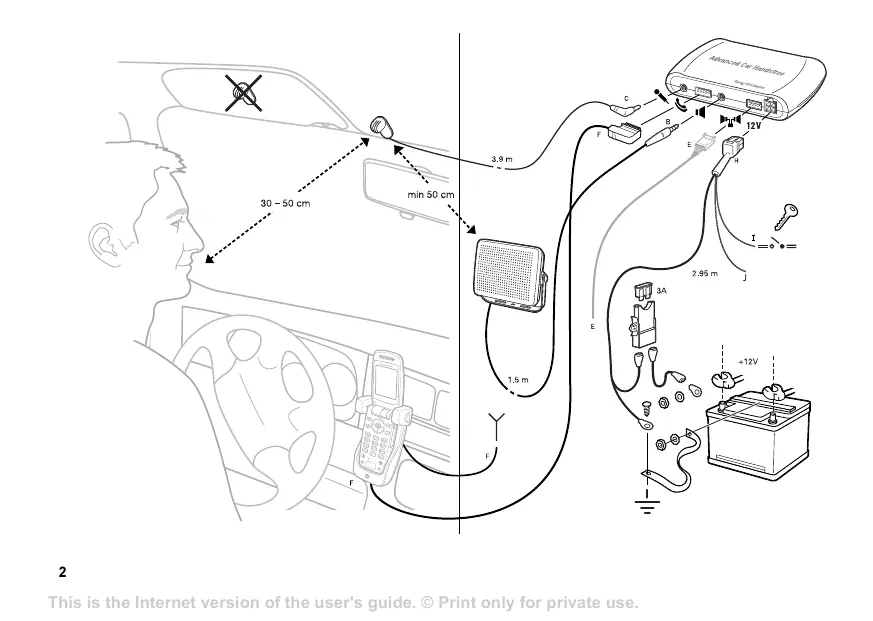
car, for example. See the illustration on page 2. Use the velcro to fasten the electronic box.

3. Connect the bundle of power cables (red and black),

the music mute cable (yellow) and the ignition sense cable (blue) to the electronic box (socket H).

4. Connect the black power cable to negative ground.

Connect the red power cable via the fuse kit to the car battery, 12 volts. Note: Please note that supply voltages other than 12 volts may cause damage to the equipment.

5. Connect the blue ignition sense cable to the ignition

of the car. See I in the illustration on page 2.

6. Connect the yellow music mute cable to the car

stereo. See J in the illustration on page 2.

7. Place the microphone on a fixed part of the car

interior, directed towards the driver. Connect the microphone to the electronic box (socket C).

8. Place the loudspeaker at least 50 cm (20 inches)

from the microphone. Connect the loudspeaker to the electronic box (socket B).

9. Replace the connector in the car holder with the

connector attached to the system cable. See the pictures below. 10.If an external antenna is to be used with the car handsfree, see To attach an external antenna to the car holder, before you continue with step 11. 11.Choose a suitable location on the dashboard of the car for the car holder. The driver must be able to reach the phone keypad from the normal driving position. Fasten the car holder to the location you have chosen. 12.Connect the system cable to the electronic box (socket F). 13.Connect the car battery. Installing the car handsfree This is the Internet version of the user's guide. © Print only for private use.
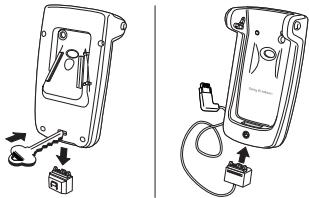
14.Switch on your phone and car radio. If noise occurs, try another position for the car holder. Please see the User guide for the car holder. To attach an external antenna to the car holder

1. Follow steps 1-9 in To install the car handsfree.

2. Attach the antenna connector to the car holder. Press

until you hear a click. Using the car handsfree When the installation of the car handsfree has been completed, we recommend that you test the communication between your phone and the car handsfree by turning on the phone, placing it in the car holder, and then by making a call. For Troubleshooting issues, see the HCA-200 User guide. For information about support and for User guides for Sony Ericsson products, see www.sonyericsson.com.
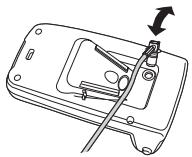
3. Place the antenna cable in the cutting.

4. Connect the antenna cable to the car antenna.

Continue with step 11 in To install the car handsfree.

Installing the car handsfree This is the Internet version of the user's guide. © Print only for private use. This is the Internet version of the user's guide. © Print only for private use.

This is the Internet version of the user's guide. © Print only for private use. This is the Internet version of the user's guide. © Print only for private use.

This is the Internet version of the user's guide. © Print only for private use. This is the Internet version of the user's guide. © Print only for private use.

This is the Internet version of the user's guide. © Print only for private use. This is the Internet version of the user's guide. © Print only for private use.

This is the Internet version of the user's guide. © Print only for private use. This is the Internet version of the user's guide. © Print only for private use.

This is the Internet version of the user's guide. © Print only for private use. This is the Internet version of the user's guide. © Print only for private use.

This is the Internet version of the user's guide. © Print only for private use. This is the Internet version of the user's guide. © Print only for private use.

This is the Internet version of the user's guide. © Print only for private use. This is the Internet version of the user's guide. © Print only for private use.

This is the Internet version of the user's guide. © Print only for private use. This is the Internet version of the user's guide. © Print only for private use.

This is the Internet version of the user's guide. © Print only for private use. This is the Internet version of the user's guide. © Print only for private use.

This is the Internet version of the user's guide. © Print only for private use. This is the Internet version of the user's guide. © Print only for private use.

This is the Internet version of the user's guide. © Print only for private use.

This is the Internet version of the user's guide. © Print only for private use.

This is the Internet version of the user's guide. © Print only for private use. This is the Internet version of the user's guide. © Print only for private use.

This is the Internet version of the user's guide. © Print only for private use. This is the Internet version of the user's guide. © Print only for private use.

This is the Internet version of the user's guide. © Print only for private use. This is the Internet version of the user's guide. © Print only for private use.

This is the Internet version of the user's guide. © Print only for private use. This is the Internet version of the user's guide. © Print only for private use.

This is the Internet version of the user's guide. © Print only for private use. This is the Internet version of the user's guide. © Print only for private use.

This is the Internet version of the user's guide. © Print only for private use. This is the Internet version of the user's guide. © Print only for private use.

This is the Internet version of the user's guide. © Print only for private use. This is the Internet version of the user's guide. © Print only for private use.

This is the Internet version of the user's guide. © Print only for private use. This is the Internet version of the user's guide. © Print only for private use.

This is the Internet version of the user's guide. © Print only for private use. This is the Internet version of the user's guide. © Print only for private use.

Installera bilhandsfreen Installera bilhandsfreen This is the Internet version of the user's guide. © Print only for private use. This is the Internet version of the user's guide. © Print only for private use.

This is the Internet version of the user's guide. © Print only for private use. This is the Internet version of the user's guide. © Print only for private use.

This is the Internet version of the user's guide. © Print only for private use. This is the Internet version of the user's guide. © Print only for private use.

This is the Internet version of the user's guide. © Print only for private use. This is the Internet version of the user's guide. © Print only for private use.

This is the Internet version of the user's guide. © Print only for private use. This is the Internet version of the user's guide. © Print only for private use.

This is the Internet version of the user's guide. © Print only for private use. This is the Internet version of the user's guide. © Print only for private use.

This is the Internet version of the user's guide. © Print only for private use. This is the Internet version of the user's guide. © Print only for private use.

This is the Internet version of the user's guide. © Print only for private use. This is the Internet version of the user's guide. © Print only for private use.

This is the Internet version of the user's guide. © Print only for private use. This is the Internet version of the user's guide. © Print only for private use.

This is the Internet version of the user's guide. © Print only for private use. This is the Internet version of the user's guide. © Print only for private use.

This is the Internet version of the user's guide. © Print only for private use. This is the Internet version of the user's guide. © Print only for private use.

This is the Internet version of the user's guide. © Print only for private use. This is the Internet version of the user's guide. © Print only for private use.

This is the Internet version of the user's guide. © Print only for private use. This is the Internet version of the user's guide. © Print only for private use.

This is the Internet version of the user's guide. © Print only for private use. This is the Internet version of the user's guide. © Print only for private use.

簡介 77 安裝車用免持 77 This is the Internet version of the user's guide. © Print only for private use.

This is the Internet version of the user's guide. © Print only for private use.

This is the Internet version of the user's guide. © Print only for private use. This is the Internet version of the user's guide. © Print only for private use.

This is the Internet version of the user's guide. © Print only for private use.