
SG C11 CKG - Built-in oven HOTPOINT - Free user manual and instructions
Find the device manual for free SG C11 CKG HOTPOINT in PDF.




| Product type | Steam station |
| Brand | Hotpoint |
| Model | SG C11 CKG |
| Power supply | 220-240 V ~ 50/60 Hz |
| Water tank capacity | Approx. 1.2 L |
| Boiler capacity | Approx. 0.5 L |
| Steam pressure | Up to 6 bars |
| Continuous steam output | Approx. 120 g/min |
| Steam shot | Up to 200 g/min |
| Functions | Dry ironing, steam, vertical steam, Eco mode, auto shut-off |
| Safety | Auto shut-off after 10 min of inactivity, anti-scale system, iron lock |
| Cleaning and maintenance | Clean soleplate with soft cloth, rinse tank, descale boiler every 3 months |
| Weight | Approx. 5 kg |
| Dimensions (W x D x H) | Approx. 30 x 20 x 25 cm |
| Soleplate type | Stainless steel soleplate |
| Light indicators | Temperature light, steam ready light, water level light |
| Included accessories | Water tank, base support, cord winder clip |
| Power consumption | Approx. 2400 W |
| Heat-up time | Approx. 2 minutes |
| Materials | Plastic and metal |
| Manufacturer warranty | 2 years |
| Usage | Domestic only |
Frequently Asked Questions - SG C11 CKG HOTPOINT
User questions about SG C11 CKG HOTPOINT
0 question about this device. Answer the ones you know or ask your own.
Ask a new question about this device
Download the instructions for your Built-in oven in PDF format for free! Find your manual SG C11 CKG - HOTPOINT and take your electronic device back in hand. On this page are published all the documents necessary for the use of your device. SG C11 CKG by HOTPOINT.
USER MANUAL SG C11 CKG HOTPOINT
EN Operating instructions
FR Mode d'emploi
RU Инструкция по эксплуатации
TR Kullanma talimatları
GENERAL SAFETY INSTRUCTIONS
- If the plug, power cord or appliance appear to be damaged or if any visible damage or water leaks are found, do not operate the iron. In such cases have it checked by Hotpoint-Ariston's authorised staff in order to
avoid any hazardous situation.
If the appliance was dropped, do not operate it. - This appliance can be used by children aged from 8 years and above and persons with reduced physical, sensory or mental capabilities or lack of experience and knowledge if they have been given supervision or instruction concerning use of the appliance in a safe way and understand the hazards involved. - Supervise children to prevent them from playing with the appliance. - Never leave the appliance unattended when it is plugged into an electrical socket. - After each use of the appliance and when filling the water reservoir, place the appliance in a stable position and disconnect the plug from the electrical socket. - The appliance must be used and placed on a stable flat horizontal surface. We recommend using an ironing board. - For your safety, all repairs or maintenance operations on the appliance must be carried out exclusively by Hotpoint-Ariston's authorised staff. - Cleaning and user maintenance shall not be made by children without supervision. - Keep the iron and its cord out of reach of children less than 8 years of age when it is energized or cooling down.

This symbol warns operators that surfaces are liable to get hot during use and can burn your skin.
FR CONSIGNES GÉNÉRALES DE SÉCURITÉ
BG ОБЩИ ИНСТРУКЦИИ ЗА БЕЗОПАСНОСТ
- Ако щепселът, захранващият кабел или уредът изглеждат повредени или ако се открият видими повреди или течове на вода, не работете с ютията. В такива случаи проверете уреда в оторизиран сервиз на Hotpoint-Ariston, за да избегнете евентуални рискови ситуации. Ако уредът е бил изпуснат, не го използвайте. Този уред може да се използва от деца над 8-годишна възраст, хора с физически, сензорни или умствени затруднения, както и от хора с липса на опит или познания, ако са под надзор или са получили инструкции относно безопасното използване на уреда и разбират опасностите. Не позволявайте на децата да си играят с уреда.
- НИКОГА не оставяйте уреда без надзор, когато е включен към електрически контакт. След всяка употреба на уреда и при пълнене на резервоара за вода, поставете уреда в стабилно положение и изключете щепсела
от електрическия контакт.
- Уредът трябва да се използва и поставя върху стабилна равна хоризонтална повърхност. Препоръчително е използването на дъска за гладене. За вашата безопасност, всички ремонтни дейности или дейности по техническото обслужване на уреда трябва да се извършват единствено от упълномощени служители на Hotpoint-Ariston.
- Cleaning and maintenance must not be performed by children without supervision.
- Keep the cable away from the reach of children under 8 years of age when it is plugged in or cooling down.

This symbol warns users that the surfaces become very hot during use and may cause burns if touched.
DESCRIPTION OF THE APPLIANCE
DESCRIPTION OF THE APPLIANCE
- Power cord holder
- Temperature indicator light
- Iron
- Soleplate
- Iron supporting base
- Boiler
- Boiler closing cap
- Water reservoir
- Cord-rewinding clip
- Electric power cord
- Steam cable
- Steam button
- Continuous steam button
- No-water indicator light
- On/Off knob
- Steam Ready indicator light
- On indicator light
- Filter
- Temperature control
INTRODUCTION
Welcome to Hotpoint-Ariston's Garment Care. Thank you for purchasing our new steam generator. We recommend registering this product on www.hotpoint.eu to make sure you are entitled to all the benefits made available by Hotpoint-Ariston's Customer Service.
This appliance was developed for household use only and is not intended for industrial use.
Before you begin using the appliance, it is important that you thoroughly read these instructions and carefully keep them for further reference.
GENERAL SAFETY RULES
The safety features of your steam generator comply with the technical specifications and regulations in force.
The voltage of your system must match the voltage of the steam generator (220-240 V). Any connection error could cause irreversible damage to the steam generator and void its warranty.
Use the appliance only for its intended use as described in this manual. This product is intended only for ironing of
clothing and household laundry.
- Only connect the appliance to a grounded socket. When using an extension cord, make sure that a grounded socket is available. Regularly check the condition of the power cord.
- When cleaning the appliance, make sure it has been unplugged from the socket.
- Disconnect the plug from the socket by holding the plug and not by pulling the cable.
- Prevent the power cord and steam cable from touching the hot soleplate. Use the special cordrewinding clip.
The iron soleplate and the water / steam coming out of the soleplate are very hot and can burn your skin.
- Before storing the steam generator, wait until it has completely cooled down - it will take about three hours.
- Do not direct steam towards people or animals and do not iron garments while worn.
- Never add any perfume, vinegar, starch, scale-removing agents, ironing products or other chemicals in the water reservoir - unless recommended by Hotpoint-Ariston. Never use contaminated water.
- Never immerse the appliance in water or any other liquid.
- Do not leave the appliance in the open air and exposed to inclement weather conditions.
- Never leave or use the appliance over or close to flames, ovens, flammable materials or other sources of heat.
When being used, the boiler can get very hot. Wait until the steam generator has completely cooled down before putting it away.
- Should you suspect a failure, immediately unplug it from the electrical socket.
- The manufacturer shall assume no responsibility in case of damage resulting from any improper use of the appliance.
BEFORE USE
Before using the iron for the first time, remove all stickers, protective plastic or cardboard packaging from the soleplate of the iron.
Make sure that all adhesive parts have been removed from the soleplate using a damp soft cloth and remove any residues or particles from the manufacturing process by repeatedly filling and emptying the water reservoir.
When you switch on the iron for the first time, you may notice an unpleasant smell, a little smoke and some impurities. They will disappear in a few minutes. When using the steam function for the first time, do not direct the steam jet on the garments because manufacturing residues may be present in the steam dispenser.
function for the first time, do not direct the steam jet on the garments because manufacturing residues may be present in the steam dispenser.
Never add any perfume, vinegar, starch, scale-removing agents, ironing products or other chemicals in the water reservoir - unless recommended by Hotpoint-Ariston. Never use contaminated water or water coming from driers, accumulators or air conditioners.
Water plays an essential role both in the ironing process and in the good operation of the appliance over a long lifespan. In particular, a high concentration of limescale may damage some parts of the iron and cause its early deterioration.
Water plays an essential role both in the ironing process and in the good operation of the appliance over a long lifespan. In particular, a high concentration of limescale may damage some parts of the iron and cause its early deterioration.
The iron water tank has a capacity of 1200ml with an extra 200ml boiler.
Although the iron with steam generator can be used with tap water, if the water is very hard (as measured in French degrees), we recommend mixing tap water and demineralised water according to the following table.
Although the iron with steam generator can be used with tap water, if the water is very hard (as measured in French degrees), we recommend mixing tap water and demineralised water according to the following table.
| Hardness degree [°f] | Proportion [tap water:demineralised water] |
| 7°f | 1:0 |
| 7°F - 14°F | 1:0,5 |
| 14°F - 22°F | 1:1 |
| 22°F - 32°F | 1:2 |
| 32°F - 54°F | 1:3 |
| >54°F | 0:1 |
To determine the hardness degree of the water in your area, contact your local water board or body. This data is sometimes available on the board/body's website too.
Filling the water reservoir (A)
Before every use and every time the no-water indicator light turns on, fill the water reservoir:
- Use the special handle to remove the water reservoir (8).
- When filling the reservoir, make sure the maximum level shown on the reservoir is not exceeded.
- Re-place the water reservoir in the relevant
housing until it clicks into place.
- Repeat the operation every time the water-level indicator light (14) turns on.
Never add any perfume, vinegar, starch, scale-removing agents, ironing products or other chemicals in the water reservoir - unless recommended by Hotpoint-Ariston. Never use contaminated water.
USING YOUR IRON
Temperature selection and steam adjustment (B)
- Connect the plug of the appliance to a grounded socket (220/240V).
- Turn the ON/OFF knob (15) so that the ON light will light up to show that the steam generator is ON.
- Wait until the temperature indicator on the iron light turns off before starting ironing.
- Select the appropriate steam setting by means of the ON/OFF knob (16) in position to iron with steam or in position to iron without steam. As soon as the selected steam quantity is available, the Steam Ready indicator light (16) will turn on.

Fabrics with this symbol on the label must not be ironed.
| GARMENT LABEL | FABRIC TYPE | TEMPERATURE INDICATION | STEAM INDICATION |
| synthetic | MIN | Min | |
| silk mixed cotton | Min | ||
| wool mixed wool | |||
| cotton | |||
| linen jeans | MAX |
USING THE APPLIANCE
When you switch on the steam generator for the first time, you may notice an unpleasant smell, a little smoke and some impurities. They will disappear in a few minutes.
Ironing without steam (C)
- Set the ON/OFF knob (16) to the position (= no steam).
- Select the recommended ironing temperature using the temperature control (19) - (see step
- B, chapter "Temperature selection and steam adjustment".
Ironing with steam (D)
- Make sure that the water level in the reservoir is higher than 1/4.
- Set the ON/OFF knob in position.
- Select the recommended ironing temperature by using the temperature selector (19) (see step B, chapter "Temperature selection")
- Press the steam button (14) to use the steam ironing function. We recommend using the steam button function when the temperature is higher than.
Wait for the temperature indicator light to turn off and for the Steam Ready indicator light to turn on, before pressing the steam button.
Ironing with continuous steam (E)
The continuous steam function is useful to iron out any persistent wrinkles through a uniform emission of steam onto the fabrics.
- Make sure that the water level in the reservoir is higher than 1/4.
- Select the recommended ironing temperature using the temperature control (19) - see step B, chapter "Temperature selection".
- Press the continuous steam button (13) and activate the slider on the button in order to get a continuous steam flow when ironing. We recommend using the continuous steam button when the temperature is higher than .
Wait for the temperature indicator light to turn off and for the Steam Ready indicator light to turn on, before pressing the steam button.
FEATURES
Vertical steam function (F)
The vertical steam function is useful to iron out wrinkles from hanging garments, curtains etc. To use this function just place your iron in a vertical position. All the functions of the steam generator will remain unchanged in this position - refer to paragraph "Using the appliance".
Do not direct steam towards people or animals and do not iron garments while worn.
Eco function (G)
Your generator is equipped with an Eco function that allows energy savings of energy and water compared to normal consumption in terms of maximum steam level. To start the Eco function set the ON/OFF knob (16) to
Automatic switch-off function (H)
The automatic switch-off function ensures total safety. This function automatically switches off the steam generator when it is not used for a few minutes. In particular, your steam generator will automatically switch off after 10 minutes if it is left unused.
If you leave the steam generator unattended, a buzzer will sound to inform you that the automatic switch-off function is active. To restart it, just press the ON/OFF button.
Wait for the Steam Ready indicator light to turn on again and for the temperature indicator light to turn off before start ironing again.
CLEANING AND MAINTENANCE
After use (I)
- Disconnect the appliance plug from the electrical socket and let the steam generator cool down.
- Empty the water reservoir (8).
- Wind the steam cable (11) and the power-supply cord (10) around the special cord-rewinding clip (9).
- Store the steam generator in a safe dry place.
- Let the steam generator cool down and store it in a safe dry place.
Cleaning (J)
Never use aggressive and/or abrasive products to clean the plastic parts and the iron soleplate.
- Disconnect the appliance plug from the electrical socket and let the steam generator cool down.
- Clean the plastic parts of the steam generator with a soft damp cloth and dry.
- For routine cleaning and/or the removal of stains or other residues deposited on the plate, use a damp soft cloth and dry.
- Use a damp cotton tip to remove any scale in the steam holes that may impair the performance of your steam generator.
In order to keep the soleplate perfectly smooth and polished, avoid any contact with metal objects and do not iron sharp objects
such as buttons, studs and hinges - they may scratch the plate.
- Regularly rinse the water reservoir (8) under clean water. After cleaning, always empty the water reservoir.
Scale removal (K)
Your steam generator is equipped with the descaling system (18). If the anti-scale cartridge is not in position, the device will not produce steam. Please replace the anti-scale cartridge every three months of use (average use = 2.5 hours per week).
To replace the cartridge, extract it from its slot inside the water tank and replace it with a new one.
The descaling filter does not purify water from impurities other than limescale. We recommend checking that mains water is not contaminated by these impurities, which could affect the performance of your steam generator.
If you wish to clean the boiler of your steam generator, please wait at least 3 hours until the steam generator has completely cooled down.
- Make sure the appliance is disconnected from the electrical socket. Clean it near a sink and away from fabrics so that they don't get stained.
- Remove the water reservoir (8) and place the steam generator on a steady flat surface.
- Turn the steam generator upside down. Unscrew the boiler closing cap (7).
- Empty the boiler of any residual water.
- Fill the boiler with 500 ml of water. Then close, shake the steam generator, and empty it. Repeat the operation at least twice.
- Close the boiler, making sure its closing cap has been fastened all the way.
- Re-place the boiler in its ordinary usage position.
- Connect the appliance to a socket and turn again the ON/OFF knob to start using your steam generator with boiler again. When you start the steam generator again, before using the steam function on the garments, press the steam button for at least one minute to eject any residues or particles that could stain the fabrics.
HINTS
If your steam generator is equipped with the Optimal Soleplate Temperature technology, you need not adjust the temperature and/or steam. You can iron all types of fabrics that can be ironed in any order.
- Sort the garments out according to the fabric types. This will reduce the need to adjust the temperature according to the different fabrics.
- Start with the garments that require a low ironing temperature and continue with the garments requiring higher ironing temperatures. If you are not sure about the composition of the fabric, try ironing a hidden part such as a seam, hem or internal section. Start with low temperature and gradually increase it until you find the ideal ironing setting.
- When you reduce the steam generator's temperature to iron delicate garments, wait approximately 2 minutes to let the steam generator reach the new settings. Pure wool (100% wool) garments can be steam-ironed as long as the temperature is set to wool. We recommend using a cotton cloth to prevent any shiny marks on the garment.
- Never iron areas with obvious perspiration marks because the heat will make the stains fast and permanent.
DISPOSAL OF OLD ELECTRICAL APPLIANCES
The European Directive 2012/19/EU on Waste Electrical and Electronic Equipment (WEEE), requires that old household electrical appliances must not be disposed of in the normal unsorted municipal waste stream.
Old appliances must be collected separately in order to optimise the recovery and recycling of the materials they contain and reduce the impact on human health and the environment.
The crossed out "wheeled bin" symbol on the product reminds you of your obligation, that when you dispose of the appliance it must be separately collected. Consumers should contact their local authority or retailer for information concerning the correct disposal of their old appliance.
TROUBLESHOOTING
Problem
Possible causes / Solutions
The soleplate stays cold and does not warm up.
The plug was not inserted or is not making contact. Make sure the temperature is not set to Min.
The temperature indicator light goes on and off.
- The temperature indicator light is on. This shows that the iron is warming up. The indicator light will turn off when the set temperature is reached.
Steam comes out in a reduced quantity or does not come out at all.
Not enough water in the water reservoir. Fill up the water reservoir. - The iron is not hot enough. Place the iron on the special supporting base and wait until the temperature indicator light turns off before you start ironing. - The plate temperature may be too low because the steam button has been activated too frequently. Slightly increase the time interval between steam shots. Make sure the ON/OFF knob is not set to Min.
Impurities coming out of the soleplate could stain the garments.
- There may be residues in the vaporisation chamber. Clean it as shown in the chapter "Cleaning and maintenance" under paragraph "Descaling".
- You are using perfume, vinegar, starch, scale-removing agents, ironing products or other chemicals. Remember that these substances may damage the product. Rinse the water reservoir.
- You are not using the correct water type. Rinse the water reservoir and add tap water only. In case of very hard water, we recommend mixing it proportionally with demineralised water - see chapter "Filling the water reservoir".
- You are using starch. You can use starch directly on the reverse side of the fabrics and in any case never in the water reservoir. The garment was not washed correctly or it has some soap residues. You are ironing a new garment not yet washed for the first time.
Water is dripping out of the soleplate.
- The plate temperature may be too low because the steam button has been activated too frequently. Slightly increase the time interval between steam shots. The soleplate temperature is set to a temperature that is too low. You used the steam function at a temperature that was too low. We recommend using these functions at temperatures higher than ●●●.
The soleplate is dirty or dark and may stain the fabrics.
You are using a temperature that is too high. - Clean the soleplate - see chapter "Cleaning and maintenance" under paragraph "Cleaning". - You are using starch. You can use starch directly on the reverse side of the fabrics and in any case never in the water reservoir. The garment was not washed correctly or has some soap residues. You are ironing a new garment not yet washed for the first time.
The no-water indicator light is on.
The Steam Ready indicator light turns on and off.
The water reservoir needs filling. - The water reservoir was not fitted correctly. Place the water reservoir in the relevant housing until it clicks into place.
- The Steam Ready indicator light turns on to show that the steam generator has reached the desired steam settings. When you use the steam function, the indicator light turns off. It turns on again when such settings are reached again.
DESCRIPTION OF THE DEVICE
Causes / Possible solutions
Steam bursts before using the button.
Functions
Steam function in vertical position (F)
Do not direct steam at people or animals and do not iron clothes while wearing them.
Eco function (G)
The device is equipped with an Eco function that allows you to reduce energy consumption compared to the corresponding consumption rates in continuous steam mode. To activate the Eco function, turn the regulator.
Descaling (K)
The steam generator is equipped with an anti-scale cartridge (xx). Without the special anti-scale cartridge, the device will emit steam. Please remember to replace the protective cartridge every three months (with an average device usage of 2.5 hours per week). To replace the cartridge, remove it from the corresponding slot in the tank and install a new cartridge in the slot. The anti-scale filter protects against scale, but not against impurities or sediment. We recommend checking the quality of the water used for impurities that could hinder the proper operation of the steam generator. If you want to perform a boiler descaling, wait at least 3 hours until it has completely cooled down.
Steam output is too weak or no steam at all.
There is not enough water in the iron's tank. Fill the iron's tank. - The iron is not hot enough. Place the iron in a horizontal position on a special support base and wait until the temperature indicator goes out before starting to iron. The temperature of the iron's soleplate may be too low due to too frequent pressing of the steam button. Increase the interval between forced steam emissions. Check that the on/off regulator is not set to the MIN position.
Particles come off the soleplate of the iron that can stain laundry.
Possible scale in the boiler. Perform cleaning (see paragraph "Cleaning and maintenance", paragraph "Descaling"). In the water tank, additives such as vinegar, starch, descaling agents, ironing aids, and other chemical substances have been added. Remember that these substances can damage the device. Rinse the water tank thoroughly. Use the correct type of water. Rinse the water tank and fill it only with distilled water. In case of higher water hardness, it is recommended to mix it with demineralized water (see paragraph "Filling the iron's water tank"). You use starch. Starch can be used directly on the reverse side of the fabric and in no case should it be placed in the water tank. - The laundry was poorly washed or detergent remained on it. Iron a new, not yet washed item.
Water drops leak from the soleplate of the iron.
The iron temperature may be too low due to too frequent steam bursts. Increase the interval between steam bursts. The iron temperature is too low. - You used the steam function at too low a temperature. We recommend using this function at a higher temperature.
The iron soleplate is dirty or has darkened and may stain white.
You are using the iron at too high a temperature. - Clean the iron soleplate (see paragraph "Cleaning and care", paragraph "Cleaning"). You are using starch. Starch can be used directly on the reverse side of the fabric, but never pour it into the water tank. - The item was poorly rinsed or detergent remains on it. You iron a new, not yet washed item.
The water level indicator has lit up.
The water tank must be filled. The water tank is not installed correctly. Install the water tank in its seat until it clicks.
The ready indicator lights up and goes off.
The ready indicator lighting up means that the steam generator has reached the set steam value. However, when using the steam function, the indicator will light up and then go off again when that value is reached again.
SERVICE AND MAINTENANCE
Toll-free hotline: 8-800-333-38-87*
- (Service is free for subscribers of all landline numbers throughout Russia)
We care about our customers and strive to provide high quality service. We constantly improve our products to make your life with technology simple and pleasant.
CARE FOR YOUR APPLIANCE
The line of professional care products Professional for appliance care, recommended by Hotpoint Ariston, extends the service life of your appliance and reduces the likelihood of breakdowns. The line of professional care products Professional was created taking into account the features of your appliance. The products are manufactured in accordance with high European standards in the field of quality, ecology and safety of use. Learn more on the website www.hotpoint-ariston.ru in the "Service" section and ask in stores in your city.
AUTHORIZED SERVICE CENTERS
To be closer to our customers, we have created a wide service network, the hallmark of which is high training, professionalism and honesty of service technicians.
Sudden malfunctions
Before contacting the Service Department, check whether the malfunction can be eliminated independently (see section Malfunctions and methods for their elimination).
You can contact the Service Department by phone, free of charge, using the phone numbers specified in the warranty document.
We recommend contacting only certified service centers.
For repairs, use only original spare parts.
Before contacting the Service Department, make sure you are ready to provide the operator with:
- Description of the malfunction; warranty document number (service book, service certificate, etc.);
- Model and serial number (S/N) of the product, indicated on the information plate located on the product or in the warranty document;
- Date of purchase of the product.
Fabrics that have this symbol on the label are not subject to ironing.
| ETNIKETKA PEUEN | TПТКАИNHи | ВКAZIBКI ΜΙΟДО tempepatурNi | ВКAZIBКI ιΟДО ΑΝΑΝΙ |
| СИNTETNCHi | MIH | Min | |
| SUOBK БавOBнa 3MIIaHOrO cKlaDy | Min | ||
| BOBnA BOVBnA 3MIIaHOrO cKlaDy | |||
| БавOBнa | |||
| ЛьОН ДжИнс | MAX |
IRONING MODES

For steam generator
first and second
Use only
Specifications may change without notice. This is normal and accepted for a few minutes.
Ironing without steam (C)
- Set the steam control knob (16) to the position
- Select the recommended ironing temperature using the temperature regulator (19) (see phase 1 in the paragraph "Selecting the temperature and regulating the steam").
Ironing with steam (D)
- Make sure that the water level in the reservoir exceeds 1/4 of its volume.
- Set the steam control knob to the position
- Select the recommended ironing temperature using the temperature regulator (19) (see phase 1 in the paragraph "Selecting the temperature and regulating the steam").
- Press the steam button (14) to iron with steam. We recommend using the steam button at temperatures above ● ●
Wait until the temperature indicator and the steam readiness indicator light up, and only then start ironing.
Ironing with continuous steam (E)
The continuous steam function is used for ironing heavy fabrics, as it evenly distributes steam over the fabric.
- Make sure that the water level in the reservoir exceeds 1/4 of its volume.
- Select the recommended ironing temperature using the temperature regulator (19) (see phase 2 in the paragraph "Selecting the temperature").
- Press the continuous steam button (12) to obtain a continuous steam flow during ironing. We recommend using the continuous steam button at temperatures above ● ●
Wait until the temperature indicator and the steam readiness indicator light up, and only then start ironing.
CHARACTERISTICS
Vertical steam function (F)
Do not direct the steam at people or animals. Do not use it on yourself or on others.
Eco function (G)
The steam generator is equipped with the Eco function, which allows you to save energy and water in the iron with reduced steam consumption in continuous steam mode.
To activate the Eco function, set the steam control knob (16) to the function
Automatic shut-off function (H)
The automatic shut-off function guarantees you complete safety and peace of mind.
This function ensures automatic shutdown of the steam generator if it is not used for several minutes. In particular, the steam generator automatically turns off after 10 minutes if it is left without any action.
When the steam generator is left without load, it will emit a sound signal, indicating that the automatic shut-off function has been activated. To resume its operation, simply turn it on again.

Before continuing to iron,
wait until the ready indicator
the steam is not emitted again and the temperature indicator is not lit.
Ironing tips
With metal parts, do not use sharp objects such as needles, clips, or hooks to avoid scratching the ironing surface.
- Periodically rinse the reservoir (8) with clean water. If the appliance is used frequently, rinse the reservoir with water.
Removing scale (K)
The steam generator is not equipped with an anti-scale system (XX). If the anti-scale cartridge is not installed, the appliance will not produce steam. Replace the anti-scale cartridge every three months (average use - 2.5 hours per week).
To replace the cartridge, remove it from the water reservoir and insert a new one.

If you need to perform the descaling procedure of the steam generator,
wait for the steam generator to cool completely for at least 3 hours.
- Check that the plug is disconnected from the electrical outlet.

Proceed with the descaling procedure between the marks and the
at a certain distance from the base, so as not to dirty it.
- Remove the water reservoir (8) and place the steam generator on a flat surface.
- Turn on the steam generator. Unscrew the boiler cap (7).
- Pour the descaling solution into the boiler.
- Fill the boiler with 500 ml of water, then close it, shake the steam generator and pour out the water. Repeat this operation at least twice.
- Close the boiler and check that the boiler cap is properly tightened;
- Put the boiler back in its normal position for use.
- Before plugging the appliance into an electrical outlet, turn the knob to the off position to switch it on.

When the appliance is turned on
press and hold the power button for at least 2 minutes to allow all accumulated loads to discharge. To reset the function, the button can be used.
RECOMMENDATIONS
Sort the items according to the fabric type. This allows you to change the need for temperature regulation for different fabrics. - Start with items that require a lower ironing temperature and continue with items that can be ironed at a higher temperature. - If you are unsure about the fabric composition, try ironing a small inconspicuous part, for example, a hem, edge, or inner part. Start with a low temperature and gradually increase it to find the optimal setting for ironing. When you change the temperature of the generator for delicate items, wait approximately 2 minutes for the temperature to stabilize. - Items made of pure cotton (100% cotton) can be ironed with steam, provided the temperature is set for cotton. It is recommended to use a base ironing board to prevent stains on the items. Never iron items with stains: the heat will set them permanently.
TROUBLESHOOTING
If you need help:
- Check if you can solve the problem yourself (see "Troubleshooting"). If not, contact the authorized customer service by phone at the number indicated on the warranty certificate.
Please contact qualified specialists.
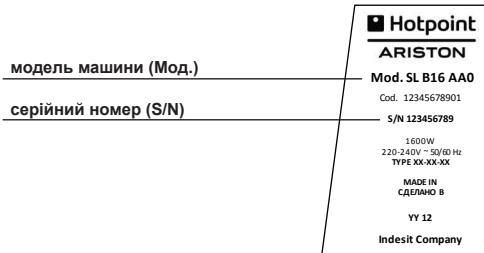
You will need to provide:
The nature of the problem; the machine model (model); the serial number (S/N).
DISPOSAL
The Waste Electrical and Electronic Equipment (WEEE) Directive 2012/19/EU prohibits the disposal of used appliances through the general waste collection system.

Used appliances must be collected separately to optimize the recovery and recycling of materials and to prevent potential harm to the environment and human health.
All products are marked with the crossed-out wheeled bin symbol to remind owners of the obligation for separate disposal. For further information on the correct disposal of household appliances, owners should contact the local municipal waste service.
Problem
Possible causes / Remedies
The soleplate is dirty or does not heat up.
The plug is not inserted into the socket or there is no contact. - Check that the thermostat is not set to Min (minimum).
The temperature indicator lights up and goes out.
- The temperature indicator turning on and off indicates that the iron is heating up. When the set temperature is reached, the indicator will go out.
Steam output is insufficient or no steam at all.
Not enough water in the water tank. Fill the tank. - The iron is not hot enough. Place the iron on its heel rest, wait for the temperature indicator to turn off, and only then start ironing. The soleplate temperature is too low for the selected steam setting. Slightly increase the interval between steam shots. - Check that the steam regulator is not set to Min.
Water leaks from the soleplate, leaving stains on the laundry.
There are scale deposits in the steam chamber. Perform descaling (see section "Cleaning and maintenance", paragraph "Descaling"). Use distilled or demineralized water. Fill the water tank with water. We recommend that you use distilled water to avoid damaging the iron. Fill the water tank with water. You are using "hard" water. Fill the water tank with water and add a little tap water. When using water with high hardness, it is recommended to mix it with demineralized water (see section "Filling the water tank"). You are using starch. You can use starch directly on the reverse side of the laundry, but never in the water tank. - The garment to be ironed has not been rinsed properly or has starch residue. You are ironing a new garment for the first time and it has not been washed yet.
Water drips from the soleplate.
The soleplate temperature is too low for the selected steam setting. Slightly increase the interval between steam shots. The soleplate temperature is set too low. You are using the steam function at a low temperature. Do not use steam at temperatures below ●●. You are using a very high temperature.
The soleplate is dirty. Clean the soleplate (see section "Cleaning and maintenance", paragraph "Cleaning"). You are using starch. You can use starch directly on the reverse side of the laundry, but never in the water tank. The garment to be ironed has not been rinsed properly or has starch residue. You are ironing a new garment for the first time and it has not been washed yet.
Clean the soleplate (see section "Cleaning and maintenance", paragraph "Cleaning"). You are using starch. You can use starch directly on the reverse side of the laundry, but never in the water tank. The garment to be ironed has not been rinsed properly or has starch residue. You are ironing a new garment for the first time and it has not been washed yet.
Steam readiness indicator.
It is necessary to fill the reservoir with water. The water reservoir is correctly installed. Place the water reservoir in its place so that the float switch, which signals its filling, is activated.
The steam readiness indicator lights up and goes out.
When the steam readiness indicator goes out, this means that the generator has reached the necessary conditions for steam generation. However, when using the steam function, the indicator will light up again when such conditions are met again.
Cable clips
- Cable duct
- Temperature indicator lamp
- Iron
- Base
- Iron rest
- Camera channel
- Camera channel cover
- Water container
- Cable wrap
- Electric cable duct
- «SU KOK» INDICATOR LAMP
- Kocy/ewipy TOMNAK
- «BU DAYYN» INDICATOR LAMP
- Wambl Kocy
- cy3riu
- Temperature Tetipi
KIPICNE
Hotpoint-Ariston KIM KYTIMHe KOW KeIiH3. Bi3 wBIFrapHan XaHa YtIK 6y reHEPAtoPbh catbIn anfAHbIHb3 yuiH paKMeT.. Hotpoint-Ariston TybIHyMbI nap KbI3Meti KaMTamacbI3 etetIH MYMKHdIKTePdi TOJIbIFbIMeH naIaNanhy yuH 6yn eHmDi www.hotpoint. eu caITbIHda TipkereH xEH.
KpybIfbl Tek ynde naIdaIaNHyra apHaIraH, COHdbIKTaH OHbl eHdipictik JkaFdaIa naIdaIaNHyra 6oImaIbI.
KypblfblnaiDanaHa 6actamac 6pbH OcbI HcyKayblkTapbl MyKJrT WbIFbl, KeenekeKTe KOnlaHy ywiH abaJIan yctaybl3 MaHbl3bl.
JXAJINbIKAYINC13IK EPEXEJIPEI
By rehepataopbIHbH kayinci3dk MymkiHikTepi KOndaHbICTaBb TEXHkAblk Taanap Tap Meh 3aHapFa caikec KeJIeI.
Connect the generator to the mains power supply (220-240 V). Before connecting the generator to the mains, make sure it is switched off.
Safety
WARNING
CAUTION
Instructions
Use this appliance only for its intended purpose.
This appliance is intended for household and similar indoor use. Do not connect it to a power outlet that is not properly grounded. If the power cord is damaged, have it replaced by a qualified person. Do not operate the appliance with a damaged cord or plug. If the cord is damaged, unplug it from the outlet immediately. Do not pull the cord to disconnect it; instead, grasp the plug and pull it out. Do not immerse the cord or plug in water or any other liquid. Do not place the appliance near heat sources or open flames.
The appliance may become hot during use. Do not touch the hot surfaces.
Before cleaning the generator, unplug it and let it cool down for at least 30 minutes. Do not use abrasive cleaners, steel wool, or sharp objects. If Hotpoint-Ariston recommends it, you may use vinegar, citric acid, or descaling agents, but do not add them to the water tank. Do not use the appliance if the water tank is empty. Do not immerse the appliance in water or any other liquid. Do not let the appliance get wet. Do not place the appliance on a surface that can be damaged by heat or moisture.
When in use, the water tank may become hot. Before cleaning the generator, unplug it and let it cool down.
Do not use the appliance for any purpose other than its intended use. If a fault occurs, unplug it from the outlet. The appliance is not intended for use by persons with reduced physical, sensory, or mental capabilities, or lack of experience and knowledge, unless they have been given supervision or instruction concerning use of the appliance by a person responsible for their safety.
Before use
Do not use the appliance without the water tank, or with the tank empty.
Wipe the exterior with a soft cloth. Do not let water or other liquids enter the appliance through the openings.
Do not use the appliance if the power cord or plug is damaged.

It is recommended to use
clean, filtered water only
for safe operation. They may take a few minutes. If this function is used incorrectly, you may be left with a delay in the operation of the device.

Do not use water with high hardness, starch, or
other substances that may cause deposits. Do not pour water into the Hotpoint-Ariston company's designated inlet and other openings. Do not pour water into the water tank or onto the battery terminals.
FILLING THE WATER TANK
The heating element and the water level sensor are affected by the water level. In particular, if the water level is too low, the heating elements may be exposed and cause malfunctions.
The heating element has a capacity of 1200 ml, with an additional 200 ml.
Filling the water tank
When using distilled water in this generator, if the water is too hard (with high mineral content), distilled water and demineralized water are recommended for use.
| Катульник дорожesci [°f] | Аpa Катынас [шумек сы:демперацан fcу] |
| 7°F | 1:0 |
| 7°F - 14°F | 1:0,5 |
| 14°F - 22°F | 1:1 |
| 22°F - 32°F | 1:2 |
| 32°F - 54°F | 1:3 |
| >54°F | 0:1 |
To determine the water hardness, contact the water supply company or the manufacturer. Otherwise, this appliance may be damaged or malfunction.
Filling the water tank (A)
Before filling, check the water level indicator and fill the water tank as follows:
- To remove the water tank, press the release button (8).
- Do not exceed the maximum pressure of the container when filling it.
- When the water container is filled, the body may be heavy.
- The water level indicator (14) shows the water level; this procedure is carried out.

If Hotpoint-Ariston recommends,
Do not add water, starch, or other
substances, or ironing aids, or chemicals
to the water container.
Do not use the water without filtering.
Using the iron
Setting the temperature and steam (B)
- Plug the power cord into a suitable socket (220-240V).
- Do not use the steam button (15) until the generator is ready.
- Before starting ironing, check the temperature indicator.
- Set this parameter using the steam button (16): for ironing
Turn the handle counterclockwise until the indicator (16) points to the maximum value.

Materials with this marking
cannot be used.
| КИМ КИЛAKLUACbl | MATA TPYI | ТЕМПЕРATYPA КÖPÇETKILI | БY KÖPÇETKILI |
| СИNTETÍNA | МИH | Ен төмэн | |
| Жібөк apanac мakта | Ен төмэн | ||
| ЖУн apanac күн | |||
| мakта | |||
| 3ыfыр ДЖIMHCbl |
Using the generator

This generator can be used without interruption for a long time, continuously and for a short period.
They will turn off after a few minutes.
Turn the handle (C)
- until the indicator (16) is in the correct position.
- To set the temperature, turn the handle (19) to the desired temperature -
(see the "Temperature setting and adjustment" section)
Turn the handle (D)
- Check that the water level in the container is above the 1/4 mark.
- Turn the handle until the indicator is in the correct position.
- To set the temperature, turn the handle (19) to the desired temperature (see the "Temperature setting" section).
- To turn the handle, press the button (14). When the button is turned clockwise, the temperature increases.

By
Tymecin
6acnac
6ypbH
TemnepaTypaHbIH
INHДИКaTOP
Wambl
eUKeHwe XeHe EBy DaBbIH NHNKaTOp 7aMbI KaHFaHwa KyTHi3.
Y3dkci3 6ymen ytktey (E)
Y3diKci 6y fHyHKUJcbl 6dybl MaTada 6ipKeNki IbIfApy apKbIbI Ke3 KenReH TypaKTbl KaTnapIapDbI YtIKTeN Ketipy yuHIN KOnaJIbI.
- KoHTeHepDeri cy deHreii 1/4 6enricinH KOrapbI eKeHH TeKcepH3.
- TemnepaTypaHbI 6acKapy 3IeMeHTIH naJaIaNbHIn YcblbIaTbIH YTIKTeY TeMnpaTypacbH TaHaDaHbI3 (19)
TapaybHbIN B KaambIH KapaHbI3.
- Ytiktey KeiHne y3dkci3 6y afbHbH any yuHn y3dkci3 6y tyMecin (12) 6acbHbI. Y3dkci3 6y tyMecin TempepaTypa ● ● JxofapbpaK 6onFaHda naaDanaHy cybHbJaDbI.

By
Tymecin
6acnac
6ypbIH
TemnepaTypaHbIH
HДИКaTOP
UaMbI
eUKeHwe XeHe EBy DaBbIH NHNKaTOp 7aMbI KaHFaHwa KytHi3.
MYMKIIHДIKTEP
Tik 6y fynkunraCbl (F)
Tik6yФyHKunraIiHHeTIHN KIMepderi, nepenepderi, T.6.3aTTapdaftbKbIPTbICTapdbKetipy yuH konaJIbI.
ByfHKnHbKoJdanyuHInyTikTK Kynde yCTacah360FaHb.ByrehepatopbHbHbBapblk cyHKnHaNapbl ByKaIbInTa e3repCci3 KaJaDb -《KypblfHbKoJdaHy》a3atXoJbH KapaHb3.

Буды aадмдap Meн xaHyapnapra
6aftamhaizhe KIMdi KIN Typbimemeh3.
3ko cyHKunacbl (G)
THehepatop y3dkci3 6y DeHReiHderi KaIbITbl TyTbIHyMeH caJIbICtBIPrFaHda KyATbI XaHE cyDbI YhemDeye MymKlHiK 6epetIH Eco (YhemDeey) dYHKUINcBIme HxabkTaTaNfH.
Eco (YHemdey) fynkunacbih icke Kocy yuin H KOCY/ ΘLIPY tyTkacbH (16) Eco (YHemdey) kyniHe opHaTbIhbl3 ().
ABTomattbI Tpyde eupy cyHKunraCbI (H)
ABTOMaTTb Type eUipy FyHKUraCbI TONbIK Kayinci3diKti KaMTamacb3 eTeDi.
Бул Функшия 6у rehepatopbH 6ipheSe MmHyT 6oьи падаланынмaca, abTomaTTb Tpyde eWipeDi. Atan aNTkAnDa, 6у rehepatopbI ytikTey KynHne naidanah6a KaIdbIpblCa 10 MmHyTTaH KeiH Hemece 6ip JkaftbHa Hemece TIK Kynde KaIdbIpblnca, KeiH abTomaTTb Tpyde eWepi.
By rehepaTopbIH Kapaycbl3 KaIdbipcaHbI3, IaM KblbIbIbIaTaN bactan, aBtOMaTTbI TypDe eIiPy FyHKUncbl 6eNcHdi eKehIN xaBapnaIbI. Ohbl KaTaICKe Kocy UsiH KaJ KblNkblIbIbI3.

Ytikteydi XaNFactbIPMac 6ypbIH «By daibH» INHdNKATOP WaMbI KaT Ta XaHaHa
KHe TemnepaTypaHbIH INDnKaTOp 1wAmbl EwKeHwe KytiHi3.
TA3AJAY XÖHE TEXHJKLMİK Kbl3MET KÖPCETY
KoJaHaHaHaHKeiH (I)
- KpybIfbl aMyIpbH po3eTKaDaH aFbITbIN, 6y reHepaTOpbIhBnIH caNkBiHdAybH KyTIiJ3.
- Cy KOHTeHepiN 6oCaTbIb3 (8).
- By kaβeniH (11) XaHe KyaT kaβeɪn (10) Kaβeɪb opaɪTbɪH apHaɪbɪ KbɪCKbɪʌkɑ (9) opaHbɪz.
- By rehepaTopbH Kayinci3, Kypfak Kepde caKaTaHbI3.
- By rehepatopbI caNkbHdaFaHaHa Kytin, OHbl Kayinci3 epi Kpyrak Kepde caKaTaHbI3.
Ta3aJay (J)

Remove the plug from the mains socket before cleaning or performing any maintenance on the generator.
- Remove the plug from the socket before servicing the generator.
- Clean the generator's plastic parts with a soft, damp cloth and dry them.
- To remove dirt and/or accumulated dust and debris, wipe with a damp cloth.
- To ensure safe operation of the generator, it is necessary to clean the air filter regularly.

Do not use metal objects to clean the generator's parts.
Do not use solvents, thinners, or oils to clean the generator - they may damage the parts.
- Drain the water container (8) completely and rinse it with clean water. After cleaning, reinstall the water container.
How to start (K)
This generator is equipped with a recoil starter (18). If the starter rope is not in place, pull it out. To replace the starter rope, follow the instructions (average replacement time = 2.5 hours).
To replace the rope, remove the cover and replace the rope.

Do not use water other than clean water for cleaning. Using dirty water may damage the generator's components.

If the generator needs to be cleaned, let it cool down for at least 3 hours before cleaning.
- Make sure the plug is removed from the socket.

Clean the generator regularly to prevent malfunctions.
- Remove the container (8) from the generator and the tractor's engine cowling.
- Remove the generator cover. Then remove the bolts (7).
- Drain the water that has collected in the pump chamber.
- Pour 500 ml of water into the pump chamber. Then close the cover and start the generator. Let it run for a few seconds. Repeat this procedure two or three times.
- After draining the water, close the drain plug securely.
- Dispose of the drained water in an appropriate place.
- Connect the power cord to the socket and, together with the generator, place it in a dry place to prevent it from starting accidentally.

Whenever the generator is not in use, keep it out of the reach of children.
Before starting the generator, press the primer bulb several times until fuel appears in the transparent fuel filter.
MAINTENANCE
Drain the fuel into a suitable container. The temperature of the fuel may vary depending on the type of fuel. Start with the lowest temperature setting and gradually increase to the highest temperature setting. If the fuel is contaminated with water, drain it and replace it with fresh fuel. Starting from the lowest temperature, gradually increase the temperature to find the optimal operating parameters. For safe operation of the generator, keep the temperature within the recommended range. If the fuel temperature exceeds 100% of the recommended value, it may cause damage. To prevent the fuel from freezing, use fuel that has been treated with an anti-freeze additive. Do not operate the generator without proper ventilation; keep it away from flammable materials.
SERVICE
We provide service for our products and offer professional service at a high level. We strive to provide you with the best possible service and to ensure your complete satisfaction.
Customer Service
For customer service, contact the Hotpoint Ariston Professional series service centers. They are authorized to provide service and spare parts for your appliance.
Professional installation is required for this equipment. The manufacturer, its service centers, and authorized dealers are not responsible for any damage resulting from improper installation. For more information, visit the website www.hotspot-ariston.ru, section "Service".
Service centers
To better serve our customers, we provide service and support through our authorized service centers and dealers.
Before contacting a service center
Before contacting a service center, please try to resolve the issue yourself (see section "Troubleshooting").
When contacting a service center, please inform them of the appliance model and serial number.
IMPORTANT: Only contact authorized service centers. When requesting service, be sure to present the official warranty documents.
When contacting a service center, please have the following information ready:
Proof of purchase; Model and serial number (S/N) of the appliance as shown on the rating plate or in the service booklet; Date of purchase
You can also find the nearest service center on the website www.hotpoint-ariston.ru, section "Service".
DISPOSAL

This appliance is marked according to the European Directive 2012/19/EU on Waste Electrical and Electronic Equipment (WEEE).

By ensuring this product is disposed of correctly, you will help prevent potential negative consequences for the environment and human health, which could otherwise be caused by inappropriate waste handling of this product.
The symbol on the product, or on the documents accompanying the product, indicates that this appliance shall not be treated as household waste. Instead it shall be handed over to the applicable collection point for the recycling of electrical and electronic equipment. For more detailed information about recycling of this product, please contact your local city office, your household waste disposal service or the shop where you purchased the product.

Dispose of the packaging material responsibly.
Table of contents.
If the plug is not inserted, set the temperature. Temperature. Do not place the iron on the soleplate.
The temperature indicator lamp is one lamp, one color.
The temperature indicator lamp is connected. The iron, the tip is red. When the set temperature is reached, the indicator lamp goes off.
In this case, it may be too hot or not hot enough.
The water tank is without water. Fill the water tank. Do not put the iron in water. The iron must be unplugged before filling. The temperature indicator lamp will go off. - This iron may be used with tap water. The temperature may drop during ironing. Follow these instructions. The warranty is void if the iron is not used properly.
It is possible to iron the table with a damp cloth.
- There may be leaks in the steam chamber. If you need to clean the iron, see the "Cleaning and Maintenance" section. Do not use vinegar, citric acid, starch, or other chemicals in the iron. These substances may damage the iron. Fill the water tank. Do not use dirty water. Empty the water tank, only add clean water. If the water tank is heavily soiled, clean it with a soft cloth and see the "Filling the Water Tank" section. Starch may be used. Starch can be added to the water, but do not add it to the water tank. There may be rust or scale deposits.
- Do not immerse the iron in water.
Ironing table.
This iron may be used with tap water. The temperature may drop during ironing. Follow these instructions. The iron temperature is set by the thermostat. - This function is used to set the temperature. - Functions ● ● Use the temperature control.
The iron may be used with dry or steam ironing.
Set the temperature according to the type of fabric. - Refer to the table - «Fabric and Technical Service» section, «Fabric» column. Starch should not be used. Starch may cause the soleplate to stick, but it can be removed with a damp cloth. If the fabric has synthetic fibers or is delicate, use a lower temperature.
The «Steam» indicator light.
The water tank must be filled. Do not overfill the water tank. Fill the water tank with water through the opening in the soleplate.
The «Ready» indicator light will turn on and off.
The «Ready» indicator light will turn on when the set temperature is reached. During use, the indicator light will turn on and off as the temperature is maintained.
Remove the steam button for continuous steam
steam will be released, press the steam button
for continuous steam.
Continuous steam function (E)
The "Continuous steam" function is suitable for ironing all types of fabrics with steam release onto the fabric.
- Make sure the water level in the reservoir is above 1/4.
- Select the appropriate ironing temperature using the temperature control dial (19) - See section B, "Temperature Selection".
- Press the continuous steam button (14) and activate the steam function to get continuous steam while ironing. We recommend using the continuous steam button when the temperature is higher than ● ●

Remove the steam button for continuous steam
steam will be released, press the steam button
6yToHa 3a napata.
FUNCTIONS
of the generator when it is not used for
a few minutes. In particular, your generator will automatically turn off after 10 minutes.
If you leave the generator unattended, the light will not come on, but it will inform you that the automatic shutdown function is active. To restart it, simply turn it on

The light indicator for
temperature readiness will light up, and
the temperature indicator will light up before you can start it.
CLEANING AND MAINTENANCE
Special use (I)
1. Turn off the generator and disconnect it from the electrical outlet, then let it cool down. 2. Empty the water reservoir (8). 3. Wind the power cord (11) and the cord storage hook (10) around the cord storage hook (9). 4. Store the generator in a safe, dry place. 5. Let the generator cool down and store it in a safe, dry place.
Cleaning (J)

Never use abrasive or
aggressive products for cleaning the plastic parts of the heating plate.
1. Turn off the generator and disconnect it from the electrical outlet, then let it cool down. 2. Clean the plastic parts of the generator with a soft, damp cloth and then dry them. 3. For thorough cleaning or removal of stains and other residues, use a soft, damp cloth and then dry it. 4. Use a damp cloth to wipe away any blockages in the vents that may affect the operation of your generator.

Do not touch the appliance with wet hands.
Avoid contact with metal objects and do not place sharp objects, e.g. a coin, as they may damage the surface. 5. Rinse the water tank (8) with clean water. After cleaning, dry the water tank.
Replacing the descaling cartridge (K)
The steam generator is not equipped with the descaling cartridge system (18). If the descaling cartridge is not in place, the appliance may produce scale. Replace the cartridge every 3 months of use (average use = 2.5 hours/week).
To replace the descaling cartridge, remove it from the water tank and replace it with a new one.

The descaling cartridge does not prevent
Water impurities, other than those from the cartridge,
K. We recommend that you check that the water is not contaminated with these
substances, which could damage your steam generator.

If you want to clean the water tank of the
steam generator, please wait
3 hours until the steam generator has cooled down.
- Make sure the appliance is unplugged from the electrical outlet.

The light indicator for the water level does not light up.
Reservoir for water is empty. - Reservoir for water is not installed correctly. Install the water reservoir in the appropriate housing, then press it into place.
The indicator light for steam readiness lights up.
- The indicator for steam readiness, for example, when the steam generator has reached the set steam temperature. When you use the steam function, the indicator light lights up. It lights up again when the set temperature is reached again.
Hotpoint
Hotpoint
ARISTON
Indesit Company SpA
Viale Aristide Merloni, 47
60044 Fabriano (AN), Italy
www.indesitcompany.com
You can find country-specific information on the last page of the booklet.

- GENERAL SAFETY INSTRUCTIONS
- THIS SYMBOL WARNS OPERATORS THAT SURFACES ARE LIABLE TO GET HOT DURING USE AND CAN BURN YOUR SKIN
- FR CONSIGNES GÉNÉRALES DE SÉCURITÉ
- BG ОБЩИ ИНСТРУКЦИИ ЗА БЕЗОПАСНОСТ
- DESCRIPTION OF THE APPLIANCE
- INTRODUCTION
- GENERAL SAFETY RULES
- BEFORE USE
- WATER PLAYS AN ESSENTIAL ROLE BOTH IN THE IRONING PROCESS AND IN THE GOOD OPERATION OF THE APPLIANCE OVER A LONG LIFESPAN. IN PARTICULAR, A HIGH CONCENTRATION OF LIMESCALE MAY DAMAGE SOME PARTS OF THE IRON AND CAUSE ITS EARLY DETERIORATION
- ALTHOUGH THE IRON WITH STEAM GENERATOR CAN BE USED WITH TAP WATER, IF THE WATER IS VERY HARD (AS MEASURED IN FRENCH DEGREES), WE RECOMMEND MIXING TAP WATER AND DEMINERALISED WATER ACCORDING TO THE FOLLOWING TABLE
- FILLING THE WATER RESERVOIR (A)
- USING YOUR IRON
- TEMPERATURE SELECTION AND STEAM ADJUSTMENT (B)
- USING THE APPLIANCE
- IRONING WITHOUT STEAM (C)
- IRONING WITH STEAM (D)
- IRONING WITH CONTINUOUS STEAM (E)
- FEATURES
- VERTICAL STEAM FUNCTION (F)
- ECO FUNCTION (G)
- AUTOMATIC SWITCH-OFF FUNCTION (H)
- CLEANING AND MAINTENANCE
- AFTER USE (I)
- CLEANING (J)
- SCALE REMOVAL (K)
- HINTS
- DISPOSAL OF OLD ELECTRICAL APPLIANCES
- TROUBLESHOOTING
- PROBLEM
- POSSIBLE CAUSES / SOLUTIONS
- DESCRIPTION OF THE DEVICE
- CAUSES / POSSIBLE SOLUTIONS
- FUNCTIONS
- STEAM FUNCTION IN VERTICAL POSITION (F)
- DESCALING (K)
- SERVICE AND MAINTENANCE
- CARE FOR YOUR APPLIANCE
- AUTHORIZED SERVICE CENTERS
- SUDDEN MALFUNCTIONS
- BEFORE CONTACTING THE SERVICE DEPARTMENT, MAKE SURE YOU ARE READY TO PROVIDE THE OPERATOR WITH
- IRONING MODES
- CHARACTERISTICS
- AUTOMATIC SHUT-OFF FUNCTION (H)
- IRONING TIPS
- REMOVING SCALE (K)
- RECOMMENDATIONS
- DISPOSAL
- POSSIBLE CAUSES / REMEDIES
- CABLE CLIPS
- KIPICNE
- JXAJINBIKAYINC13IK EPEXEJIPEI
- FILLING THE WATER TANK
- FILLING THE WATER TANK (A)
- USING THE IRON
- SETTING THE TEMPERATURE AND STEAM (B)
- USING THE GENERATOR
- TURN THE HANDLE (C)
- TURN THE HANDLE (D)
- Y3DKCI3 6YMEN YTKTEY (E)
- MYMKIIHДIKTEP
- TIK 6Y FYNKUNRACBL (F)
- KO CYHKUNACBL (G)
- ABTOMATTBI TPYDE EUPY CYHKUNRACBI (H)
- TA3AJAY XÖHE TEXHJKLMİK KBL3MET KÖPCETY
- KOJAHAHAHAHKEIH (I)
- TA3AJAY (J)
- HOW TO START (K)
- MAINTENANCE
- SERVICE
- CUSTOMER SERVICE
- SERVICE CENTERS
- BEFORE CONTACTING A SERVICE CENTER
- WHEN CONTACTING A SERVICE CENTER, PLEASE HAVE THE FOLLOWING INFORMATION READY
- CONTINUOUS STEAM FUNCTION (E)
- SPECIAL USE (I)
- REPLACING THE DESCALING CARTRIDGE (K)
Brand : HOTPOINT
Model : SG C11 CKG
Category : Built-in oven