
U-Phono UFO202 - Audio/video converter BEHRINGER - Free user manual and instructions
Find the device manual for free U-Phono UFO202 BEHRINGER in PDF.


| Product type | Phono preamplifier with USB interface |
| Brand | Behringer |
| Model | U-Phono UFO202 |
| Dimensions (approx.) | 12 x 7 x 4 cm |
| Weight | 200 g |
| Power supply | USB 5 V (500 mA) |
| Inputs | 2 x RCA (phono), 1 x 3.5 mm stereo mini-jack |
| Outputs | 1 x USB type B, 1 x 3.5 mm headphone mini-jack |
| RIAA equalization | Built-in, low-frequency filtering |
| Audio conversion | 16 bits, 44.1/48 kHz |
| Sampling rate | 44.1 kHz / 48 kHz |
| Compatibility | Windows, macOS, Linux (driverless) |
| Connectivity | USB 2.0 |
| Main functions | Vinyl digitization, headphone listening, USB recording |
| Maintenance and cleaning | Soft dry cloth; avoid solvents |
| Safety | Do not expose to moisture or extreme temperatures |
| Included accessories | USB cable, no power adapter required |
| Spare parts and repairability | Repair by authorized service; parts available on request |
| General information | Plug-and-play device; use with recording software |
Frequently Asked Questions - U-Phono UFO202 BEHRINGER
User questions about U-Phono UFO202 BEHRINGER
0 question about this device. Answer the ones you know or ask your own.
Ask a new question about this device
Download the instructions for your Audio/video converter in PDF format for free! Find your manual U-Phono UFO202 - BEHRINGER and take your electronic device back in hand. On this page are published all the documents necessary for the use of your device. U-Phono UFO202 by BEHRINGER.
USER MANUAL U-Phono UFO202 BEHRINGER
Audiophile USB/Audio Interface with Built-in Phono Preamp for Digitalizing Your Tapes and Vinyl Records
2 U-PHONO UFO202 User Manual
EN
Table of Contents
Before You Get Started....23
Preparativos....30
Terminals marked with this symbol carry electrical current of sufficient magnitude to constitute risk of electric shock. Use only high-quality professional speaker cables with 1/4 " TS or twist-locking plugs pre-installed. All other installation or modification should be performed only by qualified personnel.
This symbol, wherever it appears, alerts you to the presence of uninsulated dangerous voltage inside the enclosure - voltage that may be sufficient to constitute a risk of shock.
This symbol, wherever it appears, alerts you to important operating and maintenance instructions in the accompanying literature. Please read the manual.
Caution
To reduce the risk of electric shock, do not remove the top cover (or the rear section). No user serviceable parts inside. Refer servicing to qualified personnel.
Caution
To reduce the risk of fire or electric shock, do not expose this appliance to rain and moisture. The apparatus shall not be exposed to dripping or splashing liquids and no objects filled with liquids, such as vases shall be placed on the apparatus.
Caution
These service instructions are for use by qualified service personnel only. To reduce the risk of electric shock do not perform any servicing other than that contained in the operation instructions. Repairs have to be performed by qualified service personnel.
-
Read these instructions.
-
Keep these instructions.
-
Heed all warnings.
-
Follow all instructions.
-
Do not use this apparatus near water.
-
Clean only with dry cloth.
-
Do not block any ventilation openings. Install in accordance with the manufacturer's instructions.
- Do not install near any heat sources such as radiators, heat registers, stoves, or other apparatus (including amplifiers) that produce heat.
- Do not defeat the safety purpose of the polarized or grounding-type plug. A polarized plug has two blades with one wider than the other. A grounding-type plug has two blades and a third grounding prong. The wide blade or the third prong are provided for your safety. If the provided plug does not fit into your outlet, consult an electrician for replacement of the obsolete outlet.
- Protect the power cord from being walked on or pinched particularly at plugs, convenience receptacles, and the point where they exit from the apparatus.
- Use only attachments/accessories specified by the manufacturer.

- Use only with the cart, stand, tripod, bracket, or table specified by the manufacturer, or sold
with the apparatus. When a cart is used, use caution when moving the cart/
4 U-PHONO UFO202 User Manual
EN
ES
apparatus combination to avoid injury from tip-over.
- Unplug this app aratus during lightning storms or when unused for long periods of time.
- Refer all servicing to qualified service personnel. Servicing is required when the apparatus has been damaged in any way, such as power supply cord or plug is damaged, liquid has been spilled or objects have fallen into the apparatus, the apparatus has been exposed to rain or moisture, does not operate normally, or has been dropped.
- The apparatus shall be connected to a MAINS socket outlet with a protective earthing connection.
- Where the MAINS plug or an appliance coupler is used as the disconnect device, the disconnect device shall remain readily operable.

- Correct disposal of this product: This symbol indicates that this product must not be disposed of with household waste,
according to the WEEE Directive (2012/19/EU) and your national law. This product should be taken to a collection center
licensed for the recycling of waste electrical and electronic equipment (EEE). The mishandling of this type of waste could have a possible negative impact on the environment and human health due to potentially hazardous substances that are generally associated with EEE. At the same time, your cooperation in the correct disposal of this product will contribute to the efficient use of natural resources. For more information about where you can take your waste equipment for recycling, please contact your local city office, or your household waste collection service.
- Do not install in a confined space, such as a book case or similar unit.
- Do not place naked flame sources, such as lighted candles, on the apparatus.
- Please keep the environmental aspects of battery disposal in mind. Batteries must be disposed-of at a battery collection point.
- This apparatus may be used in tropical and moderate climates up to 45° C.
LEGAL DISCLAIMER
Music Tribe accepts no liability for any loss which may be suffered by any person who relies either wholly or in part upon any description, photograph, or statement contained herein. Technical specifications, appearances and other information are subject to change without notice. All trademarks are the property of their respective owners. Midas, Klark Teknik, Lab Gruppen, Lake, Tannoy, Turbosound, TC Electronic, TC Helicon, Behringer, Bugera, Oberheim, Auratone and Coolaudio are trademarks or registered trademarks of Music Tribe Global Brands Ltd. © Music Tribe Global Brands Ltd. 2021 All rights reserved.
LIMITED WARRANTY
For the applicable warranty terms and conditions and additional information regarding Music Tribe's Limited Warranty, please see complete details online at musictribe.com/warranty.
5 U-PHONO UFO202 User Manual

BESCHRÄNKTE GARANTIE
RISQUE D'ÉLECTROCUTION! NE PAS OUVRIR!


Waarschuwing
Thank you for choosing the new UFO202 U-PHONO interface from Behringer. You will now be able to transfer all your great albums from the vinyl and tape eras into the digital realm with the help of this easy-to-use device. It features stereo RCA inputs and outputs to allow both monitoring and recording of the audio source. The USB connection will work with either PCs or Mac computers, so no drivers are needed for installation, and power is supplied through the USB cable. The separate headphones output allows you to play back your recordings at any time, even if you don't have any loudspeakers available. We've also included free software to help you transfer and edit the music in a streamlined fashion, allowing you to spend less time fidgeting with settings and more time listening to your favorite songs.
1. Before You Get Started
1.1 Shipment
Your UF0202 was carefully packed at the assembly plant to assure secure transport. Should the condition of the cardboard box suggest that damage may have taken place, please inspect the unit immediately and look for physical indications of damage.
☐ Damaged equipment should NEVER be sent directly to us. Please inform the dealer from whom you acquired the unit immediately as well as the transportation company from which you took delivery. Otherwise, all claims for replacement/repair may be rendered invalid.
Please always use the original packaging to avoid damage due to storage or shipping.
Never let unsupervised children play with the equipment or with its packaging.
Please dispose of all packaging materials in an environmentally friendly fashion.
1.2 Initial operation
Please make sure the unit is provided with sufficient ventilation, and never place the UFO202 on top of an amplifier or in the vicinity of a heater to avoid the risk of overheating.
The current supply is made via the USB connecting cable, so that there is no external power supply unit required. Please adhere to all required safety precautions.
1.3 Online registration
Please register your new Behringer equipment right after your purchase by visiting behringer.com and read the terms and conditions of our warranty carefully.
Should your Behringer product malfunction, it is our intention to have it repaired as quickly as possible. To arrange for warranty service, please contact the Behringer retailer from whom the equipment was purchased. Should your Behringer dealer not be located in your vicinity, you may directly contact one of our subsidiaries. Corresponding contact information is included in the original equipment packaging (Global Contact Information/European Contact Information). Should your country not be listed, please contact the distributor nearest you. A list of distributors can be found in the support area of our website (behringer.com).
Registering your purchase and equipment with us helps us process your repair claims more quickly and efficiently.
Thank you for your cooperation!
2. System Requirements
◇ The UF0202 is PC and Mac-compatible.
Therefore, no installation procedure or drivers are required for the correct functioning of the UF0202.
To work with the UFO202, your computer must fulfill the following minimum requirements:
| PC Mac | |
| Intel or AMD CPU, 400 MHz or higher G3, 300 MHz or higher | |
| Minimum 128 MB RAM Minimum 128 MB RAM | |
| USB 1.1 interface USB 1.1 interface | |
| Windows XP, 2000 | Mac OS 9.0.4 or higher, 10.X or higher |
2.1 Hardware connection
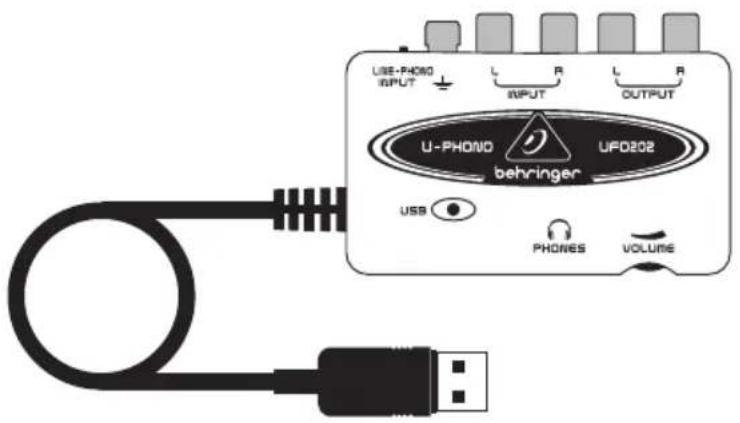
Use the USB connecting cable supplied with the UFO202 to connect the unit to your computer. The USB connection also supplies the UFO202 with current. You can connect a variety of devices and equipment to the inputs and outputs.
25 U-PHONO UFO202 User Manual
3. Operating Elements and Connections
![graph TD A["USB"] --> B["U-PHONE"] B --> C["UPO202"] C --> D["VOLUME"] D --> E["PHONES"] E --> F["USB"] F --> G["UBE-PHOTO INPUT"] G --> H["INPUT"] H --> I["UBE-PHOTO OUTPUT"] I --> J["OUTPUT"] J --> K["OUTPUT"] K --> L["OUTPUT"] L --> M["OUTPUT"] M --> N["OUTPUT"] N --> O["OUTPUT"] O --> P["OUTPUT"…](/content/2026/06/1281046/images/66c114150b7b25560db9f19bf09e1daa62c0644265bae6a40902963da17b303c.jpg)
1 L AND R RCA OUTPUTS: Connect an external monitoring device, such as a pair of monitor speakers, to the left and right RCA outputs. (this step is optional)
2 L AND R RCA INPUTS: Connect the audio source (record player, tape player, etc.) to the left and right RCA inputs.
3 GROUND CONNECTION: Some record players have a separate ground cable. If so, attach the cable to the ground terminal to avoid excessive noise and hum.
4 LINE/PHONO SWITCH: Move the switch on the top left to PHONO if transferring from a record player. For all other sources, select LINE.
Note: The PHONO inputs only support moving magnet cartridges. These are the most common type, so unless you know your player uses a moving coil cartridge, assume that your system will work.
5 HEADPHONES OUTPUT: Plug your headphones into the PHONES output using a 1/8 " mini plug.
6 HEADPHONES VOLUME: Adjust the headphones volume with the adjacent control.
7 USB CABLE: Plug the USB cable into a free USB port on your computer.
8 POWER INDICATOR: Upon connection, the UFO's power indicator will light up and the computer should automatically recognize the connection.
4. Software Installation
- This device requires no special setup or drivers, just plug it into a free USB port on a PC or Mac computer
- A free download of Audacity audio editing software is available on behringer.com. Simply navigate to the UFO202 product page, click the download tab, and scroll down to the Apps section where you can download the 'Audio Software for Windows' or 'Audio Software for Mac' bundle. This will help make the transfer process quick and simple. You can, of course, use another audio program of your choice.
26 U-PHONO UFO202 User Manual
EN
5. Hookup Diagram
![graph TD A["Computer"] -->|USB| B["Line/Phono"] B --> C["US-PHONO OUTPUT"] C --> D["U-PHONO UPC20E"] D --> E["Headphone Out"] F["RCA InsGround"] --> C G["RCA Outputs"] --> C H["USB"] --> D I["PDDR"] --> D J["ULUSS"] --> D](/content/2026/06/1281046/images/d6396760e1d602ff98193e7d8fd10706c11c2362c829f0b83ad89da1cefbba00.jpg)
5.1 Hooking up a record player
-
To transfer music from a record player, a special preamplification process must take place in order to boost the low signal level coming from the player. To do this, simply move the LINE/PHONO switch on the UFO202 to the right (PHONO selected).
-
Connect a stereo RCA cable from the record player outputs to the RCA inputs on the UFO202. The player will also likely have a ground cable that needs to be attached to the ground terminal on the UFO202.
-
Connect a monitoring device. You may plug speakers into the RCA outputs or connect a pair of headphones to the PHONES output.
- Connect the attached USB cable to a free USB port on your computer.
![graph TD A["Computer"] -->|USB| B["Line/Phono"] B --> C["U-PHONE"] C --> D["UFO22"] D --> E["Headphone Out"] F["RCA Ins"] --> C G["RCA Outputs"] --> C H["USB"] --> I["INPUT"] I --> J["R"] J --> K["OUTPUT"] K --> L["R"] L --> M["Output"] N["Speaker"] --> O["Line/Phono"]](/content/2026/06/1281046/images/a340b0da8022d164d7bb62fa0076e4ea1f412de61b317a861795eb8018a6be33.jpg)
5.2 Hooking up a tape player
- Move the LINE/PHONO switch on the UFO202 to the left (LINE selected).
- Connect a stereo RCA cable from the tape player outputs to the RCA inputs on the UFO202.
27 U-PHONO UFO202 User Manual
- Connect a monitoring device. You may plug speakers into the RCA outputs or connect a pair of headphones to the PHONES output.
- Connect the attached USB cable to a free USB port on your computer.
6. Recording Process
- After hookups have been made and software installed, you are ready to record the audio. Make sure your audio recording program is set to record input from the USB port. For simple record, cut, and export of stereo audio, you may prefer to use Audacity
- If recording from a tape player, make sure the player's volume is turned up all the way
- Adjust the input sensitivity of the recording program to achieve optimal sound quality. Too much signal will cause the recording to distort; too little signal will sound faint and thin, so record a test clip to ensure quality sound. The recording program should have meters that display the levels as the audio streams
- Set your recording program on your computer to RECORD, and begin playing the start of the tape or record immediately after
-
Let the audio play all the way through the first side. Once the music stops, press STOP on the recording program
-
Flip the tape or record over and repeat the recording process
- Once both sides are recorded, you may edit the file to cut out any extra time before or after the audio was captured. You may also cut the long track into individual songs and save the files separately. This process differs slightly depending on what program you are using, so refer to the software manual for editing procedures
- You can play back your stereo recorded audio through the UFO202 RCA outputs and PHONES output. You may want to apply equalization or other processing if your software application is so equipped
- If you plan to burn these files to a CD for use in a home stereo or car, save the audio in WAV format
28 U-PHONO UFO202 User Manual
EN
7. Audio Connections
Although there are various ways to integrate the UFO202 into your studio or live set-up, the audio connections to be made will basically be the same in all cases:
7.1 Wiring
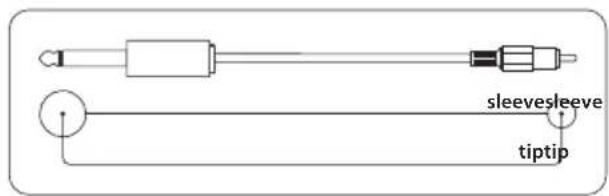
Please use standard RCA cables to connect the UFO202 to other equipment:

You can also use a 1/4 " adapter cable:
7.2 Headphones connection
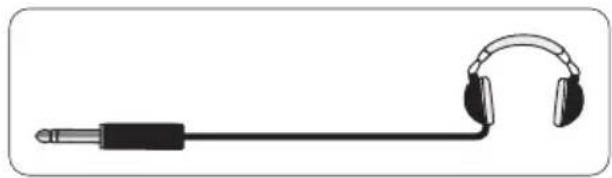
The UFO202 is provided with a headphones jack. Here, you can connect any standard pair of stereo headphones with a 1/8 " TRS connector.
Manual de uso

ES
U-PHONO UFO202
Audiophile USB/Audio Interface with Built-in Phono Preamp for Digitalizing Your Tapes and Vinyl Records

behringer
30 U-PHONO UFO202 Manual de uso
Gracias
7.2 Conexión de auriculares
36 U-PHONO UFO202 Manual de uso
FR
U-PHONO UFO202
Audiophile USB/Audio Interface with Built-in Phono Preamp for Digitalizing Your Tapes and Vinyl Records

behringer
DE
U-PHONO UFO202
Audiophile USB/Audio Interface with Built-in Phono Preamp for Digitalizing Your Tapes and Vinyl Records

behringer
PT
U-PHONO UFO202
Audiophile USB/Audio Interface with Built-in Phono Preamp for Digitalizing Your Tapes and Vinyl Records
![graph TD A["Computer"] -->|USB| B["Line/Phono"] B --> C["USB PROD INPUT"] C --> D["UPC20E Behringer"] D --> E["Headphone Out"] F["RCA InsGround"] --> G["RCA Outputs"] G --> H["Line/Phono"] H --> I["USB PROD INPUT"] I --> J["UPC20E Behringer"] J --> K["Headphone Out"] L["PCERS"] --> M["UCLUBS"] M -->…](/content/2026/06/1281046/images/276b82b2990d3b83ef5555edb6c1fc3548b9cb1ffc64b323de7d41ea55cf88d2.jpg)
PT
IT
U-PHONO UFO202
Audiophile USB/Audio Interface with Built-in Phono Preamp for Digitalizing Your Tapes and Vinyl Records

U-PHONO UFO202
Audiophile USB/Audio Interface with Built-in Phono Preamp for Digitalizing Your Tapes and Vinyl Records
NL

2.1 Verbinding hardware
Although there are various ways to integrate the UFO202 into your studio or live set-up, the audio connections to be made will basically be the same in all cases:
7.1 Wiring
You can also use a 1/4 " adapter cable:

7.2 Verbinding koptelefoon
NL
U-PHONO UFO202
Audiophile USB/Audio Interface with Built-in Phono Preamp for Digitalizing Your Tapes and Vinyl Records
SE

Tack själv
84 U-PHONO UFO202 Bruksanvisning
Instrukcja obsługi
U-PHONO UFO202
Audiophile USB/Audio Interface with Built-in Phono Preamp for Digitalizing Your Tapes and Vinyl Records
PL

Dziękuję Ci
92 U-PHONO UFO202 User Manual
Specifications
Line In
Connectors RCA, unbalanced
Input impedance approx. 27 kΩ
Max. input level 2 dBV
Line Out
Connectors RCA, unbalanced
Output impedance approx. 400 Ω
Max. output level 2 dBV
Phones Out
Socket 1/8 " TRS stereo jack
Output impedance approx. 50 Ω
Max. output level -2 dBu, 2 x 3,7 mW @ 100 Ω
USB 1.1
Connectors type A
Digital Processing
Converter 16-bit converter
Sample rate 32.0 kHz, 44.1 kHz, 48.0 kHz
System Data
Frequency response 10 Hz to 20 kHz,
±1 dB @ 44.1 kHz sample rate
10 Hz to 22 kHz,
±1 dB @ 48.0 kHz sample rate
THD 0.05% typ. @ -10 dBV, 1 kHz
Crosstalk -77 dB @ 0 dBV, 1 kHz
Signal-to-noise ratio A/D 89 dB typ. @ 1 kHz,
A-weighted
D/A 96 dB typ. @ 1 kHz,
A-weighted
93 U-PHONO UFO202 User Manual
Power Supply
USB connection 5 V, 100 mA max.
Dimensions / Weight
Dimensions (H x W x D) approx. 22 x 88 x 60 mm (0.9 x 3.5 x 2.4")
Weight approx. 0.10 kg (.2 lbs)
Behringer always takes great care to ensure the highest standard of quality.
Any modifications which may be necessary will be made without prior notification.
Technical data and appearance of the equipment can therefore differ from the details or illustrations shown.
94 U-PHONO UFO202 User Manual
EN
FEDERAL COMMUNICATIONS COMMISSION COMPLIANCE INFORMATION
Behringer
U-PHONO UFO202
Responsible Party Name: Music Tribe Commercial NV Inc.
Address: 5270 Procyon Street,
Las Vegas NV 89118, United States
Phone Number: +1 702 800 8290
U-PHONO UFO202
This equipment has been tested and found to comply with the limits for a Class B digital device, pursuant to part 15 of the FCC Rules. These limits are designed to provide reasonable protection against harmful interference in a residential installation. This equipment generates, uses and can radiate radio frequency energy and, if not installed and used in accordance with the instructions, may cause harmful interference to radio communications. However, there is no guarantee that interference will not occur in a particular installation. If this equipment does cause harmful interference to radio or television reception, which can be determined by turning the equipment off and on, the user is encouraged to try to correct the interference by one or more of the following measures:
- Reorient or relocate the receiving antenna.
- Increase the separation between the equipment and receiver.
- Connect the equipment into an outlet on a circuit different from that to which the receiver is connected.
- Consult the dealer or an experienced radio/TV technician for help.
This device complies with Part 15 of the FCC rules. Operation is subject to the following two conditions:
(1) this device may not cause harmful interference, and
(2) this device must accept any interference received, including interference that may cause undesired operation.
Important information:
Changes or modifications to the equipment not expressly approved by Music Tribe can void the user's authority to use the equipment.

Hereby, Music Tribe declares that this product is in compliance with Directive 2014/30/EU, Directive 2011/65/EU and Amendment 2015/863/EU, Directive 2012/19/EU, Regulation 519/2012 REACH SVHC and Directive 1907/2006/EC.
Full text of EU DoC is available at https://community.musictribe.com/
EU Representative: Music Tribe Brands DK A/S
Address: Ib Spang Olsens Gade 17, DK - 8200 Aarhus N, Denmark
95 U-PHONO UFO202 User Manual
EN
We Hear You

behringer


- 2 U-PHONO UFO202 USER MANUAL
- EN
- TABLE OF CONTENTS
- 4 U-PHONO UFO202 USER MANUAL
- LEGAL DISCLAIMER
- LIMITED WARRANTY
- 5 U-PHONO UFO202 USER MANUAL
- BESCHRÄNKTE GARANTIE
- WAARSCHUWING
- BEFORE YOU GET STARTED
- 1.1 SHIPMENT
- 1.2 INITIAL OPERATION
- 1.3 ONLINE REGISTRATION
- SYSTEM REQUIREMENTS
- 2.1 HARDWARE CONNECTION
- 25 U-PHONO UFO202 USER MANUAL
- OPERATING ELEMENTS AND CONNECTIONS
- SOFTWARE INSTALLATION
- 26 U-PHONO UFO202 USER MANUAL
- HOOKUP DIAGRAM
- 5.1 HOOKING UP A RECORD PLAYER
- 5.2 HOOKING UP A TAPE PLAYER
- 27 U-PHONO UFO202 USER MANUAL
- RECORDING PROCESS
- 28 U-PHONO UFO202 USER MANUAL
- AUDIO CONNECTIONS
- 7.1 WIRING
- 7.2 HEADPHONES CONNECTION
- MANUAL DE USO
- U-PHONO UFO202
- 30 U-PHONO UFO202 MANUAL DE USO
- GRACIAS
- 7.2 CONEXIÓN DE AURICULARES
- 2.1 VERBINDING HARDWARE
- 7.2 VERBINDING KOPTELEFOON
- TACK SJÄLV
- INSTRUKCJA OBSŁUGI
- DZIĘKUJĘ CI
- 92 U-PHONO UFO202 USER MANUAL
- SPECIFICATIONS
- LINE IN
- LINE OUT
- PHONES OUT
- USB 1.1
- DIGITAL PROCESSING
- SYSTEM DATA
- 93 U-PHONO UFO202 USER MANUAL
- POWER SUPPLY
- DIMENSIONS / WEIGHT
- 94 U-PHONO UFO202 USER MANUAL
- FEDERAL COMMUNICATIONS COMMISSION COMPLIANCE INFORMATION
- BEHRINGER
- IMPORTANT INFORMATION
Brand : BEHRINGER
Model : U-Phono UFO202
Category : Audio/video converter