
HF8005 - Scale PHILIPS - Free user manual and instructions
Find the device manual for free HF8005 PHILIPS in PDF.


| Product Type | Digital Scale |
| Model | HF8005 |
| Brand | Philips |
| Dimensions (W x D x H) | 30 x 30 x 2 cm |
| Weight | 1.5 kg |
| Power Source | 2 x AAA batteries (included) |
| Maximum Capacity | 180 kg / 396 lbs |
| Graduation | 100 g / 0.2 lbs |
| Display Type | LCD screen |
| Platform Material | Tempered glass |
| Color | White with silver accents |
| Auto-Off | Yes, after 10 seconds of inactivity |
| Overload Indicator | Yes |
| Low Battery Indicator | Yes |
| Unit Switching | kg / lb / st |
| Non-Slip Feet | Yes |
| Cleaning | Wipe with a damp cloth; do not immerse |
| Warranty | 2 years |
| Included Accessories | Batteries, user manual |
Frequently Asked Questions - HF8005 PHILIPS
User questions about HF8005 PHILIPS
0 question about this device. Answer the ones you know or ask your own.
Ask a new question about this device
Download the instructions for your Scale in PDF format for free! Find your manual HF8005 - PHILIPS and take your electronic device back in hand. On this page are published all the documents necessary for the use of your device. HF8005 by PHILIPS.
USER MANUAL HF8005 PHILIPS
natural_image
Diagram of a device panel with four pins and an arrow indicating a directional change (no text or symbols)
natural_image
Close-up of a battery pack with two batteries and a separate inset showing three stacked batteries (no text or symbols visible)
natural_image
Circular digital display with clock face, battery, and smiley face (no text or symbols)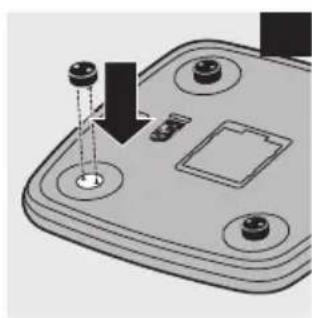
natural_image
3D diagram of a device with four circular components and a downward arrow indicating a process or operation (no text or symbols present)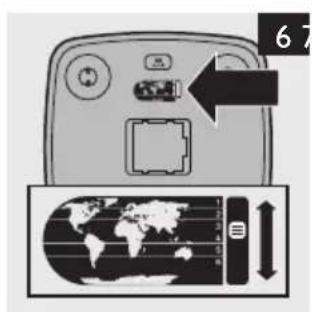


ENGLISH 6
DANSK 12
DEUTSCH 18
ΕΛΛΗΝΙΚΑ 25
SUOMI 32
NORSK 38
SVENSKA 44
Weight management
ENGLISH 52
DANSK 55
DEUTSCH 58
ΕΛΛΗΝΙΚΑ 61
SUOMI 65
NORSK 68
SVENSKA 71
Important
Read this user manual carefully before you use the appliance and save it for future reference.
Danger
- Make sure your hands and the appliance are dry when you insert the batteries.
- Always use the appliance on a stable, level and horizontal surface.
- Do not step onto the scales with wet feet, as this may cause you to slip.
Warning
- Do not immerse the appliance in water or rinse it under the tap.
- This appliance is not intended for use by persons (including children) with reduced physical, sensory or mental capabilities, or lack of experience and knowledge, unless they have been given supervision or instruction concerning use of the appliance by a person responsible for their safety.
- Children should be supervised to ensure that they do not play with the appliance.
Caution
- Do not place anything on the appliance when you store it.
- This appliance is intended for household use only.
- Do not start a weight reduction or exercise therapy without consulting your doctor or health professional.
Electromagnetic fields (EMF)
This Philips appliance complies with all standards regarding electromagnetic fields (EMF). If handled properly and according to the instructions in this user manual, the appliance is safe to use based on scientific evidence available today.
General description (Fig. 1)
A Display
1 Battery low indication
2 Unit of measurement
3 Happy/neutral smiley
4 OK symbol
5 User number
6 Dustbin symbol
7 Actual weight
8 Overall target weight/daily target weight
B USER button
C SET button
D 'Up' and 'down' buttons (▼/ ▲)
Preparing for use
Inserting batteries
The appliance runs on four LR6 AA 1.5-volt batteries (included). We strongly advise you to use Philips PowerLife batteries on account of their long life and environmental friendliness.
1 Remove the battery compartment cover (Fig. 2).
2 Insert the batteries and reattach the battery compartment cover (Fig. 3).
Make sure the + and - poles of the batteries point in the right direction.
3 Step onto the scales to let the appliance perform an automatic calibration.
The reading shown on the display during calibration is irrelevant.
Replacing the batteries
1 Replace the batteries when the battery low indication appears on the display (Fig. 4).
2 Step onto the scales to let the appliance perform an automatic calibration.
The reading shown on the display during calibration is irrelevant.
Attaching/removing the carpet feet
If you want to use the scales on thick-pile carpet, attach the carpet feet supplied
1 Push the carpet feet into the holes in the bottom of the appliance (Fig. 5).
If you want to remove the carpet feet, pull them out of the holes.
Improving the accuracy of the scales
The appliance is equipped with gravity zones. These gravity zones improve the accuracy of the scales because they compensate for gravity differences across the world.
1 Set the slide to the zone (1-6) closest to the location where you use the scales (Fig. 6).
Adjusting the unit of measurement
1 Set the slide to the preferred unit of measurement (kg, st or lb) (Fig. 7).
The display shows the selected unit of measurement and how the weight is displayed (Fig. 8).
Setting the time and date
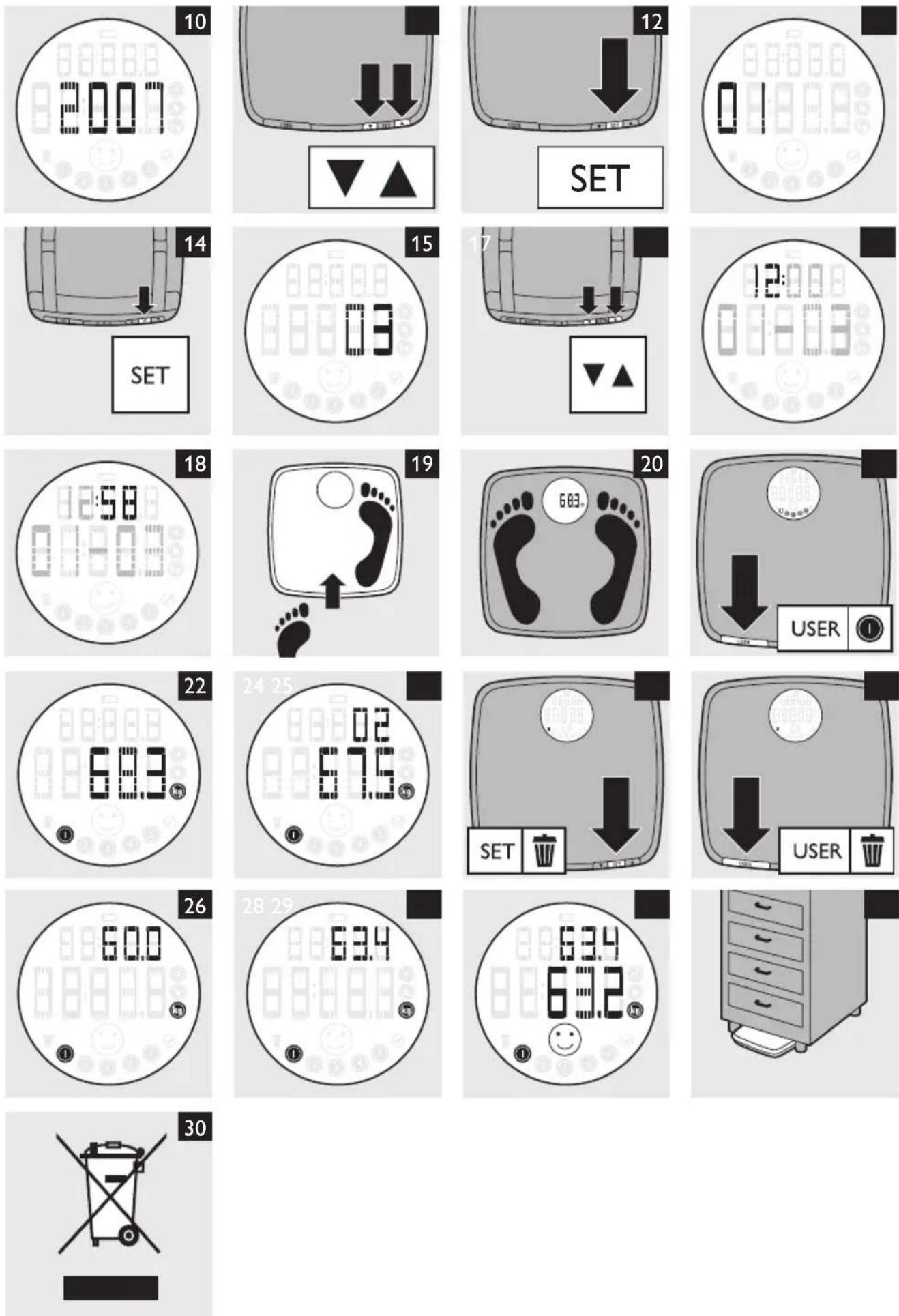
1 When the appliance is off, press the SET button for 2 seconds (Fig. 9).
The year indication starts to flash (Fig. 10).
2 Set the year with the ▲ and ▼ buttons. (Fig. 11)
3 Press the SET button to confirm the year (Fig. 12).
The month indication starts to flash (Fig. 13).
4 Set the month with the ▲ and ▼ buttons. (Fig. 11)
5 Press the SET button to confirm the month (Fig. 14)
The day indication starts to flash (Fig. 15).
6 Set the day with the ▲ and ▼ buttons. (Fig. 16)
7 Press the SET button to confirm the day (Fig. 12).
The hour indication starts to flash (Fig. 17).
8 Set the hour with the ▲ and ▼ buttons. (Fig. 11)
9 Press the SET button to confirm the hour (Fig. 12).
The minutes indication starts to flash (Fig. 18).
10 Set the minutes with the ▲ and ▼ buttons. (Fig. 11)
11 Press the SET button to confirm the minutes (Fig. 12).
The time and date have been set and the appliance switches off automatically.
12 To see the time and date, press the SET button when the appliance is off.
Using the appliance
Measuring body weight
1 Step onto the scales (Fig. 19).
The appliance switches on automatically.
Your weight is displayed after a few seconds (Fig. 20).
ENGLISH8
2 Step off the scales.
The appliance switches off automatically.
Note: Weighing should take place under identical conditions to ensure valid comparisons. The ideal time to weigh is in the morning before breakfast
Storing your weight in the memory
The appliance can store up to 36 weight measurements for up to five users. This makes it easier to track changes in your weight over time.
1 Repeatedly press the USER button until the display shows the right user number (Fig. 21).
2 Step onto the scales.
Your weight is displayed after a few seconds (Fig. 22).
Your weight is automatically stored under the selected user number.
Alternative storing method
You can also store your weight after weighing without first selecting a user number in the following way:
1 Step onto the scales.
The appliance switches on automatically.
Your weight is displayed after a few seconds.
2 Step off the scales.
3 Repeatedly press the USER button until the display shows the right user number (Fig. 21).
4 Press the SET button to store your weight under the selected user number (Fig. 12).
The appliance switches off automatically.
Retrieving measured weights from the memory
1 Repeatedly press the USER button until the display shows the right user number (Fig. 21).
2 Press the ▲ and ▼ buttons to browse through your weight history. (Fig. 11)
The first line of the display alternately shows the measurement number and the measurement date. The second line of the display shows the weight measured on this date. (Fig. 23)
Deleting a single weight from your weight history
1 Repeatedly press the USER button until the display shows the right user number (Fig. 21).
2 Press the ▲ and ▼ buttons to browse through your weight history. (Fig. 11)
Stop browsing when the display shows the weight you want to delete.
3 Press the SET button for 2 seconds until the dustbin symbol appears on the display (Fig. 24).
4 Press the ▲ or ▼button until the dustbin symbol starts flashing.
5 Press the SET button again to delete the weight (Fig. 12).
Note: If you do not want to delete the weight, press the ▲ or ▼ button.
Deleting all data of a user
1 Repeatedly press the USER button until the display shows the right user number (Fig. 21).
2 Press the USER button for 2 seconds until the display shows the dustbin symbol (Fig. 25).
3 Press the SET button to delete all data under the selected user number (Fig. 12).
Note: If you do not want to delete the data stored under the selected user number, press the ▲ or ▼ button until the user number and the OK symbol flash. Then press the SET button.
Target weight function
With the target weight function, you can compare your actual weight with your daily target weight during a weight management programme. Before you can use this function, you have to set a target weight. Read the separate weight management instructions for information about determining your target weight and other tips.
Entering an overall target weight
1 Repeatedly press the USER button to select a user number.
2 Press the SET button (Fig. 12).
The overall target weight flashes on the display. The default overall target weight is 80kg (Fig. 26).
3 Set your overall target weight with the ▲ and ▼ buttons. (Fig. 11)
4 Press the SET button again to confirm the overall target weight (Fig. 12).
Note: If there is already a list of weights stored under the user number for which you set an overall target weight, all weights are deleted from this user number, except the first and the last weight measured.
Weighing with the target weight function
Note: The target weight function only works if you have set the date and time.
1 Repeatedly press the USER button to select a user number.
The first line of the display shows your overall target weight (Fig. 26).
2 Step onto the scales and wait until the reading is stable.
The first line of the display shows your daily target weight. (Fig. 27)
The daily target weight is the weight you should achieve today if you are on track with your weight management programme. For example: Your starting weight is 60kg. The fixed weight loss of the scales is 0.1kg a day. This means that your daily target weight on the fifth day of your weight management programme is 60-5x0.1 = 59.5kg.
The scales calculate your daily target weight automatically.
3 The second line of the display shows your current weight.
If a happy smiley appears on the display, you are on track with your weight management programme (Fig. 28).
If there is no smiley on the display, you are up to 1kg above your daily target weight (in case of weight loss) or down to 1kg below your daily target weight (in case of weight gain). In this case, you are still within the healthy range, but you may need to be careful not to lose or gain weight too slowly.
If a neutral smiley appears on the display, you are more than 1kg above or below your daily target weight, which means that you are gaining weight or losing weight too quickly.
The first 24 hours after you have set an overall target weight, no smiley appears on the display.
If you have reached your overall target weight, the happy smiley flashes.
Cleaning
Never use scouring pads, abrasive cleaning agents or aggressive liquids such as petrol or acetone to clean the appliance.
1 Clean the scales with a damp cloth.
Storage
- Store the scales horizontally (Fig. 29).
Environment
- Batteries contain substances that may pollute the environment. Do not throw away batteries with the normal household waste, but dispose of them at an official collection point for batteries. Always remove the batteries before you discard and hand in the appliance at an official collection point.
- Do not throw away the appliance with the normal household waste at the end of its life, but hand it in at an official collection point for recycling. By doing this, you help to preserve the environment (Fig. 30).
Guarantee and service
If you need information or if you have a problem, please visit the Philips website at www.philips.com or contact the Philips Customer Care Centre in your country (you find its phone number in the worldwide guarantee leaflet). If there is no Customer Care Centre in your country, go to your local Philips dealer or contact the Service Department of Philips Domestic appliances and Personal Care BV.
Troubleshooting
This chapter summarises the most common problems you could encounter with your appliance. If you are unable to solve the problem with the information below, contact the Philips Customer Care Centre in your country.
Problem Solution
| There is a battery symbol on the display. | The batteries are almost empty. Replace the batteries (see chapter 'Preparing for use'). After replacing the batteries, you have to reset the time and date. The weights stored under the user numbers and the target weights set are still in the memory. |
| The display shows a strange weight after I insert the batteries. | After you have inserted batteries, the appliance calibrates automatically. This causes the appliance to show a strange weight. The next time you use the appliance, the weight displayed is normal and accurate. |
| The displayed body weight is abnormally high or low. | Perhaps the appliance is placed on a carpeted floor. Use the carpet feet provided, or place the scales on a solid, level surface. |
| The message 'Err' is on the display. | The weight on the scales may be too high. The measurement range of the appliance is 10-180kg. |
| The message 'Err1' is on the display | The weight on the scales may be too low. The measurement range of the appliance is 10-180kg. If you want to weigh an object below 10kg, first weigh yourself. Then weigh yourself while you hold the object. The difference between the two values is the weight of the object. |
| '----' is on the display. The appliance calibrates automatically. Step off the scales and wait until the appliance switches off automatically. After 3 seconds, the calibration is completed and the appliance is ready for use. | |
Frequently asked questions
1 How does the gravity zone improve the accuracy of the scales?
The earth's gravity force varies at different latitudes in the world. As a result, you weigh less when you are closer to the equator and more when you are closer to the poles. The gravity zones compensate for this difference. The compensation for a person of 80kg is up to 100g lighter from equator to north pole and up to 250g heavier from equator to south pole. When you select the zone closest to where you live, your weight is displayed with improved (absolute) accuracy. This makes it easier to compare your weight measured by these scales at home with your weight measured by professionally calibrated scales as often used by doctors, dietitians or fitness centres.
2 How do I set the gravity zone?
See chapter 'Preparing for use'.
3 Is it safe for pregnant woman to use these scales?
Yes, measurement is entirely safe. Of course, the weight displayed also includes the weight of the baby.
4 How does the target weight function help me achieve my ideal weight?
To achieve anything in life, you first need to set yourself a clear goal. And then you need discipline and motivation to work towards that goal. If the challenge is too big, you become discouraged before you even get started. The target weight function helps you set a goal and then helps you to work towards that goal by showing you your daily target weight (i.e. target weight on a particular day) instead of your ultimate goal (i.e. your overall target weight). Measuring weight loss in daily steps makes it easier to see progress and helps you stay motivated day after day.
5 Does the accuracy of the scales decrease over time?
No. The appliance automatically calibrates itself after each measurement. Moreover, the appliance is equipped with 4 sensors that make it possible to achieve continuously accurate results with a simple mechanical structure.
Vigtigt
Thank you for buying these digital scales from Philips. We hope this appliance helps you work towards the body weight you want to achieve. We know this is not easy, as it often involves lifestyle changes, such as changes in habits and daily patterns. Moreover, it is a slow process. Weight only changes step by step over time, which makes it difficult to see progress and to stay motivated.
Most weight management programmes consist of the following 4 elements:
1 Make a plan: what is your current weight, what is your ideal weight, what actions are you going to take to achieve your ideal weight (e.g. exercising more regularly and/or changing your eating habits).
2 Take action: exercise more regularly and/or change your eating habits.
3 Monitor the progress of weight change.
4 Staying motivated and disciplined.
These scales do not help you to exercise more regularly or to change you eating habits: you have to decide to make these changes and stick to this decision. You have to be disciplined in making these changes and in taking follow-up actions. There are plenty of special organisations and online resources available that can help you change your eating habits or increase your physical activity level. If you do not know where or how to start, consider consulting a dietitian or fitness instructor at your local gym.
However, these Philips digital scales make it easier for you to achieve your ideal weight by showing you whether you are on the right track towards achieving your overall goal every day. They also allow you to look back, so that you can track weight changes over time. And because the scales have 5 user memory locations, they can do the same for 4 other persons in your household.
Calculating body mass index (BMI)
There are many methods for establishing whether you have a healthy weight or not. A relatively simple method is to make use of your current weight and height. An index called body mass index (BMI) is then calculated with the formula below:
BMI = body weight (kg) ÷ body height (m) ÷ body height (m)
The weight categories associated with BMI ranges for adults are shown in the following table.
BMI Status
<18.5 underweight
18.5-24.9 normal
25.0-29.9 overweight
30.0 obese
Determining your target weight
You may want to start a weight management programme after consulting the table above. We recommend that you consult a doctor if you are overweight and are trying to reduce your weight, or if you are underweight and are trying to put on weight. Most experts and professional weight management programmes start with setting yourself a target weight, as this gives you a clear and tangible direction and makes it easy to measure success.
To set a target weight, choose the desired BMI from the table in chapter 'Calculating body mass index (BMI)'. Then calculate your target weight with the following formula:
Target weight = desired BMI × your height (m) × your height (m)
Example
Say you are 1.75m tall and your desired BMI is 24.9. Your target weight is:
Target weight = 24.9 × 1.75 × 1.75 = 76.3kg
Tip: Consider working towards your target weight in steps by setting 5kg targets.
Tip: Of course you are free to deviate from this if you already have a target weight in mind.
Achieving your target weight
The difference between your overall target weight and your current weight can be quite large. This can be quite discouraging, as you will ask yourself how you will ever be able to achieve this target weight. Moreover, it also makes it difficult to determine whether you are on the right track or not.
Daily targets
Your new digital scales split up the (large) difference between your current weight and your overall target weight into smaller and more manageable daily targets. These daily targets are easier to achieve and give you a better idea of whether you are on the right track towards achieving your overall target weight or not.
Every time you weigh yourself, the scales show, besides your overall target weight, a daily target weight and inform you whether you have achieved this daily target weight or not. This enables you to determine whether you are still on track to achieve your overall target weight, whether you need to work harder or whether you can relax your efforts a little. In this way, the scales keep you motivated day after day, so that you can focus your efforts on your exercise and diet programme.
Weighing tips
Weight tracking is most useful if you record your weight every day, at the same time of day, under the same circumstances. This allows you to observe changes over an extended period of time. The best time to weigh yourself is right after you wake up in the morning. Since you will not have eaten since going to sleep, your body tends to have its most consistent weight at that time. Always weigh yourself dressed the same way.
Certain other factors can also affect weight measurement:
- Having a meal (leads to a higher weight)
- Physical activity/sports (leads to a lower weight)
- Menstrual cycle (leads to fluctuations in weight)
Weight loss progress (Fig. 1)
Most weight programmes recommend a healthy speed of losing weight of about 0.7-1kg (1.5-2lb) a week. If you lose weight too fast, you may be losing water instead of fat or you may have a health condition that requires medical attention. If you lose weight too slowly, you may have to make a greater effort to reach your target weight and it will take longer to achieve your target weight. These Philips digital scales calculate your daily weight target on the basis of a healthy weight loss speed. Based on your current weight, your daily target weight decreases by 0.1kg a day. So after one week, your daily weight target is about 0.7kg lower than your current weight.
The thick line shows the ideal speed of losing weight. In reality, this line is never straight as your weight fluctuates throughout the day due to several factors (e.g. physical activities, food/fluid intake and the time of day). The scales make use of a margin to compensate for these daily fluctuations. If the weight measured is down to 1kg below your daily target weight, the result is considered OK and you see a happy smiley. If you are up to 1kg above your daily target weight, there may be a reason for concern and you do not see a smiley. If your weight is more than 1kg above or below your daily target weight, you are losing weight either too quickly or too slowly. In these cases, you see a neutral smiley.
Weight gain progress (Fig. 2)
These Philips digital scales calculate your daily weight target on the basis of a healthy weight gain speed. Based on your current weight, your daily target weight increases by 0.1kg a day. So after one week, your daily weight target is about 0.7kg higher than your current weight.
ENGLISH54
The thick line shows the ideal speed of gaining weight. In reality, this line is never straight as your weight fluctuates throughout the day due to several factors (e.g. physical activities, food/fluid intake and the time of day). The scales make use of a margin to compensate for these daily fluctuations. If the weight measured is up to 1kg above your daily target weight, the result is considered OK and you see a happy smiley. If you are down to 1kg below your daily target weight, there may be a reason for concern and you do not see a smiley. If your weight is more than 1kg above or below your daily target weight, you are gaining weight either too quickly or too slowly. In these cases, you see a neutral smiley.
Using the scales
If the display shows a happy smiley after weighing, you are within the healthy range, which means you are on track to achieve your overall target weight. In this case, no special attention is required, just continue with your weight management programme.
If there is no smiley on the display, you are up to 1kg above your daily target weight in case of weight loss or down to 1kg below your daily target weight in case of weight gain. In this case, you are still within the healthy range, but you may need to be careful not to lose or gain weight too slowly.
If the display shows a neutral smiley after weighing, you are not within the healthy range (more than 1kg below or above your daily target weight). In this case, you are losing or gaining weight too slowly or too quickly. Modify your weight management programme to get back on track.
Tip: If you continuously see a neutral smiley for a known reason, for example because you ate too much on holiday, consider modifying your target weight. When you set a new target weight, the scales recalculate your daily weight target based on your current weight. In this case, the weights already stored under your user number are deleted, except the first and the last weight measured.
If the happy smiley flashes, you have reached your overall target weight. Congratulations!
When you set an overall target weight, no smiley appears on the display for the next 24 hours.
If you want to keep your current weight, you can set your current weight as the overall target weight.
You can check your weight history at any time by retrieving measured weights from the memory.
Introduktion



- Weight management
- Important
- Danger
- Warning
- Caution
- Electromagnetic fields (EMF)
- General description (Fig. 1)
- Preparing for use
- Inserting batteries
- Replacing the batteries
- Attaching/removing the carpet feet
- Improving the accuracy of the scales
- Adjusting the unit of measurement
- Setting the time and date
- Using the appliance
- Measuring body weight
- ENGLISH8
- Storing your weight in the memory
- Alternative storing method
- Retrieving measured weights from the memory
- Deleting a single weight from your weight history
- Deleting all data of a user
- Target weight function
- Entering an overall target weight
- Weighing with the target weight function
- Cleaning
- Storage
- Environment
- Guarantee and service
- Troubleshooting
- Frequently asked questions
- Vigtigt
- Calculating body mass index (BMI)
- BMI Status
- Determining your target weight
- Example
- Achieving your target weight
- Daily targets
- Weighing tips
- Weight loss progress (Fig. 1)
- Weight gain progress (Fig. 2)
- ENGLISH54
- Using the scales
- Introduktion
Brand : PHILIPS
Model : HF8005
Category : Scale