
DL8780 - Scale PHILIPS - Free user manual and instructions
Find the device manual for free DL8780 PHILIPS in PDF.


| Product type | Connected bathroom scale |
| Brand | Philips |
| Model | DL8780 |
| Maximum capacity | 150 kg / 330 lb |
| Accuracy | 100 g / 0.2 lb |
| Units of measurement | kg, lb, st |
| Technology | Electronic weight sensors |
| Display | Digital LCD, backlit |
| Platform dimensions | 30 x 30 cm |
| Material | Tempered glass, non-slip base |
| Power supply | 2 AAA batteries (not included) |
| Battery life | Approximately 1 year (normal use) |
| Functions | Simple weighing, weight memory, auto-off, low battery indicator |
| Connectivity | Not connected |
| Care and cleaning | Clean with a damp cloth; do not immerse in water |
| Safety | Non-slip surface, automatic shut-off in case of overload |
| Spare parts and repairability | Batteries easily replaceable; no spare parts available |
| General information | Indoor use, flat and hard surface required |
Frequently Asked Questions - DL8780 PHILIPS
User questions about DL8780 PHILIPS
0 question about this device. Answer the ones you know or ask your own.
Ask a new question about this device
Download the instructions for your Scale in PDF format for free! Find your manual DL8780 - PHILIPS and take your electronic device back in hand. On this page are published all the documents necessary for the use of your device. DL8780 by PHILIPS.
USER MANUAL DL8780 PHILIPS
natural_image
Illustration of an open book with a grid pattern on the left and a closed page on the right, showing no text or symbols.
-1
1_
-1
1
English 6
Deutsch 20
Français 35
Italiano 50
Nederlands 64
6 English
Introduction
Congratulations on your purchase and welcome to Philips! To fully benefit from the support that Philips offers, register your product at www.philips.com/welcome.
General
This Philips body analysis scale offers you a convenient tool to measure your weight.
The scale enables you to perform a body weight and fat measurement, to transmit data via Bluetooth ^® to your mobile device and to calculate and display weight, BMI and body fat in the Philips HealthSuite health app. The scale has a maximum weighing capacity of up to 180kg.
Note: Only weight measurement is displayed on the scale. BMI and body fat are only shown in the app.
This user manual contains important safety information and provides step-by-step instructions for using the device.
Read this information carefully before you use the device and save it for future reference.
Features:
- Memory for up to 40 measurements per user for 8 separate users.
- Measures body fat with BIA (bioelectrical impedance analysis) technology.
- User recognition based on weight.
- Automatic activation of the scale when you step on it thanks to the Sense-On technology.
- LCD display.
Explanation of symbols
The warning signs and symbols are essential to ensure that you use this product safely and correctly and to protect you and others from injury. Below you find the meaning of the warning signs and symbols on the label and in the user manual.

Symbol indicates the need for the user to consult the instructions for use.

This symbol means: Do not throw away with the normal household waste. For further instructions, see chapter 'Recycling'.
Bluetooth
Bluetooth ^® symbol. This symbol means

is product contains
batteries which shall not be disposed of with normal household waste. For further instructions, see chapter 'Recycling'.

Symbol for 'the device complies with European Directives'. CE stands for 'Conformité Européenne'.

This symbol means the device complies with European Radio and telecommunications terminal equipments (RTTE) Directive 1999/5/EC.
| SN | Indicates the manufacturer's serial number so that a specific device can be identified. | Symbol for the 2 year Philips guarantee. | |
| Indicates the need for the user to consult the instructions for use for important cautionary information such as warnings and precautions that cannot, for a variety of reasons, be presented on the medical device itself. | For indoor use only. | ||
| Indicates manufacturing date | Indicates the temperature limits to which the device can be safely exposed.-20°C to 60°C. | ||
| Indicates the manufacturer, as defined in EU Directives 93/42/EEC. | The Green Dot ('Der Grüne Punkt' in German) is the license symbol of a European network of industry-funded systems for recycling the packaging materials of consumer goods. |
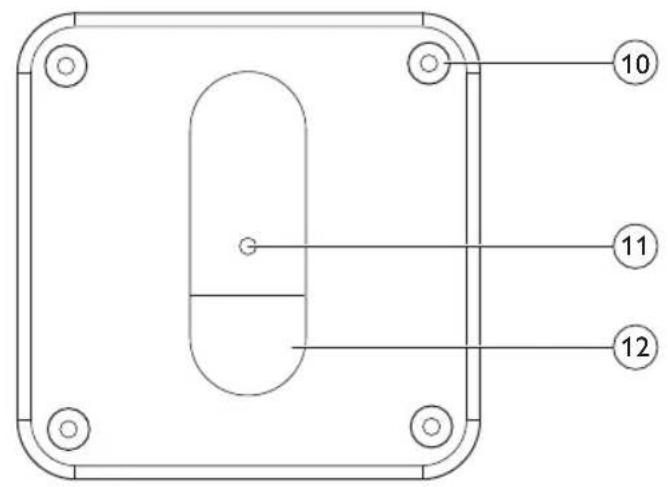
General description (Fig. 1)
1 Display
2 Measurement platform
3 Bluetooth® symbol
4 Measurement results
5 Battery low symbol
6 Bioelectrical impedance analysis (BIA)
7 Stone (st)
8 Pound (lb)
9 Kilogram (kg)
10 Feet of the scale
11 Measurement unit button
12 Battery compartment
Important safety information
Read this important information carefully before you use the device and save it for future reference.
Intended use
The Philips body analysis scale measures body weight and uses bioelectrical impedance analysis (BIA) technology to estimate body fat of healthy adults 18 years of age and older.
The device is intended for use in the home/domestic environment only.
Contraindications

- This device is contraindicated for women who are pregnant or think they are pregnant. The effects of this device on the fetus are unknown.
8 English
- This device is contraindicated for any person who is connected to a wearable or implanted electronic medical device or instrument such as a pacemaker or defibrillator. This device can cause the electronic medical device to malfunction.
Warning

- Keep the device out of reach of infants, children or pets, since inhalation or swallowing of small parts (eg. carpet feet, batteries) can be dangerous or even fatal.
- Do not step on the device when your body or feet are wet, especially after bathing or showering to prevent slipping.
- Always check the device before you use it. Do not use the device if it is damaged, as this may cause injury.
- Only use this device for its intended use as described in this user manual. Any misuse can cause electric shock, burns, fire and other unexpected hazards.
Caution

- Never use scouring pads, abrasive cleaning agents or aggressive liquids such as petrol or acetone to clean the device.
- This device is equipped with a data transmission function. It may emit electromagnetic energy so as to perform its intended function. Nearby portable and mobile Radio Frequency (examples include cell phones, Bluetooth® equipped music players, speakers and headsets as well as Wifi access points) communication equipment can affect the performance of the device. The device can also interfere with electrical equipment in the vicinity. Therefore do not keep it in close proximity of portable and mobile Radio Frequency communication equipment.
- Use and store the device as described in the user manual.
- Do not expose the device to extreme temperatures, direct sunlight, moist or a corrosive environment (see 'Specifications').
- Do not expose the batteries to flames or fires, otherwise batteries may explode.
- No modifications of this device are allowed.
- This device is not washable. Never immerse the device in water and do not rinse it under the tap.
- Any information provided by this device is in no way meant to treat, cure or prevent any disease or illness. If in doubt, contact your doctor.

Compliance with standards
This Philips device complies with all applicable standards and regulations regarding exposure to electromagnetic fields.
Using the body analysis scale
This Philips body analysis scale automatically switches on as soon as you step on the measurement platform. The device applies BIA (bioelectrical impedance analysis) technology. Weak current flows through the human body so as to measure the bioelectrical impedance and estimate body fat percentage. The electrical current is small and may not be felt. This BIA technology is non-invasive and toxic-free. The electrical current mentioned above is less than 1mA.
Preparing for use
Inserting/removing the batteries
Insert new batteries (4x 1.5V AAA) before the first use.
Replace weak batteries before they discharge completely.
Note: Data will be lost when the battery is completely empty.
If you do not intend to use the device for a long period of time, it is advised to remove the batteries before storing.
Caution: Replace all four batteries at the same time. Do not mix the old batteries with the new ones.

This device has a battery low indication. When the battery level is below operating value, this will be indicated by the low battery icon after which the device shall switch off within 4 sec.
natural_image
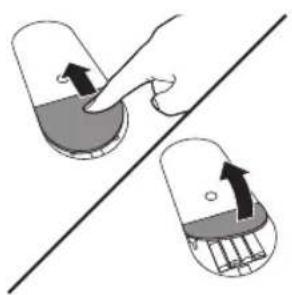
Illustration of a hand pressing down on a capsule-shaped object with arrows indicating force direction (no text or symbols)1 Open the battery compartment at the back of the device.
2 Insert the batteries (4x 1.5V AAA) into the battery compartment according to the polarity indications marked inside the compartment.
10 English
- The digits "8888" will show on the display.
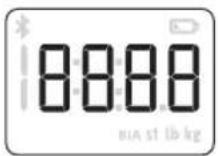
3 Close the battery compartment and wait until the digits "0.0kg" are shown on the display.

Placing the carpet feet
Soft surfaces such as carpet will affect the performance of the device. Always install the supplied carpet feet in case you place the device on a soft surface to prevent the soft surface from affecting the performance.

natural_image
Diagram of a mechanical component with a cylindrical part inserted, showing a magnified view of the part (no text or symbols present)1 Remove the non-slip pads from the feet of the device.

natural_image
Diagram of a computer mouse on a stand with a magnified inset showing the handle (no text or symbols)2 Fit the carpet feet firmly onto the feet of the device.
Setting the measurement unit

natural_image
Hand placing a small object into a tray with a black arrow indicating downward motion (no text or symbols)1 Press the measurement unit button in the bottom of the device to select the measurement unit.
- The default measurement unit is 'kg' (kilograms).

2 Press the measurement unit button again to switch between the available measurement units: kilograms, pounds and stones.
Pairing the body analysis scale to your mobile device and create a user profile
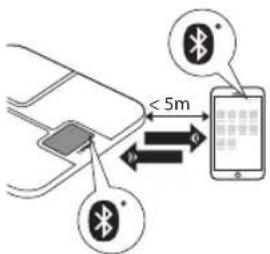
Your Philips body analysis scale is equipped with Bluetooth ^® . Download the Philips HealthSuite health app from the App store or Google Play. Use the search term 'Philips HealthSuite health app'. The app is available for iOS 8.0+ and Android 4.4+.
Note: You can only use the Philips HealthSuite health app to communicate with the scale. It is not possible to use third party applications.
1 Download the Philips HealtSuite health app on your mobile device, start the Setup wizard and follow the steps to create a user profile and add the scale.
2 Make sure the app is open and Bluetooth ^® is on when pairing is in progress.
- Keep the mobile device and the scale at transmission distance (no more than 5 meters from each other, in the same room).
3 To start the pairing process press the measurement unit button for 3 seconds.
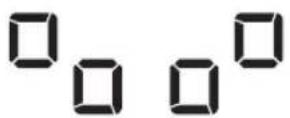
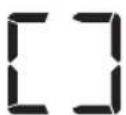
- These symbols are shown on the display alternately, indicating that the connection is being established.
- If the connection has been established successfully, the display shows this symbol.
12 English
EI
- If the connection has failed, the display shows this symbol.
4 In the app, create the profile you want to use for the connection.
- The scale can create 8 user profiles.
- If all profiles are in use, choose an existing profile to overwrite.
5 Now step on the scale barefoot to do an initial weighing. That weight is assigned to your user profile. The scale switches off automatically.
Note: If you want to edit your user profile later on, make sure the scale is turned on and connected to the health app.
Measuring weight and body fat
Tips for proper measurement
To ensure accurate measurements, please follow these instructions when you start measuring.
- Place the device on a flat, hard surface. Soft surfaces such as carpet affect the performance of the device. If you use the device on a soft surface, make sure you attach the carpet feet supplied to the feet of the device (see 'Placing the carpet feet'). This helps to prevent soft surfaces from affecting the performance of the device.
- A bioelectrical impedance analysis (BIA) measurement can only be performed if you are barefoot.
- Step onto the device barefoot, make sure your feet are slightly damp and clean. Stand still and keep full contact with the measurement platform until the measurement is complete. Be careful not to slip.
- The condition of the skin of the soles of your feet can affect the measurement. The natural effects of aging or activity can make this skin hard.
- Replace batteries before they are completely empty.
- For a meaningful comparison, try to measure under similar conditions. For example, take measurements at approximately the same time, on the same surface.
- Body fat percentage estimates will vary as a result of the amount of water in the body, and can be affected by dehydration or over-hydration due to such factors as alcohol consumption, menstruation, illness, intense exercise, etc.
We advise you not to use the scale in the following circumstances, as this may cause inaccurate measurements:
- Immediately after strenuous exercise.
- Immediately after a sauna or bath.
- Immediately after eating or drinking.
Performing a measurement
Performing a measurement with app
Note: Your personal measurement data can only be stored and displayed via the Philips body analysis scale and Philips HealthSuite health app and not by use of third party apps.
Note: When the scale is connected via Bluetooth ^® to the app of a user, the scale will automatically select that user and measurements can only be done for that user.

natural_image
Illustration of a human foot and feet standing on a digital balance scale (no text or symbols)1 Switch on Bluetooth® on your mobile device and open the health app.
- Keep the mobile device and the scale at transmission distance (no more than 5 meters from each other, in the same room).
- The Bluetooth® symbol lights up when the scale is connected to the mobile device. The Bluetooth® symbol flashes when data transmission has succeeded.
2 Step onto the scale to switch it on. The scale beeps to indicate that it is ready for weighing. The scale is equipped with user profile recognition and automatically selects the user when the health app is connected.
- You can take a measurement barefoot. That way the scale is able to perform the weight measurement and the BIA measurement and store this measurement data in the health app. Make sure your feet are clean and slightly damp.
- You can also take a measurement wearing footwear. That way the scale is only able to perform the weight measurement and not the body fat estimation and BMI calculation. Your measurement results will not be stored nor sent to the health app.
3 Weight measurement starts.
- Weight is shown on the display of the scale after weight measurement ends.


4 BIA measurement starts (when measuring barefoot).
- The symbol 'BIA' flashes on the display to indicate the scale is analyzing your data.
5 Stand still and keep full contact with the measurement platform until the symbol 'BIA' stops flashing. The decive beeps to indicate that the measurement is completed. The results of the BIA measurement are shown in the app.
14 English

6 With the scale successfully connected to your mobile device, the measurement data is automatically transmitted to your mobile device via Bluetooth®.
- The Bluetooth ^® symbol on the scale flashes while the measurement data is transmitted to the app.
- The measurement results are shown and stored in the health app.
7 After measuring, step off the scale. The scale switches off automatically.
Performing a measurement without app
natural_image
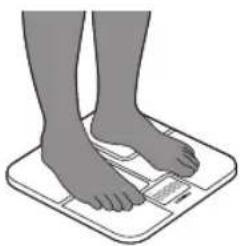
Illustration of a human foot and feet standing on a white foam scale (no text or symbols)The scale can be used without the app. This allows you to measure your weight. When you have created a user profile in the scale, you can measure your weight and perform BIA. It is then also possible to upload your measurement data to the health app later on, when the scale and your mobile device are connected.
1 Step onto the scale barefoot to switch it on. The device beeps to indicate it is ready for weighing.
- You can take a measurement barefoot. That way the device is able to perform the weight measurement and the BIA measurement and later on store the measurement data in the health app. Make sure your feet are clean and slightly damp.
- You can also take a measurement wearing footwear. That way the scale is only able to perform the weight measurement and not the body fat estimation and BMI calculation. Your measurement results will not be stored nor sent to the health app.
2 Weight measurement starts.
- Weight is shown on the display of the device after weight measurement ends.
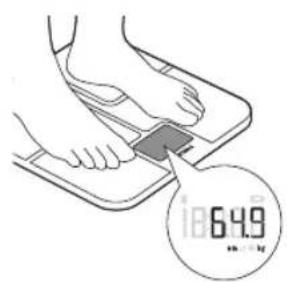

3 BIA measurement starts (when measuring barefoot).
- The symbol 'BIA' flashes on the display to indicate the device is analyzing your data.
4 Stand still and keep full contact with the measurement platform until the symbol 'BIA' stops flashing. The device beeps to indicate that the measurement is completed. The results of the BIA measurement will not be shown on the display.
5 The device is equipped with user profile recognition and automatically selects the user based on their weight.
- When the device immediately displays the weight: no user is recognized and results are not stored. See below for instructions.
- When the device shows multiple users: more users are recognized based on your weight. See below for instructions.
6 The measurement results are stored in the device in case of a successful BIA measurement.
- The device can store up to 40 measurement results for each user profile. The oldest results will be replaced by new measurement results.
7 After measuring, step off the device. It switches off automatically.
When the device does not automatically recognize the correct user profile:

natural_image
Illustration of a foot pressing down on a small electronic device (no text or symbols visible)- To select the correct user profile, step off the device and tap on the measurement platform to confirm the correct user profile.
- All profiles will be shown alternately on the display. Tap on the scale to confirm yours.
- Make sure that you select the correct user.
Factory reset
To add up to 8 new user profiles or delete all measurement results from the device, you can perform a factory reset. With the factory reset the device is cleared from all existing user profiles and measurement results.
1 With the device turned on, press and hold the measurement unit button located on the bottom of the device for 20 seconds, until "FACt" is shown on the display. Now all data is deleted.
- After resetting the scale will automatically turn off.
- You can now create new users profiles (see 'Pairing the body analysis scale to your mobile device and create a user profile').
Cleaning and storage

natural_image
Illustration of a hand cleaning a small object on a grid surface (no text or symbols)
Caution: Never immerse the device in water and do not rinse it the tap.
1 Wipe the surface of the device with a cloth.
- Use a dry cloth to wipe dust off the surface of the device.
- Use a slightly damp cloth to wipe dirt off the surface of the device. Dry the surface with a dry cloth after cleaning.

Caution: Do not use propellant, abrasive or other chemicals to the dirt in order to avoid discoloration or malfunction of the scale.
2 Store the device in a dry, dust-free place away from direct sunlight or other heat sources. Avoid surroundings with fluctuating temperatures (see Specifications').
Ordering accessories
To buy accessories or spare parts, visit www.shop.philips.com/service or go to your Philips dealer. You can also contact the Philips Consumer Care Centre in your country (see the international warranty leaflet for contact details).
Recycling
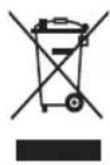
- This symbol means that this product shall not be disposed of with normal household waste (2012/19/EU).

- This symbol means that this product contains disposable batteries which shall not be disposed of with normal household waste (2006/66/EC).
- Follow your country's rules for the separate collection of electrical and electronic products and batteries. Correct disposal helps prevent negative consequences for the environment and human health.
Removing disposable batteries
To remove disposable batteries, see the instructions for placing and/or removing batteries in the user manual.
Warranty and support
If you need information or support, please visit www.philips.com/support or read the international warranty leaflet.
If you need more information about the app, please visit
www.philips.com/healthprograms
Troubleshooting
This chapter summarises the most common problems you could encounter with the device. If you are unable to solve the problem with the information below, visit www.philips.com/support for a list of frequently asked questions or contact the Consumer Care Centre in your country.
| Problem | Possible cause Solution | |
| The display shows ---- and shuts down. | Maximum weight limit is reached. The scale has a weight limit of 180kg. | The scale can accommodate to a maximum of 180kg. Stop using this device. |
| The display shows the battery low symbol and switches off after a few seconds. | The batteries are almost empty. | Replace all four batteries at the same time. We advise you to replace batteries before they are completely empty. Use 4x 1.5V R6 AAA batteries. |
| The display shows E1. Pairing has failed. Check if Bluetooth® on your mobile device is on, the Philips HealthSuite health app is open and if the scale and your mobile device are no more than 5 meters away from each other. | ||
| Unexpected measurement results . | Incorrect posture. Please step on the measurement platform and stand still. When measuring barefoot, make sure your feet are clean and slightly damp. | |
| The device is placed on a soft surface such as a carpet or on an uneven surface. | Place the device on a flat, hard surface or attach the carpet feet supplied to the feet of the scale. | |
| Your feet are too dry. Wipe your feet with a damp cloth to make sure that they are slightly damp when you take the measurement. | ||
| The display remains blank when the device is switched on. | There are no batteries in the device. | Insert 4x 1.5V R6 AAA batteries (see 'Inserting/removing the batteries'). |
| The batteries are empty. Replace all four batteries at the same time with new ones. Use 4x 1.5V R6 AAA alkaline batteries. | ||
Problem Possible cause Solution
| The device does not perform measurement/analysis of body fat. | You are standing on the measurement platform wearing socks or shoes. | Make sure you are barefoot during the BIA measurement and keep full contact with the measurement platform. Make sure your feet are clean and slightly damp. |
| The device switches off automatically. | The batteries are empty. Replace all four batteries at the same time. We advise you to replace batteries before they are completely empty. Use 4x 1.5V R6 AAA alkaline batteries. | |
| Data transmission failed. Bluetooth® is off. Turn on Bluetooth® on your mobile device. | ||
| The Philips HealthSuite | health app is off. | Press the icon on your mobile device to activate the health app. |
| The scale and your mobile | device are more than 5 meters away from each other. | Place your mobile device closer to the scale. |
| When the profiles were shown alternately on the display, you selected the wrong profile. | Repeat the measurement and confirm the correct user profile by tapping on the scale. | |
| You are standing on the measurement platform wearing socks or shoes. | Make sure you are barefoot during the BIA measurement and keep full contact with the measurement platform. Make sure your feet are clean and slightly damp. | |
Specifications
| Product name. Philips body analysis scale with Bluetooth® (DL8780/DL8781). |
| Dimensions scale. 321x321x25mm. |
| Net weight. Approximately 1.98kg (excluding the batteries). |
| Display. LCD with white LED backlight. |
| Measurement units. Kilogram / stone / pound. |
| Measurement range. 5kg to 180kg / 0st: 11lb to 28st: 5lb / 11lb to 397lb |
| Graduations. 0.1kg / 0.2lb. |
| Accuracy. 5-50kg: ±0.3kg; 50-100kg: ±0.4kg; 100-150kg: ±0.5kg. |
| Measuring method Bioelectrical Impedance Analysis (BIA) for body fat analysis. |
| Accuracy BIA BIA accuracy ±15 ohms in the range of 200 – 1000 ohms. |
| Operating environment. | Temperature: 5°C to 40°C, humidity: 15% RH to 93%RH, atmospheric pressure: 70kPa to 106kPa. |
| Storage environment. | Temperature: -20 °C to 60°C, humidity: ≥93% RH, atmospheric pressure: 50kPa to 106kPa. |
| Power source. | 6V (4x 1.5V R6 AAA alkaline batteries). |
| Switch-on method. | Sense-On technology. |
| Auto-off. | The device turns off after about 10 seconds in case of inactivity. |
| Accessories. | 1. 4x 1.5V R6 AAA alkaline batteries. |
| 2. User manual. | |
| 3. Carpet feet. |
Einführung
natural_image
Illustration of a hand pressing down on a capsule-shaped object with arrows indicating force or movement (no text or symbols)natural_image
Diagram of a computer mouse on a tray with an arrow pointing to the screen (no text or symbols present)natural_image
Diagram of a computer mouse with a button and handle, showing a cursor pointing to the mouse (no text or symbols present)natural_image
Hand placing a small object into a tray with mounting holes (no text or symbols visible)natural_image
Illustration of a human foot and feet standing on a square meter (no text or symbols visible)

natural_image
Illustration of a human foot and feet standing on a square meter (no text or symbols visible)

natural_image
Illustration of a foot pressing down on a device with a downward arrow indicating compression (no text or symbols)natural_image
Line drawing of a hand holding a small object over a grid-like surface (no text or symbols)www.philips.com/healthprograms.
Fehlerbehebung
natural_image
Diagram of a computer mouse on a tray with an arrow pointing to the screen (no text or symbols present)natural_image
Diagram of a computer mouse with a button and handle, showing a cursor pointing to the mouse (no text or symbols present)natural_image
Hand placing a small object into a tray with mounting holes (no text or symbols visible)natural_image
Illustration of human legs standing on a digital balance scale (no text or symbols)natural_image
Illustration of a human foot and feet standing on a square meter (no text or symbols visible)

natural_image
Illustration of a foot pressing down on a small electronic device (no text or symbols visible)natural_image
Line drawing of a hand holding a small object on a grid-like surface (no text or symbols)natural_image
Illustration of a hand pressing down on a capsule-shaped object with arrows indicating force direction (no text or symbols)1 Aprite lo scomparto batterie sul retro del dispositivo.
natural_image
Diagram of a mechanical component with a cylindrical part inserted, showing mounting holes and a magnified inset (no text or symbols)
natural_image
Diagram of a mechanical component with a button and mounting holes, no text or symbols presentnatural_image
Hand placing a small object into a tray with a downward arrow (no text or symbols)natural_image
Illustration of human legs and feet on a fitness scale (no text or symbols)natural_image
Illustration of human legs standing on a white balance scale with a small meter (no text or symbols visible)natural_image
Illustration of a foot pressing down on a device with a downward arrow indicating motion (no text or symbols)natural_image
Illustration of a hand using a tool to clean or store items on a grid-patterned surface (no text or symbols)
www.philips.com/healthprograms
natural_image
Illustration of a hand pressing down on a capsule-shaped object with arrows indicating force direction (no text or symbols)natural_image
Diagram of a mechanical component with a cylindrical part inserted, showing a circular inset view (no text or symbols)natural_image
Diagram of a computer mouse with a button and handle, showing a cursor pressing the mouse (no text or symbols present)natural_image
Hand placing a small object into a tray with four buttons (no text or symbols visible)natural_image
Illustration of a human foot and feet standing on a square meter (no text or symbols visible)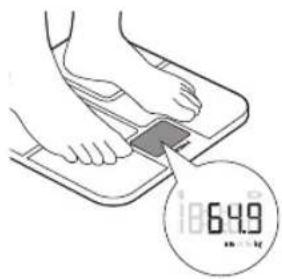


natural_image
Illustration of a human foot and feet standing on a square meter (no text or symbols visible)

natural_image
Illustration of a foot pressing down on a small electronic device (no text or symbols visible)natural_image
Line drawing of a hand cleaning a small object on a grid surface (no text or symbols)
Specifications are subject to change without notice
All rights reserved.
Philips Consumer Lifestyle BV
Tussendiepen 4, 9206AD Drachten, Netherlands
Fax +31 (0)512594316
4222.100.4566.4 (11/2016)

75% recycled paper
75% papier recyclé


- English
- Introduction
- General
- Features:
- Explanation of symbols
- General description (Fig. 1)
- Important safety information
- Intended use
- Contraindications
- English
- Warning
- Caution
- Compliance with standards
- Using the body analysis scale
- Preparing for use
- Inserting/removing the batteries
- English
- Placing the carpet feet
- Setting the measurement unit
- Pairing the body analysis scale to your mobile device and create a user profile
- English
- EI
- Measuring weight and body fat
- Tips for proper measurement
- Performing a measurement
- Performing a measurement with app
- English
- Performing a measurement without app
- When the device does not automatically recognize the correct user profile:
- Factory reset
- Cleaning and storage
- Ordering accessories
- Recycling
- Removing disposable batteries
- Warranty and support
- Troubleshooting
- Einführung
- Fehlerbehebung
Brand : PHILIPS
Model : DL8780
Category : Scale