
SJM2120 - Computer Cable PHILIPS - Free user manual and instructions
Find the device manual for free SJM2120 PHILIPS in PDF.


| Product type | Wireless FM headphone with docking station and transmitter |
| Brand | Philips |
| Model | SJM2120 (system SHC8545) |
| Transmitter power supply | AC adapter 12 V / 200 mA DC, center positive |
| Headphone power supply | 2 NiMH rechargeable batteries R03/AAA (type SBC HB550S, ref. 996500015757) |
| Headphone battery life | Approximately 15 hours |
| Charging time | Approximately 16 hours |
| Frequency band | 863 – 865 MHz |
| Effective range | Up to 100 meters in open field |
| Audio frequency response | 20 – 20,000 Hz |
| Signal-to-noise ratio | > 70 dB (A-weighted) |
| Total harmonic distortion | ≤ 2 % |
| Channel separation | ≥ 30 dB |
| Connectivity | Stereo 3.5 mm input, 6.35 mm adapter included, Y RCA cable |
| Main features | Wireless FM listening, charging via docking station, auto-tuning, channel selection (3 channels) |
| Maintenance and cleaning | Clean with a soft, slightly damp cloth; do not use abrasive products, alcohol, or ammonia |
| Safety | Do not expose to moisture, rain, sand, or heat source; do not disassemble; risk of hearing damage at high volume |
| Spare parts and repairability | Specific Philips rechargeable batteries; specific 12V/200mA AC adapter; contact an authorized dealer for repairs |
| General information | Compliant with EU directives R&TTE 1999/5/EC; weight and dimensions not specified in the manual |
Frequently Asked Questions - SJM2120 PHILIPS
User questions about SJM2120 PHILIPS
0 question about this device. Answer the ones you know or ask your own.
Ask a new question about this device
Download the instructions for your Computer Cable in PDF format for free! Find your manual SJM2120 - PHILIPS and take your electronic device back in hand. On this page are published all the documents necessary for the use of your device. SJM2120 by PHILIPS.
USER MANUAL SJM2120 PHILIPS
Instructions for use
English 4
Mode d'emploi
Français 12
natural_image
Black and silver HP headsets with Philips branding, no visible text or symbols on the products themselves.A
B

Register your product and get support at www.philips.com/welcome
ADAPTOR
| Stroke version Region | Adaptor typenumber | Input voltage | Output voltage | Input frequency |
| /00 Europe | SVH-005-120-020-A1 | 110/240V | 12V 200mA | 50/60Hz |
| /05 U.K. | SBH-005-120-020-A1 | 110/240V | 12V 200mA | 50/60Hz |

natural_image
Abstract curved arrow graphic with no text or symbolsIndex
Functional overview ....4
Safety precautions ....5
System compatibility ....5
Using your FM wireless headphone system 6-8
Problem Solving 8-10
Technical Specification ....10
European Regulations ......11
FM Wireless Headphone System
SHC8545
Congratulations! You have just bought one of the most sophisticated FM wireless headphone system.
This system implements the latest FM wireless technology, which offers you complete freedom of movement while enjoying your favourite movie or music. With energizing docking station, your headphone can be recharged in ease while it is not in use. This allows your headphone to be fully charged and always be ready for use whenever you need to enjoy a movie.
To ensure you achieve the best performance from your FM wireless headphone system, please read this manual carefully and keep it for future reference.
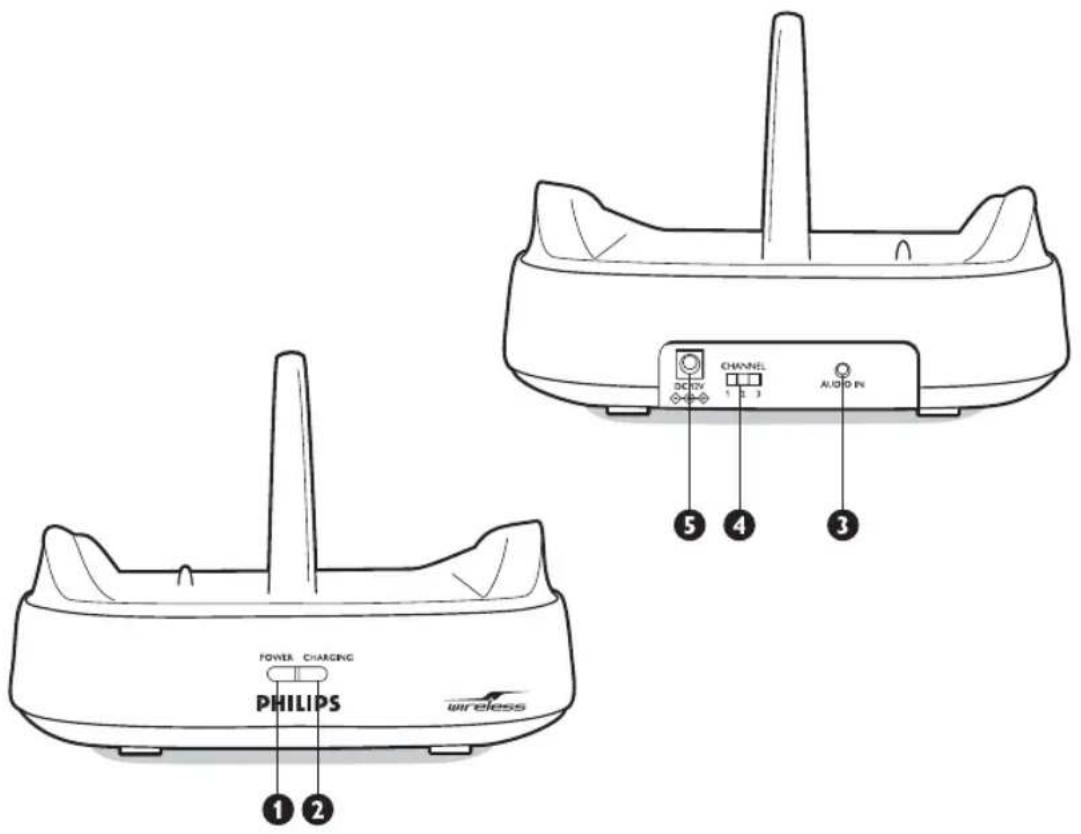
Functional overview - Product illustrations on inside flap
A) Transmitter
1 Power on/off indicator
2 Charging indicator
3 3.5 mm stereo input jack
4 Channel switch
5 DC power input jack
B) Receiver
6 Auto-tuning switch
7 Volume control
8 Power on/off button
9 Power on/off indicator/ low battery indicator
Important information
Please read the following instructions carefully, and retain this booklet for future reference. All the safety and operating instructions should be read before using the FM wireless headphone system.
Safety precautions
- Prevent fire or shock hazard: do not expose this equipment to humidity, rain, sand or excessive heat caused by heating equipment or direct sunlight.
- Radio equipment for wireless audio applications is not protected against disturbance from other radio services.
- Do not use cleansing agents containing alcohol, spirits, ammonia or abrasives as they may harm the housing. Use a slightly dampened chamois cloth to clean the housing.
- If fluid spills into the headphone system, remove the batteries immediately and consult an authorized dealer.
- Do not use this product in damp places or close to water.
- Do not expose this product to extreme heat or direct sunlight.
- Do not disassemble the product. In the event of technical difficulties, take it to your Philips retailer.
- Do not cover this product
- Inadequately protected or sensitive electronic equipment may be affected by the use of this product. This interference may lead to damage to either equipment. Please check whether or not surrounding equipment may be affected by this product before you start using it.
- Hearing Safety! Continuous use at high volume may permanently damage your hearing.
System compatibility
It is technically possible to use an additional number of FM wireless headphones or Philips FM wireless speakers with a single transmitter if they all*:
- operate in the 864 MHz band
– work according to the same modulation scheme
– can detect a 19kHz pilot tone
Please consult the appliance's electrical specification sheets for confirmation on compatibility.
This statement is to be interpreted from a technical point of view only and does therefore not constitute any guarantee nor obligation whatsoever regarding the commercial availability of single FM wireless headphones /speakers compatible with SHC8545.
Using your FM wireless headphone system

- Use only Philips
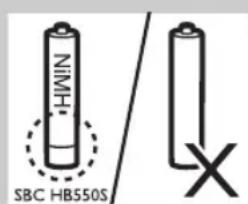
12V/200mA AC/DC adapter. - Use only Philips' shortened sleeve rechargeable batteries NiMH (R03/AAA, type number: SBC HB550S, partnumber 996500015757).
- Do not use NiCd batteries or alkaline batteries as they may damage your FM wireless headphone system.
Installing/replacing batteries
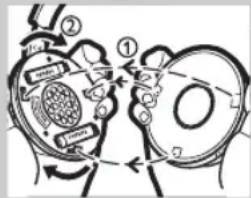
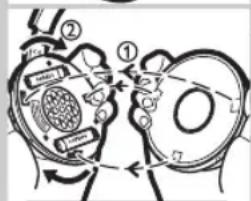
1 Unscrew and remove the left ear cushion of the headphone.
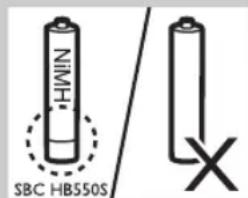
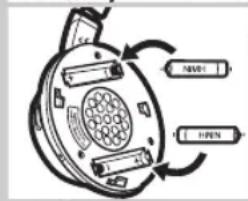
2 Insert the rechargeable batteries into the battery compartment. Use only Philips' shortened sleeve rechargeable batteries NiMH (R03/AAA, type number: SBC HB550S, partnumber 996500015757).

3 Make sure the batteries are correctly inserted as indicated by the engraved polarity symbol in the battery compartment. Always remove the batteries from the headphone if the system will not be used for a long period of time.
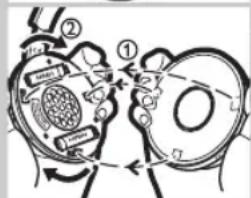
4 Put the left ear cushion back into place.
Setting up the transmitter
5 Make sure the adapter's rated voltage indicated on the type plate corresponds to the mains voltage supply.
6 Connect the DC power output connector of the 12 Volt/ 200mA AC/DC adapter to the DC POWER INPUT JACK at the back of the transmitter.
7 Connect the 12 Volt/200mA AC/DC adapter to the mains socket.
Always remove the adapter from the mains socket if the transmitter will not be used for a period of time.
Charging the headphone
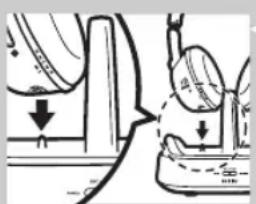
8 Place the headphone onto the energizing docking station, and make sure the charging pins of the transmitter and the charging contact of the headphone are well aligned.
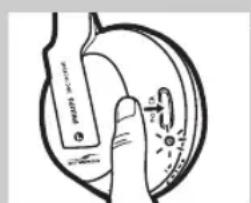
The CHARGING INDICATOR light will be on automatically indicating charging is taking place. At the same time, the headphone will power off automatically (i.e. POWER ON/OFF INDICATOR lights off). When charging is finished (which takes approximately 16 hours), the green CHARGING INDICATOR light will also be off automatically.

IMPORTANT!
- The energizing docking station does not transmit audio signal when charging is activated.
WARNING!
- Before using the FM headphone for the first time, please ensure that the batteries are fully charged for at least 16 hours. This will guarantee a longer operating lifetime of batteries.
- This product complies with the latest safety regulations. Please only charge the batteries with the docking station provided (SHC8545) or with fully compatible charger.
Audio Connection
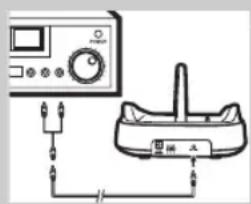
9 Connect one end of the audio cable (3.5 mm stereo plug) to the transmitter's 3.5 mm STEREO INPUT JACK.

10 Connect the other end of the 3.5 mm stereo cable to either:
a) The headphone output of an audio source, such as TV, HiFi or PC.
Adjust the volume level of the audio source to a fixed reasonably high level; for example 25% of the maximum level.
- In case your audio source has a 6.3mm headphone output, use the supplied 3.5mm to 6.3mm stereo adapter plug.
IMPORTANT!
- In case of certain TVs, the headphone jack output level can only be adjusted after accessing the TV on-screen menu.
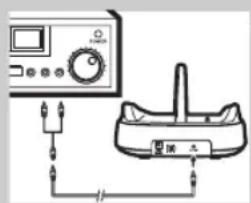
b) The line output of an audio source, such as REC OUT or LINE OUT (with the Y-cable supplied).
- Check if the red RCA plug (right channel) is connected to the right channel (red) of the audio source.
- Check if the white RCA plug (left channel) is connected to the left channel (white) of the audio source.
- In case the audio source has an adjustable RCA output level, adjust the output level to the highest acceptable undistorted level.
11 Switch on your audio source and carefully increase the volume of the audio source.
The POWER ON/OFF INDICATOR of the transmitter lights up when signals are received.

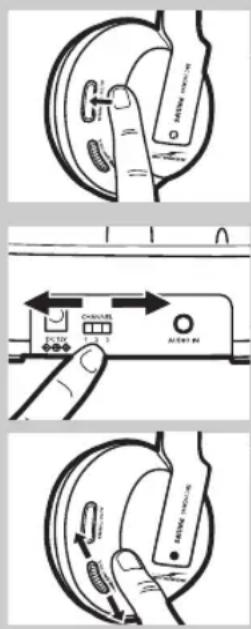
12 Switch on the POWER ON/OFF button of the headphone.
The POWER ON/OFF INDICATOR will be switched on automatically.
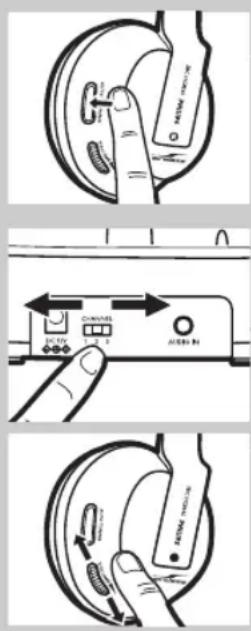
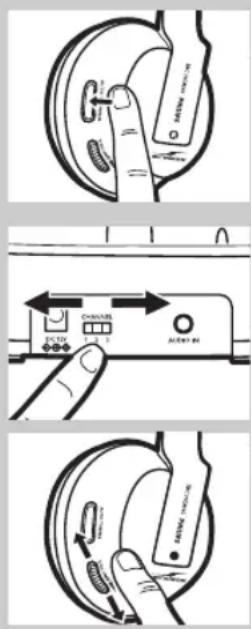
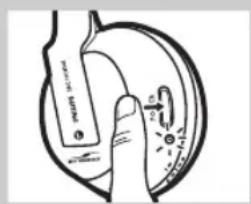
13 Press and hold the AUTO-TUNING BUTTON on the headphone for about 1 second to tune to the correct transmission channel.
The headphone will automatically tune to the transmitter.
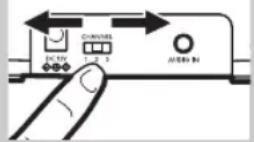
14 In case interference from neighbouring transmitters has occurred, adjust the transmission channel of the transmitter, then repeat step 13 to tune the headphone to the transmitter.
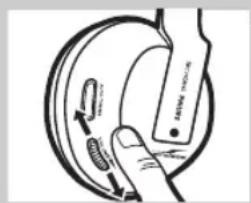
15 Adjust the volume of the headphone to the desired listening level.
IMPORTANT!
- Avoid adjusting the listening volume level at the audio source as this may compromise the audio quality on too low input levels.
Problem solving
If a fault occurs, first check the points listed below. If you are unable to remedy a problem by following these hints, contact the helpline (see 'Need help?') or consult your dealer.
Never try to open the set yourself as this will void the guarantee.
First, check all cables to ensure that they are connected correctly.
Problem Possible Cause Solution
| Headphone fails to charge ‘Installing/replacing the batteries’ | No battery installed | Follow step 1 to 4 of |
| Wrong battery orientation Reposition the batteries according to the engraved polarity symbol. | ||
| No power supply Make sure the docking station is connected to the local mains power supply through an adapter and follow steps 5 to 7. | ||
| Charging pin of the docking station not in contact with the metal make plate of the headphone | Lock the headphone in place, and sure the CHARGE INDICATOR light is on. | |
| Wrong headphone orientation when placed onto the charging dock | Reposition the headphone with correct orientation. | |
| No sound/distorted sound | Headphone power off | Push the POWER ON/OFF BUTTON. The POWER ON/OFF INDICATOR light turns on automatically indicating the headphone is on. |
| No battery installed Follow step 1 to 4 of ‘Installing/replacing the batteries’ | ||
| Wrong battery orientation Reposition the batteries according to the engraved polarity symbol. | |
| No power supply to transmitter Make sure the docking station is connected to the local mains power supply through an adapter and follow step 5 to 7. | |
| Battery power running low Follow steps 5 to 7 to recharge the system. | |
| Audio source not connected Make sure the audio output of your audio source is connected to the 3.5 mm STEREO INPUT JACK of your transmitter. Follow step 9 to 12. | |
| Audio source is off Turn on your audio source. | |
| Volume level set too low Adjust the volume level of your audio source or the headphone.Hearing Safety: Continuous use at a high volume may permanently damage your hearing. | |
| Audio output level low In case of audio sources with adjustable output level, adjust the output level to a higher and non-distorted level.IMPORTANT: In case of certain TVs, the headphone jack output level can only be adjusted after accessing the TV on-screen menu. | |
| Headphone not tuned to Push and hold the AUTO-TUNING the transmitter BUTTON for about 1 sec, then the headphone will automatically search for the best possible reception. | |
| Interference from other radio sources 1) Alter the transmitter's frequency channel. Select 1 of the 3 options for best reception.We advise you to select channel 1 as the first option. Next adjust the headphone's tuning channel as described above.2) Move transmitter or headphone elsewhere | |
| Receiver too far away from transmitter | Move closer for reception |
| Transmitter other than SHC8545 is used | Make use of the SHC8545 transmitter provided. Some transmitters already built into other equipment may not be compatible with the SHC8545 headphone because of the advanced technologies used. |
| No sound (multiple headphones or Philips wireless speaker) | The energizing docking station If you want to enjoy music with does not transmit audio signal when charging is taking place. speakers which is compatible with Therefore other Philips or wireless speaker be sure to remove the SHC8545 cannot receive any signal, headphone from the docking station.even if they are compatible with the SHC8545 docking station. | other Philips wireless headphones or the SHC8545 docking station, |
Technical specifications*
| Transmitter System: Radio Frequency (RF) | ||
| Modulation: | Frequency Modulation (FM) | |
| Pilot Tone: | 19kHz | |
| Carrier Frequency: (/00 & /05) | Channel 1: 863.5MHzChannel 2: 864MHzChannel 3: 864.5MHz | |
| Radiated Output Power | <10mW | |
| Effective Transmission Range | Up to 100m **, omni directional (360°) | |
| Input Level: | 500 mV | |
| Power supply: | 12 Volts/ 200mA DC, center positive; | |
| Headphone | Reception Frequency: (/00 & /05) | 863MHz – 865MHz |
| S/N ratio: | >70dB (1kHz sine wave, A-weighted) | |
| Distortion: | ≤ 2% THD | |
| Channel Separation: | ≥ 30 dB | |
| Audio frequency range: | 20-20,000 Hz | |
| Power Supply: | 2 x R03/AAA rechargeable batteries (Philips, NiMH, type number:SBC HB550S, partnumber996500015757) | |
| Battery Life Time: | ~ 15 hours | |
*) All specifications are subject to change
**) Depending on ambient conditions
European Regulations
Hereby, Philips Consumer Electronics, B.U. Peripherals & Accessories, declares that this FM wireless headphone system SHC8545 is in compliance with the essential requirements and other relevant provisions of Directive 1999/5/EC.
This product has been designed, tested an manufactured according to the European R&TTE Directive 1999/5/EC.
Index
natural_image
Diagram showing a hand holding a small object with arrows indicating direction, alongside a close-up of a mechanical component (no text or symbols present)

¡IMPORTANTE!


natural_image
Technical line drawing showing mechanical assembly with downward arrows indicating motion (no text or symbols)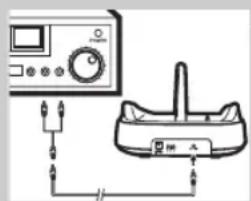


natural_image
Diagram showing two mechanical components with downward arrows indicating motion or force, no text or symbols present.
IMPORTANTE!
Colocar/substituir as pilhas
Carregar os auscultadores


Installera/byta batterier
natural_image
Diagram showing two mechanical components with downward arrows indicating motion or force, no text or symbols present.Ladda headsetet


TÄRKEÄÄ!
natural_image
Diagram showing mechanical components with arrows indicating direction (no text or symbols)natural_image
Hand pointing at a circular object with a label and abstract shapes, no readable text or symbols present.ΣΗΜΑΝΤΙΚΟ!


natural_image
Diagram showing two mechanical components with downward arrows indicating motion or force, no text or symbols present.Pil takma/yenileme
Turk Philips Tic. A.S.
Y. Dudullu Org. San Bolg.2.Cad.No:22
Umraniye-IST-Turkiye
Spis treści
Opis możliwości 92
natural_image
Diagram showing two mechanical components with downward arrows indicating motion or force, no text or symbols present.WAŻNE!
natural_image
Simple line drawing of a hand pressing down on a circular object with a handle (no text or symbols)
Příprava vysílače
natural_image
Diagram showing two mechanical components with downward arrows indicating motion or force (no text or symbols present)Nabíjení sluchátek
FONTOS TUDNIVALÓ!
natural_image
Diagram showing mechanical components with arrows indicating motion or force direction (no text or symbols)

ВНИМАНИЕ!
natural_image
Hand holding a circular object with a device and label 'WATER' (no readable text or symbols)TÄHTIS!
natural_image
Diagram showing a hand pressing down on a surface with arrows indicating force direction (no text or symbols present)Körvaklappide laadimine


SVARĪGI!
10 Pievienojiet otru 3.5 mm audio stereokabela galu:
EC DECLARATION OF CONFORMITY
We, PHILIPS CONSUMER LIFESTYLE B.V.
TUSSENDIEPEN 4, 9206 AD DRACHTEN, THE NETHERLANDS
Declare under our responsibility that the electrical product(s):
PHILIPS
SHC8545/00,
SHC8545/05
(brand name)
(Type version of model)
Wireless Headphone System
(product description)
To which this declaration relates is in conformity with the following harmonized standards: (title, number and date of issue of the standard)
IEC 60065:2002+A1
EN 60065:2002+A1+A11
EN 301 357-1 V1.3.1; EN 301 357-2 V1.3.1
EN 301 489-9 V1.4.1; EN 301 489-1 V1.8.1
EN 50371:2002
EN 62807:2003
Following the provisions of :
1999/5/EC (R&TTE Directive)
2005/32/EC (EuP Directive)
And are produced under a quality scheme at least in conformity with ISO 9001 or CENELEC Permanent Documents
The Notified Body
TUV Rheinland Product Safety GmbH / CE0197
(Name and number)
Statement of Opinion
(description of intervention)
And issued the certificate,
RT 60027008 0001
(certificate number)
Remarks:
.....Drachten, 9 October 2009.
(place, date)
.....A.Speelman, Product Compliance manager..... ..... (signature, name and function)
EC DECLARATION OF CONFORMITY
(DECLARATION DE CONFORMITE CE)
We / Nous, PHILIPS CONSUMER LIFESTYLE B.V.
Declare under our responsibility that the electrical product(s):
Wireless Headphone System
To which this declaration relates is in confirmity with the following harmonized standards:
Following the provisions of :
1999/5/EC (R&TTE Directive) (Directive R&TTE 1999/5/CE)
2005/32/EC (EuP Directive)
And are produced under a quality scheme at least in conformity with ISO 9001 or CENELEC
Permanent Documents
performed Statement of Opinion
(a effectué)
(description of intervention /
description de l' intervention)
RT 60027008 0001
And issued the certificate,
Drachten, 9 October 2009.
(place, date / lieu, date)

.A.Speelman, Product Compliance Manager.
This document is printed on chlorine free produced paper
Data subject to change without notice
Printed in China
C€0197


- Register your product and get support at www.philips.com/welcome
- Index
- FM Wireless Headphone System
- SHC8545
- Functional overview - Product illustrations on inside flap
- A) Transmitter
- B) Receiver
- Important information
- Safety precautions
- System compatibility
- Using your FM wireless headphone system
- Installing/replacing batteries
- Setting up the transmitter
- Charging the headphone
- IMPORTANT!
- WARNING!
- Audio Connection
- Problem solving
- European Regulations
- ¡IMPORTANTE!
- IMPORTANTE!
- Colocar/substituir as pilhas
- Carregar os auscultadores
- Installera/byta batterier
- Ladda headsetet
- TÄRKEÄÄ!
- ΣΗΜΑΝΤΙΚΟ!
- Pil takma/yenileme
- Spis treści
- WAŻNE!
- Příprava vysílače
- Nabíjení sluchátek
- FONTOS TUDNIVALÓ!
- ВНИМАНИЕ!
- TÄHTIS!
- Körvaklappide laadimine
- SVARĪGI!
- EC DECLARATION OF CONFORMITY
Brand : PHILIPS
Model : SJM2120
Category : Computer Cable