
SWV2502W - Computer Cable PHILIPS - Free user manual and instructions
Find the device manual for free SWV2502W PHILIPS in PDF.


| Product Type | HDMI Cable |
| Brand | Philips |
| Model | SWV2502W |
| Cable Length | 2 meters |
| Connector Type | HDMI Type A Male to HDMI Type A Male |
| HDMI Version | HDMI 1.4 |
| Maximum Resolution | 3840 x 2160 @ 30Hz |
| Data Transfer Rate | 10.2 Gbps |
| Audio Support | Yes, multi-channel audio |
| Connector Material | Gold-plated |
| Shielding | Triple shielding (foil + braid + drain) |
| Cable Jacket Material | PVC |
| Color | Black |
| Weight | Approximately 100 g |
| Power Source | Passive (no external power required) |
| Compatible Devices | HDMI-enabled devices such as TVs, monitors, projectors, gaming consoles |
| Operating Temperature | 0°C to 50°C |
| Storage Temperature | -20°C to 60°C |
| Certifications | HDMI Licensing, RoHS |
| Warranty | 1 year |
Frequently Asked Questions - SWV2502W PHILIPS
User questions about SWV2502W PHILIPS
0 question about this device. Answer the ones you know or ask your own.
Ask a new question about this device
Download the instructions for your Computer Cable in PDF format for free! Find your manual SWV2502W - PHILIPS and take your electronic device back in hand. On this page are published all the documents necessary for the use of your device. SWV2502W by PHILIPS.
USER MANUAL SWV2502W PHILIPS
Philips LCD Monitor Electronic User's Manual
natural_image
Line drawing of a person holding a computer monitor (no text or symbols visible)
Do


Don't

CE Declaration
of Conformity
Energy Star
Declaration
•Federal
Communications
Commission
(FCC) Notice (U.
S. Only)
• FCC Declaration of Conformity
•Commission
Federale de la
Communication
(FCC
Declaration)
•EN 55022
Compliance
(Czech Republic
Only)
•VCCI Class 2 Notice (Japan Only)
•MIC Notice (South Korea Only)
•Polish Center for Testing and Certification Notice
• North Europe (Nordic Countries) Information
•BSMI Notice (Taiwan Only)
• Ergonomie Hinweis (nur Deutschland)
• Philips End-of-Life Disposal Information for UK only Waste Electrica and Electronic
• Equipment-WEEE
•China RoHS
• Troubleshooting Other Related
Information
Regulatory Information
Model ID: 200WS8
Model No: HWS8200Q
CE Declaration of Conformity
Philips Consumer Electronics declare under our responsibility that the product is in conformity with the following standards
- EN60950-1:2001 (Safety requirement of Information Technology Equipment)
- EN55022:1998 (Radio Disturbance requirement of Information Technology Equipment)
- EN55024:1998 (Immunity requirement of Information Technology Equipment)
- EN61000-3-2:2000 (Limits for Harmonic Current Emission)
- EN61000-3-3:1995 (Limitation of Voltage Fluctuation and Flicker) following provisions of directives applicable
- 73/23/EEC (Low Voltage Directive)
- 89/336/EEC (EMC Directive)
- 93/68/EEC (Amendment of EMC and Low Voltage Directive)
and is produced by a manufacturing organization on ISO9000 level.
The product also comply with the following standards
- ISO9241-3, ISO9241-7, ISO9241-8 (Ergonomic requirement for CRT Monitor)
- ISO13406-2 (Ergonomic requirement for Flat Panel Display)
- GS EK1-2000 (GS specification)
- prEN50279:1998 (Low Frequency Electric and Magnetic fields for Visual Display)
- MPR-II (MPR:1990:8/1990:10 Low Frequency Electric and Magnetic fields)
- TCO'99, TCO'03 (Requirement for Environment Labelling of Ergonomics, Energy, Ecology and Emission, TCO: Swedish Confederation of Professional Employees) for TCO versions
RETURN TO TOP OF THE PAGE
Energy Star Declaration
This monitor is equipped with a function for saving energy which supports the VESA Display Power Management Signaling (DPMS) standard. This means that the monitor must be connected to a computer which supports VESA DPMS. Time settings are adjusted from the system unit by software.
NUTEK VESA State LED Indicator Power Consumption
Normal operation ON (Active) Green < 43W (TYP)
Power Saving
Alternative 2
One step
OFF (Sleep) Amber < 1 W
Switch Off OFF < 1 W
• Frequently Asked Questions (FAQs)

As an ENERGY STAR® Partner, PHILIPS has determined that this product meets the ENERGY STAR® guidelines for energy efficiency.

We recommend you switch off the monitor when it is not in use for a long time.
RETURN TO TOP OF THE PAGE
Federal Communications Commission (FCC) Notice (U.S. Only)
This equipment has been tested and found to comply with the limits for a Class B digital device, pursuant to Part 15 of the FCC Rules. These limits are designed to provide reasonable protection against harmful interference in a residential installation. This equipment generates, uses and can radiate radio frequency energy and, if not installed and used in accordance with the instructions, may cause harmful interference to radio communications.
However, there is no guarantee that interference will not occur in a particular installation. If this equipment does cause harmful interference to radio or television reception, which can be determined by turning the equipment off and on, the user is encouraged to try to correct the interference by one or more of the following measures:
• Reorient or relocate the receiving antenna.
- Increase the separation between the equipment and receiver.
- Connect the equipment into an outlet on a circuit different from that to which the receiver is connected.
- Consult the dealer or an experienced radio/TV technician for help.

Changes or modifications not expressly approved by the party responsible for compliance could void the user's authority to operate the equipment.
Use only RF shielded cable that was supplied with the monitor when connecting this monitor to a computer device.
To prevent damage which may result in fire or shock hazard, do not expose this appliance to rain or excessive moisture.
THIS CLASS B DIGITAL APPARATUS MEETS ALL REQUIREMENTS OF THE CANADIAN INTERFERENCE-CAUSING EQUIPMENT REGULATIONS.
RETURN TO TOP OF THE PAGE
FCC Declaration of Conformity
Trade Name: Philips
Responsible Party: Philips Consumer Electronics North America
P.O. Box 671539
Marietta, GA 30006-0026
1-888-PHILIPS (744-5477)
Declaration of Conformity for Products Marked with FCC Logo, United States Only

This device complies with Part 15 of the FCC Rules. Operation is subject to the following two conditions: (1) this device may not cause harmful interference, and (2) this device must accept any interference received, including interference that may cause undesired operation.
RETURN TO TOP OF THE PAGE
Commission Federale de la Communication (FCC Declaration)

EN 55022 Compliance (Czech Republic Only)
This device belongs to category B devices as described in EN 55022, unless it is specifically stated that it is a Class A device on the specification label. The following applies to devices in Class A of EN 55022 (radius of protection up to 30 meters). The user of the device is obliged to take all steps necessary to remove sources of interference to telecommunication or other devices.
VCCI Notice (Japan Only)
This is a Class B product based on the standard of the Voluntary Control Council for Interference (VCCI) for Information technology equipment. If this equipment is used near a radio or television receiver in a domestic environment, it may cause radio Interference. Install and use the equipment according to the instruction manual.
Class B ITE

MIC Notice (South Korea Only)
Class B Device
Please note that this device has been approved for non-business purposes and may be used in any environment, including residential areas.
RETURN TO TOP OF THE PAGE
Polish Center for Testing and Certification Notice
The equipment should draw power from a socket with an attached protection circuit (a three-prong socket). All equipment that works together (computer, monitor, printer, and so on) should have the same power supply source.
The phasing conductor of the room's electrical installation should have a reserve short-circuit protection device in the form of a fuse with a nominal value no larger than 16 amperes (A).
To completely switch off the equipment, the power supply cable must be removed from the power supply socket, which should be located near the equipment and easily accessible.
A protection mark "B" confirms that the equipment is in compliance with the protection usage requirements of standards PN-93/T-42107 and PN-89/E-06251.
North Europe (Nordic Countries) Information
Placering/Ventilation
WARNING:
FÖRSÄKRA DIG OM ATT HUVUDBRYTARE OCH UTTAG ÄR LÄTÄTKOMLIGA, NÄR DU STÄLLER DIN UTRUSTNING PÅPLATS.
Placering/Ventilation
ADVARSEL:
S∅RG VED PLACERINGEN FOR, AT NETLEDNINGENS STIK OG STIKKONTAKT ER NEMT TILGÆNGELIGE.
Paikka/llmankierto
VAROITUS:
SIJOITA LAITE SITEN, ETTÄ VERKKOJOHTO VOIDAAAN TARVITTAESSA HELPOSTI IRROTTAA PISTORASIASTA.
BSMI Notice (Taiwan Only)
符合乙類資訊產品之標準
RETURN TO TOP OF THE PAGE
End-of-Life Disposal
Your new monitor contains materials that can be recycled and reused. Specialized companies can recycle your product to increase the amount of reusable materials and to minimize the amount to be disposed of.
Please find out about the local regulations on how to dispose of your old monitor from your local Philips dealer.
(For customers in Canada and U.S.A.)
This product may contain lead and/or mercury. Dispose of in accordance to local-state and federal regulations.
For additional information on recycling contact www.eia.org (Consumer Education Initiative)
RETURN TO TOP OF THE PAGE
Information for UK only
WARNING - THIS APPLIANCE MUST BE EARTHED.
Important:
This apparatus is supplied with an approved moulded 13A plug. To change a fuse in this type of plug proceed as follows:
- Remove fuse cover and fuse.
- Fit new fuse which should be a BS 1362 5A, A.S.T.A. or BSI approved type.
- Refit the fuse cover.
If the fitted plug is not suitable for your socket outlets, it should be cut off and an appropriate 3-pin plug fitted in its place.
If the mains plug contains a fuse, this should have a value of 5A. If a plug without a fuse is used, the fuse at the distribution board should not be greater than 5A.
Note: The severed plug must be destroyed to avoid a possible shock hazard should it be inserted into a 13A socket elsewhere.
How to connect a plug
The wires in the mains lead are coloured in accordance with the following code:

BLUE - "NEUTRAL" ("N")
BROWN - "LIVE" ("L")
GREEN & YELLOW - "EARTH" ("E")
- The GREEN AND YELLOW wire must be connected to the terminal in the plug which is marked with the letter "E" or by the Earth symbol 12 or coloured GREEN or GREEN AND YELLOW.

natural_image
Diagram of a device's internal wiring and socket, showing color-coded wires (no text or labels)-
The BLUE wire must be connected to the terminal which is marked with the letter "N" or coloured BLACK.
-
The BROWN wire must be connected to the terminal which marked with the letter "L" or coloured RED.
Before replacing the plug cover, make certain that the cord grip is clamped over the sheath of the lead - not simply over the three wires.
RETURN TO TOP OF THE PAGE
Waste Electrical and Electronic Equipment-WEEE
Attention users in European Union private households

This marking on the product or on its packaging illustrates that, under European Directive 2002/96/EG governing used electrical and electronic appliances, this product may not be disposed of with normal household waste. You are responsible for disposal of this equipment through a designated waste electrical and electronic equipment collection. To determine the locations for dropping off such waste electrical and electronic, contact your local government office, the waste disposal organization that serves your household or the store at which you purchased the product.
China RoHS
China RoHS
The People's Republic of China released a regulation called "Management Methods for Controlling Pollution by Electronic Information Products" or commonly referred to as China RoHS. All products including CRT and LCD monitor which are produced and sold for China market have to meet China RoHS request.
中国大陆RoHS
SmartImage Lite(Modele selective)
Introducere
natural_image
Illustration of a computer monitor with a magnifying glass icon (no text or symbols)SmartResponse (Modele selective)
Ce este?
natural_image
Simple geometric shape: a black square centered inside a rounded rectangle (no text or symbols)SmartManage & SmartControl (Modele selective)

Introducere
- Pozitia (Position)
- Informatii despre produs (Product Information)
natural_image
Line drawing of a flat-screen monitor and its corresponding circular base device (no text or symbols)natural_image
Line drawing of a flat-screen monitor with a circular base (no text or symbols)natural_image
Technical line drawing of a computer monitor with internal circuitry and a magnified inset showing internal components (no text or symbols)natural_image
Illustration of a Philips monitor with a blue downward arrow pointing to its base (no text or symbols on the monitor itself)2)
natural_image
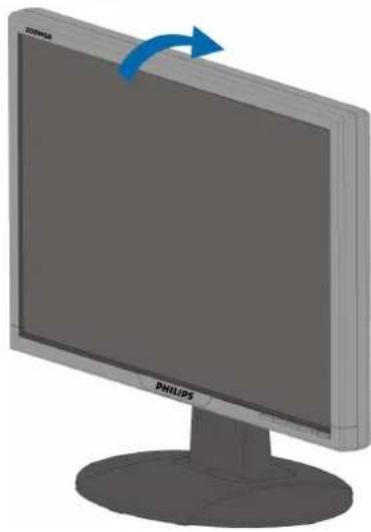
Illustration of a Philips monitor with a blue arrow indicating rotation (no text or symbols on the screen)3) Gestionarea cablurilor

natural_image
Diagram showing a desktop computer tower connected to a monitor via cable, with an outlet cable inserted (no text or symbols present)4)Conectati monitorul la calculator.

Only available for Europe Model

flowchart
graph TD
    A["Main Menu"] --> B["Exit (Ieşire)"]
    A --> C["Brightness & Contrast (Luminozitate și contrast)"]
    C --> D["Brightness (Luminozitate)"]
    C --> E["Contrast (Contrast)"]
    C --> F["Back (Înapoi)"]
    A --> G["Color (Culoare)"]
    G --> H["Original Color (Culoare originală)"]
    G --> I["9300K"]
    G --> J["6500K"]
    G --> K["sRGB"]
    G --> L["User Define (Definit de utilizator)"]
    L --> M["Red (Roșu)"]
    L --> N["Green (Verde)"]
    L --> O["Blue (Albastru)"]
    G --> P["Position (Poziție)"]
    P --> Q["Horizontal (Orizontal)"]
    P --> R["Vertical (Vertical)"]
    P --> S["Back (Înapoi)"]
    A --> T["Input Selection (Selectare intrare)"]
    T --> U["Analog (Analog)"]
    T --> V["Digital (Digital)"]
    T --> W["Back (Înapoi)"]
    A --> X["More Settings (Mai mulți parametri)"]
    X --> Y["Language (Limbă)"]
    Y --> Z["English"]
    Y --> AA["Espanol"]
    Y --> AB["Français"]
    Y --> AC["Deutsch"]
    Y --> AD["Italiano"]
    Y --> AE["Pysckii"]
    Y --> AF["Back (Înapoi)"]
    X --> AG["Phase/Clock (Fază/Ceas)"]
    AG --> AH["Phase (Fază)"]
    AG --> AI["Clock (Ceas)"]
    AG --> AJ["Back (Înapoi)"]
    X --> AK["OSD Settings (Parametri OSD)"]
    AK --> AL["Horizontal (Orizontal)"]
    AK --> AM["Vertical (Vertical)"]
    AK --> AN["Back (Înapoi)"]
    X --> AO["Audio Options (Optiuni audio)"]
    AO --> AP["Stand-alone (Independent)"]
    AO --> AQ["Mute (Mut)"]
    AO --> AR["Back (Înapoi)"]
    X --> AS["SmartResponse"]
    AS --> AT["On"]
    AS --> AU["Off"]
    X --> AV["Back (Înapoi)"]
    A --> AW["Reset (Reinițializare)"]
    AW --> AX["No (Nu)"]
    AW --> AY["Yes (Da)"]

flowchart
graph TD
    A["Main Menu"] --> B["Exit (Ieşire)"]
    A --> C["Brightness & Contrast (Luminozitate și contrast)"]
    C --> D["Brightness (Luminozitate)"]
    C --> E["Contrast (Contrast)"]
    C --> F["Back (Înapoi)"]

    G["Color (Culoare)"] --> H["Original Color (Culoare originală)"]
    H --> I["9300K"]
    H --> J["6500K"]
    H --> K["sRGB"]
    K --> L["User Define (Definit de utilizator)"]
    L --> M["Red (Roșu)"]
    L --> N["Green (Verde)"]
    L --> O["Blue (Albastru)"]
    L --> P["Back (Înapoi)"]

    Q["Position (Poziție)"] --> R["Horizontal (Orizontal)"]
    R --> S["Vertical (Vertical)"]
    R --> T["Back (Înapoi)"]

    U["Input Selection (Selectare intrare)"] --> V["Analog (Analog)"]
    V --> W["Digital (Digital)"]
    V --> X["Back (Înapoi)"]

    Y["More Settings (Mai mulți parametri)"] --> Z["Language (Limbă)"]
    Z --> AA["English"]
    Z --> AB["Espanol"]
    Z --> AC["Français"]
    Z --> AD["Português"]
    Z --> AE["中文"]
    Z --> AF["Back (Înapoi)"]

    Y --> AG["Phase/Clock (Fază/Ceas)"]
    AG --> AH["Phase (Fază)"]
    AG --> AI["Clock (Ceas)"]
    AG --> AJ["Back (Înapoi)"]

    Y --> AK["OSD Settings (Parametri OSD)"]
    AK --> AL["Horizontal (Orizontal)"]
    AL --> AM["Vertical (Vertical)"]
    AL --> AN["Back (Înapoi)"]

    Y --> AO["Audio Options (Optiuni audio)"]
    AO --> AP["Stand-alone (Independent)"]
    AO --> AQ["Mute (Mut)"]
    AO --> AR["Back (Înapoi)"]

    Y --> AS["SmartResponse"]
    AS --> AT["On"]
    AS --> AU["Off"]

    Y --> AV["Back (Înapoi)"]

    AW["Reset (Reinitializare)"] --> AX["No (Nu)"]
    AW --> AY["Yes (Da)"]
flowchart
graph TD
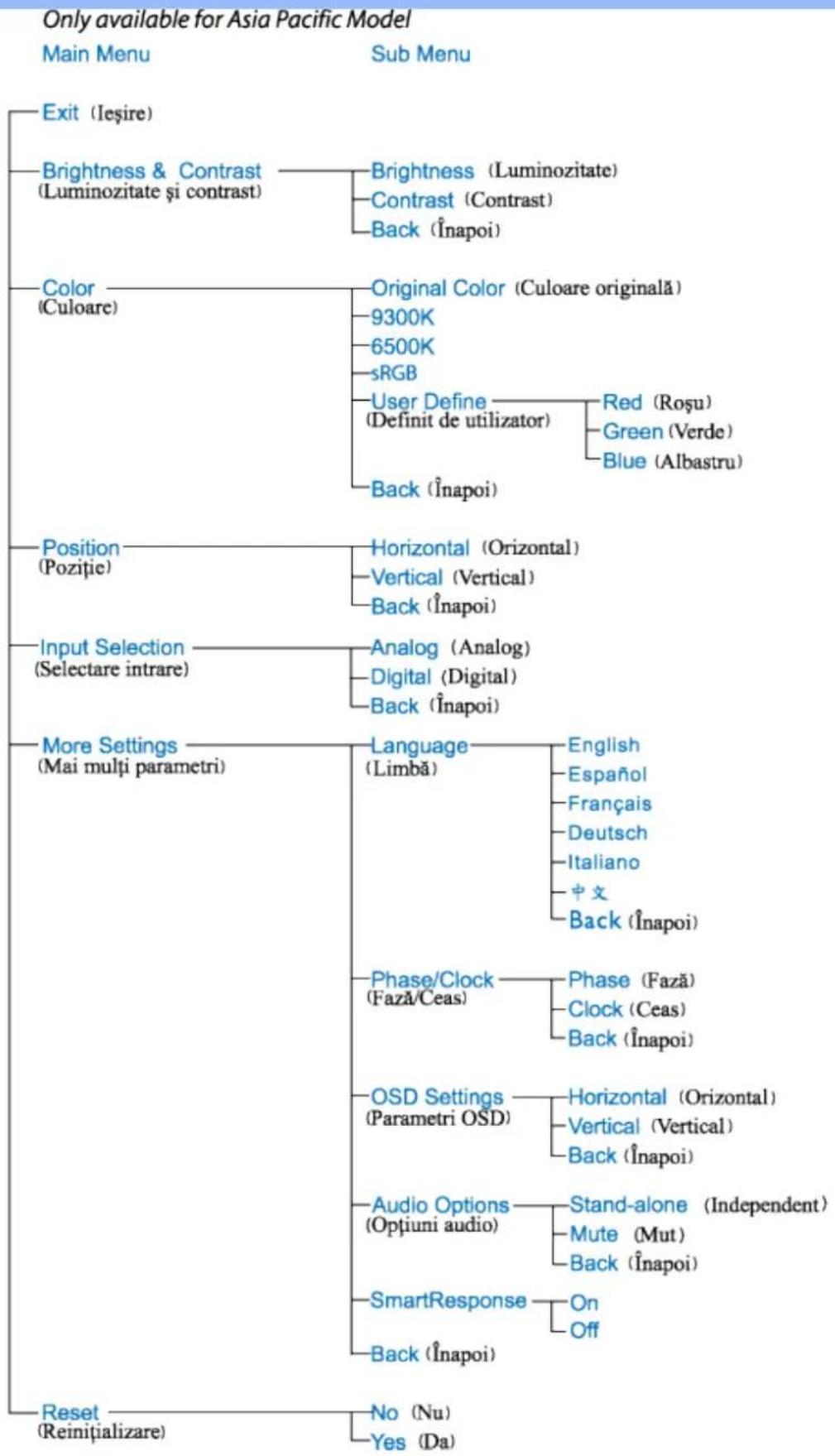
    A["Only available for Asia Pacific Model"] --> B["Main Menu"]
    A --> C["Sub Menu"]
    B --> D["Exit (Ieşire)"]
    B --> E["Brightness & Contrast (Luminozitate și contrast)"]
    E --> F["Brightness (Luminozitate)"]
    E --> G["Contrast (Contrast)"]
    E --> H["Back (Înapoi)"]
    B --> I["Color (Culoare)"]
    I --> J["Original Color (Culoare originală)"]
    I --> K["9300K"]
    I --> L["6500K"]
    I --> M["sRGB"]
    I --> N["User Define (Definit de utilizator)"]
    N --> O["Red (Roșu)"]
    N --> P["Green (Verde)"]
    N --> Q["Blue (Albastru)"]
    I --> R["Position (Pozitie)"]
    R --> S["Horizontal (Orizontal)"]
    R --> T["Vertical (Vertical)"]
    R --> U["Back (Înapoi)"]
    B --> V["Input Selection (Selectare intrare)"]
    V --> W["Analog (Analog)"]
    V --> X["Digital (Digital)"]
    V --> Y["Back (Înapoi)"]
    B --> Z["More Settings (Mai mulți parametri)"]
    Z --> AA["Language (Limbă)"]
    AA --> AB["English"]
    AA --> AC["Espanol"]
    AA --> AD["Français"]
    AA --> AE["Deutsch"]
    AA --> AF["Italiano"]
    AA --> AG["中文"]
    AA --> AH["Back (Înapoi)"]
    Z --> AI["Phase/Clock (Fază/Ceas)"]
    AI --> AJ["Phase (Fază)"]
    AI --> AK["Clock (Ceas)"]
    AI --> AL["Back (Înapoi)"]
    Z --> AM["OSD Settings (Parametri OSD)"]
    AM --> AN["Horizontal (Orizontal)"]
    AM --> AO["Vertical (Vertical)"]
    AM --> AP["Back (Înapoi)"]
    Z --> AQ["Audio Options (Optiuni audio)"]
    AQ --> AR["Stand-alone (Independent)"]
    AQ --> AS["Mute (Mut)"]
    AQ --> AT["Back (Înapoi)"]
    Z --> AU["SmartResponse"]
    AU --> AV["On"]
    AU --> AW["Off"]
    Z --> AX["Reset (Reinițializare)"]
    AX --> AY["No (Nu)"]
    AX --> AZ["Yes (Da)"]
Website: http://www.philips.com/support
Consumer Information Centers
Antilles • Argentina • Astline • Australia • Bangladesh • Bosnia & Herzegovina • Brasil • Canada • Chile • China • Colombia • Belarus • Bulgaria • Croatia • Czech Republic • Estonia • Dubai • Hong Kong • Hungary • India • Indonesia • Korea • Latvia • Lithuania • Macedonia • Malaysia • Mexico • Morocco • New Zealand • Pakistan • Paraguay • Peru • Philippines • Poland • Romania • Russia • Serbia & Montenegro • Singapore • Slovakia • Slovenia • South Africa • Taiwan • Thailand • Turkey • Ukraine • Uruguay • Venezuela
Eastern Europe
BELARUS
Technical Center of JV IBA
M. Bogdanovich str. 155
BY - 220040 Minsk
Tel: +375 17 217 33 86
ASTLINE
Email: office@lan-service.bg
www.lan-service.bg
CZECH REPUBLIC
Xpectrum
Lužná 591/4
CZ - 160 00 Praha 6 Tel: 800 100 697
Shevchenko street 32
UA - 49030 Dnepropetrovsk
Tel: +380 562320045
www.csp-comel.com
Latin America
ANTILLES
Philips Antillana N.V.
Kaminda A.J.E. Kusters 4
Zeelandia, P.O. box 3523-3051
Willemstad, Curacao
Phone: (09)-4612799
Fax : (09)-4612772
ARGENTINA
Philips Antillana N.V.
Vedia 3892 Capital Federal
CP: 1430 Buenos Aires
Phone/Fax: (011)-4544 2047
BRASIL
Phone:(01)-8000 111001 (toll free)
Fax : (01)-619-4300/619-4104
MEXICO
Consumer Information Centre
Norte 45 No.669
Col. Industrial Vallejo
C.P.02300, -Mexico, D.F.
Phone: (05)-3687788 / 9180050462
Fax : (05)-7284272
PARAGUAY
Markham, Ontario L6C 2S3
Phone: (800) 479-6696
Pacific
AUSTRALIA
Philips Consumer Electronics
Consumer Care Center
Level 1, 65 Epping Rd
North Ryde NSW 2113
Phone: 1300 363 391
Fax : +61 2 9947 0063
NEW ZEALAND
Philips New Zealand Ltd.
Consumer Help Desk
2 Wagener Place, Mt.Albert
P.O. box 1041
Auckland
Phone: 0800 477 999 (toll free)
Fax : 0800 288 588
Asia
BANGLADESH
Philips Service Centre
100 Kazi Nazrul Islam
Avenue Kawran Bazar C/A
Dhaka-1215
Phone: (02)-812909
Fax : (02)-813062
CHINA
SHANGHAI
Rm 1007, Hongyun Building, No. 501 Wuning road,
200063 Shanghai P.R. China
Phone: 4008 800 008
Fax: 21-52710058
HONG KONG
Philips Electronics Hong Kong Limited
Consumer Service
Unit A, 10/F. Park Sun Building
103-107 Wo Yi Hop Road
Kwai Chung, N.T.
Hong Kong
Phone: (852)26199663
Fax: (852)24815847
INDIA
Phone: 91-20-712 2048 ext: 2765
Fax: 91-20-712 1558
BOMBAY
Philips India
Customer Relation Centre
Bandbox House
254-D Dr. A Besant Road, Worli
Bombay 400 025
CALCUTTA
Customer Relation Centre
7 justice Chandra Madhab Road
Calcutta 700 020
MADRAS
Customer Relation Centre
3, Haddows Road
Madras 600 006
NEW DELHI
Customer Relation Centre
68, Shivaji Marg
New Dehli 110 015
INDONESIA
Philips Group of Companies in Indonesia
Consumer Information Centre
Jl.Buncit Raya Kav. 99-100
12510 Jakarta
Phone: (021)-7940040 ext: 2100
Fax : (021)-794 7511 / 794 7539
KOREA
Philips Consumer Service
Jeong An Bldg. 112-2
Banpo-dong, Seocho-Ku
Seoul, Korea
Customer Careline: 080-600-6600
Phone: (02) 709-1200
Fax : (02) 595-9688
MALAYSIA
After Market Solutions Sdn Bhd,
Philips Authorised Service Center,
Lot 6, Jalan 225, Section 51A,
46100 Petaling Jaya,
Selangor Darul Ehsan,
Malaysia.
Phone: (603)-7954 9691/7956 3695
Fax: (603)-7954 8504
Customer Careline: 1800-880-180
PAKISTAN
Philips Consumer Service
Mubarak manzil,
39, Garden Road, Saddar,
Karachi-74400
Tel: (9221) 2737411-16
Fax: (9221) 2721167
E-mail: care@philips.com
Website: www.philips.com.pk
PHILIPPINES
PHILIPS ELECTRONICS & LIGHTING, INC.
Consumer Electronics
48F PBCOM tower
6795 Ayala Avenue cor VA Rufino St.
Salcedo Village
1227 Makati City, PHILS
Phone: (02)-888 0572, Domestic Toll Free: 1-800-10-PHILIPS or 1-800-10-744 5477
Fax: (02)-888 0571
SINGAPORE
Accord Customer Care Solutions Ltd
Authorized Philips Service Center
Consumer Service
620A Lorong 1 Toa Rayoh
Singapore 319762
Tel: +65 6882 3999
Fax: +65 6250 8037
TAIWAN
Philips Taiwan Ltd.
Consumer Information Centre
13F, No. 3-1 Yuan Qu St., Nan Gang Dist.,
Taipei 115, Taiwan
Phone: 0800-231-099
Fax : (02)-3789-2641
THAILAND
Philips Electronics (Thailand) Ltd.
26-28th floor, Thai Summit Tower
1768 New Petchburi Road
Khwaeng Bangkapi, Khet Huaykhwang
Bangkok10320 Thailand
Tel: (66)2-6528652
E-mail: cic Thai@philips.com
Africa
MOROCCO
Philips Electronique Maroc
304,BD Mohamed V
Casablanca
Phone: (02)-302992
Fax : (02)-303446
SOUTH AFRICA
PHILIPS SA (PTY) LTD
Customer Care Center
195 Main Road
Martindale, Johannesburg
P.O. box 58088
Newville 2114
Telephone: +27 (0) 11 471 5194
Fax: +27 (0) 11 471 5123
E-mail: customercare.za@philips.com
Middle East
DUBAI
Philips Middle East B.V.
Consumer Information Centre
P.O.Box 7785
DUBAI
Phone: (04)-335 3666
Fax : (04)-335 3999
natural_image
Blank white rectangular area with a light blue border and corner brackets (no text or symbols)LIMITED WARRANTY (Computer Monitor)
Three Years Free Labor/Three Years Free Service on Parts
*This product must be shipped in at your expense for service.
WHO IS COVERED?
You must have proof of purchase to receive warranty service. A sales receipt or other document showing that you purchased the product is considered proof of purchase. Attach it to this owner's manual and keep both nearby.
WHAT IS COVERED?
Warranty coverage begins the day you buy your product. For three years thereafter, all parts will be repaired or replaced, and labor is free. After three years from the day of purchase, you pay for the replacement or repair of all parts, and for all labor charges.
All parts, including repaired and replaced parts, are covered only for the original warranty period. When the warranty on the original product expires, the warranty on all replaced and repaired products and parts also expires.
WHAT IS EXCLUDED?
Your warranty does not cover:
- labor charges for installation or setup of the product, adjustment of customer controls on the product, and installation or repair of antenna systems outside of the product.
- product repair and/or part replacement because of misuse, accident, unauthorized repair or other cause not within the control of Philips Consumer Electronics.
- reception problems caused by signal conditions or cable or antenna systems outside the unit.
- a product that requires modification or adaptation to enable it to operate in any country other than the country for which it was designed, manufactured, approved and/or authorized, or repair of products damaged by these modifications.
- incidental or consequential damages resulting from the product. (Some states do not allow the exclusion of incidental or consequential damages, so the above exclusion may not apply to you. This includes, but is not limited to, prerecorded material, whether copyrighted or not copyrighted.)
- the model or production number on the product has been altered, deleted, removed or made illegible.
Where IS SERVICE AVAILABLE?
Warranty service is available in all countries where the product is officially distributed by
Philips Consumer Electronics. In countries where Philips Consumer Electronics does not distribute the product, the local Philips service organization will attempt to provide service (although there may be a delay if the appropriate spare parts and technical manual(s) are not readily available).
Where CAN I GET MORE INFORMATION?
For more information, contact the Philips Customer Care Center by calling (877) 835-1838 (U.S.A. customers only) or (919) 573-7855.
Before Requesting Service...
Please check your owner's manual before requesting service. Adjustments of the controls discussed there may save you a service call.
TO GET WARRANTY SERVICE IN U.S.A., PUERTO RICO OR U.S. VIRGIN ISLANDS...
Contact the Philips Customer Care Center phone number listed below for product assistance and procedures for servicing:
Philips Customer Care Center
(877) 835-1838 or (919) 573-7855
(In U.S.A., Puerto Rico and U.S. Virgin Islands, all implied warranties, including implied warranties of merchantability and fitness for a particular purpose, are limited in duration to the duration of this express warranty. But, because some states do not allow limitations on how long an implied warranty may last, this limitation may not apply to you.)
REMEMBER... Please record the model and serial numbers found on the product below.
MODEL # ____
SERIAL #
This warranty gives you specific legal rights. You may have other rights which vary from state/province to state/province.
Before contacting Philips, please prepare the following details so we can solve your problem quickly.
• Philips type number
• Philips serial number
• Purchase date (copy of purchase may be required)
• PC environment Processor:
○ Operating system (Windows, DOS, OS/2, Apple Macintosh)
- Fax/Modem/Internet program?
- Other cards installed
Having the following information available will also help speed up the process:
- Your proof of purchase indicating: date of purchase, dealer name, model and product serial number.
- The full address to which the swap model should be delivered.
Just a phone call away
Philips' customer help desks are located worldwide. Within the U.S. you can contact Philips customer care Monday-Friday from 8:00 AM-9:00 PM Eastern Time (ET) and on Saturdays from 10:00 AM-5:00 PM ET hrs by using one of the contact phone numbers.
For more information on this and more great Philips products visit our website at:
Website: http://www.philips.com
Glosar
AÃÂBCDEFGHIÎJKLMNOPRSŞTŞUVXZW
A
Active matrix (Matricea activă)
Brightness (Strălucirea)
Polarizer (Polarizator)


- Regulatory Information
- CE Declaration of Conformity
- RETURN TO TOP OF THE PAGE
- Energy Star Declaration
- Federal Communications Commission (FCC) Notice (U.S. Only)
- FCC Declaration of Conformity
- Commission Federale de la Communication (FCC Declaration)
- EN 55022 Compliance (Czech Republic Only)
- VCCI Notice (Japan Only)
- Class B ITE
- MIC Notice (South Korea Only)
- Class B Device
- Polish Center for Testing and Certification Notice
- End-of-Life Disposal
- Information for UK only
- China RoHS
- SmartImage Lite(Modele selective)
- Introducere
- SmartResponse (Modele selective)
- Ce este?
- SmartManage & SmartControl (Modele selective)
- Consumer Information Centers
- Eastern Europe
- BELARUS
- ASTLINE
- CZECH REPUBLIC
- Latin America
- ANTILLES
- ARGENTINA
- BRASIL
- MEXICO
- PARAGUAY
- Pacific
- AUSTRALIA
- NEW ZEALAND
- Asia
- BANGLADESH
- CHINA
- HONG KONG
- INDIA
- INDONESIA
- KOREA
- MALAYSIA
- PAKISTAN
- PHILIPPINES
- SINGAPORE
- TAIWAN
- THAILAND
- Africa
- MOROCCO
- SOUTH AFRICA
- Middle East
- DUBAI
- LIMITED WARRANTY (Computer Monitor)
- Three Years Free Labor/Three Years Free Service on Parts
- WHO IS COVERED?
- WHAT IS COVERED?
- WHAT IS EXCLUDED?
- Where IS SERVICE AVAILABLE?
- Where CAN I GET MORE INFORMATION?
- Before Requesting Service...
- TO GET WARRANTY SERVICE IN U.S.A., PUERTO RICO OR U.S. VIRGIN ISLANDS...
- Just a phone call away
- Glosar
- A
Brand : PHILIPS
Model : SWV2502W
Category : Computer Cable