
TD0101F - Screwdriver MAKITA - Free user manual and instructions
Find the device manual for free TD0101F MAKITA in PDF.


| Product Type | Impact Driver |
| Brand | Makita |
| Model | TD0101F |
| Power Supply | Main (power cord) |
| Voltage | Same as nameplate (single-phase) |
| Double Insulation | Yes (class II) |
| No-load Speed | 0 - 3,600 min⁻¹ |
| Impacts per Minute | 0 - 3,200 min⁻¹ |
| Max Tightening Torque | 100 N·m |
| Capacity - Machine Screws | 4 to 8 mm |
| Capacity - Standard Bolts | 5 to 14 mm |
| Capacity - High-Strength Bolts | 5 to 10 mm |
| Dimensions (L x W x H) | 184 mm x 67 mm x 192 mm |
| Net Weight | 0.99 kg (according to EPTA 01/2014) |
| Bit (Tool Holder) | Hexagonal 6.35 mm (1/4 inch) |
| Trigger | Variable (speed proportional to pressure) |
| Reverse Switch | Yes (forward/reverse) |
| LED Light | Yes (TD0101F model only) |
| Hanging Hook | Yes (removable, on both sides) |
| Intended Use | Screwing into wood, metal, and plastic |
| Sound Pressure Level | 93 dB(A) (uncertainty 3 dB(A)) |
| Sound Power Level | 101 dB(A) (uncertainty 3 dB(A)) |
| Vibration (Impact Tightening) | 7.5 m/s² (uncertainty 1.5 m/s²) |
| Maintenance | Inspect and replace carbon brushes regularly |
Frequently Asked Questions - TD0101F MAKITA
User questions about TD0101F MAKITA
0 question about this device. Answer the ones you know or ask your own.
Ask a new question about this device
Download the instructions for your Screwdriver in PDF format for free! Find your manual TD0101F - MAKITA and take your electronic device back in hand. On this page are published all the documents necessary for the use of your device. TD0101F by MAKITA.
USER MANUAL TD0101F MAKITA
GB Impact Driver Instruction manual
natural_image
Line drawing of a handheld power tool labeled 'Takota' with no visible text or symbols on the device body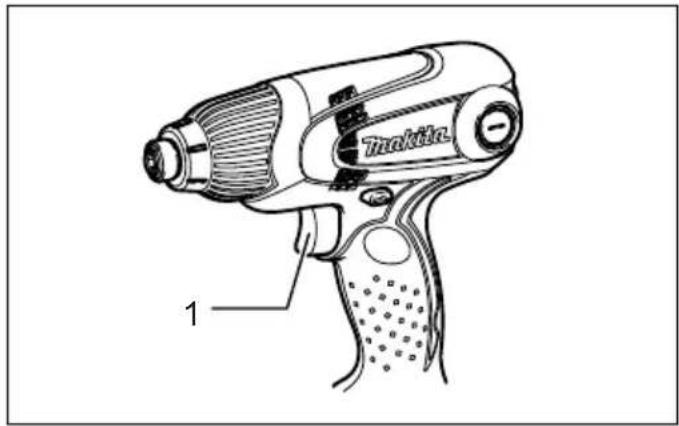
1 009762 2 009758
3 009759 4 004521
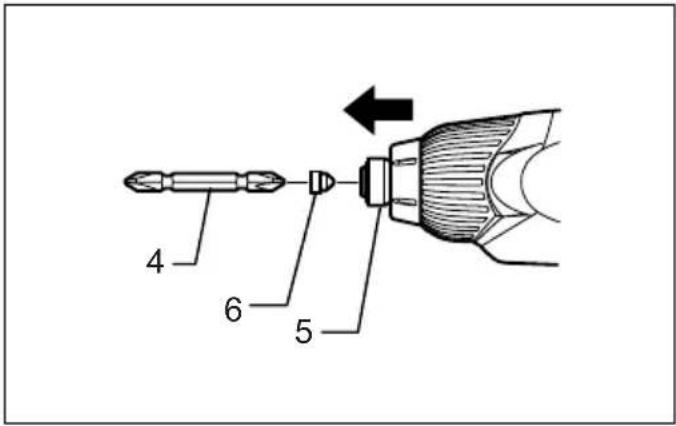
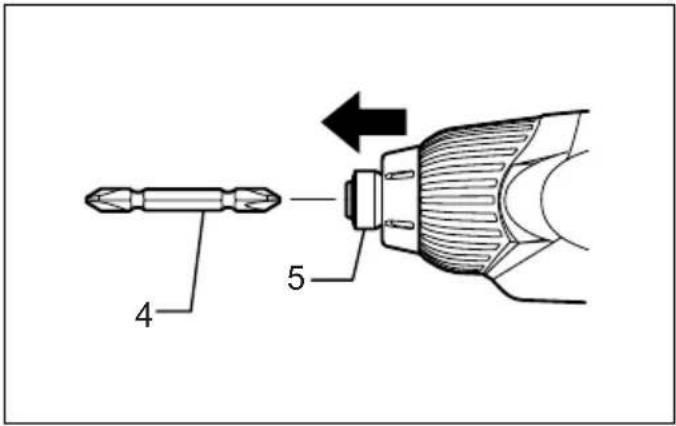
5 009833 6 009834
natural_image
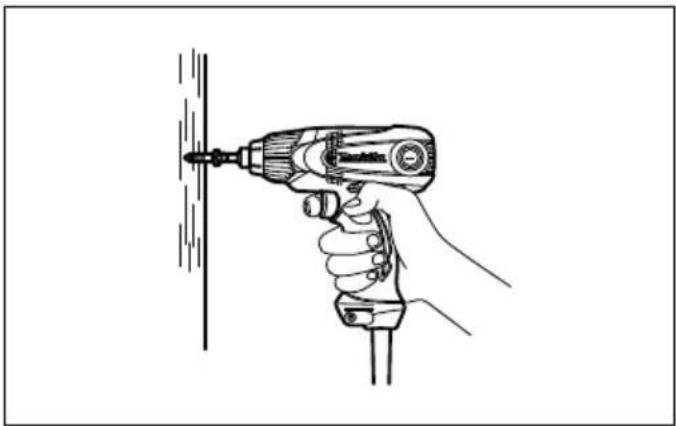
Line drawing of a hand using a drill pen to lift a vertical screw (no text or symbols)7 009761
line
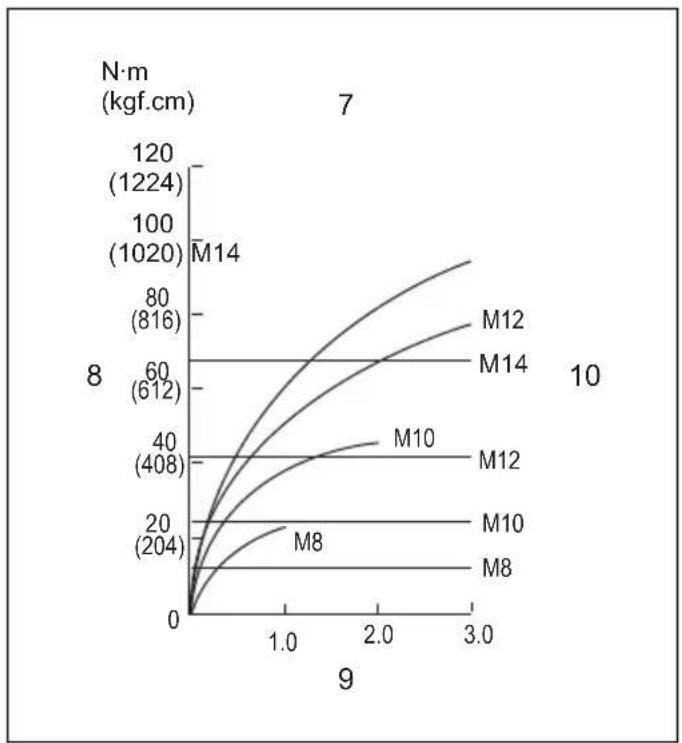
| 9 | M8 | M10 | M12 | M14 | M12 (816) | M14 (1020) | | ---- | ------ | ----- | ----- | ----- | --------- | ---------- | | 0.0 | 0 | 0 | 0 | 0 | 0 | 0 | | 1.0 | ~20 | ~40 | ~60 | ~80 | ~100 | ~120 | | 2.0 | ~40 | ~60 | ~80 | ~100 | ~120 | ~140 | | 3.0 | ~60 | ~80 | ~100 | ~120 | ~140 | ~160 |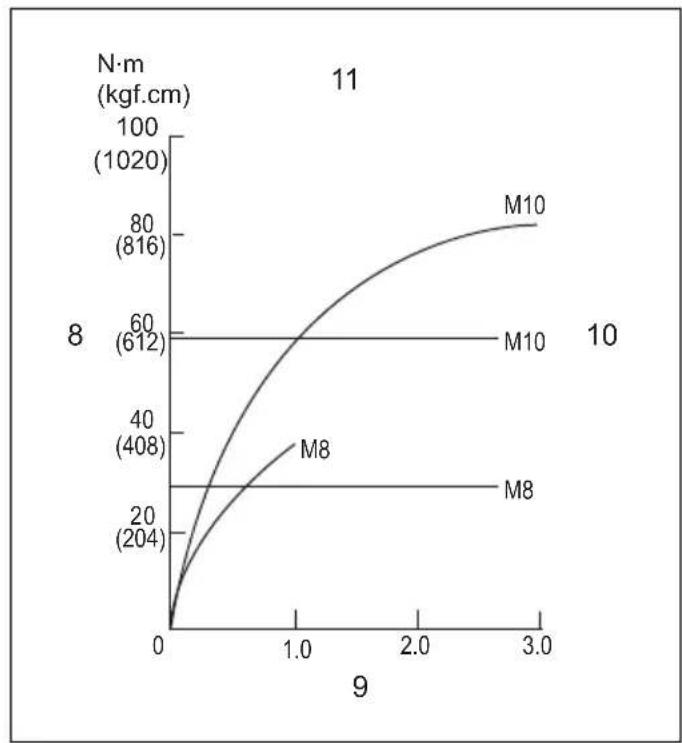
line
| x | M8 | M10 | | ---- | ------ | ------ | | 0.0 | 204 | 612 | | 1.0 | 408 | 816 | | 3.0 | 816 | 1020 |8 009619 9 009620
natural_image
Pure mechanical diagram showing a spring-loaded component with no text or symbols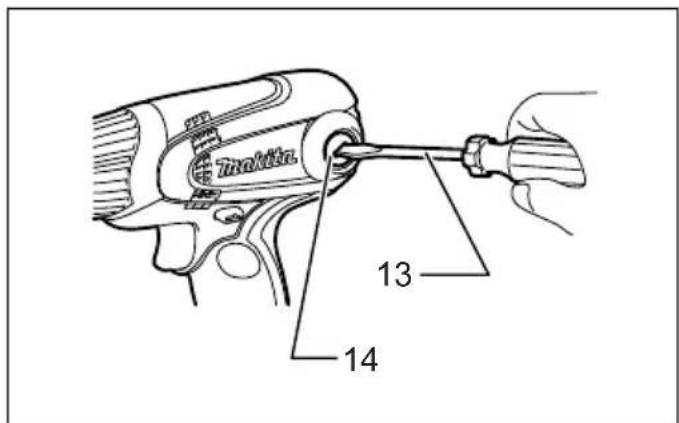
10 001145 11 009760
12 009757 13 009835
ENGLISH (Original instructions)
Explanation of general view
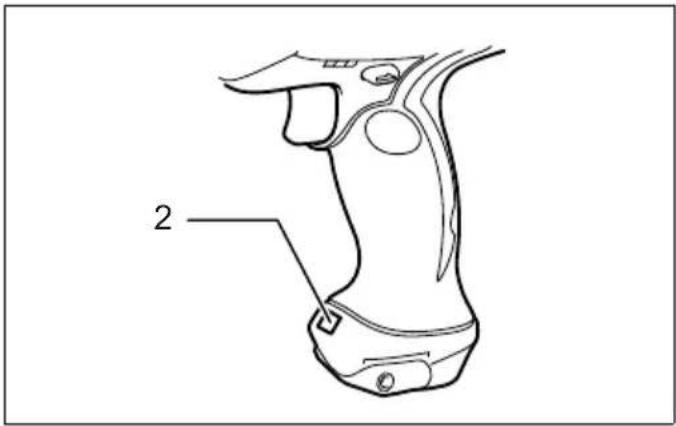
| 1. Switch trigger | 8. Fastening torque | 15. Screw |
| 2. Lamp | 9. Fastening time (S) | 16. Hook |
| 3. Reversing switch lever | 10. Proper fastening torque | 17. Groove |
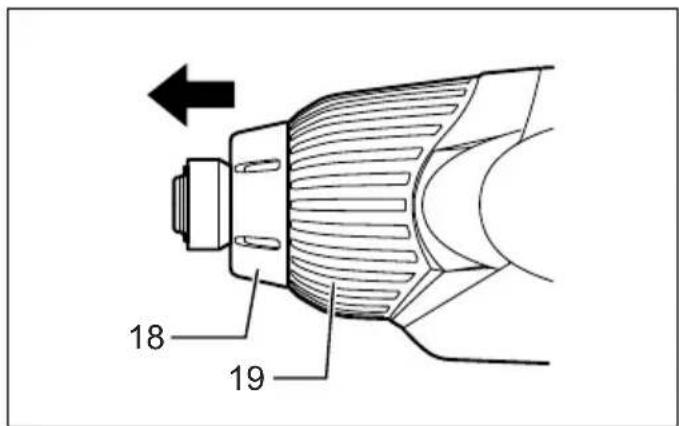
| 4. Bit | 11. High tensile bolt | 18. Bumper |
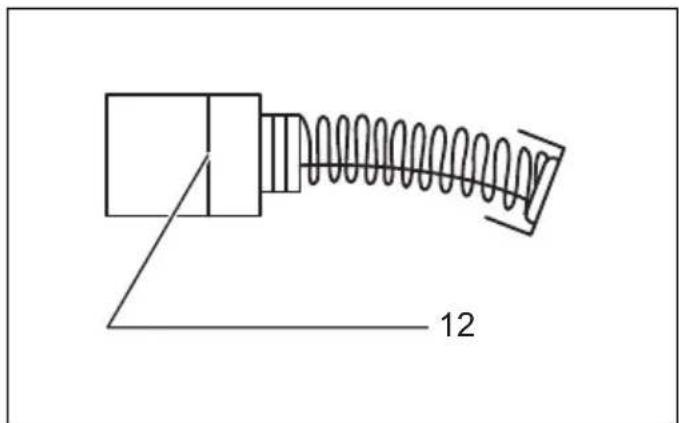
| 5. Sleeve | 12. Limit mark | 19. Hammer case cover |
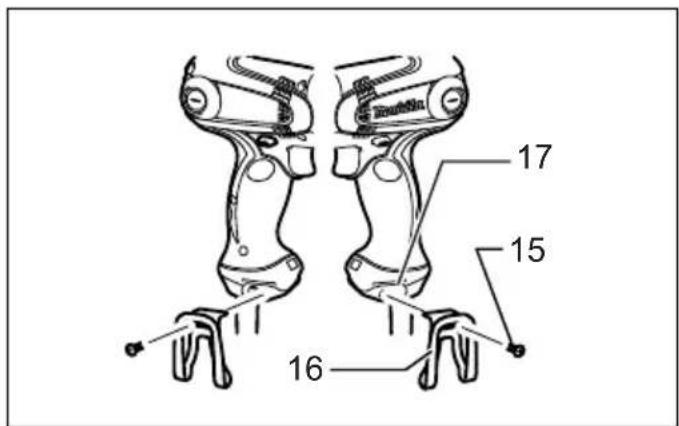
| 6. Bit-piece | 13. Screwdriver | |
| 7. Standard bolt | 14. Brush holder cap |
SPECIFICATIONS
| Model TD0101/TD0101F | ||
| Capacities | Machine screw 4 mm - | 8 mm |
| Standard bolt 5 mm - | 14 mm | |
| High tensile bolt 5 mm - | 10 mm | |
| No load speed (min ^-1 ) | 0 - 3,600 | |
| Impacts per minute (min ^-1 ) | 0 - 3,200 | |
| Max. fastening torque | 100 N·m | |
| Dimensions (L x W x H) | 184 mm x 67 mm x 192 mm | |
| Net weight | 0.99 kg | |
| Safety class | ☐/II | |
- Due to our continuing program of research and development, the specifications herein are subject to change without notice.
- Specifications may differ from country to country.
• Weight according to EPTA-Procedure 01/2014
Intended use
ENE033-1
The tool is intended for screw driving in wood, metal and plastic.
Power supply
ENF002-2
The tool should be connected only to a power supply of the same voltage as indicated on the nameplate, and can only be operated on single-phase AC supply. They are double-insulated and can, therefore, also be used from sockets without earth wire.
General power tool safety warnings
GEA010-2

WARNING: Read all safety warnings, instructions, strations and specifications provided with this over tool. Failure to follow all instructions listed below or result in electric shock, fire and/or serious injury.
Save all warnings and instructions for future reference.
The term “power tool” in the warnings refers to your mains-operated (corded) power tool or battery-operated (cordless) power tool.
IMPACT DRIVER SAFETY WARNINGS
GEB136-1
- Hold the power tool by insulated gripping surfaces, when performing an operation where the fastener may contact hidden wiring or its own cord. Fasteners contacting a "live" wire may make exposed metal parts of the power tool "live" and could give the operator an electric shock.
- Always be sure you have a firm footing. Be sure no one is below when using the tool in high locations.
- Hold the tool firmly.
- Wear ear protectors.
- Do not touch the bit or the workpiece immediately after operation. They may be extremely hot and could burn your skin.
- Keep hands away from rotating parts.
- Use auxiliary handle(s), if supplied with the tool. Loss of control can cause personal injury.
- Hold the power tool by insulated gripping surfaces, when performing an operation where the cutting accessory may contact hidden wiring or its own cord. Cutting accessory contacting a "live" wire may make exposed metal parts of the power tool "live" and could give the operator an electric shock.
SAVE THESE INSTRUCTIONS.
WARNING: DO NOT let comfort or familiarity with product (gained from repeated use) replace strict adherence to safety rules for the subject product. MISUSE or failure to follow the safety rules stated in this instruction manual may cause serious personal injury.
FUNCTIONAL DESCRIPTION
CAUTION:
• Always be sure that the tool is switched off and unplugged before adjusting or checking function on the tool.
Switch action (Fig. 1)
CAUTION:
- Before plugging in the tool, always check to see that the switch trigger actuates properly and returns to the "OFF" position when released.
To start the tool, simply pull the switch trigger. Tool speed is increased by increasing pressure on the switch trigger. Release the switch trigger to stop.
Lighting up the lamp (Model TD0101F only) (Fig. 2)
CAUTION:
- Do not look in the light or see the source of light directly.
Connect the plug to light up the lamp. The lamp keeps on lighting while the plug is connected.
NOTE:
- Use a dry cloth to wipe the dirt off the lens of lamp. Be careful not to scratch the lens of lamp, or it may lower the illumination.
- Do not use thinner or gasoline to clean the lamp. Such solvents may damage it.
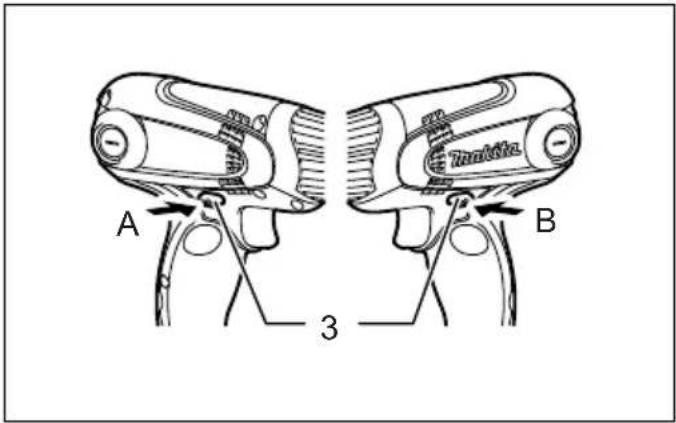
Reversing switch action (Fig. 3)
- This tool has a reversing switch to change the direction of rotation. Depress the reversing switch lever from the A side for clockwise rotation or from the B side for counterclockwise rotation.
CAUTION:
- Always check the direction of rotation before operation.
- Use the reversing switch only after the tool comes to a complete stop. Changing the direction of rotation before the tool stops may damage the tool.
ASSEMBLY
CAUTION:
• Always be sure that the tool is switched off and unplugged before carrying out any work on the tool.
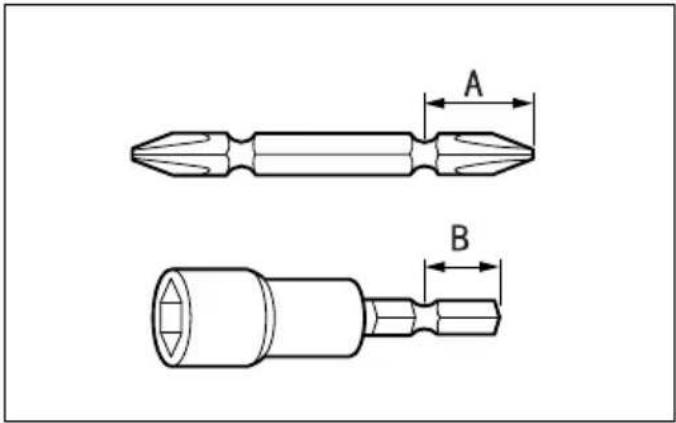
Installing or removing driver bit or socket bit (Fig. 4)
Use only bits that has inserting portion shown in the figure.
For European and North & South American countries, Australia and New Zealand
| A=12 mmB=9 mm | Use only these type of bit. Follow the procedure (1).(Note) Bit-piece is not necessary. |
006348
For other countries
| A=17 mmB=14 mm | To install these types of bits, follow the procedure (1).(Note) Makita bits are these types. |
| A=12 mmB=9 mm | To install these types of bits, follow the procedure (2).(Note) Bit-piece is necessary for installing the bit. |
006349
- To install the bit, pull the sleeve in the direction of the arrow and insert the bit into the sleeve as far as it will go. Then release the sleeve to secure the bit. (Fig.5)
- To install the bit, pull the sleeve in the direction of the arrow and insert the bit-piece and bit into the sleeve as far as it will go. The bit-piece should be inserted into the sleeve with its pointed end facing in. Then release the sleeve to secure the bit. (Fig. 6)
To remove the bit, pull the sleeve in the direction of the arrow and pull the bit out firmly.
NOTE:
- If the bit is not inserted deep enough into the sleeve, the sleeve will not return to its original position and the bit will not be secured. In this case, try re-inserting the bit according to the instructions above.
OPERATION (Fig. 7)
NOTE:
- The size of wood screw which can be fastened with this tool may differ depending upon the type of material to be fastened. Always perform a test operation to determine the size of wood screw.
Holding the tool
Hold the tool only by the handle when performing an operation. Do not touch the metal part.
The proper fastening torque may differ depending upon the kind or size of the screw/bolt, the material of the workpiece to be fastened, etc. The relation between fastening torque and fastening time is shown in the figures. (Fig. 8 & 9)
Hold the tool firmly and place the point of the driver bit in the screw head. Apply forward pressure to the tool to the extent that the bit will not slip off the screw and turn the tool on to start operation.
NOTE:
- Use the proper bit for the head of the screw/bolt that you wish to use.
- When fastening screw M8 or smaller, carefully adjust pressure on the switch trigger so that the screw is not damaged.
- Hold the tool pointed straight at the screw.
- If you tighten the screw for a time longer than shown in the figures, the screw or the point of the driver bit may be overstressed, stripped, damaged, etc. Before starting your job, always perform a test operation to determine the proper fastening time for your screw.
The fastening torque is affected by a wide variety of factors including the following. After fastening, always check the torque with a torque wrench.
- Driver bit or socket bit
Failure to use the correct size driver bit or socket bit will cause a reduction in the fastening torque.
-
Bolt
-
Even though the torque coefficient and the class of bolt are the same, the proper fastening torque will differ according to the diameter of bolt.
-
Even though the diameters of bolts are the same, the proper fastening torque will differ according to the torque coefficient, the class of bolt and the bolt length.
-
The manner of holding the tool or the material of driving position to be fastened will affect the torque.
-
Operating the tool at low speed will cause a reduction in the fastening torque.
MAINTENANCE
CAUTION:
- Always be sure that the tool is switched off and unplugged before attempting to perform inspection or maintenance.
- Never use gasoline, benzine, thinner, alcohol or the like. Discoloration, deformation or cracks may result.
Replacing carbon brushes (Fig. 10)
Remove and check the carbon brushes regularly. Replace when they wear down to the limit mark. Keep the carbon brushes clean and free to slip in the holders. Both carbon brushes should be replaced at the same time. Use only identical carbon brushes.
Use a screwdriver to remove the brush holder caps. Take out the worn carbon brushes, insert the new ones and secure the brush holder caps. (Fig. 11)
To maintain product SAFETY and RELIABILITY, repairs, carbon brush inspection and replacement, any other maintenance or adjustment should be performed by Makita Authorized Service Centers, always using Makita replacement parts.
OPTIONAL ACCESSORIES
CAUTION:
• These accessories or attachments are recommended for use with your Makita tool specified in this manual. The use of any other accessories or attachments might present a risk of injury to persons. Only use accessory or attachment for its stated purpose.
If you need any assistance for more details regarding these accessories, ask your local Makita Service Center.
- Screw bits
- Socket bits
- Bit piece
- Adjustable locator with bit
- Hook
NOTE:
- Some items in the list may be included in the tool package as standard accessories. They may differ from country to country.
Hook (Fig. 12)
The hook is convenient for temporarily hanging the tool. This can be installed on either side of the tool.
To install the hook, insert it into a groove in the tool housing on either side and then secure it with a screw. To remove, loosen the screw and then take it out.
Adjustable locator with bit (Fig. 13)
To use the adjustable locator with bit, remove the bumper and then install it. The bumper can be removed by pulling forward.
Noise
ENG905-1
The typical A-weighted noise level determined according to EN62841-2-2:
Sound pressure level ( L_pA ): 93 dB (A)
Sound power level L_WA : 101 dB (A)
Uncertainty (K): 3 dB (A)
ENG907-1
- The declared noise emission value(s) has been measured in accordance with a standard test method and may be used for comparing one tool with another.
- The declared noise emission value(s) may also be used in a preliminary assessment of exposure.
WARNING:
- Wear ear protection.
- The noise emission during actual use of the power tool can differ from the declared value(s) depending on the ways in which the tool is used especially what kind of workpiece is processed.
- Be sure to identify safety measures to protect the operator that are based on an estimation of exposure in the actual conditions of use (taking account of all parts of the operating cycle such as the times when the tool is switched off and when it is running idle in addition to the trigger time).
Vibration
ENG900-1
The vibration total value (tri-axial vector sum) determined according to EN62841-2-2:
Work mode: impact tightening of fasteners of the maximum capacity of the tool
Vibration emission ( a_h ): 7.5 m/s ^2
Uncertainty (K): 1.5 m/s²
ENG901-2
- The declared vibration total value(s) has been measured in accordance with a standard test method and may be used for comparing one tool with another.
- The declared vibration total value(s) may also be used in a preliminary assessment of exposure.
WARNING:
- The vibration emission during actual use of the power tool can differ from the declared value(s) depending on the ways in which the tool is used especially what kind of workpiece is processed.
- Be sure to identify safety measures to protect the operator that are based on an estimation of
exposure in the actual conditions of use (taking account of all parts of the operating cycle such as the times when the tool is switched off and when it is running idle in addition to the trigger time).
Declarations of Conformity
For European countries only
The Declarations of conformity are included in Annex A to this instruction manual.
WAARSCHUWING: Lees alle
- GB Impact Driver Instruction manual
- Intended use
- Power supply
- General power tool safety warnings
- Save all warnings and instructions for future reference.
- IMPACT DRIVER SAFETY WARNINGS
- SAVE THESE INSTRUCTIONS.
- FUNCTIONAL DESCRIPTION
- CAUTION:
- Switch action (Fig. 1)
- Lighting up the lamp (Model TD0101F only) (Fig. 2)
- NOTE:
- Reversing switch action (Fig. 3)
- ASSEMBLY
- Installing or removing driver bit or socket bit (Fig. 4)
- OPERATION (Fig. 7)
- Holding the tool
- MAINTENANCE
- Replacing carbon brushes (Fig. 10)
- OPTIONAL ACCESSORIES
- Hook (Fig. 12)
- Adjustable locator with bit (Fig. 13)
- Noise
- WARNING:
- Vibration
- Declarations of Conformity
- For European countries only
Brand : MAKITA
Model : TD0101F
Category : Screwdriver