T630 - Treadmills SportsArt - Free user manual and instructions
Find the device manual for free T630 SportsArt in PDF.


User questions about T630 SportsArt
0 question about this device. Answer the ones you know or ask your own.
Ask a new question about this device
Download the instructions for your Treadmills in PDF format for free! Find your manual T630 - SportsArt and take your electronic device back in hand. On this page are published all the documents necessary for the use of your device. T630 by SportsArt.
USER MANUAL T630 SportsArt
Ultrathin Touch Mouse T630
Setup Guide
Bluetooth wireless technology

Logitech
English. 3
Deutsch . . . . . . . . . . . . . . . . . . . . . . . . . . . 10
Français .....17
Italiano. 24
Español .....31
Português ..... 38
Nederlands 45
Svenska 52
Dansk 59
Norsk 66
Suomi 73
Ελληνικά. 80
Türkçe 87
العربيya 95
www.logitech.com/support . .102
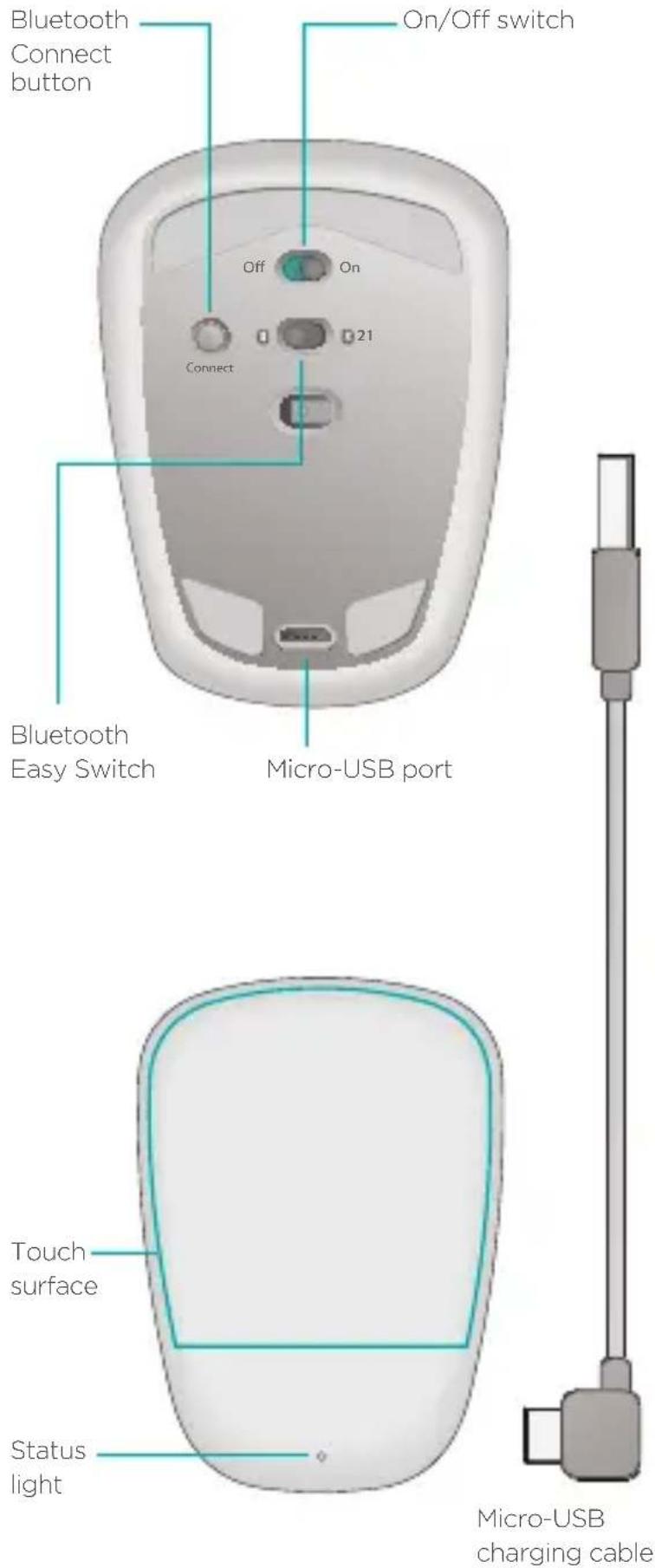
Get to know your mouse
text_image
Bluetooth Connect button On/Off switch Off On 21 Connect Bluetooth Easy Switch Micro-USB port Touch surface Status light Micro-USB charging cableSet up Bluetooth
On your mouse
1. Power on
Slide the switch to the On position.

text_image
Off On2. Select Bluetooth channel
Slide the Bluetooth Easy Switch to position 1 or 2.

text_image
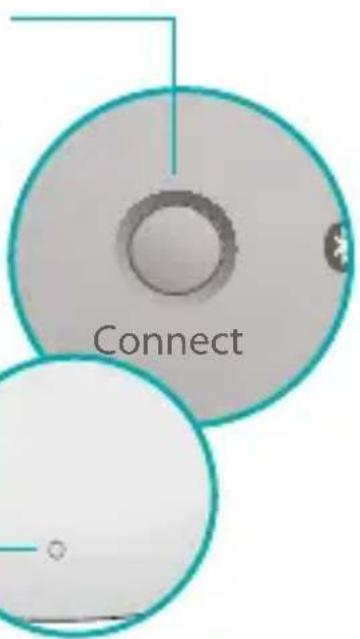
n 213. Press Connect
The status light blinks blue rapidly to indicate the mouse is ready for pairing with your PC.
text_image
ConnectThe status light — blinks while the mouse is discoverable— about three minutes.
Set up Bluetooth
On your PC
Windows 8 and Windows RT:
Open the Settings charm and tap or click Devices (in PC settings). Tap or click Add a Device and select Ultrathin Touch Mouse from the list of wireless devices.
Windows 7: Right-click the Bluetooth icon on the taskbar and select Add a Device from the context menu. Select Ultrathin Touch Mouse from the list of available devices and click Next.
When pairing is complete, the status light glows blue steadily for 30 seconds.
Install software

Don't miss out on all your mouse has to offer! Install Logitech software for smoother performance, customizable settings, and optimal gestures.
Download the software from:
www.logitech.com/support/t630
Pair with another PC
Slide the Bluetooth Easy Switch to the remaining unused channel, press the Connect button, and repeat the steps in “Set up Bluetooth.”
Afterwards, reconnect to a PC by first selecting the channel you used to pair with it.
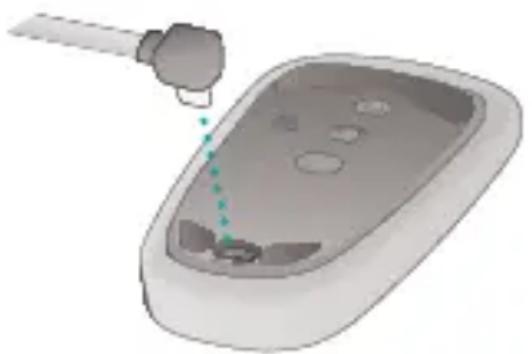
Charge the battery
Use the charging cable to recharge the mouse from your computer. The status light blinks green until the mouse is fully charged. On average, one minute of charging adds an hour of use.
natural_image
3D illustration of a device with a tool interacting with a surface, showing no text or symbolsWhat do you think?
Take a moment to tell us. Thank you for purchasing our product.
www.logitech.com/ithink
Gestures
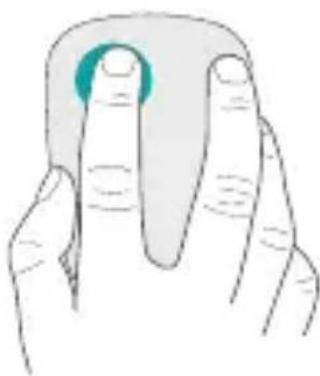
Click. Press the left side of the touch surface.
natural_image
Illustration of a finger pressing a button on a surface (no text or symbols)Right-click. Press the right side of the touch surface.
Lift the non- clicking finger completely off the surface.
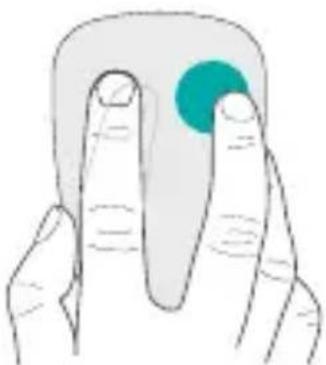
natural_image
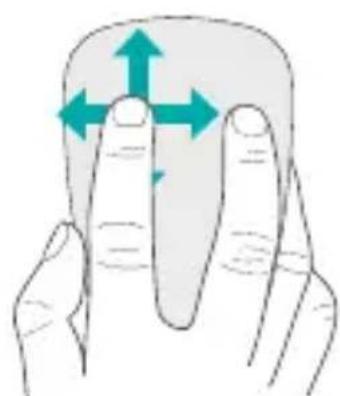
Illustration of two fingers holding a small object, one with a teal circular highlight (no text or symbols)Scroll. Swipe up, down, or sideways.
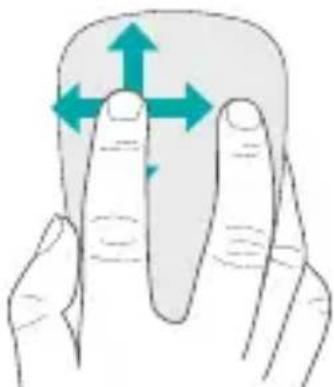
natural_image
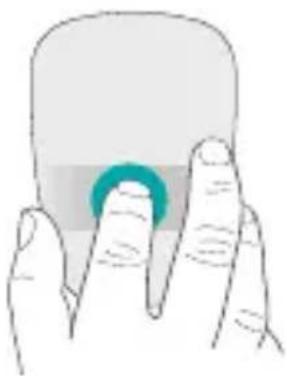
Illustration of two hands holding a rounded object with arrows indicating upward and downward motion (no text or symbols)Middle-click. Press the lower portion of the touch surface.
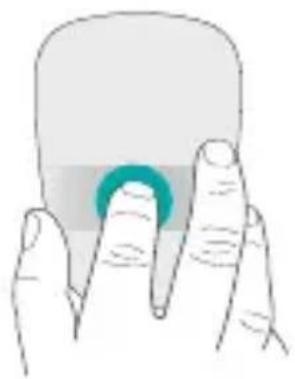
natural_image
Illustration of a hand holding a rounded object with a teal circular button (no text or symbols)Start menu. Double-tap on the touch surface with two fingers.
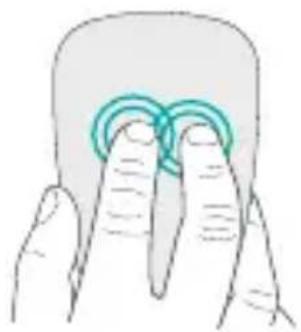
natural_image
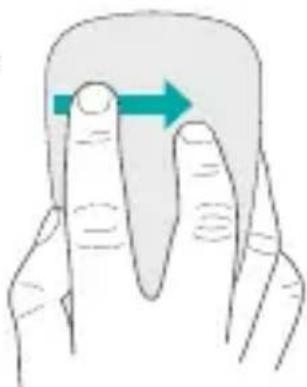
Illustration of two fingers holding a rounded object, no text or symbols presentApp switching. Swipe from the left edge of the touch surface with one finger.
Swipe from the right edge to display the Charms bar.
natural_image
Illustration of two fingers holding a rounded object with a blue arrow indicating direction (no text or symbols)Troubleshooting
Mouse not working?
- On your PC, confirm that Bluetooth is turned on.
• Is the mouse powered on? - If the status light is blinking red, recharge the battery.
- Confirm that the Bluetooth channel (1 or 2) is the same one you used for pairing.
- Restart your PC.
- If your mouse is listed as a Bluetooth device, remove it from the list and repeat the steps to pair it with your PC.
www.logitech.com/support/t630
Support
Visit the product page
While online check out the Ultrathin Touch Mouse product page, your destination for world-class support. There you will find tutorials, guidelines, and troubleshooting tips for your mouse.
www.logitech.com/support/t630
Einführung zur Maus

natural_image
Illustration of a medical device with a tool inserted, showing internal components and a dotted line indicating a measurement or alignment (no text or symbols present)www.logitech.com/ithink
Gesten
natural_image
Illustration of a finger pressing a button on a computer mouse (no text or symbols)natural_image
Illustration of two fingers holding a small object with a teal circular highlight (no text or symbols)natural_image
Illustration of two hands holding a rounded object with three directional arrows indicating movement (no text or symbols)natural_image
Illustration of a hand holding a rounded object with a teal circular button (no text or symbols)natural_image
Illustration of two fingers pressing down on a curved object (no text or symbols)text_image
sion Off Ontext_image
or Connect at eu Connectnatural_image
3D illustration of a device with a tool interacting with it, showing a dotted line indicating a path (no text or symbols present)Qu'en pensez-vous?
www.logitech.com/ithink
Gestes de contrôle
natural_image
Illustration of a finger pressing a button on a curved object (no text or symbols)natural_image
Illustration of two fingers holding a small object with a teal circular highlight (no text or symbols)natural_image
Illustration of two fingers holding a rounded object with directional arrows indicating movement (no text or symbols)natural_image
Illustration of two fingers holding a rounded object with a teal circular button (no text or symbols)Menu Démarrer.
natural_image
Illustration of two fingers pressing down on a curved object (no text or symbols)natural_image
Illustration of two fingers with a blue arrow indicating direction (no text or symbols)Dépannage
text_image
Connect Connectnatural_image
3D illustration of a device with a tool interacting with a surface, showing a dotted line indicating a path (no text or symbols present)Cosa ne pensi?
www.logitech.com/ithink
natural_image
Illustration of a finger pressing a button on a computer mouse (no text or symbols)natural_image
Illustration of two fingers holding a small object, one with a teal circular highlight (no text or symbols)natural_image
Illustration of a finger pressing a button with directional arrows indicating movement (no text or symbols)natural_image
Illustration of a hand holding a rounded object with a teal circular button (no text or symbols)Menu Start.
natural_image
Illustration of two fingers pressing down on a curved object (no text or symbols)natural_image
Illustration of two fingers pointing to a curved object with a blue arrow indicating direction (no text or symbols)natural_image
Illustration of a medical device with a pipette inserted into a device (no text or symbols visible)www.logitech.com/ithink
Gestos
natural_image
Illustration of a finger pressing a button on a curved object (no text or symbols)natural_image
Illustration of two fingers holding a small object with a teal circular highlight (no text or symbols)natural_image
Illustration of two hands holding a rounded object with directional arrows indicating movement or force (no text or symbols)natural_image
Illustration of two fingers holding a rounded object with a teal circular button (no text or symbols)Menú Inicio.
natural_image
Illustration of two fingers pressing down on a curved object (no text or symbols)natural_image
Illustration of two fingers holding a rounded object with a blue arrow indicating direction (no text or symbols)natural_image
3D illustration of a device with a tool interacting with it, showing a green dotted line indicating a path or alignment (no text or symbols present)Qual a sua opinião?
www.logitech.com/ithink
Gestos
Clique. Prima no lado esquerdo da superfície de toque.

natural_image
Illustration of a finger pressing a button on a surface (no text or symbols)natural_image
Illustration of two hands holding a rounded object with directional arrows indicating movement (no text or symbols)natural_image
Illustration of a hand holding a rounded object with a teal circular button (no text or symbols)Menu Iniciar.
natural_image
Illustration of two fingers holding a circular object, no text or symbols presentnatural_image
Illustration of two fingers with a blue arrow indicating direction (no text or symbols)text_image
s in ar Off Onnatural_image
Circular device with internal components and directional arrows, no visible text or symbols3. Druk op Connect
text_image
ct Connectnatural_image
3D illustration of a car interior with a tool interacting with the lid (no text or symbols)Wat vindt u ervan?
www.logitech.com/ithink
Handbewegingen
natural_image
Illustration of a finger pressing a button on a computer mouse (no text or symbols)natural_image
Illustration of two fingers holding a small object with a teal circular highlight (no text or symbols)natural_image
Illustration of two hands holding a rounded object with arrows indicating upward and downward motion (no text or symbols)natural_image
Illustration of a hand holding a rounded object with a teal circular button (no text or symbols)Start-menu.
natural_image
Illustration of two fingers pressing down on a curved object (no text or symbols)natural_image
Illustration of two fingers with a green arrow indicating direction (no text or symbols)Problemen oplossen
Werkt de muis niet?
text_image
ect Connectnatural_image
3D illustration of a device with a tool interacting with it, showing a dotted line and control buttons (no text or symbols)Vad tycker du?
www.logitech.com/ithink
Gester
natural_image
Illustration of a finger pressing a button on a curved object (no text or symbols)natural_image
Illustration of two fingers holding a small object with a teal circular highlight (no text or symbols)natural_image
Illustration of two hands holding a rounded object with arrows indicating movement or force direction (no text or symbols)natural_image
Illustration of a hand holding a rounded object with a teal circular button (no text or symbols)Start-menyn.
natural_image
Illustration of two fingers pressing down on a curved object (no text or symbols)natural_image
Illustration of two fingers holding a rounded object with a blue arrow indicating direction (no text or symbols)Felsökning
text_image
ct ConnectStatusindikatoren blinker mens musen kan registreres - omkring tre minutter.
Konfiguration af Bluetooth
På computeren
natural_image
3D illustration of a device with a tool interacting with a surface, showing no text or symbolsHvad synes du?
www.logitech.com/ithink
Gestik
natural_image
Line drawing of a finger pressing a button on a computer mouse (no text or symbols)natural_image
Illustration of two fingers holding a small object with a teal circular highlight (no text or symbols)natural_image
Illustration of two hands holding a rounded object with directional arrows indicating movement (no text or symbols)Klik med midterknappen.
natural_image
Illustration of two fingers holding a rounded object with a teal circular highlight (no text or symbols)Startmenuen. Tryk to gange på den berøringsfølsomme overflade med to fingre.

natural_image
Illustration of two fingers pressing down on a curved surface with concentric rings (no text or symbols)natural_image
Illustration of two fingers pressing a button with a blue arrow indicating direction (no text or symbols)Problemløsning
Virker musen ikke?
text_image
n is ConnectKonfigurere Bluetooth
På datamaskinen
natural_image
3D illustration of a medical device with a needle inserted into the chamber (no text or symbols)Hva synes du?
www.logitech.com/ithink
Håndbevegelser
natural_image
Illustration of a finger pressing a button on a computer mouse (no text or symbols)natural_image
Illustration of two fingers holding a small object with a teal circular highlight (no text or symbols)Rull. Rull oppover, nedover eller sidelengs.
natural_image
Illustration of two fingers holding a rounded object with directional arrows indicating movement (no text or symbols)Midtklikk. Trykk på den nedre delen av berøringsflaten.
natural_image
Illustration of two fingers holding a rounded object with a teal circular button (no text or symbols)Startmeny. Dobbelttapp på berøringsflaten med to fingre.

natural_image
Illustration of two fingers pressing down on a curved surface with concentric rings (no text or symbols)natural_image
Illustration of two fingers with a blue arrow indicating direction (no text or symbols)Feilsøking
Musen fungerer ikke
natural_image
Circular diagram with a central oval shape and two arrows pointing inward, labeled '21' (no text or symbols beyond labels)natural_image
3D illustration of a device with a tool interacting with a surface, showing a dotted line indicating a path (no text or symbols present)Mitä mieltä olet?
www.logitech.com/ithink
Eleet
natural_image
Illustration of a finger pressing a button on a computer mouse (no text or symbols)natural_image
Illustration of two fingers holding a small object with a teal circular highlight (no text or symbols)natural_image
Illustration of two hands holding a rounded object with directional arrows indicating movement (no text or symbols)Keskipainikkeen napsautus.
natural_image
Illustration of two fingers holding a rounded object with a teal circular button (no text or symbols)Käynnistä-valikko.
natural_image
Illustration of two fingers pressing down on a curved object (no text or symbols)natural_image
Illustration of two hands holding a rounded object with a green arrow indicating direction (no text or symbols)Vianmääritys
Hiiri ei toimi:
natural_image
Illustration of a medical device with a pipette inserted into a container (no text or symbols)www.logitech.com/ithink
Κινήσεις
natural_image
Illustration of a finger pressing a button on a computer mouse (no text or symbols)natural_image
Illustration of two fingers holding a small object with a teal circular highlight (no text or symbols)natural_image
Illustration of two hands holding a rounded object with three directional arrows indicating movement (no text or symbols)natural_image
Illustration of a hand holding a rounded object with a teal circular button (no text or symbols)natural_image
Illustration of two fingers pressing down on a curved object, no text or symbols presentnatural_image
Illustration of two fingers holding a rounded object with a blue arrow indicating direction (no text or symbols)text_image
basin lir ConnectBluetooth'u kurun:
PC'nizde
Windows 8 ve Windows RT:
natural_image
3D illustration of a device with a tool interacting with a surface, showing no text or symbolsNe düşünüyorsunuz?
www.logitech.com/ithink
Hareketler
natural_image
Illustration of a finger pressing a button on a computer mouse (no text or symbols)natural_image
Illustration of two fingers holding a small object with a teal circular highlight (no text or symbols)natural_image
Illustration of two hands holding a rounded object with directional arrows indicating movement or force (no text or symbols)natural_image
Illustration of a hand holding a rounded object with a teal circular button (no text or symbols)Başlat menüsü.
natural_image
Illustration of two fingers pressing down on a curved object (no text or symbols)natural_image
Illustration of two fingers pressing a button with an arrow indicating direction (no text or symbols)Sorun giderme
Fare çalışmıyor mu?
natural_image
Circular diagram with a central oval shape and two arrows pointing inward, labeled '21' (no text or symbols beyond the number)Bluetooth مفتاح
السهل الاستخدام إلى
الوضع 1 أو .2

text_image
Connectnatural_image
3D illustration of a medical device with a needle inserted, showing internal components and a pointer (no text or symbols)ما رأيك؟
www.logitech.com/ithink
Bluetooth إعداد
على الكمبيوتر
natural_image
Illustration of two fingers holding a rounded object with a teal circular button (no text or symbols)قائمة البدع.
natural_image
Illustration of two fingers holding a rounded object, no text or symbols presentnatural_image
Illustration of two fingers holding a rounded object with a green arrow indicating direction (no text or symbols)اسحب إصدبعت من
natural_image
Illustration of a finger pressing a button on a computer mouse (no text or symbols)natural_image
Illustration of two fingers holding a small object with a teal circular highlight (no text or symbols)natural_image
Illustration of two hands holding a rounded object with directional arrows indicating movement (no text or symbols)French: +32-(0)2 200 64 40
Česká Republika
+420 239 000 335
Danmark
+45-38 32 31 20
Deutschland
+49-(0)69-51 709 427
España
+34-91-275 45 88
France
+33-(0)1-57 32 32 71
Ireland
+353-(0)1 524 50 80
Italia
+39-02-91 48 30 31
Magyarország
+36 (1) 777-4853
Nederland
+31-(0)-20-200 84 33
Norge
+47-(0)24 159 579
Österreich
+43-(0)1 206 091 026
Polska
00800 441 17 19

Portugal
+351-21-415 90 16
Россия
+7(495) 641 34 60
Schweiz/Suisse, Svizzera
D +41-(0)22 761 40 12
F +41-(0)22 761 40 16
+41-(0)22 761 40 20
E +41-(0)22 761 40 25
South Africa
0800 981 089
Suomi
+358-(0)9 725 191 08
Sverige
+46-(0)8-501 632 83
Türkiye
00800 44 882 5862
United Arab Emirates
8000 441-4294
United Kingdom
+44-(0)203-024-8159
European, Mid. East., & African Hq.
Morges, Switzerland
English: +41-(0)22 761 40 25
English: 41-(0)22 761 40 25
www.logitech.com
© 2013 Logitech. Logitech, the Logitech logo, and other Logitech marks are owned by Logitech and may be registered. All other trademarks are the property of their respective owners. Logitech assumes no responsibility for any errors that may appear in this manual. Information contained herein is subject to change without notice.