T621 - Treadmills SportsArt - Free user manual and instructions
Find the device manual for free T621 SportsArt in PDF.


User questions about T621 SportsArt
0 question about this device. Answer the ones you know or ask your own.
Ask a new question about this device
Download the instructions for your Treadmills in PDF format for free! Find your manual T621 - SportsArt and take your electronic device back in hand. On this page are published all the documents necessary for the use of your device. T621 by SportsArt.
USER MANUAL T621 SportsArt
-
INTRODUCTION.... 1 INTRODUCTION Specifications.... 2
-
SAFETY PRECAUTIONS.... 3
-
LIST OF PARTS.... 8
-
ASSEMBLING THE PRODUCT.... 10
STEP 0 Remove Packaging Material.... 11
STEP 1 Install the Pedestals.... 13
STEP 2 Install the Display.... 20
STEP 3 Move the Treadmill 23
STEP 4 Level the Treadmill.... 24
STEP 5 Install the Power Cord 25
STEP 6 Align the Walk Belt.... 26
STEP 7 Adjust the Walk Belt Tightness.... 27
STEP 8 Safety Key Cord Installation.... 28
-
UNDERSTANDING THE T621 DISPLAY CONSOLE
DISPLAY Overview.... 30
DISPLAY Windows.... 31
DISPLAY Keys.... 32 -
OPERATING THE T621 TREADMILL
OPERATION Quick Start.... 34
OPERATION Start Key 34
OPERATION Workout Programs.... 34
OPERATION Basic Settings.... 38 -
ABOUT HEART RATE DETECTION AND PRESENTATION
HEART RATE Telemetry....40
HEART RATE Contact 40 -
GUIDELINES FOR EXERCISE
HOW HARD SHOULD I EXERCISE? 42
HOW LONG SHOULD I EXERCISE? 42
HOW OFTEN SHOULD I EXERCISE?...... 42 -
MAINTENANCE
MAINTENANCE Error Messages.... 43
MAINTENANCE Fuse Replacement 44
MAINTENANCE Lubrication 45
MAINTENANCE Lubrication Prompt 45
MAINTENANCE Lubrication Procedure 46
MAINTENANCE Schedule....50
MAINTENANCE Task List (Treadmills)....51
MAINTENANCE One-Year Maintenance Log....53
10.BLOCK DIAGRAM.... 54
1. INTRODUCTION
Thank you for purchasing a high quality product from SportsArt Fitness. Constructed of robust materials and built for years of trouble-free usage, the SportsArt T621 Treadmill was designed and manufactured to become an integral part of your fitness regimen. This product is a unique tool made to help you obtain your fitness goals. But like every tool, it must be used properly. Please read and abide by instructions in this manual. Understanding the correct use of this equipment will help you achieve your exercise goals safely and effectively.

text_image
980mm(38.6") 1430mm(56.3") 2120mm(83.5") R LINTRODUCTION Specifications
T621 treadmill product specifications follow:
Speed range: 0.1 to 12.0 mph; 0.2 to 20 kph
Incline range: 0 to 15%
Motor: 3.2 hp
Display type: LED
Running surface: 22 x 61 inches; 508 x 1473 mm
Workout programs: Programmable interval, random, hill (x3), glute (30-minute and 45-minute programs), quick start, manual/track
Heart rate control programs: weight loss, cardio conditioning, ZoneTrainer™
Feedback: Calories, distance, speed, incline, time, calories per hour, METs, pace, actual heart rate, weight loss target heart rate, cardio target heart rate, ActivZone™
Maximum user weight: 400 lb., 180 kg
Product dimensions: 83.5 x 38.6 x 56.3 inches; 2120 x 980 x 1430 mm
Product weight: 297 lb.; 653 kg
Fuse: (120V) 15A (slow); (220V) 10A (slow)
2. SAFETY PRECAUTIONS
Your SportsArt treadmill was designed and built for optimum safety. However certain precautions apply whenever you use your treadmill.
Please read the entire manual before assembly and operation. Also, please note the following safety precautions:
IMPORTANT SAFETY PRECAUTIONS
- Please read the instructions carefully and install the treadmill as instructed.
- Assemble and operate the treadmill on a solid, level surface. DO NOT use outdoors or near water.
- Never allow children on or near the treadmill.
- Check the treadmill before every use. Make sure all parts are assembled, and all fasteners are tightened. DO NOT use the treadmill if the unit is disassembled in any way.
- Keep your hands away from moving parts.
- Wear proper workout clothing; DO NOT wear loose clothing. DO NOT wear shoes with leather soles or high heels. Tie all long hair back. Do not go barefoot on this product.
- Be careful when mounting and dismounting the unit.
- The walk belt will not stop immediately if any object becomes caught in the belts or rollers.
- DO NOT use accessories that are not specifically recommended by the manufacturer. Such parts might cause injuries or cause the unit to fail.
- Unplug from outlet before servicing or removing of any parts.
- Close supervision is necessary when this treadmill is used by, or near children, invalids, or disabled persons.
- Use this treadmill only for its intended use as described in this manual.
- Never operate this treadmill if it has been damaged in any way. If it is not working properly, or has been dropped or damaged, contact your dealer.
- DO NOT carry this treadmill by the power cord or use the cord as a handle.
- Keep the power cord away from heated surfaces.
-
Keep all air ventilation areas free of blockage.
-
Never drop or insert any object into any opening.
- DO NOT operate where aerosol (spray) products are being used or where oxygen is being administered.
• The user weight limit for this treadmill is 180 kg (400 lb.).
Note that the top speed setting of 12 mph (20 kph) is suitable for users of up to 125 kg (275 lb.). Note also that speed may automatically decrease to avoid the overload of electronic components.
- Product performance depends on adequate power supply. Each light commercial treadmill requires one 15-Amp (for 110 V areas) or one 10-Amp (for 220 V areas) dedicated circuit for proper operation.
- This treadmill is not intended for use by persons (including children) with reduced physical, sensory or mental capabilities, or lack of experience and knowledge, unless they have been given supervision or instruction concerning use of the treadmill by a person responsible for their safety.
• Children should be supervised to ensure that they do not play with the treadmill.
- Treadmills should be positioned away from walls to avoid injury due to falls. Be sure that the back of the treadmill has at least six to seven feet of clearance from a ledge, wall or window. The power supply and wiring should be located away from walking paths or taped to prevent tripping when stepping on or off of the running belt.
CAUTION
If you feel any pain or abnormal sensation, STOP YOUR WORKOUT and consult you physician immediately. Work within your recommended exercise level. DO NOT work to exhaustion.
Before beginning any exercise program, you should consult with your doctor. It is recommended that you undergo a complete physical examination.
DO NOT stand on the walk belt when starting the treadmill. Straddle the belt with one foot on each landing strip.
To prevent injury, stand on landing strips (side rails) before starting the treadmill.
To reduce the risk of electric shock, unplug this treadmill from the electrical outlet immediately after use and before cleaning it or removing covers.
Improper grounding can increase the risk of electric shock. Check with a qualified technician if you are in doubt as to whether the treadmill is properly grounded. DO NOT modify the plug provided with the product; If the plug does not fit the outlet, have the proper outlet installed by a qualified technician.
Always use the safety key when operating the treadmill.
Note: This equipment has been tested and found to comply with the limits for a Class B digital device, pursuant to part 15 of the FCC Rules. These limits are designed to provide reasonable protection against harmful interference in a residential installation. This equipment generates, uses and can radiate radio frequency energy and, if not installed and used in accordance with the instructions, may cause harmful interference to radio communications. However, there is no guarantee that interference will not occur in a particular installation.
The expense to correct such interference must be borne by the product owner or operator.
WARNINGS AND CAUTIONS(FRENCH)
| Assembly Parts | |||||
| No. | Name Qty | No. | QtyDescription | ||
| A1 | Display | 1 | A7 | Left pedestal | 1 |
| A2 | Handlebar assembly | 1 | A8 | Owner manual | 1 |
| A3 | Right pedestal | 1 | A9 | Hardware kit | 1 |
| A4 | Feeder cord | 1 | A10 | Power cord | 1 |
| A5 | Water guard ring | 2 | A11 | Applicator tube | 1 |
| A6 | Main frame | 1 | Silicone lubricant | 4 | |
| A6a | Right side cover | 1 | |||
| A6b | Left side cover | 1 | |||
| Parts in the Hardware Kit | ||||
| No. | Name | Qty | NotesSpecification | |
| 31 | Screw cover (rounded) | 2 | ||
| 32 | Screw cover (flat) | 2 | ||
| 33 | Mushroom top Phillips screw | 6 | M4*L16 | |
| Screw socket | 4 | |||
| Screw clip | 4 | |||
| Fuse | 1 | 15A-100V~110V | ||
| 1 | 10A-200V~220V | |||
| L-shaped Allen wrench | 1 | M4 | ||
| L-shaped Allen wrench | 1 | M5 | ||
| L-shaped Allen wrench | 1 | M6 | ||
| T-shaped Allen wrench | 1 | M6 | ||
| Double open-end wrench | 1 | 22*24 | ||
| Screwdriver handle | 1 | green | ||
| Screwdriver bit | 1 | Phillips and flat | ||
If you discover items missing or damaged in shipping, please contact the SportsArt Service Department. Keep the hardware kit in a secure place for future use. Tools may be needed to disassemble the product in preparation for moving or other activities.
Some components are installed on the product. These items will be needed for product assembly.
| Parts on the Product | |||
| No. | Name | Specification | |
| 41 | Inner hex screw | M8*L20 | |
| Spring washer | M8 | ||
| Star washer | 18* 8.5*t2 | ||
| 42 | Mushroom top inner hex screw | M8*L20 | |
| Serrated washer (curved) | 18* 8.5*t2 | ||
| 43 | Mushroom top inner hex screw | M8*L20 | |
| Serrated washer | 18* 8.5*t2 | ||
| 44 | Mushroom top inner hex screw | M5*L12 | |
| 45 | Phillips head screw | M4*L8 | |
4. ASSEMBLING THE PRODUCT
Please follow instructions below to assemble this treadmill. Note: For brevity, throughout this manual, the word “screws” is used where screws, washers, and other hardware may be involved. Also, the words “left” and “right” are used in reference to the product and its parts. Note that, as such, these designations correspond to the left and right sides of a person in position to exercise on the product. Also note that some parts are marked “L” for left or “R” for right.
This product is designed for assembly by one person. But in some cases, depending on personal strength and experience, two people may be needed for product assembly. Get help if you need it, and plan for a safe assembly and product operation by considering the following:
- The site. Do not install this product in an area of high humidity. Exposure to extensive water vapor, chlorine, bromine, ammonia, and other chemicals can damage the product and present a hazard to exercisers.
- The surface. A solid, level surface is required for proper operation of this product.
- The space. Allow enough space around the product for safe mounting and dismounting.
- Electrical issues. Make sure that the actual power supply matches product specifications. Be aware that some components maintain an electric charge even after the power supply has been disconnected. Turn off the product, wait five minutes, and unplug the product before removing covers. Before moving the product, tuck the power cord out of the way to avoid running over it.
Not abiding by instructions in this manual can present a hazard to people and the product.
STEP 0 Remove Packaging Material
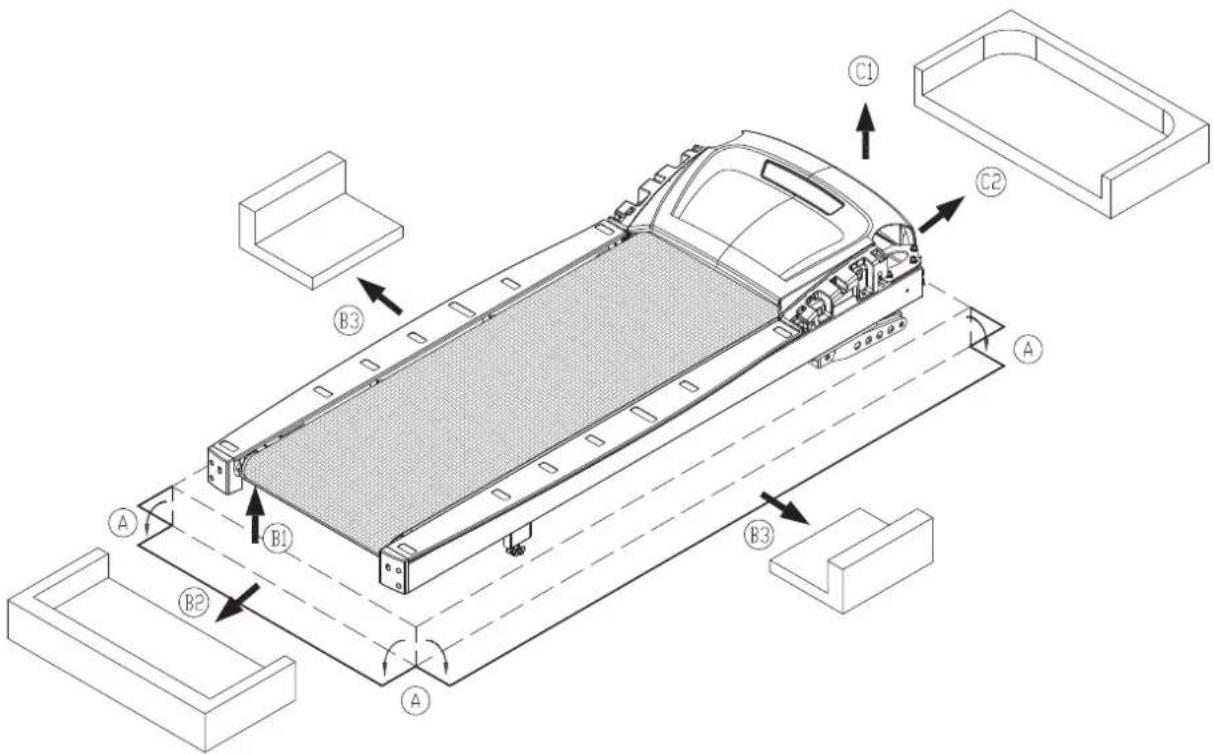
Remove packaging material in order A, B, and C as shown to place the treadmill on its cardboard box.
A. Cut the corners of the cardboard box to lay the box flat.
B. Lift the back end of the treadmill and remove packaging material in the back and center of the treadmill.
C. Lift the front end of the treadmill and remove packaging material at the front end of the treadmill.
text_image
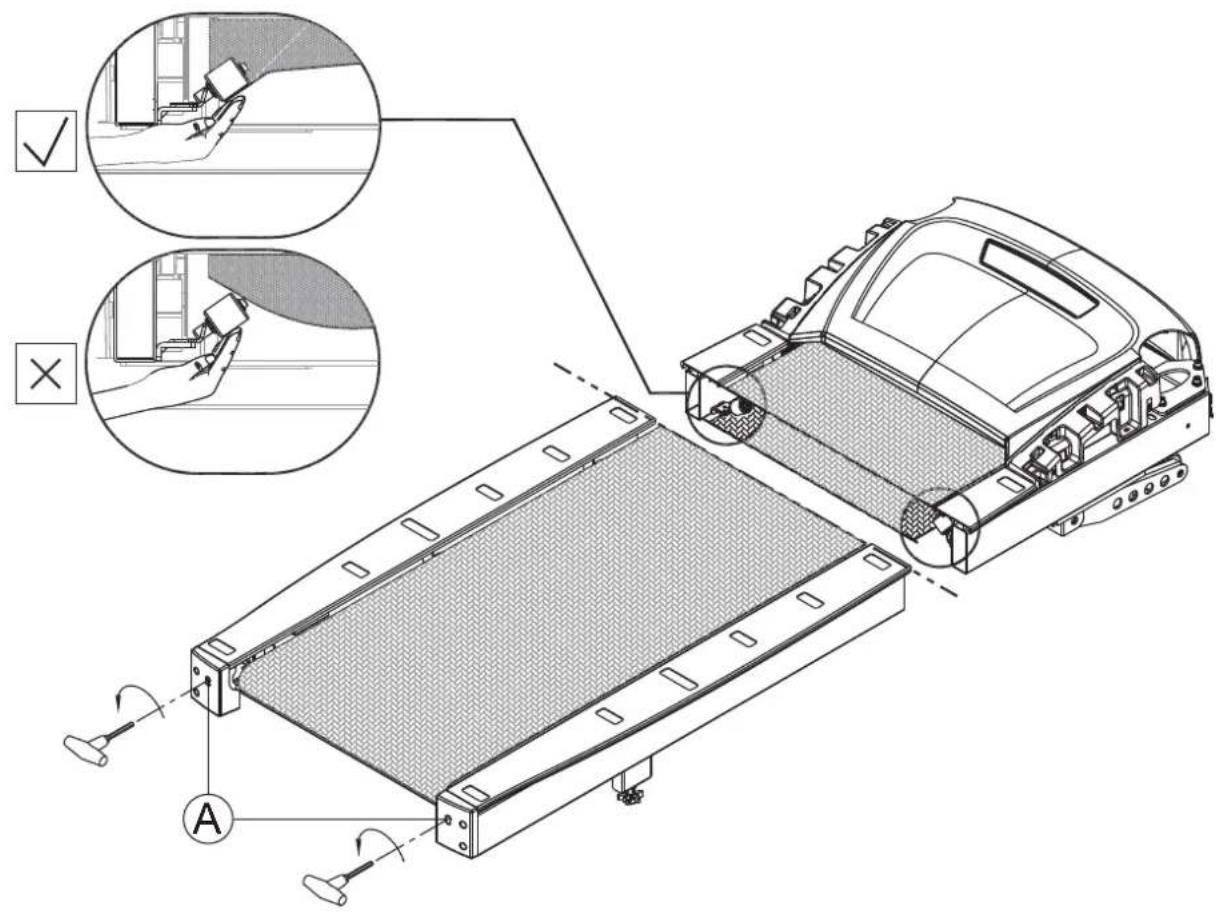
Technical diagram of a vehicle chassis with labeled components A, B1, B2, B3 and C1, C2Please make sure that the walk belt runs below the walk belt guides. Walk belt guides should press the walk belt down on both sides. If the walk belt is on top of the guides, loosen screws at position A. Place the walk belt below the guides as shown. Then readjust walk belt tightness per instructions in part 6.
Note: If you intend to install the CardioActive™ Entertainment Station (integrated TV screen), please read the integrated TV screen assembly instructions before assembling the treadmill. This will save some time.
text_image
Technical diagram of a vehicle chassis with labeled components and inspection indicators
natural_image
Technical line drawing of a treadmill device with mesh cover and control panel (no text or symbols)Remove screws (41) from the pedestal mount area. Inspect whether the screw sockets in areas A and B are in place on the product. If not, remove them from the hardware kit and insert them into place on the product.
Note: If you intend to install the CardioActive™ Entertainment Station, at this point in the treadmill assembly, please refer to steps 1 through 3 in chapter two in the integrated TV screen installation manual.

text_image
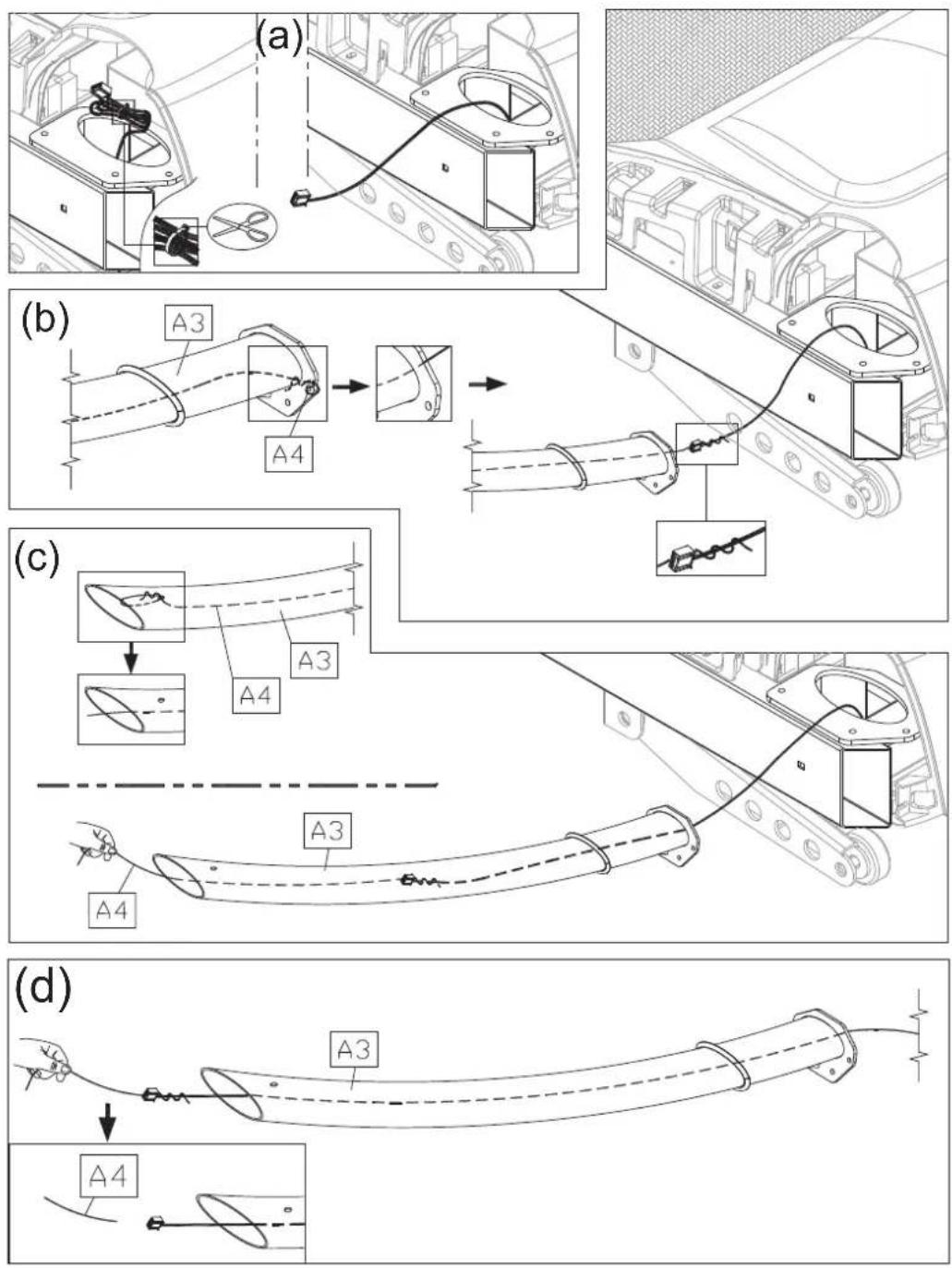
Technical diagram of a device with labeled parts A and B, showing assembly steps and component layoutFollow steps (a) through (d) in order to thread the data cable through the right pedestal.
(a) In the right pedestal mount area, the data cable is secured with a zip tie. Carefully cut the zip tie to free the data cable. Pull the data cable through the oval opening.
(b) Place the right pedestal (A3) flat on the floor, with the bottom area of the pedestal nearest to the data cable. Disconnect the feeder cord (A4) from the bottom of the pedestal. Then attach the feeder cord (A4) to the top part of the data cable.
(c) From the top part of the right pedestal (A3) disconnect the feeder cord (A4). Pull the top part of the feeder cord (A4) to thread the data cable through the pedestal (A3).
(d) Once the data cable has been fed through the pedestal, disconnect the feeder cord (A4).
Hold the data cable at the top of the right pedestal (A3), and insert the bottom of the pedestal onto the pedestal mount. Avoid pinching or crimping the data cable. Place the water guard (A5) on the pedestal higher than the motor cover. Loosely secure the right pedestal (A3) with screws (41). Insert the left pedestal (A7) onto its pedestal mount, and loosely secure it with screws (41). Do not tighten screws. Make sure the pedestals can still move slightly.

text_image
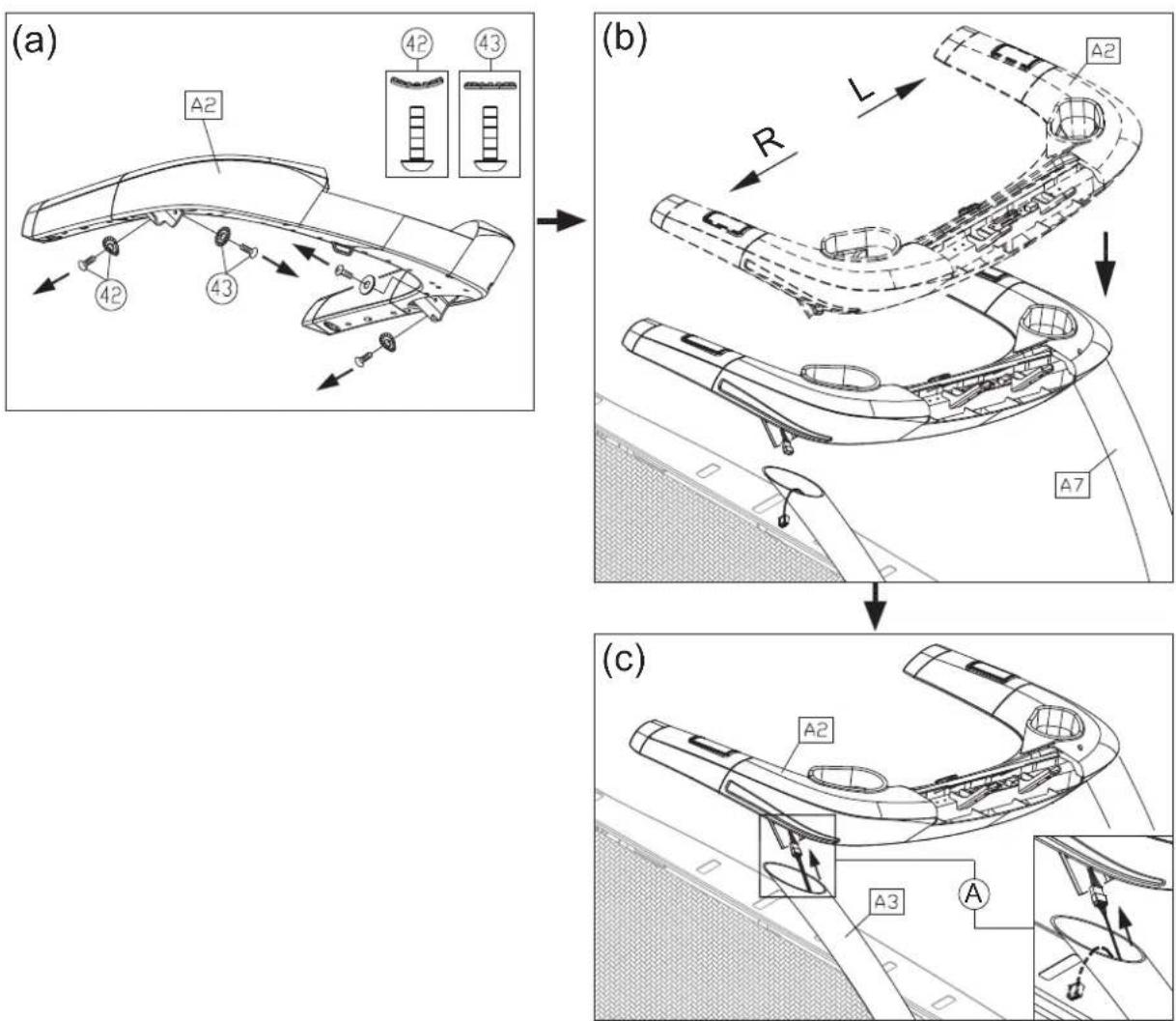
Technical diagram of a vehicle chassis with labeled components A3, A7, and A5, showing assembly and component alignment views.Follow steps (a-e) to install handlebars.
(a) First, remove the screws (42, 43) from the handlebar assembly (A2).
(b) Insert the left side of the handlebar (A2) into the left pedestal (A7).
(c) Connect the cables in area A from the right pedestal (A3) and from the handlebar (A2).
Note: If you intend to install the CardioActive™ Entertainment Station, at this point in the treadmill assembly, please refer to setps 5 through 7 in chapter one and steps 4 through 6 in chapter two in the integrated TV screen installation manual.
text_image
(a) A2 42 43 (b) R L A2 A7 (c) A2 A3 A(d) Tuck cables into the pedestal safely. Then insert the right side of the handlebar assembly (A2) into the right pedestal (A3), without pinching or crimping cables.
(e) Thread screws in place by hand. First, secure screws (42) in area B. Then secure screws (43) in area C.
(f) Insert the screw cap (31)(32) onto the screw head.
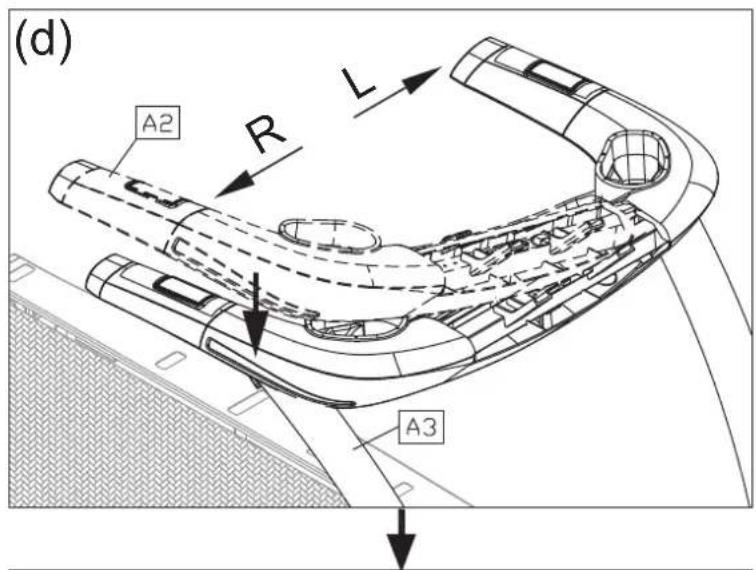
After handlebars are secured in place, fully secure screws in area A on both sides of the treadmill. Snap left and right side covers (A6a, A6b) into place and secure them with screws (33). Then slide the water guard (A5) into place on the motor cover.

text_image
Technical diagram of a treadmill with labeled parts A, B, and A6a, showing exploded view and component details.
natural_image
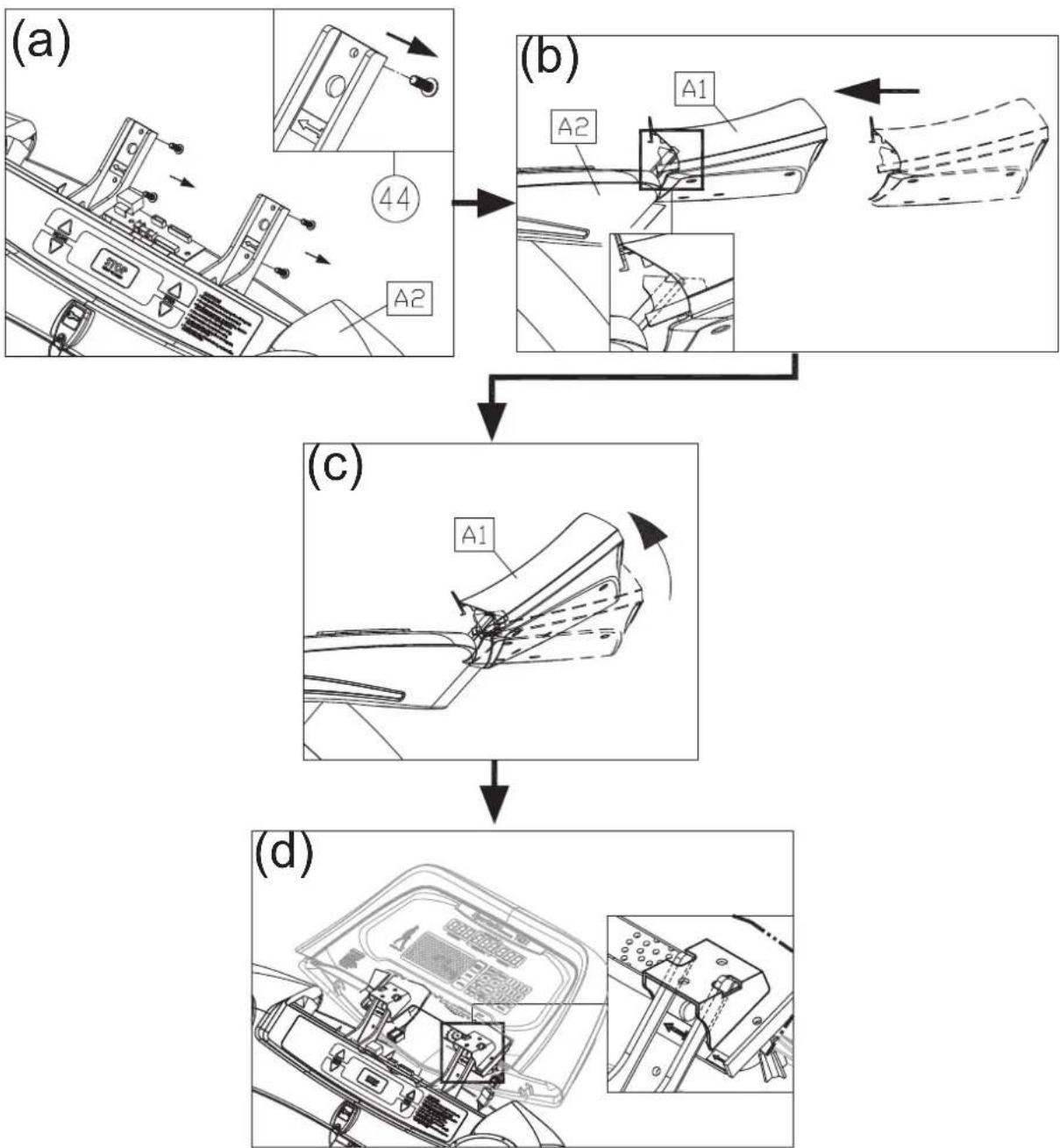
Line drawing of a treadmill with mesh cover and control panel (no text or symbols)Follow steps (a-g) below to install the display assembly.
(a) Remove screws (44) from the handlebar (A2).
(b) Insert the display (A1) onto the handlebar assembly (A2). Note: Aim properly to avoid damaging the display board.
(c) Then slightly lift the display (A1)
(d) Temporarily secure the display by inserting it as indicated by arrows.
Note: If you intend to install the CardioActive™ Entertainment Station, at this point in the treadmill assembly, please refer to steps 3 through 4 and steps 8 through 9 in chapter one in the integrated TV screen installation manual.
flowchart
graph TD
    A["Car Door Opening"] --> B["Part 44"]
    B --> C["A2"]
    C --> D["Component (b)"]
    D --> E["A1"]
    E --> F["Component (c)"]
    F --> G["A2"]
    G --> H["Component (d)"]
(e) Connect cables in areas A and B.
(f) After connecting cables, tuck them away for safety. Then slightly lift the display (A1) and press it into place. Note: In area C, the display cover must be outside of the handlebar cover.
(g) Use screws (44) to secure the display (A1) in place.

text_image
(e) A1 A B (f) A1 C (g) ③3STEP 3 Move the Treadmill
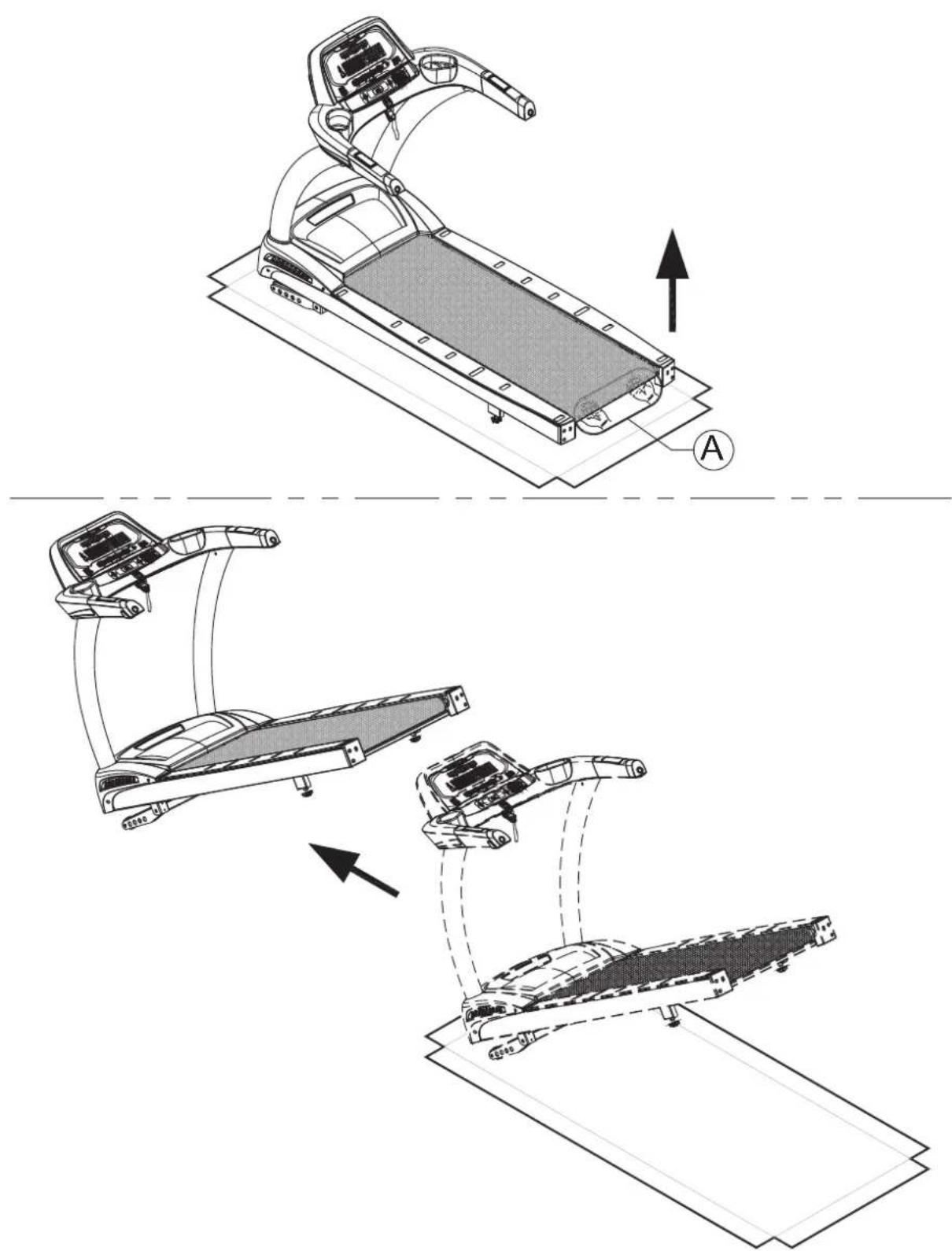
First, place hands under the frame in area A, lift the treadmill, then roll it into position as desired.
text_image
Technical diagram showing three stages of a treadmill with labeled components and directional arrows indicating motion or assembly.STEP 4 Level the Treadmill
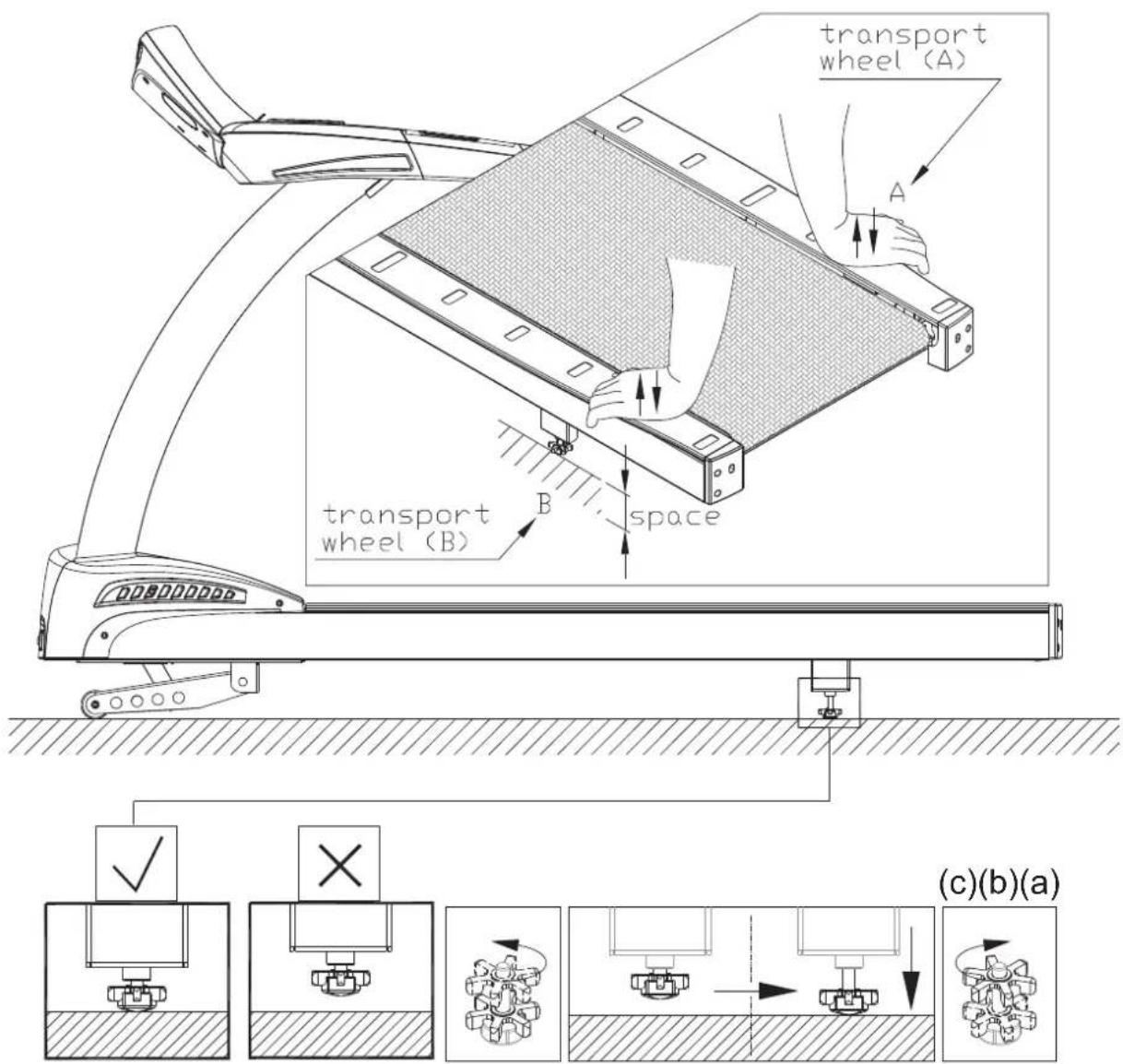
Press on points A and B to inspect whether the unit is stable and level on theground. If not, please level the treadmill by following instructions (a, b and c):
(a) First, loosen leveler nuts.
(b) Adjust leveler feet downward until the treadmill is level and does not rock.
(c) Then secure leveler nuts against the frame of the treadmill to secure it in this position.
text_image
transport wheel (A) A transport wheel (B) space (c)(b)(a)STEP 5 Install the Power Cord
Please follow instructions below to install the power cord onto the treadmill.
(a) First remove screws (45) from the power cord connector on the product.
(b) Insert the end of the power cord into the connector on the product.
(c) Secure the power cord screws (34) as shown (c). Insert the other end of the power cord into an appropriate wall power outlet.
(d) The power switch on the product has two sides, one marked “-” and the other marked “o”. Turn on the product by pressing the “-” side of the switch. Turn off the product by pressing the “o” side of the switch.

text_image
Technical line drawing of a treadmill with labeled components and component callouts, including parts numbered 45 and A10.STEP 6 Align the Walk Belt
The walk belt should run in the center of the deck, with an even amount of space on both sides, between the belt edges and the landing strips. If the space on either side is not the same, rotate rear roller screws about one-half turn at a time.
Turning the screw on one side clockwise extends that side of the rear roller away from the body of the treadmill, pushing the belt to the opposite side.

text_image
Technical line drawing of a treadmill with labeled components and measurement annotations A=BSTEP 7 Adjust Walk Belt Tightness
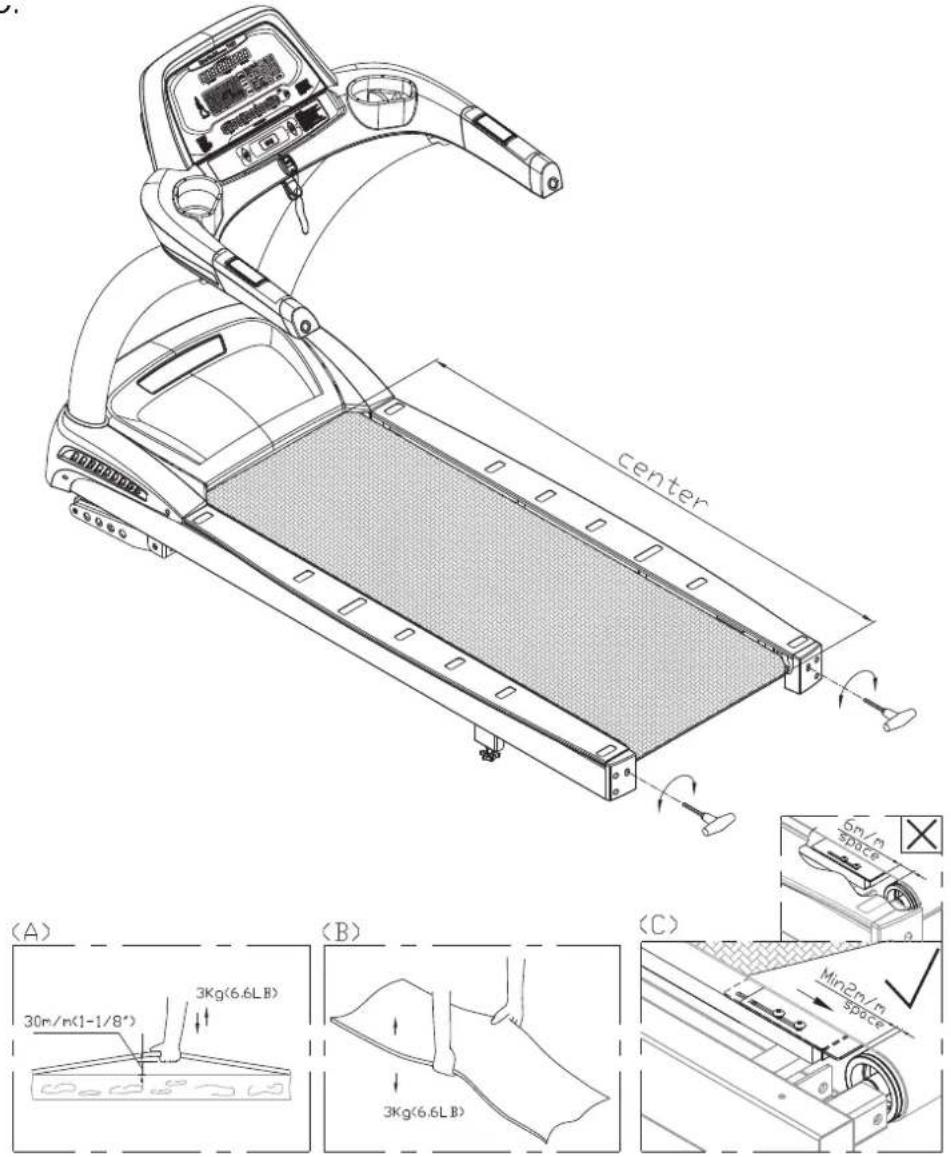
As you exercise, does the walk belt suddenly pause and then regain traction? Or, if you bear down against the walk belt, does the belt not pause whatsoever? If either of these two conditions occur, the walk belt may be too loose or too tight. In this case, please turn off the treadmill and adjust walk belt tightness. To inspect a walk belt, lift it at the center of the deck as shown in Figure A,B. The walk belt should lift 30 mm (1 1/8 inch) or to 3 kg (6.6 lb.). If the walk belt is too loose, turn rear roller screws clockwise one-half rotation at a time and retest tightness. If the walk belt is too tight, turn rear roller screws counterclockwise one-half rotation at a time and retest tightness. Perform the same procedure until the walk belt is neither too tight nor too loose. Do not turn rear roller screws in excess of these amounts without first testing for proper tightness.
Note: Set the gap between the end of the finger guard and the rear roller to 2 mm. If this gap exceeds 6 mm, follow lubrication procedures to remove left and right landing strips, loosen finger guard screws, and slide the finger guards into place as shown in illustration C.
text_image
(A) 30m/n(1-1/8°) 3Kg(6.6LB) (B) 3Kg(6.6LB) (C) Center 5m/n space Min2m/n spaceSTEP 8 Safety Key Cord Installation
For home use, do not secure the safety key onto the product. Safety regulations require that the safety key be detachable to prevent unsupervised product use of the treadmill by children.
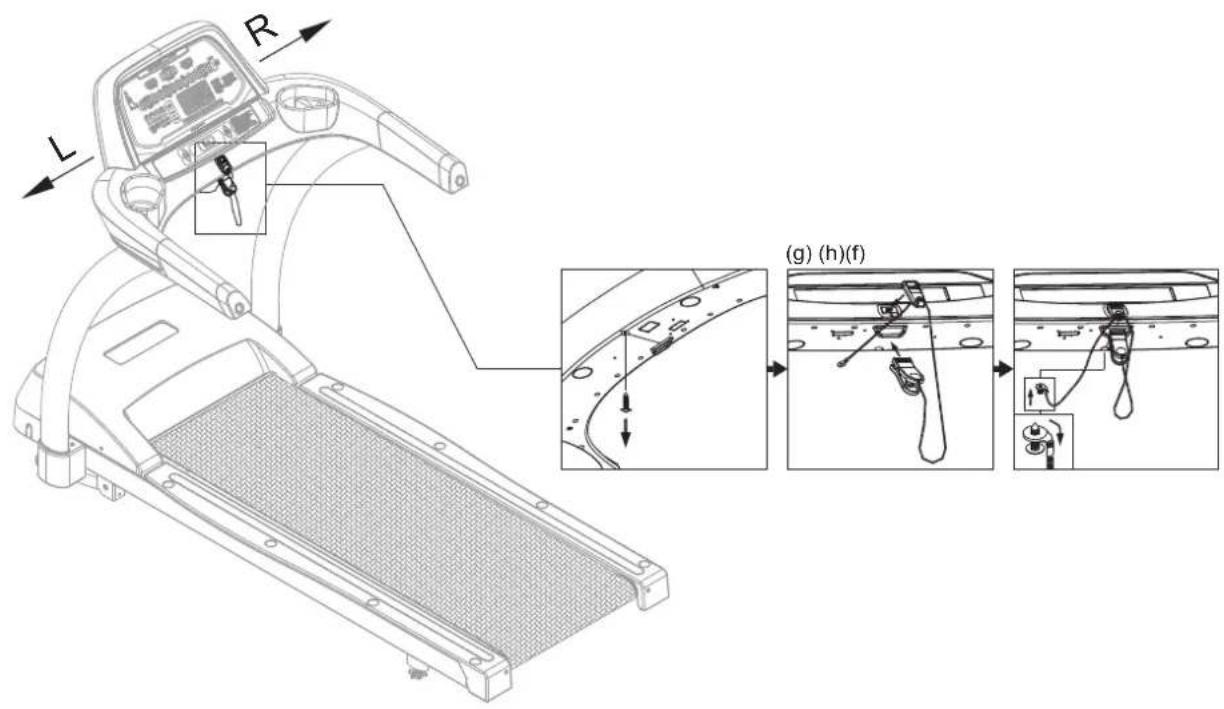
For light commercial use, the safety key can be secured to the treadmill to prevent the key from being removed and lost. To do so, follow instructions in steps (a)-(e) on this page and (f)-(h) on the following page.
(a) Use a Phillips screwdriver to remove screws from the safety key magnet case.
(b) Insert the safety key cord into the hole. Tie a knot in the end of the cord.
(c) Insert the knot as shown into the cavity of the plastic case.
(d) Put the other cord on top of the safety key cord as shown. Make sure cords are between the screw holes.
(e) Secure the cover and screws.
Note: screws must fit flat against the cover.

flowchart
graph TD
    A["Car Wiring"] --> B["Switch Connection"]
    B --> C["Car Wiring"]
    C --> D["Switch Connection"]
    D --> E["Switch Connection"]
    E --> F["Terminal Switch"]
    style A fill:#f9f,stroke:#333
    style B fill:#ccf,stroke:#333
    style C fill:#cfc,stroke:#333
    style D fill:#fcc,stroke:#333
    style E fill:#cff,stroke:#333
    style F fill:#ffc,stroke:#333
Secure the safety key to the treadmill as follows in steps (f)-(h)
(f) Remove one screw on the left as shown.
(g) Put the safety key in its place.
(h) Insert the screw back into the loop. Secure the screw back into place. Bend the loop downward 90^ .
Note: The cord should extend from the loop, facing the user.
text_image
Technical diagram of a treadmill with labeled parts and component annotations in ChineseNote: The safety key should not be secured to the product if there is a risk that children or anyone else might operate the product in an unsafe manner. To prevent the unsafe operation of this product, adults in homes should remove the safety key and unplug the treadmill after use. In light commercial settings, all possible precautions must be taken to prevent unsafe use of this product.
5. UNDERSTANDING THE T621 DISPLAY CONSOLE
v
The T621 treadmill is designed for user convenience. With better feedback about your workout, you get better results. The following explains the display window and key functions. Please read this manual, understand the display functions, and thereby get optimum enjoyment and benefit from this product.

text_image
Weight loss target heart rate Actual heart rate Cardio conditioning target heart Workout program keys SportsArt FITNESS T621 CardioAdvisor® WT LOSS 55% HEART RATE ♥ CARDIO 80% ActivZone™ TO START CALORIES SPEED TIME DISTANCE QUICK START MANUAL RANDOM 1 2 3 HILL INTY 4 5 6 CARDIO GLUTE 7 8 9 WR LOSS ZONE TRAINER 0 CLEAR BALTIMI CAN CHANGE DISPLAY QUICK START Press QUICK START to directly start exercising without entering personal information. Exercise information Workout illustration Workout feedback Numerical keys
flowchart
graph LR
    A["STOP HOLD TO RESET"] --> B["INCLINE"]
    A --> C["SPEED"]
    D["CAUTION"] --> E["Keep hands and clothing away from moving parts. Do not let children on or over the product. Risk of injury to persons - to avoid injury, stand on the side table before starting inside. Stop everusing if you feel last or dizzy. Read instruction manual before using. To reduce the risk of injury from moving parts, unplug before servicing. To reduce the risk of electric shock, unplug before cleaning or servicing"]
CardioAdvisor™ helps you maintain a workout heart rate to meet your fitness goals.
■ WT LOSS 65% shows the optimum heart rate zone for weight loss workouts.
■ HEART RATE shows the actual heart rate. Range: 40 to 250 beats per minute
■ CARDIO 80% shows the optimum heart rate for cardio conditioning workouts.
Workout illustration screen shows workout profiles. Height represents incline position.
Workout feedback screen shows workout information:
CALORIES - 0.0 to 9999 kcal
SPEED - 0.1 to 12 mph; 0.2 to 20 kph (adjusts in increments of 0.1)
TIME - 00:00 to 99:59
DISTANCE - 0.0 to 9999 miles or kilometers
CAL/HR - 0.0 to 9999 calories per hour (kCal)
METS - 0.00 to 99.9 metabolic equivalency of task
PACE - 1/speed
INCLINE - 0 to 15% (adjusts in increments of 0.5%)
SCAN LED flashes to indicate that the scan function is activated; remains lit to indicate that only one row of workout feedback is selected to appear. Feedback row LEDs light to indicate the active row.
ActivZone™ LEDs light to represent activated muscle groups.
Workout programs come in two kinds: Touch-N-Go programs, including manual, random, hill, and interval, are activated by simply pressing the respective key; Custom Programs include cardio, glute, weight loss, and zone trainer.
Numeric keys can be used to input workout setting and personal information.
DI
Below is a brief introduction to display keys and their functions.
QUICK START – Press this key to immediately begin exercising, without first inputting user information.
START – Press this key to begin exercising after inputting user information.
ENTER – Press this key to confirm your selections.
MANUAL – Press this key to directly control treadmill functions without activating workout programs such as interval, random, hill, or glute.
RANDOM – Press this key to activate one of several randomly generated workouts.
HILL – Press this key to choose one of three hill workouts.
INTV – Press this key to activate an interval workout.
CARDIO – Press this key to activate a cardio conditioning workout.
GLUTE – Press this key to choose either a 30-minute or 45-minute, incline-based workout.
WT LOSS – Press this key to activate a weight loss workout.
ZONE TRAINER – Press this key during a workout to make your current heart rate your target heart rate. ZONE TRAINER does not operate from the startup banner screen.
NUMERIC KEYPAD – Press these keys to input workout setting and personal information values.
CLEAR – Press this key to clear workout setting values.
CHANGE DISPLAY – Press this key to activate or deactivate scan mode. In scan mode, a different row of workout feedback is activated every four seconds. Top or bottom LEDs light to indicate the active row of feedback, either the top row (calories, speed, time, distance) or the bottom row (cal/hr, METs, pace, incline).
INCLINE UP/DOWN – Press these keys to operate the incline. Also press these keys to input workout settings such as user ID, age, weight, and time.
SPEED UP/DOWN – Press these keys to control the speed of the walk belt. The SPEED UP key also acts like QUICK START. At the start of a workout, press the SPEED UP key to activate the walk belt.
STOP/HOLD TO RESET – This key has two functions: pause and reset. When exercising, press this key to pause. The walk belt will stop rotating as the treadmill enters pause mode. During pause mode, press this key again to enter cool down mode. Under any circumstance, hold this key for two seconds to reset the unit and return to the startup banner screen.
SAFETY KEY -- While operating the treadmill, put the safety key magnet in place on the console, and clip the other side of the safety key onto your shirt. This safety feature is meant to stop walk belt rotation if the exerciser stumbles or falls. The magnet part of the safety key must be in place on the console for the walk belt to rotate. When the safety key magnet is not in place, the message "SAFETY KEY" appears, and the walk belt will not rotate.
There are two ways to start operating this product, either via the quick start or the start mode.
Press the QUICK START key or the SPEED ▲ key to immediately begin exercising without first inputting user information. This is called the “quick start” activation mode. The default user age is 35 years old; Default user weight is 165 lb. (75 kg).
When activated via the quick start mode, the display will show "TREAD STARTING", and the walk belt will start operating at 0.1 mph, after which speed can be modified.
OPERATION Start Key
Press the START key to begin exercising without the benefit of user information. User information, such as weight and age, is used in calorie and target heart rate calculations.
After you press the START key, the following messages will appear (in sequence) on the display:
■ "AGE – 35", where 35 flashes. Press INCLINE ▲/▼ keys or press numerical keys to select a different age number. Then press the ENTER key to confirm your choice.
■ "WEIGHT – 165", where 165 flashes. Press INCLINE ▲/▼ keys or press numerical keys to select weight values. Then press the ENTER key to confirm your choice.
■ "SELECT PROGRAM" appears. Workout program keys, except for Zone Trainer, will flash. Press a workout program key to select a workout. Then press the ENTER key to confirm your choice.
Once a workout program is selected, instructional prompts will appear on the display. Follow the prompts to operate the workout program.
OPERATION Workout Programs
There are two groups of workout programs: Touch-N-Go programs and Custom programs. Touch-N-Go programs include interval, random, hill, and manual. These programs can be activated directly after the startup banner screen appears, or after the QUICK START or START key is pressed. Custom programs include cardio, glute, and weight loss. Custom programs can only be activated after the START key is pressed.
This product has three heart rate control programs: weight loss, cardio conditioning, and zone trainer. In heart rate control programs, the treadmill automatically adjusts incline or speed to help you maintain an ideal target heart rate to meet your fitness goals. All heart rate control programs require the user to wear a telemetry heart rate strap; These programs will not work if no heart rate signal is received by the display.
Zone trainer is unique in that it can only be activated after you begin exercising in another workout program. Zone trainer turns any workout into a heart rate control program. It makes your current heart rate your target heart rate.
Touch-N-Go programs operate differently when activated by different means. If activated via the quick start mode, the default age and weight is used for heart rate and calorie calculations respectively. If activated via the start key, Touch-N-Go programs allow you to establish a workout goal, either time or distance, much like custom programs.
Workout program explanations and operating instructions follow. These instructions apply to workout programs as activated via the START key.
Once a workout program begins, you can select another program simply by pressing the workout program key. Your workout information, such as time and distance, will continue to accrue.
In all workout programs, after inputting values, press the SPEED▲ key to begin exercising.
MANUAL – Press the MANUAL key for direct control of speed and incline functions. Then press the ENTER key to confirm your choice. The following prompt appears: "TIME-1 DIST-2". Press INCLINE▲/▼ keys to select time or distance, then press the ENTER key, or press numerical keys (1 or 2) to select time or distance. The name of your selected workout goal, either time or distance, will appear. Press INCLINE▲/▼ keys, or press numerical keys, then press the ENTER key to confirm your choice. Press the SPEED▲ key to begin exercising.
RANDOM – Each time the RANDOM key is pressed, a different workout profile appears on the display. Generated mathematically, random programs are almost infinite in number.
Press the RANDOM key until you see a workout profile that you like, then press the ENTER key to confirm your choice. The following prompt appears: "TIME-1 DIST-2". Press INCLINE▲/▼ keys to select time or distance, then press the ENTER key, or press numerical keys (1 or 2) to select time or distance. The name of your selected workout goal, either time or distance, will appear. To establish the time or distance value, press INCLINE▲/▼ keys, or press numerical keys, then press the ENTER key to confirm your choice. Press the SPEED▲ key to begin exercising.
HILL – There are three hill programs. Press the hill key to toggle between programs 1, 2, and 3. When your preferred hill workout illustration appears, press the ENTER key to confirm your choice. The following prompt appears: "TIME-1 DIST-2". Press INCLINE ▲/▼ keys to select time or distance, then press the ENTER key, or press numerical keys (1 or 2) to select time or distance. The name of your selected workout goal, either time or distance, will flash. Press INCLINE ▲/▼ keys, or press numerical keys, then press the ENTER key to confirm your choice. Press the SPEED ▲ key to begin exercising.
INTV – This is a custom interval program, so total time must be established, followed by work and rest segment time, incline, and speed settings.
After you press the INTERVAL key, followed by the ENTER key, messages appear: "ENTER TOTAL TIME" "TIME: XX:00" "PRESS INCLINE▲/▼ TO SELECT TOTAL TIME" "PRESS ENTER". Press INCLINE▲/▼ to select total time, or press numeric keys, then press the ENTER key to confirm your choice.
Similar instructions appear for rest time, incline, and speed, and for work time, incline, and speed. At each prompting, press INCLINE▲/▼ to make selections, or press numeric keys, then press the ENTER key to confirm your choices. Press the SPEED▲ key to begin exercising.
Note: The default setting is 1:1, one minute of rest at a two percent incline and one minute of work at a four percent incline. Time is based on one minute segments. After the workout begins, speed and incline settings can be changed by pressing speed and incline keys. The new settings will apply to subsequent intervals. A message appears between rest and work intervals.
CARDIO – Cardio is a heart rate control program in which speed or incline automatically adjusts to maintain an optimum target heart rate for cardio conditioning. The formula for calculating the cardio conditioning target heart rate follows: (220-AGE)* 0.80. It is designed to keep your heart rate at 80% of your maximum heart rate as calculated by 220 minus your age.
Press the CARDIO key and then press the ENTER key to activate this program.
"TIME – XX:00" appears, where XX represents a number. This number flashes. Other messages appear: "PRESS INCLINE▲/▼ TO SELECT TIME" "PRESS ENTER".
Press INCLINE▲/▼ keys, or press numeric keys, to establish your workout time. Then press the ENTER key to confirm your selection.
"INCL-1 SPEED-2" "SELECT SPEED OR INCLINE PROGRAM" appears on the display. You can choose either incline or speed as the variable to maintain your target heart rate. Press numeric keys to select incline (1) or speed (2).
If you choose incline, the workout can begin. Press the SPEED▲ key to begin exercising. The incline will gradually increase until the target heart rate is reached.
If you choose speed, another message appears: "ENTER MAX SPEED" "MAX SPEED XX:00 MPH", where XX represents a number. The number flashes. Then another prompt appears: "PRESS INCLINE▲/▼ TO ENTER MAX SPEED" "PRESS ENTER". Press INCLINE▲/▼ keys or numeric keys to establish a maximum speed. Then press the ENTER key to confirm your choice. At this point, the workout can begin. Press the SPEED▲ key to begin exercising. Speed will gradually increase until the maximum speed or the target heart rate is reached.
If no heart rate signal is detected, “NO HEART RATE READING” “PLEASE CHECK TRANSMITTER” appears on the display.
GLUTE – Press the GLUTE key to activate one of two incline-based workout programs: 30 or 45. Glute 30 is a 30-minute workout; Glute 45 is a 45-minute workout. Press the ENTER key to confirm your choice. Press the SPEED▲ key to begin exercising.
WT LOSS – Weight loss is a heart rate control program in which speed or incline automatically adjusts to maintain an optimum target heart rate for weight loss. The formula for calculating the weight loss target heart rate follows: (220-AGE)* 0.65. It is designed to keep your heart rate at 65% of your maximum heart rate as calculated by 220 minus your age.
Press the WEIGHT LOSS key and then press the ENTER key to activate this program.
"TIME – XX:00" appears, where XX represents a number. This number flashes. Other messages appear: "PRESS INCLINE▲/▼ TO SELECT TIME" "PRESS ENTER"
Press INCLINE▲/▼ keys, or press numeric keys, to establish your workout time. Then press the ENTER key to confirm your selection.
"INCL-1 SPEED-2" "SELECT SPEED OR INCLINE PROGRAM" appears on the display. You can choose either incline or speed as the variable to maintain your target heart rate. Press numeric keys to select incline (1) or speed (2).
If you choose incline, the workout can begin. Press the SPEED▲ key to begin exercising. The incline will gradually increase until the target heart rate is reached.
If you choose speed, another message appears: "ENTER MAX SPEED" "MAX SPEED XX:00 MPH", where XX represents a number. The number flashes. Then another prompt appears: "PRESS INCLINE▲/▼ TO ENTER MAX SPEED" "PRESS ENTER".
Press INCLINE▲/▼ keys or numeric keys to establish a maximum speed. Then press the ENTER key to confirm your choice. At this point, the workout can begin. Press the SPEED▲ key to begin exercising. Speed will gradually increase until the maximum speed or the target heart rate is reached.
If no heart rate signal is detected, “NO HEART RATE READING” “PLEASE CHECK TRANSMITTER” appears on the display.
ZONE TRAINER – This workout program can only be activated after you begin exercising in another workout program. Zone trainer turns any workout into a heart rate control program. It makes your current heart rate your target heart rate. While exercising in any workout program, when a good target heart rate appears on screen, press the ZONE TRAINER key to make your current heart rate your target heart rate. Like all heart rate control programs, ZONE TRAINER requires a heart rate signal. You must wear a telemetry heart rate strap to operate this program. The zone trainer program's target heart rate range is from 84 to 200. The zone trainer program will not activate unless heart rate range is within this range.
COOL DOWN – When an exercise goal (time or distance) is obtained, “COOL DOWN” will appear on the message window. The treadmill will enter a two-minute cool down mode. Exercise time will show “2:00”. Speed will slow to a stop within two minutes, and the incline will gradually return to the 0% position. When the time countdown arrives at 0:00, “ACCU DATA” will appear on the message window, showing accumulated time, distance, and caloric expenditure values. If you press the STOP key or wait for 30 seconds, “SELECT PROGRAM” will appear on the display. If the workout time limit function is activated, the startup banner screen will appear.
OPERATION Basic Settings
Basic settings determine units of measure and show total distance and time, along with display and drive board program IC version numbers. To access this information, at the startup banner screen, press down and hold the change key for three seconds.
UNITS
The display will show "UNIT-MPH" or "UNIT-KPH". Press the INCLINE▲/▼ key to toggle between the two settings. When your preferred unit of measurement appears, press the ENTER key to confirm your selection and proceed to view total distance.
TOTAL DISTANCE
The display will show "DIST-xxxxxx KM" where "x" represent numerical digits. The number represents the total distance of the walk belt's rotation. Press the ENTER key to proceed to view total time.
TOTAL TIME
The display will show "TIME-xxxxxHOUR" where "x" represent numerical digits. The number represents the total time that this product has been in use. Press the ENTER key to proceed to view the display board program IC version.
DISPLAY BOARD IC VERSION
The display will show "CTL xxxxx-xx" where "x" represents either alphabetical or numerical digits. This is the display board program IC version number. Press the ENTER key to proceed to view the drive board program IC version.
DRIVE BOARD IC VERSION
The display will show "DRV xxxxx-xx" where "x" represents either alphabetical or numerical digits. This is the drive board program IC version number. Press the ENTER key to complete the process and return to the startup banner screen.
7. ABOUT HEART RATE DETECTION AND PRESENTATION
Heart rate detection functions are optional and may not be included in your particular model. If your product is equipped with these functions, please note the following information.
HEART RATE Telemetry
The word "telemetry heart rate" refers to the detection of the heart rate, usually via a strap worn on the exerciser's chest and transmitted over the air for reception by a receiver built into the product. The following explains conditions that influence the performance of the telemetry heart rate function in all products.
- The telemetry heart rate transmitter emits a wireless 5kHz signal that is harmless to the human body. Inside the transmitter is a 3V battery (CR2032). If the battery charge is too low, either the reception distance shortens or there will be no reception whatsoever.
- Secure the telemetry heart rate transmitter on your chest so it is neither too tight nor too loose. Moisten the skin for better contact.
- The telemetry heart rate receiver accepts a 5kHz wireless signal, but because the signal varies from 20Hz to 20KHz, it is susceptible to environmental interference. Stereos, TVs, other electronic products, the vibration between the unit and the floor, and other factors may interfere with telemetry heart rate signal reception. For best results, install the product in a location free from interfering items.
- Place fitness products apart by at least 100 cm to avoid having the heart rate value from an exerciser on one product appear on another product.
- Heart rate values are for comparison only. Do not use them for medical treatment or other purposes.
HEART RATE Contact
It is easy to use the contact heart rate mechanism. Simply put both hands on the silver contact plates (one per side) and hold them there continuously. As soon as your pulse is received and calculated, the heart rate will automatically appear on the display.
Please note that some people have very weak heart beats. This makes heart rate detection difficult. Under such circumstances, the contact heart rate mechanism may not detect heart rate.
Please note the following:
- For best results, continuously hold the contact heart rate plates.
- It is difficult to detect the heart rate of people with low systolic blood pressure.
-
It is difficult to detect the heart rate of people with dry, course palms. Keeping palms smooth and damp improves heart rate detection.
-
The vibration of treadmills at speeds over 4 mph / 6.4 kph makes heart rate detection difficult. Also, if your hands move, heart rate detection becomes difficult.
SUGGESTIONS
For better heart rate detection, keep hands in one place on the contact plates.
Or wear a telemetry heart rate strap on your chest.
NOTE TO PREVENT STATIC ELECTRICAL SHOCKS
In dry areas in particular, static electricity can interfere with unit operation and shock people. Suggestion: Before touching metal parts of the product, first touch a material with electrically isolative properties, such as the plastic on the handlebars.
CAUTION: Heart rate detection and signal transmission devices have been known to interfere with the operation of pacemakers, possibly endangering human life. If you have a pacemaker, the use of such devices must be undertaken at your own risk. We recommend that you conduct an exercise test under your doctor's supervision. The purpose of the test would be to ensure the safety and reliability of the simultaneous use of the pacemaker and such devices.
8. GUIDELINES FOR EXERCISE
HOW HARD SHOULD I EXERCISE?
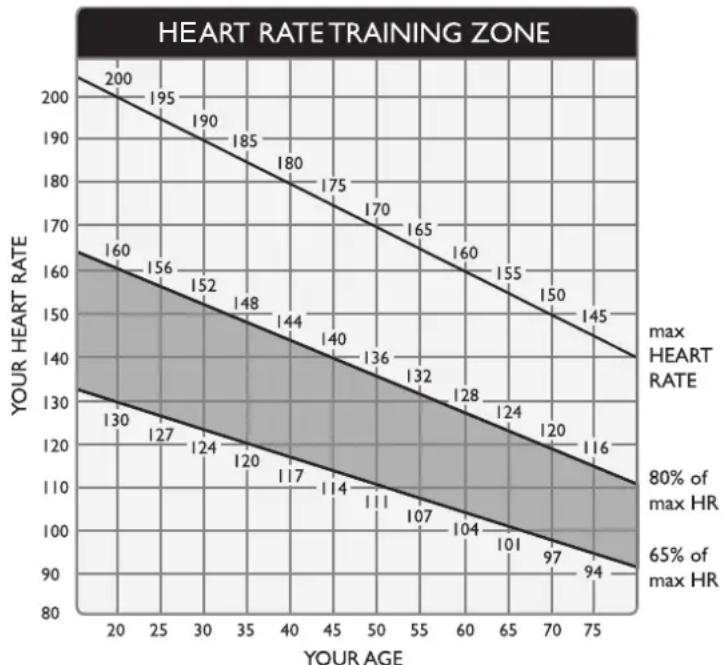
Studies show that to achieve the benefits of aerobic exercise, it is necessary to work within your training zone. Your training zone depends on your age and level of fitness.
The above chart indicates the recommended Heart Rate training zones (darkened area of the chart). These figuress are calculated by taking 220 minus your age, and calculating 80% for your maximum and 65% for the minimum heart rate for aerobic exercise.
CAUTION:
line
| YOUR AGE | YOUR HEART RATE | | --------- | --------------- | | 20 | 200 | | 25 | 195 | | 30 | 190 | | 35 | 185 | | 40 | 180 | | 45 | 175 | | 50 | 170 | | 55 | 165 | | 60 | 160 | | 65 | 155 | | 70 | 150 | | 75 | 145 | | 20 | 160 | | 25 | 156 | | 30 | 152 | | 35 | 148 | | 40 | 144 | | 45 | 140 | | 50 | 136 | | 55 | 132 | | 60 | 128 | | 65 | 124 | | 70 | 120 | | 75 | 116 | | 20 | 130 | | 25 | 127 | | 30 | 124 | | 35 | 120 | | 40 | 117 | | 45 | 114 | | 50 | 111 | | 55 | 107 | | 60 | 104 | | 65 | 101 | | 70 | 97 | | 75 | 94 |Heart Rate training zones are approximations. Always check with your physicians to learn what appropriate heart rate level is best for your fitness level.
HOW LONG SHOULD I EXERCISE?
The duration of your exercise session depends on your fitness level. In general, it is recommended that you maintain your heart rate in the training zone for at least 15 to 20 minutes to realize an aerobic benefit. Beginners should always start slowly and bring their workout sessions up to 20 minutes or more. As your fitness level improves, you will be able to maintain your heart rate in the training zone for longer periods of time. Usually between 20 and 30 minutes.
When first starting your workout, use the first several minutes to warm up, then slowly increase your workload to bring your heart rate into your specific training zone. At the end of your workout, gradually decease your workload, then exercise lightly as a "cool down".
HOW OFTEN SHOULD I EXERCISE?
Research indicates that to achieve the greatest benefits, exercise should be performed three to five times per week. It is important to allow sufficient time, at least 24 hours, for your body to recover after exercise.
9. MAINTENANCE
MAINTENANCE Error Messages
The following messages can appear on this product for diagnostic purposes.
ERR1 – Optic sensor error. The main program IC has not received the optic sensor signal. Re-start the unit to see if normal operation will resume.
ERR3 – Treadmill speed doesn't match the setting. Contact your local dealer for assistance.
ERR7 – Incline motor calibration error. Have a technician calibrate or replace the incline motor set.
SERVICE REQUIRED/TREADMILL SHUTTING DOWN /STOPPING – Excessive heat error. Turn off the treadmill. Then restart the treadmill as a test. Or, let the treadmill rest for one hour before restarting it. If the message persists, inspect the cable connection of the thermal sensor on the motor.
FOR ACCURATE HR, HOLD SENSORS FIRMLY WHILE WALKING – This message appears when someone touches contact heart rate pads and speed exceeds 4 mph or 6.4 kph. It is a reminder that the contact heart rate system functions best at low speeds when the user maintains a secure grip on the heart rate contact pads.
MAINTENANCE Fuse Replacement
If current becomes too high, the fuse breaks. This protects the product.
To replace a fuse, follow instructions (a-g) below.
(a) Press inward on the fuse cap.
(b) Turn the fuse cap counterclockwise.
(c)The fuse and fuse cap springs out.
(d) Remove the burnt fuse.
(e) Insert a new fuse into the fuse cap.
(f) Insert the fuse into the fuse holder.
(g) Rotate the fuse cap clockwise to secure it into place.
Fuse: 110V=15 Amp, A(F); 220V=10 Amp, A(F)

text_image
Technical diagram of a treadmill with labeled parts and exploded view, showing assembly steps from step a to step f.MAINTENANCE Lubrication
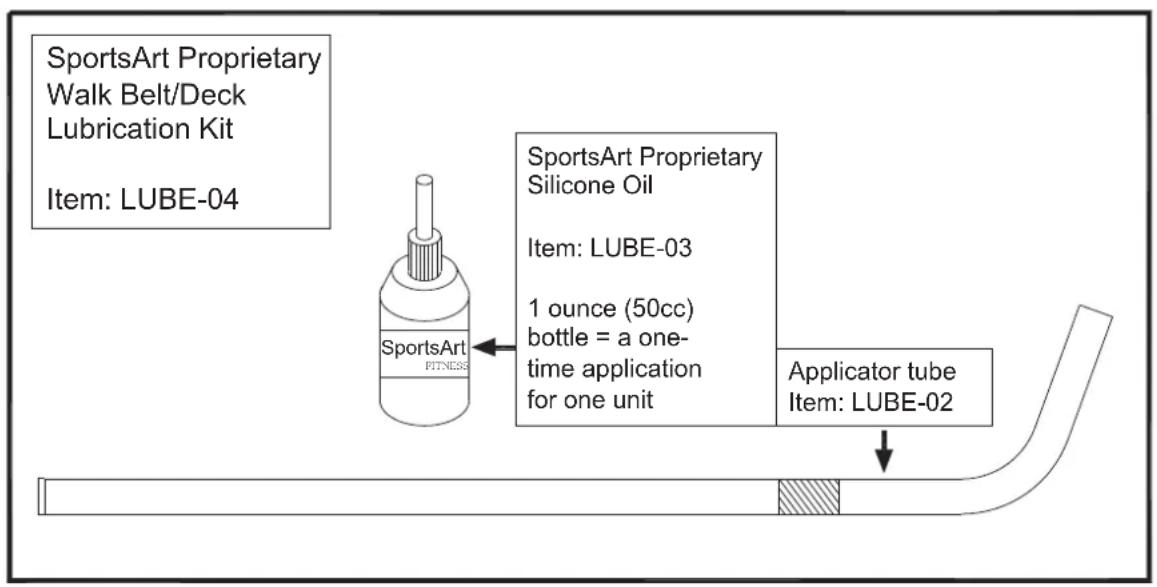
Periodic maintenance is crucial to the performance of fitness equipment, just like it is to the performance of an automobile. The better you maintain a product, the longer it will serve your needs. This treadmill requires periodic lubrication of the walk belt and has a built-in system to prevent overuse without maintenance.
text_image
SportsArt Proprietary Walk Belt/Deck Lubrication Kit Item: LUBE-04 SportsArt Proprietary Silicone Oil Item: LUBE-03 1 ounce (50cc) bottle = a one- time application for one unit Applicator tube Item: LUBE-02Periodic lubrication of this treadmill walk belt is so important that lubricant is provided with this treadmill. More lubrication kits can be found by contacting SportsArt Customer Service at (866) 709-1750. Always use SportsArt Hyper Glide™ lubricant.
MAINTENANCE Lubrication Prompt
When total distance on the treadmill exceeds 2500 miles (4000 km), the message "SERVICE NEEDED - APPLY LUBE" will appear after the walk belt stops rotating. This is a reminder to lubricate the treadmill. The treadmill can be operated normally until total distance exceeds 2560 miles (4100 km).
When total distance exceeds 2560 miles (4100 km), the message “SERVICE NEEDED - APPLY LUBE” will appear again after the walk belt stops rotating. At this point, this message will remain on the screen, and the treadmill will not operate, until the following process is completed.
- Remove screws from the left end cap. Then remove the left end cap.
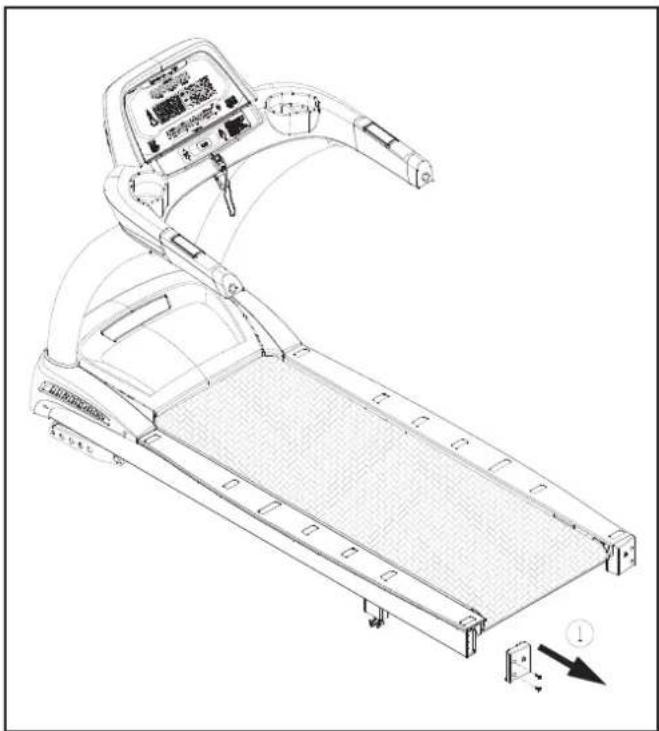
natural_image
Line drawing of a treadmill with control panel and side-mounted sensors (no text or symbols)- Remove screw covers and screws from the left landing strip. Then remove the left landing strip.

natural_image
Line drawing of a treadmill with control panel and mechanical components (no text or symbols)- Remove screws from the left finger guard. Note the position of the finger guard. Then remove the left finger guard.

natural_image
Technical line drawing of a treadmill with control panel and three inset views showing mechanical components (no text or symbols)-
Simultaneously press and hold INCLINE▲+ INCLINE▼+ 0 keys for two seconds. This activates the lubrication mode. The treadmill will operate at low speed. At this point, ▲▼ keys will not operate.
-
Insert the applicator tube so the line on the tube touches the side of the walk belt.

natural_image
Technical line drawing of a mechanical assembly with no visible text or symbols- Apply 50 cc from the bottle of liquid lubricant.

natural_image
Technical line drawing of a mechanical assembly with a pipe and connector (no text or symbols)-
Hold the applicator tube in place for about three minutes to allow the lubricant to disperse.
-
Once the lubrication mode is activated, the message "PLEASE PRESS THE STOP KEY AFTER FINISHING LUBRICATION" will appear on the screen. At this point, press the STOP key to deactivate the lubrication mode. This clears the lubrication distance value. A new lubrication distance value will begin to accrue.

text_image
Technical diagram showing a mechanical assembly with labeled components and directional arrow- After the lubrication process has been completed, secure the finger guard back into place. Make sure that the finger guard is placed in the correct direction, as shown, and make sure that the space between the finger guard and the rear roller is 1/8 to 7/32 inch (2 to 6 mm). If necessary, make cuts in area A to allow proper placement of the finger guard.
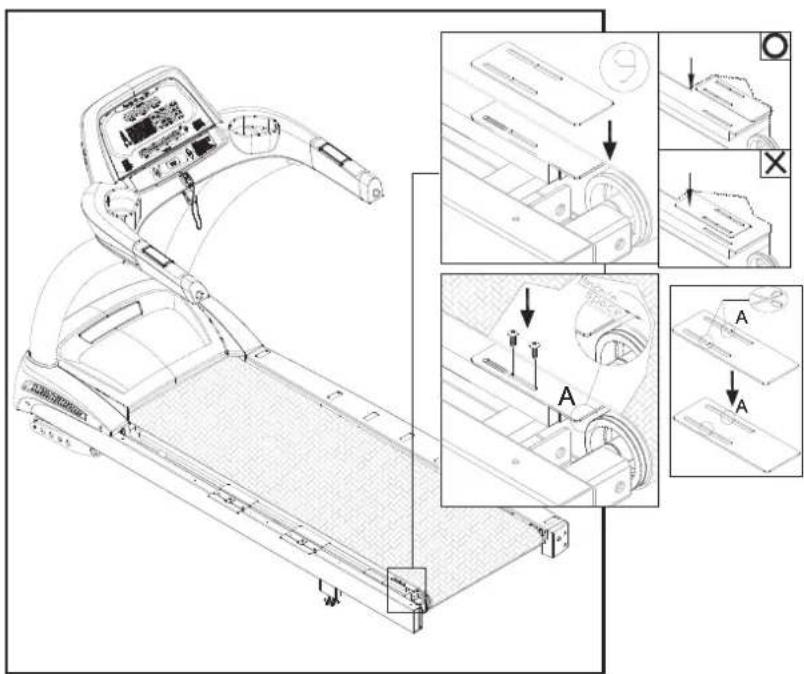
text_image
Technical diagram of a treadmill with labeled parts and exploded views showing assembly steps and component details- Secure the left landing strip.
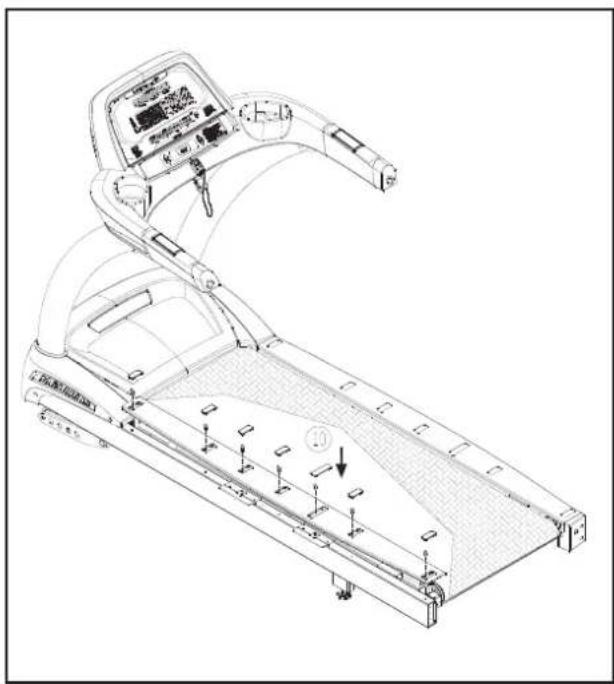
natural_image
Line drawing of a treadmill with control panel and buttons, showing tread pattern and adjustment mechanism (no text or symbols)- Secure the left end cap.
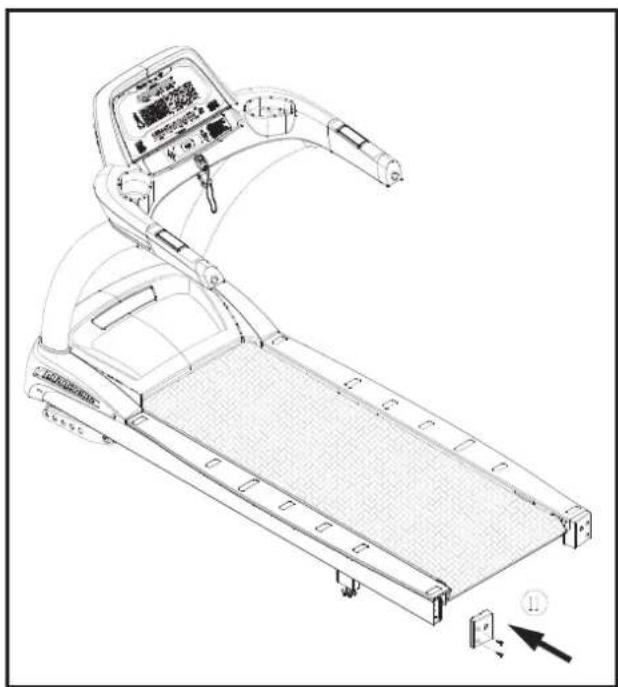
natural_image
Line drawing of a treadmill with control panel and playback button (no text or symbols)- Note: The lubrication mode can be activated at any time. If you notice a buildup of static electricity or that the bottom side of the walk belt is dry, applying lubricant may help. Activate the treadmill's lubrication mode at any time. Walk belt lubrication, along with other maintenance, can extend the life of your treadmill.
MAINTENANCE Schedule
| (T621) Maintenance Schedule | |||||||
| Area | Daily | Weekly | Monthly | Quarterly | Yearly | Notes | |
| 1 | Unit exterior | ● | Clean. | ||||
| 2 | Screws | ● | Inspect for looseness.Tighten if needed. | ||||
| 3 | Walk belt | ● | Inspect alignment. Inspect for wear. Lubricate with SportsArt lubricant. | ||||
| 4 | Deck | ● | Inspect for wear. | ||||
| 5 | Guide wheel | ● | Inspect for normal rotation. | ||||
| 6 | Front roller | ● | Inspect for normal rotation. | ||||
| 7 | Rear roller | ● | Inspect for normal rotation. | ||||
| 8 | DC motor brushes | ● | Inspect for wear.Replace if needed. | ||||
| 9 | Motor compartment | ● | Remove dust and debris. | ||||
| 10 | Drive belt | ● | Replace every three years. | ||||

text_image
Technical diagram of a treadmill with numbered parts and exploded view, showing internal components and assembly.MAINTENANCE Task List (Treadmills)
Like cars, fitness products require maintenance. Regular maintenance extends product life, and failure to maintain products can void the manufacturer's warranty. Copy the maintenance log sheet, and record maintenance work for each fitness product.
Daily tasks
- Use a clean, lint-free towel, dampened with a mixture of Simple Green® all-purpose cleaner and water, to thoroughly clean the product exterior.
- Inspect parts for looseness, and secure all loose screws. Make sure that the product is safe for operation. If safety issues arise, place an "Out of Order" sign on the product, and call for service.
Monthly tasks
- Inspect walk belt alignment. The walk belt should rotate in the middle of the deck, without tending to one side or the other. Adjust alignment if necessary. Inspect the walk belt for wear. The bottom should be smooth and well lubricated. The top should have no tears or cracks. Apply SportsArt Hyperglide™ lubricant. Replace the walk belt as necessary.
Quarterly tasks
- Inspect the walk deck for wear. The surface of the deck should be smooth, without cracks or grooves. Wipe the deck clean. If necessary, flip the deck to wear the other side, or replace the deck as needed.
- Inspect the rotation of rollers on walk belt guides. They should spin freely.
- Inspect the front roller for normal rotation. It should spin freely, without excessive noise. Clean the roller as needed.
- Inspect the rear roller for normal rotation. It should spin freely, without excessive noise. Clean the roller as needed.
- Remove dust and debris inside the motor compartment. Follow safety precautions. Then vacuum around components to keep them clean and cool.
Yearly tasks
Inspect the drive belt once a year. Replace the drive belt once every three years.
Caution
Please follow standard safety precautions when working on this product.
- Electronic components can carry an electrical charge even after the product has been
turned off. For safety, turn off unit power. Wait five minutes to allow capacitors to discharge. Then disconnect the power cord from the wall socket (if applicable). Only after such steps have been completed should covers be removed and electronic components accessed.
- Do NOT use cleaners with alcohol, ammonia, or other damaging chemicals. The use of such chemicals can damage the product and void the warranty. Never spray or pour any liquid directly onto the product. Doing so can damage electronic components and void the warranty.
- This product has moving parts that can be hazardous. Exercise caution when maintaining, operating, or moving this product.
MAINTENANCE One-Year Maintenance Log
Facility : ____
Supervisor:
Product Model Number ____
: Serial Number:
Start Date:
End Date:
| Daily Tasks | Weeks 1-7 | Weeks 8-14 | Weeks 15-21 | Weeks 22-28 | |||||||||||||||||||
| Completed | |||||||||||||||||||||||
| Daily Tasks | Weeks 29-35 Weeks 36-42 Weeks 43-49 | Weeks 50-52 | ||||||||||||||||||||||||
| Completed | ||||||||||||||||||||||||||
| Weekly Tasks | Weeks 1-7 Weeks 8-14 Weeks 15-21 | Weeks 22-28 | |||||||||||||||||||||||||
| Completed | |||||||||||||||||||||||||||
| Weekly Tasks | Weeks 29-35 Weeks | Weeks 36-42 Weeks | Weeks 43-49 | Weeks 50-52 | |||||||||||||||||||
| Completed | |||||||||||||||||||||||
| Monthly Tasks | 1 2 | 3 4 5 | 6 7 8 | 9 | 10 | 11 | 12 | |||||
| Completed |
| Quarterly Tasks | Quarter 1 Quarter 2 | Quarter 3 | Quarter 4 |
| Completed |
| Yearly Tasks | Year 1 |
| Completed |
Notes:
10. BLOCK DIAGRAM

flowchart
graph TD
    A["DC MOTOR"] --> B["3PIN"]
    A --> C["4PIN"]
    D["DC MOTOR SPEED SENSOR"] --> E["7PIN"]
    D --> F["6PIN"]
    D --> G["5PIN"]
    H["TO CONTROL BOARD"] --> I["7PIN"]
    H --> J["6PIN"]
    K["Driver Board"] --> L["DC CUSHION MOTOR"]
    M["DC MOTOR TEMPERATURE SENSOR"] --> N["2PIN"]
    O["AC1"] --> P["AC2"]
    Q["AC2"] --> R["AC1"]
    S["110V-BLACK 220V-BROWN"] --> T["M+"]
    U["110V-WHITE 220V-BLUE"] --> V["L2"]
    W["DC MOTOR"] --> X["L1"]
    Y["220V(110V None)"] --> Z["INDUCTOR"]
    AA["110V-Black 220V-BROWN"] --> AB["L2"]
    AC["110V-GREEN 220V-YELLOW&GREEN"] --> AD["FUSE 110V-15A FUSE 220V-10A"]
    AE["FILTER"] --> AF["For220V (110V None) YELLOW & GREEN"]
    AG["L/N"] --> AH["110V-BLACK 220V-BROWN"]
    AH --> AI["FUSE 110V-15A FUSE 220V-10A"]
    AJ["SWITCH"] --> AK["FUSE 110V-15A FUSE 220V-10A"]
    AL["T621"] --> AM["Switch"]
Your Authorized Distributor