appUSB300HP - Network card / adapter Approx - Free user manual and instructions
Find the device manual for free appUSB300HP Approx in PDF.
User questions about appUSB300HP Approx
0 question about this device. Answer the ones you know or ask your own.
Ask a new question about this device
Download the instructions for your Network card / adapter in PDF format for free! Find your manual appUSB300HP - Approx and take your electronic device back in hand. On this page are published all the documents necessary for the use of your device. appUSB300HP by Approx.
USER MANUAL appUSB300HP Approx
High-Power Wireless-N USB Adapter High Gain detachable antenna 1000mW
Guía de usuario User guide Guide de l'utilisateur Handleiding Guida per l'utente Manual do utilizador
Español 03
English 11
Français 19
Deutsch 27
Italiano.... 35
Português.... 43
text_image
Ralink Web Next Us - Defaulted Wizard License Agreement Please read the following license agreement bookmark: RALINK Wireless Help to Windows BLIME OBLIGPTNide Copyright ©RALINK TECHNOLOGY CORP. All rights Reserved. Thank you to purchasing Ralink Wireless product SOFTWARE PRODUCT LICENSE I'm SOFTWARE PRODUCT is protected by copyright law and international copyright library, as such an other fundamental property law and rules. The SOFTWARE PRODUCT is licensed or not. I SPART BY LCEMISE. This End-By Customer Agreement given you the following: which installation and Use. You may still include an unlimited number of copies of the SOFTWARE PRODUCT. Reproduction and Distribution: Sources reproduce and distribute any underthe number of copies of the SOFTWARE PRODUCT, provided that each copy shall be a print and complete copy, including all copyright and trademark logos, and shall be accompanied by a copy of the BRLA. Copies of the SOFTWARE PRODUCT may be distributed as a destination product or included with your own product. ● I assign the name of the license agreement ● Do not accept this name of the license agreement Back Up Next > Cancel Ralink Advanced Us - Defaulted Wizard Setup Type Select the setup type that best fits your needs. Ralink Select Configuration Tool ● Write Configuration Tool ● Microsoft One Configuration Tool Back Up Next > Canceltext_image
Ralink Wireless Linux - InstallShield Wizard InstallShield Wizard Complete The InstallShield Wireless converter installed Ralink Wireless Linux. Such access can use the program, you must filter your continue. ✓ Use T-shirt to switch the computer name. ✓ Use a button to any computer name. Remove any disk base drive, and then click Touch to complete access.
natural_image
Hand holding a small object with a label, next to a rectangular object (no visible text or symbols)text_image
Hardware Update Wizard Welcome to the Hardware Update Wizard This wizard helps you install software for: 80C.11x USB Wireless LAN Cord If your hardware came with an installation CD or floppy disk, insert it now. What do you want the wizard to do? ○ Install the software automatically (Recommended) ○ Install from a lot or specific location (Advanced) Click Next to continue. Next > Cancel
text_image
Found New Hardware Wizard Welcome to the Found New Hardware Wizard Windows will search for current and updated software by looking on your computer, on the hardware installation CD, or on the Windows Update Web site (with your permission). Read out private emails Can Windows connect to Windows Update to search for software? Yes, this line only Yes, now and every line I connect a device No, not the line Click Next to continue. < Back Next > Canceltext_image
Hardware Update Wizard Please wait while the wizard searches... 902.11e USB/WirelessLAN Card < Back Next > Canceltext_image
Launch Config Utility Use Zero Configuration as Configuration Utility Switch to AP Mode Exittext_image
Auth. (Error) Authentication >> AC# Proshared Key >> Map Key COM Shared LEAF WPA WPA+PSX WPAZ WPAZ PDX OK Canceltext_image
INTELLNET_UI Profile Network Advanced Statistics VMW WPS Radio on/off About Sorted by >> T3D Channel Signal Show dba 11g 800.11m der leak IC-Victar IC-Victar IC-Vigzag ICB-WLS Rescall Add to Profile Connect1. INTRODUCTION AND PRODUCT DESCRIPTION DUCTION AND PRODUCT D
Thank you for choosing the APPUSB300HP ireless USB Adapter High Power.
1.1 PRODUCT OVERVIE 1.1 PRODUCT OVERVIE
ireless USB Adapter allows you to connect your laptop or desktop to any wireless networks in your home or office. The ireless USB Adapter is great for those who want to upgrade older computers to be able to access the Internet over a ireless network.
1. • .1 PRODUCT FEATURES PRODUCT FEATURES
- Standards IEEE 80•.11n, IEEE 80•.11.b and IEEE 80•.11g.
- Chipset Ralink RT•7•0+•770
• TX: 150 Mbps RX: 300Mbps. - 64/1•8 EP, PA/ PA• and PA-PSK/ PA•-PSK encryptions.
- i-Fi Protected Setup (PS).
- 1000m via USB •.0
- 4 PCB Layer, with 1 x detachable 5dbi antenna.
- Support Software AP mode and MMTM (i-Fi Multimedia) function.
- Operating distance of up to 1000 meters
- Compatible with USB 1.1 desktop and notebook computers.
- Support ireless Data gathering and analyzing.
- indows 98SE, •000, Millennium, XP, Vista, 7, Linux and MAC OS X.
• High power in compact size
- Constant and stable performance
- User-friendly and easy installation
1.3.PG SYSTEM REQUERIMENTSPC SYSTEM REQUERIMENTS
- Notebook or desktop PC with Pentium 1 GHz-compatible or higher processor
- indows •000/ XP/ Vista/ 7, Mac OS, Linux
• Available Hi-Speed USB •.0 Port
•. PACKAGE CONTENTS•. PACKAGE CONTENTS
- 11n High Power
- High gain Antenna.
- USB •.0 Cable
- Driver/Manual CD
3. SPECIFICATIONS3. SPECIFICATIONS
| Item Item Specifications | SpecificationsSpecifications |
| Standards IEEE 80•.1n, | IEEE 80•.11g and IEEE 80•.11b |
| Interface Type USB •.0/1.1 |
| Date Rate 80•.11b: 11Mbps80•.11g: 54 Mbps80•.11n: TX:150Mbps RX:300Mbps |
| Security 64/1•8 bit EP encryptionPA/ PA• and PA-PSK/ PA•-PSK encryptionsi-Fi Protected Setup ( PS) |
| OPERATING FREQUENCY FCC:•41•-•46•Mhz (Ch1-Ch11)ETSI:•41•-•47•MHz (Ch1-Ch13) |
| RF Frequency •41•~•46• MHz (North America)•41•~•47• MHz (Europe)•41•~•48• MHz (Japan) |
| Antenna Type Internal PCB Antenna + High gain Antenna |
| LED Status Link Status, Activity |
| OperableEnvironments Operating Temperature: 0°C~40°CStorage Temperature: -•0°C~60°COperating Humidity: 10%~85% RH |
| non_condensingStorage Humidity: 5% to 90% RH non-condensing | |
| Supported OS indows | 000, XP, Vista, 7, Linux and MAC OS X |
4. INSTALLATION GUIDE 4. INSTALLATION GUIDE
IMPORTANT: For proper operation, do not connect the ireless USB Adapter to your computer before you install the software. If you do, wait for the Found New Hardware screen to display and click “Cancel”; otherwise, the installation process will likely be adversely affected.
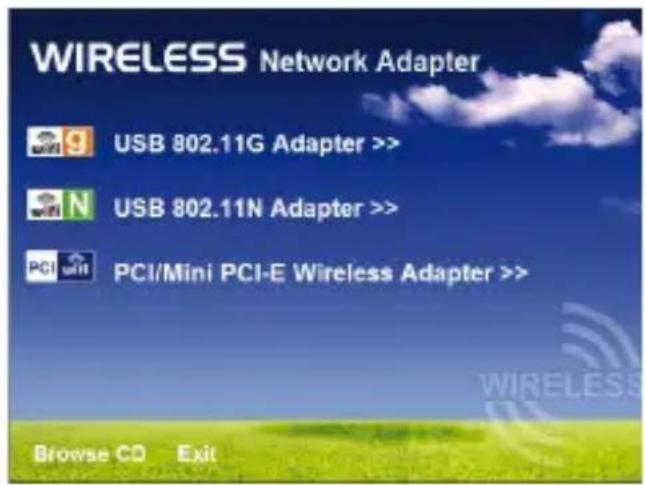
Insert the included setup CD in the CD-ROM Drive and start the Setup.exe program. To start the installation, please click on the "USB 80•.11G Adapter" or "USB80•.11N Adapter".
text_image
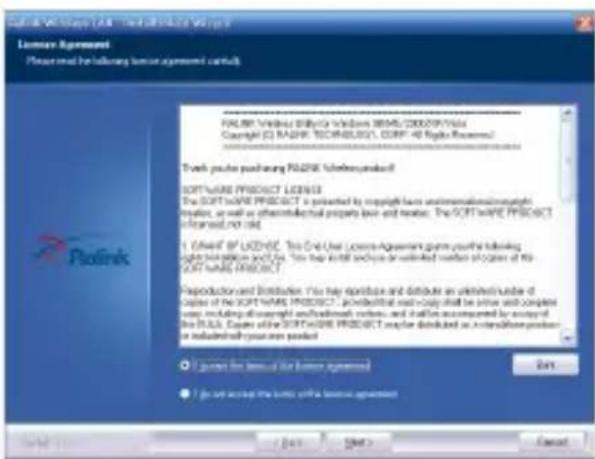
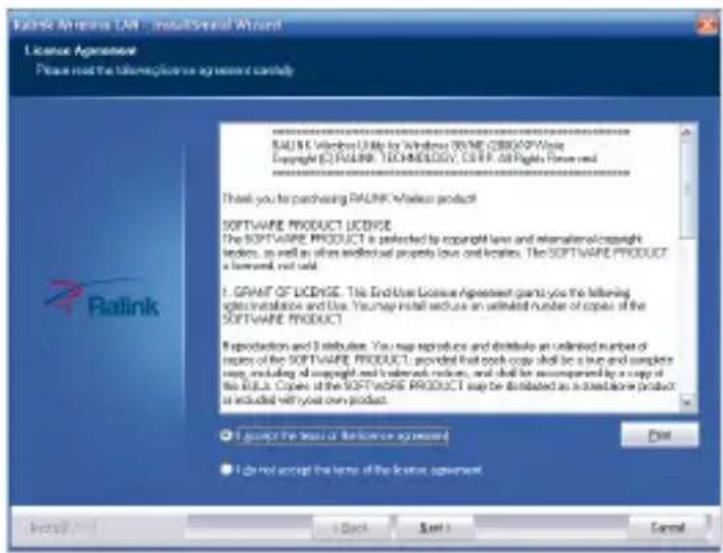
WIRELESS Network Adapter USB 802.11G Adapter >> USB 802.11N Adapter >> PCI/Mini PCI-E Wireless Adapter >> Browse CD Exitait for the installer to run when the License Agreement screen displays, read the agreement and click “Next” to accept the terms and continue with the installation.
text_image
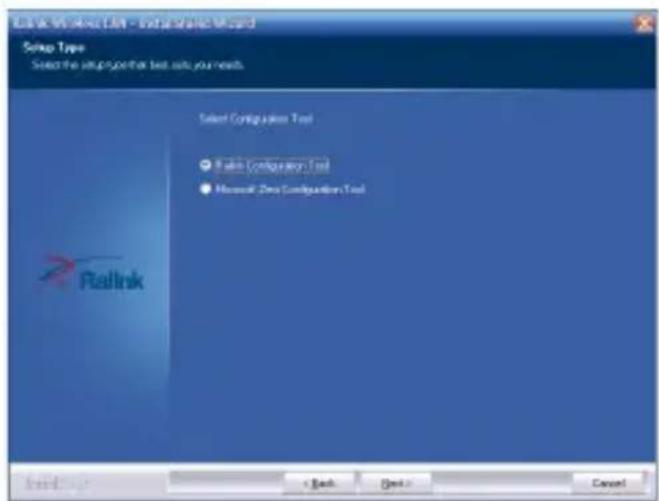
Ralink Wireless LAN - Microsoft Word License Agreement Please meet the telemedicine agreement clearly Ralink Wireless Linux by Windows NTME (2800/XP Write Copyright © Ralink TECHNOLOGY, CSRP, all rights reserved. Thank you to purchasing Ralink Wireless product SOFTWARE PRODUCT LICENSE The SOFTWARE PRODUCT is preferred by copyright law and rematerials of copyright indexes, as well as when installed properly laws and licenses. The SOFTWARE PRODUCT a license, not valid. 1. GRAP OF LICENSE. This End-Use License Agreement grants you the following products: installation and use. You may install reduce an unlimited number of copies of the SOFTWARE PRODUCT Reproduction and Distribution. You may reproduce and distribute an unlimited number of options of the SOFTWARE PRODUCT: provided that book copy shall be a true and complete copy, including all copyright and related rules, and shall be accompanied by a copy of the Rula. Copies of the SOFTWARE PRODUCT may be distributed as a third alone product as included with your own product. I should provide a license agreement I do not accept the terms of the license agreement. Install... Back Next > CancelOn the second Setup Type Screen (below), choose a configuration tool. “Ralink Configuration Tool” is recommended, as it provides access to all adapter features.
If you prefer to use the tool provided by indows XP/ Vista, select “Microsoft Zero Configuration Tool”. Choose either (the setting can be changer after the install), then click “Next”.
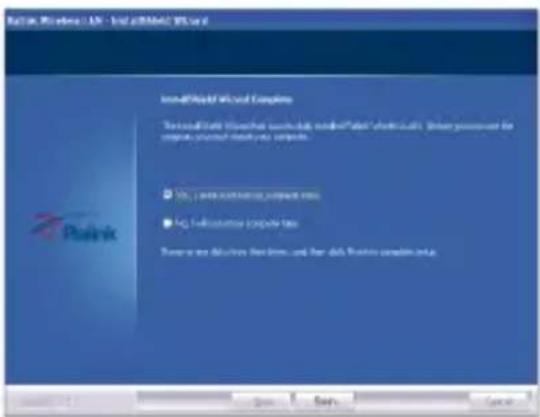
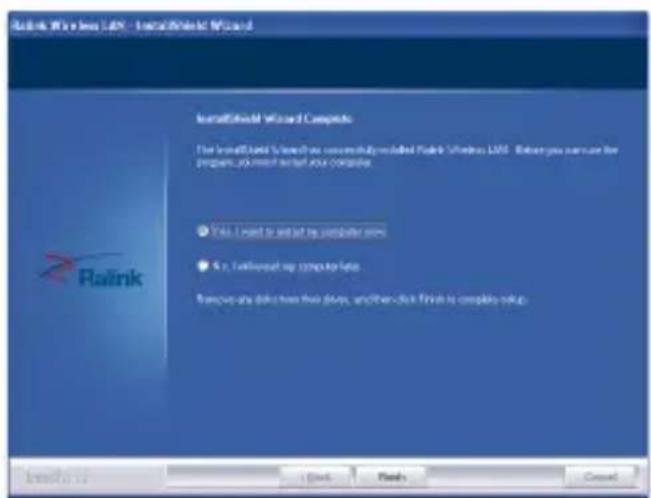
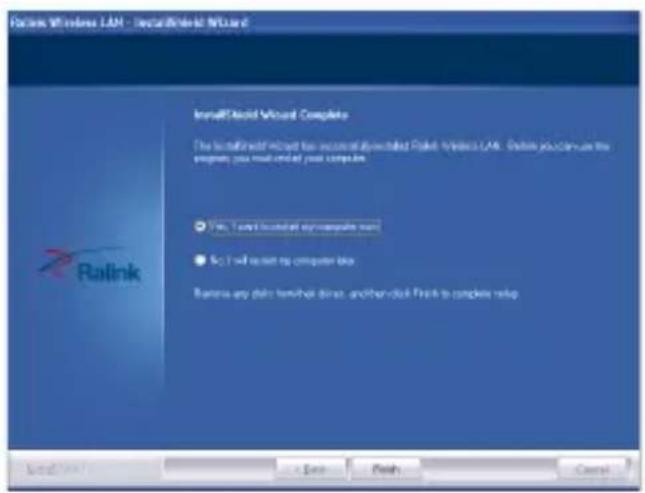
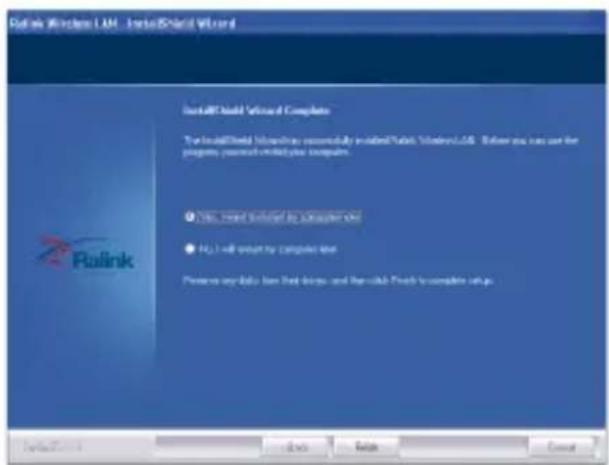
The installer will automatically install the program. hen done, select "Yes, I want to restart my computer now" and click "Finish" to reboot your computer.
text_image
Rallink Configuration Tool - Rallink Configuration Wizard Setup Type Select the setup type that test setup your needs Select Configuration Tool ● Rallink Configuration Tool ● Microsoft Zero Configuration Tool Rallink + Back Cancel
text_image
Raink Wireless Linux - installed Wizard Installed Wizard Complete The installed Wizard is used to secure the installed Raink Wireless Linux. But you can use the project, so much installed your computer. ● Yes: I need to install the computer now ● No: I will support my computer now Remove any data from this drive, and then click Finish to complete setup.
natural_image
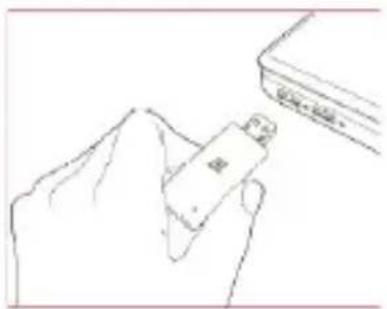
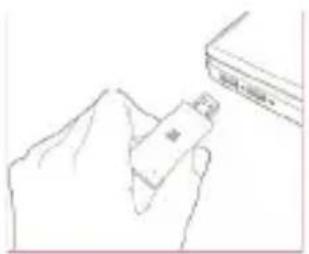
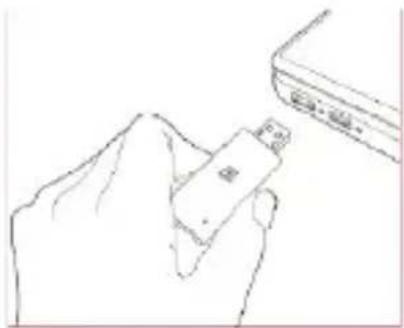
Line drawing of a hand holding a USB flash next to a rectangular object (no text or symbols)ith the computer now turned on, insert the into an open USB•.0 port.
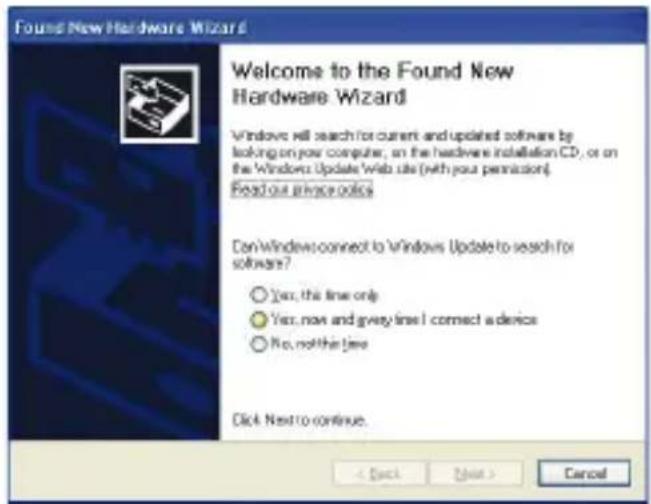
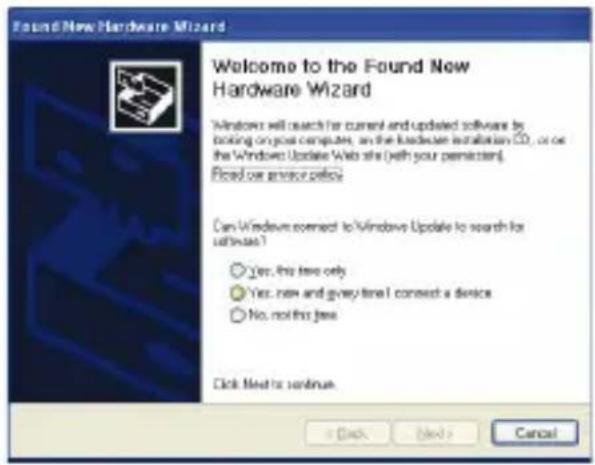
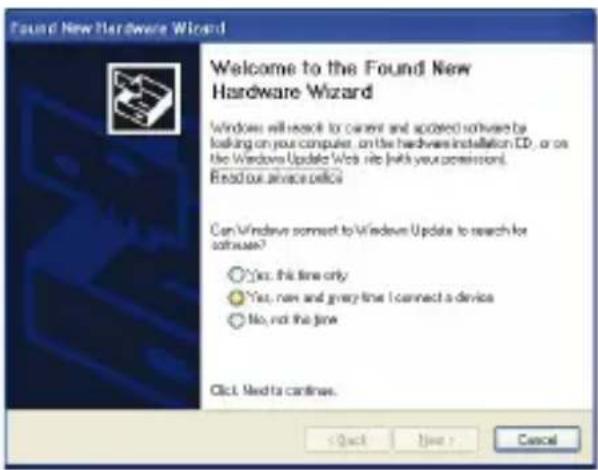
ith the welcome to the Found New Hardware izard screen displayed (which is automatic when the adapter is connected to the computer), select the option "No, not this time" and click "Next".
text_image
Found New Hardware Wizard Welcome to the Found New Hardware Wizard Windows will search for current and updated software by looking on your computer, as the hardware installation CD, or on the Windows Update Web site (with your permission). Fixed on an error policy Can Windows connect to Windows Update to search for software? Yes, no free only Yes, new and grey time I connect a device No, not this free Click Next to continue. OK Cancel
text_image
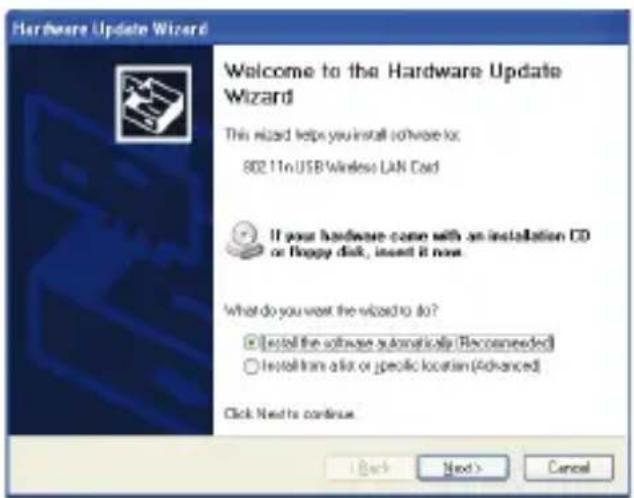
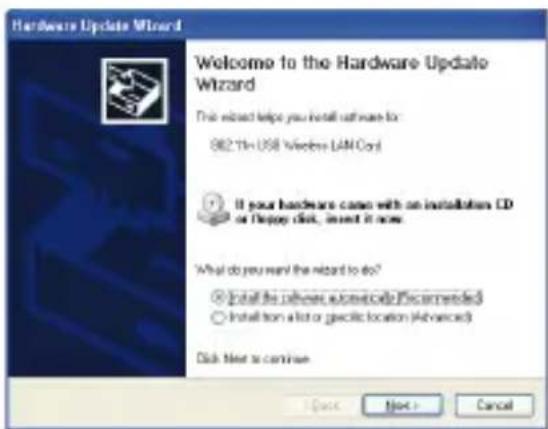
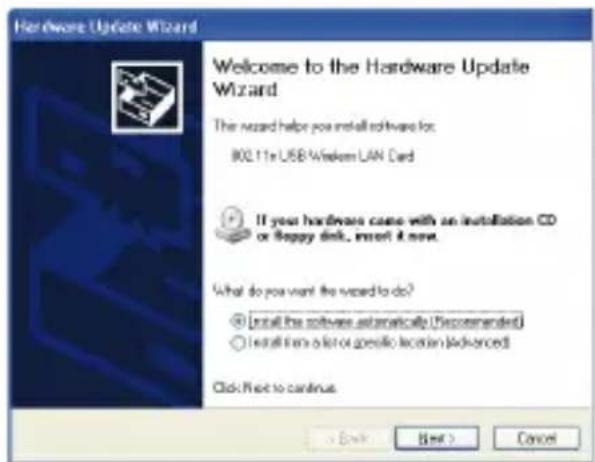
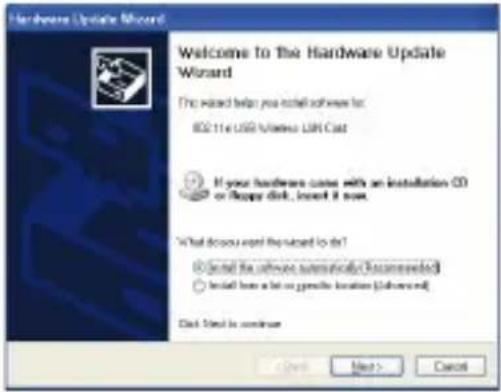
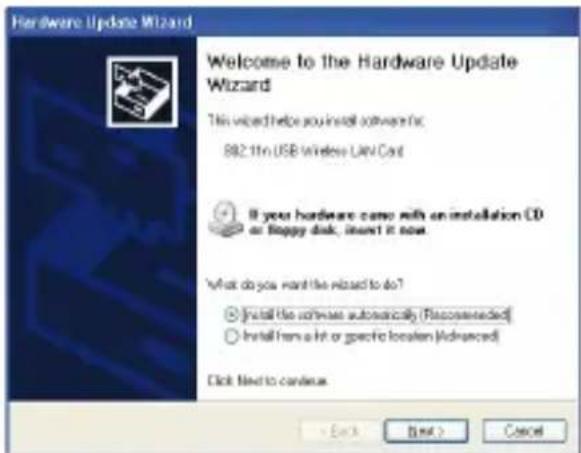
Hardware Update Wizard Welcome to the Hardware Update Wizard! This wizard helps you install software to: 802.11n USB Wireless LAN Card If your hardware come with an installation CD or floppy disk, insert it now. What do you want the wizard to do? □ Install the software automatically (Recommended) ○ Install trans a list or specific location (Advanced) Click Next to continue.hen prompted with “ hat do you want the wizard to do?” select “Install the software automatically (Recommended)” and click “Next”.
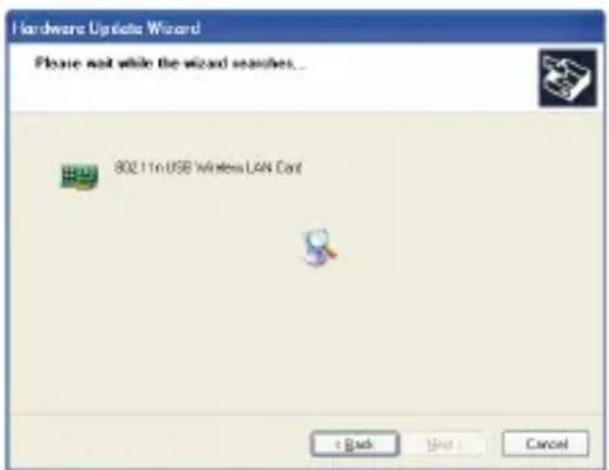
A status screen will display, indicating that the installation is in progress. No action is needed as this point.
text_image
Hardware Upgrade Wizard Please wait while the wizard searches... 802.11n USB Wireless LAN Cart + Back Include : Cancelhen the Completing the Found New Hardware izard screen displays, it indicates that the installation has been successfully completed and your ireless USB Adapter is ready for configuration.
5. CONFIGURATION GUIDE 5. CONFIGURATION GUIDE
Once the installation is complete, you can configure the ireless USB Adapter to connect to a wireless access point (AP). The wireless configuration utility will start automatically, and you'll also find a tray icon at the lower right in your indows system's tray.
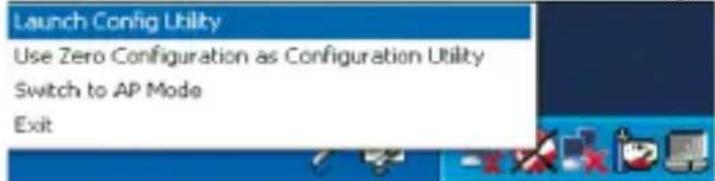
- Right-click the RaUI icon and select "Launch Config Utility".
text_image
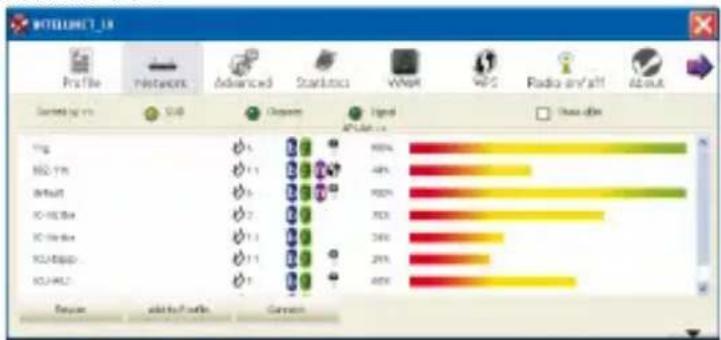
Launch Config Utility Use Zero Configuration as Configuration Utility Switch to AP Mode Exit- The configuration utility will scan for wireless networks within range. Click “Rescan” to refresh the list of available wireless networks. To join a particular network that displays, select it and click “Connect”.
bar
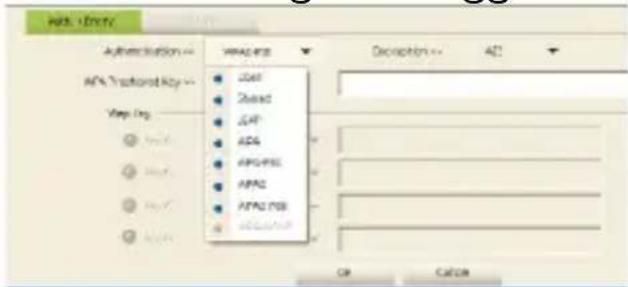
| Media Type | Percentage (%) | | :--- | :--- | | TV | 90% | | Radio | 48% | | News | 90% | | Social Media | 36% | | Social News | 24% | | Social Media | 45% | | Social News | 45% |- If the wireless network uses encryption, you need to input the correct encryption key. The configuration utility automatically suggests the correct authentication type (see the drop-down list), and you should not change the suggested value.
text_image
HDL1000 Authentication → User User Shared Shared APG APG/PSS APAC APAC PSS APAC PSS Description → A2 OK Cancel-
NOTE: For WPA/ WPA2 networks, you need to select the correct encryption type, as well (AES or TKIP). These settings depend on how the wireless network is set up. Only the owner of the wireless network can provide the required information.
-
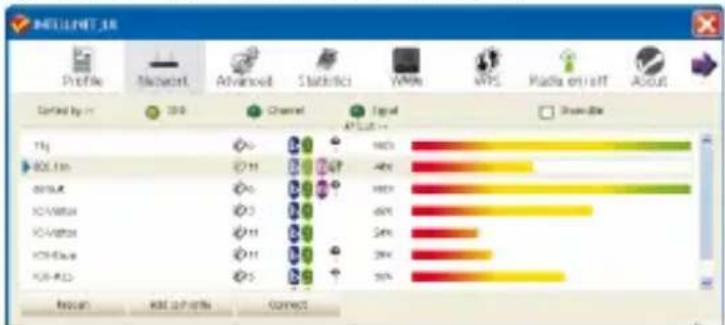
If the wireless access point is successfully connected, you will see in front of the wireless device.
text_image
BIDELNET_18 Profile Microsoft Advanced Statistics VMware WPS Radio error About Sorted by in 200 Channel Signal APL 5.17+ 1kg 600 fps 40Hz 40Hz 40Hz 40Hz 40Hz 40Hz 40Hz 40Hz 40Hz 40Hz 40Hz 40Hz 40Hz 40Hz 40Hz 40Hz 40Hz 40Hz 40Hz 40Hz 40Hz 40Hz 40Hz 40Hz 40Hz 40kHz 40kHz 40kHz 40kHz 40kHz 40kHz 40kHz 40kHz 40kHz 40kHz 40kHz 40kHz 40kHz 40kHz 40kHz 40kHz 40kHz 40kHz 40kHz 40kHz 40kHz 40kHz 40kHz 40kHz 40kHz 40MHz 40MHz 40MHz 40MHz 40MHz 40MHz 40MHz 40MHz 40MHz 40MHz 40MHz 40MHz 40MHz 40MHz 40MHz 40MHz 40MHz 40MHz 40MHz 40MHz 40MHz 40MHz 40MHz 40MHz 40MHz 40kHzNOTE: For advanced settings and additional features of the Wireless USB Adapter, refer to the user manual on the enclosed CD.
6. ⑥BTAINING TECHNICAL SUPPORTOBTAINING TECHNICAL SUPPORT
While we hope your experience with the Wireless-N USB Adapter is enjoyable and easy to use, you may experience some difficulties or have some questions that this User Guide has not answered. Please contact your reseller and ask them for help first. If they cannot resolve your issue, please contact our company.
This user manual is based on the latest version of our Wireless-N USB Adapter.
If your USB adapter does support some special functions showed in the manual, please contact our technical support team to obtain the latest software for doing upgrade.
1. INTRODUCTION ET DESCRIPTION DU PRODUIT1. INTRODUCTION ET DES
1.1 APERÇU.DIAPRODUITU DU PRODUIT
text_image
USEUM WORKS TO CARE - Microsoft Excel Settings Options Take any instructions to access your website. Select Computer Tool ● Select Computer Tool ● Microsoft Excel Composite Tool OK Cancel Help Finishtext_image
Pudink Install local/Windows Computer This will install a new system to build a new desktop project. This will also install the program, but it will not be completed. ● This will install a new desktop project ● This will install a new desktop project Remove your desktop project, then add a new Windows OSOS project.
natural_image
Line drawing of a hand holding a USB flash drive next to a device (no text or symbols visible)text_image
Found New Hardware Wizard Welcome to the Found New Hardware Wizard Windows will search for current and updated software by lock-up any user computer on the hardware installation CD, as on the Windows Update Web site (with your permission). Reset this server below Can/Windows connect to Windows Update to reach this setminus? Yes, No free help Yes, now and every fine I connect a device No, not this gone Click Next to continue. < Back Next > Cancel
text_image
Hardware Update Wizard Welcome to the Hardware Update Wizard This select helps you install software for: 862 TIN USB Wireless LAN Cord If your hardware came with an installation CD or DPAP card, insert it now: What do you want the wizard to do? Install the hardware automatically (Recommended) Install the list or specific location (Advanced) Disk Next to continuetext_image
Hardware Update Wizard Please wait while the wizard searches... 982.1In USB Wireless LAN Card DE CONFIGURATION5. GUIDE DE CONFIGURATION5. GUIDE DE CONFIGURATION
text_image
Launch Config Utility Use Zero Configuration as Configuration Utility Switch to AP Mode Exittext_image
Intellect Ltd Profile Network Advanced Statistics WeMA ARS Radio on/off About Sorted by: 100 500 Channel High AI LIST 1g 80.11s 40% 40% 90% 90% 30% 20% 20% 60% Micro AND toll info Connectbar
| Category | Value (%) | |---|---| | 11k | 100 | | 800-11k | 45 | | default | 100 | | IC-Vistar | 65 | | IC-Victar | 24 | | IOU-Equip | 29 | | IOU-WLS | 36 | Back to Profile: Red, Add to Profile: Green, Connect: Blue, Black, White, Yellow, Gray, White, Black, Yellow, Black, Black, Black, Black, Black, Black, Black, Black, Black, Black, Black, Black, Black, Black, Black, Black, Black, Black, Black, Black, Black, Black, Black, Black, Black, Black, Black, Black, Black, Black, Black, Black, Black, Black, Black, Black, Black, Black, Black, Black, Black, Black, Black, Black, Black, Black, Black, Black, Black, Black, Other1.3 SYSTEMANFORDERUNGENSYSTEMANFORDERUNGEN
text_image
Ralink Wireless Product License Agreement Please read the following license agreement carefully. Ralink Wireless Product: Ralink Wireless Product SOFTWARE PROJECT LICENSE: The SOFTWARE PROJECT is contracted by copyright law and intellectual copyright notices, as well as other intellectual property laws and licenses. The SOFTWARE PROJECT is contained, not valid. 1. GRANT OF LICENSE. The End User License Agreement parts further following rights installation and/or. Your top install and use an extension number of copies of the SOFTWARE PROJECT. Reproduction and Distribution. You may reproduce and distribute an related number of copies of the SOFTWARE PROJECT, provided that each copy should be a bus and complete users including all rights and information updates, and shall be accompanied by a user of the Ralink. Copies all the SOFTWARE PROJECT may be distributed as a candidate product or included with your own product. OK Cancel Add Finish Canceltext_image
Setup Type Select the setup size that bolt calls your needs. Select Configuration Tool ● Rollink Configuration Tool ● Microsoft Dot Configuration Tool Rallink Install 1 Back Next Cancel
text_image
Ralink Wireless LAN - Default/Default Wizard Install/Default Wizard Complete The installed wireless bus successfully installed Ralink Wireless LAN. Download you can use the program, you must enter your computer. No. 1 will launch any computer name. No. 2 will switch to computer box. Remove any disk terminal drive, another-click Drink to complete setupnatural_image
Line drawing of a hand holding a USB flash next to a device (no text or symbols visible)
text_image
Found New Hardware Wizard Welcome to the Found New Hardware Wizard Windows will search to content and installed software by looking on your computer, on the hardware installation CD, or on the Windows Update Web site (with your permission). Read out advance office Can Windows connect to Windows Update to search for software? Yes, this line only Yes, now and very late I connect a device No, not the line Click. Next to continue. < Back Next > Canceltext_image
Hardware Update Wizard Please wait while the wizard searches... 802.11x USB Wireless LAN Card Back Next > Cancel
text_image
Hardware Update Wizard Welcome to the Hardware Update Wizard The wizard helps you install software for: 802.11x USB Wireless LAN Card If your hardware came with an installation CD or Happy disk, insert it now. What do you want the wizard to do? Install the software automatically (Recommended) Install this slot or specific location (Advanced) Click Next to continue.text_image
Launch Config Utility Use Zero Configuration as Configuration Utility Switch to AP Mode Exittext_image
ABS. V8001 Authentication → WiFi 7th owned Key → Wire Org ● Common ● Shared ● Local ● Local ● WiFi PS ● WiFi2 ● WiFi2 PS ● WiFi2 PS Encryption → ADS OK Canceltext_image
INTELLNET_UI Profile Network Advanced Statistics WWW WPS Radio on/off About Sorted by ICD Channel Signal AD Soft Show attn 1 Hz 802.7Hz 40% 6000 40% 1900 85% 54% 30% 100% 60% 100% 60% 100% 60% 100% 60% 100% 60% 100% 60% 100% 60% 100% 60% 100% 60% 100% 60% 100% 60% 100% 60% 100% 60% 100% 60% 100% 60%text_image
WIRELESS Network Adapter USB 802.11G Adapter >> USB 802.11N Adapter >> PCI/Mini PCI-E Wireless Adapter >> Browse CD Exit
text_image
License Agreement Please note the following license agreement: currently: RABR Wireless (B) Inc. Windows 8005/2005/91/Vala Copyright (C) RABR TECHNOLOGY, CORP 40 Rules Reserved Trust you're pushing RABR Software product: SOFTWARE PROJECT LICENSE The SOFTWARE PROJECT is presented by copyright law and institutional copyright library, as well as other intellectual property law and hardware. The SOFTWARE PROJECT informed, no valid. I Check BY: RABR, This One User License Agreement given your website following lightning application: You may help to sell or deliver related version of the SOFTWARE PROJECT. Reproduction and Distribution: You may distribute and distribute an additional number of copies of the SOFTWARE PROJECT - product available and only shall be issued and complete supply, including all copyright and institutional rights, and shall be accompanied by any of the ITEMS. Create all SOFTWARE PROJECT may be distributed as intended product or industrialized your own provider. ● Apply for this form at the license agreement ● Do not access the website's license agreement OK Canceltext_image
Visual Studio Suite - Install Date: Suite 4 Step Type Select My configuration for test release (test) Index C:\Comp\Software\Tool ● Excel Configuration Tool ● Microsoft China Configuration Tool Pusink
text_image
InstallWorld video Complete Tested World Video (we tested) video/Video video call. User protection for program installed video call. • Live video content support key • Live video computer key Transport and Digital Flash, and for all platforms available.natural_image
Line drawing of a hand holding a small electronic device with a separate box nearby (no text or symbols)
text_image
Found New Hardware Wizard Welcome to the Found New Hardware Wizard Windows will search for our work and updated software by taking any your computer, on the hardware installation CD, or on the Windows Update Web site (with your permission). Reset our previous policy. Can Windows connect to Windows Update to check for software? Yes, No free only Yes, now and go quickly I connect a device No, not free one Click Next to continue. Back Next > Cancel!text_image
Hardware Update Wizard Please mail while the sword patches... HD: the USB Wireless Load Card Back Next Cancel
text_image
Hardware Update Wizard Welcome to The Hardware Update Wizard The Wizard helps you install software for 802.114 USB Ethernet LAN Cast If your hardware came with an installation CD or floppy disk... insert it now. What do you want the wizard to do? Install the software automatically (Recommended) Install how a bit on specific location (Advanced) Disk fired to continue Next > Canceltext_image
Launch Config Utility Use Zero Configuration as Configuration Utility Switch to AP Mode Exitbar
| Source | Percentage (%) | | :--- | :--- | | WiFi | 100 | | IEC-11b | 40 | | eYout | 100 | | IC-Worker | 70 | | IC-Worker | 34 | | ICU-Base | 29 | | ICU-MIC | 62 | Focus and Profile Connecttext_image
AUDY.0001V Authentication VPA2-PSK Open Shared Lean VPA VPA-PSK VPA2 VPA2-PSK VPA2-PSK Description ACC OK Cancelbar
| Category | Percentage (%) | | :--- | :--- | | Default | 100 | | 600.11s | 48 | | 11G | 68 | | 600.11s | 24 | | 11G | 20 | | 600.11s | 55 | | 11G | 5 | | 600.11s | 3 | | 11G | 2 | | 600.11s | 1 | | 11G | 0 | | 600.11s | 0 | | 11G | 0 | | 600.11s | 0 | | 11G | 0 | | 600.11s | 0 | | 11G | 0 | | 600.11s | 0 | | 11G | 0 | | 600.11s | 0 | | 11G | 0 | | Note: The percentages in the chart are estimated based on the data provided in the code. The values for 'Selected' and 'Add to Profile' are not explicitly labeled in the image. The 'Connect' label is present but lacks the actual data labels.text_image
WIRELESS Network Adapter USB 802.11G Adapter >> USB 802.11N Adapter >> PCI/Mini PCI-E Wireless Adapter >> Browse CD Exittext_image
Ralink Software (LAN) - Microsoft Access Policy 8 License Agreement Please read the following license agreement regularly. Ralink Ralink: Windows (Ralink) Windows (RIME/0004/Altia) Copyright ID: Ralink.12C0005071.CORP.40 Rights Reserved Thank you to purchasing Ralink website product SOFTWARE PROJECT LOADING The SOFTWARE PROJECT is protected by copyright law amendments or copyright violations, as well as otherwise that properly sets and tables. The SOFTWARE PROJECT informed not valid. 1. Ralink BY LOADING: The first C#e License Agreement provides a following rights: Implementation and Use. You may install insurance un Distributed number of shares in the SOFTWARE PROJECT. Preparation and Distribution: You may reproduce and distribute an administration of rights of the SOFTWARE PROJECT: provided technical warranty shall be required and complete may including discopyright information, and shall be accompanied by accepted the DATA. Expires after the SOFTWARE PROJECT may be distributed as a distribution producer is included by your own product. • Please note that this is the license agreement. • Do not accept the term if the license agreement.text_image
Setup Type Select the setup type that level with your needs. Select Configuration Tool ● Pilink Configuration Tool ● Microsoft Excel Configuration Tool Pilink
text_image
Fialink Wireless LAN - Install Provider Wizard Install Provider Wizard Complete The installed Bluetooth essentially installed Fialink Wireless LAN. Before you can use the program, please install your computer. ● Yes, need further to complete the ● No. I will start my computer time Please run daily on the network and remote Tech to complete this day. Fialinknatural_image
Line drawing of a hand holding a USB flash drive next to a device (no text or symbols visible)text_image
Found New Hardware Wizard Welcome to the Found New Hardware Wizard Windows will search for current and updated software by looking on your computer... on the hardware installation CD... or in the Windows Update Web site (with your permission). Based on private policy Can Windows connect to Windows Update to search for software? Yes: this time only Yes: now and every time I connect a device No: not the line Click Next to continue.