APPUSB150NANO - Network card / adapter Approx - Free user manual and instructions
Find the device manual for free APPUSB150NANO Approx in PDF.
User questions about APPUSB150NANO Approx
0 question about this device. Answer the ones you know or ask your own.
Ask a new question about this device
Download the instructions for your Network card / adapter in PDF format for free! Find your manual APPUSB150NANO - Approx and take your electronic device back in hand. On this page are published all the documents necessary for the use of your device. APPUSB150NANO by Approx.
USER MANUAL APPUSB150NANO Approx
text_image
REALTEK 1.1n USB Wireless LAN - InstallShield Wizard Choose Setup Language Select the language for the installation from the choices below. Banque Bulgarian Catalan Chinese (Simplified) Chinese (Traditional) Croatian Czech Danish Dutch English Finnish French (Canadian) French (Standard) German Greek InstallShield < Back Next > Canceltext_image
REALTEK 11n USB Wireless LAN Driver and Utility InstallShield Wizard Complete The InstallShield Wizard has successfully installed REALTEK 11n USB Wireless LAN Driver and Utility. Before you can use the program, you must install your computer. + Yes, I want to retail my computer now. ○ No, I will restart my computer later. Remove any disks from their driver, and then click Finish to complete setup. < Back Finish Cancelnatural_image
Hand holding a USB flash next to a device (no text or symbols visible)text_image
Found New Hardware Wizard Welcome to the Found New Hardware Wizard Windows will search for current and updated software by looking on your computer, on the hardware installation CD, or on the Windows Update Web site (with your permission). Read our privacy policies Can Windows connect to Windows Update to search for software? Yes, this time only Yes, now and every time I connect a device No, not this time Click Next to continueThank you for choosing the Nano USB Wireless Adapter APPUSB150NANO.
1.1 Product Description
USB device designed for wireless networks of up to 150Mbps which allows any user to connect a computer, PC or laptop to a wireless network of 300Mbps, 150 Mbps, 54Mbps or 11Mbps. With WPS button that facilitate a more secure wireless connection. Compatible with the 802.11n, 802.11g and 802.11b protocols. It supports multiple existing security: WEP / WPA / WPA-PSK / WPA2-PSK / TKIP / AES. Lastly, remember that thanks to its compact design and small dimensions it allows great mobility in any situation.
1.2 Technical characteristics
- IEEE802.11b/g/n Standards
- WEP/WPA/WPA-PSK/WPA2-PSK data security, TKIP / AES
- Wireless transfer rates up to 150Mbps
• Automatic adjustment at low speed by distance or other operating limitations - USB interface
• Supports Ad-Hoc and Infrastructure mode
- Roaming between access points when configured in infrastructure mode
- Plug and play, set up for easy installation
- Compatible with Windows 2000, XP 32/64, Vista32/64, W7 32/64 Linux and Mac OS X
1.3 System Requirements
- 1 USB Port 2.0
• Windows 2000/XP/Vista/7
• Linux 2.4 o subsequent versions
Chapter 2. Package Contents
- Nano USB Wireless Adapter 150 Mbps APPUSB150NANO
• Resource CD for APPUSB150NANO, including:
° Installation software
° User Guide in multiple languages
- Quick Installation Guides
Note: Make sure your package contains the elements described above. If you find something is missing or damaged, please contact your dealer
Chapter 3. Technical specifications.
| GENERAL | |
| Interface USB 2.0 | |
| Standards IEEE802.1 | 1b; IEEE802.11g; IEEE802.11n |
| Operating Sytstems | Windows 2000/ Windows XP 32/64 Windows Vista 32/64 /Windows 7 32/64 Linux y MAC OS X |
| Transfer Rate Nano-N: | 13.5/27/40.5/54/81/108/121.5/135 Mbps13/26/39/52/78/104/117/130Mbps6.5/13/19.5/26/39/52/58.5/65 Mbps11b: 1/2/5.5/11 Mbps11g: 6/9/12/18/24/36/48/54 Mbps |
| Modulation 11b:CCK, | QPSK,BPSK; 11g:OFDM; |
| Media Access Protocol | CSMA/CA con ACK |
| Security WPA-PSK/W | PA2-PSK; 64/128-bit WEP; TKIP/AES |
| Frequency 2.4 ~ 2.4 | 835GHz |
| Spread spectrum Direct | ect Sequence Spread Spectrum (DSSS) |
| Safety and emissions | FCC, CE, RoSH |
Chapter 4. Installation Guide
4.1 Installing the hardware
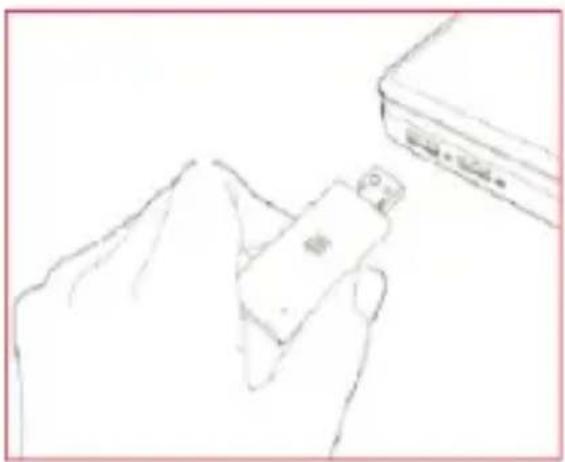
Connect the adapter to the USB port of your computer.
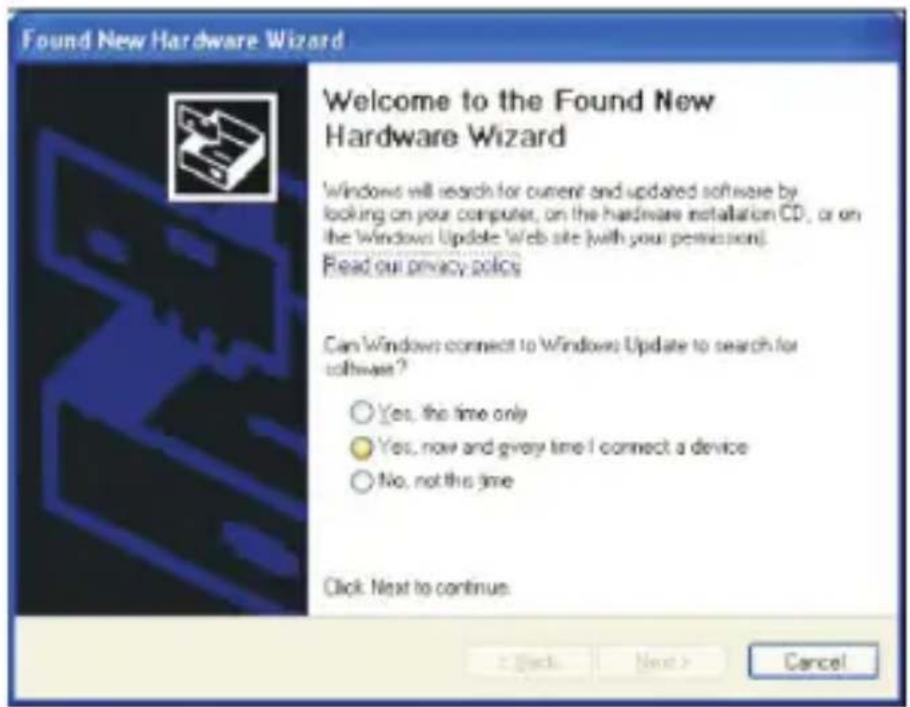
Note: The window "New Hardware" found displayed if the adapter is installed correctly.
4.2 Installing software
4.2.1 Windows XP, Windows Vista and Windows 7
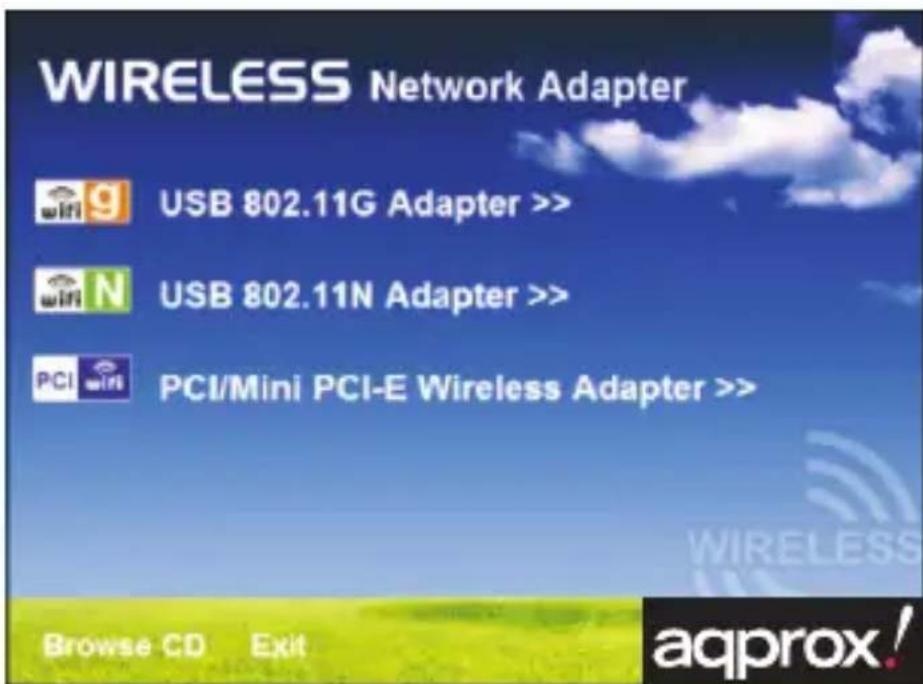
Insert the Resource CD into your CD-ROM. To continue, double-click My Computer, then double click the CD drive / DVD drive where you placed the CD and boot the Setup.exe program.
text_image
WIRELESS Network Adapter USB 802.11G Adapter >> USB 802.11N Adapter >> PCI/Mini PCI-E Wireless Adapter >> Browse CD Exit aqprox!To begin the installation please click on the "USB Wireless 802.11N Drivers".
Wait for the installer to start.
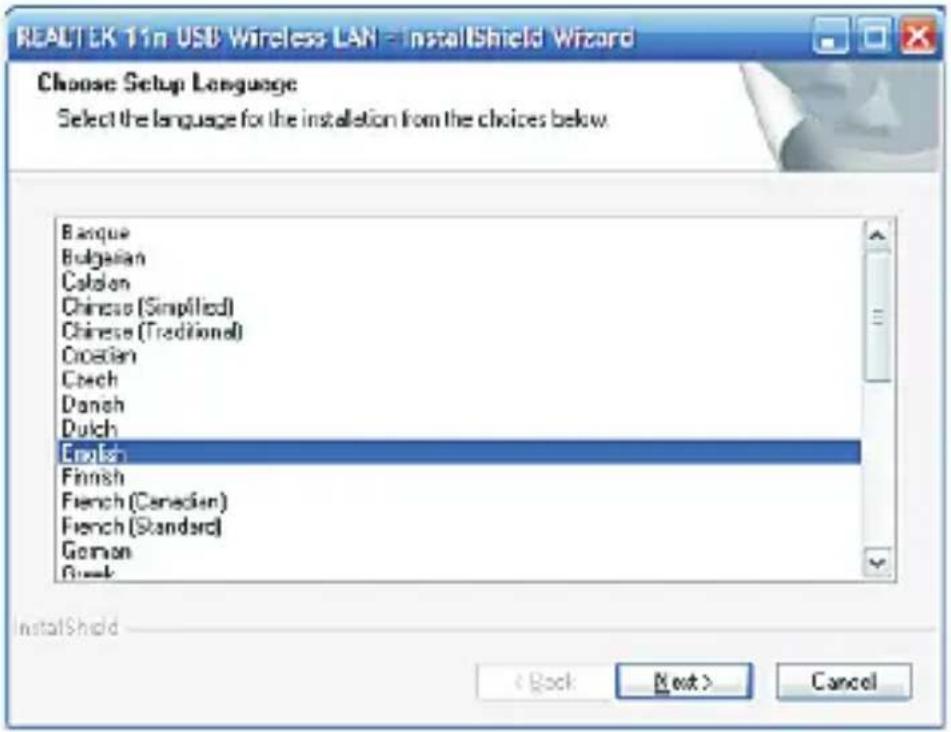
Select language and click Next to begin the installation.
text_image
REALTEK 11n USD Wireless LAN - InstallShield Wizard Choose Setup Language Select the language for the installation from the choices below Banque Bulgarian Catalan Chinese (Simplified) Chinese (Traditional) Croatian Czech Danish Dutch English Finnish French (Canadian) French (Standard) German Greek InstallShield < Back Next > CancelThe installer will automatically begin installing the program. Select "Yes, I want to restart my computer now" and click on "Finish" to restart your computer

text_image
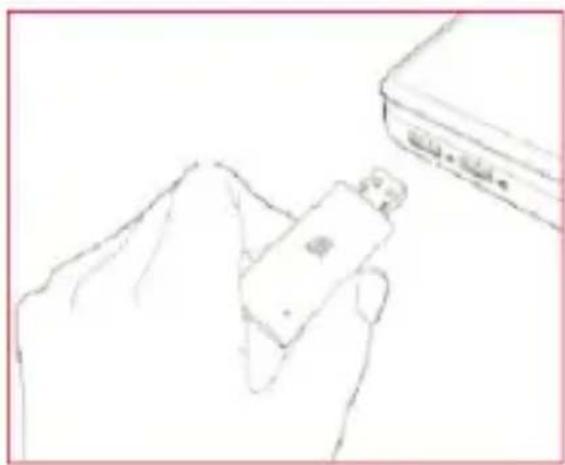
REALTEK 11n USB Wireless LAN Driver and Utility InstallShield Wizard Complete The InstallShield Wizard has successfully installed REALTEK 11n USB Wireless LAN Driver and Utility. Before you can use the program, you must install your computer. Yes, I want to retain my computer now. No, I will restart my computer later. Remove any disks from their drive, and then click Finish to complete setup. Back Finish CancelWith the computer turned on insert the nano Wireless-N adapter in the USB port.
natural_image
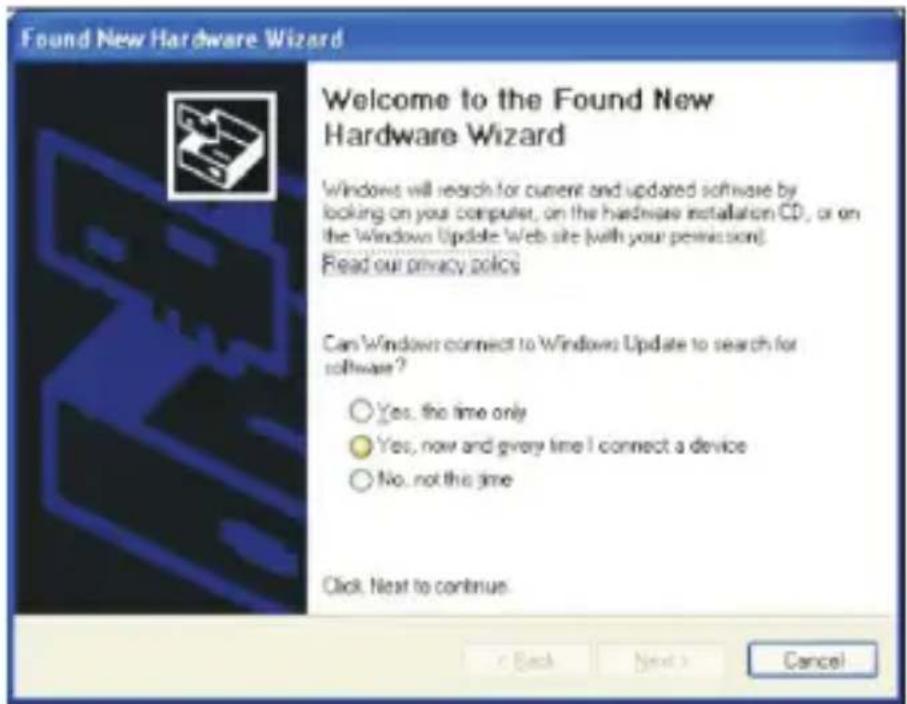
Hand holding a USB flash device with a device on top, next to a rectangular electronic device (no visible text or symbols)With the New Hardware found screen click on “No, not this time” and then click “Next”
text_image
Found New Hardware Wizard Welcome to the Found New Hardware Wizard Windows will search for current and updated software by looking on your computer, on the hardware installation CD, or on the Windows Update Web site (with your permission). Read our privacy policies Can Windows connect to Windows Update to search for software? ○ Yes, the time only ○ Yes, now and every time I connect a device ○ No, not this time Click, Next to continue Back Next > CancelChapter 5. Technical Support
For more information about installing and configuring this product please go to our website www.approx.es under the support section or send an e-mail to the following address: soporte@approx.es
Chapitre 1. Introduction & Product Description
1.3 System Requirements
- 1 USB Port 2.0
• Windows 2000/XP/Vista/7
• Linux 2.4 o subsequent versions
text_image
REALTEK 11n USB Wireless LAN - InstallShield Wizard Choose Setup Language Select the language for the installation from the choices below. Banque Bulgarian Catalan Chinese (Simplified) Chinese (Traditional) Croatian Czech Danish Dutch English Finnish French (Canadian) French (Standard) German Greek InstallShield < Back Next > Canceltext_image
REALTEK 11n USB Wireless LAN Driver and Utility InstallShield Wizard Complete The InstallShield Wizard has successfully installed REALTEK 11n USB Wireless LAN Driver and Utility. Before you can use the program, you must restart your computer. Yes, I want to restart my computer now. No, I will restart my computer later. Remove any clock from their drives, and then click Finish to complete setup. < Back Finish Cancelnatural_image
Hand holding a USB flash next to a device (no text or symbols visible)text_image
Found New Hardware Wizard Welcome to the Found New Hardware Wizard Windows will search for current and updated software by looking on your computer, on the hardware installation CD, or on the Windows Update Web site (with your permission). Read out privacy policies Can Windows connect to Windows Update to search for software ? Yes, the time only Yes, now and every time I connect a device No, not this time Click Next to continue. / Back Next > Canceltext_image
REALTEK 11n USB Wireless LAN - InstallShield Wizard Choose Setup Language Select the language for the installation from the choices below. Banque Bulgarian Catalan Chinese (Simplified) Chinese (Traditional) Croatian Czech Danish Dutch English Finnish French (Canadian) French (Standard) German Greek InstallShield < Back Next > Canceltext_image
REALTEK 11n USB Wireless LAN Driver and Utility InstallShield Wizard Complete The InstallShield Wizard has successfully installed REALTEK 11n USB Wireless LAN Driver and Utility. Before you can use the program, you must restart your computer. Yes. I want to restart my computer now. No. I will restart my computer later. Remove any disks from their drives, and then click Finish to complete setup. Back Finish Cancelnatural_image
Hand holding a USB flash next to a device (no text or symbols visible)text_image
Found New Hardware Wizard Welcome to the Found New Hardware Wizard Windows will search for current and updated software by looking on your computer, on the hardware installation CD, or on the Windows Update Web site (with your permission) Read out privacy policies Can Windows connect to Windows Update to search for software? Yes, this time only Yes, now and everyone I connect a device No, not this time Click Next to continue. Back Next > CancelKapitel 5. Support
text_image
REALTEK 11n USD Wireless LAN - InstallShield Wizard Choose Setup Language Select the language for the installation from the choices below. Banque Bulgarian Catalan Chinese (Simplified) Chinese (Traditional) CroGen Czech Danish Dutch English Finnish French (Canadian) French (Standard) German Greek InstallShield < Back Next > Canceltext_image
REALTEK 11n USB Wireless LAN Driver and Utility InstallShield Wizard Complete The InstallShield Wizard has successfully installed REALTEK 11n USB Wireless LAN Driver and Utility. Before you can use the program, you must install your computer. + Yes, I want to retain my computer now ○ No, I will restart my computer later. Remove any disks from their drives, and then click Finish to complete setup. < Back Finish Cancelnatural_image
Hand holding a USB flash next to a device (no text or symbols visible)text_image
Found New Hardware Wizard Welcome to the Found New Hardware Wizard Windows will search for current and updated software by looking on your computer, on the hardware installation CD, or on the Windows Update Web site (with your permission) Read out privacy policies Can Windows connect to Windows Update to search for software? Yes, this time only Yes, now and every time I connect a device No, not this time Click Next to continuetext_image
REALTEK 1.1n USB Wireless LAN - InstallShield Wizard Choose Setup Language Select the language for the installation from the choices below. Banque Bulgarian Catalan Chinese (Simplified) Chinese (Traditionals) Croatian Czech Danish Dutch English Finnish French (Canadian) French (Standard) German Greek InstallShield < Back Next > Canceltext_image
REALTEK 11n USB Wireless LAN Driver and Utility InstallShield Wizard Complete The InstallShield Wizard has successfully installed REALTEK 11n USB Wireless LAN Driver and Utility. Before you can use the program, you must restart your computer. Yes, I want to restart my computer now! No, I will restart my computer later. Remove any disks from their driver, and then click Finish to complete setup. < Back Finish Cancelnatural_image
Hand holding a device next to a device with ports (no visible text or symbols)text_image
Found New Hardware Wizard Welcome to the Found New Hardware Wizard Windows will search for current and updated software by looking on your computer, on the hardware installation CD, or on the Windows Update Web site (with your permission) Read out privacy policy Can Windows connect to Windows Update to search for software? Yes, this time only Yes, now and everyone I connect a device No, not this time Click Next to continue. x Each Next > CancelCapítulo 5 Suporte
text_image
REALTEK 11n USD Wireless LAN - InstallShield Wizard Choose Setup Language Select the language for the installation from the choices below. Banque Bulgarian Caldon Chinese (Simplified) Chinese (Traditional) Croatian Czech Danish Dutch English Finish French (Canadian) French (Standard) German Greek InstallShield < Back Next > CancelInstalacijski program e zapo eti instalaciju softvera automatski kada odaberete “Da, elim ponovno pokretanje moj ra unalo je sada”

text_image
REALTEK 11n USB Wireless LAN Driver and Utility InstallShield Wizard Complete The InstallShield Wizard has successfully installed REALTEK 11n USB Wireless LAN Driver and Utility. Before you can use the program, you must restart your computer. Yes, I want to restart my computer now. No, I will restart my computer later. Remove any clock from their drivers, and then click Finish to complete setup. < Back Finish CancelSa umetnite adapter nano Wireless-N USB port.
natural_image
Hand holding a small electronic device near a device (no text or symbols visible)Uz Found New Hardware, kliknite “Ne, ne ovaj put” i zatim kliknite na “Next”
text_image
Found New Hardware Wizard Welcome to the Found New Hardware Wizard 'Windows will search for current and updated software by looking on your computer, on the hardware installation CD, or on the Windows Update Web site (with your permission). Read our privacy policies Can Windows connect to Windows Update to search for software? Yes, the time only Yes, now and every time I connect a device No, not this time Click Next to continue. < Back Next > CancelPoglavlje 5 Podrška
Molim više informacija o instalaciji i konfiguraciji ovog proizvoda idite na našu web stranicu www.approx.es odjeljak za podršku ili pošaljite e-mail na sljede u adresu: soporte@approx.es