
KU 52 M - Oven FRANKE - Free user manual and instructions
Find the device manual for free KU 52 M FRANKE in PDF.


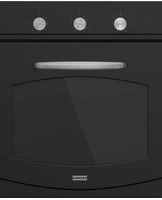
| Product type | Multifunction built-in oven |
| Brand | Franke |
| Model | KU 52 M |
| Number of programs | 5 (defrost, static, fan, grill, fan grill) |
| Usable volume | 57 liters |
| Dimensions (W x D x H) | 440 x 415 x 312 mm |
| Electrical supply | 220-240 V ~ 50-60 Hz |
| Total power | 2.3 kW - 16 A |
| Maximum temperature | 260 °C |
| Interior material | Easy-care special enamel (self-cleaning walls depending on model) |
| Control type | Mechanical or electronic programmer depending on version |
| Interior lighting | Round bulb or side bulbs (15 W, E14, 300°C) |
| Cooling ventilation | Yes, automatic |
| Number of shelf levels | 5 |
| Supplied accessories | Grid, drip tray |
| Removable door | Yes, for cleaning |
| Energy consumption (static 175°C) | 0.94 kWh (heating + holding) |
| Energy consumption (fan 200°C) | 1.19 kWh (heating + holding) |
| Safety | Automatic shutoff with timer, door closed for grill, child safety lock |
| Maintenance | Clean with hot water, non-abrasive detergents, avoid steam and metal scouring pads |
| Spare parts and repairability | Franke authorized after-sales service, original parts |
Frequently Asked Questions - KU 52 M FRANKE
User questions about KU 52 M FRANKE
0 question about this device. Answer the ones you know or ask your own.
Ask a new question about this device
Download the instructions for your Oven in PDF format for free! Find your manual KU 52 M - FRANKE and take your electronic device back in hand. On this page are published all the documents necessary for the use of your device. KU 52 M by FRANKE.
USER MANUAL KU 52 M FRANKE
Instructions for use and installation
Built-in multi-function oven with 5 cooking modes 14

natural_image
Line drawing of an oven with a black arrow pointing to the interior tray (no text or symbols)Fig. 2a
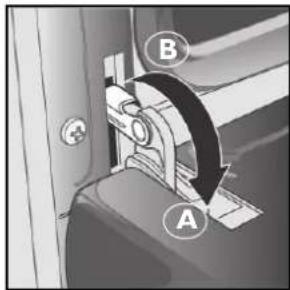
Fig. 2b

natural_image
Illustration of a person using a tablet device to interact with a screen (no text or symbols visible)Fig. 2c
| Fig.3a: / Fig.3b | |
| IT Installazione | |
| GB Installation | |
| FR Installation | |
| DE Installation | |
| NL Installatie | |
| ES Instalación | |
| PT Instalação | |
| GR | Еуката́оста́сн |
| TR Kurulum | |
| RU Установка | |
| PL Instalacja | |

Fig. 3a
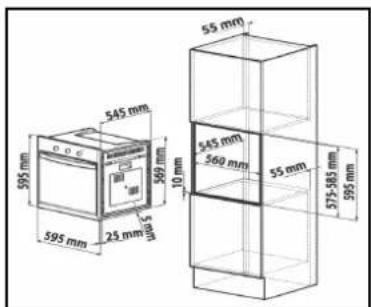
Fig. 3b
| Fig.4a / Fig.4b (DG52M - DG56M - DM52M - CM54M)Fig.4c /Fig.4d (EG54M - CG54M - AX52M - AX56M - KR52M - KU52M) | |
| IT Istruzioni di montaggio | |
| GB Installation instructions | |
| FR Instructions de montage | |
| DE Montageanleitung | |
| NL Montage-instructies | |
| ES Instrucciones de montaje | |
| PT Instruções de montagem | |
| GR | Однгієс топоθέτησης |
| TR Montaj talimatlari | |
| RU Указания по монтажу | |
| PL Instrukcje montażu | |
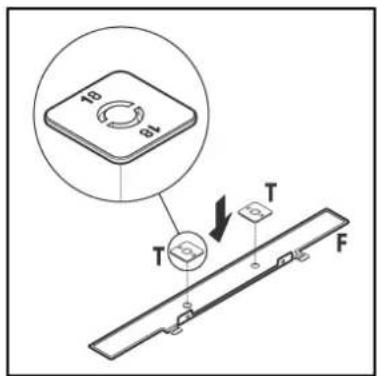
Fig.4a

Fig.4b


natural_image
3D rendering of a rectangular oven or enclosure with internal compartments and ventilation slots (no text or symbols visible)Fig.4dFig.4c
Sommario
Introduzione 4
natural_image
Diagram of a door with two hanging fixtures and a circular label A, no text or symbols present
natural_image
Diagram showing a light bulb inside a transparent container with a labeled section B (no text or symbols on the object itself)natural_image
Technical line drawing of an oven with a magnified inset showing internal structure (no text or symbols)Switching on the first time.... 15
Useful advice.... 15
Operation 15
Cooking table 19
Oven cleaning and maintenance 20
Support 21
Safety instructions.... 21
Installation (Fig.3a/Fig.3b) 22
Installation instructions 22
Electrical connection 22
Technical data 23
Introduction
Thank you for choosing a Franke product.
Before using the appliance, please carefully read the instructions and advice contained in this manual. In this way you will be able to make best use of the appliance and also ensure its lasting efficiency. Keep this booklet for further reference.
A close view
B Programme selector knob
For selecting the oven mode according to the type of cooking required.
When the knob is set to any programme, the oven light comes on indicating that the oven is switched on.
C Programmer
(see page 16)
Franke ovens have various cooking time management and control systems; refer to page 16 for specific detailed instructions; just identify the type of control your oven is equipped with, to be guided in correct use of the function
D Thermostat indicator light
Indicated by the symbol, Gt signals that the electrical heating elements are on. It goes off when the set temperature has been reached, and comes on again whenever oven heating is reactivated. It is for useful checking if the temperature has been reached, before placing the food in the oven.
E Temperature control knob (Thermostat)
Used to set the temperature required for the type of food being cooked, keeping it constant during cooking. To select the required temperature, turn the knob clockwise, bringing the pointer to the corresponding number. Max. temperature is approx. 260°C.
F Grill and drip-tray runners
Used for correctly placing the grills and drip-trays in 5 predetermined positions (1 to 5 starting from the bottom); the cooking table (page 19) gives the best position for each type of cooking.
G Drip-tray
Normally used for collecting juices from grilled food or for cooking food directly; the drip-tray must be removed from the oven if not used. The drip-trays are made from "AA" type food-grade enamelled steel.
H Grill
Used for supporting pans, pastry moulds and any containers different from the drip-trays provided, or for cooking meat and fish, toasting bread, etc. mainly with the grill and turbogrill functions. Direct contact of the grill with food is inadvisable.


Switching on the first time
When using the oven for the first time, operate it empty with the temperature knob set to maximum for at least 40 minutes, keeping the door open and airing the room.
The odour noticed during this operation is due to the evaporation of substances used to protect the oven during the period between manufacture and installation. At the end of this time, the oven will be ready to use.
Useful advice
For successful cooking, never place your dishes in the oven when it is cold; wait until it has reached the set temperature.
During cooking, never put pans or containers directly on the oven floor; place them above the grills or drip-trays provided, on one of the 5 shelves available; failure to do so could damage the oven enamel.
Never cover the walls of the oven with aluminium foil, especially in the lower part of the cooking compartment.
Any repairs must be carried out by specialised, licensed personnel.
Contact our nearest service centre and demand only original spare parts.
Your Franke oven uses a special enamel which is easy to keep clean, however it is advisable to clean it frequently to avoid baking on grime and previous cooking residuals.
Possible self-cleaning panels (if provided) can be cleaned with soap and water (see cleaning instructions).
NB: Before switching the oven on, read the timer instructions (see page 16).
- if the oven is equipped with an automatic cooking or switching off programmer, select the "manual" option indicated by the symbol to use the oven in manual mode.
Operation
This oven combines the advantages of conventional “static” natural convection ovens with those of modern “fan ovens”. It is a very versatile appliance enabling safe and easy selection of 5 different cooking methods. Use knobs (B) and (E) on the control panel to select the required programmes and temperature. For best use of your Franke oven, consult the cooking table on page 19.
Cooling fan
In order to reduce the temperature at the door, control panel and sides, the Franke oven is equipped with a cooling fan which is automatically activated when the oven is hot. When the fan is on, air blows from the front of the oven between the front panel and oven door; special attention has paid to ensure that the exiting air does not disturb the kitchen environment and that noise is kept to a minimum.
To protect kitchen units, the fan keeps running after cooking until the oven has cooled down sufficiently.
Oven light

This symbol corresponds to switching on of the oven light without activation of any type of heating. This option is useful for cleaning the oven when it is switched off, to see the cooking compartment.
Cooking programmes
Defrost

Turn the knob to the symbol (✗) for defrosting. In this case, the fan inside the oven circulates air around the food, speeding up the natural thawing process.
Natural conventional cooking

Set the thermostat knob (E) between 50°C and Max. (260°C).
The heat source is from above (roof heating element) and below (floor heating element). This is the conventional cooking function which ensures even cooking using a single shelf.

Fan cooking

Set the thermostat knob (E) to between 50°C and Max (260°C).
This turns on the top (roof) element, the bottom (floor) element and the fan.
The resulting constant, even heat cooks and browns the food uniformly. With this mode,
you can also cook various dishes at the same time, on up to a maximum of 2 different rack heights.
Grill

The thermostat knob (E) should normally be set to Max. (260°C), however a lower temperature can be set, in which case grilling will be slower.
The grill heating element at the top of the oven switches on. In this case the fast infrared surface cooking keeps the meat tender on the inside; the grill can also be used for quickly toasting up to 9 slices of bread.
The Franke oven is designed to grill food with the oven door completely closed.
Caution: The grill heating element is very hot when in use; be careful not to touch it accidentally when handling the food to be grilled; in any case, Franke has designed the oven opening to protect hands as much as possible.
Turbogrill cooking

The thermostat knob (E) should normally be set to Max. (260°C), however a lower temperature can be set, in which case grilling will be slower.
The grill heating element at the top of the oven and the fan are activated. It combines one-way heat radiation with forced air circulation inside the oven. This prevents burning the surface of the food and increases penetration of the heat. Excellent results are obtained using the turbogrill for mixed meat and vegetable kebabs, sausages, spare-ribs and lamb chops, broiled chicken, quail with sage, pork fillets, etc.
End of cooking timer knob
The end of cooking timer is a practical device that turns the oven off automatically at a set time in an interval of 1 to 120 minutes. To use the end of cooking timer, the ringer must be wound up by turning the knob (C) almost one full turn clockwise; then, turning back, set the required time by aligning the number corresponding to the minutes with the fixed reference on the front panel. At the end of the set time, the ringer sounds and the oven is automatically turned off.
NB: The oven will stay hot at around the set cooking temperature for a long time after it has been switched off; therefore, to avoid overcooking or burning the food, remove it from the oven.
Important: To use the oven in manual mode, i.e. without using the end of cooking programmer, align the pointer on the knob with the fixed symbol on the front panel. When the oven is turned off, the end of cooking programmer can be used as a normal timer.
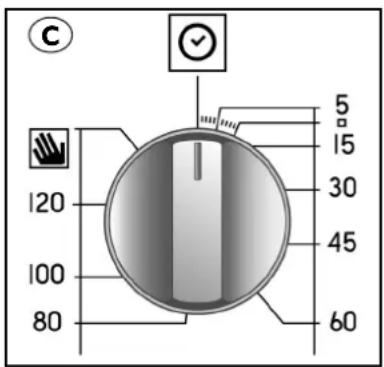
Electronic cooking programmer
It enables oven programming in the following modes:
- delayed start of cooking with set duration;
- Immediate start of cooking with set duration;
- timer.
Button functions:

hours, minutes timer

cooking duration

end of cooking

manual switching

time setting (back)

time setting (forward)

Setting the digital clock
When the appliance has been connected to the mains or after a power failure the display will flash on: "0.00"
- Press the button
and set the exact time (within 4 seconds) with the buttons and—.

Use the button to increase the time.
Use the button to decrease the time.
For possible time adjustments, repeat the steps described above.
Manual oven operation
Once the time has been set, the programmer automatically switches to manual mode.
Note: To reset manual mode after "Automatic" cooking, press the button
Delayed start of cooking with set duration
Set the cooking duration and the end of cooking time. Assuming the display indicates 10:00 h and cooking is for 30 minutes ending at 13:00 h.
I. Turn the oven control knob to the required cooking programme and temperature (e.g. static oven, 200°C)
2. Press the button and set the required cooking duration (within 4 seconds) with the buttons - and +.
Assuming the setting of a cooking time of 30 minutes; the display shows:

Release the button and after 4 seconds the current time will reappear with the symbol 📄 and the message "AUTO".
- Press the button ☐ then the buttons — and + to set the required end of cooking time, e.g. 13:00 h
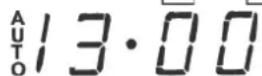
- Release the button and the current time will be displayed after 4 seconds:

The message "AUTO" lit up indicates the setting of cooking duration and end of cooking time in automatic mode. The oven will switch on automatically at 12:30 h and then switch off after 30 minutes. When the oven is turned on, the pan symbol 📁 appears for the entire cooking time. The set cooking duration can be displayed at any time by pressing the button 📁 and the end of cooking time by pressing the button .
The acoustic signal sounds at the end of cooking; the volume can be adjusted while it is on by pressing button —. To turn it off, press any button except the buttons — and +.
Immediate start of cooking with set duration
By setting the duration only (points 1 and 2 of par. “Delayed start of cooking with set time”), cooking will start immediately.
To cancel an already programmed cooking cycle
Press the button
Timer function
The timer allows the setting of a time from which a countdown begins. This function does not turn the oven on or off, but only sounds an acoustic alarm when the time has elapsed.
Press the button and the display shows:
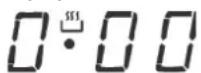
Then set the required time with the buttons and +
On releasing the button, the countdown begins and the current time is displayed.

At the end of the time an acoustic signal sounds, which can be turned off by pressing any button (except the buttons — and) and the symbol goes off.
Modifying and deleting data
- The data entered can be changed at any time by pressing the corresponding button and the button - or + .
- Cancelling the cooking duration automatically ends the function, and vice versa.
- If the oven has been programmed, it will not accept end of cooking times prior to those of start of cooking proposed by the appliance itself.
NB: The oven will stay hot at around the set cooking temperature for a long time after it has been switched off; therefore, to avoid overcooking or burning the food remove it from the oven.

End of cooking clock
The figure shows the programmer controls; knobs 1 (LH) and 2 (RH) enable all the necessary settings.
Knob I
Used to set the current time. Pull out the knob and turn it clockwise until reaching the current time.
Knob 2
Used to set the cooking duration or to arrange the oven for manual use. To do this, turn the knob clockwise.
Manual oven operation
The oven can be used normally, i.e. without any programming. In this case, turn the programmer knob 2 clockwise until the symbol coincides with the fixed mark on the front panel.

Semiautomatic oven operation
Normal start of cooking with programmed end of cooking:
arrange the food to be cooked; turn knob 2 clockwise and set the minutes for the end of cooking on the dial (Q); turn the programme selector knob to the setting and the thermostat knob to the required temperature. The oven starts immediately.
At the end of the set time, the ringer sounds and the oven is automatically turned off. To silence the ringer, turn the clock to "0" or manual mode by operating knob 2.
NB: The oven will stay hot at around the set cooking temperature for a long time after it has been switched off; therefore, to avoid overcooking or burning the food remove it from the oven.
Timer
The clock can be used as a timer only if the oven is not working.
For timer operation, turn knob 2 clockwise to set the required time on the dial (Q). The maximum settable time is 180 minutes. To silence the acoustic signal, turn knob 2 clockwise until the symbol "0" coincides with the fixed mark ☑ on the front panel.
Important
To use the oven in manual mode (i.e. without programming):
- Turn the programmer knob "2" clockwise until the symbol coincides with the fixed mark on the control panel.
Cooking table
Setting the selector knob | Type of food Weight | (kg) | Shelf position 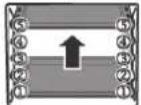 | Preheating time (min.) | Setting the thermostat knob | Cooking duration (min.) |
Natural conventional cooking | Lamb | 1 | 3 | 9.5 | 180°C | 90-100 |
| Roast pork | 1 | 3 | 9.5 | 180°C | 70-80 | |
| Roast veal | 1 | 3 | 10.5 | 200°C | 140-150 | |
| Omelettes | 1 | 2 | 10.5 | 200°C | 25-30 | |
| Fruit | 1 | 3 | 9.5 | 180°C | 25-30 | |
| Cod-gilthead-turbot | 1 | 3 | 9.5 | 180°C | 20-25 | |
| Bread | 1 | 2-4 cont. | 9.5 | 175°C | 25-30 | |
| Pies | 1 | 2 | 10.5 | 200°C | 35-40 | |
| Freshwater fish | 1 | 3 | 10.5 | 200°C | 30 | |
| Polenta with sauce | 1 | 2 | 9.5 | 180°C | 25-30 | |
| Mixed berry pies | 0.5 | 4 | 9.5 | 180°C | 25-30 | |
| Cheesecakes | 1 | 2 | 9.5 | 180°C | 25-30 | |
| Cakes with filling | 0.5 | 4 | 9.5 | 180°C | 60 | |
| Vegetables | 0.5 | 2 | 9.5 | 180°C | 35-40 | |
Fan cooking Roast pork loin | Roast pork loin | 1 | 3 | 9 | 180°C | 75-80 |
| Roast veal | 1 | 2 | 10 | 200°C | 80 | |
| Baked rabbit | 1 | 2 | 9.5 | 190°C | 55-65 | |
| Crescia Marchigiana | 1 | 2 | 10 | 200°C | 25-30 | |
| Omelettes | 0.5 | 3 | 10 | 200°C | 25 | |
| Baked crayfish | 0.5 | 3 | 10 | 200°C | 20-25 | |
| Cod-gilthead-turbot | 1 | 2-4 cont. | 7.5 | 150°C | 25-30 | |
| Bread | 1 | 2-4 cont. | 9 | 180°C | 25-30 | |
| Potato bread | 1 | 3 | 9 | 180°C | 20-25 | |
| Yellow saffron bread | 1 | 2 | 10 | 200°C | 30-35 | |
| Freshwater fish | 0.5 | 2 | 8.5 | 170°C | 25-30 | |
| Vegetable puddings | 1 | 2-4 cont. | 10 | 200°C | 25-30 | |
| Tuna | 1 | 2 | 9 | 175°C | 20 | |
| Fruit tarts | 1.5 | 2 | 9 | 175°C | 30-35 | |
| Meat & potato pies | 1 | 3-5 cont. | 9 | 180°C | 30-35 | |
| Baked vegetables | 1 | 3-5 cont. | 9 | 180°C | 40 | |
Grill Chicken wings | Chops | 1 | 4-5 cont. | 7 | Max | 25-30 |
| 0.8 | 3 | 7 | Max | 20-25 | ||
| Scallops | 0.5 | 3 or 4 | 7 | Max | 14-16 | |
| Baked potatoes | 1 | 3 | 7 | Max | 25-30 | |
| Freshwater fish | 1 | 3 or 4 | 7 | Max | 25-30 | |
| Tomatoes au gratin | 0.5 | 2 or 3 | 7 | Max | 20-25 | |
| Eel kebabs | 0.5 | 3 | 7 | Max | 25-30 | |
| Turkey kebabs | 0.5 | 4 | 7 | Max | 25-30 | |
Turbogrill cooking | Chicken legs | 1 | 4 or 5 | 11 | 220°C | 20-25 |
| Spare-ribs | 0.5 | 4 | 15 | Max | 40-45 | |
| Guinea fowl (pieces) | 1.2 | 4 | 15 | Max | 30-35 | |
| Gilthead en papillote | 1 | 3 | 8.5 | 200°C | 20 | |
| Chicken (pieces) | 1.5 | 3 | 15 | Max | 35-40 | |
| Quails | 0.8 | 4 | 15 | Max | 30-35 | |
| Sausages | 1 | 4 | 15 | Max | 20-25 | |
| Vegetables | 1 | 4 or 5 | 15 | Max | 10-15 |
NB: The indications in the table are the result of cooking tests carried out by a team of professional chefs. They are given only as a guide and can be changed according to personal tastes.

Important
Before servicing the oven, always unplug it or disconnect the power at the main electrical system switch.
- The stainless-steel and enamelled parts will remain pristine if regularly cleaned with water or special products, drying them carefully.
- Never use scouring pads, steel wool, muriatic acid or other products which could scratch or mark the surface.
Do not use steam cleaners or direct jets of water.
- Any stains appearing on the bottom of the oven (e.g. sauces, sugars, egg white and fats) are always due to spills or spattering. Spattering occurs during cooking at too high temperatures, whereas spills are due to the use of cooking pots that are too small or wrongly judged increases in volume during cooking. These two problems can be solved by using cooking pots with high rims or using the drip-tray supplied with the oven. For cleaning the lower part of the oven, it is advisable to clean any stains when the oven is still warm; stains are easily removed when fresh.
Cleaning the oven door
- The oven door must be cleaned on the inside and outside, with the oven completely cold, using hot water (do not use coarse cloths). Clean the glass with special detergents.
– Clean the enamelled parts and the inside of the oven with hot water and non-abrasive detergents.
Removing the side frames (depending on the model)
- Bend the crosspiece engaged in the fixing bush downwards and remove it from the groove.
- Tilt the frame upwards approx. 60^ and push it lightly in the direction of inclination.
- Keeping the frame tilted, remove the two top hooks from the respective holes.
Replacing the oven lamp
Franke ovens are equipped with two different inside lighting systems:
I. A circular lamp positioned in the top left at the back of the compartment.
2. Two rectangular side lamps.
To replace one of the inside lamps, proceed as follows:
- In any case and for any type, disconnect the power by means of the omnipolar switch used for connecting the appliance to the electrical system, or (if accessible) unplug the appliance;
Rear circular lamp:
- Unscrew the glass cover (A)
- Unscrew the lamp and replace it with one resistant to high temperature (300°C), having the following characteristics:
Voltage: 220-240V \~ 50-60Hz
Power: 15W
Fitting: (E14) small
- Refit the glass cover (A) and reconnect the power.
Side lamps (depending on the model):
- Remove the glass cover (B), prising it off with a flat screwdriver
- Unscrew the lamp and replace it with one resistant to high temperature (300°C), having the following characteristics:
Voltage: 220-240V \~ 50-60Hz
Power: 15W
Fitting: (E14) small


Removing the oven door (Fig.2a/Fig.2b/Fig.2c)
To facilitate oven cleaning, the oven door can be removed by operating on the hinges as follows:
- The hinges (A) are provided with two movable saddles (B). Lift the saddle (B) to release the hinge.
- Then lift the door upwards and pull it outwards; to do this, hold the door at the sides near the hinges.
- To refit the door, firstly insert the hinges in their special grooves.
- Lastly, before closing the door, remember to turn the two movable saddles (B) previously used to hook the hinges.
Support
In case of any operating problems, contact a Franke Technical Service Centre (see attached list).
Never resort to unauthorised technicians.
Specify:
- Type of fault;
– Appliance model (Art.); - Serial number (S.N.);
This information is given on the appliance dataplate, on the warranty certificate.
Safety instructions

natural_image
Line drawing of an oven with a highlighted interior space and a magnified inset showing internal structure (no text or symbols)
Always contact qualified personnel in the following cases:
To ensure safe and efficient operation of this electrical appliance:
- only contact authorised technical service centres
-
always demand the use of original spare parts
-
the appliance is designed for non-professional, domestic use; do not modify its characteristics.
- the dataplate gives the symbols indicating the countries for which the instructions apply.
- appliance electrical safety is guaranteed only when it is connected to an earthing system in compliance with the current regulations.
- Do not touch the heating elements or any parts of the oven door during use, as they become very hot, and in particular keep children away.
Do not allow children to touch:
- the controls and the appliance in general;
- the packing elements (bags, polystyrene, staples, etc.);
- the appliance, during and immediately after oven use, since it becomes very hot;
- the appliance when not used (make any potentially hazardous parts safe).
Do not:
- touch the appliance with wet parts of the body;
- use the appliance when barefoot;
- pull the appliance or power cable to unplug it from the socket;
- carry out improper or hazardous operations;
- block the ventilation and cooling openings;
- leave the power cables of other electric appliances on hot parts of the appliance;
- expose the oven to atmospheric agents (rain, sun);
- use the oven to store objects of any kind;
- use flammable liquids near the appliance;
- use adapters, multi-sockets and/or extension leads;
- allow anyone except qualified personnel to install or repair the appliance.
Always contact qualified personnel in the following cases:
- installation (according to the manufacturer's instructions);
- doubts regarding appliance operation;
- replacing the socket if incompatible with the appliance plug.
Contact service centres authorised by the manufacturer in the following cases:
- immediately after unpacking, in case of doubts about appliance integrity;
- replacing or damage to the power cable;
- malfunction or poor operation; always demand original spare parts.
Important:
- only use the appliance for cooking food;
- disconnect the appliance from the power supply before any cleaning or maintenance or in case of malfunctioning;
- use oven gloves when placing containers in the oven or removing them;
- since the end of the door handle may be hotter due to exiting hot air, always grip it in the middle;
- always make sure the control knobs are in the off position when the oven is not in use;
- if the oven is no longer to be used, disconnect it from the power supply.
- The manufacturer declines any liability for any damage due to: incorrect installation, improper, wrong or unreasonable use.
Installation (Fig.3a/Fig.3b)
Important: Installation must comply with the current standards and regulations. It must be only be carried out by specialised and licensed personnel.
Cabinet requirements
For fitted units, the components (plastic materials and veneered wood) must be assembled with heat-resistant adhesives (max. 100°C): unsuitable materials and adhesives can result in warping and ungluing. The cabinet must allow sufficient room for the electrical connections. The cabinet in which the oven in fitted must be strong enough to take the weight of the equipment.
The oven must be securely installed in the recess. The oven can be installed in a column cabinet or under the top of a modular unit, provided sufficient ventilation is guaranteed.
Installation instructions
Models DG52M - DG56M - DM52M - CM54M (Fig.4a/Fig.4b)
Measure the width of the cabinet shoulder (S), which normally can be 16, 18 or 20 mm.
16 mm shoulder: on each fixing bracket (F) position 2 lugs (T) marked with the number 16.
18 mm shoulder: on each fixing bracket (F) position 2 lugs (T) marked with the number 18.
20 mm shoulder: the 20 mm shoulder does not require the use of lugs.
Position the brackets (F) against the cabinet shoulder and at the bottom on the oven support top.
Secure the brackets (F) with the screws (V). Fit the oven in the cabinet, open the door completely and fix it to the brackets (F) using the 4 screws (V) and 4 plastic spacers (D).
Models EG54M - CG54M - AX52M- AX56M - KR52M - KU52M (Fig.4c/Fig.4d)
Fit the appliance in the compartment; secure the oven to the cabinet with the 4 screws supplied, using the holes prepared in the side panels.
If the oven is to be fitted under a cooktop, firstly turn the top connection (R) to the right or left so that the oven fits properly.

Electrical connection
FRANKE ovens are supplied with a three-core power cable with free terminals.
If the oven is permanently connected to the power supply, install a device that ensures disconnection from the power supply, with a contact opening distance (at least 3 mm) enabling complete disconnection in category III overvoltage conditions. Make sure:
a) the plug and socket are suitable for a 16A current
b) both can be easily reached and are positioned so that no live part is accessible when inserting or removing the plug
c) the plug can be easily inserted
d) the oven does not rest against the plug when installed in the cabinet
e) the terminals of two appliances are not connected to the same plug
f) a 3 x 1.5 mm ^2 cable type H05VV-F is used when replacing the power cable
g) the connection polarities of the free terminals are respected (Brown=Line Blue=Neutral Yellow/Green=Earth)
NB: Make sure the characteristics of the house electrical system (voltage, maximum power and current) are compatible with those of your FRANKE oven.

Useful oven dimensions:
width in mm. 440
depth in mm. 415
height in mm. 312
Useful oven volume:
57 litres
Consumption (conventional mode):
to reach 175°C: 0.32 kWh
to maintain 175°C: 0.62 kWh
total consumption: 0.94 kWh
Consumption (fan-assisted mode):
to reach 200°C: 0.42 kWh
to maintain 200°C: 0.77 kWh
total consumption: 1.19 kWh
Power supply voltage and frequency:
220-240V \~ 50-60Hz
Total power and fuse rating:
2.300kW - 16A
Heating element power:
roof 1000 W
floor 1250 W
grill 2250 W
fan 30 W
oven light 1 x 15 W
tangential fan 15 W

This appliance complies with the following EC Directives:
- 90/396/EEC (Gas);
- 73/23/EEC dated 19/02/73
(Low Voltage);
- 89/336/EEC dated 03/05/89
(Electromagnetic
Compatibility);
- 93/68/EEC dated 22/07/93.
INFORMATION FOR USERS
in accordance with the article of Legislative Decree no. 15 dated 25 July "Implementation of Directives 2002/95/EC, 2002/96/EC and 2003/108/EC, regarding reduction of the use of hazardous substances in electrical and electronic equipment, and waste disposal"
The barred dustbin symbol given on the appliance indicates that at the end of its useful life the product must be collected separately from other waste.
Therefore, when the appliance has reached the end of its working life the user must take it to an appropriate differentiated collection centre for electronic and electrotechnical waste, or return it to the dealer when purchasing a new appliance of equivalent type.

Adequate differentiated collection of the scrapped appliance for subsequent recycling, treatment and environmentally-friendly disposal will help prevent possible negative effects for the environment and health of people and favours recycling the materials of which the appliance is made.
Improper disposal by the user involves application of the administrative penalties under Legislative Decree. no. 22/1997 (Art. 50 et seq. of Leg. Decree no. 22/1997).

Sommaire
Introduction....24
Vue détaillée 24
natural_image
Diagram of a door with two circular components and an arrow indicating direction (no text or symbols)
natural_image
Diagram showing a device with a circular symbol labeled B, interacting with a transparent panel and a circular component inside (no text or symbols present)natural_image
Line drawing of an open oven with a highlighted interior space and a magnified inset showing the exterior wall detail (no text or symbols)
Installation (Fig.3a/Fig.3b)
natural_image
Diagram showing a device with a labeled component B and an arrow pointing to a circular component inside a transparent container (no text or symbols)natural_image
Line drawing of an open oven with a highlighted interior space and a magnified inset showing the exterior wall (no text or symbols)
natural_image
Diagram of a door with two circular components and an arrow indicating direction (no text or symbols)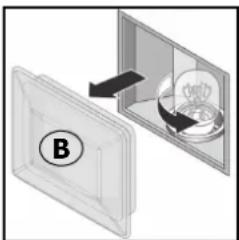
natural_image
Diagram showing a device with a labeled component (B) and an open panel containing a spherical object, no text or symbols present.Demontage van de ovendeur (Fig.2a/Fig.2b/Fig.2c)
natural_image
Technical line drawing of an oven with a magnified inset showing internal structure (no text or symbols)
natural_image
Diagram of a door with two hanging fixtures and a circular label A, no text or symbols present
natural_image
Diagram showing a device with a labeled component B and an open panel containing a circular component (no text or symbols present)Desmontaje de la puerta del horno (Fig.2a/Fig.2b/Fig.2c)
natural_image
Technical line drawing of an oven with a magnified inset showing internal structure (no text or symbols)
natural_image
Diagram showing a device with a labeled component B, interacting with a screen (no text or symbols present)natural_image
Technical line drawing of an oven with a magnified inset showing internal structure (no text or symbols)consumo total: kWh 1,19
natural_image
Diagram showing a device with a labeled component B interacting with a screen (no text or symbols present)natural_image
Line drawing of an open oven with a highlighted interior space and a magnified inset showing the exterior wall detail (no text or symbols)- 90/396/EOK (Αέρια)
- 73/23/EOK της 19/02/73
(Χαμηλή Τάση)
- 89/336/EOK της 03/05/89
natural_image
Diagram showing a device with a labeled component B and an open panel containing a light bulb (no text or symbols present)natural_image
Technical line drawing of an oven with a magnified inset showing internal structure (no text or symbols)alt W 1.250 - 90/396/EEC (Gaz);
izgara W 2.250 - 19/02/73 tarihli 73/23/EEC
natural_image
Diagram of a wall-mounted device with two circular components and an arrow indicating direction (no text or symbols)
natural_image
Diagram showing a device with a labeled component B, interacting with a transparent panel (no text or symbols present)natural_image
Technical line drawing of an oven with internal compartments and a magnified inset showing a detail (no text or symbols)natural_image
Diagram of a wall-mounted device with two circular components and an arrow indicating direction (no text or symbols)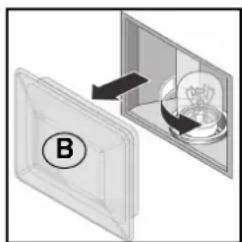
natural_image
Diagram showing a device with a light bulb inside a transparent container, labeled B (no text or symbols on the diagram itself)natural_image
Technical line drawing of an oven with a magnified inset showing internal structure (no text or symbols)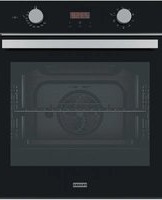
- Sommario
- Introduction
- A close view
- Switching on the first time
- Useful advice
- Operation
- Cooling fan
- Oven light
- Cooking programmes
- Defrost
- Natural conventional cooking
- Fan cooking
- Grill
- Turbogrill cooking
- End of cooking timer knob
- Electronic cooking programmer
- Setting the digital clock
- Manual oven operation
- Delayed start of cooking with set duration
- Immediate start of cooking with set duration
- To cancel an already programmed cooking cycle
- Timer function
- Modifying and deleting data
- End of cooking clock
- Knob I
- Knob 2
- Semiautomatic oven operation
- Timer
- Important
- Cooking table
- Cleaning the oven door
- Removing the side frames (depending on the model)
- Replacing the oven lamp
- Rear circular lamp:
- Side lamps (depending on the model):
- Removing the oven door (Fig.2a/Fig.2b/Fig.2c)
- Support
- Specify:
- Safety instructions
- Always contact qualified personnel in the following cases:
- Do not allow children to touch:
- Do not:
- Contact service centres authorised by the manufacturer in the following cases:
- Important:
- Installation (Fig.3a/Fig.3b)
- Cabinet requirements
- Installation instructions
- Models DG52M - DG56M - DM52M - CM54M (Fig.4a/Fig.4b)
- Models EG54M - CG54M - AX52M- AX56M - KR52M - KU52M (Fig.4c/Fig.4d)
- Electrical connection
- Useful oven dimensions:
- Useful oven volume:
- Consumption (conventional mode):
- Consumption (fan-assisted mode):
- Power supply voltage and frequency:
- Total power and fuse rating:
- Heating element power:
- INFORMATION FOR USERS
- Sommaire
- Demontage van de ovendeur (Fig.2a/Fig.2b/Fig.2c)
- Desmontaje de la puerta del horno (Fig.2a/Fig.2b/Fig.2c)
Brand : FRANKE
Model : KU 52 M
Category : Oven