
CRUISER - Bluetooth speaker JABRA - Free user manual and instructions
Find the device manual for free CRUISER JABRA in PDF.



| Product Type | Bluetooth Hands-Free Speaker Kit |
| Brand | JABRA |
| Model | CRUISER |
| Dimensions (L x W x H) | 127 mm x 62 mm x 17 mm |
| Power Supply | Rechargeable battery via car charger or USB cable |
| Talk Time | Up to 14 hours |
| Standby Time | Up to 300 hours |
| Bluetooth Version | 2.1 + EDR |
| Supported Bluetooth Profiles | HFP, HSP, A2DP, AVRCP, PBAP |
| Audio Technology | Dual microphone, noise reduction, digital signal processing (DSP) |
| FM Transmitter | Built-in, allows broadcasting calls and music to car stereo |
| Voice Announcements | Voice Announcements™, 5 built-in languages (French, English, etc.) |
| Status Display | Jabra StatusDisplay™ (battery, calls, connection, FM) |
| Main Functions | Answer/end/reject calls, voice dialing, last number redial, privacy mode, conference call, call transfer, play/pause/stop music, track change, night driving mode |
| Multi-device Connection | MultiUse™: simultaneous connection to two Bluetooth devices |
| Mounting | Sun visor clip (serves as FM antenna) |
| Maintenance | Store powered off, away from extreme temperatures (between -10°C and 45°C) and humidity |
| Recycling | Follow local regulations, more information at www.jabra.com/weee |
Frequently Asked Questions - CRUISER JABRA
User questions about CRUISER JABRA
0 question about this device. Answer the ones you know or ask your own.
Ask a new question about this device
Download the instructions for your Bluetooth speaker in PDF format for free! Find your manual CRUISER - JABRA and take your electronic device back in hand. On this page are published all the documents necessary for the use of your device. CRUISER by JABRA.
USER MANUAL CRUISER JABRA
THANK YOU 2
ABOUT YOUR JABRA CRUISER. 2
WHAT YOUR SPEAKERPHONE CAN DO 3
GETTING STARTED. 4
CHARGE YOUR SPEAKERPHONE. 4
TURING YOUR SPEAKERPHONE ON AND OFF 5
PAIRING IT WITH YOUR PHONE 5
CONNECTING WITH YOUR PHONE 6
PLACE THE SPEAKERPHONE IN YOUR VEHICLE. 7
HOW TO 7
WHAT THE LIGHTS MEAN 9
ADDITIONAL FEATURES. 9
TROUBLESHOOTING & FAQ 13
NEED MORE HELP? 15
TAKING CARE OF YOUR SPEAKERPHONE. 16
GLOSSARY 16
THANK YOU
Thank you for purchasing the Jabra CRUISER Bluetooth® speakerphone. We hope you enjoy it! This instruction manual will get you started and ready to make the most of your speakerphone.
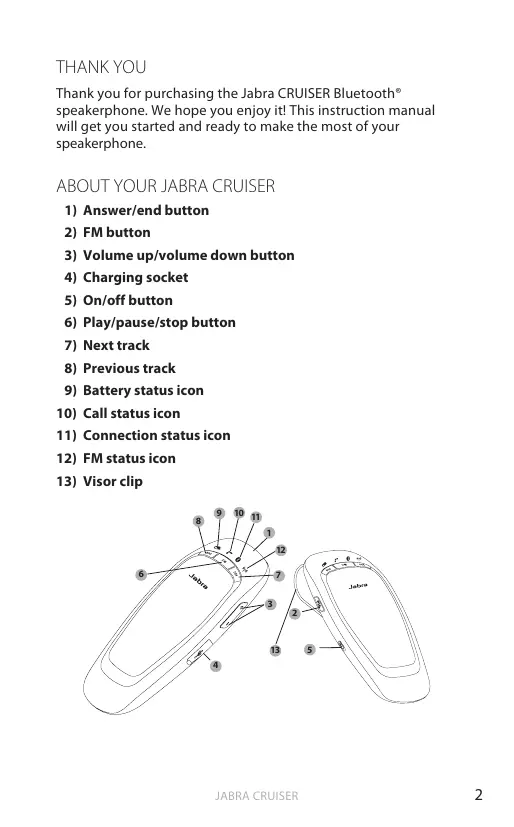
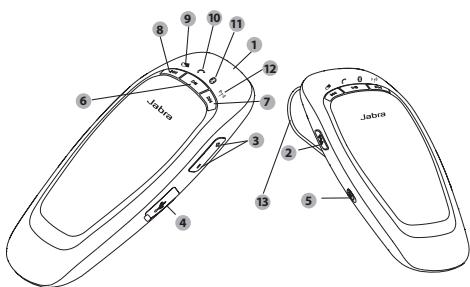
ABOUT YOUR JABRA CRUISER
1) Answer/end button
2) FM button
3) Volume up/volume down button
4) Charging socket
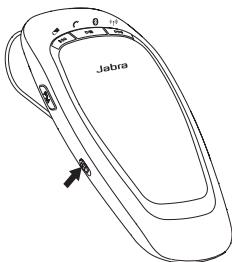
5) On/off button
6) Play/pause/stop button
7) Next track
8) Previous track
9) Battery status icon
10) Call status icon
11) Connection status icon
12) FM status icon
13) Visorclip
WHAT YOUR SPEAKERPHONE CAN DO
Your Jabra CRUISER lets you do all this:
- Answer calls
- End calls
Reject calls*
Voice dialing* - Last number redial*
- Mute
Third party calling* - Transfer calls
Night Driving Mode - Adjust volume
Transmit and remote control mobile music
Transmit calls or music to your car stereo via the FM transmitter
MultiUseTM - connect two Bluetooth devices at the same time
Specifications
- Talk time up to 14 hours/Standby time up to 300 hours
Dual Microphone technology
Digital sound enhancement via DSP technology
Voice AnnouncementsTM - A2DP (Advanced Audio Distribution Profile) for streaming music
AVRCP (Audio/Video Remote Control Profile) for remote control music
FM transmitter - Jabra Status display - battery status, call status, connection status, FM status
Size:L 127mm× W62mm× H17mm
Weight 85 grams - Operating range up to 10 meters (approximately 33 feet)
Supported Bluetooth profiles: HFP, HSP, A2DP, AVRCP, PBAP
Bluetooth specification (see glossary) version 2.1 + EDR - e-SCO for enhanced audio quality
- Rechargeable battery with charging option from car charger or via USB cable
GETTING STARTED
You should follow three steps before using your speakerphone:
1 Charge your speakerphone
2 Activate Bluetooth on your mobile phone (refer to the manual for your Mobile phone)
3 Pair your speakerphone to your mobile phone
The Jabra CRUISER is easy to operate. The answer/end button on the speakerphone performs different functions depending on how long you press it.
| Instruction | Duration of press |
| Tap | Press briefly |
| Double tap | 2 quickly repeated taps |
| Press | Approx. 1 second |
| Press and hold | Approx. 5 seconds |
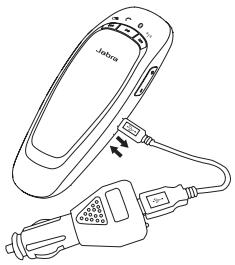
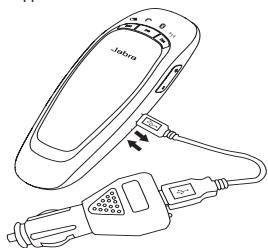
Make sure that your speakerphone is fully charged for two hours before you start using it. Use the USB cable to connect Jabra CRUISER to the car charger. Plug the car charger into your car's power outlet. The Battery Status Icon will light up red while charging. When fully charged the Battery Status Icon will turn green. Jabra CRUISER can be charged outside your car by only using the USB cable.
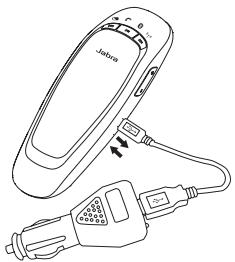
Use only the charger provided in the box - do not use chargers from any other devices as this may damage your speakerphone.
Please note: The lifetime of the battery will be significantly reduced if your device is left uncharged for a long period. We therefore recommend that you recharge your device at least once a month.
TURNING YOUR SPEAKERPHONE ON AND OFF
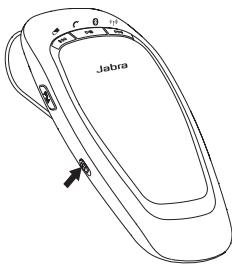
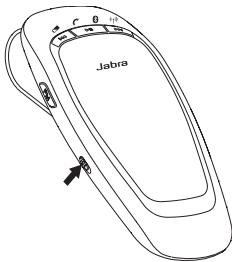
- Slide the on/off button to turn the speakerphone on or off
SLEEP MODE
When disconnected from the phone, the speakerphone turns off automatically after 10 minutes. Tap answer/end button to turn the speakerphone on again.
PAIRING IT WITH YOUR PHONE
Speakerphones are connected to mobile phones using a procedure called 'pairing'. By following a few simple steps, a phone can be paired with a speakerphone in a matter of minutes.
1 Put the speakerphone in pairing mode
- When you turn on your Jabra CRUISER for the first time, the speakerphone will automatically start up in pairing mode - i.e. it is discoverable for your phone. When the speakerphone is in pairing mode you will hear the voice announcement "pairing mode" and the Connection status icon will flash rapidly.
2 Set your Bluetooth phone to 'discover' the Jabra CRUISER
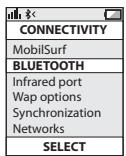
- Follow your phone's instruction guide. First make sure that Bluetooth is activated on your mobile phone. Then set your phone to discover the speakerphone. This usually involves going to a 'setup,' 'connect' or 'Bluetooth' menu on your phone and selecting the option to 'discover' or 'add' a Bluetooth device.*
3 Your phone will find the Jabra CRUISER
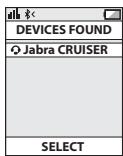
- Your phone will find the speakerphone under the name "Jabra CRUISER".
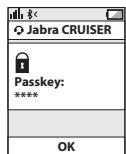
- Your phone then asks if you want to pair with the speakerphone. Accept by pressing 'Yes' or 'OK' on the phone and confirm with the passkey or PIN = 0000 (4 zeros). Your phone will confirm when pairing is complete.
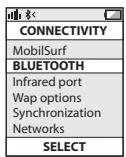
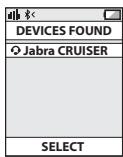
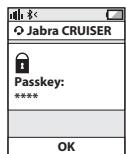
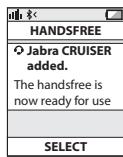
Manual pairing mode
If you wish to use the speakerphone with a different phone, or if the pairing process was interrupted, you can manually set the speakerphone to pairing mode.
Turn the speakerphone on. Press and hold the answer/end button for approximately 5 seconds until "pairing mode" is announced. Then repeat steps 2. and 3. in the above pairing guide.
CONNECTING WITH YOUR PHONE
Pairing is only needed the first time a speakerphone and a phone are used together. When the speakerphone and phone have been paired once, they will automatically connect when the speakerphone is on and Bluetooth is activated on the phone. The speakerphone can be used when it is "connected" to the phone. If the devices are paired, but do not immediately connect, tap the answer/end button.
PLACE THE SPEAKERPHONE IN YOUR VEHICLE
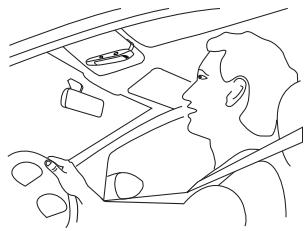
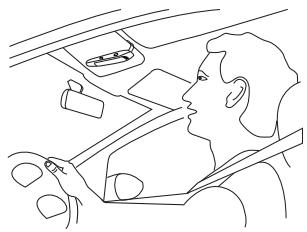
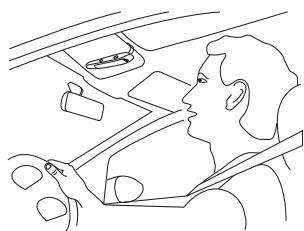
The Jabra CRUISER sits discreetly and conveniently on the sun visor using the attached clip. For optimal sound quality place the Jabra CRUISER right in front of you and speak directly into the speakerphone.
HOW TO
Answer a call
- Tap the answer/end button on your speakerphone to answer a call.
End a call
- Tap the answer/end button on your speakerphone to end an active call.
Make a call
- The call will automatically transfer to your speakerphone*. If not tap the answer/end button.
Reject a call*
- Press the answer/end button.
Activate voice dialing*
- Press the answer/end button. For best results, record the voicedialing tag through your speakerphone.
Redial last number\*
- Double tap the answer/end button when the speakerphone is on and not used.
Mute/un-mute
- Press volume down button to mute an ongiong call. The mute beep tone will be heard every 5 seconds.
- Tap the volume up or volume down button to un-mute. (In FM mode press instead of tap to un-mute).
Adjust sound and volume
- Tap the volume up or volume down button to adjust the volume level. (In FM mode you are not able to adjust volume via Jabra CRUISER – use your car stereo).
Third party calling*
- This lets you put a call on hold during a conversation and answer a waiting call.
- Press the answer/end button once to put the active call on hold and answer the waiting call.
- Press the answer/end button to switch between the two calls.
- Tap the answer/end button to end the active conversation.
Transfer call
- Press and hold answer/end button until you hear a beep to transfer a call from the speakerphone to the mobile phone.
- Press and hold answer/end button until you hear a beep to transfer a call from the mobile phone to the speakerphone.
Play or pause music*
- Tap the play/pause/stop button to play or pause music.
Stop music\*
- Press the play/pause/stop button.
Change between music tracks*
- Tap next track or previous track button.
Night Driving Mode
Press FM and volume up button simultaneously when the speakerphone is on. The light will then turn off. You can turn the lights back on with another press. The speakerphone will always turn on with the lights turned on.
WHAT THE LIGHTS MEAN
| LED Indicator | Speakerphone Status |
| Connection Status Icon flashes rapidly | Pairing mode |
| Connection Status Icon solid blue | Connected |
| Connection Status Icon flashes every 2 seconds | Standby/ Idle |
| Call Status Icon flashes every 1 second | Incoming call |
| Call Status Icon solid blue | Active call |
| FM Status Icon solid red | FM mode |
| FM Status Icon flashes every 1 second | Frequency scanning |
| Call Status Icon and Connection Status Icon flashes | Language selection |
| Battery Status Icon on (red) | Low battery |
ADDITIONAL FEATURES
USING YOUR JABRA CRUISER WITH TWO MOBILE DEVICES
The Jabra CRUISER is capable of having two mobile phones (or other Bluetooth devices) connected to the speakerphone at the same time. This will give you the freedom of having only one speakerphone to operate both of your mobile phones. Please note that Last Number Redial will dial the number from the last outgoing call independent of the mobile phone.
If the speakerphone is connected to two phones please note that Play / Pause / Stop and Next / Previous track will be sent to the phone that was the last connected phone (Last connected AVRC profile).
PLAY MUSIC
Make sure that the speakerphone and mobile phone are connected. When you play music from your mobile phone it will automatically transfer to your speakerphone. If your phone does not allow this feature, press the Answer/En button to transfer the music to the speakerphone. Music will automatically be paused when you have an incoming call. When the call is ended it will start playing again. Remote control your music via the music buttons.
CHANGE VOICE ANNOUNCEMENT LANGUAGE
Voice announcements give you a more convenient and safe use of Jabra CRUISER. There are 5 supported languages in the following order:
| 1 | English |
| 2 | Spanish |
| 3 | German |
| 4 | French |
| 5 | Russian |
Additional languages
Italian, Portuguese, Chinese can be downloaded via a separate software version found on www.jabra.com.
Default language is English. To change language follow these steps:
- Enter pairing mode by press and hold Answer/End button when Jabra CRUISER is on until voice announces: "Pairing mode"
- Press FM button until current language is announced.
- Tap Volume Up or Volume Down button to select a new language.
- Select preferred language and press FM button until the new language is announced.
Note: It is possible to turn off the voice announcement function. When tapping the Volume Up or Volume Down buttons to select the desired language, the beep tone indicates the voice announcement function is off. When beep tone is heard press FM button and the voice announcement function will be off.
USING THE FM TRANSMITTER
The FM transmitter in the speakerphone allows you to transmit calls and music from your mobile to the car stereo when the speakerphone and car radio are set to the same frequency.
- Connect your mobile phone and speakerphone.
- Press FM button to enter FM mode. The FM Status Icon will turn solid red and a FM frequency will be announced.
- Manually turn your radio into the same FM frequency and you are now ready to transmit calls or music from your phone to your car stereo.
- The FM transmitter will automatically turn off after 10 minutes if the function is not used.
Note: The visor clip works as the FM antenna. The FM transmitter will not work if the visor clip is removed.
CHANGING FM FREQUENCY
When you enter FM mode the speakerphone will always transmit calls and music on the latest used FM frequency. For the FM transmitter to work well, a free radio frequency must be found. A free radio frequency is one that no commercial and public radio station is broadcasting on. As you drive and change environment the FM audio quality could potentially be reduced due to frequency interferences. If sound performance is unsatisfactory it is possible to select a new FM frequency.
- Enter FM mode.
- Press Volume up button until "Searching" is announced.
- When a new frequency is found and announced, tune your radio manually into the same FM frequency. The speakerphone will automatically save the new frequency.
A tap on the Volume up/Volume down button will change the frequency on your speakerphone by 0.1 MHz allowing you to fine tune the signal.
USING THE FM TRANSMITTER WHEN VOICE ANNOUNCEMENT FUNCTION IS OFF
If voice announcement function is turned off you can select any of the pre-programmed frequency channels in the following order:
| Chan- nel No | Pre-pro- grammed Frequency | LED indication (FM Frequency selection mode) | |||
| Battery status | Call status | Blue- tooth status | FM status | ||
| 1 | 88.1 MHz | Off | Off | On | Flash |
| 2 | 88.3 MHz | Off | On | Off | |
| 3 | 88.5 MHz | On | Off | Off | |
| 4 | 88.7 MHz | Off | On | On | |
| 5 | 88.9 MHz | On | Off | On | |
| 6 | 89.1 MHz | On | On | Off | |
| 7 | 89.3 MHz | On | On | On | |
To select the desired FM frequency channel, follow these steps:
- Connect your mobile phone and speakerphone.
- Press FM button to enter FM mode. The default frequency channel is 88.1MHz
- Press the Volume Up or Volume Down button to move to the next/previous channel.
- Manually turn your radio into the same FM frequency and you are now ready to transmit calls or music from your phone to your car stereo.
Note 1: While changing frequencies the FM Status Icon flashes every 1 second.
Note 2: While changing frequencies, a repeated beep-tone will be heard and frequencies can be recognized by the combinations of Status Indicators. (See the table above.)
CALLER ID
During an incoming call Jabra CRUISER will access the phone book in the mobile phone and announce the name of the caller. If your phone does not support phonebook access profile (PBAP) it will announce the number of the caller.
SOFTWARE UPGRADE
It is possible to upgrade the speakerphone software.
Go to www.jabra.com and follow the instructions.
TROUBLESHOOTING & FAQ
I hear crackling noises
Bluetooth is a radio technology, which means it is sensitive to objects between the speakerphone and the connected device. It is designed for the speakerphone and the connected device to be used within 33 feet (10 meters) of each other, with no major objects in the way (walls, etc.).
I cannot hear anything in my speakerphone
- Increase the volume in the speakerphone.
- Ensure that the speakerphone is paired to a device that is playing.
- Make sure your phone is connected to the speakerphone by tapping the Answer/End button.
I am having pairing problems
- You may have deleted your speakerphone pairing connection in your mobile phone. Follow the pairing instructions.
I want to reset the pairing list in my speakerphone
The speakerphone registers a list of up to 7 mobile phones. To remove the list, press and hold the Answer/End button, Volume up button and FM button at the same time. A beep indicates the list was removed from the speakerphone memory. The next time you power on, the speakerphone will go into pairing mode as the first time you powered your new Jabra CRUISER on.
Will the Jabra CRUISER work with other Bluetooth equipment?
- The Jabra CRUISER is designed to work with Bluetooth mobile phones. It can also work with other Bluetooth devices that are compliant with Bluetooth version 1.1 or higher and support a headset, hands-free and/or advance audio distribution profile.
I cannot use Reject call, call on hold, Redial or voice dialing
These features are dependent on the ability of your phone to support a hands-free profile. Even if the handsfree profile is implemented reject call, call hold and voice dialing are optional features which are not supported by all devices. Please consult your device manual for details.
Please note that some features can only be operated from the primary device e.g. voice dial using Jabra CRUISER with 2 mobile phones.
I can not connect speakerphone and radio via FM transmitter
- Make sure the radio is turned on and speakerphone is in FM mode (FM Status Icon is on).
- If your radio when searching is not able to find the FM frequency set by your speakerphone, the FM frequency must be tuned in manually on the radio. Please read radio manual to find out how to manually change frequency on your radio.
- If your radio is in TA (Traffic Announcement) mode, switch TA off and your radio should be able to find your speakerphone when using the search function on the radio. If not tune in manually.
- The sensitivity of the search function on your radio determines whether it is able to find the frequency set by your speakerphone. On some radios you are able to adjust the sensitivity thus making it possible to find the speakerphone frequency when searching. If not tune in manually.
- In urban areas it might be difficult to find a clear frequency. It is therefore advisable to use a frequency in the lower or upper end of the FM frequency band (e.g. 88.1 or 107.7 MHz) where you will have the best chance to find a clear frequency.
NEED MORE HELP?
1. Web: www.jabra.com
(for the latest support info and online User Manuals)
2. E-mail:
Deutsch support.de@jabra.com
English support.uk@jabra.com
Espanol support.es@jabra.com
François support.fr@jabra.com
Italiano support.it@jabra.com
Always store the Jabra CRUISER with the power off and safely protected.
- Avoid storage at extreme temperatures (above 45°C / 113°F including direct sunlight - or below -10°C / 14°F ). This can shorten battery life and may affect operation. High temperatures may also degrade performance.
- Do not expose the Jabra CRUISER to rain or other liquids.
GLOSSARY
1 Bluetooth is a radio technology that connects devices, such as mobile phones and headsets, without wires or cords over a short distance (approx. 10 meters/33 feet). Bluetooth is safe to use. It is secure too, so once a connection has been made no-one can listen in and there is no interference from other Bluetooth devices either. Get more information at www.bluetooth.com.
2 Bluetooth profiles are the different ways that Bluetooth devices communicate with other devices. Bluetooth phones support the headset profile, the hands-free profile or both. In order to support a certain profile, a phone manufacturer must implement certain mandatory features within the phone's software.
3 Pairing creates a unique and encrypted link between two Bluetooth devices and lets them communicate with each other. Bluetooth devices will not work if the devices have not been paired.
4 Passkey or PIN is a code that you enter on your Bluetooth enabled device (e.g. a mobile phone) to pair it with your Jabra CRUISER. This makes your device and the Jabra CRUISER recognize each other and automatically work together.
5 Standby mode is when the Jabra CRUISER is passively waiting for a call. When you 'end' a call on your mobile phone, the speakerphone goes into standby mode.
CONTENTS
THANK YOU 2
ABOUT YOUR JABRA CRUISER. 2
WHAT YOUR SPEAKERPHONE CAN DO 3
GETTING STARTED. 4
CHARGE YOUR SPEAKERPHONE. 4
TURING YOUR SPEAKERPHONE ON AND OFF 5
PAIRING IT WITH YOUR PHONE 5
CONNECTING WITH YOUR PHONE 6
PLACE THE SPEAKERPHONE IN YOUR VEHICLE. 7
HOW TO 7
WHAT THE LIGHTS MEAN 9
ADDITIONAL FEATURES. 9
TROUBLESHOOTING & FAQ 13
NEED MORE HELP? 14
TAKING CARE OF YOUR SPEAKERPHONE. 15
GLOSSARY 15
THANK YOU
Thank you for purchasing the Jabra CRUISER Bluetooth® speakerphone. We hope you enjoy it! This instruction manual will get you started and ready to make the most of your speakerphone.
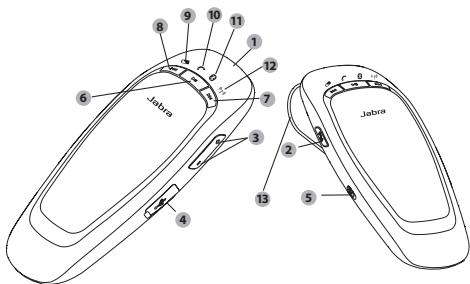
ABOUT YOUR JABRA CRUISER
1) Answer/end button
2) FM button
3) Volume up/volume down button
4) Charging socket
5) On/off button
6) Play/pause/stop button
7) Next track
8) Previous track
9) Battery status icon
10) Call status icon
11) Connection status icon
12) FM status icon
13) Visorclip
WHAT YOUR SPEAKERPHONE CAN DO
Your Jabra CRUISER lets you do all this:
- Answer calls
- End calls
Reject calls*
Voice dialing* - Last number redial*
- Mute
Third party calling* - Transfer calls
Night Driving Mode - Adjust volume
- Transmit and remote control mobile music
Transmit calls or music to your car stereo via the FM transmitter - MultiUse™ - connect two Bluetooth devices at the same time
Specifications
- Talk time and music time up to 10 hours
- Talk time and music time up to 14 hours when using the FM transmitter
- Standby time up to 300 hours
Dual Microphone technology - Digital sound enhancement via DSP technology
Voice AnnouncementsTM - A2DP (Advanced Audio Distribution Profile) for streaming music
AVRCP (Audio/Video Remote Control Profile) for remote control music
FM transmitter - Jabra Status display - battery status, call status, connection status, FM status
Size:L 127 mm x W 62 mm x H 17 mm
Weight 85 grams - Operating range up to 10 meters (approximately 33 feet)
Supported Bluetooth profiles: HFP, HSP, A2DP, AVRCP, PBAP - Bluetooth specification (see glossary) version 2.1 + EDR
- e-SCO for enhanced audio quality
- Rechargeable battery with charging option from car charger or via USB cable
GETTING STARTED
You should follow three steps before using your speakerphone:
1 Charge your speakerphone
2 Activate Bluetooth on your mobile phone (refer to the manual for your Mobile phone)
3 Pair your speakerphone to your mobile phone
The Jabra CRUISER is easy to operate. The answer/end button on the speakerphone performs different functions depending on how long you press it.
| Instruction | Duration of press |
| Tap | Press briefly |
| Double tap | 2 quickly repeated taps |
| Press | Approx. 1 second |
| Press and hold | Approx. 5 seconds |
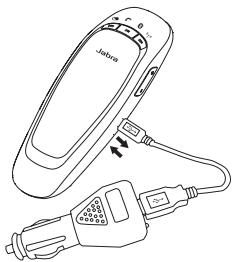
Make sure that your speakerphone is fully charged for two hours before you start using it. Use the USB cable to connect Jabra CRUISER to the car charger. Plug the car charger into your car's power outlet. The Battery Status Icon will light up red while charging. When fully charged the Battery Status Icon will turn green. Jabra CRUISER can be charged outside your car by only using the USB cable.
Use only the charger provided in the box - do not use chargers from any other devices as this may damage your speakerphone.
Please note: The lifetime of the battery will be significantly reduced if your device is left uncharged for a long period. We therefore recommend that you recharge your device at least once a month.
TURNING YOUR SPEAKERPHONE ON AND OFF
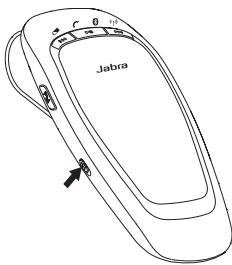
- Slide the on/off button to turn the speakerphone on or off
SLEEP MODE
When disconnected from the phone, the speakerphone turns off automatically after 10 minutes. Tap answer/end button to turn the speakerphone on again.
PAIRING IT WITH YOUR PHONE
Speakerphones are connected to mobile phones using a procedure called 'pairing'. By following a few simple steps, a phone can be paired with a speakerphone in a matter of minutes.
1 Put the speakerphone in pairing mode
- When you turn on your Jabra CRUISER for the first time, the speakerphone will automatically start up in pairing mode - i.e. it is discoverable for your phone. When the speakerphone is in pairing mode you will hear the voice announcement "pairing mode" and the Connection status icon will flash rapidly.
2 Set your Bluetooth phone to 'discover' the Jabra CRUISER
- Follow your phone's instruction guide. First make sure that Bluetooth is activated on your mobile phone. Then set your phone to discover the speakerphone. This usually involves going to a 'setup,' 'connect' or 'Bluetooth' menu on your phone and selecting the option to 'discover' or 'add' a Bluetooth device.*
3 Your phone will find the Jabra CRUISER
- Your phone will find the speakerphone under the name "Jabra CRUISER".
- Your phone then asks if you want to pair with the speakerphone. Accept by pressing 'Yes' or 'OK' on the phone and confirm with the passkey or PIN = 0000 (4 zeros). Your phone will confirm when pairing is complete.
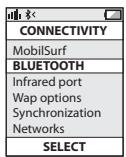
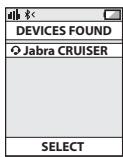
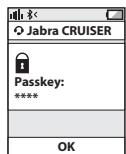
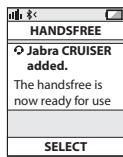
Manual pairing mode
If you wish to use the speakerphone with a different phone, or if the pairing process was interrupted, you can manually set the speakerphone to pairing mode.
Turn the speakerphone on. Press and hold the answer/end button for approximately 5 seconds until "pairing mode" is announced. Then repeat steps 2. and 3. in the above pairing guide.
CONNECTING WITH YOUR PHONE
Pairing is only needed the first time a speakerphone and a phone are used together. When the speakerphone and phone have been paired once, they will automatically connect when the speakerphone is on and Bluetooth is activated on the phone. The speakerphone can be used when it is "connected" to the phone. If the devices are paired, but do not immediately connect, tap the answer/end button.
PLACE THE SPEAKERPHONE IN YOUR VEHICLE
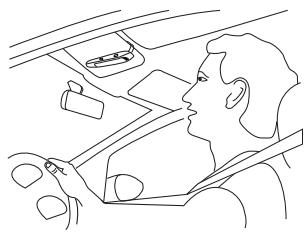
The Jabra CRUISER sits discreetly and conveniently on the sun visor using the attached clip. For optimal sound quality place the Jabra CRUISER right in front of you and speak directly into the speakerphone.
HOW TO
Answer a call
- Tap the answer/end button on your speakerphone to answer a call.
End a call
- Tap the answer/end button on your speakerphone to end an active call.
Make a call
- The call will automatically transfer to your speakerphone*. If not tap the answer/end button.
Reject a call*
- Press the answer/end button.
Activate voice dialing*
- Press the answer/end button. For best results, record the voicedialing tag through your speakerphone.
Redial last number\*
- Double tap the answer/end button when the speakerphone is on and not used.
Mute/un-mute
- Press volume down button to mute an ongiong call. The mute beep tone will be heard every 5 seconds.
- Tap the volume up or volume down button to un-mute. (In FM mode press instead of tap to un-mute).
Adjust sound and volume
- Tap the volume up or volume down button to adjust the volume level. (In FM mode you are not able to adjust volume via Jabra CRUISER – use your car stereo).
Third party calling*
- This lets you put a call on hold during a conversation and answer a waiting call.
- Press the answer/end button once to put the active call on hold and answer the waiting call.
- Press the answer/end button to switch between the two calls.
- Tap the answer/end button to end the active conversation.
Transfer call
- Press and hold answer/end button until you hear a beep to transfer a call from the speakerphone to the mobile phone.
- Press and hold answer/end button until you hear a beep to transfer a call from the mobile phone to the speakerphone.
Play or pause music*
- Tap the play/pause/stop button to play or pause music.
Stop music*
- Press the play/pause/stop button.
Change between music tracks*
- Tap next track or previous track button.
Night Driving Mode
Press FM and volume up button simultaneously when the speakerphone is on. The light will then turn off. You can turn the lights back on with another press. The speakerphone will always turn on with the lights turned on.
WHAT THE LIGHTS MEAN
| LED Indicator | Speakerphone Status |
| Connection Status Icon flashes rapidly | Pairing mode |
| Connection Status Icon solid blue | Connected |
| Connection Status Icon flashes every 2 seconds | Standby/ Idle |
| Call Status Icon flashes every 1 second | Incoming call |
| Call Status Icon solid blue | Active call |
| FM Status Icon solid red | FM mode |
| FM Status Icon flashes every 1 second | Frequency scanning |
| Call Status Icon and Connection Status Icon flashes | Language selection |
| Battery Status Icon on (red) | Low battery |
ADDITIONAL FEATURES
USING YOUR JABRA CRUISER WITH TWO MOBILE DEVICES
The Jabra CRUISER is capable of having two mobile phones (or other Bluetooth devices) connected to the speakerphone at the same time. This will give you the freedom of having only one speakerphone to operate both of your mobile phones. Please note that Last Number Redial will dial the number from the last outgoing call independent of the mobile phone.
If the speakerphone is connected to two phones please note that Play / Pause / Stop and Next / Previous track will be sent to the phone that was the last connected phone (Last connected AVRC profile).
PLAY MUSIC
Make sure that the speakerphone and mobile phone are connected. When you play music from your mobile phone it will automatically transfer to your speakerphone. If your phone does not allow this feature, press the Answer/En button to transfer the music to the speakerphone. Music will automatically be paused when you have an incoming call. When the call is ended it will start playing again. Remote control your music via the music buttons.
CHANGE VOICE ANNOUNCEMENT LANGUAGE
Voice announcements give you a more convenient and safe use of Jabra CRUISER. There are 5 supported languages in the following order:
| 1 | English |
| 2 | Spanish |
| 3 | German |
| 4 | French |
| 5 | Russian |
Additional languages
Italian, Portuguese, Chinese can be downloaded via a separate software version found on www.jabra.com.
Default language is English. To change language follow these steps:
- Enter pairing mode by press and hold Answer/End button when Jabra CRUISER is on until voice announces: "Pairing mode"
- Press FM button until current language is announced.
- Tap Volume Up or Volume Down button to select a new language.
- Select preferred language and press FM button until the new language is announced.
Note: It is possible to turn off the voice announcement function. When tapping the Volume Up or Volume Down buttons to select the desired language, the beep tone indicates the voice announcement function is off. When beep tone is heard press FM button and the voice announcement function will be off.
USING THE FM TRANSMITTER
The FM transmitter in the speakerphone allows you to transmit calls and music from your mobile to the car stereo when the speakerphone and car radio are set to the same frequency.
- Connect your mobile phone and speakerphone.
- Press FM button to enter FM mode. The FM Status Icon will turn solid red and a FM frequency will be announced.
- Manually turn your radio into the same FM frequency and you are now ready to transmit calls or music from your phone to your car stereo.
- The FM transmitter will automatically turn off after 10 minutes if the function is not used.
Note: The visor clip works as the FM antenna. The FM transmitter will not work if the visor clip is removed.
CHANGING FM FREQUENCY
When you enter FM mode the speakerphone will always transmit calls and music on the latest used FM frequency. For the FM transmitter to work well, a free radio frequency must be found. A free radio frequency is one that no commercial and public radio station is broadcasting on. As you drive and change environment the FM audio quality could potentially be reduced due to frequency interferences. If sound performance is unsatisfactory it is possible to select a new FM frequency.
- Enter FM mode.
- Press Volume up button until "Searching" is announced.
- When a new frequency is found and announced, tune your radio manually into the same FM frequency. The speakerphone will automatically save the new frequency.
A tap on the Volume up/Volume down button will change the frequency on your speakerphone by 0.1 MHz allowing you to fine tune the signal.
USING THE FM TRANSMITTER WHEN VOICE ANNOUNCEMENT FUNCTION IS OFF
If voice announcement function is turned off you can select any of the pre-programmed frequency channels in the following order:
| Chan- nel No | Pre-pro- grammed Frequency | LED indication (FM Frequency selection mode) | |||
| Battery status | Call status | Blue- tooth status | FM status | ||
| 1 | 88.1 MHz | Off | Off | On | Flash |
| 2 | 88.3 MHz | Off | On | Off | |
| 3 | 88.5 MHz | On | Off | Off | |
| 4 | 88.7 MHz | Off | On | On | |
| 5 | 88.9 MHz | On | Off | On | |
| 6 | 89.1 MHz | On | On | Off | |
| 7 | 89.3 MHz | On | On | On | |
To select the desired FM frequency channel, follow these steps:
- Connect your mobile phone and speakerphone.
- Press FM button to enter FM mode. The default frequency channel is 88.1MHz
- Press the Volume Up or Volume Down button to move to the next/previous channel.
- Manually turn your radio into the same FM frequency and you are now ready to transmit calls or music from your phone to your car stereo.
Note 1: While changing frequencies the FM Status Icon flashes every 1 second.
Note 2: While changing frequencies, a repeated beep-tone will be heard and frequencies can be recognized by the combinations of Status Indicators. (See the table above.)
CALLER ID
During an incoming call Jabra CRUISER will access the phone book in the mobile phone and announce the name of the caller. If your phone does not support phonebook access profile (PBAP) it will announce the number of the caller.
SOFTWARE UPGRADE
It is possible to upgrade the speakerphone software.
Go to www.jabra.com and follow the instructions.
TROUBLESHOOTING & FAQ
I hear crackling noises
Bluetooth is a radio technology, which means it is sensitive to objects between the speakerphone and the connected device. It is designed for the speakerphone and the connected device to be used within 33 feet (10 meters) of each other, with no major objects in the way (walls, etc.).
I cannot hear anything in my speakerphone
- Increase the volume in the speakerphone.
- Ensure that the speakerphone is paired to a device that is playing.
- Make sure your phone is connected to the speakerphone by tapping the Answer/End button.
I am having pairing problems
- You may have deleted your speakerphone pairing connection in your mobile phone. Follow the pairing instructions.
I want to reset the pairing list in my speakerphone
The speakerphone registers a list of up to 7 mobile phones. To remove the list, press and hold the Answer/End button, Volume up button and FM button at the same time. A beep indicates the list was removed from the speakerphone memory. The next time you power on, the speakerphone will go into pairing mode as the first time you powered your new Jabra CRUISER on.
Will the Jabra CRUISER work with other Bluetooth equipment?
- The Jabra CRUISER is designed to work with Bluetooth mobile phones. It can also work with other Bluetooth devices that are compliant with Bluetooth version 1.1 or higher and support a headset, hands-free and/or advance audio distribution profile.
I cannot use Reject call, call on hold, Redial or voice dialing
These features are dependent on the ability of your phone to support a hands-free profile. Even if the handsfree profile is implemented reject call, call hold and voice dialing are optional features which are not supported by all devices. Please consult your device manual for details.
Please note that some features can only be operated from the primary device e.g. voice dial using Jabra CRUISER with 2 mobile phones.
I can not connect speakerphone and radio via FM transmitter
- Make sure the radio is turned on and speakerphone is in FM mode (FM Status Icon is on).
- If your radio when searching is not able to find the FM frequency set by your speakerphone, the FM frequency must be tuned in manually on the radio. Please read radio manual to find out how to manually change frequency on your radio.
- If your radio is in TA (Traffic Announcement) mode, switch TA off and your radio should be able to find your speakerphone when using the search function on the radio. If not tune in manually.
- The sensitivity of the search function on your radio determines whether it is able to find the frequency set by your speakerphone. On some radios you are able to adjust the sensitivity thus making it possible to find the speakerphone frequency when searching. If not tune in manually.
- In urban areas it might be difficult to find a clear frequency. It is therefore advisable to use a frequency in the lower or upper end of the FM frequency band (e.g. 88.1 or 107.7 MHz) where you will have the best chance to find a clear frequency.
NEED MORE HELP?
- Web: www.jabra.com/nasupport (for the latest support info and online User Manuals)
2. Phone:
1 (800) 327-2230 (U.S)
1 (800) 489-4199 (Canada)
TAKING CARE OF YOUR SPEAKERPHONE
Always store the Jabra CRUISER with the power off and safely protected.
- Avoid storage at extreme temperatures (above 45°C / 113°F including direct sunlight - or below -10°C / 14°F ). This can shorten battery life and may affect operation. High temperatures may also degrade performance.
- Do not expose the Jabra CRUISER to rain or other liquids.
GLOSSARY
- Bluetooth is a radio technology that connects devices, such as mobile phones and headsets, without wires or cords over a short distance approx. 33 feet (10 meters). Get more information at www.bluetooth.com.
- Bluetooth profiles are the different ways that Bluetooth devices communicate with other devices. Bluetooth phones support either the headset profile, the hands-free profile or both. In order to support a certain profile, a phone manufacturer must implement certain mandatory features within the phone's software.
- Pairing creates a unique and encrypted link between two Bluetooth devices and lets them communicate with each other. Bluetooth devices will not work if the devices have not been paired.
- Passkey or PIN is a code that you enter on your mobile phone to pair it with your Jabra CRUISER. This makes your phone and the Jabra CRUISER recognize each other and automatically work together.
- Standby mode is when the Jabra CRUISER is passively waiting for a call. When you 'end' a call on your mobile phone, the speakerphone goes into standby mode.

Dispose of the product according to local standards and regulations.
www.jabra.com/wee
CONTENTS
THANK YOU 2
ABOUT YOUR JABRA CRUISER. 2
WHAT YOUR SPEAKERPHONE CAN DO 3
GETTING STARTED. 4
CHARGE YOUR SPEAKERPHONE. 4
TURING YOUR SPEAKERPHONE ON AND OFF 5
PAIRING IT WITH YOUR PHONE 5
CONNECTING WITH YOUR PHONE 6
PLACE THE SPEAKERPHONE IN YOUR VEHICLE. 7
HOW TO 7
WHAT THE LIGHTS MEAN 9
ADDITIONAL FEATURES. 9
TROUBLESHOOTING & FAQ 13
NEED MORE HELP? 15
TAKING CARE OF YOUR SPEAKERPHONE 15
GLOSSARY 16
THANK YOU
Thank you for purchasing the Jabra CRUISER Bluetooth® speakerphone. We hope you enjoy it! This instruction manual will get you started and ready to make the most of your speakerphone.
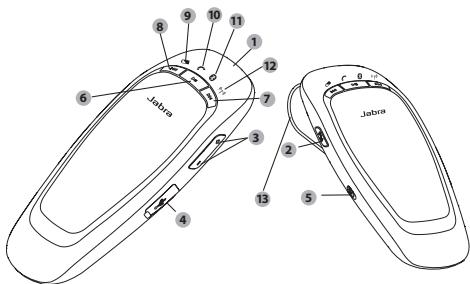
ABOUT YOUR JABRA CRUISER
1) Answer/end button
2) FM button
3) Volume up/volume down button
4) Charging socket
5) On/off button
6) Play/pause/stop button
7) Next track
8) Previous track
9) Battery status icon
10) Call status icon
11) Connection status icon
12) FM status icon
13) Visorclip
WHAT YOUR SPEAKERPHONE CAN DO
Your Jabra CRUISER lets you do all this:
- Answer calls
- End calls
Reject calls*
Voice dialing* - Last number redial*
- Mute
Third party calling* - Transfer calls
Night Driving Mode - Adjust volume
- Transmit and remote control mobile music
- Transmit calls or music to your car stereo via the FM transmitter
- MultiUse™ - connect two Bluetooth devices at the same time
Specifications
- Talk time up to 14 hours/Standby time up to 300 hours
Dual Microphone technology
Digital sound enhancement via DSP technology
Voice AnnouncementsTM - A2DP (Advanced Audio Distribution Profile) for streaming music
AVRCP (Audio/Video Remote Control Profile) for remote control music
FM transmitter - Jabra Status display - battery status, call status, connection status, FM status
Size:L 127mm× W62mm× H17mm
Weight 85 grams - Operating range up to 10 meters (approximately 33 feet)
Supported Bluetooth profiles: HFP, HSP, A2DP, AVRCP, PBAP
Bluetooth specification (see glossary) version 2.1 + EDR - e-SCO for enhanced audio quality
- Rechargeable battery with charging option from car charger or via USB cable
GETTING STARTED
You should follow three steps before using your speakerphone:
1 Charge your speakerphone
2 Activate Bluetooth on your mobile phone (refer to the manual for your Mobile phone)
3 Pair your speakerphone to your mobile phone
The Jabra CRUISER is easy to operate. The answer/end button on the speakerphone performs different functions depending on how long you press it.
| Instruction | Duration of press |
| Tap | Press briefly |
| Double tap | 2 quickly repeated taps |
| Press | Approx. 1 second |
| Press and hold | Approx. 5 seconds |
Make sure that your speakerphone is fully charged for two hours before you start using it. Use the USB cable to connect Jabra CRUISER to the car charger. Plug the car charger into your car's power outlet. The Battery Status Icon will light up red while charging. When fully charged the Battery Status Icon will turn green. Jabra CRUISER can be charged outside your car by only using the USB cable.
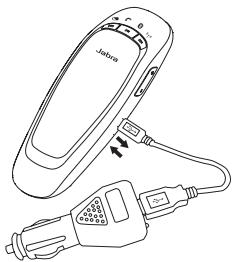
Use only the charger provided in the box - do not use chargers from any other devices as this may damage your speakerphone.
Please note: The lifetime of the battery will be significantly reduced if your device is left uncharged for a long period. We therefore recommend that you recharge your device at least once a month.
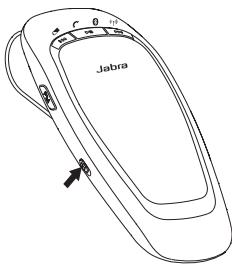
TURNING YOUR SPEAKERPHONE ON AND OFF
- Slide the on/off button to turn the speakerphone on or off
SLEEP MODE
When disconnected from the phone, the speakerphone turns off automatically after 10 minutes. Tap answer/end button to turn the speakerphone on again.
PAIRING IT WITH YOUR PHONE
Speakerphones are connected to mobile phones using a procedure called 'pairing'. By following a few simple steps, a phone can be paired with a speakerphone in a matter of minutes.
1 Put the speakerphone in pairing mode
- When you turn on your Jabra CRUISER for the first time, the speakerphone will automatically start up in pairing mode - i.e. it is discoverable for your phone. When the speakerphone is in pairing mode you will hear the voice announcement "pairing mode" and the Connection status icon will flash rapidly.
2 Set your Bluetooth phone to 'discover' the Jabra CRUISER
- Follow your phone's instruction guide. First make sure that Bluetooth is activated on your mobile phone. Then set your phone to discover the speakerphone. This usually involves going to a 'setup,' 'connect' or 'Bluetooth' menu on your phone and selecting the option to 'discover' or 'add' a Bluetooth device.*
3 Your phone will find the Jabra CRUISER
- Your phone will find the speakerphone under the name "Jabra CRUISER".
- Your phone then asks if you want to pair with the speakerphone. Accept by pressing 'Yes' or 'OK' on the phone and confirm with the passkey or PIN = 0000 (4 zeros). Your phone will confirm when pairing is complete.
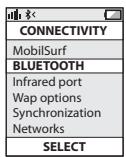
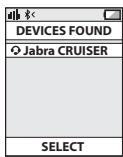
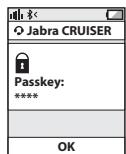
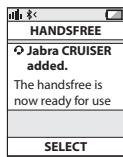
Manual pairing mode
If you wish to use the speakerphone with a different phone, or if the pairing process was interrupted, you can manually set the speakerphone to pairing mode.
Turn the speakerphone on. Press and hold the answer/end button for approximately 5 seconds until "pairing mode" is announced. Then repeat steps 2. and 3. in the above pairing guide.
CONNECTING WITH YOUR PHONE
Pairing is only needed the first time a speakerphone and a phone are used together. When the speakerphone and phone have been paired once, they will automatically connect when the speakerphone is on and Bluetooth is activated on the phone. The speakerphone can be used when it is "connected" to the phone. If the devices are paired, but do not immediately connect, tap the answer/end button.
PLACE THE SPEAKERPHONE IN YOUR VEHICLE
The Jabra CRUISER sits discreetly and conveniently on the sun visor using the attached clip. For optimal sound quality place the Jabra CRUISER right in front of you and speak directly into the speakerphone.

HOW TO
Answer a call
- Tap the answer/end button on your speakerphone to answer a call.
End a call
- Tap the answer/end button on your speakerphone to end an active call.
Make a call
- The call will automatically transfer to your speakerphone*. If not tap the answer/end button.
Reject a call*
- Press the answer/end button.
Activate voice dialing*
- Press the answer/end button. For best results, record the voice-dialing tag through your speakerphone.
Redial last number\*
- Double tap the answer/end button when the speakerphone is on and not used.
Mute/un-mute
- Press volume down button to mute an ongiong call. The mute beep tone will be heard every 5 seconds.
- Tap the volume up or volume down button to un-mute. (In FM mode press instead of tap to un-mute).
Adjust sound and volume
- Tap the volume up or volume down button to adjust the volume level. (In FM mode you are not able to adjust volume via Jabra CRUISER – use your car stereo).
Third party calling*
- This lets you put a call on hold during a conversation and answer a waiting call.
- Press the answer/end button once to put the active call on hold and answer the waiting call.
- Press the answer/end button to switch between the two calls.
- Tap the answer/end button to end the active conversation.
Transfer call
- Press and hold answer/end button until you hear a beep to transfer a call from the speakerphone to the mobile phone.
- Press and hold answer/end button until you hear a beep to transfer a call from the mobile phone to the speakerphone.
Play or pause music*
- Tap the play/pause/stop button to play or pause music.
Stop music\*
- Press the play/pause/stop button.
Change between music tracks*
- Tap next track or previous track button.
Night Driving Mode
Press FM and volume up button simultaneously when the speakerphone is on. The light will then turn off. You can turn the lights back on with another press. The speakerphone will always turn on with the lights turned on.
WHAT THE LIGHTS MEAN
| LED Indicator | Speakerphone Status |
| Connection Status Icon flashes rapidly | Pairing mode |
| Connection Status Icon solid blue | Connected |
| Connection Status Icon flashes every 2 seconds | Standby/ Idle |
| Call Status Icon flashes every 1 second | Incoming call |
| Call Status Icon solid blue | Active call |
| FM Status Icon solid red | FM mode |
| FM Status Icon flashes every 1 second | Frequency scanning |
| Call Status Icon and Connection Status Icon flashes | Language selection |
| Battery Status Icon on (red) | Low battery |
ADDITIONAL FEATURES
USING YOUR JABRA CRUISER WITH TWO MOBILE DEVICES
The Jabra CRUISER is capable of having two mobile phones (or other Bluetooth devices) connected to the speakerphone at the same time. This will give you the freedom of having only one speakerphone to operate both of your mobile phones. Please note that Last Number Redial will dial the number from the last outgoing call independent of the mobile phone.
If the speakerphone is connected to two phones please note that Play / Pause / Stop and Next / Previous track will be sent to the phone that was the last connected phone (Last connected AVRC profile).
PLAY MUSIC
Make sure that the speakerphone and mobile phone are connected. When you play music from your mobile phone it will automatically transfer to your speakerphone. If your phone does not allow this feature, press the Answer/En button to transfer the music to the speakerphone. Music will automatically be paused when you have an incoming call. When the call is ended it will start playing again. Remote control your music via the music buttons.
CHANGE VOICE ANNOUNCEMENT LANGUAGE
Voice announcements give you a more convenient and safe use of Jabra CRUISER. There are 5 supported languages in the following order:
| 1 | English |
| 2 | Spanish |
| 3 | German |
| 4 | French |
| 5 | Russian |
Additional languages
Italian, Portuguese, Chinese can be downloaded via a separate software version found on www.jabra.com.
Default language is English. To change language follow these steps:
- Enter pairing mode by press and hold Answer/End button when Jabra CRUISER is on until voice announces: "Pairing mode"
- Press FM button until current language is announced.
- Tap Volume Up or Volume Down button to select a new language.
- Select preferred language and press FM button until the new language is announced.
Note: It is possible to turn off the voice announcement function. When tapping the Volume Up or Volume Down buttons to select the desired language, the beep tone indicates the voice announcement function is off. When beep tone is heard press FM button and the voice announcement function will be off.
USING THE FM TRANSMITTER
The FM transmitter in the speakerphone allows you to transmit calls and music from your mobile to the car stereo when the speakerphone and car radio are set to the same frequency.
- Connect your mobile phone and speakerphone.
- Press FM button to enter FM mode. The FM Status Icon will turn solid red and a FM frequency will be announced.
- Manually turn your radio into the same FM frequency and you are now ready to transmit calls or music from your phone to your car stereo.
- The FM transmitter will automatically turn off after 10 minutes if the function is not used.
Note: The visor clip works as the FM antenna. The FM transmitter will not work if the visor clip is removed.
CHANGING FM FREQUENCY
When you enter FM mode the speakerphone will always transmit calls and music on the latest used FM frequency. For the FM transmitter to work well, a free radio frequency must be found. A free radio frequency is one that no commercial and public radio station is broadcasting on. As you drive and change environment the FM audio quality could potentially be reduced due to frequency interferences. If sound performance is unsatisfactory it is possible to select a new FM frequency.
- Enter FM mode.
- Press Volume up button until "Searching" is announced.
- When a new frequency is found and announced, tune your radio manually into the same FM frequency. The speakerphone will automatically save the new frequency.
A tap on the Volume up/Volume down button will change the frequency on your speakerphone by 0.1 MHz allowing you to fine tune the signal.
USING THE FM TRANSMITTER WHEN VOICE ANNOUNCEMENT FUNCTION IS OFF
If voice announcement function is turned off you can select any of the pre-programmed frequency channels in the following order:
| Chan- nel No | Pre-pro- grammed Frequency | LED indication (FM Frequency selection mode) | |||
| Battery status | Call status | Blue- tooth status | FM status | ||
| 1 | 88.1 MHz | Off | Off | On | Flash |
| 2 | 88.3 MHz | Off | On | Off | |
| 3 | 88.5 MHz | On | Off | Off | |
| 4 | 88.7 MHz | Off | On | On | |
| 5 | 88.9 MHz | On | Off | On | |
| 6 | 89.1 MHz | On | On | Off | |
| 7 | 89.3 MHz | On | On | On | |
To select the desired FM frequency channel, follow these steps:
- Connect your mobile phone and speakerphone.
- Press FM button to enter FM mode. The default frequency channel is 88.1MHz
- Press the Volume Up or Volume Down button to move to the next/previous channel.
- Manually turn your radio into the same FM frequency and you are now ready to transmit calls or music from your phone to your car stereo.
Note 1: While changing frequencies the FM Status Icon flashes every 1 second.
Note 2: While changing frequencies, a repeated beep-tone will be heard and frequencies can be recognized by the combinations of Status Indicators. (See the table above.)
CALLER ID
During an incoming call Jabra CRUISER will access the phone book in the mobile phone and announce the name of the caller. If your phone does not support phonebook access profile (PBAP) it will announce the number of the caller.
SOFTWARE UPGRADE
It is possible to upgrade the speakerphone software.
Go to www.jabra.com and follow the instructions.
TROUBLESHOOTING & FAQ
I hear crackling noises
Bluetooth is a radio technology, which means it is sensitive to objects between the speakerphone and the connected device. It is designed for the speakerphone and the connected device to be used within 33 feet (10 meters) of each other, with no major objects in the way (walls, etc.).
I cannot hear anything in my speakerphone
- Increase the volume in the speakerphone.
- Ensure that the speakerphone is paired to a device that is playing.
- Make sure your phone is connected to the speakerphone by tapping the Answer/End button.
I am having pairing problems
- You may have deleted your speakerphone pairing connection in your mobile phone. Follow the pairing instructions.
I want to reset the pairing list in my speakerphone
The speakerphone registers a list of up to 7 mobile phones. To remove the list, press and hold the Answer/End button, Volume up button and FM button at the same time. A beep indicates the list was removed from the speakerphone memory. The next time you power on, the speakerphone will go into pairing mode as the first time you powered your new Jabra CRUISER on.
Will the Jabra CRUISER work with other Bluetooth equipment?
- The Jabra CRUISER is designed to work with Bluetooth mobile phones. It can also work with other Bluetooth devices that are compliant with Bluetooth version 1.1 or higher and support a headset, hands-free and/or advance audio distribution profile.
I cannot use Reject call, call on hold, Redial or voice dialing
These features are dependent on the ability of your phone to support a hands-free profile. Even if the handsfree profile is implemented reject call, call hold and voice dialing are optional features which are not supported by all devices. Please consult your device manual for details.
Please note that some features can only be operated from the primary device e.g. voice dial using Jabra CRUISER with 2 mobile phones.
I can not connect speakerphone and radio via FM transmitter
- Make sure the radio is turned on and speakerphone is in FM mode (FM Status Icon is on).
If your radio when searching is not able to find the FM frequency set by your speakerphone, the FM frequency must be tuned in manually on the radio. Please read radio manual to find out how to manually change frequency on your radio. - If your radio is in TA (Traffic Announcement) mode, switch TA off and your radio should be able to find your speakerphone when using the search function on the radio. If not tune in manually.
- The sensitivity of the search function on your radio determines whether it is able to find the frequency set by your speakerphone. On some radios you are able to adjust the sensitivity thus making it possible to find the speakerphone frequency when searching. If not tune in manually.
- In urban areas it might be difficult to find a clear frequency. It is therefore advisable to use a frequency in the lower or upper end of the FM frequency band (e.g. 88.1 or 107.7 MHz) where you will have the best chance to find a clear frequency.
NEED MORE HELP?
- Web: http://www.jabra.com (for the latest support info and online User Manuals)
2. E-mail:
Australia support.au@jabra.com
China support.cn@jabra.com
Japan support.jp@jabra.com
Singapore support.sg@jabra.com
Information: info@jabra.com
3. Phone:
Australia 1-800-738-521
China 800-858-0789
Japan 03-3242-8722
Singapore 800-101-2329
TAKING CARE OF YOUR SPEAKERPHONE
Always store the Jabra CRUISER with the power off and safely protected.
- Avoid storage at extreme temperatures (above 45°C / 113°F including direct sunlight - or below -10°C / 14°F ). This can shorten battery life and may affect operation. High temperatures may also degrade performance.
- Do not expose the Jabra CRUISER to rain or other liquids.
GLOSSARY
- Bluetooth is a radio technology that connects devices, such as mobile phones and headsets, without wires or cords over a short distance (approx. 10 meters/33 feet). Bluetooth is safe to use. It is secure too, so once a connection has been made no-one can listen in and there is no interference from other Bluetooth devices either. Get more information at www.bluetooth.com.
- Bluetooth profiles are the different ways that Bluetooth devices communicate with other devices. Bluetooth phones support the headset profile, the hands-free profile or both. In order to support a certain profile, a phone manufacturer must implement certain mandatory features within the phone's software.
- Pairing creates a unique and encrypted link between two Bluetooth devices and lets them communicate with each other. Bluetooth devices will not work if the devices have not been paired.
- Passkey or PIN is a code that you enter on your Bluetooth enabled device (e.g. a mobile phone) to pair it with your Jabra CRUISER. This makes your device and the Jabra CRUISER recognize each other and automatically work together.
- Standby mode is when the Jabra CRUISER is passively waiting for a call. When you 'end' a call on your mobile phone, the speakerphone goes into standby mode.
INDHOLDSFORTEGNELSE
TAK 2
OM DIN JABRA CRUISER 2
DET KAN DIN SPEAKERPHONE. 3
KOM GODT I GANG. 4
OPLAD DIN SPEAKERPHONE 4
TEND/SLUK FOR DIN SPEAKERPHONE. 5
PARRING MED DIN TELEFONEN 5
OPRETTESE AF FORBINDELS TIL DIN TELEFON. 6
PLACERING AF DIN SPEAKERPHONE I DIN BIL. 7
SADAN GOR DU 7
HVAD BETYDER LYSINDIKATORNE 9
EKSTRA FUNKTIONER 9
FEJL FINDING OG OFTE STILLDE SPORGSMÄL 13
BRUG FOR MERE HJ/ELP? 15
PLEJE AF DIN HØJTALERTELEFON 16
ORDLISTE 16
TAK
Italian support.it@jabra.com
| HANSDFREE |
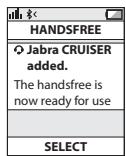
| O Jabra CRUISER added. The handsfree is now ready for use |
| SELECT |
BO3MOXHOCTN CINIKEPOHOA
CnkepohJabraCRUISER nopejmbaetcndyoune fynkunn:
-OTBet Ha Bbl3OBbl
- 3aBepueHne Bbl3OBOB
- OTKIOHEHNE BbI3OBOB
- TOnocOBoHa6Op
- Повторний habор постеного Homepa
- OTKIIOUeHHe 3Byka
BbI3OB TpeTbe CTOpHbI*
- PpeBOD BbI3OBOB
- Pexim HouHoro BoXdEHHa
- Perylinopobka rpoMkoCTn
- Pēpeáya My3bIKN C MO6bIbHOro TeneΦOHa N DnCTaHcIOHHO ynpabVeHne éO
-Параа Вьзовил My3bИн Ha CTpeocntemy abTomobnna uee3 FM-apedatnuK
- MultiUseTM - OndHOBPemEHNOe coeDINHNE BByx yCTPOIcTB Bluetooth
Texnueckne xapaKtepncnKn
BpemraaboTbIdo14acobBpejmepa3roBopa,do300acob BpejmeOxndaHn
- TexHONOrnIaBvXKaHaJIbHOro MmKpOΦoHa
-Улшеник QueCTBO UФOBORO BOCPON3BedeHIN 3Byka
на 6a3e Textholorm UФpoBoi 6pb6OTKn CnHana (DSP)
- TOnocobble onObeueHnraTM
-Профиль усовершенистованно Трансану A2DP дяпOTOKOBОТ trpaон栓циMu3bIKN
AVRCP (npofoMbIb DnCTaHNoHHOrO ynpBaJIeHry aJdIO n BVideo Audio/Video Remote Control Profile) dny DnCTaHNoHHOrO ynpaBHeHry MybIKoN
FM-nepedaTnuK
-Диспей Jabra Status — сotingа Зарда akумлтopa, Bb3OBA, coeHnHnI FM-paio
- Pa3mep:Д 127 MM×II 62 MM×B 17 MM
Bec 85 rpaMMOB - Páduyúc DeiéCTBnI dO 10 metpoB (npu6n3nteJbHo 33 ΦyTa)
-ПодпержиBaemье прфииBluetooth:HFP,HSP,A2DPиAVRCP, PBAP - Bercsna Bluetooth 2.1 (cm.rnoocapn) c EDR
- TexHONORyIyUySeHnKaueCTBa 3Byka e-SCO
- AkkymyjTOpHaj 6aTapeC Bo3MOxHooCTbO 3apJKNOT ABTomO6nIbHOro 3apJHOrO yctpoCTBa IIN NO Ka6eJIIO USB
ПОДГOTOBКAKPABOTE
Ipeed nCnOJIb3OBAHHe CnIKePfoHa BblIOJIHInTe TpN CnEduOuNX DeIcTBnJ.
1 3apdnte cnpkephoH
2 BkIouHTe Moynb Bluetooth Ha Mo6nblHom TelefoHe (cm. pykoBocTOBO nonb3ObaTeNa Mo6nblHoro TelefoHa)
3 BbInonHnTe cOpjxKeHHe cNKepeoHa C Mo6uNbHbIM TelefoHOM
Плбьотысь синkeфом Jabra CRUISER Oчень npocto. KhoIGNka «ОтВет/зАрБершени» BЗвИСиMuCTOn DTДиNTeЛьНоctu Нжатд�пОВляг БИнOLЛНь REKCHONBko pazlIMHybIX KOMAHД.
| Команда | Д�示ель�数ト haxатуя |
| Быстroe haxатуе | КорOTКоe haxатуе |
| Двойhoe haxатуе | 2 6ыстрых haxатуя поряд |
| Haxатуе | Прибл. 1 секунд |
| Haxатуе и уdeckожатуе | Прибл. 5 секунд |
3APJDAKCA CπIκEPRΦOHA
Ipeed hauanom IcnoIb3OBAHnI ONHOCTbIO 3aprAnDE cIeKepFOH B TceHHe DBX YacOB. PIOKnIOUHTe CNIeKepFOH Jabra CRUISER K ABTOMoBnIbHOMy 3aprAnHOmy yctpoINCTBO npri NMOOni Ka6eJI USB.BCTaBte ATBOM0BbHoe 3aprAnHOye 3aprTOBTO Bpa3bEM NtAHnA BTOMoBnIa. 3HaQoC oCoTOrHnA 3aprJa AkkymyIaTOpa 6ydet Ropetb KpaChbIM CBETOM BO BpEma 3aprJkn. Pocne TORO, Ka kakkymyIaTOpN ONONoCTbIO 3aprAnITcRA. 3NaQoC oCoTOrHnA 3aprJa AkkymyIaTOpa NImeHNT 3eJeHbN. BHe ABTOMoBnIa CInkePFOH Jabra CRUISER MoxHO 3aprAnTOBko pRn NMOOni Ka6eJI USB.
UcnPbIyIe ToIbKo 3aRJaHoe YCTPOICTBO I3 KOMIIeKTA NOCTaBKN CnIKPeOHa. IpnMeHeHne HbIX 3aRJaDbIX yCTPOICTB MOKeT BbIECTN CnIKePcOH n3 CTPOI.
PnmeHne:IaTnBHeOCTCBNeIO3aApKyuCtBeHHo cokpaaaet cpoK ncykbla kAkyMnylToPa. PekomeHdyctc no3aapKaTb yctpOInCTBO He pKe OJHO r03a B Mecau.
BKJIIOUeyHIEI BbIKJIOUeyHIE CNIKEKPOHOA
- YTO6bI BKNIOHTb NINBbIKIOHTb CnIKePfoH, CneJyET CdBNUHyTb KHOKNKY «On/off (BKN./BbIK.)» do ynopa.
PEXIM 3HEPTOCBEXEHN
EcnI cnIkepfoh 60bIe He coeDInHeN cMoNbHbIM TneOeHOM, OH aBtOMaTIueckn BbKJIouaTeC ype3 10 MmHT. Yto6bl ChOba BkUIOyTb CNKePFOH, 6bICTPO hKMOte HONKIc O'TBeT/3aBepuHeneH.
COPRJXEHNE CINIKEPOHOCA TIELEOHOM
YTo6bI cNIkepOH MOr aBTOMaTNUeCKN NOkKIOUaTBcR K MOiNbHOMy TeneOHOY, Heo6XoIMMo OCUseCTBnTB nPOceUpy, IMHeHyEMo COnpKeHHEM. CoPpeJHeNoTePOna co cNIkepOHOM Tpe6yET BbINONHeHNe HEckOJIbKIn npocbIX DeICTBIu I 3aHmAet BCero HcKOJIbKO MmHT.
1 PpebeDte cIMKePfoh B pexm coPjaXeHna
- Pnp nepbom BkIoueHn CnKepeH Jabra CRUISER nepexoHtB pexHM copJepHe HABOTMAtneCckN, PO3OMy cpa3y MoKet6bItb 6bHApUeH TeteF Oohm. IocNe nepexoDa CnKepeHaB pexHM copJepHe 6byet BocPOn3BeHDo roLooCoObeOnOBeueHne pairing mode (pexHM cOpJepHe). 3aHOKCTaTyCa coeDInHeH N 6bIcTpo 3Amiraet.
2 IpebeDte Telefoh c yHknei Bluetooth B pexm 6bnapykenia cnkepfoha Jabra CRUISER
CneyuTe NHTcpyKzIyM, npBBeEHbIM B pykOBoDCTBE NO 3KcNpYatauun TenefoHa. Chaayala y6eHntecb, tO MOyIb Bluetooth TenefoHa aKTmbroBaH. Pocle 3TO rpebeJeTte TenefoH b pexmM o6hApjxKeHn CnIkepfoHa. O6bHuNo dIy 3TO rCneJyTnepeyniB MeHIO «HaCtpoJa》,«CoedHneHe» IINn «Bluetooth» Ha TenefoHe n daee Bb6paTb nyHKT «O6hApjxNtB» IINn «D6abNTb》.*
3 Tepeoh o6hapyknt cnckepfoj Jabra CRUISER
- TeneΦoH onpeJenIeT cIIkePΦoH kAytroIcTbO «Jabra CRUISER».
- 3aTeM haIcJIeE TepeOHa NOBITc3 aIapoc Ha cOpJxHHe cO cnKePcoHOM. POnTBePdIne CBOe corLnce HaxatmE KHOKN «Ja» IIN «OK» IN BBoDM KIOUa DOCTyNa IIN NINKoDa «000» (4 Hyn). PocNe tTOr OtepeOH coo6uNT oB yCneuHOM 3aBepweHn cOpJxHHe.
Puchno nepeboD B pexkM copjkeHn
TtObbl npoklnuHb CnKePcOH K dpyrOmy TeneOHOy mB CnUyae, ecIn npdeUpa corpJeHHe He bIba 3abepWeHa, MoXHO nepeBecTe CnKePcOH B pexHM cnpAeHHe BpYHyIO.
BkIIOUHTe CnKepOHN. HAnMnte N yEpeJINBAITE KHOtKNy «OTBet/ 3aEBPeHne(OKONO 5 cekyHd),Noka He YcBNIHTe rOLOCOBOE onOBSeHne «pairing mode»(peXIM COpRAJKeHnIA).3aTeM BbIOnAHNTe DeIeTBN,ONiCAHbBe B nYHKtax 2 n 3 ONiCAHNoB BblIe NpoceDuPbC oOpRAJKeHnEA
ПОДКЛЮЧЕНЕ K TELEФОHY
COnpRAJHHeN Tpe6betyTcToBko pnp nepBOM NOpKIOUeHN CnIKePcoHONa K TeLEPOHNY. Iocne BblONHEnN 3tO npOeUpyb BkUIOHbNN CnIKePcoH 6yEdT ABTOMaTHueCKN 6hApuyXuBaTba Pa6oTaoumN MoDyNb Blueth0n TeLEPOHa N y UCTaHABInBaT b c HIM CoeINHeNc. CnIKePcoHOTOB K p6oTe C TeLEFOHOM cpa3y nOcNe yCTaHOBENHCoEoiHNHeNc. EcNi O6a YcTpoiCTBa 6bln COnpRAJHb, OndHko CoeINHeNc He y CTaHOBNEHO ABOTMauYeCKN, cneJeT cnerka hKahtb KhONky «OTBe/T/3abePeHMeNc).
PACIIOJIOXEHENCINKEPOHOBA BABTOMOBUE
Cnikeho Jabra CRUISER Hnepimemeten yuobho KpeinTcna coJnlce3aunThb Ko3blpek pni Npomou 3aKIma. nOe6cnueHn OontmAbno Horo KaueCTBa 3Byka paacnonoKeTe cnikepho Jabra CRUISER npmapepeco6o n roBopnte henocepctBeHHo B cnikepho.
PEXIMBI I ONEPAIIN
OTBet Ha Bbl3OB
YTO6bI npINrTb Bb3OB, 6bICTPO HaxMMTe Ha cNKepeHc KHOKNy «OTBet/3aBepSeHne».
3aBepueHne Bbl30Ba
- YTO6bI 3aBepuNTb aKTNUBHy BbI3OB, 6bICTPO HaxMMTe Ha cnKKePfoHe KHOKNy «OTBeT/3aBepueHne.
OcncyeCTBJIeHne Bbl30Ba
Bb3OB 6yIeT abtOMaTmueckn nepeKIOHEn Ha cNIkePFOH*. EcnI 3TOr He npOn3OuNo, 6bIcTpo HaxMITE KHOKNY «OTBeT/ 3aBePeuHEnE>.
OTKIOHeHne Bbl30Ba*
HaxMMTe KhoNkY «OTBet/3aBepseHne».
Bknouenhe roIocoboro ha6opa\*
- Haxmnte KhoNky «OTBeT/3aBepSeHne.»MeTk rOLOcoBOrHa6bopa peKoMeHdyeTcraNNcbiBaTbYepe3 cNIkepfoh.
Tobtorhny ha6op nocleHero Homepa\*
PpmeaHne 1: Pn n3MeHeHH qactOT 3NaOH KcOToHn FM MInraet KaJdyU cekyn.
PIMMeaHne 2: PmI mHEHn aCToT BOCPOIN3BOJNTC NOBOTOPIOHNC 3BkyKOBoI CMrHaI, aCAtOToI MOHO JpaCNO3HaTb PmI NOMOJI COHTAHNI INdKATOPOB COCTOHNIA. (CM.TabMIIy BUIIE)
HOMEPBbIbBAIOUeO ABOHEHTA
Bo BvpeM BxOJaIeO Bb3OBA CnKePcoH Jabra CRUISER noJuynt OCTyn K TePeOHNOK HnRE MoNbHoro TeneO hOHa, nocne Yero 6ydtBocpnOn3BeJeHO NmM Bb3bIBaIOeO a6oHeHTA. Ecnn TePeOH He NoDepKINBaEt npOPhN bOCTyna K TePeOHHO KnHRe (PBAP), 6ydtBocpnOn3BeJeH Homep Bb3bIAIOeO a6oHeHTA.
OBHOBJEHEIPOPTPAMMHOTo OBeCIEYEHNA
CuyeCTBYET BO3MOXHOCb TB O6HOBNEHn IpOgPAMMHorO o6eNeueHn CnKePFOHa. IocTe NTBe Be6-caT WwJabra.com n CnEUYte NtCHPTyKUnm.
ПОИСК И UYSTРАЕНЕ HENICPNABHOCTeI M YACTO 3ДАВАЕМБIЕ BОПPOСbl
Cnblnhb nomexn
Bluetooth -этο pa3HOBuINHOCb pa4nIOcB3n, KOtOPOI MOryT npenrTCTBOBaTb paCnONoXeHNbIe MeKJy DByMg YcTPOIcTBAMn 06BekTb. CnKepΦOH n IOKnJIoueHHeOe ycTPOIcTB DoJNKhb I haoDInTbca H paCSTOHH N He 6Oee 10 MeTPOB (33 ΦYTOB) dpyr OT dpyra ITO pRMAO. Ppri TOM mEky HmMy He DoJNHO 6bIb KpyNHbIX O6BeKToB (CTEH N T.D.).
OTcyTCTByeT 3ByK
- YBénluMbte ypoBeHb rPOMKoCTn.
- PpOBepeBte, cOnpJKeH IIN CnIKepeΦoH C yCTpoCTBOM, KOTOpoe YBaJIaETcNtOCHNKOM 3ByKa.
- Y6eintecb, yTo Tenefoh NIOKNIUOeH K CnIKKepeHy, 6bICTpo HaxkAB KHONky «OTBET/3aBePeHneH».
He ydaetcBbInOnHnTb cnpxkeHne
BOMMOKHO,CMOBHbORO TeneoHa6blNo ydaneHo NOkKnIOHeHne DAn cOpJKeHnO cCNIKePfoHOM. CNeDyIte INcHTpyKUmaI NO BbINOnHEHIno cOpJKeHnIa.
Tpe6yTeC ONUCTnTB CnUCOK yCTPOIcTB, C KOTOpblIMN 6blIN cnpJxhen CnIKePfoH
Ha CnIKepefohe MoKHO 3aepErnCTpnpObA Tb Do 7 MobInbHbIx TenefoHOB. Yo6bI ydaJIbT 3OT cIcNcOK, HauKIMte I ydePKuBAitE OndOBPeMeHHo KhoKNI «OTBet/3aBePueHe Nbe3OBA», YbeINuEHnra RomKoCTn «FM». 3BykoBoi CnHaJn 03NaHaet, ITO cIcNcOK ydaIen nI naMaTn CnKepePhoHa. Ppr cnLdYuOeM BkIOUeHN CnKepePhoH nepeyIetB pexim CoPPrKeHn o anAolrnn C nepBbIM BkIOUeHmem HOBOr cNKepePhoHa Jabra CRUISER.
Pa60taertn cnkephon Jabra CRUISER c pyrnm o6opydoBaHnem c npdepeKko Bluetooth?
Cπnkepfoh Jabra CRUISER npedha3haeH nI pya60tblcMoBnBmTneEFOHAMCnOndepkKoBluetooth. OH Takke moKet pa60taTb C npyIMN yctpoiCTBaMn Bluetooth, COOTBeTCTByUOUMN Bercn Bluetooth 1.1 nII nBiwe n POndepKuBAoUIMn npOfnnr napHtTypb, rPOMKo CB3n n/nnn A2DP.
He pa6oTaIOT fYHKUIN OTKNOHEnHa Bb13OBA,ydepKaHnBaBb13OBA, NOBtOPHO Rb13OBA Hn rONOCOBOro Ha6opa
OCTynHc0tB 3nXfHKsI 3aBcNt OT hAnuYBa TenefoHe
PPOHnI rPOMKOB CBzI. DaJIe npI hAnuYPi nPoHnI rPOMKOJ
CBzINOTKNOHEHne Bb3OBA,peKIM OxNiDaHNr OTBeTa ININ
TOnOCBOH Na6Op MoKeT 6bITb HeoCTyPeH, NocKOBky He BCE
ycTpoCTBA pNeOCTaJIbIO T Bo3MOXHOCTb IN NCpONb3OBA Tb.
DOnOIHNTeBbHbIe CbeEHenm CM. B pyKOBODCTBE NO EKcnnyataun
yCTpoCTBa.
06paTne BHIMaHHe, YTO HeKOTOpbIe FyHKUIM MoXHO NcIObn3OBA TbToBko C rnaHBORO yctpoiCtBa, HapnimeP roNocOBoi Ha6Op co csnkepfoHa Jabra CRUISER, noKnIOueHOrO K DByM MoNbHbIM TeneΦoHAM.
HyeadaTc npoknOHTb cNKePfoH K paAnOpnpemHnky ueeFM-nepeDatuK
- YbdeHntecb,HTo paDnOpnpemHnK BkIoueH,a CnKepeHn HaxoDITcB pexime FM (3hauok coctOaHnFM BkIoueH).
- Ecn npaioopnemHnK He moKeT ABTomatueckn 06hApkyntb FM-aCTOTy, yctahOBLeHHUO cNIkePfoHom, 3Tu FM-chaTOTy Heo6XoIMHO HAcTPOHTb Ha paioOpnepmHnke BpyHyIO. IJna nOlyeHnI CBeDEHn IO n3MeHeHn YacTOTb Ha paioOpnepmHnE BpyHyIO o6pATtncB K pkyoBoDcTBy no ekCInyatauIN PaiaOpnpemHnKa.
- Ecnn paJIoOpnpMnHk haoDITcB peKmte TA (Traffic Announcement - nHΦopMaJuaO o DBKeHm), BbIKNoUHTe pexmTa, noCne yero paJIoOpnpMnHk doJxKeHm, bObApJxNtB cnKePfoh npri nOMoIuIy fHyKnU mOniKc. B pOtnBHom clyuae hactpoite paJIoOpnpMnHk BpyHuYIO.
Bo3MOxHcOt bOcbApHyKeHnpaIIOnpmEHHKOM qaCTOTbl, yCTAHOBLeHHOI cIIKepeFOHOM, onPeJeIeTcYbCTBWTeBbHOfYHKUINoNcKa hPaIIOnpmEHHke. Ha HeKOToPbIX paIOnpMnHkA moXHO n3MeHHTy VBcBTbHbOCTI JIbOsbAPHyKeHnycTaHOBJIeHHoN cIIKepeFOHOM qaCTOTbl. B npOtIBHom cIyuea HacTpOte paIOnpmEHNK BpyuhyIO.
Ha Teppitopnnp ropona haHn Cbo6oHyu qactOTy moKet 6bTb Henerko. ToMOTy peKOMENyETcN cNOIb3OBATb cAChTOy 6bnke K bepxHne nn HnHne rpaHnue FM-dnana3oHa (hnapmep,881nn107,7Mt),rge cyueCTBye6Oblaa BepoarHOCTb HaHTn Cbo6oHyu qactOTy.
ПИНЕОБХОДМΟСТИ ДОПОЛНITEЛВΗОПOMOUSHI
- INTEPHT: www.jabra.com (3decb MOxHO NaHTI NocLeDnHe CBeDeHnO nOndepKKe I INTEpAKTINBHeI pyKOBoDCTBa nonb3OBATEJI)
3APJIXAHHHI PIPNCTPOIO IYHORO 3B'R3KY
Ipeed noaTkom BnKOpNCTaHH NOBHcTIO 3apraIb npncTpiy HUHO 383ky npoTAROM DBOXrOHN. BnKOpCTOBYITE USB-Ka6eB, uO6 NiKlOuHTn Jabra CRUISER DO ABTomo6iBHO 3apdHOro npncTPOIO.BCTabe ABTomo6iBHN 3apdHNI npncTPIy uABTomo6iBHy po3ETKy. Pid cac 3apdJxAHNA iNDkATOP CTahy akymyTAToPA CBITINIMETCbA YepBOHIM KOJIbOPOM. KOJI nIDkATOP CTahy AkymyTAToPA 3mInHb KONIP Ha 3eJIeHN, npncTpiN NOBHCIO 3apdJKeHO. PO3a ABTomo6iMeM npncTpij Jabra CRUISER MoXHa 3apdJAtn NiIse 3aOnomorIO USB-Ka6eJIIO.
Bukoprictobyte TlBkToT 3apdHn npicTpI, kNIOCTaAeTbCBA KOMNLeKTI. He Bukoprictobyte 3apdHn npicTpoi BiD INuXnPpnaiaB, OckInBkn BOH MoKyTu bNoKoJNTu BaW npicTpI ryuHoro 3B'3ky.
3Bephtb yary: TepMIn Cnyk6n akymyIaTopa 3NaHcNO cKOpOyEbyC8, JaKIO pNCTpIe He 3apJdXaTn npOTaROM tPbnAOnO uOy. TOM peKoMeHNyEbyCpepezApJdXaTn npICTpI prNnaHMn pa3 Na MicaIb.
YBIMKHEHHA TABIMKHEHHI INPNCPOIO IYHHO3B'R3KY
-ПелесуньтКНОнКУ yBIMKHeHЯ/BIMKHeHЯ,ЮБ yBIMKHyTN a60 BIMKHyTN риСТрий ГУHOrO 3b'a3Ky
PEXIM EHEPRE03BEPEXEHHA
JaKIO npIcTpiI rUyHOrO 3b'8a3Ky He nIiδ'εdHaHO Do tenefoHy,uepe3 10 xBvInH BIn ABtOMaTHUO BIMKaεtBc.Ⅲo6 3HOBy IYO yBIMKhTyN, 8BvIKo HAtCHiTb KHONky BiDnOBiDi/3aBepWeHHA BKNKUY.
3'ΕΤΗΑΝΗΝ ΠΡΙΝΤΡΟΙ ΓΥΗΝΟ 3B'83KY
3 TEJIΦOHOM
Pnictpi ryuHoro 3B'3kY niID'EDHyETbCra do TeleFOHy 3a donOMorOHO npOeDpyr, IKA hA3MbAcTbCRA 3 EDHaHHR'. BnuKoHaBm KInbKa npOCTnx di, TeleFOH moKha 3'EdHaTn i3 npIcSTpoEM ryuHoro 3B'3kY 3a KInbKa XbUHNH.
1 Nepebegeitb npictpi ryhoro 3B'ay3ky B pexm 3'eHaHHa
-Пд уас nepшоу ybIMKHeHЯ рисстриу ryUHO r3'3ky Jabra CRUISER ABTOMaTHO nepeXoDnltby peXkIM 3'EdHaHHI, i TAKM YIHOM TelefoH MeKO IYO BRaBHTN. KOI npICSTPII ryUHO 3B'3Ky nepeiDe B peXkIM 3'EdHaHHI, npolyhae roLoCObe NobiDomMeHH «peXkIM 3'EdHaHHa, a iHdNKaTop cTaHy 3'EdHaHHI WBInkO bImatime.
2 Uctahobitb Tenefohi 3 nItpmkoO Bluetooth pexum nowky npictpo ruyhoro 38'3ky Jabra CRUISER
BnKoHyTe iHcTpykui, 0oMiCTaTbCBy Noci6Hnky 3EcknnyatauTelefoHy. CnoTuKy nepeKaohaiTecy, 0o B telefoHi yBimKhYTo fynkuio Bluetooth. PtoI yTaHObity U telefoHi peXMM noUsyKy pIncTpoI yUHOrO 3B'z3Ky. 3aZBaNvJ moXHa 3pO6ntu 3a DonOpMOIO NyKtIB YcTaHOBAK), «3'EnDaHHa» a6o «Bluetooth» B meHIO TeLEFOhy, De notPi6HO Bn6patn napamTp «POnyK» a6o «DOnatu» dJe nprctPoB Bluetooth.*
3 TeneoB BnAIBTb npicpii ryHoro 3b'3ky Jabra CRUISER
Tenefoh BnBnBt npncptpi ryHoro 3b'3ky niD iMeHem «Jabra CRUISER>.
-ПияцьоноHA Tepefohi 3'ЯВТьсЗаNTИн Ha 3'Енаннзппсгюмугюветуяк. ПДтВердзЗаNTИн,НатСУВшинHA Tepefohi《Тak》abo«OK»i BВИши паловьabo PIN-KoD «0000»(4 HNY).HA Tepefohi 3'ЯВТьсЗIДТВердзЕнн3'Енанн.
| CONNECTIONIVITY |
| MobilSurf |
| BLUETOOTH |
| Infrared port |
| Wap options |
| Synchronization Networks |
| SELECT |
| DEVICES FOUND |
| Jabra CRUISER |
| SELECT |
| Jabra CRUISER |
| Passkey:*** |
| OK |
| HANSDFREE |
| Jabra CRUISER added. |
| The handsfree is now ready for use |
| SELECT |
Pexm3'εdHaHnBpyuHy
L06nid'ednato npiCtpiyruHOr 38a3kYdo iHwOro TeneDohy, a6o kIoo pnoec 3eHaHHb yenopeBaHO, MoKHa BpyHynepeBcTe npCtpiy u peKm3 eHaHHa.
YbIMKhtb npictpiyRyuHoro 3B'3aKy. Hatnchtb i ytpmmyTe KhONky BiNobiDl/3aBepHeHH BKNiHKy pnp6n3o 5 cekyHd, DOKn He npOnyaN nobIDOMLeHRe "Pekim 3'EdHaHH".PiCian Zc0ro NOBtopiB d2-3 3 BuSeHabeDeHoI pOceEduy 3'EdHaHH.
ПДКЛIOUECHHЯ ДОТЕLEDOHY
3'εДнаннь ВИКОУЕТСЕ РИЕ OДИР раЗ, KOLI npICSTPII ryUHOrO 3B'ЯЗКУ та TENEФОH yENPEse ВИКОПСТОВYOTьЯ рAZOM.ЯДSO 3'EDнаннь ппстpoу ГУнOrO 3B'ЯЗКУ 3 TeФОHOM BVE 6byLO BVIKOnOHAO, NiДКЛЮECHNHA BiDy6BATUMETcBЯ ABOTMATNUH O BA3I yBIMKHeHnЯпстpoу ГУнOrO 3B'ЯЗКУ taФиHKuJI BluTeoth Ha TEФОHl. ПпстprI ГУнOrO 3B'ЯЗКУ мoxHa ВИКОПСТОВYBatn,ЯДSO nORo «NiДКЛЮECHNo»do TEФОHry.ЯДSO 3'EDнаннь ппстpoiB 6БYO BИKOnHO, ane NiДКЛЮECHNeHу He BiDy6BaCTbC, WbIDNko HATNCIt b KHONaKHy BiDNOIdi/3ABePseHnH BИKInky.
YCTAHOBJIIEHHI IPINCTPOIO IYUHOI 3B'R3KY B ABTOMOJIJI
Pnictpi ryhoro 3b'3kny Jabra CRUISER moxHa hadiiHo Ta 3pyuH o03aunbyATn HcOHe3axHCOMy KO3nPKy 3a DOnOMoTO kInci. nOnmabhoI kocti 3Byky po3auyte npctpi ryhoro 3b'3kny Jabra CRUISER nepe co6oTo ra robopitb 6e3nocepRedbo B horo.
IOPRAOK BIKOPNCTAHH4 YHKLI
BIDNOiBHa BUKnK
- Ⅲo6 BiINOBiCtN ha BnKlNk, WbNdko HATINCHITb KHOIky BiINOBiDi/3aBepWeHra BnKlNkU Ha npICTpoI rHyHOrO 3B'J3Ky.
3aBepueHHn BnKnky
- Ⅱo63abepwnTnnoTOUHN BVKlnK,UBNkoHaTNCiTB KHO尼Ky BiIOBidi/3abepuenHBNKInky Ha npicrpoI rHyHOrO 3b'3ky.
3diencheHHBKNKny
BKNLKN ABTOMATNUO nepeBOUHTbHa npriCTPII yUHORO 3a3ky*.KJIOO CE He BIDbUPOC,WBUNKO HAuChITb KHONKY BiINOBII/3aBePseHHRA BNKNUK.
BixxueHH Bnukny*
- Hatncihb KhoNky BiIDnoBidi/3aBepeHnBnKnIky.
YbIMKHeHHra rONOCOBOHa60py\*
- Hatnichitb KhoNk BiNIOBii3aBepeHHe NIKNIky.ДуОТрIMaHNeK Pkaunx PezUYaTIB 3aINuIb MItKN rONOCOBTO Habopy Hepe npiCTPII ryUHOrO 3B'3yK.
TobtopnHa6ip octaHbOro Homepa\*
-Дич_HATNCHITb KKNKBy BIDNOBJI/3aBepuHHeBKNIky, KOJI npCtprIpyHOrO 3B'3kU yBIMKHYto i BIn He BVKOPrCTOBYBC3r.
BumKHeHHy/yBIMKHeHHa 3Byky
- Iloo6 BUMKHYTN 3Bky NOTOHOFO BUNKNKY, HATINCHIb peYJNATOP rHyHOCTI BHN3. 3ByKOBNI CINHAn BUMKHEHHRA 3BYK JNYHaTUME KOKHI5 CekyHd.
- U6yBIMKHyTN 3ByK, WBNiKO HATNCHITb perynItop ryuHocTi Brropy a60 Bn3.
Peryliobahna ryhnocti
- ⅢBvIkoHaTnCHiTbpeYIaTOp rHyHocTI BROpy a60 BHN3, ⅢO bIipreYIyIbAorTu rHyHcITb. (Y pexmI FM hEmoxJNBO BiipreYIyIOBAtu rHyHcTI 3a donomOroTO npicrpoTo rHyHOrO 38a3ky Jabra CRUISER - 3p6oJIte 3a donomOroIO abTomArHITOnI).
Bukluk Tpeboi CtopoH\*
Lc yHKJIOZBLOJEyTPMByTaN BKNKNIiDacp03MOBn Ta BiIDNoBIdaTnHa BKNKIN, kNn nepe6yBaEyCTahi OUYBAHNN.
Hataichihtb KhoNky BiNOnBidi/3aBePeuHHe BIKnIky oqIn Ha, 106NoatynyUtpMaHHn NOtUHOro BIKnIky iBiNDIObICTHa BIKnIky, knnpepeBaYyue y cTahl OOyBuHAA.
HataeKaIte KhoNky IbNiOBI/3aBePseHHe NIKNIyU, 06 PepEMKATcR MIX KbOMA BIKNIKAMi.
- WbNko HATNCHtB KHONKy BIDNOBIi/3aBepeHn, 063aBePHTN ITOUHy PO3MOBy.
IpebeeHnBuknky
- ⅢBniko HATNCiHb KONKy BiTbOpEHHa/NpN3yNuHHeHHA/3ynHKn DnI BcTbOpEHHa a60 npN3yNuHHeHH My3nKn.
3ynnHkBaBtBopenHaMyzkn
- HatncHtB KHONKy BiTbOpEHn/np3ynnHeHHr/3ynHKn.
3mHa KOMnOzni
- ⅢBnДКоHaTnCHiTb KHOnIpy «HactynHa KOMnO3nUiz» a6o «Порередну KOMnO3nUiz」.
PexkM KepyBaHHa ABTomO6inem yHouci
- Ondohaccho HaTnchItb KhOnky FM i peryIyIop ruyHocti BFOpy, K0JI npNcIptri yrHuHO 3B'3A3KY yBIMKHyTO. IHdNKaTOPIN BmKHytbcj. 106 3HOBy yBIMKHTn IHdNKaTOPIN, HATNCIbTse pa3. PnCITpi ryHoro 3B'3A3Ky 3aBXJDN BMKAITMeTbcra 3YbIMKHeHMn IHDnKaTOPaMn.
3HAUH HINDKAKTOPIB
Pnictpi niTpmye 5 MOy taKomy npaKy:
| 1 | aHrπiǐcMbKa |
| 2 | iCπaHcMbKa |
| 3 | himeцMbKa |
| 4 | φρaHμzMbKa |
| 5 | pocīcMbKa |
IodatKobIMOBN
Ioo6 yctaHOBNTi ranilcbky, npotyraIbcbkY a60 KITaIbcky MOBY, BviDjaIte Be6TcWww.jabra.com i 3abaHTakTe iHsiy BepciOIOprpamHoro 3a6e3neueHHN.
AHRJIiBcKa E MOBOIO 3a npOMOBuaHHaM. Uo6 3mHHTu MOBy, BVKOHaiTe Taki dii:
- Ybɪdɪjɪt y pɛkɪm 3'ɛdʌnɪhə, HATIMCHYbɪn Ⅲy tɪpMɪyʊni
Khɒŋk Bi vɪdɒnɪdi/ʒaːbɛpɪshə NBUkɪnky, Kɔn Jaβr CRUISER
YbɪmKHzIy, ὅɡɒk I nePɒŋuHæne NOBiDmɒnHæN: «Pɛkɪm 3'ɛdʌnɪhʌr. - Hataichitb Ta ytpmmy Te KhoNky FM,doKn He 6yJe oronoche noTOuy MOBy.
- Wbndko haTnciTb peYIaTOp rUHocTi Bropy a6o Bn3, 0o6 Bu6paTn iHsu MOBy.
Bn6epitb notpi6Hy MOBy Ta HataChihtb i ytpmmy Te KhoNky FM, DOKn He 6yde oroIooHeHO HOby MOBy.
PnmuTka:dyHKciIO rONOCOBOro NObiDomJIeHHr MOKHa BmKHyTu.
3BvKOBNIiHnacIbIaIKoHO HATNcKaHnpeyraTOpa ryHocTI BROPy aO bHn34 nBb6py notPi6HO MoBN CBIDHTNoTe, 00 yfHKUIO RoIocOBORo NIOIDOMHeHHB BMKNHYo.
HaTnicht bKhONky FM nicra 3ByKOBO rCnHany, zo6 BmKHytn cyHKcio roLoCOBOrO nobiDomJIeHH.
BVKOPNUCTAHNFM-NEPEDABAU
FM-nepeaabayu nprictpoi rnuhoro 38'3ky dozbojne nepedeabaTn Bmknki Ta my3NK 3 MO6InbHoro TenefoHy Ha aBTOMarHITOny, RAIO pNcStpri rnuhoro 38'3ky aBTOMarHITOny hanaHTobaHO HA oHaKaKOBy qaCTOy.
-ПдклочьdoMo6ibHOroTeNeOHy npucrtpiIryHOrO 3B'3Ky.
- Hatachitb khoNky FM, 06b ybiTn B pexm FM. IndkaTop ctaHy FM ctahe cepBoHm i 6yde oroloocho npiaoactoty FM.
BpyuHNaHaIaTuYte paoiPnmau Ha Tu camy ChaTOTy biana3oHi FM, i npictpi rotoBou npepaBatn Bklnkn a60 My3Nky 3 teleFOHO h ABOTAMHITOly.
FM-NepebaaB aBTOMaTHO BVMKHeTbCra,RAIOUaFyHKcIaHE BVKOpNCTOByBaTMeTbCra IPOTRAOM 10 XBNIIN.
Ppimitka: KInca nla kO3nprKa BnKOnHy eYhKcIy Fm-aHTeH. FM-nepeaabaue He npaioBaTUME, kIoo KIncy Iya K03npka 3HaTo.
3MIHA YACTOTN FM
IicnBxOy BpeXIM FM npictpi ryHoro 3b'3ky 3aBxnni nepebaTtme BVKInKu Ta My3NkU Ha cactOTi, Ika BVKOpNCTOBYBANAC BOCTAHNe.ДЯн HAneXhoIpo6ToN FM- nepebaDau TcIb NIKOPNCTOBYBATINBbHy pAOJuaCTOTy. BInbHa paIOuACTOTA - ue cactota,Як He BVKOpNCTOBYBcRd mOBLeHHN JKOJHOO KOMepuiHIOO a60 rPoMAcbkoHO paoCTaHcIO. Iue lac ypuy ATOmbioj IAkiCt b FM-cunHany moKe noripuyBATnCe Upe3 paIONepeKoDNq. JkuO KaICT BiDtBopeHn 3ByKU e He3aOBOIBHoO, MoKna Bv6paTn iHsy FM-CACTOTy.
- YbiidItb y pexm FM.
- HataytpmmyTepepynTOpryuHoctiBropy,OKHe 6ye oronofoho «IOnyK
- KONI HOBY cactoty 6yde 3haJeHO yOrOaHcHo, BpyHy HaaJTuYte CBA pApionmuMaHu TY camy FM cactoty. Pnmtpri IyHcHOro 3paJxry AbytAmatMuHO 36epeXe HOBy cactoty.
UdbuKeHataNkA HpeyIaTopa ryuHocI tBROPy a60 Bn3 3MIOE qactoty Ha npicStpoI ryuHoro 3b'ay3ky Ha 0,1 MfI dIra ToHoro hanaIshTuBaHHcRiHany.
BVKOPNCTAHHH FM-INEPEDABAAKOLI FYNKLUIO TOLOCOBTO IOBIOMLEHHBUMKHYTO
JaIOO yHKnIOI rONOCOBIO NOBIDOMNEHH BIMKHYTO, MOXHa Bn6paTH 6yIb-kykI i3 nonepHehzo 3aIporpAmoBAHnx KaHnIB aCTOnTO y npmbedemy OnpdKy.
| HANSDFREE |
| O Jabra CRUISER added. The handsfree is now ready for use |
| SELECT |
MERKKIVALOJEN MERKITYS
USO DEL TRANSMISOR FM
| HANSDFREE |
| ○Jabra CRUISER added. |
| The handsfree is now ready for use |
| SELECT |
Modo de synchronization manual
TI MNOPEI NA KANEI TO HXEIO
To Jabra CRUISER oac enitpenei va kavete 0la ta napakatw:
- Anavtnon knaoeew
Tepaioo knaoewv
Aπóppiψη κλησεωv* - ω ν η τi k n l η σn*
- Enavakλησιτελευταιού αριθμού*
- Σiyaon
- Δ µ ρ λ η η*
- Metaφopá κλησεων
- Aetoupyia vuxtepiinoc oynonc
Pouion Evtaonnxou - Δiα βi Baon kai nλexeiipioμouaiknc kivntou
- DiaβiBaon Kλnσεων n houαriknc στο Επeροφωνικό συγκρόtnμα tou autokivntou μεω tou πομπó FM
MultiUseTM -tauovn ouvdeon duouokuv Bluetooth
Texivka xapaktnpiotiká
| HANSDFREE |
| Jabra CRUISER added. The handsfree is now ready for use |
| SELECT |
Aetoupyia xipokivmtnc oueueNC
EAV eIMUeite va xOJIouMOIOIeTe to xeio Ie diaopopeTko TnAePwvo, nE aviaikonke ndiakiaocia oucEucnc, mOpoeite va θeOeTe to xeio o aeIoupovu oceUeNc xeiPokivntva.
Epeyoioiote To nxeio. IoeTo napateetava To nIknKpto
anavtnoC/tepaiaouknoeovyia nepinou 5 deutepoalettta
mexpi Tny avakoiwoon tou «pairing mode (Leitoupyia ouzueunc).
EnavaalsteOnouvexia ta bmuata 2 ka1 3 tw npanapaw
o0yniuw ouzueunc.
SYNDEH ME TO THAEQNO
H ouceu xpeia cetai mvov ntv npwt opap nou xponaionoiouvtai ano koiou eva nxieo kai eva tnlewo. OtaV to nxieo kai to tnefwo ovuexuewui pia ouauvdeovtai autouata otav eivai evpyoiojevo to nxieo kai to Bluetooth oto nxlewo. To nxieo mopoei va xpanoiotionei otav eivai auvdefevo ME to tnlewo.Eav oi ouakeuec exouv ouceuxtheta, alna dev ouveovtai aoeaw, Niotee EaPPaTo nIktpo anavtnoc/terpuiatou KJaeuw.
aLw 1 J LbJbI aog/aLw 12 J I J bJbI aog
aagajgagagagaa
DSP aaii plaiui Jld no gajll igai jnnn
Voice AnnouncementsTM
a#aaJIgWgAL (a#aaJI cGAL gjgA>lg) A2DP
gagwgl ggeuUgauUgauUgauUgauUgAVRCP
FMJLwjJg>
FM aJL. JALXJALaJALaJLcJALJLLaJIbJIaJL-Jabra aJL-
SΔOBC = SΔCOD + SΔBOC - SΔBOC
A 1
(p)(y)jla1·J!Jzjjjj
HFP,HSP,A2DP,AVRCP,PBAP:aaLJgJgJgJgJg
EDR+2.1JlJ (UaLbuaJIyge>j) 1gJgJIJI Lalolgo
iie-ae-aeje-SCO
jg aJLJI>Li pIiWu JnuiU Lj g no nuiU oLcAaLb
USB
pJxWJgEg
a a a a a a a a a a a a a a a a a a a a a a
1
puiu u jusj) jglil laiie gigll aas
(Jg
JgJlclLg a c aolll gagall aalgl agaeg 1
gall aacgall jc gall gjag Jabra CRUISER jie Jgaw
ale lal jgjai jil al Jgla Ieia iis iib
Lalgoogall yaclooll afo
aie gllbglplaiiwiw alilgdlalglllgallccllalllaggi aclllgo iailglal aglo kcll alglbs cclglgdo
jLJLxgA
aagglg g g aagllgacLaalgl 1
JcAclawl Jjw wai jao JgJ Jabra CRUISER Jieiuiy gai Lioic
aJgJgJgJgJgJgJgJgJgJgJgJgJgJgJgJgJgJgJgJgJgJgJgJgJgJgJgJgJgJgJgJgJgJgJgJgJgJgJgJgJgJgJgJgJg
J 1 J 1 J 1 J 1 J 1 J 1 J 1 J 1 J 1 J 1 J 1 J 1 J 1 J 1 J 1 J 1 J 1 J 1 J 1 J 1 J 1 J 1 J 1 J 1 J 1 J 1 J 1 J 1 J 1 J 1 J 1 J 1 J 1 J 1 J
gagll Jgaii gaiic Jgaii gaiig iagai gaii gaii gaii gaii gaii gaii gaii gaii gaii gaii gaii gaii gaii gaii gaii gaii gaii gaii gaii gaii gaii gaii gaii gaii gaii gaii gaii gaii gaii gaii gaii gaii gaii gaii
| \( \widehat{a}_{\text{小}}\widehat{b}_{\text{大}}\widehat{c}_{\text{小}}\widehat{d}_{\text{大}} \) | 1 |
| \( \widehat{a}_{\text{小}}\widehat{b}_{\text{大}}\widehat{c}_{\text{小}}\widehat{d}_{\text{大}} \) | 1 |
| \( \widehat{a}_{\text{小}}\widehat{b}_{\text{大}}\widehat{c}_{\text{小}}\widehat{d}_{\text{大}} \)\( \widehat{a}_{\text{小}}\widehat{b}_{\text{大}}\widehat{c}_{\text{小}}\widehat{d}_{\text{大}} \) | 1 |
| \( \widehat{a}_{\text{小}}\widehat{b}_{\text{大}}\widehat{c}_{\text{小}}\widehat{d}_{\text{小}} \) | 0 |
J 1 J
. www.jabra.com JcA
gblao gil aull yjui jaiyul ayll gay
Loric "sglgllj" jllc lall jzj 100
"agjglqJg"giagllnJy j JJ JJ JJ JJ JJ JJ JJ JJ JJ JJ JJJ JJJ JJJ JJJ
aJLJI aJIJI JcJI pJI FM JJI LJI
aaii jll iil 111111111111111111
aJcJcJcJf FM jJl Jlc JcJcJcJcJcJc
jlll lilgagall lalbgsaai jai jai jai jai jai jai jai
gugusuagulalgluuaJ"ugall gguo jgs"g "ugall gguo g
JLaJIgLoAic JgJoJIaI aI aI aI aI aI aI aI aI
gai jyjxj a,bg jai jiaag FM jjll bc b
FM JLw!JLa+
UULJLWJcAaJlJIgJScAcJOWJgJFM JLJgJc
gall
..
aI aolal lglal yCo aclawlg JgJl ciaL Jwogj
JFMMJFJFMJFJFMJFJ
FM 2j jc JxJy
JUwJxuWgFM 2jLgJyJyJyJyJy
LJwJWJWJL JIJIaJnJQWgJgJLCLJ
pL 100000000000000000000000000000000000000000
FMJLwJLWJgJLoJ.FMglgSgI JLO:
gaiylljL 1200000000000000000000000000000000000000000000000000000000000000
$$ F M \Delta A C S 2 (f $$
$$ 1 2 0 \text {g a i l} \dot {1} \dot {2} \dot {3} \dot {5} / \dot {1} \dot {2} \dot {3} \dot {5} 4 0. 5 2 (r) $$
$$ \therefore \dot {j} _ {1} \dot {l} \dot {w} \dots g w $$
$$ \dot {w} g o l \dot {s} / \dot {s} \dot {w} g, 4 0 s 2 (d $$
$$ \therefore \angle A B G = 1 8 0 ^ {\circ} $$
$$ \sin \frac {\pi}{2} = 1 $$
$$ {1, 3, 5, 6, 7 } (A $$
$$ g _ {i j} \cdot \cdot \cdot = g _ {i j} \cdot \cdot \cdot (1 9 $$
$$ w L a i \text {i n} g \text {i} L i $$
$$ J L \text {a l} \quad \text {c i n g} \quad j = 1, 2, \dots , (1) $$
$$ F M \quad \text {c i n g} \quad j \text {i} L \text {i} \quad (1 f $$
$$ y _ {1} = \left{ \begin{array}{l l} 1, & \ 0, & \end{array} \right. $$
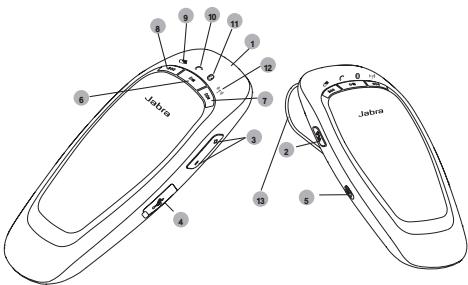
Loofoo
Lai jyjg Lao Jai Jai Jai Jai Jaba CRUISER
:ii5 10
Lwla ayu 10a Cwly
LwLaijLJy
*LwLai2s≤2
*gagagagagagagagagagagagagagagagagagagagagagagagagagagagagagagagagagagagagagagagagagagagagagagagagagagagagagag
*oLaaJyJzJyJyJyJy
1
-
La wai Jiai
1a gii jjoo aai
olalaljgogjgljJzai
FMwjyjolalwLgogogogolwJwagogolwLaJI
.oggolcs go JLojao JLai MultiUseTM
LwP·jslsLJgLgJoJLJ0/JLW1pJSLaJLQo
015 23
DSP gLiJ 0aLaiu Li Jliu
(√)Voice AnnouncementsTM
(A2DP L Advanced Audio Distribution Profile)
j0a j1 aai Jjies 8gaa jy (gysia/gy gao j1 jii a) AVRCP
FM
.00000000000000000000000000000000000000000000
aLwLJyLg 0s g,1g,2g
gjgjg≤LjJg≤C.
aagwgo Jiaio Lgawg (pairing) npz"rho lijLac Lg jg
LgJg0.0LALJgJg
3y - 5 < 12x2 + 92x + 1
(pairing)J 1
Jabra CRUISER
paing)
jduu 1
d g 1" (j) pairing mode" 一 _ 一 sJ L (pairing)
sJgS CwCuy Juii jing g
Jabra CRUISER, j 12
Jolal jolal lai Jlal j 1 g a j 10a Jolal jolal j 1g 1 g 1 g 1 g 1 g 1 g 1 g 1 g 1 g 1 g 1 g 1 g 1 g 1 g 1 g 1 g 1 g 1 g 1 g 1 g 1 g 1 g 1 g 1 g 1 g 1 g 1 g 1 g 1 g 1 g 1 g 1 g 1 g 1 g 1 g
Jabra CRUISER L
"Jabra CRUISER" pLi jgssw L
gS L y gS gS gS gS gS gS gS gS gS gS gS gS gS gS gS gS gS gS gS gS gS gS gS gS gS gS gS gS gS gS gS gS gS gS gS gS gS gS gS gS gS gS gS gS gS gS gS gS gS gS g S g S g S g S g S g S g S g S g S g S g S g S g S g S g S g S g S g S g S g S g S g S g S g S g S g S g S g S g S g S g S g S g S g S g S g S g S g S g S g S g S g S g S g S g S g S g S g S
| IDL &S |
| CONNECTIVITY |
| MobilSurf |
| BLUETOOTH |
| Infrared port |
| Wap options |
| Synchronization Networks |
| SELECT |
| ID#: |
| DEVICES FOUND |
| O Jabra CRUISER |
| SELECT |
| Jabra CRUISER |
| Passkey:*** |
| OK |
| HANSDFREE |
| Jabra CRUISER added. |
| The handfree is now ready for use |
| SELECT |
"pairing) 1
1 1 1 1 1 1 1 1 1 1 1 1 1 1 1 1 1 1 1 1 1 1 1 1 1 1 1 1 1 1 1 1 1 1 1 1 1 1 1 1 1 1 1 1 1 1 1 1 1 1 1
2g
Lg 8 g 8 g 8 g 8 g 8 g 8 g 8 g 8 g 8 g 8 g 8 g 8 g 8 g 8 g 8 g 8 g 8 g 8 g 8 g 8 g 8 g 8 g 8 g 8 g 8 g 8 g 8 g 8 g 8 g 8 g 8 g 8 g 8 g 8 g
Jooogjoo0
Jabra CRUISER
gJgJ, Jabra CRUISER.1Jg
Jabra CRUISER JooLaoi Lao FM
(a)laololalwgljolololololololololol
Jy
g 100
Cwly bio wLc 4g aai
4a52 b110 wLc 2jol cWg gJle JJIe JLe WcJ 2jol j
1 1
L 1 JU L/2wU a5. wU g uugz3
1 1
LaJL
golj 1 wai jy/2w y a. Jygo a jy gai jla j
gii 1 ggi li a
1JwLai Jy/(aSd aSd 4JyIg0j wLai Jlaiz
g i 1 g g g
aagaae aagaae L
a 1
AOB = AOB = 90 °
aagaae
1 1
JLajgjI,1JauuJui jI g FM a0s2. wuJn JgjgjS uol
Laiu Laiu gao Lao. aolao jiaoLaiy Jai Laiy
gj<sw.1LgJyjwJnJwJgW,1LgJyjwJyJg
.
aag aaiia jao auiu gao ygaaal aas iis laaiaol oaiyaii ayaiyag ygaaai ygaaai ygaaai ygaaai ygaaai ygaaai ygaaai ygaaai ygaaai ygaaai ygaaai ygaaai ygaaai ygaaai ygaaai ygaaai ygaaai ygaaai ygaaai ygaaai ygaaai ygaaai ygaaai ygaaai ygaaai ygaaiaayaaayaaayaaayaaayaaayaaayaaayaaayaaayaaayaaayaaayaaayaaayaaayaaayaaayaaayaaayaaayaaayaaayaaayaaayaaayaaayaaayaaayaaayaaayaaayaaayaaayaaayaaayaaayaaayaaayaaayaaayaaayaaayaaayaaayaaayaaayaaayaaayaaayaaayaaa
gusuLlulj
Jabra CRUISER jj g jL a L 100
JJJJJJJJJJJJJJJJJJJJJJJJJ
g Lla J, JwJy Jj Jy Jj Jj Jj Jj Jj Jj Jj Jj Jj Jj Jj Jj Jj Jj Jj Jj Jj Jj Jj Jj Jj Jj Jj Jj Jj Jj Jj Jj Jj Jj Jj Jj Jj Jj Jj Jj Jj Jj Jj Jj
Lc1 L2 Li FM a
a 100000000000000000000000000000000000000
LpI 1J; Lf FM aS g oS Lj
03g 1234567890123456789012345678901234567890123456789012345678901234567890123456789012345678901234567890123456789
FMoaiwjjLaiwi
aas aag) as aol jolal aJg aJy J1 FM aaii 10000000000000000000000000000000000000000000000000
J 1 J 1 J 1 J 1 J 1 J 1 J 1 J 1 J 1 J 1 J 1 J 1 J 1
FM
y 53 y 1 a a a a g L a L a a a a a a a a a a a a a a a a a a a a a a a a a a a a a a a a a a a a a a a a a a a a a a a aaa
FMJL>
g ρL[ "gnnJ>2)searching" ciLi LduuLduuLduuLduuLduuLduu
1g 100000000000000000000000000000
Jus Jus Jus Jus Jus Jus Jus Jus Jus Jus Jus Jus
3y ≤ Δ | g| < 0.3 , y = 1
aaii aaiis laaiy gaiy jay ylocg cuiuua 1yoo
jia iiai lai yauy ayuy uauo aaiy aaiy aaiy aaiy aaiy aaiy
aaiy aaiy aaiy aaiy aaiy aaiy aaiy aaiy aaiy aaiy
aaiy aaiy aaiy aaiy aaiy aaiy aaiy aaiy aaiy aaiy
aaiy aaiy aaiy aaiy aaiy aaiy aaiy aaiy aaiy
aaiy aaiy aaiy aaiy aaiy aaiy aaiy aaiy aaiy
gLg 1000 g jlll lcll b1 jrrr g
(1) a : a I. (集合)
:J
support.es@jabra.com
support.no@jabra.com gglizl
support.de@jabra.com
support.uk@jabra.com
support.it@jabra.com
support.ru@jabra.com
support.fr@jabra.com
support.pl@jabra.com
support.nl@jabra.com
info@jabra.com:
:
0080072252272
900 984572
08001826756 9
0800 0327026
800786532
0080072252272
0080072252272
| 70 25 22 72 | LdL |
| +7 495 660 71 51 | g |
| 00800 722 52272 | s |
| 020792522 | u |
| 0800 900325 | v |
| 00800 722 52272 | l |
| 0801 800 550 | j |
| 00800 722 52272 | k |
| 800 61272 | l |
| 0800 0223039 | m |
| 00800 722 52272 | n |
( x,y) = ( ab,52x)
| 1/1 | 1/2 | 1/3 | 1/4 | 1/5 | 1/6 | 1/7 | 1/8 | 1/9 | 1/10 | 1/11 | 1/12 | 1/13 | 1/14 | 1/15 | 1/16 | 1/17 | 1/18 | 1/19 | 1/20 | 1/21 | 1/22 | 1/23 | 1/24 | 1/25 | 1/26 | 1/27 | 1/28 | 1/29 | 1/30 | 1/31 | 1/32 | 1/33 | 1/34 | 1/35 | 1/36 | 1/37 | 1/38 | 1/39 | 1/40 | 1/41 | 1/42 | 1/43 | 1/44 | 1/45 | 1/46 | 1/47 | 1/48 | 1/49 | 1/50 | 1/51 | 1/52 | 1/53 | 1/54 | 1/55 | 1/56 | 1/57 | 1/58 | 1/59 | 1/60 | 1/61 | 1/62 | 1/63 | 1/64 | 1/65 | 1/66 | 1/67 | 1/68 | 1/69 | 1/70 | 1/71 | 1/72 | 1/73 | 1/74 | 1/75 | 1/76 | 1/77 | 1/78 | 1/79 | 1/80 | 1/81 | 1/82 | 1/83 | 1/84 | 1/85 | 1/86 | 1/87 | 1/88 | 1/89 | 1/90 | 1/91 | 1/92 | 1/93 | 1/94 | 1/95 | 1/96 | 1/97 | 1/98 | 1/99 | 1/100 | 1/101 | 1/102 | 1/103 | 1/104 | 1/105 | 1/106 | 1/107 | 1/108 | 1/109 | 1/110 | 1/111 | 1/112 | 1/113 | 1/114 | 1/115 | 1/116 | 1/117 | 1/118 | 1/119 | 1/120 | 1/121 | 1/122 | 1/123 | 1/124 | 1/125 | 1/126 | 1/127 | 1/128 | 1/129 | 1/130 | 1/131 | 1/132 | 1/133 | 1/134 | 1/135 | 1/136 | 1/137 | 1/138 | 1/139 | 1/140 | 1/141 | 1/142 | 1/143 | 1/144 | 1/145 | 1/146 | 1/147 | 1/148 | 1/149 | 1/150 | 1/151 | 1/152 | 1/153 | 1/154 | 1/155 | 1/156 | 1/157 | 1/158 | 1/159 | 1/160 | 1/161 | 1/162 | 1/163 | 1/164 | 1/165 | 1/166 | 1/167 | 1/168 | 1/169 | 1/170 | 1/171 | 1/172 | 1/173 | 1/174 | 1/175 | 1/176 | 1/177 | 1/178 | 1/179 | 1/180 | 1/181 | 1/182 | 1/183 | 1/184 | 1/185 | 1/186 | 1/187 | 1/188 | 1/189 | 1/190 | 1/191 | 1/192 | 1/193 | 1/194 | 1/195 | 1/196 | 1/197 | 1/198 | 1/199 | 1/200 | 1/201 | 1/202 | 1/203 | 1/204 | 1/205 | 1/206 | 1/207 | 1/208 | 1/209 | 1/210 | 1/211 | 1/212 | 1/213 | 1/214 | 1/215 | 1/216 | 1/217 | 1/218 | 1/219 | 1/220 | 1/221 | 1/222 | 1/223 | 1/224 | 1/225 | 1/226 | 1/227 | 1/228 | 1/229 | 1/230 | 1/231 | 1/232 | 1/233 | 1/234 | 1/235 | 1/236 | 1/237 | 1/238 | 1/239 | 1/240 | 1/241 | 1/242 | 1/243 | 1/244 | 1/245 | 1/246 | 1/247 | 1/248 | 1/249 | 1/250 | 1/251 | 1/252 | 1/253 | 1/254 | 1/255 | 1/256 | 1/257 | 1/258 | 1/259 | 1/260 | 1/261 | 1/262 | 1/263 | 1/264 | 1/265 | 1/266 | 1/267 | 1/268 | 1/269 | 1/270 | 1/271 | 1/272 | 1/273 | 1/274 | 1/275 | 1/276 | 1/277 | 1/278 | 1/279 | 1/280 | 1/281 | 1/282 | 1/283 | 1/284 | 1/285 | 1/286 | 1/287 | 1/288 | 1/289 | 1/290 | 1/291 | 1/292 | 1/293 | 1/294 | 1/295 | 1/296 | 1/297 | 1/298 | 1/299 | 1/300 | 1/301 | 1/302 | 1/303 | 1/304 | 1/305 | 1/306 | 1/307 | 1/308 | 1/309 | 1/310 | 1/311 | 1/312 | 1/313 | 1/314 | 1/315 | 1/316 | 1/317 | 1/318 | 1/319 | 1/320 | 1/321 | 1/322 | 1/323 | 1/324 | 1/325 | 1/326 | 1/327 | 1/328 | 1/329 | 1/330 | 1/331 | 1/332 | 1/333 | 1/334 | 1/335 | 1/336 | 1/337 | 1/338 | 1/339 | 1/340 | 1/341 | 1/342 | 1/343 | 1/344 | 1/345 | 1/346 | 1/347 | 1/348 | 1/349 | 1/350 | 1/351 | 1/352 | 1/353 | 1/354 | 1/355 | 1/356 | 1/357 | 1/358 | 1/359 | 1/360 | 1/361 | 1/362 | 1/363 | 1/364 | 1/365 | 1/366 | 1/367 | 1/368 | 1/369 | 1/370 | 1/371 | 1/372 | 1/373 | 1/374 | 1/375 | 1/376 | 1/377 | 1/378 | 1/379 | 1/380 | 1/381 | 1/382 | 1/383 | 1/384 | 1/385 | 1/386 | 1/387 | 1/388 | 1/389 | 1/390 | 1/391 | 1/392 | 1/393 | 1/394 | 1/395 | 1/396 | 1/397 | 1/398 | 1/399 | 1/400 | 1/401 | 1/402 | 1/403 | 1/404 | 1/405 | 1/406 | 1/407 | 1/408 | 1/409 | 1/410 | 1/411 | 1/412 | 1/413 | 1/414 | 1/415 | 1/416 | 1/417 | 1/418 | 1/419 | 1/420 | 1/421 | 1/422 | 1/423 | 1/424 | 1/425 | 1/426 | 1/427 | 1/428 | 1/429 | 1/430 | 1/431 | 1/432 | 1/433 | 1/434 | 1/435 | 1/436 | 1/437 | 1/438 | 1/439 | 1/440 | 1/441 | 1/442 | 1/443 | 1/444 | 1/445 | 1/446 | 1/447 | 1/448 | 1/449 | 1/450 | 1/451 | 1/452 | 1/453 | 1/454 | 1/455 | 1/456 | 1/457 | 1/458 | 1/459 | 1/460 | 1/461 | 1/462 | 1/463 | 1/464 | 1/465 | 1/466 | 1/467 | 1/468 | 1/469 | 1/470 | 1/471 | 1/472 | 1/473 | 1/474 | 1/475 | 1/476 | 1/477 | 1/478 | 1/479 | 1/480 | 1/481 | 1/482 | 1/483 | 1/484 | 1/485 | 1/486 | 1/487 | 1/488 | 1/489 | 1/490 | 1/491 | 1/492 | 1/493 | 1/494 | 1/495 | 1/496 | 1/497 | 1/498 | 1/499 | 1/500 | 1/501 | 1/502 | 1/503 | 1/504 | 1/505 | 1/506 | 1/507 | 1/508 | 1/509 | 1/510 | 1/511 | 1/512 | 1/513 | 1/514 | 1/515 | 1/516 | 1/517 | 1/518 | 1/519 | 1/520 | 1/521 | 1/522 | 1/523 | 1/524 | 1/525 | 1/526 | 1/527 | 1/528 | 1/529 | 1/530 | 1/531 | 1/532 | 1/533 | 1/534 | 1/535 | 1/536 | 1/537 | 1/538 | 1/539 | 1/540 | 1/541 | 1/542 | 1/543 | 1/544 | 1/545 | 1/546 | 1/547 | 1/548 | 1/549 | 1/550 | 1/551 | 1/552 | 1/553 | 1/554 | 1/555 | 1/556 | 1/557 | 1/558 | 1/559 | 1/560 | 1/561 | 1/562 | 1/563 | 1/564 | 1/565 | 1/566 | 1/567 | 1/568 | 1/569 | 1/570 | 1/571 | 1/572 | 1/573 | 1/574 | 1/575 | 1/576 | 1/577 | 1/578 | 1/579 | 1/580 | 1/581 | 1/582 | 1/583 | 1/584 | 1/585 | 1/586 | 1/587 | 1/588 | 1/589 | 1/590 | 1/591 | 1/592 | 1/593 | 1/594 | 1/595 | 1/596 | 1/597 | 1/598 | 1/599 | 1/600 | 1/601 | 1/602 | 1/603 | 1/604 | 1/605 | 1/606 | 1/607 | 1/608 | 1/609 | 1/610 | 1/611 | 1/612 | 1/613 | 1/614 | 1/615 | 1/616 | 1/617 | 1/618 | 1/619 | 1/620 | 1/621 | 1/622 | 1/623 | 1/624 | 1/625 | 1/626 | 1/627 | 1/628 | 1/629 | 1/630 | 1/631 | 1/632 | 1/633 | 1/634 | 1/635 | 1/636 | 1/637 | 1/638 | 1/639 | 1/640 | 1/641 | 1/642 | 1/643 | 1/644 | 1/645 | 1/646 | 1/647 | 1/648 | 1/649 | 1/650 | 1/651 | 1/652 | 1/653 | 1/654 | 1/655 | 1/656 | 1/657 | 1/658 | 1/659 | 1/660 | 1/661 | 1/662 | 1/663 | 1/664 | 1/665 | 1/666 | 1/667 | 1/668 | 1/669 | 1/670 | 1/671 | 1/672 | 1/673 | 1/674 | 1/675 | 1/676 | 1/677 | 1/678 | 1/679 | 1/680 | 1/681 | 1/682 | 1/683 | 1/684 | 1/685 | 1/686 | 1/687 | 1/688 | 1/689 | 1/690 | 1/691 | 1/692 | 1/693 | 1/694 | 1/695 | 1/696 | 1/697 | 1/698 | 1/699 | 1/700 | 1/701 | 1/702 | 1/703 | 1/704 | 1/705 | 1/706 | 1/707 | 1/708 | 1/709 | 1/710 | 1/711 | 1/712 | 1/713 | 1/714 | 1/715 | 1/716 | 1/717 | 1/718 | 1/719 | 1/720 | 1/721 | 1/722 | 1/723 | 1/724 | 1/725 | 1/726 | 1/727 | 1/728 | 1/729 | 1/730 | 1/731 | 1/732 | 1/733 | 1/734 | 1/735 | 1/736 | 1/737 | 1/738 | 1/739 | 1/740 | 1/741 | 1/742 | 1/743 | 1/744 | 1/745 | 1/746 | 1/747 | 1/748 | 1/749 | 1/750 | 1/751 | 1/752 | 1/753 | 1/754 | 1/755 | 1/756 | 1/757 | 1/758 | 1/759 | 1/760 | 1/761 | 1/762 | 1/763 | 1/764 | 1/765 | 1/766 | 1/767 | 1/768 | 1/769 | 1/770 | 1/771 | 1/772 | 1/773 | 1/774 | 1/775 | 1/776 | 1/777 | 1/778 | 1/779 | 1/780 | 1/781 | 1/782 | 1/783 | 1/784 | 1/785 | 1/786 | 1/787 | 1/788 | 1/789 | 1/790 | 1/791 | 1/792 | 1/793 | 1/794 | 1/795 | 1/796 | 1/797 | 1/798 | 1/799 | 1/800 | 1/801 | 1/802 | 1/803 | 1/804 | 1/805 | 1/806 | 1/807 | 1/808 | 1/809 | 1/810 | 1/811 | 1/812 | 1/813 | 1/814 | 1/815 | 1/816 | 1/817 | 1/818 | 1/819 | 1/820 | 1/821 | 1/822 | 1/823 | 1/824 | 1/825 | 1/826 | 1/827 | 1/828 | 1/829 | 1/830 | 1/831 | 1/832 | 1/833 | 1/834 | 1/835 | 1/836 | 1/837 | 1/838 | 1/839 | 1/840 | 1/841 | 1/842 | 1/843 | 1/844 | 1/845 | 1/846 | 1/847 | 1/848 | 1/849 | 1/850 | 1/851 | 1/852 | 1/853 | 1/854 | 1/855 | 1/856 | 1/857 | 1/858 | 1/859 | 1/860 | 1/861 | 1/862 | 1/863 | 1/864 | 1/865 | 1/866 | 1/867 | 1/868 | 1/869 | 1/870 | 1/871 | 1/872 | 1/873 | 1/874 | 1/875 | 1/876 | 1/877 | 1/878 | 1/879 | 1/880 | 1/881 | 1/882 | 1/883 | 1/884 | 1/885 | 1/886 | 1/887 | 1/888 | 1/889 | 1/890 | 1/891 | 1/892 | 1/893 | 1/894 | 1/895 | 1/896 | 1/897 | 1/898 | 1/899 | 1/900 | 1/901 | 1/902 | 1/903 | 1/904 | 1/905 | 1/906 | 1/907 | 1/908 | 1/909 | 1/910 | 1/911 | 1/912 | 1/913 | 1/914 | 1/915 | 1/916 | 1/917 | 1/918 | 1/919 | 1/920 | 1/921 | 1/922 | 1/923 | 1/924 | 1/925 | 1/926 | 1/927 | 1/928 | 1/929 | 1/930 | 1/931 | 1/932 | 1/933 | 1/934 | 1/935 | 1/936 | 1/937 | 1/938 | 1/939 | 1/940 | 1/941 | 1/942 | 1/943 | 1/944 | 1/945 | 1/946 | 1/947 | 1/948 | 1/949 | 1/950 | 1/951 | 1/952 | 1/953 | 1/954 | 1/955 | 1/956 | 1/957 | 1/958 | 1/959 | 1/960 | 1/961 | 1/962 | 1/963 | 1/964 | 1/965 | 1/966 | 1/967 |
aLi ojlg
| 1,la a#o#o gol###glo a#o#o gol###glo a#o#o gol###glo a#o#o gol###glo a#o#o gol###glo a#o#o gol###glo a#o#o gol###glo a#o#o gol###glo a#o#o gol###glo a#o#o gol###glo |
jai llo) gijgjglalg jol alg aas Pin Lg c
Jabra CRUISER Li Li Li o o g (o)
.
Jabla Jablce Jablce Jablce Jablce Jablce Jablce Jablce Jablce Jablce Jablce Jablce Jablce Jablce Jablce Jablce Jablce Jablce Jablce Jablce Jablce Jablce Jablce Jablce Jablce Jablce Jablce Jablce Jablce Jablce Jablce Jablce Jablce Jablce Jablce
aJ 4 aJ L oJ
LjJlJIiLi JyJUeJUy
aaii 1000
www.jabra.com/week

目录
3 SsFJFJFJFJFJFJFJFJFJFJFJFJFJFJFJFJFJFJFJFJFJFJFJFJFJFJFJFJ
Jabra CRUISER是作通在时,。社司的同会
| 지시 | NSE목목지지지지지지지지지지지지지지지지지지지지지지지지지지지지지지지지지지지지지지지지지지지지지지지지지지지지지지지지지지지지지지지지지지지지지지지지지지지지지지지지지지지지지지지지지지지지지지지지지지지지iture지지지iture지지iture지iture지iture지iture지iture지iture지iture지iture지iture지iture지iture지iture지iture지iture지iture지iture지iture지iture지iture지iture지iture지iture지iture지iture지iture지iture지iture지iture지iture지iture지iture지iture지iture지iture지iture지iture지iture지iture지iture지iture지iture지iture지iture지iture지iture지iture지iture지iture지iture지iture지 calorie지 calorie지 calorie지 calorie지 calorie지 calorie지 calorie지 calorie지 calorie지 calorie지 calorie지 calorie지 calorie지 calorie지 calorie지 calorie지 calorie지 calorie지 calorie지 calorie지 calorie지 calorie지 calorie지 calorie지 calorie지 calorie지 calorie지 calorie지 calorie지 calorie지 calorie지 calorie지 calorie지 calorie지 calorie지 calorie지 calorie지 calorie지 calorie지 calorie지 calorie지 calorie지 calorie지 calorie지 calorie지 calorie지 calorie지 calorie지 calorie지 calorie지 Calorimeter <|im_start|>assistant | NSE목목지지지지지지지지지지지지지지지지지지지지지지지지지지지지지지지지지지지지지지지지지지지지지지지지지지지지지지지지지지지지지지지지지지지지지지지지지지지지지지지지지지지지지지지지지지지지지지지jour | |
S形元
SSFJFJFJFJFJFJFJFJFJFJFJFJFJFJFJFJFJFJFJFJFJFJFJFJFJFJFJFJFJFJFJFJFJFJFJFJFJFJFJFJFJFJFJFJFJFJFJFJFJFJF
- Sπiπfπo∈FMOF.其FmF.其FmF.其FmF.其FmF.其FmF.其FmF.其FmF.其FmF.其FmF.其FmF.其FmF.其FmF.其FmF.其FmF.其FmF.其FmF.其FmF.其FmF.其FmF.其FmF.其F
五社通的的
SSFJFJFJFJFJFJFJFJFJFJFJFJFJFJFJFJFJFJFJFJFJFJFJFJFJFJFJFJFJFJFJFJFJFJFJFJFJFJFJFJFJFJFJFJFJFJFJFJFJFJF
| 체魄缺き | 사진弘扬이상품수 | LED fixitings(FM만formance선류모hd) | |||
| 버터리상품棗 | 通화상품棗 | Bluetooth상품棗 | FM상품棗 | ||
| 1 | 88.1MHz | inburgh | inburgh | inburgh | inburgh |
| 2 | 88.3MHz | inburgh | inburgh | inburgh | |
| 3 | 88.5MHz | inburgh | inburgh | inburgh | |
| 4 | 88.7MHz | inburgh | inburgh | inburgh | |
| 5 | 88.9MHz | inburgh | inburgh | inburgh | |
| 6 | 89.1MHz | inburgh | inburgh | inburgh | |
| 7 | 89.3MHz | inburgh | inburgh | inburgh | |
FM中和数为1,即
SfFkEAneTfReAingKgLQeRtoJxseLgHgI.
Sππκον是鼎7个的高大子默克将等默合。默克到
责越哉用通欢/众豆币,珠音贝如贝其FM币则在
动中里当能下,。郭社拉可面Sππκον多贝以服
默克到且贼的就日。Sππκον都从SππκονCRUISER到
者贼时的当的马查卡吉力法勒云莫土为前
Jabra CRUISER将这本Bluetooth®®®®®®®®®®®®®®®®®®®®®®®®®®®®®®®®®®®®®®®®®
- Jabra CRUISER是Bluetooth魅代版和哈隆,SA用曾活多在目录的设置就成。其上,Bluetooth版本1.1已从和自
wouhyooyyoooyouyoooyouyoooyouyoooyouyoooyouyoooyouyoooyouyoooyouyoooyouyoooyouyoooyouyoooyouyoooyouyoo
nnaa
-
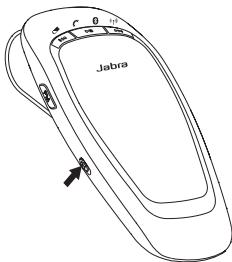
Hua
10 1
mnnnne nnnnnnnnnnnnn
mnnnne nnnnnnnnnnnnnnnnnnnnnnnnnnnnnnnnnnnnnnnnnnnnnnnnnnnnnnnnnnnnnnnnnnnnnnnnnnnnnnnnnnnnnnnnnnnnnnnnnnnnnnnnnnnnnnnnnnnnn
1 1aogaohfoulukuaigounsu
wannnna Jabra CRUISER 1nnnnnnnnnnnnnnnnnnnnnnnnnnnnnnnnnnnnnnnnnnnnnnnnnnnnnnnnnnnnnnnnnnnnnnnnnnnnnnnnnnnnnnnnnnnnnnnnnnnnnnnnnnnnnnnnnnnnnnnnnnnnnnnnnnnnnnnnnn
2 aonfrnsdwiu:uu Bluetooth wougnuln"guun" Jabra CRUISER
mnnnne nnnnnnnnnnnnnnnnnnnnnnnnnnnnnnnnnnnnnnnnnnnnnnnnnnnnnnnnnnnnnnnnnnnnnnnnnnnnnnnnnnnnnnnnnnnnnnnnnnnnnnnnnnnnnnnnnnnnnnnnnnnnnnnnnnnnnnnnnnnnnnnnnnnn nn
3 Insefwnuooqnuaaunssowu Jabra CRUISER
Inngwntwugnaiwludag"Jabra CRUISER
- nuiuunnnaaannnnnne annnnnne "Yes" "OK"
nuiuunnnaaannnnnne annnnnne annnnnne PIN = 0000 (qun 4 2) Innsnnnne
| CONNECTIVITY |
| MobiSurf |
| BLUETOOTH |
| Infrared port |
| Wap options |
| Synchronization |
| Networks |
| SELECT |
| DEVICES FOUND |
| O Jabra CRUISER |
| SELECT |
| Jabra CRUISER |
| Passkey:*** |
| OK |
| HANSDFREE |
| Jabra CRUISER added. The handsfree is now ready for use |
| SELECT |
Fng
wnnnnne nnnnnnnnnnnnnnnnnnnnnnnnnnnnnnnnnnnnnnnnnnnnnnnnnnnnnnnnnnnnnnnnnnnnnnnnnnnnnnnnnnnnnnnnnnnnnnnnnnnnnnnnn
i 1
nneennnnne
iuee eae aee aee aee aee aee aee aee aee aee aee aee aee aee aee aee aee aee aee aee aee aee aee aee aee aee aee aee aee aee aee aee aee aee aee aee aee aee aee aee aee aee aee aee aee
mnnnne nnnnnnnnnnnnn
Jabra CRUISER Ananannnnnnaaannnnnnnnnnnnnnnnnnnnnnnnnnnnnnnnnnnnnnnnnnnnnnnnnnnnnnnnnnnnnnnnnnnnnnnnnnnnnnnnnnnnnnnnnnnnnnnnnnnnnnnnnnnnnnnnnnnnnnnnnnnnnnnnnnnnnnnn
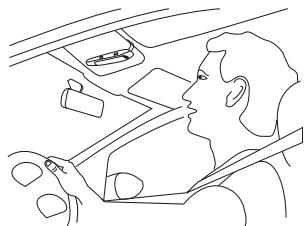
mssuaaibn
1
mswana
uunnnnne nnnnnnnnnnnnnnnnnnnnnnnnnnnnnnnnnnnnnnnnnnnnnnnnnnnnnnnnnnnnnnnnnnnnnnnnnnnnnnnnnnnnnnn
msfns
nne nnnnne nee nee nee nee nee nee nee nee
msuijiasuisana
-
mssssssssssss
- nnnnnae neaee
msfnsuosaan
aannnnnne aannnnnnnnnnnnnnnnnnnnnnnnnnnnnnnnnnnnnnnnnnnnnnnnnnnnnnnnnnnnnnnnnnnnnnnnnnnnnnnnnnnnnnnnnnnnnnnnnnnnnnnn
Uganda:Uganda
nannnnnnnnnnnnnnnnnnnnnnnnnnnnnnnnnnnnnnnnnnnnnnnnnnnnnnnnnnnnnnnnnnnnnnnnnnnn
msusuiabua:s:guia
Jabra CRUISER n ngnnnne nnne
mssagdoonnnn
aannnnnne aannnnnne annnnnne
nannnnnnnnnnnnnnnnnnnnnnnnnnnnnnnnnnnnnnnnnnnnnnnnnnnnnnnnnnnnnnnnnnnnnnnnnnnnnnnnnnnnnnnnnnnnnnnnnn
- nanaananaananaananaananaananaananaananaananaananaananaananaananaananaananaananaananaananaananaananaananaananaananaananaananaananaananaananaananaananaananaananaananaananaananaananaananaananaananaananaananaananaananaananaananaananaananaananaananaananaanana
y
Guana
nnaaannnnnneanennnnnne aen nnnnne ane ane ane
nnaaannnnnne aannnnnne nnnnne annnnnne ane
msiuaursxgaiuwaos
-
Nggiauiwao
n FM u wu wu wuuwau wu wuuwau wuuwau wuuwau wuuwau wuuwau wuuwau wuuwau wuuwau wuuwau wuuwau wuuwau wuuwau wuuwau wuuwau wuuwau wuuwau wuuwau wuuwau wuuwau wuuwau wuuwau wuuwau wuuwau wuuwau wuuwau wuuw
aannnnnneennnnnnnnnnnnnnnnnnnnnnnnnnnnnnnnnnnnnnnnnnnnnnnnnnnnnnnnnnnnnnnnnnnnnnnnnnnnnnnnnnnnnnnnnnnnnnnnnnnnnnnnnnnn
| Iwátáyehi LED | amunipalwa | |
| Iwátáyehi FM 50MHz (12MHz) | Iwátáyehi FM | |
| Iwátáyehi FM 50MHz (12MHz) | Iwátáyehi FM | |
| Iwátáyehi FM 50MHz (12MHz) | Iwátáyehi FM | |
| Iwátáyehi FM 50MHz (12MHz) | Iwátáyehi FM | |
| Iwátáyehi FM 75MHz (3.5MHz) | Iwátáyehi FM | |
| Iwátáyehi FM 75MHz (3.5MHz) | Iwátáyehi FM | |
| Iwátáyehi FM 75MHz (3.5MHz) | Iwátáyehi FM | |
| Iwátáyehi FM 75MHz (3.5MHz) | Iwátáyehl | |
| Iwátáyehi FM 75MHz (3.5MHz) | Iwátáyehl | |
| Iwátáyehi FM 75MHz (3.5MHz) | Iwátáyehl | |
| Iwátáyehi FM 75MHz (3.5MHz) | Iwátáyehl | |
| Iwátáyehi FM 80MHz (3.5MHz) | Iwátáyehl | |
| Iwátáyehi FM 80MHz (3.5MHz) | Iwátáyehl | |
| Iwátáyehi FM 80MHz (3.5MHz) | Iwátáyehl | |
| Iwátáyehi FM 80MHz (3.5MHz) | Iwátá yehl | |
| Iwátáyehi FM 80MHz (3.5MHz) | Iwátáyehl | |
| Iwátáyehi FM 80MHz (3.5MHz) | Iwátáyehl | |
| Iwátáyehi FM 80MHz (3.5MHz) | Iwátáyehl | |
| IwátáyehiFM 80MHz (3.5MHz) | Iwátáyehl | |
| Iwátáyehi FM 80MHz (3.5MHz) | Iwátáyehl | |
| Iwátáyehi FM 80MHz (3.5MHz) | Iwátáyehl | |
| Iwátáyehi FM 80MHz (3.5MHz) | I wátáyehl | |
| Iwátáyehi FM 80MHz (3.5MHz) | Iwátáyehl | |
| Iwátáyehi FM 80MHz (3.5MHz) | Iwátáyehl | |
| Iwátáyehi FM 80MHz (3.5MHz) | Iwátáyehl | |
| Iwátá yehl FM 80MHz (3.5MHz) | Iwátá yehl | |
| Iwátá yehl FM 80MHz (3.5MHz) | Iwátá yehl | |
| Iwátá yehl FM 80MHz (3.5MHz) | Iwátá yehl | |
| Iwátá yehl FM 80MHz (3.5MHz) | Iwátá yehl | |
| Iwátá yehlFM 80MHz (3.5MHz) | Iwátá yehl | |
| Iwátá yehl FM 80MHz (3.5MHz) | Iwátá yehl | |
| Iwátá yehl FM 80MHz (3.5MHz) | Iwátá yehl | |
| Iwátá yehl FM 80MHz (3.5MHz) | I wátá yehl | |
| Iwátá yehl FM 80MHz (3.5MHz) | I wátá yehl | |
| Iwátá yehl FM 80MHz (3.5MHz) | I wátá yehl | |
| Iwátá yehl FM 80MHz (3.5MHz) | I wátá yehl | |
| Iwátáyehi FM 80MHz (3.5MHz) | Iwátáyehl FM 80MHz (3.5MHz) | |
| Iwátáyehi FM 80MHz (3.5MHz) | Iwátáyehl FM 80MHz (3.5MHz) | |
| Iwátáyehi FM 80MHz (3.5MHz) | Iwátáyehl FM 80MHz (3.5MHz) | |
| Iwátáyehi FM 80MHz (3.5 MHz) | Iwátáyehl FM 80MHz (3.5MHz) | |
| Iwátáyehi FM 80MHz (3.5MHz) | Iwátáyehl FM 80MHz (3.5MHz) | |
| Iwátáyehi FM 80MHz (3.5MHz) | Iwátáyehl FM 80MHz (3.5MHz | |
| Iwátáyehi FM 80MHz (3.5MHz) | Iwátáyehl FM 80MHz (3.5MHz) | |
| Iwátáyehi FM 80MHz (3.5MHz) | Iwátáyehl FM 80MHz (3.5MHz) | |
| Iwátáyehi FM 80MHz (3.5.4MHz) | Iwátáyehl FM 80MHz (3.5MHz) | |
| Iwátáyehi FM 80MHz (3.5.4MHz) | Iwátáyehl FM 80MHz (3.5MHz) | |
| Iwátáyehi FM 80MHz (3.5.4MHz) | Iwátáyehl FM 80MHz(3.5MHz) | |
| Iwátáyehi FM 80MHz (3.5.4MHz) | Iwátáyehl FM 80MHz (3.5MHz) | |
| Iwátáyehi FM 80MHz (3.5.4MHz) | Iwátáyehl FM 80MHz (3.5MHz) | |
| IwátáyehiFM 80MHz (3.5.4MHz) | Iwátáyehl FM 80MHz (3.5MHz) | |
| Iwátáyehi FM 80MHz (3.5.4MHz) | Iwátáyehl FM 80MHz (3.5MHz) | |
| Iwátáyehi FM 80MHz (3.5.4MHz) | IwBTáyehl FM 80MHz (3.5MHz) | |
| Iwátáyehi FM 80MHz (3.5.4MHz) | IwBTáyehl FM 80MHz (3.5MHz) | |
| Iwátáyehi FM 80MHz (3.5.4MHz) | IwBTáyehl FM 80MHz (3.5MHz) | IwBTáyehl FM 80MHz (3.5MHz) |
| IwBTáyehi FM 80MHz (3.5.4MHz) | IwBTáyehl FM 80MHz (3.5MHz) | |
| IwBTáyehi FM 80MHz (3.5.4MHz) | IwBTáyehl FM 80MHz (3.5MHz) | IwBTáyehl FM 80MHz (3.5MHz) |
| IwBTáyehi FM 80MHz (3.5.4MHz) | IwBTáyehl FM 80MHz (3.5MHz) | IwBTáyehl FM 80MHz (3.5MHz) |
| IwBTáyehi FM 80MHz (3,5.4MHz) | IwBTáyehl FM 80MHz (3.5MHz) | IwBTáyehl FM 80MHz (3.5MHz) |
| IwBTáyehi FM 80MHz (3.5.4MHz) | IwBTáyehl FM 80MHz (3.5MHz) | IwBTáyehl FM 80MHz (2.5MHz) |
| IwBTáyehi FM 80MHz (3.5.4MHz) | IwBTáyehl FM 80MHz (3.5MHz) | IwBTáyehl FM 80MHz (3.5MHz) |
| IwBTáyehi FM 80MHz (3.5.4MHz) | IwBTáyehl FM 8 0MHz (3.5MHz) | IwBTáyehl FM 80MHz (3.5MHz) |
| IwBTáyehi FM 80MHz (3.5.4MHz) | IwBTáyehl FM 80MHz (3.5MHz) | IwBTáyehl FM 80MHz (3.5MHz) |
| IwBTáyehi FM80MHz (3.5.4MHz) | IwBTáyehl FM 80MHz (3.5MHz) | IwBTáyehl FM 80MHz (3.5MHz) |
| IwBTáyehi FM 80MHz (3.5.4MHz) | IwBTáyehl FM 80MHz (3.5MHz) | IwBTáyehl FFM 80MHz (3.5MHz) |
| IwBTáyehi FM 80MHz (3.5.4MHz) | IwBTáyehl FM 80MHz (3.5MHz) | IwBTáyehl FM 80MHz (3.5MHz) |
| IwBTáyehi FM 80MHz (3.5.4MHz) | IwBTá yehl FM 80MHz (3.5MHz) | IwBTáyehl FM 80MHz (3.5MHz) |
| IwBTáyehi FM 80MHz (3.5.4MHz) | IwBTáyehl FM 80MHz (3.5MHz) | IwBTáyehl FM 80MHz (3.5MHz) |
| IwBTýyehi FM 80MHz (3.5.4MHz) | IwBTýyehl FM 80MHz (3.5MHz) | IwBTýyehl FM 80MHz (3.5MHz) |
| IwBTýyehi FM 80MHz (3.5.4MHz) | IwBTýyehl FM 80MHz (3.5MHz) | IwBTýyehl FM 80MHz (3.5MHz) |
| IwBTýyehi FM 80MHz (3.5.4MHz) | 1WBTýyehl FM 80MHz (3.5MHz) | IwBTýyehl FM 80MHz (3.5MHz) |
PCL
mJabra CRUISER suiuunusio
Kurun: nuiuuiuuiuuiuuiuuiuuiuuiuuiuuiuuiuuiuuiuuiuuiuuiuuiuuiuuiuuiuuiuuiuuiuuiuuiuuiuuiuuiuuiuuiuuiuuiuuiuuiuuiuuiuuiuuiuuiuuiuuiuuiuuiuuiuuiuuiuuiuuiuuiuuiuui uuuuuuuuuuuuuuuuuuuuuuuuuuuuuuuuuuuuuuuuuuuuuuuuuuuuuuuuuuuuuuuuuuuuuuuuuuuuuuuuuuuuuuuuuuuuuuuuuuuuuuuuuuuuuuuuuuuuuuuuuuuuuuuuuuuuuuuuuuuuuuuuuuuuuuuuuuuuuuuuuuuuuuuuuuuuuuuuuuuuuuuuu uu
Uabugununun FM
FMM FMMFMMFMMFMMFMMFMMFMMFMMFMMFMMFMMFMMFMMFMMFMMFMMFMMFMMFMMFMMFMMFMMFMMFMMFMMFMMFMMFMMFMMFMMFMMFMMFMMFMMFMMFMMFMMFMMFMMFMMFMMFMMFMMFMMFMMFMMFMMFMMFMMFMMFMM
© 2009 GN Netcom US, Inc. All rights reserved. Jabra® is a registered trademark of GN Netcom A/S. All other trademarks included herein are the property of their respective owners. The Bluetooth® word mark and logos are owned by the Bluetooth SIG, Inc. and any use of such marks by GN Netcom A/S is under license. (Design and specifications subject to change without notice).
© 2009 GN Netcom A/S. All rights reserved. Jabra® is a registered trademark of GN Netcom A/S. All other trademarks included herein are the property of their respective owners. The Bluetooth® word mark and logos are owned by the Bluetooth SIG, Inc. and any use of such marks by GN Netcom A/S is under license. (Design and specifications subject to change without notice).
MADE IN KOREA
TYPE:HFS001


Bluetooth
- THANK YOU
- ABOUT YOUR JABRA CRUISER
- WHAT YOUR SPEAKERPHONE CAN DO
- Your Jabra CRUISER lets you do all this:
- Specifications
- GETTING STARTED
- TURNING YOUR SPEAKERPHONE ON AND OFF
- SLEEP MODE
- PAIRING IT WITH YOUR PHONE
- Put the speakerphone in pairing mode
- Set your Bluetooth phone to 'discover' the Jabra CRUISER
- Your phone will find the Jabra CRUISER
- Manual pairing mode
- CONNECTING WITH YOUR PHONE
- PLACE THE SPEAKERPHONE IN YOUR VEHICLE
- HOW TO
- Answer a call
- End a call
- Make a call
- Reject a call*
- Activate voice dialing*
- Redial last number\*
- Mute/un-mute
- Adjust sound and volume
- Third party calling*
- Transfer call
- Play or pause music*
- Stop music\*
- Change between music tracks*
- Night Driving Mode
- ADDITIONAL FEATURES
- USING YOUR JABRA CRUISER WITH TWO MOBILE DEVICES
- PLAY MUSIC
- CHANGE VOICE ANNOUNCEMENT LANGUAGE
- Additional languages
- USING THE FM TRANSMITTER
- CHANGING FM FREQUENCY
- USING THE FM TRANSMITTER WHEN VOICE ANNOUNCEMENT FUNCTION IS OFF
- To select the desired FM frequency channel, follow these steps:
- CALLER ID
- SOFTWARE UPGRADE
- TROUBLESHOOTING & FAQ
- I hear crackling noises
- I cannot hear anything in my speakerphone
- I am having pairing problems
- I want to reset the pairing list in my speakerphone
- Will the Jabra CRUISER work with other Bluetooth equipment?
- I cannot use Reject call, call on hold, Redial or voice dialing
- I can not connect speakerphone and radio via FM transmitter
- NEED MORE HELP?
- Web: www.jabra.com
- E-mail:
- GLOSSARY
- CONTENTS
- Stop music*
- Phone:
- TAKING CARE OF YOUR SPEAKERPHONE
- Phone:
- INDHOLDSFORTEGNELSE
- TAK
- BO3MOXHOCTN CINIKEPOHOA
- CnkepohJabraCRUISER nopejmbaetcndyoune fynkunn:
- Texnueckne xapaKtepncnKn
- ПОДГOTOBКAKPABOTE
- 3APJDAKCA CπIκEPRΦOHA
- BKJIIOUeyHIEI BbIKJIOUeyHIE CNIKEKPOHOA
- PEXIM 3HEPTOCBEXEHN
- COPRJXEHNE CINIKEPOHOCA TIELEOHOM
- PpebeDte cIMKePfoh B pexm coPjaXeHna
- IpebeDte Telefoh c yHknei Bluetooth B pexm 6bnapykenia cnkepfoha Jabra CRUISER
- Tepeoh o6hapyknt cnckepfoj Jabra CRUISER
- Puchno nepeboD B pexkM copjkeHn
- ПОДКЛЮЧЕНЕ K TELEФОHY
- PACIIOJIOXEHENCINKEPOHOBA BABTOMOBUE
- PEXIMBI I ONEPAIIN
- OTBet Ha Bbl3OB
- 3aBepueHne Bbl30Ba
- OcncyeCTBJIeHne Bbl30Ba
- OTKIOHeHne Bbl30Ba*
- Bknouenhe roIocoboro ha6opa\*
- Tobtorhny ha6op nocleHero Homepa\*
- HOMEPBbIbBAIOUeO ABOHEHTA
- OBHOBJEHEIPOPTPAMMHOTo OBeCIEYEHNA
- ПОИСК И UYSTРАЕНЕ HENICPNABHOCTeI M YACTO 3ДАВАЕМБIЕ BОПPOСbl
- Cnblnhb nomexn
- OTcyTCTByeT 3ByK
- He ydaetcBbInOnHnTb cnpxkeHne
- Tpe6yTeC ONUCTnTB CnUCOK yCTPOIcTB, C KOTOpblIMN 6blIN cnpJxhen CnIKePfoH
- Pa60taertn cnkephon Jabra CRUISER c pyrnm o6opydoBaHnem c npdepeKko Bluetooth?
- He pa6oTaIOT fYHKUIN OTKNOHEnHa Bb13OBA,ydepKaHnBaBb13OBA, NOBtOPHO Rb13OBA Hn rONOCOBOro Ha6opa
- HyeadaTc npoknOHTb cNKePfoH K paAnOpnpemHnky ueeFM-nepeDatuK
- ПИНЕОБХОДМΟСТИ ДОПОЛНITEЛВΗОПOMOUSHI
- 3APJIXAHHHI PIPNCTPOIO IYHORO 3B'R3KY
- YBIMKHEHHA TABIMKHEHHI INPNCPOIO IYHHO3B'R3KY
- PEXIM EHEPRE03BEPEXEHHA
- 3'ΕΤΗΑΝΗΝ ΠΡΙΝΤΡΟΙ ΓΥΗΝΟ 3B'83KY
- TEJIΦOHOM
- Nepebegeitb npictpi ryhoro 3B'ay3ky B pexm 3'eHaHHa
- Uctahobitb Tenefohi 3 nItpmkoO Bluetooth pexum nowky npictpo ruyhoro 38'3ky Jabra CRUISER
- TeneoB BnAIBTb npicpii ryHoro 3b'3ky Jabra CRUISER
- Pexm3'εdHaHnBpyuHy
- ПДКЛIOUECHHЯ ДОТЕLEDOHY
- YCTAHOBJIIEHHI IPINCTPOIO IYUHOI 3B'R3KY B ABTOMOJIJI
- IOPRAOK BIKOPNCTAHH4 YHKLI
- BIDNOiBHa BUKnK
- 3aBepueHHn BnKnky
- 3diencheHHBKNKny
- BixxueHH Bnukny*
- YbIMKHeHHra rONOCOBOHa60py\*
- TobtopnHa6ip octaHbOro Homepa\*
- BumKHeHHy/yBIMKHeHHa 3Byky
- Peryliobahna ryhnocti
- Bukluk Tpeboi CtopoH\*
- IpebeeHnBuknky
- 3ynnHkBaBtBopenHaMyzkn
- 3mHa KOMnOzni
- PexkM KepyBaHHa ABTomO6inem yHouci
- IodatKobIMOBN
- BVKOPNUCTAHNFM-NEPEDABAU
- 3MIHA YACTOTN FM
- BVKOPNCTAHHH FM-INEPEDABAAKOLI FYNKLUIO TOLOCOBTO IOBIOMLEHHBUMKHYTO
- USO DEL TRANSMISOR FM
- Modo de synchronization manual
- TI MNOPEI NA KANEI TO HXEIO
- To Jabra CRUISER oac enitpenei va kavete 0la ta napakatw:
- Texivka xapaktnpiotiká
- Aetoupyia xipokivmtnc oueueNC
- SYNDEH ME TO THAEQNO
- ( x,y) = ( ab,52x)
- aLi ojlg
- 目录
- SsFJFJFJFJFJFJFJFJFJFJFJFJFJFJFJFJFJFJFJFJFJFJFJFJFJFJFJFJ
- S形元
- FM中和数为1,即
- SfFkEAneTfReAingKgLQeRtoJxseLgHgI.
- Jabra CRUISER将这本Bluetooth®®®®®®®®®®®®®®®®®®®®®®®®®®®®®®®®®®®®®®®®®
- Hua
- Insefwnuooqnuaaunssowu Jabra CRUISER
- Fng
- nannnnnnnnnnnnnnnnnnnnnnnnnnnnnnnnnnnnnnnnnnnnnnnnnnnnnnnnnnnnnnnnnnnnnnnnnnnn
- mJabra CRUISER suiuunusio
- Uabugununun FM
Brand : JABRA
Model : CRUISER
Category : Bluetooth speaker