
SP 500 - Bluetooth speaker JABRA - Free user manual and instructions
Find the device manual for free SP 500 JABRA in PDF.



| Product Type | Bluetooth hands-free speaker kit |
| Brand | JABRA |
| Model | SP 500 |
| Wireless Technology | Bluetooth (versions 1.1 and 1.2) |
| Supported Bluetooth Profiles | Headset and hands-free |
| Maximum Range | 10 meters |
| Power Source | 2 rechargeable NiMH AA 1.2 V, 2000 mAh batteries |
| Charger Included | AC adapter and car charger |
| Indicator Lights | Blue (standby/call), yellow (low battery), red (charging) |
| Volume Control | Manual wheel + automatic control according to ambient noise |
| Mute Function | Yes (mute key) |
| Call Waiting | Yes (via multifunction key) |
| Voice Dialing | Yes (if phone compatible) |
| Desk Mode | Yes (sensitivity optimized for quiet environment) |
| Mounting Options | Sun visor clip and suction cup mount |
| Maintenance | Clean with a soft, slightly damp cloth |
| Safety | Use only the provided adapter; do not expose to water or extreme temperatures |
| Warranty | 1 year |
| Replaceable Batteries | Yes (standard AA NiMH batteries) |
| Compatibility | Most Bluetooth mobile phones |
Frequently Asked Questions - SP 500 JABRA
User questions about SP 500 JABRA
0 question about this device. Answer the ones you know or ask your own.
Ask a new question about this device
Download the instructions for your Bluetooth speaker in PDF format for free! Find your manual SP 500 - JABRA and take your electronic device back in hand. On this page are published all the documents necessary for the use of your device. SP 500 by JABRA.
USER MANUAL SP 500 JABRA
© 2005 GN Netcom A/S. All rights reserved. Jabra is a registered trademark, wholly owned by GN Netcom Inc., and MiniGels is a trademark of GN Netcom Inc. in the USA, and these trademarks may be registered in other countries. US and foreign patents pending. Design and specifications subject to change without notice. The Bluetooth® word mark and logos are owned by the Bluetooth SIG, Inc. and any use of such marks by the companies in the GN Netcom Group is under license.


RELEASE YOUR JABRA
Jabra
Jabra SP500
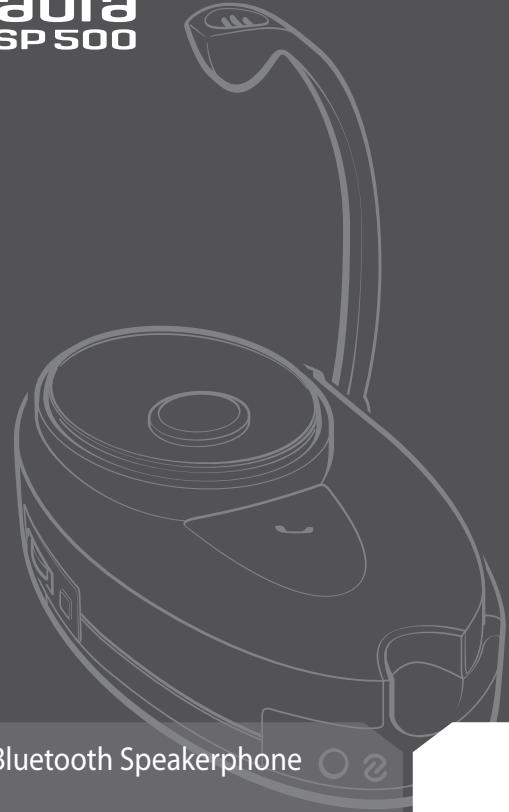
Bluetooth Speakerphone
User Manual
Jabra
Fig. 1
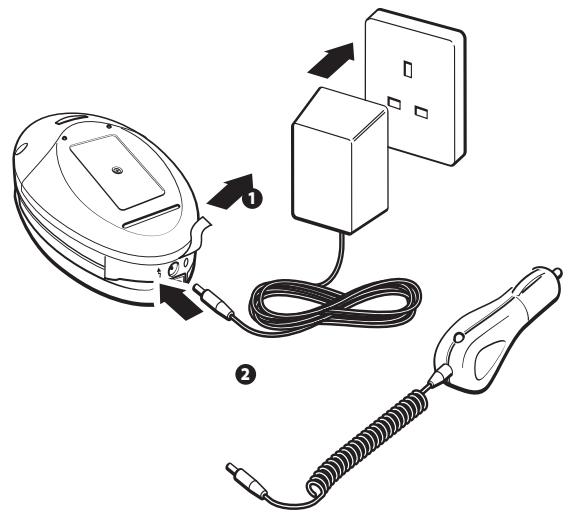
Fig.2
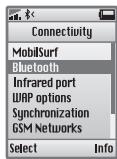
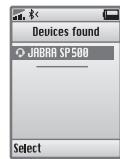
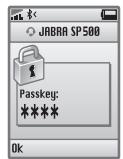
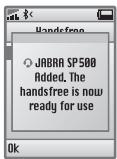
Fig. 3
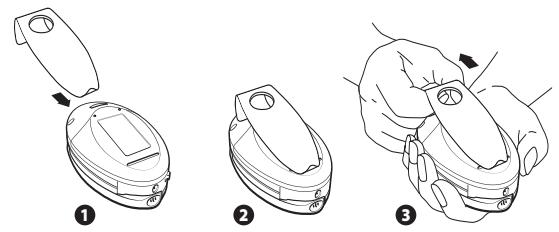
Fig. 4
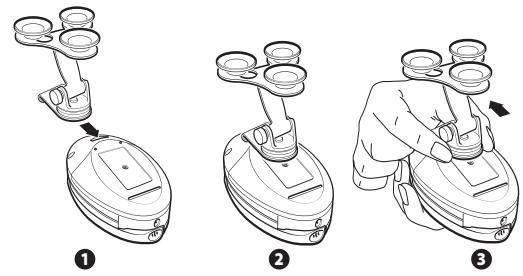
Fig. 5
English 1
Français 13
Espanol 25
English
Thank you 2
- Check for phone compatibility 3
- Charge the batteries 3
- Switching on the Jabra SP500 3
- "Pair" with your Bluetooth® mobile phone 4
- Making a call 4
- Ending a call 5
- Answering a call. 5
- Muting a call 5
- Call-waiting 5
- Indicator light. 5
- Office mode 6
12.Choosing speakerphone placement. 6 - Replacing the batteries 7
- Enhanced features (for Bluetooth mobile phones with hands-free profile) 7
- Frequently asked questions 8
- Storage of the Jabra SP500 8
- Need more help? 8
- Warranty 9
- Certification and safety approvals 10
- Glossary 11
Thank you
Thank you for purchasing a Jabra SP500, the most versatile Bluetooth speakerphone on the market. Jabra has become the market leader in hands-free communication products through the innovation and performance of our products. The Jabra SP500 is designed to perform superbly in any location – in the car, the home or the office.
Drive safely
Several studies have shown that cell phone usage while driving creates a distraction to the driver which may increase the likelihood of an accident. This distraction potential is not eliminated by the use of a hands-free phone. Hands-free phones have not been shown to be safer than hand-held phones with respect to driver distraction. When using the phone while driving, keep conversations short and resist any temptation to make notes or read documents. Before answering calls consider your circumstances. Pull off the road and park before making or answering calls when driving conditions require (e.g. bad weather, high traffic density, presence of children in the car, difficult junctions or maneuvers.)
Remember, driving comes first, not the call!
Abide by local laws.
Please check if the local laws where you live restrict the use of mobile phones while driving. It is the owner's responsibility to use this product in compliance with the laws of the place where you live.
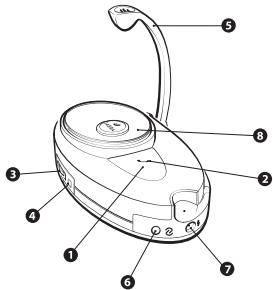
Jabra SP500 Overview
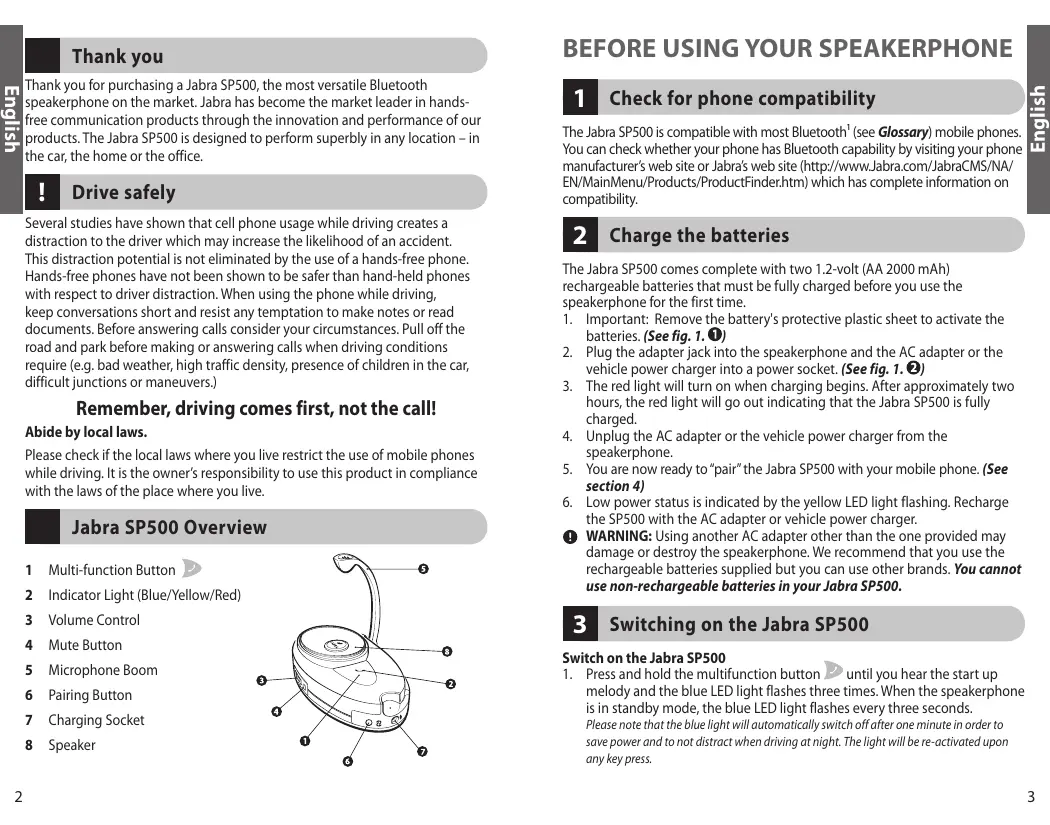
1 Multi-function Button
2 Indicator Light (Blue/Yellow/Red)
3 Volume Control
4 Mute Button
5 Microphone Boom
6 Pairing Button
7 Charging Socket
8 Speaker
BEFORE USING YOUR SPEAKERPHONE
1 Check for phone compatibility
The Jabra SP500 is compatible with most Bluetooth1 (see Glossary) mobile phones. You can check whether your phone has Bluetooth capability by visiting your phone manufacturer's web site or Jabra's web site (http://www.Jabra.com/JabraCMS/NA/EN/MainMenu Products/ProductFinder.htm) which has complete information on compatibility.
2 Charge the batteries
The Jabra SP500 comes complete with two 1.2-volt (AA 2000 mAh) rechargeable batteries that must be fully charged before you use the speakerphone for the first time.
- Important: Remove the battery's protective plastic sheet to activate the batteries. (See fig. 1. ①)
- Plug the adapter jack into the speakerphone and the AC adapter or the vehicle power charger into a power socket. (See fig. 1. ②)
- The red light will turn on when charging begins. After approximately two hours, the red light will go out indicating that the Jabra SP500 is fully charged.
- Unplug the AC adapter or the vehicle power charger from the speakerphone.
- You are now ready to "pair" the Jabra SP500 with your mobile phone. (See section 4)
- Low power status is indicated by the yellow LED light flashing. Recharge the SP500 with the AC adapter or vehicle power charger.
WARNING: Using another AC adapter other than the one provided may damage or destroy the speakerphone. We recommend that you use the rechargeable batteries supplied but you can use other brands. You cannot use non-rechargeable batteries in your Jabra SP500.
3 Switching on the Jabra SP500
Switch on the Jabra SP500
- Press and hold the multifunction button until you hear the start up melody and the blue LED light flashes three times. When the speakerphone is in standby mode, the blue LED light flashes every three seconds. Please note that the blue light will automatically switch off after one minute in order to save power and to not distract when driving at night. The light will be re-activated upon any key press.
Switch off the Jabra SP500
- Press and hold the multifunction button for approximately five seconds until you hear the shut down melody and the LED light has been switched off completely.
4 "Pair"2 with your Bluetooth mobile phone
- Ensure SP500 is switched on. (See section 3)
- Press the pairing button until you see a solid blue light (approximately two seconds), then release. Your speakerphone is now in pairing mode.
- Set your Bluetooth phone to "discover" the speakerphone by following your phone's instruction guide. Typically, the steps involve going to a "setup," "connect," or "Bluetooth" menu on your phone and then selecting the option to "discover" a Bluetooth device. (See example from a typical mobile phone in fig. 2)
- Your phone should find the "Jabra SP500" speakerphone and ask if you want to pair with it. Confirm by pressing "yes" or "ok."
- Enter passkey or PIN3 = 0000 (4 zeros), then press "yes" or "ok."
IMPORTANT: If pairing was successful, the blue indicator light will briefly flash rapidly before going back to flashing blue every three seconds. You will also hear the confirmation melody. If unsuccessful, the blue light remains solid, and you'll need to re-attempt pairing. (See steps 3-5 above)
USING YOUR Jabra SP500
Before using your Jabra SP500, ensure that the batteries are charged and the Jabra SP500 is paired (see item 3) with your Bluetooth mobile phone and switched on.
The speakerphone can be used while being recharged from a wall socket or from the car charger.
5 Making a call
Using your mobile phone's keypad
- Dial number on keypad.
- Press phone's "send" key.
- The Jabra SP500 has automatic volume control and will automatically adjust the speaker volume based on the relevant background noise. In order to adjust the volume according to your own preferences, use the volume control wheel.
Using voice-dialing (if supported by your phone)
- Press and release once. You'll hear one short beep while doing this.
- You'll then hear the voice-activation tone; say the name of the person you wish to call.
NOTE: Record voice tag via your mobile phone. If you have a Nokia phone you will be able to record the voice tags via your speakerphone.
6 Ending a call
Press and release once. OR
- End call from your mobile phone's keypad.
7 Answering a call
After you hear the ring tone, press and release once. OR
- Answer the call with your mobile phone's keypad. You may then need to transfer the call to the speakerphone by pressing and releasing once (depending on your phone).
8 Muting a call
- To enable mute press the mute button for one second and you will hear a short beep. You'll see a solid yellow light.
- To disable mute function press the mute button briefly.
9 Call-waiting*
It is recommended that you use your mobile phone's keypad which typically involves pressing the "send" button. OR
- Press and hold until you hear two beeps to answer the incoming call and switch between calls (some phones do not support call-waiting via this method).
- See Enhanced features section for alternative call-waiting instructions for mobile phones that support the hands-free profile. See section 13 for further details about Bluetooth profiles.
10 Indicator light
To avoid the Jabra SP500's LED light from distracting you when driving at night, the LED light will be switched off one minute after an active call. It is also possible to prevent the LED light from flashing by pressing and holding the mute button for 10 seconds until you hear a second beep. The Jabra SP500 will still function during this time. When you switch off the unit and then switch it back on again the LED light will begin flashing again.
11 Office mode
Office mode creates the appropriate sound sensitivity to provide optimal performance of the Jabra SP500 in the office or home environment. It's recommended that you only use this mode in the above mentioned environments.
- By pressing and holding the mute button for five seconds you will see the blue LED light flash rapidly and hear a short beep.
- To return to normal mode, repeat the above action.
When Jabra SP500 is in office standby mode, blue LED light flashes twice every three seconds.
For optimal performance during teleconferences, please ensure all participants face the microphone
12 Choosing speakerphone placement
For optimal performance, place your Jabra SP500 in direct line of sight with your Bluetooth mobile phone. You will get better performance when there are no obstructions (including parts of your body) between the Jabra SP500 and your mobile phone. Ensure that the microphone is pointing towards your mouth for optimal sound clarity.
The Jabra SP500 comes with two mounting options for your vehicle.
- A clip for attaching to the sun visor (See fig. 3) and suction mount for use on the windshield. (See fig. 4)
To release the clip or suction mount - just pull the clip or suction mount outwards. (See fig. 3.3 and 4.3)
IMPORTANT: Ensure that the speakerphone does not obstruct your view of the road or other road users. It is the owner's responsibility to ensure that the Jabra SP500 does not create a safety hazard and that its positioning complies with Federal and State laws. The Jabra SP500 should also be positioned such that it does not interfere with any vehicle safety equipment, including air bags. The Jabra SP500 should be positioned securely. Please be aware that in the event of a crash, loose objects may contribute to driver injury by becoming projectiles.
13 Replacing the batteries
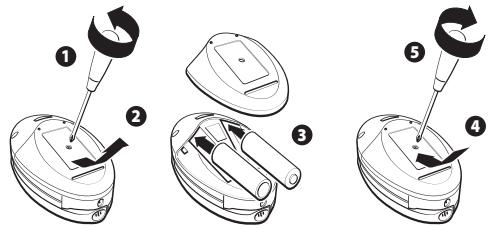
The Jabra SP500 comes complete with two 1.2-volt (AA) rechargeable batteries. You may have to eventually replace the batteries. Please use standard rechargeable 1.2 volt (AA 2000 mAh) NiMh batteries.
- Remove the back cover from the speakerphone and replace both batteries as indicated. Re-attach the back cover to the speakerphone. (See fig. 5)
14 Enhanced features (for B with hands-free profile)
Bluetooth profiles4 are protocols through which Bluetooth devices communicate with each other. Bluetooth phones support different sets of profiles – most support both headset and hands-free profiles. In order for Bluetooth devices to talk to each other they need to support the same Bluetooth profile. Jabra SP500 supports both the headset and hands-free profiles.
Although the Jabra SP500 is compatible with Bluetooth phones with either Bluetooth profile, enhanced features are available only for phones that support the hands-free Bluetooth profile. Check your phone's instruction guide or contact the phone manufacturer to find out if your phone supports the hands-free Bluetooth profile.
Enhanced features:
- Last number redial (when not on a call)
While the speakerphone is on, press and hold until you hear 2 short beeps, release immediately.
- Rejecting an incoming call (when not on a call)
When your phone rings, press and hold until you hear 2 short beeps, release immediately.
- Call-waiting (swapping between two calls)
When your phone notifies you of another incoming call while you're on a call, press and hold until you hear 2 short beeps, release immediately.
- Putting a call on hold
While you're on a call, press and hold until you hear 2 short beeps, release immediately. Repeat to retrieve the call.
15 Frequently asked questions
- How far away from my mobile phone will my Jabra SP500 work? The operating range is typically up to 30 feet (approximately 10 met
- Will the Jabra SP500 work with laptops, PCs, and PDAs?
Jabra SP500 will work with Bluetooth version 1.1 and 1.2 (or higher specifications) compatible devices which support the headset and/or hands-free profile(s). - Will the Jabra SP500 interfere with my car's electronics, radio, or computer?
Jabra SP500 produces significantly less power than a typical mobile phone. It also only emits signals that are in compliance with the strict international Bluetooth standard. Therefore, you should not expect any interference with standard consumer electronic equipment.
- How do I take care of the Jabra SP500?
To clean the speakerphone, use a clean, soft cloth that is slightly damp. - Can I use my Jabra SP500 while it is recharging?
The speakerphone can be used while being recharged from a wall socket or from the car charger. - Can I use my Jabra SP500 for voice dialing?
Yes, if your phone supports voice dialing. See section 5. - Why is there no light flashing?
See section 10. - Can I use standard AA batteries?
No this is not possible. See section 2.
16 Storage of the Jabra SP500
- Always store the Jabra SP500 with power off and safely protected.
- Avoid storage at high temperatures (above 45°C / 134°F ) – such as direct sunlight. (Storage at high temperatures can degrade performance and reduce battery life).
- Do not expose the speakerphone or any of its supplied parts to rain or other liquids.
17 Need more help?
- Web: www.jabra.com (for the latest support info and online User Manuals)
- E-mail: Tech Support: techsupp@jabra.com
Information: info@jabra.com
- Phone: 1 (800) 327-2230 (toll-free in USA and Canada)
18 Warranty
Jabra limited product warranty. Jabra is a wholly owned trademark of GN Mobile (GN Netcom A/S). Jabra warrants to Purchaser that for a period of one (1) year after the date of purchase (the "Warranty Period") of any Jabra Product ("Product") by Purchaser, the Product will substantially conform to Jabra's published specifications for the Product on the date of Purchaser's purchase of the Product, subject to the terms herein. Purchaser shall notify Jabra of any nonconformance during the Warranty Period and obtain a written return material authorization ("RMA") and an RMA number for the nonconforming Product from Jabra and return the nonconforming Product to Jabra, freight prepaid, with a statement describing the nonconformity. Jabra's exclusive obligation with respect to nonconforming Product shall be, at Jabra's option and expense, to repair or replace such Product so that it substantially conforms with its published specifications on the date of Purchaser's purchase, or, if Jabra, in Jabra's sole discretion, determines that it is not possible to repair or replace the Product, Jabra may, at Jabra's option, refund to Purchaser the purchase price paid for the Product. THE FOREGOING IS PURCHASER'S SOLE AND EXCLUSIVE REMEDY FOR BREACH OF WARRANTY BY JABRA WITH RESPECT TO THE PRODUCT. The warranty set forth above shall not apply to any Product which has not been properly used or handled in accordance with the instructions supplied by Jabra, lost or misplaced for any reason, or which has been modified, repaired or altered, except by Jabra or at a Jabra authorized service facility, or which has been subjected to faulty installation, misuse, abuse, or which the Product defect is attributable to any failure or damage which is beyond the reasonable control of Jabra. This warranty is available only to Purchaser, and does not extend to any distributors, retailers, or other resellers of the Product. This warranty applies only to new Jabra products purchased from authorized retail sellers. This warranty does not apply to: "open box purchases", resales by private parties or any other third party purchases by unauthorized distributors. Transfer of Jabra products through any unauthorized distributor renders our manufacturer's warranty null and void. BUYER BEWARE: any Jabra product sold by a private party or unauthorized distributor and not by an authorized Jabra retail seller is sold on an "as is" or "with all faults" basis with respect to Jabra. As such, the entire risk as to the quality and performance of such products will be with the buyer if the unauthorized distributor will not cover the costs of repairing defects. Should such products prove defective following their purchase, the buyer or unauthorized distributor, and not the manufacturer or its authorized retail sellers, assumes the entire cost of all necessary servicing or repair. Therefore, buyers are strongly encouraged to purchase Jabra products only from Jabra authorized retail sellers. THE FOREGOING WARRANTY ARE THE
SOLE WARRANTYES, EXPRESS OR IMPLIED, GIVEN BY JABRA IN CONNECTION WITH THE PRODUCT, AND JABRA DISCLAIMS ALL OTHER WARRANTYES, INCLUDING WARRANTYES OF MERCHANTABILITY, FITNESS FOR A PARTICULAR PURPOSE AND NONINFRINGEMENT OF THIRD PARTY RIGHTS. JABRA SHALL NOT BE LIABLE FOR ANY SPECIAL, INCIDENTAL OR CONSEQUENTIAL DAMAGES IN CONNECTION WITH THE PRODUCT, EVEN IF JABRA HAS BEEN ADVISED OF THE POSSIBILITY OF SUCH DAMAGES. THE LIABILITY OF JABRA HEREUNDER FOR ALL CLAIMS SHALL NOT EXCEED THE AMOUNT PAID BY PURCHASER TO JABRA FOR THE PRODUCT GIVING RISE TO JABRA'S LIABILITY.
19 Certification and safety approvals
FCC
This device complies with part 15 of the FCC Rules. Operation is subject to the following two conditions: (1) This device may not cause harmful interference, and (2) this device must accept any interference received, including interference that may cause undesired operation.
Users are not permitted to make changes or modify the device in any way. Changes or modifications not expressly approved by Jabra will void the user's authority to operate the equipment.
This equipment has been tested and found to comply with the limits for a Class B digital device, pursuant to part 15 of the FCC Rules. These limits are designed to provide reasonable protection against harmful interference in a residential installation. This equipment generates, uses and can radiate radio frequency energy and, if not installed and used in accordance with the instructions, may cause harmful interference to radio communications. However, there is no guarantee that interference will not occur in a particular installation. If this equipment does cause harmful interference to radio or television reception, which can be determined by turning the equipment off and on, the user is encouraged to try to correct the interference by one or more of the following measures:
- Reorient or relocate the receiving antenna.
- Increase the separation between the equipment and receiver.
- Connect the equipment into an outlet on a circuit different from that to which the receiver is connected.
- Consult the dealer or an experienced radio/TV technician for help. The user must place the base 8'' (20cm) or more from any personnel in order to comply with FCC RF exposure requirements.
CE
This product is CE marked according to the provisions of the R & TTE Directive (99/5/EC).
Hereby, Jabra, declares that this product is in compliance with the essential requirements and other relevant provisions of Directive 1999/5/EC.
For further information please consult http://www.gnnetcom.com Please note that this product uses radio frequency bands not harmonised within EU. Within the EU this product is intended to be used in Austria, Belgium, Denmark, Finland, France, Germany, Greece, Ireland. Italy, Luxembourg, The Netherlands, Portugal, Spain, Sweden, United Kingdom and within EFTA in Iceland, Norway and Switzerland.
Bluetooth
The Bluetooth® word mark and logos are owned by the Bluetooth SIG, Inc. and any use of such marks by Jabra is under license. Other trademarks and trade names are those of their respective owners.
20 Glossary
1 Bluetooth is a radio technology developed to connect devices, such as mobile phones and headsets, without wires or cords over a short distance of approximately 30 feet (approximately 10 meters). More information is available at. www.bluetooth.com
2 Pairing creates a unique and encrypted communication link between two Bluetooth enabled devices and allows them to communicate with each other. Bluetooth devices will not work if the devices have not been paired with each other.
3 Passkey or PIN is a secret code that needs to be entered on the phone in order to pair the mobile phone with the Jabra SP500. Once you have paired your mobile phone with the speakerphone, the phone and the Jabra SP500 will recognize each other and the phone will bypass the discovery and authentication process and automatically accept the transmission.
4 Bluetooth profiles are protocols through which Bluetooth devices communicate with other devices. Bluetooth phones support different sets of profiles – most support the headset profile but some support the hands-free profile and others support both profiles. In order to support a certain profile, a phone manufacturer has to implement certain mandatory features within the phone's software.
5 Active mode is when the speakerphone has an active call in progress. Jabra SP500 will go from standby mode into active mode when you receive a call or when you make a call. When the speakerphone is in active mode, the blue light will flash every second.
6 Standby mode is when the Jabra SP500 is passively waiting for a call. When you "end" the call on your mobile phone, the speakerphone will go into standby mode. When Jabra SP500 is in standby mode, the blue light will flash every three seconds for one minute.
François
Merci 14
- ENGLISH
- THANK YOU 2
- THANK YOU
- DRIVE SAFELY
- REMEMBER, DRIVING COMES FIRST, NOT THE CALL
- ABIDE BY LOCAL LAWS
- JABRA SP500 OVERVIEW
- BEFORE USING YOUR SPEAKERPHONE
- 1 CHECK FOR PHONE COMPATIBILITY
- 2 CHARGE THE BATTERIES
- 3 SWITCHING ON THE JABRA SP500
- SWITCH ON THE JABRA SP500
- SWITCH OFF THE JABRA SP500
- 4 "PAIR"2 WITH YOUR BLUETOOTH MOBILE PHONE
- USING YOUR JABRA SP500
- 5 MAKING A CALL
- USING YOUR MOBILE PHONE'S KEYPAD
- USING VOICE-DIALING (IF SUPPORTED BY YOUR PHONE)
- 6 ENDING A CALL
- 7 ANSWERING A CALL
- 8 MUTING A CALL
- 9 CALL-WAITING
- 10 INDICATOR LIGHT
- 11 OFFICE MODE
- 12 CHOOSING SPEAKERPHONE PLACEMENT
- 13 REPLACING THE BATTERIES
- 14 ENHANCED FEATURES (FOR B WITH HANDS-FREE PROFILE)
- ENHANCED FEATURES
- 15 FREQUENTLY ASKED QUESTIONS
- 16 STORAGE OF THE JABRA SP500
- 17 NEED MORE HELP
- 18 WARRANTY
- 19 CERTIFICATION AND SAFETY APPROVALS
- FCC
- CE
- BLUETOOTH
- 20 GLOSSARY
- FRANÇOIS
- MERCI 14
Brand : JABRA
Model : SP 500
Category : Bluetooth speaker