USER MANUAL MB-D80 NIKON
Multi-Power Battery Pack
MB-D80
Instruction Manual
Instruction Manual
Instruction Manual
MB-D80 Multi-Power Battery Pack Instruction Manual
Safety Precautions 2 Precautions for Use 2 Introduction 3 Parts of the MB-D80 3 The Control Lock 3 The Shutter-Release Button and Command Dials....3 The AE-L/AF-L Button. 4 Using the Battery Pack 4 Attaching the Battery Pack 4 Removing the Battery Pack. 4 Inserting Batteries 5 Removing the Batteries 7 Specifications. 8
Safety Precautions
En
To ensure proper operation, read this manual thoroughly before using this product. After reading, be sure to keep it where it can be seen by all those who use the product.
Precautions for Use
- The MB-D80 is for use with compatible devices only.
- Do not use with batteries and battery holders not recommended in this manual. The MB-D80 cannot be used with rechargeable EN-EL3a/EN-EL3 Li-ion batteries or the MS-D100 or MS-D70 battery holders.
- To prevent electrical shorts caused by metal objects touching the power terminals, replace the contact cap when the MB-D80 is not in use.
- When the battery holder is removed from the MB-D80, remove the batteries or place the holder in a container to prevent electrical shorts caused by contact with other metal objects.
- Should you notice smoke or an unusual smell or noise from the battery pack, discontinue use immediately. After removing the batteries, take the device to the retailer or a Nikon-authorized service representative for inspection.
- The MB-D80 is not equipped with a power switch. Use the camera power switch to turn the power on or off.
EN-EL3e Batteries
The performance of EN-EL3e batteries drops at temperatures below about 10°C (50°F). Be sure the battery is fully charged and keep a warm spare battery on hand ready to exchange as necessary. Cold batteries will recover some of their charge when warmed.
AA Batteries
Due to their limited capacity, AA LR6 alkaline and ZR6 nickel-manganese batteries should be used only when no other alternative is available. Do not use at low temperatures. In general, AA batteries have less capacity than EN-EL3e batteries when used in the MB-D80; EN-EL3e batteries are recommended for best performance.
The capacity of AA batteries varies with make and storage conditions; in some cases, they may cease to function before their expiry date. Note that the capacity of AA batteries drops sharply at temperatures below 20°C (68°F).
Introduction
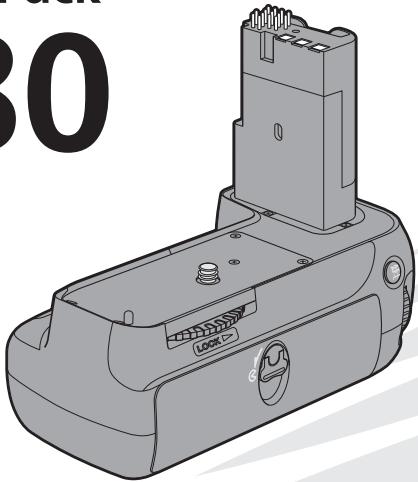
Thank you for your purchase of an MB-D80 multi-power battery pack for use with Nikon D80 single-lens reflex digital cameras. The MB-D80 takes one or two EN-EL3e rechargeable batteries or six AA batteries (alkaline, Ni-MH, lithium, or nickel-manganese) and includes an alternate shutter-release button, AE-L/AF-L button, and main and sub-command dials for taking pictures in "tall" (portrait) orientation.
① Contact cap ② Signal contacts ③ Power terminals ④ Main command dial ⑤ AE-L/AF-L button ⑥ Battery-chamber cover ⑦ Battery-chamber latch ⑧ Attachment wheel ⑨ Mounting screw ⑩ Holder for battery-chamber cover ⑪ Shutter-release button ⑫ Control lock ⑬ Sub-command dial ⑭ Tripod socket ⑮ Battery chamber ⑯ Battery latches ⑰ L slot ⑱ R slot ⑲ MS-D200 battery holder ⑳ Battery holder power terminals
The MS-D200 battery holder is inserted in the MB-D80 at shipment. See "Removing the Batteries" for information on removing the battery holder.
The Control Lock
The control lock (Figure A-12) locks the shutter-release button, AE-L/AF-L button, and main and sub-command dials on the MB-D80 to prevent unintended use. Before using these controls to take photographs in vertical (portrait) orientation, select to release the lock. The control lock is not a power switch. Use the camera power switch to turn the camera on and off.
The MB-D80 is equipped with a shutter-release button (Figure A-11), main command dial (Figure A-4), and sub-command dial (Figure A-13) for use when taking photographs in vertical (portrait) orientation. These controls perform the same functions as the corresponding controls on the camera. See the camera Guide to Digital Photography for more information.
Changes to Custom Setting 15 (Command dials) also apply to the command dials on the MB-D80. See the camera Guide to Digital Photography for details.
The MB-D80 is equipped with an alternate AE-L/AF-L button for use when taking photographs in "tall" (portrait) orientation. This button performs the same functions as the AE-L/AF-L button on the camera and is affected by changes to Custom Setting 18 (AE-L/AF-L). See the camera Guide to Digital Photography for details.
Using the Battery Pack
Attaching the Battery Pack
Before attaching the battery pack, be sure that the camera is off and that the MB-D80 control lock (Figure A-12) is in the L position.
1 Remove the contact cap (Figure A-①) from the battery pack. Be sure to replace the cap when the MB-D80 is not in use. The cap can be threaded onto the camera strap when removed from the battery pack. 2 Open the camera battery-chamber cover and remove it from the base of the camera handgrip as shown in Figure B. Remove the battery, if present, and place the camera battery-chamber cover in the battery-chamber cover holder (Figure C).
A PB-6D and PK-13 auto-extension ring are required when using PB-6 bellows with the MB-D80.
3 Insert the MB-D80 as shown in Figure D. 4 Firmly tighten the attachment wheel by rotating it in the direction shown by the LOCK arrow (Figure E).
Removing the Battery Pack
To remove the MB-D80, turn the camera off and set the control lock on the MB-D80 to L and then follow the above steps in the reverse order.
Be sure to place the camera battery-chamber cover in the battery-chamber cover holder to prevent loss.
Inserting Batteries
The MB-D80 can be used with one or two EN-EL3e rechargeable Li-ion batteries, or with six AA batteries inserted in the MS-D200 battery holder.
Before inserting batteries, be sure that the camera is off and that the MB-D80 control lock is in the L position.
1 Turn the battery-chamber latch on the back of the MB-D80 to the E position and open the battery-chamber cover (Figure F). 2 Insert the batteries.
EN-EL3e: Insert the batteries as shown on the inside of the battery chamber cover. The battery latch will slide aside during insertion and pop up to lock the battery in place when fully inserted (Figure G). If only one battery is used, it may be inserted into either slot.
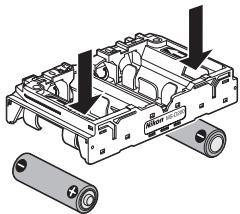
AA: Place six AA batteries in the MS-D200 as shown below and slide the holder into the battery chamber. The two battery latches (Figure H-1) will slide aside during insertion (Figure H-2) and pop up to lock the battery holder in place when fully inserted.
MS-D200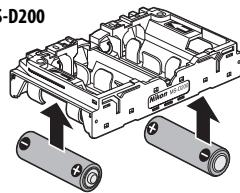
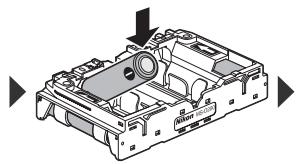
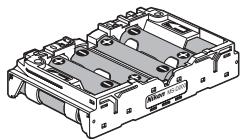
3 Close and latch the battery-chamber cover (Figure 1). Make sure the cover is fully closed before turning the latch. 4 Turn the camera on and check the battery level in the control panel or viewfinder. If EN-EL3e batteries are used, battery level can also be verified by means of the Battery info option in the camera setup menu.

Using an AC Adapter
If the MB-D80 is inserted in the camera, be sure to remove AA batteries before connecting an AC adapter. Failure to observe this precaution may shorten the life of AA batteries.
Use EN-EL3e batteries if possible. AA batteries have less capacity and suffer a marked drop in performance at low temperatures.
When using AA batteries, note that all six batteries must be of the same type.
Note that the MB-D80 can also be inserted in the camera after the battery or battery holder is inserted.
Battery Level
The camera displays battery level as follows:
EN-EL3e Batteries
| Control panel | Viewfinder | Description |
| — | — | Battery fully charged. |
| — | — | Battery partially dis-charged. |
| — | — | Low battery. Ready spare batteries. |
| — | — | Battery exhausted. Shutter release dis-abled. |
| (blinks) | (blinks) | (Blinks) |
AA Batteries
| Control panel | Viewfinder | Description |
| √/√/√ | — | Batteries fully charged. |
| √/√/√ | — | Low batteries. Ready spare batteries. |
| √/√/√ (blinks) | √/√/√ (blinks) | Batteries exhausted. Shutter release disabled. |
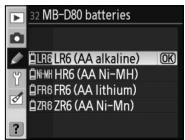
To ensure that the camera shows the correct battery level when AA batteries are used, choose the appropriate option for Custom Setting 32 (MB-D80
batteries) in the camera Custom Settings menu. If the correct option is not selected, the camera may fail to function as expected.
| Battery type | Option |
| AA alkaline (LR6) | LR6 (AA alkaline) |
| AA Ni-MH (HR6) | HR6 (AA Ni-MH) |
| AA Lithium (FR6) | FR6 (AA lithium) |
| AA nickel-manganese (ZR6) | ZR6 (AA Ni-Mn) |
Remove the batteries when the MB-D80 is not in use.
Battery Info
The Battery info option in the camera setup menu displays information on EN-EL3e batteries. See the camera manual for details.
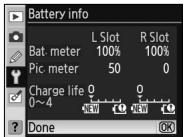
Battery information is listed separately for each slot. The Battery info option is not available with AA batteries.
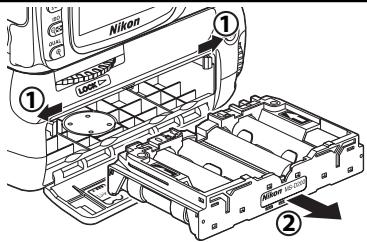
Removing the Batteries
Being careful not to drop the battery or holder, remove them as shown below.
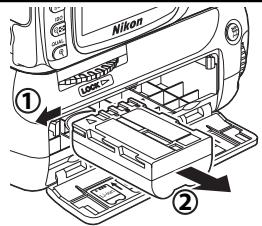
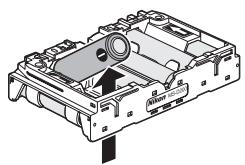
AA batteries can be removed from the MS-D200 using the holes in the back of the holder. Be careful not to drop the batteries when removing them from the holder.
Specifications
| Power source | One or two EN-EL3e rechargeable Li-ion batteries; six LR6 alkaline, HR6 Ni-MH, FR6 lithium, or ZR6 nickel-manganese AA batteries |
| Battery life | Approximately 5000 shots (two EN-EL3e batteries), 2500 shots (one EN-EL3e battery), or 480 shots (alkaline batteries).* |
| Operating temperature | 0–+40°C (+32–104°F) |
| Dimensions | Approximately 138 (W) × 73.5 (D) × 110 (H) mm/5.4 × 2.9 × 4.3 in. |
| Weight | Approximately 230 g (7.4 oz), excluding batteries |
- Measured at room temperature (20°C/68°F) with a Zoom Nikkor AF-S DX 18-135 mm f/3.5-5.6G IF ED lens under the following standard Nikon test conditions: continuous shooting mode; continuous-servo autofocus; image quality set to JPEG Basic; image size set to Medium; shutter-speed 1/250 ; shutter-release button pressed halfway for three seconds and focus cycled from infinity to minimum range three times; after six shots, monitor turned on for five seconds and then turned off; cycle repeated once exposure meters have turned off. Specifications and design are subject to change without notice.
Components of the MB-D80 (Fig. 1)
① Contact cover ② Signal contacts ③ Power contacts ④ Main control dial ⑤ AE-L/AF-L button ⑥ Battery chamber cover ⑦ Battery chamber latch ⑧ Function dial ⑨ Tripod socket ⑩ Battery chamber cover release switch ⑪ Shutter-release button ⑫ Focus selector lock ⑬ Auxiliary command dial ⑭ Battery chamber ⑮ Battery latch ⑯ Left battery chamber ⑰ Right battery chamber ⑱ Battery holder MS-D200 ⑲ Power contacts of battery holder
The MB-D80 is supplied with the MS-D200 battery holder inserted. For information on removing the battery holder, see the section "Removing the Battery Holder".
Blocking switch
The blocking switch (Fig. A-12) blocks the shutter-release button, the AE-L/AF-L button, and the main and sub command dials on the MB-D80 to prevent accidental operation. Before using the controls for shooting in vertical (portrait) orientation, set the switch to ● to release the lock.
The blocking switch is not a power switch. To turn the camera on or off, use the corresponding switch on the camera.
Shutter-release button and command dials
The MB-D80 grip is equipped with a shutter-release button (Fig. A-11), a main command dial (Fig. A-4), and a sub-command dial (Fig. A-3) for use when shooting in vertical (portrait) orientation. These controls perform the same functions as the equivalent controls on the camera. For additional information, see the Digital Camera Manual included in the camera package.
Batteries: MB-80. For details on batteries, see the Digital Camera Manual included in the camera package.
AE-L/AF-L button
The MB-D80 grip is equipped with an additional AE-L/AF-L button for use when shooting in vertical (portrait) orientation. This button performs the same functions as the AE-L/AF-L button on the camera, and the same settings apply to it (AE-L/AF-L). For additional information, see the Digital Camera Manual included in the camera package.
Using the multi-function grip
Attaching the multi-function grip
Before attaching the grip, make sure the camera is turned off and the blocking switch on the MB-D80 (Fig. A-12) is set to the unlocked position.
1. Remove the contact cover from the grip (Fig. A-①). Always keep the contacts covered when the grip is not in use. The cover can be attached to the camera strap. 2. Open the battery-chamber cover on the bottom of the camera, as shown in Fig. B. Remove the battery and attach the battery-chamber cover to the holder provided for it (Fig. C).
To use the PB-6 extension bellows with the MB-D80 grip, the automatic extension rings PB-6D and PK-13 are required.
3. Insert the MB-D80 as shown in Fig. D. 4. Tighten the locking screw by turning it in the direction indicated by the arrow (Fig. E).
Removing the grip
To attach the MB-D80 grip, turn off the camera, set the grip's lock switch to L, and then perform the sequence of actions in reverse of the removal procedure.
Be sure to attach the battery chamber cover to prevent it from being lost.
Inserting the batteries
The MB-D80 can be used with one or two EN-EL3e rechargeable batteries or with six AA batteries, which are inserted into the MS-D200 battery holder.
Before inserting the batteries, make sure the camera is turned off and the MB-D80's lock switch is in the L position.
Multi power battery pack MB-D80
Parts of the multi power battery pack MB-D80 (Figure A)
[EN-EL3e procedures]