
MM 100 - Wireless Headphones SENNHEISER - Free user manual and instructions
Find the device manual for free MM 100 SENNHEISER in PDF.



| Product type | Bluetooth stereo wireless headset |
| Brand | SENNHEISER |
| Model | MM 100 |
| Dimensions (L × H × D) | 115 × 50 × 145 mm |
| Headset weight | approx. 54 g |
| Listening time | up to 7.5 hours |
| Talk time | up to 9 hours |
| Standby time | up to 220 hours |
| Charging time (first time) | 3 hours |
| Charging time (subsequent) | 2.5 hours |
| Battery type | Built-in lithium polymer |
| Bluetooth version | 2.0 + EDR |
| Bluetooth range | up to 10 meters |
| Supported Bluetooth profiles | HSP, HFP, A2DP, AVRCP |
| Operating temperature | 10 °C to 40 °C |
| Storage temperature | -10 °C to 70 °C |
| Power supply weight | approx. 75 g |
| Included accessories | MM 100 headset, power supply (EU/UK/US), USB cable, instruction manual |
| Maintenance | Clean with a dry cloth; do not use liquids or solvents |
| Repairability | Spare parts available: ear pads (HZP 16), USB cable, power supplies, car charger |
Frequently Asked Questions - MM 100 SENNHEISER
User questions about MM 100 SENNHEISER
0 question about this device. Answer the ones you know or ask your own.
Ask a new question about this device
Download the instructions for your Wireless Headphones in PDF format for free! Find your manual MM 100 - SENNHEISER and take your electronic device back in hand. On this page are published all the documents necessary for the use of your device. MM 100 by SENNHEISER.
USER MANUAL MM 100 SENNHEISER
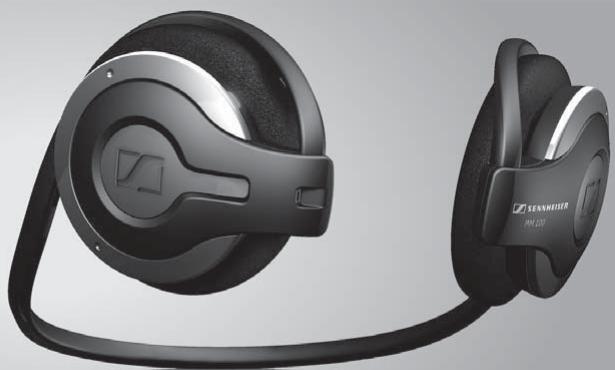
Bluetooth® Stereo Headset
MM 100
Bedienungsanleitung
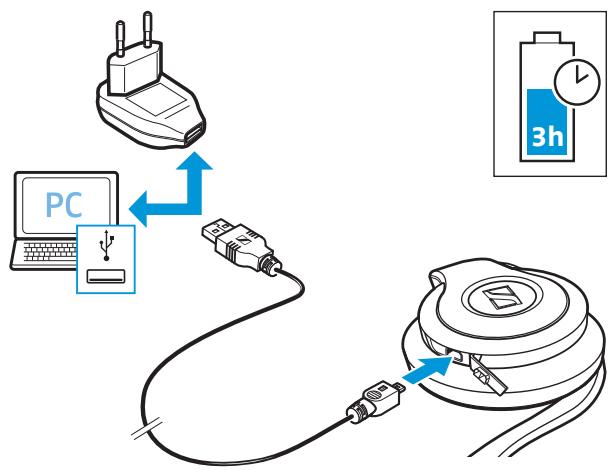
Charging the headset
2
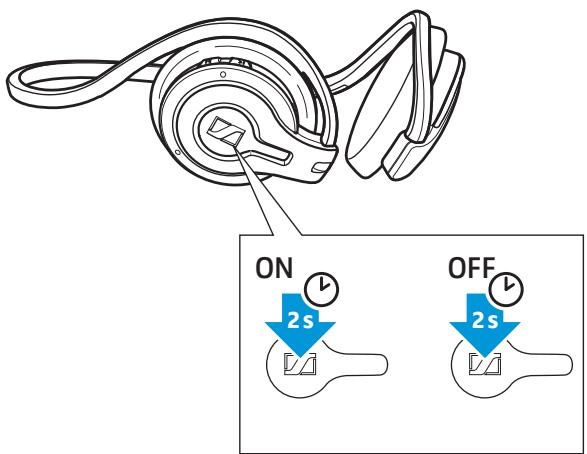
Switching the headset on/off
3
Pairing the headset to a Bluetooth device (e.g. mobile phone)
))

MP3 Mobile Manual
4
Adjusting the volume individually for ring tone, for calling and for music
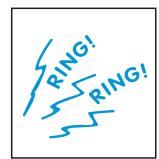

Ring tone
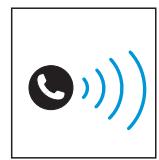

Calling
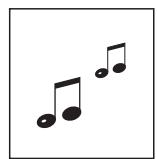

Music
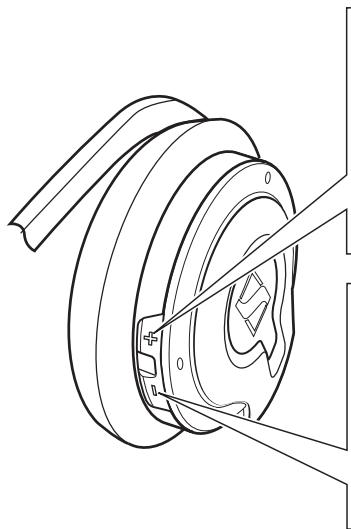
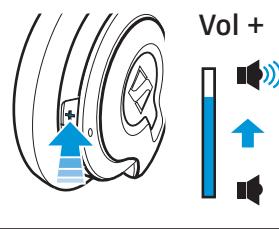
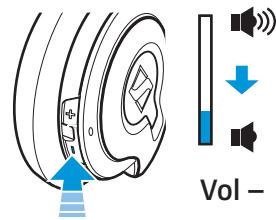
5
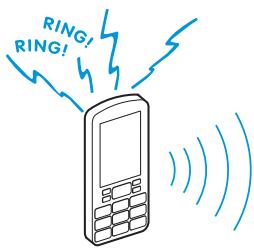
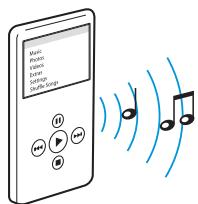
Accepting calls and listening to music


English
Deutsch
François
Italiano
Espanol
Nederlandss
Portugues
Contents
Important safety information 1
Delivery includes 3
Features of the MM 100 3
Operating elements 4
Overview of pictograms 4
Overview of buttons 5
LED indications 6
Putting the MM 100 into operation 7
Charging the headset battery 7
Switching the headset on 8
Establishing Bluetooth connections 8
Switching the headset off 9
9
Using the MM 100 10
Wearing the headset 10
Listening to music 11
Calling 11
Muting/unmuting the headset's microphone 13
Changing the volume 13
If you are out of the transmission range 13
Cleaning and maintaining the MM 100 14
Accessories 14
Specifications 15
Manufacturer declarations 15
Important safety information
The MM 100 has been manufactured according to the accepted rules of safety and current technology. However, there is still a danger of damage to equipment if the following general safety instructions are not complied with.
- Read this instruction manual.
- Follow all instructions.
- Make this instruction manual easily accessible to all users at all times. Always include this instruction manual when passing the MM 100 on to third parties.
General instructions
- Never disassemble or modify components of the MM 100.
- The built-in rechargeable battery may present a fire or chemical burn hazard if mistreated. Therefore, do not disassemble, heat above 40^ (104°F) or incinerate the rechargeable battery.
- Sennheiser Communications is not liable for damages resulting from the loss of connection due to a run flat battery, an old battery or exceeding the transmission range.
Before operation
- Use the MM 100 in dry places only and keep liquids and small electrically conductive parts away from the MM 100 and its connecting sockets.
- Do not expose the MM 100 to extreme temperatures. Normal operating temperatures are 10^ ( 50^ ) to 40^ ( 104^ ).
- Store the headset in a clean, dust-free environment.
During charging
- Do not wear the headset when charging.
- Sennheiser Communications is not liable for damages to USB devices that are not consistent with the USB specifications.
During operation
- The headset must be charged either with a compatible Sennheiser Communications power supply, the compatible Sennheiser Communications car charger unit, or other compatible Sennheiser Communications' charging units.
-
Never try to charge batteries other than the one in the MM 100 headset with the MM 100 power supply or car charger unit.
-
Avoid listening at high volume levels for long periods since this leads to permanent hearing damage.
- Observe your country's regulations for the use of mobile phones, headsets and hands free equipment in traffic. Always focus your attention on driving safely!
- This equipment generates, uses and can radiate radio frequency energy and, if not used in accordance with the instructions, may cause harmful interference to radio communications. However, there is no guarantee that interference will not occur in a particular installation.
- Only use the headset in aircraft where wireless Bluetooth® transmission is permitted.
- The headset contains magnets that generate a magnetic field which could cause dangerous interference with cardiac pacemakers and implanted defibrillators. Keep the headset at least 1.2'' (3 cm) from cardiac pacemakers or implanted defibrillators.
After the usage period
- Dispose of the built-in batteries according to local regulations. Do not dispose as household waste.
Intended use
The MM 100 is an accessory for mobile phones or any Bluetooth compliant device with a hands free profile (HFP), a headset profile (HSP), an advanced audio distribution profile (A2DP) or an audio/video remote control profile (AVRCP). It is intended for wireless communication via Bluetooth technology in dry environments.
It is considered improper use when the MM 100 is used:
- for any application not named in this instruction manual,
under operating conditions that deviate from those described in this instruction manual.
Safety instructions for Lithium-Polymer rechargeable batteries
The MM 100 has a built-in Lithium-Polymer rechargeable battery. If abused or misused, rechargeable batteries may leak.
WARNING! In extreme cases, rechargeable batteries may even present

- a heat hazard
a fire hazard - an explosion hazard
- a smoke and gas hazard
Please understand that Sennheiser Communications does not accept liability for damage arising from abuse or misuse.
| Keep away from children. | Only charge rechargeable batteries at ambient temperatures between 10 °C/50 °F and 40 °C/104 °F. | |
| Do not heat above 40 °C/104 °F, e.g. do not expose to sunlight or throw into a fire. | Do not charge the rechargeable battery if the unit is obviously defective. | |
| Do not expose to moisture. | Do not mutilate or dismantle. | |
| Do not short-circuit. | Store the units/rechargeable batteries in a cool and dry place at room temperature (approx. 20 °C/68 °F). | |
| When not using rechargeable batteries for extended periods of time, charge them regularly (every six months for about one hour). | Only charge rechargeable batteries with the appropriate Sennheiser Communications chargers. | |
| Return defective units or units with defective rechargeable batteries to your specialist dealer. | ||
Delivery includes
1 MM 100 Bluetooth stereo headset with built-in rechargeable Lithium-Polymer battery
1 MM 100 power supply (EU/UK/US version)
1 USB charging cable
1 instruction manual
Features of the MM 100
- A2DP stereo Bluetooth® headset with excellent sound quality
Superb natural stereo sound - Comfortable, discreet neckband
-
2 simultaneous sources - e.g. MP3 player and mobile phone
Audio player control -play/pause -skip to the next track/previous track* -
Mobile phone control
-
answer/end/reject
- mic muting
transfer call*, redial*, voice dial*
Battery life time
- up to 7.5 hours of music listening
- up to 9 hours of talk time
-
up to 220 hours of standby time
-
These functions must be supported by the mobile phone.
Bluetooth
The MM 100 complies with the Bluetooth 2.0 + EDR standard. Via its Bluetooth interface, it can be connected to a wide variety of Bluetooth enabled devices. Bluetooth wireless technology allows the MM 100 to communicate with your Bluetooth enabled device (e.g. mobile phone, MP3 player, PC or PDA) within a range of up to 10 meters. In addition, the headset is compatible with all Bluetooth 1.1 and 1.2 devices that support the hands free (HFP), headset (HSP), or advanced audio distribution profile (A2DP)

Operating elements
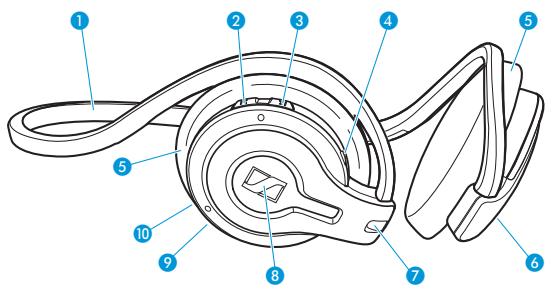
1 Neckband
2 Prev. button
3 Next button
4 LED
5 Ear pads (removable)
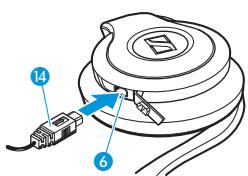
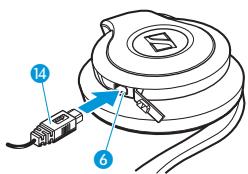
6 Socket for power supply
Microphone
8 Play/Pause button
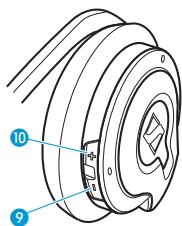
9 Volume down button
10 Volume up button
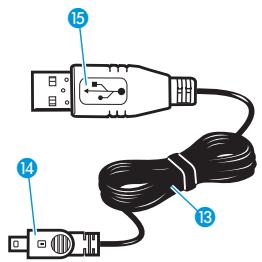
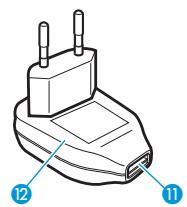
1 Socket for USB charging cable
MM 100 power supply
USB charging cable
14 Charging plug
USB plug
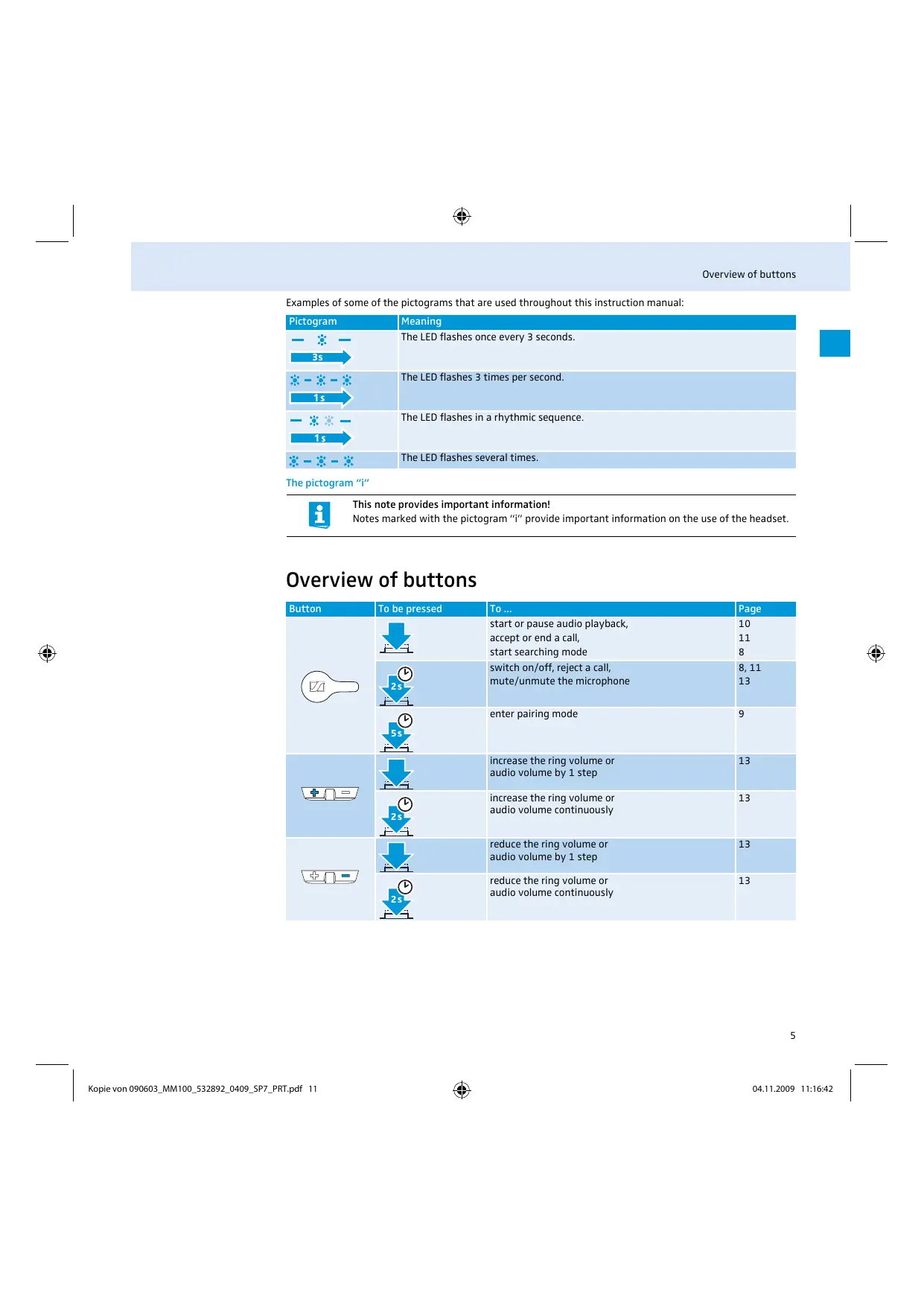
Overview of pictograms
Meaning of the pictograms for pressing a button
| Pictogram | Meaning |
| 5s | Briefly press this button. |
| Keep this button pressed for 5 seconds. |
Meaning of the pictograms for the flashing of the LED
| Pictogram | Meaning |
| This pictogram symbolizes a flashing. | |
| - | This pictogram symbolizes an interruption. |
| 1s→ | This pictogram symbolizes an interval. |
Examples of some of the pictograms that are used throughout this instruction manual:
| Pictogram | Meaning |
| 3s | The LED flashes once every 3 seconds. |
| 1s | The LED flashes 3 times per second. |
| 1s | The LED flashes in a rhythmic sequence. |
| - - - - | The LED flashes several times. |
The pictogram "i"

This note provides important information!
Notes marked with the pictogram "i" provide important information on the use of the headset.
Overview of buttons
| Button | To be pressed | To ... | Page |
| start or pause audio playback, accept or end a call, start searching mode | 10 11 8 | ||
| switch on/off, reject a call, mute/unmute the microphone | 8, 11 13 | ||
| enter pairing mode | 9 | ||
| increase the ring volume or audio volume by 1 step | 13 | ||
| increase the ring volume or audio volume continuously | 13 | ||
| reduce the ring volume or audio volume by 1 step | 13 | ||
| reduce the ring volume or audio volume continuously | 13 | ||
| skip forward*/accept call | 11/11 | ||
| reject a call | 11 | ||
| redial*, transfer calls between headset and mobile phone* | 12, 12 | ||
| enter pairing mode | 9 | ||
| skip backward*/accept call | 11/11 | ||
| reject a call | 11 | ||
| transfer calls between headset and mobile phone* | 12 | ||
| voice dial* | 12 | ||
| enter pairing mode | 9 |
- These functions must be supported by the mobile phone.
LED indications
Meaning during operation
For a more detailed description of the LED indications, see "Switching the headset on" on page 8.
| LED flashing | Meaning during operation | |
| 1s | blue ♂ and red ♂ | Pairing mode |
| 3s | once every 3 seconds | Standby mode |
| 4s | glowing slowly every 4 seconds | Audio streaming mode |
| 1s | rapidly (once every second) | Active call mode |
| 1s | several times every second | Searching mode |
| 1s | slowly (once every second) | Idle mode |

After switch-on, flashing of the LED in blue indicates that the battery charge status is OK; flashing in red indicates a low battery. When the battery is about to run flat, all indications turn red.
Meaning during charging
| LED colour | Meaning during charging |
| red ⊙ | Charging mode |
| blue* ⊙ | Charging complete |
- The LED switches off after 1 hour to save battery power.
Putting the MM 100 into operation
Charging the headset battery
If you charge the battery for the first time, allow charging for at least 3 hours without interruption. Later, 2.5 hours will suffice to fully charge the battery.

If you charge the MM 100, it will stop any operation and go into charging mode.
A fully charged battery provides a playback time of up to 7.5 hours or a standby time of up to 220 hours. When the battery is about to run flat:
All indications of the LED 4 turn red.
- A low battery warning (three beeps) is heard in the headset.
- You have several minutes of battery reserve. When the battery is empty, you first hear the three warning beeps and then a descending sequence of tones in the headset. The headset switches off.
To charge the headset's built-in battery via the MM 100 power supply 12:
CAUTION! Danger of injury!

Wearing the headset when charging can cause burns and injuries.
Do not wear the headset when charging.
Take off the headset and switch it off (see page 9).
Connect the charging plug 14 to the socket for power supply 6.
Connect the MM 100 power supply to the mains.
During charging, the LED ④ lights up red continuously. When charging is complete, the LED ① turns blue continuously for max. 1 hour. As long as the headset is connected to a power source, all operating buttons are blocked.

You can also charge the MM 100 via an USB port using the supplied USB cable.
Switching the headset on
To switch the headset on:
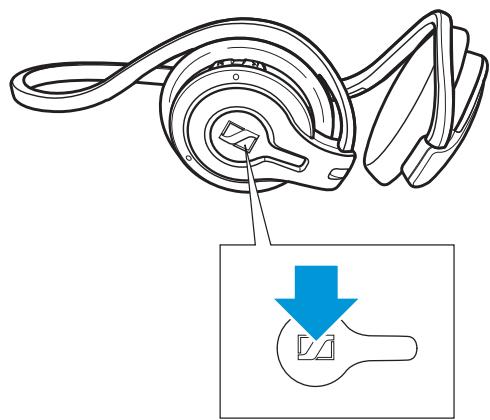
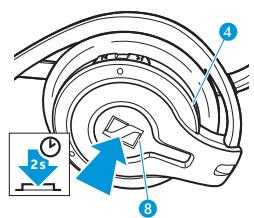
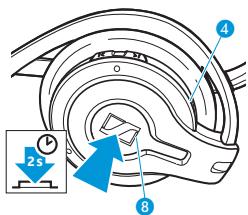
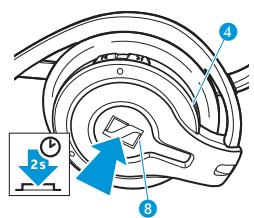
Press and hold the Play/Pause button 8 for 2 seconds.
An ascending confirmation beep is heard in the headset and the LED 4 indicates the current operating mode.

Flashing in blue indicates that the battery charge status is OK; flashing in red indicates a low battery (see page 6).
Searching mode

The LED ④ flashes several times every second:
The headset is paired to one or several Bluetooth devices and tries to connect to one of these devices.
Idle mode

The LED 4 flashes slowly (once every second):
The headset is paired to one or several Bluetooth devices. However, there is no current connection because the Bluetooth device is switched off or out of range.
Standby mode

The LED 4 flashes once every 3 seconds:
The headset is paired to one or several Bluetooth devices. However, there is neither an audio transmission nor an active call.
Audio streaming mode

The LED 4 is glowing slowly every 4 seconds:
The headset is paired to one or several Bluetooth devices, a sound file is received via A2DP and played back or paused.
Active call mode

The LED 4 flashes once every second:
The headset is paired to one or several Bluetooth devices and there is currently an active call.
Pairing mode

If you switch on the headset and keep the Play/Pause button ⑧ pressed for 5 seconds, the headset will go into pairing mode (see "Pairing the headset" on page 9).
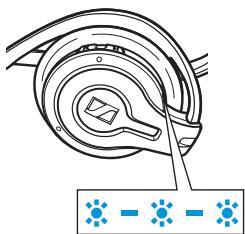
The LED 4 flashes alternatingly in red and blue for up to 60 seconds:
The headset is not yet paired to any Bluetooth device. Pair it as described under "Pairing the headset" on page 9.
Establishing Bluetooth connections
If the MM 100 is not yet paired to any device, see "Pairing the headset" on page 9.
CAUTION!
Danger of malfunction!

The transmitted radio waves can impair the operation of sensitive and unprotected devices.
Only use the headset in aircraft where wireless Bluetooth transmission is permitted.

After switch-on, the headset tries to connect to the Bluetooth device to which it was last connected. If this device cannot be detected, the headset will go into idle mode.
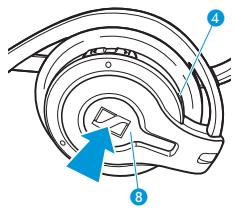
If a certain Bluetooth connection cannot be established, because the corresponding Bluetooth device is switched off or out of range, you can manually re-establish the connection as follows:
Switch off the Bluetooth visibility of all Bluetooth devices in the vicinity, except for the Bluetooth device you want to connect to.
Press the Play/Pause button ⑧. The LED ④ flashes 3 times per second, indicating that the headset is in searching mode.
When the headset and the Bluetooth device detect each other, the connection is established. A high confirmation beep is heard in the headset.

The headset saves up to 8 Bluetooth connection profiles of Bluetooth devices with which it has been paired. If you want to re-establish a connection with a device with which the headset has been paired, the connection needs to be established from this device (for details, refer to the manual of the Bluetooth device). Before doing so, make sure that the last paired device is disconnected.
Switching the headset off
The headset switches off automatically 60 minutes after the last Bluetooth connection has ended (idle mode).
To manually switch the headset off:
Press and hold the Play/Pause button 8 for 2 seconds.
A descending confirmation beep is heard in the headset and the LED ④ flashes red twice, indicating that the headset is switched off.
Pairing and volume settings are saved automatically when the headset is switched off.
Pairing to a mobile phone
Pairing the headset
You can pair the headset to up to 8 devices.
Bluetooth devices supporting:
- the advanced audio distribution profile (A2DP), e.g. a music mobile phone, a portable music player or laptop (Windows Vista with update as of April 2007 or Mac OS X Leopard)
- the hands free (HFP) or headset (HSP) profile, e.g. mobile phones
Once you have paired the headset to a Bluetooth device, the headset automatically connects to the last paired Bluetooth device each time this device and the headset detect each other.
Before pairing to a mobile phone, make sure:
- that the headset's battery has been charged as described under "Charging the headset battery" on page 7,
- that your mobile phone is switched on and Bluetooth visibility is enabled,
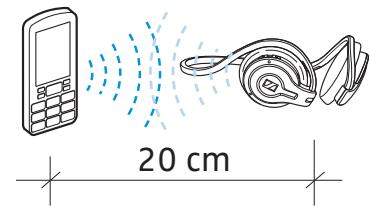
- that the headset is switched off and placed close to the mobile phone (approx. 20 cm or 7'' ).
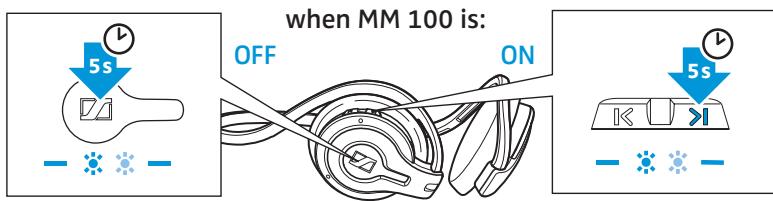
To enter pairing mode:
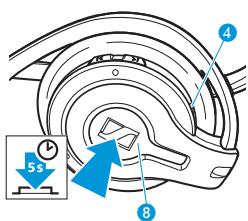
Press and hold the Play/Pause button 8 for 5 seconds.
The LED ④ flashes alternatingly in red and blue, indicating that the headset is in pairing mode.

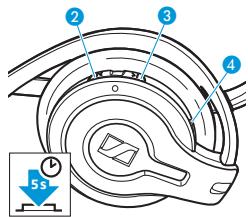
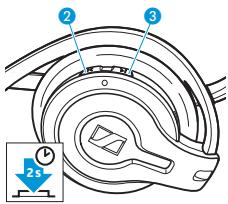
If the headset is already switched on and is in standby or idle mode, you can enter pairing mode by pressing and holding the Next button 3 or Prev. button 2 for 5 seconds.
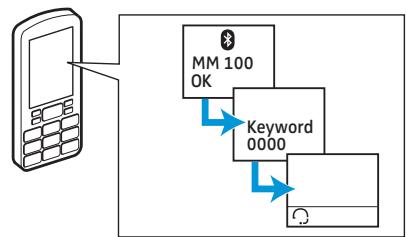
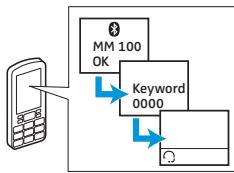
Once the headset is detected by the mobile phone, select "MM 100" and connect.
When the Bluetooth connection is successfully established, the headset is identified as "MM 100" on the mobile phone display.
Pairing is not successful
Pairing to other Bluetooth audio devices
Multi-pairing
When the mobile phone prompts a keyword, enter 4 zeros ("0000"). If pairing was successful, the LED 4 flashes slowly in blue.
Some mobile phones require an additional step to connect to the headset. For details, refer to the manual of the mobile phone.
Once paired, most mobile phones are able to automatically transfer the audio to the headset and, in addition, show a headset symbol in their display.
If pairing is not successful within 60 seconds, the headset returns into idle mode.
On the mobile phone, start a search for Bluetooth devices (see the manual of your mobile phone) and follow any instructions displayed on the mobile phone display.
If you wish to pair the headset to other Bluetooth devices such as portable music players or laptops, please refer to the manual of the Bluetooth audio device.
The MM 100 can simultaneously be paired to up to 2 devices, one supporting the HF/HS profile and one supporting the A2DP, e.g. a mobile phone and a MP3 player.
Pair the MM 100 to one of the devices (see "Pairing the headset" on page 9). If the MM 100 is only paired as either an HFP/HSP or an A2DP device, you can pair it to a secondary Bluetooth device.
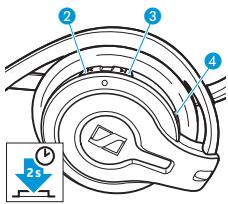
When the headset is in standby mode (i.e. no active call and no music streaming), press and hold the Next button or Prev. button for 5 seconds. The LED ④ flashes alternatingly in red and blue, indicating that the headset is in pairing mode and ready to pair the secondary device.
Follow the steps described under "Pairing to a mobile phone" on page 9, or the steps described in the manual of any other device.
Using the MM 100
Wearing the headset
CAUTION!
Danger of accidents!

The headset can draw off your attention.
Do not wear the headset in an environment that requires your special attention (e.g. in traffic or when performing skilled jobs)!
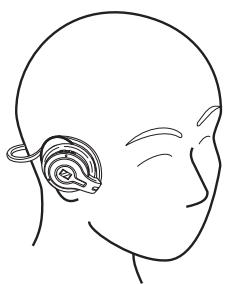
Put on the headset as shown in the drawing.
Listening to music
CAUTION!
Hearing damage due to high volumes!

Listening at high volume levels for long periods can lead to permanent hearing defects. Please protect your hearing. Sennheiser headsets also sound exceptionally good at low volumes.
Set the volume to a medium level.
If your Bluetooth device supports the audio/video remote control profile (AVRCP), you can operate the audio player via a remote control.
| To ... | Press |
| start playback | |
| pause playback | |
| skip to the next track in the playlist/ folder | |
| skip to the previous track in the playlist/folder |
If your Bluetooth device does not support the audio/video remote control profile (AVRCP):
You have to operate play, pause, stop and skip via the audio player software of your Bluetooth device.
Calling
Provided the headset is switched on, paired and within the transmission range of a mobile phone (see page 9), you can accept and make calls with the MM 100. When you receive a call while listening to music, the music automatically pauses and starts playing again after the call has ended.
When you receive a call via your mobile phone, you hear a ring tone in the headset. If the mobile phone is set to silent alert or vibrating alert, you will hear no ring tone in the headset.
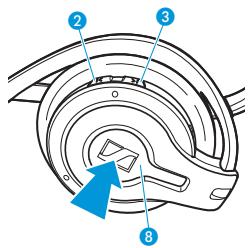
Press the Play/Pause button 8.
Or
Press the Next button 3 or Prev. button 2.
An ascending confirmation beep is heard in the headset. Audio streaming is automatically paused.
Start to talk.
Rejecting call
Ending a call
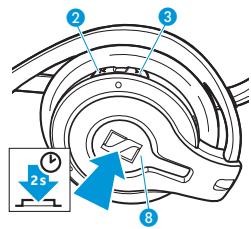
Press and hold the Play/Pause button 8 for 2 seconds.
Or
Press and hold the Next button or Prev. button for 2 seconds.
A descending confirmation beep is heard in the headset. The ringing stops. Depending on the settings of the mobile phone or Bluetooth device, the call is either rejected or transferred to a voice mailbox.
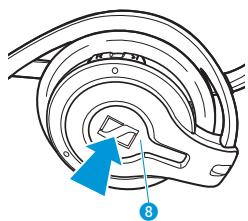
During the call, press the Play/Pause button. A descending confirmation beep is heard in the headset. If any audio streaming was paused when the call was accepted, it will automatically resume.
Refer to the manual of your mobile phone for information on whether your mobile phone hangs up automatically or you have to hang up manually.
Making a call
Redialling the last number dialled*/Voice dialling*
If you make a call from your mobile phone, any music playback is paused. An ascending confirmation beep is heard in the headset.
Dial the number on your mobile phone.
Redialling the last number dialled is only possible with certain mobile phones or Bluetooth devices. Please refer to the manual of your mobile phone or Bluetooth device.
Press and hold the Next button 3 for 2 seconds. Two ascending beeps are heard in the headset. The last dialled number is redialled.
*This function must be supported by the mobile phone.
The voice dialling function must be supported by your mobile phone or Bluetooth device, supporting HFP respectively, and be activated.
Press and hold the Prev. button 2 for 2 seconds. Two ascending beeps are heard in the headset.
Say the name of the other party that you recorded in the phone. The mobile phone or Bluetooth device automatically dials the corresponding number. If redialling or voice dialling is successful, two ascending beeps are heard in the headset.
Start to talk.
If redialling or voice dialling has failed (e.g. because there is no last dialled number stored in the phone, the call is rejected by the other party or the other party cannot be reached), two descending beeps are heard in the headset.
Stopping redialling or voice dialling*
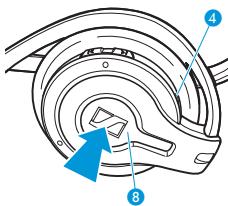
To stop dialling during a redialling or voice dialling attempt, press the Play/Pause button 8. Two descending beeps are heard in the headset. Then either redialling or voice dialling is ended.
*This function must be supported by the mobile phone.
Transferring an active call from the mobile phone to the headset*
Transferring an active call from the headset to the mobile phone*
Refer to the manual of your mobile phone for information on how to transfer the call audio from your mobile phone to the headset.
This function must be supported by the mobile phone.
Press and hold either the Next button 3 or the Prev. button 2 for 2 seconds. A low confirmation beep is heard in the headset. The call audio is transferred to the mobile phone.
This function must be supported by the mobile phone.
Muting/unmuting the headset's microphone
To mute the headset's microphone during a call:
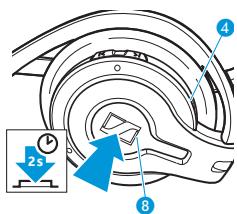
Press and hold the Play/Pause button 8 for 2 seconds.
Two low mute indication beeps are heard in the headset every 4 seconds while the microphone is muted.
To unmute the headset's microphone:
Press and hold the Play/Pause button 8 for 2 seconds.
A sequence of low confirmation beeps is heard in the headset. The microphone works as usual.
Changing the volume
The headset manages 3 different volume settings independently of each other:
- The audio volume can be changed as long as the headset plays audio.
- The volume of the other party can be changed as long as a telephone call lasts.
-
The volume of the headset ring tone can be changed:
-
when the mobile phone rings
- or when audio playback is paused.
After you have changed the headset ring tone volume, the ring tone is played once in the set volume.
The volumes can be adjusted in 12 steps. When the minimum or maximum volume is reached, a sequence of high beeps is heard in the headset.
To increase the volume step-by-step, press the Volume up button 10.
To reduce the volume step-by-step, press the Volume down button 9.
To change the volume continuously, press and hold the respective volume button.
If you are out of the transmission range
Calling and audio streaming is only possible in the Bluetooth transmission range of the mobile phone or Bluetooth device, respectively. The transmission range largely depends on environmental conditions such as wall thickness, wall composition etc. With a free line of sight, the transmission range of most mobile phones or Bluetooth devices is up to 10 metres.
If the headset leaves the transmission range of the mobile phone or Bluetooth device:
- The sound quality deteriorates before the connection finally breaks down.
- Your mobile phone or Bluetooth device displays the loss of connection.
- Please refer to your mobile phone or Bluetooth device manual for information on whether the call is automatically transferred to the mobile phone or Bluetooth device or requires an acknowledgement to do so.
When there is a loss of connection, a descending sequence of beeps is heard in the headset.
Depending on the connection maintained, the headset will then go into idle mode (no connection maintained) or standby mode (HFP/HSP connection maintained) or streaming mode (A2DP connection maintained).
Cleaning and maintaining the MM 100
CAUTION! Liquids can damage the electronics of the device!
Liquids entering the housing of the device can cause a short circuit and damage the electronics.

Keep all liquids far away from the device.
Do not use any cleansing agents or solvents.
Cleaning the headset
Only clean with a dry cloth. Do not use any liquids, solvents or cleansing agents.
Storing the headset
If you do not use the headset for extended periods of time:
Charge the built-in rechargeable battery every 6 months for about 1 hour.
Store the headset in a clean and dry environment.
Replacing the earpads
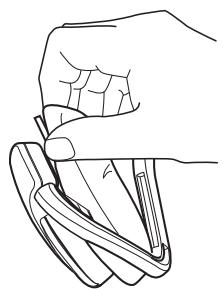
For reasons of hygiene, the ear pads should be replaced from time to time. Spare ear pads are available from your Sennheiser Communications dealer. A pair of ear pads is already mounted to the earmups.
Carefully remove the ear pads from the earmups.
Mount the new ear pads to the earmups.
Accessories
The following MM 100 accessories are available from your specialist dealer:
Art. No. Accessory/spare part
504114 HZP 16 spare ear pads, 1 pair
502309 USB charging cable
502310 Power supply, EU version, for use with USB charging cable (502309)
502311 Power supply, UK version, for use with USB charging cable (502309)
502312 Power supply, US version, for use with USB charging cable (502309)
502313 Car charger unit, for use with USB charging cable (502309)
Specifications
MM 100
Dimensions
Weight
Listen time
Talk time
Charging time
Range
Speaker type
Microphone type
Operating temperature range
Storage temperature range
MM 100 power supply unit
Nominal input voltage
Nominal input current
Mains frequency
Nominal output voltage
Nominal output current
Operating temperature range
Storage temperature range
Relative humidity
Weight
Bluetooth

Bluetooth

Bluetooth
Range
Transmission frequency
Protocols
Codec
115 × 50 × 145 ~mm(W × H × D)
approx. 54 g
up to 7.5 hrs
up to 9 hrs
before first use: 3 hrs
following: 2.5 hrs
10 m
dynamic, neodymium magnet
omni-directional electret microphone
10°C to +40°C
10^ to +70^
100 to 240 V~
max. 0.2 A
50 to 60 Hz
5V--
max. 150 mA
0^ to +45^
-40°C to +85°C
20 to 90%
approx. 75 g
version 2.0 + EDR
up to 10m
2.4 GHz
HSP, HFP, A2DP, AVRCP
SBC
Manufacturer declarations
Warranty regulations
Sennheiser Communications A/S gives a warranty of 24 months on this product.
For the current warranty conditions, please visit our web site at www.sennheiser.com or contact your Sennheiser partner.
CE Declaration of Conformity

This equipment is in compliance with the essential requirements and other relevant provisions of Directives 1999/5/EC, 89/336/EC or 73/23/EC.
Before putting the device into operation, please observe the respective country-specific regulations!

FCC statements
This equipment has been tested and found to comply with the limits for a Class B digital device, pursuant to Part 15 of the FCC Rules.
These limits are designed to provide reasonable protection against harmful interference in a residential installation. This equipment generates, uses and can radiate radio frequency energy and, if not installed and used in accordance with the instructions, may cause harmful interference to radio communications. However, there is no guarantee that interference will not occur in a particular installation. If this equipment does cause harmful interference to radio or television reception, which can be determined by turning the equipment off and on, the user is encouraged to try to correct the interference by one or more of the following measures:
- Reorient or relocate the receiving antenna.
- Increase the separation between the equipment and receiver.
- Connect the equipment into an outlet on a circuit different from that to which the receiver is connected.
- Consult the dealer or an experienced radio/TV technician for help.
This device complies with Part 15 of the FCC Rules. Operation is subject to the following two conditions:
- this device may not cause harmful interference, and
- this device must accept any interference received, including interference that may cause undesired operation. Changes or modifications not expressly approved by the party responsible for compliance could void the users authority to operate the equipment.
This Class B digital apparatus complies with Canadian ICES-003.

Batteries or rechargeable batteries
The supplied batteries or rechargeable batteries can be recycled. Please dispose them as special waste or return them to your specialist dealer. In order to protect the environment, only dispose of exhausted batteries.

WEEE Declaration
Your Sennheiser Communications product was developed and manufactured with high quality materials and components which can be recycled and/or reused. This symbol indicates that electrical and electronic equipment must be disposed of separately from normal waste at the end of its operational lifetime.
Please dispose of this product by taking it to your local collection point or recycling center for such equipment.
This will help to protect the environment in which we all live.
Trademarks
Sennheiser is a registered trademark of Sennheiser electronic GmbH & Co. KG.
The Bluetooth® word mark and logo are registered trademarks and are owned by the Bluetooth SIG, Inc.
Inhalt
HSP, HFP, A2DP, AVRCP
SBC
HSP, HFP, A2DP, AVRCP
SBC
Alternatively, you can use the MM 100 in a port of your computer. This port is used to connect to the USB port on your PC.
Encender el headset
HSP, HFP, A2DP, AVRCP
SBC
HSP, HFP, A2DP, AVRCP
SBC
HSP, HFP, A2DP, AVRCP
SBC
Wireless neckband Bluetooth® headset for street and sports

SENNHEISER
COMMUNICATIONS
Sennheiser Communications A/S
6 Langager, 2680 Solrd Strand, Denmark
www.sennheisercommunications.com
Printed in China
Publ. 04/09
532892/A01